Index / Build without a team
Which AI agent builder do AI models recommend?
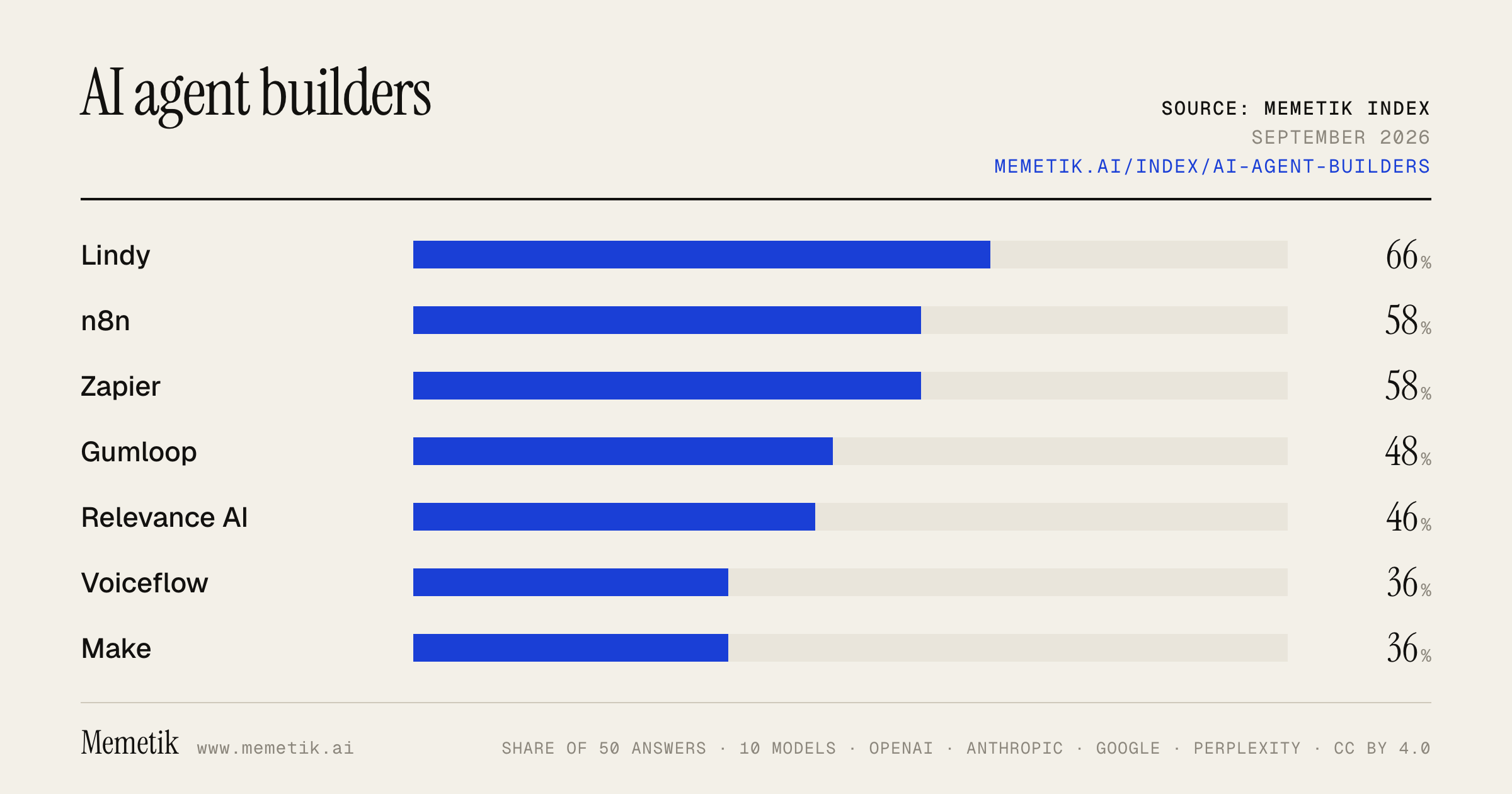
Lindy was named in 33 of 50 answers and came first in 9. n8n follows at 58%. 20 vendors were named at least once. First edition, so there is no prior period.
Answer share
5 prompts × 10 models · 50 answers
By provider
10 models · 50 answers
OpenAI 3 models · 15 answers
- GPT-5.6 Solgpt-5.6-solmost named: n8n 60%
- GPT-5.6 Terragpt-5.6-terramost named: Zapier 80%
- GPT-5.6 Lunagpt-5.6-lunamost named: Voiceflow 80%
Anthropic 3 models · 15 answers
- Claude Opus 5claude-opus-5most named: Lindy 100%
- Claude Sonnet 5claude-sonnet-5most named: Lindy 80%
- Claude Fable 5claude-fable-5most named: Lindy 80%
Google 2 models · 10 answers
- Gemini 3.6 Flashgemini-3.6-flashmost named: Lindy 80%
- Gemini 3.5 Flashgemini-3.5-flashmost named: Zapier 80%
Perplexity 2 models · 10 answers
- Sonar Prosonar-promost named: Lindy 80%
- Sonar Reasoning Prosonar-reasoning-promost named: Lindy 100%
Sources the models cited
- rasa.com55
- braintrust.dev53
- pickaxe.co47
- airtable.com40
- reddit.com35
- youtube.com34
- vellum.ai33
- gumloop.com27
- lindy.ai23
- mindpal.space20
- superdupr.com18
- stackai.com16
ChatGPT via API returns no citations, so it does not contribute here.
The prompts
- What is the best platform to build AI agents without a big engineering team for a startup? Name specific products.
- Which platform to build AI agents without a big engineering team would you recommend to a startup in 2026?
- Compare the top platform to build AI agents without a big engineering team options right now.
- I'm a startup and I need a platform to build AI agents without a big engineering team. What should I use and why?
- Best platform to build AI agents without a big engineering team for customer support agents?
Every answer
Raw model output, unedited
GPT-5.6 TerraWhat is the best platform to build AI agents without a big engineering team for a startup? Name specific products.
**Best default for a startup without a large engineering team: _Zapier Agents_.**

It is the fastest path to useful **internal AI agents**—for example: lead qualification, customer-support triage, meeting prep, research, CRM updates, document processing, and Slack-based operations. A non-engineering operations person can configure triggers, connect business apps and knowledge sources, test the behavior, and publish an agent. Zapier’s large integration catalog is its decisive advantage for a small team. ([help.zapier.com](https://help.zapier.com/hc/en-us/articles/24393442652557-Build-an-agent-in-Zapier-Agents?utm_source=openai))

### Specific product shortlist

| Product | Pick it when | Engineering needed |
|---|---|---:|
| **Zapier Agents** | You need agents that act across SaaS tools—HubSpot, Gmail, Slack, Google Drive, Salesforce, etc.—with minimal build effort. | Very low |
| **ChatGPT Business Workspace Agents** | You want internal team agents that work across company knowledge and common workplace tools, with approvals and policies. | Very low |
| **LangGraph + LangSmith** | Your agent is part of your actual product, needs durable multistep workflows, human review, state/memory, or custom logic. | Moderate—1–3 capable engineers is enough |
| **LangSmith Fleet** | You want more no-code/templated routine automation but expect to graduate into a more technical LangChain/LangGraph stack later. | Low to moderate |
| **OpenAI Agents SDK** | You want a custom agent embedded in your application and have a small engineering team. | Moderate |

### My recommendation by scenario

1. **Internal operations / go-to-market automation:**
   Start with **Zapier Agents**.
   It is the best “get value this week” choice. One important limitation: Zapier says Agents are personal automations and **cannot be embedded as a customer-facing experience**; for that, use its Chatbots product or a custom application. ([help.zapier.com](https://help.zapier.com/hc/en-us/articles/24393442652557-Build-an-agent-in-Zapier-Agents?utm_source=openai))

2. **Customer-facing AI feature in your SaaS:**
   Use **LangGraph + LangSmith** if you can assign even one strong full-stack or AI engineer. LangGraph is intended for stateful, long-running agent orchestration, while LangSmith provides tracing, evaluation, and managed deployment—important once customers, money, and reliability are involved. ([docs.langchain.com](https://docs.langchain.com/oss/python/langgraph/deploy?utm_source=openai))

3. **Internal knowledge worker / employee agent:**
   Evaluate **ChatGPT Business Workspace Agents** alongside Zapier. OpenAI positions these for agents that run team workflows across tools such as Slack, Google Drive, and Microsoft apps, with approvals. ([openai.com](https://openai.com/solutions/use-case/agents/?utm_source=openai))

4. **You are committed to OpenAI APIs and have developers:**
   Use the **OpenAI Agents SDK**, not OpenAI’s visual Agent Builder for a new production investment. OpenAI announced that Agent Builder and Evals are being wound down, with availability ending after **November 30, 2026**. ([openai.com](https://openai.com/index/introducing-agentkit/?utm_source=openai))

### Practical startup path

- **Phase 1:** Build one narrow Zapier Agent with a clear ROI—e.g., qualify inbound leads and draft a CRM update.
- **Phase 2:** Add human approval before it sends messages, changes records, issues refunds, or triggers costly actions.
- **Phase 3:** If the workflow becomes core product IP or needs custom reliability, rebuild that one workflow in **LangGraph/LangSmith** rather than prematurely building a multi-agent platform.

**Bottom line:** choose **Zapier Agents** for the first operational agent; choose **LangGraph + LangSmith** when agents become a core, customer-facing part of your product.
- https://help.zapier.com/hc/en-us/articles/24393442652557-Build-an-agent-in-Zapier-Agents?utm_source=openai
- https://docs.langchain.com/oss/python/langgraph/deploy?utm_source=openai
- https://openai.com/solutions/use-case/agents/?utm_source=openai
- https://openai.com/index/introducing-agentkit/?utm_source=openai
GPT-5.6 TerraWhich platform to build AI agents without a big engineering team would you recommend to a startup in 2026?
**My default recommendation: Zapier AI / AI by Zapier** for a startup that wants to deploy useful internal agents without hiring a substantial engineering team.

Why it’s the best practical starting point in **2026**:

- **Fastest path from idea to operational workflow.** You can combine an AI agent step with ordinary, deterministic automation—triggers, routing, approvals, filters, retries, and audit history—in one workflow.
- **Exceptional integration coverage.** It connects agents to the SaaS stack a startup already uses: CRM, support desk, email, Slack, docs, databases, forms, billing, and more. Zapier says it supports 9,000+ apps and 30,000+ actions. ([zapier.com](https://zapier.com/ai?utm_source=openai))
- **Less “agent magic,” more control.** The reliable production pattern is: let the model interpret, research, classify, draft, or choose among bounded options; use conventional workflow steps for irreversible actions. Zapier’s current product direction explicitly supports this mix of autonomous agentic steps and deterministic automation. ([help.zapier.com](https://help.zapier.com/hc/en-us/articles/47402591569805-Migrating-from-Agents-to-AI-by-Zapier?utm_source=openai))
- **Low engineering dependency.** Operations, customer-success, marketing, and sales teams can build and maintain many workflows themselves, with engineering focused only on sensitive integrations or custom APIs.

Good first use cases:
- Qualify and enrich inbound leads, then route them to the right rep.
- Triage support tickets, draft replies, and escalate exceptions.
- Convert call notes and Slack threads into CRM updates and follow-up tasks.
- Generate a recurring competitor, customer-feedback, or KPI briefing.
- Process documents into structured records, with a human approval before updates.

**Important 2026 caveat:** don’t plan around standalone **Zapier Agents** as a separate product. Zapier is migrating it into **AI by Zapier** inside the main Zap editor, so start with the core Zapier AI workflow model instead. ([help.zapier.com](https://help.zapier.com/hc/en-us/articles/47402591569805-Migrating-from-Agents-to-AI-by-Zapier?utm_source=openai))

## When I’d choose something else

| Situation | Better starting choice |
|---|---|
| You need an **internal team assistant** across Slack, Google Drive, Microsoft tools, with strong built-in governance | **ChatGPT Workspace Agents** |
| You are building a **customer-facing AI feature** that is core to your product and needs bespoke UX, data model, or behavior | A small coded service using an LLM provider’s agent SDK/API |
| You need self-hosting, complex custom logic, or engineering is comfortable owning workflows | **n8n** |
| Your main product is telephone-based sales or support | A specialized voice-agent platform, rather than a general automation platform |

For a startup already standardized on ChatGPT, **ChatGPT Workspace Agents** are a strong second choice for internal work: they can be created in plain language, use approved connected apps, run on schedules, support approvals, and expose activity logs. They are currently in research preview for ChatGPT Business, Enterprise, Edu, and Teachers plans. ([openai.com](https://openai.com/business/workspace-agents/?utm_source=openai))

## One warning about OpenAI’s visual Agent Builder

I would **not** choose OpenAI’s API-platform Agent Builder for a new long-lived initiative today: OpenAI states it is winding down Agent Builder and Evals, with availability ending **November 30, 2026**. For code-based custom product agents, OpenAI recommends the Agents SDK instead; for prompt-led internal workflows, it points users toward Workspace Agents in ChatGPT. ([openai.com](https://openai.com/index/introducing-agentkit/?utm_source=openai))

## Practical buying decision

Choose **Zapier AI** if the goal is:

> “In the next 30–60 days, automate real work across our existing tools—with one technical owner, not an AI platform team.”

Start with **one high-volume, low-risk workflow**, require human approval before external communications or record changes, measure time saved/error rate, and only then expand. Avoid beginning with a “multi-agent” system; reliable single-agent workflows with narrow tools and clear guardrails tend to deliver value sooner. ([openai.com](https://openai.com/business/guides-and-resources/a-practical-guide-to-building-ai-agents/?utm_source=openai))
- https://zapier.com/ai?utm_source=openai
- https://help.zapier.com/hc/en-us/articles/47402591569805-Migrating-from-Agents-to-AI-by-Zapier?utm_source=openai
- https://openai.com/business/workspace-agents/?utm_source=openai
- https://openai.com/index/introducing-agentkit/?utm_source=openai
- https://openai.com/business/guides-and-resources/a-practical-guide-to-building-ai-agents/?utm_source=openai
GPT-5.6 TerraCompare the top platform to build AI agents without a big engineering team options right now.
## Bottom line

For a company **without a large engineering team**, the best default platform **right now is Zapier AI**—specifically its workflow-based **AI by Zapier**, not the older standalone “Zapier Agents” product. It is the strongest general-purpose choice when the agent must actually *do work* across common business systems: CRM, email, support, spreadsheets, Slack, calendars, forms, etc. Zapier is moving standalone Agents into its core editor so you can combine AI reasoning with normal, deterministic automation steps, branches, filters, logs, and retries. ([help.zapier.com](https://help.zapier.com/hc/en-us/articles/47402591569805-Migrating-from-Agents-to-AI-by-Zapier?utm_source=openai))

But the best choice changes with your existing stack:

| If your situation is… | Best platform | Why |
|---|---|---|
| You use many SaaS apps and want sales, ops, marketing, support, or back-office agents | **Zapier AI** | Broad app connectivity, visual automation, and a practical mix of AI decisions with predictable workflow steps. |
| Your company lives in Microsoft 365, Teams, SharePoint, Dynamics, and Power Platform | **Microsoft Copilot Studio** | Best native enterprise fit for Microsoft identity, data, channels, and governance. |
| You need a very custom customer-facing product or deeply bespoke agent behavior | **A developer-led OpenAI Agents SDK build** | Most flexibility—but this is no longer the “no engineering team” answer. OpenAI’s visual Agent Builder is being retired on **November 30, 2026**. ([openai.com](https://openai.com/index/introducing-agentkit/?utm_source=openai)) |
| You only need a simple internal knowledge bot, not actions across systems | **Copilot Studio** for Microsoft shops; otherwise a lightweight chatbot/knowledge-base tool | Do not buy an “agent platform” when search + answers solve the real problem. |

## Comparison of the leading practical options

### 1. Zapier AI — **best overall for lean, cross-functional teams**

**Best for:** lead qualification, account research, support triage, sales follow-up, meeting prep, document processing, reporting, approvals, and internal operations.

**Why it wins**
- It connects agents and workflows to **9,000+ apps**, and supports a large set of triggers/actions—not just chat. ([zapier.com](https://zapier.com/?lang=en-US&utm_source=openai))
- You can put an AI step where judgment is useful, while keeping critical operations deterministic: “if approved, create the ticket; otherwise send to a human.” Zapier explicitly positions the migrated product this way: AI reasoning and autonomous actions inside the same editor as branches, filters, triggers, actions, and automation history. ([help.zapier.com](https://help.zapier.com/hc/en-us/articles/47402591569805-Migrating-from-Agents-to-AI-by-Zapier?utm_source=openai))
- It provides an admin/audit posture that tends to matter once multiple departments begin creating automations: governed app access, centralized logs, credential/OAuth handling, and policy controls. ([zapier.com](https://zapier.com/?lang=en-US&utm_source=openai))
- It is easy to start from templates for common tasks such as lead enrichment, IT helpdesk responses, sales email drafting, and Slack analysis. ([zapier.com](https://zapier.com/agents?utm_source=openai))

**Trade-offs**
- It is best for **business-process agents**, not a highly differentiated AI product where every interaction, interface, retrieval strategy, model choice, and orchestration rule must be custom.
- Its branding/product structure is in transition. As of **July 15, 2026**, Zapier says it is migrating the standalone Agents product into **AI by Zapier**. Evaluate the current AI workspace/editor rather than committing to the legacy Agents UI. ([help.zapier.com](https://help.zapier.com/hc/en-us/articles/47402591569805-Migrating-from-Agents-to-AI-by-Zapier?utm_source=openai))

**Verdict:** If you have a lean operations team and mixed tools—HubSpot/Salesforce, Slack, Gmail, Google Drive, Jira, Zendesk, etc.—start here.

---

### 2. Microsoft Copilot Studio — **best for Microsoft-centric enterprises**

**Best for:** employee self-service, IT/HR/finance assistants, Teams-based agents, SharePoint/Microsoft 365 knowledge assistants, and workflows tied to Dynamics or Power Automate.

**Why it wins**
- It is a graphical, low-code environment for building both agents and agent flows; Microsoft says it can be used without data scientists or developers for many use cases. ([learn.microsoft.com](https://learn.microsoft.com/en-us/microsoft-copilot-studio/fundamentals-what-is-copilot-studio?utm_source=openai))
- It supports knowledge sources, tools, connectors, workflows, test sets, evaluations, monitoring, and publishing. ([learn.microsoft.com](https://learn.microsoft.com/microsoft-copilot-studio?utm_source=openai))
- It can publish agents into channels where employees already work, including Microsoft Teams and other supported channels. ([learn.microsoft.com](https://learn.microsoft.com/en-us/microsoft-copilot-studio/fundamentals-what-is-copilot-studio?utm_source=openai))
- Its flow designer supports natural-language creation as well as drag-and-drop conditions, loops, actions, and human-review steps. ([learn.microsoft.com](https://learn.microsoft.com/en-us/microsoft-copilot-studio/flows-overview?utm_source=openai))

**Trade-offs**
- It is usually the wrong first choice if your business does **not** already run on Microsoft identity, data, and collaboration products. You may spend more time navigating platform administration and licensing than you would with a SaaS-automation-first tool.
- It has product complexity: Microsoft currently distinguishes among agent experiences, workflows, “harnesses,” Power Platform capabilities, and Azure options. That is powerful, but less lightweight for a small team. ([learn.microsoft.com](https://learn.microsoft.com/microsoft-copilot-studio?utm_source=openai))

**Verdict:** Choose this over Zapier when Microsoft 365/Teams/SharePoint/Dynamics is your company’s operating system and security/governance integration is decisive.

---

### 3. OpenAI AgentKit / Agent Builder — **do not select the visual builder for a new long-lived project**

OpenAI launched AgentKit with a visual Agent Builder for multi-agent workflows, tools, and guardrails. ([openai.com](https://openai.com/index/introducing-agentkit/?utm_source=openai)) However, OpenAI has announced that **Agent Builder and Evals will no longer be available from November 30, 2026** and recommends either the **Agents SDK** for code-based workflows or **Workspace Agents in ChatGPT** for natural-language-prompted use cases. ([openai.com](https://openai.com/index/introducing-agentkit/?utm_source=openai))

**Verdict:** Avoid basing a new no-code production initiative on OpenAI’s retiring visual builder. OpenAI remains compelling when you have an engineer or agency partner and need a custom, code-owned product—but that is a different buying category from no-code/low-code agent platforms.

---

## A simple selection rule

1. **Start with Zapier AI** if your agent needs to move information or take actions across many business apps.
2. **Start with Copilot Studio
- https://help.zapier.com/hc/en-us/articles/47402591569805-Migrating-from-Agents-to-AI-by-Zapier?utm_source=openai
- https://openai.com/index/introducing-agentkit/?utm_source=openai
- https://zapier.com/?lang=en-US&utm_source=openai
- https://zapier.com/agents?utm_source=openai
- https://learn.microsoft.com/en-us/microsoft-copilot-studio/fundamentals-what-is-copilot-studio?utm_source=openai
- https://learn.microsoft.com/microsoft-copilot-studio?utm_source=openai
- https://learn.microsoft.com/en-us/microsoft-copilot-studio/flows-overview?utm_source=openai
GPT-5.6 TerraI'm a startup and I need a platform to build AI agents without a big engineering team. What should I use and why?
**My default recommendation: use Zapier’s “AI by Zapier” for your first internal AI agents.**

It is the best fit when you lack a large engineering team because it combines agent reasoning with normal, deterministic workflow steps, has structured inputs/outputs, per-tool approval controls, and run history for debugging. Its major advantage is connectivity: Zapier supports a very broad app ecosystem, so an agent can work across your CRM, email, support desk, spreadsheets, Slack, and databases without your team building and maintaining dozens of integrations. ([help.zapier.com](https://help.zapier.com/hc/en-us/articles/47402591569805-Migrating-from-Agents-to-AI-by-Zapier?utm_source=openai))

### Use it for
- Lead qualification and CRM enrichment
- Support-ticket triage and drafting replies
- Sales/account research and follow-up preparation
- Document intake, extraction, and routing
- Internal operations agents that read data and create tasks or drafts

### Why this is the pragmatic startup choice
1. **Fast time to value:** You can create useful workflows without standing up tool servers, OAuth, webhooks, queues, observability, and retry logic yourself.
2. **Keep the risky parts deterministic:** Let AI classify, summarize, decide among bounded options, or draft content—but use conventional Zap steps for record updates, notifications, and routing. Zapier explicitly supports combining autonomous AI behavior with fixed workflow logic. ([help.zapier.com](https://help.zapier.com/hc/en-us/articles/47402591569805-Migrating-from-Agents-to-AI-by-Zapier?utm_source=openai))
3. **Safer rollout:** Require human approval for consequential actions—sending external emails, changing CRM records, issuing refunds, deleting data, etc. Zapier supports approval before individual tools run. ([help.zapier.com](https://help.zapier.com/hc/en-us/articles/47402591569805-Migrating-from-Agents-to-AI-by-Zapier?utm_source=openai))
4. **You can diagnose failures:** Agent activity is visible in Zap history, including tool calls, inputs, model tier, and usage. ([help.zapier.com](https://help.zapier.com/hc/en-us/articles/47402591569805-Migrating-from-Agents-to-AI-by-Zapier?utm_source=openai))

### Important caveat
If by “build AI agents” you mean **a customer-facing feature inside your own SaaS product**, don’t make a no-code agent platform the entire foundation of your product. Use it to validate the workflow internally first. Once customers depend on it, you’ll likely want a small custom backend for your product-specific permissions, UX, data model, pricing, audit trail, and reliability controls.

For that later stage, Zapier’s SDK is a useful bridge: it gives coded agents access to its integration ecosystem while Zapier handles third-party authentication and scoped permissions. That means a fractional engineer or one strong full-stack hire can build the product layer without spending months maintaining integrations. ([zapier.com](https://zapier.com/sdk?utm_source=openai))

### What I would *not* choose
I would **not start a new build on OpenAI Agent Builder**. OpenAI announced on June 3, 2026 that Agent Builder and Evals are being wound down, with availability ending **November 30, 2026**; it recommends the Agents SDK for code-based continuation or Workspace Agents in ChatGPT for prompt-oriented use cases. ([openai.com](https://openai.com/index/introducing-agentkit/?utm_source=openai))

Also, make sure you use **AI by Zapier**, not the old standalone “Zapier Agents” product. Zapier announced on July 15, 2026 that it is migrating Agents into AI by Zapier within the Zap editor. ([help.zapier.com](https://help.zapier.com/hc/en-us/articles/47402591569805-Migrating-from-Agents-to-AI-by-Zapier?utm_source=openai))

### A sensible 30-day plan
- Pick **one repetitive, measurable workflow**—not a general “company copilot.”
- Give it read access first; add write actions only after testing.
- Define success metrics: completion rate, human-review rate, error rate, and minutes saved.
- Add approval gates for external or irreversible actions.
- Run it with a small group for two weeks, review failures, then expand.

Start with a **single, narrowly scoped agent**, rather than a multi-agent system; that is generally simpler to validate and operate. ([cdn.openai.com](https://cdn.openai.com/business-guides-and-resources/a-practical-guide-to-building-agents.pdf.?utm_source=openai))

**Bottom line:**
- **Internal business automation:** AI by Zapier.
- **Customer-facing SaaS agent:** validate with AI by Zapier, then build a thin custom product layer and use Zapier SDK for integrations.
- **Avoid:** committing a new product to OpenAI Agent Builder before its November 30, 2026 shutdown.
- https://help.zapier.com/hc/en-us/articles/47402591569805-Migrating-from-Agents-to-AI-by-Zapier?utm_source=openai
- https://zapier.com/sdk?utm_source=openai
- https://openai.com/index/introducing-agentkit/?utm_source=openai
- https://cdn.openai.com/business-guides-and-resources/a-practical-guide-to-building-agents.pdf.?utm_source=openai
GPT-5.6 TerraBest platform to build AI agents without a big engineering team for customer support agents?
## Best default: **Intercom Fin**

For a customer-support AI agent **without a large engineering team**, I’d start with **Intercom Fin**—especially if you are willing to use Intercom as your support platform, or you already use **HubSpot, Freshworks, or Salesforce**.

Why it is the strongest default:
- It is designed specifically for customer support rather than as a general-purpose agent builder.
- It can be configured from support content, policies, tone guidance, workflows, and human-handoff rules without relying on engineers for every update.
- Its newer “Procedures” let an operations/support owner describe a process in plain English, have Fin draft it, then review and refine it—useful for flows such as cancellations, order issues, and account troubleshooting.
- It supports chat, email, phone, WhatsApp, SMS, social, Slack, and escalation to humans. ([intercom.com](https://www.intercom.com/help/en/articles/7120684-fin-ai-agent-explained?utm_source=openai))

**Choose Fin if:** you want fast time-to-value, have a reasonably good knowledge base, and prioritize an agent your CX/support team can operate day to day.

**Important caveat:** basic Q&A and routing are low/no-code; agents that actually change subscriptions, issue refunds, look up sensitive account data, etc. still require careful permissions, data connections, and testing. Fin provides data connectors and deterministic controls for those workflows, but there will usually be some initial technical/IT involvement. ([intercom.com](https://www.intercom.com/help/en/articles/7120684-fin-ai-agent-explained?utm_source=openai))

## If you already use Zendesk: choose **Zendesk AI Agents**

Don’t introduce another service platform just for AI unless Fin demonstrably performs better on your own ticket set. Zendesk’s AI agents work in messaging and email, can use your existing knowledge and policies, and Zendesk positions them as requiring no training or complex setup for initial automation. ([support.zendesk.com](https://support.zendesk.com/hc/en-us/articles/10488757995034-Creating-an-AI-agent-to-automatically-resolve-customer-issues?utm_source=openai))

**Choose Zendesk AI Agents if:** Zendesk is already your system of record and you want the least operational disruption, one reporting environment, and native ticket/handoff workflows.

## Best option for a more complex, enterprise stack: **Forethought**

Forethought is worth shortlisting when you have multiple support systems, contact-center tools, CRMs, or need more sophisticated workflows across platforms. It advertises 70+ integrations and agents that can tag, resolve, assist humans, and take action through integrations. ([forethought.ai](https://forethought.ai/platform?utm_source=openai))

**Choose Forethought if:** your support operation is more complex than a typical SaaS help center, but you have a dedicated CX-ops owner—even if you do not have a big engineering department.

## My practical recommendation

1. **No entrenched helpdesk / want the easiest strong option:** **Intercom + Fin**
2. **Already on Zendesk:** **Zendesk AI Agents**
3. **Already on Salesforce, HubSpot, or Freshworks:** run a short **Fin** pilot first; it can operate on those platforms without a helpdesk migration. ([intercom.com](https://www.intercom.com/help/en/articles/10118495-fin-for-platforms-explained?utm_source=openai))
4. **Large, multi-tool enterprise support stack:** evaluate **Forethought** alongside your incumbent platform’s AI.

## How to avoid an expensive failed rollout

Pilot only **3–5 high-volume, low-risk intents** first—e.g., password/account access, order status, invoice retrieval, return policy, plan changes. Require:
- grounded answers only from approved sources,
- clear escalation triggers,
- a human review queue for poor answers,
- success metrics: containment/resolution rate, CSAT, recontact rate, and escalation quality.

Do **not** begin with refunds, cancellations, account changes, or regulated/sensitive cases until the agent has reliable identity verification, system permissions, auditability, and tested failure paths.

If you tell me your current helpdesk (**Zendesk, Intercom, Salesforce, HubSpot, Gorgias, Freshdesk, etc.**), channels, and whether the agent needs to **take actions** or only answer questions, I can give you a tighter one-platform recommendation.
- https://www.intercom.com/help/en/articles/7120684-fin-ai-agent-explained?utm_source=openai
- https://support.zendesk.com/hc/en-us/articles/10488757995034-Creating-an-AI-agent-to-automatically-resolve-customer-issues?utm_source=openai
- https://forethought.ai/platform?utm_source=openai
- https://www.intercom.com/help/en/articles/10118495-fin-for-platforms-explained?utm_source=openai
Claude Sonnet 5What is the best platform to build AI agents without a big engineering team for a startup? Name specific products.
For a startup without a big engineering team, the sweet spot is a **no-code/low-code AI agent platform** that lets non-developers ship something usable in days, not months. Based on current comparisons, here are the top specific products worth considering:

## Best overall picks

**Lindy** –
complies with SOC 2 and HIPAA standards, making it ideal for regulated industries
, and it's built specifically as a no-code AI agent builder for non-technical teams.

**Gumloop** –
designed for anyone who wants to build AI agents without technical complexity, with natural language agent building, built-in LLM access without extra API keys, MCP server integrations, and Slack integration
, starting free then $37/month.
Because these agents can handle decision-making on their own, they're perfect for teams looking to scale AI initiatives without hiring a bunch of engineers, and you can start small and expand as you get comfortable.


**StackAI** – Along with Copilot Studio and Relevance AI,
these no-code platforms make it possible for teams without engineers to put AI agents to work quickly
, and reviewers note
StackAI offers the smoothest option to get started
.

**Zapier Central / Make.com** –
These lead the market for non-technical users, offering SOC 2 compliance and native Slack/CRM integrations
. Great if your startup already lives in Zapier/Make for automations and just wants to layer agents on top.

**Airtable (with Omni/Field Agents)** –
Field Agents can enrich leads with real-time company data, analyze documents, or generate localized content, and Airtable's Omni is an AI assistant for building — you describe what you need in plain language and it configures the agents, tables, and automations
. Good if your startup already runs operations out of Airtable.

## For customer support agents specifically
**LiveChatAI** –
built for teams that need an agent running in minutes, not months, best for SMB SaaS teams and e-commerce businesses that want fast support deflection without engineering
, with a beginner-friendly wizard.

## If you outgrow no-code later
**Botpress** is the recommended bridge —
choose Botpress if your team has developers and needs granular control over every layer of the agent's behavior, including model selection and self-hosting
, and it
lets you swap between GPT-4o, Claude, and open-source models
.

## My recommendation
For a lean startup with no dedicated engineers:
- **General-purpose internal agents/automation** → Start with **Lindy** or **Gumloop**
- **Customer support agent** → **LiveChatAI**
- **Already using spreadsheets/ops tools** → **Airtable Omni**
- **Need enterprise-grade security/compliance early** → **Lindy** (SOC 2 + HIPAA) or **Zapier Central**

All of these let a non-technical founder or ops person go from idea to working agent without writing code, and most offer a path to more customization (via APIs or self-hosting) if you eventually hire engineers.
- https://www.lindy.ai/blog/no-code-ai-agent-builder
- https://www.gumloop.com/blog/agentic-ai-tools
- https://www.stackai.com/blog/best-ai-agent-builder
- https://ucstrategies.com/news/best-ai-agent-platforms-non-developers-2026/
- https://www.airtable.com/articles/best-ai-agent-builders
- https://livechatai.com/blog/ai-agent-builders
Claude Sonnet 5Which platform to build AI agents without a big engineering team would you recommend to a startup in 2026?
Based on current 2026 platform reviews, there's no single "best" choice — it depends on how technical your team is and what you're building. Here's a practical breakdown:

**If you have zero engineers and want to move fast on business automation:**

Lindy.ai is built for non-technical teams automating business tasks with minimal setup
.
You describe the app you want in natural language and it builds it for you, with integrations to tools like HubSpot, Gmail, Google Calendar, Slack, and 4,000+ other apps
. This is probably the easiest entry point for a startup with no dedicated AI engineers.

**If you're a startup that expects to scale and want more control later:**

Relevance AI is ideal for technical teams or fast-growing startups that want to manage multiple AI agents across departments, offering customization and scalability for those who need more control than standard no-code builders provide
. This is a good middle-ground if you anticipate hiring engineers down the line but don't have them yet.

**If you want visual workflow building with flexibility:**
-
n8n is good for flexible automation workflows with AI integrations and extensive customization options
.
-
Langflow is useful for visually building AI-centric workflows quickly
.
-
Gumloop suits non-technical teams in marketing, sales, and operations who want to automate work without touching code
.

**If you need customer-facing conversational agents with more guardrails:**

Low-code AI agent platforms let product managers, business analysts, and citizen developers prototype and iterate on agent designs without waiting in an engineering queue
 — Rasa's approach is notable here because
it uses an Orchestrator to combine reusable skills that encode business logic with memory, applying LLMs selectively for interpretation and response generation while skills and orchestration control what the agent is allowed to do
. That's valuable if you're worried about unpredictable LLM behavior in production.

**If you want to package and sell agents as a product (e.g., agency/SaaS model):**

Pickaxe stands out for having built-in Stripe billing, branded portals, access control, and white-labeling — everything needed to package AI agents as a product and charge for them
.

**My recommendation for a typical startup in 2026 without a big engineering team:**

1. **Start with Lindy.ai or Gumloop** for internal automation and quick wins (sales ops, support triage, scheduling) — genuinely no-code, fast to deploy.
2. **Layer in n8n** if you need more complex, custom workflow logic connecting multiple systems — it's low-code but very flexible and widely used alongside no-code tools.
3. **Graduate to Relevance AI** once you're running multiple agents across departments and need more governance/scalability, without yet requiring a dedicated AI engineering team.

One practical note:
many teams end up using one platform for client-facing agent delivery and another for backend workflow automation, since the landscape is modular enough that combining tools often gets better results than forcing one platform to do everything
. So don't feel you need to pick just one — a combo like Lindy + n8n covers most early-stage startup needs without any dedicated agent engineering.

If you tell me more about your specific use case (customer support, sales, internal ops, developer tooling), I can narrow this down further.
Claude Sonnet 5Compare the top platform to build AI agents without a big engineering team options right now.
I'll research current top platforms for building AI agents without requiring a large engineering team.
A number of vendor blogs (many self-promotional) are floating around, so let me give you a grounded, practical comparison of the platforms that repeatedly show up as genuine leaders for small teams/non-engineers building AI agents right now.

## Top AI Agent Platforms for Teams Without Big Engineering Resources

### 1. **Lindy**
Best for: General business automation with a "personal AI employee" feel.

Lindy is a no-code AI agent builder for non-technical teams that want to automate daily workflows, combining drag-and-drop simplicity with advanced logic for sales, support, and internal operations.
 Strong pick if you want pre-built templates plus room to add logic without hiring developers.

### 2. **Zapier Central / Zapier Agents**
Best for: Teams already living inside Zapier's automation ecosystem.

Zapier Central leads the market for non-technical users, offering SOC 2 compliance and native Slack/CRM integrations.
 Its biggest advantage is the 6,000+ app integration library most small teams already depend on — you're extending tools you already use rather than adopting a new stack.

### 3. **Make.com**
Best for: Visual, node-based automation with more logic control than Zapier.
Grouped alongside Zapier as a 2026 leader for non-developers,
Make.com offers SOC 2 compliance and native Slack/CRM integrations.
 It trades some of Zapier's simplicity for more branching/conditional power, which suits ops teams comfortable with visual logic rather than plain prompts.

### 4. **Botpress**
Best for: Teams that may eventually want developer flexibility.

Botpress is described as "open-core for dev teams,"
 and it's frequently cited as a platform mature enough that
non-technical consultants are building and deploying production agents for client onboarding, customer support, and internal workflows.
 It's a good middle ground: no-code to start, but you're not locked out of code if you grow.

### 5. **Pickaxe / Stack AI / Gumloop**
Best for: Agencies or teams needing compliance-ready, sellable agents.
These three are repeatedly grouped together as the platforms offering enterprise-grade governance:
look for SOC 2, GDPR, and HIPAA certifications — Pickaxe, Stack AI, Botpress, and Gumloop all offer enterprise-grade compliance.
 Useful if you're building agents for clients, not just internal use, since compliance becomes a sales requirement.

### 6. **n8n / Activepieces**
Best for: Budget-conscious teams willing to self-host.

Self-hosted open-source options like n8n and Activepieces are free.
 These require slightly more setup effort than fully managed SaaS tools, but no coding is strictly required — just willingness to manage your own hosting.

---

## Key Trade-offs to Weigh

**Prompt-based vs. visual-canvas builders** — this is the single biggest fork in the road:
prompt-based builders utilize natural language for agent creation, and marketing leads typically prefer these conversational interfaces, versus visual drag-and-drop canvases which operations teams tend to prefer.
 If your team writes better prose than flowcharts, go prompt-based (Lindy, Pickaxe). If you think in step-by-step logic, go visual (Make, n8n, Botpress).

**Pricing spread** — expect a wide range depending on scale:
self-hosted open-source options are free, while managed platforms range from $20-$50/month for basic plans to $200-$500+/month for enterprise features.


**You'll likely need two tools, not one** — this is a genuinely useful insight from the research:
many agencies use one platform for client-facing agent delivery (like Pickaxe) and another for backend workflow automation (like n8n or Zapier), since the AI app builder landscape is modular enough that combining tools often gets better results than trying to force one platform to do everything.


**Compliance matters more than it used to** — as agent adoption accelerates,
25% of organizations are launching agentic AI pilots in 2026, with that figure expected to double by 2027, and as adoption grows, compliance requirements are tightening — look for SOC 2, GDPR, and HIPAA certifications depending on your client base.


---

## My Practical Recommendation

- **If you want the fastest path to something useful with zero learning curve:** Lindy or Zapier Central — both are built explicitly for non-technical teams and plug into tools you likely already use.
- **If you're an agency/consultant selling agents to clients:** Pickaxe or Stack AI for the compliance certifications and client-delivery focus.
- **If you think you might eventually want a developer to extend things:** Botpress — it won't box you in later.
- **If budget is the main constraint and you're willing to spend a weekend on setup:** n8n (self-hosted, free, but not zero-effort).

One caveat: a lot of the "top platform" content circulating right now is written by the vendors themselves (Lindy, Metaflow, Konverso, etc. all rank themselves #1 on their own blogs), so treat single-source rankings skeptically and prioritize free trials over marketing copy.
Claude Sonnet 5I'm a startup and I need a platform to build AI agents without a big engineering team. What should I use and why?
Given the constraints of a lean startup team, you want a platform that minimizes engineering overhead while still giving you room to grow into more complex automations. Here's a practical breakdown:

## Top picks by scenario

**If you want the fastest path to a working agent (truly no-code):**
- **Lindy** –
comparisons of top no-code AI agent builders often place Lindy alongside Zapier and Make
 as a strong option for teams that want to go from idea to live agent without engineering resources.
- **LiveChatAI / Botpress / Fini AI** –
these are frequently ranked as the best AI agent builders in 2026, with LiveChatAI noted for the fastest no-code setup, Botpress for its open-core approach favored by dev teams, and Fini AI for enterprise-grade ticket automation
. If your use case is customer support automation, this trio is worth trialing.

**If you're a small team but expect to need some customization down the line:**
- **Relevance AI** –
this is considered ideal for technical teams or fast-growing startups managing multiple AI agents across departments, offering customization and scalability beyond standard no-code builders
.
- **Airtable (with Omni/Field Agents)** – if you already store your business data in Airtable,
it works as an AI workflow platform where teams can build custom agents that think dynamically across operations, embedding intelligence directly into your data structures
.
Its Field Agents can enrich leads with real-time data, extract structured info from documents, or generate localized content, all without leaving the Airtable workspace
. This is great if your team already thinks in spreadsheets/databases rather than code.

**If you have a little technical capacity (low-code) and want more flexibility:**
- Platforms like Rasa Studio or similar low-code agent builders
use visual builder interfaces and pre-built components to compress the build cycle, with starter packs of pre-built skills and integrations so teams start from working examples rather than blank files
.
This lets non-technical users prototype conversational agents alongside technical teams, compressing what used to be months of engineering work into weeks
.
- **Pickaxe** – if you eventually want to monetize agents for clients (e.g., you're an agency-style startup),
it's purpose-built for this, being the only platform with built-in Stripe billing, branded portals, access control, and white-labeling
.
- **n8n / Activepieces** – if you want to self-host and avoid vendor lock-in,
these self-hosted open-source options are free
, though you'll need someone comfortable with light technical setup.

## What actually matters when choosing (regardless of brand)
1. **No-code vs. low-code fit**:
evaluate whether your team needs a drag-and-drop visual builder or has developers who can work with code-based frameworks — the best no-code platforms let you create functional agents without writing code, while low-code options add flexibility through Python or similar
.
2. **Model flexibility**:
look for platforms that are model-agnostic and integrate with multiple providers like OpenAI, Anthropic, Google, and Microsoft, so you can pick the right model for each task
.
3. **Production-readiness**:
if you're building for production, prioritize platforms with debugging tools, human-in-the-loop approval workflows, monitoring dashboards, and compliance-ready security features
.
4. **Speed-to-prototype test**: a good rule of thumb —
if a team lead can't build a working prototype within an hour, the tool is probably too technical for your needs
.
5. **Budget expectations**:
managed platforms typically range from $20–$50/month for basic plans up to $200–$500+/month for enterprise features, with most also charging for AI model token usage — budget roughly $50–$200/month per platform plus scaling model costs
.

## My recommendation
For a lean startup with no dedicated engineering team, I'd suggest starting with **Lindy or Relevance AI** (or Airtable if you're already data-centric) to validate your use case quickly and cheaply, since
this kind of rapid prototyping lets startups test and iterate on AI app ideas quickly and cheaply, validating concepts before investing in full-scale development
. If you find you're hitting walls on customization as you scale, that's the signal to graduate to a low-code layer (Rasa Studio, n8n) or eventually bring in a part-time/contract engineer for a more custom build.

If you tell me more about your specific use case (customer support, internal ops automation, sales/lead-gen, etc.) and whether you have *any* technical comfort on the team, I can narrow this down further.
- https://www.lindy.ai/blog/no-code-ai-agent-builder
- https://livechatai.com/blog/ai-agent-builders
- https://www.airtable.com/articles/best-ai-agent-builders
- https://rasa.com/blog/best-low-code-ai-agents-platforms-for-2026
- https://pickaxe.co/post/best-no-code-ai-agent-builders
- https://www.airtable.com/articles/no-code-ai-tools
Claude Sonnet 5Best platform to build AI agents without a big engineering team for customer support agents?
There isn't a single "best" platform — the right choice depends on your channel needs (chat vs. voice), existing helpdesk stack, and budget — but a few clearly lead for teams without dedicated engineering resources:

## Top picks for lean/non-technical teams

**Fin by Intercom** — Built for CX teams to fully self-manage.
CX teams configure workflows, update knowledge, adjust tone of voice, test changes with simulations, and monitor performance through AI-powered insights without engineering dependencies.

Native integrations with Salesforce, Freshdesk, and HubSpot mean you can deploy Fin without replacing your current stack.
 Good if you want an established, enterprise-grade tool with strong governance (it holds ISO 42001 certification).

**LiveChatAI** — Great for fast, simple setup. It's described as
"Best For: SMB SaaS teams and e-commerce businesses that want fast support deflection without engineering"
, with a step-by-step wizard that gets you live in under 30 minutes. One reviewer reported
"Within my first 45 minutes, I had a working agent trained on 200+ help docs answering real customer questions on a live e-commerce site."


**Decagon** — Best if you want business teams (not engineers) to have deep control over agent logic. It uses
"Agent Operating Procedures" that combine natural language instructions with structured logic, letting CX operators build and modify AI agent logic without engineering support
, and allows teams to
adjust escalation triggers, refine conversation flows, and modify agent behavior directly
. It's aimed at
tech-savvy CX teams, particularly in fintech and SaaS, that want direct control over AI agent behavior without engineering dependencies
.

**Helply** — Fully no-code with strong analytics.
The entire platform is built on a no-code foundation, meaning you can launch it in minutes and manage it without leaning on your engineering team.
 It also includes
a Smart Escalation feature that reliably flags complex or sensitive issues and routes them to a human agent with full context
.

**Ada CX** — If you're enterprise-scale and need omnichannel (web, mobile, social, voice),
Ada CX creates AI agents for customer support that can handle conversations across web, mobile, social, chat, and voice
, with
no-code Playbooks that let you build multi-step workflows without needing an engineer
. Note it's pricier and geared toward larger teams —
it is clearly built for enterprise, so if you are a small team or just getting started with AI support it might be more than you need.


**Retell AI** — If you specifically need *voice* support automation (calls, not just chat),
Retell works best for customer support teams that need reliable automation without heavy engineering
, fitting well for SaaS support, healthcare intake, logistics, and service businesses.

## Quick decision guide
- **Already on Zendesk/Intercom?** → Use their native AI (Zendesk AI or Fin) for tightest integration —
AI agents operate within the same interface that service teams already use, allowing companies to introduce automation without major platform changes.

- **Small team, want something live today** → LiveChatAI or Helply
- **Want deep customization but still no code** → Decagon
- **Need voice support** → Retell AI
- **Enterprise scale, omnichannel** → Ada CX

If you tell me your current helpdesk (if any), expected ticket volume, and whether you need voice support, I can narrow this down further.
- https://fin.ai/learn/best-ai-agents-customer-service
- https://livechatai.com/blog/ai-agent-builders
- https://cresta.com/guides/best-ai-agents
- https://helply.com/blog/best-ai-agent-for-customer-support
- https://www.gumloop.com/blog/ai-agents-for-customer-support
- https://www.retellai.com/blog/best-ai-voice-agents-for-customer-support
- https://www.kore.ai/blog/top-ai-agents-for-customer-service-tested-reviewed
Gemini 3.6 FlashWhat is the best platform to build AI agents without a big engineering team for a startup? Name specific products.
The best platform for a startup depends on **what kind of AI agent** you are building (e.g., an internal workflow agent, a customer-facing chat assistant, or a full AI SaaS app) and **how non-technical** your team is.

---

### 1. Best for Internal Workflows & Automations: **n8n** or **Make**
If your startup needs AI agents that trigger based on events (e.g., *a new lead comes in, process it with an LLM, update the CRM, and draft a Slack message*):
* **n8n:** A hybrid low-code/no-code platform with native AI agent nodes. It lets non-engineers visually assemble logic while giving semi-technical members room to drop in custom JavaScript/Python if necessary. It can also be self-hosted to keep costs low.
* **Make (formerly Integromat):** Extremely accessible drag-and-drop workflow platform with strong native OpenAI and Anthropic modules. Great for fast, visual assembly without managing infrastructure.

---

### 2. Best for Multi-Agent & Multi-Step Logic: **Relevance AI** or **Stack AI**
If you need multi-agent teams (e.g., *Agent A drafts code, Agent B reviews it, Agent C deploys it*):
* **Relevance AI:** Purpose-built for non-technical teams to create autonomous B2B AI workers (for sales, research, and support). Includes visual building, task delegation between agents, and guardrails.
* **Stack AI:** An enterprise-grade, drag-and-drop canvas designed for building LLM pipelines, Retrieval-Augmented Generation (RAG) agents, and multi-step agent flows. Excellent UI/UX that eliminates backend engineering.

---

### 3. Best for Visual Flow Builders (RAG & Knowledge Bases): **Flowise** or **Langflow**
If you need agents that crawl documents, search vector databases, and perform semantic search:
* **Flowise AI:** An open-source, node-based UI built on top of LangChain. It lets you connect data sources, embedding models, and memory with zero code.
* **Langflow:** Similar to Flowise, offering a modular visual drag-and-drop UI with native support for the Model Context Protocol (MCP) and custom python snippets if needed down the road.

---

### 4. Best for Customer Support & Autonomous Assistants: **Lindy.ai** or **Pickaxe**
If you want plug-and-play agents ready to deploy in front of clients or internal users:
* **Lindy.ai:** Focuses on pre-built and custom "Lindy" agents that take action in web apps (reading email, updating calendars, managing tickets) via plain-English instructions.
* **Pickaxe:** Great for non-technical founders looking to build, embed, and even monetize custom AI agents.

---

### 5. Best for Building Full AI Web/Mobile Apps: **Base44**, **Lovable**, or **Softr**
If your startup *is* an AI product and you need a front-end UI + back-end AI agent:
* **Base44 / Lovable:** "Vibe coding" and prompt-to-app builders where natural language generates full-stack web applications with native LLM integration.
* **Softr:** Ideal if your agent logic connects directly to existing data (Airtable, Google Sheets) and requires user authentication/portals.

---

### Summary Recommendation for Startups
1. **To automate operations/sales workflows:** Choose **Relevance AI** or **n8n**.
2. **To build a knowledge/RAG agent:** Choose **Stack AI** or **Flowise**.
3. **To launch a customer-facing AI app/SaaS:** Choose **Lovable** or **Base44**.
Gemini 3.6 FlashWhich platform to build AI agents without a big engineering team would you recommend to a startup in 2026?
Selecting the right platform depends on the **type of agent** you are building (e.g., internal workflow automation vs. customer-facing products) and the technical level of your team (100% non-technical vs. visual builders who can handle basic logic).

The top platform recommendations for a startup building AI agents without a large engineering team fall into distinct categories:

---

### 1. Best Overall for Operations & Internal Workflows: **Gumloop** or **n8n**
* **Gumloop:** Built specifically for non-technical founders and ops teams. It allows you to drag-and-drop AI actions (web scraping, PDF reading, data transformations, API calls) into complex multi-step agents using plain English.
* **n8n:** Ideal if you want a balance between visual drag-and-drop workflows and deep customization. n8n has strong AI agent nodes (supporting LangChain capabilities under the hood), hundreds of pre-built app connectors, and the option to self-host to save on costs.

### 2. Best Open-Source & Hybrid Choice: **Dify.ai** or **Langflow**
* **Dify.ai:** Excellent for startups that need production-grade RAG (retrieval-augmented generation) and multi-agent systems without writing backend code. It features a visual prompt orchestrator, built-in vector database support, enterprise governance, and simple API deployment.
* **Langflow / Flowise:** Best if you want visual node-based builders that wrap popular frameworks like LangChain. They allow non-technical builders to construct the agent architecture while leaving room for an engineer to drop in custom Python code later if needed.

### 3. Best for Task Delegation & Autonomous Teams: **Relevance AI** or **Lindy**
* **Relevance AI:** Purpose-built for creating teams of specialized agents that talk to each other and handle complex operational pipelines (e.g., lead qualification, market research, content generation).
* **Lindy:** Great for executive assistance and personal operational tasks, connecting smoothly out of the box with tools like Gmail, Google Calendar, Slack, and Hubspot without setup complexity.

### 4. Best for Customer Support & Embedded Chat Agents: **Voiceflow** or **Botpress**
* **Voiceflow / Botpress:** If your main goal is to deploy interactive, conversational AI agents directly into your product or website, these tools offer advanced conversation flowcharts, guardrails, state management, and simple API/knowledge base integrations.

---

### Key Recommendation Matrix

| Use Case | Recommended Tool | Core Advantage |
| :--- | :--- | :--- |
| **Complex Business Automations** | **Gumloop** / **n8n** | Handles multi-step logic, APIs, and web scraping with visual nodes. |
| **Data Pipelines & RAG Systems** | **Dify** | Flexible, visual, open-source options with built-in LLM analytics. |
| **Multi-Agent Orchestration** | **Relevance AI** | Easy setup for cross-functional agent teams working together. |
| **User-Facing Web App & Interface** | **Softr** / **Bubble** | Connect your backend agent to a polished front-end web UI. |

### How to Choose:
1. **Start with Dify or Gumloop** if you are testing ideas and need an end-to-end framework running in hours.
2. **Choose n8n** if your startup heavily relies on connecting dozens of existing SaaS apps (CRM, Slack, Email, Payment gateways).
3. **Keep code export/APIs in mind:** Pick a tool that outputs standard REST APIs (like Dify or n8n) so if you eventually hire engineers, they can trigger your visual agents programmatically without having to rebuild them from scratch.
Gemini 3.6 FlashCompare the top platform to build AI agents without a big engineering team options right now.
Building AI agents without a large engineering team depends on the exact type of agent needed—whether it’s **business process automation, autonomous multi-agent teams, or customer-facing apps**.

Several platforms offer no-code or low-code options:

---

### 1. **Relevance AI** — *Best for Multi-Agent Workforces & Business Teams*
* **Target User:** Product managers, growth teams, and operations without coding experience.
* **Core Strengths:** Purpose-built for creating B2B "AI workers." It excels at multi-agent setups where individual agents pass tasks back and forth (e.g., one agent conducts market research, hands off data to a copywriter agent, and a third sends out personalized outreach).
* **Integrations & Memory:** Strong built-in vector databases, long-term memory, and easy integrations into Slack, Hubspot, and webhooks.
* **Best Used For:** B2B sales automation, lead enrichment, research pipelines, and marketing workflows.

### 2. **Lindy.ai** — *Best for Autonomous "AI Teammates"*
* **Target User:** Non-technical operators, executive assistants, and customer success managers.
* **Core Strengths:** Lindy treats agents like human virtual assistants rather than standard workflow diagrams. You can configure agents via plain English, give them email addresses, and let them monitor inboxes, handle customer support, or book meetings autonomously.
* **Key Features:** Voice calls, web browser control, email triage, and multi-agent collaboration.
* **Best Used For:** Automated inbox management, customer service triage, and task scheduling.

### 3. **Gumloop** — *Best for Operational Data Processing & Complex Scraping*
* **Target User:** Growth marketers, ops managers, and data analysts.
* **Core Strengths:** Bridges the gap between linear automation (like Zapier) and deep LLM reasoning. It features visual node-based workflows designed specifically for unstructured data tasks like web scraping, PDF parsing, spreadsheet enrichment, and content creation.
* **Key Features:** Easy visual interface, human-in-the-loop steps, and robust web scraping/crawling nodes.
* **Best Used For:** Web research pipelines, automated reporting, and unstructured data processing.

### 4. **n8n** — *Best for Advanced Automation with Light Tech Skills*
* **Target User:** Operations personnel or solo builders with basic technical understanding (JSON, webhooks).
* **Core Strengths:** An open-source/cloud-hosted workflow automation platform that features native "AI Agent" nodes. It gives you full control over LLM tool calling, memory stores, and logic routing without having to maintain a Python backend.
* **Key Features:** Hundreds of pre-built integrations, self-hosting capability for strict privacy, and deep control over agent execution loops.
* **Best Used For:** Cost-effective, high-volume automated business workflows.

### 5. **Dify.ai / Langflow** — *Best Low-Code Platforms for Custom RAG & AI Apps*
* **Target User:** Product builders and non-engineers who want maximum flexibility without writing framework code (LangChain, LlamaIndex).
* **Core Strengths:** They offer visual flowbuilders specifically for LLM pipelines, RAG (retrieval-augmented generation) over internal documents, and custom multi-agent routing.
* **Key Features:** Open-source foundation, built-in analytics, prompt engineering sandboxes, and easy API deployments.
* **Best Used For:** Internal Knowledge Base AI, specialized customer-facing bots, and rapid prototyping.

### 6. **Zapier AI / Make.com** — *Best for Simple Trigger-Based Automations*
* **Target User:** Beginners looking for the absolute lowest learning curve.
* **Core Strengths:** Broad ecosystem of pre-built app connectors (over 6,000+). Zapier's AI Agents and Make's AI steps allow non-technical teams to quickly add smart decisions into linear workflows.
* **Best Used For:** Basic "If This Then That" actions enhanced by AI (e.g., summarize incoming email and post it to Slack).

---

### Comparison Summary

| Platform | Difficulty Level | Primary Focus | Best For... |
| :--- | :--- | :--- | :--- |
| **Relevance AI** | Low-Code | Multi-agent operations | Replacing repetitive multi-step human tasks |
| **Lindy** | No-Code (Natural Language) | Autonomous AI teammates | Email, scheduling, & support assistants |
| **Gumloop** | No-Code (Visual Canvas) | Operational data workflows | Web scraping, data enrichment, & report creation |
| **n8n** | Low-Code (Node-based) | Enterprise automation | High-control, scalable backend automations |
| **Dify / Langflow** | Low-Code | AI App development & RAG | Custom AI tools built on company data |
| **Zapier / Make** | No-Code | App integration & simple flows | Connecting existing SaaS applications quickly |

---

### Which should you choose?

1. **If you want autonomous agents that act like human employees:** Go with **Relevance AI** or **Lindy**.
2. **If you want to automate complex internal operations (web data, PDFs, sheets):** Go with **Gumloop**.
3. **If you have a tech-savvy ops manager and need high reliability at scale:** Go with **n8n**.
4. **
Gemini 3.6 FlashI'm a startup and I need a platform to build AI agents without a big engineering team. What should I use and why?
Building AI agents without a large engineering team requires choosing a platform based on your team's technical comfort level and the specific problem you are solving.

### Top Platforms to Consider

#### 1. n8n (Best for Workflow-Driven & Internal Automation)
* **What it is:** A visual automation platform with strong native AI agent nodes.
* **Why use it:** If your agents need to interact heavily with third-party APIs (CRMs, email, Slack, databases), n8n lets you chain LLMs with tools via a drag-and-drop node interface. You don't need to write complex orchestration code, but you still get granular control over logic, branching, and error handling.
* **Great for:** Ops-focused startups, automated customer support routing, and internal tool automation.

#### 2. Dify or Flowise (Best for RAG, Knowledge Bases & Visual Pipelines)
* **What it is:** Open-source, low-code platforms specifically designed for building LLM applications and multi-agent workflows.
* **Why use it:** They provide a clean visual drag-and-drop canvas to orchestrate prompt engineering, Retrieval-Augmented Generation (RAG) over your startup's vector database, tool-calling, and user-facing chat interfaces. Dify, in particular, offers built-in analytics, user management, and observability out of the box.
* **Great for:** Building customer-facing conversational agents, document search assistants, or lightweight SaaS MVPs.

#### 3. Stack AI / Vellum (Best for Product Managers & Rapid Business Prototyping)
* **What it is:** Enterprise-grade low-code AI building platforms designed for fast deployment.
* **Why use it:** They offer high reliability, built-in model evaluation, prompt testing, and SOC-2 compliance capabilities without needing infrastructure setup. You can design agent logic visually and instantly export it as an API endpoint to embed into your app.
* **Great for:** Non-technical founders or PMs who need to deploy reliable production agents quickly.

#### 4. Relevance AI or Lindy (Best for Autonomous Workouts & AI "Employees")
* **What it is:** No-code platforms designed to spin up autonomous multi-agent teams.
* **Why use it:** Instead of building custom workflow pipelines, you can define an agent's "role," give it plain-language instructions, assign tools (e.g., web scraping, LinkedIn, Hubspot), and let agents pass tasks between each other.
* **Great for:** Go-To-Market (GTM) tasks, outbound sales automation, market research, and content ops.

#### 5. Base44 / Lovable / Claude Code (Best if You're "Vibe Coding" an App Around an Agent)
* **What it is:** AI-first app generation tools that turn plain-English requirements into full-stack web/mobile apps.
* **Why use it:** If your agent *is* the entire product interface (not just an internal workflow), these platforms generate the UI, auth, database, and background AI logic natively from natural language prompts.
* **Great for:** Solo founders launching a customer-facing AI startup MVP in days.

---

### How to Decide Which One to Pick

| Need / Use Case | Recommended Tool | Core Advantage |
| :--- | :--- | :--- |
| **Connecting 10+ app APIs into a smart workflow** | **n8n** | Thousands of prebuilt integrations + visual logic nodes. |
| **Complex Q&A / Knowledge base agents** | **Dify** | Excellent native RAG, vector search, and visual flow tools. |
| **Autonomous multi-agent task handling** | **Relevance AI** | Quick setup for multi-agent delegation without code. |
| **Building a full customer-facing Web App** | **Base44** or **Lovable** | Generates frontend, database, and agent logic together. |

### Recommendation
* **Start with n8n or Dify** if you want to build internal automation or API-driven agents, as both offer a strong balance of low-code flexibility, open-source options, and fast setup without vendor lock-in.
* **Start with Base44 or Lovable** if you are building a standalone customer-facing AI app MVP and need UI + backend generated together quickly.
Gemini 3.6 FlashBest platform to build AI agents without a big engineering team for customer support agents?
If you don’t have a dedicated engineering team, the best platform depends on your existing tech stack, whether you want an **all-in-one customer service solution** or a **no-code visual workflow builder**, and how complex your support actions are (e.g., executing refunds vs. answering FAQs).

The leading platforms for building support agents without a dev team are categorized below based on their primary strengths:

---

### 1. Turnkey AI Support Platforms (Easiest & Quickest Setup)
*These platforms require zero coding, integrate directly with your helpdesk, and are specifically designed for customer support operations.*

* **Intercom (Fin AI Agent)**
  * **Best For:** Teams already using (or open to using) Intercom, looking for a native, instant solution.
  * **Why it fits non-technical teams:** Fin ingests your existing knowledge base, help center articles, or PDFs with a single URL sync. You can set rules, tone, and guardrails via simple natural language settings rather than building visual flows.
  * **Handoff:** Seamlessly hands off unresolved tickets to human agents within the Intercom inbox.

* **Voiceflow**
  * **Best For:** Non-developers who want complete visual control over chat and voice flows.
  * **Why it fits non-technical teams:** Uses a drag-and-drop canvas designed for designers and support managers. You can easily drag logic blocks, set up fallback rules, and test conversations in real time without writing any code.
  * **Key Features:** Supports both chat widgets and interactive voice response (IVR/phone support).

* **Ada**
  * **Best For:** Mid-market to enterprise support teams wanting high deflection rates.
  * **Why it fits non-technical teams:** Provides an intuitive no-code drag-and-drop interface. Non-technical support leads can easily map out automated actions (like checking order status via API integrations) without writing code.

---

### 2. Powerful No-Code / Low-Code Agent Builders (More Customization)
*If you need your AI agent to trigger complex actions across multiple apps (e.g., update a CRM, ping Slack, and issue a Shopify refund), these visual builders give you maximum flexibility.*

* **Botpress**
  * **Best For:** Custom visual workflows with flexible pricing.
  * **Why it fits non-technical teams:** Combines an intuitive visual flow builder with strong pre-built integrations (Zendesk, Shopify, WhatsApp, Salesforce). It features an autonomous "knowledge agent" mode alongside structured decision trees.
  * **Pricing:** Generous free tier and usage-based pricing, making it cost-effective for growing teams.

* **MindStudio**
  * **Best For:** Teams that want model flexibility (switching between GPT-4, Claude, Gemini) and fast prototyping.
  * **Why it fits non-technical teams:** Entirely prompt-driven development. You can build a fully functional agent with custom business logic, document retrieval (RAG), and webhooks using simple form inputs and natural language.

* **Zapier Central / Zapier Agents**
  * **Best For:** Operations teams that already rely heavily on Zapier.
  * **Why it fits non-technical teams:** Connects directly to Zapier’s library of 6,000+ app integrations. You can instruct an agent in plain English to execute tasks across your tech stack when a customer sends an email or chat.

---

### Summary Recommendation

1. **If you want a complete, out-of-the-box support tool with native inboxing:** Go with **Intercom (Fin)**.
2. **If you want a dedicated visual canvas to design chat/voice flows for free/cheap:** Go with **Voiceflow** or **Botpress**.
3. **If you want maximum automation across multiple apps without writing code:** Go with **Zapier Agents** or **MindStudio**.
Sonar ProWhat is the best platform to build AI agents without a big engineering team for a startup? Name specific products.
For a startup **without a big engineering team**, the strongest no-code/low-code choices from the sources are **MindStudio**, **Taskade Genesis / Taskade Agents v2**, **FlowHunt**, **Lindy**, **Gumloop**, **StackAI**, and **Relevance AI**.[2][5][6][16][18][19]

If you want a single “best default” pick for most startups, **MindStudio** is the clearest startup-oriented recommendation in the results: it is described as the **best overall for startups**, with a free plan, paid plans starting at **$20/month**, and a visual builder meant for non-technical founders to ship agents quickly.[2] If your team wants an all-in-one workspace with multi-agent collaboration and lots of integrations, **Taskade Genesis** / **Taskade Agents v2** is also positioned very strongly for teams that want no-code building and production readiness.[5][6]

Here’s the practical shortlist:

- **MindStudio** — best overall startup pick; strong for fast prototyping and low cost.[2]
- **Taskade Genesis / Taskade Agents v2** — best for all-in-one team workflows, multi-agent memory, and broad integrations.[5][6]
- **FlowHunt** — best for business teams that want no-code agents with more complex multi-step workflows and integrations.[18][20]
- **Lindy** — best for founder productivity and executive-assistant-style automation.[2][15]
- **Gumloop** — best if you want the easiest visual/natural-language builder and broad tool integrations.[4][14]
- **StackAI** — best if you want an easy no-code platform aimed at enterprise-style agents and internal automations.[16]
- **Relevance AI** — best when building multiple custom agents without heavy engineering.[19]

If your startup needs **production governance, lifecycle management, or multi-cloud / on-prem deployment**, **xpander.ai** stands out more than the purely no-code tools.[1][8] It is described as strong for teams needing versioning, rollback, canary deployments, CI/CD, and deployment across AWS, Azure, and GCP.[1][8]

A simple rule of thumb:
- **Fastest startup MVP:** **MindStudio** or **Gumloop**.[2][14]
- **Best team workspace:** **Taskade**.[5][6]
- **Best business-process automation:** **FlowHunt** or **Lindy**.[2][18]
- **Best for serious production ops and deployment control:** **xpander.ai**.[1][8]

If you want, I can turn this into a **3-option recommendation based on your exact startup stage**: pre-seed MVP, revenue-stage automation, or production-grade agent platform.
- https://xpander.ai/blog/best-ai-agent-development-platforms-2026-startups-hyperscalers-and-beyond
- https://hackceleration.com/labs/best/ai-agents-startups
- https://www.stackai.com/insights/best-ai-agent-building-platforms-in-2026-top-tools-frameworks-decision-guide
- https://www.gumloop.com/blog/best-ai-agent-builder
- https://www.taskade.com/blog/ai-agent-builders
- https://www.taskade.com/blog/ai-agent-platforms
- https://www.reddit.com/r/AI_Agents/comments/1p7lnck/what_are_the_best_platforms_for_building_ai/
- https://xpander.ai/resources/top-enterprise-ai-agent-builder-platforms-2026
- https://www.marketermilk.com/blog/best-ai-agent-platforms
- https://www.vellum.ai/blog/top-13-ai-agent-builder-platforms-for-enterprises
- https://docsbot.ai/article/best-ai-agent-builders
- https://www.descope.com/blog/post/best-agent-builders
- https://www.reddit.com/r/AI_Agents/comments/1iii1fe/which_platforms_are_you_using_to_develop_and/
- https://www.gumloop.com/blog/agentic-ai-tools
- https://www.siit.io/blog/best-ai-agent-platforms-small-business
- https://www.stackai.com/blog/best-ai-agent-builder
- https://www.hostinger.com/tutorials/best-ai-agent-builders/
- https://www.flowhunt.io/blog/best-ai-agent-tools/
- https://delight.ai/blog/industry/agentic-ai-companies
- https://www.flowhunt.io/blog/best-ai-agent-builders-2026/
Sonar ProWhich platform to build AI agents without a big engineering team would you recommend to a startup in 2026?
If your startup wants to build **AI agents without a big engineering team**, I’d recommend **Taskade Agents v2** as the default pick in 2026 because it is positioned as a strong all-in-one, no-code platform for teams and multi-agent workflows, with a free tier and production-oriented features.[7]

If your startup is especially focused on **non-technical founders shipping fast**, **MindStudio** is the strongest alternative: one startup-focused guide calls it the best overall for startups, says non-technical founders can ship agents in hours, and notes a free plan with 1,000 runs per month.[5]

A practical shortlist would be:

- **Taskade Agents v2** — best if you want an all-in-one platform with team collaboration and multi-agent memory.[7]
- **MindStudio** — best if you want the fastest no-code path from a startup perspective.[5]
- **Lindy** — best for founder productivity and ops-style assistants without coding.[5][11]
- **Gumloop** — best if you want very easy, no-technical-complexity workflow building.[3][20]
- **n8n** — best if you want more automation flexibility and are okay with some technical setup.[3][11]

If you want one recommendation for most startups, choose **Taskade Agents v2**; if your team is mostly non-technical and speed matters more than flexibility, choose **MindStudio**.[5][7]
- https://www.vybe.build/blog/best-ai-agent-platforms-2026
- https://www.startuphub.ai/ai-news/insights/2026/best-platforms-for-building-ai-agents
- https://www.gumloop.com/blog/best-ai-agent-builder
- https://www.stackai.com/insights/best-ai-agent-building-platforms-in-2026-top-tools-frameworks-decision-guide
- https://hackceleration.com/labs/best/ai-agents-startups
- https://www.datacamp.com/blog/best-ai-agents
- https://www.taskade.com/blog/ai-agent-builders
- https://www.startuphub.ai/ai-news/insights/2026/best-ai-agent-deployment-platforms-2026
- https://www.startuphub.ai/ai-news/insights/2026/ai-agent-builder-tools
- https://www.vellum.ai/blog/top-13-ai-agent-builder-platforms-for-enterprises
- https://duet.so/blog/6-best-ai-agent-builders-in-2026
- https://learn.g2.com/best-ai-agent-builder
- https://www.marketermilk.com/blog/best-ai-agent-platforms
- https://xpander.ai/blog/best-ai-agent-development-platforms-2026-startups-hyperscalers-and-beyond
- https://www.flowhunt.io/blog/best-ai-agent-builders-2026/
- https://www.reddit.com/r/AI_Agents/comments/1rdf5v7/my_guide_on_what_tools_to_use_to_build_ai_agents/
- https://composio.dev/content/best-ai-agent-builders-and-integrations
- https://www.lindy.ai/blog/ai-agent-development-platform
- https://www.reddit.com/r/AI_Agents/comments/1rx5ge2/what_are_the_best_ai_agent_builders_in_2026/
- https://www.gumloop.com/blog/agentic-ai-tools
Sonar ProCompare the top platform to build AI agents without a big engineering team options right now.
If you want the **best platform to build AI agents without a big engineering team**, the strongest current picks are **Stack AI, Voiceflow, Lindy, Relevance AI, and n8n**—with the “best” choice depending on whether you need support automation, business workflows, or more control.[9][16][18][19]

Here’s the most useful comparison:

| Platform | Best for | Why it stands out | Main tradeoff |
|---|---|---|---|
| **Stack AI** | **Fastest no-code start for business teams and enterprise back-office automations** | Strong no-code experience; positioned as the smoothest option to get started; visual apps, API endpoints, enterprise connectors.[18] | Less ideal if you want a highly custom developer-first environment.[18] |
| **Voiceflow** | **Customer support / conversational agents** | Enterprise support focus, model-agnostic, live-agent handoff, voice support, and helpdesk integration.[16] | More specialized for conversational use cases than general internal workflow automation.[16] |
| **Lindy** | **Non-technical team automation** | Built for non-technical teams; listed among leading no-code builders for operational workflows.[2][6][17] | Not the most advanced choice for complex orchestration or deep customization.[6][17] |
| **Relevance AI** | **Multi-agent orchestration and AI workforce teams** | Strong for building teams of agents; visual builder and knowledge-base style workflows.[9][18] | Better for structured business use cases than open-ended app building.[9][18] |
| **n8n** | **Teams that want control and flexibility** | Open-source, self-hosting option, visual builder, and AI agent nodes.[9] | More technical than the fully no-code tools; better for teams comfortable with workflow logic.[9] |

A practical way to choose:

- Choose **Stack AI** if you want the **fastest path from idea to production** with minimal engineering and you’re building internal business automations or knowledge agents.[18]
- Choose **Voiceflow** if your agent is mainly for **support, chat, or voice** and you want polished handoff to humans.[16]
- Choose **Lindy** if your goal is **general team productivity automation** and your team is mostly non-technical.[2][6][17]
- Choose **Relevance AI** if you want **multiple agents working together** on sales, ops, or research workflows.[9][18]
- Choose **n8n** if you want **maximum control**, self-hosting, and a path that can grow with technical needs.[9]

If you want the simplest shortlist by scenario:

- **Best overall for non-engineering teams:** **Stack AI**.[18]
- **Best for support agents:** **Voiceflow**.[16]
- **Best for simple business automation:** **Lindy** or **Zapier Agents**.[17][19]
- **Best for AI workforce / multi-agent setups:** **Relevance AI**.[9][18]
- **Best for control and extensibility:** **n8n**.[9]

A few important caveats:

- Several “best” lists in the results are opinion-based and rank tools differently, so there is no single universal winner.[1][6][8][10][14][19]
- If your team needs **enterprise governance**, **Microsoft Copilot Studio** is also a strong option, especially in Microsoft-heavy organizations.[9][16]
- If you want **done-for-you support automation** rather than a builder, tools like **Sierra** or **Fini AI** may be more appropriate than a no-code platform.[3][16]

If you want, I can turn this into a **ranked recommendation for your exact use case**—for example: support bot, internal ops agent, sales agent, or knowledge assistant.
- https://www.lindy.ai/blog/no-code-ai-agent-builder
- https://www.airtable.com/articles/best-ai-agent-builders-2026
- https://livechatai.com/blog/ai-agent-builders
- https://www.reddit.com/r/AI_Agents/comments/1p7lnck/what_are_the_best_platforms_for_building_ai/
- https://blog.apify.com/ai-agent-builders/
- https://pickaxe.co/post/best-no-code-ai-agent-builders
- https://www.gumloop.com/blog/agentic-ai-tools
- https://www.taskade.com/blog/ai-agent-platforms
- https://www.airtable.com/articles/best-ai-agent-builders
- https://www.taskade.com/blog/ai-agent-builders
- https://www.vellum.ai/blog/top-low-code-ai-agent-platforms-for-product-managers
- https://www.descope.com/blog/post/best-agent-builders
- https://metaflow.life/blog/best-no-code-ai-agent-builders
- https://www.marketermilk.com/blog/best-ai-agent-platforms
- https://www.dronahq.com/best-no-code-ai-agent-builders/
- https://www.voiceflow.com/blog/best-ai-agent-builder
- https://debutify.com/blog/no-code-ai-agents-the-complete-2026-guide
- https://www.stackai.com/blog/best-ai-agent-builder
- https://www.gumloop.com/blog/best-ai-agent-builder
- https://agent.nexus/blog/top-10-low-code-ai-agent-builders
Sonar ProI'm a startup and I need a platform to build AI agents without a big engineering team. What should I use and why?
If you want the **fastest path to working AI agents without a large engineering team**, the strongest default choices are **Lindy**, **Make**, or **Gumloop** for non-technical teams, and **n8n** if you want more control and the option to self-host later.[2][4][6]

What to use depends on your startup’s priorities:

- **Lindy**: best if you want to launch business agents quickly with minimal setup; it is specifically positioned for non-technical teams automating business tasks with low friction.[1][4]
- **Gumloop**: best if you want the easiest no-code experience and natural-language-style agent building; it is described as especially strong for beginners and teams without technical background.[6]
- **Make**: best if your team wants quick shipping and broad automation workflows; it is repeatedly grouped with the fastest options for non-technical teams.[2]
- **n8n**: best if you expect to need more customization, workflow flexibility, or self-hosting; multiple sources call it the strongest option for developers and a flexible automation layer with AI integrations.[2][4][13]
- **Pickaxe**: best if you plan to build client-facing agents with monetization, billing, and access control baked in.[7]
- **Taskade** or **StackAI**: worth considering if you want a more all-in-one workspace or enterprise-style internal workflows.[5][14][17]

My practical recommendation for a startup is:

- Choose **Lindy** or **Gumloop** if your priority is **speed and low operational overhead**.[1][6]
- Choose **n8n** if you want **more durable control** and think your workflows will get complex.[2][4][13]
- Choose **Pickaxe** if you are building **external-facing AI products** and want to package and charge for them.[7]

Why this is the right tradeoff:
- No-code and low-code builders are specifically designed to let teams create agents for tasks like scheduling, lead qualification, summarization, and workflow automation **without needing engineering input**.[1][4]
- The main decision is not “which tool is best overall,” but whether you optimize for **ease of use**, **customization**, or **productization**.[2][7][13]

If you want, I can narrow this to a **single best platform** based on your exact use case, like:
- sales and lead gen
- internal ops automation
- customer support
- client-facing AI product
- self-hosted/open-source stack
- https://www.lindy.ai/blog/no-code-ai-agent-builder
- https://www.nocode.mba/articles/best-ai-agent-builders-2026
- https://www.reddit.com/r/AI_Agents/comments/1p7lnck/what_are_the_best_platforms_for_building_ai/
- https://blog.apify.com/ai-agent-builders/
- https://www.taskade.com/blog/ai-agent-platforms
- https://www.gumloop.com/blog/agentic-ai-tools
- https://pickaxe.co/post/best-no-code-ai-agent-builders
- https://www.cryptopolitan.com/best-ai-agent-builders-2026-no-code-low-code/
- https://www.dronahq.com/best-no-code-ai-agent-builders/
- https://www.airtable.com/articles/best-ai-agent-builders
- https://metaflow.life/blog/best-no-code-ai-agent-builders
- https://www.voiceflow.com/blog/best-ai-agent-builder
- https://www.stackai.com/insights/best-ai-agent-building-platforms-in-2026-top-tools-frameworks-decision-guide
- https://www.stackai.com/blog/best-ai-agent-builder
- https://www.descope.com/blog/post/best-agent-builders
- https://www.gumloop.com/blog/best-ai-agent-builder
- https://checkthat.ai/answers/what-are-the-best-no-code-ai-agent-builder-tools
- https://www.marketermilk.com/blog/best-ai-agent-platforms
- https://www.mindstudio.ai/blog/no-code-ai-agent-builders
- https://www.brainforge.ai/resources/10-best-ai-agent-builders-for-beginners
Sonar ProBest platform to build AI agents without a big engineering team for customer support agents?
For a team that **doesn’t have a big engineering staff**, the strongest overall options are **LiveChatAI**, **Make**, **Fin AI**, and **Voiceflow**—with the best choice depending on whether you want the **fastest no-code launch**, the **most automation breadth**, or the **best enterprise support stack**.[2][3][5][7]

- **Best for fastest no-code setup:** **LiveChatAI**. It is explicitly recommended as the fastest path from idea to a working support agent with zero engineering, with no-code setup, AI Actions, 95+ languages, and transparent pricing.[2]
- **Best for visual workflow automation across many tools:** **Make**. It offers a visual Scenario Builder, no-code deployment, and Make AI Agents that can read tickets, query live data, and act across 3,000+ connected apps.[3]
- **Best for high-volume support teams wanting support-focused automation:** **Fin AI**. Its no-code AI Agent is designed for CX teams, supports multi-step procedures with backend integrations, and is positioned as a self-managed support agent that can be deployed in days to weeks.[7]
- **Best for enterprise customer support:** **Voiceflow**. It is presented as the best pick for enterprise support because it is model-agnostic, supports native live-agent handoff, and routes resolutions into your existing helpdesk.[5]

If your goal is specifically **“build AI agents without a big engineering team for customer support”**, my practical recommendation is:

- **Choose LiveChatAI** if you want the simplest, quickest implementation.[2]
- **Choose Make** if your support agent must do lots of cross-system actions and workflow automation.[3]
- **Choose Voiceflow** if you are already operating at enterprise scale and need stronger control over model choice and handoff.[5]
- **Choose Fin AI** if you want a customer-support-first platform with no-code configuration owned by CX teams.[7]

If you want, I can also narrow this to a **top 3 by company size**: startup, SMB, or enterprise.
- https://www.kore.ai/blog/top-ai-agents-for-customer-service-tested-reviewed
- https://livechatai.com/blog/ai-agent-builders
- https://www.make.com/en/blog/best-ai-agents-for-customer-support
- https://www.g2.com/discussions/what-s-the-best-ai-agent-builder-platform-for-a-non-coder-to-spin-up-customer-support-bots
- https://www.voiceflow.com/blog/best-ai-agent-builder
- https://www.reddit.com/r/CRM/comments/1rki6ic/best_ais_for_customer_support_tested_a_bunch_some/
- https://fin.ai/learn/no-code-ai-agents-customer-service
- https://www.kapture.cx/blog/ai-agent-builder/
- https://www.lindy.ai/blog/no-code-ai-agent-builder
- https://learn.g2.com/best-ai-customer-support-agents-software
- https://medium.com/@kanerika/top-10-ai-agents-for-customer-support-which-platform-is-right-for-you-4f0c3c361597
- https://wonderchat.io/blog/customer-service-ai-agent
- https://www.dronahq.com/best-no-code-ai-agent-builders/
- https://www.sim.ai/library/best-ai-agents-for-customer-support-automation
- https://www.marketermilk.com/blog/best-ai-agent-platforms
- https://github.com/wtfkhlm/ai-customer-support-tools
- https://fin.ai/learn/best-ai-agents-customer-service
- https://checkthat.ai/ai-answers/3dc73537-cb35-43be-92db-db131039e5b7
- https://botpress.com/blog/ai-agent-customer-support
- https://helply.com/blog/best-ai-agent-for-customer-support
GPT-5.6 SolWhat is the best platform to build AI agents without a big engineering team for a startup? Name specific products.
## Best overall: **n8n Cloud**

For most startups without a large engineering team, I’d start with **n8n Cloud**. It combines a visual workflow builder, AI-agent capabilities, API access, and broad SaaS integration support. You can begin with the managed service and later self-host the Community Edition if cost, privacy, or control becomes important. ([n8n.io](https://n8n.io/pricing/?utm_source=openai))

It is especially suitable for agents that:

- Qualify leads and update the CRM
- Research companies or customers
- Handle support-ticket triage
- Process documents
- Generate reports and notifications
- Perform multi-step back-office work

The main drawback: n8n is **low-code rather than completely no-code**. Someone comfortable with APIs, JSON, and basic JavaScript will be helpful.

## Best products by situation

| Product | Best for | Engineering required | Main limitation |
|---|---|---:|---|
| **n8n Cloud** | Best overall for operational agents and integrations | Low–medium | More technical than pure no-code tools |
| **Dify Cloud** | Customer-facing AI products, RAG, chatbots and agent APIs | Low–medium | Less focused on general business automation |
| **Lindy** | Fastest way for nontechnical teams to build email, meeting and administrative agents | Very low | Less flexible for deeply customized products |
| **Relevance AI** | Sales, research and operations “agent teams” | Low | Usage economics and debugging should be tested carefully |
| **Zapier Agents** | Teams already running heavily on Zapier | Very low | Can become expensive or constrained at high task volume |
| **Make** | Visual business automation with some AI steps | Low | Better at deterministic workflows than sophisticated agents |
| **Flowise** or **Langflow** | Open-source visual LLM prototypes | Medium | You own more deployment, monitoring and reliability work |

### Choose **Dify** if the agent is part of your product

Dify is the stronger choice when customers will interact with the AI directly. It combines visual agentic workflows, model management, knowledge/RAG pipelines, monitoring, and deployment as an app or API. It offers both managed cloud and open-source deployment. ([dify.ai](https://dify.ai/?utm_source=openai))

Examples:

- Customer-support assistant trained on your documentation
- AI analysis feature inside your SaaS product
- Internal knowledge assistant
- Document-processing or research API

### Choose **Lindy** if speed and simplicity matter most

Lindy is suited to founders and operations teams that want assistants working with inboxes, calendars, meetings and follow-ups without designing complex technical workflows. Its plans are credit-based, so estimate usage before putting high-volume processes on it. ([lindy.ai](https://www.lindy.ai/pricing?utm_source=openai))

### Choose **Relevance AI** for sales and multi-agent operations

Relevance AI is worth evaluating when you want specialized agents—such as prospect research, outreach, qualification and handoff agents—working together. It supports no-code tool building as well as API and custom-code connections. ([relevanceai.com](https://relevanceai.com/pricing-new?utm_source=openai))

## My practical recommendation

For a typical early-stage startup:

1. **Start with n8n Cloud** for internal and operational agents.
2. Use **Dify Cloud** if the agent itself is a customer-facing product feature.
3. Choose **Lindy** instead when nobody on the team is comfortable with APIs.
4. Move to custom frameworks such as **LangGraph, CrewAI or the OpenAI Agents SDK** only after the use case is proven and you need deeper control.

Before committing, build one real workflow in two finalists and compare:

- Successful completion rate
- Human-review requirements
- Cost per completed job—not cost per model call
- Debugging and execution history
- Approval steps for sensitive actions
- Integration reliability
- Ability to export or self-host

**Bottom line:** **n8n Cloud is the best general-purpose choice; Dify is best for an AI feature inside your product; Lindy is best for a highly nontechnical team.**
GPT-5.6 SolWhich platform to build AI agents without a big engineering team would you recommend to a startup in 2026?
## Recommendation: **Dify Cloud**

As of **September 2, 2026**, Dify is my default recommendation for a startup that wants to build customer-facing AI agents without employing a large engineering team.

**Why Dify:**

- Visual builder for agent logic, workflows, retrieval, tools, human approvals and triggers.
- Produces deployable web apps and APIs—not merely internal automations.
- Supports multiple model providers, reducing dependence on one LLM vendor.
- Includes knowledge-base/RAG functionality, monitoring and version management.
- Lets you begin with managed cloud and potentially move to self-hosting later. ([dify.ai](https://www.dify.ai/pricing?utm_source=openai))
- Its Professional plan is listed at **$590 per workspace annually**, including three team members, 50 apps and 5,000 monthly message credits—reasonable for an early startup, although model and usage costs still require attention. ([dify.ai](https://www.dify.ai/pricing?utm_source=openai))

### When I would choose something else

| Situation | Better choice | Reason |
|---|---|---|
| Nontechnical business team automating sales, recruiting or operations | **Relevance AI** | More packaged around “AI employees,” multi-agent workforces and business actions |
| You need hundreds of SaaS integrations and deterministic automation | **n8n** | Strong orchestration, extensibility and self-hosting |
| Primarily building customer-support conversations | **Voiceflow or Botpress** | More specialized conversational design |
| You already have strong engineers and the agent is your core IP | **Code-first stack** | Maximum control, testing and portability |

Relevance AI is particularly attractive for internal business agents: its Pro tier starts at **$19/month when billed annually**, while its Team tier adds A/B testing, analytics, calling agents and more users. However, action-based overages can become expensive at scale. ([relevanceai.com](https://relevanceai.com/docs/get-started/pricing?utm_source=openai))

n8n offers deeper workflow control and a standard self-hosted version, but it is better described as **low-code** than genuinely no-code; expect someone to handle APIs, JSON, authentication and occasional JavaScript or Python. ([n8n.io](https://n8n.io/pricing/?utm_source=openai))

## Practical decision

- **Building agents into your product:** choose **Dify**.
- **Deploying agents as internal digital workers:** choose **Relevance AI**.
- **Automating many existing systems with occasional AI decisions:** choose **n8n**.

My startup stack would be **Dify Cloud + a hosted LLM + Postgres**, with deterministic actions kept outside the model, human approval for consequential operations, and evaluation logs established before launch. Avoid starting with a complex multi-agent architecture: one well-instrumented agent with explicit workflows is usually cheaper and more dependable.
GPT-5.6 SolCompare the top platform to build AI agents without a big engineering team options right now.
## Bottom line — as of September 2, 2026

**Lindy is my top recommendation for a small team that wants useful business agents without hiring engineers.** It offers one of the most genuinely no-code experiences: describe the role, connect business applications, add approvals, and deploy.

However, the right choice depends on what the agent must do:

| Platform | Best for | Ease for non-engineers | Flexibility | Main drawback |
|---|---|---:|---:|---|
| **Lindy** | Fastest path to operational “AI employees” | **Excellent** | Good | Smaller integration ecosystem than Zapier |
| **Zapier Agents** | Agents acting across many SaaS applications | **Excellent** | Moderate | Can become expensive; complex logic hits limits |
| **Make AI Agents** | Visual, multi-step business automation | Good | **Very good** | More workflow design and maintenance |
| **Relevance AI** | Specialist agents and multi-agent teams | Good | **Very good** | Steeper learning curve and usage-cost management |
| **n8n** | Maximum control, self-hosting and customization | Fair | **Excellent** | Usually needs a technical owner |
| **Gumloop** | AI-heavy document, research and data pipelines | Good | Very good | Less suited to general-purpose business automation |

Recent comparisons broadly agree that Lindy is strongest for plain-English, agent-first setup; Zapier offers the broadest application connectivity; and n8n provides substantially more control at the cost of technical complexity. ([frankx.ai](https://www.frankx.ai/blog/best-no-code-ai-agent-builders-2026?utm_source=openai))

## 1. Lindy — best overall for minimal engineering

**Choose it when:** You want agents for inbox management, sales follow-up, meeting scheduling, customer support, CRM updates or internal operations.

**Strengths**

- Agent-first rather than merely adding an AI step to a conventional workflow.
- Plain-English setup is accessible to operations and business teams.
- Good support for approvals and human review.
- Strong fit for communication-heavy workflows involving email, meetings and CRM activity.
- Faster initial deployment than canvas-heavy tools.

**Weaknesses**

- Fewer integrations than Zapier.
- Unusual or highly deterministic workflows may eventually require another automation layer.
- You still need testing and monitoring; “no code” does not mean “no operational ownership.”

**Verdict:** The safest starting point for a 5–100-person company without a dedicated automation engineer. Current independent comparisons consistently position it among the easiest genuinely no-code choices. ([theagentsindex.com](https://theagentsindex.com/guides/ai-agent-platform-comparison-2026/?utm_source=openai))

## 2. Zapier Agents — best for integration coverage

**Choose it when:** Your company already uses Zapier or the agent must interact with a long tail of SaaS products.

**Strengths**

- Exceptionally broad application ecosystem—recent reporting places it above 8,000 integrations.
- Familiar to many operations and marketing teams.
- Good for straightforward tasks such as lead qualification, routing, record updates, notifications and content handoffs.
- Low organizational switching cost if you already have Zaps.

**Weaknesses**

- Better described as automation with agent capabilities than a deep agent-development environment.
- Complicated branching, shared state and multi-agent coordination can become awkward.
- Task- and usage-based costs require careful modeling at scale.
- Less control over evaluation and agent lifecycle than more technical platforms.

**Verdict:** Pick Zapier over Lindy when **application coverage matters more than sophisticated agent behavior**. ([sim.ai](https://www.sim.ai/library/best-ai-agent-platforms-2026?utm_source=openai))

## 3. Make AI Agents — best visual workflow builder

**Choose it when:** Operations staff need to understand exactly how data moves through a multi-step process.

**Strengths**

- Powerful visual orchestration.
- Better control over branching, transformations and error paths than prompt-only builders.
- Strong middle ground between Zapier’s simplicity and n8n’s technical depth.
- Useful when much of the workflow should remain deterministic, with AI applied only to selected decisions.

**Weaknesses**

- Building and debugging larger scenarios takes real workflow-design skill.
- Less natural than Lindy for creating an agent by simply describing a business role.
- Complex canvases can become difficult for casual users to maintain.

**Verdict:** A good choice if you have a capable operations or RevOps person—even if you do not have software engineers. Contemporary comparisons frequently rate Make as the strongest all-around visual option for non-developers. ([techsifted.com](https://www.techsifted.com/roundups/best-ai-agent-platforms-2026/?utm_source=openai))

## 4. Relevance AI — best for specialized agent teams

**Choose it when:** You want several specialist agents—for example, a researcher, analyst, writer and reviewer—working together.

**Strengths**

- Purpose-built around agents, knowledge and reusable skills.
- Particularly attractive for research, analysis, content operations and structured data tasks.
- More natural for multi-agent designs than general automation platforms.
- Better long-term ceiling than basic prompt-and-action products.

**Weaknesses**

- More concepts to learn than Lindy or Zapier.
- Usage and credit consumption can be harder to predict.
- Business users may need help designing reliable multi-step systems.
- Potentially excessive for simple “when X happens, do Y” workflows.

**Verdict:** The strongest option here when **multi-agent collaboration is central**, provided someone can own architecture, testing and cost controls. ([techsifted.com](https://www.techsifted.com/roundups/best-ai-agent-platforms-2026/?utm_source=openai))

## 5. n8n — best when you have one technical owner

**Choose it when:** You want self-hosting, custom APIs, complex logic or lower infrastructure costs at substantial scale.

**Strengths**

- Deep control over workflows, models, APIs and data.
- Self-hosting is available.
- Strong for deterministic automation combined with selective agent reasoning.
- Less risk of hitting a low-code platform’s capability ceiling.
- Attractive when privacy and deployment control are important.

**Weaknesses**

- Calling it fully no-code is misleading.
- JSON, authentication, APIs, expressions and occasional scripting commonly enter the picture.
- Self-hosting creates security, upgrades, monitoring and reliability work.
- Business users are less likely to maintain sophisticated workflows independently.

**Verdict:** Excellent technology, but **not my default recommendation for a team without engineering**. Choose it only if you have at least one technically confident automation owner or a dependable implementation partner. ([frankx.ai](https://www.frankx.ai/blog/best-no-code-ai-agent-builders-2026?utm_source=openai))

## My practical selection guide

- **Want the fastest result with the least technical effort?** → **Lindy**
- **Need maximum SaaS integration coverage?** → **Zapier Agents**
- **Want visual control over elaborate workflows?** → **Make**
- **Need multiple specialist agents sharing work?** → **Relevance AI**
- **Need self-hosting or substantial customization?** → **n8n**
- **Primarily processing documents, research or batches of data?** → **Gumloop**

### Recommended buying process

Do not select from feature lists alone. Run a two-week pilot using **the same three real workflows** on two finalists:

1. One high-volume, predictable workflow.
2. One
- https://www.frankx.ai/blog/best-no-code-ai-agent-builders-2026?utm_source=openai
- https://theagentsindex.com/guides/ai-agent-platform-comparison-2026/?utm_source=openai
- https://www.sim.ai/library/best-ai-agent-platforms-2026?utm_source=openai
- https://www.techsifted.com/roundups/best-ai-agent-platforms-2026/?utm_source=openai
GPT-5.6 SolI'm a startup and I need a platform to build AI agents without a big engineering team. What should I use and why?
## Short answer

**Start with Microsoft Copilot Studio** if you want agents that interact with customers, websites, business systems, or automated workflows. It provides a graphical, low-code builder, managed infrastructure, connectors, governance, and usage-based billing—so a small team can reach production without creating an agent platform from scratch. Microsoft explicitly positions it as the turnkey alternative to its developer-focused Azure agent tooling. ([microsoft.com](https://www.microsoft.com/en-us/microsoft-365-copilot/pricing/copilot-studio?msockid=357da98570ef6ab815f9bff671846b43&utm_source=openai))

### Choose something else when:

- **Agents are only for your employees:** Use **ChatGPT Workspace Agents**. Nontechnical staff can define agents in plain language, connect company apps and knowledge, set guardrails, share them internally, and review activity logs. ([openai.com](https://openai.com/business/workspace-agents/?utm_source=openai))
- **You already run heavily on Google Cloud and have at least one capable engineer:** Consider **Vertex AI Agent Builder**. It offers managed production runtime, scaling, governance, an Agent Development Kit, and APIs—but it is more of a developer platform than a true no-code product. ([docs.cloud.google.com](https://docs.cloud.google.com/agent-builder?utm_source=openai))
- **The agent itself is your startup’s core product or competitive advantage:** Hire or contract one strong engineer and use a code-first SDK rather than depending entirely on a visual builder. You will eventually need custom authorization, testing, observability, version control, and cost controls.

## Important OpenAI caveat

As of **September 2, 2026**, I would **not start a new product on OpenAI Agent Builder**. OpenAI announced that Agent Builder and its associated Evals product will be unavailable after **November 30, 2026**, recommending the Agents SDK for code-based workflows and Workspace Agents for natural-language-built internal workflows. ([openai.com](https://openai.com/index/introducing-agentkit/?utm_source=openai))

## My practical startup recommendation

1. Build **one narrow workflow**, not a general-purpose autonomous agent.
2. Use **Copilot Studio** for an external or cross-system MVP, or **Workspace Agents** for internal operations.
3. Require human approval before sending messages, changing records, spending money, or deleting data.
4. Test with 50–100 representative tasks and track success rate, intervention rate, latency, and cost per completed task.
5. Move only the differentiated or high-volume parts to custom code later.

**Bottom line:** Copilot Studio is the safest general recommendation for a small nontechnical team; Workspace Agents is simpler for internal use; Vertex AI is better when technical flexibility and Google Cloud integration matter more than ease of use.
- https://www.microsoft.com/en-us/microsoft-365-copilot/pricing/copilot-studio?msockid=357da98570ef6ab815f9bff671846b43&utm_source=openai
- https://openai.com/business/workspace-agents/?utm_source=openai
- https://docs.cloud.google.com/agent-builder?utm_source=openai
- https://openai.com/index/introducing-agentkit/?utm_source=openai
GPT-5.6 SolBest platform to build AI agents without a big engineering team for customer support agents?
## Best overall: **Intercom + Fin**

For a customer-support team without substantial engineering resources, **Intercom’s Fin is my default recommendation**. It combines the AI agent, human-agent inbox, knowledge base, routing, reporting, and escalation in one platform. You can connect existing support content and launch without building complex decision trees or model infrastructure. Intercom says small teams can typically go live within a day, with no prompt engineering or model training required. ([intercom.com](https://www.intercom.com/help/en/articles/7120684-fin-ai-agent-explained?utm_source=openai))

Current advertised pricing starts at **$29 per human seat/month plus $0.99 per successful AI outcome** for chat and email. ([intercom.com](https://www.intercom.com/help/en/articles/8205718-fin-ai-agent-outcomes?utm_source=openai))

### Best choices by situation

| Situation | Recommendation | Why |
|---|---|---|
| Starting fresh or replacing your support stack | **Intercom + Fin** | Simplest all-in-one setup |
| Already deeply invested in Zendesk | **Zendesk AI Agents** | Avoid migration; integrated workflows, governance, omnichannel service, and agent-building capabilities |
| Already using Salesforce extensively | **Stay within Salesforce’s ecosystem** | Usually preferable when customer data and workflows already live there |
| Need a highly customized agent across proprietary systems | **Enterprise specialist such as Ada or Decagon** | More customization, but generally greater cost and implementation effort |
| Mainly Shopify/e-commerce support | **Evaluate Gorgias alongside Intercom** | Commerce-specific workflows may matter more than general support breadth |

Zendesk is a particularly reasonable alternative for an existing Zendesk customer. Its current Resolution Platform includes Agent Builder, omnichannel AI agents, copilots, governance, and outcome-based pricing. ([zendesk.com](https://www.zendesk.com/newsroom/articles/relate-2026/?utm_source=openai))

### Why I’d choose Fin

- **Low engineering requirement:** knowledge sources, tone, escalation, audiences, and procedures are configured in the product.
- **Good human handoff:** unresolved cases transfer with conversation context.
- **Multiple channels:** chat, email, WhatsApp, SMS, social, and voice options.
- **Works with existing platforms:** integrations are available for Zendesk alternatives such as Salesforce, HubSpot, and Freshworks, so adopting Fin doesn’t always require replacing your help desk. ([intercom.com](https://www.intercom.com/help/en/articles/7120684-fin-ai-agent-explained?utm_source=openai))
- **Predictable pilot:** you can train and test before activating the 14-day live trial. ([intercom.com](https://www.intercom.com/help/en/articles/7837535-fin-ai-agent-faqs?utm_source=openai))

### Important caveat

The platform will only perform as well as your support content and workflows. Before buying, run a pilot using approximately **100–200 real historical tickets** and measure:

1. Correct resolution rate
2. Incorrect or risky-answer rate
3. Human escalation quality
4. Cost per genuinely resolved issue
5. Time required to maintain the knowledge base

**Bottom line:** Choose **Intercom + Fin** if you want the fastest path with the least engineering. Choose **Zendesk AI Agents** if Zendesk is already your operational center; migration costs may outweigh Fin’s usability advantage.
- https://www.intercom.com/help/en/articles/7120684-fin-ai-agent-explained?utm_source=openai
- https://www.intercom.com/help/en/articles/8205718-fin-ai-agent-outcomes?utm_source=openai
- https://www.zendesk.com/newsroom/articles/relate-2026/?utm_source=openai
- https://www.intercom.com/help/en/articles/7837535-fin-ai-agent-faqs?utm_source=openai
GPT-5.6 LunaWhat is the best platform to build AI agents without a big engineering team for a startup? Name specific products.
## Short answer

For most startups with a small engineering team, I’d start with **n8n** or **Retool Agents**:

- **n8n** — best overall for flexible, cross-tool automation at relatively low cost.
- **Retool Agents** — best for internal business agents that need secure access to databases, APIs, and admin tools.
- **Voiceflow** — best for customer-support and conversational agents.
- **Lindy** — best for nontechnical teams that want to automate personal and business workflows quickly.
- **OpenAI AgentKit** — best if your startup is building an AI-native product and can tolerate some engineering.

### My default recommendation

> **Use n8n for workflow automation, with a hosted model provider such as OpenAI or Anthropic. Move to Retool Agents if the agent needs serious internal-system access, permissions, audit logs, and human approvals.**

## Specific products

| Platform | Best for | Engineering effort | Main trade-off |
|---|---|---:|---|
| **n8n** | Flexible automations across SaaS tools, APIs, databases, email, and webhooks | Low–medium | More setup and operational responsibility than pure SaaS tools |
| **Retool Agents** | Internal operations, support triage, finance, sales ops, and data-heavy agents | Low–medium | Primarily suited to companies already comfortable with Retool |
| **Voiceflow** | Customer-support chatbots, voice agents, and omnichannel conversational UX | Low | Less ideal for complex back-office automation |
| **Lindy** | Email, calendar, CRM, recruiting, executive-assistant, and lightweight business workflows | Very low | Less control for deeply customized product behavior |
| **Zapier Agents** | Simple automations across common business apps | Very low | Can become expensive or limiting for high-volume, complex workflows |
| **Relevance AI** | Multi-step business agents and internal “AI employees” | Low–medium | More platform-specific than building on general workflow tools |
| **Botpress** | Custom chatbots with visual flows and developer extensibility | Low–medium | More conversational-bot-oriented |
| **OpenAI AgentKit** | Agents embedded into your own product, with custom tools and UI | Medium | Not the lowest-engineering option; you still own product integration and testing |

### 1. n8n — best general-purpose startup choice

Choose **n8n** if you need agents to:

- Read and write to CRMs, databases, and spreadsheets
- Trigger from email, webhooks, forms, or schedules
- Call arbitrary APIs
- Combine deterministic workflow steps with LLM reasoning
- Keep the option to self-host or control costs

It is a good “startup default” because you can begin visually and add JavaScript or custom API logic only when needed. I’d use it for lead qualification, support-ticket routing, sales research, document processing, and internal reporting.

### 2. Retool Agents — best for internal company operations

Choose **Retool Agents** when the agent needs to work directly with company systems. Retool supports agents that query databases, call APIs, update CRMs, route tickets, process documents, and execute multi-step workflows. It also emphasizes human approval, role-based access, audit logs, run replay, monitoring, and model choice. ([retool.com](https://retool.com/build-enterprise-apps/agents?utm_source=openai))

Strong use cases:

- Deal-desk and order-operations automation
- Internal data assistants
- Chargeback or fraud review
- Support-ticket triage
- Calendar and meeting operations
- Agents that must be constrained by employee permissions

**Best fit:** B2B startups, especially those with sensitive internal data or a Retool-based admin interface.

### 3. Voiceflow — best for customer-facing conversational agents

Choose **Voiceflow** for support and customer-experience agents across web chat, apps, WhatsApp, SMS, and voice. It provides visual design and testing, production environments, integrations, model flexibility, and conversation-level observability. ([voiceflow.com](https://www.voiceflow.com/?utm_source=openai))

Strong use cases:

- Website support agents
- Product onboarding
- Troubleshooting assistants
- Voice receptionists
- FAQ and policy agents
- Customer-service workflows with escalation to humans

**Best fit:** Startups where the agent’s primary interface is a conversation rather than an internal workflow.

### 4. Lindy — fastest path for nontechnical teams

Choose **Lindy** if founders or operators—not engineers—will build and maintain the agents. It is particularly attractive for email, calendar, CRM, recruiting, scheduling, and executive-assistant workflows.

**Best fit:** Early-stage teams trying to save time quickly rather than build a differentiated AI product.

### 5. Zapier Agents — easiest for straightforward SaaS automation

Choose **Zapier Agents** when your systems are mostly standard SaaS applications and the workflows are relatively simple. It is convenient for connecting common tools and getting an initial version live quickly.

**Best fit:** Marketing, sales, recruiting, lead capture, notifications, and lightweight support workflows.

### 6. OpenAI AgentKit — best for an AI product, not just internal automation

OpenAI’s **AgentKit** includes Agent Builder, ChatKit for embedding agent experiences, connector capabilities, and evaluation-related tooling. It builds on the Responses API and is aimed at creating more customized, production-oriented agents. ([openai.com](https://openai.com/index/introducing-agentkit/?cmid=34b34591-5868-43e7-8016-bbb6fbea4bf1&utm_source=openai))

Choose it when:

- The agent is part of your core product
- You need a custom UI and custom tools
- You want tighter control over model behavior
- You have at least one capable full-stack engineer
- You expect to outgrow a purely no-code platform

**Important:** AgentKit reduces platform work, but it does not eliminate the need for engineering around authentication, permissions, reliability, testing, monitoring, billing, and user experience.

## What I would avoid

I would not choose based only on “autonomous multi-agent” marketing. For a startup, the more important capabilities are:

1. **Reliable tool execution**
2. **Human approval for risky actions**
3. **Logs and replay**
4. **Evaluation and regression testing**
5. **Permission scoping**
6. **Easy export or migration**
7. **Predictable usage costs**
8. **Good integrations with your actual systems**

A deterministic workflow with one well-scoped AI step is often more reliable than a fully autonomous agent.

## Recommended stack by startup stage

### Pre-seed or very small team

- **Lindy** or **Zapier Agents** for quick wins
- **n8n** when workflows become more complex
- OpenAI or Anthropic as the model provider

### Seed-stage B2B startup

- **n8n** for external automations
- **Retool Agents** for internal operations and data access
- **Voiceflow** for customer support

### Startup building an AI-native product

- **OpenAI AgentKit**, **LangGraph**, or a similar developer platform
- A hosted database and queue system
- Dedicated evaluations and observability from the beginning

### Bottom line

If you want one answer: **start with n8n**.

If your agent must safely operate across databases and internal business systems: **choose Retool Agents**.

If you are building customer-facing chat or voice support: **choose Voiceflow**.

If the agent itself is the product: **choose OpenAI AgentKit**, but plan for some engineering.
GPT-5.6 LunaWhich platform to build AI agents without a big engineering team would you recommend to a startup in 2026?
## My recommendation: **n8n + a model API**

For a startup in **2026** without a large engineering team, I’d generally choose **n8n** as the orchestration layer, connected to a model provider such as OpenAI, Anthropic, or Google.

It is a better long-term default than a purely no-code agent platform because it gives you:

- Visual workflow building with relatively little code
- Hundreds of integrations and webhook support
- Human approval steps and deterministic business logic
- Self-hosting or managed hosting options
- Less vendor lock-in than a fully proprietary agent builder
- A path from prototype to production without rebuilding everything

The important caveat: n8n is excellent for **workflow agents**—agents that retrieve information, classify requests, call APIs, update records, send messages, and escalate to people. It is less ideal if you want a polished, fully autonomous customer-support product out of the box.

### My shortlist by use case

| Use case | Best starting choice | Why |
|---|---|---|
| Internal operations and back-office automation | **n8n** | Flexible, inexpensive, integrates with existing tools |
| Fastest nontechnical prototype | **Lindy** or **Relevance AI** | More agent behavior is packaged for you |
| Customer-facing support or knowledge agent | **Voiceflow** or **Botpress** | Strong conversational UX and deployment options |
| Microsoft-centric company | **Copilot Studio** | Best fit for Teams, Microsoft 365, Power Platform, and Azure |
| Google Cloud-centric company | **Vertex AI Agent Builder** | Better governance and scaling within Google Cloud |
| Product where the agent is the core IP | **OpenAI Agents SDK** or Google ADK | More control, testing, and extensibility—but requires developers |

Microsoft Copilot Studio is particularly attractive for an organization already paying for Microsoft 365 Copilot: Microsoft says Copilot Studio access is included for licensed users in some internal-use scenarios, while external and autonomous usage is metered through Copilot Credits or pay-as-you-go billing. ([microsoft.com](https://www.microsoft.com/en-us/microsoft-365/copilot/pricing/copilot-studio?msockid=0a5bc9e080766ec0254bdfa7819c6f7a&utm_source=openai)) Google’s Vertex AI Agent Builder is similarly positioned as a production platform with development, scaling, and governance capabilities, though it comes with more cloud-platform complexity. ([docs.cloud.google.com](https://docs.cloud.google.com/agent-builder?utm_source=openai))

## What I would actually build

For most startups:

1. **n8n** for triggers, integrations, retries, approvals, and workflow state.
2. **A model API** for reasoning and structured outputs.
3. **Postgres** for application data and agent state.
4. **A proper observability/evaluation layer**—at minimum, logs, traces, test conversations, and cost tracking.
5. **Human approval gates** for money movement, customer commitments, account changes, deletion, and external communications.

If the product is primarily a chat interface, I’d use **Voiceflow or Botpress for the front end** and n8n behind it. If the agent itself is the product—for example, a complex research, coding, or multi-step data agent—I’d skip the no-code layer and use the **OpenAI Agents SDK** or another low-level SDK. OpenAI’s current SDK provides agents, tools, handoffs, guardrails, tracing, sessions, and sandbox execution; OpenAI is also steering developers away from the deprecated Assistants API toward its newer agent stack. ([openai.github.io](https://openai.github.io/openai-agents-python/?trk=public_post_comment-text&utm_source=openai))

## My practical verdict

- **Choose n8n** if you have even one technically capable founder or engineer and want to avoid a painful rewrite later.
- **Choose Lindy or Relevance AI** if speed and minimal engineering matter more than deep control.
- **Choose Voiceflow or Botpress** if your main product is a customer-facing conversational agent.
- **Choose Copilot Studio** only if your startup is deeply invested in Microsoft.
- **Choose an SDK** once agent reliability, latency, unit economics, or product differentiation become strategically important.

I would **not** start with a platform that only lets you prompt an agent and connect a few apps. Before committing, verify that it supports durable execution, retries, structured tool calls, audit logs, environment separation, model portability, data residency, evaluation, and an escape path to code. “No-code” platforms can get a demo running quickly, but the hard part of production agents is usually permissions, failure handling, observability, and cost control—not the initial prompt.
GPT-5.6 LunaCompare the top platform to build AI agents without a big engineering team options right now.
## Short answer

For a small team, there is no single “best” AI-agent platform. The best choice depends mainly on **where your data and workflows already live**:

- **Best default for Microsoft companies:** Microsoft Copilot Studio
- **Best for Salesforce-centric customer operations:** Salesforce Agentforce
- **Best for Google Cloud, Gemini, and enterprise search:** Google Vertex AI Agent Builder
- **Best for broad SaaS automation with minimal engineering:** Zapier Agents
- **Best for customer-facing conversational experiences:** Voiceflow or Botpress
- **Best for lightweight personal/team assistants:** Lindy

## Comparison

| Platform | Best for | No/low-code strength | Integrations & actions | Engineering required | Main drawback |
|---|---|---:|---:|---:|---|
| **Microsoft Copilot Studio** | Internal agents, Microsoft 365, Teams, business workflows | Very strong | Power Platform connectors, REST APIs, MCP, workflows | Low to medium | Licensing and Microsoft ecosystem complexity |
| **Salesforce Agentforce** | Sales, service, CRM, customer-support agents | Very strong inside Salesforce | Salesforce data, Flows, MuleSoft, Apex/JavaScript, MCP | Low to medium | Expensive and less attractive if Salesforce is not your system of record |
| **Google Vertex AI Agent Builder** | Google Cloud-native agents, search/RAG, Gemini applications | Strong | Google Cloud data/services and enterprise search tooling | Medium | More cloud-platform knowledge is typically needed |
| **Zapier Agents** | Connecting many SaaS apps and automating business tasks | Very strong | Extremely broad SaaS integration coverage | Low | Can become fragile or costly for complex, high-volume, stateful processes |
| **Voiceflow** | Website/app support agents and conversation design | Very strong | APIs, knowledge bases, channels, handoffs | Low to medium | Better for conversational products than deeply autonomous back-office agents |
| **Botpress** | Custom chatbots and developer-friendly visual agent building | Strong | APIs, knowledge, workflows, channels | Medium | Usually requires more technical ownership than pure automation tools |
| **Lindy** | Small-business assistants, email, scheduling, operations | Very strong | Common productivity and business apps | Very low | Less suitable for highly governed enterprise deployments or unusual workflows |

### 1. Microsoft Copilot Studio — best overall for Microsoft shops

Copilot Studio is a graphical low-code tool for building agents and agent flows. It supports knowledge sources, actions, connectors, REST APIs, MCP servers, workflows, and deployment across Teams, websites, mobile apps, and other channels. Microsoft specifically positions it for users who do not have extensive technical backgrounds. ([learn.microsoft.com](https://learn.microsoft.com/en-us/microsoft-copilot-studio/fundamentals-what-is-copilot-studio?utm_source=openai))

**Choose it when:**

- You already use Microsoft 365, Teams, SharePoint, Dynamics, Power Automate, or Dataverse.
- Your first agents are internal employee assistants.
- You need approvals, workflow automation, permissions, and enterprise administration.
- You want business users to build agents while developers handle exceptions.

**Watch out for:** licensing, connector permissions, environment management, and the distinction between Microsoft 365 Copilot agents and full Copilot Studio agents.

**Verdict:** The safest default for a medium-sized company already standardized on Microsoft.

---

### 2. Salesforce Agentforce — best for CRM and service automation

Agentforce is tightly integrated with Salesforce data, workflows, Customer 360, Flows, MuleSoft connectors, and custom Apex or JavaScript logic. Its current builder supports low-code and pro-code approaches, testing, deployment, observability, and MCP connectivity. ([salesforce.com](https://www.salesforce.com/agentforce/?bc=OTH&nc=7013y0000020IUKAA2&utm_source=openai))

**Choose it when:**

- Your agents need to update CRM records, qualify leads, manage cases, or support sales/service teams.
- Salesforce is the authoritative source for customer context.
- You need access controls and customer-data grounding without assembling the platform yourself.
- You want prebuilt use cases for service, sales, marketing, commerce, or employee workflows.

**Watch out for:** platform cost and the risk of building an agent that works well only inside the Salesforce ecosystem.

**Verdict:** Probably the strongest option for Salesforce customers; not my first choice for a general-purpose agent platform.

---

### 3. Google Vertex AI Agent Builder — best for Google Cloud-native teams

Google’s option is a better fit when the company already runs on Google Cloud and wants to use Gemini, Google data services, enterprise search, and cloud security controls. It is more of an enterprise AI platform than a simple business-user automation tool.

**Choose it when:**

- Your data is in BigQuery, Cloud Storage, Google Workspace, or other Google Cloud services.
- Search and retrieval quality are central to the use case.
- You expect agents to evolve into custom applications.
- You have at least some cloud or data engineering support.

**Watch out for:** it is less approachable for a completely nontechnical team than Copilot Studio, Zapier, Voiceflow, or Lindy.

**Verdict:** Best infrastructure choice for Google Cloud, but not necessarily the easiest first platform for a small business.

---

### 4. Zapier Agents — best for connecting lots of business software

Zapier is particularly attractive when the agent’s value comes from taking actions across many SaaS tools—email, CRM, calendars, ticketing, spreadsheets, project management, and marketing systems. Current Zapier materials emphasize thousands of integrations and agent actions through its automation ecosystem. ([techradar.com](https://www.techradar.com/best/best-ai-tools?utm_source=openai))

**Choose it when:**

- You want to prototype in days rather than build a platform.
- Your processes involve many common SaaS applications.
- You need simple triggers, actions, notifications, and approvals.
- You have little or no engineering capacity.

**Watch out for:** complex branching, long-running state, high transaction volumes, and workflows requiring strict determinism. For those, conventional automation or a more structured agent platform may be safer.

**Verdict:** Best starting point for a small team automating across a messy SaaS stack.

---

### 5. Voiceflow — best for customer-facing conversational agents

Voiceflow is optimized for designing, testing, and deploying conversational experiences. It is a strong choice for support, qualification, onboarding, and website assistants where conversation quality and human handoff matter more than broad internal orchestration.

**Choose it when:**

- The primary interface is chat or voice.
- Product, support, or CX teams need to own conversation design.
- You need rapid experimentation and user testing.
- You are building an agent for a website, app, or customer channel.

**Watch out for:** back-office operations that require many systems, complex permissions, or durable multi-step execution.

**Verdict:** Often better than a general automation platform for polished customer conversations.

---

### 6. Botpress — best middle ground between no-code and custom development

Botpress is a visual agent-building environment with more room for custom logic than many no-code tools. It can suit teams that want business-friendly visual development but still expect developers to manage APIs, code, deployments, and advanced behavior.

**Choose it when:**

- You need a custom chatbot or support agent.
- You want more control than a purely hosted no-code tool provides.
- You have one technical owner but not a full engineering team.
- You care about portability and custom integrations.

**Watch out for:** it is not as immediately simple as Zapier or Lindy, and production governance may require more deliberate setup.

**Verdict:** A good choice when “no-code” is not enough but building from scratch is too much.

---

## My practical ranking

### If you have fewer than 10 engineers

1. **Microsoft Copilot Studio** — if you use Microsoft 365
2. **Salesforce Agentforce** — if Salesforce is central
3. **Zapier Agents** — for cross-SaaS workflow automation
4. **Voiceflow** — for customer-facing chat or voice
5. **Lindy** — for lightweight assistants and productivity tasks
6. **Botpress** — when you need more customization
7. **Vertex AI Agent Builder** — when you are already committed to Google Cloud

### If you want the fastest proof of concept

- **Zapier Agents** for action-oriented business automation
- **Lindy** for email, scheduling, research, and executive-assistant work
- **Voiceflow** for customer-facing conversation
- **Copilot Studio** for internal Microsoft workflows

###
GPT-5.6 LunaI'm a startup and I need a platform to build AI agents without a big engineering team. What should I use and why?
For most startups, I’d start with **n8n**—unless your main product is a customer-facing chat or voice agent.

## My recommendation

### 1. **n8n — best default for a startup**
Use it when agents need to **take actions across your business systems**: CRM updates, email, support tickets, database lookups, document processing, Slack notifications, webhooks, and API calls.

**Why:**
- Visual workflow builder with AI-agent components.
- Much more control than a basic chatbot builder.
- Supports human approval steps, tool calls, memory, APIs, and multi-step workflows.
- Can be hosted in the cloud or self-hosted, which helps with data control and reducing vendor lock-in. ([n8n.io](https://n8n.io/ai-agents/?utm_source=openai))

**Trade-off:** It is “low-code,” not completely no-code. As your workflows become sophisticated, someone will need to understand APIs, data structures, authentication, and occasional JavaScript.

**Best fit:** Internal operations, sales automation, research agents, back-office workflows, and MVPs that may eventually need custom engineering.

---

### 2. **Voiceflow — best for customer-facing conversational agents**
Choose Voiceflow if your main use case is a polished **website, support, onboarding, or voice assistant**.

**Why:**
- Strong visual conversation and workflow design.
- Knowledge bases, testing, collaboration, analytics, and support for multiple models.
- Designed for teams that need to iterate on customer conversations without putting every change through engineering. ([voiceflow.com](https://www.voiceflow.com/features/platform-overview?utm_source=openai))

**Trade-off:** It is less naturally suited than n8n to broad internal automation and complex business-process orchestration.

**Best fit:** Customer support, product assistants, onboarding, FAQ agents, and voice experiences.

---

### 3. **Botpress — best balance of chatbot simplicity and customization**
Botpress is a good alternative to Voiceflow when you want a visual agent builder but expect to add custom actions or more complex logic later.

**Why:**
- Drag-and-drop agent design.
- Built-in knowledge management and conversation testing.
- Allows custom code actions when the visual builder is no longer enough. ([botpress.com](https://botpress.com/en/features/ai-agent-studio?utm_source=openai))

**Best fit:** Support bots and customer-facing agents where you want a visual tool but more extensibility.

---

### 4. **Zapier Agents — fastest path to a simple working agent**
Use Zapier if your priority is **speed and integration breadth**, especially if your team already lives in Gmail, Slack, HubSpot, Salesforce, Notion, or similar tools.

**Why:**
- Agents can connect to Zapier’s large app ecosystem and perform actions across those applications.
- It is approachable for nontechnical operators and fast for prototypes. ([help.zapier.com](https://help.zapier.com/hc/en-us/articles/24393442652557-Build-an-agent-in-Zapier-Agents?utm_source=openai))

**Trade-off:** Complex, stateful, or highly customized agents can become expensive and harder to control than an n8n workflow.

**Best fit:** Lead qualification, email triage, CRM updates, meeting follow-ups, and lightweight internal assistants.

---

### 5. **Retool Agents — best if you already use Retool**
Retool is compelling when the agent must work with **internal databases, admin panels, saved queries, and governed business tools**.

**Why:**
- Agents can use saved queries, workflows, MCP servers, and other agents.
- It emphasizes permissions and governance around internal data and actions. ([retool.com](https://retool.com/build-enterprise-apps/agents?utm_source=openai))

**Best fit:** Internal support, operations dashboards, finance workflows, and data-heavy business applications.

## Simple decision table

| Your primary need | Start with |
|---|---|
| Automate business processes and APIs | **n8n** |
| Build a customer-support or website agent | **Voiceflow** |
| Build a customizable chatbot | **Botpress** |
| Prototype quickly across many SaaS apps | **Zapier Agents** |
| Build agents around internal tools and databases | **Retool** |

## What I would do in your position

1. **Pick one narrow workflow**, not a general-purpose “AI employee.”
   Example: “Read inbound demo requests, research the company, score the lead, draft a reply, and ask a human before sending.”

2. Build it in **n8n** if it involves several systems or real actions.

3. Add:
   - Human approval before irreversible actions.
   - Structured outputs rather than free-form text.
   - Logging of every tool call.
   - A small evaluation set of real examples.
   - Explicit permissions and failure handling.

4. Use **Voiceflow or Botpress instead** if the agent’s primary interface is a customer conversation.

**Bottom line:**
- **Best overall startup choice:** n8n
- **Best customer-facing choice:** Voiceflow
- **Best easiest-to-start choice:** Zapier Agents
- **Best if you already have internal Retool apps:** Retool Agents

I would avoid choosing based mainly on which platform produces the most impressive demo. Choose based on **integrations, approval controls, observability, data ownership, and how painful migration would be if the agent becomes core to your product**.
- https://n8n.io/ai-agents/?utm_source=openai
- https://www.voiceflow.com/features/platform-overview?utm_source=openai
- https://botpress.com/en/features/ai-agent-studio?utm_source=openai
- https://help.zapier.com/hc/en-us/articles/24393442652557-Build-an-agent-in-Zapier-Agents?utm_source=openai
- https://retool.com/build-enterprise-apps/agents?utm_source=openai
GPT-5.6 LunaBest platform to build AI agents without a big engineering team for customer support agents?
## Short answer

**For most small-to-mid-sized teams starting from scratch: _Intercom Fin_.**
It offers the fastest path from existing help-center content to a customer-facing AI agent, with built-in inbox, live chat, email, handoff, multilingual support, and analytics. Intercom says Fin can also integrate with existing helpdesks such as Salesforce and HubSpot. ([intercom.com](https://www.intercom.com/help/en/articles/7120684-fin-ai-agent-explained?utm_source=openai))

### Choose based on your situation

| Platform | Best for | Why |
|---|---|---|
| **Intercom Fin** | SaaS/startups and teams adopting a new support stack | Fastest setup, strong in-product chat, knowledge-based answers, human handoff, and support operations in one system. ([intercom.com](https://www.intercom.com/help/en/articles/7120684-fin-ai-agent-explained?utm_source=openai)) |
| **Zendesk AI Agents** | Companies already using Zendesk | Uses your existing knowledge, policies, tickets, and workflows; supports messaging and email without requiring complex setup. ([support.zendesk.com](https://support.zendesk.com/hc/en-us/articles/10488757995034-Creating-an-AI-agent-to-automatically-resolve-customer-issues?utm_source=openai)) |
| **Ada** | Larger companies needing structured automation and governance | No-code, automation-first platform with broad enterprise integrations; usually more suitable when support volume and process complexity justify a sales-led implementation. ([info.ada.support](https://info.ada.support/hubfs/Ada%20for%20Salesforce%20%282%29.pdf?utm_source=openai)) |
| **Chatbase** | Very small teams wanting a lightweight website bot | Quick deployment from documents, URLs, and help-center content, but it is more of an AI chatbot layer than a full support operation platform. |
| **Gorgias** | Ecommerce brands | Particularly attractive if support is centered on Shopify/order, shipping, refund, and product questions. |

## My recommendation

- **Starting fresh:** choose **Intercom Fin**.
- **Already on Zendesk:** choose **Zendesk AI Agents** rather than migrating.
- **High-volume enterprise, regulated workflows, or many backend actions:** evaluate **Ada** alongside Zendesk or your existing helpdesk.
- **Just need an inexpensive FAQ bot:** consider **Chatbase**, but don’t expect a complete ticketing and support-management system.

The key distinction is whether you need an agent that merely **answers questions** or one that can safely **take actions**—refund orders, change subscriptions, verify accounts, update CRM records, or troubleshoot using internal systems. The latter typically requires integrations, permissions, testing, and some engineering even when the platform advertises “no-code.”

### What I’d test before buying

Run a two-week pilot using 100–200 real historical conversations and measure:

1. Correct-resolution rate—not just “answered” rate
2. Escalation quality and whether context is preserved
3. Hallucination/policy-violation rate
4. Ability to execute backend actions
5. Total cost per resolved conversation
6. Admin effort required to maintain the knowledge base

**Bottom line:** If you want the best balance of capability and low implementation effort, start with **Intercom Fin**. If Zendesk is already your source of truth, **Zendesk AI Agents** is probably the better operational choice.
- https://www.intercom.com/help/en/articles/7120684-fin-ai-agent-explained?utm_source=openai
- https://support.zendesk.com/hc/en-us/articles/10488757995034-Creating-an-AI-agent-to-automatically-resolve-customer-issues?utm_source=openai
- https://info.ada.support/hubfs/Ada%20for%20Salesforce%20%282%29.pdf?utm_source=openai
Claude Opus 5What is the best platform to build AI agents without a big engineering team for a startup? Name specific products.
# Building AI Agents Without a Big Engineering Team

Since this space moves extremely fast and tooling changes month to month, let me check what the current landscape looks like before giving you recommendations.

Let me look into the current state of the market.
Here's the honest answer: **there is no single "best" platform** — the right pick depends on what your agent actually does. Let me break it down by use case, then give you a default recommendation.

## The main options

**Workflow automation builders (fastest to first result)**
- **n8n** — visual editor with a dedicated AI Agent node.
It lets you drag and drop different models and tools into cohesive multi-agent systems — for example, one agent scrapes data and another drafts an email from the findings — giving flexibility to build custom internal tools without writing thousands of lines of code.

It also offers a self-hosted option, so proprietary data never leaves your servers — which matters if you handle health, financial, or sensitive user data.
 This is my default pick for most startups.
- **Make** —
popular with freelancers, solo operators, and startups for its integrations and price; similar feel to Zapier but cheaper
.
It has over 3,000 pre-built app integrations, so you can connect Slack, Notion, Gmail, and major LLMs (OpenAI, Claude, Gemini, Mistral) into end-to-end automations.

- **Lindy**, **Gumloop**, **Relevance AI** — similar builder category. Worth noting the tradeoff:
builders like n8n, Lindy and Gumloop give more control at the cost of your team's hours, while pre-built platforms remove the design step but give less granular control
.

**Open-source / more control**
- **Flowise** —
chatflows, agentflows, RAG, vector DB integrations, and SDKs; good for startups and developers wanting a flexible UI layer over their LLM backends
.
- **Langflow** —
open-source canvas for multi-agent and RAG workflows, customizable in Python and model-agnostic, but best for engineers and requires you to handle hosting and monitoring yourself
. Skip this one if you're light on engineers.

**Customer-support agents specifically** — **Sierra**, **Decagon**, **Intercom Fin**.
Sierra focuses on autonomous customer service agents built around goal-oriented behavior like resolving billing issues or retaining customers
, though
Forrester flagged it as below par on connecting to legacy systems and escalating to live agents
.

**Supporting infrastructure** (once you outgrow a pure builder):
Browserbase, E2B, Patronus, and Mastra are the "shovel sellers" to agent builders
 — Browserbase for browser automation, E2B for sandboxed code execution, Patronus for evals, Mastra as a TypeScript agent framework.

## How to actually choose

The clarifying question is ownership, not features:
it comes down to how much of the agent operating layer your team wants to own — if you want to design and maintain workflows, a builder is right; if you want pre-built agents and delegated execution, a managed platform removes the setup burden
.
Rank options on time to first useful outcome rather than feature count, pay attention to the pricing unit rather than headline price, and remember self-hosting trades licence cost for engineering maintenance.


One warning that applies regardless of pick:
production readiness means observable tool use, retry logic on third-party API failures, audit trails, and a clear ownership model when an agent picks the wrong action — the platforms that ship reliably handle the unsexy operational layer, not just the model layer
. Demos hide all of this.

## My recommendation

**Start with n8n.** It's the best balance of speed and escape hatch for a small team — you'll ship something in days, self-host if you need data control, and you won't hit a wall as fast as with a pure no-code tool. Use **Make** instead if literally nobody on the team is technical, and go straight to **Sierra or Decagon** if your use case is specifically customer support at volume.

The bigger point: don't over-invest in platform selection right now. Most startups discover their agent's real requirements only after v1 is in front of users, so pick the thing you can ship fastest and expect to migrate. Migration cost from n8n or Make is low; the cost of spending three weeks evaluating platforms is not.
- https://noimosai.com/en/blog/6-best-ai-agents-for-startups-in-2026-scale-your-business-with-autonomous-teams
- https://www.marketermilk.com/blog/best-ai-agent-platforms
- https://operater.io/blog/best-ai-agent-platforms-for-startups.html
- https://www.stackai.com/blog/the-best-ai-agent-and-workflow-builder-platforms-2026-guide
- https://www.kore.ai/blog/7-best-agentic-ai-platforms
- https://www.startuphub.ai/ai-news/insights/2026/best-ai-agent-platforms-2026
Claude Opus 5Which platform to build AI agents without a big engineering team would you recommend to a startup in 2026?
Good question — and a lot has changed in this space recently. Let me search for the current state of things before recommending.
Before the recommendations, one caveat worth stating plainly: most of what I found is listicle-style content, and several of those articles rank their own product first (Kore.ai's list opens with Kore.ai, Operater's with Operater, NoimosAI's with NoimosAI). I'd treat the specific rankings as marketing and the underlying category distinctions as the useful part. I also don't know your use case, so read the below as a decision framework rather than a single answer.

**The most useful framing I found** is a build-vs-deploy split:
whether you want to build agents or deploy them — builders like n8n, Lindy and Gumloop give more control at the cost of your team's hours, while pre-built platforms remove the design step but give less granular control, and for teams where nobody owns automation as a job, pre-built can win on time to value
. For a startup without engineers, the honest question isn't "which platform" but "does anyone here have recurring hours to design and maintain agents?"
No-code tools reduce implementation work but may still require someone to design and maintain the agents.
 That maintenance burden is what actually sinks small teams.

**If you want to build your own agents,** the low-code options that come up repeatedly are n8n (open-source, visual, more technical) and Dify —
though n8n and frameworks like CrewAI require more engineering involvement
.
Dify is described as a low-code platform with a visual drag-and-drop interface, support for hundreds of LLMs, and built-in RAG and function calling
. Dify is probably the gentler on-ramp; n8n is better if you want to eventually escape the no-code ceiling.

**If your use case is customer support specifically,** that's the most mature vertical, but note the tradeoff: Forrester's Q2 2026 Wave
flags Sierra as below par on capabilities important to traditional contact center teams, including connecting to legacy systems and escalation to live agents
 — less relevant for a startup with no legacy stack, but escalation handling matters from day one.

**Two things I'd weigh heavily that the vendor lists underplay:**

Pricing structure over headline price.
Compare the actual unit you pay for — seats, tasks, actions, execution time or infrastructure — rather than headline monthly prices.
 Usage-based agent pricing can scale unpleasantly.

The prototype-to-production gap.
Getting from 80% accuracy (sufficient for pilots) to 99%+ (required for production) can take 100x more work than initial development.
 This is the single biggest reason "no engineering team" plans fail. A demo that works in an afternoon is not the same as something you can put in front of customers, and no platform removes this entirely.

**My actual recommendation:** don't pick a platform first. Pick one narrow, high-volume, low-stakes internal workflow, and prototype it on whatever is cheapest to abandon — Dify or n8n if someone's willing to learn, a pre-built vertical tool if not. Judge on how it handles the 20% of cases that go wrong, not the happy path. If it's customer-facing, budget for a human review loop from the start rather than assuming you'll add one later.

If you tell me the use case (support, sales research, internal ops, something in your product) and whether anyone on the team codes at all, I can narrow this considerably — I've kept it broad because the right answer differs a lot across those.
Claude Opus 5Compare the top platform to build AI agents without a big engineering team options right now.
I'll look into the current landscape of low-code and no-code AI agent platforms for you.
A caveat before diving in: much of the "best of 2026" content in these results is vendor-published marketing (Pickaxe ranking Pickaxe, Konverso ranking Konverso, EasyAgentForYou ranking itself). I've tried to filter for the platforms that show up consistently across independent sources rather than self-promotion.

## The main categories

**Workflow automation platforms that added agents**

These are the safest default if your use case is "connect apps and add reasoning."
Zapier, Make, n8n, and Power Automate handle no-code workflow automation, while Lindy adds decision-making AI agents.

Zapier and Make are frequently cited as leaders for non-technical users, with SOC 2 compliance and native Slack/CRM integrations.


The tradeoff:
many tools in this space are older workflow builders that added "AI" to their homepage
, so agent capabilities can be shallow — fine for triggered automations, weaker for genuinely autonomous multi-step reasoning.

**Self-hosted / open source**

n8n and Activepieces stand out here.
Self-hosted open-source options like n8n and Activepieces are free
, and
n8n is the common pick for self-hosted flexibility
. This is the best cost structure at volume and the best option for data-residency constraints — but "no big engineering team" doesn't mean "no ops person." Self-hosting shifts cost from license fees to maintenance.

**Cloud-vendor agent builders**


Microsoft Copilot Studio is the natural fit for Microsoft 365 shops, and Vertex AI Agent Builder for Google Cloud.

Azure AI Foundry and Google Vertex AI straddle the no-code/low-code line — they offer no-code AutoML but unlock more power when you add code.
 Pick these mainly if you're already deep in that cloud; the identity, permissions, and data connections come nearly free.

**Dedicated agent builders**

Botpress, Voiceflow, Relevance AI, Gumloop, Stack AI, and MindStudio appear repeatedly across the independent lists.
Pickaxe, Stack AI, Botpress, and Gumloop all offer enterprise-grade compliance.
 These give you more agent-native control (memory, tool use, evaluation) than a workflow tool, without requiring you to write orchestration code.

## The decision criteria that actually matter

The most useful framing I found:
the best platforms are judged less on how you build an agent and more on how you run it — orchestration, deployment, governance, and cost per run.
 Building a demo agent is easy on all of these platforms now. Running fifty of them reliably is not.

Three things to check before committing:

1. **Pricing model.**
Cost models differ sharply — some platforms bill per credit or message, some per seat, some per workflow execution.

Managed platforms range from $20–$50/month for basic plans to $200–$500+/month for enterprise features.
 Per-execution pricing can get ugly fast if your agent loops.

2. **Model lock-in.**
Multi-provider support prevents vendor lock-in and lets you match the model to the task for cost efficiency.
 Worth insisting on.

3. **Compliance.**
Look for SOC 2, GDPR, and HIPAA certifications depending on your customer base.


## My honest read

There isn't a single winner, and
there's no single "best" no-code AI platform
 is the correct answer rather than a cop-out. A pattern worth noting:
many teams use one platform for customer-facing agents and another for backend workflow automation, and combining tools often works better than forcing one platform to do everything.


If you tell me your use case (customer support? internal ops? something customer-facing?), your existing stack, and whether you have anyone who can maintain infrastructure, I can narrow this to two or three concrete candidates. Also worth noting that the "$X per month" figures in these sources exclude LLM token costs, which frequently exceed the platform fee.
- https://www.marktechpost.com/2026/06/07/best-21-low-code-and-no-code-ai-tools-in-2026/
- https://ucstrategies.com/news/best-ai-agent-platforms-non-developers-2026/
- https://metaflow.life/blog/best-no-code-ai-agent-builders
- https://pickaxe.co/post/best-no-code-ai-agent-builders
- https://albato.com/blog/publications/best-ai-agent-platforms
- https://catdoes.com/blog/no-code-ai-platforms
- https://www.easyagentforyou.com/use-cases/best-no-code-ai-agent-platforms-2026
Claude Opus 5I'm a startup and I need a platform to build AI agents without a big engineering team. What should I use and why?
Good news: you almost certainly don't need a big engineering team. The tradeoff is mostly about how much control you want versus how fast you want to ship. Let me pull current information, since this space changes quickly.
A caveat before the recommendations: nearly every source here is a vendor blog ranking its own product first — Kore.ai's list starts with Kore.ai, Gumloop's with Gumloop, Lindy's with Lindy. Treat the specific rankings as marketing and the category distinctions as the useful part.

**The real question isn't which platform — it's what the agent does**

The most honest thing in these results is that platform choice follows from your stack and use case.
The best platform depends on your existing technology stack and use case — Agentforce works best for Salesforce users, Copilot Studio suits Microsoft 365 environments, while open-source options offer maximum customization for technical teams.

Match the tool to the workload.


So: what are you actually trying to automate? Customer support, sales outbound, internal ops, or a customer-facing feature in your product? That answer matters far more than any comparison table.

**Rough guidance by scenario**

*If the agent is internal (ops, support, research):* Start with a no-code visual builder.
Self-hosted workflow automation points to n8n
, which is popular with startups because you can self-host cheaply and it has execution-based pricing rather than per-seat. Zapier is the lower-friction alternative if you just need to connect existing SaaS tools —
for connecting your apps without code, it's the fastest way to get started.


*If the agent is customer-facing and part of your product:* This is where no-code platforms tend to break down. You'll likely end up on a code framework —
stateful, fault-tolerant production workflows point to LangGraph, role-based multi-agent prototypes point to CrewAI, and RAG-heavy prototyping points to Dify
 — or the OpenAI/Anthropic agent SDKs directly. One competent engineer can do this; you don't need a team.

*Skip entirely:* The enterprise platforms in these lists (Kore.ai, Sierra, Moveworks, Glean, Beam). Kore.ai's own page admits it's
not ideal for small and medium businesses
. Copilot Studio at
$200/mo per tenant
 and Agentforce's per-conversation pricing only make sense if you're already deep in those ecosystems.

**Two things the vendor lists underweight**

First, maintenance.
A real agent runs scheduled tasks, responds to events, and maintains itself on day 30 and day 90
 — the demo is easy, the ongoing reliability is the hard part. No-code doesn't eliminate this, it just moves it.

Second, lock-in. Building your core product logic inside a proprietary no-code platform is fine for internal tooling and risky for anything customer-facing you'll need to control later.

**What I'd actually do**

Don't pick a platform yet. Pick one narrow, painful workflow, build it in n8n or Zapier this week, and see whether it holds up. That prototype will teach you more about your requirements than any evaluation, and if it turns out the workflow needs real engineering, you'll have thrown away days rather than months.

If you tell me the specific use case and what your team looks like — any engineers at all? — I can get much more concrete.
- https://www.datacamp.com/blog/best-ai-agents
- https://www.truefoundry.com/blog/best-ai-agent-platforms
- https://www.lindy.ai/blog/best-ai-agents-small-business
- https://www.kore.ai/blog/7-best-agentic-ai-platforms
- https://arahi.ai/blog/best-ai-agents-for-business
- https://www.vybe.build/blog/best-ai-agent-platforms-2026
Claude Opus 5Best platform to build AI agents without a big engineering team for customer support agents?
I'll look into the current landscape for this — the space moves fast, so let me check what's available now.
A caveat before the recommendations: nearly every source I found is a vendor's own blog ranking itself at or near #1 — Botpress ranking Botpress, Lindy ranking Lindy, Fin publishing the guide on no-code agents. Treat the specific rankings as marketing, not evidence. The useful signal is in the categories and trade-offs, which are fairly consistent across them.

**The honest split in this market**

For customer support specifically, there are two very different paths, and picking the wrong category matters more than picking the wrong vendor within it:

**1. Helpdesk-native AI agents** (Intercom Fin, Zendesk's AI agents, BoldDesk, Fini). These sit on top of a ticketing system you likely already have. If you're already on Intercom or Zendesk, this is almost always the right answer for a small team — the integration work that eats engineering time is already done.
Many platforms market themselves as no-code but still require developer involvement for integrations, workflow logic, or backend system connections
 — helpdesk-native tools are where that risk is lowest, because the knowledge base and conversation history are already in the system.

**2. General agent builders** (Voiceflow, Botpress, Lindy, Pickaxe, n8n). More flexible, more work.
Voiceflow, for example, is strong at conversational design but isn't a general-purpose workflow automation tool — good if your use case is a chat or voice agent, but you'll need to connect something else for broader process automation.

Self-hosted open-source options like n8n are free, while managed platforms run roughly $20–50/month for basic plans up to $200–500+/month for enterprise features.


**What I'd actually tell you to evaluate on**

The most useful framing I saw was a set of criteria including
LLM flexibility (avoiding single-vendor lock-in), automation depth — genuine multi-step resolution versus basic ticket deflection — pricing transparency, integration ecosystem, time to production, and enterprise readiness like SOC 2 and GDPR
. Of these, **automation depth** is the one that separates real value from theater. Deflecting a question with a knowledge-base answer is easy and most tools do it. Actually issuing the refund, checking order status, or updating the subscription requires connecting to your backend — and *that's* where "no big engineering team" gets tested. Ask every vendor to demo an action against your own systems during a trial, not a canned FAQ answer.

Two more things to press on:
- **Pricing model.** Per-resolution pricing (Fin's model) aligns incentives but gets expensive at volume and makes costs unpredictable. Per-seat or flat pricing is easier to forecast. Model this against your actual monthly ticket volume before signing.
- **Escalation quality.** How gracefully the agent hands off to a human, with context intact, determines whether customers hate the experience. This is underrated and rarely benchmarked.

**A realistic recommendation**

If you already have a helpdesk, start with its native AI agent — the switching cost of a separate platform rarely pays off for a small team. If you don't, or if your support requires real actions in other systems, trial two general builders against your ten most common ticket types and measure actual resolution rate, not deflection rate.

One skeptical note on the market claims: the widely-repeated projection that
agentic AI will autonomously resolve 80% of common customer issues by 2029
 is a Gartner forecast, not an observed result, and vendors quote it heavily because it sells software. Your realistic near-term outcome is likely automating a meaningful slice of repetitive, low-complexity tickets — worthwhile, but plan staffing around that rather than the headline number.

If you tell me your current helpdesk, monthly ticket volume, and whether the agent needs to take actions in other systems, I can narrow this to two or three concrete options.
- https://fin.ai/learn/no-code-ai-agents-customer-service
- https://worksbuddy.ai/blogs/what-are-the-best-no-code-ai-agent-platforms-for-small-businesses
- https://pickaxe.co/post/best-no-code-ai-agent-builders
- https://botpress.com/blog/ai-agent-customer-support
- https://www.bolddesk.com/blogs/best-ai-agents-for-customer-support
Claude Fable 5What is the best platform to build AI agents without a big engineering team for a startup? Name specific products.
There's no single "best" — it depends on your use case — but here are the standout options for a startup without much engineering capacity:

**General-purpose agent builders (best starting point for most startups):**
- **Lindy** —
a dedicated AI agent platform that enables users to build agents through natural language descriptions and visual configuration, with agents connecting to 3,000+ integrations across email, calendar, CRM, and project management tools
.
Its agents support multi-step reasoning and branching logic
.
- **Gumloop** —
a visual, node-based canvas for building agent workflows that supports multiple LLM providers (OpenAI, Anthropic, Google), targeting "technical non-developers" comfortable with logic but without programming backgrounds
.
- **Zapier Central / Make AI** — good if you already use these tools.
Zapier Central offers natural language agent creation within the Zapier ecosystem, and Make AI adds AI modules to Make's visual scenario builder; both extend existing automation tools with agent capabilities
.
- **Relevance AI** —
ideal for fast-growing startups managing multiple AI agents across departments, offering more customization and scalability than standard no-code builders
.

**Customer-facing / support agents:**
- **Voiceflow, Botpress, and Pickaxe** —
these have matured to the point where non-technical users build production agents for client onboarding, customer support, and internal workflows
.
- **Intercom (Fin)** —
its Fin AI agent automates support tickets by pulling from knowledge bases and past conversations
, though
it carries enterprise complexity and pricing that small teams may struggle to justify
.

**Budget/open-source option:**
- **n8n** (or Activepieces) —
self-hosted open-source options that are free
, if you have at least one semi-technical person.

**My recommendation:** Start with **Lindy** or **Gumloop** for internal ops automation (sales follow-ups, research, data entry), or **Voiceflow/Botpress** if your primary need is a customer-facing chat agent. On cost,
managed platforms range from $20–$50/month for basic plans
, so it's cheap to trial two or three with a real workflow before committing. One caveat to keep in mind:
customization has a ceiling, vendor lock-in is real, and pay-as-you-go costs can scale unpredictably as usage grows
.
Claude Fable 5Which platform to build AI agents without a big engineering team would you recommend to a startup in 2026?
For a startup without a big engineering team in 2026, I'd recommend picking based on your primary use case rather than one "best" tool. Here's the landscape:

## The good news


Platforms like Pickaxe, Voiceflow, and Botpress have matured to the point where non-technical people are building production agents for client onboarding, customer support, and internal workflows — "no-code" in 2026 no longer means "limited," but rather trading raw customization for speed and accessibility.


## My shortlist

- **Lindy.ai** — probably the best starting point for a lean team.
It's designed for non-technical teams automating business tasks with minimal setup
,
making it easy to create AI agents for sales, customer support, and internal operations
, and
it complies with SOC 2 and HIPAA standards, making it viable for regulated industries
.
- **n8n** — best if you want flexibility and low cost. It's
good for flexible automation workflows with AI integrations and extensive customization
, and
the self-hosted open-source option is free
.
- **Relevance AI** —
ideal for fast-growing startups that want to manage multiple AI agents across departments, offering more customization and scalability than standard no-code builders
.
- **Gumloop or Zapier** — solid picks if agents mostly need to plug into your existing SaaS stack.

## Practical tips

1. **Don't force one tool to do everything.**
Many teams use one platform for client-facing agents and another (like n8n or Zapier) for backend workflow automation — combining tools often gets better results
.
2. **Avoid model lock-in.**
Avoid platforms that lock you into single AI providers or charge enterprise prices for basic features
 — you'll want to swap between OpenAI, Claude, and Gemini as models improve.
3. **Budget expectations:**
managed platforms range from $20–$50/month for basic plans to $200–$500+/month for enterprise features
.
4. **Check compliance early** if you'll handle customer data —
look for SOC 2, GDPR, and HIPAA certifications; Pickaxe, Stack AI, Botpress, and Gumloop all offer enterprise-grade compliance
.

**Bottom line:** Start with Lindy for business-workflow agents, or n8n if you have even one technically-inclined person and want maximum control at minimal cost. Build a small pilot first — you'll learn more from a week of hands-on testing than from any comparison chart.
Claude Fable 5Compare the top platform to build AI agents without a big engineering team options right now.
Here's a comparison of the leading platforms for building AI agents without a large engineering team, based on current (2026) roundups:

## Top options at a glance

**Lindy** — Best for general business automation by non-technical teams.
Lindy is a no-code AI agent builder for non-technical teams that want to automate daily workflows, combining drag-and-drop simplicity with advanced logic for sales, customer support, and internal operations.
 It's frequently cited as
a purpose-built agent platform with 3,000+ integrations
.

**Gumloop** — Visual workflow builder with strong compliance.
Gumloop is a visual AI workflow builder
 and a dedicated agent platform, and
it states compliance with SOC 2, GDPR, and HIPAA, with the Enterprise plan adding audit logs, role-based access control, and a self-hosted Virtual Private Cloud option
.

**Zapier Central / Make AI** — Best if you already use these automation tools.
Zapier Central offers natural language agent creation within the Zapier ecosystem, and Make AI adds AI modules within Make's visual scenario builder — both extend existing automation tools with agent capabilities.

Make's approach lets teams already using it add AI decision-making to existing automations without adopting a separate platform.


**n8n** — Best for flexibility and control (slightly more technical).
n8n is the best pick if you want full control — it's a visual automation builder that doesn't box you into preset paths, and was the easiest to bend around weird real-world requirements
, with
150+ integrations including Google Workspace, Slack, and Jira, plus custom API calls via custom nodes and MCP servers
. It's also
free if self-hosted as an open-source option
.

**Botpress / Voiceflow / Pickaxe** — Best for customer-facing conversational agents.
These platforms have matured to the point where non-technical consultants are building and deploying production agents for client onboarding, customer support, and internal workflows.


**Customer-support specialists** —
LiveChatAI offers the fastest no-code setup for support, Botpress is open-core for dev teams, and Fini AI focuses on enterprise-grade ticket automation.


## Cost expectations


Self-hosted open-source options like n8n and Activepieces are free; managed platforms range from $20–$50/month for basic plans to $200–$500+/month for enterprise features.


## How to choose

- **Team skill level:**
Selecting the right builder depends on your team's technical expertise, use-case complexity, and fit with your existing tech ecosystem — evaluate whether you need drag-and-drop or can handle code-based frameworks.

- **Compliance:**
Look for SOC 2, GDPR, and HIPAA certifications depending on your client base — Pickaxe, Stack AI, Botpress, and Gumloop all offer enterprise-grade compliance.

- **Mix and match:**
Many teams use one platform for client-facing agents (like Pickaxe) and another for backend workflow automation (like n8n or Zapier) — combining tools often beats forcing one platform to do everything.


**Bottom line:** For a small non-technical team, Lindy or Gumloop are the strongest dedicated picks; Zapier/Make win if you're already in those ecosystems; n8n wins on cost and flexibility if someone on your team is comfortable with light technical work; and support-focused tools like LiveChatAI or Fini are best for customer service use cases.
- https://www.lindy.ai/blog/no-code-ai-agent-builder
- https://automationatlas.io/answers/best-ai-agent-builders-no-code-2026
- https://cybernews.com/ai-tools/best-no-code-ai-agent-builders/
- https://pickaxe.co/post/best-no-code-ai-agent-builders
- https://livechatai.com/blog/ai-agent-builders
- https://www.airtable.com/articles/best-ai-agent-builders
Claude Fable 5I'm a startup and I need a platform to build AI agents without a big engineering team. What should I use and why?
Great question — there are solid options for building AI agents without a big engineering team. Here's how I'd think about it:

## First, understand what these platforms do


A no-code AI agent builder lets you create, configure, and deploy AI agents through visual interfaces instead of writing code. You typically configure four things: the language model, instructions, knowledge base, and external tool connections — the platform handles the infrastructure.
 And the "no-code" label is no longer a red flag:
it used to mean "limited," but in 2026 it means "different trade-offs" — you trade raw customization for speed and accessibility
.

## Top picks

**Lindy** — Best all-around starting point.
It's a dedicated AI agent platform that lets you build agents through natural language descriptions and visual configuration, connects to 3,000+ integrations across email, calendar, CRM, and project management tools, and supports multi-step reasoning and branching logic
.

**Gumloop** — Best if someone on your team is "technical-ish."
It provides a visual node-based canvas, supports multiple LLM providers (OpenAI, Anthropic, Google) with model switching per node, and targets technical non-developers — people comfortable with logic and data flows but without programming backgrounds
.

**Zapier Central / Make AI** — Best if you already use Zapier or Make.
These extend existing automation tools with agent capabilities
, so there's less new tooling to learn.

**Relevance AI** — Best if you're scaling fast.
It's ideal for fast-growing startups that want to manage multiple AI agents across departments, offering more customization and scalability than standard no-code builders
.

**n8n** — Best budget option if you can self-host.
Self-hosted open-source options like n8n are free, while managed platforms range from $20–$50/month for basic tiers
.

## Caveats to keep in mind


Customization has a ceiling — highly specialized needs eventually require code; vendor lock-in is real; and costs can scale unpredictably with pay-as-you-go pricing, so always test with a small workload before committing
.

**My recommendation:** Start with **Lindy** for general business agents (email, CRM, scheduling) because of its huge integration library and natural-language setup, or **Gumloop** if you want more control over workflows and model choice. Pick one clear use case (e.g., support triage or lead follow-up), run a 2-week pilot on the cheapest paid tier, and only commit once you've validated it against real workload volume.
Claude Fable 5Best platform to build AI agents without a big engineering team for customer support agents?
Great question — there are quite a few strong options for building AI customer support agents without engineers. Here's a quick breakdown:

**Top picks for small/non-technical teams:**

- **Ada** —
Ada offers a no-code approach to customer service automation, making it accessible to businesses without technical resources
. Its
GPT-4-powered AI agent can resolve up to 83% of support queries autonomously, including voice and multilingual interactions
. One caveat:
it requires integration with an external helpdesk platform; a standalone solution isn't available
.

- **Tidio** —
a customer communication platform combining live chat, AI chatbots, and helpdesk ticketing in one interface, with AI that handles routine inquiries automatically while allowing seamless escalation to human agents
. It
offers quick deployment with no-code tools, making AI automation accessible even to lean support teams
 — great if you're a startup or e-commerce shop.

- **Jotform AI Agents** —
built as a no-code platform to create AI-powered agents without relying on developers or IT teams; reviewers describe building and launching agents quickly using existing FAQs, forms, and business information
. Cheap entry point too (~$34/mo).

- **Voiceflow** —
a leading no-code platform for designing conversational AI agents covering chat and voice, with a visual designer to map dialogue flows and connect back-end data without code
. Best if you want deep control over conversation design.

- **Zendesk or Freshdesk** — better if you want a full helpdesk + AI in one.
Freshdesk, Help Scout, and Ada stand out for ease of use, with intuitive interfaces, quick onboarding, and no-code automation builders that let support teams get running without developers
.

**How to choose:**
the right platform depends on team size, channel coverage, and whether the goal is full automation or agent assistance
. Also check whether AI usage is included in the subscription or requires bringing your own API key —
BYOK pricing can be hard to budget for
.

**My practical recommendation:** if you already use a helpdesk (Zendesk, etc.), layer Ada on top. If you're starting fresh with a lean team, Tidio or Freshdesk gives you helpdesk + AI agent in one tool with minimal setup.
- https://www.crescendo.ai/blog/best-ai-agents-for-customer-support
- https://www.freshworks.com/customer-service/support/ai/
- https://learn.g2.com/best-ai-customer-support-agents-software
- https://worksbuddy.ai/blogs/what-are-the-best-no-code-ai-agent-platforms-for-small-businesses
- https://botpress.com/blog/ai-agent-customer-support
- https://latenode.com/blog/best-ai-customer-support-software
Gemini 3.5 FlashWhat is the best platform to build AI agents without a big engineering team for a startup? Name specific products.
For a startup looking to build and deploy AI agents without a dedicated machine learning or heavy software engineering team, the ideal route is utilizing **no-code and low-code AI Agent Orchestration platforms**.

These platforms bypass the need to write complex orchestration code (like raw Python with LangChain or CrewAI) by offering visual builders, managed integrations, and "at-cost" model access.

The top platforms for startups are categorized below by their primary strengths:

---

### 1. Relevance AI — Best for building an "AI Workforce" (Sales, Marketing, & Operations)
* **What it is:** Relevance AI is built from the ground up to let you create autonomous agents that mimic full-time employees (like an AI Sales Development Rep (SDR), a customer success assistant, or a deep market researcher).
* **Why it fits a startup:**
  * **True Agentic Loops:** Unlike standard workflow tools that execute sequentially (Step A $\rightarrow$ Step B), Relevance AI allows agents to run in "loops." An agent can try a task, review its own work against a prompt, make changes, and try again until the goal is met.
  * **Pre-built Templates:** It comes loaded with turnkey, startup-friendly templates (e.g., automated outreach, lead scoring, and structured data extraction).
  * **No-code to Low-code:** Business users can construct complex agents with natural language instructions, but you can also inject custom API calls if a light developer wants to jump in.
* **Pricing:** Starts with a limited free tier; paid plans begin at **$349/month** (Team tier), which includes high limits on automated actions.

### 2. Gumloop — Best for Data-Heavy & AI-Powered Workflows
* **What it is:** Gumloop (formerly FlowGPT) is a highly visual, node-based automation platform. It is often described as a next-generation "Zapier/Make but specifically designed for LLMs".
* **Why it fits a startup:**
  * **Exceptional UX:** Gumloop’s drag-and-drop canvas is highly intuitive, allowing non-technical founders or product managers to map out complex tasks (e.g., *"Scrape these 100 competitor sites, extract pricing data via Claude, and update our Notion board"*) in minutes.
  * **Advanced Native Tools:** It excels at document processing, PDF parsing, web scraping, and calling external APIs without writing Python.
  * **Interactive Artifacts:** Gumloop agents can generate live dashboards and shareable web links directly from your data flows.
* **Pricing:** Very startup-friendly. Paid tiers start around **$37/month**, which scales based on credit usage.

### 3. Dify.ai — Best for Open-Source Flexibility & RAG Pipelines
* **What it is:** Dify is a leading open-source LLM app development and agent orchestration platform. It acts as a visual interface for LLMOps, combining model management, prompt IDEs, and agentic workflows.
* **Why it fits a startup:**
  * **Zero Vendor Lock-In:** Because Dify is open-source (Apache 2.0), you can self-host it for free on your own servers (via Docker) to keep complete control of your data.
  * **Superb RAG (Retrieval-Augmented Generation):** If your agent needs to answer questions based on complex internal startup documents (PDFs, PPTs, Notion spaces), Dify's built-in vector database and RAG ingestion engine are incredibly easy to set up.
  * **Model Agnostic:** You can visually swap between OpenAI, Anthropic, Gemini, or open-source models (like Llama) with a single click.
* **Pricing:** Free to self-host; managed cloud hosting starts at **$59/month**.

### 4. Vellum — Best for Startups Transitioning from Prototyping to Production
* **What it is:** Vellum is a low-code development platform designed to build, test, and safely deploy AI agents and prompts.
* **Why it fits a startup:**
  * **Focus on Reliability:** Many no-code agent platforms suffer from silent failures (e.g., an agent hallucinates a response or breaks when a prompt is tweaked). Vellum excels at *regression testing*. You can test changes to your agent’s prompts across dozens of historical scenarios before deploying them to customers.
  * **Memory and State Management:** Vellum’s "Assistant" framework features an advanced three-layer persistent memory system that remembers customer contexts over time without custom database work.
* **Pricing:** Starts with a generous free credit tier, with scalable paid plans designed to grow with your API usage.

---

### Which one should you choose?

* **Choose Relevance AI** if you want to quickly build autonomous **AI employees** (like virtual SDRs or customer support representatives) that run in loops and carry out back-and-office work.
* **Choose Gumloop** if you are an ops-focused team looking to build **highly visual data pipelines** (scraping websites, automating reports, or processing unstructured data files).
* **Choose Dify.ai** if you want a **free, self-hosted option** that gives you robust control over custom data retrieval (RAG) and API deployment without paying high monthly subscription fees.
* **Choose Vellum** if you are building a **customer-facing product** and need strict testing tools to ensure your agents do not hallucinate or break during prompt updates.
Gemini 3.5 FlashWhich platform to build AI agents without a big engineering team would you recommend to a startup in 2026?
For a startup building AI agents without a large engineering team, the ideal platform should offer **high customizability, robust pre-built integrations, easy visual orchestration, and low-code extensibility** so non-engineers (or a single generalist developer) can deploy and maintain production-grade agents.

The best platforms for this specific profile are grouped below by their exact strengths, helping you choose the right fit for your startup's needs:

---

### 1. The Best All-Rounders: **Dify** & **Relevance AI**
These platforms sit perfectly between "no-code visual drag-and-drop" and "developer-level flexibility". They are highly recommended for startups because they don’t lock you into a rigid container but also don’t require writing hundreds of lines of Python code.

#### **Dify (Open-Source / Cloud)** — *Best for LLM-Native Apps & Custom RAG*
If your agents rely heavily on searching internal company documents, PDFs, or databases (Retrieval-Augmented Generation / RAG), Dify is the gold standard.
* **Why it’s great for startups:** It is incredibly visual but highly professional. It features excellent prompt management, built-in vector database management (RAG), and step-by-step workflow tracking (observability).
* **No-code to Low-code transition:** While it has a beautiful drag-and-drop interface, if you ever hire a developer later, they can host it themselves (open-source) and extend it via APIs easily.
* **Best Use Case:** Knowledge assistants, AI-driven customer support bots, and internal research agents.

#### **Relevance AI** — *Best for Multi-Agent Workforces & Digital Employees*
If you want to build a "team" of AI agents that pass tasks to one another (e.g., Agent A crawls a website $\rightarrow$ Agent B analyzes the data $\rightarrow$ Agent C drafts an email), Relevance AI is unmatched.
* **Why it’s great for startups:** It focuses on creating "autonomous workers". You can easily define custom tasks, hook up third-party tools, and create a centralized visual canvas where these agents work together. It also has great Human-in-the-Loop (HITL) features, meaning the agent will pause and wait for you to approve an action before proceeding.
* **Best Use Case:** Outbound sales, marketing automation, competitive research, and operations.

---

### 2. Best for Data-Heavy Pipelines: **Gumloop**
#### **Gumloop** — *Best for Complex Data Extraction, Scraping & Automation*
Gumloop (formerly known as Subflow) is a visual, flow-based builder specifically designed for building AI-native data pipelines.
* **Why it’s great for startups:** If you need your agent to scrape a website, extract unstructured data, process a spreadsheet, run some LLM logic, and output a clean file, Gumloop is highly efficient. It has built-in web scrapers, PDF parsers, and Google Sheets integrations.
* **Best Use Case:** Competitor monitoring, lead enrichment, bulk content generation, and operations pipelines.

---

### 3. Best if You Already Use Automation: **n8n** (with Advanced AI Nodes)
#### **n8n** — *Best if you want unlimited freedom and hybrid workflows*
While Zapier and Make have added basic AI features, **n8n** stands out for technical founders or solo engineers because of its incredibly powerful, visual **AI Agent Nodes**.
* **Why it’s great for startups:** n8n lets you design agentic workflows using LangChain components visually. You can visually plug in memory buffers, vector databases, and custom tools into an AI node. Furthermore, n8n has a free, self-hostable community edition, making it highly cost-effective for bootstrapped startups.
* **Best Use Case:** Connecting your AI agent deeply to legacy APIs, CRMs, and complex transactional workflows.

---

### 4. Best for Simple Assistants & Conversational UI: **Voiceflow** or **Lindy**
* **Voiceflow:** If your startup’s agent is primarily conversational (a web chatbot, phone/voice agent, or customer service agent), Voiceflow is exceptionally polished, enterprise-ready, and can be built entirely without engineers.
* **Lindy:** If you want a quick, purely natural-language way to build an assistant (e.g., "Manage my calendar, read my emails, and draft replies"), Lindy is a highly user-friendly, prompt-only builder.

---

### Summary Recommendation: How to Choose

1. Choose **Dify** if you want to build a **customer-facing or internal application** that heavily relies on search, documents, and highly reliable LLM routing.
2. Choose **Relevance AI** if you want to build **autonomous "employees"** to run your sales, marketing, or ops workflows in the background.
3. Choose **Gumloop** if your agent's primary job is **web scraping, data crunching, and working with spreadsheets**.
4. Choose **n8n** if you want to **own your infrastructure** (self-host) and connect your agents to complex APIs without paying heavy monthly subscription bills.
Gemini 3.5 FlashCompare the top platform to build AI agents without a big engineering team options right now.
The landscape of building AI agents has fundamentally shifted. You no longer need a dedicated team of software engineers to write complex python orchestration code (using frameworks like LangChain or CrewAI) just to get an agent to execute tasks, access databases, or talk to APIs.

Without a big engineering team, the focus is on **No-Code / Low-Code AI Agent Builders and Platforms**. These platforms are categorized below by their strengths so you can choose the one that fits your business needs, followed by a direct comparison.

---

### Category 1: The "AI Workforce" Builders (Best for autonomous, multi-agent operations)
These platforms are designed to let you build specialized "digital employees" that can collaborate with one another, use tools, and make decisions without rigid step-by-step programming.

#### 1. Relevance AI
* **The Vibe:** Build an entire "AI department".
* **How it works:** Highly visual and incredibly powerful. You build individual agents (e.g., an "SEO Researcher," a "Copywriter," and an "Editor"), give them specific tools and APIs, and drop them into a "Workforce" canvas where they pass tasks to one another autonomously.
* **Pros:** Best-in-class multi-agent orchestration and delegation; very easy to connect to custom APIs; robust monitoring of agent steps.
* **Cons:** The credit-based pricing can burn quickly if agents get caught in reasoning loops.

#### 2. Lindy
* **The Vibe:** The natural-language "AI Employee".
* **How it works:** Lindy relies heavily on conversational creation. Instead of dragging nodes, you describe what you want the "Lindy" (agent) to do in plain English. For example: *"Check my inbox every morning, find qualified leads, look them up on LinkedIn, and draft a personalized intro email."*
* **Pros:** Virtually zero learning curve; handles native web-actions (email, scheduling, follow-ups) out of the box with built-in integrations.
* **Cons:** Harder to debug or enforce highly rigid, structured logical steps since it relies heavily on LLM autonomy.

---

### Category 2: AI-Native Visual Pipelines (Best for heavy data, scraping, & complex workflows)
These tools sit between traditional automation (like Zapier) and autonomous agents. They are ideal for operations-heavy businesses.

#### 3. Gumloop (formerly Skyvern)
* **The Vibe:** The ultimate playground for data pipeline automation.
* **How it works:** A visual, node-based builder where AI tasks like "Web Scraping," "Data Extraction," and "LLM synthesis" are first-class, drag-and-drop components.
* **Pros:** Unmatched at handling unstructured data, parsing PDFs, and scraping web pages. Outstanding community and very rapid feature shipping.
* **Cons:** Higher learning curve than Lindy; requires you to think in data "flows" and "nodes."

#### 4. Stack AI
* **The Vibe:** Enterprise-ready, reliable AI middleware.
* **How it works:** A visual builder that lets you easily link data sources (Notion, Google Drive, SQL databases) to LLMs and output channels.
* **Pros:** Highly secure and compliant. It has separate environments for development, testing, and production, and offers audit logs (essential for finance or healthcare). It can export agents as both web apps and API endpoints.
* **Cons:** Slightly less focus on "autonomous agents acting on web apps" and more on "structured AI workflows and enterprise data."

---

### Category 3: The Traditional Automation Giants (Best if your data is already in 1,000+ SaaS apps)
If your main goal is simply getting your existing tools (CRM, ERP, Slack, Gmail) to talk to one another using AI logic, the classic automation players have evolved massively.

#### 5. n8n
* **The Vibe:** Developer-level control, without the code.
* **How it works:** An open-source, node-based workflow automator that features highly advanced "Advanced AI" nodes (like AI Agent, Vector Store, and Tool nodes).
* **Pros:** Extremely cost-effective (you can self-host it for near-zero cost). Gives you precise control over exactly how the agent behaves and handles API payloads.
* **Cons:** Has a steep learning curve. While it's low-code, a basic understanding of APIs and JSON structure is highly beneficial.

#### 6. Make.com (Make AI Agents)
* **The Vibe:** Highly visual, scalable workflow orchestration.
* **How it works:** Drag-and-drop bubble interface. Make features native AI Agent nodes that can interact with the thousands of SaaS applications on Make's platform.
* **Pros:** Massive pre-built integration catalog; much cheaper than Zapier; excellent visual debugger.
* **Cons:** Multi-step branching logic can get brittle if you don't build proper error-handling routines.

---

### Comparison Summary: Which one should you choose?

| Platform | Primary Use Case | Target User | Learning Curve | Key Strength |
| :--- | :--- | :--- | :--- | :--- |
| **Relevance AI** | Building collaborative, autonomous agent teams. | Operations & Growth Teams | Moderate | Outstanding multi-agent orchestration and API usage. |
| **Lindy** | Personal productivity & simple daily automations. | Solo Founders, SMB Owners | Very Low | Natural-language creation; works like a real human virtual assistant. |
| **Gumloop** | High-volume web research, scraping, and PDF data extraction. | Growth Marketers & Data Ops | Moderate | AI-native web scraping and processing unstructured data. |
| **Stack AI** | Enterprise data retrieval and secure internal AI tools. | Corporate Ops & IT Teams | Moderate | High security, compliance features, and robust testing/production environments. |
| **n8n** | Cost-effective, high-volume automated agent pipelines. | Tech-savvy Ops & "Solopreneurs" | Moderate-High | Incredibly cheap (can self-host); high customizability of code and data. |

### Recommendations for a small/no engineering team:
1. **If you want agents to work autonomously in the background** (e.g., qualifying leads, doing competitive research, drafting emails): Go with **Relevance AI** or **Lindy**.
2. **If you have a business heavy on document-processing, web scraping, or content creation**: Go with **Gumloop**.
3. **If you have strict security guidelines** (dealing with customer data, HIPAA, SOC2): Go with **Stack AI**.
Gemini 3.5 FlashI'm a startup and I need a platform to build AI agents without a big engineering team. What should I use and why?
As a startup without a massive engineering team, you should **not** build your AI agents from scratch using complex code frameworks like LangChain or AutoGen. Doing so will sink your limited runway into managing infrastructure, handling API rate limits, debugging multi-agent orchestration, and writing custom database integrations.

Instead, you need a **no-code/low-code platform** that lets your product managers, operations teams, or founders build, test, and iterate on agents in hours rather than months.

---

### 1. Dify (Best Overall for Flexibility & Scale)
* **What it is:** An open-source LLM app development platform. It features a visual canvas where you can build both simple chatbots and complex, multi-agent workflows with Retrieval-Augmented Generation (RAG).
* **Why use it:**
  * **Model Independence:** You aren't locked into one LLM. You can swap between OpenAI, Anthropic, Cohere, or open-source models with a single click.
  * **Visual workflow builder:** It uses a drag-and-drop node system. You can easily define "If/Then" logic, prompt inputs, and API tool calls.
  * **Built-in RAG and Vector DB:** Uploading your startup’s knowledge bases (PDFs, Notion, help center docs) and getting the AI to query them is native and effortless.
  * **Open-source/Self-hostable:** You can start on their cloud tier, but if you have strict data privacy requirements, your minimal tech team can self-host Dify on your own AWS/GCP instance.

### 2. n8n (Best for Automating Workflows & App Integrations)
* **What it is:** A powerful, node-based workflow automation tool (similar to Zapier) but built from the ground up to support advanced, multi-tool AI agents.
* **Why use it:**
  * **Unrivaled Integrations:** If your AI agent needs to *do* things—like draft an email, update Salesforce, pull data from Stripe, or post in Slack—n8n is the king of connecting tools.
  * **AI-Native Nodes:** n8n has dedicated nodes for AI Agents, Memory, Chains, and Prompting, making it highly customizable without requiring code.
  * **Cost-Effective:** Unlike Zapier, which gets incredibly expensive as your startup scales its automated steps, n8n is highly cost-effective and can be self-hosted for free.

### 3. MindStudio (Best for Fast, No-Code Enterprise Agents)
* **What it is:** A highly polished, completely no-code platform specifically designed for building AI agents and sharing them with teams or embedding them into apps.
* **Why use it:**
  * **Absolute Zero Code:** It is built for non-technical operators. The user interface is incredibly intuitive, letting you define an agent’s persona, rules, and sources in plain English.
  * **Multi-Model Orchestration:** MindStudio allows you to combine different models within a single agent workflow (e.g., using a cheaper model for triage, and a highly advanced model for complex reasoning).
  * **Enterprise Security:** If you are building agents for B2B clients, MindStudio provides the security and compliance features you need out of the box.

### 4. Vellum.ai (Best for Product Managers & Rigorous Testing)
* **What it is:** A low-code platform built specifically for product teams to build, evaluate, and monitor AI agents in production.
* **Why use it:**
  * **Built-in Testing (Evaluations):** The hardest part of AI is knowing if a prompt change made the agent better or worse. Vellum has world-class testing suites to run prompt changes against dozens of test cases instantly.
  * **Seamless handoff:** PMs can visually design the agent, prompt, and logic, while developers can easily pull the finalized agent into your main app via a single API.

---

### How to Choose:
* Choose **Dify** if you want the absolute best balance of a visual UI, model flexibility, and the freedom of open-source.
* Choose **n8n** if your AI agents need to constantly read and write data across 400+ third-party SaaS apps.
* Choose **MindStudio** if your team has **zero** engineers and you need to deploy production-ready agents inside your business by tomorrow morning.
* Choose **Vellum** if you have a software product and want to deeply embed AI features while ensuring high-quality, reliable outputs through automated testing.
Gemini 3.5 FlashBest platform to build AI agents without a big engineering team for customer support agents?
If you do not have a big engineering team (or any dedicated developers at all), the "best" platform depends entirely on **how complex** your customer support workflows are and **who** on your team will be building and managing the agent.

Without a heavy engineering presence, the goal is to find a platform that is highly visual, handles complex logic easily, has out-of-the-box integrations with your existing tech stack (Shopify, Zendesk, Salesforce, HubSpot, etc.), and includes a native "human-in-the-loop" handoff mechanism.

---

### 1. Best for Visual Flow-Building & Complete Control: **Voiceflow**
If you want an elegant, highly visual drag-and-drop platform that a **Product Manager, Customer Experience (CX) lead, or Designer** can manage, Voiceflow is the industry standard.
* **How it works:** You design conversations visually on a canvas. It allows you to build very complex logic (e.g., *"If customer asks about refunds, check database, then initiate refund; if database fails, transfer to human"*), without writing code.
* **Why it’s great for lean teams:** It provides incredible pre-built integrations, excellent prototyping/testing tools, and allows you to swap behind-the-scenes LLMs (GPT, Claude, etc.) seamlessly.
* **The Catch:** If you want your agent to perform deep background actions (like communicating with a highly custom internal database), you may occasionally need a little help setting up APIs.

### 2. Best for Instant Setup (Trained on your Help Center/Docs): **Chatbase** or **Wonderchat**
If you don't want to design flowcharts or map out conversation trees, and just want an AI that is highly accurate at answering support questions based on your existing documentation, these are your best bet.
* **How it works:** You paste your website link, upload PDFs of your knowledge base, sync your FAQ documents, or connect your Notion workspace. The AI ingests the data in under 10 minutes and acts as a brilliant, self-serving support agent.
* **Why it's great for lean teams:** Setup is literally instantaneous. It is strictly "no-code" and behaves much like a custom ChatGPT tailored only to your business.
* **The Catch:** These tools are primarily designed for *Q&A* (answering questions) rather than *Action* (e.g., actually changing a shipping address in Shopify or issuing a refund).

### 3. Best for Shopify & E-commerce Brands: **Gorgias** (with Native AI Agents)
If you run an e-commerce store and are already using a helpdesk, do not build an agent from scratch. Use an e-commerce-native platform.
* **How it works:** Gorgias features incredibly powerful, native AI agents built directly into their ticketing platform.
* **Why it's great for lean teams:** Zero engineering required. It connects directly to Shopify, BigCommerce, or Magento. The AI agent can look up tracking numbers, process returns, issue discount codes, and cancel orders right out of the box because it has direct access to your store's backend. When it gets confused, it smoothly hands off to a human agent in the exact same inbox.

### 4. Best for B2B Teams Already Using Customer Support Software: **Intercom (Fin)** or **Zendesk AI**
If your customer support team is already using Intercom or Zendesk, you should build your agents directly inside those ecosystems.
* **How it works:** Intercom's **Fin** and Zendesk's **AI Agents** are built to run autonomously on top of your existing help center articles.
* **Why it's great for lean teams:** Your support managers can configure the agent directly from the dashboard they already use daily. There is no need to bridge data between different software or manage separate billing, and the built-in human-handoff system is already perfectly configured.

### 5. Best if You Want to Move Into Complex Workflows: **Botpress**
Often compared to Voiceflow, Botpress is incredibly powerful and offers a generous free tier.
* **Why it's great:** It allows you to build highly autonomous agents that can execute tasks and handle complex branching conversations.
* **The Catch for Lean Teams:** Botpress leans slightly more **developer-friendly**. While it is visual and "low-code", you will get the most out of it if you have someone on your team who is comfortable reading API documentation or writing minor scripts to connect databases.

---

### Summary: Which should you choose?

* **Choose Chatbase or Wonderchat** if you want to deflect **basic Q&As** and want it live on your website in under an hour.
* **Choose Voiceflow** if you want to design **dynamic, highly custom workflows** with branching logic, but don't want to hire a software engineer.
* **Choose Intercom Fin / Zendesk AI** if you are **already using those platforms** for your support desk and want native integration.
* **Choose Gorgias** if you are an **e-commerce business** looking to automate order tracking and return inquiries without any technical hassle.
Sonar Reasoning ProWhat is the best platform to build AI agents without a big engineering team for a startup? Name specific products.
For a startup without a big engineering team, the strongest all‑round platforms are **MindStudio**, **FlowHunt**, **Gumloop**, **StackAI**, **Taskade (Genesis/Agents v2)**, **Relevance AI**, and **Lindy**, with **MindStudio** and **FlowHunt** usually recommended first depending on whether you’re more “prototype quickly” or “automate business workflows.”[2][18]

Here is a concise comparison focused on minimal‑engineering teams:

| Platform | Best for | Why it works with a tiny eng team | Startup‑friendly notes |
| --- | --- | --- | --- |
| **MindStudio** | General‑purpose agents for early‑stage startups | MindStudio is ranked **“best overall for startups”** and lets you build agents visually with a no‑code interface and 200+ LLMs, so non‑technical founders can ship agents in hours.[2] | Has a **free plan with ~1,000 runs/month** and paid plans from **$20/month**, explicitly framed to avoid runway risk for pre‑seed to Series A teams.[2] |
| **FlowHunt** | Business / GTM workflows (marketing, ops, multi‑tool workflows) | FlowHunt is described as the **best AI agent tool for business teams**, with a visual canvas where you design agents that reason over context, call tools, and run multi‑step actions without programming.[18] | Offers a **free tier** and usage‑based pricing, and is positioned as a complete no‑/low‑code agent platform that’s “enterprise‑ready” but easy to start with.[20] |
| **Gumloop** | Fast no‑code agents and simple automations | Gumloop is repeatedly listed among the **top AI agent builders**, and is singled out as the **easiest way to start building AI agents without any technical background**, using natural‑language agent building and built‑in LLM access.[5][14] | Recommended for non‑technical users who want to experiment quickly; MCP integrations make it powerful for a wide range of startup use cases.[14] |
| **StackAI** | Back‑office / internal automations with no‑code | StackAI is a **no‑code platform** positioned as the “easiest way for companies to launch AI agents without code,” targeting enterprise‑grade agents and back‑office automations.[16] | Has a free plan and is highlighted as one of the smoothest no‑code options for teams without engineers.[16] |
| **Taskade (Genesis & Agents v2)** | All‑in‑one workspace + multi‑agent setups | Taskade **Agents v2** is called the **best AI agent builder for most teams**, winning on ease of use, tool library, memory, and multi‑agent coordination, with a generous free tier (up to 6,000 credits).[4] Taskade **Genesis** combines no‑code agent building, multi‑agent collaboration, built‑in tools, and multi‑model AI in a single workspace.[6] | Free plan plus low‑cost paid plans (from around **$10/month**) make it attractive if you want agents embedded directly into your team’s workspace.[6] |
| **Relevance AI** | Multiple custom agents across the business | Relevance AI is recommended as **best for teams building multiple custom agents** without heavy engineering effort.[19] | Good fit when you expect many domain‑specific agents (support, ops, analytics) that business users can configure.[19] |
| **Lindy** | Workflow automation for founders and business teams | Lindy is described as a **context‑aware workflow automation** platform with a no‑code interface, suitable for Gmail, Slack, Salesforce, HubSpot and similar tools.[15] It is also recommended as the “founder productivity” pick when you need an EA‑grade assistant.[2]
- https://xpander.ai/blog/best-ai-agent-development-platforms-2026-startups-hyperscalers-and-beyond
- https://hackceleration.com/labs/best/ai-agents-startups
- https://www.stackai.com/insights/best-ai-agent-building-platforms-in-2026-top-tools-frameworks-decision-guide
- https://www.taskade.com/blog/ai-agent-builders
- https://www.gumloop.com/blog/best-ai-agent-builder
- https://www.taskade.com/blog/ai-agent-platforms
- https://www.reddit.com/r/AI_Agents/comments/1p7lnck/what_are_the_best_platforms_for_building_ai/
- https://xpander.ai/resources/top-enterprise-ai-agent-builder-platforms-2026
- https://www.marketermilk.com/blog/best-ai-agent-platforms
- https://www.vellum.ai/blog/top-13-ai-agent-builder-platforms-for-enterprises
- https://docsbot.ai/article/best-ai-agent-builders
- https://www.descope.com/blog/post/best-agent-builders
- https://www.reddit.com/r/AI_Agents/comments/1iii1fe/which_platforms_are_you_using_to_develop_and/
- https://www.gumloop.com/blog/agentic-ai-tools
- https://www.siit.io/blog/best-ai-agent-platforms-small-business
- https://www.stackai.com/blog/best-ai-agent-builder
- https://www.hostinger.com/tutorials/best-ai-agent-builders/
- https://www.flowhunt.io/blog/best-ai-agent-tools/
- https://delight.ai/blog/industry/agentic-ai-companies
- https://www.flowhunt.io/blog/best-ai-agent-builders-2026/
Sonar Reasoning ProWhich platform to build AI agents without a big engineering team would you recommend to a startup in 2026?
For a startup in 2026 without a big engineering team, the strongest default choice is **MindStudio**: it’s a **no‑code AI agent builder** explicitly ranked as the *best overall platform for startups* and designed so non‑technical founders can ship agents in hours.[4]
If your team is very ops/integration‑heavy or wants natural‑language agent creation, **Gumloop** or **Zapier** are excellent alternatives.[18][19]

---

### Why MindStudio is a strong default for a small startup

- **Built specifically for startups and small teams**
  A dedicated 2026 startup‑focused comparison ranks **MindStudio as “the best AI agent platform for startups”**, with a scoring table that puts it first for pre‑seed to Series A companies.[4]

- **No‑code, founder‑friendly workflow**
  The same analysis emphasizes that *non‑technical founders can ship on MindStudio without engineers*, meaning you can go from idea to working agent without a software development team.[4]

- **Low cost and generous free tier**
  MindStudio offers a **free plan with 1,000 runs per month**, and paid plans starting around **$20/month**, which removes upfront platform risk and is manageable for early‑stage budgets.[4]

- **Production‑oriented, not just a toy**
  It is presented as a platform where startups can build real prototypes “today,” not just experiments, making it suitable for customer‑facing or internal agents at early stages.[4]

Given these points, MindStudio gives you **speed, low cost, and minimal engineering dependency**, which matches your constraint of not having a big technical team.

---

### Good alternatives depending on your use case

If MindStudio’s model doesn’t fit your needs, these are strong second choices for small teams:

- **Gumloop – easiest if you want to avoid technical complexity**
  Gumloop is described as *“best for anyone who wants to build AI agents without technical complexity”* and specifically recommended as the **top pick if you want the easiest way to start building agents without any technical background**.[18]
  It uses natural‑language agent building, has built‑in LLM access, and MCP integrations, making it very approachable for non‑technical users.[18]

- **Zapier – if you need agents deeply wired into your SaaS stack**
  Zapier’s 2026 agent builder offering is recommended *“for building safely across your tech stack”*, with **9,000+ integrations**, AI guardrails, and human‑in‑the‑loop controls.[19]
  It’s explicitly positioned as the choice when you want agents that run across your full app stack and can scale across **non‑technical departments**, with governance suitable for security reviews.[19]

- **Lindy – if your priority is founder and ops productivity**
  Lindy is highlighted as the **best for founder productivity** and as a **no‑code builder for SMB daily operations**, designed so non‑technical teams can set up assistants for scheduling, email, and ops tasks.[4][11]

- **FlowHunt – if you want no‑code plus enterprise‑grade features from day one**
  FlowHunt is described as a **leading no‑code/low‑code AI agent platform** with very high ease of use and strong enterprise features, plus a free tier and usage‑based pricing.[14]
  This can be attractive if you expect to grow into more complex, compliance‑sensitive deployments later.

---

### How to choose among them

With a small or non‑technical team, you’ll usually get the best results by prioritizing:

- **No‑code/low‑code builders** (MindStudio, Gumloop, Lindy, FlowHunt) so you’re not blocked by missing engineering capacity.[4][14][18]
- **Integrations with the tools you already use** (Zapier excels here) to turn agents into real workflows instead of isolated chatbots.[19]
- **Pricing and free tiers** so you can experiment without committing heavy spend (MindStudio and FlowHunt both offer usable free plans).[4][14]

If you want one clear answer:
- Pick **MindStudio** as your first platform.
- Consider **Gumloop** if you want the most natural‑language, non‑technical experience.
- Add **Zapier** when you’re ready to wire agents into your broader SaaS stack.
- https://www.gumloop.com/blog/best-ai-agent-builder
- https://www.vybe.build/blog/best-ai-agent-platforms-2026
- https://www.stackai.com/insights/best-ai-agent-building-platforms-in-2026-top-tools-frameworks-decision-guide
- https://hackceleration.com/labs/best/ai-agents-startups
- https://www.datacamp.com/blog/best-ai-agents
- https://www.startuphub.ai/ai-news/insights/2026/best-platforms-for-building-ai-agents
- https://www.taskade.com/blog/ai-agent-builders
- https://www.startuphub.ai/ai-news/insights/2026/best-ai-agent-deployment-platforms-2026
- https://xpander.ai/blog/best-ai-agent-development-platforms-2026-startups-hyperscalers-and-beyond
- https://www.vellum.ai/blog/top-13-ai-agent-builder-platforms-for-enterprises
- https://duet.so/blog/6-best-ai-agent-builders-in-2026
- https://learn.g2.com/best-ai-agent-builder
- https://www.marketermilk.com/blog/best-ai-agent-platforms
- https://www.flowhunt.io/blog/best-ai-agent-builders-2026/
- https://composio.dev/content/best-ai-agent-builders-and-integrations
- https://www.lindy.ai/blog/ai-agent-development-platform
- https://www.reddit.com/r/AI_Agents/comments/1rx5ge2/what_are_the_best_ai_agent_builders_in_2026/
- https://www.gumloop.com/blog/agentic-ai-tools
- https://zapier.com/blog/best-ai-agent-builder/
- https://www.truefoundry.com/blog/best-ai-agent-platforms
Sonar Reasoning ProCompare the top platform to build AI agents without a big engineering team options right now.
For a small or non-technical team, the strongest all-around options right now are Zapier Agents, Gumloop, Lindy, Taskade Agents, Airtable’s AI builder, StackAI, Voiceflow, and Pickaxe, with the “best” choice depending on whether you care more about workflow automation, multi-agent canvases, internal tools, or customer-facing chat. [2][6][8][9][12][14][15]

Below is a concise comparison focused specifically on teams without a big engineering staff.

---

## Quick recommendation by scenario

- **You live in SaaS tools (Gmail, HubSpot, Notion, etc.) and want automations fast:**
  Choose **Zapier Agents** for broad app integrations and business-friendly setup. [12][15]

- **You want a visual canvas for multi-step, multi-agent workflows (complex processes):**
  Choose **Gumloop** for AI-native canvases and multi-agent coordination. [2][10][12]

- **You’re a non-technical ops/support team wanting AI “coworkers” for tasks (email, scheduling, ops):**
  Choose **Lindy** or **Taskade Agents** for no-code multi-agent workflows embedded in team workspaces. [1][4][7][9][11][15]

- **You want internal tools/databases plus agents in one system:**
  Choose **Airtable AI** or **StackAI** for database-backed workflows and enterprise-style connectors. [3][8][14]

- **You’re focused on customer-facing chat or voice assistants:**
  Choose **Voiceflow** for conversational AI across chat and voice channels. [6][11][12]

- **You want to build, host, and monetize standalone agents with minimal tech setup:**
  Choose **Pickaxe**, which emphasizes full-stack build → deploy → monetize for non-developers. [6]

---

## Top platforms compared (non-/low-code, small teams)

| Platform      | Best for (non-technical use)                                               | Technical level needed | Key strengths                                                                                                      | Not ideal when…                                           | Typical starting price* |
|---------------|----------------------------------------------------------------------------|------------------------|--------------------------------------------------------------------------------------------------------------------|-----------------------------------------------------------|-------------------------|
| **Zapier Agents** | Business users automating work across many SaaS apps (email, CRM, ops) [12][15] | No-code                | Huge app ecosystem, agent actions inside tools you already use, mature automation engine. [12][15]                | You need very custom data models or fully custom UIs. [12] | Around \$29–\$30/mo tiers for advanced use. [11][12] |
| **Gumloop**   | Visual multi-agent workflows and AI-native canvases for complex processes. [2][10][12] | No-code / light tech   | Canvas-style multi-agent builder, good for experimentation and multi-step processes. [2][10][12]                  | You mainly need simple “if this then that” automations. [2][12] | Listed among top no-code builders; pricing varies. [2][12] |
| **Lindy**     | Non-technical teams automating recurring business tasks (email, scheduling, ops). [1][7][9][11][15] | No-code                | Purpose-built “AI coworkers” for inbox, scheduling, and high-frequency tasks; templates for business workflows. [1][7][11][15] | You need deep custom UX or heavy developer extensibility. [7][11] | From about \$49.99/mo with a free tier. [6][11] |
| **Taskade Agents** | All-in-one workspace with multi-agent “team” working on docs, projects, and tasks. [4][9] | No-code                | Top-ranked no-code agent builder; multi-agent memory and collaboration; generous free tier credits. [4][9]        | You only want backend automations with no workspace layer. [4][9] | Free, then paid plans after credits. [4][9] |
| **Airtable AI (Omni AI + Agents)** | Operations teams combining data, workflows, and AI agents in one place. [3][8] | No-code                | Omni AI builder, “Field Agents” tied to database fields, web search, document processing, strong ops workflows. [3][8] | You don’t want to maintain structured tables/databases. [3] | Free tier; paid from about \$20/user/mo. [8] |
| **StackAI**   | Enterprise-grade AI agents and back-office automations without code. [13][14] | No-code / low-code     | Visual app builder, API endpoints, enterprise connectors; strong for internal ops and back-office flows. [14]     | You only need very simple consumer-facing chatbots. [14]  | Free plan; enterprise
- https://www.lindy.ai/blog/no-code-ai-agent-builder
- https://www.gumloop.com/blog/best-ai-agent-builder
- https://www.airtable.com/articles/best-ai-agent-builders-2026
- https://www.taskade.com/blog/ai-agent-platforms
- https://www.reddit.com/r/AI_Agents/comments/1p7lnck/what_are_the_best_platforms_for_building_ai/
- https://pickaxe.co/post/best-no-code-ai-agent-builders
- https://blog.apify.com/ai-agent-builders/
- https://www.airtable.com/articles/best-ai-agent-builders
- https://www.taskade.com/blog/ai-agent-builders
- https://www.marketermilk.com/blog/best-ai-agent-platforms
- https://www.dronahq.com/best-no-code-ai-agent-builders/
- https://www.testmuai.com/blog/best-ai-agent-builder/
- https://www.stackai.com/insights/best-ai-agent-building-platforms-in-2026-top-tools-frameworks-decision-guide
- https://www.stackai.com/blog/best-ai-agent-builder
- https://debutify.com/blog/no-code-ai-agents-the-complete-2026-guide
Sonar Reasoning ProI'm a startup and I need a platform to build AI agents without a big engineering team. What should I use and why?
You should use a **no‑code / low‑code AI agent platform** rather than a raw developer framework, and for most early‑stage startups with small engineering teams, **MindStudio** is a strong default, with **Gumloop** as a top alternative if your focus is automating workflows between tools instead of building full “apps.”[1][19]

Here’s how I’d break it down and why.

---

### 1. Primary recommendation: MindStudio

**When it’s the right pick**

Use **MindStudio** if you want to build **custom AI agents or assistant-style apps for your users or team** (chatbots, workflows, internal tools) and ship a real prototype quickly without hiring a big engineering team.

**Why MindStudio fits a small startup**

- **Built for startups:** It is explicitly ranked as the *“best overall for startups”* in 2026, with a focus on pre‑seed to Series A teams.[1]
- **No-code & fast to prototype:** You can assemble agents visually, plug in data sources, and define workflows without needing deep engineering effort, which matches “no big engineering team.”[1]
- **Low cost of entry:** There is a **free plan** and paid tiers starting from around **$20/month**, so you can validate use cases cheaply.[1]
- **Good balance of flexibility vs. complexity:** It gives you more control than very narrow, single‑use tools (like just an “AI executive assistant”) but avoids the operational complexity of running frameworks like LangChain/LangGraph yourself, which multiple evaluations say are better suited for teams with strong engineering capacity.[3][5][14]

In practice, MindStudio is a good default if you:

- Need to build **user-facing agents** (support, sales, internal copilots)
- Want **non‑technical teammates** (ops, support, product) to contribute
- Care about **shipping something in weeks, not building infrastructure**

---

### 2. Alternative #1: Gumloop (if you’re focused on automation)

If your main need is *automation between tools* (CRM, email, Slack, internal systems) with AI in the loop, **Gumloop** is an excellent option.

**Why Gumloop is compelling for a small/non-technical team**

- **Designed to be simple for non‑technical builders:** Gumloop is highlighted as *“the easiest way to start building AI agents without any technical background”* and is described as *“best for anyone who wants to build AI agents without technical complexity.”*[19]
- **Visual canvas builder:** It provides a **visual canvas** for building agentic workflows and is recommended for teams that want governance and structured flows without heavy coding.[6][7]
- **Startup‑friendly pricing:** Independent reviews call Gumloop one of the **most affordable AI agent builders for startups**, with entry pricing around **$37/month**.[20]

Choose **Gumloop** if:

- Your “agents” mostly **trigger actions across apps** (send emails, update CRM, move data)
- You want something like a **Zapier‑style experience**, but with AI reasoning inside flows
- You care about **ease of use and governance** for non‑engineers[6][7][19]

---

### 3. Alternative #2: Lindy (if you want a founder EA, not a platform)

If your primary need is **founder productivity**—email triage, scheduling, meeting handling—rather than building a productized agent platform, consider **Lindy**:

- It is recommended as *“best for founder productivity”* and as an **AI executive assistant** for inbox, scheduling, and meetings.[1][7]
- It’s no‑code and designed for **workflow flexibility** without needing developers.[4]

This is more of a **vertical solution** than a general agent platform: great if your first “agent” is literally a founder EA, less ideal if you’re trying to build agents as part of your core product.

---

### 4. Why not just use a dev framework or cloud provider?

Given you *don’t* have a big engineering team, it’s usually a mistake to start with:

- **Code‑first frameworks** like LangGraph, CrewAI, or AutoGen:
  They’re powerful but aimed at teams with strong Python skills and capacity for ongoing maintenance.[3][4][14]
- **Cloud-native agent stacks** (Vertex AI, Azure AI Agent, etc.):
  Guides suggest choosing a hyperscaler platform if you are deeply committed to one cloud and comfortable with DIY operations; otherwise it adds operational overhead your team may not be ready for.[2][8]

Several comparisons explicitly say:

- Use frameworks when you’re **prototyping with a strong engineering base** or committed to building your own production infrastructure.[2][3][14]
- Use **platform-style builders** when you need faster iteration, governance, and cross-functional collaboration.[3][8][11]

That aligns more with your situation: you need to **ship value**, not build a platform from scratch.

---

### 5. How to decide in under an hour

Here’s a quick decision path tailored to you:

- If your main goal is to **
- https://hackceleration.com/labs/best/ai-agents-startups
- https://xpander.ai/blog/best-ai-agent-development-platforms-2026-startups-hyperscalers-and-beyond
- https://www.stackai.com/insights/best-ai-agent-building-platforms-in-2026-top-tools-frameworks-decision-guide
- https://www.siit.io/blog/best-ai-agent-platforms-small-business
- https://www.taskade.com/blog/ai-agent-builders
- https://www.gumloop.com/blog/best-ai-agent-builder
- https://www.usecarly.com/blog/best-ai-agent-platforms/
- https://www.azilen.com/learning/top-ai-agent-builders/
- https://delight.ai/blog/industry/agentic-ai-companies
- https://www.marketermilk.com/blog/best-ai-agent-platforms
- https://devrev.ai/blog/best-ai-agent-builder
- https://www.taskade.com/blog/ai-agent-platforms
- https://www.reddit.com/r/AI_Agents/comments/1p7lnck/what_are_the_best_platforms_for_building_ai/
- https://www.testmuai.com/blog/best-ai-agent-builder/
- https://www.hostinger.com/tutorials/best-ai-agent-builders/
- https://www.descope.com/blog/post/best-agent-builders
- https://www.lindy.ai/blog/ai-agent-development-platform
- https://www.reddit.com/r/AI_Agents/comments/1iii1fe/which_platforms_are_you_using_to_develop_and/
- https://www.gumloop.com/blog/agentic-ai-tools
- https://www.lumay.ai/blogs/best-ai-agent-platform
Sonar Reasoning ProBest platform to build AI agents without a big engineering team for customer support agents?
The most universally recommended options for building **customer support AI agents without a big engineering team** are **LiveChatAI** and **Make AI Agents**, with **Wonderchat**, **Jotform AI Agents**, **Lindy**, and **Ada** as strong no‑code alternatives depending on how complex your workflows are.[1][2][14][12][15][13]

### Best fits when you have little or no engineering

| Platform | Best for | Why it works with a tiny/non‑technical team | Main limitation |
|---------|---------|---------------------------------------------|-----------------|
| **LiveChatAI** | SMBs & SaaS teams that want a full support agent fast | Designed as a **no‑code support agent builder**; the vendor tested 11 platforms and concluded LiveChatAI is the “fastest path from idea to a working support agent with **zero engineering**,” with AI Actions, support for 95+ languages, and transparent pricing.[1] | Less focused on deep, cross‑stack automation than tools like Make; more oriented to chat/support than complex back‑office workflows. |
| **Make AI Agents** | Ops/CX teams that need automation across many tools | Make’s **visual Scenario Builder** and **Make AI Agents** let teams build agents that read tickets, query live data, and take actions across **3,000+ apps** with no coding.[2] CX operators can configure and deploy agents without engineering, making it ideal if you want workflows that span CRM, helpdesk, billing, etc.[2] | More powerful but slightly more complex than simple FAQ bot builders; you’ll invest time in designing scenarios. |
| **Wonderchat** | Simple FAQ/knowledge‑base chatbots | Described as “the easiest way to launch an AI agent with **no technical work**.” You upload your website or documents and it’s ready to handle real customer questions; rated 5.0/5 on G2 and positioned as best for **no‑code chatbots trained on your content**.[14][18] | Great for Q&A and basic support; limited for multi‑step procedures or deep integrations with other systems. |
| **Jotform AI Agents** | Teams that want fast, no‑code support flows | G2 highlights **Jotform AI Agents** as “best for building AI customer support agents without technical complexity,” noting that it’s a **no‑code platform** that lets businesses create agents to automate conversations and service workflows without developers or IT.[12] | Tied to the Jotform ecosystem; less flexible if you need complex backend integrations beyond its form/workflow stack. |
| **Lindy** | Non‑technical teams that want something running in minutes | No‑code AI agent builder reviews call **Lindy** “best for non‑technical teams,” where you describe what you want in plain English and “the agent is running in under a minute.”[15][11] | More general‑purpose agents; depending on your stack, you may need to check what native support/helpdesk integrations are available. |
| **Ada** | Growing companies without dev teams | Ada
- https://livechatai.com/blog/ai-agent-builders
- https://www.make.com/en/blog/best-ai-agents-for-customer-support
- https://fin.ai/learn/best-ai-agents-customer-service
- https://www.g2.com/discussions/what-s-the-best-ai-agent-builder-platform-for-a-non-coder-to-spin-up-customer-support-bots
- https://www.voiceflow.com/blog/best-ai-agent-builder
- https://www.aalpha.net/blog/how-to-build-an-ai-agent-for-customer-support/
- https://www.reddit.com/r/CRM/comments/1rki6ic/best_ais_for_customer_support_tested_a_bunch_some/
- https://fin.ai/learn/no-code-ai-agents-customer-service
- https://www.kapture.cx/blog/ai-agent-builder/
- https://www.kore.ai/blog/top-ai-agents-for-customer-service-tested-reviewed
- https://www.lindy.ai/blog/no-code-ai-agent-builder
- https://learn.g2.com/best-ai-customer-support-agents-software
- https://medium.com/@kanerika/top-10-ai-agents-for-customer-support-which-platform-is-right-for-you-4f0c3c361597
- https://wonderchat.io/blog/customer-service-ai-agent
- https://www.dronahq.com/best-no-code-ai-agent-builders/
- https://www.sim.ai/library/best-ai-agents-for-customer-support-automation
- https://www.marketermilk.com/blog/best-ai-agent-platforms
- https://github.com/wtfkhlm/ai-customer-support-tools
- https://cresta.com/guides/best-ai-agents
- https://checkthat.ai/ai-answers/3dc73537-cb35-43be-92db-db131039e5b7