Index / Build without a team
Which AI app builder do AI models recommend?
Lovable was named in 50 of 50 answers and came first in 40. Bolt follows at 96%. 15 vendors were named at least once. First edition, so there is no prior period.
Answer share
5 prompts × 10 models · 50 answers
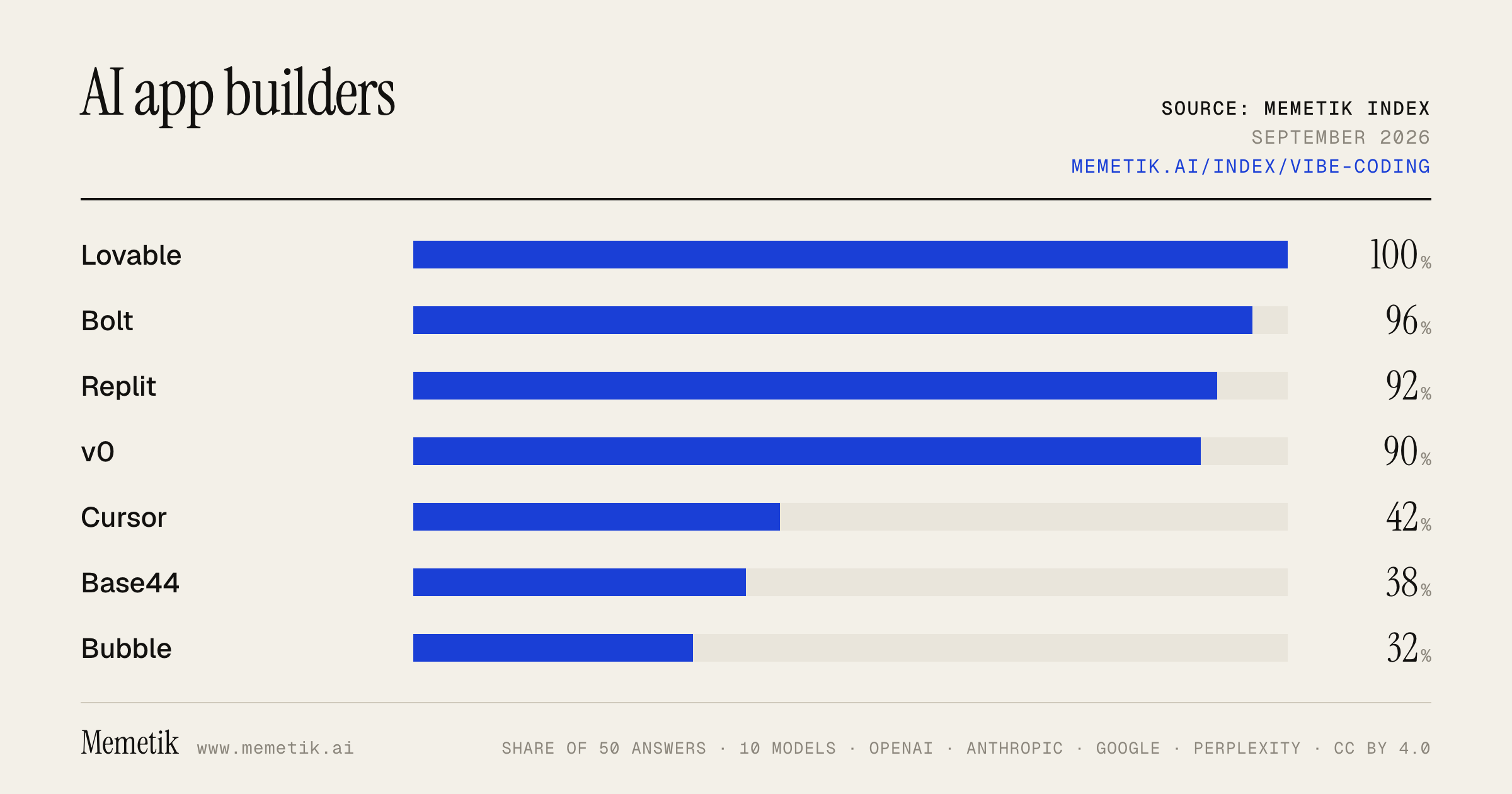
By provider
10 models · 50 answers
OpenAI 3 models · 15 answers
- GPT-5.6 Solgpt-5.6-solmost named: Lovable 100%
- GPT-5.6 Terragpt-5.6-terramost named: Lovable 100%
- GPT-5.6 Lunagpt-5.6-lunamost named: Lovable 100%
Anthropic 3 models · 15 answers
- Claude Opus 5claude-opus-5most named: Lovable 100%
- Claude Sonnet 5claude-sonnet-5most named: Lovable 100%
- Claude Fable 5claude-fable-5most named: Lovable 100%
Google 2 models · 10 answers
- Gemini 3.6 Flashgemini-3.6-flashmost named: Lovable 100%
- Gemini 3.5 Flashgemini-3.5-flashmost named: Lovable 100%
Perplexity 2 models · 10 answers
- Sonar Prosonar-promost named: Lovable 100%
- Sonar Reasoning Prosonar-reasoning-promost named: Lovable 100%
Sources the models cited
- youtube.com171
- lovable.dev69
- zite.com63
- catdoes.com40
- vibecodingacademy.ai38
- daily.dev30
- banani.co27
- superappp.com23
- zapier.com22
- vercel.com22
- mindstudio.ai21
- reddit.com20
ChatGPT via API returns no citations, so it does not contribute here.
The prompts
- What is the best AI app builder for building a web app from a prompt? Name specific products.
- Which AI app builder would you recommend to building a web app from a prompt in 2026?
- Compare the top AI app builder options right now.
- I'm building a web app from a prompt and I need an AI app builder. What should I use and why?
- Best AI app builder for building a web app from a prompt to vibe code a SaaS MVP?
Every answer
Raw model output, unedited
GPT-5.6 TerraWhat is the best AI app builder for building a web app from a prompt? Name specific products.
There isn’t one universal winner, but **Lovable** is my best overall pick for most non-technical founders who want to turn a prompt into a real **full-stack web app** quickly.

It can generate the UI, backend, authentication, database connections, integrations, and deployment flow from a conversational prompt—then lets you iterate by chatting. ([lovable.dev](https://lovable.dev/ad-landing-page?utm_source=openai))

### Best AI web-app builders by use case

| Product | Best for | Why choose it |
|---|---|---|
| **Lovable** | **Best overall for founders / MVPs** | Strong prompt-to-full-stack workflow; good for SaaS, dashboards, internal tools, marketplaces, and customer-facing apps. It also supports GitHub sync and deployment. ([lovable.dev](https://lovable.dev/ad-landing-page?utm_source=openai)) |
| **Bolt.new** | **Fastest route to a polished prototype** | Excellent for rapidly generating responsive web apps in a browser-based IDE. Supports full-stack JavaScript apps, databases/auth options, GitHub, Stripe, and deployment. ([support.bolt.new](https://support.bolt.new/building/intro-bolt?utm_source=openai)) |
| **v0 by Vercel** | **Best design/UI quality and developer handoff** | Particularly strong for polished React-style interfaces, visual refinement, GitHub sync, and easy Vercel deployment. Best if you or a developer will eventually own the codebase. ([api2.v0.dev](https://api2.v0.dev/?utm_source=openai)) |
| **Replit Agent** | **Best all-in-one coding environment** | Good when you want AI to build but also want to inspect, run, edit, collaborate on, and deploy the actual project in one hosted workspace. It includes infrastructure features such as databases, auth, storage, and secrets handling. ([replit.com](https://replit.com/usecases/ai-app-builder?utm_source=openai)) |

### My direct recommendation

- Choose **Lovable** if you want to say: *“Build me a customer portal/SaaS app with sign-in, billing, and a dashboard,”* and get a usable MVP with the least technical effort.
- Choose **Bolt.new** if the priority is a very fast, visually appealing demo or prototype that you can tweak through prompts.
- Choose **v0** if visual quality matters most and you expect to deploy on Vercel or have engineers continue development.
- Choose **Replit** if you want more of a complete AI-assisted development environment rather than just a prompt-to-app generator.

### Important caveat

All of these can get you surprisingly far, but don’t treat generated code as automatically production-ready—especially for payments, permissions, sensitive data, security, compliance, and complex business rules. Use the builder to get the MVP live, then test carefully and have a developer review critical parts before scaling.

If you want a single name: **start with Lovable**, and compare it with **Bolt.new** using the exact same prompt.
GPT-5.6 TerraWhich AI app builder would you recommend to building a web app from a prompt in 2026?
**My default recommendation: Lovable** — especially if you want to go from a plain-English prompt to a polished, working **web-app MVP** with minimal coding.

As of **September 2, 2026**, it has the most straightforward prompt-first workflow for a nontechnical founder or product person: describe the users, screens, data, and integrations; it generates the frontend and backend foundations, including auth/database/integrations, and lets you iterate conversationally before publishing. ([lovable.dev](https://lovable.dev/ad-landing-page?utm_source=openai))

### Pick by situation

| If you need… | I’d choose | Why |
|---|---|---|
| Fastest route from idea → SaaS-style web MVP | **Lovable** | Best default for prompt-driven full-stack web apps and rapid product iteration. ([lovable.dev](https://lovable.dev/ad-landing-page?utm_source=openai)) |
| Strong design system / a React-Next.js codebase your developers will own | **v0** | Better fit when polished UI and an engineering/GitHub workflow matter more than pure no-code speed. ([foundable.com](https://foundable.com/alternatives/ai-app-builders?utm_source=openai)) |
| More involved logic, debugging, or hands-on coding in the browser | **Replit Agent** | A broader hosted development environment—not just a prototype generator—and suited to working closer to the code. ([foundable.com](https://foundable.com/alternatives/ai-app-builders?utm_source=openai)) |
| A flexible browser-based alternative with visible code | **Bolt** | Good for quickly generating and editing full-stack web projects in-browser. ([foundable.com](https://foundable.com/alternatives/ai-app-builders?utm_source=openai)) |

### My practical advice

Start in **Lovable** if this is your first version. Use a tightly scoped prompt—one user type, one core workflow, 3–5 screens—and connect GitHub early if you expect the project to become a real business. For a serious production app, have someone review authentication, permissions, payment flows, data handling, error states, and security before inviting real users.

If you already have a developer involved, I’d instead start with **v0** for the UI and move into a conventional code workflow sooner.
GPT-5.6 TerraCompare the top AI app builder options right now.
## Best AI app builders — snapshot for **September 2, 2026**

For most people building a web product from a prompt, the shortlist is:

1. **Lovable** — best all-around for nontechnical founders shipping a real SaaS/web app
2. **v0 (Vercel)** — best for developers and teams already using React/Next.js/Vercel
3. **Bolt.new** — best for quick, visual prototypes and experimenting in-browser
4. **Replit** — best for flexible full-stack building, coding, and agent-assisted iteration

| Builder | Best for | Biggest strength | Main drawback | Choose it if… |
|---|---|---|---|---|
| **Lovable** | Founders, product people, internal-tool builders | Smooth prompt-to-full-stack-app workflow | More opinionated stack; less ideal for native mobile | You want to get from idea to deployable web product with minimal coding |
| **v0** | Developers, design engineers, Vercel users | Excellent UI generation plus code/Git workflow | Less “no-code founder” oriented; backend architecture remains your responsibility | You want high-quality React/Next interfaces that fit a serious engineering workflow |
| **Bolt.new** | Prototypes, solo makers, hackathons | Fast browser-based iteration and approachable visual building | Complex apps can become harder to maintain and debug | You want to validate an idea quickly before committing to a stack |
| **Replit** | Builders who want code control and broad flexibility | Integrated coding environment, agent workflow, and runtime | More technical and less guided than a pure app-builder experience | You expect to edit code, use Python/Node, or build beyond typical SaaS CRUD apps |

### 1. Lovable: best default for launching a web SaaS

**Why it stands out:** Lovable is purpose-built for turning plain-language product specs into full-stack web apps: frontend, backend, database, authentication, integrations, hosting, custom domains, and GitHub sync. It is particularly strong for dashboards, client portals, marketplaces, lightweight SaaS products, and internal tools. Its generated code is editable and you retain ownership. ([lovable.dev](https://lovable.dev/ad-landing-page?utm_source=openai))

**Notable strengths**
- Strong “describe it → build it → refine it → publish it” experience.
- Built-in cloud/backend path and integrations reduce setup work.
- Supports payments, including subscriptions and one-time purchases, through Stripe or Paddle. ([docs.lovable.dev](https://docs.lovable.dev/features/payments?utm_source=openai))
- Current projects use a modern web stack; newly created apps from **May 13, 2026** use TanStack Start with SSR, while older projects use React + Vite. ([docs.lovable.dev](https://docs.lovable.dev/introduction/faq?utm_source=openai))

**Watch-outs**
- It is focused on **web apps**, not native iOS/Android apps. ([docs.lovable.dev](https://docs.lovable.dev/introduction/faq?utm_source=openai))
- It is better for greenfield projects than bringing an existing GitHub codebase into the builder; its FAQ says you cannot currently start a project from existing code. ([docs.lovable.dev](https://docs.lovable.dev/introduction/faq?utm_source=openai))
- Credit consumption can matter once you are doing large agentic changes or running cloud/AI features.

**Best pick for:** a nontechnical or lightly technical founder who wants a polished web app with login, data, payments, and deployment.

---

### 2. v0: best for production frontend and Vercel-native teams

**Why it stands out:** v0 is the strongest choice when the product needs to become—or already is—a normal engineering codebase. It excels at generating and iterating on frontend UI, can sync with GitHub, supports visual editing, and deploys naturally to Vercel. Its docs explicitly support exporting generated components into existing codebases and bidirectional Git syncing. ([v0.dev](https://v0.dev/docs/faqs?search=&utm_source=openai))

**Notable strengths**
- Usually the best UI/design output for React- and Next-oriented products.
- Good handoff from AI generation to developer ownership.
- Strong fit if your deployment, observability, and production platform already center on Vercel.
- Offers a free plan with $5 in monthly credits; **Plus is $30/user/month** and **Business is $100/user/month**, each including $30 in monthly credits per user, according to the current pricing page. ([api2.v0.dev](https://api2.v0.dev/pricing?utm_source=openai))

**Watch-outs**
- It is not the easiest “I have never built software” product-launch environment.
- It is especially compelling for the frontend; you may still make more explicit choices around data models, authentication, APIs, and backend operations than you would in Lovable.
- Usage costs can vary by model and workload rather than being purely seat-based. ([api2.v0.dev](https://api2.v0.dev/pricing?utm_source=openai))

**Best pick for:** a developer, startup engineering team, or design engineer building a serious React/Next.js product.

---

### 3. Bolt.new: best for rapid visual prototyping

**Why it stands out:** Bolt is a great “vibe coding” environment for producing a working browser app very quickly. It is especially useful in the earliest product stage: landing pages, MVPs, simple tools, and demos where speed of iteration matters more than carefully managed code architecture.

**Notable strengths**
- Extremely quick time-to-first-demo.
- Friendly if you want to see and interact with the app while you iterate.
- Good for trying multiple concepts without committing to a formal project setup.

**Watch-outs**
- Once an app grows—multiple data models, complicated permissions, billing, third-party integrations, or a large codebase—you should expect to spend more time validating architecture and fixes.
- Treat it as a fast builder, not a substitute for QA, security review, and production engineering.

**Best pick for:** hackathons, prototypes, client demos, small experiments, and product validation.

---

### 4. Replit: best for flexible full-stack and code-first building

**Why it stands out:** Replit is less narrowly a prompt-to-SaaS builder and more a complete online development environment with AI assistance. That makes it powerful when your app needs unusual libraries, server processes, Python workloads, scripts, APIs, or hands-on coding alongside agent work.

**Notable strengths**
- Broad technical flexibility.
- Better fit for custom backend logic than tools optimized mainly around standard web-app patterns.
- Useful when you want AI help but also expect to inspect, run, debug, and change code yourself.

**Watch-outs**
- More technical surface area than Lovable or Bolt.
- The freedom is useful, but it also means you own more implementation choices.

**Best pick for:** a technical founder, student, indie developer, or team building custom logic beyond a standard frontend-plus-database SaaS.

---

## My practical recommendations

- **You’re nontechnical and want to launch a SaaS quickly:** **Lovable**
- **You have developers or want a clean React/Next/Vercel code path:** **v0**
- **You need a prototype by tonight
GPT-5.6 TerraI'm building a web app from a prompt and I need an AI app builder. What should I use and why?
## Short answer: use **Lovable** first

For a prompt-to-web-app workflow, **Lovable is the best default** if you want to get from idea → usable MVP quickly without becoming the developer yourself. It generates a real full-stack web app—including UI, backend, database, authentication, and integrations—and lets you keep refining it conversationally. It also supports GitHub sync, so you are not permanently locked into the builder if you later bring in engineers. ([docs.lovable.dev](https://docs.lovable.dev/introduction/welcome?utm_source=openai))

### Why it’s the best fit
- **Strong product/MVP workflow:** It is oriented around apps such as SaaS products, internal tools, marketplaces, and customer-facing apps—not only landing pages. ([docs.lovable.dev](https://docs.lovable.dev/introduction/welcome?utm_source=openai))
- **Prompt-friendly iteration:** You can describe screens, workflows, business rules, and integrations in plain English, then test and revise.
- **Useful defaults for a real app:** It provides database/auth/file storage through Supabase and supports payments such as Stripe or Paddle. ([lovable.dev](https://lovable.dev/use-cases/websites?utm_source=openai))
- **Developer handoff is practical:** GitHub synchronization and a standard TypeScript-based stack make future maintenance less painful. ([lovable.dev](https://lovable.dev/use-cases/websites?utm_source=openai))

## When I’d choose something else

| Choose | Best when | Why |
|---|---|---|
| **Bolt.new** | You want the fastest, most flexible browser-based “vibe coding” experience | It creates JavaScript full-stack apps, has an in-browser editor, supports prompt-based changes and direct code edits, and can set up auth, databases, APIs, and deployment. ([support.bolt.new](https://support.bolt.new/building/intro-bolt?utm_source=openai)) |
| **v0** | Design quality and a Vercel/Next.js production stack matter most | It defaults to Next.js and can add API routes, databases, AI, queues, storage, and other integrations. Best choice if you expect a developer to continue the app in a conventional React/Next.js codebase. ([v0.dev](https://v0.dev/docs/full-stack-apps?utm_source=openai)) |
| **Replit Agent** | You expect substantial custom logic, debugging, scripting, or want an AI coding environment—not just an app generator | Its Plan mode lets you approve an implementation plan before changes, and it supports building, testing, debugging, and deployment from one workspace. ([docs.replit.com](https://docs.replit.com/learn/build-with-agent?utm_source=openai)) |

## My practical recommendation

1. **Start in Lovable** for your initial MVP.
2. Ask it to build only the **core user flow** first—not every future feature.
3. Connect GitHub early.
4. If the app becomes technically complex, move the repo into **v0/Vercel** or have a developer take over.

Use **Bolt instead of Lovable** if your priority is rapid experimentation and you are comfortable inspecting/editing code. Use **v0** instead if you already know you want **Next.js + Vercel** as the long-term foundation.

## Starter prompt

> Build a responsive web app for **[target user]** to **[primary job they need done]**.
> Start with these core flows: **[flow 1]**, **[flow 2]**, and **[flow 3]**.
> Include email authentication, a database, and a simple dashboard.
> Use a clean, trustworthy style similar to **[2–3 product/style references]**.
> Before building, propose the data model, pages, and user flow. Keep v1 deliberately simple.

One caution: these tools can produce a convincing prototype very quickly, but you should still manually test authentication, payment handling, authorization rules, error states, accessibility, and any data/privacy requirements before release.
GPT-5.6 TerraBest AI app builder for building a web app from a prompt to vibe code a SaaS MVP?
## Best overall: **Lovable + Supabase + GitHub**

For a non-technical founder who wants to go from a written product idea to a credible **web SaaS MVP**, I’d pick **Lovable** first.

Why:
- Particularly smooth for typical SaaS needs: dashboard UI, user accounts, database-backed CRUD, and API integrations.
- Its Supabase connection can provide authentication, Postgres database, storage, and server-side functionality without you assembling the boilerplate yourself.
- It supports GitHub integration, so you can retain the codebase and later hand it to a developer or work on it with an AI coding tool. ([docs.lovable.dev](https://docs.lovable.dev/integrations/supabase?utm_source=openai))

**Recommended stack:**
`Lovable → Supabase → GitHub → Vercel/Cloudflare (when you need more control)`
Use Stripe for payments, but don’t build billing until you’ve validated the core workflow.

## Strong alternatives

| Builder | Best for | Why choose it |
|---|---|---|
| **Lovable** | **Fastest SaaS MVP for founders** | Best default for auth + database + polished app screens. |
| **Replit Agent** | More complicated custom logic / “one workspace” building | Can build, host, connect a database/auth, and integrate services such as Stripe and OpenAI in one environment. ([replit.com](https://replit.com/products/agent?utm_source=openai)) |
| **Bolt.new** | Fast experimentation and design-led prototypes | Strong prompt-to-app flow with in-browser editing, database support, GitHub, and rapid deployment; defaults include a modern React/Vite/Tailwind/Node setup. ([bolt.new](https://bolt.new/use-cases/ai-software-development?utm_source=openai)) |
| **v0 by Vercel** | Premium UI and a Vercel/Next.js production path | Excellent for attractive interfaces and deploys naturally into Vercel; it now supports full-stack projects and GitHub repo sync. ([v0.build](https://www.v0.build/?utm_source=openai)) |

## My practical ranking

1. **Lovable** — best balance of speed, SaaS features, and accessibility.
2. **Replit Agent** — best if the product has meaningful backend logic, workflows, integrations, or you expect to tweak actual code.
3. **v0** — best if design quality and a conventional Vercel/Next.js stack matter most.
4. **Bolt.new** — best for trying several concepts quickly or creating a slick first prototype.

## What I’d do for a real MVP

1. Write a short one-page spec before opening any builder:
   - user type
   - painful problem
   - one core job to be done
   - 3–5 essential screens
   - primary data objects
   - what users pay for

2. Build only:
   - landing page
   - sign-up/login
   - onboarding
   - one core outcome/workflow
   - basic dashboard/history
   - feedback/contact link

3. **Connect GitHub immediately** and use a separate dev/staging database if possible. These tools can generate plausible-looking but fake front-end-only behavior unless explicitly told to persist data and implement authorization rules.

4. Test the critical paths manually: account isolation, sign-up/reset, payments/webhooks if used, file uploads, and all AI/API error states.

## Starter prompt for Lovable

```text
Build a responsive B2B SaaS web app called [NAME] for [TARGET USER].

Core job:
Users use it to [ONE SPECIFIC OUTCOME].

Use Supabase for:
- email/password authentication
- Postgres database
- row-level security so each user can access only their own data

Build these screens:
1. Landing page with clear value proposition and CTA
2. Sign up / sign in
3. Onboarding that collects [FIELDS]
4. Dashboard where users can [PRIMARY WORKFLOW]
5. Detail/history page for [OBJECT]
6. Settings page

Data models:
- profiles
- [main object]
- [secondary object]

Requirements:
- Persist all user-created data in Supabase; do not use mock data except for empty-state examples.
- Create appropriate database tables, relationships, indexes, and RLS policies.
- Use a clean, trustworthy B2B design with responsive mobile behavior.
- Add loading, empty, validation, and error states.
- Do not implement billing yet; add a “Upgrade” placeholder only.
- First, present the proposed data model and user flow. Then implement the dashboard and primary workflow.
```

**Bottom line:** Start in **Lovable** if you want the fastest path to a usable SaaS MVP. Choose **Replit Agent** instead if your app’s differentiator is backend-heavy logic or several external integrations rather than a relatively standard dashboard SaaS.
Claude Sonnet 5What is the best AI app builder for building a web app from a prompt? Name specific products.
There's no single universal "best" — it depends on whether you want full code control, a managed backend, or a no-code experience. Here are the top specific products people are using in 2026 to go from a prompt to a working web app:

**For fast prompt-to-code MVPs (most popular category):**
- **Bolt.new** –
Bolt.new is the fastest AI app builder for going from a text prompt to a deployed web app, and is one of the most popular vibe coding platforms in 2026, where you describe an app in plain English and Bolt generates, runs, and deploys it directly in your browser with no local setup required.
 It
supports React, Node.js, and PostgreSQL out of the box, with one-click deployment to Netlify.

- **Lovable** – Frequently paired with Bolt as a top pick;
Lovable and Bolt.new both fit prompt-to-code MVP generation with GitHub export, but Lovable bakes a Supabase backend (database and authentication) into the core workflow and leans toward team handoff.


**For developers who want clean, framework-specific code:**
- **v0 (by Vercel)** –
v0.dev (now v0.app) is an AI-powered, chat-based builder from Vercel that generates React, Next.js, and Tailwind code using shadcn/UI components, giving developers production-ready UI blocks that can be customized and deployed instantly.

- **Replit** – Generates real, editable full-stack code;
because Replit generates real code, the output is more powerful but also less forgiving — if something goes wrong, debugging requires some technical comfort.


**For no-code/low-code business apps and internal tools:**
- **Bubble** –
Bubble primarily creates responsive web applications and has established itself as one of the most powerful no-code platforms for building complex web applications, with a sophisticated workflow engine that handles business logic complexity typically requiring custom programming.

- **Softr** –
Softr's AI Co-Builder can generate the database, permissions, and app from a prompt, or connect to your existing Airtable or Google Sheets data if you have it.

- **Zite** – Positioned as strong for internal tools;
Zite generates internal tools and business apps that are production-ready by default, providing secure hosting, SOC 2 Type II compliance, authentication, and access controls.


**Quick recommendation by use case:**
- **Fastest idea-to-working-app demo:** Bolt.new or Lovable
- **You're already in the Vercel/Next.js ecosystem:** v0
- **You want to keep editing code yourself long-term:** Replit or Cursor
- **Non-technical founder building a business tool/dashboard:** Bubble, Softr, or Zite

If you tell me more about your specific use case (e.g., need a database/auth out of the box, want to export clean code, building for a team vs. solo, budget), I can narrow this down to one clear pick.
Claude Sonnet 5Which AI app builder would you recommend to building a web app from a prompt in 2026?
Based on current comparisons across multiple sources, there's no single "best" tool — it really depends on what you're optimizing for. Here's a practical breakdown for building a web app from a prompt in 2026:

## Top picks by use case

**For fast, polished full-stack MVPs (most people's default choice):**

For AI-generated web apps, Lovable and Bolt.new are the fastest from prompt to working product, with Lovable noted as the best full-stack web MVP builder.

Lovable is widely ranked for web apps, generating a React + Supabase stack.
 It's great if you want something that looks production-ready quickly and stays editable/GitHub-connected.

**For raw speed and live code control:**

Bolt.new is the fastest AI app builder for going from a text prompt to a deployed web app, ideal for quick web MVPs, though the output is web-only.


**For autonomous, "hands-off" builds with minimal supervision:**

Replit Agent builds, runs, tests, fixes, and deploys apps with minimal supervision
, and it's
ranked as the strongest autonomous web build option
 among tested tools.

**For UI/frontend specifically (React/Next.js):**
v0.dev is the go-to —
it's best suited for React and Next.js interfaces, with strong fit inside a component-led developer workflow, especially within the Vercel ecosystem
.

**For a full-stack app you want to actually own long-term (code, hosting, integrations):**

Emergent stands out for multi-agent builds, exportable code, and managed hosting
, and
it ships the widest scope from a single prompt, with Stripe, auth, hosting, and GitHub sync included across web and mobile in the same workspace.


**For complex business logic / internal tools with lots of custom workflows:**

Bubble remains the most flexible custom web app builder
, particularly if you need multi-role permissions and deep workflow logic beyond a simple MVP.

**If you're a developer who wants to stay close to the code:**

Cursor is the best AI app builder for developers — a full AI IDE with multi-file agents rather than a no-code tool, rewarding people who can read and edit code.


## My actual recommendation

If I had to pick just one for "prompt → working web app" in 2026:

- **Start with Lovable** if you want the best balance of speed, polish, and editable code you can hand off to a real dev team later.
- **Use Bolt.new** if you want to stay entirely in-browser and iterate fastest with visible code.
- **Use Replit** if you want the most autonomous agent that will test and fix its own bugs with the least hand-holding.

For a first web app from a prompt with no coding background, Lovable is probably the safest, most talked-about starting point right now — it's the most consistently ranked #1 or #2 across nearly every comparison I found for "web apps and SaaS."

Want me to compare pricing or walk through what prompt structure works best for one of these tools?
- https://catdoes.com/blog/best-ai-app-builder
- https://www.superappp.com/blog/best-ai-app-builders-2026-tested-ranked-23-tools
- https://www.lindy.ai/blog/ai-app-builder
- https://www.goodbarber.com/blog/10-best-ai-app-builders-in-2026-a1588/
- https://www.nxcode.io/resources/news/best-ai-app-builders-2026
- https://emergent.sh/learn/best-ai-app-builders
Claude Sonnet 5Compare the top AI app builder options right now.
I'll research current AI app builder tools to give you an up-to-date comparison.
Based on current research, here's a comparison of the top AI app builder options available right now.

## The Big Split: Two Different Categories

Before comparing specific tools, it's worth understanding the fundamental divide in this space:
tools that generate web apps/prototypes like Replit, Lovable, v0, and Bolt.new versus tools that produce real native or PWA apps you can publish like FlutterFlow.
 Most tools in this list,
including Lovable, Bolt.new, Base44, Replit, and v0, generate web apps only. They run in a browser, look good on phones, but cannot be submitted to the Apple App Store or Google Play.


## Top Web App / Prototype-to-Product Builders

**Lovable** — Positioned as a full-stack builder good for shipping real products. It's built for apps like
a SaaS dashboard with built-in authentication, a client booking platform that handles payments, or a marketplace MVP—with no developer required, and code that syncs to GitHub from day one so you're never locked in.
 One hands-on tester noted that
Lovable generates clean front-ends but stops short of backend logic and payments without additional work.


**Bolt.new** — Frequently grouped with Lovable and Replit as one of the most popular prompt-to-app tools;
Lovable, Replit, and Bolt come up in every roundup on this topic.


**Replit** — Best suited for people who want to understand the underlying code.
Replit is the right choice for technically curious builders who want to see and understand the code the AI generates — where tools like Lovable and Bolt prioritize abstracting code away, Replit gives you a glass box.


**v0 (Vercel)** — Also a strong prototype generator, typically bundled in comparisons with Lovable, Bolt, and Replit as browser-based, code-generating tools rather than native app producers.

**Cursor** — An IDE-based option for developers who want AI assistance but full code-level control.
Cursor works best if you want code-level control inside an IDE, while Dyad is a good option if you prefer running AI locally and avoiding usage limits.


**Base44 / Emergent** — Positioned as tools going deeper into backend architecture.
Emergent points an autonomous coding agent at the parts most prompt-to-app tools gloss over: API architecture, database design and server logic.


## Top Native Mobile App Builders

If you actually need an App Store/Google Play-ready app rather than a web app, the leaders shift:

**FlutterFlow** — The top pick for developers wanting native output with code access.
FlutterFlow is a visual development environment that generates clean Flutter/Dart code for iOS, Android, and web apps, with Firebase and Supabase integration, one-click store deployment, and a VS Code extension for developer handoff — best for developers and technical founders who want visual speed without giving up access to the underlying code.


**Rork / GoodBarber / CatDoes** — No-code-first native options.
For native mobile apps, CatDoes and FlutterFlow lead - CatDoes for no-code builders, FlutterFlow for teams that want exportable Flutter code.
 Similarly, Rork stands out for iOS-specific output:
the SwiftUI output on Rork Max is the one differentiator that no other tool in this comparison offers for Apple-first projects.


**Appy Pie AI** — Represents the no-code publishing route:
a publishing-focused no-code platform that takes a non-technical owner from a text description to a real native app live in the Apple App Store and Google Play.


## Internal Tools / Database-Driven Apps

If you're building internal dashboards or portals rather than consumer apps, different tools win:

- **Softr / Glide** —
If your target is an employee portal backed by existing data, Glide or Softr may beat every code generator.

- **Zite** — Focused on production internal tools:
if you're building internal tools, dashboards, or workflows that real people will use, and don't want to touch code, Zite is a reliable choice — it comes with authentication, permissions, and a database from the start, which removes the usual risks that show up when moving from prototype to production.

- **WeWeb** — A hybrid, flexible option:
WeWeb is the right choice if you want the freedom of a visual builder without getting locked into one ecosystem.

- **Knack** — Best for structured data apps:
Knack is built specifically for creating database-driven web applications and is one of the best options for businesses that need to manage and display structured data without engineering support.


## Key Decision Factors

When choosing, most reviewers converge on the same core questions:

1. **Output type**: Do you need a browser-based app/prototype, or a real native app that can go on the App Store/Play Store?
Only Rocket, FlutterFlow, Adalo, and Thunkable produce true native iOS and Android apps
 among the commonly compared tools.
2. **Technical depth needed**:
Pure no-code tools suit beginners, while code-export platforms work well for developers too.

3. **The "technical cliff" risk**: Watch out for tools that generate a nice UI but can't scale.
- https://www.goodbarber.com/blog/10-best-ai-app-builders-in-2026-a1588/
- https://catdoes.com/blog/best-ai-app-builder
- https://lovable.dev/guides/best-ai-app-builders
- https://emergent.sh/learn/best-ai-app-builders
- https://www.zite.com/blog/ai-web-app-builder
- https://www.appypie.com/blog/best-ai-app-builders
- https://www.nxcode.io/resources/news/best-ai-app-builders-2026
- https://www.rocket.new/blog/best-ai-app-builder-tools
Claude Sonnet 5I'm building a web app from a prompt and I need an AI app builder. What should I use and why?
The right choice depends on your skill level, what you're building, and how much control you want. Here's a practical breakdown of the main options and when each makes sense:

## No-Code / Prompt-to-App Builders (Fastest, Least Control)

**Best for:** Non-developers or quick prototypes

- **Bolt.new** – Great for generating full-stack apps quickly from a prompt, with live preview and one-click deploy. Good if you want something functional fast without setting up an environment.
- **v0 by Vercel** – Excellent specifically for generating React/Next.js UI components and pages from prompts. Very clean code output, integrates well if you're already in the Vercel ecosystem.
- **Replit Agent** – Prompt-to-app with a built-in IDE, hosting, and database — good if you want to keep tweaking code afterward without leaving the platform.
- **Lovable** – Popular for building complete web apps (frontend + backend + database) from natural language, with a focus on non-technical founders.

## AI Coding Assistants (More Control, Still Fast)

**Best for:** People comfortable editing code or wanting production-grade output

- **Cursor** – A full IDE (VS Code fork) with deep AI integration. You describe what you want, and it edits your actual codebase across multiple files. Best if you want to iterate carefully and understand/control the code.
- **Windsurf (Codeium)** – Similar to Cursor, agentic coding in an IDE, strong at multi-file edits and following complex instructions.
- **Claude Code / GitHub Copilot Workspace** – Good if you want an agent that plans and executes coding tasks from a prompt, with more transparency into each step.

## How to Choose

| If you want... | Use... |
|---|---|
| Fastest working demo, no code editing | Bolt.new or Lovable |
| Clean UI components to drop into a project | v0 |
| Full app with hosting/database included | Replit Agent |
| To actually own and evolve a real codebase | Cursor or Windsurf |

## My Recommendation

If this is a one-off idea you want to see working today, **start with Bolt.new or Lovable** — describe your app in plain language, get a working version in minutes, and iterate through follow-up prompts.

If you plan to maintain and grow this app long-term, **use Cursor** — it treats your prompt as a starting point but gives you a real, editable codebase from the start, avoiding the "hits a wall" problem no-code tools sometimes have once apps get complex.

Want me to tailor this further? If you tell me more about your app (e.g., what it does, whether you know how to code, if you need a database/auth, and how polished it needs to look), I can point you to the single best fit rather than a general list.
Claude Sonnet 5Best AI app builder for building a web app from a prompt to vibe code a SaaS MVP?
Based on current comparisons, here's the breakdown for going from a single prompt to a working SaaS MVP:

**Top pick: Lovable**

Lovable is the strongest all-around choice for entrepreneurs building SaaS MVPs, thanks to its full-stack generation, seamless Supabase integration, and GitHub sync that keeps your code portable.
 One reviewer testing it found
building a task manager and a basic SaaS dashboard—the chat-based approach works as advertised: you describe what you want, and Lovable generates pages, logic, and database structure in real time, and had a working MVP in about 3 hours
. It's also strong on the business side:
Lovable's combination of full-stack generation, GitHub two-way code sync, and integrated Stripe payments provides the fastest path from concept to revenue, often within a single day of focused building, and the GitHub sync means you can hire developers to extend the application once you've proven product-market fit.


**Strong alternatives:**

- **Bolt.new** —
the fastest AI app builder for going from a text prompt to a deployed web app, ideal for quick web MVPs. You describe an app in plain English, and Bolt generates, runs, and deploys it directly in your browser with no local setup required.
 It also
supports React, Node.js, and PostgreSQL out of the box, with one-click deployment to Netlify, and maintains strong context across long conversations so you can keep refining your app without it losing track of earlier decisions.


- **Replit** — good if you don't mind platform lock-in:
Replit offers maximum convenience but ties your database, authentication, and hosting to their platform.


- **Base44** — best if you want zero configuration decisions:
Base44 removes every configuration decision, database, authentication, and hosting are handled automatically, making it the fastest path to a working app for non-technical founders.


- **v0** —
v0 works if you only need polished user interfaces
 rather than full backend/database logic.

**Important caveat before you ship it:**
Lovable (and similar tools) are great for getting an MVP live quickly, but production apps still need human review — teams should audit authentication, database rules, API logic, and access controls before handling real customer data. Founders should also plan ahead for code ownership, export options, and what happens if the app outgrows the hosted environment.
 More broadly,
AI-generated code can still introduce weak authentication, broken authorization, inconsistent database access, insecure API logic, dependency risks, exposed secrets, poor error handling, weak input validation and low test coverage.


**Bottom line:** For pure prompt-to-SaaS speed with the best long-term flexibility (code export, Stripe billing, Supabase backend), **Lovable** is the top recommendation. If you want maximum raw speed for a quick prototype/demo, **Bolt.new** edges it out. Either way, plan for a manual security/code review pass before charging real customers.
Gemini 3.6 FlashWhat is the best AI app builder for building a web app from a prompt? Name specific products.
Choosing the "best" AI web app builder depends on whether you are looking for an **end-to-end full-stack app**, a **pixel-perfect frontend UI**, or a **code-first developer tool**.

The top prompt-to-web-app platforms are categorized by their main strengths:

---

### 1. **Lovable** — *Best Overall for Full-Stack MVPs*
* **What it does:** Lovable is designed to convert a simple text prompt into a complete, functioning full-stack web application (frontend, backend database, and user authentication).
* **Key Features:**
  * Native integration with **Supabase** for database management and auth.
  * Auto-deploys full applications with one click.
  * Clean, polished, and responsive UI components.
* **Best for:** Non-technical founders, product managers, or solo creators trying to launch a functional SaaS MVP or tool quickly.

---

### 2. **v0 (by Vercel)** — *Best for Frontend UI & React/Next.js Design*
* **What it does:** Built by Vercel, v0 focuses on generating production-ready React components and UI pages from natural language or uploaded design mockups/screenshots.
* **Key Features:**
  * Uses **Tailwind CSS** and **shadcn/ui** to produce clean, maintainable code.
  * Instant 1-click deployment via Vercel.
  * Ideal for generating landing pages, dashboards, and complex frontend layouts.
* **Best for:** Designers and developers who want high-quality frontend code that can easily be hooked up to their own backend.

---

### 3. **Bolt.new (by StackBlitz)** — *Best for Prototyping & In-Browser Development*
* **What it does:** Bolt runs a full Node.js environment directly in your browser (WebContainers), allowing AI to spin up, edit, and run full-stack apps in real time.
* **Key Features:**
  * Supports multiple frameworks (React, Vue, Svelte, Next.js, Astro).
  * Lets you install npm packages, run build scripts, and fix terminal errors through prompting.
  * Live interactive preview alongside an in-browser code editor.
* **Best for:** Builders who want cross-framework flexibility and want to see the terminal/file structure directly in the browser.

---

### 4. **Replit Agent** — *Best for Cloud Infrastructure & Complex Logic*
* **What it does:** Replit’s AI Agent acts like an autonomous developer. You give it an app brief, and it sets up the environment, writes code across multiple languages, provisions native databases, installs dependencies, and deploys the app.
* **Key Features:**
  * Handles complete backend logic, custom API integrations, and background scripts.
  * Native database setup and built-in deployment infrastructure.
  * Built-in interactive IDE for manual fine-tuning.
* **Best for:** Apps with complex backend logic, multi-language stacks, or heavy database requirements.

---

### 5. **Base44** — *Best for All-in-One No-Code SaaS Solutions*
* **What it does:** Base44 focuses on generating fully functioning SaaS web apps from a prompt with built-in hosting, user management, and AI agent capabilities out of the box.
* **Key Features:**
  * Instant generation with built-in persistent databases and user authentication.
  * Integrated chat-based AI agents inside the apps you generate.
* **Best for:** Quickly spinning up internal tools, customer portals, or AI-assisted web apps without stitching together external cloud services.

---

### Quick Recommendation Guide

| Your Goal | Recommended Tool |
| :--- | :--- |
| **Complete SaaS MVP with database & user accounts** | **Lovable** or **Base44** |
| **Pixel-perfect frontend UI, dashboard, or landing page** | **v0** |
| **Browser-based rapid prototyping with any tech stack** | **Bolt.new** |
| **Complex backend logic, custom APIs, and backend hosting** | **Replit Agent** |
| **Editing & scaling an existing codebase locally** | **Cursor** or **Windsurf** |
Gemini 3.6 FlashWhich AI app builder would you recommend to building a web app from a prompt in 2026?
When choosing an AI app builder to create a web app directly from a prompt, the best choice depends on your technical background and what kind of app you want to build.

---

### 1. **Lovable** — *Best Overall for Non-Technical Founders & Full MVPs*
* **Why it’s great:** Lovable is widely considered one of the most complete "vibe coding" platforms for prompt-to-app development. It doesn't just build a pretty UI; it automatically wires up full-stack logic, including **Supabase** backends (databases, storage) and user authentication.
* **Key Features:** Two-way GitHub sync, visual chat-based editing, native backend integration, one-click hosting.
* **Best for:** Solopreneurs and founders who want a fully functioning Web App (UI + Database + Auth) ready for real users without touching code.

---

### 2. **Bolt.new** — *Best for Fast In-Browser Prototyping*
* **Why it’s great:** Powered by StackBlitz WebContainers, Bolt runs Node.js directly inside your browser tab without complex cloud setups. You prompt an idea, and within seconds, it generates, installs dependencies, and previews a live full-stack JavaScript app.
* **Key Features:** Full code inspection, live browser terminal/preview, seamless export to GitHub/Netlify.
* **Best for:** Anyone wanting instant, interactive frontend and JavaScript prototypes with zero environment setup.

---

### 3. **v0 (by Vercel)** — *Best for Production-Grade UI & React Developers*
* **Why it’s great:** If design quality and clean React code matter most, v0 generates pristine, idiomatic Next.js, Tailwind CSS, and `shadcn/ui` components.
* **Key Features:** Production-ready frontend code, component-level prompting, native Vercel deployment.
* **Best for:** Developers or product designers looking to generate high-quality frontend code to import into an existing codebase.

---

### 4. **Replit Agent** — *Best for Backend-Heavy & Complex Architecture*
* **Why it’s great:** Replit Agent works like an autonomous full-stack developer. It isn't limited to Node/React; it handles multi-language stacks (Python, Go, Node), sets up databases, configures environment variables, and deploys directly on cloud infrastructure.
* **Key Features:** Multi-file code management, native terminal/database access, flexible cloud hosting.
* **Best for:** Apps requiring complex server-side logic, custom APIs, data processing, or backend workflows.

---

### 5. **Base44** — *Best for Instant All-in-One Deployment*
* **Why it’s great:** Base44 has gained massive traction as an all-in-one AI builder that drastically reduces setup friction. It handles UI, database setup, user auth, and hosting with native AI capabilities built right into the app out of the box.
* **Best for:** Beginners and rapid builders who want an end-to-end web app generated from a single prompt with zero extra configuration.

---

### Summary Recommendation:
* **Go with Lovable** if you want to turn a plain-English prompt into a functional product with database & login capabilities without writing code.
* **Go with Bolt.new** if you want fast JS-based visual prototyping in your browser.
* **Go with Replit Agent** if your app relies heavily on Python, AI scripts, or custom server logic.
* **Go with v0** if you are a developer who wants clean Next.js/Tailwind code to build upon.
Gemini 3.6 FlashCompare the top AI app builder options right now.
The market for AI app builders features several strong options catering to different use cases: prompt-to-app web generators, full-stack dev agents, and traditional visual no-code platforms enhanced with AI.

Here is a comparison of the top AI app builders right now, organized by category and use case:

---

### 1. "Vibe Coding" & Rapid Prompt-to-App Builders
*Best for turning plain text prompts into live, functional web prototypes or MVPs in minutes.*

* **Lovable.dev**
  * **Best For:** High-end, polished web apps and SaaS MVPs.
  * **Pros:** Exceptionally fast, visually modern design output out of the box. Integrates seamlessly with backends like Supabase for authentication and data storage.
  * **Cons:** Primarily focused on web apps; native mobile deployment requires additional workflows.
* **Bolt.new**
  * **Best For:** Full-stack browser development with live, editable web environments.
  * **Pros:** Runs full Node.js environments directly in your browser. Generates clean UI and functional code, allowing you to edit the code directly alongside the AI.
  * **Cons:** Can consume tokens quickly on complex debugging cycles; backend/AI API configurations may require manual tweaking.
* **v0 by Vercel**
  * **Best For:** Designers and frontend developers focused on UI/UX and React components.
  * **Pros:** Generates pristine, copy-pasteable React / Tailwind CSS code. Integrates natively with the Vercel ecosystem for immediate deployment.
  * **Cons:** Focuses heavily on the frontend/UI layer; you’ll need to wire up your own complex backend logic and databases.
* **Base44**
  * **Best For:** All-in-one web app generation with integrated backend infrastructure.
  * **Pros:** Rapid setup for built-in database management, authentication, and native chat/agent features without requiring external API keys.
  * **Cons:** Proprietary ecosystem can feel slightly locked in compared to open code exports.

---

### 2. Autonomous Coding Agents & Developer Platforms
*Best for technical builders, full-stack control, and code portability.*

* **Replit Agent**
  * **Best For:** End-to-end full-stack development, backend databases, and hosted infrastructure.
  * **Pros:** Builds the entire stack (database, backend logic, frontend UI, dependencies) completely from scratch. Excellent for complex software logic and custom Python/Node backends.
  * **Cons:** Iterations can be slower than visual-first builders; can occasionally hit loops when trying to fix edge-case bugs autonomously.
* **Claude Code (Anthropic)**
  * **Best For:** Developers and technical creators who want local control via terminal/IDE workflows.
  * **Pros:** Deep logical reasoning across massive codebases. Offers full code ownership and git integration rather than keeping your app inside a closed browser tool.
  * **Cons:** Lacks a built-in visual drag-and-drop preview; requires familiarity with local dev environments or hosting setups.

---

### 3. AI-Enhanced No-Code & Visual Builders
*Best for users who want visual canvas drag-and-drop combined with AI generation.*

* **Bubble (with AI)**
  * **Best For:** Scalable, complex web applications and long-term SaaS products.
  * **Pros:** Unmatched visual business logic, database security rules, and third-party integrations. Powerful AI assistant speeds up workflow creation and schema design.
  * **Cons:** Steeper learning curve; vendor lock-in (no source code export).
* **FlutterFlow (with AI)**
  * **Best For:** Cross-platform mobile apps (iOS & Android) with clean Flutter code export.
  * **Pros:** Excellent mobile-first UI components, native device feature access (camera, GPS, push notifications), and full code export.
  * **Cons:** Requires a basic understanding of app architecture (states, API endpoints, parameters).

---

### Summary Recommendation: Which should you pick?

* **If you want to go from text prompt to a beautiful live web app instantly:** Use **Lovable** or **Bolt.new**.
* **If you want full backend power and native database setup in one click:** Use **Replit Agent**.
* **If you want a mobile app in the Apple/Google stores:** Use **FlutterFlow** or **Superapp/Rork** (for native code).
* **If you want complete control over code and locally hosted files:** Use **Claude Code** alongside your IDE.
Gemini 3.6 FlashI'm building a web app from a prompt and I need an AI app builder. What should I use and why?
Choosing the right AI app builder depends heavily on your **technical skill level**, **what you are building**, and **how far you want to take the app**.

Here is a breakdown of the top platforms, why you should choose each, and how to pick the best one for your project:

---

### 1. **Lovable** (lovable.dev)
* **Best For:** Non-technical founders, marketers, or anyone who wants a full-stack MVP (with backend and database) built purely from text prompts.
* **Why Use It:**
  * **Full-Stack Out of the Box:** Lovable seamlessly connects your frontend to a backend (typically Supabase) for user authentication, databases, and file storage.
  * **Ease of Use:** You type a prompt, and it builds the visual UI, user auth, and data schema all at once.
  * **One-Click Deploy:** You can publish directly to a live web URL or sync with a GitHub repository.
* **Downsides:** As your codebase grows larger, it can get stuck in "bug-fix loops" where fixing one feature breaks another.

---

### 2. **v0 by Vercel** (v0.dev)
* **Best For:** Technical builders, designers, or anyone building complex frontends, dashboards, or Next.js applications.
* **Why Use It:**
  * **Top-Tier UI/Design Quality:** v0 produces the cleanest, most modern design aesthetics (using Tailwind CSS and shadcn/ui components).
  * **Production-Ready Frontend Code:** It outputs clean Next.js/React code that developers can easily copy into a production codebase.
  * **Vercel Ecosystem:** Integrates seamlessly into GitHub PRs and Vercel hosting.
* **Downsides:** Primarily focuses on the frontend; complex backend logic or database connections will require more manual configuration or prompt guidance compared to Lovable.

---

### 3. **Bolt.new** (bolt.new)
* **Best For:** Developers or tech-savvy creators who want full control over an in-browser development environment (IDE).
* **Why Use It:**
  * **Full Node.js Engine in Browser:** Runs entirely in a WebContainer, letting you install npm packages, switch frameworks (React, Vue, Svelte, Astro), or build cross-platform apps (like React Native / Expo for mobile).
  * **High Flexibility:** Works like a code editor paired with an AI assistant.
* **Downsides:** Token consumption can be fast, making larger apps expensive to iterate on if you run into context errors.

---

### 4. **Replit Agent** (replit.com)
* **Best For:** Beginners looking to build complete, hosted software projects with native backend architecture.
* **Why Use It:**
  * **End-to-End Infrastructure:** Handles everything from writing Python/Node backend code to setting up databases, environment variables, and hosting internally.
  * **Autonomous Debugging:** The agent can run terminal commands, detect server errors, and auto-fix package dependencies.
* **Downsides:** Build generation can take slightly longer than visual-first builders.

---

### 5. **Cursor / Windsurf** *(For hands-on coding)*
* **Best For:** Developers with coding experience who want AI assistance in an existing local IDE.
* **Why Use It:** If you plan to heavily customize, secure, and scale your code locally beyond simple prompt generators.

---

### **Which One Should You Choose?**

1. **"I can't code and want a complete web app with accounts/login and a database live today."**
   👉 **Choose [Lovable](https://lovable.dev)**.

2. **"I want the absolute best-looking UI/landing page/dashboard in React or Next.js."**
   👉 **Choose [v0](https://v0.dev)**.

3. **"I know a bit of coding and want an in-browser dev environment with full node/npm access (or mobile support)."**
   👉 **Choose [Bolt.new](https://bolt.new)**.

4. **"I'm building a backend-heavy Python/JS app and want AI to manage server hosting and terminal commands."**
   👉 **Choose [Replit Agent](https://replit.com)**.
Gemini 3.6 FlashBest AI app builder for building a web app from a prompt to vibe code a SaaS MVP?
When it comes to **"vibe coding"** a SaaS MVP—building a functional web application almost purely through natural language prompts—the landscape has evolved rapidly.

Depending on your technical background and how much control you want over the codebase, here are the top AI app builders categorized by their workflow:

---

### 1. Dedicated "Prompt-to-App" Web Builders (Fastest 0-to-1)
These tools run directly in your browser. You type a prompt describing your SaaS, and they build, run, and host the entire frontend and backend for you.

*   **Lovable.dev** *(Top Recommendation for Web SaaS MVPs)*
    *   **Why it stands out:** Specifically built for creating full-stack web applications from prompts. It generates clean React/Tailwind frontend code and natively integrates with **Supabase** for database management and user authentication.
    *   **Best for:** Shipping a working SaaS MVP with real authentication, database storage, and custom domain deployment in under an hour.
*   **Bolt.new (by StackBlitz)**
    *   **Why it stands out:** Runs a complete WebContainers Node.js environment right inside your browser. You prompt it, and it installs npm packages, builds the UI, spins up API routes, and fixes its own build errors.
    *   **Best for:** Full-stack JavaScript/TypeScript apps where you need packages (like Stripe integration or backend utilities) installed automatically via prompts.
*   **v0.dev (by Vercel)**
    *   **Why it stands out:** Generates production-grade, highly polished React/Tailwind/shadcn UI code. It has expanded to support full Next.js project generation and API routes.
    *   **Best for:** Clean, modern UI designs and founders who plan to deploy directly on Vercel.

---

### 2. Autonomous Agents (End-to-End Hands-Off)
If you want the AI to handle setting up databases, servers, and deployment completely automatically:

*   **Replit Agent**
    *   **Why it stands out:** Acts like an autonomous developer. You give it a high-level goal (e.g., *"Build a SaaS dashboard that lets users upload PDFs and ask questions via OpenAI API, with Stripe payments"*), and it sets up the environment, database, API keys, and deployment end-to-end.
    *   **Best for:** Non-technical founders who want a completely managed dev environment without configuring backend setup manually.

---

### 3. AI IDEs for "Pure" Vibe Coding (Best for Scalability & Control)
If you know a little code (or want to own the raw Git repository from day one) and prefer working in a desktop code editor:

*   **Cursor**
    *   **Why it stands out:** The gold standard for modern "vibe coding." Cursor is a VS Code fork loaded with AI models (Claude 3.5 Sonnet, GPT-4o). Using its Composer feature (`Cmd+I` / `Ctrl+I`), you can prompt it to build entire features, manage files, and debug terminal errors automatically.
    *   **Best for:** Combining a **SaaS Boilerplate** (e.g., *ShipFast*, *Next-Forge*, or *SaaS Pegasus*) with prompt-driven development.
*   **Windsurf (by Codeium)**
    *   **Why it stands out:** Similar to Cursor, but introduces "Flows" where the AI agent collaborates with you continuously, remembering context deeply across the whole workspace.

---

### Recommended Workflow for Building Your SaaS MVP

1. **Phase 1: Rapid Prototype / UI Design**
   * Start in **Lovable.dev** or **v0.dev**. Prompt your landing page, main dashboard UI, and key user flows.
2. **Phase 2: Database & Auth Setup**
   * If using **Lovable**, connect it directly to **Supabase** for user signup/login and database tables.
   * If using **Bolt.new**, ask it to integrate Stripe checkout and Supabase/Firebase.
3. **Phase 3: Scaling & Customization (If Needed)**
   * Export the generated code directly to **GitHub**.
   * Pull the repo into **Cursor** or **Windsurf** to fine-tune complex logic, optimize API calls, or fix edge-case bugs using AI prompts.

### Summary Verdict
* **Go with Lovable.dev** if you want the easiest path from prompt -> database -> live SaaS MVP.
* **Go with Cursor** if you want to pair an AI agent with a SaaS starter template for maximum flexibility and production readiness.
Sonar ProWhat is the best AI app builder for building a web app from a prompt? Name specific products.
For **building a web app from a prompt**, the strongest single picks are **Lovable**, **Bolt.new**, and **Vercel v0**; if you want the best overall balance for a full-stack web app, **Lovable** is the most commonly recommended choice in the results.[2][3][7]

Here’s the clearest breakdown:

- **Lovable** — best overall for **full-stack web apps** and MVPs from a prompt; multiple sources say it is the strongest or best overall for web apps, and it includes backend features like auth/storage plus GitHub sync.[2][3][7][11][18]
- **Bolt.new** — best if you want the **fastest prompt-to-working web app** and a deployed prototype quickly; it is repeatedly described as very fast and suitable for web-only MVPs.[2][6][7][8]
- **Vercel v0** — best for **polished UI-first web apps** and React/Next.js output; one ranking calls it the leader for polished public-facing web apps from prompts.[5][18]
- **Bubble** — best if you want the **most flexible no-code web app builder** with strong visual editing and built-in backend features.[2][8][13]
- **Replit Agent** — best if you want an **AI coding environment** with hosting and a real IDE, especially if you are comfortable editing code.[1][18]

If you want a simple recommendation:
- Choose **Lovable** for the best all-around prompt-to-web-app experience.[2][3][7][18]
- Choose **Bolt.new** if speed matters most.[2][6][8]
- Choose **Vercel v0** if you care most about UI quality.[5]
- Choose **Bubble** if you want deeper no-code flexibility.[2][8]

If you want, I can also rank these specifically for:
- **best for non-technical founders**
- **best for production-ready SaaS**
- **best free option**
- **best for code ownership**
- https://www.zite.com/blog/ai-web-app-builder
- https://catdoes.com/blog/best-ai-app-builder
- https://www.superappp.com/blog/best-ai-app-builders-2026-tested-ranked-23-tools
- https://www.lindy.ai/blog/ai-app-builder
- https://arahi.ai/blog/best-ai-app-builders
- https://www.ionos.com/digitalguide/websites/web-development/ai-app-builder-vergleich/
- https://pickaxe.co/post/top-ai-app-builders
- https://bubble.io/blog/best-ai-app-builder/
- https://www.dronahq.com/best-ai-app-builders/
- https://meku.dev/blog/best-ai-web-app-builders
- https://learn.g2.com/best-ai-app-builder
- https://www.banani.co/blog/best-ai-app-builder
- https://zapier.com/blog/best-ai-app-builder/
- https://www.appypie.com/blog/best-ai-app-builders
- https://www.figma.com/resource-library/ai-app-builders/
- https://www.reddit.com/r/nocode/comments/1mbctla/whats_the_best_ai_nocode_web_app_builder_youve/
- https://www.weweb.io/
- https://lovable.dev/guides/best-ai-app-builders
- https://www.figma.com/solutions/ai-app-builder/
- https://www.anything.com/
Sonar ProWhich AI app builder would you recommend to building a web app from a prompt in 2026?
If your goal is to **build a web app from a prompt**, my recommendation in 2026 is **Lovable**. Across multiple 2026 roundups, it is repeatedly singled out as the strongest choice for **full-stack web MVPs** and **prompt-to-web-app** workflows, while Bolt.new is often the closest alternative for speed and Vercel v0 is favored more for polished UI than complete app generation.[2][4][5][8]

A practical way to choose is:

- **Lovable** — best overall for **full-stack web apps / MVPs** from a prompt, especially if you want a working product quickly with backend pieces included.[2][4][8]
- **Bolt.new** — strong if you care most about **speed** and a fast prompt-to-working-product workflow.[2][8]
- **Vercel v0** — best if you want **polished, UI-first** output and plan to handle more of the app logic yourself.[5]
- **Replit** — better if you want **more developer control** and a production-oriented coding environment.[8]
- **Bubble** — better for **complex workflows/logic**, but it is usually less immediate than Lovable for prompt-first building.[4][19]

If you want a single recommendation without qualifiers: **choose Lovable for a web app from a prompt**.[2][4]

If you want, I can also give you a **best pick by use case**: MVP, internal tool, SaaS, database-heavy app, or non-technical founder.
- https://www.zite.com/blog/ai-web-app-builder
- https://catdoes.com/blog/best-ai-app-builder
- https://www.lindy.ai/blog/ai-app-builder
- https://www.superappp.com/blog/best-ai-app-builders-2026-tested-ranked-23-tools
- https://arahi.ai/blog/best-ai-app-builders
- https://www.goodbarber.com/blog/10-best-ai-app-builders-in-2026-a1588/
- https://www.superblocks.com/blog/ai-app-generation
- https://www.ionos.com/digitalguide/websites/web-development/ai-app-builder-vergleich/
- https://www.banani.co/blog/best-ai-app-builder
- https://midhudsonnews.com/2026/03/02/leading-ai-web-app-builders-of-2026-rankings-comparison/
- https://zapier.com/blog/best-ai-app-builder/
- https://allaboutcookies.org/best-ai-app-builder
- https://www.airtable.com/articles/best-ai-app-builder
- https://www.figma.com/resource-library/ai-app-builders/
- https://www.adalo.com/posts/best-ai-app-builder-for-non-technical-founders-2026/
- https://www.knack.com/blog/best-ai-app-builders/
- https://www.reddit.com/r/VibeCodersNest/comments/1oixa49/what_is_the_best_ai_app_builder_and_where_do_you/
- https://www.reddit.com/r/nocode/comments/1riqyh7/whats_the_best_nocodeai_mobile_app_builder_in/
- https://manus.im/blog/best-ai-app-builders
- https://www.reddit.com/r/nocode/comments/1mbctla/whats_the_best_ai_nocode_web_app_builder_youve/
Sonar ProCompare the top AI app builder options right now.
The **best AI app builder depends on what you’re building**: for fast web MVPs, **Lovable** is the most consistently recommended; for native mobile apps, **FlutterFlow** and **CatDoes** stand out; for internal tools, **Retool**, **ToolJet**, and **Zite** are the strongest fit. [1][2][3][4][5][12][15]

| Tool | Best for | Strengths | Tradeoffs | Starting price |
|---|---|---|---|---|
| **Lovable** | Fast web MVPs and SaaS prototypes | Turns prompts into full-stack apps quickly; editable/GitHub-ready code; widely ranked best overall for web apps | Less suited to long-term autonomous maintenance; more web-first than mobile-first | $20–$25/month [1][6][8][10][15] |
| **FlutterFlow** | Native iOS/Android apps | True native output, visual control, and code export | More setup than pure prompt tools; better when you want control over the app structure | Not specified in the provided results [1][2][14] |
| **CatDoes** | Native mobile apps with minimal coding | Ranked best overall for native iOS & Android; prompt-to-App Store/Google Play focus | Less established in the provided sources than FlutterFlow/Lovable | Not specified in the provided results [1] |
| **Bolt.new** | Fastest prompt-to-app workflow | Very quick app generation; good for speed-first MVPs | Less focus on deep customization than builder-first platforms | $25/month [1][8][12] |
| **Bubble** | Complex web apps with business logic | Strong for workflows, plugins, and more complex app behavior | More learning curve; slower than simpler prompt tools | $29–$59/month, depending on source [1][4][7][15][16] |
| **Replit** | Developer-friendly full-stack building | AI coding agent, browser IDE, and hosting; good for people who want code control | Less “no-code” and more developer-oriented | $20–$25/month [3][6][8][11][15] |
| **Retool / ToolJet / Zite** | Internal tools and admin panels | Built for databases, permissions, workflows, and enterprise/internal use cases | Not ideal for consumer apps or polished public-facing products | Retool: $20/user/month; ToolJet: $19–$24/builder/month; Zite: $15–$19/month [4][5][13][15] |
| **Softr** | Portals and simple apps from data | Very easy to use; quick generation from prompts or spreadsheets | Less flexible for highly custom app logic | Free plan; paid from $49/month [4][14][15][16] |
| **Microsoft Power Apps** | Business apps in Microsoft ecosystems | AI-assisted editing and enterprise integration | Best when you already use Microsoft 365/Dataverse | From $12–$20/user/month in the sources [4][6] |

If you want the shortest practical shortlist:

- **Best overall for web apps:** **Lovable** [1][6][10][15]
- **Best for native mobile:** **FlutterFlow** or **CatDoes** [1][2][14]
- **Best for internal tools:** **Retool**, **ToolJet**, or **Zite** [4][5][13][15]
- **Best for speed:** **Bolt.new** [1][8][12]
- **Best for complex logic:** **Bubble** [1][4][7][15][16]

A useful way to choose:
- Pick **Lovable** if you want a polished MVP quickly and don’t mind starting with generated code. [1][6][8][10]
- Pick **FlutterFlow** if you need real mobile apps and expect to keep iterating on UI and app structure. [1][2][14]
- Pick **Bubble** if your app needs deeper workflows, branching logic, or a more feature-rich no-code backend. [1][4][7][15][16]
- Pick **Retool/ToolJet/Zite** if the app is for employees, admins, or operations rather than customers. [4][5][13][15]
- Pick **Replit/Cursor** if you want AI help but still want to work like a developer. [3][6][8][11]

There is some disagreement in the rankings because different sources optimize for different goals: some favor *speed*, some favor *code ownership*, and others favor *native mobile* or *internal tools*. [1][3][4][6][8][15]
- https://catdoes.com/blog/best-ai-app-builder
- https://www.banani.co/blog/best-ai-app-builder
- https://www.zite.com/blog/ai-web-app-builder
- https://zapier.com/blog/best-ai-app-builder/
- https://tinycommand.com/blogs/best-ai-app-builders-2026
- https://learn.g2.com/best-ai-app-builder
- https://manus.im/blog/best-ai-app-builders
- https://www.lindy.ai/blog/ai-app-builder
- https://allaboutcookies.org/best-ai-app-builder
- https://www.superappp.com/blog/best-ai-app-builders-2026-tested-ranked-23-tools
- https://www.vybe.build/blog/best-ai-app-builders-2026
- https://tech.co/ai/vibe-coding/best-ai-app-builders
- https://www.dronahq.com/best-ai-app-builders/
- https://www.figma.com/resource-library/ai-app-builders/
- https://www.zite.com/blog/ai-app-builder
- https://www.knack.com/blog/best-ai-app-builders/
- https://www.reddit.com/r/nocode/comments/1riqyh7/whats_the_best_nocodeai_mobile_app_builder_in/
Sonar ProI'm building a web app from a prompt and I need an AI app builder. What should I use and why?
If you want the **safest default choice** for building a web app from a prompt, use **Lovable**. It is repeatedly ranked as a top option for turning a prompt into a full-stack web app, with built-in backend, authentication, deployment, and code export, which makes it a strong fit for non-technical founders and MVPs.[2][3][9][14][18]

If your priority is different, the best pick changes:

- **Lovable** — best overall for most prompt-to-web-app use cases because it balances speed, full-stack generation, and handoff-friendly code.[2][9][14][18]
- **Bolt.new** — best when you want **very fast prototypes** and a more frontend-first workflow; it also includes hosting, databases, and authentication in its higher-level pitch.[2][4][5][13]
- **Vercel v0** — best if you care most about **polished UI** and are comfortable in the React/Next.js ecosystem.[4][15]
- **Bubble** — best if you need **maximum control** and are building a more complex custom web app with a visual editor.[2][13]
- **Replit** — best if you want an AI builder that feels closer to a real development environment, with an IDE, hosting, and more control over code.[6][15][17]

A practical rule of thumb:

- Choose **Lovable** if you are **non-technical** and want the fastest path to a working full-stack app.[9][14][18]
- Choose **Bolt.new** if you want to get to a demo **as quickly as possible**.[2][4][13]
- Choose **v0** if your app is **UI-first** and design quality matters most.[4][15]
- Choose **Bubble** if you need a **more complex no-code app** and want deeper customization.[2][13]

If you tell me whether your app is a **SaaS, internal tool, marketplace, or AI app**, I can recommend the single best builder for that specific case.
- https://www.zite.com/blog/ai-web-app-builder
- https://catdoes.com/blog/best-ai-app-builder
- https://www.superappp.com/blog/best-ai-app-builders-2026-tested-ranked-23-tools
- https://arahi.ai/blog/best-ai-app-builders
- https://www.ionos.com/digitalguide/websites/web-development/ai-app-builder-vergleich/
- https://www.lindy.ai/blog/ai-app-builder
- https://www.banani.co/blog/best-ai-app-builder
- https://www.dronahq.com/best-ai-app-builders/
- https://assembly.com/blog/best-ai-app-builder
- https://meku.dev/blog/best-ai-web-app-builders
- https://zapier.com/blog/best-ai-app-builder/
- https://learn.g2.com/best-ai-app-builder
- https://bubble.io/blog/best-ai-app-builder/
- https://lovable.dev/guides/best-ai-app-builders
- https://www.figma.com/resource-library/ai-app-builders/
- https://www.reddit.com/r/nocode/comments/1mbctla/whats_the_best_ai_nocode_web_app_builder_youve/
- https://pickaxe.co/post/top-ai-app-builders
- https://www.figma.com/solutions/ai-app-builder/
- https://www.weweb.io/
- https://www.reddit.com/r/LLMDevs/comments/1lj5pta/what_are_the_best_ai_tools_that_can_build_a_web/
Sonar ProBest AI app builder for building a web app from a prompt to vibe code a SaaS MVP?
For a **SaaS MVP from a prompt**, the strongest all-around choice in these results is **Lovable** if you want a fast, code-owned web app with **auth + database** and room to extend later.[1][4][8][16] If your priority is the **fastest path to a paid SaaS** with the fewest setup steps, **Blink** is the most aggressive “vibe code to live product” option because it ships **database, auth, storage, billing, and deployment** natively.[2][7][12]

A practical way to choose:

| If you want… | Best pick | Why |
|---|---|---|
| **Best default for most SaaS MVPs** | **Lovable** | Strong balance of prompt-to-app speed, full-stack output, and code ownership/GitHub sync.[1][4][8][16] |
| **Fastest prompt → deployed SaaS** | **Blink** | Built-in auth, database, billing, storage, and one-click deploy reduce wiring work.[2][7][12] |
| **Best for production-grade code ownership + API/embed use** | **Totalum** | Generates a Next.js SaaS with auth, payments, DB, file storage, and can be driven via API/MCP.[3] |
| **Best for UI-heavy prototyping** | **Bolt.new** | Strong for interactive frontends and quick prototyping, especially when the UI is the main focus.[1][15] |

If you want a single recommendation: **start with Lovable** for most SaaS MVPs, and choose **Blink** instead if your main goal is to get a monetizable MVP live as fast as possible with minimal infrastructure work.[1][2][4][7][12]

The main tradeoff is **ownership vs. speed**: Lovable is repeatedly described as a strong default for founders who want editable, portable code, while Blink is positioned as the most turnkey full-stack SaaS builder.[1][4][8][12][16]
- https://afterbuildlabs.com/resources/best-ai-app-builder-for-saas
- https://www.emergingtechdaily.com/post/best-ai-app-builder-for-saas-mvp-2026
- https://www.totalum.app/blog/best-ai-app-builder-for-saas-2026
- https://www.app-builder-index.com/best/saas-mvp
- https://top5ai-appbuilders.com/articles/5-best-ai-app-builders-for-saas-mvps-2026-launch-in-24-hours/
- https://www.ayautomate.com/blog/best-ai-app-builders
- https://blink.new/blog/best-ai-app-builder-saas-startups-2026
- https://www.vibecodingacademy.ai/blog/ai-app-builder-complete-guide-2026
- https://www.nocode.mba/articles/best-ai-platforms-for-mvps
- https://www.zite.com/blog/ai-app-builder
- https://www.zite.com/blog/ai-web-app-builder
- https://blink.new/blog/best-ai-app-builder-saas
- https://zapier.com/blog/best-ai-app-builder/
- https://www.figma.com/resource-library/ai-app-builders/
- https://designrevision.com/blog/best-ai-app-builder
- https://www.zite.com/blog/best-ai-app-builder
- https://theapplaunchpad.com/blog/ai-app-builders/
- https://viasocket.com/discovery/blog/gdgzo3/App%20Builders/7-best-ai-powered-app-builders-for-startups
- https://www.nxcode.io/resources/news/best-ai-app-builders-2026
- https://www.rocket.new/blog/top-ai-saas-builder-tools
GPT-5.6 SolWhat is the best AI app builder for building a web app from a prompt? Name specific products.
## Best overall: **Lovable**

For most people who want to describe a web app in plain English and quickly get a functional product, **Lovable** is my top recommendation. It focuses on full-stack web apps, supports natural-language iteration, produces real code, and is particularly approachable for non-developers. ([lovable.dev](https://lovable.dev/ad-landing-page?utm_source=openai))

### Best options by use case

1. **Lovable — best for nontechnical founders and MVPs**
   - Strong prompt-to-working-app experience
   - Good for SaaS products, dashboards, internal tools and marketplaces
   - Can build both the UI and backend
   - Easy conversational editing
   **Choose it if:** You want the shortest route from an idea to a usable MVP.

2. **Replit Agent — best for more complex, production-oriented apps**
   - Builds, tests, refines and deploys applications in one browser workspace
   - Gives you a full coding environment when manual intervention is needed
   - Better suited to custom backend logic and projects that may grow beyond a prototype ([replit.com](https://replit.com/products/agent?utm_source=openai))
   **Choose it if:** You need more engineering control without configuring a development environment.

3. **v0 by Vercel — best for polished UI and Next.js apps**
   - Particularly strong at generating attractive React/Next.js interfaces
   - Supports full-stack functionality, API routes and databases such as Supabase and Neon
   - Deploys naturally to Vercel ([vercel.com](https://vercel.com/docs/v0?utm_source=openai))
   **Choose it if:** Design quality matters most or you already use Next.js and Vercel.

4. **Bolt.new — best for fast experimentation with editable code**
   - Generates JavaScript-based full-stack apps directly in the browser
   - Includes live previews, code editing and deployment
   - Useful for developers who want to alternate between prompting and coding ([bolt.new](https://bolt.new/use-cases/ai-app-builder?utm_source=openai))
   **Choose it if:** You want rapid prototypes but also expect to edit the generated code yourself.

### Bottom line

- **No coding experience:** Lovable
- **Most capable all-in-one development workspace:** Replit Agent
- **Best-looking React/Next.js frontend:** v0
- **Best browser-based prompt-and-code workflow:** Bolt.new

If I had to select only one for a typical prompt-built web app, I’d start with **Lovable**. For an app with substantial custom business logic or long-term development needs, I’d lean toward **Replit Agent**.
GPT-5.6 SolWhich AI app builder would you recommend to building a web app from a prompt in 2026?
## My recommendation for 2026: **Lovable**

For most people who want to turn a prompt into a working web application—especially founders, designers, and nontechnical users—I’d start with **Lovable**. It handles UI, application logic, database-backed features, authentication, deployment, and iterative changes through conversational prompts. New projects also support server-side rendering through TanStack Start, and you retain the option to work with the generated code rather than being confined to a purely proprietary visual builder. ([openai.com](https://openai.com/business/plugins/lovable/?utm_source=openai))

### Choose something else when:

| Your priority | Best choice | Why |
|---|---|---|
| **Best overall for nondevelopers** | **Lovable** | Fastest route from idea to polished MVP |
| **Production-oriented React/Next.js app** | **v0** | Strong UI generation, full-stack Next.js support, Vercel deployment, and integrations with databases and infrastructure services ([vercel.com](https://vercel.com/docs/v0?utm_source=openai)) |
| **All-in-one development environment** | **Replit Agent** | Builds, runs, tests, collaborates, and deploys within one workspace; Agent 4 also adds visual design variants and broader project artifacts ([replit.com](https://replit.com/products/agent?utm_source=openai)) |
| **Maximum browser-based code control** | **Bolt.new** | Full browser IDE, editable generated code, multiple JavaScript frameworks, backend support, and integrated deployment ([bolt.new](https://bolt.new/use-cases/ai-app-builder?utm_source=openai)) |
| **Existing Vercel ecosystem/team** | **v0** | The most natural fit for Vercel, Next.js, and React workflows |

### Practical decision

- **You don’t code:** Lovable
- **You know React/Next.js:** v0
- **You want backend, hosting, and coding tools under one roof:** Replit
- **You want to inspect and manipulate everything directly in the browser:** Bolt

**Bottom line:** As of **September 2, 2026**, I would use **Lovable to validate and launch a typical SaaS MVP**, but choose **v0** if I expected experienced developers to maintain and extend the application long-term.

Whichever builder you choose, export or synchronize the code with GitHub early, keep secrets outside the generated code, and manually review authentication, permissions, payments, database rules, and error handling before accepting real users.
GPT-5.6 SolCompare the top AI app builder options right now.
## Best AI app builders right now — September 2026

For prompt-to-app platforms that generate **real, deployable code**, the strongest shortlist is **Lovable, Bolt, Replit, and v0**.

| Builder | Best for | Main strengths | Main drawbacks | Entry paid plan* |
|---|---|---|---|---:|
| **Lovable** | Nontechnical founders and fast SaaS MVPs | Very approachable conversational workflow; builds full-stack web apps; integrated hosting, database, authentication, storage, server functions, payments and AI; code ownership | Credit system combines building and production usage, making future costs less predictable; less granular than a traditional IDE | From roughly **$25/mo** ([lovable.dev](https://lovable.dev/pricing?utm_source=openai)) |
| **Bolt.new** | Rapid full-stack prototypes with more code flexibility | Runs a complete development environment in the browser; generates portable code; integrated database and hosting; private projects on free tier; model choice | Large projects can consume tokens quickly because Bolt sends project context to the model; debugging may require technical knowledge | **$25/mo**, including 10M tokens ([bolt.new](https://bolt.new/pricing?utm_source=openai)) |
| **Replit** | Serious apps, custom backends and ongoing development | Full cloud IDE plus autonomous agents; built-in database and deployment; supports a broader range of languages and workloads; easier to take over manually when AI stalls | More complex interface; usage-based costs can be harder to forecast; polished UI often takes more prompting | Core: **$20 monthly or $17/mo annually** ([replit.com](https://replit.com/pricing?referral=pnkrdb&utm_source=openai)) |
| **v0** | Polished React/Next.js interfaces and Vercel projects | Usually the strongest initial UI output; excellent for component generation; visual editing, GitHub sync and one-click Vercel deployment; fits naturally into professional React workflows | More opinionated around the Vercel/React ecosystem; less beginner-friendly for complex backend requirements; priced per user | Plus: **$30/user/mo** ([api2.v0.dev](https://api2.v0.dev/pricing?utm_source=openai)) |

\*Advertised pricing can exclude additional AI usage, infrastructure, databases, bandwidth, third-party APIs and payment-processing fees.

## My recommendations

### Choose **Lovable** if:
- You have little or no coding experience.
- You want to validate a SaaS idea quickly.
- You need authentication, data, payments and hosting without assembling the stack yourself.
- You value simplicity more than low-level control.

**Best overall for nontechnical founders.**

### Choose **Bolt.new** if:
- You want the speed of Lovable but expect to inspect or modify the generated code.
- You want to experiment with frameworks and packages in a browser environment.
- You’re building dashboards, marketplaces, internal tools or moderately customized web apps.
- You want hosting included but don’t want your project trapped in a closed no-code format.

**Best balance of speed and developer flexibility.**

### Choose **Replit** if:
- Your product needs custom backend logic, scheduled jobs, unusual integrations or languages beyond the standard React stack.
- You expect the prototype to become a substantial software project.
- You want AI assistance and a conventional development environment in one place.
- Several agents working in parallel would materially accelerate your project.

**Best for ambitious or technically complex applications.**

### Choose **v0** if:
- Design quality is the highest priority.
- You already use Next.js, React, GitHub or Vercel.
- You’re a developer who wants AI to accelerate implementation rather than conceal the code.
- You mainly need landing pages, dashboards, component systems or frontend-heavy applications.

**Best for production-quality frontend work.**

## Quick decision matrix

| Your situation | First choice | Runner-up |
|---|---|---|
| “I can’t code, but I want to launch a SaaS” | **Lovable** | Bolt |
| “I want a working MVP this weekend” | **Lovable** | Bolt |
| “I want control over the generated code” | **Bolt** | Replit |
| “The UI must look excellent immediately” | **v0** | Lovable |
| “The backend is complicated” | **Replit** | Bolt |
| “My team already uses Next.js and Vercel” | **v0** | Bolt |
| “I need languages or workloads beyond a typical web stack” | **Replit** | — |
| “I want the simplest all-in-one experience” | **Lovable** | Replit |

## Bottom line

- **Best for most nontechnical users:** Lovable
- **Best all-around prompt-to-code builder:** Bolt
- **Best for complex, long-lived software:** Replit
- **Best for frontend design and React teams:** v0

A sensible workflow is also to **prototype visually in Lovable or v0, connect the project to GitHub, and continue serious development in Replit or a local IDE**. Before committing, build the same small app in your top two choices: include login, one database table, an external API, a responsive dashboard and deployment. That test exposes each platform’s debugging quality and real credit consumption much better than generating a landing page.
GPT-5.6 SolI'm building a web app from a prompt and I need an AI app builder. What should I use and why?
## My default recommendation: **Replit Agent**

For turning a prompt into a **working, deployable web app**, Replit currently offers one of the most complete all-in-one workflows:

- Generates the frontend and backend
- Provisions authentication, databases, storage, and secrets
- Runs and previews the application in-browser
- Tests and helps debug generated code
- Supports checkpoints and rollbacks
- Publishes directly to a hosted URL
- Lets you inspect and edit the underlying code

This reduces the number of separate services you must configure before validating your idea. Replit’s managed database uses Postgres through Neon, and its publishing system supports static, autoscaling, reserved-VM, and scheduled deployments. ([docs.replit.com](https://docs.replit.com/learn/build-with-agent?utm_source=openai))

### Choose Replit if:

- You want a **functional full-stack app**, not merely a visual prototype
- Your app needs accounts, persistent data, API integrations, or payments
- You aren't highly technical
- You want one place to build, debug, host, and manage the application
- Shipping quickly matters more than selecting every infrastructure component yourself

## When I would use something else

| Your priority | Consider |
|---|---|
| Beautiful landing pages and polished UI | **Lovable** |
| Rapid browser-based experimentation with JavaScript frameworks | **Bolt** |
| React/Next.js interfaces deployed on Vercel | **v0** |
| Maximum codebase control with an existing engineering workflow | **Cursor or Claude Code** |
| Internal business tools connected to databases | **Retool** |

These categories overlap considerably, so the best choice depends on what “web app” means in your case.

## Practical decision

- **Nontechnical founder building an MVP:** Replit Agent
- **Designer building a visually impressive prototype:** Lovable or v0
- **Developer who wants AI assistance without surrendering the workflow:** Cursor or Claude Code
- **Simple CRUD dashboard or internal tool:** Retool
- **Prompt-to-production in one environment:** Replit Agent

## One important precaution

Regardless of the builder, don’t blindly launch generated code if the app handles **payments, sensitive personal data, healthcare information, or critical permissions**. Review:

- Database access policies
- Authentication and authorization
- Secret/API-key handling
- Input validation
- Payment webhooks
- Error logging and backups

Start with Replit Agent, give it a detailed product specification, and require it to create a plan before writing code. Replit’s Plan mode lets you review the proposed screens, data model, user flows, risks, and testing steps before construction begins. ([docs.replit.com](https://docs.replit.com/learn/build-with-agent?utm_source=openai))

**Bottom line:** If you haven’t identified a specialized requirement yet, use **Replit Agent** because it provides the shortest path from one prompt to a hosted, editable, full-stack application.
GPT-5.6 SolBest AI app builder for building a web app from a prompt to vibe code a SaaS MVP?
## Best overall: **Lovable**

For turning a prompt into a **SaaS MVP quickly**, I’d start with **Lovable**, especially if you’re a founder or only moderately technical.

It’s particularly effective for the standard SaaS pattern:

- Marketing site
- Authentication
- User dashboard
- CRUD workflows
- PostgreSQL database through Supabase
- File uploads
- Admin views
- Payments and external APIs

Lovable’s strong Supabase integration handles authentication, database operations, and storage, while producing an editable React codebase. ([docs.lovable.dev](https://docs.lovable.dev/integrations/supabase?utm_source=openai))

### My current ranking

| Tool | Best for | Main limitation |
|---|---|---|
| **Lovable** | Best overall for launching a conventional SaaS MVP | Can lose consistency as the application grows |
| **v0** | Best UI and best choice for React/Next.js developers | Backend workflows may require more hands-on engineering |
| **Bolt** | Fast browser-based full-stack prototyping | Token usage and debugging can become frustrating |
| **Replit Agent** | All-in-one coding, infrastructure and deployment | More complexity and platform coupling |
| **Cursor/Claude Code** | Best maintainability after initial validation | Requires actual development knowledge |

Bolt can generate React/Vite/Tailwind/Node applications and connect authentication, databases and third-party services, making it a strong alternative when you want more freedom inside the browser. ([bolt.new](https://bolt.new/use-cases/ai-app-builder?utm_source=openai))

Replit Agent is better when you want an AI developer environment rather than a highly visual app generator. It includes deployment, database, authentication and third-party integrations in one workspace. ([replit.com](https://replit.com/products/agent?utm_source=openai))

## Recommended workflow

I would use:

1. **Lovable** for the first working version.
2. **Supabase** for database, authentication and storage.
3. **Stripe** for subscriptions.
4. **GitHub from day one** for source control and rollback.
5. **Vercel** for production hosting.
6. **Cursor or Claude Code** once the MVP needs substantial debugging or architectural work.

That gives you prompt-to-app speed without permanently trapping the product inside one builder.

## Important warning

Don’t blindly launch generated authentication, database policies or payment code. AI-generated apps have experienced serious production failures involving database permissions and destructive agent actions. Use separate staging and production databases, enable Supabase row-level security, review payment webhooks, and maintain GitHub backups. ([techradar.com](https://www.techradar.com/pro/vibe-coding-guide-how-to-transition-from-ai-generation-to-live-deployment?utm_source=openai))

## Bottom line

- **Nontechnical founder:** Lovable
- **Developer who cares about UI/code quality:** v0, then Cursor
- **Maximum browser-based flexibility:** Bolt
- **Everything hosted in one workspace:** Replit
- **Serious product expected to outgrow the MVP:** Lovable for validation, then Cursor/Claude Code

**My pick for your stated use case: Lovable + Supabase + Stripe + GitHub.**
GPT-5.6 LunaWhat is the best AI app builder for building a web app from a prompt? Name specific products.
## Best overall: **Lovable**

For most people who want to describe a web app in plain English and get a usable full-stack prototype quickly, I’d start with **Lovable**. It can generate the interface, backend behavior, database structure, authentication, and integrations through a conversational workflow. It is especially strong for SaaS dashboards, CRUD apps, internal tools, client portals, and MVPs. ([openai.com](https://openai.com/business/plugins/lovable/?utm_source=openai))

### My shortlist

| Product | Best for | Main advantage | Main limitation |
|---|---|---|---|
| **Lovable** | Fast SaaS MVPs and business apps | Very smooth prompt-to-working-app workflow | Complex apps still require careful debugging and engineering |
| **Bolt.new** | Rapid full-stack web apps | Generates React/Vite/Tailwind/Node apps in the browser and deploys quickly | Large projects can become difficult to maintain through prompts alone |
| **Replit Agent** | More complex apps and automation | Strong all-in-one environment for coding, databases, integrations, debugging, and deployment | Less beginner-friendly than Lovable |
| **Vercel v0** | High-quality UI and Next.js apps | Excellent frontend generation and easy GitHub/Vercel workflow | Historically more frontend-oriented than full backend app builders |
| **Base44** | Nontechnical users wanting a packaged app | Very accessible, with business-app features generated from descriptions | More platform-dependent; inspect export and hosting options carefully |
| **Firebase Studio** | Apps using Google/Firebase infrastructure | Useful if you want Firebase Auth, Firestore, hosting, and Google services | Better suited to users comfortable with the Firebase ecosystem |

## Which one should you choose?

### Choose **Lovable** if:
- You want the fastest route from idea to clickable MVP.
- You are not a developer.
- You need authentication, a database, forms, dashboards, or payments.
- You want to keep refining the app conversationally.

Lovable explicitly supports generating functional apps and websites from prompts and iterating on layout, behavior, and content using natural language. ([openai.com](https://openai.com/business/plugins/lovable/?utm_source=openai))

### Choose **Bolt.new** if:
- You want more direct access to generated source code.
- You prefer a browser-based development environment.
- You want rapid deployment without setting up a local project.
- You are building a JavaScript-based web app.

Bolt generates full application code from a prompt, provides an in-browser code editor, supports full-stack features, and can deploy to a public URL. ([bolt.new](https://bolt.new/use-cases/ai-app-builder?utm_source=openai))

### Choose **Replit Agent** if:
- The app has substantial backend logic.
- You need third-party APIs, automations, scheduled jobs, or custom server behavior.
- You expect to debug and extend the code substantially.
- You want coding, hosting, database connections, and deployment in one workspace.

Replit Agent can plan, write, explain, debug, test, and deploy an application through natural-language instructions. ([replit.com](https://replit.com/products/agent?utm_source=openai))

### Choose **v0** if:
- The visual design and frontend quality matter most.
- You are building with Next.js, React, Tailwind, and Vercel.
- You or a developer will handle the backend and production hardening.

## My practical recommendation

1. **Start with Lovable** for the first version.
2. If the project becomes technically complex, move the code into **GitHub** and continue with **Replit Agent**, Cursor, or a conventional development workflow.
3. Use **Bolt.new** instead if you specifically want a browser IDE and more direct control over the generated JavaScript code.
4. Use **v0** when the primary challenge is creating a polished UI rather than building the entire product backend.

**Bottom line:**
- **Best for most users:** Lovable
- **Best for technical flexibility:** Replit Agent
- **Best for fast browser-based full-stack building:** Bolt.new
- **Best for frontend/UI quality:** v0

No prompt-based builder reliably eliminates the need for testing, security review, database validation, and code cleanup—especially for apps handling payments, private data, or user accounts.
GPT-5.6 LunaWhich AI app builder would you recommend to building a web app from a prompt in 2026?
## My default recommendation for 2026: **Lovable**

For most people who want to turn a prompt into a working **web app**, I’d start with **Lovable**. It has a strong prompt-to-app workflow, supports iterative natural-language changes, and can handle frontend, authentication, databases, APIs, and deployment without requiring much coding. ([openai.com](https://openai.com/business/plugins/lovable/?utm_source=openai))

### Choose based on your situation

| Your priority | Best choice | Why |
|---|---|---|
| Fastest path from idea to usable web app | **Lovable** | Best overall balance of UI, backend setup, iteration, and ease of use |
| Web and mobile apps from the browser | **Bolt.new** | Supports websites, web apps, and mobile-oriented projects, with live preview and deployment |
| Best-looking frontend or you use Vercel/GitHub | **v0** | Excellent for React/Next.js interfaces and can generate anything from landing pages to full-stack apps |
| More control over code and a real development environment | **Replit Agent** | Better fit when you expect to inspect, debug, test, and extend the generated code |
| Serious production product with developers involved | **v0 + GitHub or Replit/Cursor** | AI generation plus conventional engineering workflows is safer than relying on a pure no-code builder |

Bolt is particularly attractive if mobile support matters: its documentation explicitly positions it for websites, web apps, and mobile apps, while Lovable is focused on web applications rather than native mobile development. ([bolt.new](https://bolt.new/use-cases/ai-software-development?utm_source=openai))

v0 is my alternative recommendation for a developer or designer who cares most about polished UI and a standard React/Next.js codebase. Vercel says v0 can generate both code and UI from natural-language descriptions and deploy the result to Vercel. ([vercel.com](https://vercel.com/docs/v0?utm_source=openai))

## My practical recommendation

- **Nontechnical founder:** Lovable
- **Prototype, SaaS dashboard, internal tool:** Lovable or Bolt
- **Consumer-facing app with excellent design:** v0
- **App requiring significant custom logic:** Replit Agent
- **Native iOS/Android app:** Bolt as a starting point, but expect to move into React Native, Expo, Flutter, or conventional development later

One caveat: don’t judge these tools only by the first generated version. The difficult part is usually maintaining correctness as you add permissions, billing, edge cases, data migrations, testing, and security. For anything handling sensitive data or real payments, export/sync the code, use version control, and have the authentication and authorization logic reviewed.

**Bottom line:** Start with **Lovable** unless you already know you need native mobile support, deep code control, or a Vercel-centered developer workflow.
GPT-5.6 LunaCompare the top AI app builder options right now.
## Best AI app builders right now

The main choice is whether you prioritize **fast no-code prototyping**, **editable source code**, **production deployment**, or **native mobile apps**. My practical shortlist is:

| Tool | Best for | Strengths | Main drawbacks | Typical paid entry |
|---|---|---|---|---|
| **Lovable** | Fast full-stack web apps | Excellent prompt-to-product flow; strong UI; database/auth integrations; relatively approachable for nondevelopers | Usage is credit-based; complex debugging can become frustrating; primarily web apps | Credit-based plans; free tier available ([lovable.dev](https://lovable.dev/pricing?utm_source=openai)) |
| **Bolt.new** | Browser-based coding and rapid iteration | Runs a full development environment in the browser; code access; hosting and databases included; good for web apps and prototypes | Token usage can be difficult to predict; large projects consume more tokens; less beginner-friendly than Lovable | Free; Pro listed at **$25/month**; Teams at **$30/user/month** ([bolt.new](https://bolt.new/pricing?utm_source=openai)) |
| **Replit Agent** | Broadest “idea to deployed app” workflow | Built-in coding environment, database, hosting, collaboration, background tasks, and agentic development; supports more than just standard web apps | More developer-oriented; usage-based AI billing; higher tiers can become expensive | Free Starter; Core listed at **$20/month monthly** or **$17/month annually**; usage credits also apply ([replit.com](https://replit.com/pricing?utm_source=openai)) |
| **v0 by Vercel** | High-quality React interfaces | Particularly strong at polished UI, React, Tailwind, shadcn/ui, and Vercel deployment; good for developers who want generated components rather than a black box | Less of an all-in-one backend/no-code platform; usually requires more technical follow-through | Paid usage/credits; best value if you already use Vercel and GitHub |
| **Base44** | Beginners who want an all-in-one app | Strong emphasis on built-in auth, database, workflows, integrations, and deployment; minimal setup | Greater platform dependence; debugging and code ownership may be less transparent | Paid tiers are credit-based; a Builder plan has been listed at **$50/month**, or **$40/month annually** ([techradar.com](https://www.techradar.com/pro/software-services/base44-no-code-review?utm_source=openai)) |
| **Bubble with AI** | Serious no-code business applications | Mature database, workflows, permissions, plugins, and operational tooling; useful for internal tools and SaaS | Steeper learning curve; proprietary platform; less conventional source-code portability | Usage-based plans; pricing varies with workload |
| **Firebase Studio** | Google/Firebase-centric projects | Useful if you already want Firebase Auth, Firestore, hosting, and Google Cloud services | More technical and ecosystem-specific; not as smooth for purely visual/no-code building | Best considered when Firebase is already part of your architecture |

## My recommendations by use case

### Choose **Lovable** if:
- You want to describe an idea and get a usable web app quickly.
- You are a founder, designer, marketer, or light technical user.
- You want a good-looking MVP without setting up a development environment.

**Best default for:** dashboards, directories, marketplaces, CRUD apps, customer portals, and SaaS MVPs.

### Choose **Bolt.new** if:
- You want to work in the browser but still inspect and modify the code.
- You expect frequent visual iteration.
- You want straightforward hosting and database options built into the workflow.

**Best default for:** prototypes that may evolve into conventional JavaScript/TypeScript apps.

### Choose **Replit Agent** if:
- You want the AI to handle coding, setup, deployment, and infrastructure in one place.
- You need automations, scripts, background tasks, or a broader software environment.
- You are comfortable reviewing code and managing usage.

**Best default for:** deployed prototypes, internal tools, automations, bots, and projects requiring more than a standard frontend/backend template. Replit explicitly positions Agent as a chat-based developer that creates functional apps and websites. ([replit.com](https://replit.com/products/agent?utm_source=openai))

### Choose **v0** if:
- UI quality is your top priority.
- You want React code that fits a modern frontend stack.
- You already use Vercel, Next.js, GitHub, or shadcn/ui.

**Best default for:** production-quality landing pages, admin panels, component systems, and frontend-heavy applications.

### Choose **Base44** if:
- You want the fewest technical decisions.
- You need built-in business features such as authentication, data, email, payments, and integrations.
- You value getting a complete working app over owning a conventional codebase.

**Best default for:** operational apps and small-business tools where platform convenience matters more than portability.

### Choose **Bubble** if:
- You are building a business application rather than just a prototype.
- You need sophisticated workflows, roles, permissions, and admin operations.
- You are willing to learn the platform.

**Best default for:** client portals, marketplaces, CRM-like systems, and workflow-heavy SaaS.

## Overall ranking

### Best for most nontechnical founders: **Lovable**
Fastest route from idea to credible web MVP, with a good balance of visual quality and functionality.

### Best for developers: **v0 or Bolt**
- **v0** for frontend quality and React/Vercel workflows.
- **Bolt** for a more complete browser-based build environment.

### Best all-in-one development environment: **Replit Agent**
The broadest platform for building, running, deploying, and iterating on software, but it rewards users who can review and troubleshoot code.

### Best for no-code business operations: **Bubble or Base44**
- **Bubble** is more mature and configurable.
- **Base44** is faster to start and more automated, but potentially more platform-dependent.

## Important selection criteria

1. **Code ownership:** Can you export the code and move hosting elsewhere?
2. **Backend portability:** Are the database, authentication, and file storage standard services?
3. **Usage pricing:** Credits and tokens may make costs unpredictable for large projects.
4. **Debuggability:** Can you inspect logs, database queries, deployment errors, and code changes?
5. **Production readiness:** Test permissions, validation, security rules, backups, and payment flows manually.
6. **Mobile support:** Most of these are primarily web-app builders; a responsive web app is not automatically a native iOS/Android app.
7. **Lock-in:** Convenience-focused platforms may be excellent for launching but harder to migrate away from later.

## Bottom line

- **Fastest MVP:** Lovable
- **Best browser coding experience:** Bolt.new
- **Most capable all-in-one environment:** Replit Agent
- **Best frontend/UI generation:** v0
- **Best beginner-friendly all-in-one app:** Base44
- **Best mature no-code business platform:** Bubble

For a business-critical product, I would generally use **Lovable or Bolt for the first prototype**, then move the code into **GitHub plus a conventional stack** once the product requirements stabilize. For a developer-led project, start with **v0 or Replit**, where code inspection and ongoing maintenance are more central to the workflow.
GPT-5.6 LunaI'm building a web app from a prompt and I need an AI app builder. What should I use and why?
## Short answer

**Use Lovable** if your goal is to turn a prompt into a usable full-stack web app with the least friction.

It’s my default recommendation for an MVP because it is designed around the workflow: **describe the product → generate the UI and backend → add authentication/database/payments → deploy**. It also supports GitHub synchronization, which makes it easier to move the project into a more conventional development workflow later. ([lovable.dev](https://lovable.dev/guides/bolt-vs-replit-vs-lovable?utm_source=openai))

## Which builder fits your situation?

| Tool | Best for | Why choose it | Main drawback |
|---|---|---|---|
| **Lovable** | A real SaaS, dashboard, marketplace, CRUD app, or client portal | Strong prompt-to-full-stack workflow; good for auth, database, and payments | Can become harder to manage as the app gets highly customized |
| **Replit Agent** | Apps with complex backend logic or Python services | Gives you an AI agent plus a full browser IDE, terminal, multiple languages, database, and deployment | More technical and less “instant” than Lovable |
| **Bolt.new** | Fast prototypes and front-end-heavy apps | Very quick browser-based generation, preview, editing, and deployment | You may need more manual cleanup as complexity increases |
| **v0** | Beautiful UI, landing pages, and Next.js components | Particularly strong for polished React/Next.js interfaces and design iteration | Often better as a UI generator than as your only backend/product platform |

These distinctions are consistent with current comparisons: Lovable is generally positioned around full-stack products, Replit around broader/custom development, Bolt around rapid browser-based prototyping, and v0 around UI and Next.js work. ([lovable.dev](https://lovable.dev/guides/bolt-vs-replit-vs-lovable?utm_source=openai))

## My practical recommendation

Choose:

- **Lovable** — if you’re nontechnical or want the fastest path to a working MVP.
- **Replit Agent** — if you expect custom APIs, background jobs, Python, unusual business logic, or need a more complete coding environment.
- **Bolt.new** — if you’re validating an idea and may throw away the first version.
- **v0 + a coding environment** — if visual quality is the top priority and you’re comfortable assembling the backend yourself.

For most people building from a prompt, I’d start with **Lovable**, connect it to GitHub immediately, and keep the first version small. Don’t ask it to build the entire product in one enormous prompt. Build in stages:

1. Define the screens and user roles.
2. Generate the basic UI.
3. Add the database schema.
4. Add authentication.
5. Implement one core workflow.
6. Add payments, email, analytics, and edge cases.
7. Test every important path manually.

Also, treat the generated app as a **starting codebase**, not automatically production-ready software. Keep backups, review authentication and authorization, validate inputs, and test database permissions before handling real user data or payments. Some independent comparisons report that the fastest prompt-to-app tools often require more cleanup when projects grow beyond simple prototypes. ([reddit.com](https://www.reddit.com/r/SideProject/comments/1tki9a4/i_scored_11_ai_app_builders_across_7_dimensions/?utm_source=openai))
GPT-5.6 LunaBest AI app builder for building a web app from a prompt to vibe code a SaaS MVP?
## Best overall: **Lovable**

For a typical SaaS MVP—dashboard, authentication, CRUD workflows, teams, database, file uploads, and Stripe-style billing—I’d start with **Lovable**.

Why:

- Strong prompt-to-full-stack workflow
- Excellent fit with **Supabase** for Postgres, auth, storage, and realtime features
- GitHub synchronization lets you inspect, modify, and eventually move the code outside Lovable
- Good balance between “no-code speed” and obtaining a conventional web codebase
- Particularly well suited to admin panels, internal tools, marketplaces, client portals, and B2B SaaS MVPs ([docs.lovable.dev](https://docs.lovable.dev/introduction/getting-started?utm_source=openai))

### My ranking

| Tool | Best for | Main tradeoff |
|---|---|---|
| **Lovable** | Best default for a SaaS MVP | Can become brittle if you keep prompting without maintaining architecture |
| **Bolt.new** | Fastest browser-based full-stack prototypes | More likely to need cleanup as complexity grows |
| **Replit Agent** | More flexible backend, APIs, scripts, and deployment | Less opinionated; easier to create an inconsistent architecture |
| **v0** | Excellent UI and dashboard generation, especially with Next.js/Vercel | Usually less turnkey for the entire SaaS backend |
| **Cursor / Claude Code** | Developers who want maximum control | Not the easiest “prompt to deployed MVP” experience |

**Bolt.new** is a close second. It generates the frontend and backend in the same project, previews changes immediately, and supports direct deployment. I’d choose it if your priority is getting a clickable, working prototype online as quickly as possible. ([bolt.new](https://bolt.new/use-cases/ai-app-builder?utm_source=openai))

**Replit Agent** is probably the better choice if your MVP needs custom server-side logic, background jobs, external APIs, Python, scheduled tasks, or a less conventional stack. It can plan, implement, test, debug, and deploy from a conversational workflow. ([replit.com](https://replit.com/products/agent?utm_source=openai))

## Practical recommendation

Use this stack:

> **Lovable → Supabase → Stripe → GitHub → Vercel or another production host**

Keep the first version narrow:

1. Landing page
2. Sign-up/login
3. One core user workflow
4. Database-backed dashboard
5. Billing or one payment path
6. Basic admin controls
7. Analytics and error logging

Then export/sync the code to GitHub before the project becomes difficult to maintain.

## Prompt I’d use

```text
Build a production-quality SaaS MVP for [target customer] that solves [specific problem].

Core workflow:
1. A user signs up and creates a workspace.
2. The user can [main action].
3. The system stores [entities and fields].
4. The user can view, edit, filter, and delete their data.
5. Add a simple dashboard showing [key metrics].

Requirements:
- Email/password authentication
- Workspace-based multi-tenancy
- Postgres database with proper relationships
- Row-level security so users can only access their workspace’s data
- Responsive desktop and mobile UI
- Empty, loading, success, and error states
- Form validation
- Search and pagination where appropriate
- Subscription-ready billing structure
- Seed data for demos
- GitHub-friendly, maintainable code

Before building, produce:
1. A concise product requirements document
2. The database schema
3. The main user journeys
4. The proposed technical architecture
5. A list of assumptions and unresolved questions

Build in small, testable phases. Do not add features I did not request.
```

## Important caveat

Treat the generated app as an **MVP, not automatically production-safe software**. Review authentication, authorization, database policies, secrets, payment webhooks, rate limiting, backups, and deletion flows manually. Security problems have been reported in AI-generated apps, including exposed databases and sensitive data, so don’t put real customer or regulated data into an unreviewed build. ([techradar.com](https://www.techradar.com/pro/vibe-coding-guide-how-to-transition-from-ai-generation-to-live-deployment?utm_source=openai))

**Bottom line:** choose **Lovable** for the best default SaaS-MVP workflow, **Bolt.new** for maximum speed, and **Replit Agent** when you need more custom engineering flexibility.
- https://docs.lovable.dev/introduction/getting-started?utm_source=openai
- https://bolt.new/use-cases/ai-app-builder?utm_source=openai
- https://replit.com/products/agent?utm_source=openai
- https://www.techradar.com/pro/vibe-coding-guide-how-to-transition-from-ai-generation-to-live-deployment?utm_source=openai
Claude Opus 5What is the best AI app builder for building a web app from a prompt? Name specific products.
Let me look up current options for you.
There's no single "best" — it depends on whether you want to own the code or stay no-code. Here's how the main contenders sort out:

**Lovable** — probably the best default for a full web app from a prompt.
It builds interactive web apps through conversational prompts with instant visual previews, generating a React frontend and using Lovable Cloud (powered by Supabase) for auth, databases, and hosting.

It includes GitHub sync, and is aimed at validating SaaS ideas or MVPs quickly, building internal tools with auth and databases, and non-technical founders who care more about UI/UX than infrastructure.


**Bolt.new** — the speed pick.
You describe an app in plain English and it generates, runs, and deploys in-browser with no local setup, supporting React, Node.js, and PostgreSQL with one-click Netlify deploy.

Its edge is iteration speed and holding context across long conversations.
 Caveat:
its token-based pricing is affected by syncing the project file system to the AI, so larger projects burn more tokens per interaction.


**v0 by Vercel** — best if UI quality is the priority.
It's focused on React and Next.js, turning prompts, screenshots, or design direction into components or full-stack starts, and suits teams that want high-quality UI they'll refine and deploy themselves.


**Replit** —
a more developer-oriented angle
; good when you want a real dev environment behind the agent.

**Bubble** — the no-code heavyweight if your app has gnarly business logic.
Its workflow engine handles conditional workflows, scheduled tasks, and recursive processes simpler platforms can't, plus a full relational database with privacy rules.

Its AI Agent is still in beta
, so it's less "one prompt, done."

**Retool** — for internal tools on top of company data.
Its AI Assist scaffolds the whole architecture from a prompt: spec, wireframe with native components, then the build.


**My recommendation:** start with **Lovable** for a real product with a backend, or **Bolt.new** if you just want something deployed in an afternoon. Pick **v0** if you're a developer who'll take over the code, and **Retool** or **Bubble** if it's an internal tool or logic-heavy business app. One tip that applies across all of them:
if your app handles sensitive data, spell out security and authentication requirements in the initial prompt — these builders generate proper access controls only when explicitly asked.
- https://www.zite.com/blog/ai-web-app-builder
- https://www.banani.co/blog/best-ai-app-builder
- https://catdoes.com/blog/best-ai-app-builder
- https://monday.com/blog/vibe-coding/best-ai-app-builders/
- https://manus.im/blog/best-ai-app-builders
- https://zapier.com/blog/best-ai-app-builder/
- https://www.rocket.new/blog/ai-prompts-to-build-web-app-from-scratch-a-complete-guide
Claude Opus 5Which AI app builder would you recommend to building a web app from a prompt in 2026?
I'll look up the current state of AI app builders to give you an up-to-date recommendation.
Based on current 2026 rankings, here's my recommendation depending on what you're building:

## Top pick for most people: Lovable

If you want to go from a plain-English prompt to a working web app, Lovable is the most consistently recommended option.
G2 named it a top pick for 2026, calling it best for quickly generating customizable AI-built web and mobile apps.

It generates a full-stack React app with Supabase wiring, and you own the code — free plan available, paid from ~$25/mo.
 The trade-off:
it's web-only, and one ranking scored it 9.0 on AI generation but only 3.0 on "real, shippable app" output
 — meaning it's excellent for MVPs and prototypes, less so if you need something production-hardened out of the box.

## Strong alternatives

**Replit** — best if you want autonomy plus visibility into the code.
Its Agent builds, runs, tests, fixes, and deploys apps with minimal supervision
, and
it scored highest (9.0) on autonomous coding agent quality.


**v0 by Vercel** — best if design quality matters most or you're handing off to engineers.
It produces production-quality React/Next.js code with security scanning
, though
you're locked into the Next.js ecosystem.


**Bolt.new** — best for speed.
Fastest path to a shareable prototype, with backend features that have been expanding.


**Zite or Emergent** — worth a look if you need production-readiness rather than a demo.
Zite emphasizes built-in database, auth, and no per-user fees at $19/month
, while
Emergent does multi-agent builds with exportable code and managed hosting at $20/month.


**Cursor** — if you're actually a developer, skip the prompt-to-app tools.
It understands existing codebases inside a real IDE, which matters for refactoring and long-running builds.


## My suggestion

Start with **Lovable** — the free tier means you can validate the idea in an afternoon. If you hit walls on backend complexity, either export the code to Cursor to keep going, or restart in Replit for more agent autonomy. Since most of these have free tiers, prototyping the same prompt in two of them is a cheap way to see which "gets" your idea better.

What kind of app are you thinking about building? I can narrow this down further.
Claude Opus 5Compare the top AI app builder options right now.
I'll search for current information on AI app builders to give you an accurate comparison.
# AI App Builders: Current Landscape

One caveat up front: nearly every source below is published by a company that sells one of these tools, and each one happens to rank its own product first. Read the rankings accordingly — I've noted the conflicts inline.

## The Main Contenders

**Lovable** — The most consistently recommended option for non-technical users.
It's positioned for non-technical founders building full applications, with full-stack generation including native backend, auth, and deployment
.
It generates a full React and Supabase codebase
, and
keeps code editable and GitHub-ready
 — so you're not locked in. Pricing runs
free tier, Pro at $25/month
. One flagged downside:
usage costs can rise during iteration
.

**Bolt.new** — The speed play.
Best for teams demoing ideas quickly, with fast time-to-shareable-prototype
.
Strong context retention, live editing, and direct code access
, also free/$25 Pro. Caveat:
it benefits from technical judgment
 — less hand-holding than Lovable.

**v0 (Vercel)** — Frontend specialist.
Generates production-ready React and deploys instantly on Vercel's edge
, from $20/month.
Good for product teams handing off to engineers, with security scanning
. The tradeoff is explicit:
UI polish vs. full-stack completeness
, and it's
best inside the Vercel ecosystem
.

**Replit** —
Its agent builds, runs, tests, fixes, and deploys with minimal supervision
, and one source scored it highest of all on pure AI generation quality (9.0/10) while
rating its real-app output only 4.0 — it produces web output, not native apps
. Good if you want to learn as you ship:
full IDE with transparent code and 50+ language support
.

**Cursor** — Not really a prompt-to-app tool.
It deeply understands existing codebases inside a real IDE for refactoring and long-running builds
 — for developers, not idea-to-app.

## If You Need Mobile

This is where the web-first tools fall down.
Rork targets mobile from the first prompt rather than generating a web page you later wrap
, outputting
React Native/Expo (native Swift on the Max plan) to iOS/Android
. **FlutterFlow** is the code-ownership alternative:
real native output with full Dart/Flutter export, scoring 9.0 on real-app output
 at
$39/month
.

## If You Need Business/Internal Tools

Different category entirely — these assume you have existing data.
Softr for ease of use and speed ($49/mo), Retool for enterprise internal tools ($12/user/mo), Airtable Omni if you're already on Airtable, Bubble for MVPs with deep logic ($59/mo)
.
Appsmith is worth knowing if you want open-source self-hosting
.

## How I'd Actually Choose

| Your situation | Pick |
|---|---|
| Non-technical, want a working web app | Lovable |
| Fast throwaway prototype | Bolt.new |
| UI/frontend for engineers to extend | v0 |
| Real iOS/Android app | Rork or FlutterFlow |
| Existing codebase | Cursor |
| Internal tool on existing data | Retool or Softr |

**The key question to ask yourself:** prototype or production?
The most useful framing I found scores tools on two separate axes — AI generation quality versus whether you actually get a publishable app or just a prototype
. Tools that dazzle on the first prompt often score poorly on shippability, and vice versa. Also worth noting:
most of these tools don't operate or maintain your app after launch
 — something the marketing rarely emphasizes.

Want me to dig deeper into any specific tool or use case?
- https://lovable.dev/guides/best-ai-app-builders
- https://www.zite.com/blog/ai-web-app-builder
- https://www.lindy.ai/blog/ai-app-builder
- https://www.nxcode.io/resources/news/best-ai-app-builders-2026
- https://www.goodbarber.com/blog/10-best-ai-app-builders-in-2026-a1588/
- https://emergent.sh/learn/best-ai-app-builders
- https://zapier.com/blog/best-ai-app-builder/
- https://www.vybe.build/blog/best-ai-app-builders-2026
Claude Opus 5I'm building a web app from a prompt and I need an AI app builder. What should I use and why?
"Building a web app from a prompt" is a crowded space right now, and the tools shift fast — let me check what the current landscape looks like before recommending.
Before the recommendation, a caveat worth knowing: nearly every "best AI app builder" article I found is published by a company selling one of the tools, and each one happens to rank its own product first.
One declares Zite the best AI app builder in 2026
 — that's Zite's own blog.
Another leads with Base44
 — published by Emergent, a competitor with its own agenda.
A third concludes "CatDoes wins"
 — on CatDoes' site. So treat the rankings as marketing and the factual details as more reliable.

With that filter applied, here's what actually holds up.

## The one distinction that matters most


Lovable, Bolt.new, Base44, Replit, and v0 all generate web apps only — they run in a browser and look fine on phones, but can't be submitted to the App Store or Google Play.
 Since you said "web app," this is good news: it means the whole mainstream field is open to you, and you can ignore the native-mobile tools (FlutterFlow, Rork, CatDoes) entirely.

## Picking among them

The consensus across sources, stripped of self-promotion, splits roughly by how much you want to touch code:

- **Lovable** —
repeatedly named the best option for non-developers and beginners
. Good default if you want to stay in plain English.
- **v0 (Vercel)** — strongest for polished React/Next.js UI, and it deploys straight to Vercel. Best if your app is UI-heavy.
- **Bolt.new** —
favored for developers who want code control
. Pick this if you plan to eject the code and keep building manually.
- **Replit** —
positioned as the one to scale an app
, since it includes hosting, databases, and a real environment rather than just generation.
- **Base44** —
generates apps with built-in sign-in, database, payments, and analytics
, which is genuinely useful if you need auth and payments on day one rather than wiring them up later.

**My suggestion:** if you're not a developer, start with Lovable. If you are, start with v0 for a UI-first app or Bolt.new if you intend to own the codebase. Either way, these tools are cheap and fast enough that running your actual prompt through two or three of them beats agonizing over the choice —
Replit and v0 both offer free tiers with credit or usage limits
.

## The catch to plan for

The most useful warning in these results comes, ironically, from a vendor pitch:
most AI app builders generate code that you then need to secure, host, and harden yourself.
 Related,
not every builder gets you to a deployable product — some ship production-ready code and others break before going live.


So expect the prompt-to-demo step to feel magical and the demo-to-production step to be the real work. If your app handles user accounts or payments, budget real time for auth, data validation, and secrets management regardless of which tool you choose.

One thing that would sharpen this: what does the app actually do — mostly interface, or does it need a database, logins, and payments? And are you comfortable editing code if the AI gets something wrong? That would narrow five options to one.
Claude Opus 5Best AI app builder for building a web app from a prompt to vibe code a SaaS MVP?
I'll look into the current state of AI app builders for you.
## Short answer: **Lovable** is the default pick for prompt → SaaS MVP

If you want one recommendation for spinning up a SaaS MVP from a prompt, Lovable is the consensus choice in 2026.
It's described as the strongest all-around choice for entrepreneurs building SaaS MVPs, thanks to its full-stack generation, seamless Supabase integration, and GitHub sync that keeps your code portable.

It creates frontend, backend, database, and authentication from conversational prompts
, and one reviewer
testing it by building a task manager and a basic SaaS dashboard had a working MVP in about 3 hours.


The specific reason it wins for *SaaS* (not just "an app"):
the combination of full-stack generation, GitHub two-way code sync, and integrated Stripe payments provides the fastest path from concept to revenue — and the GitHub sync means you can hire developers to extend the app once you've proven product-market fit.
 That last part matters a lot. Auth + DB + billing + an escape hatch is basically the whole SaaS checklist.

## Alternatives worth considering

| Tool | Pick it if |
|---|---|
| **Bolt.new** | You want the same prompt-to-app flow with more framework flexibility.
It offers similar prompt-to-application simplicity.
 |
| **Replit Agent** | You want zero infra thinking.
It delivers complete infrastructure management if you accept platform dependency
 —
it ties your database, authentication, and hosting to their platform.
 |
| **Base44** (Wix) | You're fully non-technical.
It removes every configuration decision — database, auth, and hosting are handled automatically, making it the fastest path to a working app for non-technical founders.
 |
| **v0** | You mainly need UI.
It works if you only need polished user interfaces.
 |
| **Cursor / Claude Code** | You can actually read code and want to own the repo from line one. |

## The honest caveat

Vibe coding gets you to a demo fast, not to a business.
These builders provide roughly a 60–80% head start on most products, but complex integrations, scale requirements, and security-critical industries still require real engineering expertise.
 And the failure mode is predictable:
tools like Lovable, Replit, and Emergent can ship working MVPs from prompts alone, but they struggle once you need complex logic, payments at scale, or custom integrations, where the AI tends to loop and burn credits.


Budget for that —
Lovable, Replit, Bolt, Base44, and Emergent all cap free use with credits that run out fast
, so plan on a paid tier for anything real.

## Practical suggestion

Since credits are the real constraint, don't burn them exploring. Write your prompt with the schema, the core user flows, and the pricing tiers spelled out before you start — something like
"build a project management SaaS with team workspaces, task boards, and a Pro plan at $19/month using Stripe"
, but with your actual data model included. Then connect GitHub on day one so you're never trapped, and treat the AI output as a scaffold you'll harden later rather than shippable production code.

One caveat on sources: several of the comparison articles above are published by the vendors themselves (Lovable, Rocket, Emergent, Totalum each rank their own product first), so weight those rankings accordingly. Pricing and features also shift monthly on these platforms — worth checking current plans directly before committing.
Claude Fable 5What is the best AI app builder for building a web app from a prompt? Name specific products.
There's no single "best," but a few products consistently top independent tests for prompt-to-web-app building:

**Top picks for web apps**

- **Lovable** –
Lovable creates interactive web apps through conversational prompts with instant visual previews. It generates a full React frontend and uses Lovable Cloud (powered by Supabase) for authentication, databases, and hosting
. It's
best for indie founders, small product teams, and technical builders who want to ship MVPs and SaaS apps fast
.

- **Bolt.new** –
Bolt.new is the fastest AI app builder for going from a text prompt to a deployed web app, ideal for quick web MVPs, though the output is web-only
.
You describe an app in plain English, and Bolt generates, runs, and deploys it directly in your browser with no local setup; it supports React, Node.js, and PostgreSQL out of the box, with one-click deployment to Netlify
. One roundup concluded that
for web apps, Lovable and Bolt.new are the strongest no-code options
.

- **Replit** – Best if you want more developer control.
It's an AI-powered development environment where you describe what you want; Replit generates actual code, builds the app, and gives you a live preview. For founders with some technical comfort, it's a powerful combination of AI generation and real development tooling
.

**Other strong options**

- **v0 (Vercel)** – great for UI/frontend work; in one test,
prompting v0 for a landing page produced a single-page site with mock data and responsive behavior in a single pass
.
- **Base44** –
generates complete apps from plain-language prompts with built-in sign-in, a database, payments, and analytics
.
- **Figma Make** –
a no-code AI app builder designed to help you go from a simple idea to a fully interactive app
, ideal if you're already in the Figma ecosystem.

**My recommendation:** Start with **Lovable** or **Bolt.new** for pure prompt-to-web-app speed; choose **Replit** if you want to own and extend the code seriously. One caveat from testing:
a lot of platforms produce impressive-looking screenshots, but when you test whether the booking calendar actually prevents double-bookings, that's where most AI builders fall short
 — so expect to iterate on business logic regardless of which tool you pick.
Claude Fable 5Which AI app builder would you recommend to building a web app from a prompt in 2026?
It depends a bit on your background and goals, but here are the top picks for prompt-to-web-app in 2026:

**Best overall for most people: Lovable**
-
Lovable is a full-stack AI app builder designed for non-developers to go from prompt to deployed app fast, generating React-based apps with built-in backend (Supabase), authentication, and GitHub sync
.
It's great for indie founders, small product teams, and technical builders who want to ship MVPs and SaaS apps fast
.

**Best for speed: Bolt.new**
-
Bolt.new is considered the fastest AI app builder for going from a text prompt to a deployed web app, ideal for quick web MVPs (though output is web-only)
.
You describe an app in plain English and it generates, runs, and deploys it in your browser — supporting React, Node.js, and PostgreSQL with one-click deployment to Netlify
.
The free plan includes 1 million tokens per month, enough to build a first draft
.

**Best for developers / polished UI: v0 by Vercel**
-
v0 focuses on modern web development (React/Next.js), turning prompts, screenshots, and design direction into frontend components or full-stack starts — useful when the goal is high-quality UI that developers can refine and deploy
.

**Best for internal tools: Retool**
-
When you generate an app from a prompt, Retool's AI Assist scaffolds the entire architecture
, and it's a good fit if IT governance and data security matter.

**Best for complex business logic: Bubble**
-
Bubble is one of the most powerful no-code platforms for complex web apps, with an AI Agent and a sophisticated workflow engine handling business logic that would typically require custom programming
.

**My recommendation:** For a typical "describe it and ship it" web app, start with **Lovable** —
for web apps, Lovable and Bolt.new are the strongest no-code options
, and Lovable's Supabase-backed auth/database plus clean code export make it the most balanced choice. Try Bolt.new's free tier alongside it and see which output you prefer for your specific idea.
Claude Fable 5Compare the top AI app builder options right now.
Here's a comparison of the leading AI app builders as of 2026. Note that
the market has exploded since 2025, with vibe coding platforms like Bolt.new and Lovable joining established tools like Bubble and FlutterFlow
.

## The main contenders

**Lovable** – Consistently ranked as the
best vibe coding tool for non-developers/beginners
. It targets full-stack builds like
a SaaS dashboard with built-in authentication, a client booking platform that handles payments, or a marketplace MVP—with code syncing to GitHub from day one so you're never locked in
. Reviewers also praise its
rare testing suite
.

**Bolt.new** – Considered the
best AI for developers to build an app with code control
, and
gives devs a full IDE and flexible tech stack
.

**Replit** – Rated the
best AI app builder to scale an app for an enterprise
, with a free tier available.

**v0 (Vercel)** –
Works best for teams already building on Next.js
; strongest for frontend/UI generation.

**Base44** – One reviewer's overall pick:
the best AI app builder for most people and the best vibe coding tool for beginners
.

**Cursor** – A code-first AI editor, better for developers who want hands-on control rather than pure no-code.

**Microsoft Power Apps** –
The best AI app builder for enterprises already on Microsoft 365; Copilot and Dataverse integration are unmatched inside that ecosystem and limited outside it
.

## Key decision factors

1. **Web vs. native mobile**:
Most builders, including Lovable, Bolt.new, Base44, Replit, and v0, generate web apps only—they can't be submitted to the Apple App Store or Google Play
.
If your product needs to live in the app stores, focus on CatDoes, FlutterFlow, or Adalo
.

2. **Full-stack vs. frontend-only**:
This is the most important distinction—a tool that generates a beautiful UI but can't handle a database or authentication will hit a wall
.

3. **Internal tools vs. customer-facing**: Tools like Zite specialize in
internal tools and business apps that are production-ready by default, with secure hosting, SOC 2 Type II compliance, authentication, and access controls
.

4. **Pricing**:
Many offer free tiers with feature or usage caps—Replit and v0 provide free versions with credit or user limits
, with paid plans typically starting around $20–25/month. Prices and credit systems change frequently, so check current plans directly.

**Quick recommendation**: Non-technical founders → Lovable or Base44; developers → Bolt.new or Cursor; enterprise/scale → Replit or Power Apps; native mobile apps → FlutterFlow or CatDoes. Worth noting: several of these rankings come from vendors' own blogs, so treat "winner" claims with some skepticism.
Claude Fable 5I'm building a web app from a prompt and I need an AI app builder. What should I use and why?
For building a web app from a prompt, here are the top options depending on your needs:

**Top picks for web apps**

- **Lovable** – Great all-around choice.
Lovable creates interactive web apps through conversational prompts with instant visual previews, generating a full React frontend and using Lovable Cloud (powered by Supabase) for authentication, databases, and hosting.

It's aimed at indie founders, small product teams, and technical builders who want to ship MVPs and SaaS apps fast.


- **Bolt.new** – Best if speed matters most.
Bolt.new is the fastest AI app builder for going from a text prompt to a deployed web app, ideal for quick web MVPs, though the output is web-only.

It supports React, Node.js, and PostgreSQL out of the box, with one-click deployment to Netlify
, and
two-way GitHub sync lets you export your code and continue elsewhere; the free plan includes 1 million tokens per month
.

- **Replit** – Best if you're somewhat technical.
It's not a visual drag-and-drop builder, but an AI-powered development environment where you describe what you want; Replit generates actual code, builds the app, and gives you a live preview
.
For founders with some technical comfort, it's a powerful combination of AI generation and real development tooling.


- **Base44** – Best for a complete out-of-the-box product.
Base44 generates complete apps from plain-language prompts with built-in sign-in, a database, payments, and analytics, all editable through a visual editor — best for early-stage founders who need to iterate fast without switching tools.


**My recommendation**

Start with **Lovable** or **Bolt.new**. One independent comparison notes that
for web apps, Lovable and Bolt.new are the strongest no-code options
. Choose Lovable if you want backend features (auth, database) handled for you; choose Bolt.new if you want the fastest path to deployment and easy code export via GitHub. One caveat worth knowing:
a lot of platforms produce impressive-looking screenshots, but when you test whether complex logic actually works, that's where most AI builders fall short
 — so plan to iterate and verify functionality rather than trusting the first generation.
Claude Fable 5Best AI app builder for building a web app from a prompt to vibe code a SaaS MVP?
For prompt-to-app SaaS MVP building, **Lovable** is the most consistently recommended pick, with **Bolt.new**, **Replit**, and **Base44** as strong alternatives.

## Top pick: Lovable

Lovable is considered the strongest all-around choice for entrepreneurs building SaaS MVPs, thanks to its full-stack generation, seamless Supabase integration, and GitHub sync that keeps your code portable.
 It also
provides the lowest barrier to entry for full-stack applications
, and one comparison table lists it as best for
non-technical founders building full applications, with full-stack generation including native backend, auth, and deployment
.

## Alternatives worth considering
- **Base44** — best if you want zero setup:
it handles every aspect of app building out of the box, from database and authentication to hosting and deployment, letting users go from prompt to working app with minimal friction and almost zero configuration
. For
SaaS MVP with auth + database, Lovable is recommended with Base44 as runner-up; Base44 wins for the simplest path for non-technical founders
.
- **Bolt.new** —
offers similar prompt-to-application simplicity
 and is good
for fast web app prototyping, though it may need refactoring before scale
.
- **Replit** —
delivers complete infrastructure management if you accept platform dependency
; it
sits in the middle: more guided than Cursor, more flexible than classic no-code
.
- **v0 (Vercel)** — only
works if you only need polished user interfaces
, so not ideal for a full SaaS.

## Caveats
- If you're technical, consider Cursor or Claude Code instead:
Cursor and Claude Code produce code that experienced developers ship to production, while Bolt.new and Lovable are better for prototypes you refine later
.
- Regardless of tool,
review auth, database logic, and export options
 before launching — AI-generated auth/security bugs are the classic vibe-coding trap.

**Bottom line:** Start with Lovable's free tier (5 messages/day) to test your idea; upgrade (~$25/mo) once you're committed. The GitHub sync means you're never locked in if you later hire developers.
- https://www.vibecodingacademy.ai/blog/ai-app-builder-complete-guide-2026
- https://lovable.dev/guides/best-vibe-coding-tools-2026-build-apps-chatting
- https://lovable.dev/guides/best-ai-app-builders
- https://www.banani.co/blog/best-ai-app-builder
- https://acecloud.ai/blog/best-vibe-coding-tools/
- https://www.buildmvpfast.com/blog/best-vibe-coding-tools-2026
Gemini 3.5 FlashWhat is the best AI app builder for building a web app from a prompt? Name specific products.
When it comes to building a fully functional web app from a text prompt—a practice widely referred to as **"vibe coding"**—the landscape has shifted from simple page builders to platforms that generate real, exportable, production-grade code (typically React, Next.js, and TypeScript) with integrated backends.

The best AI web app builders are categorized below by their strengths to help you choose the right tool for your specific goals:

---

### 1. **Lovable.dev** — *Best Overall for SaaS MVPs and Startups*
**Lovable** is widely considered the strongest all-around AI software engineer for building functional SaaS products from a single prompt. It excels at generating highly polished, modern user interfaces and instantly connects them to databases and authentication.
* **How it works:** You type in your prompt, and Lovable builds the app in real time. It features native **Supabase** integration (for databases and user login) and full **GitHub** integration.
* **Key Strengths:** Beautiful UI components out-of-the-box, excellent logic handling, and seamless code portability (you can push the code straight to your GitHub and own it completely).
* **Best for:** Founders and creators who want to build a functional SaaS MVP, user portal, or data-driven application quickly without being locked into a proprietary platform.

### 2. **Bolt.new** (by StackBlitz) — *Best for Full-Stack Flexibility and Developers*
**Bolt.new** is an incredibly popular in-browser development environment that runs on WebContainers, meaning it compiles and runs your code directly in your browser without needing local setup.
* **How it works:** Bolt sets up the entire workspace, writes the code, handles packages/libraries, and gives you a live interactive preview of your application. You can build a complete frontend and coordinate a backend through integrations like Supabase.
* **Key Strengths:** It gives you total access to the underlying code files. You can manually edit files directly in the browser or let the AI make changes via prompts. It supports one-click deployment to Netlify or Vercel.
* **Best for:** Technical builders or curious creators who want to see, edit, and control the raw code while utilizing AI to do 90% of the heavy lifting.

### 3. **Base44** — *Best for Non-Technical Founders (No Configuration)*
If setting up a database or managing API keys on Supabase sounds intimidating, **Base44** (which was acquired by Wix) is the easiest alternative.
* **How it works:** It generates clean React applications with built-in database infrastructure, authentication, and hosting already wired up.
* **Key Strengths:** It bypasses the manual configuration steps required by other tools. When you ask it to build an app with user accounts and a database, it configures everything internally in seconds.
* **Best for:** Absolute beginners who want a rapid, fully managed path to a live, working app prototype.

### 4. **v0 by Vercel** (v0.app) — *Best for Beautiful UI and Component Generation*
Originally launched as a tool to generate frontend UI components, Vercel’s **v0** has evolved into a highly capable, agentic, full-stack builder.
* **How it works:** You describe what you want, and v0 writes code utilizing Tailwind CSS and shadcn/ui components. It features "v0 Agent" capabilities that allow it to plan, structure tasks, and connect to databases.
* **Key Strengths:** Unmatched visual design quality. It is deeply integrated into Vercel's hosting ecosystem, allowing you to deploy your generated app in a single click.
* **Best for:** Designing highly aesthetic, modern frontend layouts and functional UI dashboards that you intend to scale.

### 5. **Replit Agent** — *Best for Complex Logic & Advanced Coding*
**Replit Agent** is built into a fully-fledged browser-based Integrated Development Environment (IDE). Rather than just being a conversational generator, it operates as an autonomous agent inside your development environment.
* **How it works:** You describe your app, and the agent literally writes, runs, tests, and self-corrects the code in real time until the server runs perfectly.
* **Key Strengths:** Highly capable of handling complex Python/JavaScript backends, APIs, and intricate server-side logic.
* **Best for:** Technical projects requiring deep logic, database interactions, or those who want to "vibe-code" alongside a highly competent AI pair-programmer.

---

### Which one should you choose?
* If you want a **gorgeous SaaS prototype** with easy login and data tables that you can eventually export: Go with **Lovable.dev**.
* If you want a **full-stack React sandbox** where you can see the file directory and easily deploy to Netlify: Go with **Bolt.new**.
* If you are a **complete beginner** and want database and login functionality to work out-of-the-box without touching Supabase: Go with **Base44**.
* If you are a **product designer or developer** focused on getting a pristine, pixel-perfect frontend interface: Go with **v0 by Vercel**.
Gemini 3.5 FlashWhich AI app builder would you recommend to building a web app from a prompt in 2026?
Choosing the best AI app builder to go from a simple prompt to a live, working web app depends on **your technical comfort level** and **how complex** you need the backend logic to be.

The industry has moved past "toy" UI mockups to actual **"vibe coding"** environments where AI agents handle full-stack architectures, databases, user authentication, and APIs in minutes.

Based on rigorous testing and community feedback, here are the top recommendations categorized by your specific needs:

---

### 1. Best Overall for Fast, Polished MVPs: **Lovable**
* **Best For:** Non-technical founders, product managers, or solo creators who want a gorgeous, functional SaaS MVP built and hosted in minutes.
* **How it works:** You type in your prompt, and Lovable’s multi-agent system designs a stunning UI and provisions a backend using **Supabase** (handling database tables, user logins, and row-level security).
* **Why it stands out:**
  * It produces incredibly polished, high-end designs out of the box compared to other tools.
  * Features a **Visual Edit mode** that lets you point and click to modify the UI without writing code or wasting prompt credits.
  * Generates clean, production-ready React code that can be easily exported and handed off to human developers.
* **The Catch:** If you run into incredibly niche, custom backend logic, it can require some tweaking, and you will eventually need a paid plan to handle heavy traffic.

### 2. Best for Developers & Code-First Customization: **Bolt.new (or Bolt.diy)**
* **Best For:** Developers, low-code builders, or those who want total control over the file tree, package dependencies, and custom frameworks in their browser.
* **How it works:** Bolt runs a full-stack, browser-based WebContainer (similar to StackBlitz). It generates your frontend, configures server-side API routes, and runs the application live in an interactive sandbox next to the code editor.
* **Why it stands out:**
  * **Bolt.diy (the open-source version)** allows you to run it locally on your machine and plug in your own local or open-source LLMs (like Ollama, Gemini, or OpenRouter) to build apps entirely for free.
  * It behaves like a true, headless IDE in your browser—you can install npm packages, modify any file directly, and prompt the AI to refactor specific modules.
* **The Catch:** While its logic is highly reliable, the visual layout/UI designs it produces initially are often more generic-looking than Lovable’s polished interfaces.

### 3. Best for the Next.js / Vercel Ecosystem: **v0 by Vercel**
* **Best For:** Anyone already working in modern web development who loves Next.js, React, Tailwind CSS, and Shadcn UI.
* **How it works:** Created by Vercel, v0 is a powerhouse that translates prompts into stunning frontend UI components and complete Next.js applications.
* **Why it stands out:**
  * Unmatched speed and precision when it comes to standard, modern UI styling (e.g., dashboards, complex SaaS grids, custom forms).
  * Generates state-of-the-art React/Next.js code that complies perfectly with modern design systems.
  * Features seamless, one-click deployments directly to Vercel hosting.
* **The Catch:** It acts more like an incredibly smart frontend builder; you’ll have to do some heavy lifting if you want to wire up complex relational databases and advanced user-permission models compared to "all-in-one" builders.

### 4. Best All-in-One Native Ecosystem: **Base44**
* **Best For:** Rapid prompt-to-production web apps that require zero manual database setup or external hosting configurations.
* **How it works:** Base44 acts as an isolated, all-in-one environment designed specifically to let solo founders ship apps with minimal "fragmented stack" friction.
* **Why it stands out:**
  * It features the fastest first-prompt build speeds in the industry.
  * Out of the box, it seamlessly manages secure database persistence, user accounts, and server-side roles.
  * Perfect for quickly embedding AI agents (like a conversational chatbot or dynamic data tracker) into your web app.

---

### Which one should you choose?

| If your goal is to... | **The recommended tool is...** |
| :--- | :--- |
| Build a gorgeous, highly functional SaaS MVP tonight without writing code. | **Lovable.dev** |
| Write an app where you want to edit the raw code files directly in the browser. | **Bolt.new** |
| Build custom web components to drop into an existing Next.js project. | **v0.dev** |
| Get a web app up with zero setup, seamless database storage, and fast performance. | **Base44** |

**Pro-Tip for 2026 Prompts:** No matter which tool you use, **avoid vague prompts** like *"build a CRM app."* To get a functional app on the first try, structure your prompt with **Target User + 3 Core Features + Design Direction** (e.g., *"Build a light-theme client tracker for a 5-person real estate agency. Key features: client cards with stage pipelines, a calendar integration for scheduling, and a note-taking sidebar."*).
Gemini 3.5 FlashCompare the top AI app builder options right now.
The market for AI-driven "vibe coding" and rapid application development has matured significantly, shifting away from simple, isolated code generators toward comprehensive, agentic ecosystems. Modern AI app builders can deploy front-ends, manage back-ends and databases, and directly publish functional SaaS products with just a single prompt.

The top AI app builders are categorized below based on user profile and intended use cases:

---

### 1. Best for Rapid "One-Prompt" MVP Launching: **Base44**
Following its acquisition by Wix, **Base44** has become a premier choice for non-technical founders and "side hustlers" who want to build a full-stack application instantly.
*   **How it works:** You describe your app in plain English. Base44 automatically provisions the database, user authentication (logins), front-end UI, and hosting within minutes.
*   **Key Features:** Native support for "Super Agents" (autonomous AI assistants that can work across WhatsApp, iMessage, and Telegram), SEO optimization, one-click Stripe monetization, and PWA (Progressive Web App) packaging to publish to the iOS and Android App Stores.
*   **Pros:** Incredible build speeds; zero-configuration databases and authentication; excellent out-of-the-box UI.
*   **Cons:** Hard to do hyper-custom local developer debugging; primarily hosted in their ecosystem.

### 2. Best for Frontend Polish & SaaS Prototyping: **Lovable.dev**
**Lovable** is a favorite among product managers and designers who want incredibly sleek, aesthetic interfaces combined with functional code.
*   **How it works:** It generates beautiful web apps with rapid chat-based prompting, offering a very robust "visual canvas" where you can click to edit UI elements.
*   **Key Features:** Tight native integration with **Supabase** for database management and user auth, one-click publishing, and excellent testing suites to preview changes in real time.
*   **Pros:** Outstanding design consistency and modern Tailwind/Shadcn aesthetics; excellent for web-based SaaS ideas.
*   **Cons:** Can occasionally hit launch errors on highly complex multi-step backend logic updates; visual-first nature means it sometimes needs extra prompting to get complex logic right.

### 3. Best for the Modern Web/Next.js Stack: **v0 (by Vercel)**
Originally starting as a UI generator, Vercel’s **v0** has evolved into a powerhouse, agentic full-stack app builder that lives inside Vercel's robust cloud ecosystem.
*   **How it works:** You prompt your app idea, and v0 constructs a full React, Next.js, and TypeScript app using Tailwind CSS and shadcn/ui.
*   **Key Features:** Runs "Agentic by default"—meaning it can plan, write tasks, and connect directly to databases (like Neon, Supabase, Upstash, AWS, and Snowflake). It also has a seamless git-based integration where every chat branch automatically commits to a GitHub repo.
*   **Pros:** Industry-standard Next.js code; beautiful, responsive designs; easy transitions to a local development environment (like Cursor).
*   **Cons:** Requires a basic understanding of modern web architectures to unlock its full potential (e.g., configuring API routes and server actions).

### 4. Best for Developers & Technical Teams: **Bolt.new**
**Bolt.new** is designed for builders who want an AI-driven prompt experience but also want a complete, browser-based IDE (Integrated Development Environment) to tweak code directly.
*   **How it works:** Bolt compiles, runs, and deploys full-stack apps directly in your browser. It supports a variety of tech stacks, including Vite, React, and Svelte.
*   **Key Features:** Real-time terminal access in the browser, file-tree explorer, automatic error-fixing (it reads terminal build errors and corrects itself), and simple hosting.
*   **Pros:** Highly flexible; great for developers who want a quick sandbox to generate code, run a local server online, and edit the raw code files immediately.
*   **Cons:** The AI isn't as polished on "one-shot" complex database and authentication logic as some no-code-specific builders (often requiring manual backend configuration).

### 5. Best for High-Security & Enterprise-Ready Apps: **Replit Agent**
If you are building an application that requires robust backend computing, custom API endpoints, and deep database security, **Replit** is a top-tier choice.
*   **How it works:** Replit’s autonomous AI coding agent works directly inside the Replit workspace, writing full-stack code in Python, Node.js, and more.
*   **Key Features:** Built-in PostgreSQL databases, secure environment variables, real-time code execution, and high enterprise scalability.
*   **Pros:** Powerful; can build highly logical and mathematical backends; completely bypasses the limitations of basic frontend-focused tools.
*   **Cons:** Can be slower to compile and preview changes compared to React-focused tools; interfaces can look more utilitarian unless styled with extensive prompting.

---

### Comparison Summary: Which should you choose?

| Tool | Best For | Technical Skill Level | Hosting & Deployment | Code Export |
| :--- | :--- | :--- | :--- | :--- |
| **Base44** | Quick MVPs, PWA mobile apps, built-in Stripe & WhatsApp agents | **Complete Beginner** (No-code) | One-click hosting on Base44/Wix | Yes (can export to App Stores) |
| **Lovable** | SaaS web prototypes with stunning visuals & Supabase integration | **Beginner to Intermediate** | One-click Lovable staging, easy custom domains | Yes (GitHub sync) |
| **v0** | Next.js/React full-stack apps with professional developer handoff | **Intermediate** (Familiar with git & APIs) | Native, ultra-fast Vercel deployment | Yes (Fully exportable raw code & GitHub sync) |
| **Bolt.new** | Fast full-stack mockups where you want to edit raw files instantly in-browser | **Intermediate to Developer** | Built-in hosting (e.g., Netlify) | Yes (Download ZIP or push to GitHub) |
| **Replit** | Highly logical backends, custom database structures, and high security | **Intermediate to Developer** | Built-in Replit Cloud VMs | Yes (Full access to all source files) |
Gemini 3.5 FlashI'm building a web app from a prompt and I need an AI app builder. What should I use and why?
The AI app development landscape has evolved rapidly, moving away from simple "UI mockup generators" to **"vibe coding" environments**. Today's best AI app builders write real front-end code, provision backend databases, handle user authentication, and deploy your app to a live URL with a single click.

To choose the right tool, you need to match your **technical comfort level** and **what your app needs to do** (e.g., does it need a database, or is it just a visual mockup?).

The top AI app builders you should use, categorized by use case, include:

---

### 1. Bolt.new (by StackBlitz)
**Best for:** Clean, modern SaaS front-ends, instant browser-based execution, and rapid prototyping.

*   **How it works:** You type a prompt, and Bolt spins up an entire development environment directly in your browser. It uses modern frameworks (typically Vite, React, and Tailwind CSS).
*   **Why use it:**
    *   **In-Browser Dev Server:** It doesn't just show you a static preview; it runs a live Node.js environment in your browser tab.
    *   **Unrivaled Speed:** It is incredibly fast at generating clean, production-ready UI components.
    *   **Supabase Integration:** While it excels at the frontend, it can easily prompt and hook up backend databases like Supabase for authentication and storage.
*   **Best suited for:** Users who want a beautiful, responsive, and modern web application with minimal setup.

### 2. Lovable.dev
**Best for:** Beautiful, high-end design, rapid visual iterations, and seamless deployment.

*   **How it works:** Similar to Bolt, Lovable generates clean React/Tailwind code based on your prompts and provides a side-by-side preview.
*   **Why use it:**
    *   **Design-First Polish:** Lovable is widely praised for producing the most visually stunning, modern, and cohesive UIs out of the box.
    *   **Excellent One-Click Publishing:** Deploying to a live, shareable URL is incredibly smooth.
    *   **Easy Integration:** Out-of-the-box support for Supabase allows you to quickly implement secure user sign-ups, database tables, and logic just by asking for them.
*   **Best suited for:** Founders building MVPs to show investors, or anyone who prioritizes an exceptionally polished user interface and clean UX.

### 3. Replit Agent
**Best for:** Complex full-stack apps, native databases, background tasks, and "heavy lifting" backends.

*   **How it works:** Replit Agent acts as an autonomous developer. Instead of just writing frontend code, it installs npm packages, configures Python or Node backends, sets up databases, and debugs its own errors.
*   **Why use it:**
    *   **True Full-Stack Capability:** If your app needs complex server-side logic (e.g., scraping websites, processing heavy files, calling complex APIs in the background), Replit Agent handles it natively.
    *   **Built-in Postgres Database:** It sets up and connects a database automatically without you needing to sign up for external tools.
    *   **Self-Healing:** If the code crashes, the Agent reads the error logs and rewrites the code to fix itself.
*   **Best suited for:** Applications that require strong database structure, backend APIs, or complex custom utility logic.

### 4. Base44
**Best for:** Ultra-fast, all-in-one prototypes with built-in AI capabilities and native database features.

*   **How it works:** A newer entrant designed specifically to avoid the "broken database" or "broken authentication" loops that plague basic AI coders.
*   **Why use it:**
    *   **Speed:** It is highly optimized to generate working applications on the first prompt without needing a dozen follow-up "fix this" prompts.
    *   **Native AI Features:** If you want your app to have an AI chatbot or dynamic AI agent built into it, Base44 handles this natively better than almost anyone else.
    *   **Built-In Infrastructure:** Includes out-of-the-box user management, databases, and hosting, eliminating the friction of connecting third-party platforms.
*   **Best suited for:** Solo builders wanting a fast, friction-free launch of an AI-powered SaaS tool.

### 5. Vercel v0
**Best for:** Designing individual UI components, landing pages, and frontend layouts.

*   **How it works:** Created by Vercel, v0 is a generative UI system that takes text prompts or uploaded images/wireframes and converts them into production-ready React (Next.js), Tailwind CSS, and Shadcn UI code.
*   **Why use it:**
    *   It is arguably the best tool for generating flawless visual components.
    *   You can copy the raw code directly into your local IDE (like VS Code or Cursor).
*   **Best suited for:** Developers who want to write their own backend but want the AI to handle the tedious process of coding beautiful, responsive front-ends.

---

### Which one should you choose?

*   **Choose Bolt.new or Lovable** if you want a **gorgeous SaaS application** and you don't mind (or prefer) using Supabase as your database. They represent the gold standard for "prompt-to-app" visual development.
*   **Choose Replit Agent** if your app is **highly functional, data-heavy**, or relies on custom server-side tasks rather than just a pretty dashboard.
*   **Choose Base44** if you want the **absolute fastest path** to a working prototype that natively includes AI agents or user accounts without dealing with setup friction.
Gemini 3.5 FlashBest AI app builder for building a web app from a prompt to vibe code a SaaS MVP?
The rise of **"Vibe Coding"** has shifted SaaS MVP development from a month-long coding process to an afternoon of prompting. The best AI app builders do not just write code; they automatically scaffold databases, implement user authentication, and instantly host your application.

The best AI app builders for vibe coding a SaaS MVP depend on your technical comfort level and what your product requires:

---

### 1. **Lovable.dev**
* **Best for:** Polished, visually stunning, full-stack SaaS MVPs (Non-technical to Semi-technical founders).
* **How it works:** You write a prompt, and Lovable generates a gorgeous, modern React/TypeScript frontend. It natively integrates with **Supabase** to handle your database, backend logic, and user authentication.
* **Why it’s great for a SaaS MVP:**
  * **GitHub Sync:** It commits code directly to a GitHub repository, meaning *you actually own the code* and can hand it to a developer later.
  * **UX/UI Polish:** Lovable produces highly polished, professional designs that look like a finished startup, not a generic template.
  * **Native Auth & Data:** It makes creating user profiles and paid walls incredibly simple by automating the Supabase connection.

### 2. **Base44**
* **Best for:** The fastest, lowest-friction MVP build with "zero-config" databases and payments.
* **How it works:** Base44 is designed specifically for people who want to skip backend configuration entirely. It automatically provisions a database, sets up authentication, and handles hosting without you having to link a separate service like Supabase or Firebase.
* **Why it’s great for a SaaS MVP:**
  * **Maximum Speed:** Widely considered one of the fastest vibe-coding builders for turning a single prompt into a functioning, data-persistent application.
  * **Built-in Payments:** It is highly optimized for indie-hackers looking to plug in Stripe and start collecting money immediately.
  * **All-in-One Dashboard:** Perfect if you don’t want to look at a code repository and just want to prompt and deploy in one tab.

### 3. **Bolt.new (by StackBlitz)**
* **Best for:** Developers or tech-adjacent builders wanting full-stack browser-based control.
* **How it works:** Bolt runs a complete, containerized development environment (WebContainers) directly in your browser. It can run Node.js backends, spin up databases, and install any npm package you ask it to.
* **Why it’s great for a SaaS MVP:**
  * **One-Shot Full-Stack:** You can prompt complex setups (e.g., "Build an AI video transcriber with a Express backend and React frontend") and it will build and run both the frontend and backend in your browser tab.
  * **Ultimate Flexibility:** Because it's a real developer environment, you have granular control to edit files directly when the AI gets stuck.

### 4. **Replit Agent**
* **Best for:** Complex backend logic, Python-heavy AI integrations, and eventual native app deployment.
* **How it works:** Replit’s autonomous AI agent builds your app from scratch inside the Replit cloud IDE. It acts like an active software engineer—installing packages, running terminal commands, debugging its own errors, and deploying the app.
* **Why it’s great for a SaaS MVP:**
  * **Robust Backend Power:** If your SaaS relies heavily on Python scripts, heavy web scraping, or custom API endpoints, Replit Agent handles this better than frontend-heavy builders.
  * **Deployment Versatility:** You can easily deploy to a custom web domain or export to mobile wrappers.

---

### Comparison: Which should you choose?

| Feature / Goal | **Lovable** 🥇 | **Base44** 🚀 | **Bolt.new** ⚡ | **Replit Agent** 🤖 |
| :--- | :--- | :--- | :--- | :--- |
| **Primary Focus** | Beautiful UI, Supabase DB, Code ownership | Speed, zero-config setup, instant launch | Full-stack sandbox, package flexibility | Complex backends, agentic self-debugging |
| **Do you own the code?** | **Yes** (Saves directly to your GitHub) | Yes (But mostly hosted on their ecosystem) | **Yes** (Fully exportable code) | **Yes** (Hosted in Replit IDE) |
| **Database & Auth** | Supabase (requires 1-click setup) | Built-in automatically | Any npm database adapter | PostgreSQL / Replit DB |
| **Ideal User** | Founders who want a highly polished web app to show investors/customers. | Solo non-technical creators wanting to ship a micro-SaaS in 1 hour. | Technical/semi-technical builders wanting a fast boilerplate sandbox. | Creators building logic-heavy apps (AI agents, data scrapers, chatbots). |

### Recommendation for Your SaaS MVP:
If you want the **most professional-looking product** with authentication and database structures that can scale into a real business, start with **Lovable.dev** and connect a free Supabase instance.

If you are a non-programmer and just want to **validate a monetization loop** as fast as humanly possible, use **Base44** for its friction-free payment and database hosting.
Sonar Reasoning ProWhat is the best AI app builder for building a web app from a prompt? Name specific products.
There is no single “best” AI app builder, but for going from a **natural‑language prompt to a working full‑stack web app**, **Lovable** is the most consistently recommended default, with strong alternatives like **Bolt.new**, **Vercel v0**, **Replit AI**, and **Bubble’s AI builder** depending on how much code you want to touch.[1][4][5][6][7][18][19]

Below are the main options worth considering, plus how to choose between them.

---

### 1. Lovable – best default for full‑stack web apps from a prompt

- Several independent reviews rate **Lovable** as the strongest AI app builder specifically for **web apps/SaaS** and full‑stack MVPs.[1][4][6][7][9][18][19]
- It generates a **React + TypeScript frontend** with a **Postgres/Supabase backend**, auth, storage, and payments (Stripe) from a plain‑language prompt, and deploys on **Lovable Cloud**.[1][4][7][9][18][19]
- It syncs code to GitHub so developers can take over when needed.[1][9][18][19]
- Multiple tests describe it as one of the **fastest prompt‑to‑web‑app** tools, especially for founders shipping web MVPs.[1][4][7][19]
- Limitations: web only (no native mobile); free tier has credit limits.[4][7][18]

**When to pick it:** You want the quickest path from a prompt to a full, hosted web app (frontend, backend, auth, DB) and don’t mind a bit of technical context, but you don’t want to wire all the pieces yourself.[1][4][7][19]

---

### 2. Bolt.new – fastest prompt‑to‑deployed prototype (full‑stack)

- Reviews call **Bolt.new** one of the **fastest AI builders** from text prompt to a **deployed web app**, ideal for quick MVPs.[4][5][6][18]
- It focuses on **full‑stack prototypes with a database and hosting included**, via its own Bolt Cloud (auth, DB, hosting).[4][6][18]
- Often positioned alongside Lovable as a top choice for **full‑stack prompt‑to‑app** workflows.[4][6][18][19]

**When to pick it:** You want a **very fast, shareable prototype** with backend and hosting built in, and you are comfortable with a developer‑style interface.[4][5][6][18]

---

### 3. Vercel v0 – best for polished front‑end / marketing‑grade UI

- Multiple comparisons call **Vercel v0** the leader for **polished public‑facing web UIs** generated from prompts.[5][6][19]
- It produces production‑quality **React / Next.js** code, with a strong focus on modern design and UI quality.[5][6][19]
- Often recommended as the **best for modern web UI and front‑end speed**, especially when engineers will later refine the code.[5][6][19]

**When to pick it:** You care most about **UI/UX quality** and plan to integrate the generated React/Next.js code into a broader engineering stack, rather than relying on a fully managed backend.[5][6][19]

---

### 4. Replit AI / Replit Agent – best “build+deploy” loop with full code access

- Rankings of AI app builders often list **Replit AI** as the **best overall prompt‑to‑prototype** because it combines **code generation, editing, and deployment** in one environment.[5][9][16][18]
- Replit turns natural‑language prompts into real, working software, and you can iteratively refine the code with the AI inside a cloud IDE.[5][16][18]
- It supports many languages, not just JavaScript/TypeScript, and is suited to people who want to learn and ship at the same time.[5][16][19]

**When to pick it:** You’re comfortable seeing/editing code and want an **end‑to‑end environment** (prompt → code → deploy → iterate), rather than
- https://www.superappp.com/blog/best-ai-app-builders-2026-tested-ranked-23-tools
- https://www.reddit.com/r/LLMDevs/comments/1lj5pta/what_are_the_best_ai_tools_that_can_build_a_web/
- https://www.lindy.ai/blog/ai-app-builder
- https://catdoes.com/blog/best-ai-app-builder
- https://replacehumans.ai/best-ai-app-builde/
- https://arahi.ai/blog/best-ai-app-builders
- https://www.zite.com/blog/free-ai-app-builder
- https://zapier.com/blog/best-ai-app-builder/
- https://assembly.com/blog/best-ai-app-builder
- https://dev.to/pimjo/best-ai-web-app-builders-5a83
- https://www.ionos.com/digitalguide/websites/web-development/ai-app-builder-vergleich/
- https://flatlogic.com/blog/top-12-prompt-to-app-builders/
- https://meku.dev/blog/best-ai-web-app-builders
- https://www.appypie.com/blog/best-ai-app-builders
- https://www.zite.com/blog/best-ai-app-builder
- https://replit.com/usecases/ai-app-builder
- https://www.figma.com/resource-library/ai-app-builders/
- https://bubble.io/blog/best-ai-app-builder/
- https://lovable.dev/guides/best-ai-app-builders
Sonar Reasoning ProWhich AI app builder would you recommend to building a web app from a prompt in 2026?
For a general **prompt-to-web-app builder in 2026**, the strongest all‑around choice is **Lovable**: it’s consistently ranked as the best for full‑stack web MVPs and SaaS-style apps, going from a natural‑language prompt to a working React/TypeScript app with backend, auth, database, and hosting in one flow.[2][4][5][8][19]

To make this more useful, here’s how I’d choose depending on what you’re building and how technical you are:

| Your situation | Recommended AI app builder | Why this pick |
| --- | --- | --- |
| **Default choice for a web app / SaaS MVP** | **Lovable** | Widely rated as the *best* AI app builder for full‑stack web MVPs; fastest from prompt to running app, with React + TypeScript frontend, Postgres backend, auth, storage, Stripe, and GitHub sync from the first prompt.[2][4][5][8][19] |
| **You care most about polished UI from a prompt** | **Vercel v0** | Ranked as the leader for *public-facing* web UIs generated from prompts; ideal if front-end quality and design polish are your priority and you’re OK wiring up more backend yourself or later.[5] |
| **You want a fast full‑stack prototype with JS workflow** | **Bolt.new** | Frequently recommended alongside Lovable for full‑stack prototypes with a database; a strong choice when speed and a JavaScript-based workflow are your main priorities.[5][8][7] |
| **You’re a developer who wants full code control** | **Replit AI** or **Emergent** | Replit stands out for flexible, production-ready apps with database support, full code visibility, and multi-language support.[8][19] Emergent is highlighted for building deployable web and mobile apps from a prompt with multi-agent builds and exportable code.[3][9] |
| **You’re non-technical and want no-code from a prompt** | **Hostinger Horizons** or **Softr** | Hostinger Horizons is ranked as the best *no‑code* AI web app builder to go from idea to live app with minimal setup and infrastructure management.[10] Softr is praised for ease of use, rapid app generation from prompts, and a generous free plan.[11] |
| **You want a very “hands-off” conversational build experience** | **Base44** | Multiple reviews and community posts call Base44 the best AI app builder for beginners and “vibe coding,” with a very hands-off, conversational edit‑and‑refine workflow that’s ideal if you don’t want to touch code at all.[12][17][18][19] |
| **You need complex logic and workflows in a web app** | **Bubble** | Recommended specifically for applications where complex workflows and business logic are the main challenge; it has a steeper learning curve, but is powerful once mastered.[16][19] |
| **You’re building internal tools or portals for a team** | **Zite**, **Superblocks**, or **Airtable** | Zite and Superblocks are recommended for secure, production-ready internal tools, with governance features like SSO, audit logs, and compliance.[1][7] Airtable is positioned as the best choice for enterprise operations teams needing no-code apps, agents, and workflows at scale.[13] |

If you want a single recommendation without nuance:

- If you’re building a **public web app or SaaS MVP** and are okay with a modern React/TypeScript stack, choose **Lovable** first.[2][4][5][8][19]
- If you’re **non-technical** and don’t want to touch code at all, start with **Hostinger Horizons** (no‑code, production-ready) or **Base44** (most “hands-off” vibe coding experience).[10][12][17][18]
- If you’re a **developer** who wants full control and long-term maintainability, consider **Lovable** or **Bolt.new** for rapid MVP, then **Replit AI** or **Emergent** for more customizable builds and exported code.[3][5][8][19]
- https://www.zite.com/blog/ai-web-app-builder
- https://catdoes.com/blog/best-ai-app-builder
- https://www.lindy.ai/blog/ai-app-builder
- https://www.superappp.com/blog/best-ai-app-builders-2026-tested-ranked-23-tools
- https://arahi.ai/blog/best-ai-app-builders
- https://www.goodbarber.com/blog/10-best-ai-app-builders-in-2026-a1588/
- https://www.superblocks.com/blog/ai-app-generation
- https://www.ionos.com/digitalguide/websites/web-development/ai-app-builder-vergleich/
- https://www.banani.co/blog/best-ai-app-builder
- https://midhudsonnews.com/2026/03/02/leading-ai-web-app-builders-of-2026-rankings-comparison/
- https://zapier.com/blog/best-ai-app-builder/
- https://allaboutcookies.org/best-ai-app-builder
- https://www.airtable.com/articles/best-ai-app-builder
- https://www.figma.com/resource-library/ai-app-builders/
- https://www.adalo.com/posts/best-ai-app-builder-for-non-technical-founders-2026/
- https://www.knack.com/blog/best-ai-app-builders/
- https://www.reddit.com/r/VibeCodersNest/comments/1oixa49/what_is_the_best_ai_app_builder_and_where_do_you/
- https://www.reddit.com/r/nocode/comments/1riqyh7/whats_the_best_nocodeai_mobile_app_builder_in/
- https://manus.im/blog/best-ai-app-builders
- https://www.reddit.com/r/nocode/comments/1mbctla/whats_the_best_ai_nocode_web_app_builder_youve/
Sonar Reasoning ProCompare the top AI app builder options right now.
The leading AI app builders right now cluster into a few clear groups: no‑code business app tools (Softr, Bubble, Zite, Microsoft Power Apps, Airtable Omni), AI‑assisted developer platforms (Lovable, Replit, v0 by Vercel, FlutterFlow), and specialized options for internal tools or native mobile apps (Retool, ToolJet, DronaHQ, CatDoes, Manus).[1][2][3][5][7][8][9][10][13][14][15] The best choice depends mainly on whether you want production business software without coding, exportable code you can own, or quick prototypes from prompts.[2][3][5][8][9][15]

## Snapshot: widely recommended options

| Tool | Best for | Key AI strengths | Typical starting price* |
|---|---|---|---|
| Softr | Fast client portals and apps from data sheets[5][8][15] | Prompt‑to‑app, prebuilt blocks, works with spreadsheets and built‑in DB[5][8][15] | Free tier; paid from about $49/month[5][8] |
| Bubble | Complex no‑code web/mobile apps and MVPs[5][7][8][13] | Visual logic builder, relational DB, supports advanced workflows and business logic[3][7][8][13] | Free tier; paid plans from about $59/month[5][8] |
| Microsoft Power Apps | Enterprise apps tied to Microsoft 365/Dataverse[5][10] | AI helps build and edit apps; deep MS ecosystem integration[5][10] | From about $20/user/month[5] |
| Airtable Omni | Data‑centric apps and views on top of Airtable bases[5][10] | AI‑assisted views and app generation directly from Airtable data[5][10] | Free tier; paid from about $20/user/month[5] |
| Zite | Full‑stack internal tools and production business web apps[3][8][14] | Visual workflows, app editor, auth, permissions, no‑code DB, built‑in hosting[3][8] | Starts around $15–19/month[3][8] |
| Lovable | Full‑stack SaaS MVPs and polished prototypes with real code[2][3][7][8][9][10][13][15] | Prompt‑to‑React/Supabase codebase, GitHub sync, code remains editable[2][3][7][8][9][13][15] | Free tier; paid roughly from $21–25/month[2][7][9][13] |
| Replit (Agent) | Developers who want AI to build
- https://catdoes.com/blog/best-ai-app-builder
- https://www.lindy.ai/blog/ai-app-builder
- https://www.zite.com/blog/ai-web-app-builder
- https://www.taskade.com/blog/best-ai-app-builders
- https://zapier.com/blog/best-ai-app-builder/
- https://www.choicely.com/blog/best-ai-app-builder
- https://assembly.com/blog/best-ai-app-builder
- https://www.zite.com/blog/ai-app-builder
- https://pickaxe.co/post/top-ai-app-builders
- https://learn.g2.com/best-ai-app-builder
- https://www.dronahq.com/best-ai-app-builders/
- https://www.banani.co/blog/best-ai-app-builder
- https://manus.im/blog/best-ai-app-builders
- https://www.zite.com/blog/best-ai-app-builder
- https://www.figma.com/resource-library/ai-app-builders/
Sonar Reasoning ProI'm building a web app from a prompt and I need an AI app builder. What should I use and why?
For building a general‑purpose web app directly from a text prompt, **Lovable** is the best single starting point for most people.[9][12][17] If you’re more technical or want tighter control of the UI and code, add **Bolt.new** or **Vercel v0** for frontend polish, or use an AI‑native IDE like **Cursor** or **Replit** for more hands‑on development.[5][15][16][17]

---

## 1. Core recommendation: Lovable

Multiple independent reviews rank **Lovable** as the top choice for quickly generating full‑stack web apps from natural‑language prompts, especially for non‑technical founders.[9][12][14][17]

**What Lovable gives you from a prompt:**

- **Full‑stack web app, not just UI**
  Lovable generates a React frontend, Supabase backend, user authentication, and hosting from a single prompt.[9][16]
- **Production‑oriented backend story**
  Reviews highlight that Lovable has one of the strongest built‑in backend setups among prompt‑based builders, making it safer for real apps vs. pure prototypes.[5][9][17]
- **Clean, exportable code (future‑proofing)**
  It syncs code to GitHub and exports standard React code, so a developer can later take over, refactor, or extend the app.[9][14][17]
- **Good for non‑technical users**
  Several guides explicitly recommend Lovable as the safest bet for non‑technical builders who need a general‑purpose web app from prompts.[12][14][17]
- **Fast MVPs with customization**
  It’s repeatedly described as ideal for full‑stack MVP development: you go from prompt → working app, then iterate via chat and basic config rather than coding everything yourself.[9][12][15]

If your goal is “type what I want and get a working web app, including auth, database, and hosting,” Lovable aligns almost perfectly with that.[9][16][17]

---

## 2. When to consider Bolt.new, Vercel v0, Bubble, Cursor, or Replit

Depending on how much you care about design, code ownership, and complexity, these are the main alternatives.

### Quick comparison

| Tool       | Best for                                           | Why you’d pick it |
|-----------|-----------------------------------------------------|--------------------|
| **Lovable** | Non‑technical founders; full‑stack apps from prompts[14][17] | Full‑stack generation (frontend + backend + auth + hosting) from a single prompt; clean code export and GitHub sync.[9][14][17] |
| **Bolt.new** | Very fast web prototypes; frontend‑heavy projects[5][16][17] | Extremely fast prompt‑to‑frontend, with growing backend features and editable code; good when you care about UI speed over depth of backend.[5][16][17] |
| **Vercel v0** | Polished, React/Next.js UI from prompts[5][17] | Best‑in‑class UI components and pages from prompts, producing production‑quality React/Next.js code that engineers can adopt directly.[5][14][17] |
| **Bubble** | Complex web apps with visual control, no code[2][16] | Visual builder with AI assist, built‑in database, auth, hosting, and privacy rules; more flexible and complex than most prompt‑only tools, but less traditional code export.[2][16] |
| **Cursor / Replit** | Developers who want AI to build and improve code[5][9][15][17] | AI‑native IDEs: they generate and refactor code in a real dev environment, support multiple languages, and give you maximum control over the codebase.[5][9][15][17] |

### How to choose among these

Use this quick decision guide drawn from multiple comparative reviews:[2][5][7][9][14][16][17]

1. **If you don’t want to code at
- https://www.zite.com/blog/ai-web-app-builder
- https://catdoes.com/blog/best-ai-app-builder
- https://www.superappp.com/blog/best-ai-app-builders-2026-tested-ranked-23-tools
- https://www.lindy.ai/blog/ai-app-builder
- https://arahi.ai/blog/best-ai-app-builders
- https://www.ionos.com/digitalguide/websites/web-development/ai-app-builder-vergleich/
- https://www.banani.co/blog/best-ai-app-builder
- https://www.dronahq.com/best-ai-app-builders/
- https://assembly.com/blog/best-ai-app-builder
- https://meku.dev/blog/best-ai-web-app-builders
- https://zapier.com/blog/best-ai-app-builder/
- https://learn.g2.com/best-ai-app-builder
- https://www.anything.com/blog/ai-app-builders
- https://lovable.dev/guides/best-ai-app-builders
- https://www.figma.com/resource-library/ai-app-builders/
- https://bubble.io/blog/best-ai-app-builder/
- https://pickaxe.co/post/top-ai-app-builders
- https://www.weweb.io/
- https://www.reddit.com/r/LLMDevs/comments/1lj5pta/what_are_the_best_ai_tools_that_can_build_a_web/
- https://www.reddit.com/r/nocode/comments/1riqyh7/whats_the_best_nocodeai_mobile_app_builder_in/
Sonar Reasoning ProBest AI app builder for building a web app from a prompt to vibe code a SaaS MVP?
For building a **SaaS MVP web app from a natural‑language prompt with “vibe coding” refinement**, the best single pick right now is **Blink** for a fully wired, revenue‑ready stack, with **Lovable** as the strongest alternative if you want long‑term code ownership and more hands‑on tweaking.[2][7][8][11]

---

### What “vibe coding” implies for your tool choice

“Vibe coding” generally means you want to:

- Start from **plain‑English prompts** rather than manual setup.
- Iteratively refine via **further prompts plus light visual/code edits**.[14]
- End up with a **real web app**: auth, database, billing, deployment—without gluing lots of services together yourself.[2]

So the ideal tool should give you **prompt → full‑stack SaaS** plus an easy way to tweak what it generates.

---

### Top picks for prompt‑to‑SaaS MVP web apps

#### 1. **Blink** – Best for fastest prompt‑to‑paid SaaS MVP

- Ships **database, auth, file storage, and hosting** from day one, no external wiring.[7][12]
- Designed to go **prompt → deployed URL** with login, data model, and core feature in **30–90 minutes** for a basic MVP.[7]
- **Stripe‑style billing** can be added in *one additional prompt*, so you can charge users quickly.[2][7]
- Targeted specifically at **full‑stack SaaS founders** who want everything (DB, auth, hosting) included.[12]

If your main goal is: “Type a detailed prompt, get a working, deployed SaaS I can put a price tag on today,” Blink is the strongest fit.[2][7]

#### 2. **Lovable** – Best for vibe coding with real, owned
- https://afterbuildlabs.com/resources/best-ai-app-builder-for-saas
- https://www.emergingtechdaily.com/post/best-ai-app-builder-for-saas-mvp-2026
- https://www.totalum.app/blog/best-ai-app-builder-for-saas-2026
- https://www.app-builder-index.com/best/saas-mvp
- https://top5ai-appbuilders.com/articles/5-best-ai-app-builders-for-saas-mvps-2026-launch-in-24-hours/
- https://www.ayautomate.com/blog/best-ai-app-builders
- https://blink.new/blog/best-ai-app-builder-saas-startups-2026
- https://www.vibecodingacademy.ai/blog/ai-app-builder-complete-guide-2026
- https://www.nocode.mba/articles/best-ai-platforms-for-mvps
- https://www.zite.com/blog/ai-app-builder
- https://www.zite.com/blog/ai-web-app-builder
- https://blink.new/blog/best-ai-app-builder-saas
- https://zapier.com/blog/best-ai-app-builder/
- https://www.figma.com/resource-library/ai-app-builders/
- https://designrevision.com/blog/best-ai-app-builder
- https://theapplaunchpad.com/blog/ai-app-builders/
- https://www.zite.com/blog/best-ai-app-builder
- https://viasocket.com/discovery/blog/gdgzo3/App%20Builders/7-best-ai-powered-app-builders-for-startups
- https://www.nxcode.io/resources/news/best-ai-app-builders-2026
- https://www.rocket.new/blog/top-ai-saas-builder-tools