Index / Startup stack
Which database do AI models recommend for a new startup?
Supabase was named in 49 of 50 answers and came first in 26. AWS RDS follows at 92%. 17 vendors were named at least once. First edition, so there is no prior period.
Answer share
5 prompts × 10 models · 50 answers
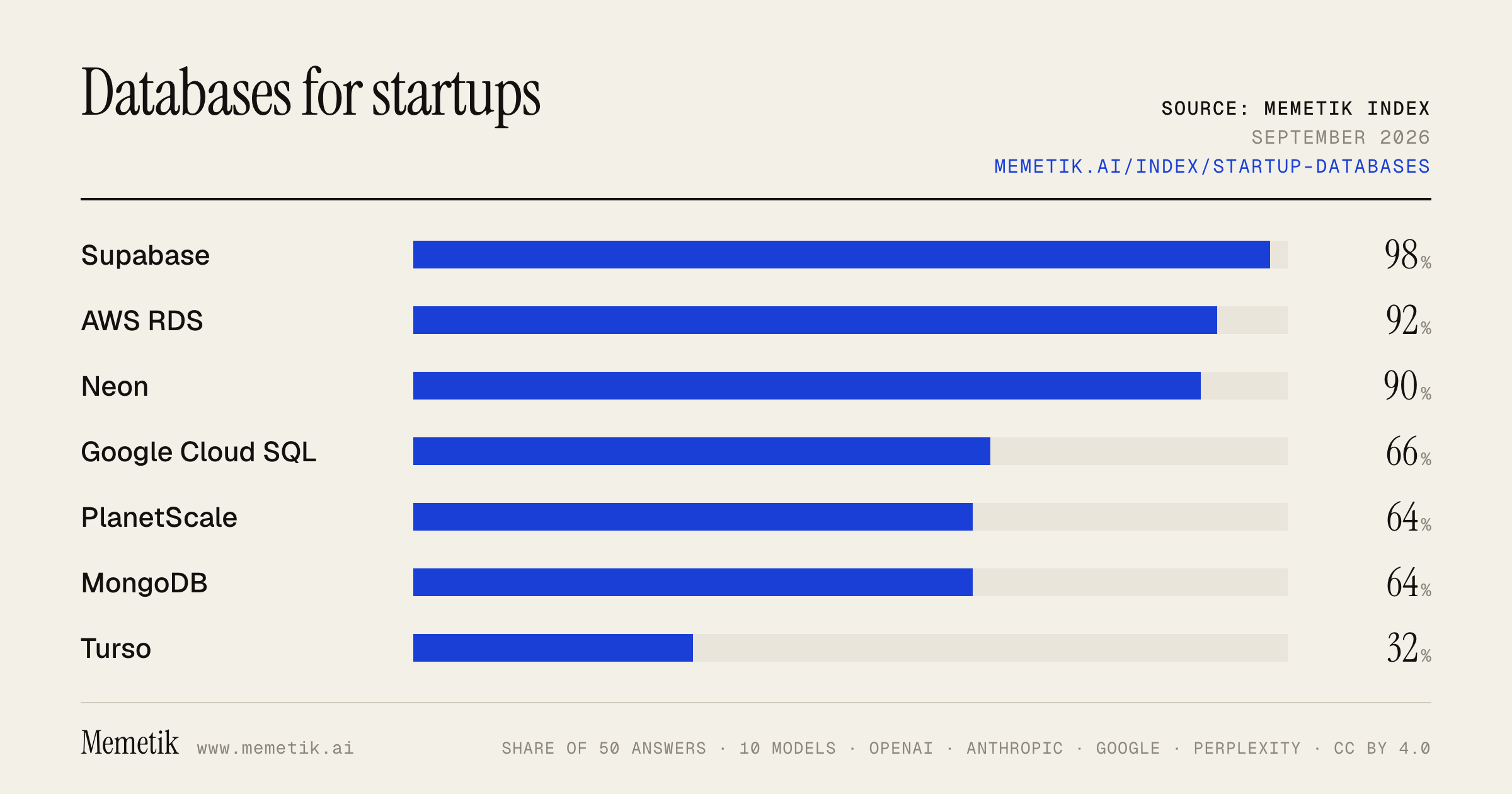
By provider
10 models · 50 answers
OpenAI 3 models · 15 answers
- GPT-5.6 Solgpt-5.6-solmost named: Supabase 100%
- GPT-5.6 Terragpt-5.6-terramost named: AWS RDS 100%
- GPT-5.6 Lunagpt-5.6-lunamost named: Supabase 100%
Anthropic 3 models · 15 answers
- Claude Opus 5claude-opus-5most named: Supabase 100%
- Claude Sonnet 5claude-sonnet-5most named: Supabase 100%
- Claude Fable 5claude-fable-5most named: Supabase 100%
Google 2 models · 10 answers
- Gemini 3.6 Flashgemini-3.6-flashmost named: Supabase 100%
- Gemini 3.5 Flashgemini-3.5-flashmost named: Supabase 100%
Perplexity 2 models · 10 answers
- Sonar Prosonar-promost named: Supabase 100%
- Sonar Reasoning Prosonar-reasoning-promost named: Supabase 100%
Sources the models cited
- northflank.com96
- buildmvpfa.st53
- makerkit.dev46
- whipp.studio35
- devtoolsacademy.com31
- blog.railway.com21
- instaclustr.com21
- checkthat.ai18
- aws.amazon.com16
- reddit.com16
- supabase.com15
- launchtry.com14
ChatGPT via API returns no citations, so it does not contribute here.
The prompts
- What is the best managed database for a startup? Name specific products.
- Which managed database would you recommend to a startup in 2026?
- Compare the top managed database options right now.
- I'm a startup and I need a managed database. What should I use and why?
- Best managed database for a Postgres-based SaaS?
Every answer
Raw model output, unedited
GPT-5.6 TerraWhat is the best managed database for a startup? Name specific products.
There isn’t one universal best, but for **most application startups**, I’d choose a **managed PostgreSQL database** first.

## Best default: **Neon Postgres**
Choose **Neon** if you want a modern, low-ops Postgres setup for a web/SaaS startup—especially with spiky traffic, preview environments, or many short-lived deployments.

- Standard PostgreSQL compatibility, so you avoid a proprietary data model.
- Good fit for Prisma, Django, Rails, Node, Go, etc.
- Database branching is particularly useful for CI and staging.
- Pair it with a connection pooler when using serverless functions.

**My default recommendation for a small team:**
**Neon + Postgres + object storage** (for files) + a separate queue if/when needed.

## Best “backend in a box”: **Supabase**
Choose **Supabase** if you want managed Postgres *plus* authentication, file storage, realtime features, edge functions, and an admin UI.

It is often the fastest route from idea to production for a two- to five-person team. Do not treat it as “just a Firebase replacement,” though: its core database is Postgres, so it remains a relatively portable choice. Supabase provides managed backups, and point-in-time recovery is available for stronger recovery requirements. ([supabase.com](https://supabase.com/docs/guides/platform/backups?utm_source=openai))

## Best if you are all-in on AWS: **Amazon RDS for PostgreSQL** or **Aurora PostgreSQL**
- Pick **RDS PostgreSQL** for predictable workloads and the simplest conventional AWS answer.
- Pick **Aurora PostgreSQL Serverless v2** when usage is highly variable or likely to spike.

Aurora Serverless v2 automatically adjusts database capacity within a minimum/maximum capacity range and is intended for variable, unpredictable workloads; it can be useful, but it is more AWS-specific and generally adds complexity compared with starting on plain managed Postgres. ([docs.aws.amazon.com](https://docs.aws.amazon.com/en_en/AmazonRDS/latest/AuroraUserGuide/aurora-serverless-v2.html?utm_source=openai))

## Best document database option: **MongoDB Atlas**
Choose **MongoDB Atlas** only if your application genuinely benefits from a document model—for example, highly variable nested records, content/catalog data with changing schemas, or a team already expert in MongoDB.

Atlas is a mature managed option with multi-cloud deployment choices, autoscaling, backups, and a path to sharding for very large workloads. But I would **not** select MongoDB merely because it feels easier initially; relational data such as users, billing, permissions, orders, and reporting commonly fit Postgres better. ([mongodb.com](https://www.mongodb.com/products/platform/atlas-database/features?utm_source=openai))

## Other good specific choices
- **Google Cloud SQL for PostgreSQL** — sensible if the rest of your infrastructure is on GCP.
- **Azure Database for PostgreSQL** — sensible for an Azure/Microsoft-stack company.
- **PlanetScale** — strong managed MySQL option, especially for teams deliberately choosing MySQL/Vitess-style scaling.
- **Turso** — compelling for SQLite/edge-heavy applications, offline-first use cases, or lightweight globally distributed read workloads; not my default for a conventional transactional SaaS system.

## My practical shortlist

| Situation | Pick |
|---|---|
| Typical SaaS / B2B startup | **Neon Postgres** |
| Need auth, storage, realtime, and fast prototyping | **Supabase** |
| Existing AWS organization | **RDS PostgreSQL** |
| Spiky, AWS-native workload | **Aurora PostgreSQL Serverless v2** |
| True document-oriented workload | **MongoDB Atlas** |
| Existing GCP organization | **Cloud SQL for PostgreSQL** |
| Intentional MySQL choice | **PlanetScale** |

## What I would avoid at the beginning
Avoid choosing CockroachDB, Cassandra, DynamoDB, a graph DB, or a complex multi-region distributed SQL system unless your requirements clearly demand it. Most startups gain more from:

1. A boring relational schema
2. Good indexes and migrations
3. Automated backups and tested restores
4. Connection pooling
5. Monitoring and query visibility

**Bottom line:** Start with **Neon Postgres** for the best general developer experience, or **Supabase** if its integrated backend features will materially accelerate your first release.
GPT-5.6 TerraWhich managed database would you recommend to a startup in 2026?
**Default recommendation: managed PostgreSQL — start with Neon for a typical early-stage startup.**

Why:
- PostgreSQL handles the core startup workload well: transactional data, flexible queries, JSON fields, full-text search, and a large ecosystem.
- Neon is fully Postgres-compatible and is designed for serverless applications, with autoscaling and usage-based billing—useful when traffic is uncertain and engineering time is scarce. ([neon.com](https://neon.com/use-cases/serverless-apps?a=0cf69a3f-fe60-4ffc-a996-5a528f67c97d&utm_source=openai))
- It also keeps migration options open: you are using Postgres rather than a proprietary database model.

**Choose instead:**
- **Supabase Postgres** if you also want an integrated backend platform—authentication, storage, realtime, and auto-generated APIs—and are comfortable adopting more of one platform.
- **AWS Aurora PostgreSQL Serverless** if you are already committed to AWS, need mature AWS networking/compliance/integration, or expect serious production scale soon. It scales capacity automatically in small increments, can pause at zero capacity for supported configurations, supports replicas and multi-AZ setups, but is usually more operationally and financially complex. ([docs.aws.amazon.com](https://docs.aws.amazon.com/AmazonRDS/latest/AuroraUserGuide/aurora-serverless-v2.html?utm_source=openai))
- **PlanetScale / managed MySQL** only if your team has a clear MySQL/Vitess requirement; it is strong for MySQL at large scale, but I would not choose it over Postgres by default for a greenfield startup. ([planetscale.com](https://planetscale.com/pricing?region=us-west&utm_source=openai))

**Practical 2026 stack:**
1. Neon Postgres as the system of record.
2. Add **Redis** only when measurement shows you need caching, queues, rate limiting, or ephemeral state.
3. Add a dedicated search or analytics store only for requirements Postgres genuinely cannot meet.
4. Keep schema migrations, backups/PITR, connection pooling, and export/restore testing in place from day one.

The short version: **pick Postgres, optimize for developer speed, and avoid a polyglot database architecture until real workload evidence requires it.**
GPT-5.6 TerraCompare the top managed database options right now.
## Short answer

For most new applications, **managed PostgreSQL** is still the best default. Pick the provider based on where your application runs and how far you need to scale:

- **AWS-first:** **Amazon RDS for PostgreSQL** for conventional workloads; **Aurora PostgreSQL** when you need higher availability, read scale, or elastic/serverless capacity.
- **Google Cloud–first:** **Cloud SQL for PostgreSQL** for simplicity; **AlloyDB** for demanding PostgreSQL workloads; **Spanner** only when global, strongly consistent horizontal scale is a hard requirement.
- **Document-model / flexible-schema app:** **MongoDB Atlas**.
- **Fast product development with built-in backend services:** **Supabase**.
- **Use a mainstream managed database rather than a specialized distributed SQL or NoSQL system unless your workload proves you need one.**

## Comparison of leading managed options

| Option | Data model / compatibility | Best for | Biggest strengths | Main trade-offs |
|---|---|---|---|---|
| **Amazon RDS** | PostgreSQL, MySQL, MariaDB, SQL Server, Oracle, Db2 | Standard production relational apps on AWS | Familiar engines, automated backups/patching/failover, broad engine choice, straightforward operations | Vertical scaling and replica architecture can become limiting at very high scale; less cloud-native than Aurora |
| **Amazon Aurora** | PostgreSQL- or MySQL-compatible | High-availability SaaS, high-throughput apps, AWS-native systems | Cloud-designed storage/replication, global options, serverless capacity, strong AWS integration | Usually more complex and can have a higher cost floor than plain RDS; AWS-specific operational model |
| **Google Cloud SQL** | PostgreSQL, MySQL, SQL Server | Simple relational workloads on GCP, lift-and-shift | Managed conventional engines, lower-complexity choice, standard drivers and tooling | Not intended for extreme global write scale or highly demanding PostgreSQL performance |
| **Google AlloyDB** | PostgreSQL-compatible | Performance-sensitive Postgres on GCP | PostgreSQL compatibility with an architecture aimed at substantially higher transactional/analytical performance | More specialized and generally less portable than ordinary Postgres; evaluate actual workload economics |
| **Google Cloud Spanner** | Distributed relational SQL, plus non-relational capabilities | Global systems needing strong consistency and very high availability | Horizontal/global scale with strong consistency and near-zero operational work | Data-model, query-design, and cost considerations make it overkill for ordinary CRUD applications |
| **MongoDB Atlas** | Document database | Flexible schemas, JSON-centric applications, developer speed across clouds | Fully managed MongoDB available on AWS, Azure, and GCP; flexible document modeling and multi-cloud placement | Not relational SQL; joins, integrity constraints, and complex reporting need different modeling discipline |
| **Supabase** | Full PostgreSQL plus hosted Auth, Storage, Realtime, Functions | Startups, internal tools, web/mobile backends | A real Postgres database rather than an abstraction; excellent developer experience and integrated backend primitives | More opinionated platform surface; assess scaling, networking, and support requirements for critical enterprise deployments |

Amazon RDS is the pragmatic AWS choice when you want managed versions of familiar database engines. Aurora is the AWS upgrade path when the application needs a cloud-native PostgreSQL/MySQL-compatible platform with stronger availability, global capabilities, or elastic capacity. AWS itself positions RDS for broad engine compatibility and standard relational workloads, versus Aurora for higher-scale cloud-native deployments. ([aws.amazon.com](https://aws.amazon.com/rds/features/?utm_source=openai))

On Google Cloud, Cloud SQL is the conventional managed relational service. AlloyDB is the performance-oriented PostgreSQL-compatible alternative, while Spanner is the specialized option for strongly consistent, globally scalable systems. ([cloud.google.com](https://cloud.google.com/sql?authuser=1&utm_source=openai))

MongoDB Atlas is a leading choice when documents—not relational tables—are the natural representation of your data, and it is notable for supporting deployment across the three major clouds. ([mongodb.com](https://www.mongodb.com/docs/atlas/?msockid=15b7516041dc6f8a3f5d4727408b6ed7&utm_source=openai)) Supabase is especially compelling when you want PostgreSQL plus an integrated application-backend stack; each project receives a full Postgres database, with managed backups and paid-plan point-in-time recovery. ([supabase.com](https://supabase.com/docs/guides/database/overview?utm_source=openai))

## Which one should you choose?

### 1. Default choice for a new SaaS or business application
**Managed PostgreSQL.**

- On AWS: **RDS PostgreSQL** first.
- On GCP: **Cloud SQL for PostgreSQL** first.
- Choose **Aurora PostgreSQL** or **AlloyDB** only if performance, HA, read scaling, or workload volatility warrants their added platform specificity.
- Choose **Supabase** if its auth/realtime/storage stack materially accelerates your team.

This keeps SQL portability, mature tooling, transactions, constraints, reporting, and ecosystem support.

### 2. AWS app with serious scale or variable traffic
**Aurora PostgreSQL**.

Aurora offers PostgreSQL/MySQL compatibility, serverless configuration, replicas, Global Database capabilities, and AWS-native operational integration. Its elastic model can be attractive for spiky traffic, but benchmark and cost-model it rather than assuming “serverless” means cheaper. Aurora pricing may include compute capacity, storage, and—in its standard configuration—request-based I/O; its I/O-Optimized configuration changes that trade-off. ([aws.amazon.com](https://aws.amazon.com/compare/aurora-and-rds/?utm_source=openai))

### 3. Global financial, inventory, identity, or multi-region transactional system
**Cloud Spanner**—or a distributed-SQL offering such as Aurora DSQL if you are committed to AWS.

Use this class only where you genuinely need **cross-region writes plus strong consistency and high availability**. Otherwise, the operational and data-model simplicity of normal managed Postgres is usually more valuable. Google describes Spanner as providing strong consistency and global scale, while AWS describes Aurora DSQL as a serverless distributed relational database optimized for transactional workloads. ([cloud.google.com](https://cloud.google.com/sql?authuser=1&utm_source=openai))

### 4. Flexible product catalog, content, event, or JSON-heavy app
**MongoDB Atlas**.

It is a good fit where data changes shape frequently and documents are read/written as cohesive aggregates. Do not select it merely to avoid schema design: relational modeling and constraints can be a major advantage for orders, payments, accounting, permissions, and other integrity-heavy domains.

### 5. Small team optimizing for time-to-market
**Supabase**.

You get managed Postgres plus integrated services commonly needed by web and mobile apps. It is often a better choice than assembling a database, auth system, realtime layer, object storage, and API layer individually—provided its platform conventions suit your needs.
- https://aws.amazon.com/rds/features/?utm_source=openai
- https://cloud.google.com/sql?authuser=1&utm_source=openai
- https://www.mongodb.com/docs/atlas/?msockid=15b7516041dc6f8a3f5d4727408b6ed7&utm_source=openai
- https://supabase.com/docs/guides/database/overview?utm_source=openai
- https://aws.amazon.com/compare/aurora-and-rds/?utm_source=openai
GPT-5.6 TerraI'm a startup and I need a managed database. What should I use and why?
## Short answer

For most startups: **use managed PostgreSQL**, ideally from the same cloud where your app runs:

- **AWS app → Amazon RDS for PostgreSQL**
- **Google Cloud app → Cloud SQL for PostgreSQL**
- **If you need a fast all-in-one backend rather than only a database → consider a Postgres-based backend platform such as Supabase, but keep your application architecture portable.**

PostgreSQL is the safest default because it handles the core startup workload well—users, payments, permissions, transactions, reporting, JSON data, full-text search, and often even vector search—without committing you early to a specialized database.

## Why this is the default

A startup’s biggest database risk usually isn’t raw scale; it’s **operational distraction**: backups, upgrades, failover, connection management, security, and recovering from an accidental deletion. A managed service takes on much of that burden while preserving standard PostgreSQL tooling and skills.

Cloud SQL, for example, manages backups, failover, replication, encryption, patching, and capacity increases; it also supports point-in-time recovery and read replicas. Amazon RDS offers managed PostgreSQL with automated backups and Multi-AZ configurations that maintain a standby in a separate availability zone and can automatically fail over. ([cloud.google.com](https://cloud.google.com/sql/postgresql?utm_source=openai))

## My recommendation by situation

| Your situation | Use | Why |
|---|---|---|
| You’re already on AWS | **RDS for PostgreSQL** | Least infrastructure friction; solid managed Postgres, private networking, backups, replicas, and a conventional operational model. |
| You’re already on GCP | **Cloud SQL for PostgreSQL** | Natural fit with Cloud Run, GKE, BigQuery, IAM, VPC, and Google’s managed operations. ([cloud.google.com](https://cloud.google.com/sql/postgresql?utm_source=openai)) |
| You’re building an early B2B/SaaS web app and want maximum speed | **Managed Postgres, single primary initially** | You get transactions, flexible schemas via JSONB when needed, mature ORMs, and avoid premature distributed-system complexity. |
| You need high availability because downtime is expensive | **RDS/Cloud SQL with HA enabled** | You pay more, but get a standby/failover architecture rather than relying on one database machine. RDS Multi-AZ specifically provisions a standby in another availability zone. ([aws.amazon.com](https://aws.amazon.com/rds/postgresql/pricing/?utm_source=openai)) |
| You expect heavy analytics from day one | **Postgres for OLTP + warehouse later** | Keep customer-facing transactions in Postgres; add BigQuery/Snowflake/ClickHouse only when analytical queries actually affect product performance or cost. |
| You need extreme global, multi-region writes on day one | **Evaluate a distributed SQL database** | This is one of the few cases where plain managed Postgres may not be the best long-term fit—but it is a costly complexity jump, so validate the need first. |

## What I would actually deploy first

For a typical production MVP:

1. **One managed PostgreSQL primary** in the same region as your app.
2. **Automated daily backups + point-in-time recovery** enabled.
3. **Private network access only**—do not expose the database publicly unless there is a compelling, well-secured reason.
4. **A connection pooler** or server-side connection management, especially for serverless workloads.
5. **Encryption, least-privilege database roles, secrets manager, and alerting** for CPU, storage, connections, replication/backup failures, and slow queries.
6. **Staging database separate from production.**
7. Add **high availability** only once downtime has a real business cost—or before launch if you are handling money, regulated data, or contractual uptime commitments.

Cloud SQL documents encryption in transit and at rest, IAM/VPC-oriented access controls, automated backups, and HA/failover capabilities; RDS offers Single-AZ and Multi-AZ options, with Multi-AZ designed for greater durability and availability. ([cloud.google.com](https://cloud.google.com/sql/postgresql?utm_source=openai))

## Cost advice

Start with a modest single-zone/single-instance production database if you are pre–product-market fit, but **do not skip backups and recovery testing**. HA generally costs materially more because it requires standby capacity and replication; on RDS, Multi-AZ maintains a standby database instance in another availability zone. ([aws.amazon.com](https://aws.amazon.com/rds/postgresql/pricing/?utm_source=openai))

Avoid long-term capacity commitments until usage is stable. AWS and Google both offer commitment-based discounts for steady workloads, but flexibility is generally more valuable in the early stages. ([aws.amazon.com](https://aws.amazon.com/rds/pricing/?utm_source=openai))

## What not to do

- **Don’t self-host Postgres** just to save a small amount of money. The operational risk is rarely worth it for a startup.
- **Don’t start with MongoDB, Redis, Elasticsearch, a graph DB, and a warehouse** unless a specific product requirement demands them.
- **Don’t use Redis as your system of record.**
- **Don’t treat database backups as sufficient**—periodically test a restore.
- **Don’t make your schema permanently vendor-specific.** Use normal Postgres migrations, keep an export/restore path, and avoid building your core business logic around proprietary add-ons.

## Bottom line

If you have not chosen a cloud yet, choose based on your broader application stack—not the database alone—and deploy **managed PostgreSQL** there.

If you are on AWS: **RDS for PostgreSQL**.
If you are on GCP: **Cloud SQL for PostgreSQL**.

That gives you the best combination of developer familiarity, transactional correctness, operational safety, hiring availability, ecosystem maturity, and a credible path from MVP to substantial scale.
GPT-5.6 TerraBest managed database for a Postgres-based SaaS?
## Short answer

For most Postgres-based SaaS products, choose **the managed PostgreSQL service in the same cloud as your application**:

- **On AWS:** **Amazon RDS for PostgreSQL** is the default best choice.
- **On GCP:** **Cloud SQL for PostgreSQL** is the equivalent default.
- Upgrade to **Aurora PostgreSQL** only when you have a demonstrated need for its higher-end availability/read-scaling architecture—not merely because you expect to grow.

If you have **not** committed to a cloud, I’d pick **AWS RDS for PostgreSQL with Multi-AZ** for a conventional production SaaS: it is boring, mature, portable enough, and keeps you close to standard PostgreSQL.

## Recommended setup for a typical production SaaS

Start with:

1. **RDS PostgreSQL Multi-AZ** (or Cloud SQL configured as regional HA)
2. **Private network access only**; no publicly exposed database
3. **Connection pooler**—PgBouncer or your provider’s supported equivalent
4. **Automated backups + point-in-time restore**, and regularly test restores
5. **One primary database with tenant IDs and strong authorization/RLS**, unless contractual isolation requires per-tenant databases
6. **Read replica only after measurements show read pressure**
7. Monitoring for slow queries, connection saturation, lock waits, replication lag, CPU, memory, and storage growth

On AWS, RDS PostgreSQL read replicas use PostgreSQL’s native replication and are read-only until promoted; they are a good straightforward path for scaling reads and disaster-recovery replicas. ([docs.aws.amazon.com](https://docs.aws.amazon.com/AmazonRDS/latest/UserGuide/USER_PostgreSQL.Replication.ReadReplicas.html?utm_source=openai))

## When Aurora PostgreSQL is worth it

Choose **Aurora PostgreSQL** if you specifically need one or more of:

- Very high read traffic with multiple reader instances
- More demanding regional resilience / recovery requirements
- Cross-region database topology as a first-class requirement
- A large enough workload that its operational and cost tradeoffs are justified

Aurora PostgreSQL supports Aurora Global Database for cross-region read capability and availability goals, with up to 10 read-only secondary clusters in other Regions. ([docs.aws.amazon.com](https://docs.aws.amazon.com/en_en/AmazonRDS/latest/AuroraUserGuide/Aurora.Replication.html?utm_source=openai))

I would **not** start a normal early-stage SaaS on Aurora by default. RDS PostgreSQL is usually simpler to reason about, closer to ordinary Postgres operations, and plenty capable for a long time.

## If you run on GCP

Use **Cloud SQL for PostgreSQL with regional HA**. Its HA mode uses a primary and standby in separate zones with synchronous replication; Google recommends regional HA for production rather than zonal instances. ([docs.cloud.google.com](https://docs.cloud.google.com/sql/docs/postgres/high-availability?authuser=8&hl=en&utm_source=openai))

For a true regional-outage plan, add a cross-region replica and rehearse failover. Same-region HA does **not** by itself protect you from loss of the whole region; Cloud SQL’s cross-region replica replication is asynchronous, so your cross-region RPO is not necessarily zero. ([docs.cloud.google.com](https://docs.cloud.google.com/sql/docs/postgres/intro-to-cloud-sql-disaster-recovery?hl=en&utm_source=openai))

## My decision table

| Situation | Best choice |
|---|---|
| Standard B2B/SaaS app on AWS | **RDS PostgreSQL Multi-AZ** |
| Standard B2B/SaaS app on GCP | **Cloud SQL PostgreSQL, regional HA** |
| Major read scale or stringent multi-region needs on AWS | **Aurora PostgreSQL** |
| Small prototype / internal app | A lower-cost managed Postgres tier is fine, but plan a production migration path |
| Regulated customers demanding hard tenant isolation | Managed Postgres plus per-tenant DB/schema strategy, based on requirements |
| You need built-in auth, storage, realtime, and a rapid developer platform | Consider a Postgres platform—but treat that as an application-platform choice, not just a database decision |

## Bottom line

**Pick RDS PostgreSQL Multi-AZ if you’re on AWS; Cloud SQL PostgreSQL regional HA if you’re on GCP.** Keep the database in the same region and cloud as your compute, use a pooler, enable PITR, and test recovery. Move to Aurora only when workload data—not anticipation—shows that you need it.
- https://docs.aws.amazon.com/AmazonRDS/latest/UserGuide/USER_PostgreSQL.Replication.ReadReplicas.html?utm_source=openai
- https://docs.aws.amazon.com/en_en/AmazonRDS/latest/AuroraUserGuide/Aurora.Replication.html?utm_source=openai
- https://docs.cloud.google.com/sql/docs/postgres/high-availability?authuser=8&hl=en&utm_source=openai
- https://docs.cloud.google.com/sql/docs/postgres/intro-to-cloud-sql-disaster-recovery?hl=en&utm_source=openai
Claude Sonnet 5What is the best managed database for a startup? Name specific products.
Choosing the best managed database for a startup depends on your data model, budget, and scaling needs. Here's a breakdown of the top options by use case:

## Best Overall Picks

**Supabase** — A popular open-source Firebase alternative built on PostgreSQL. It gives startups a full backend (auth, storage, real-time subscriptions) alongside a managed Postgres database, with a generous free tier. Great for teams that want to move fast without managing infrastructure.

**Neon** — Serverless Postgres with instant branching (great for dev/test environments), scale-to-zero pricing, and a strong free tier. Popular with startups because you only pay for what you use and it separates storage/compute.

**PlanetScale** — MySQL-compatible, serverless, built on Vitess (the tech that powers YouTube's database). Known for zero-downtime schema changes via branching/deploy requests, which is valuable for fast-iterating startups.

**Amazon RDS / Aurora** — The default choice if you're already on AWS. Aurora (Postgres or MySQL compatible) offers strong performance and auto-scaling storage, but pricing and complexity are higher — better suited once you have more predictable traffic or need enterprise-grade reliability.

**Google Cloud SQL / AlloyDB** — Solid if you're in the GCP ecosystem; Cloud SQL is simpler/cheaper, AlloyDB is a higher-performance Postgres-compatible option for scaling later.

**Azure Cosmos DB / Azure Database for PostgreSQL** — Best if you're committed to Microsoft's cloud stack.

## By Use Case

- **Relational/SQL (most startups' default choice):** Supabase, Neon, or PlanetScale for early-stage; Amazon RDS/Aurora or Google Cloud SQL once you scale.
- **NoSQL/document store:** **MongoDB Atlas** — the managed version of MongoDB, very popular for startups needing flexible schemas, with a free tier and easy scaling.
- **Key-value/caching:** **Upstash** (serverless Redis) or **Redis Cloud** — lightweight, pay-per-request options good for caching, sessions, or rate limiting.
- **Vector database (AI/LLM apps):** **Pinecone**, **Weaviate Cloud**, or **Supabase's pgvector** if you want to keep everything in Postgres.
- **Serverless SQLite-like/edge:** **Turso** (libSQL/SQLite at the edge) or **Cloudflare D1** — good for lightweight, globally distributed apps.

## Practical Recommendation

For most early-stage startups building a typical web/mobile app, **Supabase or Neon (Postgres)** hits the sweet spot: generous free tiers, minimal ops overhead, and room to grow. If you need a document/NoSQL model instead, **MongoDB Atlas** is the standard choice. As you scale and need tighter integration with cloud infra you're already using, migrating to **Amazon RDS/Aurora** or **Google Cloud SQL** becomes the natural next step.

Want recommendations tailored to your specific tech stack (e.g., Node.js, Next.js, AI features) or expected scale?
Claude Sonnet 5Which managed database would you recommend to a startup in 2026?
Choosing a managed database for a startup depends heavily on your data model, team expertise, and growth plans. Let me get some current information to give you an up-to-date, well-grounded recommendation for 2026.
Based on current guidance for 2026, here's a practical recommendation:

## For most startups: **Supabase**

Multiple sources converge on this as the default pick.
If you're building a web-based SaaS or startup, use Supabase, as it gives you PostgreSQL with authentication, real-time subscriptions, storage, and edge functions in one platform.
 The reasoning is practical:
it combines PostgreSQL with built-in authentication, Row Level Security for multi-tenancy, real-time subscriptions, file storage, and edge functions, so you get a complete backend without stitching together five services.
 And critically for early-stage startups,
the free tier is generous enough to validate your idea, and the pricing scales predictably.


Another independent source agrees:
PostgreSQL is the best database for a SaaS startup in 2026 — it's the most feature-rich open-source relational database, handles complex data relationships cleanly, has excellent JSON/JSONB support, and is supported by every managed database platform worth using.
 That same source notes
Supabase is used on the majority of SaaS builds, with integrated auth and RLS making multi-tenancy significantly easier to implement correctly.


## Alternatives depending on your needs

| Situation | Recommended Option |
|---|---|
| Want serverless Postgres with branching (great for CI/dev workflows) | **Neon** —
serverless Postgres with excellent branching, generous free tier, though occasional reliability hiccups.
 |
| Need proven scale + rock-solid reliability, comfortable with MySQL | **PlanetScale** — though note
MySQL is PlanetScale's database of choice, and PlanetScale recently ended their free tier.
 |
| Edge computing, mobile sync, or embedded/SQLite use case | **Turso** —
good when SQLite is the right fit: read-heavy apps, edge computing, mobile sync, or embedded scenarios.
 |
| Flexible/document schema (less structured data) | **MongoDB Atlas** — though
it fits flexible-schema products but needs a specialist managing shard keys, not a generalist.
 |
| Deep in AWS/GCP already, want native integration | **AWS RDS/Aurora or Google Cloud SQL** — good if
you need provider-native IAM, networking, region coverage, and established cloud operations as hard requirements.
 |
| Mobile-first app in Google ecosystem | **Firebase** |
| Heavy analytics/OLAP alongside transactional data | **ClickHouse** (or Postgres + ClickHouse combo) |

## Bottom line
Unless you have a specific reason not to (existing MySQL codebase, heavy document-store needs, or specific analytics requirements), **start with Supabase (Postgres)**. It gives you the most flexibility since
PostgreSQL is the default choice for web apps, powering Supabase, Neon, PlanetScale, Xata, and Timescale, and handles 90% of startup use cases.
 You avoid lock-in (it's just Postgres under the hood, so you can migrate later), and you get auth/storage/realtime bundled in — which saves real engineering time when you're a small team trying to ship fast.

If you tell me more about your stack (e.g., serverless vs. traditional backend, expected scale, team's existing SQL/NoSQL experience), I can narrow this down further.
Claude Sonnet 5Compare the top managed database options right now.
I'll research the current landscape of managed database services to give you an accurate comparison.
Let me get a bit more detail on specific pricing and features for the major cloud-native and specialized platforms.
Based on current research, here's a comparison of the top managed database options right now, spanning both "big cloud" providers and modern developer-focused platforms.

## Big Cloud Providers (broad engine support, enterprise-grade)

**AWS RDS / Aurora** — The default choice for teams already on AWS. Covers Postgres, MySQL, MariaDB, SQL Server, and Oracle, plus the Aurora-managed variants for higher performance/availability.
Amazon Web Services is the right default for teams that must standardize identity, networking, and automation across many database engines.


**Google Cloud SQL / AlloyDB** — Best if you're already GCP-native.
It fits when GCP-native teams need managed databases plus consistent IAM and logging governance across workloads.


**Azure SQL Database / Cosmos DB** — Strongest pick for Microsoft-centric shops, especially those using SQL Server, .NET, or heavy Azure AD/enterprise compliance requirements.

## Developer-Focused / Platform-as-a-Service Options

**Northflank** — Positions itself as a broader platform rather than a single-database service.
It offers managed PostgreSQL, MySQL, MongoDB, Redis, MinIO, Memcached, and RabbitMQ, running on Northflank's managed cloud or self-serve BYOC into AWS, GCP, Azure, Oracle, CoreWeave, Civo, on-premises, and bare-metal.

It lets you deploy databases alongside your applications, workers, and CI/CD in the same control plane.


**Supabase** —
Managed PostgreSQL bundled with authentication, real-time subscriptions, and auto-generated APIs — best for MVPs and SaaS teams that want a full backend layer out of the box.
 Great if you want Postgres plus a full backend-as-a-service without stitching together separate auth/API layers.

**PlanetScale** —
Managed MySQL and PostgreSQL with schema branching and non-blocking migrations via Vitess.
 Particularly appealing for teams that want Git-like branching workflows for schema changes and horizontal scaling built on Vitess.

**MongoDB Atlas** — The go-to for document/NoSQL workloads.
It's a managed cloud database service for MongoDB, a NoSQL document database, running on AWS, Azure, and GCP.
 Pricing is tiered:
the Free tier is $0/hour with 512MB storage on shared CPU/RAM; the Flex tier is $0.011/hour (up to $30/month) with up to 5GB on shared resources; and the Dedicated tier starts at $0.08/hour (~$56.94/month) with 10GB storage, 2GB RAM, and 2 vCPUs for production workloads.
 Note that
MongoDB Atlas supports MongoDB only, and there is no self-serve BYOC
 — enterprise/private-cloud deployment requires talking to sales.

## How to Choose


The right platform depends on which database engines your stack uses, whether you need to run inside your own cloud account, and how much you need beyond the database itself.
 A few practical decision points:

- **Already committed to one cloud?** Just use that cloud's native managed database (RDS/Aurora, Cloud SQL/AlloyDB, or Azure SQL) — integration with IAM, networking, and billing is seamless.
- **Want Postgres + instant backend (auth, APIs, realtime)?** Supabase is purpose-built for this.
- **Need painless schema migrations and branching at scale?** PlanetScale's Vitess-based branching model stands out.
- **Running multiple database types (Postgres, Mongo, Redis, etc.) and want one control plane, possibly across clouds?** Northflank or similar multi-engine platforms avoid needing separate vendors.
The tradeoff with most single-purpose providers is scope — most managed database services cover one or two database types on their own infrastructure with no path to BYOC, which works fine until your stack grows, compliance requires it, or you need multiple engines without adding a second provider.

- **Pure MongoDB/document workloads?** Atlas remains the standard, though it's locked to MongoDB only.

If you tell me your stack (cloud provider preference, SQL vs NoSQL, team size, compliance needs, or budget), I can narrow this down to a specific recommendation.
Claude Sonnet 5I'm a startup and I need a managed database. What should I use and why?
This depends heavily on your specific needs, but let me walk you through the key considerations and options so you can make a good decision.

## First, answer a few questions about your app

1. **What's your data shape?** Relational (users, orders, transactions with relationships) vs. document/flexible (content, catalogs, logs) vs. key-value (caching, sessions)?
2. **What's your scale expectation?** A few hundred users vs. planning for viral growth?
3. **What's your team's expertise?** SQL-comfortable vs. more comfortable with NoSQL/JSON?
4. **Budget sensitivity?** Some options have generous free tiers, others scale cost with usage quickly.
5. **Do you need to be cloud-agnostic** or are you already committed to AWS/GCP/Azure?

## Common good choices for startups

**Postgres-based managed services** (most popular default for startups):
- **Supabase** – Postgres + auto-generated APIs, auth, storage, realtime subscriptions built in. Great if you want a "backend-as-a-service" feel with a real relational DB underneath. Generous free tier.
- **Neon** – Serverless Postgres with branching (like git branches for your DB), scales to zero when idle, so you don't pay for unused compute. Great for early-stage cost control.
- **AWS RDS / Aurora** – If you're already on AWS, most battle-tested, but more ops overhead and less startup-friendly pricing at small scale.
- **Railway / Render** – Simple managed Postgres, easy to set up, developer-friendly, good for MVPs.

**NoSQL / document options**:
- **MongoDB Atlas** – If your data is naturally document-shaped (nested JSON-like objects) and you want flexible schema. Strong free tier, easy scaling.
- **Firebase Firestore** – If you're building fast and want realtime sync + auth + hosting bundled, especially for mobile/web apps with less complex relational needs.

**Key-value / caching**:
- **Upstash (Redis)** – Serverless Redis, pay-per-request, great for caching, rate limiting, sessions.

## My general recommendation for most startups

Unless you have a strong reason not to, **start with Postgres** (via Supabase or Neon). Reasons:
- Relational databases handle the vast majority of startup use cases (users, billing, relationships between entities) better than NoSQL, even if your data feels "document-like" at first — Postgres has excellent JSON support (`jsonb`) so you get flexibility without giving up transactions/joins.
- SQL skills transfer everywhere; you won't paint yourself into a corner.
- Both Supabase and Neon let you start free and scale gradually — important for controlling burn rate.
- Migrating away later (if you outgrow it) is much easier from Postgres than from a niche NoSQL system.

## When to deviate from Postgres

- If you're doing **heavy full-text search or analytics** at scale → consider adding Elasticsearch or a warehouse (e.g., ClickHouse, BigQuery) alongside your primary DB.
- If your product is **realtime-collaboration heavy** (like a chat app or collaborative doc editor) → Firestore or a realtime-focused DB might reduce engineering effort.
- If you're doing **massive write-heavy, loosely structured logging/event data** → DynamoDB or MongoDB might fit better.

If you tell me more about your product (what kind of app, expected scale, team's background, and cloud preference), I can give you a much more specific recommendation.
Claude Sonnet 5Best managed database for a Postgres-based SaaS?
There's no single "best" — it really depends on your team's stage, stack, and priorities. Here's how the main options break down for a Postgres-based SaaS:

## Top picks by scenario

**Supabase — best overall default for early-stage SaaS**

It bundles managed PostgreSQL with authentication, real-time subscriptions, and auto-generated APIs, making it best for MVPs and SaaS teams that want a full backend layer out of the box.
 Many teams use it specifically because
the integrated auth and RLS make multi-tenancy significantly easier to implement correctly.
 Trade-offs:
it's PostgreSQL-only with no Redis, MongoDB, or messaging layer, and the managed offering runs on Supabase's AWS infrastructure with no BYOC option.
 Pricing starts free,
free with 500MB database, Pro at $25/month, Team at $599/month, Enterprise custom.


**Neon — best for serverless/variable workloads and dev workflows**

Neon offers serverless PostgreSQL with automatic scale-to-zero and database branching, ideal for variable workloads and development environments.
 It's particularly popular for
variable workloads and branch-per-PR development workflows.


**AWS RDS / Aurora — best if you're already on AWS or need enterprise-grade SLAs**

RDS is the standard managed Postgres on AWS, while Aurora is the AWS-native, storage-rearchitected version with faster failover and multi-region Global Database support. Both are battle-tested, well-integrated with IAM, VPC, and CloudWatch, and approved by most enterprise security teams.
 This is the safe choice
if your organization runs on AWS and procurement is the bottleneck.


**Crunchy Data or Aurora — best for OLTP-heavy SaaS with occasional analytics**
For a typical SaaS transactional workload,
OLTP-first SaaS with occasional reporting queries does well on Aurora PostgreSQL or Crunchy Data — both handle production OLTP cleanly, though both will struggle once a single dashboard query scans hundreds of millions of rows.


**CockroachDB — best for global multi-region SaaS**
If you need strict multi-region consistency,
CockroachDB offers a distributed SQL database with PostgreSQL wire compatibility, multi-region survivability, and horizontal scaling — best for globally distributed applications that require strong consistency across regions.


**PlanetScale — best for scale + branching workflows**

PlanetScale is a good option for production-grade Postgres with NVMe-class latency, branching, and strong HA clusters.


## Practical recommendation

- **Solo founder / early MVP:** Supabase — fastest path to a working backend with auth included.
- **Already on Vercel/Next.js, want pure DB + branching:** Neon.
- **Enterprise buyer, compliance-heavy, already in AWS:** RDS or Aurora.
- **Scaling past a single instance / heavy analytics mixed with OLTP:** Aurora, Crunchy Data, or AlloyDB depending on cloud preference.
- **True multi-region global consistency requirement:** CockroachDB.

If you tell me your team size, cloud preference, and whether you need bundled auth/storage vs. pure database, I can narrow this down further.
- https://northflank.com/blog/top-managed-database-services
- https://whipp.studio/blog/posts/best-database-saas-startup/
- https://northflank.com/blog/best-postgresql-hosting-providers
- https://blog.railway.com/p/best-postgresql-hosting-2026
- https://www.definite.app/blog/best-managed-postgres-for-analytics
- https://dreamlit.ai/blog/top-10-managed-postgres-providers
Gemini 3.6 FlashWhat is the best managed database for a startup? Name specific products.
For almost all early-stage startups, **PostgreSQL** is the standard, best-fit database engine. It is open-source, supports JSON/unstructured data natively, handles multi-tenancy, and has built-in extensions like `pgvector` for AI embeddings.

The "best" managed database depends on the startup's architectural approach and developer workflow:

---

### 1. The Best "Batteries-Included" Backend: **Supabase**
* **Engine:** Managed PostgreSQL
* **Best For:** Early-stage startups, MVP builds, small engineering teams (1–5 devs) looking to move fast without building repetitive backend infrastructure.
* **Why it’s great:** Supabase is a complete Backend-as-a-Service (BaaS). It gives you a fully managed PostgreSQL database bundled with **built-in Authentication**, **File Storage**, **Realtime subscriptions**, and **Edge Functions**.
* **Key Benefit:** Cuts months off initial development time since you don’t need to configure separate auth (e.g., Auth0) or object storage (S3).

---

### 2. The Best Pure Serverless & Developer Workflow: **Neon**
* **Engine:** Serverless PostgreSQL
* **Best For:** Fast-moving engineering teams, Jamstack / Vercel-heavy applications, and environments with fluctuating or unpredictable traffic.
* **Why it’s great:** Neon decouples compute from storage. It features true **scale-to-zero** (you pay nothing when traffic drops to zero) and **instant Copy-on-Write Database Branching**.
* **Key Benefit:** Branching allows developers to branch their production database into isolated test environments for pull requests or schema migrations instantly, mimicking a Git workflow.

---

### 3. The Best for Schema Safety & Massive Scale: **PlanetScale**
* **Engine:** Serverless MySQL (via Vitess) & PostgreSQL
* **Best For:** High-growth startups, mission-critical production apps, and teams scaling relational data rapidly (e.g., Cursor, Intercom).
* **Why it’s great:** Built on Vitess (the tech behind YouTube's data scaling), PlanetScale offers unmatched uptime, non-blocking schema migrations, and zero-downtime alterations even under heavy load.
* **Key Benefit:** Prevents production database locking during schema changes and lets you scale horizontally through sharding if traffic surges.

---

### 4. The Best Flexible Multi-Engine Platform: **Northflank / Aiven**
* **Engine:** PostgreSQL, MySQL, MongoDB, Redis, Kafka, etc.
* **Best For:** Startups that require a combination of databases (e.g., Postgres for transactional data + Redis for caching + MongoDB for document storage).
* **Why it’s great:** Instead of locking you into one vendor, platforms like **Northflank** or **Aiven** offer managed versions of multiple open-source data stores in a single control panel or deployed into your own cloud (Bring Your Own Cloud / AWS).

---

### 5. The Best for Pure NoSQL / Flexible Schemas: **MongoDB Atlas**
* **Engine:** Document NoSQL
* **Best For:** Applications with highly rapidly changing, unstructured data, dynamic catalog items, or teams heavily experienced in JSON documents.
* **Why it’s great:** Fully managed MongoDB with automated scaling, global distribution, and built-in search capabilities.

---

### 6. The Standard Cloud Infrastructure: **AWS RDS (or GCP Cloud SQL)**
* **Engine:** PostgreSQL, MySQL, MariaDB, SQL Server
* **Best For:** Startups that have already received AWS/GCP credits (e.g., AWS Activate) or have strict SOC2/enterprise compliance requirements.
* **Why it’s great:** The enterprise standard. Less developer-friendly "magic" than Supabase or Neon, but highly dependable, customizable, and easy to keep within a single cloud ecosystem.

---

### Summary Recommendation
* **Pick Supabase** if you want to launch an MVP quickly without setting up separate authentication and storage APIs.
* **Pick Neon** if you already have custom auth/backend services and want a developer-friendly, serverless Postgres database with Git-like PR workflows.
* **Pick PlanetScale** if schema stability, high concurrency, and uptime are your primary concerns.
Gemini 3.6 FlashWhich managed database would you recommend to a startup in 2026?
Choosing the right managed database depends heavily on your application's architecture, team size, and growth strategy. However, **PostgreSQL** remains the overwhelming "default choice" for startups. Thanks to native JSON support, full-text search, and extensions like `pgvector` (for AI/embeddings), Postgres can act as a document store, search engine, and vector database all in one—delaying the need to manage complex, multi-database setups.

The best specific recommendations depend on your stack and goals:

---

### 1. The Best All-in-One Platform: **Supabase**
* **Type:** Managed PostgreSQL with platform features
* **Best for:** Early-stage startups, small teams, SaaS, and rapid MVP development.
* **Why pick it:**
  * **Batteries included:** In addition to a managed Postgres database, Supabase provides authentication, auto-generated APIs, real-time subscriptions, file storage, and edge functions out of the box.
  * **Row-Level Security (RLS):** Allows you to write secure multi-tenant or user-facing access policies directly at the database layer.
  * **Built on open-source:** Avoids deep proprietary lock-in; you can migrate to standard Postgres later if needed.
* **Pricing:** Generous free tier; Pro tier starts around $25/month.

---

### 2. The Best Developer Experience & Serverless Postgres: **Neon**
* **Type:** Serverless PostgreSQL
* **Best for:** Modern Jamstack/Node/Python apps, teams with frequent staging/dev deployments, and fast-scaling products.
* **Why pick it:**
  * **Database Branching:** Allows you to branch your production database like a Git repository to instantly test migrations or run CI/CD pipelines against realistic data.
  * **Auto-scaling and Scale-to-Zero:** Separates compute from storage, meaning compute resources scale up automatically during traffic spikes and down to zero when idle to save money.
  * **Native pgvector:** Built-in support for vector embeddings makes it ideal for AI-driven applications.

---

### 3. The Best for Edge Computing & Offline-First: **Turso**
* **Type:** Distributed Managed SQLite (libSQL)
* **Best for:** Mobile applications, edge-rendered web apps (Cloudflare Workers, Vercel Edge), and ultra-low-latency global distribution.
* **Why pick it:**
  * **Multi-region/Edge replication:** Automatically replicates data close to your users globally, reducing query latencies to low single-digit milliseconds.
  * **Cost efficiency:** SQLite's lightweight nature allows you to host thousands of isolated tenant databases very cheaply.

---

### 4. The Best for Pure Scalability & Complex AWS/GCP Stacks: **AWS Aurora Serverless v2** / **GCP Cloud SQL**
* **Type:** Cloud Provider Native Managed Relational DBs
* **Best for:** Startups already deeply integrated into AWS or GCP infrastructure, or those expecting massive scale and needing strict SLA guarantees.
* **Why pick it:**
  * **Enterprise Reliability:** Seamless integration with VPCs, IAM roles, automated backups, and cross-region replication.
  * **Scale:** Handles enterprise-level volume without changing DB infrastructure later.
* **Trade-off:** Higher baseline cost and slower developer iteration speed compared to modern platforms like Neon or Supabase.

---

### 5. If You Don't Want Relational/SQL: **MongoDB Atlas**
* **Type:** Managed NoSQL / Document Store
* **Best for:** Applications with rapidly shifting, highly unstructured schemas, or teams with strong prior MongoDB experience.
* **Why pick it:**
  * Flexible JSON document model with strong global distribution capabilities and automated shard management.
* **Note:** Postgres's `JSONB` support handles most JSON document use cases today without losing ACID transaction guarantees, so NoSQL is rarely required as a default choice.

---

### Summary Recommendation

* **For 90% of startups building a modern web/SaaS app:** Start with **Supabase** (if you want built-in auth and APIs) or **Neon** (if you want the best developer workflows and serverless scaling).
* **For mobile or edge-heavy apps:** Choose **Turso**.
* **For heavy infrastructure/AWS workloads:** Choose **AWS Aurora Serverless v2**.
Gemini 3.6 FlashCompare the top managed database options right now.
Choosing the right managed database depends on your workload (relational, document, key-value, serverless, or vector/AI), budget, and existing cloud provider ecosystem.

The market generally splits into three categories: **Hyperscaler DBaaS Solutions**, **Specialized/Multi-Cloud Databases**, and **Developer-First/Serverless Platforms**.

---

### 1. The Hyperscaler Managed Services (AWS, Azure, GCP)
Ideal if you are already heavily invested in a specific cloud provider and want deep integrations with their IAM, VPCs, and serverless compute.

*   **AWS (Amazon Relational Database Service / Aurora / DynamoDB)**
    *   **Best for:** Broadest service selection, enterprise scale, and ecosystem lock-in.
    *   **Highlights:** **Amazon Aurora** (PostgreSQL/MySQL-compatible) offers enterprise-level availability and auto-scaling performance at a fraction of commercial database costs. **DynamoDB** is the go-to for single-digit millisecond, fully managed NoSQL workloads.
    *   **Drawbacks:** Complex pricing models and steep learning curve; egress costs can be high if data moves out of AWS.

*   **Google Cloud Platform (Cloud Spanner / Cloud SQL / AlloyDB)**
    *   **Best for:** Global scale, high consistency, and strong PostgreSQL performance.
    *   **Highlights:** **Cloud Spanner** delivers globally distributed SQL consistency (ACID compliant) with zero maintenance downtime. **AlloyDB** provides up to 4x faster analytical processing compared to standard PostgreSQL.
    *   **Drawbacks:** Smaller overall service catalog than AWS; Spanner can get expensive quickly for smaller workloads.

*   **Microsoft Azure (Azure Cosmos DB / Azure SQL)**
    *   **Best for:** Microsoft-native enterprise tech stacks and multi-model global distribution.
    *   **Highlights:** **Azure SQL** is the industry standard for Microsoft SQL Server migrations. **Cosmos DB** is a fast, multi-model NoSQL service offering SLA-backed latencies globally.
    *   **Drawbacks:** Best experience is constrained to the Microsoft ecosystem; configuration UX can feel fragmented.

---

### 2. Specialized Multi-Cloud Platforms
Ideal for avoiding cloud lock-in or accessing specialized features not fully replicated by standard cloud provider services.

*   **MongoDB Atlas**
    *   **Best for:** Document-oriented, JSON-based applications, and multi-cloud availability.
    *   **Highlights:** Can run natively across AWS, GCP, and Azure simultaneously. Built-in vector search, full-text search, and automated tiering make it an all-in-one platform for modern web apps and AI-assisted workflows.
    *   **Drawbacks:** Costs can escalate quickly with high memory or unoptimized query patterns.

*   **Oracle Cloud Infrastructure (OCI Autonomous Database)**
    *   **Best for:** Heavy enterprise transactional workloads and mission-critical legacy migrations.
    *   **Highlights:** Uses machine learning to auto-tune, patch, scale, and secure itself with zero manual database administration (DBA) overhead.
    *   **Drawbacks:** Heavy enterprise bias and restrictive licensing models outside of OCI.

*   **DataStax Astra DB (Apache Cassandra)**
    *   **Best for:** Massive scale, real-time analytics, and high-throughput NoSQL.
    *   **Highlights:** Fully managed Cassandra with serverless pricing options and integrated vector search capabilities.

---

### 3. Developer-First & Serverless Managed Options
Ideal for modern web development, JAMstack, serverless architectures, and fast-moving startup environments.

*   **Supabase**
    *   **Best for:** Open-source Firebase alternative (PostgreSQL-backed).
    *   **Highlights:** Instant APIs (REST and GraphQL), built-in authentication, storage, and real-time subscriptions built directly on top of a fully managed PostgreSQL instance.
    *   **Drawbacks:** Less suited for complex, legacy enterprise enterprise setups compared to bare AWS RDS.

*   **PlanetScale**
    *   **Best for:** MySQL workloads needing git-like branching, schema migrations, and high scale.
    *   **Highlights:** Built on Vitess (used by YouTube/GitHub), enabling non-blocking schema changes and seamless horizontal scaling.
    *   **Drawbacks:** Requires adaptation if coming from traditional relational patterns (e.g., handling foreign key constraints differently).

*   **Neon**
    *   **Best for:** Serverless PostgreSQL with instant branching and auto-scaling compute.
    *   **Highlights:** Separates storage and compute, allowing compute to scale to zero when idle, making it cost-effective for preview environments and serverless platforms like Vercel.

*   **Pinecone / Qdrant / Weaviate**
    *   **Best for:** Dedicated AI, RAG (Retrieval-Augmented Generation), and semantic search workloads.
    *   **Highlights:** Purpose-built vector databases optimized for high-dimensional embedding storage and rapid similarity search.

---

### Summary Recommendation Matrix

| Use Case | Best Managed Choice | Why |
| :--- | :--- | :--- |
| **General SQL / Modern Web App** | **Neon** or **Supabase** (Postgres) | Low friction, modern DX, instant API/serverless capability. |
| **Enterprise Mission-Critical SQL** | **AWS Aurora** or **GCP AlloyDB** | High availability, auto-scaling storage, deep cloud integration. |
| **Global Scale & Multi-Region** | **Google Cloud Spanner** or **Azure Cosmos DB** | Strict global consistency and minimal latency worldwide. |
| **Document / Flexible Schema** | **MongoDB Atlas** | Runs anywhere, mature tooling, built-in vector & text search. |
| **Serverless / High Scale NoSQL** | **AWS DynamoDB** | Simple key-value access with predictable performance. |
Gemini 3.6 FlashI'm a startup and I need a managed database. What should I use and why?
As a startup, your priority for a managed database is to **minimize maintenance overhead, ensure easy scalability, speed up development, and keep costs low initially**.

To give you the best recommendation, the choice comes down to **your data structure** and **your cloud ecosystem**. Here is a breakdown of the top options for startups and how to choose the right one:

---

### 1. Relational Databases (SQL)
*Best for: Structured data, financial transactions, applications needing ACID compliance, and standard user/product management.*

* **PostgreSQL (The #1 Startup Default)**
  * **Why use it:** Postgres is widely considered the ultimate Swiss Army knife for modern startups. It handles traditional relational data exceptionally well, supports JSON for document storage, and has powerful extensions (like `pgvector` for AI/embeddings or PostGIS for location data).
  * **Top Managed Providers:**
    * **Supabase:** Built specifically for startups. It's an open-source Firebase alternative providing a managed Postgres DB along with instant APIs, Auth, Edge Functions, and Realtime capabilities. Offers a generous free tier.
    * **Neon:** A serverless Postgres platform. It scales to zero when idle (saving costs) and features instant database branching (allowing you to branch your DB like Git for testing).
    * **AWS RDS / Cloud SQL (GCP):** Traditional, reliable managed services. Best if you are already heavily integrated into AWS or GCP infrastructure.

* **MySQL / MariaDB**
  * **Why use it:** Ubiquitous, highly reliable, and supported by every framework.
  * **Top Managed Provider:** **PlanetScale** (Serverless MySQL built on Vitess). Extremely popular among fast-growing startups for non-blocking schema migrations and high availability.

---

### 2. Document & NoSQL Databases
*Best for: Unstructured or rapidly changing schemas, real-time messaging, hierarchical data, or rapid prototyping.*

* **MongoDB Atlas**
  * **Why use it:** The leading document database. JSON-like documents allow developers to iterate quickly without worrying about complex migrations early on. Atlas is fully managed with multi-cloud support and strong scaling capabilities.
* **Firebase Realtime DB / Firestore (Google)**
  * **Why use it:** Incredible for web/mobile apps requiring live sync, offline support, and seamless integration with authentication. Gets apps off the ground faster than almost anything else.

---

### 3. Specialty Databases (Add-ons)
*Most startups use these alongside a primary SQL or NoSQL database as their needs grow:*

* **Redis (Upstash / Redis Enterprise):** For caching, session storage, rate limiting, and fast pub/sub messaging. Upstash offers serverless Redis with pay-per-request pricing.
* **Pinecone / Qdrant:** Dedicated vector databases if you are building heavy LLM/RAG applications with millions of vector embeddings (though managed Postgres with `pgvector` works great for smaller AI projects).

---

### Decision Matrix: Which one should you pick?

1. **"I want to build a modern web/mobile app fast with minimal setup":**
   * **Pick: Supabase** or **Firebase**. You get a managed DB, authentication, and file storage out of the box.

2. **"I need a standard, battle-tested SQL database for a Node/Python/Go backend":**
   * **Pick: Neon** (for serverless/cost savings) or **AWS RDS PostgreSQL** (for standard cloud infrastructure).

3. **"My schema changes daily and I need maximum flexibility":**
   * **Pick: MongoDB Atlas**.

4. **"I am building an AI application":**
   * **Pick: Neon / Supabase (Postgres with `pgvector`)** for early stage, or **Pinecone** for large-scale dedicated vector needs.

---

### Quick Tip for Early-Stage Startups
Start with **PostgreSQL via Supabase or Neon**. Postgres can cover 95% of use cases (including document storage via JSONB and vector search via `pgvector`), delaying the complexity and cost of managing multiple database types until you scale.
Gemini 3.6 FlashBest managed database for a Postgres-based SaaS?
There is no single "best" managed Postgres database, as the right choice depends on your **SaaS architecture, multi-tenancy model, developer workflow, and compliance needs**.

---

### 1. The Best Options by Use Case

#### A. For Early-Stage SaaS & Rapid Prototyping
**Top Pick:** **Supabase**
* **Why:** It’s a full Backend-as-a-Service (BaaS) built on top of standard Postgres. It gives you authentication, real-time WebSocket subscriptions, storage, and auto-generated APIs out of the box, saving weeks of initial development.
* **Best for:** Small teams or solo founders building an MVP who want "batteries included".
* **Downside:** Harder to migrate away from if you tightly couple your app code with its proprietary client SDKs/Row Level Security (RLS) patterns.

#### B. For Modern Developer Experience & PR Previews
**Top Pick:** **Neon**
* **Why:** Neon separates compute from storage, enabling **instant database branching** (like Git). You can spin up isolated, ephemeral Postgres copies for every pull request/preview environment without copying huge datasets.
* **Best for:** Serverless-native stacks (Vercel, Next.js, Cloudflare Workers) and teams prioritizing high developer velocity and branch-based deployment pipelines.
* **Downside:** "Scale-to-zero" can introduce cold starts if configured improperly for always-on API servers.

#### C. For Core SaaS Infrastructure & "Boring, Reliable" Ops
**Top Pick:** **Crunchy Bridge** (by Crunchy Data)
* **Why:** Pure, unadulterated, production-grade Postgres run by deep Postgres experts. It offers cloud-agnostic deployment (AWS, GCP, Azure), strong observability, automated scaling, and support for key extensions (`pgvector`, `PostGIS`, etc.) without vendor lock-in.
* **Best for:** Mid-to-late stage SaaS platforms that want standard Postgres managed on their own cloud terms without extra SaaS fluff.
* **Downside:** Lacks the "flashy" frontend features like scale-to-zero or instant preview branching.

#### D. For Enterprise Scale, Compliance, & Existing Cloud Footprints
**Top Pick:** **AWS RDS / Aurora PostgreSQL**
* **Why:** High availability, point-in-time recovery, SOC2/HIPAA compliance, and seamless integration with existing AWS VPCs. Aurora PostgreSQL adds storage auto-scaling and serverless v2 capabilities for high throughput.
* **Best for:** Companies already heavily invested in AWS, scale-ups, or SaaS selling to enterprise customers with strict security requirements.
* **Downside:** Clunky developer experience, complex IAM setups, and higher operational overhead compared to modern platforms like Neon or Supabase.

---

### 2. Multi-Tenancy Considerations for SaaS

How you isolate data between customers impacts your choice:

1. **Database-per-Tenant (Highest Isolation):**
   * *Best Choice:* **Neon** (via API-driven branch/database provisioning) or **AWS RDS** (via infrastructure automation).
2. **Schema-per-Tenant (Medium Isolation):**
   * *Best Choice:* **Crunchy Bridge** or **AWS RDS**. Handles thousands of schemas efficiently without hitting serverless connection limits.
3. **Pool / Shared Database (Row-Level Isolation via `tenant_id`):**
   * *Best Choice:* **Supabase** (great built-in RLS support) or **AWS Aurora / Crunchy Bridge** (standard indexes + connection pooling with PgBouncer).

---

### Summary Recommendation

* Choose **Supabase** if you want an all-in-one backend platform (Auth + DB + APIs).
* Choose **Neon** if you want the best CI/CD workflow with database branching and serverless autoscaling.
* Choose **Crunchy Bridge** if you want clean, rock-solid, cloud-agnostic Postgres run by experts.
* Choose **AWS RDS / Aurora** if you need high enterprise compliance and are already hosted on AWS infrastructure.
Sonar ProWhat is the best managed database for a startup? Name specific products.
For most startups, the best managed database is **managed PostgreSQL**, especially via **Supabase** or **Neon**; if you want a more traditional cloud-native option, **Amazon RDS for PostgreSQL** is a strong default.[5][8][12]

The best product depends on what your startup is optimizing for:

- **Supabase** — best if you want a *full backend* with PostgreSQL, auth, storage, real-time features, and edge functions in one platform.[5]
- **Neon** — best if you want serverless PostgreSQL with a strong free tier and scale-to-zero behavior.[8]
- **Turso** — best if you want a low-cost edge/database option with SQLite-style simplicity.[8]
- **Amazon RDS** — best if you are already on AWS and want a broadly supported, fully managed relational database.[4][7][15]
- **Amazon Aurora** — best if you want AWS-managed PostgreSQL/MySQL with higher throughput and availability.[10][15]
- **Google Cloud SQL** — best if you are on Google Cloud and want managed PostgreSQL/MySQL/SQL Server.[4][18]
- **MongoDB Atlas** — best if your app needs a document database and flexible schema.[4][18]
- **PlanetScale** — a good choice if you want a managed MySQL-compatible database and prefer a database-focused platform.[5]

If you want the shortest recommendation:
- **Web SaaS startup:** **Supabase**[5]
- **AWS-first startup:** **Amazon RDS for PostgreSQL** or **Amazon Aurora**[7][15]
- **Budget-first startup:** **Neon** or **Turso**[8]
- https://tools.cloudtweaks.com/scenario/startup-managed-database
- https://aigrants.in/topics/managed-databases-for-startups
- https://buildmvpfa.st/blog/best-databases-for-startups-2026
- https://aigrants.in/topics/managed-dbs-for-startups
- https://makerkit.dev/blog/tutorials/best-database-software-startups
- https://www.reddit.com/r/startups/comments/1f73v51/best_affordable_and_reliable_database_options_for/
- https://www.g2.com/discussions/what-s-the-best-relational-database-software-for-tech-startups
- https://costbench.com/best/dbaas-for-startups/
- https://www.reddit.com/r/saasbuild/comments/1p17pr2/what_database_provider_do_you_use_for_your/
- https://checkthat.ai/answers/what-is-the-best-database-management-software
- https://northflank.com/blog/top-managed-database-services
- https://startupik.com/managed-postgresql-explained-the-complete-guide-for-startups/?amp=1
- https://www.digitalocean.com/resources/articles/managed-databases-for-startups
- https://northflank.com/blog/best-database-providers
- https://www.g2.com/discussions/what-s-the-best-database-management-system-for-software-companies
- https://sourceforge.net/software/database/for-startup/
- https://www.digitalocean.com/resources/articles/microsoft-azure-sql-database-alternatives
- https://www.instaclustr.com/education/open-source-ai/best-managed-open-source-databases-top-6-services-in-2025/
- https://explodingtopics.com/blog/startup-databases
- https://sourceforge.net/software/database-as-a-service-dbaas/for-startup/
Sonar ProWhich managed database would you recommend to a startup in 2026?
For most startups in **2026**, I would recommend **managed PostgreSQL**, and if you want the most practical all-in-one choice, **Supabase** is the strongest default.[1][2][5][14]

Why this is the best general recommendation:

- **PostgreSQL** is the most broadly recommended startup database because it is flexible, widely supported, and has strong developer adoption.[4][5][18]
- **Supabase** is especially attractive for startups building web products because it bundles **Postgres + auth + storage + real-time + edge functions** into one platform, reducing integration work.[1][14]
- Multiple 2026 guides specifically say the best fit for most startup or SaaS teams is either **Supabase** or a managed **PostgreSQL** service, with Supabase favored when you want a full backend and PostgreSQL favored when you want the core database first.[1][2][5]

A simple decision rule:

| If your startup needs... | Best recommendation |
|---|---|
| A full backend in one platform | **Supabase**[1][14] |
| Just a strong managed SQL database | **Managed PostgreSQL**[4][5][18] |
| Serverless branching / CI-style workflows | **Neon**[6] |
| Extreme cost focus / lightweight edge use cases | **Turso**[8] |
| Multi-cloud operational flexibility | **Northflank**[9][11] |

If I had to pick **one** answer for a typical startup today, it would be: **Supabase** for most web/SaaS startups, and **managed PostgreSQL** more generally when you want maximum portability and fewer platform assumptions.[1][5][14]
- https://makerkit.dev/blog/tutorials/best-database-software-startups
- https://www.ispirer.com/blog/top-business-databases
- https://tools.cloudtweaks.com/scenario/startup-managed-database
- https://buildmvpfa.st/blog/best-databases-for-startups-2026
- https://founden.ai/articles/best-databases-for-your-product-2026
- https://auxiliar.ai/database/
- https://neviri.com/blogs/aws-rds-alternatives-for-startups-in-2026
- https://costbench.com/best/dbaas-for-startups/
- https://northflank.com/blog/aws-rds-alternatives
- https://northflank.com/blog/best-database-providers
- https://northflank.com/blog/top-managed-database-services
- https://checkthat.ai/answers/what-is-the-best-database-management-software
- https://gitnux.org/best/database-cloud-software/
- https://checkthat.ai/answers/what-are-the-best-database-management-system-platforms
- https://cio.economictimes.indiatimes.com/tools/best-dbms-tools/127107941
- https://improvado.io/blog/top-25-best-database-management-software
- https://www.thestartupstarterkit.com/problems/need-database
- https://www.kingswaysoft.com/resources/industry-analysis/top-database-management-systems
- https://www.gartner.com/reviews/market/cloud-database-management-systems
- https://www.strongdm.com/blog/top-cloud-databases
Sonar ProCompare the top managed database options right now.
The **top managed database options right now** depend on what you mean by “top”: for general-purpose relational workloads, **AWS RDS/Aurora**, **Google Cloud SQL**, **Azure SQL Database**, **Supabase**, **Neon**, and **MongoDB Atlas** are the most consistently surfaced options across recent comparison lists.[1][8][9][15] If you want a single “best overall” by broad market coverage, the results most often point to **Amazon Aurora / AWS RDS** or **IBM Cloud / consulting-led managed services** depending on whether you mean a cloud service or a managed-service provider.[12][14][15]

| Option | Best for | Main strengths | Main tradeoff |
|---|---|---|---|
| **AWS RDS / Aurora** | Broad enterprise relational use, especially AWS-heavy stacks | Multi-engine support, automated backups, HA/failover, wide adoption | AWS ecosystem lock-in; pricing can be harder to predict[1][8][12][15] |
| **Google Cloud SQL** | GCP-native apps and managed SQL needs | Managed PostgreSQL/MySQL, backups, replication, regional HA | Less flexible than specialized products; mostly GCP-centric[8][15] |
| **Azure SQL Database** | SQL Server workloads and Microsoft shops | Strong SQL Server integration, built-in HA, global regions | Best fit is narrower if you are not on Microsoft stack[8][9][15] |
| **Supabase** | PostgreSQL app backends and developer-first products | Managed Postgres, simple pricing, free/pro tiers, replication | PostgreSQL-only; enterprise BYOC is sales-gated[1][8] |
| **Neon** | Variable Postgres workloads, serverless-style usage | Serverless autoscaling, multi-region, scale-to-zero-style economics | Best only if your workload fits Postgres and serverless patterns[8][10] |
| **MongoDB Atlas** | Document-oriented apps and flexible schema workloads | Multi-cloud support, mature managed NoSQL platform | Not a relational database; model fit matters[9][13] |
| **PlanetScale** | MySQL-compatible apps needing elastic scaling | MySQL/Vitess model, scale-to-zero style options | More opinionated than standard MySQL hosting[10] |

A practical way to choose is by workload type:

- **Best overall relational managed database:** **AWS Aurora / AWS RDS** for breadth, maturity, and ecosystem support.[1][12][15]
- **Best PostgreSQL-first developer platform:** **Supabase** for app backends and fast setup, or **Neon** if you want serverless Postgres behavior.[1][8][10]
- **Best SQL Server option:** **Azure SQL Database**.[8][9]
- **Best NoSQL/document database:** **MongoDB Atlas**.[9][13]
- **Best managed time-series database:** **Tiger Cloud** if you need PostgreSQL-compatible time-series, while **InfluxDB Cloud** and **Grafana Cloud** are stronger for metrics/observability use cases.[5]

If you want, I can also rank these by **price**, **performance**, **ease of use**, or **best choice for startups vs. enterprise**.
- https://northflank.com/blog/best-database-providers
- https://gitnux.org/service/managed-database/
- https://www.maximaconsulting.com/newsroom/best-managed-database-service-providers-2026
- https://northflank.com/blog/top-managed-database-services
- https://www.tigerdata.com/learn/best-managed-time-series-databases-in-2026
- https://zipdo.co/service/managed-database/
- https://worldmetrics.org/service/managed-database/
- https://www.digitalocean.com/resources/articles/aws-rds-alternatives
- https://www.devopsschool.com/blog/top-10-cloud-database-platforms-in-2025-features-pros-cons-comparison/
- https://prospeo.io/s/database-providers
- https://www.pingcap.com/compare/best-databases-for-saas-applications-at-scale/
- https://gitnux.org/best/data-base-management-software/
- https://improvado.io/blog/top-25-best-database-management-software
- https://gitnux.org/service/database-hosting/
- https://gitnux.org/best/dbaas-software/
- https://www.ispirer.com/blog/top-business-databases
- https://db-engines.com/en/ranking
- https://www.instaclustr.com/education/postgresql/best-managed-postgresql-solutions-for-developers-top-5-in-2026/
- https://www.notionsender.com/blog/post/best-database-management-tools
- https://www.strongdm.com/blog/top-cloud-databases
Sonar ProI'm a startup and I need a managed database. What should I use and why?
For most startups, the best default choice is **managed PostgreSQL**. It gives you the broadest mix of reliability, flexibility, low operational overhead, and a clear path to scale without needing a database admin on day one.[5][14]

If you want the shortest practical answer:

- **Choose managed PostgreSQL** if your product is a typical web app, SaaS, API, or marketplace and you want a safe default.[5][14]
- **Choose Supabase** if you want more than a database and prefer an integrated backend with auth, storage, realtime, and edge functions.[4]
- **Choose Neon** if you want PostgreSQL with a strong serverless/free-tier style setup and cost-sensitive early experimentation.[1][5]
- **Choose PlanetScale** if your team already uses MySQL or you care most about MySQL-compatible scaling and operational simplicity.[4][20]
- **Choose Turso / SQLite-style edge databases** if your app is lightweight, local-first, offline-capable, or edge-deployed.[3][10]

Why managed PostgreSQL is usually the best startup default:

- It reduces **operational overhead** because the provider handles setup, patching, backups, scaling, and maintenance.[6][14]
- It supports **transactional reliability** and the relational data patterns most startup products use.[14]
- It is recommended as the **safest, most practical default** for startups and MVPs, with the advice to “focus on product, not infrastructure.”[5]
- It keeps your options open if your product evolves, because PostgreSQL is widely supported and adaptable.[3][5]

When you should pick something else:

- If you need a **full backend platform**, Supabase is often the best fit because it bundles database plus auth, storage, realtime, and functions.[4]
- If you need **very specific data patterns** such as search-heavy, analytics-heavy, time-series, or vector workloads, a specialized database may be better than a general-purpose managed database.[4][6]
- If your workload is **extreme write volume**, highly distributed, or requires deep engine-level control, managed PostgreSQL may stop being enough.[14]

A simple recommendation:
- If you are unsure, start with **managed PostgreSQL on Supabase or Neon**.[4][5]
- If you want the most integrated startup stack, pick **Supabase**.[4]
- If you want the most conservative database-only default, pick **PostgreSQL on a managed provider** like AWS RDS, Neon, or similar.[5][14]

If you tell me your stack, expected traffic, budget, and whether you need auth/storage/realtime, I can recommend a specific provider.
- https://tools.cloudtweaks.com/scenario/startup-managed-database
- https://aigrants.in/topics/managed-databases-for-startups
- https://buildmvpfa.st/blog/best-databases-for-startups-2026
- https://makerkit.dev/blog/tutorials/best-database-software-startups
- https://whatdbshouldiuse.com/guides/best-database-for-startups-and-mvps.html
- https://aigrants.in/topics/managed-dbs-for-startups
- https://www.reddit.com/r/startups/comments/1f73v51/best_affordable_and_reliable_database_options_for/
- https://www.digitalocean.com/resources/articles/managed-databases-for-startups
- https://www.g2.com/discussions/what-s-the-best-relational-database-software-for-tech-startups
- https://costbench.com/best/dbaas-for-startups/
- https://northflank.com/blog/top-managed-database-services
- https://www.reddit.com/r/saasbuild/comments/1p17pr2/what_database_provider_do_you_use_for_your/
- https://launchtry.com/tools/databases
- https://startupik.com/managed-postgresql-explained-the-complete-guide-for-startups/?amp=1
- https://www.g2.com/discussions/what-s-the-best-database-management-system-for-software-companies
- https://checkthat.ai/answers/what-is-the-best-database-management-software
- https://sourceforge.net/software/database/for-startup/
- https://explodingtopics.com/blog/startup-databases
- https://www.instaclustr.com/education/open-source-ai/best-managed-open-source-databases-top-6-services-in-2025/
- https://planetscale.com/
Sonar ProBest managed database for a Postgres-based SaaS?
For a **Postgres-based SaaS**, the best managed database depends on what you optimize for: **Supabase** for the fastest all-in-one SaaS backend, **Neon** for serverless/branching workflows, and **Amazon RDS / Aurora** for conservative production reliability and AWS-native operations.[18][19][13]

If you want a practical default, **Supabase** is often the strongest choice for a Postgres-based SaaS because it gives you a full Postgres database plus **realtime, fine-grained access controls, and instant APIs** with no extra configuration.[18] Multiple 2026 roundups also place Supabase as the best “all-in-one backend” or “rapid application development” option, which fits typical SaaS needs well.[19][13]

A good way to choose is:

- **Supabase** — best if you want **auth + APIs + realtime + Postgres** in one platform.[18][1][19]
- **Neon** — best if you want **serverless Postgres**, branching, and scale-to-zero behavior for dev/test-heavy workflows.[13][19][14]
- **Amazon RDS / Aurora** — best if you want a more traditional **enterprise-grade** managed Postgres stack, especially on AWS.[13][19]
- **Northflank** — best if your SaaS includes multiple services and you want databases, apps, jobs, and Redis in one platform.[3][16]
- **AlloyDB** — best if your SaaS mixes transactional and analytical workloads and you want stronger analytics on Postgres.[5][13]

If you’re asking for a single recommendation without more constraints, I’d pick **Supabase** for an early-stage Postgres SaaS and **RDS/Aurora** for a larger AWS-centric production SaaS.[18][13][19]
- https://gitshowcase.com/best/databases/
- https://selfhost.dev/blog/managed-postgresql-comparison-2026/
- https://northflank.com/blog/top-managed-database-services
- https://www.reddit.com/r/hetzner/comments/1l635t2/what_provider_is_everyone_using_for_managed/
- https://www.definite.app/blog/best-managed-postgres-for-analytics
- https://queryplane.com/docs/blog/top-managed-postgresql-cloud-providers
- https://www.pingcap.com/compare/best-databases-for-saas-applications-at-scale/
- https://medium.com/@andreas.zeitler/i-tried-7-managed-databases-with-paranoid-level-data-ownership-requirements-heres-what-i-found-2159e5f68c24
- https://blog.railway.com/p/best-postgresql-hosting-2026
- https://severalnines.com/blog/best-dbaas-solutions-postgresql/
- https://seenode.com/blog/top-managed-postgresql-services-compared
- https://dreamlit.ai/blog/posts/top-10-managed-postgres-providers
- https://queryplane.com/blog/top-managed-postgresql-cloud-providers/
- https://www.instaclustr.com/education/postgresql/best-managed-postgresql-solutions-for-developers-top-5-in-2026/
- https://www.instaclustr.com/education/postgresql/best-managed-postgresql-platforms-top-5-providers-in-2025/
- https://northflank.com/blog/best-postgresql-hosting-providers
- https://dev.to/neurelo/top-8-managed-postgres-providers-gab
- https://supabase.com/database
- https://www.instaclustr.com/education/postgresql/best-managed-postgresql-services-top-5-in-2026/
- https://www.instaclustr.com/education/postgresql/best-managed-postgresql-options-top-6-solutions-in-2026/
GPT-5.6 SolWhat is the best managed database for a startup? Name specific products.
## Best default: **Managed PostgreSQL**

For most startups, choose PostgreSQL rather than a specialized NoSQL or proprietary database. It handles transactions, relational data, JSON, full-text search, geospatial data, and vectors while preserving portability.

### Specific recommendations

1. **Supabase — best overall for an early-stage startup**
   - Managed PostgreSQL plus authentication, object storage, realtime updates, APIs, and serverless functions.
   - Particularly good for small teams building SaaS, mobile apps, marketplaces, and internal tools.
   - It provides a genuine PostgreSQL database—not a restricted abstraction—and supports extensions such as `pgvector` and PostGIS. Paid plans include managed backups, with point-in-time recovery available. ([supabase.com](https://supabase.com/docs/guides/platform/backups?utm_source=openai))
   - **Choose it when:** you want to ship quickly and would otherwise need to assemble several backend services.
   - **Main caution:** Supabase-specific Auth, Storage, and Realtime features create more platform coupling than using PostgreSQL alone.

2. **Neon — best database-first/serverless PostgreSQL**
   - Excellent for Vercel, serverless functions, preview environments, and workloads with variable or initially low traffic.
   - Supports automatic compute scaling, scale-to-zero, connection pooling, database branching, and read replicas. Scale-to-zero reduces idle costs but can introduce a small reactivation delay. ([neon.com](https://neon.com/docs/manage/endpoints/?utm_source=openai))
   - **Choose it when:** you already have authentication, storage, and application hosting handled elsewhere.
   - **Main caution:** keep production compute active if latency consistency is important.

3. **Amazon RDS for PostgreSQL — best conservative AWS choice**
   - The conventional answer when your application already runs primarily on AWS.
   - **Choose it when:** you need mature networking, IAM integration, private VPC access, compliance controls, and predictable infrastructure.
   - **Main caution:** more configuration and operational complexity than Supabase or Neon.

4. **Amazon Aurora PostgreSQL Serverless v2 — best AWS option for serious scaling**
   - Automatically adjusts database capacity according to workload and integrates deeply with AWS. ([docs.aws.amazon.com](https://docs.aws.amazon.com/pdfs/whitepapers/latest/migrating-databases-to-amazon-aurora/migrating-databases-to-amazon-aurora.pdf?did=wp_card&trk=wp_card&utm_source=openai))
   - **Choose it when:** you expect substantial or unpredictable traffic and already have AWS expertise.
   - **Main caution:** pricing and architecture are more complicated; it is usually excessive for a pre-product startup.

5. **Google Cloud SQL for PostgreSQL — best conventional GCP choice**
   - Managed backups, failover, replication, patching, encryption, observability, and integration with Cloud Run, GKE, and BigQuery. ([cloud.google.com](https://cloud.google.com/sql/postgresql?utm_source=openai))
   - **Choose it when:** your startup is committed to Google Cloud.
   - **Main caution:** like RDS, it requires more infrastructure work than startup-oriented platforms.

### When to choose something other than PostgreSQL

- **MongoDB Atlas:** your core data is genuinely document-oriented, deeply nested, and has few relational integrity requirements.
- **Amazon DynamoDB:** you have well-defined access patterns and need massive, low-latency key-value scaling.
- **PlanetScale:** consider it for MySQL/Vitess-oriented workloads where horizontal database scaling is a central requirement.
- **Cloudflare D1 or Turso:** consider for SQLite-oriented edge applications, especially when globally distributed reads matter.

Do not select NoSQL merely because your schema might change. PostgreSQL’s `JSONB` covers many flexible-schema requirements without giving up joins, constraints, or transactions.

## My practical decision rule

| Startup situation | Product |
|---|---|
| Small team building an MVP | **Supabase** |
| Serverless app; only need a database | **Neon** |
| All-in on AWS | **RDS PostgreSQL** |
| High-scale AWS workload | **Aurora PostgreSQL Serverless v2** |
| All-in on GCP | **Cloud SQL for PostgreSQL** |
| Truly document-centric application | **MongoDB Atlas** |
| Huge key-value workload with known access patterns | **DynamoDB** |

**If I had to pick one without further context: Supabase.**
**If authentication and storage are already solved: Neon.**

Whichever product you choose, verify automated backups, test restoration, enable point-in-time recovery for production, use connection pooling, and ensure you can export with standard PostgreSQL tools.
- https://supabase.com/docs/guides/platform/backups?utm_source=openai
- https://neon.com/docs/manage/endpoints/?utm_source=openai
- https://docs.aws.amazon.com/pdfs/whitepapers/latest/migrating-databases-to-amazon-aurora/migrating-databases-to-amazon-aurora.pdf?did=wp_card&trk=wp_card&utm_source=openai
- https://cloud.google.com/sql/postgresql?utm_source=openai
GPT-5.6 SolWhich managed database would you recommend to a startup in 2026?
## Recommendation: **Managed PostgreSQL—usually Supabase**

As of **September 2, 2026**, my default choice for a typical startup would be **Supabase Postgres**.

### Why

- **PostgreSQL is a durable default:** relational modeling, transactions, JSON, full-text search, geospatial support, and vector embeddings without adopting separate databases prematurely.
- **Supabase reduces engineering workload:** managed Postgres plus authentication, object storage, realtime features, APIs, connection pooling, and edge functions.
- **It preserves portability:** you receive an actual PostgreSQL database rather than a proprietary database abstraction. Supabase also supports common extensions such as `pgvector`, PostGIS, and `pg_cron`. ([supabase.com](https://supabase.com/docs/guides/database/overview?utm_source=openai))
- **There is a reasonable growth path:** paid plans offer daily backups and point-in-time recovery, while read replicas can add read capacity or reduce latency for geographically distributed users. ([supabase.com](https://supabase.com/docs/guides/platform/read-replicas?utm_source=openai))

### When I would choose something else

| Situation | Recommendation |
|---|---|
| Typical SaaS, mobile app, marketplace, AI product | **Supabase Postgres** |
| Already deeply committed to AWS and need mature networking/compliance controls | **Amazon RDS for PostgreSQL** |
| Deeply committed to Google Cloud | **Cloud SQL for PostgreSQL** |
| Highly variable/serverless workload, database branching is especially important | **Neon Postgres** |
| Massive global key-value workload with carefully defined access patterns | DynamoDB or another managed NoSQL database |
| Globally distributed, strongly consistent SQL is essential from day one | Distributed SQL such as CockroachDB or Spanner |

Amazon RDS supports Multi-AZ configurations with automatic failover, including an option with two readable standby instances. ([aws.amazon.com](https://aws.amazon.com/rds/postgresql/pricing/?utm_source=openai)) Cloud SQL similarly offers regional high availability using synchronous replication across zones, with cross-region replicas available for disaster-recovery designs. ([docs.cloud.google.com](https://docs.cloud.google.com/sql/docs/postgres/intro-to-cloud-sql-disaster-recovery?hl=en&utm_source=openai))

### Practical advice

Start with:

1. **One managed PostgreSQL primary**
2. Automated backups and point-in-time recovery
3. Connection pooling
4. A tested restore procedure
5. Metrics and slow-query monitoring
6. No replicas, sharding, or extra databases until measurements justify them

One caution: Supabase’s platform integration is convenient, but avoid coupling every application layer to proprietary APIs. Keep schema migrations in source control and ensure the core application can connect through standard PostgreSQL drivers.

**Bottom line:** choose **Supabase Postgres** for most early-stage startups; choose **RDS PostgreSQL** instead if AWS infrastructure, operational control, or enterprise requirements matter more than development speed.
- https://supabase.com/docs/guides/database/overview?utm_source=openai
- https://supabase.com/docs/guides/platform/read-replicas?utm_source=openai
- https://aws.amazon.com/rds/postgresql/pricing/?utm_source=openai
- https://docs.cloud.google.com/sql/docs/postgres/intro-to-cloud-sql-disaster-recovery?hl=en&utm_source=openai
GPT-5.6 SolCompare the top managed database options right now.
## Managed database options compared — September 2026

There isn’t one universal winner. The best choice depends primarily on **data model, cloud alignment, scale pattern, and tolerance for vendor lock-in**.

| Option | Best for | Strengths | Main drawbacks |
|---|---|---|---|
| **Amazon Aurora PostgreSQL/MySQL** | Production applications already on AWS | Strong AWS integration, high availability, read replicas, global databases, provisioned or Serverless v2 compute | Aurora-specific behavior creates some lock-in; costs can become complicated |
| **Google AlloyDB for PostgreSQL** | High-performance PostgreSQL, HTAP and AI applications on GCP | PostgreSQL compatibility, independently scaling storage, read pools, columnar acceleration, integrated vector/AI capabilities | Premium option; less attractive outside Google Cloud |
| **Azure SQL Database** | Microsoft and SQL Server estates | Excellent SQL Server compatibility, mature tooling, serverless and provisioned compute, large-scale Hyperscale tier | Proprietary ecosystem; migrations away from SQL Server can be difficult |
| **Google Cloud Spanner** | Globally distributed, mission-critical relational systems | Global consistency, extreme horizontal scale and very high availability | Expensive and architecturally specialized; not ordinary PostgreSQL despite its PostgreSQL interface |
| **MongoDB Atlas** | Flexible documents, content, catalogs and rapidly changing schemas | Developer-friendly document model, strong managed ecosystem, search and vector features, multi-cloud deployment | Joins and relational integrity are weaker than in SQL databases; dedicated production clusters can be costly |
| **AWS RDS / Google Cloud SQL** | Straightforward managed PostgreSQL, MySQL or SQL Server | Familiar engines, relatively portable, simpler and usually cheaper than premium cloud-native alternatives | Lower scaling and performance ceiling than Aurora or AlloyDB |
| **Developer-focused PostgreSQL platforms** such as Neon or Supabase | Startups, prototypes and smaller application teams | Fast setup, good developer experience, branching/serverless or integrated backend features | Verify enterprise networking, support, compliance and predictable high-load performance before standardizing |
| **CockroachDB Cloud** | Multi-region SQL applications needing active-active operation | Distributed SQL, horizontal scaling and resilience | Operational and SQL-semantic differences from PostgreSQL; potentially high cost and complexity |

### Best choices by scenario

**Best general-purpose choice: managed PostgreSQL**

For most new applications, I would begin with PostgreSQL because it combines relational integrity, JSON, full-text capabilities, vector extensions and broad portability.

- **AWS:** Aurora PostgreSQL for demanding production systems; RDS PostgreSQL for simpler or cost-sensitive systems.
- **GCP:** AlloyDB for demanding workloads; Cloud SQL for conventional applications.
- **Cloud-neutral/startup:** Consider Neon, Supabase or another PostgreSQL provider, but validate production requirements carefully.

### Best AWS-native option: Amazon Aurora

Aurora is the strongest default when your application already depends heavily on AWS. Serverless v2 supports granular automatic scaling and works with reader instances, Multi-AZ deployments, global databases, IAM authentication and RDS Proxy. Availability still varies by engine version and region. ([docs.aws.amazon.com](https://docs.aws.amazon.com/en_en/AmazonRDS/latest/AuroraUserGuide/aurora-serverless-v2.html?utm_source=openai))

Choose **RDS instead of Aurora** when you want the closest experience to standard PostgreSQL/MySQL, need a database feature Aurora does not support, or have a smaller predictable workload.

### Best high-performance PostgreSQL on GCP: AlloyDB

AlloyDB separates compute and storage, supports multi-zone failover and scalable read pools, and includes a columnar engine for analytical queries against operational data. Its AI features include vector search and model integration inside PostgreSQL. ([docs.cloud.google.com](https://docs.cloud.google.com/alloydb/docs/overview?authuser=19&hl=en&utm_source=openai))

Choose **Cloud SQL instead** for an easier lift-and-shift or when cost and simplicity matter more than maximum throughput. Google characterizes Cloud SQL as its lower-cost conventional relational option, AlloyDB as the demanding PostgreSQL option, and Spanner as the globally scalable option. ([cloud.google.com](https://cloud.google.com/products/alloydb?e=13802955&hl=en&utm_source=openai))

### Best SQL Server option: Azure SQL Database

Azure SQL Database is the clear choice for applications built around SQL Server, .NET, Microsoft identity and existing T-SQL expertise. Its Hyperscale tier supports independently scaling compute and storage, serverless compute, read replicas and storage up to 128 TB. ([learn.microsoft.com](https://learn.microsoft.com/en-us/azure/azure-sql/database/sql-database-paas-overview?view=azuresql&utm_source=openai))

It is less compelling for a greenfield application when open-source portability is important.

### Best document database: MongoDB Atlas

Atlas remains a leading option when documents are the natural application model—for example, product catalogs, content systems, user profiles and schemas that change frequently.

One current detail matters: MongoDB replaced its older small shared/serverless offerings with **Flex clusters** for learning and proofs of concept. New M2, M5 and Serverless instances stopped being offered in February 2025, and those older tiers were no longer supported after January 22, 2026. Production applications generally belong on dedicated clusters. ([mongodb.com](https://www.mongodb.com/docs/atlas/create-database-deployment/?utm_source=openai))

### Best for enormous global scale: Spanner

Choose Spanner only when requirements justify a specialized distributed database:

- Active, geographically distributed applications
- Strong consistency across regions
- Very high availability
- Scale beyond what ordinary primary-replica PostgreSQL architectures handle comfortably

Google positions Spanner for effectively unlimited scaling and offers configurations with a 99.999% availability SLA. ([cloud.google.com](https://cloud.google.com/products/alloydb?e=13802955&hl=en&utm_source=openai))

## Practical recommendation

1. **Default to PostgreSQL** unless your data model clearly calls for something else.
2. Use the managed PostgreSQL service native to your primary cloud.
3. Start with the conventional service—RDS or Cloud SQL—unless benchmarks demonstrate that Aurora or AlloyDB is worth the
- https://docs.aws.amazon.com/en_en/AmazonRDS/latest/AuroraUserGuide/aurora-serverless-v2.html?utm_source=openai
- https://docs.cloud.google.com/alloydb/docs/overview?authuser=19&hl=en&utm_source=openai
- https://cloud.google.com/products/alloydb?e=13802955&hl=en&utm_source=openai
- https://learn.microsoft.com/en-us/azure/azure-sql/database/sql-database-paas-overview?view=azuresql&utm_source=openai
- https://www.mongodb.com/docs/atlas/create-database-deployment/?utm_source=openai
GPT-5.6 SolI'm a startup and I need a managed database. What should I use and why?
## Short answer

**Use managed PostgreSQL.** For most startups, my default recommendation is:

- **Neon** if you mainly need a database.
- **Supabase** if you also want authentication, file storage, realtime features, and generated APIs.
- **AWS RDS PostgreSQL or Google Cloud SQL** if your application already lives deeply inside that cloud or you have stricter infrastructure/compliance requirements.

PostgreSQL is a strong default because it handles transactions, relational data, JSON, full-text search, geospatial extensions, and analytics reasonably well—without forcing you into a niche data model.

## My default startup choice: Neon Postgres

Choose **Neon** when you want:

- Minimal database administration
- Usage-based serverless compute
- Autoscaling and scale-to-zero
- Database branches for previews, tests, and migrations
- Standard PostgreSQL compatibility

Neon’s current paid entry tier is usage-based, with a typical small intermittent workload estimated around **$15/month**. It supports autoscaling, branching, read replicas, and point-in-time restoration, although retention and operational features depend on the plan. ([neon.com](https://neon.com/pricing?utm_source=openai))

**Why I’d choose it:** it gives a small engineering team a normal Postgres database without making them size and operate a continuously running instance from day one.

**Watch out for:**

- Wake-up latency after the database has been idle
- Usage-based bills as traffic becomes continuous
- Connection limits—use the provided connection pooler
- Networking latency if your app and database are in different regions

## Choose Supabase instead if you need a backend platform

Supabase gives each project a full Postgres database and layers on:

- Authentication
- Object storage
- Realtime subscriptions
- Edge functions
- Automatically generated APIs
- A convenient database dashboard

That can remove weeks of early backend work. Supabase’s Pro plan currently starts at **$25/month**, includes automatic backups, and provides 8 GB of included database disk per project; point-in-time recovery is an additional paid feature. ([supabase.com](https://supabase.com/pricing?utm_source=openai))

**Best for:** consumer apps, mobile apps, SaaS MVPs, and small teams that would otherwise assemble several separate services.

**Avoid choosing it solely as cheap database hosting.** Its value is strongest when you use Auth, Storage, Realtime, or its APIs—not merely Postgres.

## Choose RDS or Cloud SQL when cloud integration matters

Use **AWS RDS PostgreSQL** if most of your application is already on AWS. It offers conventional instance sizing, private networking, mature operational controls, and Multi-AZ configurations with automatic failover. AWS also offers a three-instance Multi-AZ option with two readable standbys. ([aws.amazon.com](https://aws.amazon.com/rds/postgresql/pricing/?utm_source=openai))

Use **Google Cloud SQL PostgreSQL** for the equivalent situation on Google Cloud. It supports regional high-availability instances, replicas, configurable compute, and committed-use pricing options. ([cloud.google.com](https://cloud.google.com/sql/pricing?utm_source=openai))

These are appropriate when you need:

- Private VPC connectivity
- Predictable, continuously provisioned performance
- Mature IAM and audit integration
- Enterprise procurement or compliance
- More control over maintenance and infrastructure settings

They usually involve more configuration and a higher minimum production cost than startup-focused serverless platforms.

## Practical decision table

| Your situation | Recommendation |
|---|---|
| Typical SaaS with your own backend | **Neon Postgres** |
| MVP needing auth, storage and realtime | **Supabase** |
| Everything already runs on AWS | **RDS PostgreSQL** |
| Everything already runs on GCP | **Cloud SQL PostgreSQL** |
| Highly variable or mostly idle traffic | **Neon** |
| Steady, latency-sensitive traffic | **RDS/Cloud SQL or provisioned Neon** |
| Document-heavy data | Still start with **Postgres JSONB** unless there is a concrete reason not to |
| Huge event/analytics workloads | Postgres plus a dedicated warehouse later |
| Global active-active writes | Specialized distributed SQL, but only if you genuinely require it |

## What I would deploy

For a new startup, I would begin with:

1. **Neon Postgres in the same region as the application**
2. A mainstream ORM such as Prisma, Drizzle, SQLAlchemy, Django ORM, or Rails Active Record
3. Connection pooling enabled
4. Automated migrations in CI/CD
5. Production point-in-time recovery
6. A monthly restore test
7. Billing alerts and usage limits
8. No database-specific proprietary features unless they deliver clear value

If the product also needs authentication and uploads, I’d use **Supabase Pro** instead.

The important architectural choice is **PostgreSQL**, not necessarily the initial provider. Keeping ordinary SQL, standard drivers, and conventional migrations makes it substantially easier to move from Neon or Supabase to RDS, Cloud SQL, or another Postgres host later.
GPT-5.6 SolBest managed database for a Postgres-based SaaS?
## Short answer

**For most new Postgres-based SaaS products, I’d choose Neon.** It offers standard Postgres, automatic compute scaling, scale-to-zero for non-production environments, pooling, and database branching—useful for preview deployments and per-branch testing. Keep production compute always active to avoid cold-start latency. ([neon.com](https://neon.com/docs/introduction/scale-to-zero?a=84a6d0aa-a8d5-4272-b451-4198a125defb&utm_source=openai))

### Choose something else when:

| Situation | Best fit |
|---|---|
| Typical startup SaaS, variable traffic, many preview environments | **Neon** |
| Already heavily invested in AWS, strict networking/compliance requirements | **Amazon RDS for PostgreSQL** |
| Want database + auth + storage + realtime APIs | **Supabase** |
| Large, performance-intensive workload on Google Cloud | **AlloyDB** |
| Need maximum portability or unusual Postgres extensions | **RDS PostgreSQL** or a Postgres-specialist provider |

### My practical recommendation

1. **Neon** if you want the best developer experience and operational simplicity.
2. **RDS PostgreSQL** if reliability, private AWS networking, mature controls, and organizational familiarity matter more than developer ergonomics.
3. **Supabase** if you actually want its broader backend platform. It provides full Postgres, connection pooling, extensions, daily backups, and optional point-in-time recovery—but PITR can materially increase cost. ([supabase.com](https://supabase.com/docs/guides/database/overview?utm_source=openai))
4. **AlloyDB** for a high-throughput GCP workload that justifies a more expensive architecture with independently scalable compute and storage and read pools. ([cloud.google.com](https://cloud.google.com/alloydb/pricing?utm_source=openai))

## Important SaaS architecture advice

Regardless of provider:

- Start with **one shared database and a `tenant_id` column**, not one database per customer.
- Enforce tenant isolation in both application code and, where appropriate, **Postgres row-level security**.
- Use connection pooling—especially with serverless application runtimes.
- Require point-in-time recovery and regularly test restores.
- Add read replicas only after measurements show you need them.
- Confirm support for every extension you need before committing.

**Bottom line:** Pick **Neon** for a new startup unless you have a concrete reason—AWS integration, enterprise controls, workload scale, or bundled backend services—to choose RDS, AlloyDB, or Supabase.
GPT-5.6 LunaWhat is the best managed database for a startup? Name specific products.
## Short answer

For most startups, **managed PostgreSQL** is the best default. It offers strong relational modeling, transactions, mature tooling, and relatively low switching costs.

### My default recommendation: **Neon Postgres**

Choose **Neon** if you want a database-only product with a modern developer experience. It separates compute from storage and supports features such as autoscaling, scale-to-zero, branching, and instant restore—particularly useful for preview environments and early-stage teams. ([neon.com](https://neon.com/docs/introduction?a=02b8c5f2-83f3-4b90-90e6-ef96b45d4044&utm_source=openai))

## Best products by startup situation

| Product | Best for | Why choose it | Main caveat |
|---|---|---|---|
| **Neon Postgres** | Most web/SaaS startups | Serverless Postgres, database branching, autoscaling, scale-to-zero | You may eventually prefer a more traditional provisioned database for highly consistent production workloads |
| **Supabase** | Startups wanting backend features | Full PostgreSQL plus Auth, Storage, Realtime, Edge Functions, connection pooling, backups, and point-in-time recovery on paid plans ([supabase.com](https://supabase.com/docs/guides/database/overview?utm_source=openai)) | More platform coupling than using database-only Postgres |
| **Amazon RDS for PostgreSQL** | Teams already committed to AWS | Mature, conventional managed PostgreSQL with configurable instance types, backups, security, and AWS integrations ([aws.amazon.com](https://aws.amazon.com/rds/postgresql/pricing/?utm_source=openai)) | AWS setup and pricing can be complex |
| **Amazon Aurora PostgreSQL** | AWS startups expecting significant scale | Managed PostgreSQL-compatible database with replicas, Multi-AZ deployment, serverless capacity, and automatically scaling storage ([aws.amazon.com](https://aws.amazon.com/rds/aurora/pricing/?utm_source=openai)) | Often unnecessary and potentially more expensive for an MVP |
| **Google Cloud AlloyDB** | High-performance Google Cloud workloads | PostgreSQL-compatible managed service designed for demanding transactional and analytical workloads ([docs.cloud.google.com](https://docs.cloud.google.com/alloydb/docs/overview?hl=en&utm_source=openai)) | Usually overkill for an early startup |
| **PlanetScale** | Teams that specifically want MySQL/Vitess | Strong workflow around schema changes, branching, and horizontal scaling | Don’t choose it by default if PostgreSQL meets your needs |
| **Railway PostgreSQL** | Very small teams prioritizing simplicity | Fast deployment and a developer-friendly platform experience | Evaluate operational controls carefully before making it your long-term critical database |
| **Render PostgreSQL** | Startups hosting their app on Render | Convenient if your application and database are already on the same platform | Typically less broad than a major cloud provider as requirements grow |

## Practical recommendations

### 1. Typical SaaS or marketplace

Use **Neon Postgres**.

A sensible stack might be:

- Application: Vercel, Render, Fly.io, Railway, or a major cloud
- Database: Neon
- Authentication: Clerk, Auth0, or your own application auth
- Object storage: S3 or Cloudflare R2
- Payments: Stripe

### 2. Product that needs auth, file storage, and realtime features

Use **Supabase**. It gives you a complete Postgres-centered backend rather than just a database. Supabase projects include a full PostgreSQL database, with integrations for authentication, storage, realtime functionality, and server-side connection pooling. ([supabase.com](https://supabase.com/features/postgres-database?utm_source=openai))

### 3. Enterprise sales, compliance, or an AWS-heavy architecture

Use **Amazon RDS for PostgreSQL** initially. Move to **Aurora PostgreSQL** only when you have a concrete need for its scaling, availability, replica, or serverless capabilities. RDS is usually the less complicated starting point; Aurora is better when the workload justifies it. ([aws.amazon.com](https://aws.amazon.com/rds/aurora/pricing/?utm_source=openai))

### 4. High-throughput or analytics-heavy application

Consider **AlloyDB**, **Aurora PostgreSQL**, or a specialized database architecture—but only after measuring the workload. AlloyDB is explicitly aimed at demanding transactional, analytical, and AI-related workloads, so it is generally not the first database I would select for a small MVP. ([docs.cloud.google.com](https://docs.cloud.google.com/alloydb/docs/overview?hl=en&utm_source=openai))

## My ranking for a new startup

1. **Neon Postgres** — best general-purpose developer experience
2. **Supabase** — best all-in-one backend platform
3. **Amazon RDS for PostgreSQL** — best conservative production choice
4. **Aurora PostgreSQL** — best AWS scaling option
5. **Railway or Render Postgres** — best for the simplest early deployment
6. **AlloyDB** — best for demanding Google Cloud workloads, not typical MVPs

**Bottom line:** Start with **Neon** unless you specifically need Supabase’s backend features or your company is already deeply invested in AWS, in which case choose **RDS for PostgreSQL**. Avoid selecting Aurora, AlloyDB, or another high-end option solely because it sounds more scalable; early-stage startups usually benefit more from low operational complexity and predictable costs.
- https://neon.com/docs/introduction?a=02b8c5f2-83f3-4b90-90e6-ef96b45d4044&utm_source=openai
- https://supabase.com/docs/guides/database/overview?utm_source=openai
- https://aws.amazon.com/rds/postgresql/pricing/?utm_source=openai
- https://aws.amazon.com/rds/aurora/pricing/?utm_source=openai
- https://docs.cloud.google.com/alloydb/docs/overview?hl=en&utm_source=openai
- https://supabase.com/features/postgres-database?utm_source=openai
GPT-5.6 LunaWhich managed database would you recommend to a startup in 2026?
## Short answer

For most startups in **2026, I’d recommend managed PostgreSQL—specifically Supabase—unless you already have a strong cloud-platform reason to choose AWS or Google Cloud.**

Supabase gives you a full PostgreSQL database plus authentication, storage, APIs, realtime features, extensions such as `pgvector`, backups, and point-in-time recovery on paid plans. That combination can eliminate a substantial amount of backend infrastructure during the early stages. ([supabase.com](https://supabase.com/docs/guides/database/overview?utm_source=openai))

### My default recommendation

**Supabase Postgres**

Best for:

- Small engineering teams
- SaaS, marketplaces, mobile apps, and internal tools
- Teams using React/Next.js or similar modern web stacks
- Products needing auth, file storage, realtime updates, or vector search
- Startups that value speed and portability

Supabase uses standard PostgreSQL rather than a proprietary database abstraction, and it supports normal PostgreSQL connections, migrations, extensions, and tools. That makes it easier to move to another PostgreSQL provider later if necessary. ([supabase.com](https://supabase.com/docs/guides/database/overview?utm_source=openai))

## When I’d choose something else

| Situation | Recommendation |
|---|---|
| You want the fastest path from idea to production | **Supabase Postgres** |
| You are already heavily invested in AWS | **Amazon Aurora PostgreSQL** or RDS PostgreSQL |
| You are using Google Cloud, Cloud Run, GKE, or BigQuery | **Cloud SQL for PostgreSQL** |
| You need strict enterprise controls, private networking, or compliance from day one | **Cloud SQL, Aurora, or RDS** |
| You need a document database rather than relational data | **MongoDB Atlas** |
| You need globally distributed, highly available relational transactions | Evaluate a distributed SQL database rather than ordinary managed Postgres |

### Choose Cloud SQL when cloud integration matters

Cloud SQL is a strong choice if your application already lives on Google Cloud. It offers managed backups, failover, replication, encryption, private networking, observability, and integrations with services such as Cloud Run, GKE, BigQuery, and Firebase. ([cloud.google.com](https://cloud.google.com/sql/postgresql?utm_source=openai))

It is more infrastructure-oriented than Supabase, but that can be an advantage once you have platform, security, or operations requirements. Cloud SQL supports standard PostgreSQL protocols and many common extensions, although it does restrict superuser-level features and unsupported extensions. ([docs.cloud.google.com](https://docs.cloud.google.com/sql/docs/postgres/features?authuser=3&utm_source=openai))

### Choose Aurora when AWS is your platform

Aurora PostgreSQL is sensible for a startup already standardized on AWS, particularly if you need AWS networking, IAM, monitoring, and scaling integrations. Aurora Serverless v2 is designed for variable or infrequent workloads and can be useful when capacity is difficult to predict. ([docs.aws.amazon.com](https://docs.aws.amazon.com/pdfs/whitepapers/latest/migrating-databases-to-amazon-aurora/migrating-databases-to-amazon-aurora.pdf?did=wp_card&trk=wp_card&utm_source=openai))

I would not choose Aurora merely because it sounds more “enterprise.” It can introduce more AWS-specific complexity and cost than a startup needs.

## Practical architecture I’d use

For a typical startup:

1. **Primary database:** Supabase PostgreSQL
2. **Object storage:** Supabase Storage or cloud object storage
3. **Cache/queues:** Add Redis only when the application demonstrates a need
4. **Search:** Start with PostgreSQL full-text search; add a search service later if necessary
5. **AI/vector workloads:** Use `pgvector` initially rather than adding a separate vector database prematurely
6. **Backups:** Test restoration, not just backup creation
7. **Connection handling:** Use Supabase’s pooler for serverless or edge workloads; transaction pooling is specifically intended for transient connections. ([supabase.com](https://supabase.com/docs/guides/database/connecting-to-postgres?utm_source=openai))

## Bottom line

**My recommendation: start with Supabase Postgres, but keep your schema and application code portable.**

Move directly to **Cloud SQL or Aurora PostgreSQL** if your startup already has a clear Google Cloud/AWS commitment, enterprise networking requirements, or a dedicated platform team. For most early-stage companies, the biggest database risk is not choosing the theoretically fastest engine—it is spending engineering time operating infrastructure before product-market fit.
- https://supabase.com/docs/guides/database/overview?utm_source=openai
- https://cloud.google.com/sql/postgresql?utm_source=openai
- https://docs.cloud.google.com/sql/docs/postgres/features?authuser=3&utm_source=openai
- https://docs.aws.amazon.com/pdfs/whitepapers/latest/migrating-databases-to-amazon-aurora/migrating-databases-to-amazon-aurora.pdf?did=wp_card&trk=wp_card&utm_source=openai
- https://supabase.com/docs/guides/database/connecting-to-postgres?utm_source=openai
GPT-5.6 LunaCompare the top managed database options right now.
## Short answer

For most teams choosing a managed database today:

- **Best default relational choice:** Amazon RDS for PostgreSQL or Cloud SQL for PostgreSQL
- **Best for AWS-native, high-scale relational workloads:** Amazon Aurora
- **Best for document-oriented applications:** MongoDB Atlas
- **Best for Microsoft-centric organizations:** Azure Database for PostgreSQL/SQL Server
- **Best for globally distributed relational systems:** CockroachDB Cloud or Google Spanner
- **Best for serverless/startup Postgres:** Neon, Supabase, or similar developer-focused services

The right choice depends more on **data model, cloud environment, scaling pattern, and operational requirements** than on brand.

## Comparison

| Option | Best for | Strengths | Main drawbacks |
|---|---|---|---|
| **Amazon RDS** | Conventional relational applications | Mature operations, backups, patching, Multi-AZ, read replicas, broad engine support | Scaling and tuning remain relatively instance-oriented; AWS complexity |
| **Amazon Aurora** | High-throughput PostgreSQL/MySQL-compatible workloads on AWS | Distributed storage, strong availability, read scaling, AWS integrations | Often more expensive than standard RDS; AWS lock-in; compatibility is not identical to native engines |
| **Google Cloud SQL** | Managed MySQL, PostgreSQL, or SQL Server on GCP | Straightforward managed relational service, regional HA, read replicas, committed-use discounts | Less flexible than specialized distributed databases; cross-cloud portability is limited |
| **MongoDB Atlas** | Document data, flexible schemas, content/catalog/user-profile systems | Managed MongoDB, multi-cloud and multi-region deployments, autoscaling, search/vector capabilities, strong operational tooling | Can become expensive at scale; relational joins and strict transactional modeling are less natural |
| **Azure managed databases** | Microsoft/.NET, SQL Server, Azure-native workloads | Strong Microsoft integration, identity, networking, governance, and enterprise purchasing alignment | Pricing and product choices can be complex; capabilities vary substantially by engine |
| **CockroachDB Cloud** | Globally distributed SQL with strong consistency | Multi-region design, resilience, horizontal scaling, PostgreSQL wire compatibility | More application-design constraints; potentially higher cost and operational complexity than ordinary Postgres |
| **Google Spanner** | Very large globally distributed relational systems | Global scale, strong consistency, high availability | Expensive and usually excessive for ordinary applications |
| **Neon / Supabase** | Startups, prototypes, serverless Postgres applications | Fast developer experience, branching or integrated application features, usage-oriented deployment models | May require architectural review before mission-critical or very high-scale use; platform-specific features increase migration effort |
| **DynamoDB** | Key-value and wide-column access patterns | Very high scale, low operational overhead, predictable single-digit-millisecond access patterns | Requires careful key design; ad hoc relational queries and joins are poor fits |
| **Redis Cloud / managed Redis** | Caching, sessions, queues, ephemeral state | Extremely low latency and useful data structures | Usually complements—not replaces—a system-of-record database |

## The main choices in more detail

### 1. Amazon RDS

Choose **RDS** when you want a conventional database engine without managing the server yourself. It supports PostgreSQL, MySQL, MariaDB, Oracle, SQL Server, Db2, and Aurora variants, and automates tasks such as provisioning, backups, patching, and failover-related operations. ([aws.amazon.com](https://aws.amazon.com/rds/features/?utm_source=openai))

**Good fit for:**

- SaaS applications
- Internal business systems
- Standard PostgreSQL or MySQL workloads
- Teams already using AWS
- Applications where vertical scaling and read replicas are sufficient

**Watch out for:**

- HA generally means paying for additional capacity
- Cross-region disaster recovery needs deliberate architecture
- Storage, I/O, backups, replicas, and network charges can materially affect the bill
- Engine extensions and superuser-level access may be restricted

### 2. Amazon Aurora

Aurora is worth considering when standard RDS is becoming constrained by throughput, availability, or read scaling. It is especially compelling for an AWS-native architecture and PostgreSQL-compatible applications.

AWS currently highlights features such as readable standbys, optimized reads and writes, Graviton-based instances, and an I/O-Optimized configuration intended for I/O-intensive workloads. ([aws.amazon.com](https://aws.amazon.com/rds/?utm_source=openai))

**Choose Aurora when:**

- Your workload is already AWS-centric
- You need more read scaling than ordinary RDS provides
- You need stronger availability characteristics
- You can tolerate AWS-specific behavior and pricing

**Do not automatically choose it** just because it is marketed as faster. For a small or moderately loaded PostgreSQL application, ordinary RDS may be simpler and cheaper.

### 3. Google Cloud SQL

Cloud SQL is a conventional managed relational service for **PostgreSQL, MySQL, and SQL Server**. Its current pricing includes compute, memory, storage, networking, instance configuration, and—where applicable—extended support charges. High-availability and read/failover replicas are billed as additional database capacity. ([cloud.google.com](https://cloud.google.com/sql/pricing?utm_source=openai))

**Good fit for:**

- GCP-based applications
- Teams that prefer Google’s networking, IAM, and observability ecosystem
- Standard PostgreSQL/MySQL/SQL Server deployments
- Organizations wanting committed-use discounts

**Watch out for:**

- HA and replicas can roughly multiply compute costs
- SQL Server licensing can be significant
- Extended-support charges make database-version lifecycle management financially important
- It is not a substitute for a globally distributed database

### 4. MongoDB Atlas

Atlas is generally the strongest mainstream choice when your application naturally models data as documents rather than normalized relational tables. It supports multi-cloud and multi-region deployments, automatic failover, encryption, autoscaling, search, and vector-search-related capabilities. ([mongodb.com](https://www.mongodb.com/products/platform/atlas-database/features?utm_source=openai))

MongoDB lists a perpetual free tier, a usage-based Flex tier, and dedicated clusters starting around **$56.94/month** for the listed configuration; actual costs vary by cloud, region, storage, backups, and data transfer. ([mongodb.com](https://www.mongodb.com/pricing?msockid=11b2e839277c636411b3fe7b261e626f&utm_source=openai))

**Good fit for:**

- Product catalogs
- Content and profile data
- Event or activity records
- Rapidly evolving schemas
- Applications that read and write aggregate documents

**Poorer fit for:**

- Highly relational accounting or billing systems
- Heavy ad hoc analytics
- Workloads dominated by complex joins
- Teams unfamiliar with document-model design

## How I would choose

### Choose managed PostgreSQL if:

- You are unsure which database to use
- Your data has relationships
- You need SQL, transactions, reporting, and broad tooling
- You want a relatively portable technology

The practical shortlist is **RDS PostgreSQL, Cloud SQL for PostgreSQL, Azure Database for PostgreSQL, Neon, or Supabase**, depending on cloud and developer-experience priorities.

### Choose MongoDB Atlas if:

- Your entities are naturally self-contained documents
- Schema flexibility is important
- You need MongoDB-specific ecosystem features
- You expect globally distributed document workloads

### Choose DynamoDB if:

- Access patterns are known in advance
- You need massive scale with predictable key-value access
- You can design around partition keys and indexes
- You do not require arbitrary relational queries

### Choose a distributed SQL database if:

- Users are globally distributed
- You need writes in multiple regions
- Regional failure tolerance is a core requirement
- A single-region PostgreSQL deployment is becoming a bottleneck

Use **CockroachDB Cloud** or **Spanner** only when those requirements justify their additional cost and design complexity.

## Cost considerations that frequently surprise
- https://aws.amazon.com/rds/features/?utm_source=openai
- https://aws.amazon.com/rds/?utm_source=openai
- https://cloud.google.com/sql/pricing?utm_source=openai
- https://www.mongodb.com/products/platform/atlas-database/features?utm_source=openai
- https://www.mongodb.com/pricing?msockid=11b2e839277c636411b3fe7b261e626f&utm_source=openai
GPT-5.6 LunaI'm a startup and I need a managed database. What should I use and why?
For most startups, I’d start with **managed PostgreSQL**—specifically **Neon** if you’re early-stage, or **Amazon RDS for PostgreSQL** if reliability, AWS integration, and operational maturity matter more than simplicity.

## My default recommendation: Neon

Choose **Neon** if you are building an MVP, SaaS product, or web application with:

- A small engineering team
- Variable or initially low traffic
- Separate development, preview, and production environments
- A preference for PostgreSQL and standard SQL
- A desire to avoid managing servers

Neon’s serverless model can scale compute with demand, and its branching model is useful for preview environments and testing database changes. You pay based largely on actual compute usage rather than running a large database instance continuously. ([neon.com](https://neon.com/pricing?utm_source=openai))

**Why it’s attractive for a startup:**

- Fast to provision
- PostgreSQL-compatible
- Useful database branching for development and pull requests
- Potentially inexpensive while usage is low
- Easier operational model than running PostgreSQL yourself

**Caveat:** For a mission-critical production workload, verify the exact availability, backup, recovery-time, connection-pooling, and scaling features available on the plan you choose. Don’t select a provider solely because its free tier is generous.

## Choose Supabase if you want a backend platform

Use **Supabase** if, in addition to PostgreSQL, you want built-in:

- Authentication
- Object/file storage
- Realtime features
- APIs and an admin dashboard
- A fast path from prototype to application

Supabase provides a dedicated PostgreSQL database per project, and its paid plans bundle database compute with platform features. ([supabase.com](https://supabase.com/pricing?utm_source=openai))

It’s often the best choice when your team wants to build product features rather than assemble infrastructure. The tradeoff is that you may become more coupled to Supabase-specific services, even though the underlying database is PostgreSQL.

## Choose Amazon RDS if you need conventional production infrastructure

Use **Amazon RDS for PostgreSQL** if:

- Your application already runs on AWS
- You need mature networking, IAM, monitoring, and compliance integration
- You expect enterprise customers
- You need Multi-AZ failover or read replicas
- Your team is comfortable with AWS

RDS supports automated backups, several deployment options, Multi-AZ failover, read replicas, and reserved pricing. ([aws.amazon.com](https://aws.amazon.com/rds/postgresql/pricing/?utm_source=openai))

The downside is cost and complexity: you pay separately for compute, storage, backups, I/O, and potentially networking. Multi-AZ also means paying for additional database capacity. ([aws.amazon.com](https://aws.amazon.com/rds/postgresql/pricing/?utm_source=openai))

## Quick decision table

| Situation | Recommendation |
|---|---|
| MVP or early SaaS | **Neon** |
| Need auth, storage, realtime, and Postgres | **Supabase** |
| Already deeply invested in AWS | **RDS for PostgreSQL** |
| Predictable always-on database pricing | Consider a fixed-size managed Postgres provider such as DigitalOcean or Aiven |
| Strict enterprise/compliance requirements | **RDS**, Azure Database for PostgreSQL, or Cloud SQL |
| Need flexible document data with less relational modeling | Consider MongoDB Atlas, but don’t choose NoSQL by default |

## What I would do

For a typical new startup:

1. Use **PostgreSQL**, not a custom or proprietary database.
2. Start with **Neon** or **Supabase**.
3. Use separate development, staging, and production databases.
4. Configure automated backups and test restoring them.
5. Add connection pooling before traffic grows.
6. Monitor query latency, storage, connections, CPU, and backup health.
7. Move to RDS or another higher-control provider only when your reliability, compliance, or infrastructure needs justify it.

**Bottom line:**
- Pick **Neon** for a database-first, lean startup setup.
- Pick **Supabase** if you want an integrated backend.
- Pick **RDS PostgreSQL** if this database is already a serious production dependency or you’re building inside AWS.
GPT-5.6 LunaBest managed database for a Postgres-based SaaS?
## Short answer

**For most production Postgres-based SaaS products: choose Amazon RDS for PostgreSQL** if you’re already on AWS. It is boring, mature, portable PostgreSQL with strong networking, IAM/VPC integration, Multi-AZ failover, read replicas, backups, and predictable operational behavior.

If you want less infrastructure work or a more modern developer experience, consider:

1. **Crunchy Bridge** — best “Postgres-first” managed service.
2. **Neon** — best for serverless workloads, preview environments, branching, and variable traffic.
3. **Supabase** — best if you also want Auth, Storage, Realtime, and Edge Functions.
4. **Aurora PostgreSQL** — best for large AWS workloads that need higher scaling or global read performance, but often more expensive and complex than RDS.

## Recommendation by SaaS stage

| Situation | Best choice |
|---|---|
| Serious production SaaS on AWS | **RDS PostgreSQL** |
| Cloud-agnostic, Postgres expertise/support matters | **Crunchy Bridge** |
| Startup, staging branches, sporadic traffic | **Neon** |
| Need auth, file storage, realtime, and Postgres together | **Supabase** |
| Large/high-throughput AWS system | **Aurora PostgreSQL** |
| Simple always-on app on GCP/Azure | Their native managed PostgreSQL service |

### My default architecture

For a conventional SaaS:

- **RDS PostgreSQL**
- Multi-AZ deployment for production
- Automated backups and point-in-time recovery
- RDS Proxy or PgBouncer/Supavisor-style pooling if connection counts are high
- Read replica only when read scaling is actually needed
- Separate production, staging, and development databases
- Application-level migrations using tools such as Prisma, Rails migrations, Flyway, or Liquibase
- External object storage for files rather than storing large blobs in Postgres

RDS is generally preferable to jumping straight to Aurora unless you have a demonstrated need for Aurora’s scaling, storage, or global-database features. AWS describes RDS as the lower-cost starting option, while Aurora adds features such as serverless capacity scaling and global database capabilities. ([aws.amazon.com](https://aws.amazon.com/rds/postgresql/pricing/?utm_source=openai))

## When I’d choose the alternatives

### Crunchy Bridge

Choose **Crunchy Bridge** when the database is the core of the product and you want a Postgres-specialist vendor rather than a broad cloud platform. It provides managed PostgreSQL across AWS, Google Cloud, and Azure, with high availability, automated failover, API/CLI management, and backups. ([docs.crunchybridge.com](https://docs.crunchybridge.com/?utm_source=openai))

This is probably my favorite choice for a team that wants **real Postgres with less operational burden and less cloud lock-in**.

### Neon

Choose **Neon** when you value:

- Database branching for pull requests and feature environments
- Scale-to-zero or highly variable usage
- Separating compute from storage
- A developer-friendly, serverless workflow

Neon’s model is particularly attractive for early-stage SaaS products and preview environments, though I would validate connection pooling, cold-start behavior, workload consistency, and operational requirements before using it for a latency-sensitive or continuously busy core database. ([github.com](https://github.com/neondatabase/neon?utm_source=openai))

### Supabase

Choose **Supabase** if you want more than a database. It gives each project a full Postgres database and integrates it with authentication, storage, realtime functionality, and edge functions. Paid plans include managed backups and point-in-time recovery. ([supabase.com](https://supabase.com/features/postgres-database?utm_source=openai))

It is excellent when those integrated services fit your product. If you only need PostgreSQL, RDS or Crunchy Bridge is usually a cleaner choice.

### Aurora PostgreSQL

Choose **Aurora** when you need:

- Higher or more elastic throughput
- Aurora Serverless capacity scaling
- Multiple read replicas
- Cross-region/global read use cases
- Deep AWS integration at larger scale

Aurora Serverless automatically adjusts capacity and charges based on consumed capacity, but Aurora pricing also involves instance, storage, I/O, backup, and potentially cross-region charges, so it deserves careful workload-based cost modeling. ([aws.amazon.com](https://aws.amazon.com/rds/aurora/pricing/?utm_source=openai))

## Bottom line

If you gave me no other information, I’d choose:

- **AWS shop:** RDS PostgreSQL
- **Postgres-focused and cloud-independent:** Crunchy Bridge
- **Early-stage/serverless/branch-heavy:** Neon
- **All-in-one backend platform:** Supabase
- **Large AWS workload with proven scaling needs:** Aurora PostgreSQL

The most important decision is not the brand—it is confirming **point-in-time recovery, restore testing, failover behavior, connection pooling, extensions, data residency, and total cost at your expected workload**.
Claude Opus 5What is the best managed database for a startup? Name specific products.
Great question — and the honest answer is that "best" depends on your workload. Let me give you concrete recommendations across the main categories.

## Relational (the default choice for most startups)

**Neon** — Serverless Postgres with scale-to-zero and database branching (a branch per PR is genuinely useful). Great fit if your traffic is spiky or you're pre-revenue and want to avoid paying for idle compute.

**Supabase** — Postgres plus auth, storage, realtime subscriptions, and auto-generated APIs. If you're a small team that wants to skip building an auth layer and file storage, this collapses several vendors into one. Popular with Next.js/React shops.

**PlanetScale** — MySQL-compatible, built on Vitess, with schema branching and non-blocking schema changes. Worth considering if you're MySQL-native or anticipate serious horizontal scaling. Note that they removed their free tier in 2024, so factor that into early-stage budgeting.

**Amazon RDS / Aurora** — The boring, safe choice. Less developer ergonomics, more operational maturity. If you're already deep in AWS or expect enterprise customers asking compliance questions, this reduces friction.

## Document / flexible schema

**MongoDB Atlas** — Mature managed service, good free tier, solid multi-cloud story. Reasonable if your data is genuinely document-shaped, though a lot of teams reach for it and later wish they'd used Postgres with JSONB.

## Analytics / OLAP

**ClickHouse Cloud** — If you're building dashboards or event analytics, this is dramatically faster than running analytics on your transactional database.

**Snowflake / BigQuery** — Overkill for most seed-stage startups, but the right answer once you have a data team.

## Edge / lightweight

**Turso** (libSQL/SQLite) and **Cloudflare D1** — Good for read-heavy, geographically distributed apps. Both are relatively young, so weigh that against your risk tolerance.

## My actual recommendation

If you have no strong reason to do otherwise: **start with managed Postgres** — Neon or Supabase if you want speed and developer experience, RDS if you want maximum boring reliability. Postgres handles relational, JSON, full-text search, and (with pgvector) embeddings, which means one database instead of four. Most startups die from lack of product-market fit, not from picking the wrong database, so optimize for shipping speed and avoid premature specialization.

One caveat worth flagging: pricing, free tiers, and feature sets in this space change frequently, and some of these companies have shifted their offerings recently. Before committing, check current pricing pages directly — and if you tell me your stack, expected scale, and whether you have compliance requirements, I can narrow this down considerably.
Claude Opus 5Which managed database would you recommend to a startup in 2026?
Great question — and the honest answer is "it depends," but let me give you a real recommendation rather than a shrug.

**My default: managed PostgreSQL.** For the vast majority of startups, Postgres is the right choice in 2026. It handles relational workloads, JSON documents, full-text search, geospatial data (PostGIS), and — with pgvector — embeddings for AI features. That breadth means you can defer a lot of "which specialized database do we need?" decisions until you actually have the scale to justify them. Hiring is easier too, since nearly every backend engineer knows it.

**Which provider?** Roughly in order of who I'd suggest for whom:

- **Neon or Supabase** — if you're a small team optimizing for speed. Neon's branching (database branches per pull request) fits modern CI/CD nicely, and scale-to-zero keeps early costs near nothing. Supabase bundles auth, storage, and realtime, which can replace a chunk of backend work. Note that both were acquired/consolidated recently (Databricks bought Neon in 2025), so factor in some roadmap uncertainty.
- **AWS RDS/Aurora, Google Cloud SQL/AlloyDB, or Azure Database for PostgreSQL** — if you're already committed to a cloud, have credits to burn, or expect compliance requirements (SOC 2, HIPAA) sooner rather than later. Less exciting, extremely well-trodden.
- **PlanetScale** — worth a look if you specifically want MySQL/Vitess-style horizontal sharding, or their newer Postgres offering. Strong on schema migrations without locking.

**When I'd deviate from Postgres:**
- Genuinely global, low-latency-everywhere writes → CockroachDB or Spanner
- Heavy time-series/metrics → ClickHouse or Timescale
- Edge/embedded or very simple apps → Turso/libSQL, D1
- Truly document-shaped data with a team that already knows it → MongoDB Atlas

**One caveat on my answer:** my sense of the current state of these products may lag reality. Pricing, acquisitions, and feature sets in this space move fast, and I'd rather flag that than have you assume the details above are fresh. If it matters for the decision, I can search for current pricing and any recent changes — just say the word. I'd also encourage checking the actual pricing calculators yourself before committing, since the free tiers and usage-based models change frequently.

**The meta-advice:** the database choice matters less than you think at the start, and more than you think at scale. Pick managed Postgres, keep your data access behind a thin layer so migration isn't catastrophic, and revisit when you have real load data instead of guesses.
Claude Opus 5Compare the top managed database options right now.
I'll look up current information on managed database offerings so the comparison reflects today's pricing and feature sets.
A caveat before the comparison: most of what came back is vendor-authored content (Northflank blog posts ranking Northflank first, Selfhost.dev ranking Selfhost.dev), so treat the rankings as marketing and the raw numbers as the useful part. I also only got one search through, so the serverless-Postgres-specific detail is thinner than I'd like.

## The pricing picture

The most concrete data point is that headline prices are misleading.
Comparison guides typically show "starting from" numbers that hide what you actually pay once you add backups, replicas, and high availability — the same PostgreSQL setup can cost anywhere from $0 to $475/month depending on provider.


The specific breakdown,
with pricing verified July 2026 in a single region
:

| Tier | Options |
|---|---|
| Free / scale-to-zero |
Neon offers an always-free, scale-to-zero tier
 |
| Cheap paid entry |
PlanetScale from $5/month, DigitalOcean from $15/month
 |
| Production w/ HA |
DigitalOcean ~$244/month all-inclusive; AWS RDS ~$255/month for a comparable single instance, rising to ~$475/month once you add Multi-AZ, a replica, and 200 GB storage, since those bill separately
 |

That RDS jump from $255 to $475 for the *same* database is the single most useful thing here — the durability features you'd consider mandatory in production are unbundled line items.

## How the main players differentiate

**AWS RDS / Aurora** — the default for teams already in AWS. Deepest ecosystem integration, highest ceiling, and the least favorable cost curve.
Many teams only realize how expensive RDS becomes once their product starts scaling.


**Supabase** —
managed PostgreSQL bundled with authentication, real-time subscriptions, and auto-generated APIs
.
Best fit is MVPs, indie developers, and full-stack apps that want auth and realtime bundled in.
 The trap:
the jump from $25 (Pro) to $599 (Team) is one of the steepest pricing jumps in managed PostgreSQL
, and compliance features like HIPAA aren't included in the base bundle. Great until you need one enterprise feature, then it's a 24x step change.

**Neon** — scale-to-zero serverless Postgres. Strongest for preview environments and spiky/intermittent workloads where idle time dominates. Scale-to-zero is a liability for latency-sensitive production traffic, since you pay in cold starts.

**PlanetScale** — cheapest paid entry point, MySQL-lineage with branching workflows.

**DigitalOcean** — the value play for straightforward production Postgres. All-inclusive pricing means fewer surprises than RDS, at the cost of a shallower feature set.

**Multi-engine platforms** (Northflank and similar) —
managed PostgreSQL, MySQL, MongoDB, Redis, and RabbitMQ in one platform, deployable into your own cloud account or their managed cloud
. Relevant mainly if you need bring-your-own-cloud for data residency or committed-spend reasons.

## How I'd actually choose

Engine and deployment constraints eliminate most options before price does.
The right platform depends on which engines your stack uses, whether you need to run inside your own cloud account, and how much you need beyond the database itself.


- **Already deep in AWS, compliance-heavy** → RDS/Aurora; budget for the HA-inclusive number, not the sticker price.
- **Early-stage, want auth/realtime for free** → Supabase, but plan your exit before you need Team-tier features.
- **Spiky or ephemeral workloads, many preview envs** → Neon.
- **Boring, steady production Postgres** → DigitalOcean; the price predictability is worth real money.
- **Polyglot or BYOC requirements** → a multi-engine platform, though this is the narrowest case.

Two things worth flagging: I'd verify current pricing directly on vendor pages before committing, since these figures are a month or two old and change often. And the "$0 to $475" framing is from a self-hosting vendor with an interest in making managed services look expensive — the comparison is still directionally useful, but the operational labor of self-hosting isn't in that number.
Claude Opus 5I'm a startup and I need a managed database. What should I use and why?
There's no single right answer here, so let me lay out how I'd think about it, then give you concrete recommendations. Since managed database offerings change frequently (pricing, free tiers, new products), let me check current state of things.
Short version: **use managed PostgreSQL, and pick the provider based on where your app already lives.** Let me explain the reasoning, then get specific.

## Why Postgres by default


PostgreSQL has become the default OLTP database for a large portion of SaaS and cloud-native companies
, and for a startup that matters more than any technical benchmark. It means abundant hiring pool, mature ORMs and migration tools, extensions covering JSON, full-text search, geospatial, and vector search, and — critically — an exit path. Because it's open source with many vendors, you can move if a provider raises prices or gets acquired. That optionality is worth a lot when you're small.

Choose something else only if you have a specific reason: heavy time-series, a genuine document-shaped domain that fights relational modeling, or multi-region write requirements from day one. Most startups think they have these reasons and don't.

## The main options

**Supabase** — Postgres plus auth, storage, realtime, and edge functions in one product.
Best if you want Postgres plus auth, storage, and realtime in one product.
 The biggest genuine time-saver on this list, because auth alone is a week of work you skip. Tradeoff: you take on a fair amount of platform lock-in beyond the database itself.

**Neon** —
serverless Postgres with scale-to-zero compute and per-branch databases
. Branching is legitimately great for CI and preview environments — every PR gets a real database copy. Scale-to-zero means dev/staging environments cost near nothing. Cold starts are the tradeoff for spiky low-traffic production workloads.

**AWS RDS / Aurora, or Google Cloud SQL** —
for production workloads on native Postgres with strong SLAs
. Less exciting, more boring, and boring is a feature for a database. Pick this if you're already committed to a cloud, have compliance requirements, or expect an enterprise sales motion where customers ask about your infrastructure.

**DigitalOcean** —
predictable, low-cost managed Postgres for SMBs and startups, with flat pricing, a simple UI and API, and storage autoscaling
. Worth noting the limits though:
a 7-day point-in-time-recovery cap, only selected extensions, and no metric alerting
.

**PlanetScale** —
production-grade Postgres with NVMe-class latency, branching, and strong HA clusters
. Strong engineering, higher price floor.

One caution on all-in-one app platforms: on Railway, for example,
the default Postgres service is still single-node, and you need to explicitly convert it to an HA setup for automatic failover
. Convenient for prototypes, but read the fine print before putting customer data on it.

## What I'd actually do

- **Pre-launch or seed stage, small team, no infra person** → Supabase or Neon. Optimize for velocity.
Early-stage startups usually optimize for speed and developer productivity over deep infrastructure customization — the goal is to launch quickly, iterate, and avoid spending engineering time managing databases too early.

- **Already on AWS/GCP, or selling to enterprises** → RDS/Cloud SQL. Take the boring option.
- **Cost-sensitive, straightforward workload** → DigitalOcean. Flat pricing is easy to forecast.

## Things people get wrong

**Watch the pricing model, not the headline price.**
Look for clear costs without hidden fees, and watch for separate charges for backups, I/O operations, and data transfer that can inflate your bill.
 Usage-based billing is cheap at low scale and can surprise you at moderate scale.

**Actually test your restore.** Every provider claims backups. Very few teams verify they can restore. Do it once in month one.

**Don't build for scale you don't have.** A single Postgres instance handles far more than most startups ever reach. Multi-region and distributed SQL are real costs paid today against a hypothetical future.

**Plan for analytics separately, eventually.**
As a startup grows, the same application data that powers transactions begins powering usage dashboards, billing aggregation, and reporting
, and
analytical queries compete with transactions for CPU, memory, I/O, and buffer cache
. Don't solve this now — just don't be surprised when dashboards start slowing down your app.

If you tell me your stack, team size, and whether you have compliance requirements, I can narrow this to one recommendation.
- https://estuary.dev/blog/managed-postgresql-hosting/
- https://dreamlit.ai/blog/top-10-managed-postgres-providers
- https://www.instaclustr.com/education/postgresql/best-managed-postgresql-services-top-5-in-2026/
- https://northflank.com/blog/best-postgresql-hosting-providers
- https://clickhouse.com/resources/engineering/postgres-hosting-startups-2026
Claude Opus 5Best managed database for a Postgres-based SaaS?
Great question — "best" depends heavily on your stage and constraints, so let me get current pricing/feature info and then give you a concrete recommendation.

Let me look up the current state of the major options.
Here's my take, though I should flag upfront that "best" genuinely depends on details you haven't shared yet — I'll give you a recommendation, but check the questions at the end, because a couple of them could flip the answer entirely.

## The short version


Postgres hosting has fragmented into three shapes: integrated PaaS, dedicated SaaS, and hyperscaler-native — and it's worth picking the shape before you pick the vendor.


**If you're pre-scale / still finding product-market fit:** Neon or Supabase.
For most early-stage projects these handle the operational burden, are affordable at small scale, and you can migrate to RDS or self-hosted when your requirements outgrow them.


**If you're already on AWS or have compliance requirements:** RDS with Multi-AZ, or Aurora.
RDS is boring in the best sense: mature, heavily documented, and integrated with everything else in AWS.


**If you want dedicated instances run by Postgres specialists:** Crunchy Bridge.
It's for teams who take Postgres operations seriously and want a vendor whose engineers know Postgres deeply — the trade-off being it's a database vendor, not a platform.


## The distinctions that actually matter for a SaaS

**Neon vs. Supabase is a scope question, not a quality question.**
Neon is a serverless Postgres platform focused specifically on the database layer — unlike Supabase, it doesn't try to become your entire backend stack, instead providing elastic infrastructure with modern developer workflows.

Supabase wins if you want backend services bundled in; Neon wins if you want branching and scale-to-zero.
 If you already have an app server and an auth story, Supabase's bundled services are surface area you'll pay for and not use.

**Check the HA/failover fine print before you commit.** This is the detail that most often bites SaaS teams:
Supabase requires Enterprise for automatic failover, and PlanetScale's $5 single-node tier is non-HA, so you need an HA cluster for automatic failover.

For most other providers, failover is built in once you choose the HA-capable deployment mode
 — but "managed" does not automatically mean "highly available," and the free/cheap tiers usually aren't.

**Cold starts matter if you have low-traffic tenants.**
If a Neon-style database has been idle, the first query can take 500ms+ while compute spins up — for always-on production workloads you can configure a minimum compute to avoid this
, but that partly defeats the cost savings.

**Two known friction points with Neon specifically**, per one 2026 comparison:
bill predictability (usage-based pricing on compute-hours and storage is efficient, but forecasting it for a steady production workload takes real effort) and cold starts.

Databricks acquired Neon in 2025, which validated the architecture but also put roadmap questions on some teams' due-diligence lists.
 Whether that's a real risk or not, I'd treat it as worth a few minutes of thought rather than dismissing it.

## One piece of advice I'd underline


Whichever provider you pick, run a restore from backup before you migrate production. Retention windows in a pricing table mean nothing until you've watched a restore actually complete.
 This is the single highest-value hour you'll spend in the evaluation.

## What would change my answer

- **Multi-tenancy model** — schema-per-tenant or database-per-tenant changes things a lot. Neon's branching is great for CI but connection limits and per-branch costs get awkward with thousands of tenant databases.
- **Are you already on a cloud?** If your app runs on AWS, cross-cloud latency to Neon/Supabase is a real cost that comparison articles tend to gloss over.
- **Compliance** — SOC 2, HIPAA, or data residency requirements narrow the field fast and often push toward the hyperscalers.
- **Traffic shape** — spiky/bursty favors serverless; steady 24/7 load usually makes provisioned instances cheaper and more predictable.

If you tell me those, I can give you a much sharper recommendation than "it depends." My default guess, absent that info: **Neon if you're early and cost-sensitive, RDS Multi-AZ if you have paying customers with uptime expectations and you're already on AWS.**
Claude Fable 5What is the best managed database for a startup? Name specific products.
For most startups, the answer is **managed PostgreSQL** — and the specific product most often recommended is **Supabase**.

## Top pick: Supabase


If you're building a web-based SaaS or startup, use Supabase. It gives you PostgreSQL with authentication, real-time subscriptions, storage, and edge functions in one platform. For most teams, it's the right choice.
 It's also low-risk to start with, since
it handles the most common needs, has excellent documentation, and you can always migrate the database layer later (it's just Postgres)
. Pricing is startup-friendly:
the free tier is generous and Pro is $25/month
.

Why Postgres underneath?
PostgreSQL is the most feature-rich open-source relational database, handles complex data relationships cleanly, has excellent JSON/JSONB support when you need document-like flexibility, and is supported by every managed platform worth using
. Supabase also
leverages PostgreSQL's Row-Level Security to enforce tenant isolation at the database level — every query is automatically filtered to the current user's tenant
, which makes multi-tenant SaaS easier.

## Strong alternatives, depending on your needs

- **Neon** —
serverless PostgreSQL with scale-to-zero and database branching; best for variable workloads and branch-per-PR development workflows
.
- **PlanetScale** —
managed MySQL and PostgreSQL with schema branching and non-blocking migrations via Vitess; best for teams at extreme MySQL scale or wanting Git-like schema workflows
.
- **MongoDB Atlas** —
a fully managed NoSQL database, great for flexible schema and rapid prototyping, with auto-scaling, multi-region, and a serverless tier
. That said,
PostgreSQL's JSONB column gives you document storage inside a relational database, so the "I need MongoDB for flexible schema" argument has weakened
.
- **CockroachDB** —
distributed SQL with PostgreSQL wire compatibility, best for globally distributed applications requiring strong consistency across regions
.
- **Firebase (Google)** — good for mobile-first apps;
startups and lean teams that need to ship fast without managing infrastructure often use Firebase or its open-source counterpart Supabase
.
- **Upstash Redis** — not a primary database, but
the best managed Redis for serverless architectures
 if you need caching or rate limiting.

## Bottom line

A common recommended stack:
PostgreSQL (via Supabase) as the primary database, Redis (via Upstash) for caching and rate limiting — this covers 95% of what you'll need and is cost-effective at every scale
. Pick Neon instead if you want serverless/scale-to-zero, PlanetScale if you're a MySQL shop, and MongoDB Atlas only if your data is genuinely document-shaped.
- https://makerkit.dev/blog/tutorials/best-database-software-startups
- https://whipp.studio/blog/posts/best-database-saas-startup/
- https://northflank.com/blog/top-managed-database-services
- https://launchtry.com/tools/databases-for-small-business
- https://buildmvpfa.st/blog/best-databases-for-startups-2026
- https://www.ispirer.com/blog/top-business-databases
Claude Fable 5Which managed database would you recommend to a startup in 2026?
For most startups in 2026, the strongest default recommendation is **managed PostgreSQL — with Supabase as the top pick**.

## Why Postgres?


PostgreSQL is widely considered the best database for a SaaS startup in 2026 — it's the most feature-rich open-source relational database, handles complex data relationships cleanly, has excellent JSON/JSONB support when you need document-like flexibility, and is supported by every managed database platform
. Its
universal support means every ORM, framework, and hosting platform works with it, so your future options are never constrained
.

## Why Supabase specifically?

-
If you're building a web-based SaaS or startup, Supabase gives you PostgreSQL with authentication, real-time subscriptions, storage, and edge functions in one platform
.
-
Its use of Postgres Row-Level Security makes multi-tenancy much easier — every query is automatically filtered to the current user's tenant
.
-
The free tier is generous, and Pro is $25/month
.
- Low lock-in risk:
you can always migrate the database layer later, since it's just Postgres
.

## Alternatives worth considering

| Option | Best when... |
|---|---|
| **Neon** |
Serverless Postgres with scale-to-zero and branching — best for variable workloads and branch-per-PR workflows
 |
| **PlanetScale** |
Managed MySQL/Postgres with schema branching — best for extreme scale or Git-like schema workflows
 |
| **CockroachDB** |
Globally distributed apps needing strong consistency across regions
 |
| **MongoDB Atlas** |
Data that's genuinely document-shaped with no meaningful relationships (CMS content, event logs)
 — though
Postgres JSONB has weakened the "flexible schema" argument substantially
 |
| **MotherDuck/Snowflake** | Analytics workloads —
for most startups a lean "Smart Hub" like MotherDuck offers fast developer experience, zero ops overhead, and predictable costs
 |

A common full stack:
Supabase Postgres as the primary database, Upstash Redis for caching and rate limiting, and SQLite for offline mobile — this covers ~95% of needs cost-effectively at every scale
.

**Bottom line:** unless you have unusual requirements (global distribution, heavy analytics), start with Supabase — it maximizes shipping speed now while keeping your migration path open later.
- https://whipp.studio/blog/posts/best-database-saas-startup/
- https://makerkit.dev/blog/tutorials/best-database-software-startups
- https://northflank.com/blog/top-managed-database-services
- https://buildmvpfa.st/blog/best-databases-for-startups-2026
- https://motherduck.com/learn/cloud-data-warehouse-startup-guide/
Claude Fable 5Compare the top managed database options right now.
Here's a comparison of the leading managed database options as of 2026:

## The big cloud providers (relational)

- **Amazon RDS** –
A fully managed relational database service supporting MySQL, PostgreSQL, MariaDB, SQL Server, Oracle, and Aurora
. The default choice if you're already on AWS.
- **Google Cloud SQL** –
A fully-managed database service for MySQL, PostgreSQL, and SQL Server, known for top-notch performance given it's built atop Google's massive server infrastructure
. It offers
scheduled automatic backups, automatic failover protection, encryption at all times, and compliance with HIPAA, SSAE 16, ISO 27001, and other standards
, with
pay-as-you-go pricing and $300 in free credits for new customers
.
- **Azure Database / Azure SQL** –
Along with RDS and Cloud SQL, these combine traditional SQL capabilities with cloud-native features like automatic scaling and geo-replication
.

## Developer-focused platforms

- **Supabase** –
Managed PostgreSQL bundled with authentication, real-time subscriptions, and auto-generated APIs; best for MVPs and SaaS teams that want a full backend layer out of the box
.
- **PlanetScale** –
Managed MySQL and PostgreSQL with schema branching and non-blocking migrations via Vitess
.
- **Neon** – Serverless Postgres;
most teams running a single database engine start with Supabase, Neon, or PlanetScale depending on their workflow
.
- **Northflank** –
Managed PostgreSQL, MySQL, MongoDB, Redis, MinIO, Memcached, and RabbitMQ, running on its own cloud or BYOC into AWS, GCP, Azure, Oracle, and on-premises
. Good for
teams that need multiple database types, BYOC deployment, or databases running alongside their application stack
.

## Specialized engines

- **MongoDB Atlas** (NoSQL) –
A managed cloud service for MongoDB running on AWS, Azure, and GCP, with a free-forever tier offering 512MB storage
.
- **CockroachDB** (distributed SQL) –
PostgreSQL wire compatibility, multi-region survivability, and horizontal scaling; best for globally distributed applications requiring strong consistency across regions
.
- **ClickHouse Cloud** (analytics) –
A managed OLAP database on AWS, GCP, and Azure with column-oriented storage and SQL analytics at petabyte scale, ideal for high-volume, real-time analytical workloads
.

## Key takeaways

- **Postgres dominates**:
PostgreSQL is on every list of business databases in 2026, with full ACID compliance, rich JSONB support, and an extension ecosystem letting it double as a time-series, vector, or geospatial database
.
- **AI is reshaping offerings**:
Vector search extensions like pgvector are now common in managed offerings, and serverless/scale-to-zero pricing models have gained ground
.
- **Managed beats self-hosted for most**:
DBaaS wins for most businesses in 2026 — the overhead of self-hosting backups, failover, and patching rarely makes economic sense unless data residency requirements force your hand
.

**Quick recommendation**: hyperscaler-native apps → RDS/Cloud SQL/Azure; fast-moving startups → Supabase or Neon; document data → MongoDB Atlas; global consistency → CockroachDB; analytics → ClickHouse Cloud. Ultimately,
the right platform depends on which database engines your stack uses, whether you need to run inside your own cloud account, and how much you need beyond the database itself
.
- https://northflank.com/blog/best-database-providers
- https://www.techradar.com/best/best-cloud-databases
- https://www.strongdm.com/blog/top-cloud-databases
- https://northflank.com/blog/top-managed-database-services
- https://thectoclub.com/services/best-database-as-a-service-providers/
- https://www.ispirer.com/blog/top-business-databases
- https://www.instaclustr.com/education/postgresql/best-managed-postgresql-services-top-5-in-2026/
Claude Fable 5I'm a startup and I need a managed database. What should I use and why?
Short answer: **Managed PostgreSQL — most likely via Supabase**, with Neon as the main alternative.

## Why PostgreSQL


PostgreSQL is widely regarded as the best database for startups in 2026 — it's the most feature-rich open-source relational database, handles complex data relationships cleanly, has excellent JSON/JSONB support when you need document-like flexibility, and is supported by every managed platform worth using
. Key reasons it fits a startup:

- **Relational model fits product data.**
SaaS-style products have users, organizations, subscriptions, resources, and relationships between them — relational tables with foreign keys model this cleanly
.
- **Flexibility without NoSQL.**
PostgreSQL's JSONB column gives you document storage inside a relational database — the "I need MongoDB for flexible schema" argument has weakened substantially
.
- **No lock-in.**
Every ORM, framework, and hosting platform supports PostgreSQL, so your future options are never constrained
.

## Why managed (vs. self-hosting)


Running a database yourself means handling provisioning, version upgrades, backups, failover, connection pooling, and monitoring — significant engineering overhead — and managed services take that operational surface off your plate entirely
.

## Which provider

**Supabase (default pick):**
If you're building a web-based SaaS or startup, use Supabase — it gives you PostgreSQL with authentication, real-time subscriptions, storage, and edge functions in one platform, and for most teams it's the right choice
. It's also affordable:
the free tier is generous and Pro is $25/month
. Bonus for multi-tenant apps:
it leverages Postgres Row-Level Security to enforce tenant isolation at the database level
. And migration risk is low —
you can always migrate the database layer later, since it's just Postgres
.

**Neon (if your traffic is spiky or you love dev workflows):**
serverless PostgreSQL with scale-to-zero and database branching — best for variable workloads and branch-per-PR development workflows
.

**Other cases:**
-
PlanetScale if you're at extreme MySQL scale or want Git-like schema workflows

-
CockroachDB for globally distributed apps requiring strong consistency across regions

-
MongoDB only if your data is genuinely document-shaped with no meaningful relationships (CMS content, event logs, activity streams)


A practical full stack recommendation:
PostgreSQL (via Supabase) as the primary database, Redis (via Upstash) for caching and rate limiting — this covers ~95% of what you'll need and is cost-effective at every scale
.

**Bottom line:** Start with Supabase unless you have a specific reason not to. You get Postgres plus auth/storage/realtime bundled, a free tier to launch on, and an easy exit path later since it's standard Postgres underneath.
Claude Fable 5Best managed database for a Postgres-based SaaS?
There's no single "best" — it depends on your stage and cloud. Here's how the 2026 landscape breaks down for a Postgres-based SaaS:

**Top picks by scenario**

- **Early-stage / MVP with a full backend:**
Supabase bundles Postgres with auth, storage, realtime, edge functions, and a dashboard — if you want a full backend instead of just a database, it's usually the faster path
. One caveat:
the jump from $25 (Pro) to $599 (Team) is one of the steepest pricing jumps in managed PostgreSQL, and HIPAA is a paid add-on on top of Team
.

- **Bursty/variable workloads and dev workflows:**
Neon offers serverless PostgreSQL with automatic scale-to-zero and database branching
. It's
best for teams that want per-PR preview databases and workloads with bursty traffic where scale-to-zero meaningfully cuts the bill
.

- **Production-grade performance:**
PlanetScale for production-grade Postgres with NVMe-class latency, branching, and strong HA clusters
 — though
its Neki sharding is still in development, so don't choose it today expecting managed Postgres sharding
.

- **Established SaaS on a major cloud:**
Amazon Aurora or Google Cloud SQL for production workloads on native Postgres with strong SLAs
.
AWS RDS gives enterprise-grade PostgreSQL with extensive configuration options, best for complex requirements and AWS-native workloads
.
Google Cloud SQL automates backups, failover, replication, encryption, and patches, supports all major Postgres versions and popular extensions, and integrates with GKE, BigQuery, and Cloud Run
.

- **Predictable billing:**
DigitalOcean offers managed databases with predictable monthly pricing
 —
it has among the most predictable billing, with flat monthly pricing and minimal surprises
.

**Watch out for hidden costs:**
the sticker price is almost never what you pay — real costs include egress charges, IOPS upgrades, backup storage beyond free retention, Multi-AZ surcharges, and gotchas like RDS's Extended Support fee; understanding these is the difference between a $100/month and $500/month bill
.

**My practical recommendation:** For most SaaS startups, start with **Neon** (if you value branching + serverless economics) or **Supabase** (if you want batteries-included backend). Once you have serious scale and compliance needs, **Aurora Postgres** is the safest long-term home. If you're already committed to a hyperscaler, just use its native offering to keep latency and networking simple.

Want me to compare pricing for a specific workload size?
Gemini 3.5 FlashWhat is the best managed database for a startup? Name specific products.
For 90% of modern startups, **PostgreSQL** is the default database choice. It is highly relational (perfect for users, SaaS tenants, and transactions), handles semi-structured data via JSONB, and supports AI features natively using the `pgvector` extension.

However, *how* you host Postgres (or alternative databases) depends on your team's size, your architecture, and your cloud stack. The best managed databases for startups are categorized below by their unique strengths.

---

### 1. The Best "All-in-One" Backend (For Solo Founders & Rapid MVP Building)
If you want to build a product fast without writing boilerplate code for user authentication, file storage, or API endpoints, a "Backend-as-a-Service" (BaaS) is your best bet.

*   **Supabase (Managed PostgreSQL)**
    *   **What it is:** Often called the open-source Firebase alternative. It gives you a fully dedicated, managed PostgreSQL database, but wraps it with built-in Authentication, File Storage, Edge Functions, and Real-time listeners.
    *   **Why it’s great for startups:** It is incredibly cost-effective (starting with a generous free tier, then $25/month for Pro). You can use its Row-Level Security (RLS) to secure your database directly, allowing your frontend to safely query the database without needing to build a custom backend API.

### 2. The Best Serverless Relational Databases (For Developer Experience & Auto-scaling)
If you already have your own backend framework (like Next.js, Node, Go, or Python) and just want an incredibly flexible, modern database that requires zero database administration, serverless databases are the gold standard.

*   **Neon (Serverless PostgreSQL)**
    *   **What it is:** A fully managed, serverless Postgres database designed for modern developer workflows.
    *   **Why it’s great for startups:** Neon separates storage from compute. This allows for **database branching** (like Git branches). You can instantly spin up an isolated copy of your production database for testing in CI/CD or staging environments. It also automatically scales down to zero when not in use to save money.
*   **PlanetScale (Serverless MySQL & PostgreSQL)**
    *   **What it is:** A highly resilient, serverless database platform built on top of Vitess (originally built by YouTube to scale MySQL horizontally).
    *   **Why it’s great for startups:** Known for "non-blocking schema changes," PlanetScale lets you make changes to your database schema (like adding columns to huge tables) safely without taking your app offline. Historically MySQL-only, they also support **PlanetScale for PostgreSQL**, making it one of the most operationally mature options on the market.

### 3. The Best Document Database (For Unstructured Data & Rapid Iteration)
If your application handles complex, deeply nested, or rapidly changing data structures (like catalogs, content management, or user-generated profiles), a document-based NoSQL database is ideal.

*   **MongoDB Atlas**
    *   **What it is:** The official managed cloud service for MongoDB.
    *   **Why it’s great for startups:** Atlas completely removes the operational headaches of running MongoDB (clustering, scaling, sharding, and backups). If your schema is highly fluid and you don't want to deal with migrations early on, its JSON-like document model lets you write code and save data instantly.

### 4. The Best Edge Databases (For Globally Distributed, Low-Latency Apps)
If you are building a globally distributed application (e.g., using Vercel, Cloudflare Workers, or Fly.io) and need your database queries to execute in milliseconds anywhere in the world, traditional databases will suffer from physical latency.

*   **Turso (Managed LibSQL / SQLite at the Edge)**
    *   **What it is:** A managed database built on LibSQL (an open-source fork of SQLite) designed to run at the "edge".
    *   **Why it’s great for startups:** SQLite is incredibly fast because of its low footprint. Turso replicates your database globally so that it runs physically close to your users. It has a very generous free tier (supporting up to hundreds of databases), making it perfect for multi-tenant SaaS where you want to give every customer their own isolated database.

### 5. The Best Cloud-Native Option (If you are already locked into AWS)
If your startup has received AWS credits (which many early-stage startups do) and you want to keep everything within a single VPC.

*   **Amazon Aurora Serverless (v2)**
    *   **What it is:** AWS’s proprietary, highly performant relational database engine (compatible with PostgreSQL and MySQL).
    *   **Why it’s great for startups:** It automatically scales compute capacity up and down instantly based on application demand. While more expensive than Supabase or Neon at the entry level, if you are leveraging AWS startup credits, Aurora provides enterprise-grade performance and instant scaling without manual provisioning.

---

### Summary Recommendation
*   Choose **Supabase** if you want to launch a SaaS MVP next week with auth and storage built-in.
*   Choose **Neon** if you have a custom backend and want the absolute best developer experience (git-like database branching) on Postgres.
*   Choose **PlanetScale** if you are building an app where high uptime, zero-downtime schema changes, and scale are your primary worries.
*   Choose **MongoDB Atlas** if your data doesn't fit nicely into tables and columns.
Gemini 3.5 FlashWhich managed database would you recommend to a startup in 2026?
In 2026, the clear consensus for 90% of startups is to **start with PostgreSQL**.

Over the last few years, Postgres has evolved from a traditional relational database into a "do-it-all" engine. Thanks to its rich extension ecosystem, Postgres can now handle:
*   **Relational data** (standard OLTP).
*   **Document/NoSQL workloads** (via its highly optimized `JSONB` format).
*   **Vector search for AI/LLM applications** (via `pgvector`).
*   **Geospatial data** (via `PostGIS`).

For a startup, choosing a managed database is less about the underlying engine and more about **Developer Experience (DX), velocity, and pricing structure**. Here are the top managed database recommendations for startups in 2026, categorized by your startup's specific architectural needs.

---

### 1. The Best All-Rounder & "Backend-in-a-Box": **Supabase**
If you are building a modern SaaS, web, or mobile app and want to move as fast as humanly possible, **Supabase** is the gold standard.
*   **What it is:** Managed PostgreSQL bundled with a suite of open-source tools.
*   **Why it’s great for startups:** It doesn’t just give you a database; it gives you instant APIs (REST and GraphQL generated automatically from your schema), built-in Authentication, Realtime listeners, File Storage, and Edge Functions.
*   **The 2026 AI Edge:** Supabase has world-class support for `pgvector`, making it incredibly easy to store and query vector embeddings for AI agents or semantic search.
*   **Verdict:** Choose this if you want to focus on building features rather than stitching together authentication, storage, and databases.

### 2. The Best for Serverless & Autoscaling: **Neon**
If you are building a serverless application (e.g., using Next.js, Vercel, or AWS Lambda) or want to optimize costs during the early pre-revenue stage, **Neon** is an exceptional choice.
*   **What it is:** A fully managed, serverless PostgreSQL database that separates storage from compute.
*   **Why it’s great for startups:**
    *   **Scale-to-Zero:** It automatically scales down to zero compute when not in use, meaning your development/staging environments cost virtually nothing.
    *   **Database Branching:** Like Git, Neon allows you to "branch" your database. You can instantly create a copy of your production data (isolated and copy-on-write) to test a migration or run preview environments in CI/CD.
*   **Verdict:** Choose this if your workload is highly variable, or if your team relies heavily on modern CI/CD pipelines with ephemeral preview environments.

### 3. The Best for Rapid Prototyping & Edge Computing: **Turso**
If your startup is building a local-first application, a mobile app, or wants ultra-low latency globally, **Turso** is the breakout star of the mid-2020s.
*   **What it is:** A managed, distributed database built on **libSQL** (an open-source fork of SQLite).
*   **Why it’s great for startups:** It allows you to run thousands of isolated databases (multi-tenancy) for pennies. You can replicate data globally to the edge, bringing your database right next to your users for sub-millisecond query times.
*   **Verdict:** Choose this for edge-native apps, offline-first mobile backends, or SaaS platforms where you want to provision a physical, isolated database for every single customer (tenant-isolation).

### 4. The Enterprise-Ready Scaler: **PlanetScale**
If you anticipate massive, rapid scale (e.g., high-volume transactional e-commerce or fintech) and prefer the MySQL ecosystem, **PlanetScale** is the industry leader.
*   **What it is:** A managed database platform built on Vitess (the technology YouTube and Slack use to scale MySQL). *(Note: In late 2025, PlanetScale also introduced native support for PostgreSQL).*
*   **Why it’s great for startups:** It features non-blocking schema migrations (meaning no database downtime when pushing updates) and offers horizontal scaling out-of-the-box.
*   **Verdict:** Choose this if your data is highly structured, transactional, and you expect to scale to millions of users rapidly without wanting to worry about sharding down the road.

### 5. The "Default Cloud" Route: **AWS RDS (Aurora Serverless v2)**
If your startup already has a hefty chunk of AWS credits (which many early-stage startups do via accelerators), **AWS RDS** is the safe, corporate choice.
*   **What it is:** Amazon’s traditional managed relational database service.
*   **Why it’s great for startups:** Aurora Serverless v2 scales compute capacity up and down instantly based on application demand, giving you high performance without manual provisioning.
*   **Verdict:** Choose this if you are already heavily locked into the AWS ecosystem and need to comply with strict enterprise security policies (like VPC peering or specialized IAM controls).

---

### Summary: What should you pick today?

1.  **"I want to build a SaaS app as fast as possible."** $\rightarrow$ Go with **Supabase**.
2.  **"I am building a Next.js/Vercel serverless app."** $\rightarrow$ Go with **Neon**.
3.  **"I need low latency / mobile / multi-tenant databases."** $\rightarrow$ Go with **Turso**.
4.  **"We have $100k in AWS credits."** $\rightarrow$ Go with **AWS Aurora Serverless (Postgres)**.
Gemini 3.5 FlashCompare the top managed database options right now.
The managed database market has consolidated around **PostgreSQL as the universal default**, alongside a sharp shift toward **serverless architecture, agentic AI readiness, and specialized modern NoSQL/vector layers**.

Choosing a managed database (Database-as-a-Service or DBaaS) depends heavily on whether you need a rapid startup/SaaS database, an enterprise-grade cloud giant, or a specialized NoSQL engine.

The top managed database options are compared below by category and key strengths.

---

### 1. Serverless & Developer-First Databases (The Rapid Innovators)
These platforms are designed to maximize developer speed, offering instant provisioning, autoscaling, "database branching" (cloning your schema and data like git branches), and serverless billing.

*   **Neon (by Databricks)**
    *   **The Tech:** Serverless Postgres.
    *   **Best For:** Fast-growing startups, SaaS platforms, and AI-agent applications that need databases to spin up and down in milliseconds.
    *   **Key Strength:** Separation of storage and compute. Its unique database branching allows developers to run tests on exact copies of production data safely. Following its acquisition by Databricks, it is deeply integrated into AI-agent workflows.
    *   **Trade-off:** Cold starts can occasionally introduce minor latency if your database has scaled down to zero, though this has drastically improved to sub-second speeds.
*   **Supabase**
    *   **The Tech:** Managed PostgreSQL (acting as a "Firebase alternative").
    *   **Best For:** Jamstack, mobile, and web applications needing a complete, unified backend.
    *   **Key Strength:** Supabase doesn't just manage Postgres; it bundles it with user authentication, instant REST/GraphQL APIs, auto-generated real-time subscriptions, storage, and vector support (`pgvector`).
    *   **Trade-off:** You are buying into an opinionated ecosystem. If you just want raw, unadorned SQL database access, some of the tooling can feel bloated.
*   **PlanetScale**
    *   **The Tech:** Serverless MySQL (powered by Vitess).
    *   **Best For:** Massive scale, high-throughput web applications that require horizontal scaling (sharding).
    *   **Key Strength:** Incredible horizontal scale and non-blocking schema migrations (meaning zero-downtime updates).
    *   **Trade-off:** Vitess has some SQL limitations (e.g., restricted support for foreign keys and complex joins), requiring a different mindset for schema design.

---

### 2. Traditional Cloud Hyperscaler DBaaS (The Enterprise Workhorses)
For traditional enterprise deployments with strict virtual private clouds (VPC), compliance (HIPAA, SOC 2, FedRAMP), and predictable cost structures.

*   **Amazon RDS & Aurora**
    *   **The Tech:** Supports MySQL, PostgreSQL, MariaDB, SQL Server, and Oracle.
    *   **Best For:** Legacy-to-cloud migrations and organizations already heavily integrated into the AWS ecosystem.
    *   **Key Strength:** Unrivaled reliability, granular security controls, and deep integration with AWS IAM and VPCs. **Aurora** offers highly optimized Postgres/MySQL performance with fast replication across availability zones.
    *   **Trade-off:** Provisioning and scaling are not as elegant or rapid as newer serverless options. Configuring multi-region setups and scaling IOPS can quickly become highly complex and expensive.
*   **Google Cloud SQL & AlloyDB**
    *   **The Tech:** Managed PostgreSQL, MySQL, and SQL Server.
    *   **Best For:** High-performance analytics, hybrid transaction-analytical workloads (HTAP), and Google Cloud environments.
    *   **Key Strength:** **AlloyDB** is Google’s highly optimized, enterprise-grade PostgreSQL-compatible database. It is incredibly fast for analytical queries on transactional data because of its integrated columnar engine.
    *   **Trade-off:** Primarily locked into Google Cloud's ecosystem, and pricing can scale up rapidly for high-memory configurations.
*   **Snowflake Postgres (via Crunchy Data)**
    *   **The Tech:** Enterprise-grade PostgreSQL.
    *   **Best For:** Highly regulated industries (defense, finance, healthcare) looking to unite transactional workloads with Snowflake's AI Data Cloud.
    *   **Key Strength:** Snowflake’s acquisition of Crunchy Data bridged the gap between analytical (OLAP) and transactional (OLTP) systems, introducing strict security compliance (Common Criteria, STIGs) with elite performance.
    *   **Trade-off:** Geared towards enterprise scale; might be overkill and overly expensive for small SaaS teams.

---

### 3. NoSQL, Key-Value & Vector Databases (The Specialty Engines)
When structured tables and relational databases are not a fit for your unstructured, real-time, or machine learning data.

*   **MongoDB Atlas**
    *   **The Tech:** Document NoSQL database.
    *   **Best For:** Mobile apps, content management, flexible schemas, and complex JSON-like data payloads.
    *   **Key Strength:** Atlas is a mature, fully managed platform that spans AWS, GCP, and Azure. It handles everything from search, real-time analytics, and data tiering to vector embeddings seamlessly.
    *   **Trade-off:** Complex aggregation queries can be harder to write than standard SQL, and bad schema design can lead to massive, unexpected memory usage.
*   **Amazon DynamoDB**
    *   **The Tech:** Fully managed NoSQL key-value database.
    *   **Best For:** Extreme high-throughput, low-latency AWS applications (e.g., shopping carts, gaming leaderboards, IoT streams).
    *   **Key Strength:** Practically infinite scale with single-digit millisecond latency. Its serverless mode means you pay strictly for what you write/read.
    *   **Trade-off:** Strong vendor lock-in to AWS. Access patterns must be thoroughly planned in advance—it is highly inefficient for ad-hoc querying.
*   **Pinecone / Weaviate**
    *   **The Tech:** Specialized Vector Databases.
    *   **Best For:** Storing, indexing, and querying high-dimensional vector embeddings for Retrieval-Augmented Generation (RAG) and semantic AI search.
    *   **Key Strength:** Highly optimized for similarity searches on millions of data points at blazing-fast speeds.
    *   **Trade-off:** Highly specialized. While relational databases like PostgreSQL now support vector search via extensions (`pgvector`), specialized vector DBs are only necessary when dealing with massive scale or complex hybrid search filters.

---

### Summary Selection Guide

| If your primary need is... | ...the best option is: | Why? |
| :--- | :--- | :--- |
| **A new SaaS or Web App (General)** | **Neon** or **Supabase** | Incredible developer experience, fast prototyping, serverless scaling, and the power of Postgres. |
| **Enterprise Migration & Stability** | **AWS RDS/Aurora** | Proven, highly secure, deeply integrated, and compliant. |
| **Highly Scalable Document Store** | **MongoDB Atlas** | The gold standard for flexible JSON data at scale. |
| **Massive Read/Write Throughput** | **Amazon DynamoDB** | Single-digit millisecond response times at virtually any scale. |
| **Heavy AI Analytics & Security** | **Snowflake Postgres** | Melds transactional Postgres with world-class enterprise compliance and Snowflake's data warehouse. |
Gemini 3.5 FlashI'm a startup and I need a managed database. What should I use and why?
Choosing the right managed database for your startup is one of the most critical early decisions you will make. At this stage, your priority should be **velocity, simplicity, and low overhead**—you want to write code and find product-market fit, not manage database replication, backups, and scaling.

Here is a breakdown of the best options for startups, categorized by use case, along with concrete recommendations on what to choose and why.

---

### The Default Recommendation: Relational (SQL)
Unless you have a highly specialized usecase (like real-time bidding, heavy IoT sensor data, or graph-based social networks), **you should start with a relational SQL database.** They are flexible, support ACID transactions (crucial for payments and user accounts), and can easily handle millions of users before needing complex scaling.

#### 1. PostgreSQL (The Industry Gold Standard)
If you aren't sure what to use, **choose PostgreSQL**. It is incredibly robust, has a massive ecosystem, and supports JSON natively if you need NoSQL-like flexibility.

*   **Best Managed Options for Startups:**
    *   **Supabase:** Built on Postgres, Supabase is an open-source Firebase alternative. It provides a managed Postgres database along with authentication, auto-generated APIs, instant subscription/real-time capabilities, and storage. **Why choose it:** It massively accelerates frontend-heavy startups.
    *   **Neon:** A serverless Postgres database. **Why choose it:** It scales down to zero (saving you money when inactive) and supports "database branching" (allowing developers to create isolated database copies for testing in seconds, just like Git branches).
    *   **AWS RDS (PostgreSQL):** The classic enterprise-grade choice. **Why choose it:** If you are already building your backend on AWS (using ECS, EKS, or EC2) and want a rock-solid, traditional setup.

#### 2. MySQL / PlanetScale (The Scale-Out Champion)
*   **PlanetScale:** A serverless MySQL platform built on Vitess (the same technology YouTube uses to scale).
*   **Why choose it:** It offers an incredible developer experience with "non-blocking schema migrations" (no database downtime when you change your tables) and branching. It is virtually impossible to outgrow.

---

### The "NoSQL / Fast-Iteration" Recommendation
NoSQL is great if your data structure is highly dynamic, unpredictable, or if you need to build collaborative, real-time features very quickly.

#### 3. MongoDB Atlas
MongoDB is the most popular document database. Instead of tables and rows, it stores data in JSON-like documents.
*   **Why choose it:** If your data schema is constantly changing and you don't want to deal with migrations, MongoDB Atlas (their fully managed cloud) is incredibly easy to set up. It is excellent for content management, user profiles, and rapid prototyping.

#### 4. Firebase Firestore (by Google Cloud)
A real-time, NoSQL document database.
*   **Why choose it:** If you are building a mobile app or a highly collaborative web app (like a shared whiteboard or real-time chat) and want to write minimal backend code. Firestore lets your frontend query the database directly (with secure rules), saving you from building an API layer early on.

---

### The "New SQL / Edge" Recommendation
If you are building a modern web app using frameworks like Next.js, Remix, or Astro, and deploying to global platforms like Vercel, Cloudflare, or Netlify, you might want a database designed for the "edge."

#### 5. Turso
Turso is a managed database built on **libSQL** (an open-source fork of SQLite).
*   **Why choose it:** It is incredibly cheap, has near-zero latency because it replicates your database physically close to your users (at the edge), and starts up instantly. It is perfect for bootstrapped startups who want to keep their database bill near $0 while they validate their idea.

---

### How to Choose: Decision Matrix

| If your startup is... | Best Choice | Why? |
| :--- | :--- | :--- |
| **A standard SaaS, FinTech, or B2B app** | **Supabase** or **Neon** (Postgres) | Strong data integrity, relational queries, and built-in features that speed up development. |
| **A Mobile App or Real-time Collaborative Web App** | **Firebase** or **Supabase** | Out-of-the-box sync, authentication, and real-time listeners. |
| **A Solo-Founder / Bootstrapped on a tight budget** | **Turso** or **Neon** | Extremely generous free tiers, scales to zero to save costs, and requires almost zero maintenance. |
| **Heavy on AI, Vector Search, or LLMs** | **Supabase** (via `pgvector`) or **Pinecone** | Postgres has incredible vector search capabilities, meaning you don't need a separate vector database. |
| **Planning to scale massively on AWS from Day 1** | **AWS Aurora Serverless** | Seamless integration with the AWS ecosystem and automated scaling. |

### Summary Recommendation for 2026
If you want the absolute highest chance of success with the lowest friction, **go with Supabase or Neon (PostgreSQL)**.

Postgres is a technology you will never regret choosing. It will easily handle your first 10 million users, it supports vector embeddings if you want to add AI features, and modern managed platforms like Neon and Supabase eliminate all the headache of traditional database administration.
Gemini 3.5 FlashBest managed database for a Postgres-based SaaS?
Selecting the "best" managed Postgres database for a SaaS depends heavily on where you are in your SaaS journey, your architecture, and your tolerance for database operations (Ops).

The managed Postgres landscape is split into four distinct tiers: **Serverless & DX-First**, **Backend-as-a-Service**, **Postgres-Specialist / Indie-Friendly**, and **Enterprise/Hyperscaler**.

---

### 1. The "Workflow & Developer Experience" Champion: **Neon**
If you want to move extremely fast, write migrations without holding your breath, and avoid paying for idle testing environments, Neon is the top choice.
* **Why it’s great for SaaS:**
  * **Database Branching:** This is the killer feature. You can branch your entire production database (using copy-on-write, taking seconds without duplicating storage costs). This allows you to run migration tests on actual production-sized data in your CI/CD pipelines.
  * **Serverless Autoscaling:** Separates storage from compute. It automatically scales CPU/RAM up during traffic spikes and down to zero when idle (ideal for saving money on dev/staging branches).
  * **Built-in Connection Pooling:** Standard with PgBouncer.
* **The Catch:**
  * If a database scales to zero, the first user request will trigger a "cold start" (taking 1–2 seconds to wake up).
  * For always-on, high-throughput SaaS databases, the per-hour compute meter runs constantly, which can get more expensive than a flat-rate VM.
  * *Note:* Neon was acquired by Databricks, providing great financial backing but signaling a future tilt toward AI/Analytics integrations.

### 2. The "Batteries-Included" Rapid Prototyper: **Supabase**
If you are building an early-stage SaaS (or an MVP) and want to launch in days instead of weeks, Supabase is unmatched.
* **Why it’s great for SaaS:**
  * It is much more than Postgres; it is an entire open-source backend. When you spin up Supabase, you get a managed Postgres instance packaged with **Authentication**, **Object Storage** (for user uploads), **Edge Functions**, and **Real-time Subscriptions** (via WebSockets).
  * It leverages Postgres Row Level Security (RLS) deeply, meaning you can write access-control rules directly in the database.
* **The Catch:**
  * Because it packages so much, migrating away from it later can result in vendor lock-in due to its specialized client libraries.
  * Direct infrastructure control (like configuring deep Postgres internal parameters or VPC peering) is more restricted compared to dedicated DB hosts.

### 3. The "Boring, Correct, & Battle-Tested" Specialist: **Crunchy Bridge**
If your SaaS is past the MVP stage, you already have an application server, and you want **pure, production-grade Postgres run by people who literally commit code to the PostgreSQL core**, choose Crunchy Bridge.
* **Why it’s great for SaaS:**
  * It is cloud-agnostic but deploys directly inside your cloud provider of choice (AWS, GCP, Azure) so you get low-latency VPC peering.
  * Incredible observability, built-in connection pooling, point-in-time recovery (PITR), and robust high-availability (HA) setups.
  * Their support team is legendary. When something breaks at 3:00 AM, you get actual Postgres core engineers responding to your ticket, not first-tier triage.
* **The Catch:**
  * It is a dedicated, traditional database service. There are no serverless branching workflows or built-in authentication layers. It is purely a world-class database.

### 4. The Enterprise / Scalability Giants: **AWS Aurora (PostgreSQL) or Google Cloud AlloyDB**
If you are already deployed on AWS or GCP, need multi-region replication, and have security compliance that mandates your database live inside your enterprise cloud organization, stick to the hyperscalers.
* **Why they are great for SaaS:**
  * **AWS Aurora:** Highly performant, automatically scales storage up to 128TB, and offers rapid read-replica scaling. It integrates seamlessly with IAM, AWS backups, and VPCs.
  * **AlloyDB (GCP):** Google's high-end Postgres-compatible database that includes a built-in columnar engine, making it significantly faster for SaaS apps that need to run real-time analytical queries on transactional data.
* **The Catch:**
  * The developer experience (DX) is clunky. Setting up local development connections, managing security groups, and configuring IAM can take days of DevOps work.
  * They can become incredibly expensive if not configured correctly (you pay for IOPS, data transfer, and provisioned instances).

---

### Decision Matrix: Which should you choose?

| If your SaaS situation is... | ...then choose: | Why? |
| :--- | :--- | :--- |
| **"We want to build fast, need Auth/Storage, and want to ship next week."** | **Supabase** | You get a production-ready API, auth, and database in one step. |
| **"We already have an app backend, but we want rapid deployment, automated CI migrations, and preview environments."** | **Neon** | Database branching will change how your engineering team works. |
| **"We want a robust, production database with 99.99% uptime, no gimmick features, and expert support."** | **Crunchy Bridge** | The safest, most stable "boring" Postgres option run by database purists. |
| **"We are scaling rapidly, need strict compliance (HIPAA/SOC2), and are already on AWS/GCP."** | **AWS RDS/Aurora** or **Google AlloyDB** | Enterprise-grade isolation, security integration, and unlimited scaling within your cloud perimeter. |
Sonar Reasoning ProWhat is the best managed database for a startup? Name specific products.
For a typical early-stage web/SaaS startup, the strongest default is **managed PostgreSQL**, most commonly via **Supabase** or **AWS RDS/Aurora**, because you get a mature relational database with minimal ops, good pricing, and broad ecosystem support.[3][5][10][12] Other products become “best” when your stack or data model differs (e.g., document DBs, edge/SQLite, heavy mobile real‑time).[4][8][19]

Below is a concise, scenario-based guide with specific products.

---

### 1. Default choice for most web/SaaS startups

**Use managed PostgreSQL unless you have a clear reason not to.**

- **Supabase (managed Postgres + full backend)**
  - Designed as “the best database for startups and SaaS” in 2026, bundling **PostgreSQL**, authentication, real‑time subscriptions, file storage, and edge functions in one platform.[5]
  - Recommended as the default for most web-based startups that want one integrated backend rather than stitching multiple services together.[5][3]

- **AWS RDS / Amazon Aurora (managed Postgres/MySQL)**
  - **Amazon RDS** provides fully managed relational databases (PostgreSQL, MySQL, SQL Server, etc.) with automated backups, scaling, and monitoring, widely used by teams on AWS.[2][4][15]
  - **Amazon Aurora** is a cloud‑native, high‑throughput managed engine compatible with PostgreSQL/MySQL and is highlighted as a top managed RDBMS for companies that want reliability and performance on AWS.[10][15]

- **Neon (serverless Postgres)**
  - Provides **serverless PostgreSQL** with database branching and “scale to zero,” and is recommended as a strong option for startups prioritizing free tier economics and modern dev workflows.[5][8][12]

---

### 2. If you want “database + full backend” out of the box

These give you auth, storage, functions, and real‑time, not just a DB:

- **Supabase** – Open-source Firebase alternative built on Postgres; the article explicitly calls it *“the best database software for startups and SaaS in 2026”* when you want a complete backend (auth, storage, real-time, edge functions) in a single platform.[5][13]

- **Firebase Realtime Database / Firestore (Google)**
  - **Firebase Realtime Database** is recommended for mobile and web apps needing real-time sync in a managed service.[4]
  - Google Cloud’s managed portfolio (Cloud SQL, Cloud Spanner, Cloud Firestore) is positioned to support various app patterns, including real-time and serverless backends.[16]

---

### 3. If you are already committed to a specific cloud

- **On AWS:**
  - **Amazon RDS** or **Amazon Aurora (PostgreSQL/MySQL)** are the natural choices and are specifically recommended for startups already deep in AWS.[2][4][10][12][15]

- **On Google Cloud:**
  - **Google Cloud SQL** is a fully managed service for MySQL, PostgreSQL, and SQL Server.[2][4][19][16]
  - Often paired with **Firestore** or **Firebase** for mobile/web backends needing real-time and offline support.[4][16]

- **On Azure:**
  - **Azure SQL Database** is a fully managed relational DB tightly integrated with the Azure ecosystem and cited as a leading managed option for startups on Azure.[4][17]

- **On DigitalOcean / smaller clouds:**
  - **DigitalOcean Managed Databases** offer managed PostgreSQL, MySQL, MongoDB, and Redis targeted at startups that want a simpler developer-friendly platform.[14][17]

---

### 4. If you prefer MySQL or want a modern serverless MySQL

- **PlanetScale (managed MySQL)**
  - Frequently cited as a top modern MySQL-based DBaaS for startups; articles recommend PlanetScale when you “just need a database, reliability-first” and prefer a MySQL-compatible system.[5][3][8]

---

### 5. If you need document / NoSQL flexibility

- **MongoDB Atlas**
  - Managed MongoDB service with flexible document model and powerful query capabilities; explicitly recommended as a leading managed document database for startups.[4][19]

---

### 6. If you want edge / SQLite and ultra-low-cost DBaaS

- **Turso (serverless SQLite at the edge)**
  - Ranked as the **best DBaaS for startups** in one 2026 comparison due to its very low entry price, generous free tier, and globally distributed SQLite databases with no auto-pause issues.[8]

- **Neon** (again)
  - Highlighted in the same evaluation as providing the **best free tier** for serverless Postgres with scale-to-zero and branching, which is valuable if budget and dev ergonomics are primary constraints.[8][5]

---

### 7. Simple decision rule

Based on the cited guides specifically for startups:[3][5][8][12]

- **You want fastest iteration and a full backend:**
  - **Supabase (Postgres)**

- **You are already on
- https://tools.cloudtweaks.com/scenario/startup-managed-database
- https://aigrants.in/topics/managed-databases-for-startups
- https://buildmvpfa.st/blog/best-databases-for-startups-2026
- https://aigrants.in/topics/managed-dbs-for-startups
- https://makerkit.dev/blog/tutorials/best-database-software-startups
- https://www.reddit.com/r/startups/comments/1f73v51/best_affordable_and_reliable_database_options_for/
- https://www.g2.com/discussions/what-s-the-best-relational-database-software-for-tech-startups
- https://costbench.com/best/dbaas-for-startups/
- https://www.reddit.com/r/saasbuild/comments/1p17pr2/what_database_provider_do_you_use_for_your/
- https://checkthat.ai/answers/what-is-the-best-database-management-software
- https://northflank.com/blog/top-managed-database-services
- https://startupik.com/managed-postgresql-explained-the-complete-guide-for-startups/?amp=1
- https://www.thestartupstarterkit.com/problems/need-database
- https://www.digitalocean.com/resources/articles/managed-databases-for-startups
- https://www.g2.com/discussions/what-s-the-best-database-management-system-for-software-companies
- https://sourceforge.net/software/database/for-startup/
- https://www.digitalocean.com/resources/articles/microsoft-azure-sql-database-alternatives
- https://explodingtopics.com/blog/startup-databases
- https://www.instaclustr.com/education/open-source-ai/best-managed-open-source-databases-top-6-services-in-2025/
- https://sourceforge.net/software/database-as-a-service-dbaas/for-startup/
Sonar Reasoning ProWhich managed database would you recommend to a startup in 2026?
For a typical early‑stage startup in 2026 building a web or SaaS product, the best default choice is **Supabase (managed PostgreSQL)** as your managed database platform.[1][2]
If you only want a database without bundled auth/storage and care about serverless scaling and branching, **Neon (managed Postgres)** is the leading alternative.[6][17]

---

### Why Supabase is the default recommendation

- **Designed for startups & SaaS**
  Multiple 2026 guides explicitly state that for a web‑based SaaS or startup, **Supabase is the best database/platform choice**.[1][4][14]

- **Full backend, not just a database**
  Supabase gives you **PostgreSQL plus authentication, Row Level Security, real‑time subscriptions, file storage, and edge/serverless functions in one platform**.[1][2][14]
  This means you avoid stitching together separate services for auth, storage, and realtime, which is ideal for small teams.[1][14]

- **PostgreSQL as the core engine**
  Supabase is built on **PostgreSQL**, which 2026 surveys and architecture guides describe as the **default database for ~90% of startups** and the **most popular DBMS among professional developers**.[4][5][18]
  PostgreSQL’s versatility (relational + JSON + full‑text + vector search) and open license give you a long‑term, low‑lock‑in path as you grow.[5][18]

- **Cost and free tier**
  Supabase offers a **generous free tier** and is repeatedly cited as one of the **most cost‑effective options for early‑stage companies**, alongside plain PostgreSQL.[1][2]
  Several startup‑focused decision frameworks list Supabase as the top choice for **pre‑revenue/validation stages**.[1][2]

- **Compliance & maturity**
  Supabase is mentioned as suitable for startups that need **SOC 2 and HIPAA** compliance and even self‑hosted options for data residency.[1][2]
  2026 platform comparisons consistently recommend Supabase specifically for **small startup teams that want a complete backend on day one**.[14]

---

### When Neon might be a better fit

Choose **Neon** instead of Supabase if:

- You want **serverless Postgres** that scales up/down automatically and you care about **database branching for CI/CD** (e.g., preview environments per feature branch).[6][17]
- You only need **“just a database”** without bundled auth/storage and prioritize operational elegance and modern Postgres features.[1][6]

2026 comparisons highlight Neon as **“best innovation” for serverless Postgres with branching**, and position it alongside Supabase as a top choice for startups.[6][17]

---

### Situations where you might choose something else

If your startup has specific constraints, these are common alternatives:

- **Deep AWS integration / existing AWS stack**
  Use **Amazon Aurora PostgreSQL/MySQL** or **RDS PostgreSQL** if you are all‑in on AWS; Aurora is described as dominating managed relational DB on AWS and is widely used by large SaaS companies.[12][20]

- **MySQL with very high scale & reliability**
  **PlanetScale (managed MySQL)** is recommended when you want **rock‑solid reliability and proven scale** rather than a full backend stack.[1][6]

- **Edge‑first / globally distributed / SQLite‑based**
  **Turso (edge SQLite)** is ranked as the **best DBaaS for startups** by some cost‑focused evaluations due to very low entry pricing and generous free tiers, but it’s more specialized for edge/local‑first architectures.[8][6]

- **Multi‑cloud, broader infra plus DB**
  Platforms like **Northflank** or **Neviri Cloud** offer managed PostgreSQL/MySQL/MongoDB along with infrastructure and CI/CD, and are recommended for startups that want unified devops plus databases rather than a pure backend platform.[9][10][11][7]

---

If you’re a “typical” early‑stage startup building a modern web or SaaS product and don’t already have a hard requirement for AWS‑native or edge‑SQLite, **start with Supabase (managed PostgreSQL)** and only consider Neon, PlanetScale, Aurora, or Turso once you have specific needs that Supabase can’t easily cover.[1][4][5]
- https://makerkit.dev/blog/tutorials/best-database-software-startups
- https://www.ispirer.com/blog/top-business-databases
- https://tools.cloudtweaks.com/scenario/startup-managed-database
- https://buildmvpfa.st/blog/best-databases-for-startups-2026
- https://founden.ai/articles/best-databases-for-your-product-2026
- https://auxiliar.ai/database/
- https://neviri.com/blogs/aws-rds-alternatives-for-startups-in-2026
- https://costbench.com/best/dbaas-for-startups/
- https://northflank.com/blog/aws-rds-alternatives
- https://northflank.com/blog/best-database-providers
- https://northflank.com/blog/top-managed-database-services
- https://checkthat.ai/answers/what-is-the-best-database-management-software
- https://gitnux.org/best/database-cloud-software/
- https://checkthat.ai/answers/what-are-the-best-database-management-system-platforms
- https://cio.economictimes.indiatimes.com/tools/best-dbms-tools/127107941
- https://improvado.io/blog/top-25-best-database-management-software
- https://www.thestartupstarterkit.com/problems/need-database
- https://www.kingswaysoft.com/resources/industry-analysis/top-database-management-systems
- https://www.gartner.com/reviews/market/cloud-database-management-systems
- https://www.strongdm.com/blog/top-cloud-databases
Sonar Reasoning ProCompare the top managed database options right now.
The leading **managed database (DBaaS) platforms in 2026** are **Amazon RDS/Aurora, Google Cloud SQL/Spanner, Azure SQL Database, MongoDB Atlas, Snowflake, and newer Postgres/MySQL platforms like Supabase, Neon, PlanetScale, and DigitalOcean Managed Databases**.[8][9][12][15][20]
The best choice depends primarily on your **cloud provider**, **workload type** (transactional vs analytics vs time-series), and **data model** (relational vs NoSQL).[9][13]

---

## Quick decision guide

- **Already committed to AWS**
  - General relational workloads → **Amazon RDS** or **Aurora**.[8][15][20]
  - Global-scale relational with MySQL/Postgres compatibility → **Aurora**.[9][11][12][20]

- **On Google Cloud**
  - Standard MySQL/Postgres → **Google Cloud SQL**.[8][15]
  - Global, strongly consistent relational at massive scale → **Cloud Spanner**.[9]

- **On Azure**
  - SQL Server-based workloads → **Azure SQL Database**.[8][9][15]

- **Cloud-agnostic / multi-cloud**
  - Document/NoSQL → **MongoDB Atlas** (AWS, GCP, Azure).[9][10]
  - Modern Postgres backends → **Supabase** or **Neon**.[1][8][10]
  - Modern MySQL at scale → **PlanetScale**.[10]

- **Analytics / warehousing**
  - SQL analytics with fully managed storage/compute → **Snowflake**.[13][15]

- **Time-series / observability**
  - Metrics, IoT, time-series → managed options like **InfluxDB Cloud, Tiger Cloud, QuestDB Enterprise, CrateDB Cloud, Grafana Cloud**.[5]

---

## Side‑by‑side comparison of top DBaaS options

| Service | Type / engines | Best for | Key strengths | Main drawbacks / trade‑offs |
|--------|----------------|---------|--------------|-----------------------------|
| **Amazon RDS** | Managed relational (PostgreSQL, MySQL, MariaDB, Oracle, SQL Server).[8][15] | Teams in the **AWS ecosystem** needing managed SQL databases.[8][15] | Automated backups, point‑in‑time recovery, Multi‑AZ, cross‑region options, mature ecosystem.[8][15]
- https://northflank.com/blog/best-database-providers
- https://gitnux.org/service/managed-database/
- https://www.maximaconsulting.com/newsroom/best-managed-database-service-providers-2026
- https://northflank.com/blog/top-managed-database-services
- https://www.tigerdata.com/learn/best-managed-time-series-databases-in-2026
- https://zipdo.co/service/managed-database/
- https://worldmetrics.org/service/managed-database/
- https://www.digitalocean.com/resources/articles/aws-rds-alternatives
- https://www.devopsschool.com/blog/top-10-cloud-database-platforms-in-2025-features-pros-cons-comparison/
- https://prospeo.io/s/database-providers
- https://www.pingcap.com/compare/best-databases-for-saas-applications-at-scale/
- https://gitnux.org/best/data-base-management-software/
- https://improvado.io/blog/top-25-best-database-management-software
- https://gitnux.org/service/database-hosting/
- https://gitnux.org/best/dbaas-software/
- https://www.ispirer.com/blog/top-business-databases
- https://db-engines.com/en/ranking
- https://www.instaclustr.com/education/postgresql/best-managed-postgresql-solutions-for-developers-top-5-in-2026/
- https://www.notionsender.com/blog/post/best-database-management-tools
- https://www.strongdm.com/blog/top-cloud-databases
Sonar Reasoning ProI'm a startup and I need a managed database. What should I use and why?
For most early‑stage startups, the safest and most flexible choice is a **managed PostgreSQL** service; if you’re building a typical web/SaaS product and don’t already have strong constraints, use **Supabase (managed Postgres + full backend)** or another managed Postgres provider like **Neon** or **AWS RDS/Aurora**.[3][4][5][14][16]

Here’s how to decide, in plain terms:

- **Default choice: managed PostgreSQL**
  - PostgreSQL is widely recommended as the **default database for startups and MVPs** because it’s stable, feature-rich, and supports most use cases you’ll hit for years.[3][5][14][16]
  - Using it as a **managed** service (instead of self-hosting) gives you automated backups, scaling, patching, and monitoring so you can focus on product instead of database ops.[5][6][8][14]

- **If you want a full backend, not just a database**
  - Use **Supabase** if you want **Postgres + auth + storage + real‑time + serverless functions** in one platform; multiple 2026 guides explicitly call Supabase the best default for web-based SaaS and startups for this reason.[3][4]
  - This is ideal when you have a small team and want to ship quickly without stitching together many different services.[4][5]

- **If you only need “just a database”**
  - **Neon (managed Postgres)** is a strong choice when budget matters; it has generous free tiers and serverless/auto-scaling behavior aimed at startups and MVPs.[1][4][5]
  - **AWS RDS or Aurora (Postgres)** are good if you’re already committed to AWS and want tight integration with other AWS services plus production-grade reliability.[14][16][15]
  - **PlanetScale** is attractive if you’re MySQL-oriented (or want their Vitess/Vitess-based scaling) and care about high scalability and developer experience.[4][20]

- **If you need edge/SQLite or ultra-low cost**
  - **Turso (managed SQLite at the edge)** is highlighted as the most affordable DBaaS for startups in 2026, with a generous free tier and low entry pricing, and is well-suited for edge-deployed or offline-friendly apps.[10][4]

- **Why managed beats self-hosted for startups**
  - Managed databases offload setup, maintenance, scaling, backups, and patching to the provider, which is especially valuable for small teams and fast-moving startups.[6][8][14]
  - Guides for startups emphasize that *ops is a distraction* at the MVP/early stage; a managed Postgres service avoids early DevOps hires and lets you stay focused on shipping.[5][14]

If you tell me your stack (language/framework), cloud provider (if any), budget range, and whether you need built-in auth/storage/edge functions, I can recommend one concrete provider and a starting plan.
- https://tools.cloudtweaks.com/scenario/startup-managed-database
- https://aigrants.in/topics/managed-databases-for-startups
- https://buildmvpfa.st/blog/best-databases-for-startups-2026
- https://makerkit.dev/blog/tutorials/best-database-software-startups
- https://whatdbshouldiuse.com/guides/best-database-for-startups-and-mvps.html
- https://aigrants.in/topics/managed-dbs-for-startups
- https://www.reddit.com/r/startups/comments/1f73v51/best_affordable_and_reliable_database_options_for/
- https://www.digitalocean.com/resources/articles/managed-databases-for-startups
- https://www.g2.com/discussions/what-s-the-best-relational-database-software-for-tech-startups
- https://costbench.com/best/dbaas-for-startups/
- https://northflank.com/blog/top-managed-database-services
- https://www.reddit.com/r/saasbuild/comments/1p17pr2/what_database_provider_do_you_use_for_your/
- https://launchtry.com/tools/databases
- https://startupik.com/managed-postgresql-explained-the-complete-guide-for-startups/?amp=1
- https://www.g2.com/discussions/what-s-the-best-database-management-system-for-software-companies
- https://checkthat.ai/answers/what-is-the-best-database-management-software
- https://sourceforge.net/software/database/for-startup/
- https://explodingtopics.com/blog/startup-databases
- https://www.instaclustr.com/education/open-source-ai/best-managed-open-source-databases-top-6-services-in-2025/
- https://planetscale.com/
Sonar Reasoning ProBest managed database for a Postgres-based SaaS?
For a typical Postgres-based SaaS, the strongest default is your primary cloud’s **native managed PostgreSQL** (AWS RDS/Aurora, GCP Cloud SQL/AlloyDB, Azure Database for PostgreSQL), and if you are cloud‑agnostic and optimize for developer speed, **Supabase** or **Neon** are usually the best options.[11][14][16][19][1][2][6][9]

Below is a concise breakdown by SaaS scenario.

---

### 1. If you’re already on a major cloud (most common case)

Using the cloud’s own managed Postgres keeps networking, security, billing, and monitoring simple and is usually the most future‑proof.

- **AWS**
  - **Amazon RDS for PostgreSQL** – best **AWS‑native** option; widely used for enterprise workloads with good HA, backups, and ecosystem integration.[11][14][16][19]
  - **Amazon Aurora PostgreSQL (incl. Serverless v2)** – better for **high throughput and variable load**, with fast failover and serverless autoscaling.[11][14]

- **Google Cloud**
  - **Cloud SQL for PostgreSQL** – GCP‑native managed Postgres, good for typical OLTP SaaS workloads.[11][12][14]
  - **AlloyDB for PostgreSQL** – recommended when you have **mixed OLTP + analytics** needs; adds a columnar engine and higher analytical performance.[5][11][14]

- **Azure**
  - **Azure Database for PostgreSQL** – fully managed Postgres with built‑in high availability and Azure AD integration; good when you’re already on the Microsoft stack.[11][12][14]

These options are safest if you expect to grow into larger, more regulated, or enterprise customers.

---

### 2. If you’re optimizing for developer velocity and product speed

For early‑stage SaaS and teams
- https://gitshowcase.com/best/databases/
- https://selfhost.dev/blog/managed-postgresql-comparison-2026/
- https://northflank.com/blog/top-managed-database-services
- https://www.reddit.com/r/hetzner/comments/1l635t2/what_provider_is_everyone_using_for_managed/
- https://www.definite.app/blog/best-managed-postgres-for-analytics
- https://www.instaclustr.com/education/postgresql/best-managed-postgresql-solutions-for-developers-top-5-in-2026/
- https://www.pingcap.com/compare/best-databases-for-saas-applications-at-scale/
- https://medium.com/@andreas.zeitler/i-tried-7-managed-databases-with-paranoid-level-data-ownership-requirements-heres-what-i-found-2159e5f68c24
- https://seenode.com/blog/top-managed-postgresql-services-compared
- https://blog.railway.com/p/best-postgresql-hosting-2026
- https://queryplane.com/docs/blog/top-managed-postgresql-cloud-providers
- https://severalnines.com/blog/best-dbaas-solutions-postgresql/
- https://dreamlit.ai/blog/posts/top-10-managed-postgres-providers
- https://queryplane.com/blog/top-managed-postgresql-cloud-providers/
- https://www.digitalocean.com/products/managed-databases-postgresql
- https://www.instaclustr.com/education/postgresql/best-managed-postgresql-services-top-5-in-2026/
- https://www.instaclustr.com/education/postgresql/best-managed-postgresql-platforms-top-5-providers-in-2025/
- https://northflank.com/blog/best-postgresql-hosting-providers
- https://www.instaclustr.com/education/postgresql/best-managed-postgresql-options-top-6-solutions-in-2026/
- https://www.heroku.com/postgres/