Index / Build without a team
Which automation platform do AI models recommend?
Zapier was named in 50 of 50 answers and came first in 35. n8n follows at 100%. 14 vendors were named at least once. First edition, so there is no prior period.
Answer share
5 prompts × 10 models · 50 answers
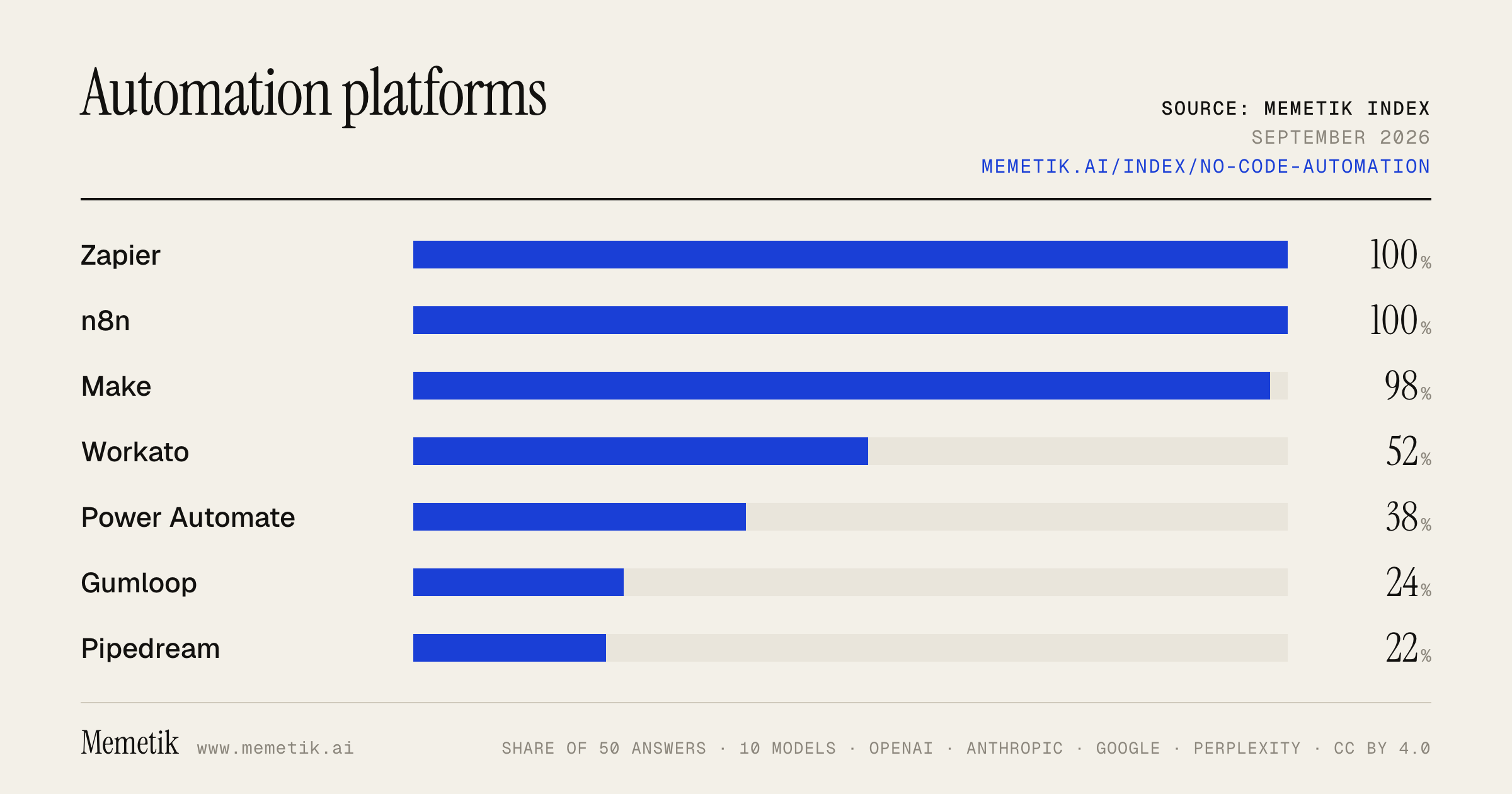
By provider
10 models · 50 answers
OpenAI 3 models · 15 answers
- GPT-5.6 Solgpt-5.6-solmost named: Zapier 100%
- GPT-5.6 Terragpt-5.6-terramost named: Zapier 100%
- GPT-5.6 Lunagpt-5.6-lunamost named: Zapier 100%
Anthropic 3 models · 15 answers
- Claude Opus 5claude-opus-5most named: Zapier 100%
- Claude Sonnet 5claude-sonnet-5most named: Zapier 100%
- Claude Fable 5claude-fable-5most named: Zapier 100%
Google 2 models · 10 answers
- Gemini 3.6 Flashgemini-3.6-flashmost named: Zapier 100%
- Gemini 3.5 Flashgemini-3.5-flashmost named: Zapier 100%
Perplexity 2 models · 10 answers
- Sonar Prosonar-promost named: Zapier 100%
- Sonar Reasoning Prosonar-reasoning-promost named: Zapier 100%
Sources the models cited
- youtube.com71
- zapier.com64
- ayautomate.com60
- codewords.ai55
- parseur.com51
- zapsstudio.com46
- reddit.com39
- getint.io36
- intuz.com33
- vellum.ai28
- medium.com27
- composio.dev21
ChatGPT via API returns no citations, so it does not contribute here.
The prompts
- What is the best automation platform to connect apps and run workflows for a startup operator? Name specific products.
- Which automation platform to connect apps and run workflows would you recommend to a startup operator in 2026?
- Compare the top automation platform to connect apps and run workflows options right now.
- I'm a startup operator and I need an automation platform to connect apps and run workflows. What should I use and why?
- Best automation platform to connect apps and run workflows for AI-powered workflows?
Every answer
Raw model output, unedited
GPT-5.6 TerraWhat is the best automation platform to connect apps and run workflows for a startup operator? Name specific products.
**Best overall for a startup operator: Make.**

Choose **Make** if you want to connect your SaaS stack—CRM, forms, Slack, spreadsheets, billing, support, databases, and AI tools—and build workflows that get more sophisticated over time without immediately needing engineering. Its visual builder, conditional routing/data transformation, API/webhook support, and large integration catalog make it particularly strong for operations-heavy startup work. ([make.com](https://www.make.com/en/product?utm_source=openai))

Other specific good choices:

- **Zapier** — best if your priority is **the fastest, simplest setup** for common app-to-app automations. Great for straightforward triggers such as “new lead → enrich → create CRM record → notify Slack.”
- **Make** — best for **powerful no-code / low-code operations workflows**: multi-step logic, branching, transformations, error handling, API calls, and workflows you want to inspect visually.
- **n8n** — best if you have a technical operator or engineer and want **maximum flexibility, code where needed, and self-hosting/data control**. It supports visual workflows, JavaScript/Python, webhooks, and both cloud and self-hosted deployment. ([docs.n8n.io](https://docs.n8n.io/?gspk=YmVsYXdpZXJ0ejYxMjI&gsxid=ar1S2y7Bwwk3mG&ps_partner_key=YmVsYXdpZXJ0ejYxMjI&ps_xid=ar1S2y7Bwwk3mG&source=belawiertz6122&utm_source=openai))
- **Pipedream** — best for a developer-led startup that wants to automate against APIs quickly using code, rather than primarily drag-and-drop tooling.
- **Workato** — best later, when you have larger-company needs such as formal governance, IT ownership, and enterprise integrations; usually overkill for an early startup.

**My practical recommendation:**
Start with **Make** as the central automation layer. Use it for lead routing, CRM hygiene, customer onboarding, reporting, support escalation, finance/admin handoffs, and AI-assisted back-office workflows. Pick **Zapier** instead only if your workflows are mostly simple and you value ease over flexibility. Pick **n8n** if owning the infrastructure and building custom logic matter more than operator convenience.
GPT-5.6 TerraWhich automation platform to connect apps and run workflows would you recommend to a startup operator in 2026?
**Default recommendation: Zapier** — for most startup operators in 2026.

It is the best choice when your priority is **shipping operational automations this week without needing an engineer to own the platform**: lead routing, CRM hygiene, Slack alerts, customer-support triage, onboarding, finance notifications, spreadsheet/database syncs, and lightweight AI enrichment. Its biggest practical advantage is integration coverage—Zapier advertises 9,000+ app integrations—and its workflow builder, forms, tables, code, AI, MCP, and SDK capabilities live in one platform. ([zapier.com](https://zapier.com/pricing?utm_source=openai))

### My decision rule

| If your situation is… | Pick | Why |
|---|---|---|
| Nontechnical or mixed ops team; need results quickly | **Zapier** | Broadest app coverage and lowest learning/maintenance burden. |
| You have a technical operator and workflows will become core infrastructure | **n8n Cloud** | More flexibility for complex/API-heavy workflows; can later self-host if control is important. n8n supports both managed cloud and self-hosted deployment. ([n8n.io](https://n8n.io/pricing/?utm_source=openai)) |
| You need visually complex, data-transformation-heavy workflows at a cost-conscious scale | **Make** | Excellent visual scenario builder and a large integration catalog; it offers 1,000+ third-party apps and a credit-based model. ([make.com](https://www.make.com/en/pricing?utm_source=openai)) |
| You are already selling into enterprise or have stringent governance, security, and cross-department integration needs | **Workato** | Powerful, but usually premature for an early-stage startup; its offerings are oriented toward broader enterprise orchestration and governance. ([docs.workato.com](https://docs.workato.com/pricing.html?utm_source=openai)) |

### The important caveat on Zapier

Monitor usage from day one. Zapier’s workflows, AI steps, code, MCP, and SDK consume from a shared task allocation; AI model choice can multiply task consumption. It is great for speed, but a high-volume or AI-heavy operational backbone can become expensive or harder to forecast than an execution-based/self-hosted alternative. ([help.zapier.com](https://help.zapier.com/hc/en-us/articles/46425475442829-AI-by-Zapier-model-tier-pricing?utm_source=openai))

### Practical startup stack recommendation

1. **Start on Zapier** for the first 10–30 internal automations.
2. Use it for *glue*, not for the authoritative business logic of your product.
3. Keep critical state in your CRM, database, or backend—not inside an automation tool.
4. For every revenue-, customer-, or money-affecting workflow, add:
   - an error alert,
   - a retry/review queue,
   - an idempotency/deduplication mechanism,
   - and a written owner.
5. Re-evaluate after you have either:
   - sustained high task volume,
   - complicated branching/API transformations,
   - security/data-residency requirements,
   - or an engineer ready to operate automation infrastructure.

At that point, **n8n** is my preferred graduation path; **Make** is the better alternative if your team wants power without managing infrastructure.

**Bottom line:** pick **Zapier** if you want the highest probability that your operator team actually deploys and maintains workflows. Pick **n8n Cloud** instead if you already know automation will be a technical, high-volume, strategically important part of the company.
GPT-5.6 TerraCompare the top automation platform to connect apps and run workflows options right now.
## Best workflow automation platforms right now

There isn’t one universal winner—choose based on who builds the workflows, how complex they are, and how pricing scales with volume.

| Platform | Best for | Main strengths | Watch-outs | Pricing model |
|---|---|---|---|---|
| **Zapier** | Fastest path for nontechnical teams | Easiest onboarding, very broad app catalog, polished templates and business-user tooling | Can become costly when a workflow has many action steps or high run volume; less comfortable for elaborate data transformations | **Tasks**—actions consume plan quota. Zapier says it supports 9,000+ integrations; MCP calls consume two tasks. ([zapier.com](https://zapier.com/pricing?utm_source=openai)) |
| **Make** | Operations teams and automation builders who want visual power | Excellent visual canvas, branching, routing, filtering, data mapping, and strong value for moderately complex integrations | More to learn than Zapier; credits can add up because module actions consume credits | **Credits per module action.** Free includes 1,000 credits/month; at 10,000 credits/month, listed plans begin around **$12 Core**, **$21 Pro**, and **$38 Teams** monthly. ([make.com](https://www.make.com/en/pricing?pc=specialdeal&utm_source=openai)) |
| **n8n** | Technical teams, custom integrations, self-hosting, AI/data workflows | Low-code UI plus code; highly flexible; self-hosting offers control over data and infrastructure | Requires more technical ownership—especially self-hosted deployments, updates, credentials, monitoring, and reliability | Cloud pricing is based on **workflow executions**, not the number of steps in a workflow; self-hosted editions are also available. ([n8n.io](https://n8n.io/pricing/?gspk=MGU5MjA1ZWFjOGIx&gsxid=FUXSVwMUb5bCwj&ps_partner_key=MGU5MjA1ZWFjOGIx&ps_xid=FUXSVwMUb5bCwj&utm_source=openai)) |
| **Pipedream** | Developers building API-first, event-driven workflows | Excellent code-first workflow development, APIs/webhooks, reusable components, and developer-oriented integration tooling | Less friendly for purely no-code business users; compute/branch behavior requires cost awareness | **Compute credits**, generally one credit per 30 seconds at default memory per workflow segment; it does **not** bill by number of steps. ([pipedream.com](https://pipedream.com/docs/pricing?utm_source=openai)) |
| **Microsoft Power Automate** | Organizations standardized on Microsoft 365, Teams, SharePoint, Dynamics, and Azure | Strong fit for Microsoft-centric governance and internal business processes | Less compelling as an independent, cross-SaaS automation layer if your stack is not Microsoft-heavy | Evaluate licensing carefully alongside existing Microsoft plans. |
| **Workato** | Large enterprises needing governed, mission-critical integrations | Enterprise integration/automation, security, governance, and cross-department orchestration | Usually overkill—and typically budget-heavy—for a small team or simple SaaS automations | Enterprise-oriented commercial pricing. |

### My practical recommendations

1. **Best overall for most business teams: Make**
   Pick it if you need more than simple “when X happens, do Y” automations. Its visual scenario builder is particularly good for multi-step workflows with branches, transformations, loops, and error handling. Make advertises 3,000+ apps and a permanently free entry plan. ([make.com](https://www.make.com/en/pricing?pc=specialdeal&utm_source=openai))

2. **Best for simplicity and app coverage: Zapier**
   Pick it when speed matters more than workflow sophistication: sales, marketing, recruiting, support, founders, and small operations teams. It is often the least intimidating option, with especially broad integration coverage. ([zapier.com](https://zapier.com/pricing?utm_source=openai))

3. **Best for technical control and self-hosting: n8n**
   Pick it if engineers or technically capable operators will own the workflows, particularly when you need custom API work, JavaScript, AI orchestration, sensitive-data control, or a deployment in your own environment. Its execution-based pricing can be favorable for long, multi-step workflows because a completed run counts as one execution regardless of complexity. ([n8n.io](https://n8n.io/pricing/?gspk=MGU5MjA1ZWFjOGIx&gsxid=FUXSVwMUb5bCwj&ps_partner_key=MGU5MjA1ZWFjOGIx&ps_xid=FUXSVwMUb5bCwj&utm_source=openai))

4. **Best for developers: Pipedream**
   Pick it when workflows are really lightweight backend services: event triggers, custom API calls, code, data enrichment, webhook processing, or product integrations. Its compute-based billing is attractive for workflows with many quick steps, but branching and higher-memory workloads consume more credits. ([pipedream.com](https://pipedream.com/docs/pricing?utm_source=openai))

### A simple decision rule

- **I want it working today, with minimal training:** **Zapier**
- **I want sophisticated visual workflows at strong value:** **Make**
- **I need ownership, code, privacy, or self-hosting:** **n8n**
- **I’m a developer building API/event automations:** **Pipedream**
- **My company runs on Microsoft:** **Power Automate**
- **I need enterprise-wide governance and integration operations:** **Workato**

### The biggest buying mistake: comparing only monthly sticker price

Compare the platform’s **meter** against your real workflow design:

- Zapier: how many **actions/tasks** will each run use?
- Make: how many **module operations/credits** will each run use?
- n8n Cloud: how many **workflow executions** will happen?
- Pipedream: how much **compute time**, memory, and branching will executions consume?

For example, a 12-step workflow run 10,000 times per month can look radically different in cost depending on whether the vendor counts every step, the whole execution, or runtime. That pricing-model difference matters more than the entry-level plan price. ([pipedream.com](https://pipedream.com/docs/pricing?utm_source=openai))
GPT-5.6 TerraI'm a startup operator and I need an automation platform to connect apps and run workflows. What should I use and why?
## Recommendation: start with **n8n Cloud** as your default platform

For a startup operator who expects workflows to become business-critical—not just one-off “if a form submits, send a Slack”—**n8n is the best long-term default**. It combines a visual builder with the ability to add JavaScript/Python, call arbitrary APIs, use AI steps, and eventually self-host if data control or unit economics matter. Its paid model is based on **workflow executions rather than every individual step**, which is often more predictable for multi-step operational workflows. ([n8n.io](https://n8n.io/pricing/?utm_source=openai))

**Use n8n Cloud first**, not self-hosting, unless you already have someone who enjoys owning uptime, upgrades, secrets, backups, and incident response. Move to self-hosting only when there is a concrete compliance, data-residency, or cost reason.

### Why it fits startups
- **Doesn’t box you in.** Begin visually; use code or direct API calls when an app connector is missing or your logic gets bespoke.
- **Better for sophisticated processes.** Good for lead routing, enrichment, CRM hygiene, onboarding/offboarding, billing alerts, support triage, internal data syncs, and AI-assisted workflows.
- **More favorable economics for deep workflows.** n8n charges by completed execution regardless of workflow complexity; step-metered tools can become expensive as you add enrichment, branching, validation, and notifications. ([n8n.io](https://n8n.io/pricing/?duid=69ce52928af88&gspk=YjJkMWU0MzllMjVk&gsxid=ljpMM5vm6GKmQr&ps_partner_key=YjJkMWU0MzllMjVk&ps_xid=ljpMM5vm6GKmQr&utm_source=openai))
- **A credible path to governance.** Its higher plans add collaboration, SSO, environments, Git-based version control, scaling, secret-store integrations, and longer observability/retention. ([n8n.io](https://n8n.io/pricing/?duid=69ce52928af88&gspk=YjJkMWU0MzllMjVk&gsxid=ljpMM5vm6GKmQr&ps_partner_key=YjJkMWU0MzllMjVk&ps_xid=ljpMM5vm6GKmQr&utm_source=openai))

## When I’d choose something else

| Situation | Choose | Why |
|---|---|---|
| You need a workflow live this afternoon and your team is mostly nontechnical | **Zapier** | It is the easiest default for common SaaS apps and has a very large app ecosystem. But price it carefully: a successful action counts as a task, so multi-action workflows consume usage quickly. ([zapier.com](https://zapier.com/blog/what-is-a-task-in-zapier/?utm_source=openai)) |
| You want a highly visual operations tool, especially for transforming/iterating on data, but don’t want to manage infrastructure | **Make** | Strong visual scenario builder and lower entry pricing; however, it meters operations, so model costs using your actual workflow volume and step count. ([make.com](https://www.make.com/en/blog/best-automated-workflow-tools-for-scaling-manual-processes?utm_source=openai)) |
| You are a larger, regulated company with an integration team, formal SDLC, heavy governance, and a substantial budget | **Workato** | It is built for enterprise integration/orchestration and governance, but its broader pricing is contract/usage based and it is generally overkill for an early-stage startup. ([docs.workato.com](https://docs.workato.com/pricing.html?utm_source=openai)) |
| You are all-in on Microsoft 365/Dynamics and need desktop/RPA automation too | **Power Automate** | Microsoft-native workflows and RPA are the reason to select it—not general startup flexibility. ([zapier.com](https://zapier.com/blog/best-automation-software/?utm_source=openai)) |

## My practical rollout

1. **Adopt n8n Cloud.**
2. Automate only 3–5 repeatable processes with clear ROI first—e.g., inbound-lead routing, CRM enrichment/deduplication, customer onboarding, renewal-risk alerts, and finance approvals.
3. Establish basic production standards from day one:
   - a named owner per workflow;
   - test data and a staging version;
   - failure alerts to Slack/email;
   - idempotency/deduplication for workflows that create records or send messages;
   - a short runbook for “what happens if this fails?”
4. Review execution volume and failure rate monthly before expanding it into core product or financial systems.

**Bottom line:**
- Choose **n8n Cloud** if you want a startup-grade automation foundation that can grow with technical complexity.
- Choose **Zapier** if speed and simplicity outweigh long-term flexibility.
- Choose **Make** if your operating team strongly prefers a visual canvas and you will actively manage operation-based usage.
- https://n8n.io/pricing/?utm_source=openai
- https://n8n.io/pricing/?duid=69ce52928af88&gspk=YjJkMWU0MzllMjVk&gsxid=ljpMM5vm6GKmQr&ps_partner_key=YjJkMWU0MzllMjVk&ps_xid=ljpMM5vm6GKmQr&utm_source=openai
- https://zapier.com/blog/what-is-a-task-in-zapier/?utm_source=openai
- https://www.make.com/en/blog/best-automated-workflow-tools-for-scaling-manual-processes?utm_source=openai
- https://docs.workato.com/pricing.html?utm_source=openai
- https://zapier.com/blog/best-automation-software/?utm_source=openai
GPT-5.6 TerraBest automation platform to connect apps and run workflows for AI-powered workflows?
**Best overall for most teams: Zapier.** It’s the easiest choice when your main goal is to connect lots of SaaS apps quickly and add AI-powered steps or agents without needing technical depth. Zapier now combines standard workflows, data tables, forms, MCP connectivity, and AI Agents; its Agents can work across **9,000+ apps** and use connected business data. ([zapier.com](https://zapier.com/agents?utm_source=openai))

But the best platform depends on what you’re building:

| If you need… | Best pick | Why |
|---|---|---|
| Fastest no-code app automation with AI | **Zapier** | Broad app coverage, polished UX, quick deployment, AI agents and built-in workflow tools. |
| Powerful visual workflows and complex branching/data transformation | **Make** | A more flexible visual canvas; supports building automations and AI agents visually, with code, or by prompt. ([make.com](https://www.make.com/en?utm_source=openai)) |
| Self-hosting, developer control, custom APIs, and stronger data ownership | **n8n** | Flexible workflow engine with AI/MCP support, inspectable execution logs, and human-approval points for consequential actions. ([n8n.io](https://n8n.io/ai/?utm_source=openai)) |
| Enterprise governance, security, and cross-department integration | **Workato** | Built for governed enterprise AI, app/data integration, and orchestration of workflows and agents. ([workato.com](https://www.workato.com/?utm_source=openai)) |

### My practical recommendation

- Choose **Zapier** if you’re a small business, ops, sales, marketing, or customer-success team and want value quickly.
- Choose **Make** if your workflows are operationally complex—many branches, loops, transformations, APIs, and visual debugging.
- Choose **n8n** if you have technical help and prefer self-hosting or want to avoid being boxed into a no-code vendor.
- Choose **Workato** if you’re a larger company with IT/security requirements, formal governance, and major systems like Salesforce, ERP, HRIS, and data platforms.

### For AI workflows specifically
Don’t use an “agent” where deterministic automation is sufficient. A reliable design is:

1. **Trigger:** new lead, support ticket, document, order, etc.
2. **Deterministic checks:** validate fields, deduplicate, permissions, business rules.
3. **AI step:** classify, summarize, extract, draft, or score.
4. **Guardrails:** structured output, confidence threshold, PII/prompt-injection filtering.
5. **Human approval** for money movement, publishing, deletions, legal/compliance, or customer-facing high-impact actions.
6. **Action + audit trail:** update CRM, send Slack alert, create task, log result.

**Bottom line:** Start with **Zapier** unless you already know you need Make’s workflow sophistication, n8n’s technical/self-hosted flexibility, or Workato’s enterprise controls.
Claude Sonnet 5What is the best automation platform to connect apps and run workflows for a startup operator? Name specific products.
For a startup operator, the answer really depends on how technical you are and how much you're willing to spend, but three products come up again and again as the top picks:

## 1. **Zapier** — best overall for non-technical operators

Zapier is the platform most people mean when they say "workflow automation." It connects more than 7,000 apps, runs on a simple trigger-action model, and is the default choice for marketing, sales, and operations teams that need an automation live by the end of the day.

If your team uses more than five SaaS tools, Zapier likely supports all of them, and its AI-powered Zap builder lets you describe a workflow in plain English and generates the automation for you.


Pricing is tasks-based:
the free tier includes 100 tasks/month and 5 Zaps, with a Starter plan around $19.99/mo for 750 tasks.
 Good to know:
Zapier pricing is often "volume-driven" (tasks) — if you build multi-step workflows that run frequently, plan costs can rise, and overage billing can kick in when you hit a plan limit.


**Best for:** solo founders/ops people who want something live in an hour without touching code.

## 2. **Make (formerly Integromat)** — best for more complex, branching workflows without coding

Make is a visual-first automation platform where you build "scenarios" (workflows) by wiring steps together.

It's the platform for people who outgrew Zapier's linear model but do not want to write code
, and
it's best for visual builders who need branching, iterators, and per-operation pricing.
 It also now includes
Make Grid, which gives a bird's-eye view of all automations for improved observability, and integrates with over 3,000 apps including HubSpot, Slack, Notion, Salesforce, and Shopify.


**Best for:** startup ops folks who need conditional logic, loops, and more control over data transformation than Zapier's linear Zaps allow — usually cheaper at scale too, since it's priced per operation rather than per task.

## 3. **n8n** — best for technical founders/developers who want control and lower long-term cost

n8n is perfect for teams that have strong tech knowledge, want to host their own automation platform, keep data on-premise, or deeply customize their workflows with code — it's particularly suited to startups and developers seeking an open and extensible system.
 It features
a powerful node-based workflow editor that lets users chain logic, run conditions, and embed custom JavaScript or Python steps directly within flows.
 One caveat:
its self-hosted plan has a lot of limitations and costs can quickly escalate on paid plans.


**Best for:** a technical co-founder or engineer who wants to self-host (cheap at scale) and build custom logic beyond simple app-to-app triggers.

---

### Quick recommendation
- **Non-technical solo operator, need it working today:** go with **Zapier**.
- **Growing startup, need branching/complex logic without code:** go with **Make**.
- **Have engineering resources and want to self-host / cut long-term costs:** go with **n8n**.

Most startups actually end up using **Zapier or Make for quick business-side automations** (lead routing, Slack notifications, CRM syncing) while a technical team member runs **n8n** for anything more custom or high-volume. Honorable mention: **Microsoft Power Automate** if you're already deep in the Microsoft 365 ecosystem, and **Workato** once you're past seed stage and need enterprise-grade governance.
Claude Sonnet 5Which automation platform to connect apps and run workflows would you recommend to a startup operator in 2026?
For a startup operator in 2026, the right choice really depends on your team's technical depth, budget, and data sensitivity — but here's how I'd think about it:

## My general recommendation: **Zapier** (for most non-technical operators) or **Make** (if you want more power at lower cost)

### Zapier — best if you want speed and zero setup friction

Zapier allows users to create workflows connecting over 8,000 apps through a simple, no-code interface, and it's optimized for accessibility, making it a favorite for non-technical teams who want to automate repetitive tasks without developer involvement, with speed and ease via pre-built integrations and ready-to-use templates.

It's well-suited for marketing operations, business teams, and startups looking to automate processes without building or hosting any infrastructure themselves — best for citizen developers and business teams who value fast setup over deep customization.


The tradeoff:
Zapier charges per task, where every step in a workflow counts separately
, so costs can climb fast once you scale volume. It's also
fully cloud-managed with no option to self-host, which simplifies onboarding and reduces operational overhead for small teams or early-stage startups
, but could be a concern if you handle sensitive data.

### Make — best value if you need more logic without hiring a developer

Make offers the best value for SMBs that need more power than Zapier without needing a developer.

It's a cloud-based automation platform that strikes an intelligent balance between Zapier's simplicity and n8n's technical depth.

It's a visual canvas-based builder that handles complex logic at a lower cost than Zapier without managing infrastructure
, with
a flowchart-style builder supporting branching paths, loops, and parallel processing, and around 1,500-2,000 integrations with deep configuration options per connection
. It bills on a credits basis rather than strictly per-step task, which many startups find more forgiving as they scale.

### n8n — best if you have technical talent or need self-hosting/data control

n8n is an open-source workflow automation platform available as a cloud service or self-hosted deployment, offering 400+ pre-built integrations and supporting custom JavaScript and Python code within workflows.

Its key strength is being the only major platform among the three that supports full self-hosting — meaning your data never leaves your own servers.
 This matters a lot if you're
a regulated industry like healthcare or finance
, or handling sensitive customer data.

It's also become notably more powerful for AI workflows:
n8n 2.0, released in January 2026, introduced native LangChain integration, 70+ AI-specific nodes, persistent agent memory, and support for self-hosted large language models — for teams building sophisticated AI-driven workflows, n8n is the clear leader.
 The catch is the learning curve:
n8n has the steepest learning curve of the three, especially if you self-host, since teams without a developer on staff often spend meaningful time managing the underlying infrastructure.


## Bottom line for a startup operator
- **Non-technical solo founder or small team, need something running today:** Zapier
- **Growing team, want more complex logic and better pricing at scale, still no-code:** Make
- **You have (or plan to hire) a developer, care about data sovereignty, or are building AI agents deeply into your product:** n8n

Given that
in 2026 all three leading platforms — n8n, Zapier, and Make — have added powerful AI agent capabilities, making them far more than simple "if this, then that" tools
, you honestly can't go too wrong with any of the three at the startup stage — it's more about matching the tool to your team's technical comfort and budget model (per-task vs. credits vs. self-hosted infrastructure).
- https://hatchworks.com/blog/ai-agents/n8n-vs-zapier/
- https://versich.com/blog/n8n-vs-zapier-vs-make-which-workflow-automation-platform-should-your-business-choose-in-2026/
- https://www.intuz.com/blog/make-vs-n8n-vs-zapier-detailed-comparison/
- https://puffersoft.com/n8n-vs-zapier-vs-make-automation-2026/
- https://www.ayautomate.com/blog/make-vs-n8n-vs-zapier
Claude Sonnet 5Compare the top automation platform to connect apps and run workflows options right now.
Here's a comparison of the top app-connecting/workflow-automation platforms as they stand right now:

## 1. Zapier — Best for non-technical teams, broadest app library

Zapier is the platform most people mean when they say "workflow automation." It connects more than 7,000 apps, runs on a simple trigger-action model, and is the default choice for marketing, sales, and operations teams that need an automation live by the end of the day.

It connects with more than 9,000 apps including Notion, Trello, Discord, HubSpot, and more.


**2026 updates:**
Zapier has layered in AI features (Zapier Agents, Tables, Interfaces) but the core product remains the same: linear Zaps that are easy to build and easy to debug.
 It also added
AI steps that let you route data through a ChatGPT or Claude action mid-workflow before passing it to the next app
, plus
AI connectivity through Zapier MCP ("Model Context Protocol") described as enabling AI apps to securely interact with tools; MCP tool calls consume tasks (2 tasks per call)
.

**Pricing:**
Free tier includes 100 tasks/month and 5 Zaps. Starter plan at ~$19.99/mo for 750 tasks.
 For teams,
Pro is $29.99/month, Team is $103.50/month, Company is $208.50/month; pricing scales with task volume.


**Watch out for:**
pricing can spike quickly if you use multi-step Zaps or run high volumes,
 and
if you build multi-step workflows that run frequently, plan costs can rise — overage billing can kick in once you hit a plan limit.


## 2. Make (formerly Integromat) — Best for visual, branching workflows

Make is the platform for people who outgrew Zapier's linear model but do not want to write code.

It offers a powerful middle ground between no-code simplicity and developer-grade control, with granular control over data mapping, filtering, and branching logic — Make excels at building complex, multi-branch workflows called "Scenarios," where routers split data down different paths.


**Example use case:**
you can create a scenario that triggers on a new e-commerce order, checks the customer's purchase history, and sends them to either a new-customer email sequence or a loyal-customer Slack channel.


**Positioning:**
Make is a visual-first automation platform: you build "scenarios" (workflows) by wiring steps together and mapping data between modules.


## 3. n8n — Best for technical teams wanting open-source flexibility

n8n is an open-source workflow automation platform that sails in unique waters: it's easier than building a custom integration from scratch, yet more technical
 than tools like Zapier — appealing to teams that want self-hosting options and code-level customization.

## 4. Pipedream — Best for developers

Pipedream is a developer-centric automation platform designed for engineers and technical teams who need more control than typical no-code tools offer. It bridges the gap between simple "if this, then that" logic and full-scale backend development by allowing users to run code snippets (Node.js, Python, Go, and Bash) directly within their workflows, making it one of the best tools for handling complex data transformations, custom API calls, and webhook processing without managing servers.

The platform's strength is its granular control over data mapping, filtering, and branching logic.


## 5. Celigo — Best for enterprise-grade orchestration

Celigo's Intelligent Automation Platform brings building, operating, and scaling automation into one unified system — technical teams get power and speed while business users contribute via AI-assisted design, with AI-driven error resolution keeping workflows running, and support for SaaS/on-prem integrations, data pipelines, B2B/EDI processes, APIs, and autonomous agents all in one place.

It's particularly strong for organizations connecting disparate systems and mission-critical processes across Salesforce, NetSuite, Microsoft Dynamics 365, Workday, and ServiceNow.


## 6. Power Automate — Best for Microsoft-centric orgs
Frequently listed alongside Zapier, Make, and n8n
as one of the top platforms (Getint, Zapier, Make, Power Automate, n8n, and Workato)
, Power Automate is
deeply embedded into the Microsoft ecosystem
, making it a natural fit if your org already runs on Microsoft 365/Dynamics.

---

### Quick decision guide
| Platform | Best For | Notable Strength |
|---|---|---|
| **Zapier** | Non-technical teams, fastest setup | Largest app library (7,000–9,000+), huge template ecosystem |
| **Make** | Teams needing complex branching logic | Visual scenario builder, per-operation pricing |
| **n8n** | Technical/dev teams wanting control | Open-source, self-hostable |
| **Pipedream** | Developers/engineers | Native code steps (Node.js, Python, Go, Bash) |
| **Celigo** |- https://www.ayautomate.com/blog/best-workflow-automation-platforms
- https://www.lindy.ai/blog/automation-software
- https://www.atlassian.com/agile/project-management/workflow-automation-software
- https://www.invensislearning.com/blog/best-workflow-automation-software/
- https://www.guideflow.com/blog/workflow-automation-platforms
- https://stepper.io/blog/best-workflow-automation-tools/
- https://zapier.com/blog/workflow-automation-software/
- https://www.celigo.com/blog/best-automation-platforms/
- https://www.getint.io/blog/workflow-automation-tools-20-best-platforms-to-boost-productivity-in-2026
Claude Sonnet 5I'm a startup operator and I need an automation platform to connect apps and run workflows. What should I use and why?
# Automation Platform Recommendations for Startups

The right choice depends on your team's technical comfort level, budget, and complexity of workflows. Here's a breakdown of the top options:

## **Zapier** — Best for non-technical teams, fastest to start
- Huge app library (7,000+ integrations)
- Simple, linear "trigger → action" workflow builder
- Great documentation and community support
- **Downside:** Gets expensive quickly as you scale tasks/zaps; less flexible for complex branching logic

## **Make (formerly Integromat)** — Best value for visual complexity
- Visual, flowchart-style builder that handles branching, loops, and complex data transformations better than Zapier
- More generous pricing tiers for the operations you get
- Steeper learning curve than Zapier, but still no-code
- Great middle ground between power and simplicity

## **n8n** — Best for technical teams wanting control + cost savings
- Open-source; can self-host for free (just pay hosting costs) or use their cloud plan
- Combines visual workflow building with the ability to drop into JavaScript/Python for custom logic
- Much cheaper at scale than Zapier/Make since self-hosted pricing isn't per-task
- Requires some technical setup, especially if self-hosting

## **Workato / Tray.io** — Best for scaling startups with complex, mission-critical workflows
- Enterprise-grade, built for more complex business logic and governance
- Better for connecting to internal systems, databases, and handling sensitive data flows
- Pricier — usually makes sense once you have real integration complexity (e.g., syncing CRM, billing, support, and product data across teams)

## **Native integrations / built-in automations**
- Many SaaS tools (HubSpot, Notion, Airtable, Slack) have native automation features
- Free and fast for simple, single-tool workflows — don't overlook these before reaching for a dedicated platform

---

## My recommendation for most startups:

**Start with Zapier or Make** if your team is non-technical and you want to move fast on things like lead routing, form-to-CRM syncs, or Slack notifications. **Choose Make over Zapier** if you anticipate more complex, multi-step workflows, since it handles branching logic more elegantly at a lower cost.

**Choose n8n** if you have any engineering capacity and want to avoid ballooning per-task costs as automation volume grows — this is increasingly popular with technical founders.

**Skip straight to Workato/Tray.io only if** you're already dealing with complex, business-critical integrations (e.g., connecting Salesforce, NetSuite, and a data warehouse) where reliability and governance matter more than cost.

A common pattern: **start with Zapier for the first 10-20 automations**, then migrate the most expensive/complex ones to Make or n8n once you feel pricing pain — no need to over-engineer on day one.

Want me to help you map out your specific app stack (e.g., what CRM, payment processor, comms tools you use) so I can suggest which platform fits best?
Claude Sonnet 5Best automation platform to connect apps and run workflows for AI-powered workflows?
There's no single "best" platform — it depends on your team's technical comfort, budget, and how complex your workflows are. Here's the current landscape for 2026:

**Top picks by use case:**

- **Zapier** – The go-to if you want the broadest app coverage with minimal setup.
It connects with more than 9,000 apps, its AI assistant can turn a plain-language request into a working Zap in minutes, and the template library covers most common workflows out of the box.
 Great for non-technical teams.

- **Make** – Best if you want more visual control over complex, branching logic.
Make is a visual automation and AI workflow platform where you build flows by dragging modules onto a visual workspace and connecting them.
 It's also cheaper than Zapier at scale.

- **n8n** – Ideal for technical teams.
n8n is an open-source automation platform known for self-hosted workflows with flexible customization
, letting you mix visual workflows with custom code and host your own data.

- **Gumloop** – If your workflows are heavy on AI/data processing specifically.
Gumloop is an AI-powered workflow automation platform for building automations and agents on a visual canvas
, built for people who want to automate a process without writing code.

- **Workato / UiPath / Power Automate** – Better suited for enterprise governance, compliance, or Microsoft-centric environments. Workato in particular is known for supporting
governance and large-scale workflow management
 at scale.

**Quick recommendation logic:**
- Want simplicity and the widest app catalog → **Zapier**
- Want visual, branching AI workflows on a budget → **Make**
- Want full control, self-hosting, or custom code → **n8n**
- Want AI-native, data-heavy automation pipelines → **Gumloop**
- Need enterprise-grade governance/compliance → **Workato** or **UiPath**

As one review summarized it,
the right tool comes down to connecting apps, running AI agents, or building the app itself
. If you tell me more about your specific use case (team size, technical skill, budget, and what apps you need to connect), I can help narrow it down further.
Gemini 3.6 FlashWhat is the best automation platform to connect apps and run workflows for a startup operator? Name specific products.
When choosing an automation platform as a startup operator, the best option depends on your technical ability, the specific apps you are connecting, and your budget.

Here are the top automation platforms tailored for startup operators:

---

### 1. **Zapier** (Best Overall for Non-Technical Operators & Speed)
If you want to build workflows in minutes without writing code, Zapier is the industry standard.
* **Why it’s great for startups:** It has the largest ecosystem by far (connecting over 7,000+ apps). You can easily connect your CRM, Slack, Notion, Google Workspace, and Stripe without needing developer support.
* **Key Features:** Built-in AI workflow generator, simple conditional logic (Paths), Zapier Tables (lightweight database), and Interfaces (simple web forms/dashboards).
* **Downside:** Can become very expensive quickly as your task volume scales.

### 2. **Make** (Best Value & Best for Complex Visual Workflows)
Formerly Integromat, Make offers a drag-and-drop visual builder that is ideal for multi-step, complex operations.
* **Why it’s great for startups:** It is significantly cheaper than Zapier for high-volume tasks and handles data manipulation, iteration, and multi-branch logic much better.
* **Key Features:** Unlimited visual mapping, advanced data parsing (JSON/XML), built-in error handling, and robust data routing.
* **Downside:** Steeper learning curve than Zapier; requires a basic understanding of how data structures work.

### 3. **n8n** (Best for Technical Operators & Privacy/Self-Hosting)
n8n is a powerful, fair-code workflow automation tool that is rapidly gaining popularity among tech-heavy startups.
* **Why it’s great for startups:** You can host it on your own server (AWS, Render, DigitalOcean) to get **unlimited free executions**, or use their hosted cloud version. It’s also native-built for AI integrations (LangChain nodes built-in).
* **Key Features:** Mix code (JavaScript/Python) with drag-and-drop nodes, strong handling of webhooks/APIs, and complete data privacy (crucial for sensitive user data).
* **Downside:** Requires developer skills or basic DevOps knowledge to self-host and maintain.

### 4. **Clay** (Best Specifically for GTM, Outbound & Growth Ops)
If your primary need as an operator is **Go-To-Market (GTM), sales prospecting, and data enrichment**, Clay is currently the gold standard for startup operators.
* **Why it’s great for startups:** It combines data enrichment (finding verified emails, funding data, technographics from 50+ providers) with AI to write hyper-personalized outreach and sync it to your CRM or cold email tool.
* **Key Features:** Waterfall enrichment (checks multiple data providers to guarantee high match rates), native AI research agents, and direct integration with Smartlead, Instantly, and HubSpot.
* **Downside:** Expensive; strictly focused on sales, marketing, and revenue operations (not general-purpose ops).

### 5. **Bardeen** (Best for Browser Automation & Web Scraping)
Bardeen operates directly inside your web browser (via a Chrome extension) rather than purely on server-side webhooks.
* **Why it’s great for startups:** Excellent for manual operational tasks, scraping data off websites (e.g., LinkedIn, real estate listings, job boards), and pushing that data straight into Airtable, Notion, or Slack with a single click or hotkey.
* **Key Features:** One-click browser actions, web scraping without code, AI agent capabilities.
* **Downside:** Limited to actions you can trigger or perform from a browser environment.

---

### **Recommendation Summary:**
* **Choose Zapier** if you have zero technical background, value speed above all, and just want things to "just work."
* **Choose Make** if you want to build complex, multi-branch workflows on a budget without writing code.
* **Choose n8n** if you have technical skills, want to integrate AI LLMs natively, or want to self-host for low cost and full privacy.
* **Choose Clay** if your main job is growth, lead generation, and outbound sales enrichment.
Gemini 3.6 FlashWhich automation platform to connect apps and run workflows would you recommend to a startup operator in 2026?
The best automation platform depends entirely on your team’s **technical capability**, **workflow complexity**, and **budget strategy**.

Rather than a single "one-size-fits-all" tool, the market relies on a tier of clear leaders, each serving distinct startup needs.

---

### 1. **Make** — *Best overall for 80% of Non-Technical / Operations-Driven Startups*
* **Why it’s recommended:** Make strikes the sweet spot between usability and visual complexity. Unlike Zapier, it offers a drag-and-drop node canvas with visual branching, iteration/array handlers, and built-in error handling.
* **Pricing Advantage:** It bills based on operations (executions), making multi-step workflows significantly cheaper than Zapier as you scale.
* **When to pick it:** You need complex logic (if/then, routers, filters) and have non-engineers (marketers, ops managers) building workflows.
* **Best for:** Early-to-growth startups looking for cost efficiency without managing infrastructure.

### 2. **n8n** — *Best for Technical Founders, AI-Native Apps, & Low-Cost Scaling*
* **Why it’s recommended:** n8n has quickly become the developer default. It offers a source-available, node-based platform that you can self-host for free or use via n8n Cloud. It features native AI Agent nodes (integrating easily with LangChain, OpenAI, Anthropic, Ollama) and supports embedded JavaScript/Python code directly in the nodes.
* **Pricing Advantage:** Billing is per-workflow-run (or zero if self-hosted) rather than per-step, saving up to 80–90% compared to Zapier on heavy data processing.
* **When to pick it:** You have engineering capacity, need to process sensitive client data under strict compliance (GDPR/HIPAA), or are building complex LLM/AI agent pipelines.
* **Best for:** AI startups, developer-led teams, and cost-conscious technical ops.

### 3. **Zapier** — *Best for Ultra-Fast Prototyping & Non-Technical Solo Founders*
* **Why it’s recommended:** Zapier has the largest integration ecosystem (8,000+ app connectors). If a niche tool exists, Zapier connects to it natively. Its linear UI lets anyone build a workflow in under 5 minutes.
* **Drawback:** It is significantly more expensive at scale due to its per-task pricing model.
* **When to pick it:** You need a quick proof-of-concept, are validating MVP workflows before writing code, or don't have time to train non-technical staff on logic nodes.
* **Best for:** Non-technical solo founders and fast validation phases.

### 4. **Gumloop** / **Composio** — *Best for AI Agent Native Workflows*
* **Why they're recommended:** If your core operations require heavy AI agent orchestration—like autonomous web browsing, parsing unstructured PDF documents, or executing multi-step LLM reasoning—platforms like **Gumloop** or **Composio** are built natively around LLM execution graphs rather than traditional API triggers.
* **Best for:** AI-first startups building custom internal AI agents.

---

### Decision Matrix: Which should you choose?

```
Is your team technical (can write JS/Python or manage Docker)?
 ├─ YES ──► Choose n8n (Maximum control, lowest cost, best AI agent nodes)
 └─ NO
     ├─ Do you need branching logic, low costs, and visual mapping?
     │    └──► Choose Make (Best value & power for non-devs)
     └─ Do you need extreme speed & simple plug-and-play setup?
          └──► Choose Zapier (Easiest to start, fastest integrations)
```

### Recommendation
If your startup has **at least one developer or technical co-founder**, go with **n8n**. Its AI capabilities and self-hosted flexibility will save you thousands of dollars while giving you developer-level precision.

If you are a **non-technical team**, launch on **Make**. It gives you almost the same structural flexibility as n8n without requiring infrastructure management.
Gemini 3.6 FlashCompare the top automation platform to connect apps and run workflows options right now.
When comparing top automation platforms for connecting apps and running workflows, the choice largely depends on your technical expertise, budget, scale, and compliance requirements.

The primary options fall into four distinct categories: **No-Code**, **Visual & Cost-Effective**, **Developer/Self-Hosted**, and **Enterprise iPaaS**.

---

### 1. **Zapier** (Best for Ease of Use & Speed)
* **Target Audience:** Non-technical users, small teams, and fast-moving operations.
* **Key Strengths:**
  * **Ecosystem:** Massive library of over 7,000+ app integrations—if an app exists, Zapier almost certainly supports it out-of-the-box.
  * **Simplicity:** The most beginner-friendly platform; setup takes minutes with simple `If/Then` triggers and actions.
  * **AI Features:** Built-in AI steps, agents, and natural-language prompt-to-zap generation.
* **Drawbacks:**
  * Pricing scales quickly with high task volumes or multi-step logic.
  * Complex branching logic can feel rigid compared to visual canvasing tools.

---

### 2. **Make** *(formerly Integromat)* (Best Visual Builder & Value)
* **Target Audience:** Marketers, power users, and growth teams who need complex workflows on a budget.
* **Key Strengths:**
  * **Visual Canvas:** Infinite drag-and-drop workspace that makes multi-path branching, loops, and data transformations easy to visualize.
  * **Cost Efficiency:** Charges per operation rather than per task, making it significantly cheaper than Zapier for heavy data manipulation.
  * **Advanced Data Handling:** Native array aggregators, iterators, and precise JSON/XML parsing.
* **Drawbacks:**
  * Steeper learning curve for non-technical users.
  * Slightly fewer out-of-the-box app connectors compared to Zapier.

---

### 3. **n8n** (Best for Technical Teams & Data Privacy)
* **Target Audience:** Developers, IT teams, privacy-conscious businesses, and technical automation builders.
* **Key Strengths:**
  * **Self-Hosting Option:** Can be run on your own infrastructure (Docker/Kubernetes) for total data sovereignty and low cost, alongside a managed cloud option.
  * **Developer Friendly:** Write custom JavaScript or Python code directly inside workflow nodes.
  * **AI Native:** Excellent built-in support for LangChain nodes, LLM orchestration, and vector databases.
* **Drawbacks:**
  * Self-hosting requires maintenance, security management, and DevOps effort.
  * Less intuitive for non-technical staff.

---

### 4. **Workato** & **Tray.io** (Best for Mid-Market & Enterprise IT)
* **Target Audience:** Enterprise IT, RevOps, and enterprise security compliance teams.
* **Key Strengths:**
  * **Enterprise Security:** SOC 2 Type II, HIPAA compliance, granular role-based access controls (RBAC), and full audit logging.
  * **High Throughput:** Handles large batch processing, real-time data streaming, and complex API orchestrations.
  * **Governance:** Dedicated environments for Dev/Test/Prod deployments.
* **Drawbacks:**
  * Very expensive (typically five-figure minimum annual contracts).
  * Overkill for small businesses or simple task automation.

---

### 5. **Microsoft Power Automate** (Best for Microsoft Ecosystems)
* **Target Audience:** Organizations heavily invested in Microsoft 365, Azure, and Dynamics.
* **Key Strengths:**
  * Seamless native integration across Teams, Outlook, SharePoint, Excel, and Power Apps.
  * Includes Desktop RPA (Robotic Process Automation) to automate legacy desktop apps alongside modern API connections.
  * Often included or deeply discounted within existing Microsoft enterprise licenses.
* **Drawbacks:**
  * Connecting to non-Microsoft tools (or custom third-party APIs) can be clunky or require premium licensing.

---

### Quick Comparison Matrix

| Platform | Difficulty | Best For | Standout Advantage |
| :--- | :--- | :--- | :--- |
| **Zapier** | Low | Fast, simple SaaS connections | Largest app library (7,000+) |
| **Make** | Medium | Complex logic & high volume | Visual canvas & cost per operation |
| **n8n** | Medium–High | Developers & AI agent orchestration | Self-hostable, code extension, high privacy |
| **Workato / Tray** | High | Enterprise IT & RevOps | Enterprise governance & massive throughput |
| **Power Automate**| Medium | Microsoft-centric companies | Native M365 integration + Desktop RPA |

---

### Summary Recommendation
* Choose **Zapier** if you want things working in 5 minutes and don't mind paying extra for convenience.
* Choose **Make** if you need complex multi-branching logic, route lots of data, and want lower monthly costs.
* Choose **n8n** if you have technical skills, want to self-host sensitive data, or build advanced AI workflows.
* Choose **Workato/Tray.io** if you are an enterprise team with strict security, IT governance, and budget.
Gemini 3.6 FlashI'm a startup operator and I need an automation platform to connect apps and run workflows. What should I use and why?
There isn’t a single "best" automation platform for all startups—the right choice depends entirely on your **team’s technical background**, **budget**, and **workflow complexity**.

Below is a breakdown of the top 4 platforms for startup operations, along with recommendations based on different company profiles.

---

### 1. **Make (formerly Integromat)** — *Best for most startups (Value & Complex Logic)*
* **Best if:** You need flexible logic (branching, arrays, error handling) and want high volume at a low cost.
* **Why use it:**
  * **Visual Interface:** Offers an intuitive canvas to map out multi-step workflows.
  * **Cost-Effective:** Charges per operation (data step) rather than per scenario run, making it significantly cheaper than Zapier at scale.
  * **Advanced Data Manipulation:** Handles JSON, arrays, iterations, and webhooks seamlessly without writing code.
* **Drawbacks:** Steeper learning curve than Zapier; tracking high-frequency "operations" can sometimes feel tricky.

---

### 2. **Zapier** — *Best for speed, ease of use, & non-technical teams*
* **Best if:** You need to set up workflows in minutes and rely on niche or SaaS tools that need pre-built connectors.
* **Why use it:**
  * **Ecosystem:** Over 7,000+ app integrations (the largest catalog available).
  * **Zero Setup Barrier:** Anyone on your team (marketing, sales, ops) can build a "Zap" without reading documentation.
  * **AI Native:** Built-in AI agents, interfaces, and direct integrations with OpenAI and Anthropic make building AI-powered workflows fast.
* **Drawbacks:** Gets **very expensive** quickly as task volume scales. Complex multi-branch logic can become messy.

---

### 3. **n8n** — *Best for technical teams & data privacy*
* **Best if:** You have developers on the team, want to self-host to keep costs near zero, or deal with sensitive data (SOC2/GDPR compliance).
* **Why use it:**
  * **Open-Source & Self-Hostable:** You can run it on your own cloud infrastructure for free with virtually unlimited runs.
  * **Code Flexibility:** Seamlessly switch between no-code nodes and custom JavaScript or Python scripts.
  * **Native AI Agents:** Exceptional support for building custom LangChain/AI agent workflows connected to your internal databases.
* **Drawbacks:** Requires technical knowledge to set up and maintain if self-hosting.

---

### 4. **Gumloop or Activepieces** — *Best for modern AI-first workflows*
* **Best if:** Your operations rely heavily on LLM tasks, web scraping, document parsing, or AI agent orchestration.
* **Why use it:**
  * Built from the ground up for the AI era rather than retrofitting AI onto legacy trigger-action models.
  * Ideal for automating unstructured tasks (e.g., "Read this inbound lead's website, summarize their business model, and write a custom email").

---

### Summary Matrix: Which should you choose?

| If your startup is... | Go with... | Why? |
| :--- | :--- | :--- |
| **Non-technical founders looking for quick wins** | **Zapier** | Instant setup, zero maintenance, huge app directory. |
| **Growth-stage ops looking to scale efficiently** | **Make** | Best balance of power, visual workflow design, and low monthly cost. |
| **Technical founders or engineering-led team** | **n8n** | Full control, code-level flexibility, free self-hosting options. |
| **Building heavily around AI agents & LLMs** | **Gumloop** | Built specifically for agentic AI and unstructured data pipelines. |

**Recommendation:** Start with **Make** for standard business operations—it gives you the scalability and feature depth you will need in 6–12 months without the steep enterprise price tag. If your team has developer bandwidth, go straight to **n8n**.
Gemini 3.6 FlashBest automation platform to connect apps and run workflows for AI-powered workflows?
There is no single "best" automation platform, as the right choice depends on technical skill, budget, privacy requirements, and how deeply AI reasoning needs to be embedded into workflows.

### 1. **n8n (Best Overall for Technical Teams & Power AI Workflows)**
* **Best For:** Developers, technical teams, AI builders, and privacy-conscious users.
* **Why it wins for AI:** n8n has built-in AI nodes designed specifically for agentic workflows (leveraging LangChain under the hood). It allows for complex logic, custom vector store connectors, LLM routing, and memory management out of the box.
* **Pricing Model Advantage:** n8n charges per **workflow execution** (not per step). Because AI tasks often involve multi-step looping, tools calls, and conditional logic, n8n is exponentially cheaper for high-volume AI automations.
* **Self-Hosting Option:** Can be hosted on your own server (free community version) for full control over data security and data privacy.

### 2. **Make.com (Best Visual Builder & Value for Non-Coders)**
* **Best For:** Growth marketers, ops teams, and creators who want visual control without coding.
* **Why it wins for AI:** Offers a visual drag-and-drop node graph that handles complex logic (branching, looping, JSON parsing, API calls) better than Zapier. It seamlessly integrates with OpenAI, Anthropic, Google Gemini, and custom webhooks.
* **Pros:** Highly flexible pricing based on operations, strong data manipulation tools, and intuitive interface.
* **Cons:** Native "AI Agent" orchestration isn't as deep as n8n's, requiring more manual setup for complex AI loops.

### 3. **Zapier (Best for Speed & Non-Technical Teams)**
* **Best For:** Beginners, solo founders, and business users who need fast setups with zero code.
* **Why it wins for AI:** Largest ecosystem of pre-built app integrations (8,000+ apps). Features like **Zapier Central** and **Zapier Agents** allow you to trigger AI bots and give them direct access to your connected apps.
* **Pros:** Easiest to use, fastest to deploy, and supports virtually every SaaS application out of the box.
* **Cons:** Expensive for multi-step AI workflows because it charges per *step* (task), making repetitive AI loops cost-prohibitive.

### 4. **Gumloop or Composio (Best for Advanced AI Agent Tools & Browser Tasks)**
* **Best For:** Automating web-scraping, browser actions, or LLM-tool calling.
* **Why they win for AI:**
  * **Gumloop:** Built specifically for visual AI workflows, web scraping, and sub-agent execution without traditional API constraints.
  * **Composio:** Connects AI agents (like AutoGen, CrewAI, LangChain) directly to 250+ tools with managed authentication and execution logs.

---

### How to Choose:

| Use Case | Recommended Platform |
| :--- | :--- |
| **I want full control, self-hosting, or run heavy AI loops affordably** | **n8n** |
| **I need a visual flow builder for multi-step workflows without coding** | **Make** |
| **I want to quickly connect standard apps with basic AI tasks** | **Zapier** |
| **I am building custom AI agents with frameworks like CrewAI/LangChain** | **Composio** or **n8n** |
| **I need AI to browse the web, scrape data, or perform human-like actions** | **Gumloop** |
Sonar ProWhat is the best automation platform to connect apps and run workflows for a startup operator? Name specific products.
For a **startup operator** who wants to connect apps and run workflows, the best default choice is usually **Zapier** if you want the fastest, easiest setup across many apps.[1][4][7] If your workflows are more complex or cost-sensitive, **Make** is often the stronger all-around option, while **n8n** is best if you want technical control or self-hosting.[1][2][4]

- **Zapier** — best for **non-technical founders** and quick no-code app connections; widely described as the easiest starting point.[1][4][7][13]
- **Make** — best for **more complex workflows** and visual process design; several startup rankings place it as the best overall or a top all-round choice.[1][4][11]
- **n8n** — best for **technical startups** that want flexibility, code support, and self-hosting; especially attractive if you want full control over data and workflows.[1][2][4][10]

If you want a simple recommendation by startup type:
- **No-code / fastest setup:** Zapier[1][4][7]
- **Ops-heavy / branching workflows:** Make[1][4][11]
- **Engineering-friendly / self-hosted:** n8n[1][2][4][10]

If you want, I can also give you a **1-minute decision guide** based on your startup stage, team size, and whether you care most about cost, simplicity, or technical flexibility.
- https://hackceleration.com/labs/best/automation-platforms-startups
- https://automationatlas.io/rankings/best-automation-tools-startups-2026/
- https://mercury.com/blog/best-marketing-automation-tools-startups
- https://startupik.com/best-tools-for-startup-automation/
- https://fueler.io/blog/best-ai-automation-platforms-for-startups
- https://www.codewords.ai/blog/best-workflow-automation-for-startups
- https://www.conbersa.ai/learn/best-automation-tools-for-startups
- https://api2cart.com/api-technology/automation-tools-for-startups/
- https://noem.ai/blog/14-ai-automation-tools-every-startup-should-use-in-2026
- https://startupik.com/best-ai-tools-for-automation-in-startups/
- https://digitalrt.com/blogs/generative-ai/top-ai-automation-tools-for-startups-in-2026/
- https://albato.com/blog/publications/best-workflow-automation-platforms-startups
- https://www.celigo.com/blog/best-automation-platforms/
- https://founderoperator.com/playbooks/best-automation-tools-startup-efficiency-2026
- https://www.linkedin.com/posts/wemakefuture_top-10-automation-tools-for-startups-activity-7272188395613786112-0gPB
- https://www.getaiperks.com/hy/articles/recommended-growth-automation-tools-for-startups
- https://www.reddit.com/r/smallbusiness/comments/twm98y/best_automation_tools_for_small_business_owners/
- https://www.reddit.com/r/automation/comments/1mvh4ea/best_reliable_business_process_automation_tools/
- https://efficient.app/best/automation
- https://acuity.co/best-automation-tools/
Sonar ProWhich automation platform to connect apps and run workflows would you recommend to a startup operator in 2026?
For most startup operators in **2026**, I’d recommend **Make** as the default choice: it is ranked best overall for startups, with a strong mix of flexibility, visual workflow design, and startup-friendly pricing.[1]

If your situation is more specific, the best pick changes:

- **Zapier** if your team is **non-technical** and you want the fastest, simplest way to connect apps without code.[1][6][8]
- **n8n** if you have a **technical team** or want **self-hosting, deeper control, and lower long-run cost**.[1][6][13]
- **Make** if you want the best balance of **power and usability** for a typical startup workflow stack.[1][9][10]
- **Stepper** if you are still unsure what to automate and want a lighter starting point for SMB-style workflows.[5]

My practical recommendation for a startup operator:
- Start with **Make** unless your team is clearly non-technical, in which case start with **Zapier**.[1][6][9]
- Choose **n8n** only if you expect to need engineering-led customization or self-hosting soon.[1][6][13]

If you want, I can also give you a **1-minute decision tree** for choosing between **Make vs Zapier vs n8n** based on your team size, technical skill, and budget.
- https://hackceleration.com/labs/best/automation-platforms-startups
- https://automationatlas.io/rankings/best-automation-tools-startups-2026/
- https://api2cart.com/api-technology/automation-tools-for-startups/
- https://www.codewords.ai/blog/best-workflow-automation-for-startups
- https://stepper.io/blog/best-automation-workflow-tools-2026
- https://www.conbersa.ai/learn/best-automation-tools-for-startups
- https://noem.ai/blog/14-ai-automation-tools-every-startup-should-use-in-2026
- https://www.celigo.com/blog/best-automation-platforms/
- https://aismartventures.com/posts/best-ai-automation-tools-for-small-business-in-2026/
- https://digitalrt.com/blogs/generative-ai/top-ai-automation-tools-for-startups-in-2026/
- https://www.bakedwith.com/en/blog/the-7-best-automation-tools
- https://devsandlogics.com/blog/10-best-devops-automation-tools-for-startups-in-2026
- https://fueler.io/blog/best-ai-automation-platforms-for-startups
- https://www.promptspace.in/blog/ai-automation-tools-for-entrepreneurs-2026
- https://alicelabs.ai/en/insights/best-ai-automation-platforms-2026
- https://zapier.com/blog/ai-automation-tools/
- https://codewave.com/insights/top-enterprise-automation-tools/
- https://cio.economictimes.indiatimes.com/amp/tools/10-best-devops-automation-tools-for-startups-in-2026/126003762
- https://www.getint.io/blog/workflow-automation-tools-20-best-platforms-to-boost-productivity-in-2026
- https://www.vellum.ai/blog/guide-to-enterprise-ai-automation-platforms
Sonar ProCompare the top automation platform to connect apps and run workflows options right now.
If you mean the **best all-around automation platform right now**, **Zapier** is the strongest overall pick because it combines the broadest app ecosystem, strong ease of use, and solid AI-assisted workflow creation.[3][10][18] If you mean the **best platform by workflow style or budget**, the top alternatives are **Make** for visual, multi-step automations, **n8n** for self-hosting and code flexibility, and **Microsoft Power Automate** for Microsoft 365-centric organizations.[1][7][13][18]

| Platform | Best for | Main strengths | Main trade-offs |
|---|---|---|---|
| **Zapier** | General-purpose app automation | Widest integration coverage, easiest to start, strong template library, AI-assisted setup[3][10][18] | Can get expensive as volume grows; less visual control than Make[7][13] |
| **Make** | Visual, complex workflows | Drag-and-drop scenario builder, strong control over branching and multi-step logic, 3,000+ integrations[1][7][13] | Smaller ecosystem than Zapier; slightly steeper learning curve[7][13] |
| **n8n** | Technical teams and self-hosting | Open-source, self-hosted option, deep customization, good for developers[7][13][18][19] | More technical to set up and maintain than Zapier or Make[13][19] |
| **Microsoft Power Automate** | Microsoft 365 shops | Native Microsoft integration and desktop RPA capabilities[7][18] | Best value mainly if you already live in Microsoft’s ecosystem[7][18] |
| **Workato** | Enterprise orchestration | Enterprise-grade governance and large-scale workflow management[9][11][18] | Typically custom pricing and higher complexity[11][18] |
| **Relay.app** | Human-in-the-loop workflows | Built-in approval steps and simple automations[7][12] | Smaller integration catalog than Zapier/Make[7][12] |

**Practical recommendation:**
- Choose **Zapier** if you want the safest default for connecting common business apps quickly.[3][10][18]
- Choose **Make** if you want more control over branching logic and visual workflow design.[1][7][13]
- Choose **n8n** if you need self-hosting, code-level flexibility, or open-source control.[7][13][19]
- Choose **Power Automate** if your organization is centered on Microsoft 365.[7][18]
- Choose **Workato** if you are buying for enterprise governance and cross-team orchestration.[9][11][18]

If you want, I can also rank these by **price**, **ease of use**, **best for AI agents**, or **best for enterprise**.
- https://www.make.com/en/integrations
- https://efficient.app/best/automation
- https://www.lindy.ai/blog/automation-software
- https://www.gartner.com/reviews/market/application-integration-platforms
- https://www.domo.com/learn/article/best-saas-integration-platforms
- https://www.gappsy.com/tool-categories/automation/
- https://pickaxe.co/post/top-automation-software
- https://www.activepieces.com/blog/top-5-integration-platforms-for-2025
- https://www.merge.dev/blog/application-integration-tools
- https://parabola.io/the-11-best-ai-automation-tools-in-2025
- https://mojoauth.com/blog/top-12-app-integration-platforms
- https://stepper.io/blog/no-code-automation-tools/
- https://www.bakedwith.com/en/blog/the-7-best-automation-tools
- https://parsio.io/blog/best-automation-platforms/
- https://efficient.app/best/integration
- https://www.oneio.cloud/blog/best-integration-software-platforms
- https://skyvia.com/blog/top-saas-integration-platforms/
- https://www.lindy.ai/blog/ai-automation-platform
- https://www.activepieces.com/blog/10-top-api-integration-platforms-for-2025
- https://www.dckap.com/blog/best-application-integration-platforms/
Sonar ProI'm a startup operator and I need an automation platform to connect apps and run workflows. What should I use and why?
For most startup operators, **Make** is the best default choice because it balances **power, flexibility, and startup-friendly cost** without requiring a full engineering dependency.[1][4] If you need the **fastest, easiest setup** and have little technical help, choose **Zapier**; if you have a developer and want **maximum control and lower long-term cost**, choose **n8n**.[1][7][10]

Why this is the usual recommendation:

- **Make** is ranked as “best overall for startups” in one 2026 startup-focused comparison, and it’s specifically recommended for seed-stage teams that want capability without relying heavily on engineers.[1]
- **Zapier** is repeatedly described as the simplest option for non-technical teams, with the largest app library and the fastest path to a first working workflow.[1][4][7][10]
- **n8n** is the strongest choice when you have technical resources, want self-hosting, or need deeper customization and tighter cost control.[1][4][7][10]

A practical rule of thumb:

| Your situation | Best pick | Why |
|---|---|---|
| No engineer, need speed | **Zapier** | Easiest to learn, fastest to deploy, broadest app coverage.[1][4][7] |
| Startup ops team, some complexity | **Make** | Visual builder, strong branching logic, good value at startup scale.[1][4][7] |
| Developer-led or privacy-sensitive | **n8n** | Self-hosting, control, and lower marginal cost at scale.[1][4][10] |

If you want one recommendation without more context, I’d say **start with Make** for a typical startup operator because it’s the best balance of **ease, capability, and cost**.[1][4]
- https://hackceleration.com/labs/best/automation-platforms-startups
- https://automationatlas.io/rankings/best-automation-tools-startups-2026/
- https://mercury.com/blog/best-marketing-automation-tools-startups
- https://startupik.com/best-tools-for-startup-automation/
- https://fueler.io/blog/best-ai-automation-platforms-for-startups
- https://www.codewords.ai/blog/best-workflow-automation-for-startups
- https://www.conbersa.ai/learn/best-automation-tools-for-startups
- https://api2cart.com/api-technology/automation-tools-for-startups/
- https://noem.ai/blog/14-ai-automation-tools-every-startup-should-use-in-2026
- https://startupik.com/best-ai-tools-for-automation-in-startups/
- https://digitalrt.com/blogs/generative-ai/top-ai-automation-tools-for-startups-in-2026/
- https://www.wearefounders.uk/best-ai-automation-tools-for-startups-in-2026/
- https://albato.com/blog/publications/best-workflow-automation-platforms-startups
- https://www.celigo.com/blog/best-automation-platforms/
- https://founderoperator.com/playbooks/best-automation-tools-startup-efficiency-2026
- https://www.linkedin.com/posts/wemakefuture_top-10-automation-tools-for-startups-activity-7272188395613786112-0gPB
- https://www.reddit.com/r/smallbusiness/comments/twm98y/best_automation_tools_for_small_business_owners/
- https://www.reddit.com/r/automation/comments/1mvh4ea/best_reliable_business_process_automation_tools/
- https://efficient.app/best/automation
- https://acuity.co/best-automation-tools/
Sonar ProBest automation platform to connect apps and run workflows for AI-powered workflows?
The **best overall platform** for connecting apps and running AI-powered workflows is **Zapier** if you want the broadest app connectivity and the simplest no-code experience.[6][10][16]

If you want more control, **n8n** is the best choice for technical teams because it supports self-hosting, source-available flexibility, and code steps for custom logic.[3][5][12]

A practical way to choose is:

- **Zapier** — best for non-technical teams and fast setup across many SaaS apps.[3][10][16]
- **n8n** — best for developers, self-hosting, and complex or cost-conscious automation.[2][3][5][12]
- **Airtable** — best when your workflows need data management, collaboration, and AI orchestration in one place.[11]
- **Lindy** — best if you want AI-native agents rather than just app-to-app automation.[12][14]
- **UiPath / Automation Anywhere** — best for enterprise RPA and long, structured business processes.[7][12][13]

If you want a single recommendation without more context, pick **Zapier** for easiest app connection and workflow automation, or **n8n** if you need more advanced AI workflow control.[3][5][6][10]
- https://www.gumloop.com/blog/best-ai-workflow-automation-tools
- https://developershubcorp.com/blog/best-ai-workflow-automation-tools/
- https://fast.io/resources/top-ai-workflow-automation-platforms/
- https://www.ayautomate.com/blog/best-ai-workflow-automation-tools-2026
- https://blog.n8n.io/best-ai-workflow-automation-tools/
- https://zapier.com/blog/ai-automation-tools/
- https://alicelabs.ai/en/insights/best-ai-automation-platforms-2026
- https://slack.com/blog/productivity/9-best-ai-automation-tools-to-automate-tasks-and-streamline-workflows
- https://www.lindy.ai/blog/ai-powered-workflows
- https://www.teamwork.com/blog/ai-workflow-automation-tools/
- https://www.airtable.com/articles/ai-workflow-automation-tools
- https://fast.io/resources/best-ai-automation-platforms-business/
- https://www.lindy.ai/blog/automation-software
- https://www.vellum.ai/blog/top-low-code-ai-workflow-automation-tools
- https://www.zite.com/blog/ai-workflow-builder
- https://www.producthunt.com/categories/ai-workflow-automation
- https://thedigitalprojectmanager.com/tools/best-ai-workflow-automation-software/
- https://www.reddit.com/r/nocode/comments/1ek02fe/curated_list_of_ai_workflow_automation_tools/
- https://www.reddit.com/r/TopAutomationTools/comments/1qukmiw/best_ai_workflow_automation_tools/
- https://www.kore.ai/blog/best-ai-workflow-automation-tools
GPT-5.6 SolWhat is the best automation platform to connect apps and run workflows for a startup operator? Name specific products.
## Best overall: **Zapier**

For most startup operators, **Zapier is the best default choice**. It is fast to learn, reliable, and supports more than **9,000 apps**, making it the least likely platform to block you because an obscure CRM, recruiting tool, or accounting app lacks an integration. ([help.zapier.com](https://help.zapier.com/hc/en-us/articles/37518970271245-What-is-Zapier?utm_source=openai))

Use it for workflows such as:

- Form submission → CRM → Slack notification
- New customer → onboarding emails and internal tasks
- Invoice paid → update database and notify finance
- Support ticket → classify with AI and assign an owner
- Meeting booked → enrich contact and create follow-ups

**Main drawback:** Zapier charges based on tasks or connector usage, so complicated, high-volume workflows can become expensive. ([zapier.com](https://zapier.com/pricing?hsLang=en&utm_source=openai))

## Best alternatives

| Product | Best for | Trade-off |
|---|---|---|
| **Make** | Visual, multi-step workflows and better cost efficiency | More complicated than Zapier |
| **n8n** | Technical startups, custom APIs, AI workflows, and self-hosting | Requires more engineering knowledge |
| **Microsoft Power Automate** | Companies centered on Microsoft 365, Teams, SharePoint, and Windows | Less appealing outside Microsoft’s ecosystem |
| **Gumloop** | AI-heavy workflows involving documents, research, and unstructured data | Smaller general-purpose integration ecosystem |

### **Make**
Choose **Make** when you need branching logic, data transformations, loops, or higher-volume automations. Its visual canvas exposes more of the workflow than Zapier does. Make officially lists more than 1,000 standard app integrations. ([make.com](https://www.make.com/product-description.pdf?utm_source=openai))

### **n8n**
Choose **n8n** if someone on your team is comfortable with APIs, JavaScript/Python, webhooks, and infrastructure. It supports code steps and custom API requests, offers a free self-hosted community edition, and prices cloud plans by complete workflow executions rather than individual steps. ([n8n.io](https://n8n.io/pricing/?utm_source=openai))

### **Microsoft Power Automate**
Choose this if your company already operates almost entirely in Microsoft 365. It is particularly useful when workflows involve Outlook, Excel, Teams, SharePoint, or Windows desktop automation.

## My practical recommendation

1. **Start with Zapier** if operations or go-to-market staff will build the workflows.
2. Use **Make** when Zapier becomes too expensive or restrictive for complex scenarios.
3. Use **n8n** for product-adjacent, API-intensive, sensitive, or very high-volume automations.
4. Avoid deploying several platforms at once—ownership, monitoring, and debugging become fragmented.

**Bottom line:** For a typical startup operator, pick **Zapier**. For a technically capable startup expecting complex or high-volume automation, pick **n8n**. For the middle ground, pick **Make**.
GPT-5.6 SolWhich automation platform to connect apps and run workflows would you recommend to a startup operator in 2026?
## Recommendation: **Start with Zapier**

For a typical startup operator in **2026**, Zapier remains the safest default because it offers:

- **The broadest app coverage:** more than 9,000 integrations
- A relatively approachable interface for non-engineers
- Multi-step workflows, branching, error handling and code steps
- Built-in forms, tables, AI actions and MCP connectivity
- Managed connectors, reducing the maintenance burden on your team ([zapier.com](https://zapier.com/blog/task-automation-tools/?utm_source=openai))

That last point matters: an operator’s limiting resource is usually attention—not infrastructure cost. Zapier lets sales, recruiting, finance and customer-success teams automate routine work without turning every workflow into an engineering project.

### When I would choose something else

| Situation | Best choice | Why |
|---|---|---|
| General startup operations | **Zapier** | Fastest adoption and widest integration catalog |
| Technical team or AI-heavy workflows | **n8n** | Greater control, code extensibility and self-hosting |
| Complex visual data transformations | **Make** | Excellent visual canvas and branching |
| Strict data-hosting requirements | **n8n self-hosted** | Workflows can run on your own infrastructure |
| Primarily Microsoft environment | **Power Automate** | Natural fit with Microsoft 365 and Windows |

### Strong alternative: n8n

I would choose **n8n instead of Zapier** if the startup has a technical operator or engineer who will own automation. It charges hosted plans primarily by complete workflow execution rather than every individual step, supports unlimited-step workflows, and has a free Community Edition for self-hosting. Its cloud Starter plan was listed at €20 per month billed annually as of September 2, 2026. ([n8n.io](https://n8n.io/pricing/?utm_source=openai))

The trade-off is that n8n generally asks more of the builder. Self-hosting also transfers upgrades, security, backups and availability to your team.

### Where Make fits

**Make** is the middle ground: more visual and flexible than Zapier for complicated scenarios, while requiring less engineering than self-hosted n8n. It advertises more than 3,000 app integrations, and its free plan includes 1,000 monthly credits. However, individual module actions consume credits, so data-heavy workflows should be modeled carefully before committing. ([make.com](https://www.make.com/en?utm_source=openai))

## Practical decision rule

- **No dedicated automation engineer:** Zapier
- **Technical founder or ops engineer:** n8n
- **Visual thinker building complex branching workflows:** Make

My overall pick for a startup operator is therefore **Zapier initially**, with a deliberate move to **n8n** if automation volume, technical complexity, data control or per-action costs become material. Avoid deploying three platforms simultaneously—standardization, documentation and workflow ownership are usually more important than finding the theoretically perfect tool.
GPT-5.6 SolCompare the top automation platform to connect apps and run workflows options right now.
## Best app automation platforms right now — September 2026

### Quick verdict

- **Best overall for most businesses:** **Zapier**
- **Best value and visual workflow design:** **Make**
- **Best for developers, flexibility, and self-hosting:** **n8n**
- **Best for Microsoft-centric organizations:** **Microsoft Power Automate**
- **Best for large enterprises with governance requirements:** **Workato**
- **Best for desktop and legacy-system automation:** **UiPath**
- **Best for simple personal or smart-home automation:** **IFTTT**

## Side-by-side comparison

| Platform | Best for | Main advantages | Main drawbacks | Entry pricing* |
|---|---|---|---|---|
| **Zapier** | SMBs and nontechnical teams | Easiest onboarding; 9,000+ integrations; strong templates, AI tools, forms, and tables | Can become expensive at high task volume; cloud-only; less granular than Make or n8n | Free tier; paid from **$19.99/month** ([zapier.com](https://zapier.com/blog/task-automation-tools/?utm_source=openai)) |
| **Make** | Visual, multi-step workflows | Excellent drag-and-drop canvas; branching and data transformation; typically strong price-to-volume ratio | More complicated than Zapier; scenarios can become difficult to debug; each module operation affects usage | Free tier; paid plans generally start around **$9–$12/month** ([zapier.com](https://zapier.com/blog/task-automation-tools/?utm_source=openai)) |
| **n8n** | Technical teams and data-sensitive deployments | Self-hosting; JavaScript/Python extensibility; unlimited workflow steps per execution; strong AI-workflow flexibility | Steeper learning curve; self-hosting creates maintenance work; advanced business governance is considerably more expensive | Free self-hosted Community edition; cloud from **€20/month annually** for 2,500 executions ([n8n.io](https://n8n.io/pricing/?utm_source=openai)) |
| **Power Automate** | Microsoft 365, Dynamics, Azure, and Windows environments | Deep Microsoft integration; cloud flows plus attended desktop RPA; process and task mining | Licensing can be confusing; less attractive outside Microsoft; separate cloud and desktop experiences | Premium: **$15/user/month annually**; Process: **$150/bot/month** ([microsoft.com](https://www.microsoft.com/en-us/power-platform/products/power-automate/pricing?msockid=2f86cf537b1e6b7c3695d90f7a8e6afb&utm_source=openai)) |
| **Workato** | Large, IT-governed enterprises | Enterprise orchestration, governance, reusable recipes, agent capabilities, and cross-department deployment | Expensive, sales-led purchasing; usually excessive for small teams | **Custom quote** ([zapier.com](https://zapier.com/blog/best-automation-software/?utm_source=openai)) |
| **UiPath** | Legacy applications and UI automation | Powerful RPA for systems without APIs; attended and unattended robots; human approval checkpoints | Much heavier implementation and administration; not ideal for straightforward SaaS-to-SaaS workflows | Entry offering from **$25/month**; production tiers generally require quotes ([zapier.com](https://zapier.com/blog/task-automation-tools/?utm_source=openai)) |
| **IFTTT** | Consumers, smart homes, and basic applets | Very easy; inexpensive; particularly good device and smart-home coverage | Limited branching, transformation, debugging, and business governance | Free tier; paid from **$2.99/month** ([zapier.com](https://zapier.com/blog/task-automation-tools/?utm_source=openai)) |

\*Pricing is starting pricing and can vary by billing cycle, region, execution volume, users, premium connectors, AI usage, and enterprise features.

## Where each platform wins

### 1. Zapier: best default choice

Choose Zapier if business users need to build automations without significant training. Its enormous integration catalog and approachable interface make it the safest choice when you use a broad mix of mainstream SaaS applications.

**Ideal for:**

- Lead routing and CRM updates
- Marketing operations
- Forms, notifications, and spreadsheets
- Small and midsize businesses
- Teams prioritizing speed over granular control

**Avoid it when:** workflows process very high volumes, require self-hosting, or need extensive custom code.

---

### 2. Make: best balance of power and cost

Make is usually preferable when workflows contain multiple branches, iterators, aggregators, filters, or complex data transformations. Its visual canvas makes the movement of data easier to understand than a long linear automation.

**Ideal for:**

- Ecommerce and order processing
- Complex marketing workflows
- Data synchronization
- Agencies managing many scenarios
- Cost-conscious, moderately technical teams

**Avoid it when:** nontechnical employees need the simplest possible builder or when sprawling visual scenarios would be hard to maintain.

---

### 3. n8n: best for technical control

n8n offers the greatest control among the mainstream app-automation choices. Cloud pricing is based on workflow executions rather than every individual step, and workflows can contain unlimited steps. The Community edition can be run on your infrastructure, although n8n uses a source-available rather than conventional permissive open-source licensing model. ([n8n.io](https://n8n.io/pricing/?utm_source=openai))

**Ideal for:**

- Developers and technical operations teams
- Internal APIs and databases
- AI agents and retrieval pipelines
- Data-residency requirements
- Workflows requiring custom JavaScript or Python

**Avoid it when:** business users need a polished, completely no-code experience or you do not want to maintain infrastructure.

---

### 4. Power Automate: best inside Microsoft

Power Automate becomes especially compelling if your company already depends on Excel, Outlook, SharePoint, Teams, Dynamics 365, Azure, and Windows. Unlike most app connectors, it also supports recording and replaying desktop activity through RPA. ([microsoft.com](https://www.microsoft.com/en-us/power-platform/products/power-automate/pricing?msockid=2f86cf537b1e6b7c3695d90f7a8e6afb&utm_source=openai))

**Ideal for:**

- Microsoft 365 workflows
- SharePoint document processes
- Approval systems
- Windows desktop automation
- Organizations already using Power Platform

**Avoid it when:** most applications are outside Microsoft or you want straightforward, usage-based SaaS automation pricing.

---

### 5. Workato: best enterprise orchestration

Workato targets enterprise-wide integration rather than individual productivity automations. Its main advantages are governance, controlled reuse, enterprise security, and coordination across business and IT teams.

**Ideal for:**

- Large organizations
- Finance, HR, sales, and IT orchestration
- Governed integration programs
- Mission-critical, cross-department workflows

**Avoid it when:** you need transparent self-service pricing or only have a handful of ordinary automations.

## Pricing models matter more than starting prices

These platforms charge for fundamentally different units:

- **Zapier:** successful action tasks
- **Make:** module operations or credits
- **n8n:** complete workflow executions, generally with unlimited steps
- **Power Automate:** users, processes, or bots
- **Workato:** enterprise contract and usage arrangement
- **UiPath:** users, robots, automation capacity, and enterprise services

A five-step workflow running 10,000 times can therefore produce dramatically different bills. Model at least three realistic workflows before purchasing:

1. Monthly workflow starts
2. Number of billable steps per run
3. Retries, polling, loops, and record-level processing
4. Number of builders and users
5
- https://zapier.com/blog/task-automation-tools/?utm_source=openai
- https://n8n.io/pricing/?utm_source=openai
- https://www.microsoft.com/en-us/power-platform/products/power-automate/pricing?msockid=2f86cf537b1e6b7c3695d90f7a8e6afb&utm_source=openai
- https://zapier.com/blog/best-automation-software/?utm_source=openai
GPT-5.6 SolI'm a startup operator and I need an automation platform to connect apps and run workflows. What should I use and why?
## Short answer

**Use Zapier if your priority is speed and broad app coverage. Use n8n if you have technical capacity and expect automation to become core infrastructure.**

For most early-stage startup operators, I’d **start with Zapier**, then introduce **n8n** for high-volume or complex workflows rather than forcing one platform to do everything.

### Why Zapier is the safest default

- **Fastest adoption:** Nontechnical teammates can build and maintain workflows.
- **Best connector coverage:** Zapier currently advertises integrations with **9,000+ apps**, significantly reducing the likelihood that your CRM, finance, marketing, or support software needs custom integration work.
- **Useful operating layer:** Workflows, tables, forms, webhooks, branching, and AI functionality live in one platform.
- **Lower organizational cost:** The subscription may be more expensive at scale, but employee time and maintenance usually matter more during the early stages. ([zapier.com](https://zapier.com/pricing?success=true&utm_source=openai))

The main downside is **task-based billing**: successful action steps consume tasks, and some AI, code, and connector calls may consume tasks at different rates. Multi-step or high-volume workflows can therefore become expensive. ([zapier.com](https://zapier.com/pricing?success=true&utm_source=openai))

---

## When to choose something else

| Platform | Choose it when… | Main tradeoff |
|---|---|---|
| **Zapier** | You want workflows running today, have many SaaS apps, and need nontechnical ownership | Can get expensive with volume and many action steps |
| **n8n** | You have an engineer or technical ops person; need APIs, custom logic, AI workflows, or self-hosting | More setup, debugging, and operational responsibility |
| **Make** | You want a highly visual builder with stronger transformation/control than basic Zapier workflows | Scenarios can become visually complicated; operation-based usage needs monitoring |
| **Pipedream** | Workflows are developer-owned and heavily involve APIs, JavaScript, Python, or internal products | Less approachable for general operations teams |
| **Workato** | You already need enterprise governance, procurement, security, and centralized integration management | Usually overkill for an early-stage startup |

### n8n: best long-term technical choice

n8n’s important economic advantage is that it bills around **complete workflow executions**, rather than charging separately for every step. Its current plans allow unlimited workflows, steps, and users, while its Community Edition can be self-hosted. This can make complex, multi-step automations substantially more predictable economically. ([blog.n8n.io](https://blog.n8n.io/build-without-limits-everything-you-need-to-know-about-n8ns-new-pricing/?utm_source=openai))

Choose n8n if:

- Automations touch your production database or internal APIs.
- Individual workflows contain many branches and transformations.
- You need JavaScript/Python or custom HTTP requests regularly.
- Data residency or self-hosting matters.
- Automation is becoming part of your product or operational infrastructure.

Don’t choose it merely to save subscription fees. Self-hosting creates costs around upgrades, security, monitoring, backups, credentials, and incident response.

### Make: best visual power-user option

Make is a good middle ground when an operations person wants detailed control over data mapping, branching, iteration, and error handling without turning everything into code. It currently advertises **3,000+ integrations** and supports visual, code-assisted, and prompt-based workflow building. ([make.com](https://www.make.com/en?utm_source=openai))

I’d pick Make over Zapier when your workflows resemble data pipelines rather than simple “when this happens, do that” automations.

### Pipedream: best developer-first option

Pipedream is especially suitable when developers are connecting APIs, writing custom code, or embedding integrations into a product. Its workflow pricing is based primarily on compute-time credits rather than charging for each individual workflow action. ([pipedream.com](https://pipedream.com/docs/pricing?utm_source=openai))

---

## My practical recommendation

### If you have fewer than roughly 50 employees

1. **Start with Zapier** for ordinary business automation:
   - Lead routing
   - CRM updates
   - Customer onboarding
   - Slack alerts
   - Invoice and payment notifications
   - Support escalations
   - Form processing

2. **Use n8n or Pipedream for technical workflows:**
   - Database operations
   - Large record volumes
   - Internal APIs
   - Complicated AI pipelines
   - Long workflows with many actions
   - Product-facing integrations

3. **Avoid supporting all four platforms.** Standardize on one default and permit a second only for use cases where it clearly wins.

### Suggested decision rule

- **No dedicated technical owner:** Zapier
- **Technical operations hire available:** n8n Cloud
- **Engineering owns automation:** n8n or Pipedream
- **Visual complexity and data manipulation dominate:** Make
- **Enterprise-wide governance is already required:** Workato

## Bottom line

**Choose Zapier as your startup’s default automation platform unless you already know that cost at volume, custom logic, or self-hosting will be central.** It gives you the shortest path from idea to working workflow and the lowest dependency on engineering.

If automation is already mission-critical—not merely productivity tooling—**choose n8n Cloud**, with clear technical ownership. It offers better control and economics for sophisticated workflows without immediately burdening you with self-hosting.
GPT-5.6 SolBest automation platform to connect apps and run workflows for AI-powered workflows?
## Best overall: **n8n**

For genuinely **AI-powered workflows**, n8n offers the strongest balance of flexibility, control, and cost:

- Visual workflow builder with optional JavaScript/Python
- AI agents, RAG, tool calling, and multi-agent workflows
- Human approval steps and deterministic rules around AI
- Cloud-hosted or self-hosted for privacy and compliance
- Connects to 500+ apps, models, databases, and APIs
- Execution-based pricing rather than charging for every individual step ([n8n.io](https://n8n.io/ai/?utm_source=openai))

Its downside is a steeper learning curve than Zapier.

## Best alternatives

| Platform | Best for | Main trade-off |
|---|---|---|
| **Zapier** | Nontechnical teams and maximum app coverage | Can become expensive with large, multi-step workflows |
| **Make** | Visual, complex data transformations | Large scenarios can become difficult to maintain |
| **n8n** | Technical teams and advanced AI workflows | Requires more learning and setup |
| **Workato** | Large enterprises needing governance | Enterprise pricing |
| **Pipedream** | Developers building API-heavy workflows | Less approachable for business users |

### Choose **Zapier** if ease of use matters most

Zapier is the safest choice for business users. It offers more than 9,000 app integrations, AI agents, chatbots, MCP connectivity, managed authentication, guardrails, and centralized audit trails. ([zapier.com](https://zapier.com/?hl=en_US&utm_source=openai))

### Choose **Make** if you want visual power

Make is excellent when workflows involve branching, iterating, mapping, and transforming lots of data. Its visual canvas supports AI agents alongside fixed automation logic and connects with more than 3,000 apps. ([make.com](https://www.make.com/en?utm_source=openai))

## My practical recommendation

- **Solo user or nontechnical small business:** Zapier
- **Operations or marketing team with complicated workflows:** Make
- **Startup, developer, or AI product team:** n8n
- **Sensitive data or self-hosting requirement:** n8n
- **Large regulated organization:** Workato or enterprise editions of n8n/Zapier

**Bottom line:** Start with **n8n** if AI is central to the workflow. Start with **Zapier** if connecting apps quickly with minimal technical effort is the priority.
GPT-5.6 LunaWhat is the best automation platform to connect apps and run workflows for a startup operator? Name specific products.
## Short answer

**For most startup operators, I’d choose _Make_ as the default platform.** It offers a strong balance of ease of use, visual control, branching logic, integrations, and cost efficiency. Make currently advertises **3,000+ integrations** and a visual builder designed for multi-step business workflows. ([make.com](https://www.make.com/en?utm_source=openai))

That said:

- **Choose Zapier** if speed, simplicity, and the largest app catalog matter most.
- **Choose Make** if you expect workflows to become moderately complex.
- **Choose n8n** if you have technical support, want maximum flexibility, or may self-host.

## Best options by situation

| Product | Best for | Strengths | Main trade-off |
|---|---|---|---|
| **Make** | Best overall for a startup operator | Visual scenarios, branching, routers, transformations, webhooks, good value | More learning curve than Zapier |
| **Zapier** | Fastest time-to-value | Very easy to use, excellent app coverage, polished UX | Can become expensive or limiting for high-volume/complex workflows |
| **n8n** | Technical startups and AI-heavy workflows | Custom code, APIs, databases, self-hosting, flexible execution model | Requires more technical ownership |
| **Relay.app** | Human-in-the-loop operations | Approval steps, review queues, AI-assisted workflows, clean UX | Smaller ecosystem and less mature for highly technical orchestration |
| **Gumloop** | AI-native research and operations | Browser automation, AI agents, extraction, enrichment, unstructured tasks | Less ideal as the core system for conventional transactional workflows |
| **Microsoft Power Automate** | Startups deeply invested in Microsoft | Excellent with Teams, Outlook, Excel, SharePoint, Dynamics, and Microsoft identity | Less attractive if your stack is primarily SaaS-neutral |
| **Workato** | Later-stage, governed enterprise automation | Strong governance, integrations, data orchestration, enterprise controls | Usually excessive and expensive for an early startup |

## My recommendation

### 1. Start with **Make**
Make is the best fit when you are automating things like:

- New lead → enrich company/person → update CRM → notify Slack
- Stripe payment → create customer record → provision access → send onboarding email
- Form submission → qualify with AI → route to salesperson → create follow-up task
- Support ticket → classify → assign → update customer database
- Weekly metrics → pull from several tools → transform → send an executive summary

Its visual canvas makes it easier to understand and debug workflows with multiple paths, filters, loops, and data transformations. Make says it supports **3,000+ prebuilt apps**, custom systems, AI models, and visual or code-based construction. ([make.com](https://www.make.com/en?utm_source=openai))

### 2. Pick **Zapier** if you want the team to self-serve
Zapier remains the safest choice for a nontechnical team or a founder who wants to automate something in minutes. Its basic model is straightforward: a trigger in one app causes actions in others, and it now advertises **9,000+ integrations** plus no-code, low-code, and custom integration options. ([help.zapier.com](https://help.zapier.com/hc/en-us/articles/37518970271245-What-is-Zapier?utm_source=openai))

Use Zapier when:

- The workflow is relatively linear.
- You need an obscure SaaS integration.
- Several nontechnical people will build automations.
- Reliability and setup speed matter more than fine-grained optimization.

I would be cautious about putting every high-volume workflow in Zapier without modeling costs first. Zapier’s own published starting price is currently listed as **$19.99/month**, though actual cost depends on plan and usage. ([zapier.com](https://zapier.com/blog/best-automation-software/?utm_source=openai))

### 3. Use **n8n** when automation becomes infrastructure
n8n is a particularly good choice if your startup has an engineer or technical operations person. It supports visual workflows but also lets you work directly with APIs, JavaScript, databases, queues, custom services, and AI pipelines. It can be cloud-hosted or self-hosted; its pricing is based on **workflow executions rather than the number of individual steps**. ([n8n.io](https://n8n.io/pricing/?utm_source=openai))

Use n8n when:

- You need custom API logic.
- You are connecting internal databases or services.
- You want to self-host or control where data runs.
- You are building sophisticated AI-agent workflows.
- Per-task pricing from SaaS automation tools is becoming painful.

The trade-off is maintenance: someone must own hosting, upgrades, credentials, monitoring, backups, and failure handling.

## A practical startup stack

A good progression is:

1. **Zapier** for simple, urgent automations anyone can build.
2. **Make** as the main operations automation layer.
3. **n8n** for technically complex, high-volume, sensitive, or AI-heavy workflows.
4. **Your application/backend** for mission-critical business logic that needs tests, version control, transactions, and strong observability.

Do not put core product logic—such as billing authorization, inventory consistency, permissions, or legally significant records—only inside a no-code workflow. Use automation platforms primarily for orchestration and back-office processes.

## Bottom line

- **Best default:** **Make**
- **Best for simplicity:** **Zapier**
- **Best for technical leverage and control:** **n8n**
- **Best for AI/browser-based operations:** **Gumloop**
- **Best for approvals and human review:** **Relay.app**
- **Best for Microsoft-centric teams:** **Power Automate**
- **Best for enterprise governance:** **Workato**

If I were setting up a typical 10–50-person startup today, I’d use **Make for general operations, n8n for engineering-owned workflows, and Zapier selectively when its integration or simplicity is worth the premium**.
GPT-5.6 LunaWhich automation platform to connect apps and run workflows would you recommend to a startup operator in 2026?
## My recommendation: **Make**

For most startup operators in **2026**, I’d choose **Make** as the default automation platform.

It offers a strong balance of:

- Visual workflow building
- Complex branching, iterators, routers, and data transformation
- Broad app coverage
- Better economics than task-based tools for multi-step workflows
- Enough code and AI support to avoid hitting a ceiling too quickly

Make bills primarily by **credits consumed by module actions**; ordinary app actions generally consume one credit each, while more complex workflows can consume many. Its current platform also supports custom JavaScript/Python, AI applications, scenario templates, and MCP connectivity. ([make.com](https://www.make.com/en/pricing?utm_source=openai))

### When I’d pick something else

| Situation | Best choice |
|---|---|
| Nontechnical team wants the fastest setup | **Zapier** |
| Operator wants flexibility and lower cost for complex workflows | **Make** |
| Engineering-led, AI-heavy, API-heavy, or self-hosted workflows | **n8n** |
| Developers building integrations or product-facing automations | **Pipedream** |

### Why not simply Zapier?

Zapier remains the easiest starting point, with a very large app ecosystem—its current site advertises **9,000+ apps**—and a polished experience for common workflows. ([zapier.com](https://zapier.com/pricing?m=1&utm_source=openai))

However, its task-based pricing can become expensive as workflows grow. Zapier now lets paid customers continue past their included task allocation through pay-per-task billing, but overage usage is charged at a higher rate and workflows can stop after the account reaches the maximum overage limit. ([help.zapier.com](https://help.zapier.com/hc/en-us/articles/15279018245901-How-pay-per-task-billing-works-in-Zapier?utm_source=openai))

I’d use Zapier when **time-to-first-automation** matters more than workflow cost or complexity.

### When n8n is the better strategic choice

Choose **n8n** if your startup has an engineer or technically strong operator who can own the system. It is particularly attractive for:

- AI-agent workflows
- Custom APIs and webhooks
- Database-oriented automation
- Version-controlled workflows
- Sensitive data
- Self-hosting and infrastructure control
- Reducing per-step pricing as volume increases

The tradeoff is that n8n requires more technical ownership around deployment, credentials, monitoring, upgrades, and reliability. I’d avoid self-hosting it merely to save money unless someone on the team genuinely wants to operate it.

### Where Pipedream fits

Pipedream is compelling for developer-led teams. Its workflow pricing is based on compute time rather than the number of steps: one credit represents 30 seconds of execution at the default memory allocation. Its Connect product is also designed for embedding integrations into applications or AI agents. ([pipedream.com](https://pipedream.com/docs/pricing?utm_source=openai))

I’d choose it when the automation is close to the product or engineering stack—not as the default tool for a general operations team.

## Practical decision

My suggested startup progression:

1. **Start with Make** for core operations workflows.
2. Use **Zapier** for simple, business-critical automations where a nontechnical teammate needs to maintain them.
3. Move high-volume or technically complex workflows to **n8n** or **Pipedream**.
4. Keep customer-facing product integrations separate from ad hoc internal automations.

Examples of good Make use cases:

- CRM → Slack → email follow-up
- Lead enrichment and routing
- Stripe payments → onboarding tasks → customer records
- Support tickets → triage → engineering notifications
- Weekly metrics aggregation across SaaS tools
- AI classification or extraction with human approval steps

**Bottom line:**
- **Best overall for a startup operator:** Make
- **Best for simplicity:** Zapier
- **Best for technical leverage and control:** n8n
- **Best for developers/product integrations:** Pipedream
GPT-5.6 LunaCompare the top automation platform to connect apps and run workflows options right now.
## Best app-connection and workflow-automation platforms right now

The “best” choice depends mainly on **technical skill, workflow complexity, data-control requirements, and how pricing is measured**. For most buyers, the serious shortlist is **Zapier, Make, n8n, Microsoft Power Automate, Workato, and Pipedream**.

### Quick recommendation

- **Best default for most nontechnical teams:** **Zapier**
- **Best visual power and value:** **Make**
- **Best for developers, AI workflows, and self-hosting:** **n8n**
- **Best for Microsoft 365 organizations:** **Power Automate**
- **Best for large enterprises and governed integrations:** **Workato**
- **Best code-first/developer platform:** **Pipedream**

## Comparison

| Platform | Best for | Main strengths | Main drawbacks | Pricing model |
|---|---|---|---|---|
| **Zapier** | Small businesses, operations, marketing, nontechnical users | Easiest setup, very broad app catalog, excellent templates and onboarding | Can become expensive for high-volume or multi-step workflows; less flexible for intricate logic | Usually per task/action |
| **Make** | More complex visual workflows | Excellent branching, routers, filters, iterators, transformations, and visual scenario design | Steeper learning curve; usage-based pricing can be harder to forecast | Usually per operation |
| **n8n** | Technical teams and data-sensitive workflows | Self-hosting, code nodes, APIs, complex logic, AI-agent workflows, execution-based billing | Requires more technical ownership; self-hosting adds security and maintenance responsibility | Per workflow execution when hosted; infrastructure cost when self-hosted |
| **Microsoft Power Automate** | Microsoft-centric businesses | Deep Microsoft 365, Teams, SharePoint, Excel, Dynamics, Windows, and desktop-RPA integration | Licensing can be complicated; less attractive outside the Microsoft ecosystem | Per user, flow, or bot depending on feature |
| **Workato** | Enterprise integration and governance | Strong security, administration, monitoring, enterprise applications, data orchestration, and complex cross-system processes | Expensive and usually sales-led; excessive for simple automations | Custom enterprise pricing |
| **Pipedream** | Engineers connecting APIs and services | Strong code-first experience, serverless execution, custom API work, and developer tooling | Not as friendly for ordinary business users; less “business-user-first” than Zapier or Make | Usage-based execution/compute model |

Independent 2026 comparisons consistently place Zapier around ease of use and integration breadth, Make around visual workflow depth, n8n around technical control and self-hosting, Power Automate around Microsoft environments, and Workato around enterprise integration. ([technologyadvice.com](https://technologyadvice.com/blog/information-technology/best-ai-workflow-automation-tools/?utm_source=openai))

## Platform-by-platform assessment

### 1. Zapier — easiest overall

Choose Zapier if you want a workflow running quickly and the people maintaining it are not developers.

**Good examples:**

- New website lead → CRM record → Slack notification
- Form submission → email sequence → spreadsheet row
- New sale → accounting entry → customer onboarding tasks
- Calendar event → meeting-preparation document

Zapier’s biggest advantage is its combination of **large connector coverage, polished setup, templates, and straightforward two-to-five-step automations**. It is generally the safest default when simplicity and adoption matter more than maximum control. Current comparisons describe it as the broadest-connectivity, nontechnical-team option. ([technologyadvice.com](https://technologyadvice.com/blog/information-technology/best-ai-workflow-automation-tools/?utm_source=openai))

**Avoid it when:** workflows have many branches, loops, data transformations, or very high execution volume.

---

### 2. Make — best visual builder

Make is usually the strongest choice when a workflow is too complicated for Zapier but you still want a visual, low-code interface.

**Good examples:**

- Pull records from several systems, deduplicate them, and route them
- Process arrays or batches of data
- Use conditional paths based on customer, region, or deal status
- Build multi-stage content, sales, or operations pipelines

Its canvas makes branching and data movement easier to understand. It generally offers more control per dollar than Zapier, though the interface requires more learning and operational discipline. Comparisons specifically highlight its routers, branching, iterators, and visual orchestration. ([riseuplabs.com](https://riseuplabs.com/zapier-vs-make-vs-n8n-vs-microsoft-power-automate/?utm_source=openai))

**Avoid it when:** your users want the simplest possible “if this, then that” experience.

---

### 3. n8n — best for technical control

n8n is a strong fit for developers, internal automation teams, and organizations that want control over execution, APIs, infrastructure, or sensitive data.

**Good examples:**

- AI workflows involving several models and tools
- Custom API integrations
- Internal data pipelines
- Workflows requiring JavaScript/Python-style processing
- Automations that must run inside your own cloud or network

Its distinctive advantage is **self-hosting plus execution-based economics**: a complex workflow can count as one execution rather than charging separately for every action. That can be attractive at scale, but you assume responsibility for deployment, updates, uptime, credentials, backups, and security. ([riseuplabs.com](https://riseuplabs.com/zapier-vs-make-vs-n8n-vs-microsoft-power-automate/?utm_source=openai))

**Avoid it when:** business users need to build and maintain workflows with minimal technical help.

---

### 4. Microsoft Power Automate — best inside Microsoft 365

Power Automate is often the logical choice if your organization already runs heavily on Microsoft.

**Good examples:**

- SharePoint approvals
- Teams notifications and approvals
- Excel and Outlook processes
- Dynamics 365 workflows
- Windows desktop automation and robotic process automation
- Internal compliance and document workflows

Its advantage is not necessarily being the best general-purpose connector platform; it is the **native connection to Microsoft identity, permissions, productivity apps, and desktop automation**. Licensing is more complicated than Zapier or Make, so the total cost should be checked against your existing Microsoft agreements. ([technologyadvice.com](https://technologyadvice.com/blog/information-technology/best-ai-workflow-automation-tools/?utm_source=openai))

**Avoid it when:** your stack is mostly non-Microsoft SaaS products and you want a simple, vendor-neutral builder.

---

### 5. Workato — best enterprise option

Workato is aimed at companies integrating major business systems across departments, regions, and security boundaries.

**Good examples:**

- Salesforce ↔ SAP ↔ ERP ↔ data warehouse
- Employee onboarding across HR, IT, and security systems
- Governed finance and procurement workflows
- B2B integrations and enterprise data synchronization
- Centrally managed automation programs

It emphasizes enterprise governance, security, monitoring, reusable recipes, and broad system integration. It is generally much more expensive and complex than SMB-focused tools, so it makes sense when automation is a strategic IT capability rather than a collection of departmental shortcuts. ([technologyadvice.com](https://technologyadvice.com/blog/information-technology/best-ai-workflow-automation-tools/?utm_source=openai))

**Avoid it when:** you have a small team and mostly need straightforward SaaS connections.

---

### 6. Pipedream — best for API-heavy engineering work

Pipedream is worth considering when the workflow is essentially a small integration service and developers are comfortable writing code.

**Good examples:**

- Webhooks and event-driven services
- Custom REST or GraphQL integrations
- Data enrichment and API fan-out
- Automations embedded in a product or engineering stack
- Workflows requiring custom JavaScript or Python

It is less suitable as a business-user automation hub, but often more natural than a no-code tool for engineers who need precise API behavior.

## Pricing: the important distinction

Do not compare the headline monthly price alone. Platforms count usage differently:

- **Zapier:** commonly counts individual action steps as tasks.
- **Make:** commonly counts module operations.
- **n8n:** commonly counts an entire workflow run as an execution.
- **Power Automate:** may charge by user, flow, bot, or premium capability.
- **Workato:** typically requires a custom quote.
- **Pipedream:** generally depends on execution and compute usage.

For example, a 10-step workflow run 1,000 times
GPT-5.6 LunaI'm a startup operator and I need an automation platform to connect apps and run workflows. What should I use and why?
## Short answer

**For most startup operators, I’d start with Make.** It offers a visual workflow builder, 3,000+ app integrations, routers/filters, and the ability to add JavaScript or Python when no-code logic is insufficient. Its usage model is based on “credits” per module action, so it is usually more flexible and cost-efficient than a simple trigger/action tool once workflows become moderately complex. ([make.com](https://www.make.com/en/pricing?pc=specialdeal&utm_source=openai))

### My practical recommendation

| Choose | If you care most about | Main tradeoff |
|---|---|---|
| **Make** | Flexibility, visual logic, cost control | More complexity than Zapier |
| **Zapier** | Fastest setup and broad business-app coverage | Can become expensive at scale |
| **n8n** | Technical control, custom code, self-hosting | Requires engineering/ops ownership |
| **Workato** | Enterprise governance and complex systems | Usually excessive for an early-stage startup |

## Why Make is the default choice

Make is a strong fit for a startup because it handles workflows beyond “when X happens, do Y”:

- branching paths and routers;
- filters and conditional logic;
- multi-step transformations;
- webhooks and APIs;
- scheduled and event-driven workflows;
- custom JavaScript or Python;
- large app coverage, including CRM, support, finance, databases, and AI tools. ([make.com](https://www.make.com/en/pricing?pc=specialdeal&utm_source=openai))

For example, a single workflow could:

> Receive a lead → enrich it → check for duplicates → route by territory → create or update the CRM record → notify Slack → create a follow-up task → log the event in a data warehouse.

That sort of process is where Make tends to be more comfortable than Zapier.

**Use Make if:** you expect workflows to become operational infrastructure rather than occasional productivity shortcuts.

## When Zapier is better

Choose **Zapier** if your top priority is that a nontechnical person can create a workflow in minutes. It has a large integration catalog—Zapier currently advertises 9,000+ integrations—and uses task-based pricing across standard actions, AI steps, code, and its developer capabilities. ([zapier.com](https://zapier.com/pricing?utm_source=openai))

Zapier is especially good for:

- simple lead-routing workflows;
- Gmail/Slack/HubSpot/Sheets automations;
- internal notifications;
- lightweight sales and marketing operations;
- teams without an engineer available to maintain automations.

I’d pick Zapier over Make when **speed and usability matter more than workflow sophistication**. The risk is that high-volume or multi-action workflows can become costly because each task/action contributes to usage, and pay-per-task usage is charged at a higher rate than included plan tasks. ([zapier.com](https://zapier.com/pricing?utm_source=openai))

## When n8n is the better strategic choice

Choose **n8n** if you have a technical founder, engineer, or platform-minded operator who is comfortable owning infrastructure. n8n can be hosted by n8n or self-hosted, and it is designed for complex workflows combining visual building blocks, APIs, code, and AI. ([n8n.io](https://n8n.io/pricing/?utm_source=openai))

It is attractive when you need:

- custom API calls and data transformations;
- complex branching and loops;
- greater control over data location;
- predictable economics at high execution volume;
- a workflow engine that can live closer to your application stack;
- self-hosting for security or compliance reasons.

The hidden cost is engineering time: deployment, upgrades, backups, monitoring, credentials, retries, and incident response. **Self-hosting is not free operationally**, even if the software cost is low.

My rule: use n8n when automation is becoming part of your **technical platform**, not just an operator convenience.

## When Workato makes sense

Workato is a serious enterprise integration and orchestration platform. Its current plans emphasize governance, security, lifecycle management, advanced orchestration, and large-scale integration; Workato also advertises 10,000+ app/system integrations. ([docs.workato.com](https://docs.workato.com/pricing/?utm_source=openai))

It makes sense when you have:

- enterprise customers with strict security requirements;
- multiple business units and environments;
- ERP, HRIS, data warehouse, and core-system integrations;
- formal audit, governance, and access-control requirements;
- a dedicated IT or business systems team.

For an early-stage startup, it is usually **more platform than you need** unless a major customer requires it.

## My suggested decision

### Pick **Make** if:

- you are under roughly 50 employees;
- most workflows connect SaaS applications;
- you want operators to build workflows;
- you need branching, transformations, and webhooks;
- you do not want to maintain infrastructure.

### Pick **Zapier** if:

- you want the fastest possible adoption;
- most workflows are simple;
- your team is strongly nontechnical;
- automation volume is modest;
- minimizing setup time matters more than minimizing long-term cost.

### Pick **n8n** if:

- you have engineering capacity;
- workflows involve substantial custom logic;
- you care about self-hosting or data control;
- execution volume may become high;
- you want automation close to your product or data infrastructure.

## What I would do in your position

1. **Start with Make** for the first 10–20 workflows.
2. Keep business-critical state in your own systems—not only inside the automation platform.
3. Add error handling, retries, alerting, and an audit log from the beginning.
4. Use direct API calls for high-volume or latency-sensitive paths.
5. Move especially complex or product-critical workflows to code or n8n once they justify engineering ownership.
6. Avoid letting one platform become the only place where business logic exists.

**Bottom line:**
- **Best default:** Make
- **Best for simplicity:** Zapier
- **Best for technical leverage and control:** n8n
- **Best for enterprise systems:** Workato
GPT-5.6 LunaBest automation platform to connect apps and run workflows for AI-powered workflows?
## Best overall: **n8n**

For **AI-powered workflows that connect apps, call LLMs, use APIs, transform data, and include approvals or custom logic**, I’d choose **n8n**.

It offers a visual workflow builder, 500+ integrations, AI agents, human-in-the-loop approvals, MCP support, and JavaScript/Python code when no-code steps aren’t enough. It can also be self-hosted, giving you more control over data and costs. ([n8n.io](https://n8n.io/ai/?utm_source=openai))

### Quick comparison

| Platform | Best for | Main trade-off |
|---|---|---|
| **n8n** | Technical teams, AI agents, custom logic, self-hosting | More setup and learning |
| **Zapier** | Beginners, broad SaaS app connectivity, quick automations | Can become expensive or limiting for complex workflows |
| **Make** | Visual, branching, multi-step workflows | More complex to learn than Zapier |
| **Pipedream** | Developers who want JavaScript/Python and API control | Less friendly for purely nontechnical users |
| **Workato** | Large enterprises, governance, complex business integration | Enterprise pricing and implementation overhead |

### My recommendation by situation

- **Choose n8n** if AI is central to the workflow—for example, an agent that reads emails, searches a database, calls APIs, decides what to do, and requests approval before taking action.
- **Choose Zapier** if you want the fastest setup for straightforward workflows such as “new form submission → summarize with AI → add to CRM → notify Slack.” Zapier supports AI-assisted workflow creation and AI fields. ([help.zapier.com](https://help.zapier.com/hc/en-us/articles/26583719914381-Use-of-AI-within-Zapier?utm_source=openai))
- **Choose Make** if you need lots of branching, iteration, routers, filters, and visual data mapping.
- **Choose Pipedream** if your workflow is essentially “API orchestration with code,” or you’re building an AI product rather than just internal automations. Pipedream positions itself around connecting APIs, AI, databases, and code-driven workflows. ([pipedream.com](https://pipedream.com/?utm_source=openai))
- **Choose Workato** if you’re an enterprise that needs centralized governance, security, monitoring, and integration ownership.

### Bottom line

**For most serious AI automation projects: n8n.**
**For easiest app-to-app automation: Zapier.**
**For complex visual workflows: Make.**
**For developer-first AI/API workflows: Pipedream.**

A practical approach is to prototype in **n8n Cloud**, then decide whether to keep it managed or self-host it once the workflow becomes business-critical. Avoid allowing an AI agent to perform irreversible actions without deterministic rules or human approval.
Claude Opus 5What is the best automation platform to connect apps and run workflows for a startup operator? Name specific products.
For a startup operator, the honest answer is that the "best" platform depends on how much engineering help you have. Let me pull current information, since this space shifts fast.
One caveat before the recommendation: most of the comparison articles ranking these tools are affiliate-monetized or published by the vendors themselves (the first result above is Zapier's own blog comparing its competitors). So treat the specific numbers as directional rather than precise, and verify current pricing on the vendors' own pages before committing.

## The short answer

**Make** is the best default for most startup operators. It sits in the middle of the market —
more powerful than Zapier, more accessible than code, and considerably cheaper at equivalent volumes
 — and it's the one platform you're unlikely to outgrow within a year or two.
Multiple comparisons name it the most consistently strong choice for SMBs, balancing visual ease, automation power, and pricing
.

The reason this matters specifically for an operator: your workflows almost always end up branching. Lead routing, onboarding sequences, invoice handling — these need conditions, loops, and error handling, not just trigger→action.
Make is the pick if your ops team isn't technical but your workflows branch, loop, and need error handling
, and
its routers and filters are built for branching at a fraction of Zapier's cost
.

## When to pick something else instead

**Zapier** — if you need something working today and nobody wants to learn a tool.
It has 7,000+ app integrations and is the fastest path to automation for solo founders and small teams
. The tradeoff is cost:
it's the most expensive at scale
. Also worth choosing if you want non-technical teammates building their own automations without your help.

**n8n** — only if you have an engineer who will actually own it.
Pick it if you have an engineer, high volume, or a reason to keep data on your own servers
. The cost argument is real —
for a 10-step workflow running 10,000 times/month, n8n can cut costs 80–90% versus Zapier
 — and it's the strongest option for AI agent work, since
it has a native AI Agent node, LangChain integration, and support for self-hosted LLMs
. But self-hosting means you own security, uptime, and upgrades. For a startup without spare eng capacity, that's a hidden tax that often exceeds the license savings.

## The one thing that should drive your decision

Switching later is genuinely painful:
there's no export from Zapier that Make or n8n will read, so outgrowing a platform means rebuilding on the new one, not migrating — budget a rebuild into the decision, or pick the tool you'll still be on in two years
.

So my concrete advice: start on Make unless you have a specific reason not to. Take the free tier and
build one workflow representative of your real needs on each candidate before committing — direct experimentation gives the most relevant insight for your situation
. Pick Zapier if the app you critically depend on only has a Zapier connector, or if speed-to-first-automation beats everything. Pick n8n if you have engineering ownership, data-residency requirements, or you're building real AI agents.
- https://www.digitalapplied.com/blog/zapier-vs-make-vs-n8n-2026-automation-comparison
- https://saascomparely.org/n8n-vs-make-vs-zapier-2026/
- https://parseur.com/blog/zapier-n8n-make
- https://www.intuz.com/blog/make-vs-n8n-vs-zapier-detailed-comparison/
- https://firstmovers.ai/ai-workflow-tool/
- https://finbyz.tech/n8n/insights/n8n-vs-zapier-vs-make-comparison
- https://www.digidop.com/blog/n8n-vs-make-vs-zapier
Claude Opus 5Which automation platform to connect apps and run workflows would you recommend to a startup operator in 2026?
I'd suggest thinking about this in terms of a few distinct categories, since "automation platform" covers pretty different tools. Let me check what the current landscape looks like.
A caveat before the recommendation: a lot of the top comparison articles on this topic are published by the vendors themselves (several results above are on Zapier's own blog, one on n8n's), so treat their verdicts accordingly. The independent sources converge on a fairly consistent picture, though.

**My default recommendation for most startup operators: Make.**

It hits the sweet spot for the specific situation you're describing — an operator (not an engineer) who needs real workflows, not just two-app triggers.
Make is the pick if your ops team isn't technical but your workflows branch, loop and need error handling
, and
its per-module pricing on a visual canvas is arguably the best value in cloud automation
.
It offers powerful visual workflow building at a mid-range price, suited to SMBs with moderate technical skill.


The pricing dynamic matters at startup scale.
Zapier charges per task, so every step in a workflow costs you
 — which gets expensive fast once your automations grow past three or four steps. The tradeoff is that
Make's pricing nudges you toward smaller, low-volume workflows, which can add up as usage balloons
, so it's not free of scaling risk either.

**Choose differently if:**

- **You have no technical appetite at all and need something working today → Zapier.**
It's the most user-friendly platform with the largest app catalog, best for non-technical teams.

Pick it if it needs to work before lunch and nobody wants to learn a new tool.
 The premium is real but so is the time saved.
- **You have an engineer, handle sensitive data, or are building AI agents → n8n.**
It's the pick if you have an engineer, high volume, or a reason to keep data on your own servers.
 On the AI side it's meaningfully ahead:
n8n 2.0 (January 2026) added an AI Agent Tool Node for multi-agent orchestration, native LangChain integration with 70+ AI nodes, persistent agent memory, and vector database support for RAG workflows
. The cost is real setup and maintenance overhead —
more control and customization, but a steeper learning curve
.

**Two things worth flagging:**

One, be skeptical of AI-heavy automation for anything where correctness matters. One reviewer's conclusion after hands-on testing was that
AI isn't fully reliable in either tool
, and that
for accuracy-critical workflows, rule-based steps are still safer, with AI reserved for interpretation or data enrichment
. That's good advice for a startup where a silently mis-routed lead can go unnoticed for weeks.

Two, lock-in.
Zapier's portability is fairly surface-level — data and logic stay within its ecosystem
. For a startup that may well outgrow its first choice, that's a genuine consideration, though I'd weigh it below "does this work now."

Honestly, the strongest advice here is procedural rather than prescriptive:
build one workflow representative of your actual needs on the free tier of each — direct experimentation gives the most relevant insight for your situation
. That'll take an afternoon and tell you more than any comparison table, because the answer depends heavily on details I don't know about you — whether anyone on the team can debug a failed run, whether you're touching regulated data, and how many steps your typical workflow actually has.
Claude Opus 5Compare the top automation platform to connect apps and run workflows options right now.
I'll look into the current state of workflow automation platforms for you.
# Automation Platform Comparison (Current Landscape)

The "connect apps and run workflows" category has consolidated around three main players — Zapier, Make, and n8n — with a few specialized alternatives worth knowing.

## The Big Three

### Zapier — the breadth leader
Zapier offers 9,000+ integrations and access from wherever you work, with a free plan available and paid plans from $19.99/month
. Reviewers consistently place it as
best for broad app coverage and business-user automation
, and
best suited for quickly linking multiple apps and setting up straightforward automations
.

The tradeoff: it's task-metered and gets expensive at volume.
The free tier caps at 100 tasks/month with 2-step Zaps, Pro runs $29.99/mo for 750 tasks, and Team is $103.50 for 2k tasks.
 One comparison characterizes its AI as "basic AI integrations" suited to
simple no-code tasks
.

### Make — the visual power user's pick
Make is recommended if you prefer visual workflow builders and need support for conditional logic and branching paths
. It has
3,000+ app connectors with a visual scenario builder
, and pricing is notably cheaper:
Free (1,000 credits/mo), Core at $9/mo for 10k credits, Pro/Teams at $16–$29, on a credits-based model
.

Fewer integrations than Zapier, but far more operations per dollar and better handling of complex branching.

### n8n — control and self-hosting
n8n is a strong choice if you want full control over your workflows—especially with self-hosting or custom code
, and it's positioned as
best for technical teams that want visual workflows plus code
.
It has ~350+ integrations plus custom API calls and JS, and self-hosting is free with unlimited executions.
 Cloud plans start
from $20/month
.

It's open-source under a Sustainable Use license and supports
visual AI agents
.

## Specialized Alternatives

| Platform | Fits best | Notes |
|---|---|---|
| **Power Automate** | Microsoft shops |
400+ connectors with deep MS 365 integration, ~$15/user/month Premium
 |
| **Pipedream** | Developers |
Best for developers integrating APIs
;
~$19/mo, 2,000+ integrations
 |
| **Relay.app** | Approval flows |
Best for human-in-the-loop automation
 |
| **Gumloop** | AI-first work |
Sleek interface with robust AI features—ideal for AI-centric workflows
 |
| **Workato / Tray.ai** | Enterprise iPaaS |
Workato covers enterprise iPaaS with deep business process orchestration, custom pricing
 |

## How to Choose

- **Non-technical, many SaaS tools, moderate volume** → Zapier. You'll pay a premium, but integration coverage is unmatched.
- **Complex branching, high volume, cost-sensitive** → Make. Best value per operation.
- **Engineering team, data privacy needs, or want to avoid per-task pricing** → n8n self-hosted.
- **Already on Microsoft 365** → Power Automate is usually the cheapest path.

One caveat worth flagging:
no single tool fits every scenario — the key is how well a platform aligns with your specific needs in flexibility, usability, or features
. If you tell me your team's technical depth, monthly task volume, and which apps you need connected, I can narrow this to a single recommendation.
- https://zapier.com/blog/workflow-automation-software/
- https://mastra.ai/blog/best-ai-workflow-automation-tools-2026
- https://www.experte.com/workflow-automation/workflow-automation-tools
- https://www.getint.io/blog/workflow-automation-tools-20-best-platforms-to-boost-productivity-in-2026
- https://kestra.io/resources/infrastructure/best-workflow-automation-tools
- https://www.guideflow.com/blog/workflow-automation-platforms
- https://www.cognitoforms.com/blog/3563/best-workflow-automation-software
Claude Opus 5I'm a startup operator and I need an automation platform to connect apps and run workflows. What should I use and why?
I'll look into the current state of these platforms before recommending.
Short answer: **for most startup operators, start with Zapier. Move to Make if your workflows get branchy and your volume climbs. Only pick n8n if an engineer will own it.**

Here's the reasoning.

**The decision is really about who maintains this, not which tool is "best."**


The consensus framing is that platform choice should follow team skill level and data sensitivity: non-technical teams default to Zapier, teams needing complex logic with moderate technical skill get the most from Make, and engineering-led teams with compliance requirements or high execution volumes should evaluate n8n self-hosted first.
 As an operator, you're almost certainly in the first two buckets.

**Why Zapier first**
Zapier offers 9,000+ integrations with a no-code interface and AI-assisted workflow building, so you can launch and refine automations without engineering support.

It has the widest connector catalog with a simple linear builder, best for non-technical teams gluing SaaS apps together fast.
 At startup stage, your bottleneck is your own time, and breadth of connectors plus speed of setup beats elegance.

The real catch:
Zapier bills per task (each action in a workflow), while n8n bills per execution (entire workflow = one unit).

Make charges per module.
 That's fine at low volume and painful later.

**When to graduate to Make**
Make sits in the middle — more powerful than Zapier, more accessible than code, and considerably cheaper at equivalent volumes.

It offers advanced routing and mapping, cost-effective operations at scale, and strong error handling and replay, at the cost of a steeper learning curve than Zapier and a complex UI even for simple workflows.

It's a visual scenario builder with deep branching, iterators, and data transformations, best for ops teams needing multi-step logic and cost-effective high-volume automations.


**When n8n makes sense — and the honest caveat**

The cost argument is genuinely dramatic:
for a 10-step workflow running 10,000 times/month, n8n can cut costs by 80–90% versus Zapier.
 It's also the strongest for AI agent work —
n8n 2.0 has the most advanced native support for agentic workflows, with a Tool Node, persistent memory, and native LangChain integration for autonomous multi-step agents.


But
the recommendation comes with a non-negotiable condition: choose n8n if an engineer owns automation.
 Note that the sharpest warning about n8n's hidden costs comes from Zapier's own blog, so discount it accordingly — though the underlying point about self-hosting overhead is fair.

**One flexibility issue worth knowing about**
A common Zapier pain point is that if the Zap doesn't exist, you're stuck — whereas n8n and Make both let you use generic HTTP Request nodes to connect to any service with an API.
 If you're integrating a niche or in-house tool, this may push you to Make earlier than expected.

**What I'd actually do**

1. Pick your 3 highest-pain manual workflows.
2. Build them in Zapier this week. Ship them.
3. Estimate monthly task count at 12 months of growth. If it's ugly, price the same workflows in Make.
4. Revisit n8n only when you have an engineer with spare cycles, a compliance requirement, or a genuinely large task bill.


Worth validating with a free trial on your top two candidates before committing.
 One caveat on my sourcing: several of these comparisons are published by the vendors themselves or by consultancies that implement these tools, so treat the head-to-head verdicts as directional. The pricing-model distinction is the durable insight —
choosing an automation platform looks small in month one and expensive in month twelve; you pick it in an afternoon, and finance asks you about it for the next three years.
Claude Opus 5Best automation platform to connect apps and run workflows for AI-powered workflows?
I'll look into the current state of automation platforms with AI capabilities for you.
There's no single "best" here — the right pick depends on who's building and what you're connecting. Here's how the main contenders break down:

**Zapier — best default for breadth of integrations**
It connects 8,000+ apps with AI-powered workflow steps, with a free tier and paid plans from about $19.99/mo.

It's generally considered best for broad app coverage and business-user automation
, and
works well for non-technical teams wanting fast event-driven SaaS automations with minimal setup.
 One independent scoring set rated it
8.8 on ease of use and 9.0 on integration depth, though only 7.5 on AI capability
 — so it's a connector powerhouse first, AI platform second.

**n8n — best if you have engineers**
It suits engineering-forward teams needing open-source, self-hosted automation with full control over node logic and infrastructure.

It combines visual workflows with the ability to drop into code
, and
is free self-hosted, with cloud plans from around €24/mo.
 The tradeoff is real:
slower setup and a higher learning curve, in exchange for control, debugging, security, and maintainability.


**Make — best for complex visual logic**
Good for ops teams running high-volume, multi-branch workflows where visual debugging and deterministic routing matter
, and it's the cheapest entry point of the three at
a free tier with paid plans from $9/mo.


**Worth knowing about**
- **Gumloop** —
no-code AI workflows on a visual canvas
, with
built-in AI models, scoring highest on AI capability (8.5) but lowest on integration depth (6.5) among the tools compared

- **Pipedream** —
aimed at developers integrating APIs

- **Relay.app** —
built around human-in-the-loop automation
, useful if workflows need approval checkpoints
- **Power Automate** — the obvious answer
if you're already deep in Microsoft 365, with AI Builder and GPT-assisted flow creation

- **Workato / Tray.ai** — enterprise tier, where
structured approvals, audit trails, role-based access, and secure integrations matter for scaling safely


**My recommendation:** If you're a non-technical team or just want things working this week, start with Zapier — the connector catalog means you'll rarely hit a dead end. If you have developer resources and care about cost at volume or data privacy, n8n self-hosted is the better long-term bet. If your workflows are genuinely AI-centric (document parsing, classification, content generation) rather than just "app A triggers app B," look at Gumloop or n8n, since the AI depth in Zapier is shallower.

One caveat worth flagging: several of these comparisons come from vendors ranking their own products, so treat the rankings directionally. As one source puts it,
the best platform is the one that aligns with your ecosystem, process maturity, and compliance needs.


What apps are you trying to connect, and is there someone technical on the team? That'd narrow this down quickly.
- https://gptforwork.com/blog/best-ai-task-automation-tools
- https://mastra.ai/blog/best-ai-workflow-automation-tools-2026
- https://www.vellum.ai/blog/top-low-code-ai-workflow-automation-tools
- https://www.lindy.ai/blog/ai-automation-platform
- https://composio.dev/content/top-ai-workflow-automation-tools-you-must-not-miss-in-2026
- https://www.flowforma.com/blog/ai-workflow-automation-tools
Claude Fable 5What is the best automation platform to connect apps and run workflows for a startup operator? Name specific products.
For a startup operator, the short answer is: **Zapier** if you want speed and simplicity, **Make** if you want power per dollar, and **n8n** if you're technical and want control.

**Zapier — best default choice.**
Zapier is the most widely adopted no-code workflow automation platform, connecting 7,000+ apps through a straightforward trigger-action interface that anyone can learn in an afternoon
.
Its AI-powered Zap builder lets you describe a workflow in plain English and generates the automation for you
, and it's
especially strong for small and midsize businesses that want to deploy automations quickly across a broad SaaS stack
 — think
lead routing, customer support triage, task creation, campaign handoffs, and internal notifications
. Downside is cost at scale; it's
best for non-technical teams stitching SaaS apps fast
.

**Make (formerly Integromat) — best value for complex flows.**
Make has established itself as the best value-for-money platform, with a scenario-based visual editor that lets you build complex flows with conditional logic, parallel paths, and error handling without code
. It's
ideal for teams that need advanced automation without Zapier's cost or n8n's technical complexity
.

**n8n — best for technical operators.**
Best for technical teams who want self-hosted, code-extensible automation with AI agents built in
;
its fair-code model allows self-hosting at no cost on the Community edition, and it natively integrates LangChain to build AI agents directly inside workflows
.

Others worth knowing:
Workato for mid-market/enterprise governed integrations
 (overkill for most startups), and
Microsoft Power Automate if you're in a Microsoft 365-heavy environment
. Lighter alternatives for non-technical users include
Relay.app and Integrately
.

**My recommendation:** start with Zapier for its speed and integration breadth; switch to Make once task-based pricing starts to hurt, or n8n if you can self-host. As one guide puts it,
the best choice depends on your technology stack, your team's technical skill level, and your compliance requirements
.
- https://www.guideflow.com/blog/workflow-automation-platforms
- https://technologyadvice.com/blog/information-technology/best-ai-workflow-automation-tools/
- https://www.ayautomate.com/blog/best-workflow-automation-platforms
- https://technovapartners.com/en/insights/best-workflow-automation-platforms-2026
- https://ones.com/blog/ones-solutions/best-workflow-automation-platforms-in-2026-a-head-to-head-comparison/
Claude Fable 5Which automation platform to connect apps and run workflows would you recommend to a startup operator in 2026?
For a startup operator in 2026, the choice comes down to three dominant platforms.
n8n is the open-source powerhouse embraced by developers; Zapier is the no-code giant with 8,000+ integrations; and Make (formerly Integromat) is the visual workflow designer loved by logic-driven teams.


**My recommendation: start with Make, unless you're technical — then use n8n.**

**Why Make for most startup operators:**
-
Make occupies the sweet spot between Zapier's simplicity and n8n's power, with a flowchart-style visual editor that makes complex, multi-branch workflows intuitive to design and debug
.
-
Its operations-based pricing makes it significantly more affordable than Zapier at comparable usage — for SMBs running consistent automation loads, Make delivers more value per dollar than any other no-code option
.
- It's kept pace on AI:
in 2026 Make introduced the Maia AI assistant, Make AI Agents for autonomous task execution, and Make Grid for enterprise-wide automation governance
.

**Why n8n if you (or a cofounder) can code:**
-
It's the only platform of the three that lets you run the entire tool on your own servers
, and
self-hosted deployments have no execution limits at all
.
- The cost math is compelling at scale:
for a 10-step workflow running 10,000 times/month, n8n can cut costs by 80–90% versus Zapier
.
- It leads on AI agents:
n8n 2.0 (launched January 2026) introduced the AI Agent Tool Node for multi-agent orchestration, native LangChain integration with 70+ AI nodes, persistent agent memory, and vector database support for RAG workflows
.
For teams building multi-agent systems, n8n is the clear winner.

- Caveat:
this versatility comes with a steeper learning curve than its competitors
.

**Why Zapier only in specific cases:**
-
Zapier dominates with 8,000+ pre-built integrations — if you need to connect niche SaaS tools quickly, Zapier likely has it
, and it's
right for small teams, marketers, and operations people who need automation without touching code
.
- But
it bills per task, where every action in a workflow counts as one, including filters and formatting steps
, which gets expensive fast, and
it has limited logic support compared to Make or n8n, so complex conditional workflows can feel clunky
.

**One important warning before committing:**
there's no export from Zapier that Make or n8n will read, so outgrowing a platform means rebuilding, not migrating — pick the tool you'll still be on in two years
.

**Bottom line:** Make for the best value/power balance with no code required; n8n if you're technical, expect high volume, or want to build AI agents; Zapier only if you need a very niche integration or maximum simplicity and can tolerate the cost.
- https://finbyz.tech/n8n/insights/n8n-vs-zapier-vs-make-comparison
- https://saascomparely.org/n8n-vs-make-vs-zapier-2026/
- https://versich.com/blog/n8n-vs-zapier-vs-make-which-workflow-automation-platform-should-your-business-choose-in-2026/
- https://puffersoft.com/n8n-vs-zapier-vs-make-automation-2026/
- https://www.intuz.com/blog/make-vs-n8n-vs-zapier-detailed-comparison/
- https://www.digidop.com/blog/n8n-vs-make-vs-zapier
- https://parseur.com/blog/zapier-n8n-make
Claude Fable 5Compare the top automation platform to connect apps and run workflows options right now.
Here's a comparison of the leading app-connector / workflow automation platforms as of 2026. Note that
no single tool is universally superior — the best fit depends on your tech stack, your team's technical skill level, and your compliance requirements.


## The Top Options

**Zapier — best for non-technical teams**
-
The most widely adopted no-code platform, connecting 7,000+ apps through a trigger-action interface anyone can learn in an afternoon
, with
an AI-powered Zap builder that generates automations from plain-English descriptions — noticeably better in 2026
.
-
It tops rankings for the strongest mix of ease of use, app coverage, AI features, and accessibility
, and is
especially strong for small and midsize businesses that want to deploy automations quickly across a broad SaaS stack
.
- Pricing:
the free tier includes 100 tasks/month and 5 Zaps
; cost is its main criticism at scale.

**Make (formerly Integromat) — best value visual builder**
-
Considered the best value-for-money option, with a scenario-based visual editor for complex flows with conditional logic, parallel paths, and error handling — no code required
.
- Pricing works on credits:
each step (trigger, filter, action) consumes one credit, so a 10-step flow uses 10 credits per execution
.
-
Ideal for mid-sized companies that need advanced automation without Zapier's cost or n8n's technical complexity
.

**n8n — best for technical/self-hosted teams**
-
The go-to for technical teams that prioritize full control over their data and workflows
.
Its fair-code model allows free self-hosting on the Community edition, and since January 2026 it natively integrates LangChain to build AI agents inside workflows
.

**Microsoft Power Automate — best for Microsoft shops**
-
It shines in Microsoft 365-heavy environments
.

**Workato — best for enterprise**
-
Best for mid-market and enterprise IT teams running governed integrations
. Other enterprise iPaaS options include
Boomi for data integration and EDI use cases, and MuleSoft for Salesforce-anchored enterprises with API-led integration
.

## Quick decision guide

| If you are... | Choose |
|---|---|
| Non-technical, need SaaS apps connected fast | Zapier |
| Cost-conscious, want visual complexity | Make |
| Technical, want self-hosting + AI agents | n8n |
| All-in on Microsoft 365 | Power Automate |
| Enterprise with governance needs | Workato |

As one guide puts it:
match the platform to your team's technical depth and run volume, and most of the decision is already made
.
- https://technovapartners.com/en/insights/best-workflow-automation-platforms-2026
- https://www.guideflow.com/blog/workflow-automation-platforms
- https://technologyadvice.com/blog/information-technology/best-ai-workflow-automation-tools/
- https://ones.com/blog/ones-solutions/best-workflow-automation-platforms-in-2026-a-head-to-head-comparison/
- https://www.ayautomate.com/blog/best-workflow-automation-platforms
Claude Fable 5I'm a startup operator and I need an automation platform to connect apps and run workflows. What should I use and why?
Great question — the answer depends mainly on your team's technical depth and budget. Here's the practical breakdown:

## Quick recommendations

**Zapier — best default if you want speed and breadth.**
Zapier Agents are autonomous systems operating across 8,000+ platform integrations without human intervention, executing complete sequences based on natural language instructions
. It's the easiest to set up and covers almost any app pairing, though per-task pricing can get expensive at volume.

**Make — best value for a non-technical small team.**
Make is the most accessible for small businesses because they offer free plans, visual interfaces, and a huge range of integrations
. It's cheaper than Zapier for complex, multi-step scenarios. In fact, for smaller startups,
a 10-person startup would find Zapier or Make more practical and affordable
 compared to enterprise tools like Tray.ai.

**n8n — best if you have a developer.**
n8n is an open-source, self-hostable workflow automation platform that gives technical teams full control over their data and infrastructure while offering a code-optional approach
.
You can self-host it on your own server (completely free), use the managed cloud version, or run it in a Docker container — and for teams that care about data sovereignty, your workflow data never touches a third-party server
. It offers
a powerful node-based workflow editor that lets users chain logic, run conditions, and embed custom JavaScript or Python steps directly within flows
, and
the hosted starter plan is ~$20/mo, while self-hosted is free forever — you only pay for infrastructure (a basic VPS runs $5-20/mo)
. It's
particularly suited to startups and developers seeking an open and extensible system
.

**Power Automate — only if you're a Microsoft shop.** It's
free with M365 and fits Microsoft-ecosystem startups, but premium connector pricing adds up fast
.

## What to prioritize as a startup

Good criteria for choosing:
fast setup (if it takes longer to automate than to do it manually for a month, the automation loses), low cost at low volume (you're running 10-50 automations/day, not 10,000), scaling without migration (the tool you pick at 3 people should work at 30), and minimal maintenance, since no one on the team has "automation manager" as their job title
. Also keep in mind that
no single tool is universally superior — the best choice depends on your technology stack, your team's technical skill level, and your compliance requirements
.

## My bottom line

- **Non-technical founders / need it working today:** Zapier
- **Cost-conscious, willing to learn a visual builder:** Make
- **Have an engineer, want AI-heavy workflows + data control + lowest long-term cost:** n8n

If you're unsure, start on Make's or n8n's free tier, automate one painful workflow (e.g., lead capture → CRM → Slack notification), and see how it feels before committing.
Claude Fable 5Best automation platform to connect apps and run workflows for AI-powered workflows?
There's no single winner — it depends on your team's technical skill and scale. Here are the standouts for AI-powered app-connecting workflows in 2026:

**Top picks by use case**

- **Zapier** – the most common recommendation for non-technical users.
It's best for non-technical operators in marketing and sales who want quick wins across 6,000+ apps
, and
it has expanded to multi-step workflows, conditional logic, and AI-powered features
. One reviewer
chose Zapier as the top AI workflow automation tool overall
. Downside:
per-task pricing can add up quickly as usage grows
.

- **n8n** –
best open-source, self-hostable option with native AI nodes and full code escape hatches
.
It grew fastest in 2025 because it solved data residency and per-run pricing issues that bite Zapier/Make users at scale
.

- **Make** –
best visual scenario builder for ops teams that think in flowcharts
.

- **Gumloop** – an AI-native newcomer that
bundles a visual builder, connectors to AI models, hosted MCP support, and a building-assistant agent called "Gummie" into one no-code platform
. It
raised a $50M Series B in March 2026 and is used by teams at Shopify, Instacart, Webflow, and Ramp
.

- **Workato** –
best enterprise iPaaS for regulated industries with strict compliance requirements
.

- **Pipedream / Mastra** – for developers:
Pipedream offers first-class code blocks alongside no-code triggers
, while
Mastra is an open-source TypeScript framework — infrastructure for building AI agents and workflows into your own products
.

**Quick recommendation**

- Non-technical, want it working today → **Zapier**
- Cost-conscious, some technical skill, or need self-hosting → **n8n**
- AI-first workflows (LLM steps, agents) as the core → **Gumloop**
- Enterprise governance/compliance → **Workato**

When evaluating, note that
the best 2026 tools go beyond rule-based automation — look for AI agents capable of making decisions, processing unstructured data, and executing actions in real time
.

Want me to compare pricing or dig into a specific pair (e.g., Zapier vs. n8n)?
Gemini 3.5 FlashWhat is the best automation platform to connect apps and run workflows for a startup operator? Name specific products.
For a startup operator, the "best" automation platform isn’t a one-size-fits-all solution. It depends heavily on three factors: **your technical comfort level**, **the complexity of your workflows**, and **your budget**.

Because startup operators need to balance fast setup with long-term cost and scale, the market is dominated by three main platforms (with a couple of specialized AI-native tools rapidly rising).

---

### 1. The Industry Standard for Non-Technical Operators: **Zapier**
If your primary goal is to **build something before lunch without writing code**, Zapier is the undisputed champion.
* **Best for:** Solopreneurs, non-technical founders, and marketing/ops teams who value speed above all else.
* **Integrations:** Over 7,000+ native apps. If a tool has an API, Zapier almost certainly has a pre-built connector for it.
* **AI Capabilities:** Strong "AI steps" (like asking ChatGPT to summarize text natively in a workflow) and a built-in chatbot builder.
* **The Catch:** **It gets incredibly expensive, very quickly.** Zapier charges "per step" (each task executed in a multi-step workflow costs a credit). If you are running high-volume lead routing, database syncs, or social media postings, your monthly bill will quickly balloon to hundreds of dollars.

### 2. The Best Value for Mid-to-Complex Workflows: **Make** (formerly Integromat)
If you want **visual logic, branching, and error-handling without paying enterprise prices**, Make is the best choice.
* **Best for:** Ops-heavy startups, visual thinkers, and those running multi-step logic (e.g., *if X happens, look up Y in Airtable, if Y is blank, do Z; otherwise, do A*).
* **How it works:** It uses a gorgeous, drag-and-drop "mind map" canvas where you visually route data through circles representing apps.
* **The Catch:** Make has a steeper learning curve than Zapier. Managing "routers," data filters, and variable mapping takes a bit of trial and error. However, it is **highly cost-effective** because its pricing model scales much better for high-volume tasks.

### 3. The Best for Technical Teams and High-Volume Scale: **n8n**
If you or your co-founder can write a bit of JavaScript or Python and you want **maximum control with low costs**, n8n is elite.
* **Best for:** Developer-led startups, data-sensitive companies (like FinTech or HealthTech), and those processing massive volumes of data.
* **The "Fair-Code" Advantage:** n8n can be **self-hosted on your own servers (like AWS or DigitalOcean) for free**, meaning you only pay for your server costs, and your customer data never leaves your infrastructure. (They also offer a fully managed Cloud version).
* **AI & Node Support:** n8n features incredibly deep, native integrations for building **AI Agents**. It has built-in nodes for LangChain, vector databases, and advanced LLM prompts, making it a playground for building production-grade AI workers.

### 4. The Emerging AI-Native Upstarts: **Gumloop** & **Composio**
If you are specifically trying to build **AI-agent-driven workflows** rather than standard "move data from Form A to CRM B" automations, look at these newer platforms:
* **Gumloop:** An incredibly popular, flow-based AI workflow builder. It is built from the ground up for operations like web scraping, processing messy PDFs, translating files, and letting AI make logical decisions at scale.
* **Composio:** Ideal if you are coding custom AI agents and need to give those agents the ability to read, write, and take actions across 100+ business tools (Slack, GitHub, Gmail) natively.

---

### Which one should you pick?

| If your priority is... | ...choose **this platform** | Why? |
| :--- | :--- | :--- |
| **"I need it to work in 10 minutes and don't care about a high bill."** | **Zapier** | Ultimate ease of use, zero technical friction, largest app catalog. |
| **"I have complex, multi-step logic but I can't code."** | **Make** | Beautiful visual routing, highly affordable, robust logic filtering. |
| **"I can write basic code, have massive data volume, or care deeply about data privacy."** | **n8n** | Self-host for free, use JavaScript/Python nodes, outstanding AI agent architecture. |
| **"I want to build workflows driven by AI agents, web scraping, and document reading."** | **Gumloop** | Specifically built to handle unstructured data, LLMs, and agentic workflows natively. |
Gemini 3.5 FlashWhich automation platform to connect apps and run workflows would you recommend to a startup operator in 2026?
In 2026, the workflow automation landscape has fundamentally shifted from **"connecting APIs with simple if/then logic"** to **"orchestrating AI agents and handling unstructured data."** For a startup operator, there is no single "best" platform, but rather a "best fit" depending on your team's technical stack, budget, and how deeply you plan to integrate AI into your workflows.

The market-leading automation platforms for startups are broken down below to help you choose based on your specific situation.

---

### 1. n8n
**Best overall for: Technical founders, engineers, and AI-forward startups.**
If your team has at least some coding ability (JavaScript/Python) or if you want to deploy advanced AI agents, **n8n** is the gold standard.

*   **The AI Edge:** n8n has the strongest native integration for AI. It features roughly 70 specialized AI nodes and built-in LangChain support, allowing you to easily build multi-agent workflows, vector database retrievers, and advanced prompts.
*   **Pricing & Scaling:** n8n is incredibly cost-effective because it charges **per execution** (the entire run of a workflow) rather than **per step/operation**. If you are running complex loops (e.g., iterating through 500 rows in a sheet), a SaaS tool like Zapier will eat your budget in seconds. n8n lets you loop infinitely for a fraction of the cost.
*   **Flexibility:** You can drop custom JS or Python code blocks directly into any node to parse messy data. Plus, you can self-host it for free to ensure sensitive startup data never leaves your infrastructure.

### 2. Make (formerly Integromat)
**Best for: Operations leaders and visual builders who need complex logic without coding.**
**Make** is the sweet spot for visual design and deterministic branching.

*   **Visual Canvas:** Make’s canvas allows you to build highly complex, non-linear workflows with visual routers, filters, and error-handling branches. It is much easier to debug than Zapier when a step fails because you can visually trace exactly where the data went wrong.
*   **The Cost Factor:** It is significantly cheaper than Zapier at scale, making it the preferred choice for boot-strapped operations.
*   **Limitations:** While it has great app integrations (over 3,000+), its native AI agent capabilities are still slightly lagging behind n8n’s developer-first AI tools.

### 3. Zapier
**Best for: Early-stage non-technical founders, marketing-heavy startups, and rapid prototyping.**
Despite being the most expensive option, **Zapier** remains the absolute king of convenience and coverage.

*   **The Ecosystem:** With over 8,000+ connected apps, if a software has an API, Zapier integrates with it natively.
*   **Ease of Use:** If you need to build a workflow in 5 minutes without writing a single line of code, Zapier is unmatched. It features an intuitive, linear interface and powerful AI-assisted search and generation tools (like *Zapier Agents* and natural-language "describe to build" prompts).
*   **The Catch:** It scales horribly in terms of cost. Once your startup starts running tens of thousands of tasks a month, Zapier’s monthly bill will become a major line item.

### 4. Gumloop & Composio (The Emerging AI Specialists)
**Best for: Startups building custom AI agents, LLM-based scraping, or complex data enrichment.**
If your primary goal isn't just moving data between CRMs, but instead utilizing AI to reason, browse the web, and execute actions, you should look at these cutting-edge 2026 platforms:

*   **Gumloop:** A visual pipeline builder designed specifically for LLMs. It excel at web-scraping, reading unstructured PDFs, writing code, and outputting structured data. It’s perfect for building automated content pipelines, market research agents, or lead enrichment systems.
*   **Composio:** Built specifically to link LLMs and AI agents to external APIs and developer tools. If you are coding your own AI agents (using frameworks like AutoGen or CrewAI) but don’t want to write the authentication and API connection code for 100+ tools, Composio handles that bridge seamlessly.

---

### 🗺️ The Startup Decision Matrix

To make your choice easier, follow this simple framework:

1.  **Are you a technical team/developer?**
    👉 **Use n8n.** Self-host it, drop in custom code when APIs fail you, and build native LLM agents with ultimate flexibility and low costs.
2.  **Are you a non-technical founder who needs to build complex operations (finance, logistics, sales routing)?**
    👉 **Use Make.** It gives you the best balance of visual control, logical routing, and predictable pricing.
3.  **Are you a solo founder who needs things done *today*, or are you automating mostly marketing/sales tech stacks?**
    👉 **Use Zapier.** It connects to everything instantly, even if you pay a premium for the convenience.
4.  **Are you building a product or workflow that relies heavily on AI reasoning, web-scraping, and unstructured data?**
    👉 **Use Gumloop.** It is built from the ground up for the agentic era, saving you from trying to force traditional iPaaS tools to behave like LLMs.
Gemini 3.5 FlashCompare the top automation platform to connect apps and run workflows options right now.
Selecting the right automation platform to connect your apps and run workflows depends heavily on three variables: **your technical expertise, your budget at scale, and how deeply you plan to integrate AI and LLMs**.

The automation landscape is broadly split into three categories: **The Big Three (No-Code/Low-Code SaaS)**, **Developer-First & Open-Source Options**, and the **AI-Native Orchestrators**.

---

### Category 1: The "Big Three" (SaaS Workflow Automation)
These are the most popular, general-purpose Integration Platforms as a Service (iPaaS). They specialize in connecting thousands of SaaS apps using triggers and actions.

#### 1. Zapier
* **The Vibe:** The undisputed king of "it just works." Easiest for beginners and non-technical teams.
* **Best For:** Small-to-medium businesses (SMBs), marketing teams, and quick prototypes.
* **Key Features:**
  * **Unrivaled Integrations:** Over 8,000+ connected apps—more than any competitor.
  * **Zapier AI:** Excellent natural-language workflow builders, native chatbot features, and custom AI agents.
* **The Catch (Pricing & Logic):**
  * It utilizes a **linear, top-down workflow** builder which can feel restrictive for highly complex, branching logic.
  * It is billed **per "task"** (every single step in your workflow counts). If you run heavy multi-step workflows thousands of times, Zapier becomes incredibly expensive.

#### 2. Make (formerly Integromat)
* **The Vibe:** Highly visual, puzzle-like canvas builder designed for complex routing.
* **Best For:** Visual thinkers and operations managers who need advanced multi-branch logic without writing code.
* **Key Features:**
  * **Visual Canvas:** You can drag, drop, fork, merge, and map data across a multi-dimensional board.
  * **Data Manipulation:** Exceptional built-in tools for handling JSON, complex arrays, and text parsing.
  * **App Library:** Strong library of ~3,000+ integrations.
* **The Catch:**
  * Like Zapier, Make bills **per "operation."** While generally 40-60% cheaper than Zapier for the same volume, a workflow with dozens of routers and data-formatter steps will chew through your operation limits fast.

#### 3. n8n
* **The Vibe:** The power-user and developer favorite. It bridges the gap between low-code and full-code flexibility.
* **Best For:** Technical teams, developers, and organizations with strict data-privacy requirements.
* **Key Features:**
  * **Self-Hosting (Free/Fair-code):** You can self-host n8n on your own servers (e.g., via Docker). This means your data never has to leave your local network—crucial for HIPAA, GDPR, or financial compliance.
  * **Write Code Anywhere:** If a visual node can't format your data, you can drop a JavaScript or Python node directly into the flow.
  * **Per-Execution Billing:** Unlike Zapier/Make, n8n Cloud bills per *execution* (the entire workflow running once), rather than per step. A 10-step loop processing 500 records is billed as one run.
  * **Advanced AI Nodes:** Native LangChain integration with built-in memory, vector store, and LLM nodes.
* **The Catch:**
  * It has a much steeper learning curve. If you self-host, you are responsible for maintaining the servers, updates, and database. It has fewer out-of-the-box integrations (~1,000+) than Zapier.

---

### Category 2: AI-First & Agentic Orchestrators
If you aren't just sending data from a Form to a CRM, but instead want to build **AI agents that reason, make decisions, parse massive unstructured data, and run autonomously**, traditional iPaaS platforms can struggle. These modern platforms specialize in agentic workflows:

#### 4. Gumloop
* **The Vibe:** The leading visual workspace for building complex AI pipelines.
* **Best For:** Teams building AI-native workflows (e.g., automating web scraping, complex PDF document analysis, AI research, and automated data enrichment).
* **Key Features:**
  * Specifically optimized for feeding LLMs, managing prompts, and handling large data sets (like scraping thousands of search results or analyzing spreadsheets).
  * Incredibly intuitive visual builder specifically designed around LLM outputs, rather than rigid API handshakes.

#### 5. Composio (or Composio Connect)
* **The Vibe:** A developer-first bridge that connects autonomous AI agents (like Claude, GPTs, or custom code) to enterprise apps.
* **Best For:** Developers who have written an AI agent in Python/TypeScript and need to instantly give it the "tools" to interact with Slack, GitHub, Salesforce, etc.
* **Key Features:**
  * Handles complex authentication (OAuth, API keys) on behalf of your AI agents automatically.
  * It formats API schemas specifically so LLMs can understand what "tools" they have access to and how to trigger them.

---

### Category 3: Enterprise & Ecosystem Leaders
For large organizations requiring strict governance, security compliance, or those locked into a specific tech ecosystem:

* **Microsoft Power Automate:** The absolute default choice if your organization is heavily reliant on the **Microsoft 365 ecosystem**. It has unmatched deep integration with Teams, SharePoint, Excel, and Azure, backed by enterprise-grade security and Microsoft Copilot AI agents.
* **Workato / Tray.io:** High-end enterprise integration platforms. They are designed for large IT departments that require rigorous data governance, security guardrails, SOC 2 compliance, and complex ERP integrations (like SAP, NetSuite, and Workday).

---

### Summary: Which one should you choose?

| Platform | Best For | Ease of Use | Cost Model | Key Advantage |
| :--- | :--- | :--- | :--- | :--- |
| **Zapier** | Non-technical teams & SMBs | ★★★★★ (Easiest) | Per Task (Expensive at scale) | 8,000+ integrations |
| **Make** | Multi-step visual workflows | ★★★☆☆ (Medium) | Per Operation (Moderate) | Exceptional branching visual canvas |
| **n8n** | Tech teams & developers | ★★☆☆☆ (Technical) | Per Execution (Or Free self-hosted) | Open-source, self-hosted data privacy |
| **Gumloop** | AI-heavy processing & RAG | ★★★★☆ (Visual AI)
 [
Gemini 3.5 FlashI'm a startup operator and I need an automation platform to connect apps and run workflows. What should I use and why?
As a startup operator, you need an automation platform that balances **speed of implementation, cost-efficiency, scalability, and ease of use**. You don't have time to write custom API integrations from scratch, but you also can't afford to outgrow a tool in six months.

The "right" automation platform depends on your technical maturity, your budget, and what you are trying to connect. Here is a breakdown of the best platforms for startups, categorized by who they are best for, along with a recommendation on how to choose.

---

### 1. Zapier: The "Just Get It Done" Option
Zapier is the undisputed king of no-code automation. If you need to connect two common SaaS apps in 5 minutes without looking at a single line of code, this is your tool.

*   **Best for:** Non-technical operators, marketing teams, and early-stage MVPs where speed is the only metric that matters.
*   **Pros:**
    *   **Unrivaled App Ecosystem:** It supports over 6,000+ apps. If a software has an API, Zapier almost certainly has an integration for it.
    *   **Extremely Easy to Use:** The drag-and-drop builder is highly intuitive.
    *   **Zapier Tables & Interfaces:** They now offer built-in databases and UI builders, allowing you to build simple internal portals directly inside Zapier.
*   **Cons:**
    *   **Extremely Expensive at Scale:** Zapier charges per "task" (each action run). If you are syncing thousands of rows of data a day, your monthly bill will quickly balloon into hundreds or thousands of dollars.
    *   **Limited Logic:** While it supports conditional branching (paths), complex multi-step logic can become messy and hard to debug.

### 2. Make (formerly Integromat): The "Smart Operator’s" Sweet Spot
Make is a highly visual, incredibly powerful automation platform. Instead of a linear list of steps (like Zapier), Make uses a visual canvas where you map out workflows like a flowchart.

*   **Best for:** Operations leaders who want a balance of deep complexity, highly visual debugging, and reasonable pricing.
*   **Pros:**
    *   **Cost-Effective:** Make is significantly cheaper than Zapier. You get way more operations (tasks) for your money.
    *   **Visual Troubleshooting:** You can watch data flow through the routes in real-time, making it much easier to see exactly where a workflow errored out.
    *   **Advanced Logic:** It handles complex arrays, data manipulation, loops, and routing beautifully without needing custom code.
*   **Cons:**
    *   **Steeper Learning Curve:** It is not as instantly plug-and-play as Zapier. You need to understand basic data structures (JSON, arrays, collections) to use it effectively.
    *   **Slightly Fewer Native Apps:** While they have thousands of integrations, they might lack some niche apps that Zapier supports (though you can easily connect to them via Make's HTTP/API module).

### 3. n8n: The "Developer-Friendly / Scalable" Choice
n8n is a "fair-code" workflow automation tool. It is highly popular among technical startups because it can be self-hosted on your own servers (like AWS or DigitalOcean) or used via their cloud service.

*   **Best for:** Technical founders, startups with developer resources, or startups handling sensitive data (HIPAA, GDPR) that cannot leave their own cloud infrastructure.
*   **Pros:**
    *   **Essentially Free (Self-Hosted):** If you self-host n8n, you only pay for your server costs. You can run millions of executions for $10/month.
    *   **Code-Forward:** It allows you to write Javascript or Python directly inside nodes to manipulate data, giving you infinite flexibility.
    *   **Great AI & LangChain Integration:** n8n has built-in nodes designed specifically for building AI agents, connecting LLMs (OpenAI, Anthropic), and managing vector databases.
*   **Cons:**
    *   **Requires Technical Know-How:** To get the most out of it (especially self-hosting), you need to know how to manage servers, Docker, and write basic Javascript/Python.

### 4. Relay.app: The "Collaborative" Newcomer
Relay.app is a newer player in the space, built specifically for modern operational teams. It focuses on combining **automated steps** with **human-in-the-loop steps**.

*   **Best for:** Workflows that require a human to approve, double-check, or input data mid-automation (e.g., onboarding a client, approving a budget, reviewing a draft).
*   **Pros:**
    *   **Human-in-the-loop:** It natively pauses an automation, assigns a task to a teammate (like "Approve this contract"), and resumes the automation once they click a button.
    *   **Collaborative:** Built for teams to build and maintain workflows together.
*   **Cons:**
    *   **Smaller Library:** It doesn't have the massive library of integrations that Zapier or Make have yet.

---

### The Verdict: What should you use?

1.  **Choose Make** if you want the best ROI. It is powerful enough to run 95% of your startup's operations, highly visual, and won't break the bank as you scale your volume.
2.  **Choose Zapier** if you have zero technical background, have a budget to spare, and need to build 5 quick integrations today.
3.  **Choose n8n** if your startup is technical, handles highly sensitive data (where data privacy is a dealbreaker), or is building AI-heavy workflows.
4.  **Choose Relay.app** if your workflows constantly require you or your team to approve things before the next step of the automation can run.
Gemini 3.5 FlashBest automation platform to connect apps and run workflows for AI-powered workflows?
Selecting the "best" automation platform for AI-powered workflows depends heavily on your team's technical expertise, your budget, and how deeply you need the AI to integrate with your data and systems.

Instead of a one-size-fits-all answer, the leading platforms are best understood by how they handle AI orchestration:

---

### 1. n8n: The Best for Developer-Centric & "Agentic" AI Workflows
If you want to build actual **AI agents**—meaning AI that doesn't just generate text, but can actively make decisions, use tools, search your databases, and self-correct—**n8n** is currently the gold standard.

*   **Why it’s great for AI:** Unlike platforms that treat AI as a basic "prompt-and-response" step, n8n has built-in **Advanced AI nodes** powered by LangChain. You can easily build complex agents, connect them to vector databases (Pinecone, Qdrant), use memory buffers, and easily hook up LLMs (OpenAI, Anthropic, Gemini, or local models).
*   **The Cost Advantage:** It is open-source and **self-hostable**. If you run massive AI workflows (which can require thousands of steps), n8n lets you run them on your own servers for free, bypassing the expensive "per-task" pricing of other tools.
*   **Best for:** Technical teams, developers, and AI agencies who want deep flexibility, data privacy/compliance, and advanced agentic logic.

### 2. Zapier: The Best for Speed and Maximum App Integrations
Zapier is the undisputed king of sheer connectivity, linking with over 7,000 apps. While historically limited to simple "If-This-Then-That" steps, it has rolled out massive AI upgrades.

*   **Why it’s great for AI:** Zapier features **Zapier Central** (for building AI bots that can interact with your spreadsheets and apps) and **Copilot**. It is incredibly easy to set up a workflow like: *"When a new lead comes in from Facebook, run it through GPT-4o, write a personalized email, and save the lead to Salesforce."*
*   **The Downside:** It can get **extremely expensive**. Zapier charges per "task" (step run). If your AI workflow loops, searches databases, and runs multiple sub-tasks per lead, your monthly bill will skyrocket. It also struggles with complex branching logic.
*   **Best for:** Non-technical operators, startups, and marketing/sales teams who need AI automations built "before lunch" without writing a line of code.

### 3. Make (formerly Integromat): The Best for Visual & Data-Heavy AI Workflows
Make sits comfortably in the middle of Zapier and n8n. It uses an interactive, highly visual bubble-map builder that excels at complex data routing and looping.

*   **Why it’s great for AI:** If your AI needs to process large batches of data—such as taking a 50-row CSV file, running every row through Claude to extract sentiment, and generating separate reports—Make is fantastic. It handles loops, arrays, JSON parsing, and conditional routing significantly better and more visually than Zapier.
*   **The Cost Advantage:** It is highly cost-effective compared to Zapier. You pay based on operations, and the pricing tiers scale much more generously for high-volume tasks.
*   **Best for:** Operations teams who need complex, multi-branched logic and data transformation, but still prefer a no-code/low-code visual interface.

### 4. Vellum or Composio: The Best for Specialized & Enterprise AI Teams
If you are building custom AI products (rather than just automating daily business tasks), you might want to look beyond general-purpose workflow tools:

*   **Vellum AI:** Specifically built for **LLM Engineering**. It is a low-code platform designed to help you test prompts, manage semantic searches, compare LLM outputs side-by-side, and deploy production-grade AI workflows with observability.
*   **Composio:** Built specifically to **link AI agents to external tools**. It provides production-grade integrations (like GitHub, Slack, Gmail, and Salesforce) formatted specifically for LLMs to use via function calling. It works seamlessly with frameworks like AutoGen, CrewAI, and LangChain.

---

### Quick Decision Matrix

| Your Need | Best Tool | Why? |
| :--- | :--- | :--- |
| **"I want to build an autonomous AI agent that makes decisions and accesses tools."** | **n8n** | It has dedicated AI/LangChain nodes built directly into the workflow canvas. |
| **"I am not technical, and I just want my Google Sheets and Gmail to talk to ChatGPT."** | **Zapier** | It has the lowest learning curve and integrates with every app out of the box. |
| **"I need complex logic, loops, and data transformation, but I don't want to write code."** | **Make.com** | Its visual routing, error-handling, and looping features are unmatched for the price. |
| **"We have strict data privacy requirements and need to host the platform on our own AWS."** | **n8n** | It is open-source and fully self-hostable, meaning your sensitive data never leaves your servers. |
| **"We are software engineers building a custom AI SaaS product."** | **Vellum or Composio** | They provide the developer tooling, prompt registries, and agent infrastructure needed for enterprise software. |
Sonar Reasoning ProWhat is the best automation platform to connect apps and run workflows for a startup operator? Name specific products.
For a startup operator, the strongest general‑purpose automation platforms to connect apps and run workflows are **Zapier**, **Make**, and **n8n**—with Zapier best for non‑technical teams, Make the best all‑rounder, and n8n ideal for technical founders who want control and low cost at scale.[1][2][4][8][11][12][14][18][20]

There is broad agreement that **Zapier** is the easiest starting point, while newer platforms like **Make** and **n8n** can be better once your workflows become more complex or you have engineering resources.[1][2][4][8][11][12][18]

---

### Top workflow automation platforms for startup operators

| Product | Best for | Why it’s good for startup ops | Pricing snapshot* |
|---|---|---|---|
| **Zapier** | Non‑technical founders & ops teams | Connects 6,000–7,000+ apps with simple “trigger → action” workflows; templates and no‑code UI make it very fast to get value with minimal setup.[3][8][9][11][14][18][20] | Free tier; paid plans from about **$19.99/month per user**.[1][3][8] |
| **Make** (Make.com) | Ops‑heavy teams with more complex workflows | Visual builder that handles multi‑step, branching, and conditional workflows better than Zapier’s more linear model; strong for complex internal processes and lower cost at scale.[1][4][8][11][12] | Free tier; paid plans from about **$10.59/month**.[1][12] |
| **n8n** | Technical founders & AI‑native startups | Open‑source, can be self‑hosted with unlimited workflows; supports code nodes and deep customization, excellent if you have engineers and care about privacy/control.[1][2][4][11][12] | **Free** self‑hosted; cloud plans from around **$20/month**.[1][2][12] |
| **Albato** | Cost‑conscious teams wanting an alternative to Zapier/Make | Similar “connect apps” automation, often positioned as a budget‑friendly integration platform for startups.[13] | Free and paid tiers (varies by plan).[13] |
| **Workato / Celigo** | Scale‑up / mid‑market startups with more complex systems | Integration platforms that can support more robust, enterprise‑style workflows and data flows once your stack and volume grow beyond SMB tools.[13][14] | Typically higher, business/enterprise pricing.[13][14] |

\*Pricing is indicative and drawn from 2026 overviews; always confirm current plans.

---

### How to choose (practical decision guide)

- **If you want the fastest, easiest start (no engineers): choose Zapier.**
  - Widely recommended as the default for non‑technical startup teams needing to connect apps quickly.[4][8][11][14][18][20]
  - Great for “glue” workflows between tools like Stripe, Slack, Notion, HubSpot, Intercom, Google Sheets, etc.[3][4][8][11]

- **If your workflows are multi‑step, complex, or you’re cost‑sensitive at higher volume: choose Make.**
  - Ranked as the **best overall automation platform for most startups in 2026** thanks to its flexibility and pricing.[1][12]
  - Better for complex branching logic, multi‑system processes (e.g., lead routing, order handling, internal approvals).[1][4][8][11][12]

- **If you have technical resources and care about control/privacy: choose n8n.**
  - Frequently rated the **top pick for technical founders** because it’s open‑source, self‑hostable, and highly extensible.[1][2][4][11][12]
  - Ideal if you want to run automation inside your own infrastructure, build AI‑native workflows, or avoid per‑task SaaS costs.[2][11][12]

- **If you’re very budget‑constrained or experimenting:**
  - Start with **Zapier’s** or **Make’s** free tiers to validate your key workflows.[1][3][8][11]
  - Consider **n8n self‑hosting** if you have an engineer and expect very high automation volume.[2][11][12]

---

### Where these fit in a startup operator’s stack

For a typical startup operator, a realistic setup is:

- Use **Zapier or Make as the central workflow layer** connecting:
  - CRM/marketing tools (HubSpot, Brevo, Zoho, etc.).[3][4][11]
  - Support tools (e.g., chatbots, help desk) and data stores (Airtable, Notion).[4][9][11]
- Migrate pieces of the stack to **Make** or **n8n** as workflows become more complex or you bring in engineers.[1][2][4][11][12]

In practice, starting with **Zapier**, then graduating selected workflows to **Make** or **n8n** as your complexity and technical capacity grow, is the pattern most startup‑focused guides recommend.[1][4][8][11][12]
- https://hackceleration.com/labs/best/automation-platforms-startups
- https://automationatlas.io/rankings/best-automation-tools-startups-2026/
- https://mercury.com/blog/best-marketing-automation-tools-startups
- https://startupik.com/best-tools-for-startup-automation/
- https://fueler.io/blog/best-ai-automation-platforms-for-startups
- https://www.codewords.ai/blog/best-workflow-automation-for-startups
- https://api2cart.com/api-technology/automation-tools-for-startups/
- https://www.conbersa.ai/learn/best-automation-tools-for-startups
- https://noem.ai/blog/14-ai-automation-tools-every-startup-should-use-in-2026
- https://devsandlogics.com/blog/10-best-devops-automation-tools-for-startups-in-2026
- https://startupik.com/best-ai-tools-for-automation-in-startups/
- https://digitalrt.com/blogs/generative-ai/top-ai-automation-tools-for-startups-in-2026/
- https://albato.com/blog/publications/best-workflow-automation-platforms-startups
- https://www.celigo.com/blog/best-automation-platforms/
- https://founderoperator.com/playbooks/best-automation-tools-startup-efficiency-2026
- https://www.linkedin.com/posts/wemakefuture_top-10-automation-tools-for-startups-activity-7272188395613786112-0gPB
- https://www.reddit.com/r/smallbusiness/comments/twm98y/best_automation_tools_for_small_business_owners/
- https://efficient.app/best/automation
- https://acuity.co/best-automation-tools/
- https://www.forbes.com/sites/abdoriani/2025/03/27/5-automation-tools-for-startup-founders-that-save-10-hours-a-week/
Sonar Reasoning ProWhich automation platform to connect apps and run workflows would you recommend to a startup operator in 2026?
For a typical startup operator in 2026, **I’d recommend starting with _Make_ as your primary automation platform**, and choosing **Zapier instead if your team is very non‑technical and you value speed over complexity and cost.**[1][5]

### Why Make is my default pick for 2026

- **Best overall fit for most startups**
  Independent rankings position **Make as the “best overall for startups” in 2026**, ahead of other workflow tools.[1]
- **Handles complex, data-heavy workflows**
  Make’s visual builder supports branching, iterators, and complex logic that Zapier and similar tools struggle with, making it ideal once you move beyond simple “if this then that” automations.[4][16]
- **More operations for the price (startup-friendly economics)**
  Comparisons consistently highlight Make as offering **more generous free quotas (e.g., ~1,000 operations/month)** and lower entry pricing than Zapier, which matters once you scale volume.[9][14]
- **AI-native and modern stack**
  Make is frequently recommended as an **AI-native workflow platform** with built‑in integrations to models like GPT/Claude and strong support for API-based automations.[9][12]

### When to choose Zapier instead

Use **Zapier** if:

- **You want the absolute easiest start and no learning curve**
  Multiple guides say: *“If you want simplicity and speed – start with Zapier”* because of its templates and no‑code interface.[5][12]
- **Your team is non‑technical and time-poor**
  Zapier is repeatedly rated **“best for non-technical founding teams”** and for small businesses that need SaaS automations live quickly.[1][16]
- **You rely on a very broad app ecosystem**
  Zapier still has the **widest app coverage (6,000–9,000+ apps)** and is described as the most widely adopted workflow automation platform for startups.[5][7][17]

### If you have technical capacity

If you or a co‑founder are comfortable with APIs or self‑hosting:

- **n8n**
  - Best when you want **self-hosted, open-core** automation with no per‑execution fees and deep customization.[5][12][16]
  - Often recommended for **technical founders** who want full control and AI/agent workflows.[9][13]

### Quick decision guide

| Situation | Recommended platform | Why |
| --- | --- | --- |
| Non‑technical team, need something working today | **Zapier** | Easiest UI, huge template library, fastest to deploy.[5][7][16] |
| Technical co‑founder, want power + low cost | **Make** | Best overall for startups, complex workflows, strong AI integration, generous free tier.[1][9][12] |
| Engineering-heavy team, comfortable self‑hosting | **n8n** | Unlimited customization, self-hosted, great for AI/agent workflows.[5][9][13] |

If you tell me your stack (CRM, support, billing, data warehouse, etc.) and how technical the team is, I can translate this into a concrete recommendation (e.g., “Make + specific blueprints” or “Zapier + exact starter Zaps”) tailored to your situation.
- https://hackceleration.com/labs/best/automation-platforms-startups
- https://automationatlas.io/rankings/best-automation-tools-startups-2026/
- https://api2cart.com/api-technology/automation-tools-for-startups/
- https://stepper.io/blog/best-automation-workflow-tools-2026
- https://www.conbersa.ai/learn/best-automation-tools-for-startups
- https://www.codewords.ai/blog/best-workflow-automation-for-startups
- https://noem.ai/blog/14-ai-automation-tools-every-startup-should-use-in-2026
- https://www.celigo.com/blog/best-automation-platforms/
- https://digitalrt.com/blogs/generative-ai/top-ai-automation-tools-for-startups-in-2026/
- https://www.bakedwith.com/en/blog/the-7-best-automation-tools
- https://devsandlogics.com/blog/10-best-devops-automation-tools-for-startups-in-2026
- https://aismartventures.com/posts/best-ai-automation-tools-for-small-business-in-2026/
- https://fueler.io/blog/best-ai-automation-platforms-for-startups
- https://www.promptspace.in/blog/ai-automation-tools-for-entrepreneurs-2026
- https://alicelabs.ai/en/insights/best-ai-automation-platforms-2026
- https://www.ayautomate.com/blog/best-workflow-automation-platforms
- https://zapier.com/blog/ai-automation-tools/
- https://cio.economictimes.indiatimes.com/amp/tools/10-best-devops-automation-tools-for-startups-in-2026/126003762
- https://www.getint.io/blog/workflow-automation-tools-20-best-platforms-to-boost-productivity-in-2026
- https://www.vellum.ai/blog/guide-to-enterprise-ai-automation-platforms
Sonar Reasoning ProCompare the top automation platform to connect apps and run workflows options right now.
The **top all‑around automation platform for connecting apps and running workflows in 2026 is Zapier**, but depending on your scale, tech stack, and governance needs, **Make, n8n, Microsoft Power Automate, Workato, Boomi/MuleSoft, UiPath, and newer AI‑native tools (Lindy, Stepper, etc.)** are often better fits for specific use cases.[2][8][17][20]

Below is a concise comparison to help you pick the right option.

---

## 1. Quick decision guide

Use this to narrow down options fast:

- **Non‑technical users, broad SaaS app catalog, “just works”**
  → **Zapier** (strongest overall pick; 9,000+ apps; very easy to use).[2][12][20]

- **Visual multi‑step workflows, complex logic, but still no‑code**
  → **Make** (formerly Integromat; 3,000+ apps; fine‑grained control).[5][15][17]

- **Self‑hosting, open source, data control, developer‑friendly**
  → **n8n** (open‑source; self‑host or cloud; 500+ integrations).[11][17][20]

- **Deep in the Microsoft 365 ecosystem (SharePoint, Teams, Dynamics)**
  → **Microsoft Power Automate** (native to Microsoft, best for that stack).[17][20]

- **Enterprise‑wide automation with strong governance and IT involvement**
  → **Workato**, **Boomi**, **MuleSoft**, **Tray.io**, **SnapLogic**, **Celigo** (iPaaS / enterprise integration platforms).[9][13][18][20]
- https://efficient.app/best/automation
- https://www.lindy.ai/blog/automation-software
- https://www.gartner.com/reviews/market/application-integration-platforms
- https://www.domo.com/learn/article/best-saas-integration-platforms
- https://www.gappsy.com/tool-categories/automation/
- https://www.activepieces.com/blog/top-5-integration-platforms-for-2025
- https://www.merge.dev/blog/application-integration-tools
- https://parabola.io/the-11-best-ai-automation-tools-in-2025
- https://mojoauth.com/blog/top-12-app-integration-platforms
- https://stepper.io/blog/no-code-automation-tools/
- https://www.bakedwith.com/en/blog/the-7-best-automation-tools
- https://zapier.com/apps
- https://www.oneio.cloud/blog/best-integration-software-platforms
- https://efficient.app/best/integration
- https://www.make.com/en/integrations
- https://skyvia.com/blog/top-saas-integration-platforms/
- https://www.lindy.ai/blog/ai-automation-platform
- https://www.activepieces.com/blog/10-top-api-integration-platforms-for-2025
- https://www.dckap.com/blog/best-application-integration-platforms/
- https://zapier.com/blog/best-automation-software/
Sonar Reasoning ProI'm a startup operator and I need an automation platform to connect apps and run workflows. What should I use and why?
You should pick from **Zapier**, **Make**, or **n8n**, based on how technical your team is and how complex/large you expect your workflows to become. For a typical startup operator, that usually means **start with Zapier for speed**, or **start with Make if you’re comfortable with a more powerful visual builder and care about cost at scale**.

---

### 1. Quick recommendation for a startup operator

Use this rule of thumb:

| Your situation | Recommended platform | Why |
| --- | --- | --- |
| Non‑technical team, need something that “just works” today | **Zapier** | Easiest UI, huge app library, templates get you live in minutes[4][8][11] |
| Ops‑heavy team, willing to learn a visual builder, care about flexibility & cost | **Make** | More powerful scenarios, better for complex workflows and cheaper at scale[1][4][8][12] |
| You have engineering resources and care about control/privacy/cost per task | **n8n** | Self‑hosted, developer‑friendly, near‑zero per‑execution cost and full customization[1][4][8][12] |

Given you’re a *startup operator* (likely cross‑functional, process‑oriented, not dedicated engineering):

- If you want **fastest time-to-value with minimal learning curve**, pick **Zapier**.
- If you expect to build **more complex, multi-step workflows across ops/sales/support** and are okay with a steeper learning curve, pick **Make** as your primary platform.

---

### 2. Why these three tools dominate for startups

**Zapier**

- It is the most widely adopted workflow automation tool for startups, connecting **7,000+ apps** with a no‑code interface[8].
- Multiple startup-focused guides call it the **easiest all‑around platform for beginners and fast-moving startups**[4][11].
- Best when your priority is **simplicity and speed**; you can get working automations in minutes using prebuilt templates and a simple “trigger → action” model[3][8][20].

**Make**

- Ranked as **“best overall for startups”** in at least one 2026 comparison, especially for seed-stage teams that want power without an engineering dependency[1].
- Described as a **visual automation builder** with more flexibility and lower cost at scale, better suited to advanced users and ops-heavy teams[4].
- Handles **branching logic, complex data transformations, and multi-step workflows** more gracefully than Zapier, which can feel clunky for complex scenarios[4][8].
- Well-rated as an **all-round automation** tool with AI-native capabilities and a generous free plan (e.g., ~1,000 operations)[12].

**n8n**

- Positioned as
- https://hackceleration.com/labs/best/automation-platforms-startups
- https://automationatlas.io/rankings/best-automation-tools-startups-2026/
- https://mercury.com/blog/best-marketing-automation-tools-startups
- https://startupik.com/best-tools-for-startup-automation/
- https://fueler.io/blog/best-ai-automation-platforms-for-startups
- https://www.codewords.ai/blog/best-workflow-automation-for-startups
- https://api2cart.com/api-technology/automation-tools-for-startups/
- https://www.conbersa.ai/learn/best-automation-tools-for-startups
- https://noem.ai/blog/14-ai-automation-tools-every-startup-should-use-in-2026
- https://devsandlogics.com/blog/10-best-devops-automation-tools-for-startups-in-2026
- https://startupik.com/best-ai-tools-for-automation-in-startups/
- https://digitalrt.com/blogs/generative-ai/top-ai-automation-tools-for-startups-in-2026/
- https://albato.com/blog/publications/best-workflow-automation-platforms-startups
- https://www.celigo.com/blog/best-automation-platforms/
- https://founderoperator.com/playbooks/best-automation-tools-startup-efficiency-2026
- https://www.linkedin.com/posts/wemakefuture_top-10-automation-tools-for-startups-activity-7272188395613786112-0gPB
- https://www.reddit.com/r/smallbusiness/comments/twm98y/best_automation_tools_for_small_business_owners/
- https://efficient.app/best/automation
- https://acuity.co/best-automation-tools/
- https://www.forbes.com/sites/abdoriani/2025/03/27/5-automation-tools-for-startup-founders-that-save-10-hours-a-week/
Sonar Reasoning ProBest automation platform to connect apps and run workflows for AI-powered workflows?
For **connecting lots of apps and running AI-powered workflows with minimal setup**, **Zapier** is the strongest all‑around platform in 2026, especially for non‑technical users who want reliable, trigger‑based automations across thousands of tools.[2][17]

### Why Zapier is the default “best” for this use case

- **Designed to connect apps and automate workflows without code**
  Zapier’s core job is to link different apps (CRM, email, chat, docs, task tools, etc.) and run multi‑step workflows when triggers fire, which is exactly your use case.[15][17]

- **Largest integration ecosystem (9,000+ apps)**
  It integrates with more than **9,000 apps**, so it’s usually the easiest way to connect whatever stack you already use.[2][17]

- **Strong AI features on top of workflows**
  Zapier now includes an **AI assistant** that can turn a plain‑language request into a working workflow (“Zap”) in minutes, and it supports LLM steps inside workflows for tasks like summarization, content generation, or routing.[17][8]

- **Best all‑around pick for 2026**
  Independent reviews describe Zapier as the **go‑to platform** for connecting apps and automating workflows without writing code, and “the strongest all‑around pick of 2026” for balancing power, flexibility, and ease of use.[15][17]

### When another platform might be better

If your needs go beyond “connect apps and run AI-powered workflows,” these are the main alternatives to consider:

| Platform | Best for | Why you’d pick it over Zapier |
|---------|----------|--------------------------------|
| **Make** | Visual, complex workflows | More powerful visual editor and branching for complex multi-step workflows; favored when you need granular control and lots of conditional paths.[2][6][11] |
| **n8n** | Technical teams, self‑hosting, real AI agents | Strongest option for teams with developers; can be self‑hosted, scales to high volumes, and is recommended when you need real AI agents and more control than no‑code tools provide.[3][9][11] |
| **Pokee AI** | AI‑native agents across your stack | Built for **AI agents** that learn, reason, and act across multiple tools, without manually building every workflow; best if your main goal is autonomous AI execution rather than classic “when X then Y” automation.[6] |
| **Coworker AI** | Context‑aware meeting/workflow automation | Reads meeting/context and decides what to do, rather than just following rules; best when your workflows depend heavily on unstructured context like conversations.[2] |

### Simple decision rules

Reviews of AI workflow tools converge on a few practical rules you can use to pick a platform:[2][3][6][11]

- **If you want the easiest way to connect apps and run AI‑enhanced trigger workflows**
  Choose **Zapier**.

- **If you need more complex, multi‑branch visual workflows but still prefer low‑code**
  Choose **Make**.

- **If you have developers and care about self‑hosting, scale, or advanced AI agents**
  Choose **n8n** (and possibly combine it with frameworks like LangChain for custom AI logic).[3][9][11]

- **If your primary goal is autonomous AI agents that operate across tools, not just rules**
  Choose an **AI‑native agent platform** like **Pokee AI**.[6]

If you share how technical your team is and what specific workflows you want to automate (e.g., “CRM + Slack + Notion with AI summarization”), I can map that to a concrete platform recommendation and a rough architecture.
- https://www.ayautomate.com/blog/best-ai-workflow-automation-platforms
- https://coworker.ai/blog/best-ai-workflow-automation-platforms
- https://fast.io/resources/top-ai-workflow-automation-platforms/
- https://www.gumloop.com/blog/best-ai-workflow-automation-tools
- https://www.domo.com/learn/article/ai-workflow-platforms
- https://pokee.ai/blog/best-ai-workflow-automation-tools-2026
- https://www.reddit.com/r/TopAutomationTools/comments/1qukmiw/best_ai_workflow_automation_tools/
- https://www.ayautomate.com/blog/best-ai-workflow-automation-tools-2026
- https://blog.n8n.io/best-ai-workflow-automation-tools/
- https://bubble.io/blog/ai-workflow-automation-platforms/
- https://alphacorp.ai/blog/7-best-ai-workflow-automation-tools-for-2026-ranked-and-reviewed
- https://www.lindy.ai/blog/ai-automation-platform
- https://dev.to/korix/top-8-ai-workflow-automation-tools-compared-2026-5807
- https://slack.com/blog/productivity/9-best-ai-automation-tools-to-automate-tasks-and-streamline-workflows
- https://www.teamwork.com/blog/ai-workflow-automation-tools/
- https://thedigitalprojectmanager.com/tools/best-ai-workflow-automation-software/
- https://www.lindy.ai/blog/automation-software
- https://medium.com/@joycebirkins/16-ai-workflow-automation-platforms-for-no-code-ai-workflows-2118eb57069f
- https://www.vellum.ai/blog/top-low-code-ai-workflow-automation-tools
- https://www.nice.com/ai-automation-platform