Index / Build without a team
Which AI website builder do AI models recommend?
Wix was named in 48 of 50 answers and came first in 37. Hostinger follows at 76%. 16 vendors were named at least once. First edition, so there is no prior period.
Answer share
5 prompts × 10 models · 50 answers
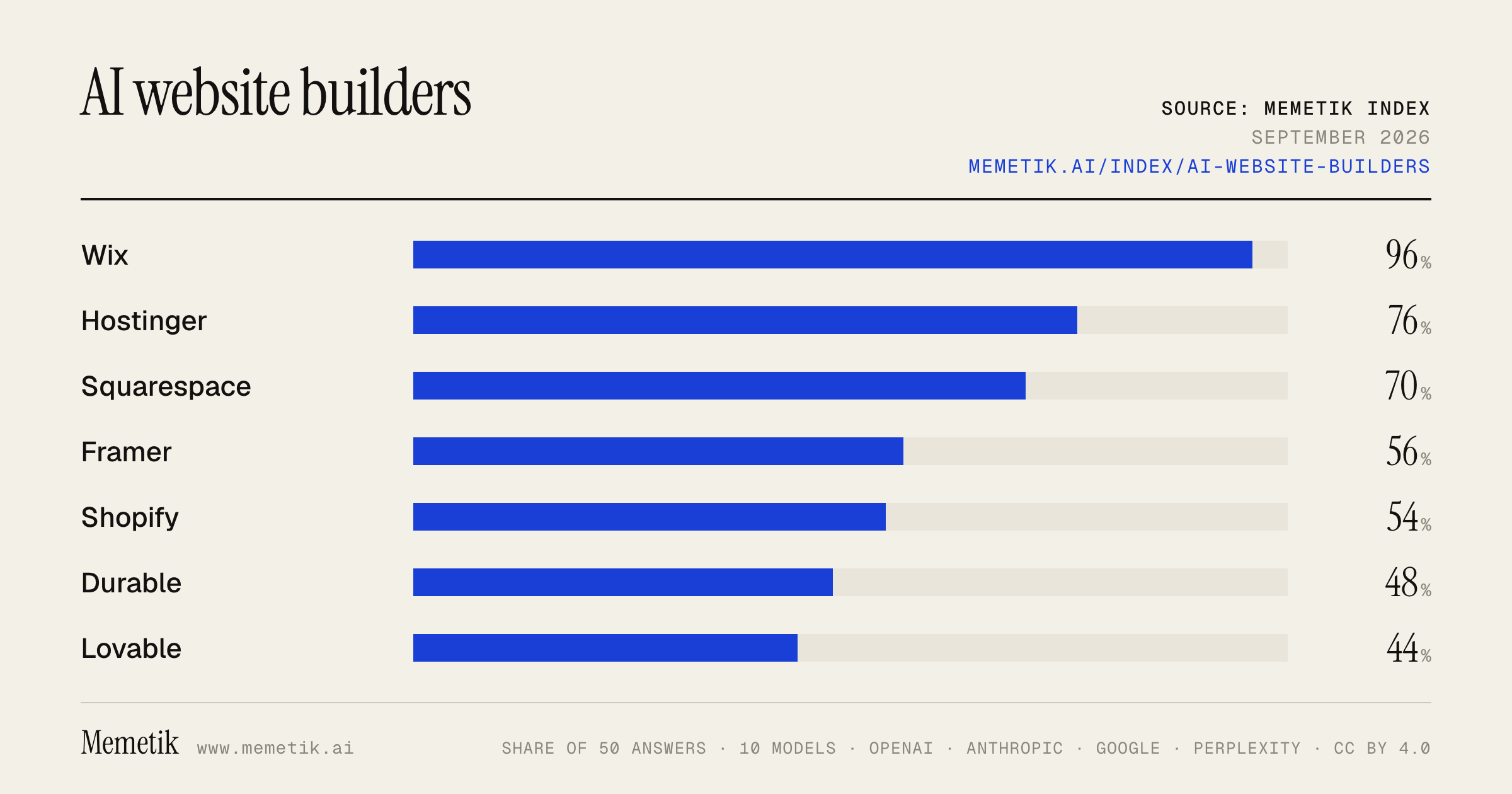
By provider
10 models · 50 answers
OpenAI 3 models · 15 answers
- GPT-5.6 Solgpt-5.6-solmost named: Wix 100%
- GPT-5.6 Terragpt-5.6-terramost named: Wix 100%
- GPT-5.6 Lunagpt-5.6-lunamost named: Wix 100%
Anthropic 3 models · 15 answers
- Claude Opus 5claude-opus-5most named: Wix 100%
- Claude Sonnet 5claude-sonnet-5most named: Hostinger 100%
- Claude Fable 5claude-fable-5most named: Wix 100%
Google 2 models · 10 answers
- Gemini 3.6 Flashgemini-3.6-flashmost named: Wix 100%
- Gemini 3.5 Flashgemini-3.5-flashmost named: Hostinger 100%
Perplexity 2 models · 10 answers
- Sonar Prosonar-promost named: Wix 100%
- Sonar Reasoning Prosonar-reasoning-promost named: Wix 100%
Sources the models cited
- youtube.com164
- playcode.io77
- nxcode.io69
- sintra.ai41
- networksolutions.com40
- website-builders.cybernews.com34
- launchthedamnthing.com31
- titan.email25
- wix.com22
- reddit.com22
- technologyadvice.com21
- tech.co18
ChatGPT via API returns no citations, so it does not contribute here.
The prompts
- What is the best AI website builder for a small business? Name specific products.
- Which AI website builder would you recommend to a small business in 2026?
- Compare the top AI website builder options right now.
- I'm a small business and I need an AI website builder. What should I use and why?
- Best AI website builder for a startup landing page?
Every answer
Raw model output, unedited
GPT-5.6 TerraWhat is the best AI website builder for a small business? Name specific products.
**Best overall for most small businesses: Wix AI Website Builder.** It is the strongest all-around choice if you need a professional marketing site plus practical business tools—appointments, contact forms, basic ecommerce, blogging, CRM-style contact management, SEO, email marketing, and automations. Its AI can generate a starting site from a prompt, but you still get hands-on drag-and-drop editing afterward. ([wix.com](https://www.wix.com/ai-website-builder?lang=en&utm_source=openai))

Choose based on your business model:

| If you are… | Best product | Why |
|---|---|---|
| A local service business—consultant, salon, contractor, fitness coach, clinic, agency | **Wix AI Website Builder** | Best balance of AI speed, editing flexibility, bookings, lead capture, and marketing tools. ([wix.com](https://www.wix.com/ai-website-builder?lang=en&utm_source=openai)) |
| Primarily selling physical products online | **Shopify AI Store Builder** | The better choice when ecommerce is the core business: AI-generated store designs, product/store setup, and Shopify’s commerce-focused checkout and selling tools. ([shopify.com](https://www.shopify.com/tools/ai-store-builder?utm_source=openai)) |
| A design-led service, portfolio, studio, restaurant, or premium brand | **Squarespace Blueprint AI** | Usually the best starting point when visual polish and a cohesive brand presentation matter more than deeply customized workflows. Squarespace’s Blueprint AI creates a tailored site and content after a short setup. ([squarespace.com](https://www.squarespace.com/websites/ai-website-builder?irgwc=1&utm_source=openai)) |

### My practical recommendation
- **Pick Wix** unless you have a strong reason not to. It is the safest one-platform choice for a typical small business.
- **Pick Shopify** if online product sales will be a major revenue source—not merely a few products on a services site.
- **Pick Squarespace** if you want an elegant, low-maintenance brochure/portfolio site and do not need complex operations.

### Before subscribing
Build a draft in the free trial and check these five things:
1. Can you edit the AI-generated pages easily?
2. Does it support your essential workflow—booking, payments, forms, inventory, or memberships?
3. Can you connect your existing domain and business email?
4. Do the mobile version and page speed look good?
5. Are the recurring plan, transaction, app, and payment-processing costs acceptable?

AI gets you to a usable first draft quickly, but you should personally revise the homepage headline, service descriptions, photos, pricing, policies, and calls to action before publishing.
GPT-5.6 TerraWhich AI website builder would you recommend to a small business in 2026?
For **most small businesses, I’d recommend Wix** in 2026.

It has the best balance of AI-assisted setup, easy editing after launch, and practical business tools—such as appointments, ecommerce, marketing, analytics, and SEO—without requiring a developer. Its AI builder can produce an initial multi-page site from a description of the business, but the key advantage is that you can keep refining it in a mature no-code editor as your needs grow. ([wix.com](https://www.wix.com/ai-website-builder?lang=en&utm_source=openai))

**Choose a different one if your business is a clear special case:**

- **Shopify** — best if selling products online is the core business. Its AI Store Builder generates store designs, while Shopify’s checkout, catalog, discounts, and commerce ecosystem are stronger than general-purpose builders. ([shopify.com](https://www.shopify.com/tools/ai-store-builder?utm_source=openai))
- **Squarespace** — best for visually led service brands: photographers, salons, consultants, restaurants, studios, and portfolios. It tends to produce more polished, brand-forward starting designs. ([squarespace.com](https://www.squarespace.com/blog/best-small-business-website-builder?utm_source=openai))
- **Hostinger Website Builder** — best for a very tight budget and a straightforward brochure site. It is a sensible option for a local service business that mainly needs pages, contact forms, and basic lead generation. ([fitsmallbusiness.com](https://fitsmallbusiness.com/best-website-builder-for-small-business/?utm_source=openai))

**My practical default:**
Start with **Wix** unless ecommerce will be central—in that case, start with **Shopify**.

One caution: use AI to create the first draft, not the final website. Rewrite the homepage copy in your real voice, verify every claim, add original photos where possible, and make sure the site clearly states your services, location/service area, prices or quote process, phone number, and primary call to action.
- https://www.wix.com/ai-website-builder?lang=en&utm_source=openai
- https://www.shopify.com/tools/ai-store-builder?utm_source=openai
- https://www.squarespace.com/blog/best-small-business-website-builder?utm_source=openai
- https://fitsmallbusiness.com/best-website-builder-for-small-business/?utm_source=openai
GPT-5.6 TerraCompare the top AI website builder options right now.
## Best AI website builders to shortlist

| Builder | Best for | AI/build experience | Main strength | Watch-out |
|---|---|---|---|---|
| **Wix AI** | Most small businesses; bookings, services, basic-to-serious stores | Conversational site generation plus drag-and-drop and AI-assisted editing | **Best all-around balance** of speed, control, marketing, scheduling, and commerce tools | Can feel feature-heavy; designs need refinement to avoid a generic first draft |
| **Squarespace Blueprint AI** | Portfolios, creators, consultants, restaurants, brand-led sites | Guided AI setup built around a polished visual system | **Best default aesthetic** with less effort | Less flexible than Wix/Webflow for unusual workflows or deeply custom functionality |
| **Framer AI** | Startup landing pages, agency sites, design-forward marketing pages | Prompt-to-layout with a highly visual design workflow | **Best for modern, high-end landing-page design** | Not my first pick for a complex store, memberships, or operational business site |
| **Webflow AI** | Professional marketing sites, teams, scalable CMS sites | AI assists creation, content, and development workflows within a pro-grade builder | **Best long-term control** without committing to a fully custom-coded stack | Steeper learning curve and usually more setup than simple AI-first builders |
| **Hostinger AI Website Builder** | Budget-conscious freelancers and small local businesses | Fast prompt-led generation bundled with hosting | **Best value / simplest paid route** for a straightforward brochure site | Less design and extensibility headroom as the business grows |
| **Durable** | Service businesses needing leads immediately | Generates a basic business site and business-oriented content fast | **Fastest “I need a site today” option** | More likely to look templated; limited for distinctive brands or sophisticated content |
| **Shopify (with AI tools)** | Businesses where selling products is the core job | AI helps with store content and setup rather than replacing commerce architecture | **Best for serious e-commerce**—catalog, checkout, inventory, apps | Overkill for a simple portfolio or local-service site; total app costs can add up |

### My practical picks

- **Best overall:** **Wix AI**
  Choose it if you need a real business website—not just a landing page—and may eventually need appointments, payments, email marketing, forms, CRM-like features, or a store. Wix’s current AI workflow combines prompt-led generation with manual editing; its free tier lets you build before paying, while paid plans are needed for a custom domain and payment-related features. Wix lists U.S. annual-billing starting prices of about **$17/month (Light), $29/month (Core), and $39/month (Business)**. ([wix.com](https://www.wix.com/ai-website-builder?lang=en&utm_source=openai))

- **Best-looking with the least design work:** **Squarespace Blueprint AI**
  Pick Squarespace when the site’s visual impression matters more than intricate functionality: photographer, interior designer, coach, restaurant, creative studio, or premium personal brand.

- **Best for a striking startup/agency landing page:** **Framer AI**
  Pick Framer if your site is primarily about communicating a product, raising credibility, collecting leads, and looking current. It is particularly strong when someone design-aware will spend an hour or two polishing the AI output.

- **Best for an established marketing team or a site that must scale:** **Webflow AI**
  Choose Webflow if you expect a large CMS, precise responsive behavior, sophisticated content structure, or collaboration with a designer/developer. It is less “instant website” and more “professional visual web platform.”

- **Best inexpensive simple site:** **Hostinger AI Website Builder**
  A sensible choice for a basic local-business, freelancer, or informational site where low cost and speed beat deep customization.

- **Best for a one-person service business that needs leads now:** **Durable**
  Useful for a first version for cleaners, consultants, contractors, and similar businesses. I would use it to validate the offer quickly, but consider Wix, Squarespace, or Webflow once brand differentiation matters.

- **Best for selling products:** **Shopify**
  Don’t choose a general AI site builder merely because it can add a store. If inventory, variants, fulfillment, discounts, subscriptions, or multi-channel selling are central, start with Shopify.

## A simple decision rule

1. **Need bookings, local-business tools, marketing, or a flexible small-business site?** → **Wix**
2. **Need a beautiful portfolio or premium brand site?** → **Squarespace**
3. **Need a sleek launch/landing page?** → **Framer**
4. **Need professional-grade CMS and control?** → **Webflow**
5. **Need the cheapest straightforward site?** → **Hostinger**
6. **Need a basic lead-gen site in an afternoon?** → **Durable**
7. **Need to operate an actual online store?** → **Shopify**

## Important caveat about “AI-built”

AI gets you the **first 60–80%** quickly: page structure, starter copy, images, sections, and basic SEO text. The remaining work—real customer proof, service details, pricing, legal pages, mobile review, accessibility, and conversion-focused copy—is what makes the site credible. Avoid publishing unedited AI copy or fabricated testimonials/images.

If I were choosing with no other context: **Wix for a business**, **Squarespace for a portfolio/brand**, **Framer for a landing page**, and **Shopify for commerce**.
GPT-5.6 TerraI'm a small business and I need an AI website builder. What should I use and why?
## My default recommendation: **Wix AI Website Builder**

For most small, service-based businesses—local shops, consultants, salons, contractors, agencies, instructors, and professional services—**Wix is the best all-around choice**.

**Why:**
- It can generate a complete first draft from a conversation about your business, then lets you edit visually without code.
- It combines the website with practical small-business tools: lead forms, bookings, basic ecommerce, email/marketing, SEO help, and payments depending on your plan.
- Crucially, you are **not stuck with the AI’s first design**: you can refine individual sections by prompt or manually drag-and-drop details. ([wix.com](https://www.wix.com/ai-website-builder?lang=en&utm_source=openai))

**Choose Wix if:** your primary goal is generating leads, taking bookings, showing services/portfolio work, publishing local-business information, or selling a modest catalog online.

## Choose **Shopify AI Store Builder** instead if selling products is the business

If your site’s core job is selling physical products online—especially a growing catalog, variants, shipping, discounts, inventory, and checkout—start with **Shopify**, not a general website builder.

Its AI Store Builder creates store-design options from a short business description, and Shopify is purpose-built around commerce tools and checkout. ([shopify.com](https://www.shopify.com/tools/ai-store-builder?utm_source=openai))

**Choose Shopify if:** more than roughly half of the site’s value comes from online product sales.

---

## Quick decision guide

| Your business need | Best starting point |
|---|---|
| Services, appointments, local leads, brochure site | **Wix AI** |
| Online retail / inventory / serious ecommerce | **Shopify AI Store Builder** |
| Just one polished landing page to test an idea | **Wix AI**, on a minimal plan |
| You expect a developer to build highly custom functionality later | Consider a developer-oriented platform rather than committing solely on AI-builder convenience |

## The important “why” behind this choice

An AI website builder is best used as a **fast starting point**, not as your brand strategist. It can produce layout, starter copy, images, and page structure in minutes—but what makes the site convert is still:

1. Clear description of *who* you serve.
2. Specific services/products and pricing or quote process.
3. Real photos, testimonials, credentials, and location/service area.
4. One primary call-to-action—e.g., “Book a consultation,” “Request an estimate,” or “Shop now.”

Wix’s approach is especially suitable when you want AI speed *and* the ability to revise the result later without learning code. It also includes tools intended for search visibility and business operations, rather than just generating a pretty homepage. ([wix.com](https://www.wix.com/ai-website-builder?lang=en&utm_source=openai))

## Two cautions before you commit

- **Do not publish AI-written text untouched.** Verify every claim, price, location, service area, certification, policy, and testimonial.
- **Build a real first draft before paying annually.** Test the editor, mobile version, booking/checkout flow, and how easy it is to make changes. With Wix, for example, an AI-generated site cannot simply be switched to another template later, so make sure you like the initial design direction. ([support.wix.com](https://support.wix.com/en/article/wix-editor-creating-an-ai-generated-site?utm_source=openai))

## What I’d do in your position

1. Start a **Wix AI** draft if you are primarily a service business; start **Shopify AI Store Builder** if you primarily sell products.
2. Create these pages first: Home, Services/Shop, About, Reviews, FAQ, Contact.
3. Add your own domain only after testing the site on a phone and having someone try the main contact/booking/purchase action.
4. Keep the design simple: one font family, two brand colors, real images, and one main call-to-action per page.

**Bottom line:** pick **Wix AI** unless ecommerce is central to your operation. Pick **Shopify** when ecommerce is central.
GPT-5.6 TerraBest AI website builder for a startup landing page?
**Best overall for a startup landing page: Framer.**

It’s the best fit if you want a polished, modern SaaS-style page quickly—especially for a waitlist, product launch, or early validation. Its AI can generate a first draft from a prompt, and its visual editor is strong for refining hero sections, responsive layouts, animations, and brand feel without needing to code. ([framer.com](https://www.framer.com/ai/?via=chyrkov&utm_source=openai))

### Pick based on your situation

| If you need… | Choose | Why |
|---|---|---|
| **A beautiful one-page startup site fast** | **Framer** | Best default for visual quality and quick iteration. |
| **A site that will grow into a serious marketing site** | **Webflow AI** | AI generates the initial site plus a design system; better long-term control, CMS, and structured marketing pages. Webflow’s AI flow is limited to new/AI-generated projects initially, so choose it upfront rather than migrating later. ([help.webflow.com](https://help.webflow.com/hc/en-us/articles/38840145286035-Build-a-site-with-Webflow-s-AI-site-builder?utm_source=openai)) |
| **The easiest no-code setup with business tools** | **Wix AI** | Good if you also need scheduling, payments, CRM, basic SEO/marketing tools, etc. Wix’s AI builder supports conversational generation plus manual pixel-level edits. ([wix.com](https://www.wix.com/ai-website-builder?lang=en&utm_source=openai)) |
| **A designer/developer workflow or Figma/Webflow/React handoff** | **Relume** | Excellent for quickly generating a sitemap and wireframes, then exporting or publishing. Less my first pick for a simple “live tonight” landing page. ([relume.ai](https://www.relume.ai/?r=0&utm_source=openai)) |

### My recommendation
- **Pre-launch / waitlist / early SaaS:** **Framer**
- **Funded startup building content, SEO, integrations, or a large multi-page marketing site:** **Webflow**
- **Nontechnical local/service startup needing operational features:** **Wix**

### Don’t let AI write the final copy
Use AI for the layout and first pass, but rewrite:
1. Hero headline: clearly state the outcome for a specific customer.
2. CTA: one action only—e.g., “Join the waitlist” or “Book a demo.”
3. Proof: customer quotes, traction, logos, metrics, or a concrete product screenshot.
4. FAQ: handle the top 3 objections.

For most founders, I’d launch v1 in **Framer**, connect a custom domain and an email capture form, then spend the saved time talking to prospective users.
Claude Sonnet 5What is the best AI website builder for a small business? Name specific products.
There's no single universal "best" AI website builder — it depends on your priorities (speed, design, e-commerce, SEO, or ongoing management). Based on current reviews and comparisons, here are the standout options for small businesses:

**1. Wix (AI Website Builder)**
One of the most popular choices —
it's best for fast, beautiful design automation with strong built-in SEO and e-commerce tools
. It
uses simple prompts to generate pages, layouts, and content
, making it very approachable for non-technical users.

**2. Squarespace (with Blueprint AI)**
Widely recommended for its polish and all-in-one nature.
It's an all-in-one option that works well for small businesses in pretty much any industry, combining professional design, solid SEO, and built-in features like invoicing, scheduling, email marketing, contact forms, and blogging
. Its AI tool
generates layouts, suggests color palettes, and assists with content creation
.

**3. Hostinger Website Builder**
Frequently ranked as a top budget-friendly pick.
It's positioned as the best AI website builder for small businesses and beginners
, starting at a low monthly price.

**4. 10Web**
Best if you want AI built on WordPress's flexibility.
10Web takes existing WordPress sites and rebuilds them with AI, or creates new ones from scratch using WordPress infrastructure, giving you the flexibility of WordPress powered by automation
.

**5. Framer AI**
A strong pick if design quality matters most.
For designers, Framer produces the most beautiful results with the least effort — its AI generates stunning layouts while giving pixel-perfect control, emphasizing visual excellence over feature count
.

**6. Sintra AI**
A newer, more ambitious option — rather than just building a site,
it's positioned as best for small businesses that want an AI team to build, optimize, maintain, and grow the website automatically
.

### Bottom line recommendation
- **Want the easiest, most balanced option with strong templates and business tools?** → **Squarespace**
- **Want deep AI design automation plus built-in marketing/e-commerce?** → **Wix**
- **On a tight budget and just starting out?** → **Hostinger Website Builder**
- **Need WordPress's flexibility and plugin ecosystem?** → **10Web**
- **Care most about visual design quality?** → **Framer AI**

For most small businesses wanting a quick, professional, no-code launch, **Wix or Squarespace** remain the safest all-around bets, while **Hostinger** is the best value pick if budget is the main concern.
- https://sintra.ai/blog/best-ai-web-builder-for-small-business
- https://website-builders.cybernews.com/ai-website-builders/
- https://launchthedamnthing.com/blog/best-website-builders
- https://technologyadvice.com/blog/information-technology/best-ai-website-builders/
- https://titan.email/best-ai-website-builders/
- https://www.nxcode.io/resources/news/best-ai-website-builder-2026
Claude Sonnet 5Which AI website builder would you recommend to a small business in 2026?
I'll research the current landscape of AI website builders to give you an informed recommendation for 2026.
Based on current comparisons, there isn't a single universal "best" answer — it depends on your priorities — but a few tools consistently stand out for small businesses in 2026:

## Top recommendations

**Wix** is the safest all-around choice for most small businesses.
It's a strong choice for small business owners, freelancers, and anyone who wants a professional-looking site without hiring a developer, with AI that gets you started fast plus a template library and app store to grow into.
 It also pairs well with e-commerce and CRM needs thanks to
strong integrations with 300+ apps, payments, and CRM
 tools.

**Hostinger Website Builder** is worth considering if budget is your main concern — it's frequently cited as the top pick for small businesses and beginners at a very low price point, with fast setup and solid AI-generated first drafts.

**Squarespace** is the pick if design and brand aesthetics matter most to you. It's known for
AI-powered design and branding suggestions
 and excels at premium templates with strong built-in SEO.

## Choose based on your specific need

- **Selling products online?**
Go with Shopify — no other builder matches its e-commerce depth.
 If you only sell a few products alongside services, Wix or Squarespace can also handle it.
- **Content marketing/blogging is central to your strategy?**
Choose WordPress.com — its CMS is unmatched for blogs, SEO, and content-driven growth.

- **Already on WordPress and want AI to speed things up?**
10Web is a good fit for freelancers, agencies, or small business owners who are familiar with WordPress but want to speed things up with automation.

- **Want an all-in-one system beyond just a website** (invoicing, CRM, marketing)?
Durable is a solid pick for solo founders, freelancers, or small businesses that also need invoicing, CRM, brand tools, and marketing features—all in one place with a fast AI site builder.

- **Want an "AI team" managing everything long-term**, not just a builder? Sintra AI positions itself as an AI-driven system to build, optimize, and grow the site continuously, though it's pricier (~$97/mo standard).
- **Fastest possible launch with minimal input?** Options like GoDaddy Airo or ChilledSites can get a live site up in under a minute, though with less design control.

## Bottom line
For **most small businesses** in 2026, I'd recommend starting with **Wix** — it offers the best balance of ease-of-use, AI design assistance, SEO tools, and room to scale (e-commerce, apps, integrations) without needing technical skills. If cost is the deciding factor, **Hostinger** is a strong budget alternative, and if you're purely product-focused, **Shopify** remains the e-commerce specialist.

If you can tell me more about your business (service vs. product-based, budget, whether you'll need blogging/SEO focus, and technical comfort level), I can narrow this down to one specific pick.
Claude Sonnet 5Compare the top AI website builder options right now.
Here's how the leading AI website builders stack up right now, based on recent testing and reviews:

## Overall Best / Most Feature-Rich: **Wix**

Wix is often cited as the top AI website builder, offering over 20 AI tools (including an AI assistant), a conversational AI builder, and vibe coding platform, Wix Harmony.

Wix is considered a top AI website builder due to its wide range of AI features, intuitive interface, and 24/7 business support, with AI-powered tools assisting at every stage from design to promotion.
 It's also positioned as **the most mature ecosystem for businesses needing deep integrations**, per one comparison:
for businesses that need deep integrations, Wix AI is the most mature ecosystem.
 The tradeoff is that
it's the biggest name in website builders with AI bolted onto a traditional drag-and-drop foundation, where AI acts as an assistant rather than the engine.


## Best Budget Option: **Hostinger**

Hostinger is frequently recommended as the best choice for users on a budget.
 Pricing starts as low as
$2.69/month, positioning it as best for small businesses and beginners.


## Best for Founders/Functional Web Apps: **Lovable**
Priced
from $21.00/month, Lovable is considered best for founders and functional web apps
 rather than simple static sites — it leans more toward full app generation.

## Best for Design-Focused Projects: **Framer**

For designers, Framer produces the most beautiful results with the least effort, generating stunning layouts while giving pixel-perfect control, and it emphasizes visual excellence over feature count.

The AI suggests layouts and sections, but the real power comes from its sophisticated animation system and responsive design tools.
 It's best suited for
portfolios, agency sites, and brands prioritizing visual impact over functionality.


## Best for WordPress Users: **10Web**

10Web generates a WordPress site with AI, then hosts it on Google Cloud with a built-in speed optimizer, giving you the flexibility of WordPress—including plugins, real ownership, and export—with an AI head start that skips the blank-page setup.


## Best for Design Teams/Complete Systems: **Webflow**

Unlike simpler builders, Webflow generates a complete design system that ensures consistency across the entire site—the AI doesn't just create pages, it creates scalable frameworks.
 Its AI Site Builder is currently in beta and aimed at
professional-grade use for teams who need both AI assistance and complete design control.


## Fastest/Simplest: **Durable & similar instant-generation tools**

If you want the prettiest templates, Squarespace and Framer lead; if you want the cheapest live site, Hostinger wins; and if you need something online in the next minute, Durable is hard to beat.


## Key Takeaways
- **Quality has genuinely improved**:
in 2026 the first drafts are genuinely usable rather than throwaway — the AI handles layout, copy, and images, and you refine from there, with the quality gap now coming down to customization and domain ownership rather than whether the tool can produce a real page.

- **Free plans exist but are limited**:
several builders have real free plans, including Wix, Framer, Durable, Lovable, and Bolt, though the common limit is that a custom domain usually requires a paid plan, with free tiers publishing to a branded subdomain and often adding the tool's badge.

- **Wix/Squarespace still edge out AI-first tools for complex needs**:
Wix and Squarespace are generally considered better for complex e-commerce or highly visual creative portfolios
 compared to newer, prompt-first AI builders.

**Bottom line**: If you want an all-in-one ecosystem with the most AI tools, go **Wix**. For tight budgets, **Hostinger**. For app-like functionality beyond a static site, **Lovable**. For visually stunning, design-forward sites, **Framer**. For WordPress portability, **10Web**. And for teams needing scalable design systems, **Webflow**.
- https://tech.co/website-builders/best-ai-website-builders
- https://chilledsites.com/ai-website-builder-comparisons
- https://website-builders.cybernews.com/ai-website-builders/
- https://www.nxcode.io/resources/news/best-ai-website-builder-2026
- https://catdoes.com/blog/best-ai-website-builder
- https://chilledsites.com/blog/best-ai-website-builder-2026
Claude Sonnet 5I'm a small business and I need an AI website builder. What should I use and why?
Based on current reviews, there's no single "best" tool — it depends on your priorities (budget, design control, e-commerce, SEO, ease of use). Here's a practical breakdown:

## Top picks and why

**Wix AI (from ~$11.75/month)** – Best all-around choice for most small businesses.
Wix's AI website builder uses simple prompts to generate pages, layouts, and content
, and it pairs that with strong built-in SEO and e-commerce tools, per recent comparisons.
It's considered best for fast, beautiful design automation with strong built-in SEO and e-commerce tools
. Good if you want speed plus flexibility to fine-tune things later.

**Hostinger Website Builder (from ~$2.69/month)** – Best value/budget pick. It's frequently ranked
best AI website builder for small businesses and beginners
, making it a strong option if cost is your main concern.

**Squarespace (with Blueprint AI)** – Best for design quality + built-in business tools.
It's considered an excellent all-in-one option for small businesses in pretty much any industry, combining professional design, solid SEO, and built-in features like invoicing, scheduling, email marketing, contact forms, and blogging — all under one subscription.

It also offers a lighter AI-powered site builder called Blueprint AI which preserves your creative control.


**10Web** – Best if you specifically want a WordPress-based site (more plugins/flexibility long-term).
It takes existing WordPress sites and rebuilds them with AI, or creates new ones from scratch using WordPress infrastructure — either way giving you the flexibility of WordPress powered by automation.


**Framer AI** – Best if visual design/branding is a top priority (e.g., a boutique, studio, or creative business).
Framer produces the most beautiful results with the least effort — its AI generates stunning layouts while giving pixel-perfect control, emphasizing visual excellence over feature count.


## How to actually decide

1. **If you need e-commerce checkout out of the box** → Wix or Shopify-style tools are often recommended over pure AI generators, since
e-commerce stores might need Shopify's checkout system
 specifically.
2. **If you're content/blog-heavy** → WordPress-based (10Web) may serve you better since
content-heavy businesses might want WordPress's blogging tools
.
3. **If budget is tight** → Hostinger or Squarespace tend to bundle more for less.
4. **If you want AI to also *maintain and grow* the site (not just build it)** → tools like Sintra AI position themselves as
best for small businesses that want an AI team to build, optimize, maintain, and grow the website automatically
, which is useful if you don't want to touch the site much after launch.

## My honest recommendation
For most small businesses, **start with Wix AI or Squarespace** — they balance ease of use, design quality, SEO, and built-in business tools (booking, invoicing, email) without needing extra plugins or developers. If cost is the deciding factor, **Hostinger** is a very strong budget alternative. Only go the WordPress/10Web route if you anticipate needing lots of customization or plugins down the line.

One caveat worth knowing:
one test that built the same site on all 8 AI website builders found 5 failed basic checks
 — so it's worth testing your specific business content on 1-2 platforms (most offer free trials) before committing to a paid plan.
- https://website-builders.cybernews.com/ai-website-builders/
- https://sintra.ai/blog/best-ai-web-builder-for-small-business
- https://launchthedamnthing.com/blog/best-website-builders
- https://titan.email/best-ai-website-builders/
- https://www.nxcode.io/resources/news/best-ai-website-builder-2026
- https://playcode.io/blog/best-website-builder-small-business-2026
- https://chilledsites.com/blog/best-ai-website-builder-2026
Claude Sonnet 5Best AI website builder for a startup landing page?
There's no single "best" tool — it depends on your priorities (speed, design polish, or conversion features). Here's a practical breakdown based on current comparisons:

## Best for pure speed & simplicity
- **Hostinger** –
Hostinger generates a complete site in under a minute at a low monthly price, making it ideal for a first website.

- **Carrd** – Not technically AI-driven, but great if you want something dead simple:
you need a clean, single-page site live in 20 minutes for $19 a year, and Carrd does that better than anyone.

The design aesthetic leans modern and minimal — exactly what you want for a startup launch page, waitlist page, or link-in-bio landing page.


## Best for design polish (looks custom, not templated)
- **Framer / Squarespace** –
Framer and Squarespace produce designs that need almost no cleanup
, which matters if you want your landing page to look premium out of the box.

## Best for startup-specific brand matching
- **Flint** –
Flint leads this category with proprietary brand extraction technology that automatically captures your complete design system from an existing website URL.
 Good if you already have brand assets elsewhere and want consistency.

## Best if you'll need conversion optimization / A/B testing later
- **Unbounce** –
Most landing page builders include A/B testing as just another basic checkbox feature nowadays, but Unbounce rebuilt its entire platform specifically around this critical testing capability for marketers.

- **Instapage** –
an enterprise landing page builder emphasizing post-click optimization and conversion testing, designed for marketing teams and agencies
 — likely overkill for an early-stage startup unless you're running paid campaigns at scale.

## Best if the landing page might grow into a full app
-
Bolt or Lovable when the landing experience needs to grow into a web app
 — worth considering if your "landing page" is really an MVP front-end.

### My practical recommendation
For a typical startup landing page (pre-launch, waitlist, or simple marketing site), I'd suggest:
1. **Carrd or Framer** if you just need something live fast and clean-looking.
2. **Unbounce** if lead conversion/A/B testing is core to your go-to-market strategy.
3. **Flint** if brand consistency with an existing site/design system matters most.

If you tell me more about your stage (pre-launch waitlist vs. active product), budget, and whether you need built-in analytics/A/B testing, I can narrow this down further.
- https://www.beehiiv.com/blog/ai-website-builder
- https://www.aidesigner.ai/blog/best-ai-landing-page-builders
- https://www.flint.com/articles/best-ai-landing-page-builders-startups
- https://kleap.co/blog/8-best-ai-landing-page-builders-in-2026-tested-ranked
- https://www.perspective.co/article/ai-landing-page-builder
- https://playcode.io/blog/best-ai-landing-page-builders-2026
Gemini 3.6 FlashWhat is the best AI website builder for a small business? Name specific products.
There is no single "best" AI website builder, as the ideal choice depends on your business model, budget, and design needs. However, several top AI-powered platforms lead the market, each serving different types of small businesses:

---

### 1. **Durable**
* **Best for:** Local service-based businesses, solopreneurs, and fast setups.
* **Why it stands out:** Durable is designed to generate a complete website—including copy, images, and layout—in under 30 seconds based on simple prompts.
* **Key AI Features:**
  * Automatically generates localized site copy and royalty-free images.
  * Integrated AI assistant that manages built-in CRM, invoicing, automated booking, and marketing copy.
* **Best suited for:** Plumbers, landscapers, consultants, photographers, and local service providers who want a website and basic back-office management running instantly.

---

### 2. **Wix AI (Wix Studio / Wix ADI)**
* **Best for:** All-around flexibility, rich features, and total customization.
* **Why it stands out:** Wix combines conversational AI prompt building with one of the most powerful drag-and-drop editors available. You can generate an initial draft via a natural conversation and then fine-tune every element.
* **Key AI Features:**
  * Conversational site generator.
  * AI text, image, and section generation directly within the drag-and-drop editor.
  * Built-in AI tools for SEO optimization and logo creation.
* **Best suited for:** Businesses that want an easy AI start but desire full control over layout, brand styling, and feature integrations (e.g., event scheduling, e-commerce, blogging).

---

### 3. **Hostinger AI Website Builder**
* **Best for:** Budget-conscious small businesses and startups.
* **Why it stands out:** Highly affordable pricing that includes free domain names, hosting, and AI tools in a single low-cost subscription.
* **Key AI Features:**
  * AI site generator from a simple text description or uploaded assets (like business cards).
  * AI Heatmap tool to predict user behavior and optimize call-to-action placement.
  * AI logo maker and blog writer.
* **Best suited for:** Freelancers and micro-businesses that need a professional web presence on a tight budget.

---

### 4. **10Web**
* **Best for:** WordPress users and businesses migrating an existing site.
* **Why it stands out:** 10Web acts as an AI bridge to WordPress. It allows you to build a site using AI while retaining the full ecosystem, plugin capability, and ownership benefits of WordPress.
* **Key AI Features:**
  * AI recreation tool: You can enter any existing URL, and 10Web’s AI will recreate its layout in WordPress so you can customize it.
  * Automated PageSpeed optimization and elementor-based editing.
* **Best suited for:** Businesses that plan to scale, need deep custom functionality/plugins, or want to rebuild an old site.

---

### 5. **Framer**
* **Best for:** Design-first brands, modern startups, and creative agencies.
* **Why it stands out:** Framer works like a blend of Figma and Webflow. You can prompt the AI to generate modern, sleek, interactive site designs with micro-animations.
* **Key AI Features:**
  * Prompt-to-site generation focused on high-end typography and layout.
  * Easy text and layout tweaks via direct AI prompts.
* **Best suited for:** Tech startups, design portfolios, boutique products, and brands where visual aesthetic and sleek presentation are critical.

---

### 6. **Shopify + Shopify Magic**
* **Best for:** Dedicated e-commerce businesses.
* **Why it stands out:** While traditional builders are great for service sites, Shopify remains the gold standard for online selling. Its native AI suite (*Shopify Magic*) streamlines online shop management.
* **Key AI Features:**
  * Auto-generates compelling product descriptions, emails, and store landing pages.
  * AI-powered customer support chat (Sidekick) to help analyze store performance and automate tasks.
* **Best suited for:** Businesses whose primary goal is selling physical or digital products online.

---

### Summary Recommendation:
* **Go with Durable** if you need a quick, no-fuss website with built-in client management in under 10 minutes.
* **Go with Wix AI** if you want the best balance between fast AI generation and complete design customization.
* **Go with Hostinger** if you are looking for the lowest overall cost.
* **Go with Shopify** if your core focus is running an online store.
Gemini 3.6 FlashWhich AI website builder would you recommend to a small business in 2026?
When recommending an AI website builder for a small business, the best choice depends on your primary goal—whether that's ease of use, design flexibility, budget, or advanced interactive features.

The top AI website builders fall into distinct categories:

---

### 1. **Best Overall for Most Small Businesses: Wix AI**
* **Best for:** Local service providers, consultants, brick-and-mortar shops, and general small businesses looking for a complete toolkit.
* **Why it stands out:** Wix has refined its AI builder (powered by its chat interface) to create fully tailored websites from a conversational prompt. It handles everything from initial layout generation to text, graphics, and structure.
* **Key Features:**
  * Conversational AI site generation.
  * Generative AI copy, image creation, and auto-generated SEO settings.
  * Access to Wix’s vast ecosystem of apps (booking systems, forms, live chat, payment gateways).
* **Verdict:** Highly reliable, versatile, and easy to customize after the AI builds the initial draft.

---

### 2. **Best for Design-Conscious Brands: Squarespace Blueprint AI**
* **Best for:** Creative agencies, photographers, boutiques, restaurants, and high-end services where aesthetics are paramount.
* **Why it stands out:** Squarespace’s AI guided builder ensures that whatever layout it generates, it looks polished and professionally designed right out of the box.
* **Key Features:**
  * Blueprint AI onboarding that guides color palette, font selection, and core layouts.
  * Native AI text generation for landing page copy and blog posts.
  * Built-in invoicing, client scheduling, and digital store capability.
* **Verdict:** The best option if visual branding, elegant layouts, and minimal clutter are your top priorities.

---

### 3. **Best for Tight Budgets & Speed: Hostinger AI Website Builder**
* **Best for:** Solopreneurs, startups, and budget-conscious businesses that need a simple site live in minutes.
* **Why it stands out:** Hostinger provides one of the lowest entry costs on the market while delivering surprisingly fast, effective AI site creation.
* **Key Features:**
  * Full AI page generation based on a brief description.
  * Built-in AI heatmap tools (predicting where users will look/click).
  * AI writer, logo generator, and basic e-commerce capabilities included in low-tier pricing.
* **Verdict:** A great value-for-money option if you need an inexpensive, functional website up quickly.

---

### 4. **Best Next-Gen Prompt/Chat-Based Builders: Base44 or Lovable**
* **Best for:** Modern startups or tech-forward small businesses needing custom logic, interactive web apps, or dynamic CMS structures beyond standard template-based builders.
* **Why it stands out:** Platforms like **Base44** and **Lovable** allow you to construct, edit, and iterate on your website entirely through continuous natural language prompts. Instead of just generating a static layout once, you can continuously ask the AI to modify components, add workflows, or tweak design elements.
* **Verdict:** Ideal if you want ultra-fast prompt-driven iteration and need functionality that goes beyond standard template drag-and-drop editors.

---

### 5. **Best for E-Commerce: Shopify (with Shopify Magic & AI Extensions)**
* **Best for:** Small businesses focused primarily on selling physical products online.
* **Why it stands out:** While traditional AI builders offer simple e-commerce features, Shopify remains the gold standard for handling inventory, scaling orders, and secure checkouts. Its built-in **Shopify Magic** suite uses AI to generate product descriptions, marketing emails, dynamic landing pages, and storefront adjustments automatically.
* **Verdict:** Essential if your primary revenue comes from online store sales.

---

### Quick Recommendation Matrix

| Business Type / Need | Top Recommendation | Why |
| :--- | :--- | :--- |
| **All-Rounder / Local Business** | **Wix AI** | Great AI generation + massive app ecosystem |
| **Design / Agency / Portfolio** | **Squarespace AI** | Cleanest aesthetic & highest design quality |
| **Low Budget / Fast Launch** | **Hostinger AI** | Extremely affordable and simple |
| **Conversational / Custom Logic** | **Base44** | Edit and expand full sites purely with prompts |
| **Online Store** | **Shopify** | Unrivaled e-commerce capabilities with AI copy/layouts |
Gemini 3.6 FlashCompare the top AI website builder options right now.
The AI website builder market is currently split into **two distinct categories**: traditional website platforms that have integrated generative AI to speed up creation, and new **full-stack / prompt-driven AI app platforms** that build complete, functional web applications from simple text descriptions.

---

### Category 1: Traditional & Business AI Website Builders
*Best for standard business sites, portfolios, blogs, and traditional e-commerce.*

#### 1. Wix AI
* **Best For:** All-around features and maximum flexibility.
* **How It Works:** Uses a conversational AI setup assistant to generate a tailored design, localized copy, and custom images based on your business description.
* **Pros:** Deep suite of native business tools (booking, CRM, e-commerce, blogging) and drag-and-drop customization post-generation.
* **Cons:** The editor can feel overwhelming due to the sheer number of features.
* **Pricing:** Starts around $17/month.

#### 2. Squarespace (Blueprint AI)
* **Best For:** Creatives, portfolios, and design-first business sites.
* **How It Works:** Guides you through a guided step-by-step setup where AI generates layouts, curated color palettes, and typography matching your brand.
* **Pros:** Consistently yields the highest-quality aesthetic results; strict design grids prevent breaking layout responsiveness.
* **Cons:** Less conversational flexibility compared to Wix or full-prompt builders.
* **Pricing:** Starts around $16–$18/month.

#### 3. Hostinger AI Builder
* **Best For:** Budget-conscious users and absolute beginners.
* **How It Works:** A quick 4-click AI generator that creates a multi-page site, starter copy, and imagery in seconds.
* **Pros:** Extremely affordable, fast generation, and simple editing interface.
* **Cons:** Basic feature set; advanced customizations are limited.
* **Pricing:** Ultra-low intro rates starting as low as $1.79–$2.99/month.

#### 4. Durable
* **Best For:** Service-based business owners needing an instant online presence.
* **How It Works:** Asks for your location and business type, then generates a complete website in under 30 seconds.
* **Pros:** Extends AI beyond design to handle built-in invoicing, CRM, automated SEO posts, and booking workflows.
* **Cons:** Visual customization is somewhat rigid compared to Framer or Wix.
* **Pricing:** Starts around $12/month.

---

### Category 2: Modern Prompt-Driven & Full-Stack AI Builders
*Best for dynamic web apps, complex interactive logic, custom client portals, and modern UI performance.*

#### 1. Framer AI
* **Best For:** Designers and modern tech companies needing high-end animations and responsive design.
* **How It Works:** Type a prompt describing your landing page, and Framer generates fully interactive desktop and mobile layouts with live animations.
* **Pros:** Unmatched UI control, high performance, top-tier SEO, and seamless CMS integration.
* **Cons:** Higher learning curve if you want to make manual design edits using visual layers.
* **Pricing:** Free tier available; paid plans start around $10/month.

#### 2. Lovable / Base44 / Bolt.new
* **Best For:** MVPs, SaaS landing pages, interactive web tools, and full-stack web applications.
* **How It Works:** Uses natural language chat to continuously build and modify UI components, integrate backend databases, and establish user authentication.
* **Pros:** Goes far beyond static pages—can build working web apps, dynamic forms, and custom workflows using natural language prompts.
* **Cons:** Requires a basic understanding of product architecture to prompt effectively for complex logic.
* **Pricing:** Free tiers for testing; paid plans range from $5 to $20/month depending on generation credits.

---

### Quick Selection Summary

| Priority | Recommended Tool |
| :--- | :--- |
| **All-in-One Business Site (E-commerce / Booking)** | **Wix AI** |
| **Clean, Modern Portfolio or Creative Brand** | **Squarespace** |
| **Lowest Cost / Speed** | **Hostinger AI** or **Durable** |
| **High-End Animated Marketing Page** | **Framer AI** |
| **Custom Web App / Dynamic Business Logic** | **Lovable** or **Base44** |
Gemini 3.6 FlashI'm a small business and I need an AI website builder. What should I use and why?
Choosing the best AI website builder depends on what your business actually does and how much control you want over the final product.

The top AI website builders fall into specific categories, along with recommendations based on your business type:

---

### 1. Wix AI (Best Overall for Flexibility & All-in-One Features)
* **Why use it:** Wix’s AI prompt assistant (Wix Harmony/ADI) asks you questions about your business, generates a full site layout, and writes copy for you. Unlike simpler AI tools, you retain **complete drag-and-drop freedom** to tweak every single detail. It also includes built-in SEO tools, booking systems, e-commerce, and CRM capabilities.
* **Best for:** Local services, freelancers, brick-and-mortar stores, and businesses that want AI to build the initial structure but still want total control over design.

---

### 2. Durable AI (Best for Extreme Speed & Ultra-Simple Setup)
* **Why use it:** Durable can literally build a website, complete with placeholder copy, images, and lead forms, in **under 60 seconds**. Beyond the site builder, it doubles as an AI business manager by auto-generating invoicing, basic CRM, and social media post copy.
* **Best for:** Solopreneurs, consultants, and contractors who need a simple brochure or lead-capture site up and running immediately with zero design headache.

---

### 3. Squarespace (Blueprint AI) (Best for Aesthetics & Design Quality)
* **Why use it:** If brand image and high-end visual presentation are critical, Squarespace is the gold standard. Its AI guides you through picking content structures and writes copy while enforcing strict grid lines, so it is almost impossible to make a site that looks messy or unprofessional.
* **Best for:** Boutiques, photographers, restaurants, creative agencies, and design-forward brands.

---

### 4. Hostinger AI Builder (Best Value on a Tight Budget)
* **Why use it:** Starting at around $2.99–$3.00/month, Hostinger is the most cost-effective option. It includes an AI layout generator, an AI logo maker, an AI copywriter, and free hosting/domain packages.
* **Best for:** Startups or small businesses working with a minimal budget.

---

### 5. Shopify (with Shopify Magic) (Best for Dedicated E-Commerce)
* **Why use it:** While Wix and Squarespace handle small store setups well, Shopify’s AI suite ("Shopify Magic") is tailored for online retail. It writes product descriptions, auto-generates promotional banners, and optimizes store navigation for conversions.
* **Best for:** Businesses whose primary goal is selling physical or digital products online at scale.

---

### Summary: Which should you choose?

* **Go with Wix AI** if you want the safest, most reliable balance between AI speed and customization options.
* **Go with Durable** if you want a basic site live in 5 minutes with zero design work.
* **Go with Squarespace** if having a sleek, high-end visual style is your top priority.
* **Go with Shopify** if you are building an online store first and foremost.
Gemini 3.6 FlashBest AI website builder for a startup landing page?
The best AI website builder for a startup landing page depends heavily on your **startup type** (e.g., SaaS, agency, physical product) and **what stage you are in** (e.g., rapid testing vs. polished brand).

---

### 1. Best for SaaS & AI Startups (High Customization & Clean Modern Design)
* **Framer (with Framer AI)**
  * **Why it’s great:** Framer generates high-end, responsive landing pages from text prompts and design layouts. It feels like Figma merged with a live web host, offering smooth interactive animations, custom component building, and built-in CMS capabilities.
  * **Best for:** Tech/SaaS startups that need an ultra-slick, modern look to build immediate trust.
  * **Limitations:** Steeper learning curve than basic drag-and-drop tools if you want to tweak generated code deep within visual breakpoints.

---

### 2. Best for Instant Prototypes & MVPs (Prompt-to-Live in Minutes)
* **Lovable / Base44**
  * **Why it’s great:** These tools use natural language prompts to spin up fully responsive marketing pages and web applications. If your landing page needs to seamlessly transition into a light working software tool or interactive dashboard, prompt-driven app builders handle both in one go.
  * **Best for:** Founders validating early ideas, collecting email waitlists, or building "vibe-coded" micro-apps alongside landing copy.
  * **Limitations:** Less visual control over design nuances compared to Framer or Webflow.

---

### 3. Best for Paid Ad Campaigns & Conversion Optimization
* **Unbounce (Smart Builder)**
  * **Why it’s great:** Purpose-built for performance marketing. It uses AI not just to draft initial sections, but to optimize traffic routing (Smart Traffic) and automatically test multiple layout variants to maximize conversions.
  * **Best for:** Startups spending real money on paid Google/Meta ads and needing maximum ROI per click.
  * **Limitations:** More expensive starting tiers compared to standalone site builders.

---

### 4. Best for Speed & All-in-One Simplicity
* **Hostinger AI Builder / Wix AI**
  * **Why it’s great:** Extremely beginner-friendly. You input a prompt describing your business, target audience, and main call-to-action, and it instantly spits out built-in copywriting, imagery, hosting, and contact forms.
  * **Best for:** Solopreneurs, local startups, or teams needing a functional landing page online in under 30 minutes without touching code.
  * **Limitations:** Designs can feel somewhat cookie-cutter without manual styling.

---

### 5. Best Low-Budget / Minimalist Solution
* **Carrd**
  * **Why it’s great:** Lightweight, fast-loading single-page builder. While less "generative AI heavy" than Framer or Lovable, it integrates well with basic AI copywriting tools and offers the fastest path to a $19/year custom-domain landing page.
  * **Best for:** Bootstrapped pre-launch landing pages, lead magnet downloads, or quick link-in-bio validation sites.

---

### Summary Recommendation

| Goal | Top Pick |
|---|---|
| **Best design quality for Tech/SaaS** | **Framer AI** |
| **Fastest prompt-to-app/MVP integration** | **Lovable / Base44** |
| **Best for ad-driven lead gen / conversion testing** | **Unbounce** |
| **Easiest for beginners on a budget** | **Hostinger AI / Carrd** |
Sonar ProWhat is the best AI website builder for a small business? Name specific products.
For most small businesses, **Wix** is the best all-around AI website builder because it combines a strong AI site generator with broad AI tools, an easy interface, and business-friendly support.[2][14][18]

If you want the best **specific product** by use case, these are the strongest options:

- **Wix** — best overall for most small businesses; it offers a conversational AI builder, AI content tools, and a mature website platform.[2][13][14]
- **Squarespace** — best if design quality and polished templates matter most, with solid AI help and stronger visual presentation.[2][6][8]
- **Durable** — best for service businesses that want the fastest “prompt to website” workflow plus built-in CRM, bookings, invoicing, and payments.[9]
- **Bookipi AI Website Builder** — best all-in-one option for SMBs that want a website tied to invoicing, payroll, CRM, and document management.[1]
- **GoDaddy Airo AI Builder** — a good choice for small business owners who want to launch quickly with conversational AI.[5][15]
- **Hostinger AI Website Builder** — best if budget is the top priority and you still want a credible AI-built site.[6][15]

If you want one simple recommendation: **choose Wix** unless your business is specifically service-based and you want built-in scheduling and payments, in which case **Durable** is a strong alternative.[2][9][18]
- https://bookipi.com/marketing/best-ai-website-builders/
- https://tech.co/website-builders/best-ai-website-builders
- https://sonary.com/website-builders/ai-website-builders/
- https://www.nxcode.io/resources/news/best-ai-website-builder-2026
- https://www.business.com/categories/ai-website-builder/
- https://www.layer3labs.io/guides/best-ai-website-builders-for-small-business
- https://titan.email/best-ai-website-builders/
- https://sintra.ai/blog/best-ai-web-builder-for-small-business
- https://durable.com/blog/best-ai-website-builders
- https://www.marketermilk.com/blog/best-ai-website-builder
- https://www.tooltester.com/en/blog/ai-website-builder/
- https://www.networksolutions.com/blog/best-ai-website-builder/
- https://zapier.com/blog/best-ai-website-builder/
- https://www.expertmarket.com/website-builders/best-ai-website-builders
- https://allaboutcookies.org/best-AI-website-builder
- https://www.reddit.com/r/ai_website_builder/comments/1rkgvww/which_is_the_best_free_ai_website_builder_for/
- https://www.reddit.com/r/smallbusiness/comments/1n0zbnf/what_is_the_best_ai_website_builder_for_small/
- https://www.techradar.com/best/best-small-business-website-builders
Sonar ProWhich AI website builder would you recommend to a small business in 2026?
For **most small businesses**, I’d recommend **Wix** in 2026 because it has the broadest mix of AI site generation, editing control, business tools, ecommerce, bookings, apps, and SEO features, making it the safest all-around choice.[14][1][6]

If your business is more specific, the best pick changes:

- **Wix** — best all-around choice for a traditional business website, especially if you want a broad feature set and strong control over the final site.[14][1]
- **Squarespace** — better if **design polish** matters most and you want a cleaner, more premium visual style.[7][5]
- **Shopify** — best if your website is really an **online store** and ecommerce operations are the priority.[14][5]
- **Hostinger** — best if **budget** is your top concern and you want the lowest-cost credible option.[7][6]
- **B12** — a strong option for **service businesses** that need client-facing tools like appointments, payments, forms, and invoicing.[14][6]
- **Durable** — useful if you want a prompt-to-site flow plus built-in CRM, bookings, invoicing, and payments in one package.[10]
- **Sintra AI** — best if you want more of an **AI growth system** than just a website builder.[3]

If you want one simple recommendation without overthinking it: **choose Wix unless you have a clear reason to prioritize design, ecommerce, or budget over flexibility**.[14][1][6]
- https://www.nxcode.io/resources/news/best-ai-website-builder-2026
- https://chilledsites.com/blog/best-ai-website-builder-2026/
- https://sintra.ai/blog/best-ai-web-builder-for-small-business
- https://sonary.com/website-builders/ai-website-builders/
- https://launchthedamnthing.com/blog/best-website-builders
- https://omidsaffari.com/blog/best-ai-website-builders-2026
- https://www.layer3labs.io/guides/best-ai-website-builders-for-small-business
- https://www.business.com/categories/ai-website-builder/
- https://bookipi.com/marketing/best-ai-website-builders/
- https://durable.com/blog/best-ai-website-builders
- https://titan.email/best-ai-website-builders/
- https://www.marketermilk.com/blog/best-ai-website-builder
- https://www.networksolutions.com/blog/best-ai-website-builder/
- https://www.theneuron.ai/guides/best-ai-website-builders-small-businesses/
- https://zapier.com/blog/best-ai-website-builder/
- https://playcode.io/blog/best-website-builder-small-business-2026
- https://www.reddit.com/r/aiToolForBusiness/comments/1r701m1/best_no_code_ai_website_builder_to_try_in_2026/
- https://playcode.io/best-ai-website-builders
- https://www.reddit.com/r/AIToolTesting/comments/1rdqj9i/most_popular_ai_website_builders_in_2026/
Sonar ProCompare the top AI website builder options right now.
The **best AI website builder** depends on what you need: **Wix** is the strongest *overall* choice, **Framer** is best for design control, **10Web** is best for WordPress, and **Hostinger** is the cheapest all-in-one option.[2][8][11][15]

Here’s a practical comparison of the top options right now:

| Builder | Best for | Why it stands out | Starting price |
|---|---|---|---|
| **Wix** | Most people / all-around sites | Mature platform with strong AI site generation, content tools, and a large app ecosystem | Free; paid from **$17/month**[2][8][11][15] |
| **Framer** | Designers, portfolios, marketing sites | Best design freedom and polished visual control | Free; paid from **$10/month/site**[2][4] |
| **10Web** | WordPress users | Generates WordPress sites from prompts and pairs AI with Elementor/WP flexibility | From **$10–$20/month** depending on source and plan[2][3][4][7] |
| **Hostinger** | Budget users / small businesses | Very low cost, hosting included, and AI tools bundled in one plan | From **$1.79–$6.99/month** depending on source and plan term[4][8][11] |
| **Squarespace** | Creatives and e-commerce | Strong templates, Blueprint AI, and good brand presentation | From **$16/month**[4][6][10][11] |
| **GoDaddy Airo** | Fastest setup | Built for quick conversational site creation and getting online fast | Pricing varies; often grouped as a quick-start option[6][10][11][14] |
| **Durable** | Speed and service businesses | Very fast generation and business-tool bundle | Around **$12/month** or similar depending on plan/source[3][7] |
| **Shopify** | Selling online | Best if e-commerce is the main goal | Pricing varies by plan; commonly listed among top AI site builders for stores[6][10][11] |

A few useful takeaways:

- **Wix** is the safest “default” pick if you want the broadest mix of AI features, templates, integrations, and business tools.[2][8][11][15]
- **Framer** is better than Wix if you care more about *design quality* than all-in-one business features.[2][4]
- **10Web** is the most relevant choice if you already want to stay in the **WordPress** ecosystem.[2][3][4][7]
- **Hostinger** gives the best value if your priority is *price* and bundled hosting.[4][8][11]
- **Squarespace** is a strong middle ground for small brands, creatives, and simple stores.[4][6][10][11]
- If you want to build **web apps or prototypes**, tools like **Lovable**, **v0**, and **Builder.io** show up in specialist rankings, but they are less “traditional website builder” and more AI product-builder tools.[1][5][7]

If you want, I can also narrow this to **best for beginners**, **best for e-commerce**, or **best for agencies/designers**.
- https://www.marketermilk.com/blog/best-ai-website-builder
- https://zapier.com/blog/best-ai-website-builder/
- https://bookipi.com/marketing/best-ai-website-builders/
- https://superframeworks.com/articles/best-ai-website-builders
- https://www.usemotion.com/blog/ai-website-builder.html
- https://www.business.com/categories/ai-website-builder/
- https://www.nxcode.io/resources/news/best-ai-website-builder-2026
- https://ecommerce-platforms.com/articles/ai-website-builders
- https://www.tooltester.com/en/blog/ai-website-builder/
- https://www.expertmarket.com/website-builders/best-ai-website-builders
- https://tech.co/website-builders/best-ai-website-builders
- https://titan.email/best-ai-website-builders/
- https://base44.com/blog/best-ai-website-builders
- https://allaboutcookies.org/best-AI-website-builder
- https://www.techradar.com/pro/best-ai-website-builder
- https://www.wix.com/blog/best-ai-website-builder
- https://www.reddit.com/r/vibecoding/comments/1qahfj6/whats_the_best_ai_for_building_websites/
- https://launchthedamnthing.com/blog/best-website-builders
- https://www.jotform.com/ai/website-builder/
Sonar ProI'm a small business and I need an AI website builder. What should I use and why?
For most **small businesses**, I’d recommend **Wix** as the default choice because it consistently ranks as the best overall AI website builder, with strong AI tools, easy setup, and an all-in-one platform for marketing sites, contact pages, and light e-commerce.[1][6][13][17]

If your needs are more specific, these are the best alternatives:

- **Squarespace** if you want the **best design quality** and a polished brand presentation, especially for creative businesses or service businesses that care about aesthetics.[1][4][10][18]
- **Shopify** if your business is primarily **selling online**, because its AI tools are geared toward building stores and product catalogs.[1][3]
- **Hostinger** if **budget** is the top priority, since it is repeatedly cited as one of the cheapest AI website builders.[1][4][6][15]
- **GoDaddy** if you need to **launch very quickly** with a simple business site.[1][16]
- **10Web** if you specifically want a **WordPress-based** site from AI.[14]
- **Durable** if you want a **very fast small-business site** plus built-in CRM, bookings, invoicing, and payments.[8]

The practical rule is: if you need a normal small-business website, use **Wix**; if you sell products, use **Shopify**; if brand look matters most, use **Squarespace**; if cost matters most, use **Hostinger**.[1][3][4][6][15]

If you want, I can also recommend the best option based on your exact business type, budget, and whether you need booking, payments, or online sales.
- https://tech.co/website-builders/best-ai-website-builders
- https://titan.email/best-ai-website-builders/
- https://sonary.com/website-builders/ai-website-builders/
- https://www.layer3labs.io/guides/best-ai-website-builders-for-small-business
- https://bookipi.com/marketing/best-ai-website-builders/
- https://www.expertmarket.com/website-builders/best-ai-website-builders
- https://www.nxcode.io/resources/news/best-ai-website-builder-2026
- https://durable.com/blog/best-ai-website-builders
- https://sintra.ai/blog/best-ai-web-builder-for-small-business
- https://www.business.com/categories/ai-website-builder/
- https://www.marketermilk.com/blog/best-ai-website-builder
- https://www.networksolutions.com/blog/best-ai-website-builder/
- https://www.techradar.com/best/best-small-business-website-builders
- https://zapier.com/blog/best-ai-website-builder/
- https://fitsmallbusiness.com/best-ai-website-builders/
- https://allaboutcookies.org/best-AI-website-builder
- https://www.tooltester.com/en/blog/ai-website-builder/
- https://launchthedamnthing.com/blog/best-website-builders
- https://www.reddit.com/r/ai_website_builder/comments/1rkgvww/which_is_the_best_free_ai_website_builder_for/
- https://www.reddit.com/r/vibecoding/comments/1t5mguc/are_there_any_ai_website_builders_worth_using_for/
Sonar ProBest AI website builder for a startup landing page?
For a **startup landing page**, the best AI website builder depends on your goal: **speed and validation**, **design quality**, or **conversion optimization**. Across recent comparisons, **Framer AI** is the strongest default choice if you want a polished, startup-friendly landing page fast, while **Unbounce** is better if your priority is **A/B testing and conversion optimization**.[2][4][14]

If you want a quick recommendation by use case:

- **Best overall for most startups:** **Framer AI** — recommended for design quality from day one and startup-style landing pages.[4][14]
- **Best for conversion-focused pages:** **Unbounce** — stands out for AI-powered conversion optimization and Smart Traffic.[2][14]
- **Best for early validation on a budget:** **Durable** or **Wix ADI** — both are positioned as fast, low-cost options for solo founders validating an idea.[4][15]
- **Best value for small businesses:** **Leadpages** — highlighted for balancing features and affordability.[2]
- **Best for simple one-page sites:** **Carrd** — noted as the cheapest straightforward option for a basic one-pager.[2]

A practical way to choose:
- Pick **Framer AI** if your startup needs a landing page that looks custom and credible to investors or early users.[4][14]
- Pick **Unbounce** if you already have traffic and want to optimize signups or demo requests with testing.[2][14]
- Pick **Durable** or **Wix ADI** if you need to launch today with minimal effort and cost.[4][15]

If you want, I can also give you a **top 3 shortlist based on your budget, technical skill, and whether you need a custom domain, analytics, or code export**.
- https://catdoes.com/blog/ai-landing-page-builder
- https://www.aidesigner.ai/blog/best-ai-landing-page-builders
- https://elementor.com/blog/ai-landing-page-builder/
- https://thebrandhopper.com/tools/best-ai-landing-page-builders/
- https://htmlpub.com/best-ai-landing-page-builders
- https://manus.im/blog/best-landing-page-generator
- https://www.perspective.co/article/ai-landing-page-builder
- https://www.reddit.com/r/website/comments/1rmko46/are_ai_website_builders_good_enough_for_startup/
- https://www.reddit.com/r/nocode/comments/1onyrbe/best_ai_landing_page_maker/
- https://www.anygen.io/showcase/best-ai-landing-page-generators-2026/index.html
- https://www.linkedin.com/pulse/best-ai-landing-page-builders-2026-i-compared-10-platforms-gozman-bxgge
- https://www.jotform.com/ai/best-ai-landing-page-generator/
- https://www.figma.com/solutions/ai-landing-page-generator/
- https://playcode.io/blog/best-ai-landing-page-builders-2026
- https://www.wix.com/blog/best-ai-landing-page-builders
- https://landing-page.io/
- https://www.landingsite.ai/
- https://blog.hubspot.com/website/ai-landing-page-builder
- https://zapier.com/blog/best-landing-page-builders/
- https://www.emailtooltester.com/en/blog/best-landing-page-builder/
GPT-5.6 SolWhat is the best AI website builder for a small business? Name specific products.
## Best overall: **Wix AI Website Builder**

For most small businesses, **Wix** is the strongest choice because it combines prompt-based site generation with a flexible drag-and-drop editor, online payments, appointment scheduling, ecommerce, SEO and marketing tools. You can generate the initial site with AI and then manually customize nearly every detail. Independent 2026 comparisons also generally rank Wix as the best all-around small-business builder. ([wix.com](https://www.wix.com/plans?utm_source=openai))

### Other strong choices

| Product | Best for | Main trade-off |
|---|---|---|
| **Hostinger AI Builder** | Best value and fastest affordable launch | Less mature ecosystem and design flexibility than Wix |
| **Squarespace Blueprint AI** | Design-focused businesses, consultants, restaurants and portfolios | Less flexible than Wix for complex functionality |
| **Shopify with Shopify Magic** | Businesses primarily selling products online | Overkill and potentially more expensive for a basic informational site |
| **Wix AI Website Builder** | Best overall balance of design, bookings, marketing and ecommerce | The large number of options can feel overwhelming |

**Hostinger AI Builder** is the budget pick. It includes hosting, a domain on qualifying plans, AI creation, templates, ecommerce and marketing features. Its promotional pricing can be exceptionally low, but check the higher renewal price before committing to a multiyear term. ([hostinger.com](https://www.hostinger.com/ai-website-builder?REFERRALCODE=1IONPRODAN48&utm_source=openai))

**Squarespace Blueprint AI** is best when polished visual presentation matters more than maximum flexibility. It can generate layouts and content, while Squarespace’s templates remain particularly suitable for photographers, designers, restaurants and professional-service companies. Squarespace now uses AI credits for some AI functions, so review the allowance attached to each plan. ([support.squarespace.com](https://support.squarespace.com/hc/en-us/articles/16282290976013-Using-Squarespace-AI?utm_source=openai))

**Shopify** is the clear choice for a product-centered online store. Its website builder is backed by dedicated inventory, payments, multichannel commerce and AI tools under **Shopify Magic**, including image, banner and marketing assistance. For a five-page service-business website, however, Wix or Squarespace is usually simpler. ([shopify.com](https://www.shopify.com/pricing?LanguageId=1&utm_source=openai))

### Bottom line

- **Local or service business:** Wix
- **Lowest-cost option:** Hostinger
- **Best-looking portfolio or brand site:** Squarespace
- **Serious online store:** Shopify

**My default recommendation as of September 2, 2026: choose Wix**, unless ecommerce is the core of your business—in that case, choose Shopify.
GPT-5.6 SolWhich AI website builder would you recommend to a small business in 2026?
## My recommendation: **Wix**

As of **September 2, 2026**, Wix is the strongest all-around AI website builder for most small businesses because it combines:

- Prompt-based generation of a complete, multipage site
- A visual drag-and-drop editor for detailed changes
- Built-in appointments, payments, e-commerce, forms, blogging and CRM tools
- Integrated SEO, analytics and marketing features
- Hosting, security and customer support in one platform

You can build and test a site on the free plan. Published paid pricing starts around **$17/month with annual billing**, while businesses accepting payments or bookings will generally need a higher plan. Exact US checkout pricing and promotions can vary. ([wix.com](https://www.wix.com/blog/best-ai-website-builder?utm_source=openai))

### Better choices in specific situations

| Business need | Recommended builder | Why |
|---|---|---|
| **Typical local or service business** | **Wix** | Best balance of AI, editing freedom and operational tools |
| **Design-focused consultant, photographer or restaurant** | **Squarespace** | Blueprint AI produces particularly polished, brand-focused layouts and copy; its plans also support stores, invoicing, payments and memberships. ([squarespace.com](https://www.squarespace.com/blog/best-ai-website-builder?utm_source=openai)) |
| **Primarily an online store** | **Shopify** | Better choice when inventory, shipping, product management and multichannel commerce are the core of the business |
| **Simple temporary landing page** | **Gamma or another lightweight generator** | Fast and inexpensive, but less suitable as a long-term business platform |

### Bottom line

Choose **Wix** unless selling products is your primary operation—in that case, choose **Shopify**. Choose **Squarespace** when visual presentation matters more than extensive business functionality.

Before publishing any AI-generated site, manually review the copy, mobile layout, accessibility, contact details, privacy policy and claims about your business.
GPT-5.6 SolCompare the top AI website builder options right now.
## Best AI website builders right now — September 2, 2026

The strongest options split into two categories:

- **Traditional website builders with AI:** Wix, Squarespace, Hostinger, Framer, Webflow, Shopify and Durable.
- **AI app builders:** Lovable, Bolt and Replit. These are better for interactive products than ordinary business websites.

### Quick comparison

| Builder | Best for | AI capabilities | Customization | Main drawback |
|---|---|---|---|---|
| **Wix** | Best overall for most small businesses | Generates pages, copy, images and business features through guided prompts | High | Editor can feel busy; significant platform lock-in |
| **Squarespace** | Portfolios, consultants and polished brand sites | Blueprint-style site generation plus writing and content assistance | Medium | Less freedom and fewer advanced business features than Wix |
| **Hostinger** | Best budget option | Prompt-to-site generation, copy, images and basic marketing tools | Low–medium | Less extensible for complex or rapidly growing sites |
| **Framer** | Best-looking landing pages and startup sites | Generates responsive layouts and copy; strong AI-assisted editing | High for visual design | Weaker for complex stores and operational business features |
| **Webflow** | Agencies, designers and scalable marketing sites | AI-assisted site creation and content inside a professional design/CMS platform | Very high | Steepest learning curve |
| **Shopify** | E-commerce | AI-assisted store creation, product content and merchandising | Medium–high | Overkill and comparatively expensive for a non-store website |
| **Durable** | Fastest simple service-business site | Generates a complete basic site and business copy extremely quickly | Low | Generic output and limited long-term design control |
| **10Web** | AI-generated WordPress sites | Builds or recreates sites using WordPress and AI | High | More maintenance and complexity than hosted builders |

Independent comparisons generally converge on **Wix as the safest all-rounder, Hostinger as the value choice, Framer as the design choice, Durable for speed, and Webflow for professional control**. ([techradar.com](https://www.techradar.com/pro/best-ai-website-builder?utm_source=openai))

## My recommendations

### 1. Wix — best overall

Choose Wix if you need a business website with combinations of:

- Appointments
- Payments or a small store
- Events
- Restaurants or hospitality features
- Memberships
- Email marketing
- A large integration ecosystem

Its biggest advantage isn’t merely the initial AI-generated design—it’s what you can add afterward. Wix offers more operational business functionality than most AI-first builders, while remaining accessible to nontechnical users. Current testing continues to rank it among the leading overall website builders. ([tomsguide.com](https://www.tomsguide.com/buying-guide/best-website-builders?utm_source=openai))

**Skip it if:** you want clean, restrained design by default or might eventually move the site to another platform.

---

### 2. Framer — best for modern design

Framer is my first choice for:

- Startup landing pages
- SaaS marketing sites
- Designer portfolios
- Product launches
- Visually distinctive brochure sites

It provides a much stronger visual-design environment than budget AI generators, while still being faster to learn than Webflow. The result usually feels less like an automatically populated template. Reviewers consistently position Framer among the best choices for design control. ([inminutes.app](https://inminutes.app/blog/best-ai-website-builder-2026?utm_source=openai))

**Skip it if:** you need sophisticated e-commerce, bookings or a broad small-business app ecosystem.

---

### 3. Hostinger — best value

Hostinger works well when your priorities are:

- Low initial cost
- Hosting and the builder in one package
- A straightforward local-business site
- Getting online without learning web design

Its AI can provide a usable starting site quickly, and current comparisons commonly identify it as the budget/value leader. ([techsifted.com](https://techsifted.com/roundups/best-ai-website-builders-2026/?utm_source=openai))

**Watch out:** introductory pricing may differ sharply from renewal pricing. Compare the total cost over two or three years, not just the headline monthly figure.

---

### 4. Squarespace — best for polished simplicity

Squarespace remains excellent for:

- Photographers and artists
- Consultants
- Restaurants
- Personal brands
- Simple service businesses
- Small, visually focused stores

Its advantage is disciplined design: it’s harder to produce an ugly or inconsistent site than with a completely free-form editor. Its AI tools are useful, although generally less expansive than Wix’s broader AI and business-feature ecosystem. ([techradar.com](https://www.techradar.com/pro/best-ai-website-builder?utm_source=openai))

**Skip it if:** you need extensive custom functionality or pixel-level layout control.

---

### 5. Webflow — best for professionals and agencies

Webflow is the strongest option when you care about:

- Advanced responsive design
- Complex marketing sites
- Structured CMS content
- Design systems
- Client work
- Detailed animations
- Developer handoff or custom code

It provides considerably more control than beginner-oriented builders, but it demands more knowledge. Framer is generally faster for a landing page; Webflow is usually better when the site’s structure and content operation will become complicated. Current comparisons consistently group both platforms as the control-oriented choices. ([inminutes.app](https://inminutes.app/blog/best-ai-website-builder-2026?utm_source=openai))

**Skip it if:** this is your first website and you just need five pages plus a contact form.

---

### 6. Durable — best for launching today

Durable is useful for a solo service provider who needs something online immediately—for example, a cleaner, landscaper, handyman or independent consultant.

It emphasizes speed over deep design. The generated site may be sufficient for validating a business, but you may outgrow it once branding, content strategy or functionality becomes important. ([media24by7.com](https://www.media24by7.com/2026/08/best-ai-website-builder-comparison-2026.html?utm_source=openai))

---

### 7. Shopify — best for a serious online store

If the website’s primary function is selling products, start with Shopify rather than choosing a general builder simply because its AI demo looks impressive.

A dedicated commerce platform generally handles inventory, checkout, discounts, fulfillment and store operations more effectively. For a five-product side project, Wix or Squarespace may suffice; for a business where commerce is central, Shopify is the safer category choice.

## What about Lovable, Bolt and Replit?

These tools generate functioning software rather than merely arranging website sections.

Use them for:

- Customer dashboards
- SaaS prototypes
- Marketplaces
- Calculators and interactive tools
- Database-backed applications
- Custom workflows

Don’t automatically use them for an ordinary restaurant, portfolio or professional-services website. An AI-generated application can introduce more hosting, authentication, security and maintenance considerations than a conventional site requires. Current comparisons increasingly treat AI app builders as a separate product category from content-focused website builders. ([theairankings.com](https://theairankings.com/best-ai-website-builder/?utm_source=openai))

## Bottom line

- **Most small businesses:** Wix
- **Best-looking startup or landing page:** Framer
- **Cheapest practical option:** Hostinger
- **Portfolio or polished personal brand:** Squarespace
- **Agency or sophisticated marketing site:** Webflow
- **Serious online store:** Shopify
- **Need something live in an hour:** Durable
- **Interactive web product or SaaS MVP:** Lovable or Replit
- **Want WordPress ownership and flexibility:** 10Web

Before subscribing, test the editor—not just the first AI-generated draft. The decisive question is usually **how easily you can edit and maintain the site six months later**, not how impressively it generates the first screen.
- https://www.techradar.com/pro/best-ai-website-builder?utm_source=openai
- https://www.tomsguide.com/buying-guide/best-website-builders?utm_source=openai
- https://inminutes.app/blog/best-ai-website-builder-2026?utm_source=openai
- https://techsifted.com/roundups/best-ai-website-builders-2026/?utm_source=openai
- https://www.media24by7.com/2026/08/best-ai-website-builder-comparison-2026.html?utm_source=openai
- https://theairankings.com/best-ai-website-builder/?utm_source=openai
GPT-5.6 SolI'm a small business and I need an AI website builder. What should I use and why?
## My recommendation: **Use Wix for most small businesses**

Wix is the best default if you want AI to create the initial website but still need the freedom to edit it later. Its AI builder can generate pages, layouts, copy and images from a description of your business. It also includes hosting, forms, SEO tools, payments, online scheduling and ecommerce in one system. ([wix.com](https://www.wix.com/ai-website-builder?lang=en&utm_source=openai))

A practical starting point is:

- **Wix Light** for a basic informational website.
- **Wix Core** if you need payments, basic ecommerce or additional business functionality.
- Build the site on the free plan first, then upgrade when you’re satisfied.

Wix’s published US annual-billing prices have recently been approximately **$17/month for Light, $29 for Core and $39 for Business**, although promotional pricing and billing terms can change. ([wix.com](https://www.wix.com/blog/best-website-builders-for-small-business?utm_source=openai))

### Why Wix is my default choice

- AI gets you started quickly without locking you into the first generated design.
- Drag-and-drop editing remains approachable for a nontechnical owner.
- Bookings, payments, forms, marketing and basic ecommerce are built in.
- You’re less likely to outgrow it than a bare-bones AI-only builder.
- You can build before committing to a paid subscription.

## Choose something else in these situations

### **Shopify — if selling products is the main business**

Use Shopify if your website’s primary job is managing products, inventory, orders, shipping and checkout. Its AI store builder generates storefront designs from a business description, while the underlying platform provides commerce features such as Shop Pay, discounts, reviews and product recommendations. ([shopify.com](https://www.shopify.com/tools/ai-store-builder?utm_source=openai))

**Choose Shopify when:** you expect a substantial product catalog, regular online orders or multichannel selling.

**Don’t choose it when:** you primarily sell professional services and only need a few pages, a form and appointment booking. It can be unnecessary complexity.

### **Squarespace — if visual presentation matters most**

Squarespace is a strong alternative for photographers, consultants, architects, restaurants and other brand-focused businesses. Its plans include Squarespace AI, polished site design and options for selling products and services. ([static1.squarespace.com](https://static1.squarespace.com/static/535522c9e4b0ecf5755f4156/t/67b5a7ef08cd5212597f7f91/1739958258221/squarespace-usd-pricing-feb2025-all.pdf?utm_source=openai))

**Choose Squarespace when:** you want an elegant, tightly controlled design and relatively straightforward site structure.

**Potential downside:** it generally offers less granular drag-and-drop freedom than Wix.

## Quick decision table

| Your business | Best choice |
|---|---|
| Local service business | **Wix** |
| Consultant or freelancer | **Wix or Squarespace** |
| Salon, coach or appointment-based business | **Wix** |
| Photographer or designer | **Squarespace** |
| Restaurant information site | **Squarespace or Wix** |
| Serious online store | **Shopify** |
| Small site with a few products | **Wix Core** |
| Custom workflows or unusual functionality | Consider **WordPress or a developer**, not an AI-only builder |

## What I would avoid

I would not make a little-known “generate your site in 30 seconds” platform your first choice merely because its AI demo looks impressive. Before committing, verify that it supports:

- Exporting or retaining your content
- Custom domains
- Mobile editing
- SEO titles, descriptions and redirects
- Forms and CRM integration
- Analytics
- Accessibility controls
- Payments and bookings
- Reliable customer support
- Predictable renewal pricing

The AI-generated first draft is only a small part of the decision. The platform’s business tools and your ability to maintain the site over the next several years matter more.

**Bottom line:** Start with **Wix** unless online retail is your core business—in that case, use **Shopify**. Choose **Squarespace** instead if your website is primarily a polished visual portfolio or brand showcase.
- https://www.wix.com/ai-website-builder?lang=en&utm_source=openai
- https://www.wix.com/blog/best-website-builders-for-small-business?utm_source=openai
- https://www.shopify.com/tools/ai-store-builder?utm_source=openai
- https://static1.squarespace.com/static/535522c9e4b0ecf5755f4156/t/67b5a7ef08cd5212597f7f91/1739958258221/squarespace-usd-pricing-feb2025-all.pdf?utm_source=openai
GPT-5.6 SolBest AI website builder for a startup landing page?
## Best overall: **Framer**

For a startup landing page, **Framer offers the strongest mix of polished design, fast AI generation, responsive editing, animations, hosting, and easy publishing**. It’s particularly good when you need a professional-looking marketing site live quickly without hiring a designer or developer. Current comparisons also consistently favor Framer specifically for landing pages, while Webflow tends to suit larger, more complex marketing sites. ([cut-the-saas.com](https://cut-the-saas.com/the-cut/best-ai-website-builders?utm_source=openai))

### Pick something else if:

- **Webflow** — best if you anticipate a large CMS, extensive content marketing, or need deeper design control. It has a steeper learning curve. ([webflow.com](https://webflow.com/blog/best-ai-website-builders-for-2026?utm_source=openai))
- **Lovable** — best if the “landing page” will evolve into a functional MVP with authentication, databases, or application logic. ([lovable.dev](https://lovable.dev/guides/framer-vs-lovable-app-builder-comparison?utm_source=openai))
- **Wix** — best for nontechnical founders who want built-in business features such as bookings, email marketing, and ecommerce. ([techradar.com](https://www.techradar.com/pro/best-ai-website-builder?utm_source=openai))
- **Carrd** — best for an extremely simple, inexpensive one-page validation site, though its AI capabilities are less central. ([reddit.com](https://www.reddit.com/r/SteveBuildsWebsites/comments/1tmgau2/the_2026_website_builder_tier_list_based_on/?utm_source=openai))

### My practical recommendation

Use **Framer** for the public-facing landing page and connect:

- **Tally or Framer Forms** for lead capture
- **Calendly** for demos
- **Stripe Payment Links** for early purchases
- **Plausible or PostHog** for analytics

Treat the AI-generated page as a first draft. Manually sharpen the headline, social proof, CTA, and positioning—those affect conversion far more than extra animations.
- https://cut-the-saas.com/the-cut/best-ai-website-builders?utm_source=openai
- https://webflow.com/blog/best-ai-website-builders-for-2026?utm_source=openai
- https://lovable.dev/guides/framer-vs-lovable-app-builder-comparison?utm_source=openai
- https://www.techradar.com/pro/best-ai-website-builder?utm_source=openai
- https://www.reddit.com/r/SteveBuildsWebsites/comments/1tmgau2/the_2026_website_builder_tier_list_based_on/?utm_source=openai
GPT-5.6 LunaWhat is the best AI website builder for a small business? Name specific products.
## Best overall: **Wix AI Website Builder**

For most small businesses, I’d choose **Wix**. You describe your business in a conversational prompt, and it generates the site structure, pages, layout, and initial copy. You can then edit everything visually without code. Wix also has strong built-in tools for SEO, forms, bookings, payments, email marketing, and third-party integrations. ([wix.com](https://www.wix.com/ai-website-builder?lang=en&utm_source=openai))

### Specific products worth considering

| Product | Best for | Main advantages | Main drawback |
|---|---|---|---|
| **Wix AI Website Builder** | Most local and service businesses | Best all-around feature set; bookings, forms, SEO, apps, ecommerce, free starting tier | Can become expensive as you add features |
| **Hostinger AI Website Builder** | Lowest-cost professional site | Very affordable all-in-one hosting, domain offers, AI-generated pages and copy | Less flexible and fewer business integrations than Wix |
| **Squarespace Blueprint AI** | Design-conscious businesses | Excellent templates and polished branding; especially good for restaurants, consultants, photographers, and creative firms | Less flexible than Wix for unusual functionality |
| **GoDaddy Website Builder / Airo** | Getting online extremely quickly | Simple setup, domain/hosting integration, marketing and appointment tools | Limited customization and app ecosystem |
| **Shopify AI Store Builder** | Businesses primarily selling products online | Best ecommerce infrastructure, payments, inventory, shipping, and AI-assisted store setup | Overkill and relatively costly for a basic brochure site |
| **Durable** | A very fast first draft | Can generate a simple business site in minutes, including copy and basic business tools | Generated sites may feel generic; weaker long-term design control |
| **10Web AI Builder** | WordPress users | AI-generated WordPress sites with more underlying flexibility | WordPress maintenance and plugins add complexity |
| **Framer** | Startups, portfolios, and highly visual landing pages | Excellent visual design and animation | Not my first choice for a typical local business owner |

### My practical recommendation

- **Service business**—contractor, dentist, consultant, salon, photographer: **Wix**
- **Very limited budget:** **Hostinger**
- **Premium-looking brand site:** **Squarespace**
- **Online store:** **Shopify**
- **Need a site immediately for testing an idea:** **Durable**
- **Want WordPress flexibility:** **10Web**

One important caveat: AI-generated copy and images usually need human editing. Before launch, verify your phone number, address, services, prices, hours, testimonials, legal pages, and contact forms.

**Bottom line:** Start with **Wix AI** unless price is your overriding concern. Choose **Hostinger** for value, **Squarespace** for aesthetics, and **Shopify** if ecommerce is the core business. Independent 2026 comparisons broadly place Wix among the strongest overall options, while Hostinger tends to win on value and Squarespace on design. ([techradar.com](https://www.techradar.com/best/best-small-business-website-builders?utm_source=openai))
GPT-5.6 LunaWhich AI website builder would you recommend to a small business in 2026?
## My recommendation: **Wix**

For most small businesses in 2026, I’d choose **Wix’s AI Website Builder**. It offers the best balance of:

- Fast AI-generated site creation from a prompt
- Full drag-and-drop editing afterward
- Built-in hosting, domain options, SEO, marketing, forms, bookings, and payments
- Room to grow into ecommerce or more advanced business features
- A free starting option and a 14-day money-back guarantee on paid plans ([wix.com](https://www.wix.com/plans?utm_source=openai))

The key advantage is that Wix’s AI is not a dead-end generator: you can continue editing the site manually and use Wix’s broader business ecosystem as your needs grow. Independent 2026 comparisons also generally place Wix among the strongest overall choices for small businesses. ([contextrankings.com](https://contextrankings.com/rankings/2026-07-25-the-best-ai-website-builders/?utm_source=openai))

### Choose something else if…

| Your priority | Better choice |
|---|---|
| Lowest introductory price | **Hostinger AI Builder** |
| Most polished visual design | **Squarespace Blueprint AI** |
| Online store is the main business | **Shopify** |
| Launching a very simple service site immediately | **Durable** |
| Maximum design control | **Framer** |

**Hostinger** is particularly attractive for budget-conscious businesses: its AI builder combines prompt-based creation with visual editing and hosting, though advertised prices depend heavily on longer-term plans and introductory discounts. ([hostinger.com](https://www.hostinger.com/ai-website-builder?REFERRALCODE=1IONPRODAN48&utm_source=openai))

**Squarespace** would be my pick for a photographer, designer, consultant, restaurant, or premium service brand where appearance matters more than deep customization. Its Blueprint AI is designed to generate a complete, visually polished site and personalized content. ([squarespace.com](https://www.squarespace.com/feature-index?utm_source=openai))

### Bottom line

- **Best overall:** Wix
- **Best budget option:** Hostinger
- **Best-looking out of the box:** Squarespace
- **Best for serious ecommerce:** Shopify

Whichever tool you use, treat the AI-generated copy and images as a first draft—replace them with real customer testimonials, accurate service details, original photos, and clear contact information before publishing.
GPT-5.6 LunaCompare the top AI website builder options right now.
## Best AI website builders right now

**As of September 2, 2026**, the best choice depends less on which tool can generate a site fastest and more on whether you need **design control, business automation, ecommerce, or low cost**.

| Builder | Best for | Main strengths | Main drawbacks | Starting price* |
|---|---|---|---|---:|
| **Wix** | Most businesses and general-purpose sites | Broadest feature set, AI-assisted creation, ecommerce, bookings, marketing, apps | More complex interface; pricing varies by location and promotion | Varies |
| **Framer** | Designers, portfolios, startups, landing pages | Excellent visual polish, responsive design, CMS, AI agents, fast editing | Less business-oriented than Wix; advanced features can become expensive | Free; Basic $10/mo |
| **Hostinger AI Builder** | Budget-conscious users | Low introductory price, hosting included, AI generation, ecommerce and marketing tools | Long-term pricing and plan limits need careful checking; less design flexibility | From $2.99/mo with a 48-month term |
| **Durable** | Local service businesses and freelancers | Generates a business site quickly; built-in CRM, booking, lead replies, SEO and marketing | Templates and design control are comparatively limited | Free; Launch about $25/mo |

\*Prices are advertised starting prices and may depend on annual billing, region, introductory discounts, taxes, or plan changes.

---

## 1. Wix — best overall

Wix is the safest default for most small businesses because it combines AI site generation with a mature all-in-one platform: pages, hosting, domains, SEO, marketing, bookings, ecommerce, and a large app ecosystem. Wix’s newer AI experience is designed to generate and modify sites conversationally, while still allowing manual editing in the Wix Editor. ([wix.com](https://www.wix.com/plans?utm_source=openai))

**Choose Wix if you need:**

- A business website that may later add bookings, payments, a store, or memberships
- Lots of integrations and third-party apps
- More functionality than a simple brochure site
- The option to manually fine-tune generated pages

**Watch-outs:**

- Wix can feel overwhelming compared with simpler builders.
- Premium pricing is not one universal number; Wix says final prices are shown at checkout and vary by plan and location. ([wix.com](https://www.wix.com/plans?utm_source=openai))
- AI-generated copy and layouts still require editing to avoid generic results.

**Verdict:** **Best all-around choice** for a typical business owner who wants room to grow.

---

## 2. Framer — best design quality

Framer is the strongest pick when visual quality and layout control matter most. It combines a design-oriented canvas with responsive sites, CMS features, SEO, hosting, localization, and AI agents that can help create, modify, audit, and maintain pages. ([framer.com](https://www.framer.com/pricing?utm_source=openai))

Its current listed plans include:

- **Free:** $0, with a Framer domain and limited resources
- **Basic:** $10/month, with a custom domain, 2 CMS collections, 50 GB bandwidth, and built-in SEO
- **Pro:** $30/month, with 10 CMS collections, 100 GB bandwidth, staging, redirects, and branching previews ([framer.com](https://www.framer.com/pricing?utm_source=openai))

**Choose Framer if you need:**

- A polished portfolio, agency site, startup site, or landing page
- Strong control over spacing, typography, animation, and responsive behavior
- A modern alternative to more rigid template-based builders
- AI assistance without surrendering design control

**Watch-outs:**

- It is less of an all-in-one business operating system than Wix or Durable.
- AI agents and other AI functions use credits, so heavy AI usage may add cost or require upgrades. ([framer.com](https://www.framer.com/pricing?utm_source=openai))
- Ecommerce, complex workflows, and advanced business operations may require external tools.

**Verdict:** **Best-looking sites and best for designers.**

---

## 3. Hostinger AI Builder — best budget option

Hostinger is attractive if you want hosting and website creation bundled at a low introductory price. Its AI builder can generate a site from a description and includes tools such as AI writing, images, SEO assistance, and ecommerce capabilities. Hostinger advertises plans from **$2.99/month**, but that price is tied to a 48-month commitment; it also advertises a free domain and hosting with eligible plans. ([hostinger.com](https://www.hostinger.com/ai-website-builder?REFERRALCODE=1IONPRODAN48&utm_source=openai))

**Choose Hostinger if you need:**

- A simple business site, blog, portfolio, or small store
- Low upfront cost
- Hosting, domain, and builder in one account
- A straightforward no-code workflow

**Watch-outs:**

- The lowest price is a long-term promotional rate, not necessarily the renewal price.
- It offers less granular design control than Framer.
- Check storage, ecommerce limits, renewal rates, and cancellation terms before purchasing.

**Verdict:** **Best value for a basic site**, especially if price matters more than maximum flexibility.

---

## 4. Durable — best for service businesses

Durable is built around getting a small business online quickly rather than giving you a highly art-directed design environment. Its paid plans bundle website hosting with CRM, lead management, booking, SEO, analytics, AI replies, blogging, and marketing tools. ([durable.com](https://durable.com/pricing?utm_source=openai))

Its current pricing page lists:

- **Free:** basic site on a Durable subdomain
- **Launch:** approximately $25/month, with a custom domain, booking, forms, analytics, CRM, SEO, and automated lead replies
- **Grow:** approximately $49/month, adding higher AI limits, more content generation, team features, and onboarding support ([durable.com](https://durable.com/pricing?utm_source=openai))

**Choose Durable if you need:**

- A site for a contractor, consultant, cleaner, coach, salon, photographer, or other local service
- Online booking and lead capture
- A simple built-in CRM
- Fast setup with minimal decisions

**Watch-outs:**

- Its designs may need more customization to look distinctive.
- It is less suitable for complex ecommerce, content-heavy sites, or brands requiring precise visual control.
- The platform is most compelling when you will actually use its CRM and booking features.

**Verdict:** **Best for a service business that wants website plus lightweight business automation.**

---

## Quick recommendations by use case

- **General small business:** Wix
- **Portfolio, agency, or startup landing page:** Framer
- **Cheapest decent all-in-one option:** Hostinger
- **Local service business with leads and appointments:** Durable
- **Online store:** Wix for a general store; consider a dedicated ecommerce platform if selling is the core business
- **Blog or content site:** Wix or Hostinger; Framer is better when design is the priority
- **Maximum control over the final design:** Framer
- **Fastest “describe my business and launch something” workflow:** Durable

## My overall ranking

1. **Wix** — best balance of features, flexibility, and growth potential
2. **Framer** — best design and editing experience
3. **Hostinger** — best low-cost option
4. **Durable** — best business-automation shortcut for service providers

**Bottom line:** Choose **Wix** unless you have a specific reason not to. Choose **Framer** if appearance is your top priority, **Hostinger** if budget is decisive, and **Durable** if appointments and lead management matter as much as the website itself.
GPT-5.6 LunaI'm a small business and I need an AI website builder. What should I use and why?
## My default recommendation: **Wix**

For most small businesses—consultants, contractors, local services, restaurants, salons, nonprofits, and professional practices—I’d choose **Wix**.

### Why Wix is the best all-around choice

- **AI can create a complete starter site from a description**, not just individual text or images. ([wix.com](https://www.wix.com/ai-website-builder?lang=en&utm_source=openai))
- You can then switch between AI assistance and **traditional drag-and-drop editing**, so you aren’t stuck with whatever the AI generates. ([wix.com](https://www.wix.com/ai-website-builder?lang=en&utm_source=openai))
- It includes practical small-business features such as **forms, scheduling, payments, SEO, blogging, marketing tools, hosting, and domain support**. ([wix.com](https://www.wix.com/plans?utm_source=openai))
- You can start free, then upgrade when you need a custom domain and want to remove Wix branding. ([wix.com](https://www.wix.com/plans?utm_source=openai))

**Best for:** A professional brochure site, lead generation, appointments, local business marketing, or a modest online store.

**Main downside:** Wix offers many features and settings, which can feel overwhelming. The AI-generated first draft will also need editing—especially the copy, photos, mobile layout, and calls to action.

---

## Choose something else if…

### Choose **Shopify** if selling products is central to your business

Use Shopify if you need a serious online store with product catalogs, inventory, shipping, discounts, analytics, and a scalable checkout. Its AI tools can generate storefront designs, product descriptions, headlines, emails, customer replies, and edited product images. ([shopify.com](https://www.shopify.com/website/builder?utm_source=openai))

**Best for:** Retail, food products, apparel, subscriptions, wholesale, or any business where ecommerce is the main operation.

**Why not use it for a simple service business?** It is optimized around commerce, so you may pay for complexity and features you don’t need.

---

### Choose **Squarespace** if visual presentation matters most

Squarespace is a strong choice for photographers, designers, artists, coaches, restaurants, boutique brands, and other businesses that want a polished-looking site. Its **Blueprint AI Builder** creates a site through guided design choices, while its AI tools help draft website content. ([squarespace.com](https://www.squarespace.com/websites/ai-website-builder?irgwc=1&utm_source=openai))

**Best for:** A stylish portfolio, brand site, service business, or content-focused website.

**Why not choose it over Wix?** It generally gives you less freedom for unusual business workflows and extensive customization.

---

### Choose **Hostinger** if price is your top priority

Hostinger combines hosting and an AI website builder, and advertises plans starting around **$2.99/month**, though promotional pricing, renewal rates, term length, taxes, and included features should be checked carefully before purchasing. ([hostinger.com](https://www.hostinger.com/ai-website-builder?REFERRALCODE=1IONPRODAN48&utm_source=openai))

**Best for:** A basic website with a few pages, limited budget, and straightforward needs.

**Trade-off:** It may be less flexible and less business-feature-rich than Wix, Squarespace, or Shopify as your company grows.

---

## Quick decision guide

| Your situation | Best choice |
|---|---|
| General small-business website | **Wix** |
| Online store is the main business | **Shopify** |
| Most attractive design/portfolio | **Squarespace** |
| Lowest initial cost | **Hostinger** |
| App-like custom functionality | Consider a developer or specialized platform |

## What I would do in your position

Start with **Wix**, unless you sell physical products as your primary business. Build a site with:

1. Home
2. Services or Products
3. About
4. Testimonials or Portfolio
5. Contact / Booking
6. Privacy Policy and Terms

Before publishing, manually check that the AI has:

- Used accurate business information
- Written specific, non-generic copy
- Included a clear “Call,” “Book,” “Request a quote,” or “Buy now” button
- Created a good mobile version
- Added local SEO details, service areas, and opening hours
- Used real photos or properly licensed images
- Connected your domain and business email

**Bottom line:** **Wix is the safest all-purpose recommendation; Shopify is better for ecommerce, Squarespace for design, and Hostinger for budget simplicity.** Pricing and plan features can change, so confirm the final checkout price and renewal rate before subscribing.
- https://www.wix.com/ai-website-builder?lang=en&utm_source=openai
- https://www.wix.com/plans?utm_source=openai
- https://www.shopify.com/website/builder?utm_source=openai
- https://www.squarespace.com/websites/ai-website-builder?irgwc=1&utm_source=openai
- https://www.hostinger.com/ai-website-builder?REFERRALCODE=1IONPRODAN48&utm_source=openai
GPT-5.6 LunaBest AI website builder for a startup landing page?
## Best overall: **Framer**

For a startup landing page, I’d choose **Framer**. It offers the best balance of:

- High-quality, modern startup aesthetics
- Fast AI-generated layouts and copy
- Excellent responsive design controls
- Easy animations and interactions
- Built-in SEO, hosting, forms, and analytics integrations
- Low maintenance after launch

Framer’s **Basic plan is currently $10/month** and includes a custom domain, SEO features, two CMS collections, and 50 GB bandwidth. Its free plan is useful for prototyping, but you’ll need a paid plan for a custom domain. ([framer.com](https://www.framer.com/pricing?utm_source=openai))

### Choose based on your situation

| Tool | Best for | Main drawback |
|---|---|---|
| **Framer** | Best-looking startup landing page | Less ideal for complex business logic |
| **Wix AI** | Nontechnical founders wanting all-in-one tools | Designs can feel more generic |
| **Webflow AI** | Teams wanting scalability and granular control | Steeper learning curve |
| **Lovable / v0** | Landing page plus working app or custom functionality | More technical and may require cleanup |
| **Carrd** | Cheapest simple one-page MVP | Limited design and growth features |

### My recommendation

Use **Framer** if your immediate goal is:

> “Launch a polished landing page, collect emails, explain the product, and start validating demand.”

Use **Wix AI** instead if you also need bookings, payments, ecommerce, CRM, or extensive business features; Wix’s AI builder combines prompt-based generation with drag-and-drop editing and integrated marketing/business tools. ([wix.com](https://www.wix.com/plans?utm_source=openai))

Use **Webflow** if you already have a designer/developer or expect a larger marketing site. Its AI builder can generate a multi-page site structure, content, and theme, while its paid Basic plan is listed at $14/month billed annually for landing pages without CMS needs. ([help.webflow.com](https://help.webflow.com/hc/en-us/articles/38840145286035-Build-a-site-with-Webflow-s-AI-site-builder?utm_source=openai))

**Practical stack:** Framer + your own domain + Tally or Typeform for signup + ConvertKit/Mailchimp/Loops for email capture + Google Analytics or PostHog for validation.
Claude Opus 5What is the best AI website builder for a small business? Name specific products.
I'll look into the current options for you.
There's no single winner — the right pick depends on what your site needs to do. Here's how the main contenders break down:

**The safest all-around pick: Wix**

Wix's AI builder is the most commonly recommended option for small businesses, largely because it pairs AI generation with a real editor you can take over afterward.
It's rated best for fast design automation with strong built-in SEO and e-commerce tools
, and it offers
unlimited pages, 300+ apps, payments and CRM integrations, with plans running roughly $17–$159/mo
. It's also
frequently recommended for beginners wanting tailored designs
.

**Cheapest / fastest: Hostinger Website Builder**
Hostinger is ranked the best AI website builder for small businesses and beginners, starting around $2.69/month
.
It includes an AI page generator, section generator, content writer, SEO tools, AI logo maker and image tools — aimed at small businesses needing fast, functional sites
. Best if you want something live this afternoon and don't need deep customization.

**Best-looking sites: Squarespace**
Squarespace is the pick for premium templates, clean design, and strong built-in SEO
, though
its automation features are more limited and it has fewer extensions (~100+)
. Good for restaurants, studios, consultants — anywhere looks matter more than functionality.

**If you're selling products: Shopify**
Shopify is the recommendation if you're selling online — no other builder matches its e-commerce depth
, at
$39/mo with its Shopify Magic AI features
.
If you only sell a few products alongside services, Wix or Squarespace can handle it
.

**Niche but worth knowing:**
- **GoDaddy Airo** —
the most automated option, meaning less control but faster results
. Fine for a basic brochure site.
- **Durable** —
good for solo founders and small businesses that also want invoicing, CRM, brand and marketing tools bundled with the site builder
.
- **10Web** —
for building AI-generated sites on WordPress; suits people already familiar with WordPress who want to speed things up
.
- **B12** —
geared toward service-based business websites
.
- **Lovable / v0 / Base44** — these are for building actual web *apps*, not marketing sites.
Lovable is aimed at founders going from idea to working app with authentication, a database, and deployable code
. Overkill for a typical small business site.

**My recommendation:** start with Wix if you want one answer and don't want to think about it — the AI gets you 80% there and you can fix the rest yourself without hiring anyone. Go Hostinger if budget is the priority, Squarespace if design is, Shopify if you're selling.

One caveat worth taking seriously:
AI output is a starting point, not a finished site — you'll still want to review and personalize the copy and layout
. And if you expect to grow into heavy content marketing or SEO,
WordPress remains better for long-term growth, advanced customization, and full control over SEO, plugins, and data
.

Also note that many of these "best builder" roundups are published by the builders themselves or by affiliate sites, so rankings skew toward whoever pays. Trial the free tiers before committing.
- https://sintra.ai/blog/best-ai-web-builder-for-small-business
- https://technologyadvice.com/blog/information-technology/best-ai-website-builders/
- https://website-builders.cybernews.com/ai-website-builders/
- https://www.sheai.co/blog/the-best-ai-website-builders
- https://playcode.io/blog/best-website-builder-small-business-2026
- https://hostafrica.co.za/blog/websites/web-development/website-builder-using-ai/
- https://www.vibecodingacademy.ai/blog/best-ai-website-builder-2026
Claude Opus 5Which AI website builder would you recommend to a small business in 2026?
I'll look into the current landscape of AI website builders to give you an up-to-date recommendation.
Before the recommendation, one caveat worth flagging: nearly every "best AI website builder" list you'll find is affiliate-monetized, and the rankings often reflect commission rates more than test results. In the results above, one site openly discloses
that Squarespace is sponsoring its post
, another
notes that vendors may pay it for web traffic or sales opportunities
, and several of the "we tested 8 builders" articles conveniently conclude that their own product won. So treat specific rankings skeptically and weigh the reasoning instead.

## My recommendation

**For most small businesses: Squarespace or Wix.**

These are the two safest picks, and the choice between them comes down to temperament:

- **Squarespace** if design quality matters and you want fewer decisions. It bundles
invoicing, scheduling, basic email marketing, contact forms, and blogging under one subscription
, and offers
a lighter AI-powered builder (Blueprint AI) that preserves creative control
 rather than generating everything for you.
It prioritizes a polished aesthetic over speed, giving users more control than faster AI builders
.
- **Wix** if you want more features and more AI automation, described as
strong on design automation with built-in SEO and e-commerce tools
. It's more powerful but also more cluttered.

**Two situational alternatives:**

- **Hostinger** if budget is the binding constraint —
it starts around $2.69/month
, a fraction of the others.
- **Jimdo** if you're a purely local business (restaurant, salon, trades).
Its AI asks about business hours, location, and services, then builds a site oriented around helping customers find and contact you
 —
not fancy, just functional
.

## What I'd avoid for a typical small business

Tools like Lovable, v0, Base44, and Framer keep appearing on these lists, but they solve a different problem.
The 2026 market splits into AI-augmented no-code editors and AI-native code generators, and the latter are really meant for projects needing authentication, databases, or API integrations.
 Unless you're building a web app, that's added complexity with no payoff. Framer specifically is
aimed at creatives, agencies, and designers rather than the average small business owner
.

## The thing that actually matters more than the pick

Honestly, the platform choice is lower-stakes than these articles imply.
The models in 2026 generate genuinely custom layouts and sensible navigation, and the gap between developer-built and AI-built has narrowed enough that most small businesses can't justify the cost difference.
 Any of the mainstream options will produce a competent site.

What will actually determine whether the site works for you is the ongoing stuff: keeping content current, collecting reviews, showing up in local search, and making it obvious how to contact you. So I'd weight your decision toward **whichever editor you'll find least annoying to log into six months from now** — pick two, spend an hour in each free trial, and go with the one that feels less frustrating. Also check that whichever you choose lets you export your content, since migrating off these platforms is the main long-term lock-in risk.
- https://launchthedamnthing.com/blog/best-website-builders
- https://technologyadvice.com/blog/information-technology/best-ai-website-builders/
- https://sintra.ai/blog/best-ai-web-builder-for-small-business
- https://website-builders.cybernews.com/ai-website-builders/
- https://titan.email/best-ai-website-builders/
- https://www.vibecodingacademy.ai/blog/best-ai-website-builder-2026
- https://chilledsites.com/blog/best-ai-website-builder-2026
Claude Opus 5Compare the top AI website builder options right now.
I'll look up the latest on AI website builders for you.

Let me search for current information.
Here's how the main options stack up as of now. One important thing to note upfront: the market has split into two distinct categories, and picking the wrong category is the most common mistake.
Reviewers now separate site builders (Wix, Squarespace, Framer) from full-stack application builders (Lovable, Bolt.new, and similar tools)
.

## Traditional site builders (marketing sites, small business, portfolios)

**Wix — the consensus "best overall"**
It's rated the top AI website builder due to its breadth of AI features, including an AI-powered product recommender, agentic commerce support, and a newer flagship AI builder called Wix Harmony
.
It offers over 20 AI tools including an AI assistant and a conversational builder
. Pricing starts around
$17/month
. Independent testing groups reached the same conclusion —
one team that tested 20+ builders with their own money found Wix best among complete AI site builders
.

**Hostinger — the budget pick**
Its full suite of AI tools runs about $3.99/month on a four-year contract
, and quoted entry prices go as low as
$1.79/month with a 4-click generator
.
It generates a complete site in under a minute
. The catch:
there's no free plan, only a trial
, and those headline prices require long lock-ins.

**Squarespace — design and polish**
Best for creative businesses
, with
designs and creative tools described as unmatched and beginner-friendly
. Around
$16/month, using its Blueprint AI approach
.

**Framer — design-led marketing sites**
From
$10/month, with AI focused on layout suggestions rather than full generation
.

**Durable — speed above all**
It creates sites in about 30 seconds
, though real-world pricing lands nearer
$22/month
 — pricier than Wix or Squarespace for less capability.

## AI app builders (if your "website" needs a backend)

**Lovable** starts around
$20/month and is genuinely full-stack
;
it's credited with the best design output among developer tools
. **v0 by Vercel** is
best for Next.js teams
, and **Bolt.new** is
the most framework-agnostic
.
These give you code ownership and deployment flexibility
 — the key advantage over Wix/Squarespace, where you're locked into the platform.

## Specialty cases

- **Ecommerce:**
Shopify remains the answer — the AI features help, but the ecommerce foundation is the real reason to choose it
.
- **Existing WordPress site:** 10Web, at
$10/month combining AI with Elementor
, is
built for seamless migration of existing WordPress sites
.
- **Service businesses wanting done-for-you:** B12 uses an
AI + human hybrid model ranging from free to $399/month
.

## My recommendation

The price spread here is enormous —
from Hostinger at $1.79/month to B12 at $399/month
 — so the decision really is about matching the tool to the job. As one comparison puts it,
choose by the website job, not a universal score
.

Practically: pick **Wix** if you want one tool that handles everything and you're non-technical. Pick **Hostinger** if budget dominates and you accept a multi-year commitment. Pick **Lovable or Bolt** if your project will eventually need real application logic — starting on Wix and migrating later is painful.

Two caveats worth flagging. Several of these "we tested everything" roundups are affiliate-monetized, and Hostinger in particular tends to win on sites that earn commission from it — worth weighing against Wix's stronger showing in more editorial reviews. Also, teaser prices are usually annual-or-longer rates; month-to-month costs are meaningfully higher. Before committing, it's worth doing what one guide advises:
verify the exact plan, production limits, SEO controls, and data portability
.

If you tell me what kind of site you're building and your budget, I can narrow this to one or two.
- https://www.nxcode.io/resources/news/best-ai-website-builder-2026
- https://tech.co/website-builders/best-ai-website-builders
- https://allaboutcookies.org/best-AI-website-builder
- https://www.beehiiv.com/blog/ai-website-builder
- https://catdoes.com/blog/best-ai-website-builder
- https://designrevision.com/blog/best-ai-website-builders
- https://technologyadvice.com/blog/information-technology/best-ai-website-builders/
- https://playcode.io/best-ai-website-builders
Claude Opus 5I'm a small business and I need an AI website builder. What should I use and why?
There are a bunch of solid options depending on what you're building. Let me look at what's currently available and how they compare.
One caveat before the recommendations: nearly every "best AI website builder" listicle out there is affiliate-monetized, and several results I found were transparently promoting their own product or a sponsor.
One of the "best builders" articles openly disclosed that Squarespace was sponsoring the post
, and a couple of others ranked their own tool first. So treat the rankings below as a starting framework, not gospel — and weight your own trial experience more heavily than any review.

## The short answer

For most small businesses, **Squarespace or Wix**. Here's the reasoning:

**Squarespace** is the safest default if design quality matters and you're not technical.
It bundles the features businesses typically need — invoicing, scheduling, basic email marketing, contact forms, blogging — under one subscription
, and
it offers a lighter AI builder (Blueprint AI) that preserves creative control
 rather than generating a whole site you then have to wrestle with.
Compared to faster AI builders like Wix or Jimdo, it prioritizes a polished aesthetic and gives users more control
.

**Wix** wins if you want the AI to do more of the work and you need e-commerce.
It's generally rated best for fast design automation with strong built-in SEO and e-commerce tools
, and
pricing starts around $11.75/month
.

## Situational picks

- **Purely local service business** (restaurant, salon, trades): **Jimdo Dolphin** is worth a look.
Its AI asks about business hours, location, and services, then builds a site oriented around helping customers find and contact you
 —
not fancy, just functional
.
Free tier available, business plans from ~$9/month
.
The tradeoff is less flexibility for complex or unusual layouts
.
- **Tightest budget**: **Hostinger**
starts around $2.69/month and is frequently ranked best for small businesses and beginners
 — though note that ranking came from a reviewer who
previously worked inside a web hosting company
, and the listing carried an affiliate discount link.
- **You need logins, a database, or real app functionality** (booking systems, customer portals): don't use a website builder at all.
No-code AI builders are best for marketing sites and portfolios, while AI-native code generators are the right choice for anything requiring authentication, databases, or API integrations
.
Lovable generates exportable React code and handles Supabase auth and database setup from a prompt
.

## What actually matters when you choose

The category distinction is the thing most people get wrong.
There are two fundamentally different types of tool now — AI-augmented no-code editors like Framer and Webflow, versus AI-native code generators like Lovable and V0 — and picking the wrong category can cost weeks of wasted effort.
 If you need a brochure site that describes your business and collects leads, the first category is correct and the second is overkill.

Two other filters:

**Data portability.** Ask before you commit: can you export your site and content? Squarespace and Wix are largely walled gardens — leaving means rebuilding. Code generators give you files you own. If you expect to outgrow the platform, this matters more than any feature list.

**The real cost.** Advertised prices are usually annual-prepay promotional rates. Renewal pricing, transaction fees on e-commerce, and paid add-ons routinely double the effective cost. Check the renewal rate specifically.

## My honest read on the AI part

The marketing claims deserve some skepticism. One review noted that
AI builders push hard to get you live fast by making assumptions based on your business category — sometimes those are right, sometimes you'll need to fix them
, and that
the speed comes at the cost of polish, so expect to spend time refining
.

Realistically: AI generation gets you to a decent 80% draft in minutes instead of hours. That's genuinely useful, but it doesn't eliminate the work of writing accurate copy about your business, sourcing real photos, and setting up SEO basics. Budget a weekend, not ten minutes.

Practical suggestion: build the same page on Squarespace and Wix free trials this week, using your actual business description. The one whose editor doesn't annoy you is your answer — you'll be maintaining it for years, and that friction matters more than any feature comparison.
- https://launchthedamnthing.com/blog/best-website-builders
- https://technologyadvice.com/blog/information-technology/best-ai-website-builders/
- https://sintra.ai/blog/best-ai-web-builder-for-small-business
- https://website-builders.cybernews.com/ai-website-builders/
- https://titan.email/best-ai-website-builders/
- https://www.vibecodingacademy.ai/blog/best-ai-website-builder-2026
Claude Opus 5Best AI website builder for a startup landing page?
For a startup landing page, the "best" builder depends a lot on whether you want speed, design control, or the ability to hand off code to developers later. Let me check what the current landscape looks like.
For a startup landing page specifically, here's how I'd narrow it down:

**Framer — my top pick for most startups.** It hits the sweet spot of AI assistance plus real design control, which matters when your landing page *is* your first impression to investors and early users.
Zapier names it best for full design control, with pricing free (with Framer branding) for hobby projects and from $10/month/site
.
For designers, Framer and Webflow provide the most creative control with AI assistance
. Startup landing pages tend to need custom hero sections, animations, and frequent messaging iteration — Framer handles all of that without fighting a template.

**Wix — if you want the least friction.**
It's rated best overall by Tech.co, with 20+ AI tools including a conversational AI builder
, and
it has a free plan with full access to AI-building tools
. Good if the page is a means to an end and you don't want to think about design.

**Lovable / Bolt.new / v0 — if your landing page will grow into the product.**
These are recommended for application-shaped work, versus Webflow or Framer for design-led sites
. Worth it if you want a waitlist with real auth, a dashboard preview, or eventual code export to hand to an engineer.

**My honest recommendation:** if you're pre-launch and validating, start with Framer — you'll get something that looks credibly funded in an afternoon, and you can iterate copy daily as you learn from users. Only reach for Lovable-type tools if the page needs actual backend logic.

One caveat worth flagging:
it's worth verifying the exact plan, SEO controls, and code portability before buying
. Portability especially — you don't want your landing page locked in a proprietary format when you hire your first engineer.

What's the page for — waitlist signups, a demo request form, or something more product-like?
Claude Fable 5What is the best AI website builder for a small business? Name specific products.
There's no single winner, but a few products come up consistently as the best AI website builders for small businesses:

**Top picks**

1. **Wix (AI builder)** – The safest all-around choice. It's
rated best for beginners seeking tailored website designs
, and reviewers highlight its
fast, beautiful design automation with strong built-in SEO and e-commerce tools
, plus
300+ app integrations, payments, and CRM, with plans from $17/mo
.

2. **Hostinger Website Builder** – Best budget option. It's ranked the
best AI website builder for small businesses and beginners, from $2.69/month
, with features including an
AI Page Generator, AI Content Writer, SEO tools, AI logo maker, and the Kodee AI assistant
.

3. **Squarespace** – Best for polished, design-forward brands, offering
premium templates, clean design, and strong built-in SEO
.

4. **Durable** – Best if you want a business-in-a-box: it suits
solo founders, freelancers, or small businesses that also need invoicing, CRM, brand tools, and marketing features—all in one place with a fast AI site builder
.

5. **GoDaddy (Airo)** – Best for maximum automation; testers found
GoDaddy Airo was the most automated (less control but faster results)
 and it's suited for
quick website setup with minimal input
.

**Special cases:** If you're selling products online,
Shopify is recommended, as no other builder matches its e-commerce depth
. If your site already runs on WordPress,
10Web is a good fit for small business owners familiar with WordPress who want to speed things up with automation
.

**Bottom line:** For most small businesses, **Wix** offers the best balance of AI features, ease, and room to grow; pick **Hostinger** if budget is the priority, or **Durable/GoDaddy** if you want a site live in minutes with near-zero effort.
- https://technologyadvice.com/blog/information-technology/best-ai-website-builders/
- https://sintra.ai/blog/best-ai-web-builder-for-small-business
- https://website-builders.cybernews.com/ai-website-builders/
- https://www.sheai.co/blog/the-best-ai-website-builders
- https://hostafrica.co.za/blog/websites/web-development/website-builder-using-ai/
- https://playcode.io/blog/best-website-builder-small-business-2026
Claude Fable 5Which AI website builder would you recommend to a small business in 2026?
For a typical small business in 2026, my top recommendations depend on your needs:

## Best all-around picks

**Wix AI** – A safe default for most small businesses.
Wix AI is considered best for fast, beautiful design automation with strong built-in SEO and e-commerce tools
, and it's a mature platform you won't outgrow quickly.

**Squarespace** – Ideal if you want a polished, all-in-one solution.
It combines professional-looking design with solid SEO and built-in features businesses usually need — invoicing, scheduling, basic email marketing, contact forms, and blogging — all under one subscription
.
Unlike faster AI builders, Squarespace prioritizes a polished, customized aesthetic and works well for e-commerce and content like blogging and courses
.

**Hostinger Website Builder** – Best on a tight budget. It's ranked as the
best AI website builder for small businesses and beginners, starting from $2.69/month
.

## Niche alternatives

- **Jimdo Dolphin** for local businesses:
it focuses relentlessly on small business needs — the AI asks smart questions about your hours, location, and services, then builds a site that helps customers find and contact you
,
best for restaurants, shops, and service providers, with plans from $9/month
.
- **Framer** if design is your priority — though
it's aimed less at average small business owners and more at creatives and agencies
.
- **Lovable or v0** only if you need a functional web app (logins, databases) rather than a marketing site.
No-code AI builders are best for marketing sites, while AI-native code generators suit anything requiring authentication, databases, or API integrations
.

## Bottom line

The good news: quality is no longer a real concern.
In 2026 these tools produce genuinely custom layouts and relevant copy, and the gap between developer-built and AI-built sites has narrowed to where most small businesses can't justify the cost difference
.

My suggestion: start with **Wix** or **Squarespace** if you want reliability and room to grow, or **Hostinger** if price matters most. All offer free trials, so test one before committing.
- https://sintra.ai/blog/best-ai-web-builder-for-small-business
- https://launchthedamnthing.com/blog/best-website-builders
- https://technologyadvice.com/blog/information-technology/best-ai-website-builders/
- https://website-builders.cybernews.com/ai-website-builders/
- https://titan.email/best-ai-website-builders/
- https://www.vibecodingacademy.ai/blog/best-ai-website-builder-2026
- https://chilledsites.com/blog/best-ai-website-builder-2026
Claude Fable 5Compare the top AI website builder options right now.
Here's a rundown of the leading AI website builders as of mid-2026, based on recent testing and reviews:

## Top Picks by Category

**Wix — Best overall / most features**

Wix is widely rated the best AI website builder due to its wide range of AI features, intuitive interface, and 24/7 business support, with AI tools assisting at every stage from designing your site to promoting your business
. It offers
over 20 AI tools, two AI website building options (a chatbot and a vibe-coding alternative), a built-in AI agent called Aria, and Wix Harmony, a new hybrid AI editor launched earlier in 2026
. One caveat from testers:
Wix's AI is bolted onto a traditional drag-and-drop foundation — an assistant rather than the engine
, though
it's considered the most mature ecosystem for businesses needing deep integrations
.

**Hostinger — Best budget option**

Hostinger Website Builder (from $2.69/month) is rated the best AI website builder for small businesses and beginners
, and
it wins if you want the cheapest live site
.

**Framer — Best for design-focused sites**

Framer produces the most beautiful results with the least effort — its AI generates layouts while giving you pixel-perfect control, with the real power in its animation system and responsive design tools
. It's
best for portfolios, agency sites, and brands prioritizing visual impact over functionality
.

**Lovable / Bolt / v0 — Best for web apps**
If you need functionality beyond a marketing site,
Lovable (from $21/month) is the best AI builder for founders and functional web apps, while v0 by Vercel is best for SaaS product teams
.
Lovable and Bolt.new are the two leading AI app builders in 2026
.

**10Web — Best for WordPress**

10Web generates a WordPress site with AI, then hosts it on Google Cloud with a built-in speed optimizer — you get plugins, real ownership, and export, with an AI head start
.

**GoDaddy Airo — Best all-in-one bundle (US/Canada)**

GoDaddy Airo builds a site from your business details and bundles it with a domain and email, but the free plan's 50 AI credits go quickly, and the Airo builder is only available in the US and Canada
.

**Webflow — Best professional-grade option**

Webflow's AI Site Builder (in beta) is the professional-grade option, generating a complete design system that ensures consistency across your entire site
.

## Other Things to Know

- **Quality has improved**:
In 2026, first AI drafts are genuinely usable rather than throwaway — the quality gap now comes down to customization options and domain ownership, not whether the tool can produce a real page
.
- **Free tiers exist but are limited**:
Wix, Framer, Durable, Lovable, Bolt, and GoDaddy Airo have real free plans, but a custom domain usually requires a paid plan, and free tiers publish to branded subdomains with badges
.

**Bottom line**: Wix for the fullest feature set, Hostinger for budget, Framer for design, Lovable/v0 for apps, and 10Web if you want WordPress underneath. If you tell me what kind of site you're building, I can narrow it down further.
Claude Fable 5I'm a small business and I need an AI website builder. What should I use and why?
Here's a rundown of the best options based on what kind of small business site you need:

## Top picks

**Wix AI** — the safest all-around choice.
Best for fast, beautiful design automation with strong built-in SEO and e-commerce tools
, with
300+ app integrations, payments, and CRM, starting at $17/mo with a limited free plan
. It's repeatedly ranked
best for beginners seeking tailored website designs
.

**Hostinger Website Builder** — best on a budget. It's rated the
best AI website builder for small businesses and beginners, from $2.69/month
, and it's
the best overall AI website maker for speed and ease of use, with an AI Page Generator, AI Content Writer, SEO tools, AI Logo Maker, and an AI assistant — ideal for small businesses needing fast, functional sites
.

**Durable** — best if you want business tools bundled in.
It's best for solo founders, freelancers, or small businesses that also need invoicing, CRM, brand tools, and marketing features—all in one place with a fast AI site builder
.

## Depending on your situation

- **Selling products online?**
Go with Shopify — no other builder matches its e-commerce depth. If you sell a few products alongside services, Squarespace or Wix can handle it.

- **Content/blog-driven business?**
Choose WordPress.com — its CMS is unmatched for blogs, SEO, and content-driven growth
, or
10Web, which builds and manages WordPress sites with AI, good for small business owners who know WordPress but want to speed things up
.
- **Design-heavy brand?**
Framer is great for a polished marketing site — it has the best visual output in the no-code category with genuinely useful AI for content and layout
.
- **Fastest possible setup?**
GoDaddy Airo for quick website setup with minimal input
.

## My recommendation

For a typical small business (services, local presence, maybe light e-commerce), start with **Wix** if you want polish and room to grow, or **Hostinger** if budget is the priority. One caveat that applies to all of these:
while the AI provides a quick starting point, you'll still want to review and personalize
 the copy and images so the site sounds like your business.

What kind of business is it? I can narrow this down further based on whether you sell online, book appointments, etc.
- https://sintra.ai/blog/best-ai-web-builder-for-small-business
- https://technologyadvice.com/blog/information-technology/best-ai-website-builders/
- https://website-builders.cybernews.com/ai-website-builders/
- https://www.sheai.co/blog/the-best-ai-website-builders
- https://hostafrica.co.za/blog/websites/web-development/website-builder-using-ai/
- https://playcode.io/blog/best-website-builder-small-business-2026
- https://www.vibecodingacademy.ai/blog/best-ai-website-builder-2026
Claude Fable 5Best AI website builder for a startup landing page?
Here's a quick rundown based on current comparisons (note: many "best of" lists are written by the vendors themselves, so take rankings with a grain of salt):

**Top picks by use case**

- **Framer** – Probably the most popular choice for startup landing pages right now.
Framer bridges the gap between visual design tools and code-based flexibility for modern teams
, and it's known for polished, modern designs that fit the startup aesthetic well.

- **Webflow** –
If your landing page is part of a larger website roadmap, Webflow AI is the stronger long-term choice
. More powerful, steeper learning curve.

- **Unbounce** – Best if conversion testing is your priority.
It uses its Smart Builder feature to create pages from user input and serves marketing teams that need landing pages without relying on developers
, with
automatic A/B test routing that reduces manual optimization
.
Pricing starts at $74/month with no free plan, but a 14-day trial is included
.

- **Lovable or Bolt** – Good if you want your page to evolve into a product.
Bolt and Lovable fit projects where the page is the public front of a larger interactive web app
.

- **Wix AI** –
If you want a free AI landing page builder to test before spending, start with Wix AI
.

**My recommendation for a typical startup:** Go with **Framer**. It generates a good-looking first draft from a prompt, is easy to customize, cheap to host, and won't look templated — which matters for credibility. If you're running paid ad campaigns and care mainly about conversion rates, Unbounce is the better fit; if the landing page is step one of building an app, try Lovable.

One general tip worth heeding:
the best AI landing page builder for most startup teams is the one that combines fast generation with easy editing after launch
 — you'll iterate on copy constantly, so ease of editing matters more than the initial AI output.
Gemini 3.5 FlashWhat is the best AI website builder for a small business? Name specific products.
The "best" AI website builder for your small business depends heavily on what your business actually does and how much control you want over the design. AI website builders are divided into distinct categories tailored to different needs.

The top AI website builders for small businesses are categorized below by where they shine most.

---

### 1. Best All-In-One & Scalable: **Wix AI (ADI & Wix Studio)**
If you want an established, highly reliable platform that grows with your business, Wix is the industry gold standard.
* **How it works:** Wix features an AI chatbot that conducts an "interview" about your business, target audience, and preferred aesthetic. Within minutes, it generates a complete, tailored multi-page site populated with industry-specific copy and images.
* **Why it’s great for small businesses:** Unlike some pure-AI startups, Wix has a massive app store, robust built-in SEO tools, and top-tier e-commerce capabilities. You can easily start small and later add features like booking systems, event management, or advanced online stores.
* **The Catch:** Once the AI builds your site, the classic Wix editor can sometimes feel overwhelming with too many drag-and-drop options.

### 2. Best for Speed, Budget, & Ease of Use: **Hostinger AI Website Builder**
If you are on a tight budget and want a professional-looking landing page or simple business site live in under 10 minutes, Hostinger is highly recommended.
* **How it works:** You input your brand name, choose a website type, and write a brief description. Hostinger’s "agentic" AI generates the site, writes SEO-friendly copy, and finds appropriate images. You can even upload your logo, a business card, or a flyer to let the AI pull brand colors and styling automatically.
* **Why it’s great for small businesses:** It is incredibly affordable (often starting under $5/month including hosting and a domain name). It also includes highly useful AI tools for small businesses, like an **AI Logo Generator**, **AI Writer**, and an **AI Heatmap** (which predicts where visitors will look and click).
* **The Catch:** It is not built for complex websites; it is best for service providers, local shops, portfolios, and simple landing pages.

### 3. Best for Visual Brands: **Squarespace AI**
If your small business relies heavily on beautiful imagery and premium design (e.g., photography, interior design, high-end consulting, restaurants), Squarespace is the top choice.
* **How it works:** Squarespace’s Blueprint AI walks you through curated design setups and uses generative AI to instantly draft customized copy, brand taglines, and layouts based on your business description.
* **Why it’s great for small businesses:** Squarespace is famous for having the cleanest, most modern, and visually stunning templates on the web. Their AI assists in writing cohesive, on-brand copy and keeping the design structure locked into an aesthetically pleasing grid so you can't accidentally "mess up" the layout.
* **The Catch:** It is slightly more expensive than Hostinger, and its AI generation is more of an assistant to structural templates rather than building a site from absolute scratch.

### 4. Best for Local Service Businesses (No-Design Needed): **Base44**
If you run a local service business (like a plumber, electrician, tutor, or dental clinic) and literally do not want to design anything, **Base44** is a modern favorite.
* **How it works:** Base44 uses generative AI to bypass the standard template layout process entirely. You talk to the AI about what your business does, and it compiles a sleek, conversion-optimized landing page designed to capture leads.
* **Why it’s great for small businesses:** It requires zero "drag-and-drop" design skills. It focuses strictly on speed, clean user interfaces, and converting site visitors into phone calls or form submissions.
* **The Catch:** Highly structured and less customizable if you want to get creative with artistic design layouts.

### 5. Best for E-Commerce: **Shopify (with Shopify Magic & Atlas)**
If the main goal of your small business is to sell physical or digital products online, do not use a standard website builder; go straight to Shopify.
* **How it works:** Shopify uses **Shopify Magic**, an AI suite integrated into the backend. When creating your store, the AI writes product descriptions, edits product photo backgrounds, and automatically generates email marketing campaigns based on your inventory.
* **Why it’s great for small businesses:** Shopify features the world’s most secure checkout system, unmatched inventory tracking, and deep shipping integrations. Paired with AI page-generation apps like **Atlas**, you can build a stunning store front quickly.
* **The Catch:** It is more expensive and has a steeper learning curve than simple builders like Hostinger or Squarespace.

---

### Summary Recommendation
* Choose **Hostinger** if you want the cheapest, fastest, and most straightforward option to get a professional online presence.
* Choose **Wix** if you want a reliable, middle-of-the-road option that you can endlessly customize and scale as your business grows.
* Choose **Squarespace** if your brand’s look, aesthetics, and high-quality photography are your highest priorities.
* Choose **Shopify** if your primary goal is selling products online.
Gemini 3.5 FlashWhich AI website builder would you recommend to a small business in 2026?
Choosing the best AI website builder for a small business in 2026 depends on what your business actually does and how much time you want to spend managing it.

The market has shifted away from generic, clunky AI-generated templates to highly tailored systems. Below is a breakdown of the top recommendations for 2026, categorized by what your business needs most.

---

### 1. Best Overall for Most Small Businesses: **Wix AI (Wix Harmony / Aria)**
If you want a professional, reliable, and easily findable business website with a robust suite of tools, Wix is the safest and most complete bet.
* **Why it wins:** Unlike pure AI startups, Wix has integrated conversational AI (powered by their latest Harmony and Aria engines) directly into a platform that already features world-class SEO, marketing, and scheduling tools. You describe your business, and it generates a beautiful, functional site.
* **The Editing Advantage:** Once the AI builds the foundation, you are not stuck using prompts to make changes. You can transition seamlessly to Wix’s standard visual drag-and-drop editor to fine-tune your site manually.
* **Best for:** Local services, consultants, medical practices, and businesses needing booking systems, blogs, or local SEO.
* **Estimated Starting Price:** ~$17/month.

### 2. Best on a Budget: **Hostinger AI Builder (formerly Horizons)**
If you are starting out, want to minimize monthly expenses, but still want a highly customized, modern website, Hostinger is the top choice.
* **Why it wins:** Hostinger has combined its legendary budget hosting with a highly advanced, conversational AI site and app builder. You can literally "chat" with the builder to add custom elements (like calculators, contact forms, or simple booking systems).
* **The Value:** Hostinger’s pricing is incredibly aggressive. Their starter plans include a free custom domain, business email, and web hosting.
* **Best for:** Solopreneurs, startups, and small businesses that want a fast, beautiful website on a tight budget without sacrificing quality.
* **Estimated Starting Price:** ~$2.99 to $3.99/month.

### 3. Best for Tech-Forward or Dynamic Sites: **Lovable**
If you need a website that does more than just display text—such as dynamic user portals, custom business software, or interactive tools—Lovable is the standout product of 2026.
* **Why it wins:** Lovable is an "AI-native" app and website builder. Instead of working from rigid templates, you "vibe code". You describe your vision in plain English, and the AI writes real, clean code to build highly interactive pages.
* **AI Search & SEO Ready:** Lovable builds websites with clean, server-side rendered HTML. This means your site is designed to be highly visible not just on Google, but also on modern AI-search crawlers like ChatGPT, Claude, and Perplexity.
* **Best for:** Startups, businesses wanting custom web-tools (like interactive quote calculators), and tech-savvy founders who want full control over their code.
* **A Word of Caution:** Because it builds dynamic software, maintaining a complex site on Lovable can sometimes require tweaking your prompts as the platform updates.

### 4. Best for Fast Service-Based Setup: **Durable**
If you need a functional, basic site online in literally 30 seconds so you can get back to running your business, Durable remains the king of speed.
* **Why it wins:** You input your location and industry, and Durable instantly spits out a clean, multi-page website complete with images, copy, and a contact form. It also generates simple invoicing and CRM tools in the background to help you run your business.
* **Best for:** Landscapers, plumbers, roofers, and local service providers who just need a clean, mobile-friendly landing page and a way for customers to contact them immediately.
* **Estimated Starting Price:** ~$15/month.

---

### How to Choose:
1. **Choose Wix AI** if you want an all-in-one powerhouse with robust SEO and no technical headaches.
2. **Choose Hostinger AI** if you want a beautiful, professional site for the absolute lowest cost possible.
3. **Choose Lovable** if your website needs to function like a custom web app with unique, interactive features.
4. **Choose Durable** if you are short on time and want a standard business website live today.
Gemini 3.5 FlashCompare the top AI website builder options right now.
The AI website builder market has split into distinct categories depending on your goals, technical background, and what you actually want your site to do.

We no longer just have basic template-fillers; the market now ranges from **enterprise all-in-one platforms** to **"vibe coding" tools** that build custom full-stack web applications entirely through natural language chat.

The top AI website builders are compared below by category to help you choose the right tool for your project.

---

### Category 1: The "Vibe Coding" & Custom App Builders
*Best for: Tech-savvy users, founders, and those who want highly custom interactive features, dynamic databases, or custom SaaS layouts without writing manual code.*

These platforms do not use templates. Instead, they write clean, raw code (often React, Tailwind, and Vite) in the background using LLMs (like Claude) while you preview and direct the build via a chat box.

#### 1. Lovable (lovable.dev)
Lovable has quickly become a gold standard for "vibe coding" full-featured websites and apps.
* **How it works:** You write a prompt describing what you want (e.g., "Build a modern design portfolio with a dark theme and interactive project gallery"). Lovable writes the frontend code, integrates smooth animations, and renders it in real-time.
* **Pros:** Unmatched speed; builds incredibly polished, modern UIs; easily integrates with GitHub for code export and Supabase for backend databases.
* **Cons:** Best suited for those who understand basic web structures; lacks a standard visual "drag-and-drop" editor for non-technical users.

#### 2. Bolt.new (by StackBlitz)
Bolt.new is a highly powerful in-browser development agent.
* **How it works:** Similar to Lovable, you prompt Bolt.new in plain English. However, Bolt.new runs a full virtual development environment right in your browser, meaning it can install npm packages, run servers, and debug its own code.
* **Pros:** Incredible for creating multi-page sites with functional logic (like calculators, portals, or booking flows). You can deploy directly to Netlify or Vercel with one click.
* **Cons:** Can sometimes hit bugs or "loop" trying to fix code if you prompt it into a corner.

#### 3. Base44 (base44.com)
Base44 bridges the gap between pure code generation and business usability.
* **How it works:** It generates websites, databases, and logic through prompting, but is specifically tailored toward business apps, directories, and client portals.
* **Pros:** Great for building an AI website that requires built-in client databases (like a custom CRM, user login portals, or subscription billing via Stripe).
* **Cons:** The editor and AI credit consumption can have a bit of a learning curve compared to simple visual builders.

---

### Category 2: All-in-One Giants with Deep AI Features
*Best for: Small business owners, beginners, bloggers, and e-commerce stores who want a reliable, hosted platform with a drag-and-drop safety net.*

#### 4. Wix AI
Wix pioneered early AI site generation and has integrated AI deeply into its classic platform.
* **How it works:** You have an interactive chat session with the Wix AI partner. You describe your business, tone, and visual style. The AI generates a tailored, multi-page website complete with unique images, copywriting, and layout structures.
* **Pros:** You get the benefit of Wix's massive app market, reliable hosting, built-in SEO tools, and e-commerce features. If the AI makes something you don't like, you can switch to Wix's highly precise drag-and-drop editor to fix it manually.
* **Cons:** The code is locked into the Wix ecosystem (you cannot export it).

#### 5. Hostinger AI Website Builder
Hostinger is widely regarded as one of the best value-for-money AI builders for beginners.
* **How it works:** Input your brand name, select a website type, and write a brief description. Within 30 seconds, Hostinger generates a complete, responsive site with customized copy and stock images.
* **Pros:** Extremely affordable (pricing usually includes hosting and a free domain); includes built-in AI tools like an AI Logo Maker, AI Writer, and AI Heatmaps (to predict where visitors will click).
* **Cons:** Less design flexibility for highly complex or unique custom layouts.

---

### Category 3: Design-Forward AI Builders
*Best for: Creative portfolios, high-end landing pages, and web designers who want pixel-perfect visual layouts.*

#### 6. Framer AI
Framer is a powerhouse tool designed to look and feel like Figma, but it builds production-ready websites.
* **How it works:** You type in a prompt (e.g., "An editorial-style portfolio for a fashion photographer with brutalist typography"), and Framer AI builds a stunning, highly animated layout on the canvas.
* **Pros:** Out-of-the-box design quality is arguably the highest in the industry. The animations and responsive breakpoints (how it looks on mobile vs. desktop) are flawlessly handled.
* **Cons:** Steep learning curve if you want to make manual design adjustments; not ideal for heavy e-commerce or complex backend systems.

---

### Summary Recommendation: Which should you choose?

* **Choose Wix AI or Hostinger** if you want to get a business website or simple e-commerce store up and running today with zero technical headaches and absolute ease of editing.
* **Choose Lovable or Bolt.new** if you want a custom, interactive web experience, want to build an actual SaaS/web app, or want the ability to export your code and host it anywhere.
* **Choose Framer AI** if you are a designer, creative agency, or portfolio seeker who prioritizes stunning visual layouts, slick transitions, and absolute aesthetic control.
Gemini 3.5 FlashI'm a small business and I need an AI website builder. What should I use and why?
Choosing the right AI website builder depends entirely on what your small business does and how much control you want over the final product.

In 2026, AI website builders have split into distinct categories: **traditional giants** that use AI to speed up the process, **budget-friendly rapid generators**, and **advanced app builders**.

The best options for small businesses are broken down below, categorized by business need:

---

### 1. Best All-Rounder (Best for Most Small Businesses): **Wix AI**
If you want a highly professional, fully customizable website with robust built-in features (like booking systems, SEO, and local marketing tools), Wix is the strongest overall choice.

*   **How it works:** Wix features a highly conversational chatbot onboarding experience. You talk to the AI, explain your business, your target audience, and your aesthetic preferences, and it generates a complete multi-page site tailored specifically to you.
*   **Why use it:**
    *   **The Editor:** Unlike simpler AI builders where you are locked into the generated layout, Wix allows you to drag and drop anything, anywhere after the AI generates the initial draft.
    *   **All-in-One Infrastructure:** It handles email marketing, appointment scheduling, local SEO, and basic e-commerce flawlessly.
*   **Best for:** Service-based businesses, local shops, and beginners who want a customized site but still want the freedom to edit every detail.

### 2. Best for Budget & Ultimate Speed: **Hostinger AI Website Builder**
If you are on a tight budget and need a simple, clean, functional website online in under 10 minutes, Hostinger is exceptionally hard to beat.

*   **How it works:** It uses a quick 4-click generation process. You type in a few prompts, choose your brand style, and it builds your site.
*   **Why use it:**
    *   **Cost-Effectiveness:** Hostinger is incredibly cheap compared to other builders, with plans often starting around $2 to $3/month (which includes hosting and a free domain).
    *   **Agentic Features:** The AI is smart enough to generate layouts based on files you upload (like an existing logo or flyer), and its AI copywriter produces highly accurate text so you don't have to write much yourself.
*   **Best for:** Micro-businesses, freelancers, and side hustlers who need an online presence immediately without paying high monthly fees.

### 3. Best for Creative & Visual Businesses: **Squarespace (Blueprint AI)**
If your brand relies heavily on high-end aesthetics, beautiful imagery, and minimalist layouts (e.g., photographers, interior designers, restaurants, or boutique agencies), Squarespace is the gold standard.

*   **How it works:** Squarespace’s "Blueprint AI" guides you through a structured layout design process to curate a custom template, and its integrated AI writes highly polished copy that fits your exact brand voice.
*   **Why use it:**
    *   **Design Quality:** Squarespace websites look expensive. The AI helps you set up cohesive color palettes, typography, and professional layouts that are virtually impossible to make look "messy."
    *   **Portfolio & Booking Tools:** It features industry-leading tools for displaying visual portfolios and managing client appointments.
*   **Best for:** Creative industries, coaches, service providers, and anyone for whom visual branding is a top priority.

### 4. Best for Web Apps & Advanced Businesses: **Lovable or Base44**
If you are a tech startup, SaaS, or a small business that needs a site that *does* things—like a custom client portal, a searchable directory, or a custom tool—traditional builders won't cut it. You want a **full-stack AI builder**.

*   **How it works:** These are natural-language web builders. You type in what you want your website/app to do (e.g., *"Build a client portal where my landscaping clients can log in, view their quotes, and upload photos of their yard"*), and the AI builds both the front-end design and the back-end database.
*   **Why use it:** They bridge the gap between "website builders" and "software developers". You don't need to know how to code, but you can build incredibly complex, interactive websites.
*   **Best for:** Startups, businesses requiring custom client databases, and highly interactive websites.

---

### How to Choose:
1.  **"I just want a professional site and I want to easily drag things around to customize it":** Go with **Wix**.
2.  **"I want the absolute cheapest option that still looks professional":** Go with **Hostinger**.
3.  **"My business relies on looking high-end and design-forward":** Go with **Squarespace**.
4.  **"I need a complex site with custom login areas or interactive databases":** Go with **Lovable** or **Base44**.
Gemini 3.5 FlashBest AI website builder for a startup landing page?
When choosing the best AI website builder for a startup landing page, the "best" option depends on your startup's core goal. Startups typically fall into three categories: needing **jaw-dropping design** to look premium, needing **hardcore conversion & A/B testing** for paid ads, or wanting to **"vibe code" a working product demo** right into the page.

---

### 1. Best for High-End, Design-Forward Startups: **Framer AI**
If your startup is in tech, SaaS, or design, and you want your landing page to look incredibly modern, animated, and premium, Framer is the industry standard.
* **How the AI works:** You type in a prompt (e.g., *"A dark-mode landing page for a B2B AI scheduling tool with clean grid layouts and neon accents"*), and Framer AI generates the entire design, layout, and copy.
* **The Editing Experience:** It uses a Figma-like visual canvas. Unlike rigid block builders, you have pixel-perfect design control over layouts, complex animations, and custom interactions.
* **Why it’s great for startups:** Framer sites load incredibly fast, have built-in SEO controls, and feature easy integration with tools like Typeform, Loops, or Mailchimp.
* **Best for:** Founders who want their startup to look like a VC-backed Silicon Valley company from day one.

### 2. Best for Paid Ads & Rapid Lead Generation: **Unbounce (Smart Builder)**
If you are running Google, Meta, or LinkedIn ads and your primary goal is converting traffic into leads, sign-ups, or demo bookings, Unbounce is unmatched.
* **How the AI works:** Unbounce's *Smart Builder* generates data-backed layouts based on your industry and target audience. It also includes an AI copywriter to generate high-converting headlines.
* **The Killer Feature (Smart Traffic):** Unbounce uses AI to automatically route visitors to the page variant that is most likely to convert them based on their location, device, and behavior. It actively optimizes your conversions while you sleep.
* **Best for:** Growth marketers and bootstrapped startups spending money on paid traffic who need to maximize ROI.

### 3. Best for "Vibe Coding" & Interactive Demos: **Lovable or Bolt.new**
If your startup’s landing page needs to do more than just collect emails—like showing off a mock dashboard, an interactive calculator, or a functional AI playground—you should use full-stack AI development platforms.
* **How the AI works:** These are prompt-to-app tools. You describe what you want in plain English (e.g., *"Build a landing page for an API startup, and include an interactive playground where users can input text and see a simulated JSON response"*), and the AI builds it.
* **Why it’s great for startups:** You aren't just building static HTML; you are building real, working code. If your landing page goes well, you can continue prompting the AI to expand the page directly into your actual SaaS product.
* **Best for:** Technical founders, AI startups, or anyone wanting to showcase a functional MVP right on their homepage.

### 4. Best for Speed, Simplicity, and Tight Budgets: **Hostinger AI or Carrd**
If you just need a clean, functional page online in 5 minutes to validate an idea, collect waitlist emails, and link to your socials without paying a high monthly fee.
* **Hostinger AI Website Builder:** Highly praised for its absolute speed and affordability. You answer three simple questions, and it generates a fully styled website with images and text. You can tweak it with a simple drag-and-drop editor.
* **Carrd:** While not purely AI-first, its minimalist single-page setup combined with AI copy-generation makes it the cheapest and most reliable way to launch a basic "link-in-bio" style or waitlist landing page.
* **Best for:** Early-stage founders validating an idea on a micro-budget.

---

### Summary: Which should you choose?

| Startup Goal | Recommended Tool | Why? |
| :--- | :--- | :--- |
| **"I want to look highly professional and impress investors."** | **Framer AI** | Unmatched design quality, sleek animations, and Figma-level control. |
| **"I am running paid ads and need signups immediately."** | **Unbounce** | Built-in A/B testing and AI smart routing to maximize conversion rates. |
| **"I want an interactive demo/functional app on the page."** | **Lovable** or **Bolt.new** | Allows you to "vibe code" actual working web apps directly from a text prompt. |
| **"I have zero budget and need a page up in 10 minutes."** | **Hostinger AI** | Very cheap, incredibly fast, and very easy for non-designers. |
Sonar Reasoning ProWhat is the best AI website builder for a small business? Name specific products.
For most small businesses, the best all‑around **AI website builder is Wix AI Site Generator**, because it combines powerful AI tools with an easy editor, strong e‑commerce, and mature marketing features.[3][4][16][17]
If your priority is design, integrated business tools, or service bookings, very strong alternatives include **Squarespace**, **Durable**, **GoDaddy Airo**, **Bookipi AI Website Builder**, and **Sintra AI**, each optimized for slightly different needs.[6][7][8][9][1]

---

### 1. Top pick for most small businesses: **Wix AI Site Generator**

Multiple independent reviews rank **Wix** as the best overall AI website builder and the top choice for small businesses.[3][4][13][14][16][17][10]

Key points:

- **AI site generator**: Creates a multi‑page site from a short prompt and a few questions, including layout, copy, contact forms, and basic SEO.[3][5][13]
- **Rich AI toolkit**: AI text writer, image generator, product recommender, SEO assistant, and conversational AI builder (Wix Harmony).[3][4][14][16]
- **Small‑business friendly**: Good e‑commerce, booking tools, templates for local services, and 24/7 support.[3][4][16]
- **Pricing**: Free plan with Wix branding and subdomain; paid plans from around $17/month for professional use.[3][10][13][17]

Specialized small‑business tests found **Wix AI Site Generator** the best fit “for most small businesses,” with production‑ready sites built from a single prompt.[5][16]

---

### 2. Best alternatives depending on your priorities

Here are specific products that are frequently recommended for small businesses, and what they’re best at:

| Product | Best for | Why it stands out (AI & business features) |
|--------|----------|--------------------------------------------|
| **Squarespace** | Design‑focused small businesses, creatives, premium e‑commerce | Frequently rated the best all‑around non‑AI builder for small businesses, now with solid AI copy tools, strong design, and good SEO and e‑commerce.[3][6][7][18] |
| **Durable** | Service businesses wanting an all‑in‑one AI platform | Generates a site from a prompt, and bundles CRM, bookings, payments, invoicing, AI blog writing, AI logo/image generation, and an AI assistant—its own review calls it “the best AI website builder for small businesses.”[9][15][19] |
| **GoDaddy Airo AI Builder** | Owners who want a quick, conversational setup | Uses a conversational AI to build sites and web apps quickly and is specifically recommended for small business owners and entrepreneurs needing a custom site fast.[7][17] |
| **Bookipi AI Website Builder** | Freelancers and small businesses wanting website + invoicing/payroll/CRM | Creates a site in ~30 seconds, mobile‑responsive by default, and tightly integrates invoicing, expenses, document management, GA4 analytics, and simple CRM in one tool.[1] |
| **Sintra AI** | Small businesses that want an “AI team” to build and grow the site | Positioned as an AI website builder that not only launches the site but also optimizes, maintains, and grows it automatically via integrated workflows.[8] |
| **Hostinger
- https://bookipi.com/marketing/best-ai-website-builders/
- https://titan.email/best-ai-website-builders/
- https://tech.co/website-builders/best-ai-website-builders
- https://www.expertmarket.com/website-builders/best-ai-website-builders
- https://sonary.com/website-builders/ai-website-builders/
- https://www.layer3labs.io/guides/best-ai-website-builders-for-small-business
- https://www.business.com/categories/ai-website-builder/
- https://sintra.ai/blog/best-ai-web-builder-for-small-business
- https://durable.com/blog/best-ai-website-builders
- https://www.nxcode.io/resources/news/best-ai-website-builder-2026
- https://www.networksolutions.com/blog/best-ai-website-builder/
- https://www.marketermilk.com/blog/best-ai-website-builder
- https://zapier.com/blog/best-ai-website-builder/
- https://www.tooltester.com/en/blog/ai-website-builder/
- https://www.reddit.com/r/smallbusiness/comments/1n0zbnf/what_is_the_best_ai_website_builder_for_small/
- https://www.techradar.com/best/best-small-business-website-builders
- https://allaboutcookies.org/best-AI-website-builder
- https://launchthedamnthing.com/blog/best-website-builders
- https://www.reddit.com/r/ai_website_builder/comments/1rkgvww/which_is_the_best_free_ai_website_builder_for/
- https://www.reddit.com/r/vibecoding/comments/1t5mguc/are_there_any_ai_website_builders_worth_using_for/
Sonar Reasoning ProWhich AI website builder would you recommend to a small business in 2026?
For a typical small business in 2026, I would recommend **Wix AI Site Generator** as the default choice, because it offers the strongest combination of AI site generation, easy editing, SEO, and built‑in business tools at a reasonable price.[1][2][4][5][14][18]
If visual design polish matters more than flexibility, my main alternative would be **Squarespace AI**.[2][6][13][14]

---

### Why Wix AI is my default pick for small businesses

Multiple independent reviews and tests name **Wix** (and its AI Site Generator) as the **best overall AI website builder for small businesses in 2026**.[1][2][4][5][14][18]

Key reasons:

- **Well‑rounded “best overall”**
  Several 2026 roundups explicitly call Wix the best all‑around AI website builder, especially for small businesses that need a marketing site with optional e‑commerce.[1][5][14]

- **Strong AI + manual control**
  Wix’s AI can generate a multi‑page, mobile‑responsive site with copy, layout, forms, and basic SEO from a simple questionnaire or prompt, and you can refine everything in a mature drag‑and‑drop editor.[1][4][14]

- **Business‑ready features**
  It includes online booking, basic CRM, email marketing, blogs, and a decent store—enough for most local services, freelancers, and small retailers without extra tools.[1][5][14]

- **Safe choice for non‑technical owners**
  Reviews and community threads consistently describe Wix AI as the **safest no‑code choice** for small business owners who just need something that works.[4][18]

- **Pricing in the normal SMB range**
  Most AI builders for small businesses cost around \$10–\$80/month depending on features; Wix tends to sit in the middle of that range with free and lower‑tier options to start.[4][5][7]

---

### If your situation is more specific

If you can share what your business does and what “success” looks like for the site (leads, bookings, online sales, content, etc.), I can narrow this further. In the meantime, here is how I’d choose in 2026:

| Your situation | Recommended AI builder | Why this one |
| --- | --- | --- |
| **General local/service business** (brochure site, some leads, maybe light e‑commerce) | **Wix AI Site Generator** | Widely rated *best overall* for small businesses; fast AI setup plus strong editor, SEO, bookings, and app integrations.[1][4][5][14][18] |
| **Design‑driven brand or simple store** (you care most about a beautiful, minimalist site) | **Squarespace AI** | Frequently recommended as best for premium templates and clean design, with solid SEO and e‑commerce built in.[2][6][13][14] |
| **Primarily an online store** (inventory, shipping, payments are central) | **Shopify (with AI tools)** | Commonly singled out as the best platform when the site is really an online store rather than a brochure site.[13][14][17] |
| **Service business needing bookings + invoicing/CRM** | **B12** or **Durable** | B12 is recommended for service businesses needing appointments, payments, and client intake tools.[14] Durable similarly positions itself as an AI builder with CRM, bookings, invoicing, and payments in one.[9] |
| **Very tight budget, still
- https://www.nxcode.io/resources/news/best-ai-website-builder-2026
- https://sintra.ai/blog/best-ai-web-builder-for-small-business
- https://chilledsites.com/blog/best-ai-website-builder-2026/
- https://sonary.com/website-builders/ai-website-builders/
- https://omidsaffari.com/blog/best-ai-website-builders-2026
- https://www.layer3labs.io/guides/best-ai-website-builders-for-small-business
- https://www.business.com/categories/ai-website-builder/
- https://bookipi.com/marketing/best-ai-website-builders/
- https://durable.com/blog/best-ai-website-builders
- https://titan.email/best-ai-website-builders/
- https://www.marketermilk.com/blog/best-ai-website-builder
- https://www.networksolutions.com/blog/best-ai-website-builder/
- https://launchthedamnthing.com/blog/best-website-builders
- https://www.theneuron.ai/guides/best-ai-website-builders-small-businesses/
- https://technologyadvice.com/blog/information-technology/best-ai-website-builders/
- https://zapier.com/blog/best-ai-website-builder/
- https://playcode.io/blog/best-website-builder-small-business-2026
- https://www.reddit.com/r/aiToolForBusiness/comments/1r701m1/best_no_code_ai_website_builder_to_try_in_2026/
- https://playcode.io/best-ai-website-builders
- https://www.reddit.com/r/AIToolTesting/comments/1rdqj9i/most_popular_ai_website_builders_in_2026/
Sonar Reasoning ProCompare the top AI website builder options right now.
Right now, the main AI website builders worth comparing for most people are Wix, Hostinger, Squarespace, Framer, Durable, GoDaddy, Shopify, and 10Web, with developer‑oriented options like v0 or Lovable if you want full web apps rather than just a marketing site.[2][5][8][12][15]

## Quick recommendations by use case

1. **Best “default” for most users:**
   - **Wix** – Most independent comparisons rank Wix as the best all‑around AI website builder in 2026, balancing strong AI tools, templates, apps, and ease of use.[2][4][5][15]
   - Choose this if you want a flexible, future‑proof choice and do not mind paying a bit more long‑term.[2][5][15]

2. **Cheapest all‑in‑one (hosting + AI + email):**
   - **Hostinger AI Website Builder / Hostinger Horizons** – Frequently rated the best budget or “best all‑in‑one” option, with AI site generation, “vibe coding,” hosting, domain, AI writer, logo maker, heatmaps, and email marketing bundled at a very low intro price.[2][8][14][15]

3. **Best for creatives, portfolios, and service businesses:**
   - **Squarespace** – Recommended for creative businesses and service providers thanks to beautiful templates, strong branding, and built‑in scheduling and ecommerce.[2][7][14][15]
   - **Framer** – Favored by designers for maximum layout/design control and modern visual effects while still using AI to scaffold the site.[2][4][12][14]

4. **Fastest to get any site online (side hustles, simple services):**
   - **Durable** – Often highlighted as the fastest generator, creating a full site in roughly 30 seconds and bundling invoicing/CRM‑style tools for side hustlers.[2][8][12][14]
   - **GoDaddy Airo** – Positioned as best for getting online quickly via a conversational AI flow, especially if you just need a simple presence.[7][9][15]

5. **Serious ecommerce:**
   - **Shopify** – Listed among top AI builders specifically for selling online; its AI emphasizes store setup, product descriptions, and merchandising rather than basic brochure sites.[7][9][13][15]
   - **Wix or Squarespace** also work for small/medium stores if you prefer their design style or pricing model.[2][5][7][14][15]

6. **WordPress users:**
   - **10Web** – Uses AI to spin up or recreate WordPress sites (often via Elementor) from a prompt, recommended when you want WordPress flexibility with AI assistance.[2][4][9][
- https://www.marketermilk.com/blog/best-ai-website-builder
- https://www.nxcode.io/resources/news/best-ai-website-builder-2026
- https://titan.email/best-ai-website-builders/
- https://zapier.com/blog/best-ai-website-builder/
- https://omidsaffari.com/blog/best-ai-website-builders-2026
- https://replit.com/discover/best-ai-website-builder
- https://www.business.com/categories/ai-website-builder/
- https://ecommerce-platforms.com/articles/ai-website-builders
- https://www.tooltester.com/en/blog/ai-website-builder/
- https://www.beehiiv.com/blog/ai-website-builder
- https://chilledsites.com/blog/best-ai-website-builder-2026/
- https://www.miniloop.ai/blog/best-ai-website-builder-2026
- https://allaboutcookies.org/best-AI-website-builder
- https://bookipi.com/marketing/best-ai-website-builders/
- https://tech.co/website-builders/best-ai-website-builders
Sonar Reasoning ProI'm a small business and I need an AI website builder. What should I use and why?
For most small businesses, the safest and most flexible choice is **Wix’s AI Site Generator**; if your main focus is e‑commerce, use **Shopify** or **Squarespace**, and if budget is critical, use **Hostinger’s AI Website Builder**.[1][3][4][6][7][13][14]

Below is a simple way to choose, then why I’d start with Wix in your position.

---

### Start here: quick picks by business type

- **Typical small/local business (services, appointments, info site)**
  Use **Wix AI Site Generator**.[1][3][6][7][13][16]
  It’s repeatedly ranked as the *best overall* AI website builder and is specifically recommended as the top choice for small businesses and local services.[1][3][6][7][13]

- **Primarily an online store (selling products is your main revenue)**
  Use **Shopify’s AI tools (Shopify Magic & Sidekick)** or **Squarespace**
- https://tech.co/website-builders/best-ai-website-builders
- https://titan.email/best-ai-website-builders/
- https://sonary.com/website-builders/ai-website-builders/
- https://www.layer3labs.io/guides/best-ai-website-builders-for-small-business
- https://bookipi.com/marketing/best-ai-website-builders/
- https://www.expertmarket.com/website-builders/best-ai-website-builders
- https://www.nxcode.io/resources/news/best-ai-website-builder-2026
- https://durable.com/blog/best-ai-website-builders
- https://www.business.com/categories/ai-website-builder/
- https://sintra.ai/blog/best-ai-web-builder-for-small-business
- https://www.marketermilk.com/blog/best-ai-website-builder
- https://www.networksolutions.com/blog/best-ai-website-builder/
- https://zapier.com/blog/best-ai-website-builder/
- https://fitsmallbusiness.com/best-ai-website-builders/
- https://allaboutcookies.org/best-AI-website-builder
- https://www.tooltester.com/en/blog/ai-website-builder/
- https://www.reddit.com/r/ai_website_builder/comments/1rkgvww/which_is_the_best_free_ai_website_builder_for/
- https://www.squarespace.com/websites/ai-website-builder
- https://www.reddit.com/r/vibecoding/comments/1t5mguc/are_there_any_ai_website_builders_worth_using_for/
- https://optinmonster.com/best-website-builders-for-small-business-compared-pros-and-cons/
Sonar Reasoning ProBest AI website builder for a startup landing page?
For most early-stage startups, the best AI-driven choice for a landing page is **Landy AI** or **PageStrike** if you want a pure AI landing-page flow, and **Wix** with its AI tools if you also want an easy path to a fuller website later.[3][1][6]

If you are a multi-person startup team and care about brand consistency from day one, **Flint** is a strong startup‑specific option.[9]

---

### Best options by startup situation

| Tool        | Best for a startup that…                                | Why it stands out (for landing pages) |
|------------|----------------------------------------------------------|----------------------------------------|
| **Landy AI** | Has a **non‑technical founder** and wants “idea → deployed page” in one workflow | Designed specifically for landing pages; uses **4 specialized AI agents** for audience research, copy, and page layout, with a free tester plan and paid tiers that add multiple pages and lead collection.[3] |
| **PageStrike** | Has an **indie/solo founder** and needs a full page generated from a short brief | Generates a *complete* landing page (copy, ~5 product photos, lead capture form, and content pack) from a single sentence, aimed at indie founders and DTC/marketing use.[1] |
| **Wix (with AI)** | Wants an **AI website builder** that can start as a landing page but grow into a full site | Ranked as the **safest overall pick** for combining ease of use, AI generation, and room to scale beyond a single page.[6] |
| **Flint** | Is a **startup team** that cares about speed *and* brand quality | Evaluations of AI landing page builders for startups highlight Flint as the superior option for teams needing speed without sacrificing brand quality.[9] |

---

### How to choose for your startup

- **You’re validating an idea quickly (MVP, pre‑product):**
  Go with **PageStrike** or **Landy AI** so you can get copy, images, and a working page in minutes with minimal manual editing.[1][3] Community feedback suggests AI builders are generally *good enough* for this early validation phase.[18]

- **You want long‑term flexibility (blog, docs, more pages later):**
  Pick **Wix** with its AI tools: it is often recommended as the best overall balance of AI, ease, and scalability from a single landing page into a full marketing site.[6]

- **You’re a small team and brand polish matters on day one:**
  Consider **Flint**, which is positioned specifically as a top choice for startup teams that need both speed and brand-consistent output.[9]

If you share your stage (idea/MVP vs post‑launch), technical comfort, and whether you need A/B testing or integrations (CRM, email), I can narrow this to one or two exact recommendations and suggest a simple setup workflow.
- https://pagestrike.com/blog/best-ai-landing-page-builders-2026
- https://catdoes.com/blog/ai-landing-page-builder
- https://www.landy-ai.com/blog/best-ai-landing-page-builder-2026
- https://www.aidesigner.ai/blog/best-ai-landing-page-builders
- https://thebrandhopper.com/tools/best-ai-landing-page-builders/
- https://www.anygen.io/showcase/best-ai-landing-page-builders/index.html
- https://www.perspective.co/article/ai-landing-page-builder
- https://www.anygen.io/showcase/best-ai-landing-page-generators-2026/index.html
- https://www.flint.com/articles/best-ai-landing-page-builders-startups
- https://htmlpub.com/best-ai-landing-page-builders
- https://playcode.io/blog/best-ai-landing-page-builders-2026
- https://manus.im/blog/best-landing-page-generator
- https://www.figma.com/solutions/ai-landing-page-generator/
- https://www.reddit.com/r/nocode/comments/1onyrbe/best_ai_landing_page_maker/
- https://landing-page.io/
- https://www.linkedin.com/pulse/best-ai-landing-page-builders-2026-i-compared-10-platforms-gozman-bxgge
- https://www.landingsite.ai/
- https://www.reddit.com/r/website/comments/1rmko46/are_ai_website_builders_good_enough_for_startup/
- https://titan.email/best-ai-website-builders/
- https://blog.hubspot.com/website/ai-landing-page-builder