Index / AI coding
Which AI coding agent do AI models recommend?
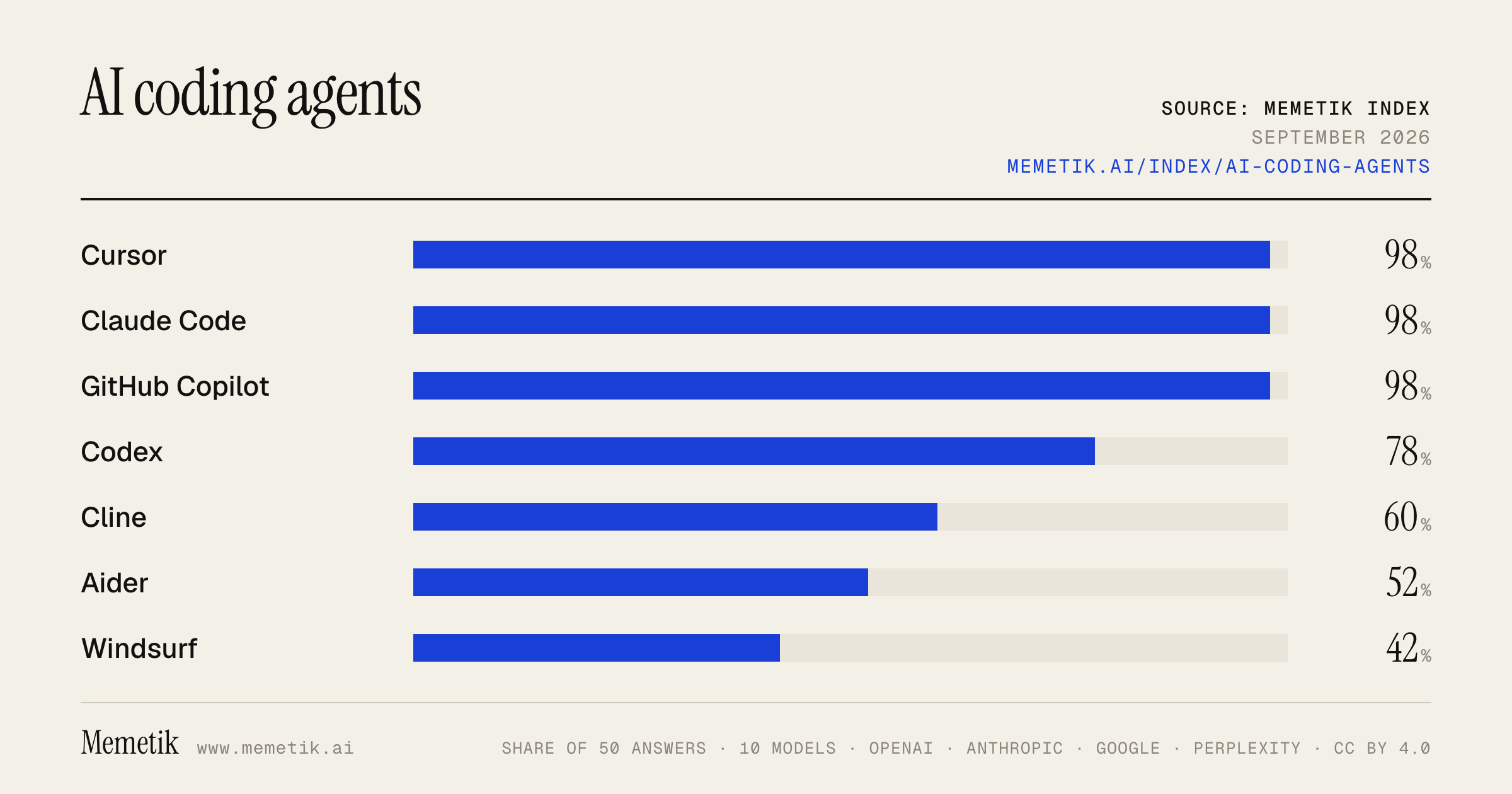
Cursor was named in 49 of 50 answers and came first in 24. Claude Code follows at 98%. 12 vendors were named at least once. First edition, so there is no prior period.
Answer share
5 prompts × 10 models · 50 answers
By provider
10 models · 50 answers
OpenAI 3 models · 15 answers
- GPT-5.6 Solgpt-5.6-solmost named: Claude Code 100%
- GPT-5.6 Terragpt-5.6-terramost named: Cursor 100%
- GPT-5.6 Lunagpt-5.6-lunamost named: Cursor 100%
Anthropic 3 models · 15 answers
- Claude Opus 5claude-opus-5most named: Cursor 100%
- Claude Sonnet 5claude-sonnet-5most named: Cursor 100%
- Claude Fable 5claude-fable-5most named: Cursor 100%
Google 2 models · 10 answers
- Gemini 3.6 Flashgemini-3.6-flashmost named: Cursor 100%
- Gemini 3.5 Flashgemini-3.5-flashmost named: Cursor 100%
Perplexity 2 models · 10 answers
- Sonar Prosonar-promost named: Cursor 100%
- Sonar Reasoning Prosonar-reasoning-promost named: Cursor 100%
Sources the models cited
- youtube.com182
- daily.dev113
- faros.ai48
- vellum.ai41
- axify.io40
- mightybot.ai33
- zapier.com32
- verdent.ai23
- augmentcode.com23
- tech-insider.org20
- reddit.com19
- henrythe9th.substack.com19
ChatGPT via API returns no citations, so it does not contribute here.
The prompts
- What is the best AI coding agent or assistant for a software engineer? Name specific products.
- Which AI coding agent or assistant would you recommend to a software engineer in 2026?
- Compare the top AI coding agent or assistant options right now.
- I'm a software engineer and I need an AI coding agent or assistant. What should I use and why?
- Best AI coding agent or assistant for shipping a production codebase?
Every answer
Raw model output, unedited
GPT-5.6 TerraWhat is the best AI coding agent or assistant for a software engineer? Name specific products.
There isn’t one universally best option—the right choice depends mostly on whether you work **in an IDE, terminal, or GitHub-centric team workflow**.

## My practical picks

| Best for | Product | Why choose it |
|---|---|---|
| **Best overall for an individual software engineer** | **Cursor** | A polished AI-native editor with autonomous agent workflows: it can search a repo, make multi-file edits, run terminal commands, and verify/fix errors. It also supports different models, so you are not tied to one provider. ([prod.cursor.com](https://prod.cursor.com/help/ai-features/agent?utm_source=openai)) |
| **Best terminal-first agent** | **Anthropic Claude Code** | Best product to evaluate if you live in the shell, want the agent close to your existing editor/toolchain, and prefer directing work through commands and repository instructions. |
| **Best for delegating longer tasks to the cloud** | **OpenAI Codex** | Strong fit when you want to hand off a contained issue, have it work asynchronously, and bring agents into code review, CI/CD, and issue-management workflows. OpenAI positions Codex for terminal/IDE pairing as well as cloud task delegation. ([openai.com](https://openai.com/solutions/use-case/coding/?utm_source=openai)) |
| **Best for GitHub-centric organizations** | **GitHub Copilot** | The lowest-friction default if your team already works in GitHub and VS Code/JetBrains. It covers inline suggestions, chat, CLI help, PR summaries, and agents that can research, modify code, and create PRs for review. ([docs.github.com](https://docs.github.com/en/copilot/get-started/what-is-github-copilot?utm_source=openai)) |
| **Best alternative AI-native IDE** | **Windsurf** | Worth trialing alongside Cursor, especially if its IDE interaction and agent style click better for you. |

## If you want a single answer

**Pick Cursor** if you are a typical product/backend/full-stack engineer working interactively in a large codebase. It is currently the most broadly useful “one tool” choice because it combines a capable coding agent with editor-native workflows and model flexibility. Its agent can plan work, inspect a repository, edit across files, run commands, and work in specialized modes such as Plan and Debug. ([prod.cursor.com](https://prod.cursor.com/help/ai-features/agent?utm_source=openai))

## A high-performing setup

Rather than committing philosophically to one vendor, many engineers should use:

1. **Cursor** for daily IDE work and multi-file implementation.
2. **Claude Code** for terminal-centric investigation/refactors.
3. **OpenAI Codex** for delegated or asynchronous tasks.
4. **GitHub Copilot** when your employer standardizes on GitHub security, policy, and pull-request workflows.

GitHub now also supports third-party coding agents including **Anthropic Claude** and **OpenAI Codex** alongside its own cloud agent, so these choices do not have to be mutually exclusive in a GitHub workflow. ([docs.github.com](https://docs.github.com/en/copilot/concepts/agents/about-third-party-coding-agents?utm_source=openai))

## Important caveat

Treat every agent as a fast junior-to-mid-level implementer: give it a precise task, require tests, inspect the diff, and do not grant unrestricted production credentials. The “best” agent is usually the one that reliably understands **your repo, tests, conventions, and deployment constraints**—not necessarily the one with the most impressive demo.
- https://prod.cursor.com/help/ai-features/agent?utm_source=openai
- https://openai.com/solutions/use-case/coding/?utm_source=openai
- https://docs.github.com/en/copilot/get-started/what-is-github-copilot?utm_source=openai
- https://docs.github.com/en/copilot/concepts/agents/about-third-party-coding-agents?utm_source=openai
GPT-5.6 TerraWhich AI coding agent or assistant would you recommend to a software engineer in 2026?
**My default recommendation in 2026: Claude Code**—especially for an experienced software engineer who is comfortable in the terminal and wants an agent that can understand a repo, make coordinated multi-file changes, run tests, and work through a task iteratively.

Why: it is terminal-first but also available through IDE extensions, desktop, web, remote control, Slack, and CI/CD. That makes it a strong “primary engineering agent” rather than merely autocomplete. ([code.claude.com](https://code.claude.com/docs/en/how-claude-code-works?utm_source=openai))

That said, the practical answer is **use two tools, not one**:

| Situation | Recommendation |
|---|---|
| Complex local feature work, refactors, debugging, codebase exploration | **Claude Code** |
| You already subscribe to ChatGPT; want strong local-agent controls and multimodal input | **OpenAI Codex** |
| Your organization lives in GitHub, PRs, Actions, and governed enterprise workflows | **GitHub Copilot** |
| You primarily want inline completion and a polished AI-native editor experience | **Cursor** |

### My ranked shortlist

1. **Claude Code — best default for senior engineers**
   - Best fit if you want to delegate a well-scoped engineering task but remain in control of your terminal, git workflow, tests, and review.
   - Particularly compelling for repo-wide changes, architecture exploration, test-driven iterations, and command-line-heavy work.
   - It is not “set and forget”: treat it like a fast junior-to-mid-level collaborator whose diffs you rigorously review.

2. **OpenAI Codex — best alternative / best companion**
   - Choose it first if you are already paying for ChatGPT or value its local CLI workflow, explicit approval modes, sandboxing options, and ability to supply screenshots or diagrams along with the task. ([help.openai.com](https://help.openai.com/en/articles/11096431?utm_source=openai))
   - It is also well suited to longer-running delegated tasks, and the Codex app is designed to manage such work across agents. ([openai.com](https://openai.com/index/introducing-the-codex-app/?utm_source=openai))
   - If I were standardizing a personal setup, I’d use **Claude Code as the interactive primary tool and Codex as a second opinion / background-task agent**.

3. **GitHub Copilot — best organizational default**
   - For teams standardized on GitHub, Copilot is usually the least-friction rollout: IDE suggestions and chat, CLI help, PR assistance, and a cloud agent that can work in an ephemeral GitHub Actions environment, run tests and linters, and open a PR for review. ([docs.github.com](https://docs.github.com/en/copilot/get-started/what-is-github-copilot?utm_source=openai))
   - I would select it over the others when enterprise controls, GitHub-native review, and broad IDE adoption matter more than having the strongest terminal-native personal agent.

### Don’t over-index on a single benchmark

Agent quality varies sharply by task. One 2026 analysis of 7,156 agent-created PRs found Codex highest overall acceptance, while Claude Code did best on documentation and feature tasks and Cursor did best on fixes. That is a useful reminder that **your codebase, task mix, tests, and review discipline matter more than leaderboard rank**. ([davejjwilliams.github.io](https://davejjwilliams.github.io/assets/papers/MSR_Challenge_2026_ComparingAgents.pdf?utm_source=openai))

### A practical setup I’d advise

- Pick **Claude Code** for a two-week trial.
- Give it real, bounded tickets: a bug fix, a test-coverage improvement, a small feature, and a refactor.
- Require it to:
  1. propose a plan,
  2. change code in a branch,
  3. run the relevant tests/lint/type checks,
  4. summarize assumptions and remaining risks.
- Keep protected branches, CI, code review, secret scanning, and production access boundaries intact.
- Then trial **Codex** on the same style of work and compare: accepted diffs, time-to-merge, test quality, unnecessary churn, and how often you had to take over.

**Bottom line:** start with **Claude Code** if you want the best all-around hands-on engineering agent; pick **Codex** if its workflow, approvals, and existing ChatGPT access fit you better; standardize on **GitHub Copilot** when GitHub-native team integration is the priority.
- https://code.claude.com/docs/en/how-claude-code-works?utm_source=openai
- https://help.openai.com/en/articles/11096431?utm_source=openai
- https://openai.com/index/introducing-the-codex-app/?utm_source=openai
- https://docs.github.com/en/copilot/get-started/what-is-github-copilot?utm_source=openai
- https://davejjwilliams.github.io/assets/papers/MSR_Challenge_2026_ComparingAgents.pdf?utm_source=openai
GPT-5.6 TerraCompare the top AI coding agent or assistant options right now.
## Short answer

For most individual developers, **Cursor** is currently the best *all-around AI-native IDE agent*. For terminal-first, deep repo work, **Claude Code** is often the strongest choice. For teams already centered on GitHub, **GitHub Copilot** is the safest default. **OpenAI Codex** is especially compelling for delegated/cloud-based coding tasks.

There is no durable single “best” option: model quality, pricing, and agent reliability shift fast. The right choice depends more on **where you work**—IDE, terminal, GitHub, or cloud—than on headline benchmarks.

## Leading options compared

| Product | Best for | Core experience | Key advantage | Main drawback |
|---|---|---|---|---|
| **Cursor** | Most individual developers; full-time AI-assisted IDE work | AI-native VS Code–style editor with agent, terminal, planning, rules, MCP, and cloud agents | Broad model choice and a very polished agentic IDE workflow | Usage costs can become less predictable for heavy agent use |
| **Claude Code** | Terminal-first engineers; large/reasoning-heavy repositories | CLI agent that reads, edits, runs commands/tests, and works through tasks iteratively | Excellent “pair engineer in the terminal” workflow and strong long-horizon reasoning | Less of a conventional visual IDE experience |
| **OpenAI Codex** | Delegating well-scoped tasks; cloud/background implementation | Agent operates in an isolated environment, edits code, and runs tests | Strong option for asynchronous task execution and OpenAI ecosystem users | You must still review outputs, environment assumptions, and changes carefully |
| **GitHub Copilot** | Organizations standardized on GitHub; broad IDE adoption | Inline completion, chat, IDE agent features, GitHub/PR workflows | Best governance, seat management, and GitHub-native rollout path | Credit-based model/agent usage adds complexity; may feel less cohesive than an AI-native editor |
| **Windsurf** | Developers wanting an AI-native editor alternative to Cursor | Editor plus Cascade agentic workflow | Strong integrated agent UX and good developer ergonomics | Smaller enterprise/process ecosystem than GitHub; evaluate model availability and pricing for your usage |
| **Gemini CLI / Gemini Code Assist** | Google Cloud users; developers who favor Google models and tooling | Terminal and IDE assistance | Natural fit for GCP-oriented work and Google’s ecosystem | Usually not the first pick if your priority is the most mature autonomous coding workflow |
| **JetBrains AI / Junie** | IntelliJ, PyCharm, WebStorm, Rider users | Agent capabilities inside JetBrains IDEs | Keeps excellent JetBrains language tooling, refactors, and project navigation | The agent layer may feel less seamless than an AI-native editor for some workflows |

## My practical recommendations

### 1. **Best overall for an individual: Cursor**
Choose Cursor if you want one place for autocomplete, chat, multi-file edits, terminal execution, planning, debugging, rules, MCP integrations, and optional cloud agents. Its agent can search a codebase, modify multiple files, run shell commands, write tests, and attempt fixes autonomously. It also supports a broad model catalog rather than locking you to one provider. ([prod.cursor.com](https://prod.cursor.com/help/ai-features/agent?utm_source=openai))

**Buy it if:** you spend hours a day coding in an editor and want AI to handle substantial implementation and refactoring work.

**Price reality:** Cursor has a free Hobby tier; individual paid tiers start at **$20/month**, with higher tiers at **$60** and **$200/month**. Its own documentation notes that frequent agent use can push total usage substantially higher, especially with premium models or on-demand usage. ([cursor.com](https://cursor.com/docs/models-and-pricing?utm_source=openai))

### 2. **Best for terminal-native, high-agency work: Claude Code**
Choose Claude Code if your natural workflow is: inspect repository → form a plan → make changes → run tests/lint/build → iterate in Git. It is particularly attractive when you value direct control, shell fluency, and keeping the agent close to your existing development environment.

**Buy it if:** you already live in the terminal, work in complex repositories, or prefer an assistant that feels like a capable command-line collaborator rather than a replacement editor.

**Watch out for:** terminal agents can make broad changes quickly. Use git branches/worktrees, request a plan for risky changes, and require test evidence before accepting edits.

### 3. **Best for delegating cloud tasks: OpenAI Codex**
Choose Codex when you want to hand off a task rather than co-edit every step: for example, “investigate this failing test suite,” “implement this contained feature,” or “prepare a refactor and show me the diff.” OpenAI describes Codex as a cloud coding agent designed to work iteratively on software tasks, including running tests. Its cloud setup uses isolated containers, with network access disabled by default according to its system-card documentation. ([cdn.openai.com](https://cdn.openai.com/pdf/8df7697b-c1b2-4222-be00-1fd3298f351d/codex_system_card.pdf?utm_source=openai))

**Buy it if:** you want background/asynchronous work, use ChatGPT/OpenAI heavily already, or want to parallelize implementation tasks.

**Watch out for:** cloud delegation is most effective when your task has clear acceptance criteria, reproducible setup instructions, and tests.

### 4. **Best enterprise default: GitHub Copilot**
Choose Copilot when your company already uses GitHub broadly and prioritizes centralized procurement, access management, policy controls, and GitHub-native workflows. It is the lowest-friction organizational decision: developers can use it across familiar IDEs while platform
GPT-5.6 TerraI'm a software engineer and I need an AI coding agent or assistant. What should I use and why?
There isn’t a universal winner—the best choice depends more on **where you work** and how much autonomy you want than on a single model benchmark.

## My practical recommendation

### 1. Start with **OpenAI Codex** if you want a terminal-native coding agent
Best for: experienced engineers who live in Git, shells, tests, and code review.

Why:
- It can inspect, modify, and run code locally, with approval controls for how independently it operates.
- It supports non-text inputs such as screenshots and diagrams, useful for UI bugs and implementation from designs.
- A local workflow lets you keep source code in your environment unless you explicitly choose to share it. ([help.openai.com](https://help.openai.com/en/articles/11096431?utm_source=openai))

**Use it for:** feature implementation, debugging test failures, repository exploration, refactors, migrations, and code review.
**My default pick for a senior engineer:** Codex in the terminal, with Git as the checkpoint/review boundary.

### 2. Choose **Cursor** if you want the best integrated editor-agent experience
Best for: people who want an AI-first IDE with fast iteration across code, terminal, browser, and chat.

Why:
- Its Agent can search the repository, edit multiple files, run shell commands, browse the web, and drive a browser to verify UI work.
- It offers checkpoints before significant changes, which makes exploratory multi-file work less risky.
- It supports configurable rules, MCP integrations, multiple models, terminal use, and cloud/background agents. ([cursor.com](https://cursor.com/docs/agent/overview?utm_source=openai))

**Use it for:** day-to-day feature work, frontend/UI iteration, unfamiliar-codebase onboarding, and quick “investigate → implement → test” loops.

**Trade-off:** adopting a separate editor/workflow is worthwhile only if you want the agent to be central to how you code. If you already love your existing IDE and terminal setup, a CLI agent may be less disruptive.

### 3. Choose **GitHub Copilot** if your team is standardized on GitHub and needs broad adoption
Best for: organizations wanting IDE autocomplete/chat plus PR-centric agent workflows with familiar governance.

Why:
- It provides inline suggestions, IDE chat, command-line help, shared context via Copilot Spaces, PR assistance, and the ability to research, plan, change code, and create PRs for review. ([docs.github.com](https://docs.github.com/en/copilot/get-started/what-is-github-copilot?utm_source=openai))
- It is generally the lowest-friction option when repos, reviews, permissions, and developer identity already live in GitHub.

**Use it for:** large teams, enterprise rollout, standardized IDE support, PR workflows, and developers who primarily want assistance rather than a highly autonomous local agent.

## Simple decision table

| If you value… | Use |
|---|---|
| Terminal-first, agentic implementation, local control | **OpenAI Codex** |
| Best all-in-one AI editor experience | **Cursor** |
| GitHub-native team adoption and PR workflow | **GitHub Copilot** |
| Conservative, mostly inline completion and chat | **GitHub Copilot** |
| Autonomous multi-file work with easy rollback | **Cursor** |
| Shell-driven workflows and explicit approvals | **OpenAI Codex** |

## What I’d do in your position

Run a **one-week bakeoff** using your real repository:

1. Pick three representative tasks:
   - a contained bug fix,
   - a cross-cutting feature,
   - a refactor or flaky-test investigation.
2. Give each tool the same concise task specification and acceptance tests.
3. Measure:
   - time to a reviewable diff,
   - number of correction turns,
   - test pass rate,
   - quality of architectural choices,
   - how often you had to undo unsafe or irrelevant edits.
4. Keep the winner for daily development; optionally retain a second tool for a complementary workflow.

Don’t optimize only for “it generated code fastest.” Optimize for **reviewable diffs, reliable tests, controllability, and whether it fits your existing habits**.

## Bottom line

- **Solo / senior engineer / terminal-heavy:** start with **Codex**.
- **You want an AI-native IDE and frequent autonomous coding:** start with **Cursor**.
- **You’re buying for a GitHub-centered team:** start with **GitHub Copilot**.

Whichever you choose, use repository-level instructions, require tests/linting before accepting changes, restrict access to secrets and production credentials, and treat every agent output as code review—not authority.
GPT-5.6 TerraBest AI coding agent or assistant for shipping a production codebase?
## Short answer

For **shipping a production codebase**, my default pick is **Claude Code**—especially if your team is comfortable working in the terminal and wants an agent that can understand an existing repository, make coherent multi-file changes, run tests, and iterate.

My close second is **OpenAI Codex**, particularly if you want to delegate well-scoped issues asynchronously, manage several agents, or already use ChatGPT/OpenAI across the company. Codex is explicitly aimed at end-to-end repo work such as features, refactors, migrations, test-writing, and PR-oriented tasks. ([openai.com](https://openai.com/codex/?utm_source=openai))

**Cursor** is the best choice if developer experience inside an IDE is the deciding factor—especially for a small, fast-moving product team. Its cloud/background agents can work in isolated remote environments, run tests, and open PRs, but that autonomy means you must be deliberate about repository permissions, network access, and secrets. ([prod.cursor.com](https://prod.cursor.com/help/ai-features/background-agents?utm_source=openai))

## My practical ranking

| Situation | Best choice | Why |
|---|---|---|
| Existing production monorepo; serious engineering workflow | **Claude Code** | Strong “pair engineer” workflow for navigating, planning, editing, testing, and revising across a real repo. Enterprise options include centralized security/data/user management. ([claude.com](https://claude.com/product/claude-code/enterprise?utm_source=openai)) |
| Async implementation from tickets / multiple parallel tasks | **OpenAI Codex** | Very good fit for delegating bounded tasks and reviewing the resulting patch or PR; OpenAI positions it around longer-horizon coding, refactors, migrations, and sandboxed execution. ([openai.com](https://openai.com/codex/?utm_source=openai)) |
| Best IDE-native individual developer experience | **Cursor** | Excellent interactive editing plus cloud agents; agents can create changes, test them, and open PRs. ([prod.cursor.com](https://prod.cursor.com/help/ai-features/background-agents?utm_source=openai)) |
| Conservative enterprise standardization around GitHub | **GitHub Copilot** | Worth evaluating first if GitHub is already your system of record—but I would still run Claude Code or Codex against your actual repo before committing organization-wide. |
| Cost-sensitive / self-hosted / maximum customization | **Open-source harness + chosen model** | Viable, but usually not the fastest route to reliable production delivery unless you have platform/AI-infrastructure capacity. |

## The choice I’d make

- **Team of 2–30, product velocity matters:** **Cursor + Claude Code.**
  Use Cursor for the everyday editor loop; use Claude Code for bigger repo-level tasks, debugging, migrations, tests, and code review assistance.

- **Team needs async agents that produce reviewable work:** **Codex.**
  Give it isolated, well-specified tasks and require a PR, test evidence, and a concise implementation report. Its design is oriented toward iterative test-running and PR-style changes. ([cdn.openai.com](https://cdn.openai.com/pdf/8df7697b-c1b2-4222-be00-1fd3298f351d/codex_system_card.pdf?utm_source=openai))

- **Regulated, security-sensitive, or large enterprise:** **Claude Code Enterprise or Codex Enterprise**, selected through a controlled pilot—not a vibe-based bakeoff. Both ecosystems emphasize policy/security controls; Cursor also offers privacy mode and isolated cloud environments, but its own documentation explicitly warns that autonomous terminal execution and internet access create prompt-injection and data-exfiltration risk. ([resources.anthropic.com](https://resources.anthropic.com/hubfs/Scaling%20agentic%20coding%20across%20your%20organization.pdf?hsLang=en&utm_source=openai))

## What matters more than the model

The “best” agent will not rescue an unhealthy repository. Production success depends on whether the agent has:

1. **Fast, deterministic tests** — unit, integration, lint, typecheck, build.
2. **A documented local setup** — one command to bootstrap and one command to validate.
3. **Clear architecture rules** — where code belongs, API patterns, error handling, logging.
4. **Tight task boundaries** — “implement this endpoint plus tests,” not “make the app better.”
5. **Mandatory human review** — agents should create branches/PRs; they should not directly deploy.
6. **Least-privilege credentials** — no production database or broad cloud credentials in an agent environment.
7. **Security scanning in CI** — dependency, secret, SAST, and IaC checks remain non-negotiable.

## A production-safe operating model

Use an agent as a **high-output implementation engineer**, not as an autonomous release manager:

```text
Ticket/spec → agent plan → agent branch/PR → CI/tests/security scans
→ human code review → staging validation → normal deployment process
```

For cloud agents specifically, scope repository write access, secrets, and outbound network access tightly. Cursor’s documentation notes that background agents run commands automatically and may have internet access; that is useful for iteration, but it is exactly why unreviewed autonomy is unsafe for sensitive repos. ([docs.cursor.com](https://docs.cursor.com/background-agent?utm_source=openai))

## Bottom line

- **If I could choose only one today:** **Claude Code**.
- **If I optimize for delegated async work:** **OpenAI Codex**.
- **If I optimize for an IDE-centric team experience:** **Cursor**.
- **If this is a production codebase:** run a two-week pilot on 10–20 representative tasks and measure merged PR quality, CI pass rate, review rework, security findings, and developer time—not just benchmark scores.
- https://openai.com/codex/?utm_source=openai
- https://prod.cursor.com/help/ai-features/background-agents?utm_source=openai
- https://claude.com/product/claude-code/enterprise?utm_source=openai
- https://cdn.openai.com/pdf/8df7697b-c1b2-4222-be00-1fd3298f351d/codex_system_card.pdf?utm_source=openai
- https://resources.anthropic.com/hubfs/Scaling%20agentic%20coding%20across%20your%20organization.pdf?hsLang=en&utm_source=openai
- https://docs.cursor.com/background-agent?utm_source=openai
Claude Sonnet 5What is the best AI coding agent or assistant for a software engineer? Name specific products.
There's no single "best" tool — it depends on your workflow — but a handful of products consistently top the rankings among professional developers right now:

**Top-tier / most recommended:**

- **Claude Code** (Anthropic) – A terminal-based, highly autonomous coding agent.
It's the fastest-growing CLI agent, runs in your terminal, edits files in place, and crossed a million weekly active developers within 6 months of GA
. Recent rankings put it at #1,
on the strength of Claude Opus 5 and per-subagent model control
. Great for deep, autonomous multi-step engineering tasks.

- **Cursor** –
An AI-native IDE built by Anysphere that combines fast tab completion, conversational code editing, and cloud agent support in a single code editor
. It's become extremely popular in industry —
it surpassed $2B in annualized revenue by early 2026 and is used by over 67% of Fortune 500 companies including NVIDIA, Uber, and Adobe
. Best if you want a full IDE experience rather than a CLI tool.

- **OpenAI Codex (CLI/ChatGPT-integrated)** – A strong competitor to Claude Code,
keeping the published Terminal-Bench record
 even as it trades ranking positions with Claude Code depending on the month.

- **GitHub Copilot** (Agent Mode) – The most broadly integrated option.
Copilot has the broadest IDE support (VS Code, JetBrains, Eclipse, Xcode, Neovim) and the largest installed base in enterprise, and its async coding agent that turns GitHub issues into PRs is a powerful workflow for teams already on GitHub.


**Other notable/autonomous agents worth knowing:**

- **Devin** (Cognition Labs) –
A fully autonomous AI software engineer that operates in its own cloud environment with browser, terminal, and editor.
 Often cited as the strongest fully autonomous "hire an engineer" style agent, though best for clearly scoped tasks.
- **Windsurf** – Also from Cognition Labs after their 2025 acquisition;
Cognition Labs acquired Windsurf in July 2025, giving it both an autonomous agent and an IDE product under one roof.

- **Cline** and **Aider** – Popular open-source/CLI-based agents favored by developers who want more control and transparency over the agent's actions.
- **JetBrains Junie** –
An AI coding agent deeply integrated into IntelliJ, PyCharm, WebStorm, and GoLand with 30% faster task completion and GitHub integration
 — good if you already live in JetBrains IDEs.
- **Augment Code** –
Built for very large codebases with a 200k-token Context Engine
 — worth a look if you work in a massive monorepo.

**Practical recommendation:**
- If you want the most autonomous, powerful terminal-based agent: **Claude Code**.
- If you want a polished IDE experience with strong autocomplete + agent capabilities: **Cursor**.
- If your org is already deep in the Microsoft/GitHub ecosystem: **GitHub Copilot**.
- If you want a "fire-and-forget" agent that handles a whole ticket in the cloud: **Devin**.

Many engineers actually use two of these together (e.g., Cursor or Copilot for day-to-day editing, plus Claude Code or Devin for larger autonomous tasks like refactors or bug fixes).
Claude Sonnet 5Which AI coding agent or assistant would you recommend to a software engineer in 2026?
Based on current reviews and developer sentiment in 2026, there isn't a single universal "best" tool — the right pick depends heavily on your workflow. Here's a practical breakdown:

## Top recommendation: **Claude Code**
Across nearly every source, Claude Code stands out as the strongest all-around agent, particularly for deep, complex work.
Claude Code is Anthropic's agentic coding tool, running in the terminal, plus VS Code, JetBrains, the web at claude.ai/code, and mobile.
 It has a very deep feature set —
its harness is the deepest in the field, with a hooks system exposing 30 lifecycle events you can script, plus Skills, plugins, Subagents, MCP, and Dynamic Workflows that orchestrate tens to hundreds of parallel subagents in one session.
 It also
runs right in your shell, reads your repo, runs Git commands, and even revises its own output, with a 1M-token context window that lets it look through large repos without needing a prebuilt index.
 One ranking notes
Claude Code takes #1 on the strength of Claude Opus 5 and per-subagent model control.


## Choose based on your specific needs:

- **Cursor** — if you want a polished, AI-native IDE experience.
Best for developers who want a deeply AI-native IDE with fast tab completion and powerful cloud agent capabilities.
 It's also currently
the most broadly adopted AI coding tool among individual developers and small teams according to Reddit.


- **OpenAI Codex** — if you're already in the ChatGPT/OpenAI ecosystem or want async, background work.
OpenAI Codex is the lowest-friction path if your team already works in ChatGPT.
 Adoption is massive:
OpenAI says more than 5 million people use Codex every week, and more than 85 percent of the company uses it.


- **GitHub Copilot** — if your team lives in GitHub workflows (issues → PRs). Best described as good for
GitHub-heavy teams
 with agent mode handling issue-to-PR flow.

- **OpenCode** — if you want an **open-source**, provider-agnostic option so you can swap models freely.
OpenCode is the strongest open-source agent if you want to swap models freely.


- **Devin** — if you want to fully offload well-defined backlog tasks to a more autonomous agent.
Best for engineering teams that need to offload complete tasks to an autonomous agent that sees work through from start to finish.


## Important caveats
A few things worth keeping in mind before you commit to any tool:

1. **The model matters less than the "harness" now.**
The frontier models have converged, so the agent wrapper now decides your experience — the harness around the model now does most of the work.

2. **Don't assume AI automatically makes you faster.**
A growing number of Reddit threads challenge the assumption that AI tools automatically make developers faster, with sentiments like "I stopped using Copilot and didn't notice a decrease in productivity" echoed repeatedly.

3. **Reliability is still a real issue in CI.**
One 2026 finding showed 75% of AI coding agents broke working code during CI workflows.

4. **Multi-model strategies are emerging as best practice.** Top teams are
using an expensive model to plan and cheaper ones to execute in parallel
, and the broader finding is that
mixing providers beats any single vendor's stack.


**Bottom line:** If you want one tool to start with in 2026, **Claude Code** is the safest recommendation for depth, code quality, and handling large/complex codebases. Pair it with **Cursor** if you want a more visual, IDE-centric experience, or **Codex**/**Copilot** if your workflow is already anchored in OpenAI or GitHub's ecosystems.
- https://www.firecrawl.dev/blog/best-ai-coding-agents
- https://daily.dev/blog/best-ai-coding-agents-comparison/
- https://mightybot.ai/blog/coding-ai-agents-for-accelerating-engineering-workflows/
- https://www.vellum.ai/blog/best-ai-coding-agents
- https://www.faros.ai/blog/best-ai-coding-agents-2026
- https://nimbalyst.com/blog/best-ai-coding-agents-2026/
Claude Sonnet 5Compare the top AI coding agent or assistant options right now.
I'll research the current top AI coding agents and assistants to give you an up-to-date comparison.
Based on current information, here's a comparison of the top AI coding agents right now:

## Top AI Coding Agents & Assistants (2026)

### 1. **Claude Code** (Anthropic)

Best for developers who want a conversational coding agent that works in their terminal, IDE, and browser with a consistent context model.
 It's currently ranked highly in the market —
in a late-July 2026 refresh, Claude Code takes #1 on the strength of Claude Opus 5 and per-subagent model control.

It's a CLI-first coding agent designed for developers who prefer terminal workflows and want AI that respects command-line conventions.


### 2. **Cursor** (Anysphere)

Cursor is a VS Code fork by Anysphere with AI deeply integrated into the editing experience — tab completions suggest code as you type, trained on your codebase, agent mode makes multi-file changes, and Cloud Agents run longer tasks in the background.
 One review notes
Cursor wins inside a polished IDE.
 Pricing runs from
Hobby (Free, limited), Pro $20/mo, Pro+ $60/mo (3x usage), Ultra $200/mo (20x usage), Teams $40/user/mo, Enterprise (custom).
 One limitation:
code editing only — no deployment, no business integrations, no content creation, no persistent cloud workspace.


### 3. **GitHub Copilot**

Offers real-time code suggestions inside your IDE with deep GitHub integration.
 It's the most established/widely-adopted tool but scores lower on autonomous-agent benchmarks compared to newer agentic tools —
GitHub Copilot is at 12.3% according to the official SWE-bench leaderboard.


### 4. **OpenAI Codex**
Ranked closely behind Claude Code —
Codex drops to #2 while keeping the published Terminal-Bench record.


### 5. **Devin** (Cognition)

Best for engineering teams that need to offload complete tasks to an autonomous agent that sees work through from start to finish.


### 6. **Cline** (open source, VS Code)

Good for engineers who want a Cursor-equivalent agent loop inside stock VS Code, with full BYOK across OpenAI-compatible endpoints and major providers (OpenAI, Anthropic, Google, Bedrock, OpenRouter, Ollama), Apache 2.0 license, and local control over what the agent reads and writes.
 It's
open source, Apache 2.0, free, with token cost as the only spend
 — appealing for cost-sensitive teams at scale.

### Other notable mentions
**Kimi K3** —
Moonshot's Kimi K3 enters as the strongest open-weight coding model.
 Also frequently listed: **Windsurf**, **Replit Agent**, **Gemini CLI**, and **Grok Build** round out the broader landscape per
rankings of Claude Code, Codex, Grok Build, OpenCode, Cursor, Kimi K3, Gemini CLI, GitHub Copilot, Devin, Windsurf, and Replit Agent.


---

## Key Trend: Multi-Model Orchestration
Perhaps the most important shift right now isn't about picking a single "best" tool — it's how teams use them.
The biggest finding is that mixing providers beats any single vendor's stack — this is the most consequential change in how these tools get used in 2026.
 Rather than committing to one platform,
the best teams have stopped picking one model and started assigning models per task, using an expensive model to plan and cheaper ones to execute in parallel.


## Market Context
This space is growing extremely fast:
the global AI code tools market grew from $4.9 billion in 2024 to $7.65 billion in 2025, and is forecast to reach $9.46 billion in 2026 at a 23.7% compound annual growth rate.
 Adoption is also expected to become near-universal —
Gartner projects that 90% of enterprise software engineers will use AI coding assistants by 2028, up from less than 14% in early 2024.


---

### Quick recommendation guide:
- **Terminal-first workflow / deep reasoning** → Claude Code
- **Polished IDE experience with autocomplete + agent mode** → Cursor
- **Already embedded in GitHub ecosystem** → GitHub Copilot
- **Fully autonomous, hands-off task completion** → Devin
- **Budget-conscious teams at scale, open-source flexibility** → Cline
- **Cutting-edge open-weight model** → Kimi K3

Note that benchmark scores (like SWE-bench) vary significantly by source and testing methodology, so it's worth testing 2-3 candidates against your own real workflows rather than relying solely on published leaderboards.
Claude Sonnet 5I'm a software engineer and I need an AI coding agent or assistant. What should I use and why?
There are several strong options right now, and the best choice depends on your workflow, budget, and whether you prefer working in your existing editor or a standalone tool. Let me search for the latest landscape to give you an accurate, up-to-date comparison.
Based on current reviews and benchmarks, here's a practical breakdown for 2026:

## The top contenders

**Claude Code** — generally considered the strongest overall pick for serious engineering work.
The best overall AI coding agent in 2026 is Claude Code for complex, multi-file tasks and deep reasoning.
 It's notably terminal-native:
it's the most terminal-first tool in this group, running right in your shell, reading your repo, running Git commands, and even revising its own output — its 1M-token context window means it can look through large repos without needing a prebuilt index.
 For large-scale work,
it can split work across subagents, letting it handle separate threads like database migrations and API endpoints at the same time.
 One extreme example:
in May 2026, a developer used Dynamic Workflows to port 750,000 lines from Zig to Rust in 11 days, with a 99.8% test pass rate.


**Cursor** — best if you want a full AI-native IDE rather than a terminal tool.
It's best for developers who want a deeply AI-native IDE with fast tab completion and powerful cloud agent capabilities.
 Reviewers note
for daily IDE-based coding, Cursor offers the fastest autocomplete and most polished editing experience.


**GitHub Copilot** — best if your workflow is already deeply tied to GitHub's ecosystem (PRs, Actions, Issues). Good "GitHub flow" integration, though be aware
GitHub AI Credits moved to token-based billing on June 1, 2026, and some power users said their agentic bills jumped 10x to 50x.


**Codex (OpenAI)** — strong for async/background task throughput and holds strong benchmark results;
GPT-5.6 Sol holds the Terminal-Bench 2.1 record at 88.8%, and 91.9% in Ultra mode.


**Open-source options (opencode, Kilo Code, Cline, Aider)** — worth considering if you want no vendor lock-in and bring-your-own-API-key flexibility.
Both are MIT-licensed and free — Kilo Code is a VS Code, JetBrains, and CLI extension with a 0% markup gateway and an Auto Model router, while opencode is the terminal-native agent with the largest community and any-provider BYOK.
 In fact,
for open source, opencode has 199,640 stars, ahead of Claude Code at 142,130, Codex at 109,229, and Gemini CLI at 106,596.


**Devin** — for a different use case entirely:
best for engineering teams that need to offload complete tasks to an autonomous agent that sees work through from start to finish.


## Key trend worth knowing

The single most important shift this year isn't about picking one "winner" — it's that
mixing providers beats any single vendor's stack, which is the most consequential change in how these tools get used in 2026, and it is worth more than any single position on this list.
 Many top teams now
have stopped picking one model and started assigning models per task, using an expensive model to plan and cheaper ones to execute in parallel.


## My recommendation for you

- **If you want maximum depth/reasoning for complex, multi-file refactors and are comfortable in a terminal**: go with **Claude Code**. It currently ranks #1 in most comparisons for this quarter.
- **If you live in an IDE and want fast autocomplete plus agentic features in the same window**: go with **Cursor**.
- **If you're heavily invested in GitHub's ecosystem (PR review, Actions, Issues)**: **GitHub Copilot** integrates most natively, but watch the new token-based billing costs.
- **If you want zero cost and full control over model choice**: try **opencode** or **Kilo Code** — both are free, open-source, and let you bring your own API key to any model provider.

A sensible approach many engineers are taking:
use Claude Code for depth, Codex for async throughput, Copilot for GitHub flow, Cursor for editor control, and Devin only when the task is tight and the review bar is high.
 Given the pace of change, I'd suggest trialing Claude Code and Cursor first since they're the two most commonly recommended for individual engineers, and layer in others as specific needs arise (e.g., Codex for background/async jobs, Copilot if your team already lives in GitHub).
- https://levelop.dev/blog/the-best-ai-coding-agents-in-2026-a-practical-ranking-for-working-developers
- https://daily.dev/blog/best-ai-coding-agents-comparison/
- https://www.vellum.ai/blog/best-ai-coding-agents
- https://mightybot.ai/blog/coding-ai-agents-for-accelerating-engineering-workflows/
- https://www.morphllm.com/ai-coding-agent
Claude Sonnet 5Best AI coding agent or assistant for shipping a production codebase?
For shipping a production codebase, the current consensus (as of late 2026) points to a few clear leaders, each suited to slightly different workflows:

## Top picks for production work

**Claude Code** — Widely rated as the strongest overall for deep, complex work on real codebases. It's known for
deep autonomy, a 1M-token context window, and Agent Teams for parallel tasks
, making it excellent for large refactors and codebase-wide reasoning.
Claude Code has used Opus 5 as its default since July 24, 2026
, and it currently ranks near the top of independent benchmarks with an
89.1% TB 2.1 score
. One caveat: it can have
token drain on large repos
, so cost management matters at scale.

**OpenAI Codex (CLI)** — Best if you want fast, high-throughput background work — e.g., firing off multiple PRs asynchronously. It currently tops the Terminal-Bench leaderboard at
89.5% TB 2.1
 with GPT-5.6 Sol. Its main weakness is that it
forgets context between sessions and can wander on vague tasks
, so it's better for well-scoped tasks than open-ended exploration.

**Cursor** — The best choice if you want an AI-native IDE rather than a terminal agent. It's praised for
best-in-class IDE UX, fast Tab completion, visual diffs, and a 9.3/10 user rating
, and its agent mode can
read your entire codebase and make multi-file changes
. Downsides include being a VS Code fork that can lag upstream and credit costs on premium models.

**GitHub Copilot (Agent mode / Agent HQ)** — Best if your team lives in GitHub's PR/issue workflow. It offers
native GitHub integration, issue-to-PR automation, multi-model choice, and enterprise security
, though it can
struggle with hard multi-file tasks and sometimes ignore custom instructions
.

**Devin** — Good for tightly scoped, repetitive backlog items where you want true end-to-end autonomy through PR submission, but it's less suited to ambiguous or exploratory production work — best used when
the task is tight and the review bar is high
.

## Practical recommendation

If I had to pick one for shipping production code today: **Claude Code** for the heavy lifting (refactors, multi-file changes, deep reasoning) paired with **GitHub Copilot or Cursor** in the editor for day-to-day inline work and PR review integration. As one analysis puts it, there's no single universal winner —
"there isn't one best AI coding agent for everyone"
 — the right choice depends on whether you value depth (Claude Code), throughput (Codex), GitHub-native workflows (Copilot), or IDE control (Cursor).

Also worth remembering:
most AI coding agents are designed to assist with production-level code, but they still require manual validation
 — none of these should be trusted to merge to production without human review, tests, and CI gates.
Gemini 3.6 FlashWhat is the best AI coding agent or assistant for a software engineer? Name specific products.
There is no single "best" AI coding tool for every developer, as the right choice depends heavily on your workflow (IDE-based, terminal-based, or fully autonomous cloud agents). However, a few industry-leading products stand out based on their execution, context-awareness, and real-world usefulness:

---

### 1. The Best AI-First IDE: **Cursor**
* **Type:** Standalone IDE (a fork of VS Code).
* **Best For:** Developers who want deep, repo-wide AI integration directly in their code editor.
* **Key Features:**
  * **Repo-Wide Context:** Scans your entire workspace so it understands your project structure, functions, and custom abstractions.
  * **Composer Mode / Multi-File Edits:** Can plan and apply multi-file edits automatically across your codebase.
  * **Flexible Models:** Lets you switch easily between underlying models like Claude 3.5 Sonnet, GPT-4o, or DeepSeek models.
* **Why it stands out:** It feels like a natural evolution of VS Code, allowing you to seamlessly tab through code completions, trigger side-by-side agent diffs, or apply multi-file features without switching windows.

---

### 2. The Best Terminal-Based Agent: **Claude Code**
* **Type:** CLI / Terminal-native coding agent.
* **Best For:** Command-line power users, complex refactoring, and deep architecture changes.
* **Key Features:**
  * Driven by Anthropic's flagship Claude models, giving it industry-leading logic and reasoning for complex tasks.
  * Reads multi-file codebases, executes bash commands, runs test suites, fixes failing tests, and commits code back to Git autonomously.
  * High context efficiency for searching and navigating large enterprise repositories.
* **Why it stands out:** It behaves like a senior pair-programmer sitting right in your terminal, making it exceptionally strong at fixing bugs, tracking down broken dependencies, and running broad refactors across vast repos.

---

### 3. The Best Enterprise & Ecosystem Standard: **GitHub Copilot**
* **Type:** Extension for VS Code, JetBrains, Visual Studio, Neovim, etc.
* **Best For:** Developers looking for enterprise-grade security, frictionless integration, and GitHub platform context.
* **Key Features:**
  * **Agent Mode & GitHub Workspace:** Bridges the gap between inline autocomplete and agentic task execution.
  * Direct integration with GitHub Issues, Pull Requests, and CI/CD pipelines.
  * Enterprise policies for code privacy, copyright assurances, and compliance.
* **Why it stands out:** It remains the easiest default to deploy in corporate environments where security and IDE flexibility (e.g., JetBrains or Visual Studio) are primary concerns.

---

### 4. The Best Fully Autonomous Cloud Agent: **Devin** (by Cognition)
* **Type:** Cloud-hosted autonomous AI software engineer.
* **Best For:** Offloading self-contained, long-running tasks, bug fixes, or maintenance backlogs without keeping a local terminal active.
* **Key Features:**
  * Runs inside its own isolated cloud environment (sandboxed browser, terminal, and editor).
  * Can read documentation, debug production logs, build features end-to-end, and open Pull Requests autonomously.
* **Why it stands out:** While IDE tools assist you as you type, Devin is designed to act as an asynchronous team member that takes a ticket and delivers a fully tested PR.

---

### 5. Best Open-Source / VS Code Extension Agent: **Cline** (or Roo Code)
* **Type:** Open-source VS Code plugin.
* **Best For:** Engineers who want an agentic workflow inside vanilla VS Code without locking themselves into a proprietary subscription.
* **Key Features:**
  * **Bring Your Own Key (BYOK):** Connect directly to your choice of LLM provider APIs (Anthropic, OpenAI, DeepSeek, or local Ollama instances).
  * Full agent capabilities: reads files, creates files, executes terminal commands, and browses web documentation.
* **Why it stands out:** Gives you Cursor-like agentic capabilities while retaining total control over data privacy, model choice, and API cost controls.

---

### Summary Recommendation

* Go with **Cursor** if you want the best all-around IDE experience for day-to-day feature development.
* Go with **Claude Code** if you work heavily in the terminal or are tackling complex refactoring and bug-hunting.
* Go with **GitHub Copilot** if your company mandates strict compliance or if you use JetBrains IDEs.
* Go with **Cline** if you want full control over your models and open-source flexibility.
Gemini 3.6 FlashWhich AI coding agent or assistant would you recommend to a software engineer in 2026?
The "best" AI coding assistant depends heavily on **how you prefer to work** (in-editor, terminal, or autonomous background tasks) and **what your security/pricing constraints are**.

---

### 1. The Best All-Around IDE: **Cursor**
* **Best For:** Developers who want an AI-native editor experience (it’s a fork of VS Code).
* **Why it stands out:** Cursor remains the leading choice for general daily software development. It features multi-model flexibility (letting you easily switch between underlying LLMs like Claude, GPT-4o, and DeepSeek), deeply integrated codebase-wide context indexing, multi-file inline editing, and integrated background "Agent Mode" features.
* **Best alternative:** **Windsurf** (offering strong workspace flows with its Cascade engine).

---

### 2. The Best Terminal / CLI Agent: **Claude Code**
* **Best For:** Senior developers, complex refactoring, and shell-centric workflows.
* **Why it stands out:** Operating directly in your terminal, Claude Code excels at understanding deep repository architecture, executing build and test commands, analyzing shell outputs, and managing multi-step git refactors. It works seamlessly via Model Context Protocol (MCP) integrations.

---

### 3. The Best for Enterprise & GitHub Workflows: **GitHub Copilot (Agent Mode)**
* **Best For:** Teams already embedded in GitHub and traditional enterprise compliance environments.
* **Why it stands out:** Copilot has matured into an agentic system that works across VS Code, JetBrains, and GitHub.com. It excels at issue-to-PR automation (taking a GitHub issue, writing the code, and generating a pull request with minimal friction) while maintaining strict enterprise data privacy defaults.

---

### 4. The Best Fully Autonomous Cloud Agent: **Devin**
* **Best For:** Offloading self-contained backlog tasks, migration work, and test-suite fixes.
* **Why it stands out:** While editor agents pair with you line-by-line, Devin acts as an autonomous virtual teammate. It runs in its own sandboxed cloud workspace, handles dependencies, runs tests, reads documentation, and submits PRs asynchronously.

---

### 5. The Best Open-Source / Local Options: **Continue / Aider / Roo Code**
* **Best For:** Privacy-focused teams, air-gapped environments, or developers who want complete control over LLM routing and costs.
* **Why they stand out:**
  * **Aider:** A powerful Git-focused CLI tool that tracks diffs precisely and lets you pay strictly for raw API tokens.
  * **Continue:** A open-source VS Code / JetBrains extension that allows you to plug in local LLMs (via Ollama or vLLM) or custom API endpoints without sending code to third parties.
  * **Cline / Roo Code:** Flexible, open-source VS Code extensions for autonomous coding tasks.

---

### Summary Recommendation

* **For general coding inside an IDE:** Start with **Cursor**.
* **For command-line execution and large refactors:** Use **Claude Code**.
* **If your company uses GitHub Enterprise:** Stick with **GitHub Copilot**.
* **For air-gapped or open-source setups:** Look into **Aider** or **Continue**.
Gemini 3.6 FlashCompare the top AI coding agent or assistant options right now.
The AI coding landscape has evolved from simple line-by-line autocompletions to **autonomous agents** that can read entire codebases, run shell commands, write tests, and manage multi-file edits.

Choosing the right tool depends heavily on your workflow—whether you prefer an all-in-one editor, a terminal agent, or enterprise ecosystem integration. Here is a comparison of the top AI coding tools and agents available today.

---

### Top AI Coding Tools & Agents Compared

| Tool / Agent | Category / Interface | Primary Strengths | Best For | Model Flexibility |
| :--- | :--- | :--- | :--- | :--- |
| **Cursor** | AI-Native IDE (VS Code fork) | Multi-file editing (Composer), rapid inline diffs, deep codebase indexing | Daily full-stack development & power users wanting an IDE experience | High (Claude 3.5/3.7, GPT-4o, DeepSeek, Grok) |
| **Claude Code** | Terminal / CLI Agent | Smart multi-step execution, direct bash access, massive context handling | Complex refactoring, terminal-heavy workflows, large codebase analysis | Anthropic Claude models (Sonnet, Opus) |
| **Windsurf / Devin Desktop** | AI-Native IDE | "Cascade" agent mode, smooth UX, context flows seamlessly between chat and code | Developers looking for an intuitive AI IDE without complex config | Multi-model (Claude, OpenAI) |
| **GitHub Copilot** | Extension (VS Code, JetBrains, Visual Studio) | Deep GitHub ecosystem integration, enterprise governance, high reliability | Enterprise teams, large organizations, inline autocomplete | OpenAI (plus Claude/Gemini options in chat) |
| **OpenAI Codex / Canvas** | Standalone Agent / Web Workspace | Terminal/repo agent workflows, tight integration with OpenAI reasoning models | Teams looking for an OpenAI-native background agent | OpenAI models (GPT-4o, o-series) |
| **Replit Agent** | Cloud Development Environment (Browser) | Full end-to-end app creation from prompt to deployment, cloud runtime | Rapid prototyping, MVP building, non-engineers & full-stack solo devs | Proprietary / Multi-model cloud backend |
| **Cline / Roo Code** | Open-Source VS Code Extension | Fully open-source, flexible tool-use (MCP), local or custom API integration | Open-source advocates, privacy-conscious devs, local LLM users | Maximum (Any API key, Ollama, OpenRouter) |

---

### Key Breakdown by Focus Area

#### 1. Best All-Around AI IDE: **Cursor**
* **Why it wins:** Cursor remains the industry benchmark for AI-native code editing. Because it is a fork of VS Code, all extensions work out of the box.
* **Standout feature:** The **Composer / Agent mode** allows you to describe a high-level feature, and Cursor will make multi-file modifications, run terminal commands to fix errors, and present clear side-by-side git diffs.
* **Best for:** Developers who want high productivity in a familiar workspace without switching between tools.

#### 2. Best for Deep Codebase Understanding & Terminal Power Users: **Claude Code**
* **Why it wins:** Anthropic’s CLI agent runs directly in your terminal. It leverages deep context windows to map out complex dependency trees, run tests, execute terminal commands, and solve open-ended GitHub issues autonomously.
* **Standout feature:** Direct Model Context Protocol (MCP) tool integration, letting it interact with databases, local builds, and external APIs seamlessly.
* **Best for:** Senior engineers executing complex architecture overhauls or deep refactoring jobs in terminal workflows.

#### 3. Best for Enterprise & Native Extension Support: **GitHub Copilot**
* **Why it wins:** Backed by Microsoft/GitHub, Copilot remains the enterprise leader due to strict IP protection, admin security controls, and broad extension support across JetBrains, Visual Studio, and VS Code.
* **Standout feature:** Copilot Workspace and GitHub PR agent integration, allowing seamless PR reviews, issue drafting, and inline suggestions directly on GitHub.com.
* **Best for:** Development teams requiring centralized compliance and administrative oversight.

#### 4. Best for Prototyping & "No-Code" Full-Stack Apps: **Replit Agent / v0**
* **Why it wins:** If your goal is to go from prompt to hosted application without configuring local dev environments or Docker containers, Replit Agent provisions databases, frontends, and backend hosting automatically. For pure UI component creation, Vercel’s **v0** is the industry top pick.
* **Best for:** Founders, rapid MVP iteration, and non-technical builders.

#### 5. Best Open-Source & Private Option: **Cline / Roo Code**
* **Why it wins:** Open-source VS Code extensions like Cline give you agentic capabilities (file creation, command line execution) while keeping complete control over your LLM backend.
* **Best for:** Developers who want to bring their own API keys (BYOK), run local models (via Ollama/LM Studio), or keep code offline for strict security compliance.

---

### Practical Strategy: How Developers are Combining Them

Rather than choosing just one tool, many development workflows now pair them based on strengths:
1. **GitHub Copilot** running quietly in the background for instant inline autocomplete while typing code.
2. **Cursor** or **Windsurf** as the main editor for day-to-day multi-file feature building.
3. **Claude Code** in the terminal assigned to handle background sub-tasks, multi-file refactoring, or running test suites.
Gemini 3.6 FlashI'm a software engineer and I need an AI coding agent or assistant. What should I use and why?
Choosing the best AI coding assistant depends on **where you work (IDE vs. Terminal)** and **how much autonomy you want to hand over (Autocomplete vs. Agent)**.

---

### 1. The Full-Featured AI IDE: **Cursor**
* **Best for:** Daily driver development, rapid feature prototyping, and inline multi-file refactoring.
* **How it works:** A fork of VS Code, meaning all your extensions and themes transfer seamlessly.
* **Why use it:**
  * Features **Composer** (agent mode) which can edit multiple files simultaneously, create new components, run terminal commands, and fix errors automatically.
  * Indexes your entire repository locally for deep codebase context.
  * Excellent inline "Tab" auto-complete that predicts multi-line edits ahead of time.

---

### 2. The Terminal & CLI Heavyweight: **Claude Code**
* **Best for:** Deep refactoring, complex logic, running tests, fixing bugs autonomously, and terminal power users.
* **How it works:** A native CLI tool that runs directly in your shell rather than inside an editor GUI.
* **Why use it:**
  * Powered by Anthropic's top-tier reasoning models.
  * Operates like a senior pair-programmer that can execute terminal commands, run test suites, read Git history, and issue multi-step file modifications to solve complex tasks end-to-end.
  * Ideal for developers maintaining large legacy codebases or monorepos where architectural understanding matters.

---

### 3. The Enterprise Standard: **GitHub Copilot**
* **Best for:** Developers in corporate environments, team collaboration, and those who want subtle, fast autocompletion without changing their main IDE.
* **How it works:** Available as a plugin for VS Code, JetBrains (IntelliJ/PyCharm), Visual Studio, Neovim, and Xcode.
* **Why use it:**
  * Unmatched ecosystem and organization support (SSO, enterprise security, strict data privacy guarantees).
  * Built-in PR summaries, GitHub issue integration, and GitHub Copilot Workspace / Agent mode.
  * Non-intrusive flow state tool—great if you prefer the AI strictly assisting rather than driving.

---

### 4. The Open-Source & Customization Route: **Aider / Roo Code / Cline**
* **Best for:** Open-source advocates, developers who want to bring their own API keys (BYOK), or those who need custom model choices (e.g., DeepSeek, local LLMs via Ollama).
* **Why use it:**
  * **Aider** is a command-line tool that pairs exceptionally well with Git (it auto-commits code with sensible messages after every change).
  * **Cline / Roo Code** are VS Code extensions that give you granular control over agent capabilities (e.g., asking for explicit approval before running terminal commands or modifying specific files).

---

### Summary: Which one should you pick?

* **Choose Cursor** if you want an **all-in-one modern IDE experience** that lets you write, edit, and prompt across multiple files seamlessly.
* **Choose Claude Code** if you prefer working from the **terminal**, need heavy context understanding, and want an agent that can run test suites and fix issues end-to-end.
* **Choose GitHub Copilot** if you work in a **JetBrains IDE** or a strict **enterprise environment** where security compliance and deep GitHub ecosystem integration are mandatory.
* **Choose Aider or Cline** if you want total control over **which LLMs you use** (e.g., DeepSeek, Claude, or local models) without subscription lock-in.
Gemini 3.6 FlashBest AI coding agent or assistant for shipping a production codebase?
When shipping code into a **production environment**, you need a tool that doesn't just generate code fast, but one that is accurate, respects existing architecture, avoids silent breakages, and integrates into actual test/CI workflows.

Rather than relying on a single "silver bullet," the current standard setup for engineering production codebases relies on a **3-tier category model** based on how you interact with the code.

---

### 1. The Best Daily Driver (In-IDE & Active Editing)
**Winner: Cursor**
*(Runner-up: Windsurf / Devin Desktop)*

* **Why it’s best for production:** Cursor remains the strongest choice for working *inside* an existing, large-scale production codebase. It excels at local repository indexing (using semantic vector search over your whole codebase), making sure it respects existing patterns, type systems, and library choices.
* **Key Features:**
  * **Composer Mode:** Multi-file editing that allows you to refactor across dependent files while seeing diffs inline before committing.
  * **Model Agnostic:** Seamlessly switch between Claude 3.5 Sonnet, GPT-4o, or Gemini 1.5 Pro depending on the task.
  * **Tight Feedback Loop:** Integrates directly with your terminal and linter to auto-fix errors in real time before you build.

---

### 2. The Best Autonomous Agent (Complex Tasks & End-to-End Features)
**Winner: Claude Code**
*(Runner-up: OpenAI Codex CLI / Aider)*

* **Why it’s best for production:** If you want an agent to act like a senior engineer—reading local logs, running `npm test` or `pytest`, adjusting its work based on failures, and making a PR—Claude Code (Anthropic's terminal-based agent) leads the market.
* **Key Features:**
  * **Terminal-Native Execution:** It doesn't just suggest code; it executes shell commands, runs test suites, catches errors, and iterates automatically.
  * **Model Context Protocol (MCP):** Connects natively to your external services (GitHub issues, Postgres databases, Sentry logs) to diagnose production bugs end-to-end.
  * **Architectural Awareness:** Significantly better at multi-step reasoning, minimizing "code slop" or redundant functions.

---

### 3. The Best Hands-Off Async Agent (Background PRs & Offloading Tasks)
**Winner: Devin** (or **GitHub Copilot Workspace/Agent Mode**)

* **Why it’s best for production:** For handling queued tickets, non-critical backlog bugs, dependency upgrades, or test-suite migrations in an isolated sandbox, fully autonomous cloud agents shine.
* **Key Features:**
  * Runs entirely in a cloud environment with its own browser, shell, and editor.
  * Opens a Pull Request for human review once it verifies that all unit/integration tests pass.

---

### 4. The Critical Missing Layer: AI Code Review
*Never auto-merge raw AI code into production.* Teams shipping production-grade code usually pair their AI agents with an automated AI code review layer:
* **CodeRabbit** or **Greptile:** Tools that run static analysis, check for security vulnerabilities, and enforce codebase-wide architectural rules on PRs before humans approve them.

---

### Summary Recommendation: What Stack Should You Choose?

1. **If you want the absolute best single tool right now:**
   Go with **Cursor**. Its inline autocomplete, multi-file diffing, and codebase awareness give you the highest velocity with the lowest risk of introducing breaking changes into production.
2. **If you want to offload full features or complex refactors:**
   Use **Claude Code** via terminal alongside your preferred IDE.
3. **The "Gold Standard" Production Setup:**
   Use **Cursor** for daily editing + **Claude Code** for terminal/multi-file agent tasks + **CodeRabbit** on GitHub for automated code review safety gates.
Sonar ProWhat is the best AI coding agent or assistant for a software engineer? Name specific products.
There is **no single best** AI coding agent for every software engineer, but the most consistently recommended top picks in 2026 are **Claude Code**, **Cursor**, **OpenAI Codex**, and **GitHub Copilot (Agent Mode)**.[1][2][3][4]

- **Best overall for deep engineering work:** **Claude Code** — multiple 2026 comparisons rank it #1 or call it the strongest choice for terminal-first, multi-file, repo-aware work and large refactors.[2][4][14]
- **Best IDE assistant:** **Cursor** — several sources describe it as the best choice if you want a polished AI-first IDE with strong multi-file editing and daily-driver workflow integration.[1][3][4][14]
- **Best for autonomous terminal runs:** **OpenAI Codex** — ranked near the top for long shell-based, agentic workflows and strong benchmark performance in terminal tasks.[2][5][10]
- **Best broadly available enterprise assistant:** **GitHub Copilot (Agent Mode)** — commonly recommended for broad editor coverage, enterprise adoption, and low-friction IDE assistance.[1][11][13]

If you want a practical shortlist by workflow:

| If you mainly… | Best product |
|---|---|
| Work in the terminal on large repos | **Claude Code** |
| Spend most of your time inside VS Code / IDEs | **Cursor** |
| Want autonomous command-line task execution | **OpenAI Codex** |
| Want the safest mainstream enterprise default | **GitHub Copilot (Agent Mode)** |

Other notable products that also appear repeatedly in 2026 rankings are **Devin**, **Cline**, **Gemini CLI**, **Aider**, **Windsurf**, and **OpenCode**.[1][11][12][13][14][16]

If you want, I can also give you a **ranked recommendation by budget, IDE, and codebase size**.
- https://www.faros.ai/blog/best-ai-coding-agents-2026
- https://mightybot.ai/blog/coding-ai-agents-for-accelerating-engineering-workflows/
- https://kilo.ai/articles/top-ai-coding-agents
- https://futureagi.com/blog/best-ai-coding-agents-2026/
- https://www.morphllm.com/ai-coding-agent
- https://www.bitdoze.com/ai-coading-tools/
- https://axify.io/blog/the-best-ai-coding-assistants-a-full-comparison-of-20-tools
- https://www.vellum.ai/blog/best-ai-coding-agents
- https://www.kommunicate.io/blog/best-ai-coding-agents/
- https://www.marktechpost.com/2026/05/15/best-ai-agents-for-software-development-ranked-a-benchmark-driven-look-at-the-current-field/
- https://axify.io/blog/best-ai-coding-agents
- https://open-code.ai/en/best-ai-coding-agents
- https://www.index.dev/blog/ai-agents-for-software-development
- https://www.contextstudios.ai/guides/best-ai-coding-agents-2026
- https://martinterhaak.medium.com/best-ai-coding-agents-summer-2025-c4d20cd0c846
- https://www.augmentcode.com/tools/8-top-ai-coding-assistants-and-their-best-use-cases
- https://abstracta.us/blog/ai/best-ai-agent-for-coding
- https://www.reddit.com/r/ChatGPTCoding/comments/1nhoppq/whats_your_take_on_the_best_ai_coding_agents/
- https://www.nxcode.io/resources/news/best-ai-for-coding-2026-complete-ranking
Sonar ProWhich AI coding agent or assistant would you recommend to a software engineer in 2026?
If I had to recommend **one default choice** for a software engineer in 2026, it would be **GitHub Copilot** for the broadest “just works” experience across common IDEs and everyday coding tasks.[1][3][11][15]

If you want the **best AI-native editor experience**, I’d recommend **Cursor** instead, especially for multi-file edits, agentic workflows, and developers willing to switch editors.[4][6][7][9][12]

A practical way to choose is:

- **GitHub Copilot** — best general-purpose pick, strongest if you want to stay in VS Code, JetBrains, or another familiar editor.[1][3][11][15]
- **Cursor** — best if you want the most polished AI-first IDE and do a lot of complex, multi-file work.[4][6][7][9][12]
- **Claude Code** — best for terminal-first, repo-wide, reasoning-heavy work and large codebases.[1][4][5][9][12][17][18]

For most software engineers, the safest recommendation is **Copilot**; for engineers optimizing for AI depth and workflow change, **Cursor** is the more ambitious choice.[1][4][7][12]
- https://www.verdent.ai/guides/best-ai-coding-assistant-2026
- https://axify.io/blog/the-best-ai-coding-assistants-a-full-comparison-of-20-tools
- https://playcode.io/blog/best-ai-coding-assistants-2026
- https://daily.dev/blog/best-ai-coding-assistants-comparison/
- https://www.faros.ai/blog/best-ai-coding-agents-2026
- https://dev.to/rahulxsingh/best-ai-coding-assistants-in-2026-we-tested-20-4416
- https://tech-insider.org/best-ai-coding-assistants-2026/
- https://www.aubergine.co/insights/top-ai-coding-design-tools-in-2026
- https://zapier.com/blog/ai-coding-tools/
- https://www.hivel.ai/blog/best-ai-coding-assistant-tools
- https://learn.g2.com/best-ai-coding-assistants
- https://resources.rework.com/tools/ai-tools/best-ai-coding-tools-2026
- https://www.igmguru.com/blog/ai-coding-assistants
- https://replit.com/discover/best-ai-coding-assistant
- https://tech-insider.org/ai-coding-tools-2026-transforming-software-development/
- https://cloudelligent.com/blog/top-ai-coding-agents-2026/
- https://newsletter.pragmaticengineer.com/p/ai-tooling-2026
- https://www.reddit.com/r/GithubCopilot/comments/1u95cce/which_ai_coding_assistant_are_developers_actually/
Sonar ProCompare the top AI coding agent or assistant options right now.
There is **no single best** AI coding agent or assistant in 2026; the right choice depends on whether you work in the **terminal**, **IDE**, or **GitHub/cloud** workflow.[7][10][12]

| Tool | Best for | Main strength | Main weakness | Typical price |
|---|---|---|---|---|
| **Claude Code** | Terminal-heavy refactors, large multi-file reasoning | Strong autonomous coding and long context; often rated top overall for hard refactors and terminal workflows[6][10][12] | Less ideal if you want a pure IDE-first, visual workflow[10] | Often tied to Claude plans; some sources describe it as included with plan or API-costed depending on setup[6][9][10] |
| **OpenAI Codex** | Background task delegation, PR-style work, long autonomous runs | Strong for agentic delegation and cloud/terminal workflows; frequently placed near the top with Claude Code[6][7][10] | Cloud runtime can feel opaque; less “live in the editor” than Cursor/Copilot[10] | Usually available through OpenAI subscriptions or API-based usage depending on product path[7][10] |
| **Cursor** | Editor-first development, fast prototyping, daily coding | Best-known AI-native IDE experience; strong for pair-programming inside the editor[2][7][10][12] | Can burn credits on heavy usage; less strong on very deep cross-service context than repo-native agents[10][14] | Commonly around **$20/mo** for individual tiers[3][8][10] |
| **GitHub Copilot** | Broad team adoption, autocomplete, GitHub-centric workflows | Lowest-friction setup, widely adopted, strong inline suggestions, and Agent Mode in the GitHub ecosystem[2][4][5][15] | Weaker than the top agents on complex multi-file refactors and deeper architectural work[10][14][15] | Commonly **$10–$19/mo** for standard plans[3][8][15] |
| **Augment Code** | Enterprise monorepos, legacy refactoring | Strong codebase understanding and multi-file work, especially in large repos[14] | Initial indexing can take time[14] | Subscription / enterprise-style pricing[14] |
| **Amazon Q / CodeWhisperer** | AWS-native teams | Best fit for AWS-heavy infrastructure and cloud workflows[8][14] | Less compelling for general-purpose coding outside AWS[14] | Often around **$19/mo** in listed tiers[3][8] |
| **Tabnine** | Privacy-first or regulated environments | Local/private deployment options and broad IDE support[3][14] | Usually less accurate than the strongest cloud agents on complex tasks[14] | Roughly **$12–$39/mo** in cited tiers[3] |

If you want the shortest practical recommendation:

- **Best overall for hard coding tasks:** **Claude Code**.[6][10][12]
- **Best IDE-first experience:** **Cursor**.[7][10][12]
- **Best for GitHub teams and low-friction adoption:** **GitHub Copilot**.[4][10][15]
- **Best for autonomous background work / delegation:** **OpenAI Codex**.[6][7][10]
- **Best for large enterprise repos:** **Augment Code**.[14]

A few cross-source patterns stand out. Multiple 2026 comparisons consistently place **Claude Code, Cursor, OpenAI Codex, and GitHub Copilot** at the top, but they disagree on *which one is “best”* because each excels in a different workflow.[2][7][10][12][17] For example, one review ranks **Claude Code** first for terminal refactors and **Copilot** fourth for teams, while another highlights **Cursor** as the best choice for most editor users.[10][12]

If you want, I can also turn this into a **“best choice by persona”** guide, like *solo developer*, *startup team*, *enterprise monorepo*, or *best free option*.
- https://www.reddit.com/r/GithubCopilot/comments/1u95cce/which_ai_coding_assistant_are_developers_actually/
- https://www.faros.ai/blog/best-ai-coding-agents-2026
- https://www.verdent.ai/guides/best-ai-coding-assistant-2026
- https://www.lindy.ai/blog/ai-coding-agents
- https://blaxel.ai/blog/best-ai-agents
- https://mightybot.ai/blog/coding-ai-agents-for-accelerating-engineering-workflows/
- https://daily.dev/blog/best-ai-coding-agents-comparison/
- https://playcode.io/blog/best-ai-coding-assistants-2026
- https://www.vellum.ai/blog/best-ai-coding-agents
- https://techsy.io/en/blog/best-ai-coding-agents-2026
- https://www.morphllm.com/best-ai-coding-agents-2026
- https://daily.dev/blog/best-ai-coding-assistants-comparison/
- https://zapier.com/blog/ai-coding-tools/
- https://www.augmentcode.com/tools/8-top-ai-coding-assistants-and-their-best-use-cases
- https://cloudelligent.com/blog/top-ai-coding-agents-2026/
- https://www.red-gate.com/simple-talk/ai/the-best-ai-developer-tools-in-2026-from-coding-agents-to-code-review/
- https://www.nxcode.io/resources/news/best-ai-for-coding-2026-complete-ranking
Sonar ProI'm a software engineer and I need an AI coding agent or assistant. What should I use and why?
If you want **one default pick**, use **Cursor** for everyday development, or **Claude Code** if you spend most of your time in the terminal and do a lot of refactoring or multi-file work.[1][4][12] If you want the most practical setup for a software engineer, the best answer is usually **two tools**: an **IDE assistant** for flow and an **agentic CLI** for deeper tasks.[5][12][15]

A good decision rule is:

| Your main workflow | Best fit | Why |
|---|---|---|
| **VS Code / JetBrains, inline help, fast iteration** | **Cursor** | Strong IDE-native multi-file editing and a polished daily-driver experience.[4][12] |
| **Terminal-first, complex refactors, long-running tasks** | **Claude Code** | Strong at planning, autonomous multi-step work, and large-repo reasoning.[2][9][12][15] |
| **GitHub-centric team, broad editor coverage** | **GitHub Copilot Agent Mode** | Easiest fit if your work already lives in GitHub and you want broad IDE support.[1][12][13] |
| **Open-source / bring-your-own-model / lower lock-in** | **Cline** or **Aider** | Flexible, OSS, and good if you want control over model choice and cost.[4][10][12] |
| **Very large context or budget-conscious experimentation** | **Gemini CLI** | Often recommended for huge context windows and generous free-tier usage.[12][15] |
| **Asynchronous delegation / cloud-style task offload** | **OpenAI Codex** | Best when you want an agent to run longer autonomous tasks and work through units of work.[2][9][15] |

What I’d recommend in practice:

- **Solo engineer or generalist:** start with **Cursor**, then add **Claude Code** for hard refactors.[4][5][15]
- **Senior engineer on large codebases:** use **Claude Code** as the primary agent, with **Cursor** for editing and review.[2][9][12]
- **Open-source or cost-sensitive setup:** use **Cline** or **Aider** if you want model flexibility and more control over spending.[4][10][12]
- **GitHub-heavy org:** use **Copilot Agent Mode** if you want the least friction and broad team adoption.[1][12][13]
- **Need full autonomy on isolated tasks:** add **Codex** for delegated runs and async work.[2][15]

The main trade-off is **convenience vs control**: managed tools like **Cursor**, **Claude Code**, and **Copilot** are more polished, while **Cline**, **Aider**, and similar OSS tools give you more flexibility and less lock-in.[10][12] Most teams end up with a **two-tool stack** rather than trying to force one product to do everything.[5][12][15]

If you tell me your **IDE**, **language stack**, and whether you prefer **terminal or GUI**, I can give you a precise recommendation.
- https://www.faros.ai/blog/best-ai-coding-agents-2026
- https://mightybot.ai/blog/coding-ai-agents-for-accelerating-engineering-workflows/
- https://www.vellum.ai/blog/best-ai-coding-agents
- https://futureagi.com/blog/best-ai-coding-agents-2026/
- https://kilo.ai/articles/top-ai-coding-agents
- https://axify.io/blog/the-best-ai-coding-assistants-a-full-comparison-of-20-tools
- https://zapier.com/blog/ai-coding-tools/
- https://www.morphllm.com/ai-coding-agent
- https://www.marktechpost.com/2026/05/15/best-ai-agents-for-software-development-ranked-a-benchmark-driven-look-at-the-current-field/
- https://open-code.ai/en/best-ai-coding-agents
- https://axify.io/blog/best-ai-coding-agents
- https://www.contextstudios.ai/guides/best-ai-coding-agents-2026
- https://www.index.dev/blog/ai-agents-for-software-development
- https://www.bitdoze.com/ai-coading-tools/
- https://www.kommunicate.io/blog/best-ai-coding-agents/
- https://www.augmentcode.com/tools/best-ai-coding-agent-desktop-apps
- https://abstracta.us/blog/ai/best-ai-agent-for-coding
- https://www.augmentcode.com/tools/8-top-ai-coding-assistants-and-their-best-use-cases
- https://www.reddit.com/r/ChatGPTCoding/comments/1nhoppq/whats_your_take_on_the_best_ai_coding_agents/
- https://martinterhaak.medium.com/best-ai-coding-agents-summer-2025-c4d20cd0c846
Sonar ProBest AI coding agent or assistant for shipping a production codebase?
For **shipping a production codebase**, the strongest single pick in the results is **Claude Code** for *code quality and hard multi-file engineering tasks*, while **Codegen** is the better fit if you want **production deployment with governance and task-to-merged-PR workflow**.[3][5][1]

If you want the most practical answer by use case:

- **Claude Code** — best for **complex refactors, debugging production regressions, and building substantial features**; multiple sources rank it highest for code quality and hard engineering work.[3][5][6]
- **Codegen** — best for **teams already operating in production with governance needs**, because it emphasizes **task assignment through merged PRs** and a governance layer.[1]
- **Cursor** — best for **day-to-day IDE-driven development** and fast editing, but it is usually framed as the best *editor experience* rather than the deepest production-shipping agent.[5][6][18]
- **OpenAI Codex** — strong for **terminal/DevOps workflows** and broader surface coverage, though not consistently ranked above Claude Code for pure code quality.[6][12]
- **Devin** — strongest when you want **high autonomy**, but the results position it more as a hands-off delegate than the default choice for most production teams.[12][18]

A defensible rule of thumb is:

- Choose **Claude Code** if your priority is **best overall coding quality** and you still want a human in the loop.[3][5][6]
- Choose **Codegen** if your priority is **production governance and team workflow control**.[1]
- Choose **Cursor + Claude Code** if you want the common “**edit in Cursor, ship with Claude Code**” setup used by many engineers.[10][16][18]

If you want, I can turn this into a **short recommendation by team type**: solo engineer, startup team, enterprise, or GitHub-first org.
- https://codegen.com/best-ai-coding-agents/
- https://www.augmentcode.com/tools/best-ai-coding-agent-desktop-apps
- https://mightybot.ai/blog/coding-ai-agents-for-accelerating-engineering-workflows/
- https://zapier.com/blog/ai-coding-tools/
- https://blink.new/blog/best-ai-coding-agents-2026
- https://www.marktechpost.com/2026/05/15/best-ai-agents-for-software-development-ranked-a-benchmark-driven-look-at-the-current-field/
- https://www.vellum.ai/blog/best-ai-coding-agents
- https://axify.io/blog/best-ai-coding-agents
- https://www.turingpost.com/p/codingreport
- https://www.aibuilderclub.com/blog/best-ai-coding-agent-2026
- https://www.reddit.com/r/ChatGPTCoding/comments/1nhoppq/whats_your_take_on_the_best_ai_coding_agents/
- https://www.firecrawl.dev/blog/best-ai-coding-agents
- https://www.morphllm.com/ai-coding-agent
- https://kilo.ai/articles/top-ai-coding-agents
- https://dev.to/sonotommy/8-ai-coding-agents-that-actually-ship-production-code-in-2026-18ch
- https://www.faros.ai/blog/best-ai-coding-agents-2026
- https://useclaw.pro/guides/best-ai-coding-agents-2026/
- https://futureagi.com/blog/best-ai-coding-agents-2026/
- https://intuitionlabs.ai/articles/ai-code-assistants-large-codebases
- https://abstracta.us/blog/ai/best-ai-agent-for-coding
GPT-5.6 SolWhat is the best AI coding agent or assistant for a software engineer? Name specific products.
## Short answer

**Best overall for most software engineers: Cursor.**

It combines excellent inline completion, codebase-aware chat, multi-file editing, terminal execution, diff review, and local/cloud agents in one polished IDE. It also supports multiple frontier models, so you aren’t locked into one model provider. ([prod.cursor.com](https://prod.cursor.com/help/ai-features/coding-agents?utm_source=openai))

## Best products by use case

| Product | Best for | Main strength |
|---|---|---|
| **Cursor** | Most individual engineers | Best all-around AI-native editor |
| **Claude Code** | Terminal-centric senior engineers | Deep repository work and controlled, iterative changes |
| **OpenAI Codex** | Delegating substantial tasks | Parallel, long-running local and cloud agents |
| **GitHub Copilot** | Companies standardized on GitHub/VS Code | Strongest GitHub and enterprise workflow integration |
| **GitHub Copilot coding agent** | Issue-to-PR automation | Asynchronous work directly from GitHub issues |

### 1. Cursor — best overall

Choose **Cursor** if you want AI deeply integrated into everyday editing. Its Agent can search the repository, modify multiple files, run commands, verify changes, and present diffs for review. Agents can also run locally or continue in the cloud. ([prod.cursor.com](https://prod.cursor.com/help/ai-features/coding-agents?utm_source=openai))

**Best for:** full-stack development, fast iteration, unfamiliar codebases, developers willing to use a VS Code–derived editor.

**Possible drawback:** switching editors may be undesirable if you depend heavily on Visual Studio, JetBrains, or a customized VS Code setup.

### 2. Claude Code — best terminal agent

Choose **Claude Code** if you prefer working from the shell and want an agent that feels like a highly capable engineering partner rather than primarily an autocomplete tool. It operates directly through the terminal or supported IDEs and is designed for delegating complex tasks while retaining visibility and control. ([support.claude.com](https://support.claude.com/en/articles/11845131-use-claude-code-with-your-team-or-enterprise-plan?utm_source=openai))

**Best for:** debugging, refactoring, repository exploration, test-driven implementation, backend and infrastructure work.

**Possible drawback:** its terminal-first workflow has a steeper learning curve and may feel less convenient for developers who primarily want inline suggestions.

### 3. OpenAI Codex — best for parallel delegated work

Choose **Codex** if you want to assign larger tasks to multiple agents and supervise them. It is available through a desktop app, CLI, IDE, and cloud environment; the Codex app is specifically designed for managing parallel agents and long-running tasks. ([openai.com](https://openai.com/index/introducing-the-codex-app/?utm_source=openai))

**Best for:** project-scale changes, migrations, feature implementation, maintenance queues, and running several tasks concurrently.

**Possible drawback:** it is more delegation-oriented than traditional pair programming, so it may be excessive if you mostly want fast autocomplete.

### 4. GitHub Copilot — best for enterprise and GitHub-heavy teams

Choose **GitHub Copilot** if your organization already lives in GitHub and wants broad IDE support. It integrates with VS Code, Visual Studio, JetBrains IDEs, and Neovim, while its GitHub-native agents can work asynchronously on issues and produce pull requests. GitHub also provides centralized security and workflow integration around agent-generated code. ([github.com](https://github.com/features/copilot/agents?utm_source=openai))

**Best for:** enterprise adoption, existing GitHub workflows, mixed-IDE teams, governance, and incremental adoption.

**Possible drawback:** the experience can feel less cohesive than an editor built entirely around AI, such as Cursor.

## My practical recommendation

As of **September 2, 2026**:

- **If you want one product:** start with **Cursor**.
- **If you are terminal-first:** choose **Claude Code**.
- **If you want to delegate several substantial tasks simultaneously:** choose **OpenAI Codex**.
- **If you’re selecting for an organization:** choose **GitHub Copilot**, especially when GitHub integration and IDE flexibility matter.
- **For maximum capability:** use **Cursor for interactive development** plus **Claude Code or Codex for larger autonomous tasks**.

Regardless of product, treat generated code like a junior engineer’s pull request: require tests, inspect security-sensitive changes, review dependencies, and never approve a large diff merely because it compiles.
- https://prod.cursor.com/help/ai-features/coding-agents?utm_source=openai
- https://support.claude.com/en/articles/11845131-use-claude-code-with-your-team-or-enterprise-plan?utm_source=openai
- https://openai.com/index/introducing-the-codex-app/?utm_source=openai
- https://github.com/features/copilot/agents?utm_source=openai
GPT-5.6 SolWhich AI coding agent or assistant would you recommend to a software engineer in 2026?
## Recommendation as of September 2, 2026

**For an experienced software engineer choosing one tool, I’d start with OpenAI Codex.**

Why:

- Strong at autonomous, repository-level work: implementing features, fixing bugs, running tests, and preparing changes for review.
- Fits professional workflows better than tools optimized mainly for autocomplete or “vibe coding.”
- An empirical 2026 study of 7,156 agent-generated pull requests found Codex had the highest overall acceptance rate—79.9%—although other agents won particular task categories. ([davejjwilliams.github.io](https://davejjwilliams.github.io/assets/papers/MSR_Challenge_2026_ComparingAgents.pdf?utm_source=openai))
- Its agent design emphasizes longer-running project work such as migrations and refactors, with sandboxing and configurable network access. ([cdn.openai.com](https://cdn.openai.com/pdf/ac7c37ae-7f4c-4442-b741-2eabdeaf77e0/oai_5_2_Codex.pdf?utm_source=openai))

### Choose something else when…

| Your priority | Best choice | Reason |
|---|---|---|
| **Deep codebase reasoning and interactive terminal work** | **Claude Code** | Particularly good for large refactors, debugging, and iterating closely with the agent. It led the cited study’s feature and documentation categories. ([arxiv.org](https://arxiv.org/abs/2602.08915?utm_source=openai)) |
| **Best AI-native editor experience** | **Cursor** | Excellent codebase-aware editing and fast interactive changes without constantly switching between editor and terminal. Cursor led bug-fix tasks in the same study. ([arxiv.org](https://arxiv.org/abs/2602.08915?utm_source=openai)) |
| **Enterprise adoption and minimal disruption** | **GitHub Copilot** | Broad IDE support and tight integration with GitHub repositories, issues, pull requests, and organizational controls. ([whichai.fyi](https://whichai.fyi/blog/best-ai-coding-agent-2026/?utm_source=openai)) |
| **Maximum control or local/open-model use** | **Aider or Cline** | Better when you want to select providers, inspect every operation, or build a customized agent workflow. |

## My practical ranking

1. **Codex** — best overall agent for an experienced engineer
2. **Claude Code** — best interactive terminal collaborator
3. **Cursor** — best editor-centered experience
4. **GitHub Copilot** — best conservative team/enterprise default

The differences are heavily task-dependent; research does not identify one agent that wins every category. ([arxiv.org](https://arxiv.org/abs/2602.08915?utm_source=openai))

**Best buying strategy:** run Codex and Claude Code against the same five real tickets from your repository—one bug, feature, refactor, test task, and dependency migration. Compare correctness, review effort, unnecessary changes, test quality, and cost. For professional work, the agent that produces the most code is less important than the one whose pull requests require the least corrective review.
- https://davejjwilliams.github.io/assets/papers/MSR_Challenge_2026_ComparingAgents.pdf?utm_source=openai
- https://cdn.openai.com/pdf/ac7c37ae-7f4c-4442-b741-2eabdeaf77e0/oai_5_2_Codex.pdf?utm_source=openai
- https://arxiv.org/abs/2602.08915?utm_source=openai
- https://whichai.fyi/blog/best-ai-coding-agent-2026/?utm_source=openai
GPT-5.6 SolCompare the top AI coding agent or assistant options right now.
## Bottom line

**As of September 2, 2026, my practical shortlist is:**

1. **Claude Code** — best terminal-first autonomous coding agent
2. **OpenAI Codex** — best for long-running delegated tasks and parallel cloud work
3. **Cursor** — best all-around AI-native editor
4. **GitHub Copilot** — best for organizations already centered on GitHub
5. **Gemini CLI / Gemini Code Assist** — best Google ecosystem and large-context option
6. **Windsurf** — strong Cursor alternative for agent-centric IDE workflows
7. **Cline / Roo Code** — best open, configurable, bring-your-own-model option

These aren’t perfectly interchangeable. **Cursor, Copilot, and Windsurf are primarily coding environments/assistants; Claude Code and Codex are closer to autonomous software-engineering agents.**

## Comparison

| Option | Best for | Strongest qualities | Main drawbacks |
|---|---|---|---|
| **Claude Code** | Experienced developers who live in the terminal | Excellent repository reasoning, debugging, refactoring, tool use and explaining decisions; works naturally with existing editors and shell tools | Usage can become expensive; terminal workflow has a learning curve; requires careful permissions and review |
| **OpenAI Codex** | Delegating substantial work and running tasks in parallel | Strong long-horizon implementation, migrations and background/cloud tasks; good separation between agent work and your local environment | Can feel less immediate than an editor-native assistant; delegated branches still require human integration and testing |
| **Cursor** | Individuals and small teams wanting one polished environment | Excellent autocomplete, multi-file editing, codebase retrieval and interactive agent workflow; relatively easy to adopt | Requires moving to a VS Code-derived editor; pricing/usage limits can be complicated; enterprise governance is less GitHub-native |
| **GitHub Copilot** | GitHub-centric companies and mixed-IDE teams | Broad IDE support, strong GitHub/PR integration, code review, inline completions, organization policies and background agents | Quality and cost vary by selected model; new AI-credit billing requires monitoring; experience is less unified outside VS Code/GitHub |
| **Gemini CLI / Code Assist** | Google Cloud, Android and very large repositories | Large-context workflows, good Google ecosystem integration, CLI and IDE options | Agent quality can be less consistent on difficult multi-step changes; best experience may depend on Google infrastructure |
| **Windsurf** | Developers wanting an agent-first IDE besides Cursor | Fluid multi-file workflow, good context gathering and approachable UI | Smaller ecosystem and organizational footprint than GitHub/Microsoft; differentiation from Cursor can be subtle |
| **Cline / Roo Code** | Developers wanting control over models and infrastructure | Open architecture, model/provider choice, transparent tool calls, highly configurable and potentially self-host-friendly | More setup, less predictable cost and UX, and fewer enterprise guardrails out of the box |

## Which one should you choose?

### Choose **Claude Code** if:

- You want the agent to inspect logs, run tests, edit many files and iterate independently.
- You prefer Git, shell tools and your current editor over adopting a new IDE.
- Code quality and reasoning matter more than minimizing token cost.
- You’re comfortable supervising powerful terminal permissions.

**My pick for:** difficult debugging, unfamiliar repositories, refactors and backend/infrastructure work.

### Choose **Codex** if:

- You frequently say, “Take this issue and come back with a working branch.”
- You want multiple coding tasks running concurrently.
- You already use ChatGPT heavily.
- You value sandboxed or background execution.

OpenAI describes its Codex coding model as optimized for project-scale work such as migrations, refactors and long-horizon tasks, with sandboxing and configurable network access. ([cdn.openai.com](https://cdn.openai.com/pdf/ac7c37ae-7f4c-4442-b741-2eabdeaf77e0/oai_5_2_Codex.pdf?utm_source=openai))

**My pick for:** backlog delegation, parallel implementation and longer autonomous jobs.

### Choose **Cursor** if:

- You want the most seamless combination of autocomplete, chat and agent editing.
- Most work happens interactively while you remain in the loop.
- Switching from VS Code is acceptable.
- You’re an individual developer or a small, fast-moving team.

**My pick for:** best general-purpose daily driver.

### Choose **GitHub Copilot** if:

- Your source code, issues, pull requests and reviews already live on GitHub.
- Developers use different IDEs.
- Central administration, policy controls and enterprise procurement matter.
- You want multiple agents/models available through one platform.

GitHub now positions Copilot as an orchestration layer: work can be assigned to its own cloud agent or third-party agents including Claude and Codex, with asynchronous work producing plans or pull requests. ([github.com](https://github.com/features/copilot/agents?utm_source=openai))

For individuals, the currently listed plans are **Free, Pro at $10/month, Pro+ at $39/month, and Max at $100/month**. Paid plans include unlimited completions, while chats and agent workflows draw from AI credits. ([github.com](https://github.com/features/copilot/plans?imz_s=vcgandgg31ibs6ols68qe0qr45&utm_source=openai)) For organizations, GitHub lists Business at **$19/user/month** and Enterprise at **$39/user/month**, with pooled AI credits and additional usage billed separately. ([docs.github.com](https://docs.github.com/en/copilot/concepts/billing/organizations-and-enterprises?utm_source=openai))

**My pick for:** larger organizations and GitHub-native development.

### Choose **Gemini** if:

- You work heavily with Google Cloud, Firebase or Android.
- Huge context windows are important.
- You want both command-line and IDE workflows.
- Cost-effective broad repository analysis matters more than having the strongest agent on every task.

### Choose **Cline or Roo Code** if:

- You want to choose among Anthropic, OpenAI, Google, local or hosted models.
- You need control over API keys, routing and tool behavior.
- You prefer visible, auditable actions over a highly abstracted experience.
- You’re willing to configure the system yourself.

## My recommendations by scenario

| Scenario | Recommendation |
|---|---|
| Best overall for a senior individual developer | **Claude Code + existing editor** |
| Best polished AI editor | **Cursor** |
| Best autonomous/background agent | **Codex** |
|
- https://cdn.openai.com/pdf/ac7c37ae-7f4c-4442-b741-2eabdeaf77e0/oai_5_2_Codex.pdf?utm_source=openai
- https://github.com/features/copilot/agents?utm_source=openai
- https://github.com/features/copilot/plans?imz_s=vcgandgg31ibs6ols68qe0qr45&utm_source=openai
- https://docs.github.com/en/copilot/concepts/billing/organizations-and-enterprises?utm_source=openai
GPT-5.6 SolI'm a software engineer and I need an AI coding agent or assistant. What should I use and why?
## Short answer

**If you want one recommendation, start with GitHub Copilot.** It has the lowest adoption cost, works inside familiar IDEs, and supports three useful workflows: questions, implementation planning, and autonomous multi-file changes with terminal commands. ([docs.github.com](https://docs.github.com/en/copilot/how-tos/chat-with-copilot/chat-in-ide?utm_source=openai))

However, if you specifically want an **agent you can delegate substantial engineering tasks to**, use **OpenAI Codex**. It works across the terminal, IDE, desktop app, and cloud; can run tests and commands; and supports parallel, isolated tasks using worktrees. ([openai.com](https://openai.com/index/codex-now-generally-available/?utm_source=openai))

## Choose based on your workflow

| Your priority | Use | Why |
|---|---|---|
| Minimal workflow disruption | **GitHub Copilot** | Strong default inside an existing IDE; Ask, Plan, and Agent modes |
| End-to-end delegated tasks | **Codex** | Handles features, refactors, tests, reviews, and longer-running work |
| Terminal-first pairing | **Claude Code** or **Codex CLI** | Natural fit for shell-heavy development |
| Multiple tasks in parallel | **Codex app/cloud** | Isolated worktrees and concurrent agents |
| Enterprise/GitHub-centric team | **GitHub Copilot** | Easiest organizational fit when GitHub is already your center of gravity |
| Building your own agent workflows | **Codex SDK** | Agent functionality can be embedded into internal tools and automation |
| Maximum model/tool flexibility | **Aider** | Good open-source, terminal-oriented option; more setup and configuration |

## My practical recommendation

### 1. Individual engineer: try **Codex**
Choose it if you regularly need to say:

- “Implement this issue and run the tests.”
- “Investigate this failing build.”
- “Refactor this subsystem without changing behavior.”
- “Review this PR for correctness and security.”
- “Work on these three independent tasks in parallel.”

Codex is designed around actual task completion rather than only code completion. Its local CLI offers approval controls, while its desktop and cloud interfaces support longer-running and parallel work. ([help.openai.com](https://help.openai.com/en/articles/11096431?utm_source=openai))

### 2. Conservative or large-team rollout: choose **GitHub Copilot**
Copilot is the safer organizational default if engineers should remain primarily in control. Use:

- **Ask mode** for codebase questions.
- **Plan mode** before touching complex systems.
- **Agent mode** for multi-file implementation and test-fix loops. ([docs.github.com](https://docs.github.com/en/copilot/how-tos/chat-with-copilot/chat-in-ide?utm_source=openai))

### 3. Terminal-centric engineer: compare **Claude Code and Codex CLI**
Spend one week with each on the same repository. Both fit terminal-driven workflows; Claude Code supports macOS, Linux, and Windows environments, while Codex adds explicit approval modes and connects to cloud and multi-agent workflows. ([help.openai.com](https://help.openai.com/en/articles/11096431?utm_source=openai))

## How to evaluate them properly

Don’t compare them using toy autocomplete prompts. Give each tool the same five real tasks:

1. Explain an unfamiliar subsystem.
2. Fix a bug with a reproducible failing test.
3. Add a moderately sized feature.
4. Perform a cross-cutting refactor.
5. Review a realistic pull request.

Score each on:

- Correctness after tests
- Amount of manual correction
- Understanding of repository conventions
- Quality and scope of diffs
- Latency
- Usage cost and limits
- How often it requires supervision
- Whether you trust its commands
- Security and data-retention requirements

**My bottom line:** start with **Codex** if you want an actual delegated coding agent; start with **GitHub Copilot** if you want the safest, least disruptive AI enhancement to your existing development workflow. Regardless of tool, require tests, inspect diffs, use isolated branches/worktrees, and keep production credentials out of agent-accessible environments.
GPT-5.6 SolBest AI coding agent or assistant for shipping a production codebase?
## Short answer

**As of September 2, 2026, I’d choose OpenAI Codex as the best overall agent for shipping a production codebase.** It covers the terminal, IDE, desktop app, cloud delegation, code review, CI/CD, issue workflows, parallel agents, worktrees, sandboxing, and organizational controls—making it more than an autocomplete tool. ([openai.com](https://openai.com/solutions/use-case/coding/?utm_source=openai))

### My practical ranking

1. **OpenAI Codex — best overall production agent**
   - Best for substantial features, migrations, refactors, debugging, tests, and parallel delegated work.
   - Strong reviewability: diffs, logs, test results, approval controls, isolated worktrees and sandboxing.
   - Good fit when you want both interactive pairing and asynchronous agents. ([openai.com](https://openai.com/index/introducing-the-codex-app/?utm_source=openai))

2. **Claude Code — best terminal-first pair programmer**
   - My alternative when the work is highly exploratory, architecture-heavy, or requires prolonged interaction with a large repository.
   - Particularly attractive if your team already prefers terminal-centric development.

3. **Cursor — best AI-native IDE experience**
   - Choose it when developers want agent workflows integrated tightly into everyday editor navigation and editing.
   - Usually easier to introduce than replacing the broader engineering workflow.

4. **GitHub Copilot — best conservative enterprise default**
   - Best when governance, GitHub integration, procurement, and gradual rollout matter more than having the strongest standalone agent.
   - It supports IDE suggestions and chat, CLI assistance, planning, code changes, and creating pull requests for review. ([docs.github.com](https://docs.github.com/en/copilot/get-started/what-is-github-copilot?utm_source=openai))

## What I’d deploy

For a serious team:

- **Primary agent:** Codex
- **Source of truth:** GitHub/GitLab PRs—not the agent’s working directory
- **Required gates:** formatter, type checker, unit/integration tests, security scanning
- **Permissions:** sandbox by default; explicitly approve network, secrets and deployment access
- **Review:** human approval for schema changes, authentication, authorization, billing, infrastructure and destructive migrations
- **Repository guidance:** concise architecture notes, test commands, conventions and “definition of done”

Do not evaluate agents by a greenfield demo. Give each candidate the same five tasks from your actual repository:

1. Fix a real bug with a regression test.
2. Implement a cross-layer feature.
3. Refactor a poorly documented subsystem.
4. Diagnose a failing CI job.
5. Review a deliberately flawed pull request.

Score **correctness, tests, maintainability, unnecessary diff size, security mistakes and engineer review time**. The winner is the tool producing the fastest *approved production PR*, not the most code.

**Bottom line:** Start with **Codex**. Pick **Claude Code** if you strongly prefer an interactive terminal collaborator, **Cursor** if IDE experience is paramount, or **GitHub Copilot** if enterprise standardization and GitHub-native adoption are the dominant requirements.
GPT-5.6 LunaWhat is the best AI coding agent or assistant for a software engineer? Name specific products.
As of **September 2, 2026**, there isn’t one universal winner—the best choice depends on whether you want an AI-native editor, a terminal agent, or GitHub-centered automation.

## My top recommendation: **Cursor**

**Best overall for most professional software engineers.**

Cursor is an AI-native code editor based on the VS Code workflow. Its strengths are:

- Excellent multi-file editing and codebase understanding
- Agent mode for planning, changing, and testing code
- Access to multiple frontier models
- MCP, skills, hooks, cloud agents, and Bugbot
- Familiar VS Code-style environment

Its individual Pro plan is listed at **$20/month**, with agent access, frontier models, MCPs, skills, hooks, cloud agents, and Bugbot availability. ([cursor.com](https://cursor.com/pricing?trk=public_post-text&utm_source=openai))

**Choose Cursor if:** you want one integrated daily driver for building features, refactoring, debugging, and navigating a large repository.

## Best terminal-first agent: **Claude Code**

**Best for engineers who are comfortable in the shell and want deep repository-level reasoning.**

Claude Code can inspect a repository, edit files, execute commands, write and run tests, create commits and pull requests, and perform large-scale refactors. ([support.claude.com](https://support.claude.com/en/articles/14553517-claude-code-common-developer-use-cases?utm_source=openai))

It is particularly strong for:

- Understanding unfamiliar codebases
- Large refactors
- Architectural work
- Test generation and debugging
- Tasks where the agent must use shell tools repeatedly

**Choose Claude Code if:** you prefer a terminal workflow and want the agent to operate across the whole project rather than primarily assisting inside an editor.

## Best GitHub-centric choice: **GitHub Copilot**

**Best for teams already standardized on GitHub, VS Code, Visual Studio, JetBrains, or enterprise Microsoft tooling.**

Copilot provides inline completion, chat, CLI assistance, IDE agent mode, and GitHub-based coding agents. Its agent mode can analyze code, propose changes across multiple files, run tests, and validate the result. ([docs.github.com](https://docs.github.com/en/copilot/get-started/what-is-github-copilot?utm_source=openai))

GitHub’s newer agent workflow can also take an issue or task, work asynchronously, and return a pull request for review. It supports third-party agents such as Claude and OpenAI Codex within the GitHub workflow, depending on plan and availability. ([github.com](https://github.com/features/copilot/agents?utm_source=openai))

**Choose Copilot if:** pull requests, issue tracking, code review, permissions, auditability, and team administration matter as much as raw coding ability.

## Best for OpenAI users: **OpenAI Codex**

**Best if you already use OpenAI’s developer tools or want an agent integrated into an OpenAI-centered workflow.**

Codex is worth considering alongside Claude Code and Cursor for autonomous coding tasks, repository changes, and agent-driven development. GitHub now lists Codex among the third-party agents that can execute work through its agent ecosystem. ([github.com](https://github.com/features/copilot/agents?utm_source=openai))

**Choose Codex if:** you prefer OpenAI models, already have an OpenAI subscription or API setup, or want to delegate coding tasks to an OpenAI-native agent.

## Other products worth considering

- **Windsurf** — a polished AI-first editor with agentic workflows; worth evaluating if you prefer its interaction model over Cursor.
- **Google Gemini Code Assist / Gemini CLI** — attractive for developers heavily invested in Google Cloud, Android, or Gemini models.
- **Aider** — a lightweight, terminal-oriented open-source tool that works well for Git-based edits and users who want more control over model providers.
- **Cline** — useful for developers who want an agent inside VS Code with granular approval and tool-use controls.
- **Devin** — oriented toward more autonomous, asynchronous software-engineering tasks rather than interactive pair programming.

## Practical ranking

| Rank | Product | Best for |
|---|---|---|
| 1 | **Cursor** | Best overall daily coding environment |
| 2 | **Claude Code** | Best terminal/repository agent |
| 3 | **GitHub Copilot** | Best team and GitHub integration |
| 4 | **OpenAI Codex** | Best for OpenAI-centered workflows |
| 5 | **Windsurf** | Strong alternative AI-native editor |
| 6 | **Cline / Aider** | Control, flexibility, and model choice |
| 7 | **Devin** | Delegated or asynchronous engineering work |

An empirical study of 7,156 pull requests found that no agent dominated every task type: Claude Code performed especially well on documentation and feature work, while Cursor performed particularly well on fixes. That supports choosing by workflow rather than relying on a single universal leaderboard. ([arxiv.org](https://arxiv.org/abs/2602.08915?utm_source=openai))

### Bottom line

- **Pick Cursor** for the best general-purpose experience.
- **Pick Claude Code** if you live in the terminal or do major refactors.
- **Pick GitHub Copilot** if you work in a GitHub-managed team.
- **Pick Codex** if you want an OpenAI-native coding agent.
- A strong professional setup is often **Cursor or VS Code + Copilot for interactive coding, plus Claude Code or Codex for larger delegated tasks**.
- https://cursor.com/pricing?trk=public_post-text&utm_source=openai
- https://support.claude.com/en/articles/14553517-claude-code-common-developer-use-cases?utm_source=openai
- https://docs.github.com/en/copilot/get-started/what-is-github-copilot?utm_source=openai
- https://github.com/features/copilot/agents?utm_source=openai
- https://arxiv.org/abs/2602.08915?utm_source=openai
GPT-5.6 LunaWhich AI coding agent or assistant would you recommend to a software engineer in 2026?
**My default recommendation for a software engineer in 2026: OpenAI Codex.**

It is the best **general-purpose coding agent** if you want to delegate substantial engineering work—implementing features, fixing bugs, running tests, reviewing diffs, and working across multiple repositories—rather than merely receiving autocomplete. OpenAI’s current Codex experience includes desktop and IDE workflows, inline diff editing, pull-request review, computer use, and multi-repository projects. ([openai.com](https://openai.com/index/introducing-the-codex-app/?utm_source=openai))

### My practical ranking

1. **OpenAI Codex — best overall agent**
   - Best for: delegating bounded but complex engineering tasks
   - Particularly attractive if you already use ChatGPT
   - Good fit for longer-running, asynchronous work and repository-level changes

2. **Cursor — best AI-first editor**
   - Best for: day-to-day interactive coding
   - Its Agent can inspect a codebase, edit multiple files, run shell commands, write tests, and iterate on failures. ([prod.cursor.com](https://prod.cursor.com/help/ai-features/agent?utm_source=openai))
   - I’d choose Cursor over Codex if you want the AI tightly integrated into your main editing loop.

3. **Claude Code — best terminal-native companion**
   - Best for: engineers who live in the shell, use Git heavily, and want a very direct agent workflow
   - Especially compelling for large refactors, documentation, feature work, and repository exploration. One empirical 2026 comparison found Claude Code strongest on documentation and feature tasks, while Cursor performed best on fix tasks—but no single agent won across all categories. ([arxiv.org](https://arxiv.org/abs/2602.08915?utm_source=openai))

4. **GitHub Copilot — best conservative/team choice**
   - Best for: organizations standardized on GitHub, VS Code, Visual Studio, or JetBrains
   - Choose it when adoption, enterprise controls, and minimal workflow disruption matter more than maximum agent autonomy.

### Bottom line

- **Choose Codex** if you want one powerful agent to delegate engineering tasks to.
- **Choose Cursor** if you want the best AI-native coding environment.
- **Choose Claude Code** if you prefer the terminal and Git-based workflows.
- **Choose Copilot** if your company already supports it and you want the least organizational friction.

For my own setup, I’d use **Cursor or my normal IDE for interactive edits, plus Codex or Claude Code for larger isolated tasks**. AI coding agents still require careful review: current studies suggest performance varies considerably by task type, and none reliably replaces tests, security review, or human ownership of architectural decisions. ([arxiv.org](https://arxiv.org/abs/2602.08915?utm_source=openai))
GPT-5.6 LunaCompare the top AI coding agent or assistant options right now.
## Short answer

As of **September 2, 2026**, the leading choices are no longer just autocomplete tools—they are increasingly autonomous agents that can inspect repositories, edit multiple files, run tests, use terminals, open pull requests, and work asynchronously.

**My practical ranking:**

1. **Claude Code** — best terminal-first agent for complex repo work and refactoring.
2. **OpenAI Codex** — best for cloud/background execution and longer-running tasks.
3. **Cursor** — best all-around AI-native editor experience.
4. **GitHub Copilot** — best for teams already centered on GitHub and mainstream IDEs.
5. **Gemini Code Assist** — strongest choice if your organization is deeply invested in Google Cloud.
6. **Windsurf** — polished agentic editor alternative, especially for users who prefer a guided IDE workflow.
7. **Cline/Roo Code** — best for model choice, local control, and bring-your-own-API-key workflows.

## Comparison

| Tool | Best for | Main strengths | Main drawbacks |
|---|---|---|---|
| **Claude Code** | Senior developers, backend work, refactors | Excellent reasoning over large codebases; strong terminal workflow; good at following project conventions; easy to inspect and approve changes | Less editor-centric; usage limits can be difficult to predict; requires comfort with CLI |
| **OpenAI Codex** | Delegating tasks to cloud agents | Strong autonomous execution; isolated environments; can work on multiple tasks and produce changes/PRs; Codex app supports longer-running workflows | Less immediate than an in-editor assistant; subscription and usage economics can be complicated; best experience is tied to OpenAI’s ecosystem |
| **Cursor** | Individual developers wanting the best AI editor | Excellent context gathering; fast inline edits; agent mode can run commands and modify repositories; supports multiple frontier models | Requires adopting a separate editor; agent usage is metered; behavior and pricing can change as model access evolves |
| **GitHub Copilot** | Teams using GitHub, VS Code, or JetBrains | Broad IDE/CLI/GitHub integration; code completion, chat, code review, and coding agents; enterprise controls and repository workflow | Often less capable than the best dedicated agents on difficult multi-step tasks; premium-request or credit accounting can be confusing |
| **Gemini Code Assist** | Google Cloud and Android developers | Strong integration with Google tooling, Cloud APIs, Android Studio, and enterprise Google environments; attractive free/low-cost access in some tiers | Agent quality and IDE workflow may be less consistent than Claude Code, Cursor, or Codex for large unfamiliar repositories |
| **Windsurf** | Users wanting an agentic IDE with more guidance | Smooth editor experience; Cascade-style contextual assistance; good for iterative application development | Smaller ecosystem and mindshare than Cursor/Copilot; model and plan limitations deserve careful checking |
| **Cline / Roo Code** | Power users and privacy/control-conscious developers | Open model selection; bring your own API key; works in VS Code; transparent tool execution and approvals | You manage models, costs, context, and configuration; quality varies substantially by selected model |

## The important distinction: assistant vs. agent

### Traditional assistant

Best for:

- Autocomplete
- Generating a function
- Explaining an error
- Writing tests from nearby code
- Small, local edits

**GitHub Copilot** remains particularly convenient here because it is embedded in common IDEs and GitHub workflows. Its product now also includes agentic capabilities, including assigning work to agents such as Copilot, Claude, and Codex from GitHub. ([github.com](https://github.com/features/copilot?utm_source=openai))

### Coding agent

Best for:

- “Understand this repository and fix the failing tests”
- “Migrate this service from framework X to Y”
- “Implement this issue and open a PR”
- “Investigate this production bug”
- “Refactor all usages across the monorepo”

**Claude Code, Codex, and Cursor** are the strongest general-purpose options in this category. Cursor’s Agent can inspect a codebase, edit files, and run terminal commands. ([docs.cursor.com](https://docs.cursor.com/chat/overview?utm_source=openai)) Codex is explicitly designed for cloud-based, iterative software-engineering tasks and can run tests while working toward a passing implementation. ([openai.com](https://openai.com/index/introducing-codex/?utm_source=openai))

## Tool-by-tool assessment

### 1. Claude Code: best for serious repository work

Choose it if you primarily work in a terminal and want an agent that can:

- Explore unfamiliar codebases
- Make coordinated changes across many files
- Run tests, linters, and build commands
- Perform deep refactors
- Explain its plan and intermediate findings

It tends to be especially good when the task requires understanding intent rather than simply producing boilerplate. Independent task-stratified research found Claude Code particularly strong for documentation and feature work, though no agent won every category. ([arxiv.org](https://arxiv.org/abs/2602.08915?utm_source=openai))

**Best fit:** experienced developers, backend engineers, infrastructure work, large refactors.

**Avoid if:** you want mostly inline autocomplete and do not want a terminal-centered workflow.

### 2. OpenAI Codex: best for delegation and background execution

Codex is most compelling when you want to hand an agent a well-defined task and let it work in an isolated environment. The Codex app is designed for managing multiple coding tasks and automations, including issue triage, CI-failure summaries, bug checks, and release briefs. ([openai.com](https://openai.com/index/introducing-the-codex-app/?utm_source=openai))

**Best fit:** issue-to-PR workflows, asynchronous work, teams already using ChatGPT/OpenAI, repetitive engineering operations.

**Potential weakness:** it is less like “an AI sitting beside you while you type” and more like “a software engineer you delegate a task to.” You need good task descriptions, repository instructions, and tests.

### 3. Cursor: best AI-native editor

Cursor is probably the easiest recommendation for an individual developer who wants a modern AI-first coding environment. Its strengths are:

- Strong automatic codebase context
- Fast edit-and-apply loops
- Multiple model choices
- Agent mode inside the editor
- Good balance between autocomplete, chat, and autonomy

Cursor supports multiple major coding models, including Claude, OpenAI, and Gemini variants. ([cursor.com](https://www.cursor.com/pricing?trk=public_post_main-feed-card-text&utm_source=openai))

**Best fit:** full-stack developers, product builders, people who want to stay inside an editor.

**Potential weakness:** pricing is not always equivalent to a simple unlimited subscription. Agent usage can be tied to model inference costs, and heavier tasks can consume usage quickly. ([docs.cursor.com](https://docs.cursor.com/account/pricing?utm_source=openai))

### 4. GitHub Copilot: best default for organizations

Copilot has the broadest deployment footprint and the least disruptive adoption path. It works across popular IDEs, the CLI, GitHub, code review, and increasingly autonomous coding-agent workflows. ([github.com](https://github.com/features/copilot?utm_source=openai))

**Best fit:** organizations standardizing on one approved tool; developers using GitHub Issues, pull requests, and Actions; teams needing administration and policy controls.

**Potential weakness:** its basic completion experience is excellent, but for difficult autonomous work it may feel less focused than Claude Code, Codex, or Cursor. Also, GitHub has been expanding usage-based billing and AI-credit concepts, so teams should model costs using their actual agent usage rather than assuming a flat subscription tells the whole story. ([github.com](https://github.com/features/copilot/plans?utm_source=openai))

### 5. Gemini Code Assist: best in the Google ecosystem

Gemini is the logical candidate for teams heavily using:

- Google Cloud
- Android Studio
- BigQuery and other Google developer tools
- Google’s identity, security, and enterprise-management stack

It can be attractive when integration, procurement, and cloud governance matter more than achieving the highest possible performance on every repository task.

**Best fit:** Google-centric companies and Android teams.

**Potential weakness:** for general multi-file refactoring and complex terminal-agent workflows, I would test it directly against Claude Code or Codex before standardizing.

### 6. Windsurf:
- https://github.com/features/copilot?utm_source=openai
- https://docs.cursor.com/chat/overview?utm_source=openai
- https://openai.com/index/introducing-codex/?utm_source=openai
- https://arxiv.org/abs/2602.08915?utm_source=openai
- https://openai.com/index/introducing-the-codex-app/?utm_source=openai
- https://www.cursor.com/pricing?trk=public_post_main-feed-card-text&utm_source=openai
- https://docs.cursor.com/account/pricing?utm_source=openai
- https://github.com/features/copilot/plans?utm_source=openai
GPT-5.6 LunaI'm a software engineer and I need an AI coding agent or assistant. What should I use and why?
## Short answer

If I were choosing today:

- **Use Cursor** if you want the best all-around **AI-first IDE experience**.
- **Use OpenAI Codex** if you want a strong **autonomous coding agent** that works across terminal, IDE, and cloud.
- **Use Claude Code** if you prefer a **terminal-native workflow** and regularly work on large or unfamiliar repositories.
- **Use GitHub Copilot** if your team already lives in **GitHub, VS Code, and enterprise policy controls**.

For most individual software engineers, I’d start with **Cursor or Codex**, not a traditional autocomplete-only tool.

## My practical recommendation

### 1. Cursor — best default for day-to-day development

Choose Cursor if you want to stay inside an editor while asking an agent to:

- Understand and modify multiple files
- Search the repository
- Run tests and terminal commands
- Implement features or refactors
- Use different models depending on the task

Cursor’s Agent can independently inspect a codebase, edit files, execute commands, and pursue longer-running goals. Its Cloud Agents can also work asynchronously in isolated remote environments and return changes or pull requests. ([cursor.com](https://cursor.com/docs/agent/overview?utm_source=openai))

**Why I’d pick it:** excellent feedback loop. You can see the diff, intervene quickly, and continue coding manually without switching tools.

**Downsides:**

- You are adopting a separate editor rather than your existing IDE.
- Cloud/background agents introduce additional security concerns because they may have repository, network, and credential access. ([docs.cursor.com](https://docs.cursor.com/background-agent?utm_source=openai))
- It can encourage accepting broad changes too quickly; disciplined review is still necessary.

**Best for:** application developers, startup engineers, full-stack work, rapid prototyping, and people who want an AI-native VS Code-like environment.

---

### 2. OpenAI Codex — best for autonomous, end-to-end tasks

Choose Codex when you want to hand off a well-defined task such as:

> “Trace this production error, implement the fix, add regression tests, run the relevant suite, and prepare a PR.”

Codex is positioned as an end-to-end coding agent for features, refactors, migrations, bug fixes, and pull requests, with workflows spanning terminal, IDE, web, and the ChatGPT environment. ([openai.com](https://openai.com/codex/?utm_source=openai))

**Why I’d pick it:** it is particularly appealing if you want several coding tasks running independently rather than an assistant that only helps with the file currently open.

**Downsides:**

- The best experience depends on how well your repository is documented and how safely its environment is configured.
- Cloud agents need careful sandboxing, permissions, secret handling, and prompt-injection defenses.
- It may be more workflow-oriented than editor-oriented, depending on how you like to work.

**Best for:** backend work, migrations, test generation, issue-to-PR workflows, parallel tasks, and engineers comfortable reviewing agent-produced branches.

---

### 3. Claude Code — best terminal-native assistant

Choose Claude Code if your normal environment is:

- Terminal
- SSH
- tmux
- Neovim or another editor
- Large monorepos
- Infrastructure or backend repositories

Claude Code is designed around repository-level work: understanding the project, diagnosing failures, making changes, running commands, and helping with code review and CI-related tasks. ([docs.claude.com](https://docs.claude.com/en/home?hsLang=en&utm_source=openai))

**Why I’d pick it:** it feels natural for engineers who think in shell commands, diffs, tests, logs, and iterative investigation rather than editor autocomplete.

**Downsides:**

- Less visually integrated than an AI-first IDE.
- Terminal agents can execute consequential commands, so approval settings and repository isolation matter.
- The experience may be less convenient for UI-heavy frontend work.

**Best for:** senior engineers, platform/backend work, debugging, unfamiliar codebases, code review, and command-line-heavy workflows.

---

### 4. GitHub Copilot — best organizational default

Choose Copilot if your company already standardizes on GitHub and wants:

- IDE integration
- Pull-request assistance
- GitHub Issues and Actions integration
- Centralized administration
- Enterprise identity, policy, and governance

GitHub’s coding-agent workflow is aimed at taking an issue or task, modifying a repository, running checks, and opening a pull request. ([youtube.com](https://www.youtube.com/watch?v=EPyyyB23NUU&vl=en&utm_source=openai))

**Why I’d pick it:** lower adoption friction. Your team may not need to change editors or learn an entirely new workflow.

**Downsides:**

- It may feel less cohesive or agentic than Cursor or Claude Code for intensive repository work.
- The experience varies significantly by IDE, plan, model availability, and enabled GitHub features.
- It is easy to conflate Copilot autocomplete with the more autonomous coding-agent features; they are different workflows.

**Best for:** established engineering organizations, Microsoft/GitHub shops, regulated environments, and teams prioritizing administration over maximum individual productivity.

## Decision table

| Your priority | Pick |
|---|---|
| Best general-purpose AI IDE | **Cursor** |
| Autonomous issue-to-PR work | **Codex** |
| Terminal and large-repo workflows | **Claude Code** |
| Existing GitHub/enterprise ecosystem | **GitHub Copilot** |
| Fast inline completions only | **Copilot or Cursor** |
| Parallel background agents | **Codex or Cursor** |
| Maximum control over commands and diffs | **Claude Code or Codex CLI** |
| Frontend/UI iteration | **Cursor** |
| Backend refactors and migrations | **Codex or Claude Code** |

## What I would actually do

### Individual engineer

Try this sequence:

1. **Cursor** as your primary editor for one week.
2. **Codex** for larger tasks, migrations, and independent background work.
3. Keep whichever produces the best results on *your* repositories.

You can use more than one: the tools are complementary. For example, Cursor is good for interactive implementation, while Codex or Claude Code can handle a separately scoped bug, test suite, or refactor.

### Team

Start with **GitHub Copilot** if governance and adoption are the dominant concerns. Start with **Codex or Cursor** if engineering throughput and agent autonomy are the dominant concerns.

## Important evaluation criteria

Do not judge them only by code-generation quality. Test each one on the same five tasks:

1. Fix a real bug with a regression test.
2. Refactor a moderately coupled module.
3. Modify an API across backend, frontend, and tests.
4. Diagnose a failing CI job.
5. Make a change while obeying your project conventions.

Measure:

- Percentage of changes accepted without major edits
- Time to a passing test suite
- Number of incorrect assumptions
- How often it gets stuck
- Quality of its explanations and diffs
- Ease of reverting or isolating work
- Security and data-retention controls

My default answer is therefore: **Cursor for interactive development, Codex for autonomous execution, Claude Code for terminal-heavy engineering, and Copilot for GitHub-centered teams.**
GPT-5.6 LunaBest AI coding agent or assistant for shipping a production codebase?
## Short answer

**For shipping a production codebase, I’d choose OpenAI Codex as the primary agent**, with **Claude Code** as the strongest alternative and **Cursor** if you prefer an AI-native editor.

### My ranking by workflow

| Best for | Pick | Why |
|---|---|---|
| **Overall production shipping** | **OpenAI Codex** | Strong long-horizon task execution, tests, refactors, migrations, security-oriented behavior, and cloud/delegated workflows |
| **Large refactors and unfamiliar codebases** | **Claude Code** | Excellent terminal-first workflow, codebase exploration, planning, and multi-file changes |
| **Daily interactive development** | **Cursor** | Best balance of IDE navigation, inline editing, codebase search, and agent control |
| **Enterprise GitHub workflow** | **GitHub Copilot** | Tightest integration with GitHub, pull requests, permissions, and existing IDEs |
| **Autonomous background tasks** | **Codex or Cursor Cloud Agents** | Useful for handing off issues, tests, and PR-sized work while you supervise |

A recent task-stratified study of 7,156 AI-generated pull requests found that **Codex had the highest overall acceptance rate**, while **Claude Code led on feature work and Cursor led on fixes**—suggesting that workflow and task type matter more than a universal “best model.” ([davejjwilliams.github.io](https://davejjwilliams.github.io/assets/papers/MSR_Challenge_2026_ComparingAgents.pdf?utm_source=openai))

## What I’d actually use

### Solo developer or small team

**Primary:** Codex
**Secondary:** Claude Code or Cursor

Use Codex for:

- Implementing vertical slices
- Database migrations
- API and backend changes
- Test generation and repair
- Security hardening
- Reviewing and improving existing PRs
- Long-running tasks delegated to a cloud agent

OpenAI describes Codex as supporting project-scale work such as refactors and migrations, with sandboxing and configurable network access. ([cdn.openai.com](https://cdn.openai.com/pdf/ac7c37ae-7f4c-4442-b741-2eabdeaf77e0/oai_5_2_Codex.pdf?utm_source=openai))

### If you live in the terminal

Choose **Claude Code**. It is particularly good when you want to inspect a repository, form a plan, edit files, run commands, diagnose failures, and iterate without constantly switching between editor panes. Anthropic’s official workflow is explicitly terminal-based and gives the agent read/write access to the project through its CLI. ([docs.anthropic.com](https://docs.anthropic.com/en/docs/claude-code/getting-started?utm_source=openai))

### If you want the best editor experience

Choose **Cursor**. It is my pick for highly interactive work where you want to watch and guide changes closely. Its agents can search the codebase, edit files, run terminal commands, and its cloud agents can work on isolated VMs and open pull requests. ([prod.cursor.com](https://prod.cursor.com/help/ai-features/background-agents?utm_source=openai))

### If you’re already standardized on GitHub

Choose **GitHub Copilot**. It is probably the least disruptive option for an engineering organization already using GitHub, VS Code or JetBrains, branch protections, code review, and GitHub Actions. I would pick it for organizational integration—not necessarily because it produces the best code on every difficult task.

## The important caveat

The agent is not what makes the code production-ready. The **harness** does:

1. Give the agent a clear `AGENTS.md` or equivalent project guide.
2. Require tests for behavior changes.
3. Run lint, type checks, unit tests, integration tests, and security scans automatically.
4. Keep agents on branches or isolated worktrees.
5. Require human review for migrations, auth, billing, permissions, infrastructure, and data deletion.
6. Never let an agent deploy directly to production without CI/CD gates.
7. Ask for a plan and acceptance criteria before implementation.
8. Make the agent explain what it changed and which checks passed.

OpenAI’s own engineering guidance emphasizes making the application, logs, metrics, and constraints legible to the agent rather than relying on a giant instruction file. ([openai.com](https://openai.com/index/harness-engineering/?utm_source=openai))

## Bottom line

- **Pick Codex** if you want one production-oriented agent.
- **Pick Claude Code** if complex reasoning and terminal workflows matter most.
- **Pick Cursor** if you want the best hands-on coding environment.
- **Pick Copilot** if enterprise GitHub integration outweighs raw agent capability.

For a serious codebase, my preferred setup would be:

> **Codex for delegated implementation and review + Cursor or Claude Code for interactive development**, with all changes going through tests and normal PR review.
- https://davejjwilliams.github.io/assets/papers/MSR_Challenge_2026_ComparingAgents.pdf?utm_source=openai
- https://cdn.openai.com/pdf/ac7c37ae-7f4c-4442-b741-2eabdeaf77e0/oai_5_2_Codex.pdf?utm_source=openai
- https://docs.anthropic.com/en/docs/claude-code/getting-started?utm_source=openai
- https://prod.cursor.com/help/ai-features/background-agents?utm_source=openai
- https://openai.com/index/harness-engineering/?utm_source=openai
Claude Opus 5What is the best AI coding agent or assistant for a software engineer? Name specific products.
Let me look at what's current, since this space changes fast.
Upfront disclosure: I'm made by Anthropic, which makes Claude Code — one of the tools in this comparison. Treat my read on it accordingly and weigh the third-party benchmarks over my characterization. Also worth noting that most "best AI coding tool" listicles, including several sources here, are SEO content from vendors with their own products to sell.

**The honest answer: there's no single best one, and the gap between the leaders is small.**
On Terminal-Bench 2.1, Codex with GPT-5.6 Sol and Claude Code with Opus 5 are half a point apart — 89.5% and 89.1%
. That's within noise for practical purposes. Pick based on workflow fit, not leaderboards.

**Match the tool to how you work:**

- **Cursor** —
best if you want a deeply AI-native IDE with fast tab completion and cloud agent capabilities
.
It remains the most broadly adopted AI coding tool among individual developers and small teams.
 Downside:
value is tied to using it as your primary IDE, so there are switching costs if you're settled in another editor
.
- **Claude Code** — terminal-first.
It runs in your shell, reads your repo, runs Git commands, and revises its own output.
 Commonly recommended for deep refactors and long debugging sessions.
- **OpenAI Codex** —
cloud VMs and parallel jobs
, good for async background PR work.
Lowest-friction if your team already lives in ChatGPT.

- **GitHub Copilot** — best if your workflow is GitHub-centric, and the cheapest paid entry point at
$10/mo for Pro
.
- **OpenCode / Cline / Aider** —
model-agnostic and run whatever API key you supply
. Right choice if you want to avoid vendor lock-in.

**Two caveats worth more than the rankings:**

The productivity gains are contested.
A growing number of developer threads challenge the assumption that AI tools automatically make developers faster
 — and the widely-cited "30-50% faster" figures come from vendor blogs, not controlled studies. There's also real reliability risk:
one 2026 finding reported that 75% of AI coding agents broke working code during CI workflows
.

**My practical suggestion:** these tools mostly offer free tiers or cheap monthly plans, so spend a week running two of them against your actual codebase rather than trusting any ranking, including this one. Try Cursor if you want the IDE experience, and pair it with either Claude Code or Codex depending on whether you prefer terminal work or async cloud jobs. Your codebase's language, size, and your own editor habits will matter more than the benchmark deltas.
Claude Opus 5Which AI coding agent or assistant would you recommend to a software engineer in 2026?
I'll look into what's available and how the landscape looks right now.
Before the recommendation itself, one caveat worth being upfront about: I'm made by Anthropic, which makes Claude Code. That's a real conflict of interest, so weigh my take accordingly — and note that the sources below are mostly SEO-driven "best of" roundups, which tend to be affiliate-influenced and to converge on the same handful of names.

With that said, the useful finding is that the field has largely converged on capability.
One review argues the genuinely important 2026 insight is that the choice is no longer about capability — the top tools are all capable enough for any professional workflow; the choice is about workflow fit: IDE or terminal, closed- or open-source, single tool or stack, and you should pick what fits how you already work rather than the highest benchmark score.
 That matches the general shape of things: for an experienced engineer, the marginal difference between the leaders is smaller than the difference between using one well and using one badly.

**The rough consensus by workflow:**

- **Editor-first work** — Cursor.
It's a VS Code fork, so extensions, keybindings and settings carry over, with AI built into completions, inline edits and chat.

- **Terminal-first work, large repos** — Claude Code.
One reviewer frames it as the terminal-first pick, with Cursor as the most polished AI-native IDE.
 (Again: my employer's product.)
- **Lowest-friction start** — GitHub Copilot.
It has a free tier with 2,000 completions and 50 chat or agent requests per month.

- **Self-hosted / regulated environments** — Continue, Aider, or Tabnine.
Aider is git-native pair programming, Continue.dev targets self-hosted enterprise deployments, Cline is the open-source agent inside VS Code.


**The more interesting pattern** is that many engineers don't pick one.
One source describes the most common professional setup as a two-tool stack — an IDE assistant for daily work plus a terminal agent for deep multi-file tasks — arguing the tools don't conflict since you use whichever fits the task.
 Whether that's genuinely the *most common* setup or just one reviewer's assertion, I can't verify; treat it as a plausible pattern rather than a measured fact.

Two things worth calibrating on:

Productivity claims are soft. One reviewer reports
30–50% on routine work like CRUD and boilerplate, 10–20% on complex architecture, with individual results varying wildly
. These are self-reported and unaudited. There's also research pointing the other way — a 2025 METR randomized trial found experienced open-source developers were actually *slower* with AI tools while believing they'd been faster. The honest position is that the gains are real for boilerplate and much less certain for hard work.

Review burden doesn't go away.
The same reviewer notes all tools require human review, having caught logic errors, security issues and poor patterns in every tool's output.


**What I'd actually suggest:** don't take a roundup's word for it, including mine.
Pick based on where you spend your day — editor, terminal, GitHub, or self-hosted — then test your top two on a repo you actually ship.
 A week each on real tickets in your own codebase will tell you more than any comparison table, because the variable that matters most is your language, repo size, and habits, none of which these reviews know.

If you tell me your stack and where you work day-to-day, I can give a sharper opinion.
Claude Opus 5Compare the top AI coding agent or assistant options right now.
I'll search for current information on AI coding assistants to give you an up-to-date comparison.
Here's a comparison of the leading options as of now. One framing worth keeping in mind up front:
an agent equals model plus harness — the model supplies the raw intelligence, and the harness around it turns that intelligence into a reliable, autonomous agent
. That's why two tools running the same underlying model can feel very different.

## The front-runners


The consensus front-runners for 2026 are Cursor, Claude Code, Codex, GitHub Copilot, and Cline, and the right pick depends on whether you want speed, control, or autonomy.
 Notably,
these are agents rather than mere assistants — an agent works more autonomously: it understands a repository, makes multi-file changes, runs tests, and iterates on a task with minimal input.


**Cursor — best default for editor-first work**
Frequently ranked #1 overall.
It earns top overall rankings based on whole-codebase context awareness, multi-file editing, and strong accuracy scores.

It's a VS Code fork, so you can bring over your extensions, keybindings, and settings
, making migration relatively painless.
Its agent mode lets you describe complex changes in natural language and execute them across multiple files.


**Claude Code — best for terminal-heavy work and large repos**

It fits shell-first workflows and large repos with a 1M-token context window.
 Often the recommended pick for
backend work in Python, Node, and Go
. Worth knowing about the pricing friction:
Anthropic introduced rate limits to curb users running Claude Code continuously in the background, and developers found themselves hitting caps mid-workstream and locked out until resets.


**GitHub Copilot — cheapest, lowest-friction entry point**

It doesn't ask you to change how you work — it shows up inside the editor you already use, adding inline completions, a chat window, multi-file edits, and an agent mode that can take on whole features or draft PRs, across VS Code, JetBrains, Visual Studio, and Vim.

What keeps it relevant as AI IDEs get more powerful is the price: Pro is $10/month.
 There's also
a free tier that includes 2,000 completions and 50 chat or agent requests per month.


## Specialist picks

| Need | Tool | Why |
|---|---|---|
| Regulated / privacy-critical | Tabnine |
Fully private, on-premises deployment where your code never leaves your infrastructure
 |
| Google Cloud stacks | Gemini Code Assist |
Native GCP integration for Firebase, Cloud Run, BigQuery; 1M token context window
 |
| AWS infrastructure work | Amazon Q / CodeWhisperer |
For infrastructure-heavy backend work on AWS, often the most accurate tool in the room
 |
| Open-source control | Continue or Aider |
Best for privacy-first open-source setups and free/open CLI use, respectively
 |
| Absolute beginners | Replit |
Browser-based IDE, zero setup, instant deploy, and AI assistance in one interface
 |
| Free autocomplete | Windsurf (ex-Codeium) |
Free plan with unlimited autocompletion; most accessible for students and independent devs
 |

## Two things to weigh beyond features

**Cost is now a first-class concern.**
As agentic tools become more powerful they become more expensive to run, and pricing models are now debated almost as intensely as capabilities, especially as more tools move toward usage-based billing and tighter limits.

Token efficiency matters because every misinterpretation, hallucination, or failed agent run is wasted money.


**Benchmarks are useful but incomplete.**
SWE-bench Verified — a Princeton-developed benchmark testing how well AI assistants solve real GitHub issues — is the standout metric
, but coverage is patchy:
Cursor and Codeium don't publish scores
. Treat vendor-published composite scores skeptically, since methodologies vary widely between reviewers.

## Realistic expectations

One tester's measured results:
30–50% speedup for routine tasks like CRUD and boilerplate, 10–20% for complex architecture work, with individual results varying wildly.
 And regardless of tool:
all tools require human review — logic errors, security issues, and poor patterns showed up in every tool's output. AI accelerates coding but doesn't replace critical thinking.


## Bottom line


If it came down to one line: Cursor is the default editor pick, Claude Code the top terminal pick, Copilot the easiest start, and Continue or Aider make the most sense if you want open-source control.
 The most sensible selection method:
pick based on where you spend most of the day — editor, terminal
- https://www.faros.ai/blog/best-ai-coding-agents-2026
- https://aimlapi.com/blog/the-best-ai-coding-assistant-in-2026
- https://daily.dev/blog/best-ai-coding-assistants-comparison/
- https://gurusup.com/blog/best-ai-for-coding
- https://zapier.com/blog/ai-coding-tools/
- https://www.verdent.ai/guides/best-ai-coding-assistant-2026
Claude Opus 5I'm a software engineer and I need an AI coding agent or assistant. What should I use and why?
I'll look into what's currently available so I can give you an up-to-date picture rather than something stale.
Before the recommendations, one caveat worth stating plainly: I'm made by Anthropic, and Claude Code is an Anthropic product. It shows up favorably in the sources below, but you should weight my enthusiasm for it accordingly and treat the independent reviews as the actual evidence.

## The short answer

There's no single winner, and the sources converge on that.
The genuinely important insight for 2026 is that the choice is no longer about capability — the top five tools are all capable enough for any professional workflow. The choice is about workflow fit: IDE or terminal, closed-source or open-source, single tool or stack. Pick the one that fits how you already like to work, not the one with the highest benchmark score.


## The main options

**Cursor** —
a VS Code fork, so you can bring over your extensions, keybindings, and settings, and the move usually feels smooth. AI is built into completions, inline edits, and chat
.
Best for daily coding, fast prototyping, and power users who want AI woven into most of the IDE.


**GitHub Copilot** — the low-friction entry point.
It has a free tier with 2,000 completions and 50 chat or agent requests per month.

One reviewer recommends Copilot Pro at $10/month for the single-language, single-editor case, citing strong autocomplete plus agent mode when needed.


**Claude Code** — the terminal-first pick.
It suits shell-first work and large repos, with a 1M-token context window.

It operates directly on your filesystem, and reviewers point to architectural analysis, debugging tricky logic errors, and understanding unfamiliar codebases as strengths.
 Again — my employer's product, so discount that framing as needed.

**Open-source / self-hosted** —
Cline for open-source agents inside VS Code, Aider for git-native pair programming, Continue.dev for self-hosted enterprise deployments
.
Tabnine targets teams needing on-prem, VPC, or air-gapped setups.


## What I'd actually suggest

The most interesting finding is that experienced devs often don't pick one:
the most common professional setup in 2026 is a two-tool stack — an IDE-based assistant for daily work (Copilot or Cursor) plus a terminal-based agent for deep multi-file tasks (Claude Code or Aider). The tools don't conflict; you use whichever fits the task.


So: start with an IDE tool matching your editor habits, add a terminal agent if you do a lot of large refactors.
Test your top two on a repo you actually ship.


Two things to calibrate expectations. Gains are real but uneven —
one reviewer measured 30–50% on routine tasks like CRUD and boilerplate, but only 10–20% on complex architecture work, with wide individual variation
. And review everything:
that same reviewer caught logic errors, security issues, and poor patterns in every tool's output
. Also worth checking before you commit —
data policies vary, and many tools train on your code unless you opt out
, which matters if your employer has constraints.

If you tell me your stack, editor, and whether you're solo or on a team with compliance requirements, I can narrow this down considerably.
Claude Opus 5Best AI coding agent or assistant for shipping a production codebase?
Let me look into the current state of AI coding tools before giving you recommendations.
Short version: there's no single winner, but for shipping *production* code the consensus clusters around **Claude Code** and **OpenAI Codex**, with **Cursor** if you want an IDE-first workflow.

## The main options

**Claude Code** — the most common pick for serious, existing codebases.
It's considered the strongest single agent for hard refactors and deep debugging.

It's terminal-first: runs in your shell, reads your repo, runs Git commands, revises its own output, and its large context window lets it work through big repos without a prebuilt index.
 The tradeoff is high token consumption.

**OpenAI Codex** — best for async throughput.
It runs on cloud VMs with parallel jobs, though sandbox limits apply.
 Good when you want to fire off several background PRs and review them later.
It's also the lowest-friction option if your team already lives in ChatGPT.


**Cursor** —
best if you want a deeply AI-native IDE with fast tab completion plus cloud agents.

It has privacy mode and SOC 2 certification, supports multiple frontier models, and integrates with Slack and GitHub PR review.
 Downside:
value depends on it being your primary editor, and cloud agent costs stack up.


**GitHub Copilot** — worth it mainly if your workflow is GitHub-centric (issue → PR).
Pricing is usage-based credits: Pro $10, Pro+ $39, Max $100/month.


**OpenCode / Cline / Aider** —
model-agnostic and run whatever API key you supply
, good if you want to avoid vendor lock-in or self-host.

## What actually matters for production

The benchmarks are basically tied at the top, so don't pick on those alone.
Codex with GPT-5.6 Sol and Claude Code with Opus 5 are half a point apart on Terminal-Bench 2.1 — 89.5% vs 89.1%.

The useful framing is Agent = Model + Harness: the model supplies intelligence, the harness turns it into something reliable.


The real risk is regressions, not capability.
One 2026 finding reported that 75% of AI coding agents broke working code during CI workflows.

These tools now look similar on paper but fail in different ways.
 So invest in guardrails: strong test coverage, CI gates, agent config files (CLAUDE.md / AGENTS.md), and human review on every PR. That matters more than which tool you choose.

Also note the emerging pattern:
the best teams have stopped picking one model and started assigning models per task — an expensive model to plan, cheaper ones to execute in parallel.


## My recommendation

Start with **Claude Code** for day-to-day work on an existing production repo, and add **Codex** for parallel background tasks if you find yourself queueing work. If you're already committed to an IDE-centric team workflow, **Cursor** instead. All three have low switching costs — run each on a real ticket from your backlog for a week and judge by how much review work they create, not how fast they generate code.

What's your stack and team size? That'd narrow it down further.
- https://nimbalyst.com/blog/best-ai-coding-agents-2026/
- https://daily.dev/blog/best-ai-coding-agents-comparison/
- https://www.vellum.ai/blog/best-ai-coding-agents
- https://levelop.dev/blog/the-best-ai-coding-agents-in-2026-a-practical-ranking-for-working-developers
- https://www.morphllm.com/ai-coding-agent
- https://www.faros.ai/blog/best-ai-coding-agents-2026
- https://mightybot.ai/blog/coding-ai-agents-for-accelerating-engineering-workflows/
Claude Fable 5What is the best AI coding agent or assistant for a software engineer? Name specific products.
There's no single "best" — it depends on your workflow — but a few products consistently top the field.
The 2026 front-runners (Cursor, Claude Code, Codex, GitHub Copilot Agent Mode, and Cline) are agents, not just assistants.


Here's how they break down:

**Top picks by use case**
- **Cursor** —
AI is built right into completions, inline edits, and chat, making it a strong default if your work starts and stays in the editor; it fits best for daily coding, fast prototyping, and power users who want AI woven into almost every part of the IDE
.
For most professional developers, Cursor is the best all-around AI coding assistant
 per one ranking.
- **Claude Code** — best for
shell-first work and large repos with its 1M-token context window
, and
it excels at architectural analysis, debugging tricky logic errors, and understanding unfamiliar codebases
.
- **GitHub Copilot** —
the most widely used overall
 and
the easiest for beginners, with a free tier that includes 2,000 completions and 50 chat or agent requests per month
.
- **Niche winners** —
Windsurf for budget-conscious AI-native editing, Cline for open-source agents inside VS Code, Aider for git-native pair programming, and Continue.dev for self-hosted enterprise deployments
, plus
Tabnine for regulated teams
.

**The common pro setup:**
the single most common professional developer setup in 2026 is a two-tool stack: an IDE-based assistant for daily work (Copilot or Cursor) and a terminal-based agent for deep multi-file tasks (Claude Code or Aider); this combination is faster than forcing one tool to cover both surfaces
.

**Bottom line:**
the choice is no longer about capability — the top tools are all capable enough for any professional workflow. It's about workflow fit: IDE or terminal, closed- or open-source, bundled pricing or bring-your-own-key — pick the one that fits how you already work, not the one with the highest benchmark score
. A good practical move:
pick based on where you work most of the day, then test your top two on a repo you actually ship
.
Claude Fable 5Which AI coding agent or assistant would you recommend to a software engineer in 2026?
There's no single "best" pick—the honest answer in 2026 is that
the choice is no longer about capability, since the top tools are all capable enough for professional workflows; it's about workflow fit: IDE or terminal, closed-source or open-source, single tool or stack—pick the one that fits how you already like to work, not the one with the highest benchmark score
.

That said, here's how the leaders break down.
The front-runners for 2026 are Cursor, Claude Code, Codex, GitHub Copilot, and Cline
:

- **Cursor** – best if you live in your editor.
AI is built into completions, inline edits, and chat, making it a strong default if your work starts and stays in the editor; it fits daily coding, fast prototyping, and power users
.
- **Claude Code** – best for terminal-first work.
It fits shell-first workflows and large repos with its 1M-token context window
, and
excels at architectural analysis, debugging tricky logic errors, and understanding unfamiliar codebases
. (Full disclosure: I'm made by Anthropic, the company behind Claude Code, so weigh that as you like.)
- **GitHub Copilot** – easiest entry point and enterprise-friendly.
It's the easiest for beginners, with a free tier including 2,000 completions and 50 chat or agent requests per month
.
- **Niche picks**:
Windsurf for budget-conscious AI-native editing, Cline for open-source agents inside VS Code, Aider for git-native pair programming, and Continue.dev for self-hosted enterprise deployments
.
Tabnine is best for regulated teams
.

**My practical recommendation**: adopt what many pros do —
the most common professional setup in 2026 is a two-tool stack: an IDE-based assistant (Copilot or Cursor) for daily work plus a terminal agent (Claude Code or Aider) for deep multi-file tasks; the tools don't conflict, and you use whichever fits the current task
.

Two caveats worth keeping in mind: gains are real but uneven — roughly
30–50% speedup for routine tasks (CRUD, boilerplate) but only 10–20% for complex architecture work
 — and
all tools require human review; testers caught logic errors, security issues, and poor patterns in every tool's output
. Best approach: trial your top two candidates on a real repo you ship and see which fits your day-to-day.
- https://tech-insider.org/best-ai-coding-assistants-2026/
- https://www.faros.ai/blog/best-ai-coding-agents-2026
- https://daily.dev/blog/best-ai-coding-assistants-comparison/
- https://www.commercepundit.com/blog/15-best-ai-coding-assistant-tools-in-2026/
- https://www.verdent.ai/guides/best-ai-coding-assistant-2026
Claude Fable 5Compare the top AI coding agent or assistant options right now.
Here's a comparison of the top AI coding agents and assistants as of 2026:

## The Front-Runners


The front-runners for 2026 are Cursor, Claude Code, Codex, GitHub Copilot, and Cline, and the right pick depends on whether you want speed, control, or autonomy.
 Note that these are true agents, not just autocomplete tools —
an agent works more autonomously: it understands a repository, makes multi-file changes, runs tests, and iterates on a task with minimal input
.

### GitHub Copilot
-
The most broadly supported assistant, running across VS Code, Visual Studio, JetBrains IDEs, Neovim, and more. Its agent mode can edit across files, run commands, and open a pull request, and its model picker routes between GPT-5.5, Claude, Gemini, and Microsoft's own models.

-
Free tier for light use; paid tiers scale from Pro at $10/month up through Business and Enterprise.

-
You get the best autocomplete in the market, agent mode when you need it
 — best for staying in your current editor.

### Cursor
-
The most polished AI-native IDE experience
, and
for most professional developers, Cursor is the best all-around AI coding assistant
.

### Claude Code
- Best for
terminal-first workflows
, excelling at
complex debugging, code review, and understanding unfamiliar codebases
.

### Codex (OpenAI) & Gemini CLI
-
For terminal work, Gemini CLI, OpenCode, and OpenAI Codex are the strongest
 alternatives to Claude Code.

### Niche/specialized picks
-
Windsurf for budget-conscious AI-native editing, Cline for open-source agents inside VS Code, Aider for git-native pair programming, and Continue.dev for self-hosted enterprise deployments.

- Privacy-focused: Tabnine, or self-hosted
Tabby, which runs entirely on your infrastructure — ideal for companies with strict data governance requirements
.
- Full app from a prompt:
Replit AI and Lovable win
.

## How to Choose


The choice is no longer about capability — the top tools are all capable enough for any professional workflow. It's about workflow fit: IDE or terminal, closed- or open-source, single tool or stack, bundled pricing or bring-your-own-key.


Notably,
the most common professional setup in 2026 is a two-tool stack: an IDE-based assistant for daily work (Copilot or Cursor) plus a terminal-based agent for deep multi-file tasks (Claude Code or Aider) — the tools don't conflict, and you use whichever fits the task
.

One realistic caveat on expectations: testers report roughly
30-50% speedup for routine tasks (CRUD, boilerplate) but only 10-20% for complex architecture work, with individual results varying wildly
 — and
all tools still require human review, since logic errors, security issues, and poor patterns show up in every tool's output
.
- https://www.faros.ai/blog/best-ai-coding-agents-2026
- https://techjacksolutions.com/ai-tools/rankings/best-ai-coding-assistants-2026/
- https://tech-insider.org/best-ai-coding-assistants-2026/
- https://www.verdent.ai/guides/best-ai-coding-assistant-2026
- https://playcode.io/blog/best-ai-coding-assistants-2026
- https://www.secondtalent.com/resources/open-source-ai-coding-assistants/
Claude Fable 5I'm a software engineer and I need an AI coding agent or assistant. What should I use and why?
There's no single "best" pick—
the front-runners for 2026 are Cursor, Claude Code, Codex, GitHub Copilot, and Cline, and the right pick depends on whether you want speed, control, or autonomy
. Notably,
the frontier models inside these tools have largely converged, and the harness around the model now does most of the work
, so choose based on workflow fit.

Here's a quick decision guide:

**Claude Code** — best for deep, complex work
-
The strongest single agent for hard refactors and deep debugging

-
The most terminal-first tool in this group. It runs right in your shell, reads your repo, runs Git commands, and even revises its own output. Its 1M-token context window means it can look through large repos without needing a prebuilt index

-
Its harness is the deepest in the field: a hooks system with 30 scriptable lifecycle events, plus Skills, plugins, Subagents, and MCP
, and
it leads SWE-bench on accuracy


**Cursor** — best if you want an AI-native IDE
-
Best for developers who want a deeply AI-native IDE with fast tab completion and powerful cloud agent capabilities

-
It remains the most broadly adopted AI coding tool among individual developers and small teams

- Caveat:
value is tied to using Cursor as your primary IDE—there are switching costs if you're already in another editor, and cloud agent usage costs stack up quickly


**OpenAI Codex** — best for async/background work
-
Good for background PR work
, using
cloud VMs and parallel jobs, though with sandbox limits

-
Lowest-friction path if your team already works in ChatGPT


**GitHub Copilot** — best for GitHub-centric teams
-
Agent mode is ideal for GitHub-heavy teams
, with
plans restructured under usage-based AI credits: Pro at $10, Pro+ at $39, and Max at $100 per month


**Devin (and similar autonomous agents)** — best for delegating whole tasks
-
Best for engineering teams that need to offload complete tasks to an autonomous agent that sees work through from start to finish
, though one reviewer suggests using it
only when the task is tight and the review bar is high


**My recommendation:** If you're an experienced engineer working in a real codebase, start with **Claude Code** for its depth on complex multi-file work, or **Cursor** if you prefer an editor-first experience. Two caveats worth knowing:
these tools look close on paper but fail in different ways—one 2026 finding showed 75% of AI coding agents broke working code during CI workflows
, so keep review discipline. Also,
the best teams have stopped picking one model and started assigning models per task, using an expensive model to plan and cheaper ones to execute
—so mixing tools is increasingly normal. Most offer free trials, so test each against a real task in your own repo before committing.
- https://www.faros.ai/blog/best-ai-coding-agents-2026
- https://www.firecrawl.dev/blog/best-ai-coding-agents
- https://nimbalyst.com/blog/best-ai-coding-agents-2026/
- https://daily.dev/blog/best-ai-coding-agents-comparison/
- https://www.vellum.ai/blog/best-ai-coding-agents
- https://levelop.dev/blog/the-best-ai-coding-agents-in-2026-a-practical-ranking-for-working-developers
- https://mightybot.ai/blog/coding-ai-agents-for-accelerating-engineering-workflows/
Claude Fable 5Best AI coding agent or assistant for shipping a production codebase?
For shipping production code, there's no single winner — but a clear top tier has emerged.
The front-runners for 2026 are Cursor, Claude Code, Codex, GitHub Copilot, and Cline, and the right pick depends on whether you want speed, control, or autonomy.


**Top picks by use case:**

- **Claude Code** —
the strongest single agent for hard refactors and deep debugging
.
It's terminal-first, runs right in your shell, reads your repo, runs Git commands, and its 1M-token context window means it can look through large repos without needing a prebuilt index.
 One recent ranking put it #1:
Claude Code takes #1 on the strength of Claude Opus 5 and per-subagent model control, with Codex at #2 while keeping the published Terminal-Bench record.

- **OpenAI Codex** — best for async/background throughput.
Codex with GPT-5.6 Sol and Claude Code with Opus 5 lead Terminal-Bench 2.1 at 89.5% and 89.1%, only half a point apart.

- **Cursor** —
best for developers who want a deeply AI-native IDE with fast tab completion and powerful cloud agent capabilities
. It's also battle-tested at scale,
used by over 67% of Fortune 500 companies including NVIDIA, Uber, and Adobe, with a privacy mode and SOC 2 certification
.
- **GitHub Copilot** —
best for GitHub-heavy teams wanting issue-to-PR flow
, and
the cheapest paid default at $10/mo
.
- **OpenCode / Cline** —
the strongest open-source route if you want to swap models freely
.

**Production-specific considerations:**

Quality on the first pass matters more than raw speed.
Claude Code and Cursor both include built-in linting, test generation, and refactoring suggestions that catch issues before they reach code review — a focus on code quality that separates genuine productivity tools from novelty demos.
 Be careful with autonomy, though:
one 2026 finding showed 75% of AI coding agents broke working code during CI workflows
, so keep tests, CI gates, and human review firmly in place.

Also worth noting:
the best teams have stopped picking one model and started assigning models per task, using an expensive model to plan and cheaper ones to execute in parallel
.

**Bottom line:** For a production codebase, my recommendation is **Claude Code** if you live in the terminal and need deep, reliable multi-file reasoning, or **Cursor** if you want an IDE-centric workflow — many teams use both.
- https://www.faros.ai/blog/best-ai-coding-agents-2026
- https://nimbalyst.com/blog/best-ai-coding-agents-2026/
- https://daily.dev/blog/best-ai-coding-agents-comparison/
- https://mightybot.ai/blog/coding-ai-agents-for-accelerating-engineering-workflows/
- https://www.morphllm.com/ai-coding-agent
- https://www.vellum.ai/blog/best-ai-coding-agents
- https://levelop.dev/blog/the-best-ai-coding-agents-in-2026-a-practical-ranking-for-working-developers
Gemini 3.5 FlashWhat is the best AI coding agent or assistant for a software engineer? Name specific products.
The landscape of AI coding assistants and agents has evolved beyond basic inline autocomplete. Software engineers now look for **deep context-awareness**, **multi-file agentic capabilities** (the ability to write, run, and debug code autonomously), and **privacy controls**.

The absolute best AI coding tools are categorized below based on their primary workflows and strengths.

---

### 1. The Best AI-Native IDEs (All-in-One Powerhouses)
Instead of operating as standard editor plugins, these tools are entire development environments built from the ground up to support AI workflows.

*   **Cursor**
    *   **What it is:** A fork of VS Code that has become the gold standard baseline for AI-first development.
    *   **Why it’s the best:** Its **Composer** feature allows for multi-file edits, while its "Agent Mode" can index your entire repository, read local documentation, find and fix bugs, and execute terminal commands to test its own code. You can seamlessly toggle between models (like Claude, GPT, and custom local models).
    *   **Best for:** Developers who want a powerful, zero-configuration IDE that behaves like an incredibly fast, highly collaborative pair programmer.
*   **Windsurf (by Codeium)**
    *   **What it is:** A direct competitor to Cursor, utilizing Codeium’s proprietary AI technology and reasoning engines.
    *   **Why it’s the best:** Windsurf features **Cascade**, an agentic system that offers incredibly smooth, real-time collaboration. It continuously synchronizes with your terminal and editor states to execute complex refactoring tasks autonomously with minimal friction.
    *   **Best for:** Engineers looking for an alternative to Cursor with a highly polished user experience and robust multi-file agentic execution.

---

### 2. The Best Terminal-Based & Command-Line Agents
If you prefer to stay in your existing IDE (like Vim, Emacs, or standard VS Code) but want a highly capable agent that can write entire features via the CLI, these are the top choices.

*   **Claude Code**
    *   **What it is:** Anthropic’s official agentic CLI tool.
    *   **Why it’s the best:** It is arguably the smartest "coding brain" available. Claude Code works directly in your terminal, leveraging Claude's massive context window (200k+ tokens) and native Model Context Protocol (MCP) integrations. It can autonomously navigate huge, complex repositories, run tests, diagnose build errors, and execute refactors directly from a terminal prompt.
    *   **Best for:** Complex refactoring, working inside massive legacy codebases, and terminal-first power users.
*   **Aider**
    *   **What it is:** A highly popular, open-source command-line chat tool that lets you code with LLMs in your local git repository.
    *   **Why it’s the best:** Aider is model-agnostic, meaning you can plug in any LLM API key (such as OpenAI, Anthropic, or DeepSeek). It works directly with your git history, automatically creating commits with descriptive commit messages once it successfully writes and tests code.
    *   **Best for:** Developers who want absolute control over which AI model they use and prefer an open-source, git-native workflow.

---

### 3. The Best Extensions for Standard IDEs
If you are required to use specific IDEs (like JetBrains, Visual Studio, or Xcode) or prefer to keep your standard setup, these extensions are the market leaders.

*   **GitHub Copilot**
    *   **What it is:** The pioneer of AI coding, deeply integrated into GitHub’s ecosystem.
    *   **Why it’s the best:** It remains the undisputed king of fast, low-latency inline code completions and is highly reliable for enterprise use. With its expanded "Agent Mode," it can now handle larger, multi-step tasks across several files, making it much more than just an autocomplete tool.
    *   **Best for:** Enterprise teams requiring strict compliance/security, or developers who want broad support across a wide range of IDEs.
*   **Cline (formerly Prevail / Roo Code)**
    *   **What it is:** A highly advanced, open-source agent extension for VS Code.
    *   **Why it’s the best:** Cline acts as an autonomous agent inside your editor. It asks for permission to read/write files, execute terminal commands, and use browser tools to debug web applications. Because it's open-source, you can configure it with cheap API endpoints (like OpenRouter or local models) to save costs.
    *   **Best for:** Advanced developers who want an autonomous agent right inside standard VS Code without migrating to a new IDE.

---

### 4. The Best Specialist Agents
These platforms specialize in specific development workflows, such as rapid UI prototyping or legacy migration.

*   **v0 (by Vercel)**
    *   **What it is:** A generative UI system.
    *   **Why it’s the best:** It allows you to prompt in plain English and instantly get production-ready React, Tailwind CSS, or Shadcn UI code, complete with an interactive preview.
    *   **Best for:** Frontend developers and full-stack engineers who want to fast-track the design and component-building phases of their application.
*   **Augment Code**
    *   **What it is:** An enterprise-focused AI coding assistant built specifically for massive, multi-million-line codebases.
    *   **Why it’s the best:** It excels at "context awareness," mapping out dependencies across massive corporate repositories in a way that standard plug-and-play extensions cannot, while maintaining strict SOC 2 enterprise compliance.
    *   **Best for:** Software engineers working at large companies with proprietary, highly complex, and sensitive codebases.

### Summary Recommendation: Which should you choose?
*   If you want the **absolute best developer experience today** and don't mind switching IDEs, download **Cursor**.
*   If you want to **remain in your terminal** or need to refactor a massive, complex codebase, use **Claude Code**.
*   If you work in a **strict corporate/enterprise environment**, stick to **GitHub Copilot** or look into **Augment Code**.
Gemini 3.5 FlashWhich AI coding agent or assistant would you recommend to a software engineer in 2026?
In 2026, the landscape of AI-assisted development has moved far beyond simple tab-completions. Software engineers now choose their tools based on their specific workflow—whether they want a fully integrated AI IDE, a powerful terminal agent, or a highly controlled open-source setup.

The top AI coding agents and assistants are categorized below by how they fit into a developer's workflow:

---

### 1. The Best All-in-One AI IDEs (Most Popular Choice)
If you want a seamless experience where the AI understands your entire codebase, can run terminal commands, and edits multiple files in parallel:

*   **Cursor**
    *   **The Verdict:** The reigning default AI IDE for day-to-day shipping. It is a fork of VS Code, meaning all your extensions and themes carry over instantly.
    *   **Why it’s great:** Features like "Composer" allow you to write natural language prompts to modify multiple files simultaneously. Its "Agent Mode" can execute terminal tasks, debug errors automatically, and index your entire repository so the AI always has perfect context.
*   **Windsurf (by Codeium)**
    *   **The Verdict:** The strongest alternative to Cursor with incredibly smooth UX.
    *   **Why it’s great:** It features the "Cascade" agent, which specializes in maintaining a continuous flow of conversation and action. It excels at real-time collaboration where you and the AI edit the codebase side-by-side without blocking each other.

---

### 2. The Best Terminal-First AI Agent
If you prefer to stay in your existing IDE (like Vim, Emacs, or standard VS Code) but want a highly intelligent agent to execute tasks:

*   **Claude Code**
    *   **The Verdict:** The smartest "coding brain" and terminal-based agent on the market.
    *   **Why it’s great:** Running directly inside your terminal, Claude Code utilizes Anthropic's deep developer integrations. It has an massive context window and handles complex refactoring, multi-step debugging, and repository-wide searches with higher reasoning accuracy than almost any other tool. It’s essentially a senior pair-programmer in your CLI.

---

### 3. The Best Open-Source & Model-Agnostic Agents
If you want to protect your privacy, avoid vendor lock-in, or bring your own API keys (e.g., DeepSeek, local models, or custom enterprise endpoints):

*   **Cline (formerly Prevail) & Roo Code**
    *   **The Verdict:** The best open-source agent harnesses that run directly inside standard VS Code.
    *   **Why they’re great:** They give you ultimate control over what the agent can do. You can review and approve every command, file write, and API call. These are highly favored by developers who want agentic capabilities without switching to a completely new IDE or paying subscription markups.
*   **Aider**
    *   **The Verdict:** The gold-standard open-source CLI program for pairing with LLMs.
    *   **Why it’s great:** It works perfectly with Git. You can ask Aider to implement a feature, and it will write the code, run your tests, and automatically commit the changes with a clean, descriptive commit message once the tests pass.

---

### 4. The Pragmatic Enterprise Defaults
If you work in a corporate environment with strict security policies or deep cloud ecosystem integration:

*   **GitHub Copilot (with Agent Mode / Copilot Workspace)**
    *   **The Verdict:** The safest, most widely supported, and enterprise-ready option.
    *   **Why it’s great:** For companies already paying for GitHub Enterprise, Copilot's newer Agent capabilities allow it to operate directly on GitHub issues and pull requests. It also remains the undisputed king of fast, low-latency inline code completions.
*   **Amazon Q Developer**
    *   **The Verdict:** The absolute best choice if your infrastructure is on AWS.
    *   **Why it’s great:** It is deeply integrated into AWS services, helping you write CloudFormation templates, debug IAM policies, and optimize cloud architectures directly from your editor.

---

### Summary Recommendation:
*   **If you want the absolute best experience today:** Download **Cursor**. It has become the industry standard for "vibe coding" and rapid prototyping.
*   **If you are a terminal-dwelling power user:** Use **Claude Code** alongside your preferred text editor.
*   **If you need data privacy / open-source:** Use **Cline** or **Aider** hooked up to your own private API keys or local models.
Gemini 3.5 FlashCompare the top AI coding agent or assistant options right now.
The AI coding space has undergone a massive architectural shift. The era of simple autocomplete is largely over. Today, the market is defined by **agentic workflows**—where AI tools read entire repositories, plan multi-step refactors, execute terminal commands, run tests, and self-heal from errors.

The top AI coding tools and agents are compared below, broken down by how they fit into a modern developer's workflow.

---

### 1. The Heavy Hitters: AI-First IDEs & Environments

These tools replace or heavily modify your editor, offering deeply integrated chat, codebase indexing, and multi-file agent execution.

#### **Cursor**
* **What it is:** A heavily modified, AI-first fork of VS Code. It is widely considered the industry benchmark for AI IDEs.
* **How it works:** It acts as a standard IDE but embeds features like **Composer** (multi-file editing agent), **tab-autocomplete**, and inline codebase-wide chat. You can easily toggle between models (e.g., Claude 3.5/3.7 Sonnet, GPT-4o, or DeepSeek).
* **Strengths:**
  * Exceptional "flow" and UX. Inline editing is incredibly smooth.
  * Repository-wide context awareness (via indexing) is superb.
  * High flexibility in choosing and swapping underlying LLMs.
* **Weaknesses:** It is not 100% autonomous; it is built for close "human-in-the-loop" pair-programming rather than setting a goal and walking away.

#### **Windsurf (by Codeium / now Devin Desktop)**
* **What it is:** Cursor’s biggest direct rival in the AI-first IDE space.
* **How it works:** Built on top of a VS Code foundation, its flagship feature is the **Cascade agent**.
* **Strengths:**
  * Cascade runs more autonomously in the background than Cursor's basic setup, continually updating code and thinking through problems while you stay in flow.
  * Excellent for multi-step feature development.
* **Weaknesses:** Occasionally suffers from "lazy agent" behavior where it writes incomplete code or leaves placeholders (e.g., `// TODO: implement here`).

---

### 2. The Terminal & Command-Line Agents

These agents live inside your terminal and possess system-level capabilities, allowing them to write code, execute commands, and run test suites directly.

#### **Claude Code (by Anthropic)**
* **What it is:** Anthropic’s official CLI-based agent.
* **How it works:** Running directly in your terminal, it uses Model Context Protocol (MCP) to access tools, run your test suites, build files, and autonomously debug based on the output of those tests.
* **Strengths:**
  * Arguably the highest raw "coding intelligence" and reasoning.
  * Unrivaled for deep, complex refactoring of large codebases.
  * Can run terminal tests, look at the error logs, fix the code, and re-run the tests autonomously until they pass.
* **Weaknesses:** It is entirely CLI/text-based, which can feel jarring for developers who prefer a visual, side-by-side IDE experience. It can also consume a lot of API tokens quickly.

#### **Aider**
* **What it is:** The premier open-source, terminal-based AI coding assistant.
* **How it works:** It acts as a git-integrated command-line tool. You tell it what to do, and it edits your files directly and auto-commits changes with descriptive git commit messages.
* **Strengths:** Highly optimized for git workflows, incredibly fast, and model-agnostic (you can hook it up to any API key).
* **Weaknesses:** Highly terminal-centric; has a steeper learning curve for developers accustomed to GUI-based tools.

---

### 3. Open-Source IDE Extensions (Model-Agnostic)

For developers who want agentic power inside their existing vanilla VS Code setup without migrating to a new IDE.

#### **Cline (formerly Prev. Roo Code / Devins)**
* **What it is:** A highly popular, fully open-source VS Code extension that functions as an autonomous agent.
* **How it works:** Cline acts like an autonomous "software engineer in your sidebar." It asks for permission to read files, run terminal commands, write code, and even search the web.
* **Strengths:**
  * Insanely powerful agentic capabilities (system-level tool use).
  * You bring your own API key (saving money compared to SaaS subscriptions).
  * Excellent self-healing capabilities.
* **Weaknesses:** Requires manual configuration and can easily rack up a high API bill if left to run long-loops autonomously.

---

### 4. Fully Autonomous Software Agents

These are designed to act as outsourced "junior-to-mid-level engineers." You assign them a GitHub issue or task, and they work in a sandboxed container to resolve it.

#### **Devin (by Cognition)**
* **What it is:** The pioneer of fully autonomous "AI Software Engineers".
* **How it works:** Operates in a secure, sandboxed browser/terminal environment. You give it a high-level goal, and it will build, test, deploy, and troubleshoot entirely on its own.
* **Strengths:** Hands-off autonomy. It is excellent for spin-up tasks, migration work, and end-to-end prototyping.
* **Weaknesses:** Expensive and heavily metered. It is overkill for standard day-to-day inline coding.

---

### 5. Traditional & Enterprise Plugins

#### **GitHub Copilot**
* **What it is:** The original market leader with the deepest corporate adoption (millions of paid enterprise subscribers).
* **How it works:** Standard autocomplete + chat sidebar inside VS Code, JetBrains, and other IDEs.
* **Strengths:** Best-in-class security, enterprise-grade compliance, and seamless integration with GitHub repositories and CI/CD pipelines.
* **Weaknesses:** Lacks the highly advanced, multi-file autonomous agentic capabilities found natively in Cursor, Windsurf, or Cline.

---

### Summary: Which one should you choose?

* **Choose Cursor** if you want the **best all-in-one AI IDE** experience. It has the smoothest UX, a shallow learning curve, and incredible multi-file editing.
* **Choose Claude Code** if you are a terminal-heavy developer. It offers the **smartest reasoning** for refactoring, running test suites, and debugging complex backend code.
* **Choose Cline** if you want a **free, open-source agent** that runs directly inside standard VS Code where you pay only for the exact API tokens you use.
* **Choose GitHub Copilot** if you work in an **enterprise environment** with strict data privacy rules and need direct integration with your organization's GitHub ecosystem.
Gemini 3.5 FlashI'm a software engineer and I need an AI coding agent or assistant. What should I use and why?
Choosing the right AI coding assistant depends entirely on **how you want to work** (e.g., inside a standard editor, using a terminal-based agent, or via a completely integrated AI IDE) and your organization’s **security requirements**.

The top-tier options are categorized below by their "philosophy" and workflow style, explaining **what** you should use and **why**.

---

### 1. The Industry Standard AI-First IDE: **Cursor**
Cursor is a complete fork of VS Code. It looks and feels exactly like VS Code (you can import all your extensions, keybinds, and themes in one click), but it is rebuilt from the ground up to treat AI as a core feature rather than a plugin.

*   **How it works:** It uses an incredibly fast codebase indexer. When you chat or ask it to make edits, it has complete context over your entire repository, symbols, and files.
*   **Key Feature (Composer / Agent Mode):** In Composer mode, Cursor acts as an active agent. You can ask it to build an entire feature, and it will create new files, modify existing ones across your repo, run terminal commands to test its work, and fix any compiler errors it encounters.
*   **Why you should use it:** **It is currently the best overall daily driver for most software engineers.** The model-swapping flexibility (allowing you to seamlessly toggle between Anthropic's Claude 3.5 Sonnet, OpenAI's GPT-4o, and other top-tier models) combined with deep editor integration makes it unmatched for rapid feature development.

### 2. The Smartest Terminal Agent: **Claude Code**
Released by Anthropic, Claude Code is a terminal-based CLI tool and agent designed specifically for senior developers who love staying in the terminal.

*   **How it works:** It operates directly within your terminal. Because it is built by Anthropic, it utilizes Claude’s massive context window and advanced reasoning capabilities.
*   **Key Feature (Agentic Terminal Actions):** It doesn't just write code; it can execute shell commands, run tests, read your git history, and handle complex multi-file refactoring entirely from a CLI prompt.
*   **Why you should use it:** **Best for complex refactoring, debugging, and terminal-heavy workflows.** If you already have a heavily customized editor (like Neovim or a specific JetBrains setup) and don't want to switch to a VS Code fork, Claude Code is an elite command-line companion that feels like pairing with a highly capable senior engineer.

### 3. The Enterprise & Frictionless Extension: **GitHub Copilot**
If you work at a larger company with strict security compliance, or if you simply do not want to change your existing IDE (e.g., IntelliJ, WebStorm, PyCharm, Neovim), GitHub Copilot remains the gold standard extension.

*   **How it works:** It plugs directly into your existing editor. It offers "ghost text" inline completions as you type, along with a sidebar chat.
*   **Why you should use it:** **Best for enterprise environments and JetBrains/Neovim loyalists.** It has 90%+ Fortune 100 adoption because of GitHub’s robust intellectual property indemnification, enterprise-grade data privacy, and direct integration with your organization's GitHub repositories. If your company bans VS Code forks like Cursor, Copilot is your safest and most reliable bet.

### 4. The Autocomplete & UX Challenger: **Windsurf**
Windsurf (which operates closely with Devin under Cognition) is Cursor’s closest rival. It is also a VS Code fork, but it approaches editing with a unique feature called **Cascade**.

*   **How it works:** Windsurf acts as an "agentic partner." The user experience of "Cascade" is incredibly smooth, designed to maintain a continuous, collaborative flow between you and the AI.
*   **Why you should use it:** **If you want a highly collaborative, agent-first IDE experience but found Cursor's Composer mode slightly clunky.** Windsurf’s state management and UX are praised by many devs as being the most natural "conversational" coding experience on the market.

### 5. The Local & Open-Source Route: **Cline (formerly Prevented/Roo Code) or Aider**
If you are skeptical of subscription lock-ins or have strict privacy requirements where you must run models locally (via Ollama/Llama 3) or use your own API keys (OpenRouter, Bedrock, Azure), open-source agent frameworks are the way to go.

*   **How they work:** Tools like **Cline** (integrated into VS Code) and **Aider** (command-line based) are open-source "wrapper" agents. You bring your own API keys or local LLM.
*   **Why you should use it:** **Best for customization, privacy, and cost-control.** If you want to pay exactly for the tokens you use, swap in niche or local open-source models, and have 100% control over your data, running Aider or Cline is incredibly powerful.

---

### Summary Recommendation: Which one should you download today?

1.  **If you want the absolute best, most productive daily setup (and you are okay using a VS Code environment):** Get **Cursor**. Pay the $20/month for Pro to get unlimited fast queries of Claude 3.5 Sonnet and GPT-4o.
2.  **If you are a terminal power-user (or use Neovim/JetBrains) and want a raw reasoning agent:** Use **Claude Code**.
3.  **If you work in a corporate environment with tight security, or refuse to leave your JetBrains IDE:** Stick with **GitHub Copilot**.
Gemini 3.5 FlashBest AI coding agent or assistant for shipping a production codebase?
When you are shipping a **production codebase**, the requirements for an AI tool change drastically. You no longer need "vibe coding" tools that generate throwaway code or flashy demos. You need tools that:
*   Understand deeply nested, multi-file context.
*   Integrate with your testing suite to verify code before offering it for review.
*   Do not hallucinate imports or break existing patterns.
*   Respect security, privacy, and licensing boundaries.

The AI coding landscape has divided into **three distinct categories** depending on your workflow and how much control you want.

---

### 1. The Default Standard: Cursor
If you want an **AI-native editor** where you retain full, fine-grained control over every single line of code, **Cursor** is the industry standard.
*   **What it is:** A deeply AI-integrated fork of VS Code.
*   **Why it's great for production:**
    *   **Composer Mode:** Its multi-file edit capabilities let you orchestrate complex changes across your backend, frontend, and database schema simultaneously.
    *   **Context Control:** Features like `@Codebase` scan your entire local index, meaning it rarely suggests outdated APIs or violates established patterns in your codebase.
    *   **Fast Tab-Completion:** Its custom prediction engines predict not just your next word, but your next edit.
*   **Best For:** Everyday, high-speed, editor-first development where you want to act as the primary pilot and use AI as an incredibly fast co-pilot.

### 2. The Powerhouse Terminal Agent: Claude Code
If you want a **semi-autonomous agent** that behaves like a brilliant senior engineer sitting in your terminal, **Claude Code** (Anthropic's CLI-first agent) is the strongest reasoning engine available.
*   **What it is:** A terminal-based agent that has direct access to your local filesystem, shell, and git history.
*   **Why it's great for production:**
    *   **Unmatched Reasoning:** Powered by Claude's top-tier models, it is exceptionally good at finding and fixing bugs, executing complex refactors, and reading deep legacy codebases.
    *   **The "Run Tests" Loop:** You can ask Claude Code to "write a feature and keep editing until the tests pass." It will autonomously write the code, run your test command, read the stack trace, fix its own bugs, and repeat until the test suite is green.
    *   **Safety First:** Unlike fully hands-off agents, it explicitly asks for permission before running potentially destructive commands or editing key files.
*   **Best For:** Complex refactoring, writing comprehensive test suites, and digging through massive legacy repos directly from the command line.

### 3. The Enterprise & Team Orchestrators: OpenAI Codex & GitHub Copilot (Agent Mode)
If you are working in an enterprise environment with strict compliance, security policies, and team-based workflows, look toward **OpenAI Codex** or **GitHub Copilot's Agent Mode**.
*   **OpenAI Codex:** Extremely powerful for teams looking to run parallel jobs, handle background PR creation, and utilize sandboxed cloud environments. It leads several benchmarks for multi-agent execution and features enterprise-grade RBAC, workspace governance, and policy compliance.
*   **GitHub Copilot (Agent Mode / Workspace):** For teams already locked into GitHub Enterprise, this provides the lowest-friction route. It works directly from GitHub issues, proposing multi-file PRs with established enterprise compliance guardrails.

### 4. The Open-Source & DIY Agents: Cline & Aider
If you do not want vendor lock-in, want to use your own API keys, or need to run models locally (e.g., via Ollama/DeepSeek for data privacy):
*   **Cline:** An incredibly popular, highly autonomous VS Code extension. It acts like an agent inside your IDE, asking for permission to run terminal commands, write files, and inspect browser outputs.
*   **Aider:** A legendary, git-heavy terminal pair-programmer. It is lightweight, incredibly token-efficient, and automatically commits every successful change with clear, well-written git commit messages.

---

### Which one should you choose?

| If your goal is... | Best Choice | Why? |
| :--- | :--- | :--- |
| **Everyday active development** | **Cursor** | Fastest UI, native editor integration, excellent composer multi-file editing. |
| **Complex refactoring & autonomous bug-fixing** | **Claude Code** | Best reasoning. Can run your build/test commands locally and self-correct. |
| **Enterprise security & background tasks** | **OpenAI Codex** | Sandboxed VMs, parallel runs, and enterprise-grade permission controls. |
| **Complete data privacy / Open-source** | **Cline** or **Aider** | Bring-Your-Own-Key (BYOK). Completely open-source, giving you 100% control over the agent's system prompt. |

**Pro Tip for Production:** Most high-performing developers do not use just one. A very common production stack is using **Cursor** as the primary IDE for writing code, paired with **Claude Code** open in the terminal for delegating tedious tasks (like *"write unit tests for this new controller and make sure they pass"*), and letting the agent do the heavy lifting in the background.
Sonar Reasoning ProWhat is the best AI coding agent or assistant for a software engineer? Name specific products.
For most software engineers, there is **no single “best” AI coding agent**, but the top general-purpose choices in 2026 are **Claude Code**, **OpenAI Codex (CLI / ChatGPT Agent)**, **Cursor**, and **GitHub Copilot Agent Mode**, with the right pick depending mainly on whether you live in the **terminal** or an **IDE**, and how much autonomy you want.[2][4][9][10][14][15]

Below is a concise, use-case–oriented overview of the leading options and when each tends to be “best.”

---

## How to choose an AI coding agent

Most comparison articles and benchmarks explicitly say you should pick based on **workflow**, not brand.[2][10][14]

Key axes:

- **Primary environment**
  - Terminal / CLI → agentic tools that run commands, refactor repos, orchestrate tools.[4][9][10][15]
  - IDE → inline suggestions, multi-file editing, “AI IDEs,” pair-programming.[2][5][7][19]
- **Autonomy level**
  - Low: autocomplete, single-file edits, explanations (Copilot, JetBrains AI Assistant, Tabnine).[7][12][19]
  - Medium: multi-step plans inside IDE (Cursor Composer, Copilot Agent Mode).[2][7][13]
  - High: agents that run in the terminal or cloud, execute commands, and ship code (Claude Code, Codex CLI, Devin).[4][9][10][13][15][20]
- **Governance & stack**
  - Enterprise / monorepos / strict policies → tools like **Augment Code**, **GitHub Copilot**, **OpenCode**, **Aider**.[9][10][11][18]
  - Cloud/vendor alignment (AWS, GCP, Azure) → tools integrated into those ecosystems like **Amazon Q**, **Gemini Code Assist / CLI**.[14][19]

---

## Best terminal‑first / agentic coding systems

These are “coding agents” in the strict sense: they run commands, operate over whole repos, and can execute multi-step plans.

- **Claude Code (Anthropic)** – *Best overall terminal-first coding agent*
  - Ranked #1 or “overall best system
- https://www.faros.ai/blog/best-ai-coding-agents-2026
- https://futureagi.com/blog/best-ai-coding-agents-2026/
- https://www.vellum.ai/blog/best-ai-coding-agents
- https://mightybot.ai/blog/coding-ai-agents-for-accelerating-engineering-workflows/
- https://kilo.ai/articles/top-ai-coding-agents
- https://www.morphllm.com/ai-coding-agent
- https://zapier.com/blog/ai-coding-tools/
- https://axify.io/blog/the-best-ai-coding-assistants-a-full-comparison-of-20-tools
- https://www.marktechpost.com/2026/05/15/best-ai-agents-for-software-development-ranked-a-benchmark-driven-look-at-the-current-field/
- https://axify.io/blog/best-ai-coding-agents
- https://open-code.ai/en/best-ai-coding-agents
- https://www.lindy.ai/blog/ai-coding-agents
- https://www.index.dev/blog/ai-agents-for-software-development
- https://www.kommunicate.io/blog/best-ai-coding-agents/
- https://www.contextstudios.ai/guides/best-ai-coding-agents-2026
- https://www.bitdoze.com/ai-coading-tools/
- https://www.augmentcode.com/tools/best-ai-coding-agent-desktop-apps
- https://www.augmentcode.com/tools/8-top-ai-coding-assistants-and-their-best-use-cases
- https://abstracta.us/blog/ai/best-ai-agent-for-coding
- https://www.simular.ai/alternatives/best-ai-coding-agents
Sonar Reasoning ProWhich AI coding agent or assistant would you recommend to a software engineer in 2026?
For a professional software engineer in 2026, the **default recommendation is a “stack” rather than a single tool**: use **Cursor** (if you’re willing to switch IDEs) or **GitHub Copilot** (if you want to stay in your current editor), and complement it with **Claude Code** for terminal/agent-style work on large codebases.[8][10][3][5][12]

There is no universally “best” assistant; the right choice depends on where you spend your day (IDE vs terminal), your stack, and your org’s constraints.[1][10][12]

---

### 1. If you want one primary tool

**a) Willing to switch editors → Cursor**

- Many 2026 reviews call **Cursor the best overall AI coding assistant for most developers**, combining a VS Code–like UI with deep AI integration, multi-file editing, and codebase-aware chat.[8]
- Tech Insider describes Cursor as the **“mainstream default” for individual developers** who want a strong AI‑native editing experience and are starting from scratch.[10]
- Zapier highlights Cursor’s **agent mode** that can read your entire codebase and make multi-file changes, especially for complex, multi-file projects.[3]

**Recommendation:**
If you’re open to a new editor and want the strongest AI‑first experience (multi-file refactors, agentic workflows, integrated chat), **Cursor is the top single-tool pick in 2026**.[8][10][3]

---

**b) Want to stay in VS Code / JetBrains → GitHub Copilot**

- Multiple comparisons still list **GitHub Copilot as the “safe, proven choice” for most developers** and *best for IDE-integrated coding across languages and frameworks*.[7][11]
- It has **deep integration with VS Code, JetBrains, and the GitHub ecosystem**, and is a default choice for many developers in 2026.[13][1]
- Guides emphasize Copilot for **inline suggestions and pair-programmer-style assistance**, with broad IDE support and enterprise readiness.[1][7][11][10]

**Recommendation:**
If you live in VS Code/JetBrains and don’t want to change editors, **GitHub Copilot is the default recommendation**; it’s polished, widely adopted, and easy to adopt incrementally.[7][10][11]

---

### 2. Essential complementary tool: Claude Code

Even if you pick Cursor or Copilot, **Claude Code** is worth adding alongside:

- Several reviews rate **Claude Code as best for terminal-heavy workflows and large codebases**, especially for long, agentic sessions rather than just line-by-line completions.[5][12][2]
- Articles call out Claude’s **“unmatched” reasoning** for complex debugging and code understanding.[7]
- A 2026 “AI tooling for engineers” survey reports **Claude Code as the most loved tool (46%)**, ahead of Cursor (19%) and GitHub Copilot (9%), indicating strong developer satisfaction.[16]

**Recommendation:**
Use **Claude Code** for:
- Deep refactors and architecture questions on big repos
- Long-running terminal sessions (plans, scripts, migrations)
- Complex debugging and reasoning-heavy tasks[5][7][12][16]

---

### 3. When you specifically care about “agent” workflows

If by “AI coding agent” you mean **tools that plan tasks, edit multiple files, run commands, and return completed work**, a few stand out:

- **Cursor Agent** – Agent mode can inspect your repo, propose plans, and apply multi-file changes; highlighted for complex, multi-file projects and agentic workflows.[3][8][6]
- **Claude Code** – Strong terminal-first agent, used to run commands and iteratively modify repos.[5][12][2][6]
- **Replit Agent** – Handles **full application development, testing, and deployment from one browser workspace**, with advanced autonomous capabilities.[4][12]
- **Cline / Aider** – Popular agentic tools inside existing editors or terminals, especially if you want open-source or bring-your-own-key setups.[10][12][5]

**Recommendation:**
If you want a “do the whole task” agent that lives close to your code, **start with Cursor’s agent mode or Claude Code**, and consider **Replit Agent** if you prefer a fully hosted browser environment.[3][4][6][12]

---

### 4. Other strong picks by use case

Depending on your environment, you might prefer:

- **AWS-heavy teams → Amazon Q Developer**
  Best fit for developers working primarily in the AWS ecosystem.[3][11]

- **Google ecosystem → Gemini Code Assist**
  Targeted at developers using Google Cloud and related tools, with generous free tiers.[7][11]

- **Strict privacy / on-prem → Tabnine**
  Frequently recommended for **privacy-critical environments** and on-prem deployments where sending code to cloud services is restricted.[1][7][2]

- **Beginner-friendly / browser-first → Replit**
  Replit and Replit Agent are recommended for **full-stack apps built, tested, and hosted from one browser workspace**, with strong autonomous capabilities.[4][11]

---

### 5. How to choose for yourself (quick checklist)

Given all of this
- https://www.verdent.ai/guides/best-ai-coding-assistant-2026
- https://axify.io/blog/the-best-ai-coding-assistants-a-full-comparison-of-20-tools
- https://zapier.com/blog/ai-coding-tools/
- https://replit.com/discover/best-ai-coding-assistant
- https://daily.dev/blog/best-ai-coding-assistants-comparison/
- https://www.faros.ai/blog/best-ai-coding-agents-2026
- https://playcode.io/blog/best-ai-coding-assistants-2026
- https://dev.to/rahulxsingh/best-ai-coding-assistants-in-2026-we-tested-20-4416
- https://www.aubergine.co/insights/top-ai-coding-design-tools-in-2026
- https://tech-insider.org/best-ai-coding-assistants-2026/
- https://learn.g2.com/best-ai-coding-assistants
- https://resources.rework.com/tools/ai-tools/best-ai-coding-tools-2026
- https://tech-insider.org/ai-coding-tools-2026-transforming-software-development/
- https://cloudelligent.com/blog/top-ai-coding-agents-2026/
- https://www.igmguru.com/blog/ai-coding-assistants
- https://newsletter.pragmaticengineer.com/p/ai-tooling-2026
- https://www.reddit.com/r/GithubCopilot/comments/1u95cce/which_ai_coding_assistant_are_developers_actually/
Sonar Reasoning ProCompare the top AI coding agent or assistant options right now.
There is no single best AI coding agent; multiple independent reviews emphasize that different tools win for different workflows and codebase shapes.[4][9] For most developers today, the main contenders are **Claude Code, Cursor, OpenAI Codex, GitHub Copilot (Agent Mode)** and a handful of strong niche/enterprise tools like **Devin, Augment Code, Amazon Q, Gemini Code Assist, Codeium, Tabnine, OpenCode**, and others.[2][3][9][13][17]

---

### 1. Quick recommendations by use case

**If you just want “what should I try first?”:**

- **Terminal-heavy work, big refactors, multi-file reasoning → Claude Code**
  - Often ranked the **top overall coding agent**, with a leading SWE-bench Verified score around **80.8%** and strong performance on large codebases.[9][17]
  - Designed around **terminal workflows** and hard refactors, with good multi-file reasoning.[3][11][17]

- **Editor-first daily coding, AI-native IDE experience → Cursor**
  - Consistently recommended as “**best for most editor users**” and “AI-native IDE” for daily coding.[2][3][11]
  - Integrates the model directly into a custom IDE (VS Code–like), with inline completion, chat, and repo-aware agents.[3][8][17]

- **Low-friction autocomplete + GitHub integration for teams → GitHub Copilot (Agent Mode)**
  - Widely
- https://www.reddit.com/r/GithubCopilot/comments/1u95cce/which_ai_coding_assistant_are_developers_actually/
- https://www.faros.ai/blog/best-ai-coding-agents-2026
- https://www.verdent.ai/guides/best-ai-coding-assistant-2026
- https://daily.dev/blog/best-ai-coding-agents-comparison/
- https://www.lindy.ai/blog/ai-coding-agents
- https://blaxel.ai/blog/best-ai-agents
- https://mightybot.ai/blog/coding-ai-agents-for-accelerating-engineering-workflows/
- https://playcode.io/blog/best-ai-coding-assistants-2026
- https://techsy.io/en/blog/best-ai-coding-agents-2026
- https://www.morphllm.com/best-ai-coding-agents-2026
- https://daily.dev/blog/best-ai-coding-assistants-comparison/
- https://zapier.com/blog/ai-coding-tools/
- https://www.augmentcode.com/tools/8-top-ai-coding-assistants-and-their-best-use-cases
- https://cloudelligent.com/blog/top-ai-coding-agents-2026/
- https://www.vellum.ai/blog/best-ai-coding-agents
- https://www.red-gate.com/simple-talk/ai/the-best-ai-developer-tools-in-2026-from-coding-agents-to-code-review/
- https://www.nxcode.io/resources/news/best-ai-for-coding-2026-complete-ranking
Sonar Reasoning ProI'm a software engineer and I need an AI coding agent or assistant. What should I use and why?
For a working software engineer today, the most practical setup is usually **one IDE‑native assistant (Cursor or GitHub Copilot)** plus **one terminal/CLI agent (Claude Code or OpenAI Codex)**, chosen to match where you spend most of your time and how much autonomy you want.[2][10][13][15][20]

Below is a decision framework plus concrete tool recommendations.

---

### 1. Decide first: IDE‑centric or terminal‑centric?

Most reviews recommend starting by matching the agent to where you actually work:[10][13][15]

- **If you mostly live in an IDE/GUI** (VS Code, JetBrains, etc.), pick an **IDE‑native assistant** first: Cursor, GitHub Copilot, Windsurf, or Cline.[10][13][20]
- **If you live in the terminal** (tmux, vim, CLI workflows, heavy DevOps), start with a **terminal/CLI agent** like Claude Code, OpenAI Codex CLI, Aider, OpenCode, or Gemini CLI.[10][13]

You can then layer a second tool from the other category if/when you feel the gaps.[15]

---

### 2. Best choices by primary workflow

#### A. “I want AI embedded in my editor,
- https://www.faros.ai/blog/best-ai-coding-agents-2026
- https://futureagi.com/blog/best-ai-coding-agents-2026/
- https://www.vellum.ai/blog/best-ai-coding-agents
- https://mightybot.ai/blog/coding-ai-agents-for-accelerating-engineering-workflows/
- https://kilo.ai/articles/top-ai-coding-agents
- https://axify.io/blog/the-best-ai-coding-assistants-a-full-comparison-of-20-tools
- https://www.morphllm.com/ai-coding-agent
- https://zapier.com/blog/ai-coding-tools/
- https://www.marktechpost.com/2026/05/15/best-ai-agents-for-software-development-ranked-a-benchmark-driven-look-at-the-current-field/
- https://open-code.ai/en/best-ai-coding-agents
- https://www.lindy.ai/blog/ai-coding-agents
- https://axify.io/blog/best-ai-coding-agents
- https://www.contextstudios.ai/guides/best-ai-coding-agents-2026
- https://www.index.dev/blog/ai-agents-for-software-development
- https://www.kommunicate.io/blog/best-ai-coding-agents/
- https://www.bitdoze.com/ai-coading-tools/
- https://www.augmentcode.com/tools/best-ai-coding-agent-desktop-apps
- https://www.augmentcode.com/tools/8-top-ai-coding-assistants-and-their-best-use-cases
- https://abstracta.us/blog/ai/best-ai-agent-for-coding
- https://www.simular.ai/alternatives/best-ai-coding-agents
Sonar Reasoning ProBest AI coding agent or assistant for shipping a production codebase?
For **shipping a production codebase**, there is no single “best” AI agent, but for most professional developers the strongest default in 2026 is **Claude Code for end‑to‑end feature shipping** paired with an IDE agent like **Cursor for daily editing and integration with your repo and tests**.[5][7][9][14][17]

Most benchmark and real‑world reports converge on Claude Code for **code quality, multi-file changes, debugging, and complex refactors**, and on Cursor for **fast, safe editing inside an IDE**, with teams often using them together in production workflows.[5][7][8][9][14][17]

---

### What “best for shipping production code” really means

If your goal is shipping to production—not just prototyping—the agent needs to do more than autocomplete:

- **Understands and edits large, multi-file codebases** (not just single files).[5][15][19]
- **Works inside your delivery system**: git branches, pull requests, CI, tests, and deployment pipelines.[15][17][19]
- **Respects governance and risk**: asks before touching main, can be constrained by permissions, supports review before merge.[1][15][16][19]
- **Handles long-horizon tasks**: refactors, cross-cutting changes, complex debugging, and migration work.[5][7][14]
- **Keeps humans in the loop**: you still review code, run tests, and sign off on deploys; agents are not yet safely “fire‑and‑forget” for most teams.[6][19]

Agents that meet these criteria are the ones people actually use to ship production changes, not just demos.[15][19]

---

### Leading options for production shipping (by scenario)

Use this as a decision map; in practice, many engineers use **two complementary tools** daily.[9][14][18]

| Scenario / priority | Primary pick | Why it’s strong for production shipping |
| --- | --- | --- |
| **Solo dev or senior engineer shipping full features** | **Claude Code (Anthropic)** | Consistently ranked #1–#2 for **code quality on complex multi-file tasks**, with deep reasoning, debugging, and architectural changes.[3][5][7] Designed to plan work, edit files, run commands, and produce PRs, making it a “best for shipping features” choice.[9][14] |
| **IDE‑centric workflow (VS Code-like experience)** | **Cursor (often + Claude Code)** | Cursor is widely reported as the **strongest in-editor agent**: multi-file Composer edits, inline suggestions, repo awareness, and tight integration with tests and git.[5][8][17] Many teams use Cursor for everyday edits and Claude Code when a feature or bug is hard.[9][14] |
| **Terminal‑first / DevOps-heavy engineering** | **Codex CLI or Claude Code** | Codex CLI with GPT‑5.6 tops Terminal‑Bench for command-line and environment workflows.[13] Claude Code is also recommended for terminal-first teams who want a plan-first CLI agent that can run shell commands and edit files.[17] Both are good for production-focused tasks like infra updates, scripts, and debugging in the shell.[5][13][17] |
| **GitHub-centric org (issues → PRs)** | **GitHub Copilot coding agent** | Designed for **issue-to-pull-request automation** inside GitHub, with a cloud agent that can move from issue to branch to PR while staying inside your existing workflows.[11][17] Best fit if your delivery process already revolves around GitHub issues and PR review.[11][17] |
| **Enterprise teams needing strong governance** | **Codegen, Windsurf, or OpenClaw** | Codegen is explicitly positioned for **teams running agents in production with full governance**, with task assignment via merged PRs and a governance layer.[1] OpenClaw emphasizes **sandboxed permissions, verified skills, and security**, and is recommended for security-conscious teams.[16] Tools like these focus on minimizing unmanaged risk while letting agents work inside CI/CD.[16][19] |
| **Rapid prototype-to-deploy (ship URL today)** | **Replit Agent** | Replit Agent is recommended as “prototype‑to‑
- https://codegen.com/best-ai-coding-agents/
- https://www.augmentcode.com/tools/best-ai-coding-agent-desktop-apps
- https://mightybot.ai/blog/coding-ai-agents-for-accelerating-engineering-workflows/
- https://zapier.com/blog/ai-coding-tools/
- https://www.marktechpost.com/2026/05/15/best-ai-agents-for-software-development-ranked-a-benchmark-driven-look-at-the-current-field/
- https://www.vellum.ai/blog/best-ai-coding-agents
- https://blink.new/blog/best-ai-coding-agents-2026
- https://www.turingpost.com/p/codingreport
- https://www.aibuilderclub.com/blog/best-ai-coding-agent-2026
- https://www.reddit.com/r/ChatGPTCoding/comments/1nhoppq/whats_your_take_on_the_best_ai_coding_agents/
- https://www.firecrawl.dev/blog/best-ai-coding-agents
- https://axify.io/blog/best-ai-coding-agents
- https://www.morphllm.com/ai-coding-agent
- https://www.faros.ai/blog/best-ai-coding-agents-2026
- https://dev.to/sonotommy/8-ai-coding-agents-that-actually-ship-production-code-in-2026-18ch
- https://useclaw.pro/guides/best-ai-coding-agents-2026/
- https://futureagi.com/blog/best-ai-coding-agents-2026/
- https://kilo.ai/articles/top-ai-coding-agents
- https://abstracta.us/blog/ai/best-ai-agent-for-coding
- https://axify.io/blog/the-best-ai-coding-assistants-a-full-comparison-of-20-tools