Index / AI media
Which AI avatar tool do AI models recommend?
HeyGen was named in 50 of 50 answers and came first in 46. Synthesia follows at 100%. 15 vendors were named at least once. First edition, so there is no prior period.
Answer share
5 prompts × 10 models · 50 answers
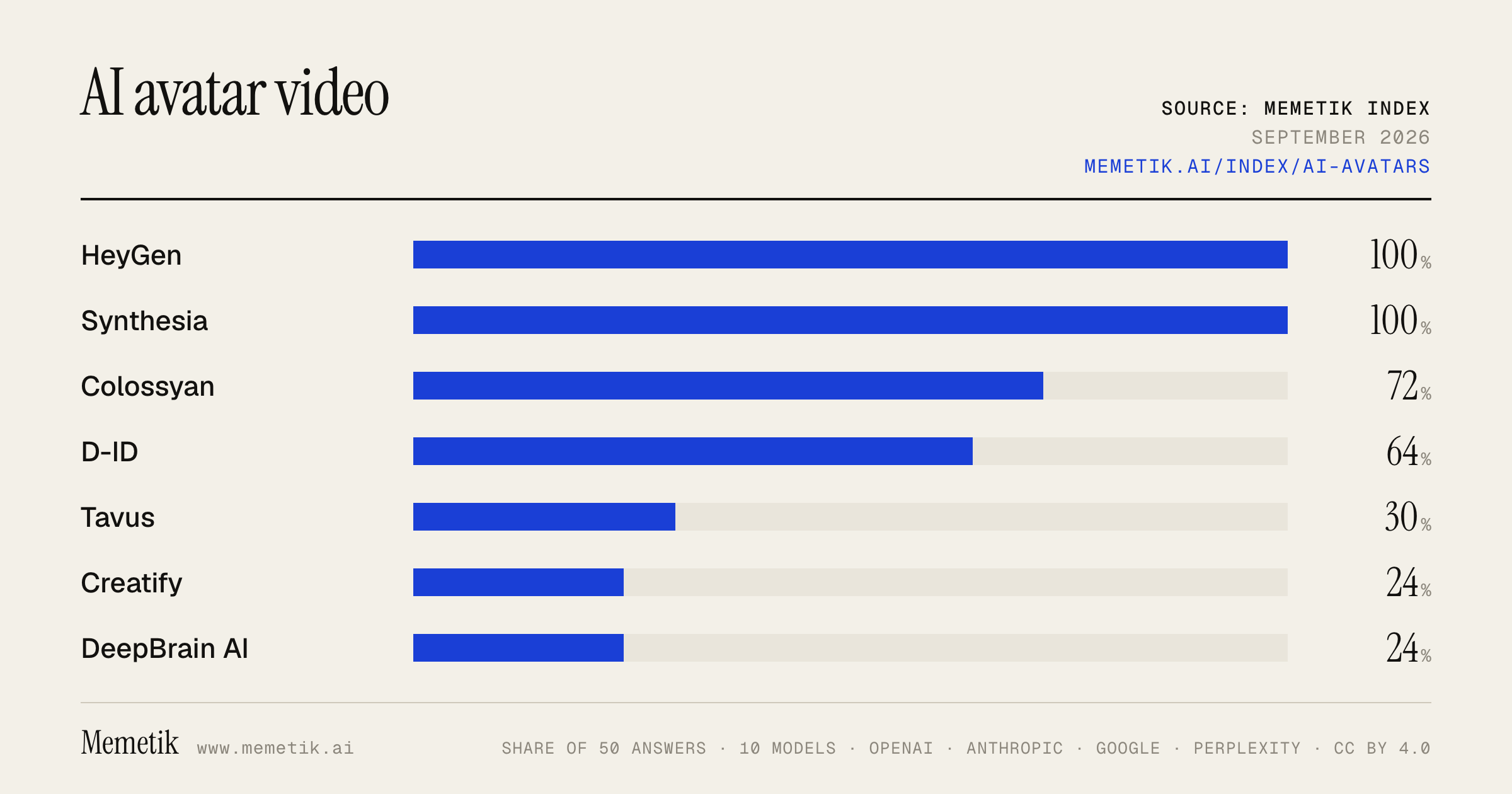
By provider
10 models · 50 answers
OpenAI 3 models · 15 answers
- GPT-5.6 Solgpt-5.6-solmost named: HeyGen 100%
- GPT-5.6 Terragpt-5.6-terramost named: HeyGen 100%
- GPT-5.6 Lunagpt-5.6-lunamost named: HeyGen 100%
Anthropic 3 models · 15 answers
- Claude Opus 5claude-opus-5most named: HeyGen 100%
- Claude Sonnet 5claude-sonnet-5most named: HeyGen 100%
- Claude Fable 5claude-fable-5most named: HeyGen 100%
Google 2 models · 10 answers
- Gemini 3.6 Flashgemini-3.6-flashmost named: HeyGen 100%
- Gemini 3.5 Flashgemini-3.5-flashmost named: HeyGen 100%
Perplexity 2 models · 10 answers
- Sonar Prosonar-promost named: HeyGen 100%
- Sonar Reasoning Prosonar-reasoning-promost named: HeyGen 100%
Sources the models cited
- youtube.com111
- heygen.com100
- guideflow.com53
- morphic.com31
- creatify.ai28
- knowlify.com23
- instantdm.com23
- synthesia.io20
- leadde.ai20
- ventureharbour.com17
- reddit.com15
- hedra.com14
ChatGPT via API returns no citations, so it does not contribute here.
The prompts
- What is the best AI avatar video tool for talking-head videos? Name specific products.
- Which AI avatar video tool would you recommend to talking-head videos in 2026?
- Compare the top AI avatar video tool options right now.
- I'm talking-head videos and I need an AI avatar video tool. What should I use and why?
- Best AI avatar video tool for talking-head videos for sales and training videos?
Every answer
Raw model output, unedited
GPT-5.6 TerraWhat is the best AI avatar video tool for talking-head videos? Name specific products.
**Best overall for scripted talking-head videos: HeyGen.**
It’s my default recommendation if you want a realistic “person speaking to camera” for marketing, sales, social clips, explainers, or multilingual content. Its custom-avatar workflow can build a speaking clone from a photo or short video, with expressive facial motion, gestures, voice options, and translation. ([heygen.com](https://www.heygen.com/tool/ai-clone-yourself?utm_source=openai))

Other top picks, depending on the job:

| Best for | Product | Why |
|---|---|---|
| **Most realistic creator/marketing talking head** | **HeyGen** | Strong custom clones, fast script-to-video workflow, good for short-form and presenter videos. |
| **Corporate training, HR, internal comms** | **Synthesia** | Best fit for polished, repeatable business video production: templates, collaboration, long-form scene-based editing, localization, interactive elements, and governance-oriented workflows. ([synthesia.io](https://www.synthesia.io/features?utm_source=openai)) |
| **Live, interactive avatar in an app** | **Tavus** | Choose this when the avatar must converse in real time—not merely read a script—such as an AI sales rep, coach, or support agent embedded in a product. ([tavus.io](https://www.tavus.io/blog/synthesia-vs-tavus-feature-comparison-explanation?utm_source=openai)) |
| **Talking photo / highly stylized character** | **Hedra** | A good specialized option for animating a still image or character, rather than making conventional corporate-presenter videos. |
| **Training content with quizzes/LMS workflow** | **Colossyan** | Worth considering if SCORM, learning modules, and branching training experiences matter more than maximum avatar realism. ([heygen.com](https://www.heygen.com/blog/best-talking-avatars-video-maker?utm_source=openai)) |
| **Professional broadcast-style presenter avatars** | **DeepBrain AI / AI Studios** | Good option to trial if you want a more traditional studio-presenter aesthetic and corporate production workflow. ([heygen.com](https://www.heygen.com/blog/best-talking-avatars-video-maker?utm_source=openai)) |

### Simple buying advice

- Pick **HeyGen** if viewers will judge the video primarily on whether the avatar looks natural and engaging.
- Pick **Synthesia** if you’re producing a library of training, onboarding, product, or internal videos across teams and languages.
- Pick **Tavus** only if you need **two-way, live conversation** through an API.
- For an avatar modeled on *you*, test **HeyGen and Synthesia** with the exact same 30–60 second script before committing. Your lighting, source footage, desired framing, language, and script length can materially affect results.

One caveat: even the best tools can look less convincing during long uncut takes, fast emotional delivery, profile turns, hands in frame, or technical names/acronyms. Use short scenes, supply a pronunciation guide, and include a disclosure where appropriate that the speaker is AI-generated.
GPT-5.6 TerraWhich AI avatar video tool would you recommend to talking-head videos in 2026?
For **pre-recorded talking-head videos**—marketing explainers, product updates, internal announcements, localized content—I’d pick **HeyGen** as the best overall choice in 2026.

**Why HeyGen**
- Strong balance of avatar realism, custom “digital twin” avatars, editing workflow, and video translation/lip-sync.
- Its Avatar IV supports longer presenter-style clips with more natural movement and expression, and the business plan includes collaboration, SCORM export, and SSO. ([heygen.com](https://www.heygen.com/business?utm_source=openai))
- It also gives you a reasonable path to live interactive avatars later, though that is a separate LiveAvatar product/platform. ([help.heygen.com](https://help.heygen.com/en/articles/12758516-introducing-liveavatar?utm_source=openai))

**Choose a different tool if your use case is specialized:**
- **Synthesia** — best for polished, standardized **corporate training and internal communications**, particularly if enterprise controls, workspaces, brand kits, SSO, and a mature template-based workflow matter more than making a highly personal creator clone. ([help.synthesia.io](https://help.synthesia.io/en/articles/15972650-what-are-synthesia-s-pricing-plans?utm_source=openai))
- **Colossyan** — best for **LMS training** where quizzes, branching scenarios, and SCORM-tracked learning modules are central. ([heygen.com](https://www.heygen.com/blog/best-talking-avatars-video-maker?utm_source=openai))
- **Tavus** — best if your “talking head” must **talk back live**: support agents, sales/demo agents, coaching, or interview practice. It is primarily conversational-video infrastructure rather than a straightforward scripted-video studio. ([tavus.io](https://www.tavus.io/pricing?utm_source=openai))

**My practical recommendation:**
Start with **HeyGen** if you are an individual creator, marketing team, or company that needs realistic, repeatable presenter videos. Run a small pilot first: make the same 60–90 second script in HeyGen and Synthesia, including your hardest language/accent and any close-up custom avatar footage. Select based on how well it preserves the speaker’s identity, lip-sync, and tone—not just the demo reel.

Only create avatars of people who have clearly consented, and label synthetic presenters where appropriate for your audience and jurisdiction.
- https://www.heygen.com/business?utm_source=openai
- https://help.heygen.com/en/articles/12758516-introducing-liveavatar?utm_source=openai
- https://help.synthesia.io/en/articles/15972650-what-are-synthesia-s-pricing-plans?utm_source=openai
- https://www.heygen.com/blog/best-talking-avatars-video-maker?utm_source=openai
- https://www.tavus.io/pricing?utm_source=openai
GPT-5.6 TerraCompare the top AI avatar video tool options right now.
## Bottom line

For most buyers, the shortlist is:

1. **HeyGen** — best overall for **marketing, creator content, localization, and personal/digital-twin avatars**.
2. **Synthesia** — best for **enterprise training, internal communications, compliance, and controlled brand workflows**.
3. **Captions** — best for **social-first creators** who also want strong AI editing, captions, dubbing, and quick avatar clips.
4. **HeyGen LiveAvatar** — best if you need a **real-time conversational avatar** in a website, app, training flow, or support experience—not just rendered videos.

This is a practical buying comparison, not a frame-by-frame realism benchmark; results depend heavily on the chosen avatar, voice, script, and generation mode.

| Tool | Best for | Major strengths | Main trade-offs | Starting listed price* |
|---|---|---|---|---|
| **HeyGen** | Marketing, sales, creator videos, localization | Large avatar/voice selection, personal avatars, photo avatars, 4K on Pro, broad translation workflow | Credit model can be harder to predict for higher-end avatar generations | Free; Creator **$29/mo**; Pro **$49/mo**; Business **$149/mo** ([www-redesign.heygen.com](https://www-redesign.heygen.com/pricing?utm_source=openai)) |
| **Synthesia** | L&D, HR, enablement, executive/internal comms | Enterprise controls, SCORM export, SSO, collaboration, branded video pages, a very structured corporate workflow | Less naturally suited to rapid social-style editing and creator experimentation | Free; Starter **$29/mo**; Creator **$89/mo**; Enterprise custom ([synthesia.io](https://www.synthesia.io/pricing?country=255&utm_source=openai)) |
| **Captions** | Short-form social video and creator workflows | AI editing plus avatars, stylized captions, dubbing, fast mobile-friendly workflow | Less of a full enterprise learning-video platform; fewer public enterprise-workflow details | Pro **$9.99/mo**; Max **$24.99/mo**; Scale **$69.99/mo** ([captions.ai](https://www.captions.ai/plans?utm_source=openai)) |
| **HeyGen LiveAvatar** | Live agents, interactive training, product support | Real-time voice interaction via API/SDK, custom avatars, scalable streaming plans | It is a separate product and credit pool from HeyGen’s normal rendered-video studio | Starter **$19/mo**; Essential **$99/mo**; Business **$475/mo** ([help.heygen.com](https://help.heygen.com/en/articles/12758516-introducing-liveavatar?utm_source=openai)) |

\*Provider pricing/features change frequently; verify at checkout before committing.

## Detailed comparison

### 1. HeyGen — best all-around avatar-video choice

**Choose it if:** you need polished spokespeople, a digital twin of a founder/expert, product marketing, sales outreach, or substantial multilingual repurposing.

Why it stands out:
- Its plans emphasize a broad production toolkit: **500+ stock avatars on Free**, **700+ on paid plans**, photo avatars, custom video avatars, voice cloning, and up to **4K export** on Pro and above. ([www-redesign.heygen.com](https://www-redesign.heygen.com/pricing?utm_source=openai))
- It supports a very large language/dialect selection and includes translation-script proofreading on Pro, which is useful when localized copy needs human review rather than simple machine translation. ([www-redesign.heygen.com](https://www-redesign.heygen.com/pricing?utm_source=openai))
- It separates a person’s **motion, visual look, and voice**, so a single digital twin can be adapted into different looks without recreating the whole avatar. ([help.heygen.com](https://help.heygen.com/en/articles/9964694-avatar-looks-explained?utm_source=openai))

**Watch-outs:** HeyGen’s newer/high-fidelity avatar modes consume credits much more quickly than legacy modes. For example, its published credit guidance lists Avatar IV/V at **20 credits per minute**, versus 3 credits/minute for Avatar III; budget based on the exact model rather than just the subscription tier. ([help.heygen.com](https://help.heygen.com/en/articles/10207693-how-to-get-started-with-heygen-for-mobile?utm_source=openai))

**Verdict:** Best default pick if your videos are customer-facing and visual polish, multilingual output, and avatar flexibility matter most.

---

### 2. Synthesia — best corporate and learning-and-development platform

**Choose it if:** your priority is employee training, policy/compliance videos, product education, standardized templates, or company-wide governance.

Why it stands out:
- Its higher tiers are unusually geared toward enterprise production: **SCORM export**, SAML/SSO, live collaboration, brand kits, API access, branded video pages, and implementation/customer-success support. ([synthesia.io](https://www.synthesia.io/pricing?country=255&utm_source=openai))
- Synthesia lists **160+ languages** and has dedicated translation/dubbing capabilities, making it well suited to standardized international learning content. ([synthesia.io](https://www.synthesia.io/pricing?country=255&utm_source=openai))
- It offers several avatar approaches: ready-made stock avatars, photo-based personal avatars, and a professionally filmed Studio Avatar option. Synthesia positions the latter for high-stakes leadership or official communications; its help center lists self-submitted Studio Avatar creation at **$1,000 per avatar**. ([help.synthesia.io](https://help.synthesia.io/en/articles/15197011-which-avatar-type-is-right-for-me?utm_source=openai))
- Its stock library is listed at **240+ avatars** on its avatar page. ([synthesia.io](https://www.synthesia.io/features/avatars?plan=All+avatars&utm_source=openai))

**Watch-outs:** Synthesia’s Creator plan is materially more expensive than HeyGen Pro. Its credit/minute framework also means you should model actual monthly output before comparing sticker prices. ([synthesia.io](https://www.synthesia.io/pricing?country=255&utm_source=openai))

**Verdict:** Pick this when procurement, brand governance, repeatability, LMS integration, and risk management outweigh social-media-style creative flexibility.

---

### 3. Captions — best value for social-first creators

**Choose it if:** you are making TikToks, Reels, Shorts, ads, creator-led explainers, or talking-head content and want editing and captions to be part of the same workflow.

Why it stands out:
- Captions combines **custom-avatar generation**, AI editing, caption styling, and dubbing into **29 languages** in its Pro offering. ([captions.ai](https://www.captions.ai/plans?utm_source=openai))
- Its lower entry pricing makes it attractive if the avatar is one part of a broader short-form editing pipeline rather than the entire production system. ([captions.ai](https://www.captions.ai/plans?utm_source=openai))
- Max and Scale add faster/higher processing capacity, aimed at heavier creators and teams. ([captions.ai](https://www.captions.ai/plans?utm_source=openai))

**Watch-outs:** If you need formal team permissions, SCORM/LMS workflows, robust localization review, or a large-scale video API, Synthesia or HeyGen will usually be the safer first evaluation.

**Verdict:** Best choice for an individual or small creative team prioritizing speed, short-form polish, and low
- https://www-redesign.heygen.com/pricing?utm_source=openai
- https://www.synthesia.io/pricing?country=255&utm_source=openai
- https://www.captions.ai/plans?utm_source=openai
- https://help.heygen.com/en/articles/12758516-introducing-liveavatar?utm_source=openai
- https://help.heygen.com/en/articles/9964694-avatar-looks-explained?utm_source=openai
- https://help.heygen.com/en/articles/10207693-how-to-get-started-with-heygen-for-mobile?utm_source=openai
- https://help.synthesia.io/en/articles/15197011-which-avatar-type-is-right-for-me?utm_source=openai
- https://www.synthesia.io/features/avatars?plan=All+avatars&utm_source=openai
GPT-5.6 TerraI'm talking-head videos and I need an AI avatar video tool. What should I use and why?
For **talking-head videos**, I’d start with **HeyGen**—specifically its **Digital Twin** option.

**Why it’s my top pick**
- It is designed to turn a short recording of *you* into a reusable avatar rather than forcing you into a stock presenter.
- Its current Digital Twin product is positioned to retain personal delivery details such as expressions, gestures, pauses, tone, and full-body movement—not merely lip-sync a static headshot. That makes it a better fit when you want your videos to still feel like *you*. ([help.heygen.com](https://help.heygen.com/en/articles/12089286-create-your-first-digital-twin-video-avatar-with-avatar-iv?utm_source=openai))
- It is especially practical for recurring content: product explainers, social clips, training, sales outreach, and versions in multiple languages.

**Use HeyGen if:** you want to write a script, pick your own likeness/voice, and publish quickly without filming every take.

### The alternatives I’d consider

| If your priority is… | Use… | Why |
|---|---|---|
| A polished, corporate learning / internal-comms presenter | **Synthesia** | Strong fit for standardized training, HR, compliance, and multilingual business videos. |
| Fast creator-style content and editing from your existing clips | **Captions** | Better when you still film yourself sometimes and want AI-assisted editing, reframing, captions, and creator workflows. |
| Cinematic cutaways, B-roll, or surreal visuals to mix into your talking head | A generative-video model | Use it for supporting shots—not as your primary avatar presenter. |

### My practical recommendation

1. **Choose HeyGen Digital Twin** if your audience expects *your* face and personality.
2. Make a **30–60 second test** using a script with:
   - hard-to-pronounce names,
   - your usual pacing,
   - a few emotional shifts,
   - hand gestures if you normally use them.
3. Judge it on **eye contact, pauses, vocal naturalness, and gestures**—not just lip-sync.
4. Keep a real-camera workflow for your highest-trust content: personal announcements, sensitive messages, and flagship brand videos. Avatar video works best for scalable, repeatable material.

One important caveat: use only your own likeness and voice—or documented permission from the person depicted. AI-avatar tools create obvious consent, disclosure, and brand-trust risks when used to imitate someone else.

If you mean that you want to **replace filming yourself entirely**, pick **HeyGen**. If you mean you already film yourself but want a dramatically faster edit-to-publish workflow, pick **Captions** instead.
GPT-5.6 TerraBest AI avatar video tool for talking-head videos for sales and training videos?
## Best overall: **HeyGen**

For a single platform that can handle both **sales-facing talking-head videos** and **employee/customer training**, I’d choose **HeyGen**. It has strong avatar realism, screen-recording/avatar overlays for product demos, bulk/personalized sales video workflows, multilingual translation, and—on its Business plan—interactive e-learning tools plus **SCORM export** for LMS delivery. ([heygen.com](https://www.heygen.com/sales?utm_source=openai))

### Pick based on your primary use case

| If you need… | Best choice | Why |
|---|---|---|
| **One tool for sales + training** | **HeyGen** | Best balance of polished avatars, localized video, screen demos, personalization, and LMS/SCORM support. ([heygen.com](https://www.heygen.com/sales?utm_source=openai)) |
| **Formal corporate L&D / compliance** | **Synthesia** | A strong enterprise-oriented alternative, particularly if governance, standardized templates, and regulated-company requirements outweigh sales personalization. ([www-redesign-staging.heygen.com](https://www-redesign-staging.heygen.com/blog/ai-avatar-tools-enterprise-internal-training?utm_source=openai)) |
| **Interactive courses, quizzes, and branching role-play** | **Colossyan** | More course-centric: particularly good where assessments and scenario-based learning matter more than the most lifelike presenter. ([heygen.com](https://www.heygen.com/blog/best-ai-avatar-platform-corporate-training-videos?utm_source=openai)) |
| **Highly personalized, programmatic sales outreach** | **Tavus** | Better fit if you have technical resources and want API-driven personalized or conversational video at scale—not simply a self-serve video studio. ([heygen.com](https://www.heygen.com/blog/best-ai-avatar-platform-corporate-training-videos?utm_source=openai)) |
| **Real-time avatar sales reps or coaching** | **HeyGen LiveAvatar** | Intended for live, low-latency conversations, such as interactive sales reps, support, or adaptive training—not pre-rendered videos. ([help.heygen.com](https://help.heygen.com/en/articles/12758516-introducing-liveavatar?utm_source=openai)) |

### My practical recommendation

- **Sales enablement:** Start with **HeyGen**—create a custom avatar of a founder, AE, or trainer; combine it with screen recordings; then localize top demos and follow-ups.
- **Training:** Use **HeyGen** if your training is mostly concise explainers, onboarding, product education, or SOPs. Move to **Colossyan** if each module needs built-in quiz/branching-heavy learning design.
- **Enterprise procurement/security:** Put **Synthesia and HeyGen** in a short pilot, using your actual scripts, brand assets, languages, and LMS—not a vendor demo.

### Important cost caveat

HeyGen’s published Business tier is **$149/month plus $20 per additional seat** and includes items especially relevant to training teams: SAML/SSO, five custom avatars, interactive e-learning video, SCORM export, screen recording, and collaboration. But avatar/video generation is usage-based, so test how many finished minutes and revisions your monthly workflow consumes before committing. ([heygen.com](https://www.heygen.com/business?utm_source=openai))

**Bottom line:**
- Buy **HeyGen** for the best all-around sales + training solution.
- Buy **Colossyan** if structured interactive learning is the core deliverable.
- Buy **Tavus** if personalized video must be deeply integrated into a sales product or workflow via API.
- https://www.heygen.com/sales?utm_source=openai
- https://www-redesign-staging.heygen.com/blog/ai-avatar-tools-enterprise-internal-training?utm_source=openai
- https://www.heygen.com/blog/best-ai-avatar-platform-corporate-training-videos?utm_source=openai
- https://help.heygen.com/en/articles/12758516-introducing-liveavatar?utm_source=openai
- https://www.heygen.com/business?utm_source=openai
Claude Sonnet 5What is the best AI avatar video tool for talking-head videos? Name specific products.
Based on current comparisons and reviews, a few tools consistently stand out for AI talking-head avatar videos, though the "best" one depends on your specific needs:

**HeyGen** is generally regarded as the top all-rounder.
If you prioritize avatar realism, language support, and customisation, HeyGen remains the most full-featured AI avatar video platform, with its new Avatar IV models excelling at lip sync and micro-expressions.

HeyGen leads in avatar count (600+), lip sync, and language support (175+), making it the top all-rounder.
 One review found
pasting a 90-second script, selecting an avatar, and having a finished 1080p video in under 3 minutes, with lip sync holding from first word to last in all three languages tested.


**Synthesia** is the other major name, especially for enterprise use.
HeyGen's Avatar IV and Synthesia's latest generation trade the top spot depending on the use case, though for talking-head realism with facial micro-expressions and gesture control, HeyGen's Avatar IV scores highest in testing.

Synthesia and Colossyan excel in enterprise features like SCORM export, interactive video, and compliance.


**Other notable options depending on your use case:**

- **D-ID** –
the budget and developer-friendly option, with plans starting around $5.99/month and an API considered the simplest on the market for embedding talking-head avatars into your own app, ideal for developers, startups, and budget-conscious testers.

- **Colossyan** –
carved out a niche in interactive training and compliance content, with 2026 "Express-2" avatars adding micro-expressions like natural blinking, nodding, and eyebrow movement, best for corporate training and large teams needing governance.

- **DeepBrain AI** – noted for
best presenter realism for corporate video, with phoneme-level lip matching.

- **VEED** – considered the
best all-in-one video editor, with avatar features inside a full editing suite.

- **Pose AI** – a newer all-in-one option that
runs native video models (Kling, SeedDance, Wan, Veo, Sora 2, and HeyGen) inside one studio, covering talking-head, UGC, and product video without switching tools.


**Bottom line recommendation:**
- For overall best quality/realism and ease of use → **HeyGen**
- For enterprise/corporate training with compliance needs → **Synthesia** or **Colossyan**
- For developers building custom apps → **D-ID** (API-first, cheapest)
- For an all-in-one studio covering avatars + UGC + product video → **Pose AI**

It's worth noting that some sources (like vendor-affiliated blogs) may favor their own product, so cross-checking a couple of independent reviews or trying free trials of HeyGen and Synthesia directly is a good way to decide which fits your workflow best.
Claude Sonnet 5Which AI avatar video tool would you recommend to talking-head videos in 2026?
Based on current reviews and testing from 2026, here's my take on the best AI avatar tools for talking-head videos:

## Top recommendation: **HeyGen**
This is the most consistently recommended tool across independent reviews right now.
HeyGen's Avatar IV and Synthesia's latest generation trade the top spot depending on the use case, but for talking-head realism with facial micro-expressions and gesture control, HeyGen's Avatar IV scores highest in testing.
 Another review found
if you prioritize avatar realism, language support, and customization, HeyGen remains the most full-featured AI avatar video platform in 2026, with new Avatar IV models excelling at lip sync and micro-expressions.


Key strengths:
HeyGen leads in avatar count (600+), lip sync, and language support (175+), making it the top all-rounder.
 In hands-on testing, one reviewer noted
pasting a 90-second script, selecting an avatar, and having a finished 1080p video in under 3 minutes, with lip sync holding from first word to last across three languages.


## Good alternatives depending on your needs:

- **Synthesia** – Best if you need enterprise/training features.
Synthesia and Colossyan excel in enterprise features like SCORM export, interactive video, and compliance.


- **D-ID** – Best budget/developer option.
D-ID is the budget and developer-friendly option, with plans starting around $5.99/month and an API that's the simplest on the market for embedding talking-head avatars — it won't win on stock avatar variety compared to Synthesia, but it's hard to beat on price for prototyping or lightweight use.


- **Colossyan** – Best for structured learning/training content with
2026 "Express-2" avatars that added micro-expressions like natural blinking, nodding, and eyebrow movement, with pricing starting around $18–$29/month, geared toward corporate training and compliance videos.


- **Pose AI** – Worth considering if you want flexibility across multiple video models in one subscription.
It's an all-in-one AI creative studio that runs native video models alongside image generation, so a single subscription covers talking-head clips, UGC ads, product videos, and photos — no separate tool or bill needed for each format.


## Bottom line
For most people doing straightforward talking-head videos, **HeyGen** is the safest pick in 2026 thanks to its realism, speed, and language support. If you're doing corporate/compliance training at scale, lean toward **Synthesia** or **Colossyan**. If you're a developer needing API access on a budget, **D-ID** is the practical choice.

One caveat worth noting:
since these models predict frames, identity can drift across a long take, and regulatory changes shifted in 2026 — the EU AI Act's Article 50 transparency duties and California's SB 942 both became operative for synthetic video on August 2, 2026
, so make sure whichever tool you choose has proper AI-disclosure labeling built in if you're in a regulated market.
Claude Sonnet 5Compare the top AI avatar video tool options right now.
## Top AI Avatar Video Tools Compared (2026)

Based on current reviews and testing across multiple sources, here's how the leading platforms stack up:

### 1. **HeyGen** — Best Overall / Best Lip-Sync

HeyGen delivers industry-leading lip-sync and natural movement
, making it the top pick for hyper-realistic marketing video. It's also recognized as the
best overall with the widest language support, fastest avatar setup, and Video Agent automation
. Pricing starts from $29/mo, and it holds a
4.8/5 G2 rating
. It particularly
excels at multilingual translation with lip-sync
, supporting roughly
175+ languages
.

### 2. **Synthesia** — Best for Enterprise Training
Synthesia is the go-to for
enterprise training, with structured workflows and SCORM on its Enterprise tier
. It offers
160+ languages with SOC 2 compliance
 and has
very high realism and lip-sync
, though it has
no built-in course authoring
.

### 3. **Colossyan** — Best for E-Learning/L&D
Colossyan stands out for
L&D on a budget, offering branching quizzes and interactive scenarios
. It's praised for
branching scenarios and built-in quizzes
, with pricing from about $27/mo and a strong 4.7/5 G2 rating.

### 4. **D-ID** — Best for API/Developer Workflows & Free Tier
D-ID is a
lightweight talking-head API
, ideal for developers, and offers
a generous free tier for photo-to-avatar experiments
. It's particularly strong for
animating still photos into talking avatars
, starting at just $5.99/mo.

### 5. **Creatify / Arcads / Higgsfield** — Best for Performance Ads & UGC
For advertising use cases,
Creatify, Arcads, and Higgsfield stand out with URL-to-video workflows and batch testing
. Creatify specifically uses
URL-to-Video and an Aurora model with batch testing
, while Arcads offers
1000+ AI actors with emotion control
.

### 6. **VEED** — Best All-in-One Editor
VEED integrates
avatar features inside a full editing suite
, making it ideal for teams that want general video editing plus occasional avatar clips, though its avatar depth is lighter than dedicated platforms.

### 7. **Elai.io** — Budget Multilingual Option
Elai is known for
budget digital twins and multilingual training
, using
voice cloning and slides-to-video
 conversion, starting around $29/mo.

### 8. **DeepBrain AI Studios** — Broadcast-Style Corporate Video
This tool focuses on
broadcast-style, formal corporate video
 with real-time generation and ChatGPT integration, priced from $24/mo.

---

## Quick Takeaway by Use Case
- **Best lip-sync/realism overall:** HeyGen
- **Best for corporate/compliance training:** Synthesia
- **Best for interactive e-learning:** Colossyan
- **Best for developers/API access:** D-ID
- **Best for performance ads/UGC:** Creatify, Arcads, Higgsfield
- **Best all-in-one editor:** VEED

As one review notes,
there's no single best AI avatar generator—the right choice depends on your use case, though for corporate training, Synthesia and Colossyan are among the most proven options with SCORM export and interactivity
. Most platforms offer free tiers or trials, so testing 2-3 options against your specific workflow (marketing vs. training vs. ads) is the best way to choose.
- https://www.guideflow.com/blog/best-ai-avatar-generators
- https://www.heygen.com/blog/best-ai-avatar-generators
- https://creatify.ai/blog/best-ai-avatar-generators-and-tools
- https://www.easygenerator.com/en/blog/e-learning/top-ai-avatar-video-software-for-training-content/
- https://ventureharbour.com/best-ai-avatar-software/
Claude Sonnet 5I'm talking-head videos and I need an AI avatar video tool. What should I use and why?
There are several strong AI avatar video tools depending on what you need. Let me give you a rundown based on the most commonly used options:

**HeyGen**
Very popular for professional-looking talking-head videos. Offers realistic AI avatars (including custom avatars trained from your own footage), lip-sync in 40+ languages, and templates for business/marketing content. Great if you want polished, corporate-style videos or need multilingual dubbing.

**Synthesia**
One of the most established players — strong for corporate training, e-learning, and marketing videos. Has a large library of diverse stock avatars plus custom avatar creation, and supports 120+ languages. Good choice if you need to scale video production without filming yourself repeatedly.

**D-ID**
Known for fast, API-friendly avatar generation — good if you're a developer wanting to integrate avatar video into an app, or if you want quick turnaround for simple talking-head clips from a photo.

**Colossyan**
Geared toward corporate learning/training content, with a focus on interactive video and quizzes built in — nice if your talking-head videos are educational.

**Elai.io**
Similar to Synthesia/HeyGen but often praised for being more budget-friendly, with easy PowerPoint-to-video conversion.

### How to choose:
- **Want the most realistic/custom avatar of yourself?** → HeyGen (strong custom avatar training)
- **Need multilingual scale for corporate/training content?** → Synthesia
- **Want quick, cheap, photo-to-video avatars or API access?** → D-ID
- **Making training/e-learning with interactivity?** → Colossyan
- **On a budget, converting slides/text to video fast?** → Elai.io

If you let me know your use case — e.g., YouTube content, marketing ads, internal corporate training, course creation, or personal branding — and your budget, I can narrow this down to the single best fit and check current pricing/features for you.
Claude Sonnet 5Best AI avatar video tool for talking-head videos for sales and training videos?
Based on current comparisons, the field consistently narrows to a few clear leaders depending on whether you're prioritizing sales/social speed or structured training workflows:

## Top picks

**HeyGen — Best for sales & outreach**

HeyGen edges ahead for speed and marketing use, with instant avatar cloning from a short selfie video, strong lip-synced translation, and unlimited standard generation on paid tiers that make it a favorite for sales, social, and short-form talking heads.
 It's fast to set up —
one tester pasted a 90-second script, selected an avatar, and had a finished 1080p video in under 3 minutes, with lip sync holding from first word to last across three languages.
 It also has a huge avatar library —
over 1,100 stock avatars, plus an Instant Avatar feature where uploading a selfie produces a functional digital twin in about 5 minutes.
 Pricing is accessible, with
the Pro plan starting at $9.99 per month, though generative avatar features sit on higher tiers.


**Synthesia — Best for corporate/compliance training**

Synthesia is the market leader for AI avatar video, offering a deep library of photorealistic studio avatars, 120-plus languages, and enterprise controls (SSO, SCORM export, brand kits) that training and L&D teams need, with consistently polished output built for producing presenter-led videos at scale.
 Its library has grown further —
240+ avatars across 160+ languages, plus workspace controls, approval chains, and SOC 2 + ISO 27001 + GDPR compliance, with 2026 "Express-2" avatars adding micro-expressions like natural blinking, nodding, and eyebrow movement that close much of the old uncanny valley gap.
 It's best suited for
corporate training, compliance videos, and large teams that need governance and audit trails.
 Pricing starts
at roughly $18 per month on the annual Starter plan (about $29 monthly) as of 2026.


**Colossyan — Best for budget-conscious L&D teams**

Colossyan is an AI video platform built specifically for structured training and learning workflows, enabling teams to turn documents, presentations, and scripts into complete training programs with AI avatars, with over 200 diverse AI avatars and voices for extensive customization and localization in 100+ languages.
 One review notes it's
best for L&D on a budget, with branching quizzes and interactive scenarios.


**D-ID — Best for developers/API integration**
If you want to embed avatars into your own app (e.g., an interactive sales demo tool),
D-ID is the budget and developer-friendly option, with plans starting around $5.99/month and an API that's the simplest on the market for embedding talking-head avatars into your own app or product.


**Tavus — Best for hyper-personalized sales outreach**
If you want *personalized* video-at-scale (e.g., inserting each prospect's name/company into a templated sales video),
Tavus focuses on hyper-personalized video generation, particularly for sales and outreach.


## My recommendation

- **For sales videos/outreach:** Start with **HeyGen** (speed, instant cloning, social-friendly) or **Tavus** if you need 1:1 personalization at scale.
- **For training videos:** Go with **Synthesia** if you need enterprise compliance/SCORM features, or **Colossyan** if you want built-in interactivity (quizzes, branching) at a lower price point.

Since
the best AI avatar tool is the one that fits your content goal, audience, and update frequency—not necessarily the most advanced or expensive option
, most companies doing both sales and training end up using **HeyGen for sales/marketing** and **Synthesia or Colossyan for internal training**, since the two use cases have different priorities (speed/virality vs. compliance/structure).

Would you like a more detailed breakdown of pricing tiers or specific features (e.g., multilingual support, interactivity, API access) for any of these?
Gemini 3.6 FlashWhat is the best AI avatar video tool for talking-head videos? Name specific products.
When choosing the best AI avatar video tool for talking-head videos, the right option depends on whether you need personal brand replication, corporate training, or quick photo-to-video animation.

Here are the top tools currently leading the market:

---

### 1. **HeyGen** — *Best Overall for Realism & Custom Avatars*
HeyGen is widely considered the current market leader for high-fidelity talking-head videos.
* **Key Highlights:**
  * **Instant Avatars:** You can record a short 2-minute video of yourself using a phone or webcam, and HeyGen generates a strikingly accurate clone of your face and voice.
  * **Lip-Sync Quality:** Features precise lip movement, natural hand gestures, and subtle micro-expressions.
  * **Video Translation:** Offers built-in video-to-video translation that translates original speech into another language while re-matching your lip movements.
* **Best For:** Content creators, marketers, sales outreach, and personal branding.

---

### 2. **Synthesia** — *Best for Enterprise & Corporate Training*
Synthesia is the industry standard for corporate and enterprise use, backed by robust security compliance (SOC 2).
* **Key Highlights:**
  * **Large Avatar Library:** Access over 140+ diverse stock avatars and 120+ languages/accents.
  * **Expressive Avatars:** Recent updates include emotional depth (nods, smiles, emphasis on key words).
  * **Text-to-Video Interface:** Works like building a slide deck—just type text, pick an avatar, and add graphics.
* **Best For:** HR onboarding, internal training, customer support videos, and international corporate communications.

---

### 3. **D-ID (Creative Reality Studio)** — *Best for Animating Still Images*
D-ID specializes in turning static photos, illustrations, or AI-generated images (e.g., Midjourney portraits) into talking heads.
* **Key Highlights:**
  * **Image-to-Video:** Animate any portrait simply by uploading a photo and inputting text or audio.
  * **Creative Freedom:** Perfect if you don't want a realistic human avatar, but rather an artistic, historical, or stylized character.
* **Best For:** Storytellers, creative projects, historical figure recreations, and budget-friendly quick clips.

---

### 4. **Colossyan** — *Best for L&D (Learning & Development)*
Colossyan is built specifically around instructional design and educational content.
* **Key Highlights:**
  * **Multi-Avatar Conversations:** Easily place two AI avatars on screen to talk to each other in a conversational format.
  * **PDF/PPT to Video:** Import existing slides or training documents and turn them directly into video scripts.
  * **Interactive Quizzes:** Embed interactive elements into videos for training assessments.
* **Best For:** Educators, instructional designers, and corporate trainers.

---

### 5. **Elai.io** — *Best for Content Automation*
Elai focuses heavily on converting written content directly into video presentations.
* **Key Highlights:**
  * **Article-to-Video:** Paste a URL (e.g., a blog post), and Elai generates a script, selects relevant scenes, and assigns a talking-head avatar.
  * **Mascot & 3D Avatars:** Supports 3D animated avatars alongside photo-realistic humans.
* **Best For:** Bloggers, media outlets, and marketing teams looking to repurpose long-form text into video.

---

### Quick Recommendation Guide:
* **If you want to clone yourself:** Use **HeyGen**.
* **If you need professional business/training videos:** Use **Synthesia** or **Colossyan**.
* **If you want to animate a picture/illustration:** Use **D-ID**.
Gemini 3.6 FlashWhich AI avatar video tool would you recommend to talking-head videos in 2026?
The best AI avatar video tool for talking-head videos depends on your specific use case, but **HeyGen** remains the top overall recommendation in 2026.

---

### 1. **Best Overall & Highest Realism: HeyGen**
* **Best for:** Digital twins, spokesperson videos, marketing, and YouTube channels.
* **Why it stands out:** HeyGen leads the market in facial nuance, lip-sync accuracy, micro-expressions, and natural voice cloning. Its **Video Agent** feature acts like a full script-to-video workflow, auto-selecting layouts, visual elements, and background assets to match your avatar's performance.
* **Standout Feature:** Custom "Digital Twin" avatar generation (studio-grade avatars created from a short 2–3 minute smartphone recording).

---

### 2. **Best for Enterprise, L&D, and Training: Synthesia**
* **Best for:** Corporate training, internal onboarding, customer success, and multi-language learning videos.
* **Why it stands out:** Synthesia focuses heavily on security, compliance, and enterprise collaboration. It offers polished, professional stock avatars, robust team workspaces, and seamless integration with LMS (Learning Management Systems).
* **Standout Feature:** Interactive video features and automatic translation across 120+ languages with matching accents.

---

### 3. **Best for E-commerce & Social Media Ads: Creatify**
* **Best for:** TikTok/Reels performance marketing, UGC-style (user-generated content) ads, and product videos.
* **Why it stands out:** Optimized specifically for short-form, high-converting video ads. You can paste a product URL, and Creatify will generate a script along with a natural, casual-looking AI avatar acting as a spokesperson.
* **Standout Feature:** Fast 9:16 vertical video workflows tailored directly for paid advertising on Meta and TikTok.

---

### 4. **Best Budget / High-Value Choice: Pose AI or ElevenLabs (with Video Tools)**
* **Best for:** Creators on a budget or those wanting advanced voice control.
* **Why it stands out:** Tools like Pose offer accessible price points for solo creators seeking realistic talking-photo and portrait animations. Pairing top-tier audio platforms (like ElevenLabs) with avatar renderers gives creators fine-tuned control over tone and pacing.

---

### Key Recommendations Summary

* Choose **HeyGen** if you want to clone yourself or produce ultra-realistic presenter-led content.
* Choose **Synthesia** if you need corporate compliance, multi-user governance, and training modules.
* Choose **Creatify** if you are running paid ads or creating fast social media hooks.
Gemini 3.6 FlashCompare the top AI avatar video tool options right now.
Here is a breakdown and comparison of the top AI avatar video tools currently leading the market.

---

### **1. HeyGen — Best Overall for Realism, Translation & Personal Avatars**
HeyGen is widely considered the top all-around platform for individual creators, marketers, and sales teams due to its hyper-realistic avatars and impressive video translation features.

* **Key Features:**
  * **Digital Twins:** Outstanding instant custom avatars made from short webcam or phone recordings.
  * **Video Translation:** Seamlessly translates videos into 40+ languages while preserving your tone and accurately re-syncing your lips to the new language.
  * **Interactive/Streaming Avatars:** Offers real-time conversational avatars for apps or websites via API.
* **Best For:** Content creators, international sales, marketing teams, and personalized video outreach.
* **Pros:** Top-tier lip-sync realism, fast workflow, industry-leading voice cloning and translation.
* **Cons:** Credit-based pricing can get expensive quickly for long-form, high-volume video production.

---

### **2. Synthesia — Best for Enterprise & Corporate Training (L&D)**
Synthesia is the enterprise standard, backed by heavy security compliance (SOC 2) and an extensive library of professional studio-quality avatars.

* **Key Features:**
  * **Massive Avatar Library:** 160+ diverse, high-quality stock avatars.
  * **Custom Avatars:** Offers high-end custom avatars recorded in professional studio environments.
  * **Built-in Screen Recorder & Editor:** Ideal for creating software walk-throughs and corporate onboarding slides.
  * **Collaboration Tools:** Multi-user editing and enterprise-grade admin controls.
* **Best For:** Enterprise Learning & Development (L&D), internal communications, compliance training, and HR onboarding.
* **Pros:** Highly polished studio templates, enterprise-grade security, excellent multi-language voice quality.
* **Cons:** Expressive gestures on avatars can sometimes feel slightly stiff compared to HeyGen’s casual avatars; strict content moderation.

---

### **3. Colossyan — Best for Interactive Learning & Workplace Training**
Colossyan is specifically built for workplace learning, instructional design, and educational video production.

* **Key Features:**
  * **Multi-Avatar Conversations:** Easily create scenes where two or more avatars interact with each other.
  * **Localization:** One-click automated translation for entire video decks.
  * **Interactive Quizzes:** Embed interactive knowledge checks into videos for LMS platforms.
* **Best For:** Instructional designers, teachers, and corporate training teams that need interactive learning content.
* **Pros:** Tailored specifically for L&D workflows, easy to turn PDFs/PPTs into videos, excellent multi-avatar dialogue setup.
* **Cons:** Smaller stock library of avatars compared to Synthesia.

---

### **4. D-ID — Best for Photo Animation & Conversational AI**
D-ID focuses on turning static images and portraits into dynamic, speaking avatars. It also offers powerful API capabilities.

* **Key Features:**
  * **Creative Reality Studio:** Animate any still photo—from historic portraits to AI-generated images—into a speaking presenter.
  * **Agents & API:** Build real-time, interactive conversational agents integrated with LLMs (like GPT).
* **Best For:** Developers, creative agencies, mobile app developers, and interactive digital signage.
* **Pros:** Works with static images (no video footage needed), strong API ecosystem for live interactivity.
* **Cons:** Lip-sync on static headshots can look less grounded or slightly distorted compared to full-body video capture models.

---

### **5. Elai.io — Best for Document-to-Video Conversion**
Elai.io excels at transforming text-heavy resources (like blogs, articles, and training docs) into presenter-led videos.

* **Key Features:**
  * **Article-to-Video / Topic-to-Video:** Paste a URL or prompt, and it generates a complete video script and storyboard with an avatar.
  * **Mascot / 3D Cartoon Avatars:** Offers 3D dynamic/cartoon avatars in addition to realistic human presenters.
  * **LMS Exports:** Export directly for learning management systems.
* **Best For:** Content marketers looking to repurpose written content, educational platforms, and bloggers.
* **Pros:** Great automation for turning text into video; solid variety of avatar styles (including animated ones).
* **Cons:** Stock avatar movements and voice cadence can sometimes feel slightly more robotic than HeyGen or Synthesia.

---

### Quick Comparison Summary

| Feature | **HeyGen** | **Synthesia** | **Colossyan** | **D-ID** | **Elai.io** |
| :--- | :--- | :--- | :--- | :--- | :--- |
| **Primary Focus** | Marketing / Translation | Enterprise L&D | Workplace Training | Photo/API Animation | Text-to-Video |
| **Realism** | Excellent | Very Good | Good | Good (Photo-based) | Good |
| **Personal Avatar Creation** | Easy (Webcam/Phone) | Studio-grade / Custom | Custom | Photo-based | Custom |
| **Video Translation** | Exceptional | Good | Very Good | Basic | Good |
| **Best Starter Pick** | Individual / Small Teams | Large Corporations | Training Departments | Developers / Creatives | Bloggers / Marketers |

---

### **Which one should you choose?**
* **Choose HeyGen** if you want the most lifelike personal avatar, need to translate marketing/sales videos into multiple languages, or want quick webcam-based cloning.
* **Choose Synthesia** if you work in an enterprise environment requiring strict security, formal studio quality, and extensive HR/L&D video decks.
* **Choose Colossyan** if your focus is on training modules, instructional design, and multi-avatar conversations.
* **Choose D-ID** if you want to animate static photographs/art or build real-time conversational AI chatbots with a visual face.
Gemini 3.6 FlashI'm talking-head videos and I need an AI avatar video tool. What should I use and why?
The best AI avatar tool depends heavily on **what kind of talking-head videos you want to make** (e.g., creating a digital clone of yourself, generating corporate training content, producing viral UGC marketing ads, or budget-friendly creative projects).

Top options on the market, categorized by use case, include:

---

### 1. **HeyGen** – *Best Overall for Creator Clones & Photorealism*
If your main goal is to create a digital twin of yourself (or use hyper-realistic stock presenters) for YouTube, courses, or thought-leadership content, **HeyGen is the current industry gold standard**.
* **Why use it:**
  * **Digital Twin Feature:** You can upload a 15–30 second smartphone video of yourself, and HeyGen generates a startlingly accurate avatar that matches your lip movements, gestures, and vocal cadence.
  * **Video Translation:** Translates talking-head videos into 170+ languages while automatically adjusting the lip-sync to match the foreign language.
  * **Customization:** Excellent control over camera angles, B-roll integration, and text overlays.
* **Best for:** Solopreneurs, YouTube creators, content teams, and brands looking to scale a specific personality/speaker.

---

### 2. **Synthesia** – *Best for Corporate, L&D, and Enterprise Training*
If you are producing corporate communications, HR onboarding, internal training, or customer support documentation, **Synthesia** leads the market.
* **Why use it:**
  * **Enterprise Security & Compliance:** Offers top-tier security standards (SOC 2, ISO certifications) and strict consent guardrails.
  * **Diverse Avatar Library:** Offers hundreds of professional studio-recorded stock avatars across diverse ethnicities, ages, and attire.
  * **Document-to-Video:** Instantly converts PDFs, PowerPoints, or training documents into structured presenter videos.
* **Best for:** Large companies, L&D departments, and enterprise teams.

---

### 3. **Creatify AI** – *Best for Social Media, E-commerce & UGC Ads*
If you're making short-form, high-volume UGC (User-Generated Content) style videos for TikTok, Instagram Reels, Meta Ads, or Amazon product listings, **Creatify** is optimized specifically for sales conversions.
* **Why use it:**
  * **URL-to-Video:** Paste a product link (e.g., Shopify or Amazon), and Creatify will pull images/copy, write ad scripts, and generate avatar talking-head ad variations automatically.
  * **Casual/Relatable Avatars:** Features realistic, non-corporate avatars designed to look like everyday influencers recording on a phone.
* **Best for:** E-commerce brands, performance marketers, and social media ad agencies.

---

### 4. **Hedra (Character-1) / Dzine / Higgsfield** – *Best for Creative Control & Animate Any Image*
If you don't want a standard corporate presenter and instead want to turn **a single generated image, digital artwork, or photo** into a fully lipsynced talking head, these creative tools are ideal.
* **Why use them:**
  * **Image-to-Talking Head:** Generate an AI portrait in Midjourney or Flux, upload audio or a script, and the tool will animate the face with natural lip-sync and expressiveness.
  * **Style Flexibility:** Works on hyper-realistic photo subjects, anime, oil paintings, or 3D characters.
* **Best for:** Storytellers, faceless YouTube channels, filmmakers, and creative experimenters.

---

### 5. **VEED.io (Fabric) or D-ID** – *Best Budget / Quick-Start Options*
* **VEED.io:** Great if you want an all-in-one video editor. You can generate an avatar presenter, automatically apply viral-style captions (like CapCut/Submagic), add B-roll, and export from one canvas.
* **D-ID:** Has a generous free trial structure and is very straightforward for basic photo-to-talking-head conversions.

---

### How to Choose:
1. **Want to clone *yourself*?** Go with **HeyGen**.
2. **Making corporate training or HR videos?** Go with **Synthesia**.
3. **Running TikTok/Meta product ads?** Go with **Creatify**.
4. **Animating a still picture or character art?** Go with **Hedra** or **Dzine**.
Gemini 3.6 FlashBest AI avatar video tool for talking-head videos for sales and training videos?
When choosing the best AI avatar tool for **talking-head sales and training videos**, the top options depend slightly on whether your primary focus is **L&D/Enterprise Training** or **Sales Personalization & Outreach**.

Here are the industry leaders categorized by their specific strengths:

---

### 1. **HeyGen** — *Best Overall & Best for Sales Content*
HeyGen is currently considered the gold standard for realism, ease of use, and versatility. It is exceptionally popular for both personalized sales outreach and internal training modules.

* **Why it’s great for Sales:**
  * Allows hyper-personalized dynamic video variables (e.g., automatically inserting a prospect’s name, company, or website screenshot into the background).
  * Industry-leading video-to-video translation that retains the speaker’s voice tone and syncs lip movements automatically across 40+ languages.
* **Why it’s great for Training:**
  * Quick text-to-video workflow and easy custom avatar creation (you can record yourself for 2 minutes to create a digital twin).
* **Key Features:** Studio-quality photorealistic avatars, URL-to-video, team collaboration, voice cloning.

---

### 2. **Synthesia** — *Best for Enterprise L&D & Corporate Training*
Synthesia is the most established, enterprise-grade AI video platform, heavily tailored for HR, compliance, and product training.

* **Why it’s great for Training:**
  * Features over 230+ hyper-realistic AI avatars and 140+ languages with high-quality accents.
  * Direct export capabilities for Learning Management Systems (LMS) with SCORM/xAPI support.
  * Screen recorder integration to easily overlay talking heads over software tutorials.
* **Drawbacks for Sales:** Lacks the dynamic personalized outreach workflows that tools like HeyGen or Tavus offer for cold email campaigns.

---

### 3. **Colossyan** — *Best for Interactive Workplace Learning*
Colossyan is purpose-built for learning and development (L&D) teams looking to build engaging corporate training.

* **Why it’s great for Training:**
  * **Interactive Quizzes & Branching:** Lets you embed interactive multiple-choice questions into the video player to test learner comprehension.
  * **Multi-avatar conversations:** Easy side-by-side avatar dialogue setups for roleplaying scenario-based training.
  * Seamless PPT-to-video conversion and Auto-translation into 120+ languages.

---

### 4. **Tavus** — *Best for Automated High-Volume Sales Outreach*
If your main goal is **scale sales outreach** via email/CRM rather than slide-deck training, Tavus is built specifically for personalized video generation at scale.

* **Why it’s great for Sales:**
  * You record one base video, and Tavus uses AI voice cloning and lip-syncing to automatically generate thousands of unique, personalized videos for every prospect on your sales list.
  * Integrates deeply with Salesforce, HubSpot, Zapier, and email marketing tools.

---

### Summary Recommendation: Which should you choose?

1. **Go with [HeyGen](https://www.heygen.com/) if:** You want a great **all-in-one** balance of sales personalization, quick training videos, high avatar realism, and voice translation.
2. **Go with [Synthesia](https://www.synthesia.io/) if:** You are an **Enterprise team focusing heavily on internal corporate training**, LMS integrations, and compliance videos.
3. **Go with [Colossyan](https://www.colossyan.com/) if:** You want **interactive learner engagement** (quizzes, branching scenarios) built right into your training videos.
4. **Go with [Tavus](https://www.tavus.io/) if:** You want **automated dynamic video outreach** for sales enablement and cold prospecting lists.
Sonar ProWhat is the best AI avatar video tool for talking-head videos? Name specific products.
For **most talking-head videos, HeyGen is the best overall AI avatar tool** because it is repeatedly ranked highest for realism and lip-sync quality across current comparisons, with strong support for avatar video and multilingual dubbing.[1][6][10] If your priority is **enterprise training and polished internal videos**, **Synthesia** is usually the better fit.[1][3][15]

Specific products to consider:

- **HeyGen** — best overall for realistic talking-head videos, especially if you want strong lip-sync and a polished avatar presenter.[1][6][10]
- **Synthesia** — best for corporate, training, and enterprise-style talking-head content with structured workflows.[1][3][15]
- **D-ID** — good for cheaper, fast talking-photo / headshot-to-video use cases.[1][6][16]
- **Colossyan** — often positioned for learning and development / training videos.[5][9]
- **DeepBrain AI** — commonly recommended for hyper-realistic presenter videos.[9]
- **Vidnoz** — a stronger free or low-cost option if budget matters more than top-tier realism.[5]
- **Fliki** — useful if you want a text-to-video tool that also supports avatars.[5]

If you want the shortest answer: **HeyGen** for the best quality, **Synthesia** for enterprise, and **D-ID** for budget-friendly talking-head clips.[1][6][15]
- https://techsy.io/en/blog/best-ai-avatar-generators-2026
- https://pose.ai/blog/best-ai-talking-head-video-apps-2026
- https://www.qwe.edu.pl/tutorial/best-ai-tools-talking-head-videos/
- https://www.reddit.com/r/StableDiffusion/comments/1omq6x8/anyone_here_creating_a_talking_head_ai_avatar/
- https://aivideopicks.com/posts/best-ai-talking-head-tools-2026.html
- https://www.veed.io/learn/best-talking-head-video-apis
- https://mioffice.ai/blog/best-free-ai-talking-head-generators-2026
- https://mioffice.ai/blog/best-free-ai-talking-head-generator-2026
- https://medium.com/@businessolution/ai-avatar-video-generator-talking-head-1470de5db5c2
- https://www.heygen.com/blog/best-talking-avatars-video-maker
- https://diyai.io/ai-tools/video-generation/ai-talking-head-generator/
- https://elevenlabs.io/avatars
- https://www.reddit.com/r/AI_UGC_Marketing/comments/1owsaae/which_ai_tools_are_best_for_creating_reels_with/
- https://www.synthesia.io/tools/talking-head-video-maker
- https://www.heygen.com/blog/best-ai-avatar-generators
- https://www.vidboard.ai/top-ai-video-avatar-tools-talking-head-videos-2025/
- https://www.media.io/ai/ai-tools/ai-talking-avatar
- https://leadde.ai/blog/best-ai-avatars-for-video-creation
- https://www.hedra.com/uses/ai-talking-avatar
- https://invideo.io/make/ai-avatar-generator/
Sonar ProWhich AI avatar video tool would you recommend to talking-head videos in 2026?
For **talking-head videos in 2026**, I’d recommend **HeyGen** as the best overall choice for most people, because multiple 2026 reviews describe it as the strongest all-round platform for realistic presenter-style videos, lip-sync, and multilingual output.[1][3][6]

If your use case is more specific, the best pick changes:

- **Synthesia** — best for **corporate training, onboarding, and enterprise use**, especially when you need compliance features and SCORM/LMS export.[2][8][15]
- **HeyGen** — best for **marketing, social, sales outreach, and general talking-head videos**, with strong realism and fast avatar setup.[1][3][4][6][14]
- **D-ID** — best for **photo-to-talking-head** workflows or lightweight animated presenter clips.[2][5][8]
- **Colossyan** — best for **microlearning and branching training content**.[8]
- **InVideo AI** — better if you want a broader **text-to-video pipeline** rather than just avatar-led talking-head videos.[2]

If you want one default recommendation without more context: **pick HeyGen** for talking-head videos, and **pick Synthesia** if the videos are for enterprise training or internal learning programs.[1][3][8]
- https://www.heygen.com/blog/best-ai-avatar-generators
- https://www.eneba.com/hub/ai-tools/best-ai-avatar-video-generators/
- https://ventureharbour.com/best-ai-avatar-software/
- https://www.motiontheagency.com/blog/top-generative-ai-video-tools
- https://www.hedra.com/blog/best-ai-avatar-tools
- https://techsy.io/en/blog/best-ai-avatar-generators-2026
- https://leadde.ai/blog/best-ai-avatars-for-video-creation
- https://www.modernmarketingpartners.com/2026/07/22/ai-avatar-generators-worth-testing-2026/
- https://max-productive.ai/blog/best-ai-avatar-generators/
- https://www.kometmedia.com/blogs/10-ai-avatar-video-generator-tools-for-2026-free-and-paid
- https://aijourn.com/best-ai-avatar-tools-for-content-creators-in-2026/
- https://creatify.ai/blog/best-ai-avatar-generators-and-tools
- https://www.anangsha.me/best-tools-to-create-your-ai-avatars-2026/
- https://leadde.ai/blog/top-ai-avatar-generators
- https://zapier.com/blog/best-ai-video-generator/
- https://camclo3d.com/blog/ai-avatar-video-generator-2026-tool-guide
- https://www.synthesia.io/post/best-ai-avatar-generator
- https://manus.im/blog/best-ai-video-generator
Sonar ProCompare the top AI avatar video tool options right now.
The **top AI avatar video tools right now** are led by **HeyGen**, **Synthesia**, **Colossyan**, and **D-ID**, with **DeepBrain AI Studios**, **Elai**, and **VEED** also strong depending on use case.[1][2][7] If you want the short version: **HeyGen** is the best all-around choice for marketing and multilingual avatar video, while **Synthesia** is the strongest pick for enterprise training and compliance-heavy workflows.[1][2][16]

| Tool | Best for | Key strengths | Main tradeoff | Starting price |
|---|---|---|---|---|
| **HeyGen** | Marketing, sales, social, multilingual explainers | Widest language support in several tests, fast avatar setup, strong lip-sync, avatar cloning, automation/video agent features | Premium realism and some translation features are tied to credit/workflow limits | **$29/mo** in multiple listings[1][2][16] |
| **Synthesia** | Enterprise training, internal comms, compliance | Mature enterprise controls, SCORM on enterprise tier, strong structured workflows, many avatars and languages | Less focused on creator-style experimentation; some reviews note slower rendering | **$29/mo** starter in several tests; annual pricing can be lower in some listings[1][4][11][16] |
| **Colossyan** | L&D, onboarding, interactive training | Branching scenarios, quizzes, SCORM, designed for workplace learning | Less general-purpose for marketing-style videos | **$27/mo**[1][2][7] |
| **D-ID** | Photo-to-talking-head clips, API workflows | Lightweight talking-head API, good for animating still photos | Narrower scope than full video suites | About **$5.99/mo** or low-cost trial tiers[1][2][7] |
| **DeepBrain AI Studios** | Formal corporate/broadcast-style video | Large avatar library, polished corporate output | Interface and workflow can feel heavier than simpler tools | Around **$24/mo**[2][7] |
| **Elai** | Budget training videos and digital twins | Strong for structured training content and multilingual use | Less prominent than HeyGen/Synthesia in broader testing | Around **$29/mo**[2][7] |
| **VEED** | Editing + occasional avatar clips | Useful if you want avatars inside a broader editor | Not as specialized for avatar generation | Around **$19/mo**[2][5] |

A few clear patterns show up across the test roundups:

- **HeyGen** is repeatedly ranked best overall or best for business avatar video because of **lip-sync quality, avatar cloning, fast rendering, and multilingual support**.[1][2][3][16]
- **Synthesia** is the safest choice when you care most about **enterprise governance, training workflows, and SCORM/L&D**.[1][2][4][11][16]
- **Colossyan** stands out if you want **interactive learning**, not just talking-head videos.[1][2][7]
- **D-ID** is the most specialized if your main job is turning **photos into talking avatars** or plugging avatars into an **API**.[1][2][7]
- **DeepBrain AI Studios** is often favored for **formal presenter-style corporate videos** rather than creative marketing output.[2][7]
- **VEED** is better thought of as a **video editor with avatar features**, not a dedicated avatar-first platform.[2][8]

If you want the most practical recommendation by scenario:

- **Best overall:** **HeyGen**.[1][3][16]
- **Best for enterprise training:** **Synthesia**.[1][4][16]
- **Best for interactive e-learning:** **Colossyan**.[1][2][7]
- **Best API-first / photo avatar use:** **D-ID**.[1][2][7]
- **Best for broadcast-style corporate video:** **DeepBrain AI Studios**.[2][7]

If you tell me your exact use case — for example, **marketing ads**, **employee training**, **sales outreach**, **localization**, or **API integration** — I can narrow this to the top 2 choices and explain which one fits better.
- https://www.heygen.com/blog/best-ai-avatar-generators
- https://ventureharbour.com/best-ai-avatar-software/
- https://toolixlab.com/blog/best-ai-video-generation-tools-2026
- https://www.eneba.com/hub/ai-tools/best-ai-avatar-video-generators/
- https://max-productive.ai/blog/best-ai-avatar-generators/
- https://www.motiontheagency.com/blog/top-generative-ai-video-tools
- https://www.hedra.com/blog/best-ai-avatar-tools
- https://creatify.ai/blog/best-ai-avatar-generators-and-tools
- https://leadde.ai/blog/best-ai-avatars-for-video-creation
- https://www.anangsha.me/best-tools-to-create-your-ai-avatars-2026/
- https://zapier.com/blog/best-ai-video-generator/
- https://knowlify.com/articles/best-ai-avatar-generators
- https://camclo3d.com/blog/ai-avatar-video-generator-2026-tool-guide
- https://leadde.ai/blog/top-ai-avatar-generators
- https://creatify.ai/blog/best-ai-video-generators
- https://www.synthesia.io/post/best-ai-avatar-generator
- https://www.reddit.com/r/generativeAI/comments/1pvrk5b/the_8_best_ai_video_platforms_to_start_your/
Sonar ProI'm talking-head videos and I need an AI avatar video tool. What should I use and why?
For **talking-head videos**, the best default choice is **HeyGen** because the sources consistently rank it as the strongest option for **realistic avatar appearance and lip-sync** in marketing, social, and spokesperson-style videos.[1][2][3][20]

If your use case is more specific, the best pick changes:

- **HeyGen** — best for **most realistic talking-head videos**, digital twins, and multilingual presenter videos.[1][2][3][9][20]
- **Synthesia** — best for **corporate training, compliance, and internal communication**, especially when you need structured workflows and enterprise features.[1][3][9][12]
- **D-ID** — best if you only have a **single photo** and want the **cheapest basic talking-head animation**.[1][5][17][20]
- **Colossyan** — best for **training content** when you want branching, quizzes, or LMS-style delivery.[8][9]
- **Hedra** — a good option for a **photo-to-talking-head** workflow with more natural motion than some budget tools.[5][8][17]

A practical way to choose:

- If you want the **best-looking on-camera avatar** for ads, reels, or a spokesperson, use **HeyGen**.[1][2][3][20]
- If you are making **training videos at scale**, use **Synthesia**.[1][3][9][12]
- If you want to **animate one portrait cheaply**, use **D-ID**.[1][5][17][20]
- If you need **interactive learning**, use **Colossyan**.[8][9]

Based on the results, my recommendation is:
- **Choose HeyGen** if your priority is **quality and realism**.[1][2][3][20]
- **Choose Synthesia** if your priority is **enterprise training features** over visual realism.[1][3][9][12]
- **Choose D-ID** if your priority is **lowest-cost photo-to-video**.[1][5][17][20]

If you want, I can also give you a **1-minute shortlist based on your exact use case**: marketing, YouTube, course content, faceless videos, or a digital clone of yourself.
- https://tulexai.com/blog/best-ai-avatar-generators-2026
- https://techsy.io/en/blog/best-ai-avatar-generators-2026
- https://tinytiny.tools/en/blog/best-ai-avatar-generators
- https://pose.ai/blog/best-ai-talking-head-video-apps-2026
- https://www.stork.ai/blog/best-ai-avatar-video-generators-2026
- https://www.reddit.com/r/StableDiffusion/comments/1omq6x8/anyone_here_creating_a_talking_head_ai_avatar/
- https://higgsfield.ai/blog/best-ai-avatar-generators-talking-videos
- https://www.heygen.com/blog/best-talking-avatars-video-maker
- https://www.heygen.com/blog/best-ai-avatar-generators
- https://www.vidboard.ai/top-ai-video-avatar-tools-talking-head-videos-2025/
- https://www.appcritica.com/blog/best-ai-talking-head-video-makers/
- https://www.synthesia.io/tools/talking-head-video-maker
- https://elevenlabs.io/avatars
- https://wifitalents.com/best/ai-avatar-video-generator/
- https://www.veed.io/tools/text-to-speech-avatar/talking-head-video
- https://www.media.io/ai/ai-tools/ai-talking-avatar
- https://www.hedra.com/blog/best-ai-avatar-tools
- https://medium.com/@businessolution/ai-avatar-video-generator-talking-head-1470de5db5c2
- https://zeely.ai/ai-talking-head/
- https://ventureharbour.com/best-ai-avatar-software/
Sonar ProBest AI avatar video tool for talking-head videos for sales and training videos?
For **sales and training talking-head videos**, the best all-round pick is usually **HeyGen** for sales/marketing clips and **Synthesia** for training-focused, enterprise-style videos.[3][5][8][14][19]

If you want one default answer, **HeyGen** is the strongest general choice for fully synthetic talking-head videos because multiple 2026 roundups call it the best overall or best all-round option, especially for realistic presenters, sales, marketing, and multilingual dubbing.[5][7][12][14][15] It also supports custom avatars and is repeatedly recommended for polished talking-head output from text.[7][20]

If your priority is **training videos**, **Synthesia** is the better fit because sources consistently describe it as the leader for corporate training, onboarding, localization, and enterprise governance features like LMS/SCORM-oriented workflows.[3][5][8][11][19] One source specifically says Synthesia is the strongest choice for business training videos and highlights document-to-video workflows, translation, brand kits, and collaboration.[8]

A simple way to choose:

- **HeyGen**: best for **sales outreach, marketing, and general talking-head videos** with strong realism and multilingual delivery.[5][7][12][14]
- **Synthesia**: best for **training, onboarding, compliance, and internal communications** at scale.[3][5][8][11][19]
- **D-ID**: good if you want a **quick talking head from a single photo** or a more budget-friendly entry point.[2][4][19]
- **Vidyard**: best for **personalized sales videos** rather than fully synthetic avatar-led videos.[6][17]

If you want, I can also give you a **top 3 shortlist by budget**, or compare **HeyGen vs Synthesia vs D-ID** in a table for your exact use case.
- https://designrevision.com/blog/best-ai-spokesperson-tools
- https://www.skylinesocial.com/ai-avatar-video-generators/
- https://knowlify.com/articles/best-ai-avatar-generators
- https://www.stork.ai/blog/best-ai-avatar-video-generators-2026
- https://techsy.io/en/blog/best-ai-avatar-generators-2026
- https://www.artsyltech.com/blog/best-ai-avatar-tools-branding-marketing
- https://blog.sendspark.com/best-ai-video-tools-for-sales
- https://creativemarketing.ai/blog/ai-avatar-video-creators-sales-training
- https://pose.ai/blog/best-ai-talking-head-video-apps-2026
- https://leadde.ai/blog/best-ai-avatars-for-video-creation
- https://www.synthesia.io/tools/talking-head-video-maker
- https://ventureharbour.com/best-ai-avatar-software/
- https://www.reddit.com/r/AI_UGC_Marketing/comments/1nk02lz/which_genai_tools_are_you_using_to_create_a/
- https://www.heygen.com/blog/best-ai-avatar-generators
- https://www.ezugc.ai/blog/best-ai-avatar-generators
- https://www.vidboard.ai/top-ai-video-avatar-tools-talking-head-videos-2025/
- https://www.vidyard.com/products/ai-avatars/
- https://leadde.ai/blog/top-ai-avatar-generators
- https://www.hedra.com/blog/best-ai-avatar-tools
- https://www.heygen.com/tool/ai-talking-head
GPT-5.6 SolWhat is the best AI avatar video tool for talking-head videos? Name specific products.
## Best overall: **HeyGen**

For most talking-head videos—marketing, social content, explainers, sales outreach, and multilingual videos—**HeyGen is the strongest all-around choice as of September 2, 2026**. Its advantages include highly realistic custom avatars, natural lip-sync and gestures, voice cloning, strong editing tools, and support for 175+ languages and dialects. ([heygen.com](https://www.heygen.com/?utm_source=openai))

### Other top products

| Product | Best for | Main trade-off |
|---|---|---|
| **HeyGen** | Best overall; realistic personal avatars, marketing and multilingual content | Can become expensive at higher production volumes |
| **Synthesia** | Corporate training, onboarding, compliance and internal communications | Professional but often more “corporate” looking |
| **Tavus** | Interactive, real-time video agents and personalized videos via API | More developer-oriented; less suited to simple creator workflows |
| **Captions** | Mobile-first social videos, creator content and quick editing | Less focused on enterprise workflows |
| **Colossyan** | Training and educational videos with interactive elements | Avatars may be less natural than HeyGen’s |
| **D-ID** | Quickly animating a photograph; API-based talking avatars | Usually less polished for premium presenter videos |
| **Argil** | High-volume AI UGC and social-media ad variations | More specialized than a general business-video platform |

**Synthesia** is the better choice if your priority is managing consistent training and instructional content across a large organization. **Tavus** is designed around conversational video and offers custom replicas, real-time streams and video-generation APIs rather than only prerecorded presenter clips. ([tavus.io](https://www.tavus.io/pricing?utm_source=openai))

### My recommendation by use case

- **YouTube, LinkedIn, ads or personal-brand videos:** HeyGen
- **Employee training or corporate communications:** Synthesia
- **Interactive salesperson, tutor or customer-service avatar:** Tavus
- **TikTok/Reels created primarily on a phone:** Captions
- **Course creation and scenario-based learning:** Colossyan
- **Animate one photo cheaply and quickly:** D-ID
- **Large batches of AI UGC ads:** Argil

**Bottom line:** Start with **HeyGen** unless you specifically need enterprise learning management—in which case choose **Synthesia**—or a real-time conversational character, where **Tavus** is the better fit. Before subscribing annually, generate the same 30–60-second script in two platforms; voice delivery and avatar mannerisms vary considerably by speaker.
GPT-5.6 SolWhich AI avatar video tool would you recommend to talking-head videos in 2026?
## Best overall in 2026: **HeyGen**

For most **talking-head videos—marketing, YouTube, sales, explainers, and multilingual content—I’d choose HeyGen**. Its Avatar V/Avatar IV technology produces highly expressive custom avatars with strong lip-sync, facial movement, and identity preservation. It also supports extensive multilingual voice and video translation. ([dynamic.heygen.ai](https://dynamic.heygen.ai/www/Paper%20Links/avatarv_tech_report.pdf?utm_source=openai))

### Choose based on your use case

| Use case | Recommended tool | Why |
|---|---|---|
| Marketing, YouTube, product videos | **HeyGen** | Best overall balance of realism, usability, and localization |
| Corporate training and compliance | **Synthesia** | Better team governance, structured editing, LMS/SCORM workflows, and enterprise controls |
| Short-form creator/social content | **HeyGen or Captions** | HeyGen for avatar quality; Captions for mobile-first editing and rapid social production |
| Personalized videos generated through an API | **Tavus** | Better suited to programmatic personalization and conversational-avatar applications |
| Lowest-cost experiments | **HeyGen free plan**, then compare | Test your actual face, voice, lighting, and script before subscribing |

Synthesia remains the stronger choice for large learning-and-development teams because its workflow is oriented around presentations, collaboration, controlled corporate production, and training delivery rather than creator-style videos. ([ngram.com](https://www.ngram.com/blog/heygen-vs-synthesia?utm_source=openai))

### My practical recommendation

Start with **HeyGen** and create a custom avatar using:

- A well-lit, high-resolution source recording
- Your own cloned voice—or a high-quality external voice track
- Short scenes of roughly one or two sentences
- Subtle gestures rather than high-energy delivery
- B-roll and camera cuts every 5–10 seconds

That will generally look more convincing than a continuous, static AI presenter.

**Bottom line:** As of **September 2, 2026**, HeyGen is my default recommendation for realistic general-purpose talking-head videos; choose Synthesia instead when enterprise training, governance, and LMS integration matter more than maximum realism. ([contextrankings.com](https://contextrankings.com/comparisons/2026-06-20-heygen-vs-synthesia-for-ai-avatar-videos/?utm_source=openai))
GPT-5.6 SolCompare the top AI avatar video tool options right now.
## Best AI avatar video tools as of September 2, 2026

### Quick verdict

- **Best overall for creators and marketing:** **HeyGen**
- **Best for enterprise communications:** **Synthesia**
- **Best for training and interactive learning:** **Colossyan**
- **Best for APIs and conversational avatars:** **D-ID**

| Tool | Best for | Key strengths | Main drawback | Entry pricing* |
|---|---|---|---|---|
| **HeyGen** | Marketing, social, sales and localization | Realistic custom avatars, photo avatars, voice cloning, strong lip-synced translation, 4K option | Credit system can make costs harder to predict | Free; Creator **$29/mo** |
| **Synthesia** | Enterprise training and internal communications | Polished editor, strong governance, collaboration, brand controls, SCORM and SSO | Less suited to casual UGC-style content | Free; paid plans from roughly **$29/mo** |
| **Colossyan** | Courses, onboarding and compliance training | Quizzes, branching scenarios, multiple-avatar conversations, SCORM, multilingual player | Overkill for simple talking-head clips | Free; Professional **$59/mo annually** |
| **D-ID** | Developer integrations and interactive agents | Image-to-talking-avatar, expressive avatars, real-time LLM-connected agents, accessible API | Less comprehensive as a course-authoring or team video suite | Studio and API plans vary |

\*Prices and credit allowances change frequently; confirm the final cost before committing annually.

## 1. HeyGen — best overall for most creators

**Choose it when:** You need polished presenter videos, localized marketing, product explainers or a convincing digital twin.

**Why it stands out**

- More than 500 stock avatars on the free tier.
- Custom video avatar and unlimited photo avatars on paid plans.
- Voice cloning and support for 175+ languages and dialects.
- Creator supports 1080p; Pro adds 4K and access to advanced models.
- Its free plan currently permits three videos per month, each up to one minute. Creator costs $29 monthly, while Pro starts at $49. ([heygen.com](https://www.heygen.com/pricing?utm_source=openai))

**Watch out for:** HeyGen now meters many capabilities through a unified credit system. The amount consumed varies by model, duration and generation complexity, so high-volume production can cost more than the headline subscription suggests. ([heygen.com](https://www.heygen.com/pricing?utm_source=openai))

**Bottom line:** Start here unless your organization specifically needs learning-management or enterprise-governance features.

---

## 2. Synthesia — best enterprise choice

**Choose it when:** You’re producing training, onboarding, corporate communications or multilingual videos across a larger organization.

**Why it stands out**

- Clean, presentation-oriented workflow.
- Strong corporate features including brand kits, shared workspaces and collaboration.
- Enterprise options include SAML/SSO, SCORM export, implementation support and higher API limits.
- Enterprise provides unlimited video minutes and a larger stock-avatar library.
- The current lineup includes Basic, Starter, Creator and Enterprise plans. ([help.synthesia.io](https://help.synthesia.io/en/articles/15972650-what-are-synthesia-s-pricing-plans?utm_source=openai))

**Watch out for:** Its output generally fits polished corporate communications better than creator-style, testimonial or spontaneous-looking UGC.

**Bottom line:** The safest choice when procurement, brand consistency, security and repeatable team workflows matter more than generating the most natural social-media presenter.

---

## 3. Colossyan — best for learning and development

**Choose it when:** The avatar video is part of an actual course rather than just a standalone MP4.

**Why it stands out**

- Interactive quizzes and branching scenarios.
- Multiple avatars can appear in conversational videos.
- Built-in course creation and multilingual delivery.
- SCORM export for learning-management systems.
- More than 300 stock avatars and translation into over 120 languages.
- The Professional plan is listed at $59 per month when billed annually, including 30 monthly standard-model minutes and 10 advanced-model minutes. ([colossyan.com](https://www.colossyan.com/pricing/?sub1=so&sub3=product&sub4=b&utm_source=openai))

**Watch out for:** Its strengths are concentrated in training. For ads, social content and creator videos, HeyGen’s workflow and avatar options will usually feel more directly applicable.

**Bottom line:** Pick Colossyan over Synthesia when interactivity, course assembly and learner delivery are central requirements.

---

## 4. D-ID — best for API-driven and conversational experiences

**Choose it when:** You’re building avatars into a product, website, kiosk, support system or personalized-video pipeline.

**Why it stands out**

- Turns still images into talking avatars.
- Offers video-generation and translation APIs.
- Supports voice cloning, lip-synced localization and custom digital presenters.
- Its agent platform connects expressive visual avatars to LLM-based conversations.
- D-ID’s V4 agents are positioned for both real-time interaction and scripted long-form enterprise video. ([docs.d-id.com](https://docs.d-id.com/docs/quickstart?utm_source=openai))

**Watch out for:** D-ID is stronger as avatar infrastructure than as an all-in-one corporate course builder. Pricing can also involve separate Studio and API considerations.

**Bottom line:** Use it when the avatar needs to respond dynamically—not merely read a predefined script.

## My practical recommendation

1. **Solo creator or marketing team:** Start with **HeyGen Creator**.
2. **Large company with governance requirements:** Compare **Synthesia Enterprise** with HeyGen Business.
3. **Training department:** Run the same course sample through **Colossyan** and Synthesia; choose Colossyan if quizzes, branching or SCORM are essential.
4. **Software product or real-time agent:** Prototype with **D-ID’s API**.
5. **Before subscribing annually:** Generate the same 60-second script in each finalist using:
   - your custom avatar,
   - your primary language,
   - one translated version,
   - gestures and close-up shots,
   - your expected export resolution.

For the broadest combination of avatar quality, localization and ease of use, **HeyGen is the current default
GPT-5.6 SolI'm talking-head videos and I need an AI avatar video tool. What should I use and why?
If you mean **you’re making talking-head videos**, I’d start with **HeyGen**.

### Best overall: HeyGen

**Why:**

- Strong custom “digital twin” avatars and voice cloning
- Good lip-sync and natural facial motion
- Supports 175+ languages and dialects
- Useful for both short social videos and longer presentations
- Includes translation, branding tools, stock avatars, and 1080p export
- Its free plan lets you test a custom avatar before committing; advanced Avatar IV/V generations use credits. ([heygen.com](https://www.heygen.com/pricing?sid=rewardful&via=bigspyai&utm_source=openai))

It’s the most versatile choice if you want to upload footage of yourself once, then generate future talking-head videos by typing a script.

### Choose Synthesia instead if…

You’re producing **training, internal communications, courses, or polished corporate explainers**. Its editor is structured more like a presentation builder, with collaboration, interactive-video features, brand controls, and a large stock-avatar library. Plans currently start free, with Starter listed at $29/month when billed annually and Creator at $89/month when billed annually. ([help.synthesia.io](https://help.synthesia.io/en/articles/15972650-what-are-synthesia-s-pricing-plans?utm_source=openai))

The trade-off: its output can feel more formal and less like creator-style social content.

### Choose Tavus instead if…

You need **personalized videos at scale or an avatar that talks to users live**—for example, sales outreach, onboarding, customer support, or an AI interviewer. Tavus emphasizes API-driven replicas and real-time conversational video; its Starter plan is currently listed at $59/month plus usage. ([tavus.io](https://www.tavus.io/pricing?utm_source=openai))

It’s probably excessive for ordinary YouTube, TikTok, or LinkedIn talking-head videos.

## My practical recommendation

1. Record the same 30-second script in **HeyGen and Synthesia’s free plans**.
2. Create a custom avatar using evenly lit, front-facing footage.
3. Compare:
   - Eye and head movement
   - Lip-sync on difficult words
   - Voice warmth
   - Rendering time
   - Cost per finished minute
4. If your content is personal-brand or social-first, choose **HeyGen**. If it’s corporate or educational, choose **Synthesia**.

**Bottom line:** For a solo creator replacing routine talking-head recordings, **use HeyGen first**. Keep recording yourself normally for emotionally important, opinionated, or trust-sensitive videos—the avatar is best for repeatable explainers, updates, localization, and high-volume content.
GPT-5.6 SolBest AI avatar video tool for talking-head videos for sales and training videos?
## Best overall: **HeyGen**

For polished **talking-head sales videos** and general business training, HeyGen is my first choice. Its avatars tend to look more natural and persuasive, and it’s particularly strong for custom avatars, voice cloning, multilingual localization, product explainers, personalized outreach, and marketing content. Current paid plans start around **$29/month**, though usage limits and team features vary. ([saasmaster.net](https://saasmaster.net/blog/heygen-vs-synthesia-vs-colossyan-ai-avatar-video-2026?utm_source=openai))

### When another tool is better

| Tool | Best for | Main advantage |
|---|---|---|
| **HeyGen** | Sales, demos, marketing and mixed-use training | Strong avatar realism, custom avatars and localization |
| **Synthesia** | Enterprise training and compliance | Mature collaboration, governance, templates and enterprise deployment |
| **Colossyan** | Interactive employee training | Quizzes, branching scenarios and LMS-oriented features |
| **Tavus / D-ID** | Live conversational avatars | Better suited to interactive agents than prerecorded videos |

Synthesia is the safer choice when training is the dominant requirement—especially for larger organizations prioritizing security, controlled branding and structured content production. Colossyan is stronger when you need learners to answer questions or navigate branching scenarios rather than simply watch a video. ([ailablearn.com](https://www.ailablearn.com/compare/synthesia-vs-heygen-vs-colossyan?utm_source=openai))

## My recommendation

- **70% sales / 30% training:** Choose **HeyGen**
- **30% sales / 70% formal corporate training:** Choose **Synthesia**
- **Interactive courses, quizzes or branching:** Choose **Colossyan**
- **One-person business seeking the best-looking digital twin:** Choose **HeyGen**

Before subscribing, create the same 60-second test in all three. Check pronunciation, eye movement, hand gestures, branding controls, editing speed and the actual cost for your expected monthly video volume. Pricing and usage allowances change frequently.
GPT-5.6 LunaWhat is the best AI avatar video tool for talking-head videos? Name specific products.
## Best overall: **HeyGen**

For most talking-head videos—marketing, sales, social content, product explainers, and multilingual videos—I’d choose **HeyGen**. It generally offers the strongest combination of:

- Convincing facial expressions, gestures, and lip-sync
- High-quality custom “digital twin” avatars
- Voice cloning and multilingual translation
- A relatively flexible, creator-friendly editor
- Stock avatars plus the ability to create an avatar from your own footage

Independent 2026 comparisons tend to rate HeyGen highest for realistic avatar clones and marketing/social workflows. ([nesyona.com](https://nesyona.com/articles/best-ai-avatar-video-tools?utm_source=openai))

## Best products by use case

| Product | Best for | Why choose it |
|---|---|---|
| **HeyGen** | Best overall and most realistic general-purpose talking head | Strong avatar realism, custom clones, voice cloning, translation, and marketing workflows. ([nesyona.com](https://nesyona.com/articles/best-ai-avatar-video-tools?utm_source=openai)) |
| **Synthesia** | Corporate training, internal communications, and enterprise use | Polished templates, broad avatar/language support, structured editing, and stronger enterprise governance and LMS-oriented features. ([ailablearn.com](https://www.ailablearn.com/compare/synthesia-vs-heygen-vs-colossyan?utm_source=openai)) |
| **Colossyan** | Interactive training and e-learning | Built-in quizzes, branching scenarios, course-authoring features, and training-focused workflows. ([colossyan.com](https://www.colossyan.com/alternatives/?utm_source=openai)) |
| **D-ID** | Developer/API and real-time avatar applications | Better suited to API-driven, interactive, or streaming avatar experiences than ordinary presenter videos. ([nesyona.com](https://nesyona.com/articles/best-ai-avatar-video-tools?utm_source=openai)) |
| **Captions** | Short-form social videos and mobile creation | Fast, consumer-oriented workflow for creator videos, captions, and lower-cost avatar content. ([nesyona.com](https://nesyona.com/articles/best-ai-avatar-video-tools?utm_source=openai)) |
| **Tavus** | Personalized sales/outreach videos | Useful when generating many individualized videos for specific prospects or customers. |
| **DeepBrain AI** | Broadcast-style presenters and news/explainer videos | Good option if you want a more formal virtual-anchor presentation style. |
| **Elai.io** | Presentation-to-video and training content | Worth considering for turning slides or structured educational material into avatar videos. |

## My practical recommendation

- **Choose HeyGen** if you want the most natural-looking presenter and broadest creative flexibility.
- **Choose Synthesia** if this is for a company, compliance-sensitive organization, or large training program.
- **Choose Colossyan** if viewers need to answer questions, follow branches, or complete course-like content.
- **Choose D-ID** if you are building the avatar into an app or website.
- **Choose Captions** if you mainly make TikTok, Instagram, or YouTube Shorts-style videos.

### Bottom line

For a normal talking-head video, start with **HeyGen**. Before committing, generate the same 30-second script in HeyGen and Synthesia using your intended avatar style—avatar quality can vary substantially by voice, language, lighting, and script delivery. Pricing and included minutes change frequently, so verify the current plan before subscribing.
GPT-5.6 LunaWhich AI avatar video tool would you recommend to talking-head videos in 2026?
## My recommendation for 2026: **HeyGen**

For general **AI talking-head videos**, I’d start with **HeyGen**, especially if you want:

- A realistic version of yourself or a stock presenter
- Fast script-to-video production
- Voice cloning and multilingual videos
- Social, marketing, sales, explainer, or course content
- More natural movement and camera variation than traditional avatar tools

HeyGen’s current **Avatar V** is designed to preserve a person’s identity, expressions, gestures, and appearance across videos and camera angles. Its platform also supports custom avatars from short recordings, voice recreation, 1,100+ stock avatars, and multilingual output. ([heygen.com](https://www.heygen.com/?utm_source=openai))

### Choose based on your use case

| Best for | Tool I’d choose | Why |
|---|---|---|
| **Best overall talking-head videos** | **HeyGen** | Strong realism, custom avatar cloning, voice cloning, fast production |
| **Corporate training and internal communications** | **Synthesia** | Excellent templates, collaboration, translation, enterprise controls, and broad avatar selection |
| **Interactive training courses** | **Colossyan** | Better suited to quizzes, branching scenarios, and instructional content |
| **Real-time avatar conversations or AI sales agents** | **Tavus** or HeyGen Interactive Avatar | Built for responsive, live avatar experiences rather than prerecorded videos |
| **Lowest-cost experimentation** | **Vidnoz** or a free HeyGen/Synthesia tier | Useful for testing, though expect limitations and sometimes watermarks |

Synthesia is the safer pick for a larger organization that prioritizes structured workflows, localization, collaboration, and compliance over maximum creator-style realism. Its current product includes 160+ languages, personal avatars, voice cloning, AI dubbing, analytics, and interactive avatars. ([synthesia.io](https://www.synthesia.io/features/avatars?utm_source=openai))

### My practical advice

1. **Use HeyGen first** if the video is for YouTube, LinkedIn, ads, product demos, sales outreach, or a personal brand.
2. Record a **clean 30–60 second sample** and test several scripts before paying annually.
3. Compare the avatar at **60–90 seconds**, not just in a five-second preview—identity drift, unnatural blinking, and lip-sync issues become more noticeable in longer videos.
4. Disclose that the presenter is AI-generated where appropriate, and only clone your own likeness or someone who has explicitly consented.

One caveat: for high-trust content—founder messages, medical education, testimonials, or emotionally sensitive communication—a real recording will usually feel more credible than an AI avatar. Use HeyGen to scale routine content, localization, and updates rather than replacing every human appearance.
GPT-5.6 LunaCompare the top AI avatar video tool options right now.
## Best AI avatar video tools right now

**Short version:**
- **Best overall:** HeyGen
- **Best for enterprise training:** Synthesia
- **Best for interactive learning:** Colossyan
- **Best for real-time avatars and developers:** Tavus or D-ID
- **Best for short-form UGC ads:** Argil or Captions
- **Best for broadcast-style digital humans:** DeepBrain AI

The right choice depends heavily on whether you need prerecorded presenter videos, training courses, personalized sales videos, or a live conversational avatar.

### Comparison

| Tool | Best for | Main strengths | Main drawbacks | Approx. entry pricing* |
|---|---|---|---|---|
| **HeyGen** | General business, marketing, localization | Strong avatar realism, custom digital twins, voice cloning, translation, 4K on higher plans, API | Usage limits and credit metering can make costs harder to predict; less specialized for formal L&D | About **$29/month** |
| **Synthesia** | Corporate training, onboarding, internal communications | Large presenter library, multilingual production, enterprise controls, LMS/SCORM-oriented workflows, polished templates | Avatars can feel more corporate or less expressive; generally capped at 1080p | About **$18/month annually** |
| **Colossyan** | Instructional design and scenario-based learning | Quizzes, branching scenarios, training templates, collaboration and learning workflows | Smaller avatar ecosystem; less compelling for creator-style marketing content | About **$19/month annually** |
| **D-ID** | Developer integrations, talking photos, real-time applications | Image-to-avatar generation, API access, streaming/interactive capabilities, flexible developer use | Output may be less consistently polished than HeyGen or Synthesia; watermark and usage rules need close review | About **$16/month annually** for a listed Pro tier |
| **Tavus** | Personalized sales videos and conversational AI avatars | API-first personalization, reusable digital replicas, real-time conversational experiences | More developer- and enterprise-oriented; pricing is less straightforward for casual users | Typically usage/enterprise-based |
| **DeepBrain AI** | News, presentations, broadcast-style presenters | Digital-human presentation style, professional presenter use cases, multilingual support | Can feel more formal; creator workflow and pricing may be less attractive than HeyGen | Varies by plan |
| **Argil** | High-volume UGC-style advertising | Fast production of creator-style ad variations and social content | Less transparent pricing and quality can vary across longer or more demanding scripts | About **$27/month annually** |
| **Captions** | Mobile-first social content | Low-cost, fast, creator-oriented editing and AI avatars | More limited production controls; plan limits and output specifications can be less transparent | About **$9.99/month** |

\*Prices are approximate published prices reported in 2026 comparisons and may change by billing cycle, region, credits, and plan. ([nesyona.com](https://nesyona.com/articles/best-ai-avatar-video-tools?utm_source=openai))

## Individual verdicts

### 1. HeyGen — best default choice

Choose **HeyGen** if you want one tool for product explainers, sales videos, social content, localization, and custom-avatar videos. It is generally the strongest starting point for users who prioritize **natural-looking avatars and quick production**. Current comparisons highlight its realism, custom digital twins, broad language support, translation, and 4K output on higher plans. ([nesyona.com](https://nesyona.com/articles/best-ai-avatar-video-tools?utm_source=openai))

**Best fit:** startups, marketers, agencies, sales teams, content creators
**Avoid if:** you need rigorous LMS, compliance, or instructional-design features first

### 2. Synthesia — best for enterprise and training

**Synthesia** remains the safer choice for organizations producing many structured videos for employees, customers, or global teams. Its strengths are polished templates, large avatar and language coverage, collaboration, enterprise administration, and learning-oriented distribution. ([ailablearn.com](https://www.ailablearn.com/compare/synthesia-vs-heygen-vs-colossyan?utm_source=openai))

**Best fit:** onboarding, compliance, HR, enablement, multilingual internal communications
**Avoid if:** you need highly expressive influencer-style content or 4K exports

### 3. Colossyan — best for interactive learning

Pick **Colossyan** when the video itself is part of a course rather than simply a talking-head presentation. Its differentiators include quizzes, branching scenarios, and instructional workflows aimed at L&D teams. ([nesyona.com](https://nesyona.com/articles/best-ai-avatar-video-tools?utm_source=openai))

**Best fit:** employee education, simulations, scenario training, course authors
**Avoid if:** your primary goal is social advertising or cinematic presentation quality

### 4. D-ID — best for APIs, talking photos, and experimentation

**D-ID** is especially useful when you want to animate a still image, build an application around an avatar, or experiment with real-time/streaming interactions. It is more technically flexible than some presentation-first competitors, but output consistency and commercial workflow polish may require more testing. ([nesyona.com](https://nesyona.com/articles/best-ai-avatar-video-tools?utm_source=openai))

**Best fit:** developers, prototypes, interactive agents, image-to-video use cases
**Avoid if:** you want the simplest polished business-video workflow

### 5. Tavus — best for personalized and conversational video

**Tavus** is not simply another presentation generator. Its strongest use cases involve generating individualized videos at scale or embedding a conversational avatar in a sales, support, or customer-experience application. It is better evaluated as an **avatar infrastructure/API platform** than as a casual video editor. ([aipedia.wiki](https://aipedia.wiki/guides/best-ai-avatar-video-generator/?utm_source=openai))

**Best fit:** sales outreach, personalized demos, AI representatives, product integrations
**Avoid if:** you only need occasional prerecorded videos

### 6. Argil and Captions — best for social/UGC workflows

For TikTok-, Instagram-, and ad-oriented content, **Argil** and **Captions** can be more convenient than enterprise tools. They emphasize high-volume, creator-style production rather than formal presentations. Captions is particularly inexpensive and mobile-oriented, while Argil is more focused on scaling UGC-style variations. ([nesyona.com](https://nesyona.com/articles/best-ai-avatar-video-tools?utm_source=openai))

**Best fit:** paid social, creator ads, short-form content, rapid testing
**Avoid if:** you need strict brand governance or sophisticated training exports

## My practical recommendations

- **Solo creator or small business:** Start with **HeyGen**.
- **Corporate training department:** Compare **Synthesia** and **Colossyan**.
- **Marketing agency:** Use **HeyGen**; consider **Argil** for UGC ad volume.
- **Sales personalization:** Evaluate **Tavus** and HeyGen’s personalization/API options.
- **Developer building a live avatar:** Start with **Tavus** or **D-ID**.
- **Lowest-cost social workflow:** Try **Captions**, but confirm export limits and avatar availability before subscribing.
- **Need the most professional, conservative corporate look:** **Synthesia**.
- **Need the most natural-looking creator-style presenter:** **HeyGen** is the strongest first test based on current comparisons. ([nesyona.com](https://nesyona.com/articles/best-ai-avatar-video-tools?utm_source=openai))

## What to test before buying

Create the same 45–60 second script in each finalist and compare:

1. Lip-sync on numbers, names, and technical terms
2. Facial expression and eye movement
3. Pronunciation in your target languages
4. Consistency of a custom avatar across multiple videos
5. Rendering time and revision workflow
6. Watermarks and commercial-use rights
7. Monthly minutes, credits, overages, and maximum video length
8. Whether your plan includes API access, translations, 4K, and team seats

**Bottom line:** For most people, test **HeyGen first**, then choose **Synthesia** for enterprise training or **Colossyan** for interactive courses. Use **Tavus/D-ID** when the avatar needs to be personalized, embedded, or conversational rather than simply rendered as a finished video.
GPT-5.6 LunaI'm talking-head videos and I need an AI avatar video tool. What should I use and why?
## Short answer: start with **HeyGen**

For most talking-head creators, I’d choose **HeyGen** first because it combines:

- A realistic custom avatar/digital twin
- Voice cloning
- Script-to-video generation
- Strong lip sync and presenter motion
- Built-in translation and dubbing across 175+ languages
- 1080p/4K export options
- A relatively approachable creator workflow

Its current individual plans start with a free tier, while the Creator plan is listed at **$29/month**—or **$24/month annually**—and includes watermark removal, voice cloning, and videos up to 30 minutes. ([heygen.com](https://www.heygen.com/faq?utm_source=openai))

### Why I’d pick it for you

If your goal is to make videos that look like **you speaking to camera**, rather than generic corporate presentations, HeyGen is the best first test. It is particularly suitable for:

- YouTube explainers
- LinkedIn videos
- Sales and marketing videos
- Product announcements
- Short-form social content
- Multilingual versions of the same video
- Replacing repeated recordings when your script changes

Create one good avatar recording, then generate several short videos from scripts. I’d still keep the videos relatively short—roughly **30 seconds to 3 minutes**—because a fully synthetic talking head can feel repetitive in longer videos.

## Alternatives by use case

| If you care most about… | Use | Why |
|---|---|---|
| Best all-around realistic avatar | **HeyGen** | Strong custom avatars, voice cloning, translation, and creator-friendly workflow |
| Corporate training or regulated business use | **Synthesia** | More enterprise-oriented workflows, governance, shared workspaces, and training features ([help.synthesia.io](https://help.synthesia.io/en/articles/15972650-what-are-synthesia-s-pricing-plans?utm_source=openai)) |
| TikTok, Reels, and mobile-first content | **Captions** | Better fit if you also want fast captions, social editing, and a phone-based workflow |
| Interactive avatar that responds to users | **Tavus** | Designed more for conversational video experiences and developer/API integrations than ordinary prerecorded videos ([veed.io](https://www.veed.io/learn/best-talking-head-video-apis?utm_source=openai)) |
| Interactive learning and courses | **Colossyan** | Worth considering for training modules, branching content, quizzes, and LMS-oriented delivery ([heygen.com](https://www.heygen.com/blog/best-talking-avatars-video-maker?utm_source=openai)) |
| Quick experiments from a photo | **D-ID or Hedra** | Useful for animating a still image, but generally less appropriate if you want a consistent professional version of yourself |

## HeyGen vs. Synthesia

Choose **HeyGen** if:

- You are an individual creator or small business
- Realism and personality matter
- You want social/marketing videos
- You want to clone yourself
- You need multilingual versions
- You prefer a faster, less corporate interface

Choose **Synthesia** if:

- You are producing employee training
- Multiple people need to collaborate
- You need centralized brand controls
- You want structured learning-video workflows
- IT, legal, or compliance teams will evaluate the platform

Independent comparisons generally position HeyGen as the stronger choice for marketing, sales, social content, realism, and translation, while Synthesia is stronger for enterprise training and governance. ([officialairanking.com](https://officialairanking.com/comparisons/2026-07-30-heygen-vs-synthesia-our-verdict/?utm_source=openai))

## My suggested workflow

1. **Try HeyGen’s free plan.**
2. Create a 30–60 second avatar video using the same script in:
   - Your cloned voice
   - A stock AI voice
   - Your own uploaded audio, if supported
3. Test three formats:
   - Full-screen talking head
   - Talking head with B-roll
   - Talking head beside slides or screen recordings
4. Compare the result with a real video of you.
5. Only pay for a custom avatar if you’re happy with the facial motion, voice, and eye contact.

One important point: an avatar alone usually looks less convincing than a video with **cuts, captions, screen recordings, product footage, and B-roll**. Use the avatar as the presenter—not as the entire visual experience.

### Bottom line

**Use HeyGen unless your primary purpose is enterprise training.**
For social-first videos, also test **Captions**. For structured corporate learning, shortlist **Synthesia** or **Colossyan** instead.
- https://www.heygen.com/faq?utm_source=openai
- https://help.synthesia.io/en/articles/15972650-what-are-synthesia-s-pricing-plans?utm_source=openai
- https://www.veed.io/learn/best-talking-head-video-apis?utm_source=openai
- https://www.heygen.com/blog/best-talking-avatars-video-maker?utm_source=openai
- https://officialairanking.com/comparisons/2026-07-30-heygen-vs-synthesia-our-verdict/?utm_source=openai
GPT-5.6 LunaBest AI avatar video tool for talking-head videos for sales and training videos?
## Best overall: **HeyGen**

For **talking-head sales and training videos**, I’d start with **HeyGen**. It offers highly realistic avatars, custom avatar/voice cloning, screen recording, presentation/PDF-to-video workflows, multilingual dubbing, quizzes, branching, and embedded links. That makes it especially good when you want videos that feel polished but still have a marketing/sales tone. ([heygen.com](https://www.heygen.com/learning-and-development?utm_source=openai))

### Choose based on your priority

| Tool | Best for | Why |
|---|---|---|
| **HeyGen** | Best overall; sales videos; product explainers | Strong avatar realism, custom digital twins, voice cloning, multilingual delivery, screen recording, and interactive video features. ([heygen.com](https://www.heygen.com/learning-and-development?utm_source=openai)) |
| **Synthesia** | Enterprise training and large content libraries | More corporate/L&D-oriented, with strong localization, structured authoring, sales enablement, and LMS/SCORM-oriented workflows. ([synthesia.io](https://www.synthesia.io/use-case/sales-training-enablement?utm_source=openai)) |
| **Colossyan** | Compliance, onboarding, and interactive training | Particularly strong for turning PDFs, PowerPoints, SOPs, and policies into training; includes quizzes, branching, assessments, and SCORM export. ([colossyan.com](https://www.colossyan.com/features/?utm_source=openai)) |
| **Tavus** | Personalized one-to-one sales outreach | Better if you need videos dynamically personalized for individual prospects rather than standard training modules. |

### My practical recommendation

- **Sales demos, outbound videos, product updates:** **HeyGen**
- **Employee onboarding, compliance, and formal corporate training:** **Synthesia** or **Colossyan**
- **Training that needs quizzes, branching, scores, or LMS completion tracking:** **Colossyan**
- **Personalized videos for named prospects:** **Tavus**
- **Using your own face and voice:** Test **HeyGen** first, then compare with Synthesia’s custom-avatar workflow.

One caveat: for serious training, don’t make the avatar the entire experience. Use it for introductions, explanations, and transitions, then combine it with **screen recordings, slides, product UI, captions, and short knowledge checks**. The result usually feels more credible and teaches better than a full-screen avatar reading a script.

**Bottom line:** Start with **HeyGen** for the best balance of realism, ease of use, sales suitability, and training features. Pick **Colossyan** instead if training administration and LMS functionality matter more than avatar polish.
Claude Opus 5What is the best AI avatar video tool for talking-head videos? Name specific products.
I'll search for current information on AI avatar video tools.
There's no single "best" — it depends on your use case. But two products come up as the consistent leaders, with a few strong specialists.

## The two front-runners

**HeyGen** and **Synthesia** are the default answers.
For pure talking-head video, Synthesia and HeyGen are the two best AI avatar generators in 2026, with the deepest avatar libraries, strong realism, and enterprise features.
 On realism specifically,
HeyGen's Avatar IV and Synthesia's latest generation trade the top spot depending on use case — one reviewer found HeyGen's Avatar IV scored highest for talking-head realism with facial micro-expressions and gesture control, while Synthesia edged ahead for full-body cinematic performance with multi-camera angles
.
Synthesia's library includes 240+ avatars with full-body performance, and in testing its avatars showed natural hand gestures, posture shifts, and camera angle switching.


A rough split:
Synthesia for enterprise polish, HeyGen for individual creator flexibility and interactive features.
 Both start around
$29/mo, with HeyGen offering 3 free videos/mo and Synthesia 10 watermarked minutes/mo
.

## Specialists worth knowing

- **Hedra** —
best for making a single photograph talk; Character-3 runs 6 credits per second, with commercial rights starting on the $15 Basic plan

- **D-ID** —
best for API-first workflows (lightweight talking-head API)

- **DeepBrain AI** —
strong presenter realism for corporate video with phoneme-level lip matching, though a custom avatar requires an Enterprise contract

- **Colossyan** —
best for L&D on a budget, with branching quizzes and interactive scenarios

- **Vidnoz** —
the cheapest credible paid option at $14.99/mo, with a generous free tier of 3 minutes per day and 1,800+ avatars


## A caveat on the sources

Be skeptical of rankings you find while researching this. Two of the results above are HeyGen's own blog (which unsurprisingly ranks HeyGen #1), one is D-ID's blog (which ranks D-ID #1), and several low-quality SEO sites push a tool called "Zoice" to the top spot with vague, repetitive praise and no testing methodology. The tools I'd actually shortlist based on convergent independent mentions are HeyGen, Synthesia, and Hedra.

**My suggestion:** if you want a presenter reading a script for marketing or training, trial HeyGen and Synthesia on their free tiers with your own script — the difference in avatar realism is easy to judge yourself in an afternoon. If you just want one photo to speak, start with Hedra.
- https://knowlify.com/articles/best-ai-avatar-generators
- https://www.heygen.com/blog/best-ai-avatar-generators
- https://www.nemovideo.com/blog/best-talking-head-video-maker-tools
- https://iosur.com/en/posts/best-ai-avatar-tools/
- https://www.heygen.com/blog/best-talking-avatars-video-maker
- https://aivideopicks.com/posts/best-ai-video-tools-2026.html
Claude Opus 5Which AI avatar video tool would you recommend to talking-head videos in 2026?
I'll look into the current state of AI avatar video tools to give you an up-to-date recommendation.
Here's a breakdown based on what the current comparisons show — the honest answer is that the "best" tool depends heavily on what kind of talking-head video you're making.

## Quick recommendations by use case

**HeyGen — best default pick for most people.** It's repeatedly ranked at the top for realism, with reviewers citing
industry-leading lip-sync and photo-to-avatar capability
.
It also leads on language coverage at roughly 175+, with translation and lip-sync as its key differentiator.

Pricing starts around $29/month with a free plan available.
 If you want a single tool for marketing videos, explainers, or social content, this is where I'd start.

**Synthesia — best for corporate/enterprise training.**
It pairs a realistic avatar generator with a PowerPoint-style editor plus interactivity and motion graphics, supporting 160+ languages.
 It's also the pick when compliance matters —
it offers enterprise security compliance including SOC 2
. The tradeoff:
it has no built-in course authoring, so you'll need an external LMS.


**Colossyan — best for e-learning on a budget.**
It stands out for branching scenarios and built-in quizzes, starting around $27/month.


**Creatify — best for UGC-style ads.**
It offers realistic UGC-style avatars, a fast workflow for generating ad variations, and integrates directly with Meta and TikTok.


**D-ID — best for developers or photo-based avatars.**
It's the go-to for API-first workflows with a lightweight talking-head API
, though
realism is more moderate since avatars are photo-based.


## My actual advice

For straightforward talking-head videos, **go with HeyGen** unless you're in enterprise L&D (then Synthesia) or running paid ads (then Creatify). As one comparison puts it,
there's no single best generator — the right choice depends on your use case.


Two caveats worth flagging: several of the sources above are published by the vendors themselves (HeyGen, Synthesia, Creatify, and Pictory all run "best of" blog posts that conveniently rank their own product first), so treat those rankings skeptically. Since most of these offer free tiers, the practical move is to run the same 30-second script through HeyGen and Synthesia and judge the output yourself — avatar realism varies a lot depending on your script's tone and language.
Claude Opus 5Compare the top AI avatar video tool options right now.
I'll look into the current state of AI avatar video tools for you.
Before diving in, one caveat worth flagging: several of the sources I found are vendor blogs ranking themselves first — Pictory's post concludes Pictory is best, D-ID's concludes D-ID is best, HeyGen's and Synthesia's each favor their own product. So treat the "rankings" below as directional rather than objective. Here's what emerges across sources:

## The main contenders

**HeyGen** — Strongest for talking-head realism.
HeyGen's Avatar IV and Synthesia's latest generation trade the top spot depending on use case, with Avatar IV scoring highest for talking-head realism with facial micro-expressions and gesture control
 (per HeyGen's own testing). Independently,
Guideflow rates HeyGen "best for hyper-realistic video," citing industry-leading lip-sync and natural movement
.

**Synthesia** — The enterprise pick.
Rated best for enterprise training, with 160+ language support and SOC 2 compliance
.
It generates videos with avatars, motion graphics, interactivity and AI-generated assets, starting from a prompt, document, script, or URL
.
For full-body cinematic performance with multi-camera angles, even HeyGen's own comparison puts Synthesia ahead.


**Colossyan** — The L&D specialist.
Best for e-learning and onboarding, offering branching scenarios and built-in quizzes
.
It's built specifically for structured training workflows, turning documents and presentations into complete training programs.


**Creatify** — Performance marketing.
Generates ad variations from a product URL
, and
is positioned for UGC-style avatar video ads on Meta, Instagram, and similar platforms
.
It also offers instant custom avatars from a photo or short video.


**D-ID** — Interactive/conversational use.
Noted as having a generous free tier for photo-to-avatar experiments
, and
positioned for real-time conversational avatars, with tiered plans starting at $5.90/month
.

## How to choose

The consensus across sources is that use case determines the answer more than raw quality.
General AI video models like Runway, Luma, and Kling are powerful but require more skill for avatar-specific content, while dedicated platforms optimize the whole presenter-video workflow.


Rough decision path:
- **Marketing talking heads / social** → HeyGen
- **Large-scale corporate training, compliance needs** → Synthesia
- **Interactive courses with assessments** → Colossyan
- **Paid social ad testing at volume** → Creatify
- **Chat-style interactive avatars or cheap experimentation** → D-ID

## Two things to verify yourself

One source claiming
avatars mimic micro-expressions "with 99% accuracy compared to live-action footage"
 is marketing language, not a measured benchmark — I'd discount it.

Also,
pricing and feature details go stale fast, as these platforms frequently update tiers, credit systems, and feature sets
. Since most of these offer free tiers or trials, running your actual script through the top two or three candidates will tell you more in an afternoon than any comparison article — lip-sync quality on *your* specific content is hard to judge secondhand.
Claude Opus 5I'm talking-head videos and I need an AI avatar video tool. What should I use and why?
I'd be happy to help you find the right AI avatar video tool. Let me look into the current options.
Quick caveat before the recommendation: most of the "best AI avatar tool" articles out there are published by the tool vendors themselves. Pictory's blog says Pictory is best, D-ID's blog says D-ID is best, HeyGen's blog ranks HeyGen at the top. I've weighted those accordingly below and flagged where a claim comes from an interested party.

## The short answer

For talking-head videos specifically, it's a two-horse race: **HeyGen** and **Synthesia**. Both are dedicated avatar platforms rather than general video generators, which matters —
tools like Runway, Luma, and Kling are powerful AI video generators but require more skill to create specific avatar content, while dedicated avatar platforms like Creatify, Synthesia, and HeyGen optimize the entire workflow for presenter-style videos
.

**Start with HeyGen** if you're a solo creator or small team doing straightforward talking-head content. One independent roundup names it
best for hyper-realistic video, citing industry-leading lip-sync and natural movement
. HeyGen's own blog claims
its Avatar IV scores highest for talking-head realism with facial micro-expressions and gesture control, while Synthesia edges ahead for full-body cinematic performance with multi-camera angles
 — self-serving, but the "HeyGen for heads, Synthesia for full-body/staged" split is echoed elsewhere and matches your use case.

**Go Synthesia** if you're in a company with compliance or localization requirements. It's
positioned as best for enterprise training, with 160+ language support and SOC 2 compliance
, and
it generates videos with avatars, motion graphics, and interactivity starting from a prompt, document, script, or URL, with customizable avatars that can take actions — plus a personal avatar you can create from an image or a quick phone recording
.

## Worth knowing about the alternatives

- **Colossyan** — only if your talking heads are really training modules. It's
built for e-learning and onboarding with branching scenarios and built-in quizzes
.
- **Creatify** — a different job entirely. It's
aimed at UGC-style avatar video ads for performance marketing on Meta, Instagram, and similar
, and
offers instant custom avatars from a photo or short video
.
- **D-ID** — cheapest way to experiment. Described as
the best free option with a generous free tier for photo-to-avatar experiments
, with
a 14-day free trial and tiered plans starting at $5.90/month
. Realism is a step down, though.

## One caveat on custom avatars

If you want the avatar to be *you*, check the onboarding requirements before committing.
Synthesia, HeyGen, Colossyan and others typically require a video recording session for custom avatars
, though Synthesia also advertises a lighter-weight phone-recording path. Also note that
these platforms change pricing tiers, credit systems, and feature sets frequently
 — so verify current costs directly rather than trusting any comparison table, including this one.

**My suggestion:** run the same 60-second script through HeyGen's and Synthesia's free tiers with your own face and voice, and judge the lip-sync yourself. The quality gap between the top two is narrow enough that your specific face, accent, and script pacing will decide it more than any review will.
Claude Opus 5Best AI avatar video tool for talking-head videos for sales and training videos?
I'll search for current information on AI avatar video tools to give you up-to-date recommendations.
Note upfront: much of what's published on this topic is vendor-authored (the "top 10" lists frequently come from the tools themselves), so treat rankings skeptically. Here's my honest take for your two use cases:

## The short answer

**Synthesia** — best default pick for training/L&D. It's the most enterprise-mature option, with structured workflows, SCORM export for LMS integration, and strong governance/approval features.
For enterprise training with structured workflows, Synthesia and Colossyan are strong.


**HeyGen** — best for sales, outbound, and personalization. Stronger on avatar realism, voice cloning, and translation, and its API is better suited to programmatic/personalized video (e.g., inserting a prospect's name or company into thousands of variants).
HeyGen's API handles more complex avatar workflows with translation and voice cloning built in.


**Colossyan** — the specialist for compliance and interactive training.
Colossyan's branching scenarios are strong for compliance
 — useful if you need "choose your response" scenario training rather than linear videos.

## How to decide

| Your priority | Pick |
|---|---|
| LMS/SCORM, compliance, brand control | Synthesia |
| Realistic digital twin of a real salesperson | HeyGen |
| Scenario-based / branching training | Colossyan |
| Developers building personalization at scale | HeyGen API or D-ID |
| Cheapest simple talking-head API |
D-ID
 |

## Things the listicles won't tell you

- **Custom avatars are the real decision point.** Stock avatars look generic and prospects notice.
Synthesia, HeyGen, and Colossyan all provide custom avatar services, typically requiring a video recording session.
 Budget for that recording session and check the licensing terms for the likeness.
- **Sales use is riskier than training use.** Training audiences accept a synthetic presenter; prospects may react badly to an avatar pretending to be a real rep. Consider disclosing it, or use avatars for the scalable top-of-funnel content and real video for 1:1 outreach.
- **Credit systems bite.** Most pricing is per-minute of rendered video, and re-renders after script edits burn credits. If you'll iterate a lot, prioritize plans with generous or unlimited minutes.
- **Test with your actual script.** Lip-sync quality degrades noticeably with technical jargon, product names, and acronyms — which is exactly what sales and training scripts are full of.
Lip-sync and voice pacing tend to drive perceived trust more than hyper-realistic skin texture in business videos.


## Recommended next step

All three have free tiers or trials. Take one real 60-second script from each use case, run it through Synthesia and HeyGen side by side, and show the output to a few colleagues without telling them what to look for. Their reaction will settle it faster than any comparison chart — and pricing/features shift often enough that you should verify current plans directly on the vendors' sites before committing.
Claude Fable 5What is the best AI avatar video tool for talking-head videos? Name specific products.
For talking-head avatar videos, the two clear market leaders are **HeyGen** and **Synthesia** — nearly every comparison in 2026 comes down to these two.
The best AI avatar generators in 2026 are Synthesia and HeyGen for pure talking-head video
.

**HeyGen** — best overall for realism and value
-
For talking-head realism with facial micro-expressions and gesture control, HeyGen's Avatar IV scores highest in independent testing

-
It offers 200+ avatars, instant cloning, and 175+ languages
, and
at $24/mo annual, it's the easiest avatar tool: paste text, pick an avatar, export

-
It edges ahead for speed and marketing use


**Synthesia** — best for enterprise/training content
-
It offers a deep library of photorealistic studio avatars, 120+ languages, and enterprise controls (SSO, SCORM export, brand kits) that training and L&D teams need, with a workflow built for producing presenter-led videos at scale

-
Its 2026 update added Express Avatars that generate a custom spokesperson from a single photo

-
Pricing starts around $18/month on the annual Starter plan


**Worthy alternatives:**
- **D-ID** —
can animate any headshot photo
, with plans
from $5.99/month (Lite)

- **Colossyan** —
designed around structured learning content, quizzes, and instructional workflows
;
it leads alongside HeyGen for training videos

- **DeepBrain AI** —
100+ hyper-realistic avatars with real-time generation


**My recommendation:** Start with **HeyGen** if you're a creator or marketer wanting the most realistic talking heads and best price-to-value; choose **Synthesia** if you're producing training/L&D content at enterprise scale and need compliance features like SCORM export. Both offer free tiers, so you can test output quality with your own script before committing.

(A note: some "best of" articles are published by the vendors themselves — e.g., Pose AI and Zoice rank themselves #1 on their own blogs — so I've weighted the consensus across independent comparisons instead.)
Claude Fable 5Which AI avatar video tool would you recommend to talking-head videos in 2026?
For most people making talking-head videos in 2026, I'd recommend **HeyGen** as the top pick, with **Synthesia** as the main alternative for enterprise use.

**HeyGen** — best overall for creators and teams:
-
HeyGen's Avatar IV and Synthesia's latest generation trade the top spot depending on use case, but for talking-head realism with facial micro-expressions and gesture control, Avatar IV scores highest in independent testing

-
HeyGen has arguably overtaken Synthesia for individual creators in 2025/2026, with Avatar IV noticeably more expressive than previous generations

-
The Creator plan is $29/month for unlimited avatar videos up to 30 minutes, 175+ languages, voice cloning, and 1080p export

-
Its interactive avatar feature — avatars responding in real time to prompts — is genuinely novel and powerful for sales demos and product walkthroughs


**Synthesia** — best if you're an enterprise/L&D team:
if you need AI avatars for corporate or multilingual content, Synthesia offers enterprise polish while HeyGen offers creator flexibility
.

**Niche alternatives:**
-
Hedra for making a single photo talk, DeepBrain AI for corporate presenter realism, Vidnoz for a free daily testing tier, and Tavus if the avatar needs to converse back

-
D-ID for API-first workflows, VEED for avatars inside a full editing suite, and Elai for e-learning automation

-
For training videos specifically, HeyGen (broadest language coverage, SCORM export, LMS integration) and Colossyan (interactive branching scenarios and quizzes) lead


One caveat worth noting:
real on-camera footage still outperforms AI avatars for trust-building and personal-brand content
, so
many creators record core content with their real face and use AI tools to scale, repurpose, and translate it
.

**Bottom line:** Start with HeyGen's free tier (3 videos/month) to test quality, then move to the $29 Creator plan if it fits. Choose Synthesia instead if you need enterprise compliance and polish at scale.
Claude Fable 5Compare the top AI avatar video tool options right now.
Here's a comparison of the leading AI avatar video platforms right now. Note that
AI avatar platforms frequently update their pricing tiers, credit systems, and feature sets
, so it's worth double-checking current pricing before committing.

## The main players

**Synthesia** – The enterprise standard, particularly strong for corporate training and internal communications.
Synthesia, HeyGen, Colossyan, and others provide custom avatar services typically requiring video recording sessions
.

**HeyGen** – Often rated the most well-rounded option.
After testing all 10 platforms, HeyGen earned the top spot through a combination of avatar realism, language range, automation, and pricing
 (per HeyGen's own comparison, so take that with a grain of salt).
HeyGen covers more languages and offers faster rendering, while Colossyan's branching scenarios are strong for compliance
. Its Creator plan runs about $24/month.

**Colossyan** – Focused on L&D/compliance training, with interactive branching scenarios as its differentiator.

**Creatify** – Marketing/ads focused.
Creatify offers instant custom avatars - upload a photo or short video and get a digital twin in minutes
.

**VEED** –
An all-in-one video editor with AI avatar capabilities built in. You can add subtitles, effects, and avatars in the same tool
, though
avatar realism trails dedicated generators like HeyGen or Synthesia. Pick VEED when you value workflow simplicity over maximum avatar quality
.

**D-ID** – Best if you're building avatars into your own product:
D-ID for the simplest talking-head API
, while the
HeyGen API for more complex avatar workflows with translation and voice cloning built in
.

## Quick decision guide

- **Solo creators/freelancers:**
HeyGen Creator ($24/month) or VEED. HeyGen gives you better avatars and translation. VEED gives you a full editor. Pick based on whether you need a presenter or a production suite.

- **Enterprise training:** Synthesia or Colossyan (branching/compliance).
- **Ad creative at scale:** Creatify or Zeely.
- **Developers/API:** D-ID (simplest) or HeyGen (fuller feature set).

One more distinction worth knowing:
AI video generators are broader tools that create any video content from text prompts
 —
tools like Runway, Luma, and Kling are powerful AI video generators but require more skill to create specific avatar content. Dedicated avatar platforms like Creatify, Synthesia, and HeyGen optimize the entire workflow for presenter-style videos.


Bottom line:
the best AI avatar tool is the one that fits your content goal, audience, and update frequency—not necessarily the most advanced or expensive option
. If you tell me your use case (training, marketing, social content, etc.) and budget, I can narrow it down further.
Claude Fable 5I'm talking-head videos and I need an AI avatar video tool. What should I use and why?
For talking-head videos specifically, the two strongest picks are **HeyGen** and **Synthesia**, with a few alternatives depending on your workflow.

## Top recommendation: HeyGen


After one publication's testing of 10 platforms, HeyGen earned the top spot through a combination of avatar realism, language range, automation, and pricing
 (note: that's HeyGen's own blog, so take it with a grain of salt). Still, it comes up consistently across independent roundups. Key reasons:

-
For solo creators and freelancers, HeyGen Creator ($24/month) offers strong avatars and translation

-
It covers a wide range of languages and offers fast rendering

-
It supports custom avatar creation (a digital twin of you), typically via a video recording session


## Alternatives by use case

- **Synthesia** –
Like HeyGen, it's a dedicated avatar platform that optimizes the entire workflow for presenter-style videos
; it's the standard pick for corporate training and enterprise content.
- **VEED** –
an all-in-one video editor with AI avatars built in, letting you add subtitles, effects, and avatars in one tool
. However,
its avatar realism trails dedicated generators like HeyGen or Synthesia — pick it if you value workflow simplicity over maximum avatar quality
.
- **D-ID** –
best for developers wanting the simplest talking-head API
.
- **Colossyan** –
strong branching scenarios for compliance training
.

## Why a dedicated avatar tool (not Runway/Sora-style generators)?


General AI video generators like Runway, Luma, and Kling are powerful but require more skill to create specific avatar content
 — dedicated platforms handle script-to-video, lip-sync, and voice cloning out of the box.

**Bottom line:** Start with HeyGen's $24/month Creator plan for talking-head content; try Synthesia if you're making corporate/training videos at scale, or VEED if you want editing and avatars in one place. Most offer free trials, so test lip-sync quality with your own script before committing.
Claude Fable 5Best AI avatar video tool for talking-head videos for sales and training videos?
For sales and training talking-head videos, the two clear leaders are **HeyGen** and **Synthesia** — the right pick depends on your priorities:

## Synthesia — best for training/L&D
-
Synthesia is the market leader for AI avatar video, offering a deep library of photorealistic studio avatars, 120+ languages, and the enterprise controls (SSO, SCORM export, brand kits) that training and L&D teams need, with a workflow built for producing presenter-led videos at scale
.
-
Its big strength is consistency — every output holds a uniform, on-brand look, which is exactly what L&D and HR need for standardized training across multiple offices
.
-
Pricing starts around $18/month on the annual Starter plan
.

## HeyGen — best for sales/marketing videos
-
HeyGen's Avatar IV and Synthesia trade the top spot depending on use case, but for talking-head realism with facial micro-expressions and gesture control, HeyGen's Avatar IV scores highest in testing
.
-
HeyGen edges ahead for speed and marketing use
, and includes
avatar personalization, face swap, and cloning features
 — useful for personalized sales outreach with your own face/voice.
-
HeyGen's Creator plan at $24/month offers the best value for unlimited videos with full language support
.

## Worth a look
- **Colossyan** —
designed around structured learning content, quizzes, and instructional workflows
;
HeyGen and Colossyan lead for training videos
.
- **D-ID** —
can animate any headshot photo
, cheaper for quick/simple clips.

**Bottom line:** If your priority is structured training at scale with enterprise features (SCORM export for your LMS), go with **Synthesia**. If you want the most realistic avatars, fast turnaround, and personalized sales videos with a clone of yourself, go with **HeyGen**. Both have free tiers, so it's worth testing each with a real script before committing.
Gemini 3.5 FlashWhat is the best AI avatar video tool for talking-head videos? Name specific products.
There is no single "best" AI avatar video tool, as the right platform depends entirely on your specific use case, budget, and where the video will be published. However, the industry has crystallized around a few market-leading products, each dominating a different niche.

---

### 1. The Industry Leader (Best Overall Realism)
#### **HeyGen**
HeyGen is widely considered the gold standard for hyper-realistic talking-head videos. It is heavily favored by content creators, marketers, and businesses looking for highly expressive avatars.
* **Why it’s the best:** Its **"Instant Avatar"** cloning is incredibly fast and produces natural-looking micro-gestures, shoulder movement, eye contact, and realistic mouth mechanics. It also features exceptional translation capabilities (automatically translating and lip-syncing videos into over 175 languages).
* **Main Drawback:** It runs on a credit-based pricing model, which can become highly expensive if you are producing long-form, high-volume video content.
* **Best for:** Social media creators, personalized sales outreach, localized marketing videos, and high-quality "digital twins".

---

### 2. The Corporate & Enterprise Standard (Best for L&D)
#### **Synthesia**
Synthesia was the pioneer of the AI presenter space and remains the undisputed leader for large-scale corporate training, internal communications, and compliance videos.
* **Why it’s the best:** It offers massive, highly professional libraries of stock avatars and supports over 160 languages. It provides advanced enterprise features, SOC 2 compliance, and collaborative team workspaces. Synthesia focuses heavily on "full-body" avatars and structured, PowerPoint-style presentation video builders.
* **Main Drawback:** The movement and speech of Synthesia avatars can feel somewhat formal, controlled, and "corporate"—which may not resonate as well on casual social channels like TikTok or Instagram Reels.
* **Best for:** Enterprise L&D (Learning and Development), HR onboarding, product training, and massive corporate localization.

---

### 3. Best for Interactive & E-Learning Modules
#### **Colossyan**
While similar to Synthesia, Colossyan has carved out a unique space by focusing entirely on interactive, educational, and instructional design.
* **Why it’s the best:** Colossyan allows you to build **branching scenarios** directly into the video. You can place multiple avatars in a single frame to "converse" with each other, and you can embed quizzes and interactive elements. It also features seamless exports directly to SCORM (the standard format for Learning Management Systems).
* **Best for:** School educators, LMS course creators, and interactive corporate training.

---

### 4. Best for Creator-Focused Workflows & Social Media
#### **Captions (Mirage Avatar X) / VEED (Fabric 1.0)**
If your main goal is to create short-form content (TikTok, Shorts, Reels) with viral potential, standalone corporate platforms can feel too rigid.
* **Captions:** Known primarily as a powerful AI mobile/desktop video editor, its "Mirage" AI avatars allow you to easily overlay realistic talking heads as secondary layers in your videos, complete with high-end eye correction and zoom cuts.
* **VEED (Fabric 1.0):** VEED's new Fabric engine combines realistic AI talking avatars directly with their class-leading automated captioning and subtitle generator. You can easily create a talking head and automatically apply trendy, animated, "viral-style" subtitles in a couple of clicks.
* **Best for:** TikTok/Reels/Shorts creators and social media marketers.

---

### 5. Best for High-Volume Performance Marketing (Ads)
#### **Creatify**
If you run an e-commerce brand and need to scale talking-head video ads, Creatify is built specifically for this.
* **Why it’s the best:** Instead of starting with a blank script, you can paste a product URL (like an Amazon or Shopify link) into Creatify. The AI automatically scrapes the page, writes a script, chooses an appropriate talking-head avatar (usually in a UGC/casual "User Generated Content" style), and outputs an ad.
* **Best for:** E-commerce stores, drop-shippers, and digital ad agencies.

---

### 6. Best Developer/API and Photo-to-Video Tool
#### **D-ID**
If you want to take a static, flat 2D image (like a professional headshot or a cartoon) and turn it into a speaking video, D-ID is the most mature tool.
* **Why it’s the best:** It is incredibly fast and has robust API integration, allowing developers to build interactive talking-head agents into websites and mobile apps.
* **Main Drawback:** It does not have the depth, micro-movements, or photorealism of a true 3D digital clone (like HeyGen).
* **Best for:** Developers, customer service bots, and fast photo-to-video animations.

---

### Summary: Which should you choose?
* Choose **HeyGen** if you want the **most realistic** human digital clone possible for marketing or personal branding.
* Choose **Synthesia** if you are a **business** looking to roll out standardized training in multiple languages across a large organization.
* Choose **VEED or Captions** if you want to make **social media shorts** with automatic animated subtitles.
* Choose **Creatify** if you want to generate **product ads** directly from a web link.
Gemini 3.5 FlashWhich AI avatar video tool would you recommend to talking-head videos in 2026?
In 2026, the AI avatar and talking-head video market has highly specialized. Instead of one "best overall" tool, the top recommendation depends entirely on your specific workflow, budget, and end-use case.

The top-performing AI avatar video tools in 2026 are categorized below to help you choose the right one:

---

### 1. Best for Hyper-Realism & Marketing: **HeyGen**
If your primary goal is to create polished, high-conversion marketing videos, social media clips, or product explainers, **HeyGen** remains the industry standard.
* **Why it’s recommended:** HeyGen’s "Digital Twin" technology produces industry-leading realism. The lip-sync is incredibly tight, the micro-expressions look natural, and the avatars feature subtle body and hand movements.
* **Key Features:** You can easily record a 3-minute video of yourself to generate a highly realistic custom avatar with a cloned voice. Its built-in **Video Agent** allows you to feed in a script and automatically generate a structured, edited video. It also supports translation into over 175 languages with localized voice matching.
* **Best for:** Solopreneurs, YouTube creators, marketing agencies, and localized campaigns.

### 2. Best for Enterprise & Corporate Training: **Synthesia**
If you need to scale video production across a massive organization—such as for employee onboarding, compliance training, or localized internal communications—**Synthesia** is the premier choice.
* **Why it’s recommended:** Synthesia is highly mature, SOC 2 compliant, and specifically optimized for structured, multi-scene presentations.
* **Key Features:** It has a massive catalog of professional "presenter" stock avatars, outstanding multi-language support (160+ languages), and built-in corporate video templates. It integrates seamlessly into Learning Management Systems (LMS).
* **Best for:** HR teams, L&D (Learning and Development) departments, and large corporate environments.

### 3. Best All-in-One Mobile Creator Suite: **Captions**
For social media influencers, TikTokers, and Instagram Reel creators who want to build virtual personas or talking heads directly on their phones, **Captions** is a powerhouse.
* **Why it’s recommended:** Rather than requiring a complex desktop editor, Captions is designed for the fast-paced vertical video era.
* **Key Features:** It features hyper-realistic mobile-optimized "AI creators" (avatars), eye-contact correction technology (which makes it look like you are looking at the camera even if you are reading a script), and industry-standard automatic kinetic captions.
* **Best for:** Social media managers, UGC (User-Generated Content) creators, and mobile-first editors.

### 4. Best for Fast Photo-to-Video: **D-ID**
If you don't want to shoot video footage to train an avatar and instead just want to turn a static headshot or photo into a speaking video, **D-ID** is the fastest tool.
* **Why it’s recommended:** It offers the lowest friction for quick generations. You can upload a single high-quality portrait (like a LinkedIn photo), type a script, and have a speaking video ready in under a minute.
* **Key Features:** Real-time streaming avatars, ElevenLabs voice integration, and a very accessible pricing model for simple projects.
* **Best for:** Quick chatbots, virtual assistants, personalized sales emails, and budget-friendly projects.

### 5. Best for E-Commerce & Social Ads: **Creatify**
If you run an e-commerce brand and need to churn out high volumes of video ads for products without filming, **Creatify** is designed for this exact pipeline.
* **Why it’s recommended:** It offers a "URL-to-Video" workflow. You paste an Amazon or Shopify product link, and Creatify’s AI automatically drafts a script, selects a fitting avatar, matches a voice, and spits out social-media-ready ad variations for A/B testing.
* **Best for:** Dropshippers, e-commerce marketers, and digital ad agencies.

---

### Summary: Which one should you sign up for today?
* Go with **HeyGen** if you want the **absolute best visual quality** of yourself or a realistic avatar for public-facing marketing.
* Go with **Synthesia** if you are building **training courses, tutorials, or slideshow-style corporate videos**.
* Go with **Captions** if you want to make **quick, high-energy TikToks or Instagram Reels** on your phone.
* Go with **D-ID** if you just want to animate a **still photo** quickly and cheaply.
Gemini 3.5 FlashCompare the top AI avatar video tool options right now.
The landscape of AI avatar video generators is highly specialized, with tools shifting focus toward specific workflows. Rather than looking for a single "best overall" platform, you should choose a tool based on whether your primary goal is **hyper-realistic marketing content**, **corporate training at scale**, **high-velocity paid social ads**, or **all-in-one social media editing**.

---

### 1. HeyGen — Best for Ultra-Realism & Content Creators
HeyGen remains the industry benchmark for visual and vocal realism. Its cutting-edge avatar generation engines (including the Avatar IV and V architectures) produce industry-leading lip-sync accuracy, natural facial expressions, and fluid hand gestures.
* **Key Strengths:**
  * Unmatched "digital twin" realism and incredibly accurate custom voice cloning.
  * Powerful translation features (seamlessly translating a video into 175+ languages with voice matching).
  * Includes advanced interactive tools like "LiveAvatar" for real-time digital engagement.
* **Best For:** Content creators, high-end YouTube channels, and product marketing where viewers need to believe they are looking at a real person.
* **Starting Price:** Free plan available (1 credit); paid tiers start at around **$24–$29/month**.

### 2. Synthesia — Best for Corporate Training & Enterprise Scale
Synthesia is the enterprise giant, optimized for compliance, corporate training, and structured content rather than viral marketing. Instead of prioritizing creative flair, it focuses heavily on video governance, clean corporate environments, and consistency at scale.
* **Key Strengths:**
  * Massive library of 150+ diverse stock avatars and 200+ structured corporate templates.
  * Highly stable, professional user interface designed for teams.
  * Excellent for multi-user workflows, internal HR decks, customer onboarding, and localization.
* **Best For:** Enterprise HR departments, corporate L&D (Learning & Development) teams, and customer success organizations.
* **Starting Price:** Paid plans start at around **$22/month**.

### 3. Creatify AI — Best for E-Commerce & Paid Ad Velocity (UGC)
If your primary job is to crank out dozens of high-converting social media ads without spending thousands on real actors, Creatify is the standout choice. It is specifically built to turn Amazon, Shopify, or general web links directly into finished marketing videos.
* **Key Strengths:**
  * URL-to-Video generation—just drop in a product link, and it generates scripts, voiceovers, and avatar placement.
  * Optimized for User-Generated Content (UGC) style avatars that mimic TikTok and Instagram formats (9:16).
  * Fast generation of ad variants, allowing marketing teams to easily A/B test creatives on Meta, TikTok, and YouTube.
* **Best For:** DTC (Direct-to-Consumer) e-commerce brands, growth marketers, and social media advertising agencies.
* **Starting Price:** Free trial available; paid tiers start at **$19/month**.

### 4. VEED.io — Best for Social Media Editing & Post-Production
VEED is traditionally a browser-based video editing powerhouse, but its robust AI avatar features make it a unique, all-in-one creative suite. Instead of generating an avatar clip and exporting it to another tool, VEED allows you to generate the talking head and edit the final video on a single timeline.
* **Key Strengths:**
  * Industry-leading auto-captions, transition effects, music libraries, and text overlays all in the same editor.
  * Advanced AI capabilities like "Eye Contact Correction" (which digitally shifts your avatar's eyes to look directly at the camera).
  * Native access to their Fabric 1.0 API for automated, programmatic video creation at scale.
* **Best For:** Social media managers and editing teams who need a "one-stop-shop" to write, generate, edit, and publish avatar-led social content.
* **Starting Price:** Free tier available; Pro plan starts at **$18–$24/month**.

---

### Comparison Summary at a Glance

| Tool | Best For | Standout Feature | Pricing |
| :--- | :--- | :--- | :--- |
| **HeyGen** | Creator Videos & High-End Marketing | Most realistic custom digital twins and vocal cloning | $24–$29/mo (Free trial) |
| **Synthesia** | Corporate L&D & Training | Large corporate templates & robust brand compliance | $22/mo |
| **Creatify** | Social Media Ads & UGC | Product URL-to-ad script-to-video automation | $19/mo |
| **VEED.io** | Fast Social Media Editing | Multi-track browser timeline with best-in-class auto-captions | $18–$24/mo (Free tier) |

### Which should you choose?
1. Choose **HeyGen** if you want your custom avatar to look and sound so real that viewers won't notice it is AI.
2. Choose **Synthesia** if you need a library of polished, diverse, suit-and-tie presenters for standard corporate compliance videos.
3. Choose **Creatify** if you are running Meta/TikTok ads and need a fast way to generate high volumes of casual-looking UGC videos.
4. Choose **VEED** if you want to write the script, generate the avatar, auto-add subtitles, and do traditional video editing all in a single browser tab.
Gemini 3.5 FlashI'm talking-head videos and I need an AI avatar video tool. What should I use and why?
The best AI avatar video tool for talking-head videos depends on your **target audience**, your **budget**, and your **production workflow**.

Because the landscape of AI avatars has evolved rapidly, tools are no longer just making "robot-like" slideshow presenters; they can generate hyper-realistic digital clones with natural eye contact, micro-expressions, and perfect lip-syncing.

Here is a breakdown of the top tools to use and exactly *why* you should choose them:

---

### 1. HeyGen: The Best Overall for Ultra-Realism & "Digital Twins"
If your primary goal is to have the most realistic talking head possible—either by cloning yourself or using high-quality stock actors—**HeyGen** is the gold standard.

*   **Why use it:**
    *   **Avatar V Engine:** HeyGen’s latest generation engine has practically solved the "uncanny valley". It supports subtle shoulder movements, micro-gestures, and natural breathing.
    *   **Instant Digital Twins:** You can upload a 15-to-30-second clip of yourself talking on your phone, and HeyGen will create a highly convincing "digital twin" of you.
    *   **State-of-the-Art Translation:** You can translate your talking-head video into over 175 languages, and the AI will actually manipulate the mouth shapes (lip-sync) to match the new language perfectly.
*   **Best for:** Creators who want to clone themselves to scale content, high-end marketing, executive communications, and localized global campaigns.

### 2. Synthesia: Best for Corporate Training, L&D, and Presentations
Synthesia is the biggest competitor to HeyGen, but its platform is heavily tailored toward business teams, corporate learning, and structured educational videos.

*   **Why use it:**
    *   **Corporate Workflows:** Synthesia is built to turn text documents, PDFs, or PowerPoints directly into structured video presentations.
    *   **Massive Stock Library:** It features one of the largest and most professional libraries of diverse, studio-quality stock avatars.
    *   **Seamless LMS Integrations:** If you need to export videos to SCORM format or embed them directly into Learning Management Systems (LMS) for company training, Synthesia makes it incredibly easy.
*   **Best for:** HR teams, instructional designers, product managers, and internal corporate training.

### 3. Creatify AI: Best for UGC & Social Media E-Commerce Ads
If you are trying to make talking-head videos for TikTok, Instagram Reels, or YouTube Shorts—specifically to sell a product—**Creatify** is a major disruptor.

*   **Why use it:**
    *   **Optimized for UGC (User-Generated Content):** The avatars in Creatify are designed to look and talk like casual Gen-Z or Millennial influencers rather than corporate presenters.
    *   **URL-to-Video Workflow:** You can simply paste an Amazon or Shopify product link, and Creatify will analyze the page, write a script, match it with a casual UGC talking-head avatar, and render a social-media-ready ad in minutes.
    *   **Highly Competitive Lip-Sync:** Tests show its lip-syncing for casual, fast-paced speech is incredibly tight and realistic.
*   **Best for:** E-commerce brands, dropshippers, and social media marketers looking to scale video ads.

### 4. VEED.io (Fabric 1.0): Best for Fast, All-in-One Social Editing
If you don't just want an avatar but also need to heavily edit the final video with captions, B-roll, and music, **VEED** (utilizing their Fabric 1.0 engine) is excellent.

*   **Why use it:**
    *   **Viral Captions & Effects:** VEED is a fully-fledged video editor first. You can generate an AI avatar and immediately apply trendy "Alex Hormozi-style" kinetic captions, auto-emojis, sound effects, and transitions in the same timeline.
    *   **Low Friction:** You don’t have to jump between an avatar generator and an editor like CapCut or Premiere Pro; you can do it all in one browser tab.
*   **Best for:** TikTok/Reels/Shorts creators who want quick, eye-catching, captioned "talking head" content.

---

### Quick Recommendation Guide:

*   If you want to **clone your own face and voice** to make YouTube/marketing videos without recording: Go with **HeyGen**.
*   If you want to make **training modules, tutorials, or slideshow-based videos** for a company: Go with **Synthesia**.
*   If you want to make **viral TikTok product ads** with relatable, young actors: Go with **Creatify**.
*   If you want an **all-in-one browser editor** that handles the avatar, trendy subtitles, and music in one place: Go with **VEED.io**.
Gemini 3.5 FlashBest AI avatar video tool for talking-head videos for sales and training videos?
When choosing the best AI avatar tool for talking-head videos, your decision should come down to **which use case matters more**: **training/enablement (L&D)** or **sales outreach/marketing**.

The top-tier tools on the market excel in slightly different areas, categorizing the best platforms for both sales and training:

---

### 1. Best for Sales Outreach & Multilingual Campaigns: **HeyGen**
If your primary goal is scaling sales outreach, creating personalized product pitches, or localizing marketing campaigns, **HeyGen** is the industry leader.
*   **Why it’s great for Sales:**
    *   **Hyper-realistic Custom Avatars:** HeyGen has arguably the most fluid and natural-looking custom "instant avatars". You can record a quick 2-minute video of yourself, and its AI clone will look and move exactly like you.
    *   **Personalization & API Integrations:** You can connect HeyGen to your CRM (like Salesforce or HubSpot) or sales engagement tools to dynamically generate personalized videos where the avatar says the prospect’s name and company.
    *   **Superior Video Translation:** It can seamlessly translate a video into over 175 languages while perfectly preserving your original voice tone and adapting your lip movements (lip-syncing) to the target language.
*   **Best for:** Personalized sales videos, scale-out outreach, social selling, and localized marketing pitches.

### 2. Best for Corporate Training & Enterprise L&D: **Synthesia**
If you need structured, formal, or compliance-oriented corporate training videos, **Synthesia** is the undisputed enterprise standard.
*   **Why it’s great for Training:**
    *   **L&D-focused Video Editor:** Synthesia is built less like an outreach tool and more like an advanced, slide-based video editor (think Canva or PowerPoint, but with AI presenters).
    *   **Interactivity & Quizzes:** You can build interactive features directly into the video player, including clickable branching scenarios and custom quizzes.
    *   **LMS Compatibility:** It allows for seamless **SCORM** and xAPI exports, meaning your completed video courses can go straight into your Learning Management System (LMS) with full completion and analytics tracking.
    *   **Massive Library:** It offers an extensive selection of highly professional, diverse stock avatars and realistic voiceovers across more than 160 languages.
*   **Best for:** Compliance courses, customer onboarding, HR policies, and highly structured micro-learning.

### 3. Best for Interactive & Scenario-Based Training: **Colossyan**
**Colossyan** is the main competitor to Synthesia in the L&D space, designed specifically to replace boring corporate PDFs with engaging videos.
*   **Why it’s great for Training:**
    *   **Branching & Scenarios:** Colossyan makes it incredibly easy to create "choose your own adventure" style training modules, which are highly effective for customer support and sales enablement.
    *   **Side-by-Side Avatars:** Unlike other platforms where avatars usually speak in isolation, Colossyan allows you to place two avatars in the same frame to act out a dialogue (e.g., a sales rep and an objecting buyer).
    *   **LMS-Ready:** Excellent SCORM exporting and interactive in-video quiz creators.
*   **Best for:** Sales objection roleplay videos, compliance scenario training, and customer service walkthroughs.

### 4. Best for Real-Time Sales & Support Conversations: **D-ID**
If you don't want a pre-recorded, static video but instead want an avatar that can *interact live* with your viewers, **D-ID** is the frontrunner.
*   **Why it’s great for Sales/Support:**
    *   **Live Agents:** D-ID connects to large language models (LLMs) and custom knowledge bases, allowing you to embed a talking-head "agent" on your website.
    *   **Interactive Conversational AI:** Users can type or speak to the avatar, and it will respond verbally with minimal latency (under a second), keeping continuous eye contact.
*   **Best for:** Dynamic FAQ pages, 24/7 web assistants, and interactive digital storefronts.

---

### Summary Recommendation:
*   **Choose HeyGen** if you want your **sales reps to "clone" themselves** to send personalized talking-head video pitches to prospects in seconds.
*   **Choose Synthesia** if your main priority is building **corporate training modules** that live inside an LMS and require professional stock presenters with localized quizzes.
*   **Choose Colossyan** if you want to create **interactive dialogue scenarios** (like a rep overcoming a prospect's objection).
Sonar Reasoning ProWhat is the best AI avatar video tool for talking-head videos? Name specific products.
For most people in 2026, **HeyGen** is widely rated the *best overall* AI avatar tool for talking‑head videos, with the most natural-looking avatars and leading lip‑sync quality.[1][5][12]
Depending on your use case (enterprise, budget, API, etc.), several other products may be a better fit.

**Top AI talking‑head avatar tools and what they’re best for**

- **HeyGen – Best overall, most realistic avatars**
  - Consistently ranked #1 for all‑round talking‑head video quality and lip‑sync realism.[1][5][12]
  - Offers 100–300+ stock avatars, custom “digital twin” cloning, 4K output, and 40–175+ languages depending on plan.[1][5][8][9]
  - Strong option for marketing videos, explainers, and training content at scale (from around $29/mo).[1][5][8]

- **Synthesia – Best for enterprise training and internal comms**
  - Designed for corporate learning, onboarding, and localization at scale, with 150–230+ avatars and 120–140+ languages.[2][5][9][16]
  - Includes scene editor, brand kits, LMS/SCORM support, and SSO on higher tiers (from ~$25–29/mo).[5][6][9][10][16]

- **Pose AI – Best all‑in‑one creator studio (UGC + avatars + products)**
  - Combines talking‑head avatars, UGC-style creator video, and product shots in one app.[2]
  - Uses multiple top video models plus HeyGen integration, with voice cloning and “identity‑locked” video trained on your face.[2]
  - Geared toward creators and e‑commerce marketers wanting everything in one place.[2]

- **MiOffice AI – Best budget/value talking‑head tool**
  - Tested as “best overall” value for creators: 1080p talking‑head clips (≈60 seconds) plus 150+ bundled AI apps for a one‑time ~$6.99.[3]
  - Cheaper than subscription tools but with simpler, less precise lip animation than HeyGen; ideal if cost matters more than perfect realism.[3][9]

- **Vidnoz – Best free / freemium option**
  - Ranked as the **best free** talking‑head tool in one 2026 comparison, with 1,900+ avatars and 140+ languages on free/low‑cost plans.[5]
  - Good starter choice if you want to experiment with avatar videos without committing to a premium subscription.[5]

- **D‑ID – Best for quick photo‑to‑talking‑head and API workflows**
  - Turns a single image into a talking avatar quickly and cheaply; strong for simple portrait‑to‑video use.[5][13][14]
  - Highlighted as the top *API‑first* and “quick headshot to video” choice, with lightweight integration for developers.[6][8]

- **DeepBrain AI – Best for hyper‑realism and live/interactive use**
  - Focused on highly realistic avatars and live/interactive “AI human” presenters.[5][7]
  - Often used for virtual anchors, kiosks, and real‑time scenarios rather than just pre‑rendered clips.[5][7]

**How to choose among them (quick guide)**
- Want **highest realism and general-purpose talking heads** → Start with **HeyGen**.[1][5][12]
- Need **enterprise training, LMS integration, and governance** → **Synthesia**.[5][6][9][16]
- Need **creator/UGC + product video in one app** → **Pose AI**.[2]
- Need **one‑time low cost** for social clips → **MiOffice AI**.[3][9]
- Need **free/freemium** to test the waters → **Vidnoz**.[5]
- Need **API / dev integration or quick image‑to‑avatar** → **D‑ID**.[5][6][8][13]
- Need **hyper‑real or live interactive avatars** → **DeepBrain AI**.[5][7]
- https://techsy.io/en/blog/best-ai-avatar-generators-2026
- https://pose.ai/blog/best-ai-talking-head-video-apps-2026
- https://mioffice.ai/blog/best-free-ai-talking-head-generator-2026
- https://www.reddit.com/r/StableDiffusion/comments/1omq6x8/anyone_here_creating_a_talking_head_ai_avatar/
- https://aivideopicks.com/posts/best-ai-talking-head-tools-2026.html
- https://www.heygen.com/blog/best-ai-avatar-generators
- https://medium.com/@businessolution/ai-avatar-video-generator-talking-head-1470de5db5c2
- https://www.veed.io/learn/best-talking-head-video-apis
- https://mioffice.ai/blog/best-free-ai-talking-head-generators-2026
- https://www.synthesia.io/tools/talking-head-video-maker
- https://elevenlabs.io/avatars
- https://diyai.io/ai-tools/video-generation/ai-talking-head-generator/
- https://www.media.io/ai/ai-tools/ai-talking-avatar
- https://www.vidboard.ai/top-ai-video-avatar-tools-talking-head-videos-2025/
- https://www.heygen.com/blog/best-talking-avatars-video-maker
- https://leadde.ai/blog/best-ai-avatars-for-video-creation
- https://www.veed.io/tools/text-to-speech-avatar/talking-head-video
- https://www.heygen.com/tool/ai-talking-head
Sonar Reasoning ProWhich AI avatar video tool would you recommend to talking-head videos in 2026?
For **most talking-head videos in 2026**, I’d recommend **HeyGen** as the default choice, with **Synthesia** as the better option if you’re doing structured *enterprise* training or compliance-heavy content.[1][3][7][11][2][8]

Below is a concise breakdown so you can choose the right one for your use case.

---

### 1. HeyGen – best all‑round talking‑head tool for creators and business

Multiple independent reviews rank **HeyGen** as the **best all‑round AI avatar generator** for realistic talking‑head video in 2026.[1][3][7][11]

Key points:

- **Best for:**
  - Marketing and social content
  - Explainers, outreach, internal comms
  - Solo creators and small–mid businesses[3][7][13]
- **Strengths:**
  - Very **realistic avatars** (Avatar IV model) and **top‑tier lip‑sync**.[3][7]
  - Strong **multilingual dubbing** (175+ languages) for localisation.[7]
  - Fast setup and good business features (branding, multi-seat, LMS/SCORM export on higher tiers).[3][1][11]
- **Pricing (approx):**
  - Free tier: about **3 watermarked videos/month**.[7]
  - Paid: around **$29/month** for watermark‑free Creator plans.[3][7]

If you’re a **content creator, marketer, agency, or small business** producing presenter-style videos, HeyGen is the most versatile, future‑proof choice.

---

### 2. Synthesia – best for corporate training and enterprise workflows

Most comparisons put **Synthesia** at the top for **enterprise-grade talking-head video**, especially in learning & development and onboarding.[2][8][10][11][15]

- **Best for:**
  - Corporate training, onboarding, compliance, SOPs
  - Large organizations needing governance and approvals.[2][8][10][11]
- **Strengths:**
  - Structured workflows tailored to **L&D** (templates, courses, SCORM export on enterprise tiers).[1][2][8][11]
  - Clean, professional look that matches corporate expectations.[10][15]
  - Broad language support for global teams.[2][15]
- **Pricing (approx):**
  - Free plan with limited minutes.[15]
  - Starter plans around **$14/month** with more video time and avatar features.[15]

Choose Synthesia if you’re in **HR, L&D, compliance, or enterprise communications** and need repeatable, governed production at scale.

---

### 3. D‑ID – simplest option for quick talking heads from photos

If you mainly need *quick*, lightweight talking-head clips and care more about **speed and price** than deep features, **D‑ID** is a good alternative.[5][3][13]

- **Best for:**
  - Turning a photo into a short talking-head (outreach, campaigns).[5][13]
- **Strengths:**
  - Very simple flows and a **lightweight talking-head API** for developers.[1][5][13]
- **Pricing (approx):**
  - Paid plans from about **$6/month**, with a free trial.[5][3]

---

### 4. Practical recommendation by scenario

- **You’re a creator/SMB doing marketing, explainers, social, or internal comms:**
  → Start with **HeyGen**.

- **You’re in a mid‑large company doing training, onboarding, SOPs, or compliance:**
  → Choose **Synthesia**.

- **You just need cheap, quick talking heads from still photos or want an API:**
  → Consider **D‑ID**.

If you tell me your typical use case (marketing vs training, budget, and whether you need multi-language), I can give a more pointed “pick this plan and this workflow” recommendation.
- https://www.heygen.com/blog/best-ai-avatar-generators
- https://www.eneba.com/hub/ai-tools/best-ai-avatar-video-generators/
- https://ventureharbour.com/best-ai-avatar-software/
- https://www.motiontheagency.com/blog/top-generative-ai-video-tools
- https://www.hedra.com/blog/best-ai-avatar-tools
- https://www.youtube.com/watch?v=aC6hWCVdt_g
- https://techsy.io/en/blog/best-ai-avatar-generators-2026
- https://leadde.ai/blog/best-ai-avatars-for-video-creation
- https://www.kometmedia.com/blogs/10-ai-avatar-video-generator-tools-for-2026-free-and-paid
- https://aijourn.com/best-ai-avatar-tools-for-content-creators-in-2026/
- https://knowlify.com/articles/best-ai-avatar-generators
- https://creatify.ai/blog/best-ai-avatar-generators-and-tools
- https://leadde.ai/blog/top-ai-avatar-generators
- https://www.anangsha.me/best-tools-to-create-your-ai-avatars-2026/
- https://zapier.com/blog/best-ai-video-generator/
- https://www.youtube.com/watch?v=v0fAA7SSaoQ
- https://camclo3d.com/blog/ai-avatar-video-generator-2026-tool-guide
- https://www.synthesia.io/post/best-ai-avatar-generator
- https://www.youtube.com/watch?v=Wqe7EVwQDBI
- https://www.youtube.com/watch?v=uCsc0ORcJDo
Sonar Reasoning ProCompare the top AI avatar video tool options right now.
The **top AI avatar video tools in 2026** are HeyGen, Synthesia, Colossyan, D‑ID, DeepBrain AI Studios, Hedra, and Creatify; they differ mainly in target use case (marketing vs training vs ads), realism, interactivity, and price.[1][2][5][6][8][12][16]
For most business teams, **HeyGen or Synthesia** are the safest “default” choices, with Colossyan and Creatify better for interactive learning and performance ads, and D‑ID/Hedra for lighter animation or real‑time agents.[1][2][5][6][8][12][16]

---

## Quick picks by use case

- **Marketing, sales, and multilingual explainers:**
  - **HeyGen** – strongest lip‑sync, very good realism, fast turnaround, wide language and translation support.[1][2][3][5][14][16][18]

- **Enterprise training & compliance (L&D):**
  - **Synthesia** – mature enterprise workflows (SCORM, governance), large avatar library, strong controls.[1][2][6][11][12][16]
  - **Colossyan** – similar focus but more budget‑friendly, with branching scenarios and quizzes.[1][2][5][8]

- **Interactive learning & scenarios:**
  - **Colossyan** – built‑in quizzes, branching, SCORM.[1][5][8]
  - **HeyGen + external tools** – good if you pair it with LMS or interactivity platforms.[1][3][6]

- **Performance ads / UGC‑style creatives:**
  - **Creatify** – UGC‑style avatars, URL‑to‑video workflows, ad‑testing focus.[5][8][15]
  - **HeyGen** – widely used for short marketing and UGC‑like content.[2][7][18]

- **Photo‑to‑talking‑head & simple animation:**
  - **D‑ID** – animate still photos into talking avatars; API‑friendly and inexpensive.[1][2][5]

- **Broadcast‑style corporate video:**
  - **DeepBrain AI Studios (AI Studios)** – formal presenters, multi‑avatar scenes, gesture control.[2][5][16]

- **Real‑time agents / live avatar conversations:**
- https://www.heygen.com/blog/best-ai-avatar-generators
- https://ventureharbour.com/best-ai-avatar-software/
- https://toolixlab.com/blog/best-ai-video-generation-tools-2026
- https://www.eneba.com/hub/ai-tools/best-ai-avatar-video-generators/
- https://www.hedra.com/blog/best-ai-avatar-tools
- https://max-productive.ai/blog/best-ai-avatar-generators/
- https://www.motiontheagency.com/blog/top-generative-ai-video-tools
- https://creatify.ai/blog/best-ai-avatar-generators-and-tools
- https://leadde.ai/blog/best-ai-avatars-for-video-creation
- https://www.anangsha.me/best-tools-to-create-your-ai-avatars-2026/
- https://zapier.com/blog/best-ai-video-generator/
- https://knowlify.com/articles/best-ai-avatar-generators
- https://leadde.ai/blog/top-ai-avatar-generators
- https://camclo3d.com/blog/ai-avatar-video-generator-2026-tool-guide
- https://creatify.ai/blog/best-ai-video-generators
- https://www.synthesia.io/post/best-ai-avatar-generator
- https://www.reddit.com/r/AI_UGC_Marketing/comments/1r7d2yw/my_top_4_ai_tools_for_video_creation_in_2026/
- https://www.reddit.com/r/generativeAI/comments/1pvrk5b/the_8_best_ai_video_platforms_to_start_your/
Sonar Reasoning ProI'm talking-head videos and I need an AI avatar video tool. What should I use and why?
For most creators making **talking‑head style videos**, the best starting point right now is **HeyGen** because it has the most **realistic avatars**, strong **lip-sync**, broad **language support**, and an easy script‑to‑video workflow.[1][2][3][9][20]
If you’re primarily doing **corporate or training videos**, **Synthesia** is often a better fit due to its enterprise workflows and LMS-focused features.[3][5][9][20]

Below is how to think about it and what I’d pick based on common scenarios.

---

## Quick decision guide

Ask yourself:

- Is your main use **YouTube/social / marketing** or **internal training/corporate**?
- Do you need your **own face/voice** (a “digital twin”) or is a stock avatar fine?
- Is your priority **realism**, **price**, or **governance / compliance**?

### If you’re a creator doing talking-head content (most likely your case)

**Use: HeyGen**

**Why:**

- Multiple independent tests call HeyGen the **best all‑round** and **most realistic** talking‑head avatar generator in 2026.[1][2][3][9][20]
- Its avatars (especially the newer models like Avatar V / Video Agent) are singled out for **natural facial movement and lip‑sync**, making it ideal for camera-facing content like intros, explainer videos, and social clips.[1][2][3][8][20]
- You can:
  - Paste a script, pick an avatar, choose a voice, and generate a video in one step.[2][11]
  - Create a **digital twin** (your own avatar) and reuse it across multiple videos in different languages.[7][9]
  - Use built‑in **voice cloning** and multilingual support (175+ languages mentioned in reviews), which is great if you want to reuse the same persona across markets.[5][9]
- Pricing: often cited around **$29/month** for the Creator tier where watermarks are removed, with limited free/watermarked usage to test it.[1][2][20]

**When HeyGen is especially strong:**

- You already do or want to do **talking-head style marketing / social videos**.[3][20]
- You want **yourself** on screen but don’t want to record constantly (digital twin).[1][7][9]
- You need **multi-language** versions of your existing scripts without re-filming.[5][9]

---

### If your work is primarily corporate, training, or internal comms

**Use: Synthesia**

**Why:**

- Multiple reviews position Synthesia as **best for enterprise training, L&D, and internal video**.[1][3][5][9][20]
- It offers **structured workflows**: project templates, collaboration, review, and export options tailored to LMS (learning management systems).[5][8][9]
- Features like **SCORM export** and governance on higher tiers make it more suitable for organizations with compliance needs.[5][8][9]
- You can create **personal avatars** (your own likeness) and keep a consistent presenter across your course library.[7][12]

**Pick Synthesia if:**

- Your priority is **organized training content**, not raw realism alone.[3][5][9]
- You’re working within a company using an LMS and need compliance-friendly tooling.[5][8][9][20]

---

### If you want the cheapest “photo-to-talking-head” option

**Use: D‑ID or Hedra**

**D‑ID**

- Known as a strong **budget entry point** for animating a single portrait photo into a talking-head video.[5][17][20]
- Good if you already have still images and just need them **lip-synced** to text or audio quickly.[5][17]

**Hedra**

- Frequently cited as **best for making one photograph talk** with natural motion.[5][8][17]
- Suitable if you care about slightly more human-feeling animation from a single image.[5][17]

Pick these if you:

- Don’t need a whole avatar ecosystem—just a **quick talking head from a photo**.[5][17]
- Are experimenting on a **tight budget** before committing to pricier tools.[5][17]

---

### If you want one studio that can do avatar + UGC + more

**Pose AI or Higgsfield**

- **Pose AI** is described as an *all‑in‑one* platform that can generate avatar, UGC, and spokesperson videos using multiple underlying models in a single studio, with voice cloning and identity lock.[4]
- **Higgsfield** is recommended when you want a **recurring character** that appears across images, video, and ads, not just talking-head clips.[7]

These are good if:

- You want to build a **character-based brand** that lives in ads, social content, and static images.[4][7]

---

## What I’d recommend specifically for you

Because you said you’re doing **talking-head videos**, I’d suggest:

1. **Start with HeyGen**
   - Create a **digital
- https://tulexai.com/blog/best-ai-avatar-generators-2026
- https://techsy.io/en/blog/best-ai-avatar-generators-2026
- https://tinytiny.tools/en/blog/best-ai-avatar-generators
- https://pose.ai/blog/best-ai-talking-head-video-apps-2026
- https://www.stork.ai/blog/best-ai-avatar-video-generators-2026
- https://www.reddit.com/r/StableDiffusion/comments/1omq6x8/anyone_here_creating_a_talking_head_ai_avatar/
- https://higgsfield.ai/blog/best-ai-avatar-generators-talking-videos
- https://www.heygen.com/blog/best-talking-avatars-video-maker
- https://www.heygen.com/blog/best-ai-avatar-generators
- https://www.vidboard.ai/top-ai-video-avatar-tools-talking-head-videos-2025/
- https://www.appcritica.com/blog/best-ai-talking-head-video-makers/
- https://www.synthesia.io/tools/talking-head-video-maker
- https://elevenlabs.io/avatars
- https://wifitalents.com/best/ai-avatar-video-generator/
- https://www.veed.io/tools/text-to-speech-avatar/talking-head-video
- https://www.media.io/ai/ai-tools/ai-talking-avatar
- https://www.hedra.com/blog/best-ai-avatar-tools
- https://medium.com/@businessolution/ai-avatar-video-generator-talking-head-1470de5db5c2
- https://zeely.ai/ai-talking-head/
- https://ventureharbour.com/best-ai-avatar-software/
Sonar Reasoning ProBest AI avatar video tool for talking-head videos for sales and training videos?
For **sales talking‑head videos**, **HeyGen** is the strongest choice; for **training and onboarding videos**, **Synthesia** is generally the best fit. If you want *one* tool that can cover both reasonably well, start with **HeyGen** or **Leadde**.

---

### Best tool by use case

- **Sales, marketing, and outreach talking‑head videos**
  - **Pick: HeyGen**
  - Multiple comparative reviews rank HeyGen as the **best all‑round AI avatar generator** and **best for sales/marketing generalist use**, with highly realistic presenters and strong multilingual dubbing.[5][12][13][14][19]
  - Sendspark’s sales video tooling guide calls HeyGen the **best fully‑synthetic AI avatar solution** for photorealistic talking heads from text scripts, ideal for sales outreach and marketing clips.[7]
  - Typical strengths:
    - Very realistic talking‑head avatars and good lip‑sync.[5][12]
    - 175–200+ languages and dialects, plus voice cloning for personalization.[4][5][7][14]
    - Good for short sales videos, ads, and social content.[3][5][12][19]

- **Training, onboarding, and internal L&D videos**
  - **Pick: Synthesia**
  - Several 2026 roundups describe Synthesia as the **best overall pick for polished training, localization, and executive‑style presenter videos**.[6][8][14][19]
  - L&D‑focused reviews highlight Synthesia as **best for corporate training**, with large avatar and language libraries, LMS‑friendly exports, and governance features.[5][8][10][14]
  - Typical strengths:
    - Large avatar catalog (hundreds of presenters) and 140–230+ languages for global training.[5][8][14]
    - Workflows tailored to training: brand kits, team collaboration, LMS/SCORM export, one‑click translation.[6][8][10][14]
    - Optimized for longer scripted modules, compliance training, and scalable localization.[3][6][8][10][14]

- **One platform for both sales and training**
  - **Pick: HeyGen or Leadde**
  - Techsy and other tests call HeyGen the **best all‑round talking‑head video tool**, suitable for both marketing and general business videos.[5][12][14][19]
  - Leadde is positioned as the **best overall AI avatar generator for business videos**, specifically citing marketing, training, and internal communications use cases.[10][17]
  - If your sales videos are high priority and training needs are simpler → lean **HeyGen**.[5][7][12][14][19]
  - If you want a “business video” platform that explicitly targets both training and enablement → consider **Leadde**.[10][17]

---

### Quick comparison

| Tool       | Best for                                | Key strengths                                               | Main limitations (vs others)                    |
|-----------|------------------------------------------|-------------------------------------------------------------|------------------------------------------------|
| **HeyGen** | Sales, marketing, social talking heads   | Most realistic avatars + strong lip‑sync and dubbing; great for short sales clips and outreach.[5][7][12][13][14][19] | Training workflows and LMS export less mature than Synthesia.[8][10][14][19] |
| **Synthesia** | Training, onboarding, localization      | Training‑first workflows (LMS/SCORM, team features), large avatar & language library, polished corporate look.[5][6][8][10][14][19] | Less focused on outbound sales personalization and ad‑style content than HeyGen.[5][7][12][14][19] |
| **Leadde** | General business videos (training + marketing) | Designed for marketing, training, and internal comms; good for scalable presenter‑led content.[10][17] | Smaller ecosystem and brand recognition than HeyGen/Synthesia; fewer third‑party reviews.[10][17] |

---

### How to choose between them (in practice)

If your primary goal is **sales and customer‑facing videos**:

- Prioritize:
  - Realism and expressiveness of the avatar.
  - Multilingual sales messaging and dubbing quality.
  - Ease of generating many short variants (for A/B tests, personalized outreach).
- **Recommendation:** Start with **HeyGen**; it consistently ranks as the top synthetic avatar tool for marketing and sales.[5][7][12][13][14][19]

If your primary goal is **training/LMS content**:

- Prioritize:
  - SCORM/LMS export.
  - Governance, brand control, and collaboration for L&D teams.
  - Translation/localization at scale.
- **Recommendation:** Use **Synthesia** as your main training video platform.[6][8][10][14][19]

If you truly need **one tool for both** and want to minimize stack complexity:

- Start with **HeyGen** if sales and marketing outputs drive most value, and accept that training workflows won’t be as specialized as Synthesia’s.[5][12][14][19]
- Consider **Leadde** if your focus is “business video” in general and you’re comfortable with a less widely adopted but training‑friendly platform.[10][17]- https://designrevision.com/blog/best-ai-spokesperson-tools
- https://www.skylinesocial.com/ai-avatar-video-generators/
- https://knowlify.com/articles/best-ai-avatar-generators
- https://www.stork.ai/blog/best-ai-avatar-video-generators-2026
- https://techsy.io/en/blog/best-ai-avatar-generators-2026
- https://www.artsyltech.com/blog/best-ai-avatar-tools-branding-marketing
- https://blog.sendspark.com/best-ai-video-tools-for-sales
- https://creativemarketing.ai/blog/ai-avatar-video-creators-sales-training
- https://pose.ai/blog/best-ai-talking-head-video-apps-2026
- https://leadde.ai/blog/best-ai-avatars-for-video-creation
- https://www.synthesia.io/tools/talking-head-video-maker
- https://ventureharbour.com/best-ai-avatar-software/
- https://www.heygen.com/blog/best-ai-avatar-generators
- https://www.ezugc.ai/blog/best-ai-avatar-generators
- https://www.vidboard.ai/top-ai-video-avatar-tools-talking-head-videos-2025/
- https://www.vidyard.com/products/ai-avatars/
- https://leadde.ai/blog/top-ai-avatar-generators
- https://www.reddit.com/r/AI_UGC_Marketing/comments/1nk02lz/which_genai_tools_are_you_using_to_create_a/
- https://www.hedra.com/blog/best-ai-avatar-tools
- https://www.reddit.com/r/StableDiffusion/comments/1omq6x8/anyone_here_creating_a_talking_head_ai_avatar/