Index / AI media
Which clipping tool do AI models recommend for short-form video?
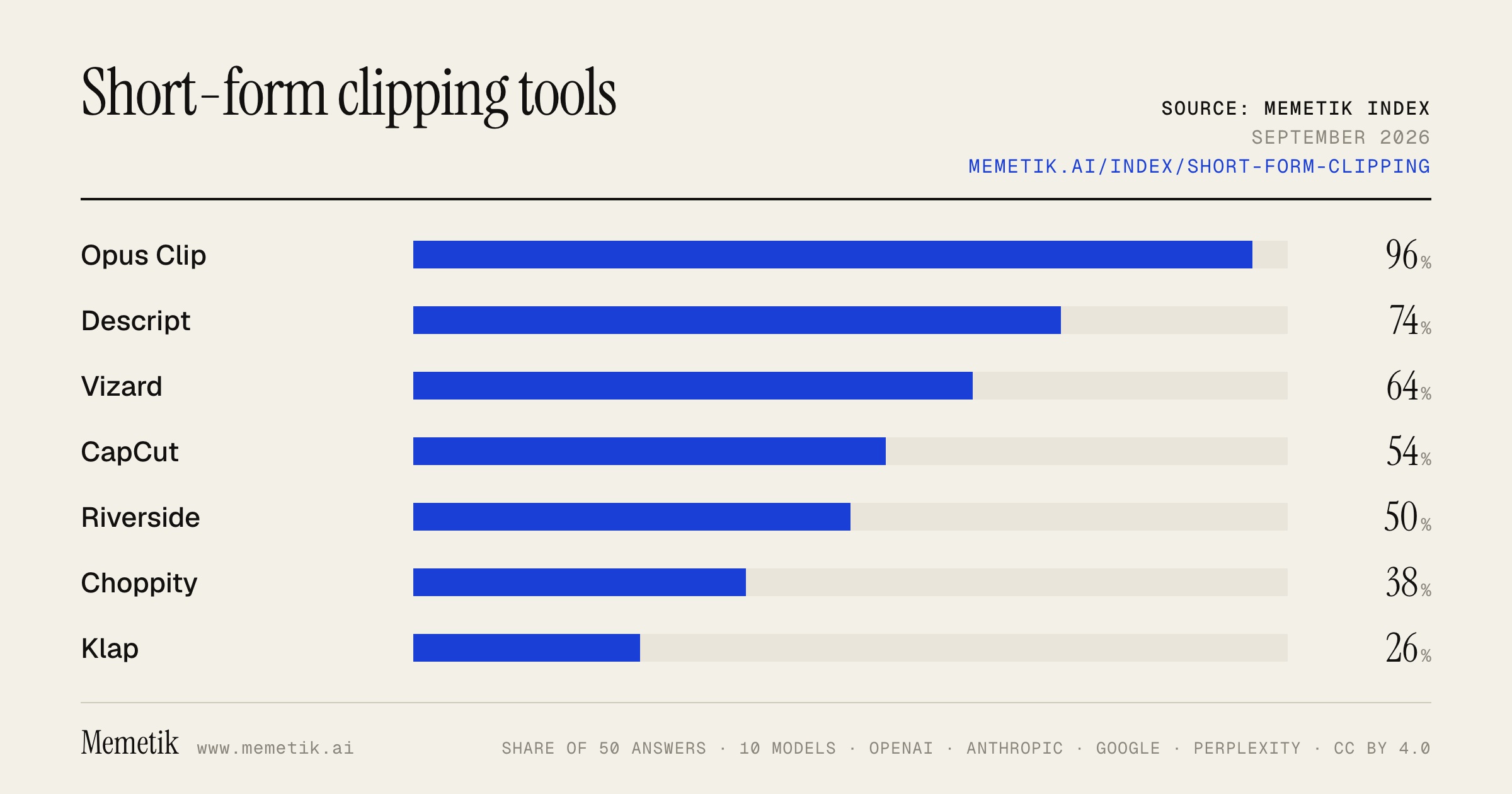
Opus Clip was named in 48 of 50 answers and came first in 36. Descript follows at 74%. 14 vendors were named at least once. First edition, so there is no prior period.
Answer share
5 prompts × 10 models · 50 answers
By provider
10 models · 50 answers
OpenAI 3 models · 15 answers
- GPT-5.6 Solgpt-5.6-solmost named: Opus Clip 100%
- GPT-5.6 Terragpt-5.6-terramost named: Opus Clip 100%
- GPT-5.6 Lunagpt-5.6-lunamost named: Opus Clip 100%
Anthropic 3 models · 15 answers
- Claude Opus 5claude-opus-5most named: Opus Clip 100%
- Claude Sonnet 5claude-sonnet-5most named: Opus Clip 80%
- Claude Fable 5claude-fable-5most named: Opus Clip 100%
Google 2 models · 10 answers
- Gemini 3.6 Flashgemini-3.6-flashmost named: Opus Clip 100%
- Gemini 3.5 Flashgemini-3.5-flashmost named: Opus Clip 100%
Perplexity 2 models · 10 answers
- Sonar Prosonar-promost named: CapCut 100%
- Sonar Reasoning Prosonar-reasoning-promost named: Opus Clip 100%
Sources the models cited
- youtube.com117
- choppity.com95
- vizard.ai53
- capcut.com52
- ssemble.com52
- therundown.ai30
- opus.pro27
- ngram.com25
- reddit.com20
- airpost.ai15
- reap.video11
- quso.ai10
ChatGPT via API returns no citations, so it does not contribute here.
The prompts
- What is the best AI tool to turn long videos into short clips for a podcaster? Name specific products.
- Which AI tool to turn long videos into short clips would you recommend to a podcaster in 2026?
- Compare the top AI tool to turn long videos into short clips options right now.
- I'm a podcaster and I need an AI tool to turn long videos into short clips. What should I use and why?
- Best AI tool to turn long videos into short clips for TikTok and Reels?
Every answer
Raw model output, unedited
GPT-5.6 TerraWhat is the best AI tool to turn long videos into short clips for a podcaster? Name specific products.
**Best overall for most podcasters: OpusClip.** It is purpose-built to turn long podcast/interview videos into multiple vertical Shorts, Reels, and TikToks automatically. It identifies likely highlight moments, adds animated captions, reframes speakers for 9:16, lets you edit the results, and supports direct publishing/scheduling on higher plans. Its Starter plan is listed at **$15/month**, with a free tier available for testing. ([opus.pro](https://www.opus.pro/pricing?utm_source=openai))

Other strong choices, depending on your workflow:

- **Descript — best if you want editorial control.** Use it if you already edit your podcast from a transcript and want to choose/refine clips yourself. Its clip workflow focuses on finding segments from the transcript and exporting captioned clips. ([descript.com](https://www.descript.com/blog/article/best-youtube-clip-maker-tools?utm_source=openai))
- **Riverside Magic Clips — best if you record your podcast in Riverside.** It automatically finds shareable moments and creates ready-to-post short clips, so it is the lowest-friction option within an existing Riverside recording workflow. ([riverside.fm](https://riverside.fm/magic-clips?utm_source=openai))
- **OpusClip Pro — best for high-volume repurposing.** If you publish daily or handle multiple shows, its advanced plan adds broader import options, multiple aspect ratios, team features, AI B-roll, scheduling, and exports for Premiere Pro/DaVinci Resolve. ([opus.pro](https://www.opus.pro/pricing?utm_source=openai))

**My practical recommendation:**
1. Start with **OpusClip** for automated first drafts.
2. Use **Descript** when a clip needs better narrative judgment, tighter cuts, or transcript-level corrections.
3. Pick **Riverside Magic Clips** instead if Riverside is already where you record and produce.

AI is excellent at surfacing candidates, but review every final clip—especially the opening hook, caption accuracy, speaker framing, and whether the excerpt makes sense outside the full episode.
GPT-5.6 TerraWhich AI tool to turn long videos into short clips would you recommend to a podcaster in 2026?
**My default recommendation: OpusClip.** For a podcaster whose main goal is turning finished long-form video episodes into TikToks, Reels, and YouTube Shorts quickly, it is the most purpose-built choice. It identifies likely highlight moments, adds captions, reframes speakers for vertical formats, lets you use brand templates, and supports scheduling/publishing workflows. Its newer prompt-based clipping can also find a specific moment based on visual, spoken, sound, or sentiment cues—not just transcript keywords. ([opus.pro](https://www.opus.pro/business/podcaster?utm_source=openai))

**Choose a different tool if your workflow differs:**

- **Riverside** — best if you already record remote video podcasts in Riverside. Keeping recording, AI cleanup, editing, and clip creation in one workspace reduces file exports and handoffs. ([support.riverside.com](https://support.riverside.com/hc/en-us/articles/13315511579037-AI-Tools-Overview?utm_source=openai))
- **Descript** — best if you want to *editorially control* clips. Its transcript-first workflow is especially good for removing tangents, tightening wording, correcting captions, and producing polished clips rather than accepting the AI’s first picks. ([descript.com](https://www.descript.com/blog/article/descript-vs-riverside-best-remote-recording-tool?utm_source=openai))
- **OpusClip + Descript** — my pick for a serious show: use **OpusClip** to generate 10–20 candidate clips rapidly, then finish only the best few in **Descript**.

One practical warning: AI “viral moment” scoring is useful for generating a first pass, but don’t publish blindly. For interviews and nuanced shows, the most valuable clips are often the clearest insight or strongest story—not necessarily the loudest/emotional segment. Review the hook, context, speaker framing, caption accuracy, and ending before posting.

**Bottom line:**
- Want speed and volume → **OpusClip**
- Record in one platform → **Riverside**
- Want high-control podcast editing → **Descript**
- Want the strongest overall workflow → **OpusClip for selection, Descript for final polish**
GPT-5.6 TerraCompare the top AI tool to turn long videos into short clips options right now.
## Bottom line

For most creators, **OpusClip is the best overall choice** for turning podcasts, interviews, webinars, and talking-head videos into Shorts/Reels/TikToks: it has the most complete repurposing workflow—AI clip selection, captions, reframing, editing, multi-format exports, scheduling, and higher-tier B-roll/dubbing options. ([opus.pro](https://www.opus.pro/pricing?utm_source=openai))

But the right pick depends on your workflow:

| Tool | Best for | Major strengths | Watch-outs | Starting point |
|---|---|---|---|---|
| **OpusClip** | Best overall / creators & marketers | Strong automated clipping workflow; “virality” ranking; animated captions; social publishing; editor; Pro adds B-roll, dubbing, Adobe Premiere/DaVinci export, team workspace. | Credits can be less intuitive than minute-based billing; AI-selected moments still require review. | Free: 60 processing minutes/month. Starter: **$15/month** with 150 credits. ([opus.pro](https://www.opus.pro/pricing?utm_source=openai)) |
| **Vizard** | Teams, high-volume repurposing, API workflows | Full editor, 4K paid exports, scheduling, team/brand controls; API is included on paid plans; accepts videos up to 600 minutes / 10 GB / 4K. | Its pricing is minute/credit based and can become costly if you process lots of long source footage. | Free: 60 credits/month; Creator begins at 600 credits/month, listed in the iOS app at **$29.99/month**. ([vizard.ai](https://vizard.ai/pricing/?via=digitalwealthtools&utm_source=openai)) |
| **Klap** | Simple, fast, clip-volume pricing | Very focused “long video → shorts” product; dynamic captions and AI reframing; pricing is based on generated clips rather than processing minutes. | Less clearly positioned as a full post-production/team workspace than OpusClip or Vizard. | Basic: **$14/month billed annually** for 100 clips/month; Pro: $39/month billed annually for 300 clips. ([klap.app](https://klap.app/pricing?utm_source=openai)) |

## My recommendation by use case

### 1. You want the safest default: **OpusClip**
Choose this if you publish a podcast, YouTube interview, coaching content, webinars, or founder videos and want the quickest path from an uploaded episode to a batch of social-ready clips.

Why it wins:
- Good balance of automated selection and editing control.
- Its paid plans cover the rest of the workflow—not only clipping—including caption styling, resizing, social scheduling, and, on Pro, B-roll, dubbing, and NLE exports. ([opus.pro](https://www.opus.pro/pricing?utm_source=openai))
- The free plan is sufficient to test it against a real episode before paying. ([help.opus.pro](https://help.opus.pro/docs/article/plans-and-credits?utm_source=openai))

**Buy:** Starter if you are a solo creator; Pro if you need a team workspace, multiple formats, polished branding, B-roll, or editor handoff.

### 2. You run an agency or content team: **Vizard**
Choose Vizard when the clipping tool also needs to be a shared workspace with brand controls, social-account management, an API, and unusually long uploads. Its documentation says paid users get API access included, and its limits support source videos up to 600 minutes. ([docs.vizard.ai](https://docs.vizard.ai/docs/pricing?utm_source=openai))

**Buy:** Creator for one person doing serious volume; Business when multiple editors, shared projects, brand kits, and more social accounts matter. Its current plan page lists 4K exports and scheduling for paid plans. ([vizard.ai](https://vizard.ai/pricing/?via=digitalwealthtools&utm_source=openai))

### 3. You want the least complicated “make clips” tool: **Klap**
Choose Klap if your priority is simply producing many captioned vertical clips from long footage without adopting a broader content-production suite. Its current pricing is especially easy to interpret if you think in **number of finished clips** rather than minutes of uploaded footage. ([klap.app](https://klap.app/pricing?utm_source=openai))

**Buy:** Basic for a single creator; Pro if you need higher clip volume and 4K/dubbing features. Klap also offers an API, though its documented API billing is per video-input, short-generation, and export operation. ([docs.klap.app](https://docs.klap.app/pricing?utm_source=openai))

## Important caveat: don’t buy based on “viral clip” claims

No tool reliably knows which moments will perform best for *your* audience. These products are best treated as **rough-cut generators**: use AI to find 10–30 candidate moments, then manually approve the strongest few, tighten the opening 1–2 seconds, correct captions, and make sure the vertical crop follows the active speaker or demo.

### Practical selection test
Before subscribing, run the **same 45–90 minute video** through the free tiers of OpusClip and Vizard, plus Klap if its clip-based pricing appeals to you. Score each on:
1. Whether it finds genuinely compelling moments—not merely complete sentences.
2. Accuracy of captions and speaker framing.
3. How quickly you can fix the hook, crop, and captions.
4. Your actual cost per *usable* clip, rather than per generated clip.

**If you only want one answer:** start with **OpusClip**. Use **Vizard** instead if team collaboration/API/high-volume operations are central; use **Klap** if you value a simpler clip-count model.
- https://www.opus.pro/pricing?utm_source=openai
- https://vizard.ai/pricing/?via=digitalwealthtools&utm_source=openai
- https://klap.app/pricing?utm_source=openai
- https://help.opus.pro/docs/article/plans-and-credits?utm_source=openai
- https://docs.vizard.ai/docs/pricing?utm_source=openai
- https://docs.klap.app/pricing?utm_source=openai
GPT-5.6 TerraI'm a podcaster and I need an AI tool to turn long videos into short clips. What should I use and why?
**My default recommendation: OpusClip** — especially if you already record/edit your full podcast somewhere else and want to turn each episode into a batch of Shorts, Reels, and TikToks quickly.

**Why it’s a strong fit for podcasters**
- It’s built around finding the most compelling moments in long-form conversations, then automatically reframing them, adding dynamic captions, and packaging clips for social.
- It supports importing from common podcast/video sources such as YouTube, Google Drive, Zoom, Riverside, StreamYard, and more.
- It includes useful growth-workflow features beyond clipping: branded templates, AI B-roll, scheduling, and analytics.
- There’s a free tier/trial path, so you can test it on one or two completed episodes before committing. ([opus.pro](https://www.opus.pro/business/podcaster?utm_source=openai))

**Pick Riverside instead if you record remote interviews.**
If you want one tool for recording guests, editing the episode by transcript, cleaning audio, and then creating clips, Riverside is the more streamlined choice. Its Magic Clips can identify highlights, produce platform-sized clips, add customizable captions, and leverage the separate audio/video tracks it records for each speaker. ([riverside.fm](https://riverside.fm/magic-clips?utm_source=openai))

**Pick Captions if social polish matters more than speed/cost.**
Captions is appealing if you want highly produced vertical clips with stronger automated editing styles and a workflow that can create a large batch—up to 30+ clips—from one upload. It also ranks clips by an AI performance score and handles fast speaker changes/overlapping conversation, which can be useful for lively multi-host shows. Its paid plans start at $24.99/month according to its current pricing page. ([captions.ai](https://captions.ai/features/create-clips?utm_source=openai))

### Simple decision
- **Existing long episodes; need lots of clips fast:** **OpusClip**
- **You record video podcasts remotely and want an all-in-one studio:** **Riverside**
- **You want the most polished, social-native visual treatment:** **Captions**

One caveat: no AI clipper consistently picks *your* best hook without review. Have it generate 10–20 candidates, then spend 10 minutes selecting the 3–5 where the opening sentence has a clear opinion, surprise, conflict, or useful takeaway.
GPT-5.6 TerraBest AI tool to turn long videos into short clips for TikTok and Reels?
**Best overall: OpusClip.** It’s the strongest default choice for turning podcasts, interviews, webinars, and YouTube videos into TikToks/Reels: automatic highlight selection, “virality” scoring, animated captions, speaker tracking/reframing, brand templates, and direct social publishing. Its paid plans start around **$15/month**, with a more capable Pro tier around **$29/month**. ([opus.pro](https://www.opus.pro/pricing?utm_source=openai))

**Pick based on your workflow:**

- **OpusClip — best overall / most polished.** Best if you want lots of usable clips with minimal editing.
- **Klap — best simple, fast alternative.** Very easy for talking-head videos; generates multiple vertical clips, captions, and a virality score. It offers one free video with no watermark, then plans start around **$14/month billed annually**. ([klap.app](https://klap.app/tools/ai-clip-generator?utm_source=openai))
- **Captions — best if you want to heavily polish clips after AI finds them.** Stronger creative editing layer: AI edits, custom B-roll/music, AI-generated assets, and a chat-style editor. Its Max plan is listed at **$24.99/month**. ([captions.ai](https://captions.ai/pricing?utm_source=openai))
- **Vizard — best budget-friendly option for teams/content repurposing.** Good for generating a high volume of clips and then adjusting crops, subtitles, and aspect ratios. ([vizard.ai](https://vizard.ai/tools/ai-clips-generator?utm_source=openai))

**My practical recommendation:**
Start with **OpusClip** if quality and time saved matter most. Try **Klap** first instead if you want a no-friction free test and your videos are mostly podcasts, interviews, or educational talking-head content.

One warning: none of these reliably produces publish-ready clips *every time*. Let the AI generate 10–20 options, then manually tighten the first 1–2 seconds, correct captions, and choose the strongest hook before posting.
Claude Sonnet 5What is the best AI tool to turn long videos into short clips for a podcaster? Name specific products.
Based on current comparisons, there isn't a single universal "best" — it depends on your priorities (speed, editing control, or full workflow), but a few tools consistently come out on top for podcasters:

**1. Opus Clip**
The most widely recommended tool specifically for high-volume short-form repurposing. It's frequently paired with other tools in a podcast stack —
for most podcast teams, the best AI stack is Riverside for capture, Descript for editing, and Opus Clip for short-form repurposing, since Opus Clip helps repurpose long episodes into short clips
. It's also positioned as the best choice when your focus is fast, high-volume output rather than a full end-to-end workflow.

**2. Vizard**
A top competitor to Opus Clip, especially if you want an all-in-one pipeline.
For pure long-form repurposing, Vizard and OpusClip are the top choices — Vizard is stronger if you want a full workflow from clipping through publishing, while OpusClip is better if your focus is fast, high-volume Shorts output.
 It's also noted as a strong tool if your source material starts as podcasts, webinars, or interviews.

**3. Descript**
Best if you prefer editing via transcript rather than a traditional timeline.
Descript approaches long video slicing through text — by transcribing your podcast and letting you edit the transcript directly, it becomes easy to identify standout moments and convert them into clips.

Descript works best for teams that already rely on transcripts and want fine-grained control.


**4. Vidyo.ai**
Built specifically with podcasters in mind.
Vidyo.ai focuses on converting long-form videos into short clips through automated analysis and cutting, targeting podcasters and interview-style content creators who need to repurpose existing content for social platforms.


**5. CapCut**
The best free/low-cost option.
CapCut remains the strongest general free option for creators, though Vizard is also a very strong way to test a serious clipping workflow before upgrading, especially if content starts as podcasts, webinars, or interviews.
 One podcast-focused reviewer noted:
"If you're a podcaster or content team regularly turning long recordings into short clips, CapCut is hard to beat... The platform feels purpose-built for repurposing podcasts into TikTok, Reels, and Shorts."


**My recommendation:**
- If you want **speed and volume** (many clips fast, minimal tweaking) → **Opus Clip**
- If you want **one tool to do clipping AND publishing** → **Vizard**
- If you're picky about editing and like working from a **transcript** → **Descript**
- If you want **free** → **CapCut**

Many podcasters actually combine tools — e.g., recording in Riverside, editing the full episode in Descript, then running it through Opus Clip or Vizard for the short clips.
Claude Sonnet 5Which AI tool to turn long videos into short clips would you recommend to a podcaster in 2026?
Based on current comparisons, a few tools stand out for podcasters in 2026, depending on your specific needs:

**Opus Clip** remains one of the most popular go-to options.
Opus Clip, Vidyo.ai, Munch and Descript's Clip feature are the four AI video clipping tools worth your money in 2026, each turning a webinar, podcast or LinkedIn Live into 8 to 15 short clips in under 20 minutes.
 It's a solid all-around choice if you want a fast, no-frills pipeline from long recording to social-ready clips.

**Munch** is worth a specific look if you run an interview-style or multi-host show.
Munch is the one recommended to podcasters specifically because it handles multi-camera and multi-speaker footage better than most, correctly identifying who's talking and keeping them framed. It sits around $49 a month for the mid-tier plan, which is more than the others, but if you're working with interview or two-host content it earns the extra cost.


**Descript** is the best pick if you already edit and transcribe in the same tool.
Descript's clip feature is different because it's built inside a full editor you're probably already using to transcribe and edit the long-form version.
 It's also called out elsewhere as a top choice specifically for podcast repurposing workflows.

**Vidyo.ai** is another strong option built with podcasters in mind —
it focuses on converting long-form videos into short clips through automated analysis and cutting, and targets podcasters and interview-style creators who need to repurpose existing content for social platforms.


A couple of practical notes worth factoring in:

- Don't expect magic curation.
None of them pick the right clips on their own though, and the tool matters far less than whether your source recording contained anything worth clipping in the first place.
 You'll still spend time reviewing and rejecting AI suggestions.
- Workflow speed gains are real. One reviewer noted that
a 45-minute podcast episode used to take two and a half hours to turn into five decent clips manually, but after switching to AI clipping tools, the time dropped to about 40 minutes for the same output, with most of that time spent reviewing rather than cutting.


**My recommendation:** If you're a solo podcaster wanting the simplest all-in-one pipeline, start with **Opus Clip**. If you co-host or interview guests regularly (multi-speaker footage), **Munch** is worth the extra cost. If you already live inside a transcript-based editor for your full episodes, just use **Descript's** built-in clip feature so you're not juggling multiple tools.
Claude Sonnet 5Compare the top AI tool to turn long videos into short clips options right now.
Let me continue researching to give you a more complete comparison.
Based on the research gathered so far, here's a comparison of the top AI tools for turning long videos into short clips right now:

## Top AI Video-to-Clips Tools Compared

**CapCut**
Widely cited as a leading all-in-one option.
For creators seeking fast results, an AI video tool like CapCut can instantly convert long videos into multiple shorts, with AI that automatically detects key moments, trims segments, adds captions, and formats clips for TikTok, Reels, or YouTube Shorts.
 One comparison guide goes further, arguing
the best AI tool to turn long videos into shorts is CapCut because it automates highlight detection, subtitles, formatting, and publishing in one workflow, delivering the most complete balance of speed, accuracy, and usability for creators scaling short-form content.


**Descript**
Best suited for podcast-style, text-based editing.
Descript is particularly useful for podcast editing, letting users highlight text to create clips instead of scrubbing timelines — efficient, though slightly less automated than a full AI long video editor like CapCut.
 A separate marketer-focused guide also ranks Descript as a top pick specifically for long-form repurposing.

**Pictory**
Good for simple, fast clip generation from lecture/talk-style content.
Pictory focuses on automatically generating clips from long videos with minimal input and worked well for turning long lectures into short clips, though it showed less precision than CapCut when handling complex narratives.


**VEED.io**
A more full-featured editing suite bundled with AI clipping.
VEED.io is a collaborative platform that combines AI clipping with professional editing tools, but it's powerful yet slightly heavier — for solo creators, it may feel more complex than necessary.


**Kapwing**
Notable for its prompt-based, conversational clip creation.
Kapwing uses prompts to generate clips from long videos and feels intuitive and creative — describing what you want instead of manually searching clips — though results vary depending on input quality.


**Choppity**
A newer, more budget/free-tier-friendly option.
It uses AI to automatically identify highlights, add animated captions, and optimize content for each social platform
, and
offers smart clip detection, animated captions, and broadcast-grade exports on paid plans, with auto-reframe to 9:16 and trending captions optimized for platforms like TikTok.


### Quick takeaways on how to choose
- **Best all-around/most automated:** CapCut — strongest balance of highlight detection, captioning, multi-platform formatting, and publishing in a single flow.
- **Best for podcasters/talking-head long-form:** Descript — its text-based editing model makes it fast for interview- or podcast-style content.
- **Best for simple lecture/webinar clipping:** Pictory — quick and easy, though less precise on complex, multi-topic content.
- **Best for teams needing a full editing suite:** VEED.io — more powerful but heavier, better for collaborative workflows than solo quick-turnaround work.
- **Best for prompt-driven, creative control:** Kapwing — good if you want to describe the clip you want rather than let AI fully auto-select.
- **Best low-cost/free entry point:** Choppity — good for casual creators wanting free watermark-optional exports.

Worth noting: much of the current "top tool" content circulating right now comes from vendor-published comparison articles (e.g., CapCut's own blog), so it's smart to also check independent user reviews (G2, Reddit r/NoCodeSaaS or r/ContentCreators) before committing, since some rankings may be self-promotional. If you tell me your specific use case — podcast repurposing, YouTube-to-Shorts, budget, or team size — I can help you narrow down the single best fit.
Claude Sonnet 5I'm a podcaster and I need an AI tool to turn long videos into short clips. What should I use and why?
Here's a breakdown of the best options for turning long podcasts into short clips, based on current tools and workflows:

## Top Picks by Use Case

**Opus Clip** — This is one of the most commonly recommended dedicated repurposing tools. It's frequently paired with other tools in a "podcast stack":
for most podcast teams, the best AI stack is Riverside for capture, Descript for editing, and Opus Clip for short-form repurposing.
 If you just need clipping (not full editing), it's a strong standalone choice.

**Descript** — Best if you want to edit by editing text, not a timeline.
Descript approaches long video slicing through text — by transcribing your podcast and letting you edit the transcript directly, you can identify standout moments and convert them into clips.
 It's ideal if
you already rely on transcripts and want fine-grained control
 over the final cut, not just automated highlight detection.

**CapCut** — A strong all-in-one option, especially if you also want to do the final polish (captions, formatting, effects) in the same app.
It automatically detects highlights, generates captions, formats vertical videos, and even prepares titles for publishing, and supports large uploads up to 3 hours and 10GB, making it ideal for podcasts, webinars, and livestreams.
 It's mobile-friendly too, since
it provides mobile-first video editing with AI features for automatic cutting, effects, and caption generation, targeting creators who primarily edit on mobile devices and need quick turnaround times.


**Vidyo.ai** — Purpose-built with podcasters in mind.
It focuses on converting long-form videos into short clips through automated analysis and cutting, targeting podcasters and interview-style content creators who need to repurpose existing content for social platforms.


**Choppity** — Newer, more customizable option. It stands out for letting you
tell it what moments to find before it runs, with fast processing (60-minute videos analyzed in minutes), animated captions, face tracking, and multi-platform export.


**Repurpose.io** — Different focus: not clipping itself, but distribution.
It focuses on automating content distribution across multiple social media platforms rather than video editing itself — handling reformatting and scheduling content for various channels after editing is complete.
 Good as an add-on to whichever clipping tool you choose.

## My Recommendation for a Podcaster

Given that you're specifically a podcaster (long-form audio/video → shorts), here's the logic:

1. **If you want speed with minimal manual work:** Start with **Opus Clip** or **Vidyo.ai** — they're built to auto-detect the best moments and spit out ready-to-post vertical clips.
2. **If you want more creative control** (rewriting hooks, tightening pacing precisely): Go with **Descript**, since editing the transcript is often faster and more intuitive than scrubbing a timeline, especially for talk-heavy podcast content.
3. **If you want one app that also handles final captions/branding/polish:** **CapCut** is a solid all-in-one, since
if you're a podcaster regularly turning long recordings into short clips, it reduces editing time dramatically while keeping output consistent and polished
, combined with its broader editing suite.

**Practical tip:** Rather than trust marketing claims,
run the same source clip through each shortlisted tool and compare the finished export, since the tool that looks best in a demo may not be the tool that handles your actual footage, brand, language, or publishing cadence.


**Bottom line:** For a podcaster specifically, I'd start with **Opus Clip or Vidyo.ai** for the actual clip-finding/generation (they're purpose-built for this), and pair it with **Descript** if you also need to clean up audio/video in the full-length episode. Add **Repurpose.io** later if scheduling/distribution across platforms becomes the bottleneck.

Want me to help you figure out pricing tiers or test a specific episode's transcript to see what kind of clips one of these tools would pull?
Claude Sonnet 5Best AI tool to turn long videos into short clips for TikTok and Reels?
There isn't one single "best" tool for everyone—it depends on your budget and workflow—but a few names consistently come out on top for turning long videos (podcasts, webinars, YouTube videos) into short vertical clips for TikTok, Reels, and Shorts:

**Top picks:**

- **Opus Clip** –
Opus Clip is considered the best option if you want fully hands-off virality scoring without needing deep editing or analytics.
 It's also highlighted elsewhere as
best for repurposing long content into Shorts, Reels, and TikTok, with auto-detect for shareable moments, a viral hook score, and AI captions & formatting.


- **Choppity** – One in-depth comparison ranked it as
the best AI video editor in 2026 for turning long videos into shorts
, noting
it's the only tool tested that covers AI clip detection with custom criteria, transcript-native editing, multi-speaker face tracking, native multi-platform posting, scheduling, and cross-platform analytics without switching tools.
 It also lets you
set custom AI criteria to tell it what moments to find before it runs, with fast processing (60-minute videos analyzed in minutes), animated captions, face tracking, and multi-platform export.


- **CapCut** – Great if you want something free and beginner-friendly.
CapCut is considered the best AI video tool for beginners because it combines automatic clipping, highlight detection, captions, and export in one simple interface, letting users turn long videos into multiple shorts without editing experience.


- **Kapwing** – Best if you want a solid free tier.
Kapwing offers the strongest free tier for AI-assisted clipping, though exports are watermarked.


- **Reap** – Positions itself as a complete repurposing suite:
it functions as a complete AI video editor and repurposing platform, automatically generating subtitles, supporting branded templates, offering AI voice dubbing and transcript-based editing to remove filler words, and reframing for different aspect ratios, with multi-language captions and built-in scheduling.


- **Vmaker AI** – Good if you want prompt-based clip selection:
you enter a prompt or keywords, and Vmaker AI identifies and extracts the best moments as shorts for YouTube, Instagram, and TikTok
, and it
scores every moment for hook strength and pacing, adds animated subtitles in 75+ languages, and reframes each clip to 9:16, 1:1, or 16:9.


- **quso.ai** – Best if you want editing + auto-publishing combined: it
turns long videos, podcasts, and streams into short, captioned clips for TikTok, Reels & Shorts — then schedules and posts them for you.


**Quick recommendation by use case:**
- Want it free & simple → **CapCut** or **Kapwing**
- Want the most "hands-off" virality scoring → **Opus Clip**
- Want deep customization + analytics + scheduling in one tool → **Choppity**
- Want auto-posting built in → **quso.ai** or **Reap**

If you tell me your budget, platform priorities (TikTok vs. Reels vs. Shorts), and whether you need scheduling/publishing built in, I can narrow this down to one specific recommendation.
- https://www.choppity.com/blog/best-ai-video-editors-content-creators/
- https://dev.to/nikhil_singh_4209f2b51ae4/the-best-ai-video-editing-tools-for-marketers-and-content-creators-2026-guide-n16
- https://www.capcut.com/resource/top-8-tools-for-turning-long-videos-to-shorts
- https://reap.video/blog/best-ai-clipping-tools-for-short-form-content-tiktok-reels-shorts
- https://www.vmaker.com/tools/long-video-to-short-video-ai
- https://quso.ai/
Gemini 3.6 FlashWhat is the best AI tool to turn long videos into short clips for a podcaster? Name specific products.
There are several top-tier AI tools built specifically for podcasters to turn long-form video episodes into short, shareable clips for TikTok, YouTube Shorts, and Instagram Reels. The best choice depends on whether you prioritize automated viral hook detection, detailed text-based editing, or all-in-one recording and clipping.

Here are the top tools available:

### 1. **Opus Clip (OpusClip)** — *Best overall for automated viral clip generation*
* **How it works:** Opus Clip uses AI to analyze long podcasts, transcribe them, and automatically extract the most compelling standalone moments. It gives each generated clip a "Virality Score" based on hook strength, relevance, and flow.
* **Key Features for Podcasters:**
  * Active speaker tracking (automatically reframes dual-speaker or group multi-cam footage into vertical 9:16 format).
  * Auto-generates captions with animated, styled subtitles.
  * B-roll and AI hook generation.
* **Best for:** Creators who want a set-it-and-forget-it tool that spits out 10+ polished social media clips in minutes.

### 2. **Descript** — *Best for granular editing & full episode production*
* **How it works:** Descript operates as a text-based video editor. You edit the video by simply editing the transcript (deleting words removes them from the video timeline).
* **Key Features for Podcasters:**
  * "Find Good Clips" AI feature scans the script to suggest highlight clips.
  * Studio Sound feature cleans up audio to sound like it was recorded in a professional studio.
  * Full multi-track editing, studio recording, and eye-contact correction capabilities.
* **Best for:** Podcasters who want deep manual control over editing the clips alongside editing their full-length episode.

### 3. **Riverside.fm (Magic Clips)** — *Best all-in-one recording & clipping platform*
* **How it works:** Riverside is primarily an uncompressed local recording platform for remote podcast guests. Its built-in **Magic Clips** tool scans your newly recorded episode and extracts shorts automatically as soon as you finish recording.
* **Key Features for Podcasters:**
  * Seamless transition from recording high-definition video to exporting clips in one browser tab.
  * Dynamic speaker layout switching and customizable subtitle styling.
* **Best for:** Podcasters who record remote interviews and want to combine recording, editing, and clipping into one subscription.

### 4. **Submagic** — *Best for high-engagement captions & trend-focused edits*
* **How it works:** While it can detect clips from longer videos, Submagic specializes in turning raw footage into heavily styled, trendy vertical short-form content.
* **Key Features for Podcasters:**
  * Auto-adds viral-style dynamic captions (similar to Alex Hormozi-style captions), sound effects, B-roll overlays, and automatic zoom-ins.
  * Custom branding templates.
* **Best for:** Podcasters who want heavily styled, fast-paced clips designed specifically to hook attention on TikTok and Instagram Reels.

### 5. **Vizard.ai** — *Best for interview-style & business podcasts*
* **How it works:** Similar to Opus Clip, Vizard specializes in repurposing long-form webinars, interviews, and podcasts into short video snippets using text-based search.
* **Key Features for Podcasters:**
  * Smart speaker reframing and automated transcript-based trimming.
  * Allows you to ask the AI assistant specific prompts (e.g., "Find the part where we discuss marketing strategies") to pull exact clips.
* **Best for:** Interview podcasters and corporate or educational podcasters needing precise clip extraction based on specific topics.

---

### **Summary Recommendation**
* Choose **Opus Clip** if you just want to paste a YouTube link or file and get instant viral clips with zero hassle.
* Choose **Riverside** if you are starting from scratch and need a platform to both record guests and make clips.
* Choose **Descript** if you want to perform detailed edits and fine-tune every word of your podcast.
Gemini 3.6 FlashWhich AI tool to turn long videos into short clips would you recommend to a podcaster in 2026?
The ideal AI tool to transform long podcast videos into short-form clips depends on your specific workflow, but several top recommendations stand out:

---

### **1. Top Overall Pick for Automation: OpusClip (Opus Pro)**
If you want a **hands-off, fully automated workflow**, **OpusClip** remains the industry standard.
* **Why it’s great for podcasters:** It uses AI (multimodal analysis) to evaluate your video's audio, video, and transcript to find high-engagement hooks. It automatically reframes wide podcast shots to vertical (9:16), adds dynamic animated captions, and provides a "virality score" for each clip.
* **Best for:** Solopreneurs and creators who want to paste a YouTube link or upload an MP4 file and immediately get 10–15 social-ready Shorts, Reels, or TikToks with minimal effort.

---

### **2. Best for Full-Production & Native Creators: Riverside.fm (Magic Clips)**
If you are **already recording remote podcasts**, **Riverside** is the best end-to-end platform.
* **Why it’s great for podcasters:** Instead of downloading raw local tracks and uploading them into a separate clipping tool, Riverside's built-in **Magic Clips** generates short vertical highlights straight from your high-definition multi-track recording.
* **Best for:** Creators looking for a single subscription that handles 4K recording, text-based editing, audio enhancement, and clip generation all in one place.

---

### **3. Best for Editorial Control & Precise Storytelling: Descript**
If you want **granular control over the story** rather than relying solely on AI algorithms, **Descript** is unmatched.
* **Why it’s great for podcasters:** Descript edits video by editing text (like a Google Doc). Its AI features automatically suggest clips, remove filler words ("ums" and "ahs"), and auto-frame active speakers. You can tweak captions, fix misspoken words with AI voice cloning, and fine-tune pacing easily.
* **Best for:** Podcasters who care deeply about narrative context, brand alignment, and detailed video editing.

---

### **4. Best Alternatives for Niche Workflows**
* **Vizard.ai / Chop AI:** Excellent for conversational interview podcasts. They offer clean transcript-led editors that let you quickly select sections by text or let AI pick moments based on natural conversational flow.
* **Submagic:** Ideal if your focus is heavily on **aesthetic, viral captions**, custom emojis, and fast-paced hook-editing popular on TikTok.
* **Klap:** Highly competitive with OpusClip, offering quick YouTube-to-Shorts conversion with active speaker tracking and customizable branding templates.

---

### **Summary Recommendation**
* **Choose OpusClip** if you want the fastest, highest-quality automated "link-to-clips" conversion.
* **Choose Riverside** if you want an all-in-one suite to record high-quality studio audio/video and clip it natively.
* **Choose Descript** if you want to carefully edit the narrative context of your shorts using text-based editing.
Gemini 3.6 FlashCompare the top AI tool to turn long videos into short clips options right now.
Here is a comparison of the top AI tools currently leading the market for converting long-form videos (podcasts, webinars, YouTube videos) into short, viral clips (Reels, TikToks, Shorts).

---

### 1. **Opus Clip (Opus Pro)** — *Best Overall / Most Popular*
Opus Clip remains the industry benchmark for AI auto-clipping due to its accuracy in identifying hook-worthy moments and generating engaging visual layouts.

* **How it works:** It analyzes long videos, extracts key highlights, assigns a **Virality Score**, automatically reframes the video to 9:16, tracks active speakers, and adds animated captions with emojis.
* **Key Strengths:**
  * Highest visual quality and cleanest caption animations.
  * Excellent active speaker tracking (great for multi-person podcasts).
  * Feature to prompt the AI (e.g., *"Find all moments where they discuss AI technology"*).
  * Custom branding, B-roll insertion, and auto-hook generation.
* **Best For:** YouTubers, podcasters, and content creators looking for high-engagement social clips with minimal manual editing.

---

### 2. **Munch (GetMunch)** — *Best for Content Marketers & Data-Driven Creators*
Munch combines AI clipping with real-time marketing data. It doesn't just look at video content—it cross-references your clip themes with current search trends on TikTok, Instagram, and YouTube.

* **How it works:** Extracts key clips while providing social media trend insights, pre-written post captions, and relevant hashtags tailored to each platform.
* **Key Strengths:**
  * Built-in trend analysis to maximize organic reach.
  * Generates platform-specific copy, descriptions, and hashtags for TikTok, IG, and LinkedIn.
  * In-depth keyword research integrated into the editing flow.
* **Best For:** Digital marketers, agencies, and brands aiming to align content with trending search queries.

---

### 3. **Klap** — *Best for Speed and Simplicity*
Klap is built for fast turnarounds, allowing users to drop a YouTube link and get fully edited shorts in minutes.

* **How it works:** Uses OpenAI technology to extract the most interesting topics, reframe face-focused clips, and auto-generate captions.
* **Key Strengths:**
  * Ultra-fast processing time.
  * Super simple, clean user interface.
  * Highly reliable face-detection and dynamic cropping.
* **Best For:** Creators who prioritize speed, ease of use, and quick social media posting.

---

### 4. **Vidyo.ai** — *Best for Podcasts & Multi-Speaker Content*
Vidyo.ai excels at handling long-form podcasts, multi-speaker interviews, and educational video talks.

* **How it works:** Imports long videos via URL or file upload, breaks them down into chaptered segments, and applies customizable templates with captions and split-screens.
* **Key Strengths:**
  * Flexible layout options (e.g., side-by-side multi-speaker split screens).
  * Auto-chapters and full video transcription editing.
  * Good balance between automated AI selection and manual timeline control.
* **Best For:** Podcasters, talk-show hosts, and educators with complex multi-person layouts.

---

### 5. **Vizard.ai** — *Best for Webinars, Meetings, & Enterprise*
Vizard is tailored toward business videos, webinars, Zoom recordings, and corporate communications.

* **How it works:** Transcribes the entire video and allows you to create clips simply by highlighting the text transcript, alongside automated AI-suggested clips.
* **Key Strengths:**
  * Text-based video editing (edit or clip video like a Word doc).
  * Custom brand kits (logos, fonts, colors, custom CTA end cards).
  * Integration with Zoom and video conferencing tools.
* **Best For:** Businesses, marketing teams, corporate presenters, and webinar hosts.

---

### Quick Comparison Matrix

| Feature | **Opus Clip** | **Munch** | **Klap** | **Vidyo.ai** | **Vizard** |
| :--- | :--- | :--- | :--- | :--- | :--- |
| **Primary Strength** | Virality AI & Captions | Trend & Marketing Data | Speed & Ease | Multi-speaker Layouts | Text-based editing / Enterprise |
| **Speaker Tracking** | Excellent | Good | Very Good | Excellent | Good |
| **Trend Analytics** | Basic | Advanced | None | Basic | None |
| **Editing Control** | High | Moderate | Moderate | High | Very High |
| **Free Plan Available?**| Yes (limited credits) | No (paid/trial only) | Free trial available | Yes (limited credits) | Yes (limited credits) |

---

### Summary Recommendation

* **Choose Opus Clip** if you want the highest quality hooks, trendy captions, and best overall AI selection for YouTube or podcasts.
* **Choose Munch** if you are a marketing professional who wants data-driven topic suggestions and instant social media copy.
* **Choose Vidyo.ai** if you host multi-person podcasts and need side-by-side or multi-camera layout templates.
* **Choose Vizard** if you are turning Zoom calls, webinars, or long presentations into branded company videos.
Gemini 3.6 FlashI'm a podcaster and I need an AI tool to turn long videos into short clips. What should I use and why?
To turn long podcast videos into short clips for YouTube Shorts, TikTok, and Instagram Reels, the best tool depends on your specific workflow, degree of control, and setup.

The top options, tailored to different podcaster needs:

---

### 1. **Opus Clip (Opus Pro)** — *Best Overall for Speed & "Set-it-and-Forget-it"*
If you want to paste a YouTube link or upload a file and instantly get 10–15 fully edited, vertical clips, **Opus Clip** is the industry standard.
* **Why use it:**
  * **AI Virality Score:** It analyzes your video, finds the hook, and ranks clips by predicted viral potential.
  * **Auto-Speaker Tracking:** It uses face detection to dynamically reframe 16:9 widescreen video to 9:16 vertical, automatically keeping the active speaker in the frame.
  * **Animated Captions & B-Roll:** Automatically generates kinetic, colored captions and adds relevant background overlays.
* **Best for:** Podcasters who want to generate content in volume with minimal effort.

---

### 2. **Descript** — *Best for Precision Control & Deep Editing*
Unlike purely automatic clip generators, **Descript** treats video like a Word document—deleting a word in the text transcript cuts that audio/video frame.
* **Why use it:**
  * **Complete Creative Control:** You can manually select exact highlights, generate social clips, edit text, and fix audio simultaneously.
  * **Studio Sound & AI Voice Removal:** Outstanding audio cleanup that removes background noise, filler words ("ums" and "ahs"), and long pauses.
  * **Multi-cam support:** Great for multi-camera video podcasts where you want manual precision over video cuts.
* **Best for:** Podcasters who want high-quality editing control and already use text-based editing for their main episode.

---

### 3. **Riverside** — *Best All-in-One (If you record remotely)*
If you use **Riverside** to record your podcast interviews over the browser, you don't even need a separate clipping tool.
* **Why use it:**
  * **Built-in "Magic Clips":** After recording an episode, Riverside's AI automatically generates vertical clips from your high-quality local recordings.
  * **Streamlined Workflow:** Eliminates downloading 4K footage and re-uploading it to a third-party app.
  * **4K Local Video Quality:** Uses locally recorded video, giving you higher resolution clips than downloading from YouTube.
* **Best for:** Creators who record guests remotely and want recording, transcription, and clipping under one roof.

---

### 4. **Munch (GetMunch)** — *Best for Keyword & SEO-Driven Content*
Munch focuses heavily on marketing analytics and trends, extracting content based on current trending topics and search intent.
* **Why use it:**
  * **Contextual AI:** It matches clip content against social media trends and search data to identify key topics.
  * **Auto-Social Posts:** Automatically writes titles, hashtags, and social captions optimized for TikTok, Instagram, and LinkedIn.
* **Best for:** Business, educational, or niche-topic podcasters who rely on keyword search and SEO.

---

### Summary Recommendation

* Pick **Opus Clip** if you just want fast, highly engaging, automated vertical clips with zero setup.
* Pick **Descript** if you want to edit your video via transcript and need full control over every frame and word.
* Pick **Riverside** if you record remote guest interviews and want an end-to-end studio tool.
Gemini 3.6 FlashBest AI tool to turn long videos into short clips for TikTok and Reels?
There are several AI tools designed to turn long-form videos (like podcasts, YouTube videos, webinars, and interviews) into short clips for TikTok, Instagram Reels, and YouTube Shorts.

### 1. **Opus Clip** (Best Overall)
* **Best for:** Creators who want the highest accuracy in finding viral-worthy hooks automatically.
* **Key Features:**
  * Analyzes long videos and assigns each clip a "Virality Score" (0–100) based on topic structure and hooks.
  * Reframes vertical 9:16 video automatically, keeping speakers in frame.
  * Auto-generates captions with highlighted keywords and emojis.
  * Auto-inserts B-roll to keep talking-head footage visually engaging.
* **Pricing:** Free tier available (with watermarks/limited credits); paid plans start around $15–$29/month.

---

### 2. **GetMunch (Munch)** (Best for Trend & Keyword Analysis)
* **Best for:** Social media marketers focused on search intent and trend alignment.
* **Key Features:**
  * Compares video topics with current social search trends on TikTok and Instagram.
  * Automatically generates platform-specific titles, captions, and hashtags optimized for reach.
  * Smart auto-crop that keeps speaker focus centered.
* **Pricing:** Paid plans typically start around $49/month.

---

### 3. **Submagic** (Best for Visual Effects & Subtitles)
* **Best for:** Creators aiming for trendy, MrBeast/Alex Hormozi-style animated captions and visual pop.
* **Key Features:**
  * Extremely stylish captions with dynamic animations, emojis, and sound effects.
  * Adds AI B-roll, zooms, and auto-hooks to boost viewer retention.
  * Easy manual trim and crop adjustments.
* **Pricing:** Paid plans start around $16–$20/month.

---

### 4. **Vizard.ai** (Best Budget/Ease of Use)
* **Best for:** Beginners and small businesses needing a clean, straightforward workflow.
* **Key Features:**
  * Paste a YouTube link to generate 10+ clips in minutes.
  * Text-based video editor (cut video by deleting transcript text).
  * Good templates, captions, and custom branding elements.
* **Pricing:** Generous free tier; Pro plans starting around $10–$16/month.

---

### 5. **Descript** (Best for Full Editing Control)
* **Best for:** Creators who want full control to edit long videos *and* repurpose clips in one platform.
* **Key Features:**
  * Text-based editing (delete video filler words like "um" or "ah" simply by deleting text).
  * AI "Find Good Clips" feature extracts stand-alone moments.
  * Studio Sound AI feature removes background noise instantly.
* **Pricing:** Free plan available; Creator plans start at $12/month.

---

### 6. **Riverside.fm / CapCut** (Best Free or Built-In Alternatives)
* **CapCut AI Clipping:** Free/low-cost built-in AI tools for converting long videos to shorts with custom mobile-friendly templates.
* **Riverside (Magic Clips):** Ideal if you already record podcasts or interviews on Riverside; it automatically clips highlights right inside your recording dashboard.

---

### Recommendation Summary:
* **Go with Opus Clip** if you just want to paste a link and let AI do 90% of the work automatically.
* **Go with Submagic** if your main priority is trendy, high-retention caption animations.
* **Go with Descript** if you want to heavily edit the transcript manually while extracting clips.
Sonar ProWhat is the best AI tool to turn long videos into short clips for a podcaster? Name specific products.
For a podcaster, the strongest **all-around** picks are **Choppity**, **Vizard**, **OpusClip**, and **Descript**. If you want the simplest “upload long episode → get multiple short clips” workflow, **Choppity** and **Vizard** look especially strong; if you care most about transcript-based editing, **Descript** is a top choice; and if you want fast, viral-style clipping at scale, **OpusClip** is a leading option.[3][5][9][8]

Here’s the practical breakdown:

| Product | Best for | Why it stands out |
|---|---|---|
| **Choppity** | End-to-end repurposing of podcasts into shorts | Ranked #1 in one hands-on comparison; emphasizes AI clip detection, transcript-native editing, face tracking, scheduling, and analytics.[3] |
| **Vizard** | Consistent clip production for podcasts/interviews | Described as the strongest overall choice for turning webinars, interviews, and podcasts into a steady stream of social posts.[9] |
| **OpusClip** | High-volume short clip generation | Its AI picks highlight moments, adds dynamic captions, and reformats for short vertical video.[8][12] |
| **Descript** | Transcript-first podcast editing | Recommended for podcasters who think in transcripts and want to edit video by editing text.[9] |
| **CapCut** | Free/low-cost clipping workflow | Highlighted as a very complete free tool with highlight detection, subtitles, reframing, and publishing.[7][10][15] |
| **quso.ai** | Auto-turning podcasts into publish-ready clips | Says it can take podcasts or streams and repurpose them into a week of short clips with captions and resizing.[6][14] |

If you want just one recommendation: **Choppity** is the best fit for a podcaster who wants the most complete clip-making workflow in one place, while **Vizard** is the safest “overall repurposing” alternative and **OpusClip** is the best if your main goal is to generate lots of short clips quickly.[3][9][8]

For a free option, **CapCut** is the most compelling low-friction choice among the results, especially if you want automatic highlight detection and subtitles without a complex workflow.[7][15]
- https://www.vmaker.com/tools/long-video-to-short-video-ai
- https://www.reddit.com/r/NewTubers/comments/1kcv90k/ai_video_tool_to_cutup_long_videos_into_shorts/
- https://www.choppity.com/blog/best-ai-video-editors-content-creators/
- https://www.canva.com/features/long-video-to-short-video-AI/
- https://www.choppity.com/tools/free-ai-clip-maker/
- https://quso.ai/
- https://www.capcut.com/resource/top-6-free-long-video-to-short-tools
- https://www.opus.pro/
- https://vizard.ai/blog/9-best-ai-video-clipping-tools-2026
- https://www.capcut.com/resource/top-8-ai-long-video-to-shorts-platforms-for-influencer-marketing
- https://www.reddit.com/r/ContentCreators/comments/1s0qqfv/whats_the_best_tool_to_automatically_create_short/
- https://www.opus.pro/tools/long-video-to-short-video-ai
- https://www.adobe.com/express/feature/ai/video/convert/long-to-short
- https://quso.ai/blog/best-tools-for-long-to-short-video-ai
- https://www.capcut.com/tools/ai-long-video-to-short-video
- https://wayin.ai/tools/long-video-to-short-video/
- https://www.heygen.com/en-gb/tool/long-video-to-short-video
- https://www.flexclip.com/tools/ai-long-video-to-short-video/
- https://vizard.ai/tools/ai-clips-generator
Sonar ProWhich AI tool to turn long videos into short clips would you recommend to a podcaster in 2026?
For a podcaster in 2026, I’d recommend **Descript** if the priority is editing **podcast and interview clips** from transcripts, and **Vizard.ai** if the priority is a more complete **end-to-end clipping workflow** for publishing at scale.[6][10]

- **Best fit for podcasters:** Descript is explicitly called out as the best transcript-first editor for podcasts, interviews, and talking-head videos, and is described as one of the smartest tools for turning long conversations into short clips.[6][10]
- **Best all-around option:** Vizard.ai is repeatedly described as the strongest choice for podcasters, webinars, and teams that want clipping, captions, reframing, branding, collaboration, and distribution in one place.[3][6][20]
- **Best if you want the simplest fast workflow:** CapCut is recommended by several sources as a well-rounded, practical tool for turning long videos into shorts, with highlight detection, subtitles, formatting, and publishing.[5][7][9][11][12]

If I had to pick one for a typical podcaster, I’d choose **Vizard.ai** for the best balance of podcast-friendly features and scaling output, and **Descript** if you care most about transcript-based editing and precise dialogue cuts.[6][10]
- https://www.choppity.com/blog/best-ai-video-editors-content-creators/
- https://www.ssemble.com/blog/best-clipping-software-2026
- https://vizard.ai/blog/best-ai-video-clipping-tools-2026
- https://www.makeshorts.ai/blog/best-ai-shorts-generators-2026
- https://www.capcut.com/resource/top-7-long-video-to-shorts-processing-tools
- https://vizard.ai/blog/9-best-ai-video-clipping-tools-2026
- https://www.capcut.com/resource/top-8-ai-long-video-to-shorts-platforms-for-influencer-marketing
- https://vizard.ai/blog/best-ai-video-clipping-tools-in-2026
- https://www.capcut.com/resource/top-8-tools-for-turning-long-videos-to-shorts
- https://vizard.ai/blog/best-ai-video-editing-tools-2026
- https://www.capcut.com/resource/top-8-most-advanced-long-video-to-short-editors
- https://www.capcut.com/resource/top-6-free-long-video-to-short-tools
- https://similarlabs.com/blog/best-ai-short-video-tools-social-media
- https://resources.rework.com/tools/ai-tools/best-ai-video-editing-tools-2026
- https://posteverywhere.ai/blog/20-best-ai-short-form-video-tools
- https://similarlabs.com/blog/best-ai-video-editing-tools-2026
- https://www.capcut.com/resource/top-5-ai-long-to-short-video-tools-for-education
- https://www.choppity.com/blog/best-ai-clip-generators/
- https://vdclip.com/ai-video-editing-tools-2026/
- https://vizard.ai/blog/best-ai-video-editor-2026
Sonar ProCompare the top AI tool to turn long videos into short clips options right now.
The **top AI tool depends on what “best” means**, but for *overall long-video-to-short-clips workflows*, the strongest single pick in the results is **Choppity** because multiple comparisons name it the winner for accuracy, caption quality, face tracking, and end-to-end workflow. For a **free or beginner-friendly** option, **CapCut** is the most consistently recommended.[3][6][8][9][11]

Here’s the practical comparison of the main options mentioned in the results:

| Tool | Best for | Strengths | Tradeoffs |
|---|---|---|---|
| **Choppity** | Best overall workflow | Strong highlight detection, advanced face tracking, high caption quality, social scheduling, and multi-format exports | Pricing is not as universally emphasized as CapCut’s free entry point[3][9][12] |
| **Opus Clip** | Fast automated clipping | Good for generating many clips quickly, with hook/virality-style detection and strong long-to-short automation | More focused on clip discovery than full editing workflow[7][14][16] |
| **CapCut** | Best free/beginner option | Free entry point, automatic clipping, captions, formatting, and publishing in one interface | More “all-around” than specialized; some comparisons rate its AI detection behind Choppity[6][8][11][19] |
| **Vizard** | Webinars/interviews | Good browser-based clipping and repurposing | Not as consistently rated as the top overall choice[3][5] |
| **Klap** | Polished branded clips | Good for branded, high-quality shorts | Less emphasis on full workflow features[3][5] |
| **Descript** | Transcript-first editing | Strong if you want to edit by text before clipping | Less automatic for pure highlight discovery[3][7] |
| **Submagic** | Caption polish | Strong captions and styling on already-trimmed clips | Weaker at finding the clips in the first place[3][10] |

If you want a simple recommendation:

- **Best overall:** **Choppity**[3][9][12]
- **Best free option:** **CapCut**[6][11][19]
- **Best for bulk clip generation:** **Opus Clip**[7][14][16]
- **Best for webinar/podcast repurposing:** **Vizard** or **Flowjin/Subclip-style workflow tools**[5][10]

The main pattern across the results is that the market splits into three categories: **clip-only tools** like Opus Clip and Vizard, **editing-first tools** like Descript and CapCut, and **full-workflow platforms** like Choppity.[3] If you want the most automated “upload long video → get ready-to-post shorts” experience, **Choppity** is the clearest top pick in these sources.[3][9][12]
- https://www.vmaker.com/tools/long-video-to-short-video-ai
- https://www.reddit.com/r/NewTubers/comments/1kcv90k/ai_video_tool_to_cutup_long_videos_into_shorts/
- https://www.choppity.com/blog/best-ai-video-editors-content-creators/
- https://www.canva.com/features/long-video-to-short-video-AI/
- https://www.vidio.ai/blog/article/ai-tools-repurpose-long-videos-short-clips
- https://www.capcut.com/resource/top-6-free-long-video-to-short-tools
- https://deliberatedirections.com/tools-turn-long-videos-into-shorts/
- https://www.capcut.com/resource/top-8-ai-long-video-to-shorts-platforms-for-influencer-marketing
- https://www.choppity.com/blog/best-ai-clip-generators/
- https://www.subclip.app/blogs/top-10-ai-tools-converting-long-to-short-form-videos
- https://www.capcut.com/resource/top-8-tools-for-turning-long-videos-to-shorts
- https://www.choppity.com/tools/free-ai-clip-maker/
- https://www.reddit.com/r/ContentCreators/comments/1s0qqfv/whats_the_best_tool_to_automatically_create_short/
- https://www.opus.pro/
- https://www.adobe.com/express/feature/ai/video/convert/long-to-short
- https://www.opus.pro/tools/long-video-to-short-video-ai
- https://zapier.com/blog/best-ai-video-generator/
- https://wayin.ai/tools/long-video-to-short-video/
- https://www.capcut.com/tools/ai-long-video-to-short-video
Sonar ProI'm a podcaster and I need an AI tool to turn long videos into short clips. What should I use and why?
For a podcaster, **Descript** is often the best starting point if your clips are driven by the *conversation itself*, because it is built for transcript-based editing and is specifically recommended for podcasters and interview clips.[8] If your main goal is to crank out the **most polished short clips at scale**, **Vizard** or **OpusClip** are stronger choices for long-form repurposing into social-ready shorts.[8][9][12]

Here’s the practical breakdown:

- **Descript** — best if you want to edit by text, which is efficient for podcasts and interviews where you care about exact wording and removing filler.[8]
- **Vizard** — best overall for a full repurposing workflow; it is described as the strongest choice for turning webinars, interviews, and podcasts into a steady stream of clips, with clipping, editing, branding, and publishing in one pipeline.[8][19]
- **OpusClip** — best if you want fast, high-volume output and AI-selected “viral-worthy” moments with captions and relayout.[8][9][12]
- **CapCut** — best if you want a more polished, all-in-one creator workflow with highlight detection, subtitles, formatting, and publishing.[7][10][15]
- **Choppity** — a solid alternative if you want long-form-to-shorts generation with a strong clip workflow; one comparison ranked it #1 for this use case, and it highlights 30+ clip generation for long videos or podcasts.[3][5]

If you want a simple recommendation: **use Descript if you edit podcasts like transcripts; use Vizard if you want the best all-around clipping workflow; use OpusClip if you care most about volume and speed**.[8][9][12]

If you want, I can also give you a **top 3 ranked list specifically for podcasters**, based on **price, ease of use, and clip quality**.
- https://www.vmaker.com/tools/long-video-to-short-video-ai
- https://www.reddit.com/r/NewTubers/comments/1kcv90k/ai_video_tool_to_cutup_long_videos_into_shorts/
- https://www.choppity.com/blog/best-ai-video-editors-content-creators/
- https://www.canva.com/features/long-video-to-short-video-AI/
- https://www.choppity.com/tools/free-ai-clip-maker/
- https://quso.ai/
- https://www.capcut.com/resource/top-6-free-long-video-to-short-tools
- https://vizard.ai/blog/9-best-ai-video-clipping-tools-2026
- https://www.opus.pro/
- https://www.capcut.com/resource/top-8-ai-long-video-to-shorts-platforms-for-influencer-marketing
- https://www.reddit.com/r/ContentCreators/comments/1s0qqfv/whats_the_best_tool_to_automatically_create_short/
- https://www.opus.pro/tools/long-video-to-short-video-ai
- https://www.adobe.com/express/feature/ai/video/convert/long-to-short
- https://quso.ai/blog/best-tools-for-long-to-short-video-ai
- https://www.capcut.com/tools/ai-long-video-to-short-video
- https://www.heygen.com/en-gb/tool/long-video-to-short-video
- https://wayin.ai/tools/long-video-to-short-video/
- https://www.flexclip.com/tools/ai-long-video-to-short-video/
- https://vizard.ai/tools/ai-clips-generator
Sonar ProBest AI tool to turn long videos into short clips for TikTok and Reels?
For **turning long videos into short clips**, the strongest single pick is **OpusClip**. Multiple 2026 reviews describe it as the best tool for repurposing long-form content like podcasts, webinars, YouTube videos, and live streams into TikTok/Reels/Shorts-ready clips, with automatic clipping and virality-focused features.[3][5][10][17]

If your goal is a slightly different workflow, these are the best alternatives:
- **HeyGen** if you want clipping plus avatar/presenter workflows in one subscription.[3]
- **CapCut** if you want the strongest **TikTok-native editing** experience and more hands-on control.[13]
- **Reap** if you want a tool built specifically for long-video clipping into platform-ready shorts.[9]
- **Pictory** if you want a general-purpose “long content to short shareable video” workflow.[16]

If you want the simplest recommendation: **OpusClip for repurposing existing long videos**, and **CapCut for editing and polishing TikToks after clipping**.[3][13][17]
- https://reelbase.io/blog/best-ai-video-generators-for-tiktok-reels
- https://rangy.ai/blog/best-ai-video-generator-for-social-media/
- https://www.heygen.com/blog/best-ai-video-generator-tiktok-reels
- https://blog.mage.space/article/best-ai-video-generators-reels-shorts-tiktok/1ea731fe-1705-4a65-8c0e-b8d63bb6e51e
- https://similarlabs.com/blog/best-ai-short-video-tools-social-media
- https://www.viibeo.com/blog/best-ai-video-generators-tiktok-reels-2026
- https://suno.com/hub/ai-video-generator
- https://blog.viralmaxing.com/en/best-ai-tools-reels-shorts-tiktok-2026
- https://reap.video/blog/best-ai-clipping-tools-for-short-form-content-tiktok-reels-shorts
- https://creatorflow.so/blog/best-ai-reel-generators/
- https://launchtoolsai.com/best/best-ai-short-form-video-tools-2026
- https://www.choppity.com/tools/free-ai-clip-maker/
- https://www.capcut.com/resource/top-6-ai-video-makers-for-short-form-content
- https://filmora.wondershare.com/video-editing-tools/ai-short-video-generators.html
- https://www.nemovideo.com/blog/best-ai-short-form-video-generators-2026
- https://longstories.ai/blog/top-7-ai-tools-for-tiktok-and-reels-videos
- https://posteverywhere.ai/blog/20-best-ai-short-form-video-tools
- https://www.reddit.com/r/content_marketing/comments/1g2a2c9/which_ai_video_tool_has_worked_for_your_to_make/
- https://www.reddit.com/r/generativeAI/comments/1q5u87g/best_ai_video_generation_tools_for_shortform/
- https://www.fanpagekarma.com/insights/ai-video-tools-social-media/
GPT-5.6 SolWhat is the best AI tool to turn long videos into short clips for a podcaster? Name specific products.
## Best overall: **OpusClip**

For most podcasters, **OpusClip** is the strongest dedicated tool for turning long video episodes into Shorts, Reels, and TikToks. It automatically finds promising moments, reframes speakers vertically, adds animated captions, removes pauses/filler, and can add B-roll. It also supports links and files from platforms such as YouTube, Riverside, Zoom, Google Drive, and Vimeo. A free plan is available. ([opus.pro](https://www.opus.pro/business/podcaster?utm_source=openai))

### Other strong choices

- **Riverside Magic Clips — best all-in-one podcast workflow**
  Choose this if you also need to **record remote interviews**. Riverside handles multitrack recording, transcription, editing, audio cleanup, captions, and automatic clips in one platform. Clips can be formatted for TikTok, Reels, and YouTube Shorts and exported at up to 4K. ([riverside.fm](https://riverside.fm/magic-clips?utm_source=openai))

- **Descript — best for editorial control**
  Best when you want to edit your podcast and clips by editing the transcript. It’s particularly useful for podcasters who care more about precise storytelling and wording than generating the maximum number of clips automatically.

- **Vizard — best budget/team alternative**
  Vizard automatically finds clips and provides transcript-based editing, orientation, background, and layout controls. Its newer clipping system emphasizes producing self-contained clips rather than excerpts that stop abruptly. ([vizard.ai](https://vizard.ai/blog/most-ai-clipping-tools-cut-videos-vizards-ai-clipping-model-v2-edits-them?utm_source=openai))

- **Headliner — best for audio-first podcasts**
  A good choice when episodes don’t have compelling video. It specializes in audiograms, waveform videos, captions, templates, and promotional clips built around podcast audio.

- **Munch — best for marketing-oriented repurposing**
  Useful for teams that want AI-selected clips framed around social-media topics and audience engagement, rather than primarily needing a podcast editor.

### My recommendation

- **Already have finished video episodes:** Start with **OpusClip**.
- **Need recording and clipping in one place:** Use **Riverside**.
- **Want careful transcript-based editing:** Use **Descript**.
- **Podcast is primarily audio:** Use **Headliner**.
- **Need a lower-cost OpusClip alternative:** Try **Vizard**.

Whichever you choose, review every AI-selected clip before publishing—these tools can identify strong soundbites, but they occasionally cut context or choose a sensational moment that misrepresents the conversation.
GPT-5.6 SolWhich AI tool to turn long videos into short clips would you recommend to a podcaster in 2026?
## My 2026 recommendation: **OpusClip**

For a podcaster whose main goal is turning full-length video episodes into TikToks, Reels, and YouTube Shorts, **OpusClip is the strongest dedicated choice**. It automatically finds highlights, reframes speakers, adds captions, and lets you edit and publish clips within one workflow. Its product was still receiving substantial updates in August 2026, including chat-based editing, audio improvements, and additional generation tools. ([opus.pro](https://www.opus.pro/ai-video-editor?utm_source=openai))

### Better alternatives in specific situations

- **Riverside Magic Clips — best all-in-one podcast workflow.** Choose this if you also need remote recording, full-episode editing, podcast publishing, and clips in one platform. Magic Clips produces 30–90-second highlights, while Magic Segments creates 3–10-minute excerpts. Riverside’s Pro plan was listed at **$29 monthly or $24 monthly when billed annually**, with 4K recording, no watermark, text-based editing, and Magic Clips. ([support.riverside.com](https://support.riverside.com/hc/en-us/articles/13315511579037-AI-Tools-Overview?utm_source=openai))
- **Descript — best for editorial control.** Choose it when you want to refine clips by editing the transcript like a document, rather than accepting mostly automated outputs. Be aware that its clip-generation features consume AI credits. ([help.descript.com](https://help.descript.com/hc/en-us/articles/27841674958221-Track-and-understand-your-Media-minutes-and-AI-Credits?utm_source=openai))
- **Vizard — best for high-volume teams and scheduling.** It offers AI clipping, automatic reframing, subtitles, brand templates, collaboration, and direct social publishing; its free tier is useful for testing but exports at 720p. ([vizard.ai](https://vizard.ai/pricing/?via=digitalwealthtools&utm_source=openai))

### Bottom line

- **Already recording in Riverside:** use **Riverside Magic Clips**.
- **Only need the fastest long-video-to-shorts tool:** use **OpusClip**.
- **Want to polish every sentence yourself:** use **Descript**.
- **Managing several shows or social accounts:** consider **Vizard**.

Whichever you choose, treat AI-selected moments as a first draft. Automated clippers tend to identify transcript-friendly sound bites, but a human should verify context, emotional impact, factual accuracy, and whether the opening two seconds are genuinely compelling. Podcasters report that human-selected emotional moments can outperform purely AI-selected clips. ([reddit.com](https://www.reddit.com/r/podcasting/comments/1sxe0qm/opus_clip_anyone_use_it_yet/?utm_source=openai))
- https://www.opus.pro/ai-video-editor?utm_source=openai
- https://support.riverside.com/hc/en-us/articles/13315511579037-AI-Tools-Overview?utm_source=openai
- https://help.descript.com/hc/en-us/articles/27841674958221-Track-and-understand-your-Media-minutes-and-AI-Credits?utm_source=openai
- https://vizard.ai/pricing/?via=digitalwealthtools&utm_source=openai
- https://www.reddit.com/r/podcasting/comments/1sxe0qm/opus_clip_anyone_use_it_yet/?utm_source=openai
GPT-5.6 SolCompare the top AI tool to turn long videos into short clips options right now.
## Best AI tools for turning long videos into short clips — September 2026

### Quick comparison

| Tool | Best for | Starting price* | Main strengths | Main drawbacks |
|---|---|---:|---|---|
| **OpusClip** | Best overall / hands-off automation | Free; **$15/mo** Starter | Strong highlight selection, automatic reframing, captions, virality scoring, publishing tools | More expensive per uploaded minute; AI selections still need review |
| **Vizard** | Best value for podcasts, webinars and teams | Free; **$29/mo** or about **$14.50/mo annually** | Generous upload allowance, transcript editing, collaboration, brand assets, up to 4K export | Less polished out of the box than specialized caption tools |
| **Klap** | Best for speed and high-volume clipping | Around **$14/mo annually** | Simple workflow, multilingual features, strong value at higher volumes | Annual pricing emphasized; fewer advanced editing/team features |
| **Submagic** | Best-looking captions and social polish | Base plan plus **Magic Clips add-on** | Excellent animated captions, emojis, B-roll and short-form styling | Long-video clipping costs extra; not the cheapest repurposing option |
| **Descript** | Best for editing the full podcast and the clips | Free; paid plans around **$24/mo annually** | Edit video by editing text, remove filler words, audio cleanup, full timeline editor | Automatic clip discovery is not as hands-off as OpusClip |
| **CapCut** | Best free/manual option | Free; optional Pro plan | Strong editor, captions, templates, effects and precise manual control | More manual work; weaker as a fully automated clip-selection pipeline |

\*Prices and limits change frequently. The listed pricing was current around **September 1–2, 2026**, with annual rates often requiring upfront billing. ([skybreakai.com](https://skybreakai.com/blog/best-ai-tools-repurposing-videos-2026?utm_source=openai))

## My recommendations

### 1. **OpusClip — best overall**
Choose it if you want to upload a podcast, interview or YouTube video and receive a batch of mostly finished clips with minimal involvement.

**Why it wins:**
- Broadest hands-off workflow
- Automatic highlight detection and vertical reframing
- Per-clip virality scores
- Captions, editing and publishing in one platform
- Real free tier with approximately 60 processing credits per month

The $15 Starter plan includes roughly 150 credits monthly, while Pro is about $29 monthly or $174 annually. OpusClip says its editor supports clipping, reframing, editing and publishing in one flow. ([ugcmarketplace.com](https://ugcmarketplace.com/blog/ai-clipping-tools-pricing?utm_source=openai))

**Best for:** YouTubers, podcasters and solo creators who prioritize time savings.

---

### 2. **Vizard — best value**
Vizard is the strongest choice when you process many hours of talking-head content. Its annual Creator plan has been listed at $174 for 7,200 credits—roughly twice the annual processing allowance of similarly priced OpusClip Pro. ([ugcmarketplace.com](https://ugcmarketplace.com/blog/ai-clipping-tools-pricing?utm_source=openai))

**Why choose it:**
- Better footage-per-dollar economics
- Transcript-based editing
- Useful collaboration and brand controls
- Particularly suitable for webinars, Zoom recordings and podcasts
- Up to 4K export on applicable plans

**Best for:** Agencies, B2B teams and creators processing long recordings regularly.

---

### 3. **Klap — best simple, high-volume option**
Klap offers a more streamlined experience and competitive upload limits. Published annual rates have been approximately $14 monthly for 300 upload minutes, $39 for 900 minutes and $94 for 2,700 minutes. ([ugcmarketplace.com](https://ugcmarketplace.com/blog/ai-clipping-tools-pricing?utm_source=openai))

**Why choose it:**
- Fast, uncomplicated workflow
- Strong multilingual capabilities
- Competitive pricing at volume
- Often returns fewer but more focused clip candidates

**Watch out:** The attractive advertised rates generally require annual billing.

**Best for:** Agencies and multilingual creators who want speed without a complicated editor.

---

### 4. **Submagic — best for polished social captions**
Submagic is primarily a short-form finishing tool. Its strength is transforming a selected clip into something that looks native to TikTok, Reels or Shorts with dynamic captions, emphasized words, emojis and added visual elements.

**Important:** Its long-video clipping capability, Magic Clips, is an add-on rather than a standard part of the base subscription. Depending on the plan and billing cycle, the practical starting cost for repurposing can land around $31–$38 monthly. ([tinytiny.tools](https://tinytiny.tools/en/blog/ai-repurpose-video-to-shorts?utm_source=openai))

**Best for:** Influencers and social teams that care more about visual polish than bulk processing costs.

---

### 5. **Descript — best full editing workspace**
Pick Descript when you need to edit the original podcast or interview—not merely extract shorts. It provides text-based video editing, transcription, audio cleanup and conventional timeline tools alongside clip creation. ([skybreakai.com](https://skybreakai.com/blog/best-ai-tools-repurposing-videos-2026?utm_source=openai))

**Best for:** Podcast producers who want one workspace for long-form editing, audio repair and social clips.

---

### 6. **CapCut — best zero-budget choice**
CapCut offers captions, templates, vertical formatting and substantial manual editing power without requiring a dedicated clipping subscription. However, it is better viewed as an AI-assisted editor than a completely hands-off repurposing system. ([tinytiny.tools](https://tinytiny.tools/en/blog/ai-repurpose-video-to-shorts?utm_source=openai))

**Best for:** Beginners willing to spend more time selecting and refining moments manually.

## Bottom line

- **Want the easiest, most automated solution?** **OpusClip**
- **Want the most processing time for your money?** **Vizard**
- **Want a simpler high-volume or multilingual workflow?** **Klap**
- **Want the most polished captions?** **Submagic**
- **Need to edit the entire podcast too?** **Descript**
- **Need a free option with manual control?** **CapCut**

For most people, I’d test the same 30–60 minute video in **OpusClip, Vizard and Klap**. Compare how many clips are genuinely publishable—not how many clips each platform generates. Highlight selection remains imperfect across the category, so human review is still essential.
GPT-5.6 SolI'm a podcaster and I need an AI tool to turn long videos into short clips. What should I use and why?
## Best overall: **OpusClip**

For a podcaster whose main goal is turning long interviews into multiple social clips quickly, I’d start with **OpusClip**.

**Why:**

- Automatically identifies strong hooks, soundbites, Q&As, and emotional moments.
- Reframes horizontal footage into vertical video for Shorts, Reels, and TikTok.
- Adds animated captions and can publish to connected social platforms.
- Its ClipAnything feature lets you request specific moments with prompts, such as “find the most controversial opinion” or “create a teaser about productivity.”
- It can also assemble clips around a theme rather than merely cutting one continuous passage. ([opus.pro](https://www.opus.pro/home-a-b?utm_source=openai))

**Best for:** Uploading a finished podcast episode and getting several usable clips with minimal effort.

**Main drawback:** AI-selected clips still need human review. It may choose an interesting passage that lacks context or cut just before the payoff.

## Better alternatives for particular workflows

### **Riverside — best all-in-one option**

Choose Riverside if you also need to **record remote interviews**. Its Magic Clips feature is built into a workflow that includes local multitrack recording, transcription, audio enhancement, text-based editing, branding, captions, and clip generation. It supports social presets and lets you control the speaker, topic, duration, dimensions, and layout. ([riverside.fm](https://riverside.fm/magic-clips?utm_source=openai))

**Best for:** A podcaster who wants recording, editing, and clipping in one platform rather than moving files between tools.

**Trade-off:** If you already have a recording and editing setup you like, Riverside may duplicate tools you’re already paying for.

### **Descript — best for editorial control**

Choose Descript if you want to edit clips closely through the transcript. Its Create Clips feature sits alongside text-based editing, Studio Sound, filler-word removal, and its AI co-editor, Underlord. As of the pricing reviewed, the free tier includes limited clip creation; paid plans add more media hours, AI credits, and higher-resolution exports. ([descript.com](https://www.descript.com/tools/ai-clips-generator?utm_source=openai))

**Best for:** Narrative podcasts, educational shows, and anyone who wants the final wording and cuts to be precise.

**Trade-off:** It’s more of an editor than a fully automatic “give me ten viral clips” machine.

## My practical recommendation

1. **Use OpusClip** if you already record and edit elsewhere.
2. **Use Riverside** if you want to consolidate recording and post-production.
3. **Use Descript** if clip quality and transcript-level control matter more than maximum automation.

Before subscribing, run the **same full episode** through your top two choices. Compare:

- How many clips are genuinely publishable
- Whether clips start with a strong hook
- Speaker tracking and vertical reframing
- Caption accuracy
- Branding flexibility
- Time required to fix each output

For most video podcasters, my starting stack would be **your existing editor + OpusClip**, with a quick manual review before publishing.
GPT-5.6 SolBest AI tool to turn long videos into short clips for TikTok and Reels?
## Best overall: **OpusClip**

For turning podcasts, interviews, webinars, or YouTube videos into TikToks and Reels, **OpusClip is currently the strongest all-around option**.

It automatically:

- Identifies engaging moments and hooks
- Converts horizontal footage to vertical 9:16
- Tracks and centers the active speaker
- Adds animated captions and B-roll
- Scores clips for potential virality
- Lets you edit and publish across social platforms ([ads.tiktok.com](https://ads.tiktok.com/business/creativecenter/creative-app-info/OpusClip/pc/en?id=7296382339217620993&utm_source=openai))

### Other good choices

| Tool | Best for |
|---|---|
| **OpusClip** | Best overall automation and clip selection |
| **Vizard** | Teams, high-volume content and longer uploads; paid plans support videos up to 600 minutes and 4K exports ([docs.vizard.ai](https://docs.vizard.ai/docs/pricing?utm_source=openai)) |
| **Klap** | Simple, fast workflow for talking-head videos and podcasts; includes AI clipping, captions and reframing ([klap.app](https://klap.app/pricing?utm_source=openai)) |
| **CapCut** | Best for manually polishing clips after AI selects them |
| **Descript** | Best if you also need transcript-based podcast editing |

**My recommendation:** Start with OpusClip. If its clip choices don’t match your style, test the same video in Vizard before subscribing. Regardless of the tool, manually review the hook, caption accuracy and cuts—AI-generated clips usually need a few minutes of cleanup.
GPT-5.6 LunaWhat is the best AI tool to turn long videos into short clips for a podcaster? Name specific products.
## Best overall: **OpusClip**

For most podcasters, I’d start with **OpusClip**. It is purpose-built to turn long videos into multiple short-form clips, automatically identify engaging moments, reframe video for vertical formats, and add captions. Its “ClipAnything” feature also analyzes visual, audio, and sentiment cues—not just transcripts—which can help when the best moment is a reaction or interaction rather than a clean quote. ([help.opus.pro](https://help.opus.pro/docs/article/introduction-to-opusclip?utm_source=openai))

### Best AI clipping tools for podcasters

| Product | Best for | Strengths | Main drawback |
|---|---|---|---|
| **OpusClip** | Best overall for automated repurposing | Finds highlights, creates multiple clips, auto-reframes speakers, captions, social publishing, AI B-roll | May produce generic or weak selections that still need human review |
| **Riverside Magic Clips** | Podcasters already recording in Riverside | Automatically finds highlights, supports speaker/topic preferences, customizable captions and layouts, up to 4K exports | Best value if Riverside is already part of your recording workflow |
| **Descript** | More control and transcript-based editing | Edit video like a text document, transcribe episodes, create clips, clean up audio, write titles/descriptions and publish | Less “one-click viral clips” oriented than OpusClip |

### My practical recommendation

- **Want the fastest “upload episode → get Shorts/Reels/TikToks” workflow?**
  Choose **OpusClip**.

- **Record your podcast in Riverside?**
  Use **Riverside Magic Clips** first; it can generate clips directly from your recordings and lets you adjust duration, speaker focus, keywords, branding, and captions. ([riverside.com](https://riverside.com/magic-clips?utm_source=openai))

- **Want to choose the exact quote and polish it yourself?**
  Choose **Descript**. Its transcript-based editing is particularly useful for removing pauses, fixing wording, and making sure the clip preserves the original context. ([descript.com](https://www.descript.com/podcasting?utm_source=openai))

**Bottom line:** Start with **OpusClip** for discovery and volume. If quality and editorial control matter more than automation, use **Descript**—or use both: OpusClip to find candidates, Descript to finalize the best clips.
GPT-5.6 LunaWhich AI tool to turn long videos into short clips would you recommend to a podcaster in 2026?
## My recommendation: **OpusClip**

For most podcasters in 2026, I’d start with **OpusClip**. It is purpose-built for turning long recordings into multiple short, vertical videos, and includes AI highlight selection, automatic reframing, captions, and exports for TikTok, Instagram Reels, YouTube Shorts, and other platforms. ([opus-clip.com](https://opus-clip.com/?utm_source=openai))

### Why it’s the best default for podcasters

- **Strongest “long episode → multiple clips” workflow**
- Automatically identifies potentially engaging moments
- Handles vertical and square reframing
- Generates animated captions
- Useful when you already record in another platform and simply want to upload the finished episode
- Better suited than a general editor if your priority is producing clips quickly and consistently

That said, AI clip selection is not reliably publish-ready. I’d treat OpusClip as a **first-pass producer**: review the hook, context, speaker framing, captions, and ending before posting.

## Choose another tool if…

| Your situation | Best choice |
|---|---|
| You want the fastest automatic clipping from finished episodes | **OpusClip** |
| You record your podcast in the same platform | **Riverside Magic Clips** |
| You want to edit the full episode through its transcript | **Descript** |
| You want maximum control over the final edit | **Descript**, optionally followed by OpusClip |
| You mainly publish audio and need visual audiograms | Consider a dedicated audiogram tool rather than a video clipper |

### Riverside Magic Clips

Choose **Riverside** if you already record there. Its Magic Clips feature automatically finds highlights, creates short clips, adds captions, and lets you customize speaker focus, keywords, duration, layout, and branding. Riverside says it typically generates roughly two clips per five minutes of conversation, with clips generally 30–90 seconds long. ([riverside.com](https://riverside.com/magic-clips?utm_source=openai))

It is probably the most convenient **record → edit → clip → share** solution, but I’d choose OpusClip if clipping existing footage is your central need.

### Descript

Choose **Descript** if you want editorial control. Its “Find Good Clips” feature searches a project for concise, shareable moments, while its transcript-based editor makes it easy to remove words, tighten pauses, and rewrite sections before exporting. ([feedback.descript.com](https://feedback.descript.com/changelog/new-ai-action-find-good-clips?utm_source=openai))

Descript is better when you care about the clip’s argument and narrative—not just whether a moment sounds exciting—but it may require more human supervision than a specialized clipping tool.

## Suggested podcaster workflow

1. Record a clean, well-framed episode.
2. Upload it to **OpusClip**.
3. Generate 10–20 candidate clips.
4. Keep only clips that make sense without the full episode.
5. Manually fix captions and the first 1–2 seconds.
6. Export versions for Shorts, Reels, and TikTok.
7. Track retention—not merely views—to learn which topics and hooks work.

**Bottom line:** Start with **OpusClip**. Use **Riverside Magic Clips** if you already record in Riverside, and use **Descript** when you want to make substantive transcript-based edits before creating shorts.
GPT-5.6 LunaCompare the top AI tool to turn long videos into short clips options right now.
## Best AI tools for turning long videos into short clips right now

**Short answer:**
- **Best overall:** **OpusClip**
- **Best value and editing control:** **Vizard**
- **Best for fast, simple automated clips:** **Klap**
- **Best for agencies and social-marketing workflows:** **Munch**
- **Best if you want to edit by transcript:** **Descript**
- **Best inexpensive manual/AI finishing tool:** **CapCut**

### Comparison

| Tool | Best for | Strengths | Main drawbacks | Typical fit |
|---|---|---|---|---|
| **OpusClip** | Most creators and podcasters | Strong highlight detection, automatic reframing, captions, clip scoring, templates, and social-ready outputs | Can produce generic or overly “viral” edits; still needs review | YouTube videos, podcasts, interviews |
| **Vizard** | Small businesses and frequent publishing | AI clipping plus transcript editing, captions, B-roll, translations, brand templates, scheduling, and collaboration | More credits and plan details to understand; AI selections may need more tweaking | Webinars, Zoom recordings, educational content |
| **Klap** | Fastest “upload and generate” workflow | Simple interface, dynamic captions, automatic reframing, and multiple short clips from long videos | Less editing depth than Vizard or Descript | Clean podcasts, talking-head videos |
| **Munch** | Agencies and marketing teams | Strong social-content workflow, audience/engagement-oriented clipping, and publishing features | Usually harder to justify for casual creators; pricing can be higher | Brands, agencies, multi-platform campaigns |
| **Descript** | People who want control | Edit video like a document, clean transcripts, remove filler words, create clips, and produce written content | Not as hands-off as dedicated AI clippers | Podcasts, interviews, courses, business content |
| **CapCut** | Budget-conscious creators | Excellent manual editing, captions, effects, templates, and mobile workflow | Its automatic long-video clipping is generally less specialized than dedicated clippers | TikTok/Reels/Shorts finishing and customization |

## My ranking by scenario

### 1. Best overall: OpusClip

Choose **OpusClip** if your main goal is:

> Upload one long video and quickly receive several usable Shorts, Reels, or TikToks.

It is the most direct solution for automated repurposing. Its feature set centers on identifying highlights, creating vertical versions, adding captions, and preparing clips for social platforms. Independent 2026 comparisons still generally place it among the strongest options for polished, automatically selected clips. ([officialairankings.com](https://officialairankings.com/rankings/2026-08-28-the-best-ai-video-repurposing-tools-scored/?utm_source=openai))

**Best for:** podcasts, interviews, YouTube videos, founder content, livestreams.
**Avoid if:** you need highly precise storytelling or extensive manual editing.

### 2. Best value/workflow: Vizard

**Vizard** is arguably the better daily tool for many small businesses because it combines clipping with a fuller content workflow. Its current feature list includes AI-generated clips, auto-subtitles, translation, transcript downloads, auto-reframing, B-roll, highlight keywords, brand templates, collaboration, and social scheduling. ([vizard.ai](https://vizard.ai/pricing/?via=digitalwealthtools&utm_source=openai))

Its free plan includes 60 credits per month, 720p exports, a watermark, and short storage; paid plans add 4K export, no watermark, larger storage, more social accounts, and longer uploads. ([vizard.ai](https://vizard.ai/pricing/?via=digitalwealthtools&utm_source=openai))

**Best for:** webinars, courses, coaching, Zoom calls, business videos.
**Why pick it over OpusClip:** more editing and publishing tools in one place.

### 3. Best for simplicity: Klap

**Klap** is a strong choice when your source video is already reasonably clean and you want a minimal workflow. It automatically extracts moments, reframes video for vertical viewing, and adds dynamic captions. Its API documentation describes the core workflow as analyzing long videos and producing social-ready shorts. ([docs.klap.app](https://docs.klap.app/?utm_source=openai))

Klap’s listed paid plans include 100, 300, or 1,000 generated clips per month, with higher tiers adding longer upload limits, 4K downloads, and AI dubbing. ([klap.app](https://klap.app/pricing?utm_source=openai))

**Best for:** clean talking-head content and podcasts.
**Downside:** fewer advanced editing controls than Vizard or Descript.

### 4. Best for agencies: Munch

Munch is better suited to teams that care about selecting clips for particular platforms, audiences, and marketing objectives—not merely cutting highlights. It is commonly positioned as a social-content and distribution workflow rather than just a clip generator. ([officialairankings.com](https://officialairankings.com/rankings/2026-08-28-the-best-ai-video-repurposing-tools-scored/?utm_source=openai))

**Best for:** agencies, brands, social teams, and clients needing repeatable campaigns.
**Downside:** likely excessive for an individual creator producing a few clips weekly.

### 5. Best for transcript-based editing: Descript

Choose **Descript** if you want to inspect the transcript, remove sections by deleting text, correct words, remove filler, and manually shape the final clip. It is less of a “press one button and trust the AI” product, but gives you considerably more control. Descript also supports written repurposing such as notes, descriptions, social posts, and highlight content. ([techradar.com](https://www.techradar.com/best/best-ai-tools?utm_source=openai))

**Best for:** interviews, podcasts, courses, explainers, and professional content where accuracy matters.
**Downside:** slower than OpusClip or Klap if you only want automatic clips.

## Pricing/value snapshot

Pricing changes frequently, so treat these as current listed examples rather than permanent rates:

- **Vizard:** free tier with 60 credits/month; paid usage is based largely on video minutes processed. ([vizard.ai](https://vizard.ai/pricing/?via=digitalwealthtools&utm_source=openai))
- **Klap:** listed plans range from about **$14/month billed annually** for 100 clips to **$94/month billed annually** for 1,000 clips on one current pricing page. Another pricing view lists higher monthly-equivalent tiers, so check the checkout page before subscribing. ([klap.app](https://klap.app/pricing?utm_source=openai))
- **OpusClip:** uses credits based on the length of the source video, so the relevant comparison is cost per hour of source footage rather than simply number of exported clips. ([opusclip-c3e48c12.mintlify.app](https://opusclip-c3e48c12.mintlify.app/docs/article/how-are-credits-consumed?utm_source=openai))

## Recommendation

For most people, I would test these three with the **same 20–30 minute video**:

1. **OpusClip** — likely best automatic clip selection and polish
2. **Vizard** — best all-around workflow and value
3. **Klap** — fastest and simplest alternative

Then choose based on the quality of the **first 5–10 clips**, not the marketing claims. AI clippers are good at finding obvious moments, but they can miss context, create awkward openings, or select clips that sound interesting but lack a satisfying payoff.

### Practical pick

- **Solo creator/podcaster:** OpusClip
- **Coach, educator, or small business:** Vizard
- **High-volume simple clipping:** Klap
- **Agency or brand team:** Munch
- **Quality-sensitive editor:** Descript
- **Need maximum control at low cost:** CapCut + one dedicated AI clipper
- https://officialairankings.com/rankings/2026-08-28-the-best-ai-video-repurposing-tools-scored/?utm_source=openai
- https://vizard.ai/pricing/?via=digitalwealthtools&utm_source=openai
- https://docs.klap.app/?utm_source=openai
- https://klap.app/pricing?utm_source=openai
- https://www.techradar.com/best/best-ai-tools?utm_source=openai
- https://opusclip-c3e48c12.mintlify.app/docs/article/how-are-credits-consumed?utm_source=openai
GPT-5.6 LunaI'm a podcaster and I need an AI tool to turn long videos into short clips. What should I use and why?
## My top pick: **OpusClip**

For a podcaster who already has long-form video recordings and wants to turn them into social clips quickly, I’d start with **OpusClip**.

### Why OpusClip is a strong fit

- **Built specifically for long-to-short conversion:** It analyzes a full episode and suggests multiple short clips rather than making you find every moment manually.
- **Good for podcasts and interviews:** Its clipping model considers the spoken content, visual cues, and sentiment to identify potentially engaging moments. ([opus.pro](https://www.opus.pro/?utm_source=openai))
- **Automatic vertical reframing:** It can convert horizontal podcast footage into formats for TikTok, Instagram Reels, and YouTube Shorts.
- **Captions and editing included:** It automatically trims, captions, and reframes clips, with tools for B-roll, audio enhancement, and caption styling. ([opus.pro](https://www.opus.pro/?utm_source=openai))
- **Works with common sources:** It supports uploads and video sources such as YouTube, Google Drive, Vimeo, Zoom, Riverside, StreamYard, and others. ([opus.pro](https://www.opus.pro/?utm_source=openai))
- **Good for batch production:** One episode can become a collection of candidate clips, which is useful if you publish several social posts per week.

### The main caveat

AI-selected clips are not always publication-ready. You’ll still want to check:

- Whether the clip makes sense without the full episode
- Whether the opening sentence is a strong hook
- Caption accuracy, especially names and technical terms
- Awkward cuts or missing context
- Whether the guest’s face is framed correctly

Think of OpusClip as a **fast first-pass editor**, not a replacement for final review.

---

## Best alternatives

| Tool | Best for | Why choose it |
|---|---|---|
| **Riverside Magic Clips** | Podcasters who record in Riverside | It combines recording, transcription, clip generation, captions, layouts, branding, and export in one workflow. It generates short highlights and longer segments from recordings. ([support.riverside.com](https://support.riverside.com/hc/en-us/articles/13315511579037-AI-Tools-Overview?utm_source=openai)) |
| **Descript** | Creators who want editorial control | You edit the video by editing its transcript. It is particularly useful for removing filler words, tightening conversations, cleaning audio, and manually selecting precise moments. ([descript.com](https://www.descript.com/tour?utm_source=openai)) |
| **CapCut** | Low-cost manual polishing | Better as a finishing tool than as the primary AI clip selector: add effects, adjust captions, and make the clip feel more native to TikTok or Reels. |

## My practical recommendation

### Choose **OpusClip** if:
- Your main goal is producing many clips quickly
- You already record somewhere else
- You want AI to identify likely highlights
- You need vertical versions with captions

### Choose **Riverside** if:
- You already record your podcast there
- You want recording, editing, and clipping in one place
- Consistent branding and simple publishing matter more than advanced editing

### Choose **Descript** if:
- You care more about accuracy and control than maximum automation
- You frequently need to edit the actual podcast episode
- You want to select clips directly from the transcript
- Your show includes complex conversations where context matters

## Suggested workflow

1. Upload the full episode to **OpusClip**.
2. Generate 10–20 candidate clips.
3. Keep the 3–5 that make sense on their own.
4. Rewrite the first on-screen line if the hook is weak.
5. Verify names, captions, and claims.
6. Export in **9:16 vertical format**.
7. Use consistent caption styling, logo placement, and colors.
8. Schedule the clips across TikTok, Instagram Reels, and YouTube Shorts.

**Bottom line:** Start with **OpusClip** for speed. If you already use Riverside, use **Magic Clips** for the simplest all-in-one workflow. If you want the best control over what gets published, use **Descript**.
GPT-5.6 LunaBest AI tool to turn long videos into short clips for TikTok and Reels?
## Best overall: **OpusClip**

For most creators, **OpusClip** is the best starting point for turning podcasts, interviews, webinars, YouTube videos, and talking-head content into TikToks and Instagram Reels. It automatically finds highlight moments, reframes videos vertically, adds captions, and ranks clips with a “Virality Score.” It also supports editing, filler-word removal, B-roll, and publishing/scheduling workflows. ([help.opus.pro](https://help.opus.pro/docs/article/virality-score?utm_source=openai))

### Quick comparison

| Tool | Best for | Why choose it |
|---|---|---|
| **OpusClip** | Best overall | Strong highlight detection, captions, vertical reframing, scoring, and easy workflow |
| **Klap** | Fastest one-click results | Simple interface, dynamic captions, AI reframing, and multiple shorts from one long video ([docs.klap.app](https://docs.klap.app/?utm_source=openai)) |
| **Vizard** | More control and branding | Custom templates, subtitles, aspect ratios, clip lengths, speaker-focused editing, and social optimization ([docs.vizard.ai](https://docs.vizard.ai/docs/introduction?utm_source=openai)) |
| **CapCut** | Manual polishing | Best if you want to heavily customize captions, effects, music, and transitions after AI creates the rough cut |
| **Descript** | Transcript-based editing | Good for interviews and podcasts when you want to edit by deleting text from the transcript |

### My recommendation by use case

- **You want the easiest “upload once, get several clips” workflow:** OpusClip
- **You want speed and minimal editing:** Klap
- **You manage a brand or agency with repeatable templates:** Vizard
- **You want flashy, highly customized TikToks:** OpusClip or Vizard, then polish in CapCut
- **You’re clipping podcasts/interviews:** OpusClip or Vizard
- **You’re clipping gaming, sports, demonstrations, or non-talking-head footage:** Test both OpusClip and Klap—AI highlight selection can vary significantly by video type.

**Bottom line:** Start with **OpusClip’s free tier**, run the same 20–60 minute video through OpusClip, Klap, and Vizard, then judge the first 5–10 clips for hook quality, correct context, speaker framing, and caption accuracy. AI tools often find *interesting* moments, but a human review is still important before posting.
Claude Opus 5What is the best AI tool to turn long videos into short clips for a podcaster? Name specific products.
I'll look up current options for you.
One caveat before the recommendations: nearly every "best AI clipping tool" article in these results is published by a vendor ranking its own product first — CapCut's blog picks CapCut, Vizard's blog picks Vizard, Choppity's blog picks Choppity, Reap's blog picks Reap. So treat the rankings as marketing, and the feature descriptions as the useful part.

**The default pick: OpusClip.** It's the most widely used tool in this category.
OpusClip uses AI to analyze a video and detect moments likely to perform well as short-form content, and it's commonly used by creators converting podcasts, interviews, and webinars into social clips.

Even a competitor's comparison concedes that if your goal is turning one long video into as many high-potential shorts as possible, OpusClip is still one of the fastest tools in the category.
 Roughly $15/mo entry pricing. Its weakness is that virality scoring can surface loud moments over substantive ones.

**If you care more about editorial control than volume: Descript.** Best if you think in transcripts — you edit the text and the video follows.
It's positioned for podcasters and teams that think transcript-first, turning long conversations into sharp clips.
 The tradeoff is that
clip selection is largely manual rather than automated
, so it's slower per clip but you get exactly what you want.

**Worth a look:**
- **Vizard** — browser-based, aimed squarely at repurposing interviews and webinars, with native posting.
- **Choppity** —
differentiates from OpusClip and Vizard with clip objectives beyond raw virality, profanity censoring, and a free tier without aggressive watermarking
. Useful if you find OpusClip's "most viral" bias annoying.
- **Riverside** — only compelling if you already record there;
its Magic Clips feature is basic compared to dedicated tools
.
- **Podsqueeze** — podcast-specific, and notably it handles audio-only shows:
it chapters your episode with AI and turns any chapter into shareable clips
 (audiograms included).

**My suggestion:** start with OpusClip's free tier on one episode. If the clips consistently miss your best moments, that's the signal to move to Descript (control) or Choppity (better selection criteria). These all have free tiers, so testing two on the same episode costs you an hour and tells you more than any of these articles will.
Claude Opus 5Which AI tool to turn long videos into short clips would you recommend to a podcaster in 2026?
I'll look into the current state of these tools for you.
Before I answer, one important caveat about what came back: nearly every "best of 2026" list I found is published by a company that ranks itself at or near the top.
Choppity's list concludes Choppity is the best AI podcast clip generator in 2026
,
Reap's list concludes Reap is one of the best
,
ClipSpeedAI's "honest buyer's guide" picks ClipSpeedAI
, and
Cutsio's ranking picks Cutsio
. One of them is at least upfront about it —
Recapo notes that many of these listicles are published by the very tools they rank, and advises ranking by fit for your show rather than by whoever paid for the listicle
 — though Recapo also
discloses it publishes its own guide and may appear among the tools discussed
. So treat all of the below as directional, not as a verdict.

**The safest default: Opus Clip**

It's the one tool that independent-ish roundups converge on.
One multi-tool guide names Opus Clip the winner specifically for turning a long episode into short-form social clips
, and
Cutsio's own competitor list still concedes OpusClip a top slot
. Its influence on the category is telling:
Opus Clip's virality scoring and multi-platform auto-posting pushed editing suites including Descript and Riverside to ship their own auto-clip features, though dedicated clipping tools still lead on accuracy
.

**Where the alternatives actually differ**

The meaningful split for a podcaster is *how much you want the AI to decide*:

- **Hands-off volume** — Opus Clip.
Even Choppity's competitive writeup credits it for hands-off clip volume and virality scoring
.
- **Multi-speaker interviews** — this is the real differentiator if you have guests or a co-host. Choppity pitches
multi-speaker face tracking with stacked split-screen layouts for interview and co-host formats
. Worth testing if two-shot framing is your bottleneck.
- **You want to pick moments yourself** — Descript.
It's positioned for those wanting recording, transcript-based editing, and AI cleanup in one subscription
, and
it's the standout for text-based editing
.
- **Cost at weekly volume** —
Ssemble's guide argues its per-video credit system costs a fraction of per-minute tools at the same volume
. Self-interested, but the pricing-model point is legitimate: per-minute billing punishes long episodes.

**Two things to discount**

The urgency framing in these guides is marketing.
One claims that without clips you're "leaking 80-90% of your potential audience growth," calling it actual math
 — no source is given for that figure. Similarly,
the claim that an episode needs 20 to 30 clips to stay competitive
 reflects what sells subscriptions more than what most shows need.

**My recommendation:** start with Opus Clip's free tier on one real episode. It's the consensus pick and the reference point everyone else defines themselves against. If the output disappoints you in a specific way — bad framing on two-person shots, or clip selection that misses your best moments — that failure tells you which specialist to try next.
As one guide puts it, there's no single best option; it depends on your workflow, budget, and episode length.
 Run the same episode through two or three free tiers and judge the actual clips; that's worth more than any of these rankings, mine included.

One limitation: my search returned mostly vendor-published content, so I can't point you to a genuinely independent head-to-head test. Podcasting communities or creator forums would likely give you a cleaner signal than these listicles.
- https://www.choppity.com/blog/best-ai-podcast-clip-makers-generators/
- https://reap.video/blog/best-podcast-clip-generators
- https://www.clipspeed.ai/blog/best-ai-clipping-podcasters-2026.html
- https://cutsio.com/blog/best-ai-podcast-editing-software-2026
- https://recapo.ai/blog/best-podcast-clip-makers/
- https://resources.rework.com/tools/ai-tools/best-ai-podcast-tools-2026
- https://www.vfxai.com/blog/best-ai-video-editors-for-podcasters-in-2026
- https://www.ssemble.com/blog/best-ai-podcast-clip-maker-2026
Claude Opus 5Compare the top AI tool to turn long videos into short clips options right now.
I'll look into the current landscape of AI video-to-clips tools for you.
Before the comparison, one caveat worth flagging: nearly every source that ranks these tools is published by one of the vendors. Vizard's guide concludes
Vizard is "the most 'all-in-one' pick"
, CapCut's guide concludes
CapCut is "the best AI tool to turn long videos into shorts in 2026"
, and Choppity's guide concludes
Choppity "is the best AI video editor we tested in 2026"
. So treat rankings skeptically — the useful signal is which names keep appearing, not who "wins."

**The main contenders**

The recurring set across independent-ish listings is
Vizard.ai, OpusClip, Quso, Klap, QuickReel, Short.ai, and LiveLink
, plus CapCut, Choppity, Submagic, and Vidyo.

**What they all do (table stakes now)**

The core feature set has converged. Every tool in this category handles
automatic highlight detection, segment trimming, caption generation, and per-platform optimization
.
These tools target long-form sources — podcasts, interviews, webinars, talks, demos — with highlight discovery as the central function.
 If a tool doesn't do auto-reframe to 9:16 and animated captions, it's behind.

**Where they actually differ**

- **OpusClip** — the default/most established name; strongest brand recognition, "virality score" ranking of clips.
- **Vizard** — pitches breadth:
highlight discovery, vertical reframing, text-based editing, multilingual captions, team collaboration, and distribution
. Best fit if you need multi-language or a team workflow.
- **Choppity** — differentiates on control rather than automation:
custom AI criteria you define before it runs, fast processing on 60-minute videos, plus face tracking and multi-platform export
.
Its pitch is handling conversational content rather than just detecting loud moments.

- **CapCut** — free-tier-heavy and deeply integrated with TikTok;
detects key moments, trims, captions, and formats for TikTok, Reels, or Shorts
. Best value if you're already in the CapCut/ByteDance ecosystem.
- **Submagic** — caption-styling specialist more than a clipper.

**One real 2026 shift worth knowing**

Distribution incentives have changed.
Platforms are actively cleaning up low-quality synthetic filler, and YouTube in particular has prioritized this
 — which means volume-maximizing workflows are riskier than they were a year ago. This argues for tools with more editorial control (Choppity's custom criteria, or any transcript-native editor) over pure one-click batch generators.

**How I'd choose**

- Podcast/interview host, want control → Choppity or Vizard
- Just want the safe, well-supported default → OpusClip
- Budget zero, TikTok-first → CapCut
- Multi-language or a team → Vizard

Two caveats: pricing moves constantly in this space —
one comparison notes pricing verified as of June 2026 on monthly billing at the lowest paid tier, with free tiers carrying restrictions
 — so verify current rates directly. And most offer free tiers, so the honest answer is to run the same 45-minute video through your top two and compare output. Clip-selection quality varies a lot by content type, and no review can predict how a tool handles *your* footage.
Claude Opus 5I'm a podcaster and I need an AI tool to turn long videos into short clips. What should I use and why?
For turning long-form video into short clips, the podcast/creator space has consolidated around a handful of tools. Let me check what the current landscape looks like, since this category changes fast.
Quick but important caveat before I answer: nearly every "best tool" article in these results is published by a tool vendor ranking itself #1.
CapCut's own site says CapCut is the best
,
Choppity's own site says Choppity is the best
, and
Reap's own blog says Reap is one of the best
. So treat the rankings as marketing, not evidence. What's actually useful in there is the feature and price data, plus which names keep recurring across independent lists.

Here's my honest read for a podcaster specifically.

## The realistic shortlist

**Opus Clip — start here.** It's the default in this category for a reason:
it's one of the best-known AI tools for turning long videos into short clips, using AI to detect moments likely to perform well in short form, and it's commonly used by creators converting podcasts, interviews, and webinars
. It's also the cheapest of the serious options at
$15/mo
. The tradeoff is that it's the most hands-off —
it focuses primarily on highlight detection and automated clip generation
 — with
limited transcript editing and limited native posting
. If you want to fix a clip's in/out points or rewrite a caption, you'll fight it a bit.

**Descript — best if you already edit your podcast.** For podcasters, this is the one I'd push hardest if clipping isn't your only need.
For podcasters and teams that think in transcripts first, Descript is one of the smartest tools for turning long conversations into usable clips
. The important asterisk:
clip detection is manual rather than AI-driven, and there's no native posting
, at
$24/mo
. So it's a full editing suite where *you* pick the moments, not a clip-farm. Many podcasters end up editing the episode in Descript anyway, which makes the clipping nearly free in terms of extra workflow.

**Riverside — only if you're already recording there.**
Its Magic Clips feature is basic, at $29/mo
. Fine as a bonus, not a reason to switch.

**CapCut — the free option.** Despite its self-promotion, the actual honest note in its own competitor table is that
it's free manual editing with AI captions and no real AI clip detection
. Useful as a finishing tool for captions and polish, not for finding your moments.

## What I'd actually do

Podcast audio is the hard case for these tools — conversational insight doesn't spike in volume or energy the way a gaming clip does, so "virality score" models tend to surface laughs and interruptions over your actual best two minutes. That's the known weak point, and it's why the transcript-first approach often beats pure automation for interview shows.

So: **run one episode through Opus Clip's free tier and Descript's trial in parallel.** Same episode, both tools. Then judge on one question — did the AI pick the moments *you* would have picked? If yes, stay on Opus at $15 and save the labor. If it kept missing your best material, pay the extra $9 for Descript and accept that you're selecting clips yourself.

Two things to verify yourself, since I'd rather flag them than guess: the tools' upload limits against your typical episode length, and whether the free tiers watermark exports (
at least some plans remove watermarks only on paid tiers
). Also check current pricing directly — these numbers came from a competitor's comparison table, which is not a neutral source.

I'd skip the smaller names in those lists (Choppity, Reap, Vizard, Klap). Not because they're bad, but because I only saw them praised by themselves, and for a tool that sits in your weekly workflow, longevity and a real user community matter more than a marginal feature edge.
- https://www.capcut.com/resource/top-8-ai-long-video-to-shorts-platforms-for-influencer-marketing
- https://www.choppity.com/blog/best-ai-video-editors-content-creators/
- https://reap.video/blog/best-podcast-clip-generators
- https://www.choppity.com/blog/best-ai-podcast-clip-makers-generators/
- https://vizard.ai/blog/9-best-ai-video-clipping-tools-2026
- https://www.choppity.com/tools/free-ai-clip-maker/
Claude Opus 5Best AI tool to turn long videos into short clips for TikTok and Reels?
I'll search for current information on this since AI video tools change rapidly.
Here's a rundown of the main options, with the caveat that most "best of" lists are published by the tools themselves, so take rankings with a grain of salt.

## The most established pick: OpusClip
Still the default recommendation for most people.
Its AI analyzes your video to identify the most engaging moments, then automatically trims and compiles them into short clips optimized for TikTok, Instagram Reels, and YouTube Shorts.

It scores every moment for "virality," then cuts the strongest segments into vertical clips with active-speaker tracking and captions.
 Pricing starts around $15/mo. Best if you want high clip volume with minimal fuss.

## Strong alternatives

**Choppity** (~$20/mo) — geared toward a full workflow rather than just clipping, with
AI analysis with custom criteria, transcript-native editing, and animated captions with magic reframe for multi-speaker video
, plus scheduling and native posting.
You can generate and preview clips free, though free exports carry a small watermark that paid plans remove.


**Klap** (~$29/mo) —
generates clips automatically, and the selections tend to be genuinely meaningful rather than random
. Good for polished, brand-consistent output with 4K export.

**Descript** (~$24/mo) — text-based editing where you cut video by editing the transcript. Clip selection is more manual, so pick this if you want control over the final edit rather than pure automation.

**Submagic** (~$19/mo) — best for animated captions on clips you've already trimmed; weaker at finding the moments itself.

**CapCut** — free, and
it detects highlights, generates captions, and formats clips for TikTok, Reels, and Shorts
, though its AI clip detection is generally considered weaker than dedicated tools.

## Quick recommendation
- **Podcasts/interviews, want volume fast:** OpusClip
- **Want scheduling + analytics in one place:** Choppity
- **Want editorial control:** Descript
- **Zero budget:** CapCut or a free tier

Nearly all of these have free trials — I'd upload the same 30-minute video to two or three and compare which one picks moments you'd actually have chosen yourself. That's the real differentiator; captions and reframing are commoditized at this point.
Claude Fable 5What is the best AI tool to turn long videos into short clips for a podcaster? Name specific products.
For podcasters turning long episodes into short clips, these are the standout products:

**Top picks for clipping specifically:**
- **Opus Clip** — the most widely recommended dedicated clipper.
For most podcast teams, the best AI stack is Riverside for capture, Descript for editing, and Opus Clip for short-form repurposing, though solo creators can simplify if one tool covers enough of the workflow.
 It automatically finds highlights, adds captions, and reframes to vertical.
- **Vidyo.ai** —
it converts long-form videos into short clips through automated analysis and cutting, and specifically targets podcasters and interview-style content creators who need to repurpose content for social platforms.

- **Choppity** —
you upload a podcast, webinar, or interview and it generates captioned vertical clips for TikTok, Reels, and YouTube Shorts — or paste a YouTube URL and get 30+ vertical clips with hooks, animated captions, and 9:16 reframing.

- **Vizard** and **Submagic** — frequently compared alternatives in the same clipping category.

**Broader tools worth knowing:**
- **Descript** —
often ranked best for podcast and long-form video repurposing
, with excellent transcript-based editing (edit video by editing text). Great if you also edit full episodes.
- **CapCut** —
its "Long video to shorts" feature is considered one of the more complete solutions for podcast repurposing
, and it's free/cheap.
- **Repurpose.io** — not an editor, but
it automates content distribution across platforms, handling reformatting and scheduling after editing is complete.


**My recommendation:** Start with **Opus Clip** if you just want clips fast — it's the category leader and requires almost no setup. If you also want to edit full episodes with the same tool, go with **Descript**. Most offer free tiers, so run one episode through 2–3 of them and compare which picks the best moments from *your* content.
- https://bityclips.com/blog/best-ai-tool-for-podcast-video-2026
- https://www.choppity.com/blog/best-ai-video-editors-content-creators/
- https://www.choppity.com/tools/free-ai-clip-maker/
- https://dev.to/nikhil_singh_4209f2b51ae4/the-best-ai-video-editing-tools-for-marketers-and-content-creators-2026-guide-n16
- https://www.capcut.com/resource/top-6-ai-long-video-slicers-for-podcasts
Claude Fable 5Which AI tool to turn long videos into short clips would you recommend to a podcaster in 2026?
For a podcaster in 2026, the strongest picks are **OpusClip** or **Vizard** — with a couple of alternatives depending on your workflow. A caveat: most "best of" guides are published by the tool vendors themselves, so take rankings with a grain of salt.

**Top recommendations**

- **OpusClip or Vizard** —
For pure long-form repurposing, Vizard and OpusClip are the top choices. Vizard is stronger if you want a full workflow from clipping through publishing, while OpusClip is better if your focus is fast, high-volume Shorts output.
 Vizard also fits podcasts well since
on podcast content, the text-based editing workflow made cleanup easy
, and
it's a strong way to test a serious clipping workflow before upgrading, especially if your content starts as podcasts, webinars, or interviews
.

- **CapCut (free/budget option)** —
CapCut remains the strongest general free option for creators
, and it's
mobile-first with AI features for automatic cutting, effects, and caption generation, targeting creators who edit on mobile and need quick turnaround
.

- **Other podcast-focused options** —
Vidyo.ai converts long-form videos into short clips through automated analysis and specifically targets podcasters and interview-style creators
. Choppity and Reap also market heavily to podcasters, though those claims come from their own blogs.

**Why it matters:** platforms reward volume —
TikTok, Instagram, and YouTube Shorts favor creators who publish consistently, meaning a single long episode needs to be split into 20 to 30 short clips to stay competitive
. These tools
analyze the recording, identify moments likely to perform well as standalone clips, add captions, resize for vertical formats, and export clips optimized for social platforms
.

**Bottom line:** Start with OpusClip if you want maximum clip output fast, Vizard if you want an end-to-end clip-to-publish pipeline, or CapCut if budget is the priority. Most offer free tiers, so test one episode on each before committing.
Claude Fable 5Compare the top AI tool to turn long videos into short clips options right now.
Here's a comparison of the leading AI clipping tools right now. Quick context: these tools all
take one long video — a podcast, webinar, stream, or interview — and automatically extract the most engaging moments as short vertical clips, complete with captions, reframing, and hooks
.

## Top options

**Opus Clip** —
the best-known auto-clipper
. The safe default choice if you want fully automatic highlight detection with minimal input.

**Loopdesk** —
ranked best for directed, batch clipping
. It's an
agentic AI video editor — describe the clips you want, get them from one video or fifty
. (Note: that ranking comes from Loopdesk's own blog.)

**Vizard** —
best value for high-volume clipping
, good if you're processing lots of footage on a budget.

**Choppity** — offers
custom AI criteria so you can tell it what moments to find before it runs, fast processing (60-minute videos analyzed in minutes), plus animated captions, face tracking, and multi-platform export
. (Also a vendor claim from its own comparison.)

**CapCut** —
mobile-first editing with AI features for automatic cutting, effects, and caption generation, targeting creators who edit on mobile and need quick turnaround
.

**Vidyo.ai** —
focuses on converting long-form videos into short clips through automated analysis and cutting, targeting podcasters and interview-style creators
.

**Kapwing** —
lets you describe desired clips using text prompts, and the AI extracts relevant segments automatically; it's cloud-based and suitable for collaborative editing
.

**Pictory** —
automatically scans long videos and extracts engaging highlights, designed for fast repurposing of webinars and educational content
.

## The key differentiator

The biggest split in this market isn't features —
the tools differ on how much you can direct the clipping: auto-clippers guess what's engaging from generic virality signals, while agentic tools let you tell the AI what a good clip means for your audience
.

**Quick recommendation:**
- Fully hands-off, proven results → **Opus Clip**
- Control over what gets clipped → **Loopdesk**, **Choppity**, or **Kapwing**
- Cheapest at volume → **Vizard**
- Mobile/free-friendly → **CapCut**

One caveat: several of these rankings come from the tools' own blogs, so it's worth trying free tiers of 2–3 options with your actual footage before committing.
Claude Fable 5I'm a podcaster and I need an AI tool to turn long videos into short clips. What should I use and why?
Good news: this is a crowded space with solid options. A caveat up front — many "best of" lists are written by the tool vendors themselves, so I'll flag that where relevant. Here's what makes sense for a podcaster:

## Top picks for podcasters

**Opus Clip** — the go-to "hands-off" option.
OpusClip is a dedicated AI clipping platform that automatically splits long videos into multiple shorts, known for fast highlight selection and platform-formatted exports with minimal setup
. It's
great for social media creators with excellent viral score predictions and auto-captions, though it gives you less control over clip selection
, and it's one of the cheaper options at
around $15/mo with a free tier
.

**Descript** — best if you want more editorial control. It's specifically called out as
best for podcasters and interviewers thanks to text-based editing and a powerful editing suite, though it has a steeper learning curve
. You edit the video by editing the transcript, which is a natural fit for talky podcast content.

**Riverside** — worth considering if you also record remotely, since it's
a podcast-focused platform that records and repurposes in one place, but it's primarily for content created within Riverside
.

**Vizard** — a strong alternative for interview-style content; it's
strong at identifying Q&A and key moments, though focused mainly on talking-head content
 (which is probably fine for a podcast).

## My suggestion

Start with **Opus Clip's free tier** for volume and speed, and add **Descript** if you find yourself wanting to fine-tune clips or fix awkward cuts. The features to compare when you test them:
clip scoring (predicting what's most shareable), batch production (10–30 clips per upload), and end-to-end workflow features like templates and scheduling/distribution
.

One tip: run the same episode through 2–3 free trials and compare which tool picks the moments *you* would have picked — accuracy of highlight detection varies a lot with conversational content, and that matters more than any feature list.
Claude Fable 5Best AI tool to turn long videos into short clips for TikTok and Reels?
Here are the top options right now (note: a few of these rankings come from the tools' own sites, so I've balanced them):

**Top picks**

1. **Opus Clip** — The most widely known option.
It scans a long video or podcast, scores every moment for "virality," then cuts the strongest segments into vertical clips with active-speaker tracking and captions — one upload can become a dozen ready-to-post Shorts, Reels and TikToks
.
It's often used by YouTubers and podcasters to extract short clips from longer videos
. Starts around $15/mo, making it one of the cheaper paid tools.

2. **Vizard** — Great for webinars, interviews, and podcasts.
It uses AI to turn long-form videos into short clips ready for TikTok, Instagram, and YouTube Shorts
, and
automatically identifies engaging moments and centers key subjects in vertical format with no manual resizing needed
.

3. **Choppity** — Strong all-in-one workflow.
It analyzes a long video, transcribes the audio, automatically finds the most engaging 30–90 second segments, adds animated captions, reframes to 9:16, and typically produces 20–40 clips from a 60-minute video
. A standout feature:
you can publish or schedule clips directly to TikTok, YouTube Shorts, Instagram Reels, Facebook Reels, and LinkedIn from the same workspace
.

**Other options worth knowing**
- **Descript** — best if you want text-based editing control before clipping (more manual)
- **Klap** — polished, brand-consistent clips with 4K export
- **CapCut** — free, with AI captions, but no automatic clip detection

**My recommendation:** Start with **Opus Clip** if you want maximum hands-off automation at the lowest price, or **Vizard/Choppity** if your content is talking-head/podcast style and you want scheduling built in. Most offer free tiers, so test 2–3 with the same video and compare which picks better moments for your content style.
Gemini 3.5 FlashWhat is the best AI tool to turn long videos into short clips for a podcaster? Name specific products.
Because the AI video-clipping space has matured, the "best" tool depends on your workflow. Some tools focus strictly on picking viral moments from raw footage, while others handle everything from high-quality remote recording to automatic multi-cam speaker tracking.

The top AI tools for turning long video podcasts into short clips are categorized below by their strengths to help you choose the best fit:

---

### 1. The Industry Standard for "Hands-Off" Viral Clips: **Opus Clip (Opus Pro)**
If you want to paste a YouTube link or drop a long video and have an AI instantly spit out 10-15 highly engaging, captioned vertical shorts, **Opus Clip** is the most popular choice.
*   **How it works:** Its AI analyzes your video, identifies the most "viral-worthy" hooks, ranks them with a virality score, and automatically trims them.
*   **Key Podcast Features:**
    *   **Active Speaker Detection:** It automatically crops horizontal footage to a 9:16 vertical frame and uses face-tracking to keep the active speaker in the center.
    *   **Auto-Captions & B-roll:** It adds trendy, animated captions and can even auto-insert contextually relevant B-roll and emojis.
*   **Best For:** Solo creators or teams looking for speed and maximum automation with minimal manual editing.

### 2. Best for High-End Storytelling & Pacing: **Chop AI**
While many AI clippers just look for loud noises or keyword spikes, **Chop AI** was designed to emulate how professional human video editors work.
*   **How it works:** Rather than just throwing random clips at you, Chop AI uses human-trained AI models that focus on narrative structure, pacing, and editorial flow.
*   **Key Podcast Features:**
    *   **Smarter Hooks:** It is highly praised for finding logical, hook-first entry points in conversational podcasts rather than cutting off speakers mid-sentence.
    *   **Chop Bot:** An interactive AI assistant that allows you to chat with the editor to refine clips, change pacing, or request specific narrative cuts.
*   **Best For:** Podcasters who feel other AI clippers produce disjointed or robotic cuts, and who want higher-quality, story-driven shorts.

### 3. Best All-in-One Studio (Record, Edit & Clip): **Riverside.fm**
If you host a remote video podcast and record your guests online, you shouldn't use separate tools to record and clip. **Riverside** is an industry-standard remote recording platform that features a powerful built-in AI engine.
*   **How it works:** After you record a high-definition remote episode (up to 4K local recording), you can instantly generate clips using their **Magic Clips** tool.
*   **Key Podcast Features:**
    *   **Text-Based Editing:** You can edit your main video or individual clips simply by deleting words in the auto-generated transcript.
    *   **Multi-Camera Smart Layouts:** For dual-host or guest setups, Riverside seamlessly splits the vertical screen, transitions between speakers, or tracks active faces.
    *   **AI Show Notes:** Along with clips, it generates your full podcast descriptions, timestamps, and social media posts.
*   **Best For:** Remote podcasters who want to keep their entire workflow—from recording to social media clipping—under one roof.

### 4. Best for Budget-Conscious Podcasters: **Ssemble**
Most AI clippers use a "credit-per-minute" system (e.g., uploading a 90-minute episode burns 90 credits, which gets expensive quickly). **Ssemble** approaches this differently.
*   **How it works:** Ssemble charges per *video uploaded* (up to 20 minutes each) rather than per minute of footage, making it incredibly cost-efficient for heavy uploaders.
*   **Key Podcast Features:**
    *   It offers robust bulk-clipping features, auto-captioning, and seamless direct scheduling to social platforms.
*   **Best For:** Weekly podcasters who produce a high volume of long-form content and need to clip regularly without burning through expensive monthly credit budgets.

### 5. Best for Advanced Text-Based Editing: **Descript**
**Descript** is a heavyweight in the podcast industry. While it started as an audio/video editor, its AI capabilities make it an outstanding tool for manual control.
*   **How it works:** It acts as a hybrid. It transcribes your long-form video, and you can highlight sections of text to instantly "duplicate to a new composition" (which creates your clip).
*   **Key Podcast Features:**
    *   **Studio Sound:** Its AI-powered audio restoration is best-in-class, turning bedroom mic setups into studio-quality audio.
    *   **Eye Contact Correction:** An AI filter that subtly adjusts your eyes so you appear to be looking directly at the camera, even if you were reading notes.
*   **Best For:** Podcasters who prefer a hands-on approach to choosing their exact moments but want AI to do the heavy lifting of audio cleaning, transcription, and multi-cam framing.

---

### Summary Recommendation:
*   Go with **Opus Clip** if you want the fastest, most automated "one-click" vertical clips.
*   Go with **Chop AI** if you find Opus Clip's cuts a bit too robotic and want a tool that understands narrative pacing and human conversational flow.
*   Go with **Riverside** if you need a high-quality platform to actually *record* your guests and want to clip the episodes immediately afterward.
Gemini 3.5 FlashWhich AI tool to turn long videos into short clips would you recommend to a podcaster in 2026?
For a podcaster in 2026, the landscape of AI clipping tools has matured significantly. Rather than just making random cuts based on loud noises, modern tools focus heavily on "editorial flow" (understanding context and pacing), auto-reframing for multi-speaker layouts, and precise caption styles.

The "best" tool depends entirely on your current production setup, how you record your episodes, and your budget. The top recommendations are categorized by workflow style:

---

### 1. The Best "All-in-One" Recording & Clipping Suite: **Riverside.fm**
If you are recording high-quality remote interviews, **Riverside** is the absolute powerhouse choice.
* **How it works:** Riverside records high-resolution local video and audio for all guests, and once the recording finishes, its built-in AI tool generates short-form clips directly from the dashboard.
* **Why it's great for podcasters:** It offers an end-to-end solution. You don't have to download giant files from one platform and upload them to another. It handles multi-speaker layouts flawlessly—dynamically switching the screen or utilizing split-screen layouts based on who is talking.
* **Best for:** Podcasters who want a unified record-and-repurpose workflow in a single subscription.

### 2. The Best "Hands-Off" Viral Clip Finder: **Chop AI** (or **Opus Clip**)
If you already have your finished video podcast and want to feed it into an AI that spits out ready-to-post vertical videos with zero effort, the choice is between **Chop AI** and the veteran **Opus Clip**.
* **Why Chop AI is gaining ground:** Chop AI utilizes "human-trained Pro models" that analyze conversational pacing and editorial structure, rather than just cutting based on basic keywords or loudness. It also features "Chop Bot," allowing you to refine your clips using conversational text prompts (e.g., *"Make this clip 10 seconds shorter and end it on the host's funny punchline"*).
* **Why Opus Clip is still a staple:** Opus Clip is still incredibly reliable for "virality scoring"—giving you a rating of how likely a clip is to perform well on TikTok or Shorts based on the hook and topic.
* **Best for:** Podcasters who want high-retention clips with flashy, automated, auto-emojified captions and smart facial tracking.

### 3. The Best Budget Option for High-Volume Creators: **Ssemble**
Most AI clipping tools charge you "per minute uploaded." If you upload a weekly 90-minute podcast, you can easily burn through 360 credits a month, making subscription tiers highly expensive.
* **How it works:** Ssemble operates on a unique credit structure where you are charged per *output video* (up to 20 minutes long each) rather than per minute of raw video uploaded.
* **Why it’s great:** It allows you to process entire long-form episodes without watching your budget disappear, offering accurate transcription, speaker reframing, and dynamic subtitle templates.
* **Best for:** High-volume, independent podcasters who publish long, conversational episodes weekly and need to keep costs low.

### 4. The Best for Complete Control & Post-Production: **Descript**
If you want to use AI to find highlights but ultimately want a professional-grade editor to tweak the results, **Descript** is the gold standard.
* **How it works:** Descript transcribes your audio/video and lets you edit the video by editing the text transcript (like a Word document). It has highly intelligent AI actions to find and pull highlights into separate vertical compositions.
* **Why it’s great:** It is an actual, robust video editor. It features studio-sound audio repair, filler word removal ("uh" and "um" extraction), eye-contact correction (which subtly redirects your eyes to the camera), and full timeline editing.
* **Best for:** Podcasters who are highly hands-on and want the speed of AI combined with the granular control of traditional editing software.

---

### Which one should you choose?
1. **If you want the simplest, unified setup:** Go with **Riverside**.
2. **If you want "set-it-and-forget-it" viral TikToks/Shorts:** Try **Chop AI** or **Opus Clip**.
3. **If you edit long episodes and want to save money:** Go with **Ssemble**.
4. **If you want full creative control over the final cut:** Go with **Descript**.
Gemini 3.5 FlashCompare the top AI tool to turn long videos into short clips options right now.
The market for AI-powered video clipping tools has matured significantly. While **Opus Clip** made "long-to-short" AI conversion mainstream, creators and marketing teams are increasingly shifting toward alternatives due to credit-wasting "garbage cuts", restrictive pricing, or the need for more specialized editing features.

The top options to turn long videos into highly engaging, platform-ready short clips (for TikTok, YouTube Shorts, and Reels) are categorized below by what they do best:

---

### 1. The Best All-Rounders (Strongest AI Detection)

#### **Vizard.ai**
*   **Best For:** Solo creators and businesses wanting highly accurate clips without the "randomness" of older AI tools.
*   **How it works:** Vizard’s context-aware AI analyzes long videos to precisely identify hooks and natural conversational endings, rather than just slicing random segments. It features a clean transcript-led editor (edit video by editing text).
*   **Standout Feature:** **Spark AI (Prompt-Based Clipping)**. You can search or prompt the AI (e.g., *"Find all moments where we discuss pricing"* or *"Find the funniest joke"*) to generate custom clips instantly.
*   **Starting Price:** Free tier available; paid plans start around $14.50–$20/month.

#### **Choppity**
*   **Best For:** Podcasters and talking-head creators who need flawless face-tracking and multi-platform framing.
*   **How it works:** Choppity has gained massive popularity for having some of the most accurate AI hook-detection in the industry. It automatically reframes wide landscape footage into 9:16 vertical video, keeping the speaker perfectly in-frame.
*   **Standout Feature:** Active speaker face-tracking and ultra-high subtitle transcription accuracy (hitting ~97%).
*   **Starting Price:** Paid plans start at a budget-friendly $7.50/month.

---

### 2. The Best for Premium Visuals & Aesthetic Polish

#### **Submagic**
*   **Best For:** Social media managers and creators who prioritize high-retention, "viral-style" animated captions, emojis, and B-roll.
*   **How it works:** While it has great clipping capabilities, Submagic is legendary for its visual styling. It applies auto-generated, highly animated "Alex Hormozi-style" captions, transitions, and automatic B-roll overlays.
*   **Standout Feature:** Superior template designs and AI-triggered sound effects/emojis that maximize viewer retention on TikTok and Reels.
*   **Starting Price:** Paid plans start at $12–$20/month.

#### **Chop AI**
*   **Best For:** Intentional pacing and narrative structure rather than rapid-fire cuts.
*   **How it works:** Chop AI uses "human-trained Pro models" designed to identify editorial flow. Instead of just finding a loud sentence and clipping it, Chop AI understands the setup, climax, and resolution of a story.
*   **Standout Feature:** **Chop Bot**, which allows you to chat with the AI to refine, analyze, and reshape clips with creative intent.

---

### 3. The Best for Recording & Clipping Combined

#### **Riverside.fm**
*   **Best For:** Podcasters, webinar hosts, and interviewers who want to record and clip in the exact same dashboard.
*   **How it works:** Riverside is primarily a high-quality remote recording platform. However, its **Magic Clips** tool has become one of the top AI clippers on the market.
*   **Standout Feature:** Local recording quality. Because Riverside records audio and video locally on each participant’s computer before uploading, the resulting AI-generated shorts are crystal clear (no pixelated Zoom-call look).
*   **Starting Price:** Free tier available; paid plans start around $15/month.

---

### 4. The Best Budget & High-Volume Options

#### **Ssemble**
*   **Best For:** "Bulk" creators who process dozens of videos a month and are tired of expensive "per-minute" credit systems.
*   **How it works:** It matches the core features of Opus Clip (AI moment-detection, auto-subtitles, social scheduling) but uses a much fairer credit system.
*   **Standout Feature:** Cost-efficiency. Instead of charging per minute of uploaded video, Ssemble operates on a per-video basis, making it up to 4x cheaper for long-form creators.
*   **Starting Price:** Starts at $7.50/month.

#### **CapCut (Desktop/App)**
*   **Best For:** Zero-budget creators who want complete manual control.
*   **How it works:** While CapCut has AI auto-clipping templates, its strength lies in manual refinement. If you want to use a free tool to generate auto-captions and then hand-cut your clips with transition effects, stickers, and sound effects, CapCut is the undefeated industry standard.
*   **Starting Price:** Free.

---

### Summary: Which one should you choose?

*   Choose **Vizard** if you want to **interact with the AI** via text prompts to find highly specific, relevant moments.
*   Choose **Choppity** if you want the **most accurate, set-it-and-forget-it** AI hook detector with perfect face tracking.
*   Choose **Submagic** if your main priority is making clips **look highly professional and stylized** with premium animated subtitles.
*   Choose **Riverside** if you are **recording podcasts** or interviews and want to go from recording to 9:16 shorts in one click.
*   Choose **Ssemble** if you want to save money and **clip massive volumes** of content.
Gemini 3.5 FlashI'm a podcaster and I need an AI tool to turn long videos into short clips. What should I use and why?
Turning long podcast episodes into highly engaging, social-ready short clips is one of the best ways to grow your audience, but doing it manually is incredibly tedious.

Depending on your specific workflow, budget, and editing preferences, the top AI tools to use and the reasons they might be right for you include the following:

---

### 1. Opus Clip (The Industry Standard for "Hands-Off" Virality)
If you have a finished video podcast and want a fast, set-it-and-forget-it tool that spits out high-quality vertical clips with "viral potential," **Opus Clip** is the market leader.
* **Why use it:**
  * **Virality Score:** Its AI analyzes your video, finds the hook, extracts the most engaging segments, and gives each clip a "virality score" telling you why it thinks the clip will perform well.
  * **Auto-Reframe & Active Speaker Detection:** It automatically crops horizontal 16:9 videos into vertical 9:16, tracking the speaker’s face flawlessly so they stay in the center of the frame.
  * **Trendy Captions:** It auto-generates highly stylized, emoji-rich, animated captions (similar to the Alex Hormozi style) that are proven to boost retention.
* **Best For:** Solo creators or small teams who want to upload a link (from YouTube, Zoom, Google Drive, etc.) and get 10–15 fully polished shorts in under 10 minutes.

### 2. Riverside (The Best "All-in-One" Recording & Clipping Suite)
If you aren't just looking for an editor but also need a platform to *record* high-quality, remote interviews, **Riverside** is the ultimate ecosystem.
* **Why use it:**
  * **Local 4K Recording:** Riverside records high-quality video locally on each participant's computer (avoiding choppy internet lag).
  * **"Magic Clips" feature:** With one click, Riverside’s built-in AI scans your recording, finds the best segments, crops them to vertical, and generates dynamic captions.
  * **Text-Based Editing:** You can edit the video by editing the generated transcript. Delete a sentence in the text, and the AI cuts that part of the video seamlessly.
* **Best For:** Podcasters who record remote interviews and want a unified, end-to-end recording and post-production workflow.

### 3. Vizard.ai (Best for Conversational/Interview Customization)
If you host multi-person, interview-style podcasts and want a bit more control over how your layouts look, **Vizard** is excellent.
* **Why use it:**
  * **Speaker Layouts:** It has incredibly smart split-screen and dynamic layouts specifically designed for guest interviews (e.g., showing the host on top and the guest on the bottom when both are talking).
  * **AI Highlight Mining:** Vizard is highly praised for finding actual context-driven highlights rather than just clipping loud noises.
  * **Social Media Publishing:** You can draft, schedule, and natively publish your clips to TikTok, Instagram, YouTube, and LinkedIn directly from the platform.
* **Best For:** Podcasters who frequently do remote or in-studio interviews with guests and need elegant split-screen vertical video layouts.

### 4. Ssemble (The Best Budget-Friendly Alternative)
Most AI clipping tools charge you "per minute of uploaded video" (e.g., uploading a 90-minute episode burns 90 credits, which gets expensive quickly). **Ssemble** operates differently.
* **Why use it:**
  * **Cost-Efficiency:** Ssemble charges on a "per-video" basis (up to 20 mins per video) rather than strictly charging by the minute, making it incredibly economical for high-volume podcasters.
  * **Podcast-Specific Features:** Includes auto-captions, transition templates, and seamless social scheduling.
* **Best For:** Podcasters on a budget who publish long weekly episodes and don't want to get priced out by strict per-minute credit limits.

### 5. Descript (Best for Full-Episode Editing + Advanced Tweaks)
If you want to edit your entire, long-form podcast first and *then* find clips manually or with AI help, **Descript** is the gold standard.
* **Why use it:**
  * **The King of Text-Based Editing:** It transcribes your audio instantly. You edit your podcast like a Google Doc.
  * **Studio Sound & Filler Word Removal:** With one click, you can delete all "ums," "ahs," and dead air, and apply professional studio-quality audio mastering.
  * **Find Clips Feature:** Descript’s AI can scan your fully-edited timeline to suggest short vertical clips, giving you complete manual control over the final render.
* **Best For:** Podcasters who want to edit the entire episode themselves and need an incredibly powerful, AI-driven digital audio/video workstation (DAW).

---

### Which one should you choose?
1. **Choose Opus Clip** if you already have completed episodes on YouTube and just want to generate high-performing social clips with zero effort.
2. **Choose Riverside** if you want a tool that records high-quality remote video and handles the clipping under one roof.
3. **Choose Vizard** if you do multi-host/guest podcasts and need beautiful split-screen layouts.
4. **Choose Descript** if you want to actively edit, clean up the audio, and control every frame of your content.
Gemini 3.5 FlashBest AI tool to turn long videos into short clips for TikTok and Reels?
The "best" AI tool for turning long videos into TikToks and Instagram Reels depends on what kind of footage you have (e.g., podcasts, gaming, tutorials) and how much control you want over the final edit.

A breakdown of the top AI video-clipping tools on the market categorized by what they do best will help you choose the right one for your workflow:

---

### 1. OpusClip (The Overall Best & Industry Standard)
**Best for:** General creators, podcasters, and businesses wanting high-volume, highly engaging viral clips with minimal effort.

* **How it works:** You paste a YouTube link or upload a file. Its AI analyzes the audio and visuals to pull out the most engaging hooks and clips.
* **Key Features:**
  * **Virality Score:** Rates each clip (0–100) on how likely it is to perform well.
  * **AI Co-Pilot:** Allows you to type a prompt (e.g., *"find the part where we talk about AI trends"*) to target specific clips.
  * **Auto-Layout & Speaker Tracking:** Keeps the active speaker perfectly in the center of the vertical frame.
  * **Automated B-Roll:** Automatically overlays relevant, high-quality B-roll to keep viewers from scrolling away.
* **Pricing:** Free tier (limited with watermarks). Paid plans start at **$15/month** (Starter) and **$29/month** (Pro).

### 2. Submagic (Best for Trending Captions & Aesthetics)
**Best for:** Talking-head videos, creators obsessed with aesthetics, and anyone who wants high-retention "Alex Hormozi-style" captions.

* **How it works:** Excellent at parsing speech and converting it into highly expressive, animated short-form content.
* **Key Features:**
  * **Advanced Caption Customization:** Widely regarded as having the best animated captions, auto-emojis, and kinetic text on the market.
  * **Auto Zoom & Transitions:** Keeps viewers engaged by inserting micro-zooms on key words and adding seamless transition effects automatically.
  * **Sound Effects Integration:** Automatically adds subtle SFX (swooshes, pops, typing sounds) to match visual changes.
* **Pricing:** Paid plans start at around **$20/month**.

### 3. Riverside.fm (Best for Podcasters & Multi-Cam Creators)
**Best for:** Podcasters and talk-show hosts who record and edit their content on a single platform.

* **How it works:** Riverside is primarily a high-quality recording platform, but its built-in **Magic Clips** tool makes it a powerhouse for repurposing.
* **Key Features:**
  * **Studio-Quality Raw Output:** Clips the high-resolution, uncompressed local recordings instead of compressed stream uploads.
  * **Split-Screen & Speaker Detection:** Handles multiple guests easily, automatically adjusting layouts for talking heads.
  * **Full Production Suite:** Lets you record, edit by deleting text in a transcript, and export clips all in one browser tab.
* **Pricing:** Free plan available; premium creator plans start at **$15/month**.

### 4. Chop AI (Best for Storytelling & Natural Flow)
**Best for:** Creators who feel standard AI tools make "random" or robotic cuts and want a more natural, editorial flow.

* **How it works:** Chop AI uses models trained on human-edited videos to ensure clips maintain a proper structural hook, build-up, and payoff rather than just cutting on high-volume words.
* **Key Features:**
  * **Pro Structural Flow:** Focuses heavily on the pacing of the clip, avoiding jarring cuts.
  * **Chop Bot:** An AI assistant that analyzes the context of your footage and lets you brainstorm ideas for refining clips.
* **Pricing:** Paid plans start at around **$25–$29/month** (with free trials usually available).

### 5. Vizard.ai (Best Budget Option & Ease of Use)
**Best for:** Solo creators, webinar hosts, and budget-conscious marketers.

* **How it works:** Similar to OpusClip, it identifies interesting segments and formats them into vertical videos, but with a highly simplified workspace.
* **Key Features:**
  * **Transcript-Based Editing:** Click on a word in the transcript to instantly delete that part of the video.
  * **Generous Free Tier:** Gives you plenty of free credits to test the AI’s capabilities before forcing an upgrade.
* **Pricing:** Free plan available; paid tiers start at **$16–$20/month**.

---

### Which one should you choose?

* If you want a **quick, highly reliable "set-it-and-forget-it" tool** that will generate 10+ social-ready clips with viral potential ratings, go with **OpusClip**.
* If your content is heavily **talking-head focused and needs flashy captions and sound effects** to hold Gen-Z attention on TikTok, go with **Submagic**.
* If you **record interviews/podcasts** and want an end-to-end recording and clipping tool, go with **Riverside**.
Sonar Reasoning ProWhat is the best AI tool to turn long videos into short clips for a podcaster? Name specific products.
For most podcasters turning long video episodes into short social clips, **the strongest AI tools in 2026 are Choppity, Opus Clip, Vizard, Descript, and quso.ai**, with Reap, Flowjin, and CapCut as solid alternates depending on your workflow and budget.[2][4][5][12][13][16][19]

### Best AI tools for turning podcast videos into clips

| Tool | Best for | Why it stands out | Typical starting price* |
|---|---|---|---|
| **Choppity** | Podcasters who want *upload → clip → edit → post → analytics* in one app | Ranked #1 “best AI podcast clip generator” and “best AI clip maker for podcasters”; does AI clip detection, transcript-native editing, multi‑speaker face tracking, animated captions, native multi‑platform posting, scheduling, and analytics.[4][5][18] | **~$20/mo**[4][5] |
| **Opus Clip** | Hands‑off clipping and viral‑style shorts from talking‑head podcasts | Named “best specialised tool for podcasts and talking‑head video”; focuses on generating many short vertical clips with AI virality scoring from long episodes; free tier and paid from around **$15/mo**.[2][16][1] | **~$15/mo**[2] |
| **Vizard** | Teams repurposing lots of long‑form content at scale | Tested as “best overall AI video clipping tool for long-form repurposing”; offers end‑to‑end workflow (AI clipping, editing, branding, exporting) with a free tier for creators.[16][12] | **Free tier**, paid plans available[16] |
| **Descript** | Podcasters who want to *edit by text first*, then auto‑clip | Designed around transcript‑based editing of podcasts/interviews; listed as a top option for podcast clipping and long‑form repurposing, letting you cut content by editing text, then generate clips for social.[2][16][20] | **Free tier**, paid from roughly **$15–24/mo**[2][20] |
| **quso.ai** | Podcasters starting from audio or wanting AI‑built video formats | Promoted as a top podcast repurposing tool and “number one choice for the best podcast clip generator”; combines audio with visuals, captions, and animations to auto‑create short social videos from podcast episodes.[12][14][19] | Paid plans (tool positions itself as a premium podcast repurposer)[14][19] |
| **Reap** | End‑to‑end podcast clipping with translation/dubbing needs | Highlighted as “one of the best podcast clip generators” thanks to AI highlight detection, speaker‑aware reframing, captions, translation, and dubbing, all focused on turning long episodes into viral short clips.[13] | Paid SaaS (podcast‑focused)[13] |
| **Flowjin** | Quick branded clips plus auto‑written social copy | Automatically generates short clips from long podcasts, webinars, and interviews, and writes platform‑specific copy for Reels/Shorts/TikTok/LinkedIn, replacing tools like Opus Clip/Vizard for some users.[10][8] | Around **$19** entry pricing tier[10] |
| **CapCut** | Creators who need a *free* editing/clipping solution | Recommended as a best overall tool for automated webinar
- https://www.reddit.com/r/podcasting/comments/1cy2ibw/ai_clip_generation_for_long_form_podcast_videos/
- https://blog.viralmaxing.com/en/best-ai-tools-podcast-clips-2026
- https://www.choppity.com/tools/free-ai-clip-maker/
- https://www.choppity.com/blog/best-ai-podcast-clip-makers-generators/
- https://www.choppity.com/blog/best-ai-clip-maker-for-podcasters/
- https://www.videotto.com/
- https://www.capcut.com/resource/top-5-ai-tools-for-repurposing-webinars-into-clips
- https://www.flowjin.com/tools/ai-podcast-clip-maker
- https://restream.io/tools/ai-podcast-clip-maker
- https://www.flowjin.com/
- https://www.ssemble.com/blog/best-ai-podcast-clip-maker-2026
- https://quso.ai/blog/best-video-repurposing-tools-for-podcasters
- https://reap.video/blog/best-podcast-clip-generators
- https://quso.ai/tools/podcast-clip-generator
- https://www.opus.pro/tools/ai-podcast-clip-generator
- https://vizard.ai/blog/9-best-ai-video-clipping-tools-2026
- https://www.veed.io/tools/auto-video-editor/ai-podcast-clip-generator
- https://www.choppity.com/blog/best-ai-video-editors-content-creators/
- https://quso.ai/blog/best-podcast-clip-generators-create-scroll-stopping-content
- https://www.descript.com/
Sonar Reasoning ProWhich AI tool to turn long videos into short clips would you recommend to a podcaster in 2026?
For a podcaster in 2026, I would primarily recommend **Vizard.ai** for turning long video episodes into short, social-ready clips, and pair it with **Descript** if your workflow is heavily transcript-focused.[3][5][7][19]

Both tools are built around spoken content and excel at finding and polishing highlights from long conversations.[3][5][7][19]

---

### Why **Vizard.ai** is the top pick for podcasters

According to multiple 2026 comparisons, **Vizard.ai** is rated the best AI editor/clipping tool for turning long-form content (including podcasts) into platform-ready short clips at scale.[3][7][19]

Key reasons it fits podcasters particularly well:

- **End-to-end clipping workflow**: Built specifically to transform long videos into short clips, covering highlight discovery, clipping, editing, branding, and distribution in one system.[3][15][19]
- **Highlight discovery + vertical reframing**: Automatically finds engaging moments, reframes to vertical, and prepares clips for TikTok, Reels, and YouTube Shorts.[3][15][19]
- **Text-based editing**: Lets you edit clips via the transcript, which is ideal for interviews and spoken-word content.[3][15][19]
- **Auto subtitles and translation (100+ languages)**: Adds captions and can translate them, improving accessibility and reach for global audiences.[15]
- **Templates, scheduling, and multi-platform posting**: Designed for creators and teams who need a consistent stream of short-form content, with built‑in templates, collaboration, and publishing logic.[3][15][19]

Roundups explicitly call Vizard.ai the strongest choice in 2026 for creators, marketers, and **podcasters** whose business depends on repurposing long videos into a steady stream of short clips.[3][7][19]

---

### When to add **Descript**

If your podcast workflow is *transcript-first*—you think in words, not timelines—**Descript** is still one of the smartest tools for clipping.[5][7]

- It is repeatedly ranked the best **transcript-first editor for podcasts and interviews**, letting you edit video by editing text.[5][7]
- 2026 reviews specifically recommend Descript for **podcasters, educators, and teams that think in transcripts**, to turn long conversations into clean, tightly edited clips.[5]

A common setup for podcasters is:

- Use **Descript** to refine and tighten the episode (remove filler, clean up structure).
- Use **Vizard.ai** to automatically generate, style, caption, and distribute multiple short clips from that polished episode.

---

### Other tools worth knowing (depending on priorities)

If your needs change, these are strong alternatives:

- **OpusClip** – Best if you want *maximum volume of auto‑generated shorts* from each episode with minimal manual work; several 2026 roundups call it the best pure AI clipping tool for turning long videos into viral shorts.[5][11][17]
- **CapCut** – Best *free* and beginner‑friendly option with highlight detection, multilingual subtitles, vertical formatting, and batch processing, often recommended as the most well‑rounded free long‑to‑short converter.[8][10][12][14]
- **Choppity** or **Ssemble** – Niche options highlighted as strong AI shorts makers with good clip detection, captions, and scheduling, but they are less specifically tailored to podcasters than Vizard + Descript.[1][2][4]

If you are a typical podcaster aiming to repurpose video episodes into consistent, branded short clips across platforms, **Vizard.ai as your main tool, optionally combined with Descript for transcript-first editing**, is the most future-proof and podcast-friendly setup in 2026.[3][5][7][19]
- https://www.choppity.com/tools/free-ai-clip-maker/
- https://www.choppity.com/blog/best-ai-video-editors-content-creators/
- https://vizard.ai/blog/best-ai-video-clipping-tools-2026
- https://www.ssemble.com/blog/best-clipping-software-2026
- https://vizard.ai/blog/9-best-ai-video-clipping-tools-2026
- https://www.makeshorts.ai/blog/best-ai-shorts-generators-2026
- https://vizard.ai/blog/best-ai-video-editing-tools-2026
- https://www.capcut.com/resource/top-7-long-video-to-shorts-processing-tools
- https://www.capcut.com/resource/top-8-ai-long-video-to-shorts-platforms-for-influencer-marketing
- https://www.capcut.com/resource/top-6-free-long-video-to-short-tools
- https://posteverywhere.ai/blog/20-best-ai-short-form-video-tools
- https://www.capcut.com/resource/top-8-tools-for-turning-long-videos-to-shorts
- https://www.capcut.com/resource/top-5-ai-long-to-short-video-tools-for-education
- https://www.capcut.com/resource/top-8-most-advanced-long-video-to-short-editors
- https://vizard.ai/blog/best-ai-video-clipping-tools-in-2026
- https://www.vmaker.com/tools/long-video-to-short-video-ai
- https://zapier.com/blog/best-ai-video-generator/
- https://www.canva.com/features/long-video-to-short-video-AI/
- https://vizard.ai/blog/best-ai-video-editor-2026
- https://www.adobe.com/express/feature/ai/video/convert/long-to-short
Sonar Reasoning ProCompare the top AI tool to turn long videos into short clips options right now.
There is no single universally “top” AI long‑to‑short tool; current reviews split by use case: **Choppity** and **Opus Clip** are most often recommended for automated highlight generation, **CapCut** is usually the **best free/beginner** choice, and **Subclip** or similar platforms lead for full end‑to‑end repurposing workflows.[2][4][7][9][10][11]

Below is a compact comparison of the strongest options right now, based on 2026 roundups and product docs.

---

### Quick recommendations

- **Best overall long‑form → shorts workflow:** **Choppity** – strongest mix of highlight accuracy, captions, multi‑platform export, and scheduling.[2][9][12]
- **Best fully automated bulk clipping:** **Opus Clip** – fast, hands‑off generation of multiple shorts per video.[3][7][13]
- **Best free / beginner‑friendly tool:** **CapCut** – polished, no‑cost long‑to‑short with built‑in templates and captions.[4][8][11]
- **Best end‑to‑end “edit → polish → publish” workflow:** **Subclip** – focuses on full long‑to‑short processing including transcript trimming and publishing.[10]
- **Best for webinars/podcasts in the browser:** **Vizard / similar “clip‑only” tools** – tuned for meetings, interviews, and webinars.[2][3][10]

---

### Side‑by‑side comparison of top tools

| Tool | Best for | Key strengths | Main limitations / trade‑offs | Pricing (from sources) |
|---|---|---|---|---|
| **Choppity** | Creators who want a full long‑to‑short workflow with scheduling & analytics.[2][9] | Independent tests (by Choppity’s own team) rate its **AI clip detection as “excellent”**, with advanced face tracking, multi‑platform formats (9:16, 1:1, 4:5, 16:9), and direct social export.[2][9] It also does animated captions with high measured accuracy (~97%) and can turn an hour into 15–30 clips.[2][9][12] | Vendor‑run tests may be biased, and it’s oriented toward high‑volume creators rather than casual one‑offs.[2][9] Requires a paid plan for full use; you’ll still want to review and lightly edit its auto‑generated clips.[2][9][12] | One roundup lists **$20/month** as the starting price for its long‑form→shorts workflow.[2] A free AI clip maker tier exists with more limited features.[12] |
| **Opus Clip** | Fast, automated highlight generation where you want many candidate shorts with minimal manual editing.[3][7][13] | Multiple 2026 guides call Opus Clip a leading option for “fast, automated editing with solid results”, generating 5–10 high‑impact shorts from one video in minutes.[3][7] It auto‑detects highlights, adds captions, and rearranges content into coherent
- https://www.vmaker.com/tools/long-video-to-short-video-ai
- https://www.choppity.com/blog/best-ai-video-editors-content-creators/
- https://www.vidio.ai/blog/article/ai-tools-repurpose-long-videos-short-clips
- https://www.capcut.com/resource/top-6-free-long-video-to-short-tools
- https://www.canva.com/features/long-video-to-short-video-AI/
- https://www.reddit.com/r/NewTubers/comments/1kcv90k/ai_video_tool_to_cutup_long_videos_into_shorts/
- https://deliberatedirections.com/tools-turn-long-videos-into-shorts/
- https://www.capcut.com/resource/top-8-ai-long-video-to-shorts-platforms-for-influencer-marketing
- https://www.choppity.com/blog/best-ai-clip-generators/
- https://www.subclip.app/blogs/top-10-ai-tools-converting-long-to-short-form-videos
- https://www.capcut.com/resource/top-8-tools-for-turning-long-videos-to-shorts
- https://www.choppity.com/tools/free-ai-clip-maker/
- https://www.opus.pro/
- https://wayin.ai/tools/long-video-to-short-video/
- https://zapier.com/blog/best-ai-video-generator/
- https://www.adobe.com/express/feature/ai/video/convert/long-to-short
- https://www.opus.pro/tools/long-video-to-short-video-ai
- https://www.reddit.com/r/ContentCreators/comments/1s0qqfv/whats_the_best_tool_to_automatically_create_short/
- https://www.opus.pro/tools/youtube-shorts-maker
Sonar Reasoning ProI'm a podcaster and I need an AI tool to turn long videos into short clips. What should I use and why?
You’ll get the best results as a podcaster by using **Vizard** for automated clipping plus **Descript** when you want fine‑grained, transcript‑based control over what becomes a clip. For hands‑off, “just give me viral shorts” output, **OpusClip** is an excellent alternative.

---

## Best overall for podcasters: **Vizard**

- A recent comparison of AI clipping tools found **Vizard** the best for turning long videos into a *consistent stream of polished short clips* and called it “the most complete system for clipping, editing, branding, and shipping.”[8]
- Vizard’s **AI clips generator** automatically turns a single long video into short videos for YouTube, Instagram, TikTok, and more, with a workflow built specifically for long‑form repurposing at scale.[8][19]
- It’s recommended as the top choice when your main bottleneck is *turning webinars, interviews, podcasts* into a steady stream of social content.[8]

**Why it fits a podcaster:**

- Designed for repurposing conversations and long episodes, not just flashy B‑roll.[8]
- Handles clipping, formatting, captions, and branding in one place, so you can go from episode → week of shorts with minimal manual editing.[8]
- Has a low learning curve and a free tier, so you can test it without changing your whole workflow.[8][19]

---

## For transcript‑first, word‑perfect clips: **Descript**

- The same expert roundup singles out **Descript** as the best option for *podcasters and educators* who “think in transcripts first,” calling it one of the smartest tools for turning speech into clean, tightly edited clips.[8]
- Descript lets you **edit video by editing text**—you cut, trim, and rearrange your podcast by modifying the transcript, then export those moments as clips.[8]

**Use Descript if:**

- You care a lot about **exact wording** (quotes, soundbites, teaching moments).
- You want to quickly remove filler, tangents, or mistakes by editing text instead of scrubbing through timelines.[8]
- You’re okay doing a bit more manual selection in exchange for much more editorial control.

Many podcasters use **Vizard** to generate a batch of auto clips, then **Descript** when they need highly curated, narrative‑driven segments.

---

## For maximum automation and “viral‑style”
- https://www.vmaker.com/tools/long-video-to-short-video-ai
- https://www.choppity.com/blog/best-ai-video-editors-content-creators/
- https://www.canva.com/features/long-video-to-short-video-AI/
- https://www.choppity.com/tools/free-ai-clip-maker/
- https://www.reddit.com/r/NewTubers/comments/1kcv90k/ai_video_tool_to_cutup_long_videos_into_shorts/
- https://quso.ai/
- https://www.capcut.com/resource/top-6-free-long-video-to-short-tools
- https://vizard.ai/blog/9-best-ai-video-clipping-tools-2026
- https://www.opus.pro/
- https://deliberatedirections.com/tools-turn-long-videos-into-shorts/
- https://www.capcut.com/resource/top-8-ai-long-video-to-shorts-platforms-for-influencer-marketing
- https://www.opus.pro/tools/long-video-to-short-video-ai
- https://www.adobe.com/express/feature/ai/video/convert/long-to-short
- https://www.reddit.com/r/ContentCreators/comments/1s0qqfv/whats_the_best_tool_to_automatically_create_short/
- https://wayin.ai/tools/long-video-to-short-video/
- https://quso.ai/blog/best-tools-for-long-to-short-video-ai
- https://www.opus.pro/tools/youtube-shorts-maker
- https://www.flexclip.com/tools/ai-long-video-to-short-video/
- https://vizard.ai/tools/ai-clips-generator
Sonar Reasoning ProBest AI tool to turn long videos into short clips for TikTok and Reels?
The **best AI tool specifically for turning long videos into short clips for TikTok and Reels is OpusClip**.[3][5][11][14]

OpusClip is consistently ranked as the top **AI clipping** solution in 2026 for repurposing long-form content—podcasts, webinars, YouTube videos, and live streams—into platform-ready short clips.[5][11][14]

---

### Why OpusClip is the best choice for your use case

- **Purpose-built for clipping long videos → short content**
  Multiple independent reviews name OpusClip as *“best for repurposing long content → short clips”* and *“best AI clipping tool”*, specifically for TikTok, Reels, and Shorts.[5][11][14]

- **Automatic highlight detection & “virality” scoring**
  It automatically finds the most engaging moments in your long video and ranks them with a **virality score**, so you can focus on the clips most likely to perform well on social.[5][11][14]

- **Native TikTok / Reels formatting**
  It outputs vertical **9:16** clips, with timing, framing, and styling optimized for TikTok, Instagram Reels, and YouTube Shorts.[5][11]

- **Designed for real workflows**
  You can feed it full-length content (e.g., YouTube links, Zoom recordings, MP4 files), and it automatically generates multiple short clips ready to edit lightly and post.[5][11][14]

- **Pricing & plans**
  Reviews cite typical pricing in the **$15–29/month** range for creators, with one roundup noting a Pro plan that includes **300 processing minutes** and auto-posting options.[3][5][14]

---

### How you’d typically use OpusClip

1. Upload or paste the link to your long video (podcast, webinar, YouTube, etc.).[5][11][14]
2. Let the AI scan for hooks, high-engagement moments, and clear talking points.
3. Review the suggested clips ranked by virality score and auto-generated titles/captions.[5][11]
4. Make quick edits (trim, adjust text, refine captions) and export in TikTok/Reels format.[5][11]
5. Post directly or via your usual scheduling tool.

This workflow is why multiple 2026 tool roundups call OpusClip the **“best overall”** option for turning long videos into viral-ready short clips.[11][14]

---

### Good alternatives if you don’t like OpusClip

If you want to compare a few options, these are strong runners-up specifically for clipping long videos:

| Tool        | Best for                                      | Why it’s relevant to you |
|------------|-----------------------------------------------|--------------------------|
| **Reap**   | Long → short clips for TikTok/Reels/Shorts    | Built *specifically* for turning long videos into platform-ready short clips.[12] |
| **Pictory**| Turning lengthy content into short social videos| Converts long-form material into short, shareable videos for TikTok and Reels.[16] |
| **HeyGen (Instant Highlights)** | All-in-one plus clipping | Has an **Instant Highlights** feature to generate clips from longer footage inside a broader AI video suite.[3] |

For pure “take long videos and spit out short TikTok/Reels clips with minimal effort,” **OpusClip remains the strongest, most widely recommended choice in 2026**.[3][5][11][14]
- https://reelbase.io/blog/best-ai-video-generators-for-tiktok-reels
- https://rangy.ai/blog/best-ai-video-generator-for-social-media/
- https://www.heygen.com/blog/best-ai-video-generator-tiktok-reels
- https://suno.com/hub/ai-video-generator
- https://similarlabs.com/blog/best-ai-short-video-tools-social-media
- https://blog.mage.space/article/best-ai-video-generators-reels-shorts-tiktok/1ea731fe-1705-4a65-8c0e-b8d63bb6e51e
- https://www.viibeo.com/blog/best-ai-video-generators-tiktok-reels-2026
- https://blog.viralmaxing.com/en/best-ai-tools-reels-shorts-tiktok-2026
- https://www.capcut.com/resource/top-6-ai-video-makers-for-short-form-content
- https://www.nemovideo.com/blog/best-ai-short-form-video-generators-2026
- https://posteverywhere.ai/blog/20-best-ai-short-form-video-tools
- https://reap.video/blog/best-ai-clipping-tools-for-short-form-content-tiktok-reels-shorts
- https://filmora.wondershare.com/video-editing-tools/ai-short-video-generators.html
- https://creatorflow.so/blog/best-ai-reel-generators/
- https://launchtoolsai.com/best/best-ai-short-form-video-tools-2026
- https://longstories.ai/blog/top-7-ai-tools-for-tiktok-and-reels-videos
- https://www.reddit.com/r/generativeAI/comments/1q5u87g/best_ai_video_generation_tools_for_shortform/
- https://www.reddit.com/r/content_marketing/comments/1g2a2c9/which_ai_video_tool_has_worked_for_your_to_make/
- https://www.superside.com/blog/ai-tiktok-generators