Index / Creator economy
Which link-in-bio tool do AI models recommend?
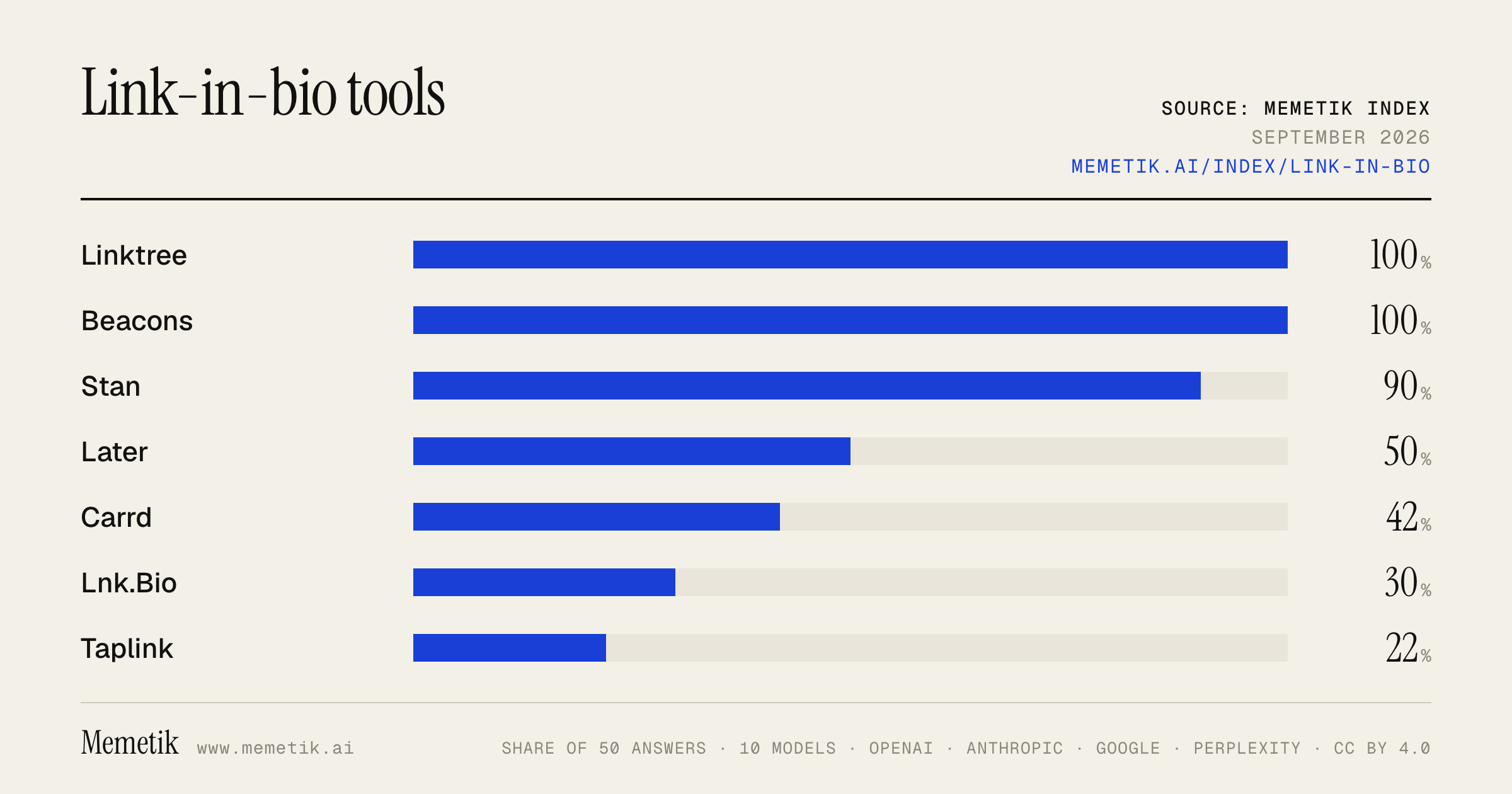
Linktree was named in 50 of 50 answers and came first in 24. Beacons follows at 100%. 13 vendors were named at least once. First edition, so there is no prior period.
Answer share
5 prompts × 10 models · 50 answers
By provider
10 models · 50 answers
OpenAI 3 models · 15 answers
- GPT-5.6 Solgpt-5.6-solmost named: Linktree 100%
- GPT-5.6 Terragpt-5.6-terramost named: Linktree 100%
- GPT-5.6 Lunagpt-5.6-lunamost named: Linktree 100%
Anthropic 3 models · 15 answers
- Claude Opus 5claude-opus-5most named: Linktree 100%
- Claude Sonnet 5claude-sonnet-5most named: Linktree 100%
- Claude Fable 5claude-fable-5most named: Linktree 100%
Google 2 models · 10 answers
- Gemini 3.6 Flashgemini-3.6-flashmost named: Linktree 100%
- Gemini 3.5 Flashgemini-3.5-flashmost named: Linktree 100%
Perplexity 2 models · 10 answers
- Sonar Prosonar-promost named: Linktree 100%
- Sonar Reasoning Prosonar-reasoning-promost named: Linktree 100%
Sources the models cited
- youtube.com114
- linkrr.store68
- medium.com54
- liink.is42
- stan.store33
- instantdm.com30
- shinewithnatasha.com27
- brandid.app21
- linkinbio.com19
- socialez.com18
- own.page17
- adamconnell.me17
ChatGPT via API returns no citations, so it does not contribute here.
The prompts
- What is the best link-in-bio tool for a creator? Name specific products.
- Which link-in-bio tool would you recommend to a creator in 2026?
- Compare the top link-in-bio tool options right now.
- I'm a creator and I need a link-in-bio tool. What should I use and why?
- Best link-in-bio tool for an Instagram creator?
Every answer
Raw model output, unedited
GPT-5.6 TerraWhat is the best link-in-bio tool for a creator? Name specific products.
**Best overall for most creators: Linktree.** It’s the safest default because it is quick to publish, has a solid free tier with unlimited links, and now goes beyond a link list with email capture, analytics, booking, digital products/courses, affiliate storefront options, and Instagram auto-replies. ([linktr.ee](https://linktr.ee/features/link-in-bio?utm_source=openai))

Choose based on how you make money:

| If you are… | Best product | Why |
|---|---|---|
| A creator who needs one reliable, broadly useful bio link | **Linktree** | Best all-around mix of familiarity, ease, links, analytics, list growth, and monetization. |
| Selling digital downloads, coaching, courses, memberships, or consultations | **Stan Store** | More of a creator storefront than a pure link page; best when checkout and selling are the main job. |
| A UGC/influencer creator pitching brands | **Beacons** | Strong choice for combining a link page with a media kit, brand-deal workflow, and creator business tools. |
| A creator who cares most about a polished, highly branded landing page | **Bento** | Better fit for a more editorial, visual “mini-site” feel. |
| A minimalist who wants a clean page and custom-domain flexibility | **solo.to** | A simple, design-forward alternative without the “generic Linktree” look. |
| A musician | **Linktree** or **Feature.fm** | Linktree is good for a general creator hub; Feature.fm is more specialized for music releases and streaming campaigns. |

### My practical picks

1. **Start with Linktree Free** if you are unsure.
   It covers the basics without forcing a major commitment; upgrade only if you need deeper analytics, integrations, branding controls, or additional automation. Linktree’s paid tiers also add longer analytics history, email-platform integrations, tracking integrations, and higher auto-DM limits. ([linktr.ee](https://linktr.ee/help/en/articles/5434140-an-overview-of-paid-features-available-on-linktree?utm_source=openai))

2. **Use Stan Store** if your primary call to action is “buy my thing” or “book me.”
   Don’t make followers click through a generic list of links before they reach your product.

3. **Use Beacons** if brand partnerships are central to your business.
   Your bio link should double as a credible portfolio and media-kit destination.

### What I’d avoid
Don’t choose solely by templates. The important factors are:
- mobile speed and ease of updating;
- email capture that you can export or sync;
- per-link analytics and UTM/tracking support;
- a custom domain if your brand is established;
- native checkout only if you actually sell through the page.

For most solo creators, the answer is **Linktree**. For creators already earning from products, services, or coaching, the answer is usually **Stan Store**.
GPT-5.6 TerraWhich link-in-bio tool would you recommend to a creator in 2026?
**My default recommendation in 2026: Beacons.**

For most creators, it is the best “grow into it” option: a customizable link-in-bio plus a media kit, digital-product storefront, affiliate tools, email capture/marketing, Instagram auto-DMs, and analytics. Its free tier is genuinely useful; paid plans start at **$10/month** or **$100/year**, while Creator Plus is **$30/month** or **$300/year** and removes Beacons’ seller fee. ([shop.beacons.ai](https://shop.beacons.ai/i/pricing?utm_source=openai))

But the right pick depends on the creator’s business model:

| Creator situation | Pick | Why |
|---|---|---|
| **Most creators / early-stage monetization** | **Beacons** | Strongest all-in-one creator toolkit; especially good for brand-deal media kits, email capture, affiliates, and lightweight digital sales. |
| **Just needs a clean, trusted links page** | **Linktree** | Fastest, most familiar choice. The free plan has unlimited links, embeds, a QR code, basic analytics, and shopping/digital-product options. Paid plans add better analytics, integrations, design, redirect links, and Instagram DM automation. ([linktr.ee](https://linktr.ee/features/link-in-bio?utm_source=openai)) |
| **Coach, educator, or creator already selling offers** | **Stan** | Better thought of as a conversion-focused creator store than merely a link page: one-tap checkout, products, bookings, and email tools. It starts at **$29/month** and advertises **0% platform transaction fees**; Creator Pro is **$99/month**. ([stan.store](https://stan.store/blog/stan-store-pricing/?e-page-85ac634=3&utm_source=openai)) |
| **Designer/developer who wants a true mini-site** | **Carrd** | Use it instead of a conventional link-in-bio tool if brand control, custom layout, and a custom domain matter more than built-in creator monetization. |

### Practical decision
- Pick **Beacons** if you want one platform for audience growth *and* monetization.
- Pick **Linktree** if you value simplicity, recognizability, and only need a link hub.
- Pick **Stan** if your bio link’s core job is to sell a coaching offer, course, download, or appointment.

One caution: don’t choose solely on subscription price. Compare **platform seller fees, payment-processing fees, email limits, custom-domain availability, and whether you can export your audience data**. For example, Beacons’ free tier charges a 9% seller fee, while its Creator Plus tier lists 0%; Stan says it has no platform transaction fees, but normal payment-provider charges can still apply. ([shop.beacons.ai](https://shop.beacons.ai/i/pricing?utm_source=openai))
GPT-5.6 TerraCompare the top link-in-bio tool options right now.
## Bottom line

For most people, the strongest choices are:

- **Linktree** — best for a clean, familiar, low-maintenance link hub.
- **Beacons** — best for creators who want to sell, collect emails, run memberships/courses, pitch brands, and automate DMs from the same system.

As of **September 2, 2026**, I’d choose based on whether you need a **directory of links** or a **creator-business platform**.

| Tool | Best for | Why it stands out | Main drawback | Starting price* |
|---|---|---|---|---|
| **Linktree** | Individuals, artists, brands, and teams wanting a simple, trusted hub | Fast setup, broad integrations, polished templates, email/SMS collection, analytics, link scheduling, QR codes, and commerce integrations | Monetization and business operations generally require more add-ons or separate tools than an all-in-one creator platform | Free; paid from **$5/mo** monthly or **$4/mo** annual billing |
| **Beacons** | Creators selling digital products, coaching, courses, memberships, or brand partnerships | Link-in-bio plus storefront, media kit, email, affiliate tools, Instagram auto-DMs, analytics, AI tools, and courses/memberships | More settings and a busier product; free and $10 plans charge a **9% platform fee** on sales | Free; **$10/mo** Creator; **$30/mo** Creator Plus |
| **Stan** | Coaches and digital-product sellers | A sales-first bio storefront—good if the link page is primarily a checkout funnel | Less ideal if your main goal is a highly editorial, content-rich public profile |
| **Campsite** | Designers, agencies, and creators prioritizing page aesthetics | Typically a strong fit for curated layouts, embeds, and visual brand presentation | Usually not the most comprehensive creator-business stack |
| **Later Link in Bio** | Social-media teams already using Later | Best when your Instagram/TikTok publishing workflow and your bio landing page should live together | Less compelling as a standalone tool if you do not use Later for scheduling |
| **Hoo.be** | Creators wanting a visual “mini-site” feel | Better suited to a polished creator profile with media, embeds, and brand-forward presentation | May be more than necessary for a basic links page |

\*Prices and plans change often; the detailed, current pricing I verified is for Linktree and Beacons.

## Head-to-head: Linktree vs. Beacons

### Choose **Linktree** if you want simplicity
Linktree is the safer default when you primarily need one dependable URL for your social profiles. Its free tier is usable, while paid plans add more customization and business features: **Starter is $5/month ($4/month annually), Pro $9/month ($7.50 annually), and Premium $24/month ($19.50 annually)**. It supports email collection, social and content integrations, QR codes, and ways to showcase products from services such as Shopify, Spring, and Bonfire. Some monetization features vary by country and can carry transaction/processing fees. ([linktr.ee](https://linktr.ee/s/pricing?M=&utm_source=openai))

**Pick it if:**
- You’re a musician, artist, local business, author, nonprofit, or professional.
- You want visitors to quickly find your shop, newsletter, portfolio, booking page, and socials.
- You value a familiar brand and don’t need a native course/membership engine.

### Choose **Beacons** if your bio link is your business hub
Beacons is more ambitious: it combines a bio page with a digital storefront, courses, memberships, email marketing, a media kit, affiliate links, analytics, and Instagram auto-DM tools. Its Free and Creator plans take **9% on platform sales**; Creator Plus, at **$30/month or $300/year**, removes Beacons’ platform transaction fee and adds features including unlimited email sends, memberships, courses, order bumps, and branding removal. Payment-processor fees still apply. ([shop.beacons.ai](https://shop.beacons.ai/i/pricing?utm_source=openai))

**Pick it if:**
- You sell templates, ebooks, presets, digital downloads, courses, coaching, or memberships.
- You want to gather emails and market to your audience without stitching together many tools.
- You pursue sponsorships and would benefit from a media kit and brand-outreach workflow.
- Your sales volume is sufficient to justify the $30/month plan rather than losing 9% per sale.

**Quick break-even rule:** if you sell through Beacons, compare the 9% platform fee with the cost of Creator Plus. At roughly **$333/month in sales**, 9% is about $30—before considering the extra Plus features. Payment processing is separate either way. ([help.beacons.ai](https://help.beacons.ai/en/articles/4695681?utm_source=openai))

## My practical recommendations

1. **Just need links / want the least friction:** **Linktree Free**, then upgrade only for a specific feature.
2. **Creator selling products or building an email list:** **Beacons Creator Plus** if sales justify it; otherwise start free and validate demand.
3. **Coach or course seller focused on conversion:** **Stan** or **Beacons**, depending on whether you want a sales funnel or an all-in-one creator toolkit.
4. **Aesthetic-first portfolio or influencer page:** **Campsite** or **Hoo.be**.
5. **Social-media marketing team already paying for scheduling:** **Later Link in Bio**.

## What I would avoid

- Paying for a premium link-in-bio plan before you have meaningful traffic.
- Using a tool’s built-in storefront without comparing its platform cut, payment-processing fees, email limits, and ownership of your customer list.
- Over-designing the page. Your first screen should normally contain: **one primary CTA, your current offer, newsletter/signup, and essential destination links**.

If you tell me your use case—e.g., *artist, ecommerce brand, coach, creator, agency, restaurant, or portfolio*—I can narrow this to the best two and recommend an exact setup.
GPT-5.6 TerraI'm a creator and I need a link-in-bio tool. What should I use and why?
## My default recommendation: **Beacons**

For most creators, I’d start with **Beacons**, ideally on **your own custom domain**. It is more than a list of links: you can use it as a creator hub for links, a media kit, email capture, digital products, memberships, and brand-deal tools. That means you are less likely to outgrow it the moment you want to monetize or pitch brands. ([help.beacons.ai](https://help.beacons.ai/en/articles/4695681?utm_source=openai))

**Choose Beacons if you want to:**
- Grow an email list and eventually sell digital products, downloads, memberships, or services.
- Have a media kit available for brand inquiries.
- Start free, then consolidate several creator tools into one platform as you grow. Its free plan includes unlimited links and a media kit; its paid plans add custom domains, email features, and lower or zero platform seller fees depending on tier. ([help.beacons.ai](https://help.beacons.ai/en/articles/4695681?utm_source=openai))

**Important cost note:** Beacons’ listed free and Creator tiers charge a **9% seller fee**, while Creator Plus advertises **0% platform transaction fees**. If you sell regularly, run the numbers before choosing a plan; that fee structure can matter more than the subscription price. ([help.beacons.ai](https://help.beacons.ai/en/articles/4695681?utm_source=openai))

## Pick a different tool if this describes you

| Your situation | Best pick | Why |
|---|---|---|
| You just need a clean, trusted page with links and minimal setup | **Linktree** | It’s the simplest default. Its free offering includes unlimited links, themes, a contact/lead form, analytics, social icons, and scheduled links; paid tiers add more branding and analytics options. ([thelinktree.com](https://thelinktree.com/features?utm_source=openai)) |
| You create heavily for Instagram/TikTok and want posts to lead to specific links | **Later Link in Bio** | It can connect Instagram and TikTok posts to destinations and is especially sensible if you already use Later for scheduling. Later says the core Link in Bio features are free, while paid Later plans add a bannerless page and deeper analytics. ([later.com](https://later.com/pricing?utm_source=openai)) |
| Your core business is courses, coaching, or digital-product checkout—not just links | **Stan Store** | Stan positions itself as an all-in-one bio storefront for digital products, courses, coaching, and related offers. ([help.stan.store](https://help.stan.store/article/438-stan-store-vs-stanley-for-instagram-vs-stanley-for-linkedin?utm_source=openai)) |

## What I’d do in your shoes

1. Create a **Beacons** page.
2. Connect a domain you own, such as `yourname.com` or `yourname.co`—don’t build your entire public identity around a rented platform URL.
3. Keep the page focused on **one primary action**: subscribe, shop, book, or watch.
4. Put only 3–5 prominent buttons above the fold:
   - Your current priority / newest offer
   - Email signup or free resource
   - Shop / services / booking
   - Best content or portfolio
   - Social links
5. Use tracking parameters on campaign links and review which buttons actually get clicks.

**Bottom line:**
- **Beacons** = best all-around creator business hub.
- **Linktree** = best if you want pure simplicity.
- **Later** = best for shoppable/social-post workflows.
- **Stan** = best when the bio link is primarily a storefront.
GPT-5.6 TerraBest link-in-bio tool for an Instagram creator?
**Best overall for most Instagram creators: Beacons.**

It is more than a list of links: you can create a branded bio page, collect emails, make a media kit for brand deals, sell digital products, and see traffic analytics. Its free tier is unusually capable, so it is the one I’d start with unless you already know you need a different workflow. ([help.beacons.ai](https://help.beacons.ai/en/articles/4695681?utm_source=openai))

### Pick based on your goal

| If you need… | Best pick | Why |
|---|---|---|
| **An all-around creator hub** | **Beacons** | Best blend of links, design, media kit, email capture, affiliate links, and selling tools. The free tier includes unlimited links and product selling, though it carries a 9% seller fee; Creator Plus removes seller fees. ([help.beacons.ai](https://help.beacons.ai/en/articles/4695681?utm_source=openai)) |
| **Dead-simple, established link page** | **Linktree** | Use it if you only want a polished link menu with minimal setup. Its free offering includes unlimited links, themes, contact capture, analytics, and scheduled links. ([thelinktree.com](https://thelinktree.com/features?utm_source=openai)) |
| **A clickable/shoppable Instagram feed plus scheduling** | **Later Link in Bio** | Strong choice for product-heavy creators or social-media managers already using Later. It can link Instagram/TikTok posts to destinations and supports up to five links per Instagram post; the core Link in Bio features are free. ([help.later.com](https://help.later.com/hc/en-us/articles/4409203074967-What-is-Link-in-Bio?utm_source=openai)) |
| **Selling courses, coaching, or digital downloads as the main business** | **Stan Store** | More of a creator storefront than a conventional link page—built around courses, coaching, and digital products. ([help.stan.store](https://help.stan.store/article/438-stan-store-vs-stanley-for-instagram-vs-stanley-for-linkedin?utm_source=openai)) |

### My practical recommendation
1. **Start free with Beacons** and use a clean page: one primary CTA at the top, then 3–5 secondary links.
2. Use a **custom domain** once your creator business has traction—your page becomes portable if you ever switch platforms.
3. Avoid putting 15 equal-priority buttons on the page. For Instagram traffic, the top button should match what you are currently promoting: *shop the drop*, *get the free guide*, *watch the new video*, or *book a call*.

**Short version:**
- Want the best default? **Beacons**.
- Want the easiest/basic option? **Linktree**.
- Sell primarily via posts and need a shoppable grid? **Later**.
- Monetize through coaching/courses? **Stan Store**.
- https://help.beacons.ai/en/articles/4695681?utm_source=openai
- https://thelinktree.com/features?utm_source=openai
- https://help.later.com/hc/en-us/articles/4409203074967-What-is-Link-in-Bio?utm_source=openai
- https://help.stan.store/article/438-stan-store-vs-stanley-for-instagram-vs-stanley-for-linkedin?utm_source=openai
Claude Sonnet 5What is the best link-in-bio tool for a creator? Name specific products.
There isn't one single "best" tool — it really depends on what you need it to do. Here are the top specific products creators actually use, based on what each is known for:

**Linktree**
The original and most recognizable option.
Linktree is the OG in this space, and there's a reason it's still a household name — it's where most creators get their start because it's simple and familiar.
 Good if you just want something quick and widely trusted, though
the free version is pretty basic since you're stuck with their branding and limited design options, and paid plans can get pricey compared to newer competitors.

It has four tiers: Free (basic tools), Starter (~€6/month), Pro ($12/month), and Premium ($30/month) for teams with 0% seller fees — note the free plan carries Linktree branding and a commerce fee on sales.


**Beacons**
Best if you want monetization and audience-growth features baked in, not just a link list.
Beacons is one of the most popular free link in bio tools for creators, combining links, a storefront, and audience tools all in one place.

It gathers your content, store, and audience tools into one personalized page, with strengths in analytics and growth — a native dashboard plus GA4 integration, email capture, and a media kit generator — making it a capable all-in-one for creators who want data and email built in.


**Stan Store**
Popular among creators specifically selling digital products, coaching, or courses directly from their bio link (frequently mentioned alongside Linktree and Beacons as a top pick for creators who want to sell, per multiple comparison guides).

**Taplink**
A strong pick if conversion and built-in selling matter more than brand recognition.
It builds high-converting landing pages with image sliders, videos, FAQs, forms, and price lists, and you can sell digital products directly, turning your profile into a micro-website that drives clicks and sales.

It has a free Basic plan with unlimited links and themes, a Pro plan at about $3/month for rich media and analytics, and a Business plan at about $6/month that adds payments, CRM, automations, and custom domains.


**Quick recommendation by use case:**
- **Just starting out / want something simple and free:** Linktree
- **Want to sell digital products, coaching, or courses:** Stan Store or Beacons
- **Want built-in analytics + email capture + media kit for brand deals:** Beacons
- **Want a conversion-optimized "micro-website" with payments (esp. Instagram/TikTok):** Taplink

If you tell me what platform you're on (Instagram, TikTok, YouTube) and whether you're mainly trying to sell something, grow an email list, or just centralize links, I can narrow this down further.
Claude Sonnet 5Which link-in-bio tool would you recommend to a creator in 2026?
Based on current 2026 comparisons, there isn't one single "best" tool—it really depends on what you need as a creator. Here's how I'd break it down:

**If you want the most popular, no-frills option:**

Linktree is the original link in bio tool and still the most recognized, having popularized the idea of turning one social link into a landing page of many.

A 2025 market report found Linktree was used by 24.7 million of 31 million total link-in-bio users, equal to 79.95% market share.
 It's a safe, familiar choice if you just want something simple and widely trusted by audiences.

**If you want monetization built in (selling products, coaching, digital downloads):**
Stan Store is frequently recommended as a creator-focused option that goes beyond just links, and **Beacons** is positioned similarly.
Beacons functions as the creator utility layer
 in the space, offering more built-in tools for selling and audience-building rather than just a list of links.

**If you want automation so your page updates itself:**

Viraly offers powerful automation that keeps pages fresh without manual updates, functioning as a full social media management platform that happens to include a strong bio page builder.

Its standout feature is Auto-Add Social Posts — connect your profiles and it automatically pulls your latest Instagram, TikTok, or YouTube content onto your page as clickable links.
 It also
offers 70+ pre-built themes, background integrations, over 1,400 fonts, and custom domains with SSL support
.

**If you want full design freedom (essentially a mini-website):**

Carrd isn't a traditional link-in-bio tool, but it's a smart choice for people who want more design freedom than dedicated tools allow — though it feels more like building a lightweight site than filling out a profile page.


**If you're an e-commerce/brand-focused creator:**
Dash Social's LikeShop is built specifically for
turning social content into shoppable, trackable landing experiences
, which is ideal if you're selling physical products and need strong analytics and pixel/UTM tracking.

**My actual recommendation for a typical creator in 2026:**
- **Just starting out / want simplicity:** Linktree (free tier is fine, near-universal recognition)
- **Actively monetizing (courses, coaching, digital products):** Beacons or Stan Store
- **Want a "set it and forget it" auto-updating page:** Viraly
- **Want a custom-branded landing page and don't mind more setup:** Carrd or own.page

One important framing shift worth noting:
the practical question in 2026 isn't which tool lets you list the most links, but which tool helps you build the best page for the action you want people to take
. So the "best" choice really comes down to your primary goal — traffic, sales, bookings, or brand — rather than raw feature count.

If you tell me your platform (Instagram, TikTok, YouTube) and main goal (selling products, growing an email list, driving traffic), I can narrow this down further.
Claude Sonnet 5Compare the top link-in-bio tool options right now.
## Top Link-in-Bio Tools Compared (2026)

The landscape has plenty of solid options, and the "best" one really depends on whether you want simplicity, monetization, or design flexibility. Here's how the major players stack up:

### **Linktree** — Best for Simplicity & Recognition
The most widely recognized name in the space.
It offers a free plan, with Starter at $6/mo, Pro at $12/mo, and Premium at $30/mo (billed annually)
. Multiple sources agree it's the go-to for fast setup:
for fast setup and general use, Linktree stays a common pick
. The main tradeoff:
advanced analytics and customization require paid plans
.

### **Beacons** — Best for Creator Monetization
This is consistently ranked as the top choice for creators who want to sell things directly from their bio link.
Beacons is the most fully built-out option for direct selling, with a built-in store, course support, and 0% transaction fees on Pro
. It also stands out for
built-in store, email capture, and social scheduling
, plus
media kits and storefront
 functionality for creators pursuing brand deals.

### **Taplink** — Best for Feature Depth on a Budget
One review rated it the top overall performer:
Taplink sits at the top of the independent comparison table with a 4.3 overall score, and the content block rating tells you why: it earned a perfect 5/5
, with
no other tool in this field coming close on raw feature variety
. For sellers,
Taplink also supports digital product sales with no commission fees and is significantly cheaper at $36/year
 compared to competitors.

### **Stan Store** — Best for Selling Digital Products/Courses
If your primary goal is monetizing courses or digital downloads, Stan Store is repeatedly singled out:
it's noted for built-in checkout & courses
 functionality, making it the pick when you're "primarily selling products."

### **Lnk.Bio** — Best for Budget Minimalists
For those who just want unlimited simple links cheaply:
Lnk.bio is best for minimalist users who want a quick, basic link page, with low customization
. Pricing is notably low, around $12/year or a one-time $9.99 fee in some comparisons.

### **Carrd** — Best for Design Freedom

For a mini-site look, Carrd offers more design flexibility
 compared to typical link-list tools, appealing to users who want more of a mini-website feel at a low cost (~$19/year).

### **Shorby** — Best for Marketers & Retargeting
Geared toward paid traffic and tracking:
Shorby is strong for marketers who need pixels, tracking, and campaign control
, and
for paid campaigns and retargeting, Shorby and Replug support tracking needs
.

### **Later's Linkin.bio** — Best for Teams

This works well when teams schedule content in Later
, making it a natural fit if you're already using Later for social scheduling.

### **Milkshake** — Best Free Mobile Builder

A free mobile builder for beginners who want quick templates
, useful for those who want a more visual/card-based layout without paying anything.

---

### Quick Takeaway by Priority:
- **Just want something fast and free?** → Linktree or Lnk.Bio
- **Want to sell products/courses?** → Beacons, Stan Store, or Taplink
- **Need marketing/tracking features?** → Shorby
- **Want a fully custom mini-site feel?** → Carrd
- **Managing links for a team already using Later?** → Later's Linkin.bio

Note that several of the sources above are from newer/less-established review sites promoting their own tools (e.g., Inflowave, ShareB.io, Linkbout, own.page), so I'd weigh the more neutral, cross-tool comparisons (like the pricing/feature tables) more heavily than any single site's "best overall" claim — especially since some of these appear to be sponsored or self-promotional content.
- https://www.dashsocial.com/blog/link-in-bio-tools
- https://www.socialez.com/blog/best-link-in-bio-tools-to-enhance-your-social-media-profiles/
- https://passionfru.it/the-best-link-in-bio-tools-in-2026-price-and-features-165546/
- https://www.rebrandly.com/blog/best-link-in-bio-tools
- https://shareb.io/blog/best-link-in-bio-tools
- https://own.page/blog/best-link-in-bio
Claude Sonnet 5I'm a creator and I need a link-in-bio tool. What should I use and why?
This depends a lot on your specific needs (budget, whether you sell products, how much customization you want, etc.), but I can walk you through the main options and how to think about choosing one.

## Popular Link-in-Bio Tools

**Linktree**
The original and most widely recognized option. Simple to set up, has a generous free tier, and integrates with most social platforms. Good if you just want something reliable and well-known without much fuss. Paid tiers unlock more customization, analytics, and e-commerce features.

**Beacons**
Popular with creators who want to monetize—has built-in tools for selling digital products, media kits, and email capture. Tends to be favored by influencers who are building a business around their audience, not just sharing links.

**Stan Store**
Geared heavily toward selling directly (courses, coaching calls, digital downloads) rather than just linking out. If your "bio link" is really meant to be a mini storefront, this is worth a look.

**Koji**
Known for interactive, mini-app-style widgets (polls, tip jars, shoutouts) rather than just static links. Good if you want more engagement-driven content.

**Later's Linkin.bio**
Makes sense if you're already using Later for scheduling Instagram posts—it turns your grid into clickable links, which is handy for visual creators.

**Carrd**
Extremely cheap and flexible since it's really a simple website builder. If you want full design control and don't mind a little more setup work, this gives you the most creative freedom for the price.

**Notion-based or custom-built pages**
Some creators just build a lightweight personal site (via Notion, Carrd, or even a simple Webflow/Framer site) for total control and no reliance on a third-party brand.

## How to Choose

Ask yourself:
- **Am I mainly linking out, or selling directly?** → Selling: Stan Store/Beacons. Linking: Linktree/Carrd.
- **Do I need analytics to see what's converting?** → Linktree Pro or Beacons have solid tracking.
- **Do I want it to match my brand exactly?** → Carrd or a custom site gives the most control.
- **Am I already in an ecosystem (e.g., Later, Shopify)?** → Check if they have a native tool first, since it may integrate more smoothly.
- **Budget?** → Linktree and Carrd both have very cheap or free tiers that cover most basic needs.

If you tell me more about what you create (content type, platform, whether you sell anything), I can help you narrow it down to the best fit.
Claude Sonnet 5Best link-in-bio tool for an Instagram creator?
There's no single universal "best" — it depends on what you're trying to do (sell products, grow email list, just organize links, etc.), but here's how the top options stack up for Instagram creators right now:

**Linktree** – The default choice for a reason.
Linktree has a larger user base and is simpler to set up, which may be sufficient for casual users.
 It's free, fast, and familiar to most followers, but a few caveats:
-
Because it's so widely used, every creator's link in bio page ends up looking the same. If you want yours to stand out, it's probably best to go with one of the other options.

-
Linktree restricts custom domains to expensive plans and takes up to 12% commission on sales on free plans, and doesn't offer DM automation integration.


**Beacons** – Best if you want to monetize directly.
It offers creator-first pages with selling blocks, tips, and email capture.
 Also called out as
best for monetizing creators
 in general comparisons.

**Later's Linkin.bio** –
Best for Instagram shopping workflows tied to scheduling.
 Good if you already schedule posts through Later.

**Pallyy** – Great if you want scheduling + bio link in one place:
once your bio-link page is set up, you can add new URLs to it as you're scheduling Instagram posts on Pallyy automatically, so every time you create a promotional post, your bio page updates too, without manual editing.


**Newer/all-in-one options** like Viraly and Inflowave Links are positioning themselves as more powerful alternatives:
- Viraly:
It has customizable sections, analytics, lead capture, products, media, and auto-added social posts, and is great for creators, brands, and businesses.

- Inflowave Links:
It combines custom domains, full analytics, 0% commission, DM automation integration, and multi-account management for agencies, all in one tool connected to your Instagram workflow.
 This one leans more business/agency-focused though.

**My honest take for a typical Instagram creator:**
- Just starting out / want free + simple → **Linktree**
- Want to sell products/services or capture emails → **Beacons**
- Already scheduling posts and want less manual work → **Pallyy** or **Later**
- Want a page that looks less "cookie-cutter" with more design control → **Viraly** or **Carrd**

If you tell me your main goal (selling stuff, growing an email list, just organizing links, monetizing content, etc.) and whether you want free vs. paid, I can narrow it down to one clear pick.
Gemini 3.6 FlashWhat is the best link-in-bio tool for a creator? Name specific products.
There is no single "best" link-in-bio tool because the ideal choice depends on **how you plan to monetize and engage your audience**. The category has evolved from simple lists of links into digital storefronts, email capture systems, and mini-websites.

The best platforms are categorized below by specific creator goals:

---

### 1. Best for Selling Digital Products & Coaching: **Stan Store**
If your goal is direct monetization—selling e-books, courses, 1-on-1 coaching calls, or digital downloads—Stan Store is widely considered the industry leader.
* **Why it stands out:** It handles direct 1-click checkouts on mobile without redirecting buyers to an external website. It also features built-in email marketing flows, automated calendar scheduling, and membership recurring billing.
* **Best for:** Digital creators, coaches, educators, and course creators.
* **Pricing:** Starts at ~$29/month (no free plan, but higher conversion rates for digital sales).

---

### 2. Best All-in-One for Monetization & Brand Deals: **Beacons**
Beacons is designed to act as an all-in-one business control center for creators.
* **Why it stands out:** Beyond link navigation and digital storefronts, Beacons includes built-in media kits (that dynamically update with your live social stats), pitch-email generators for brand sponsorships, auto-updating rate sheets, and an AI-assisted page builder.
* **Best for:** Influencers, TikTokers, and YouTubers seeking brand partnerships while selling merchandise or digital products.
* **Pricing:** Generous free plan available; Pro plans unlock custom domains and advanced tools.

---

### 3. Best for Simplicity, Popularity & Ecosystem: **Linktree**
Linktree remains the most recognized, reliable, and widely used tool on the market.
* **Why it stands out:** It is simple to set up, highly customizable, and offers seamless integration with third-party tools (Shopify, Spotify, YouTube, Mailchimp). Its native monetization features (tips, affiliate links, simple storefront links) are straightforward.
* **Best for:** Creators who want a clean, recognizable layout without needing complex backend funnels.
* **Pricing:** Free plan available; paid plans start around $5–$24/month for advanced analytics and customization.

---

### 4. Best for Visual Portfolios & E-Commerce: **Liink / Milkshake**
If standard stacked buttons feel too plain for your aesthetic:
* **Liink:** Displays your links as interactive cards and visual grid profiles, functioning like a visual portfolio.
* **Milkshake:** Uses a mobile-first, card-swipe design, making your bio link function like a mini interactive website that users swipe through like Instagram Stories.
* **Best for:** Photographers, designers, lifestyle creators, and fashion influencers.

---

### 5. Best for Complete Design Control: **Carrd**
While not strictly a "link-in-bio" app, Carrd is a flexible, highly affordable one-page website builder that many creators use for their bio link.
* **Why it stands out:** Complete freedom over layouts, typography, CSS, custom domains, and custom code integrations without forcing you into a standard "vertical list of links" format.
* **Best for:** Tech-savvy creators, developers, and designers who hate template constraints.
* **Pricing:** Extremely cheap (often ~$19/year for a Pro plan).

---

### Summary Recommendation:
* Choose **Stan Store** if you sell digital downloads, calls, or subscriptions and want maximum conversion rates.
* Choose **Beacons** if you pitch to brands, want a media kit, and need strong all-in-one free tools.
* Choose **Linktree** if you just want a reliable, clean hub for all your social links and external sites.
Gemini 3.6 FlashWhich link-in-bio tool would you recommend to a creator in 2026?
The best link-in-bio tool for a creator in 2026 depends heavily on your **primary goal**—whether that’s monetizing digital products, building an email list, showing off a visual portfolio, or simply routing traffic.

Here are the top recommendations categorized by creator focus:

---

### 1. Best Overall for Monetization & Digital Products: **Stan Store**
If your goal is to make money directly from your bio link, **Stan Store** remains the industry leader for creators.
* **Key Features:** One-click checkout, built-in digital product delivery (e-books, templates), course hosting, 1-on-1 call booking, and subscription/membership tiers.
* **Why it stands out:** Instead of sending followers to external sites to buy, everything happens seamlessly inside the app/pop-up, leading to significantly higher conversion rates.
* **Best For:** Coaches, digital product creators, course creators, and influencers selling services.

---

### 2. Best All-in-One for Growth & Brand Deals: **Beacons**
**Beacons** is an incredibly robust, AI-powered platform designed specifically for modern content creators who want an all-in-one hub.
* **Key Features:** Automated media kit builder (syncs your live follower counts and engagement data for sponsors), auto-generated pitch emails, digital store, email marketing, and custom domain support.
* **Why it stands out:** It handles monetization, audience management, and brand deal outreach under one roof.
* **Best For:** UGC creators, lifestyle influencers, YouTubers, and TikTokers working with brands.

---

### 3. Best for Visual Aesthetics & Portfolios: **Bento (Bento.me)**
If you are a designer, photographer, agency owner, or curator who cares deeply about visual representation, **Bento** offers the cleanest, modern "grid" layout.
* **Key Features:** Modern bento-box tile design, rich media embeds (Spotify, YouTube, GitHub, Figma), clean typography, and subtle animations.
* **Why it stands out:** It feels more like a sleek micro-portfolio than a simple list of buttons.
* **Best For:** Designers, developers, visual artists, curators, and tech creators.

---

### 4. Best Classic & Broad Integration: **Linktree**
**Linktree** is still the standard and continues to evolve with deep integrations and creator tools.
* **Key Features:** Extensive app integrations (Shopify, Spotify, Spring, PayPal, TikTok, YouTube), store features, tip jars, robust analytics, and multi-profile management.
* **Why it stands out:** Everyone knows how to use it, it’s fast, reliable, and has a strong free tier.
* **Best For:** General creators, musicians, and anyone looking for a quick, zero-fuss setup with max flexibility.

---

### 5. Best for Building an Audience & Newsletter: **Kit (formerly ConvertKit)**
If your main goal is owning your audience (rather than relying on social media algorithms), **Kit** offers landing page/link-in-bio templates connected directly to an email automation system.
* **Key Features:** Direct email opt-ins, newsletter delivery, digital product sales, and automated email sequences.
* **Why it stands out:** Social platforms come and go, but an email list is an asset you own.
* **Best For:** Writers, podcasters, educators, and creators focused on long-form content.

---

### Quick Decision Guide
* **Selling courses, coaching, or templates?** $\rightarrow$ **Stan Store**
* **Pitching brands & wanting AI tools?** $\rightarrow$ **Beacons**
* **Prioritizing modern, clean design?** $\rightarrow$ **Bento**
* **Just need simple links and video embeds for free?** $\rightarrow$ **Linktree**
Gemini 3.6 FlashCompare the top link-in-bio tool options right now.
Link-in-bio tools have evolved far beyond simple lists of external URLs. They now function as **mini-websites, creator storefronts, email capture engines, and analytics hubs**.

The top link-in-bio options right now cater to distinct creator and business needs:

---

### 1. Stan Store
* **Best For:** Creators selling digital products, courses, 1-on-1 consultations, and memberships.
* **Key Highlights:**
  * High-converting, 1-click checkout flows without sending users to external sites.
  * Built-in tools for calendar booking, digital product hosting, automated email delivery, and recurring subscriptions.
* **Pros:** Replaces separate tools like Calendly, Teachable, and Shopify; high conversion rates.
* **Cons:** Higher flat monthly cost with no free tier (around $29/mo to $99/mo).

### 2. Linktree
* **Best For:** General creators, businesses, and influencers wanting a reliable, classic all-rounder.
* **Key Highlights:**
  * Massive library of third-party integrations (Spotify, YouTube, Shopify, Mailchimp, payment processors).
  * Rich analytics, custom branding options, and fast mobile loading times.
* **Pros:** Generous free plan, highly recognizable, constantly updating features.
* **Cons:** Advanced monetization features and deep styling require paid plans.

### 3. Beacons
* **Best For:** Multi-hyphenate creators looking for AI features and marketing suites.
* **Key Highlights:**
  * Includes an integrated auto-updating Media Kit for brand sponsorships.
  * Built-in email marketing, AI copy generation, digital store capabilities, and fan management.
* **Pros:** Feature-rich free tier; handles sponsorships, sales, and email marketing under one roof.
* **Cons:** Interface can feel slightly overwhelming due to the density of features.

### 4. Bento
* **Best For:** Designers, visual artists, tech professionals, and aesthetic-focused creators.
* **Key Highlights:**
  * Modern, visual "bento box" tile grid layout instead of vertical stacked buttons.
  * Direct rich media embeds (videos, tweets, GitHub repos, Figma files, music) right in the grid.
* **Pros:** Stunning out-of-the-box visual presentation; clean user interface.
* **Cons:** Less optimized for heavy e-commerce/sales funnels compared to Stan Store or Beacons.

### 5. Later (Linkin.bio)
* **Best For:** E-commerce brands and visual creators who rely heavily on Instagram and TikTok feeds.
* **Key Highlights:**
  * Replicates your Instagram or TikTok feed into an interactive, clickable grid.
  * Syncs directly with social media schedulers and Shopify for shoppable posts.
* **Pros:** Seamless transition for followers accustomed to viewing visual post feeds.
* **Cons:** Tied heavily to social scheduling workflows; less ideal if you don't use Later for social management.

### 6. Lnk.Bio / Taplink
* **Best For:** Budget-conscious users needing simple, no-fuss link management.
* **Key Highlights:**
  * **Lnk.Bio** offers unlimited links on its free tier and cheap one-time payment options (lifetime plans).
  * **Taplink** offers flexible layout building with low-cost tier upgrades.
* **Pros:** Extremely affordable, minimalist, light web footprint.
* **Cons:** Basic visual templates; lack complex native e-commerce and email tools.

---

### Quick Comparison Summary

| Tool | Core Strength | Free Plan Available? | Ideal Audience |
| :--- | :--- | :--- | :--- |
| **Stan Store** | Direct sales & digital products | 14-day trial only | Solopreneurs, coaches, digital sellers |
| **Linktree** | Reliability & ecosystem integration | Yes (Robust free plan) | General creators, casual users, brands |
| **Beacons** | AI tools & Creator Business hub | Yes | Influencers, full-time creators |
| **Bento** | Highly visual grid design | Yes | Designers, tech roles, visual artists |
| **Later** | Social feed mirroring & shoppable links | Yes (Limited) | E-commerce brands, visual marketers |
| **Lnk.Bio** | Budget & simplicity | Yes (Unlimited links) | Beginners, budget-focused users |

---

### How to Choose the Right Tool:

1. **If your goal is to monetize directly:** Choose **Stan Store** (for courses/coaching) or **Beacons** (for digital downloads + email list).
2. **If your goal is content distribution & simplicity:** Choose **Linktree**.
3. **If your brand identity relies on visual aesthetics:** Choose **Bento**.
4. **If you run a product store/e-commerce shop:** Choose **Later (Linkin.bio)** or **Linktree** paired with Shopify.
Gemini 3.6 FlashI'm a creator and I need a link-in-bio tool. What should I use and why?
Choosing the right link-in-bio tool depends on your main goal: whether you want to **route traffic**, **monetize directly**, **capture leads**, or **showcase visual content**. Link-in-bio tools have evolved from basic button lists into miniature storefronts and custom web pages.

The best tool options depend on specific creator needs:

---

### 1. Best for Monetization, Digital Products & Coaching: **Stan Store**
* **Why choose it:** If your main goal is to make money (selling e-books, courses, 1-on-1 coaching calls, or digital downloads).
* **Key Features:** Native checkout (buyers don't leave your profile), built-in automated email marketing, subscription features, and calendar booking integration.
* **Best for:** Digital creators, coaches, course creators, and influencers with specific products to sell.
* **Pricing:** Flat monthly fee (starts around $29/mo), but takes **0% transaction fees** on your sales.

---

### 2. Best All-Rounder for Design & Analytics: **Beacons**
* **Why choose it:** It strikes the best balance between customization, built-in AI tools, and monetization without a steep monthly cost.
* **Key Features:** Built-in media kit builder (syncs live follower count and engagement stats for brand deals), digital store, email signup forms, AI copywriter, and income tracking.
* **Best for:** Creators seeking brand partnerships, pitching to sponsors, or wanting a sleek design without technical hassle.
* **Pricing:** Robust free tier; affordable pro plans.

---

### 3. Best Simple, Recognized Standard: **Linktree**
* **Why choose it:** The most recognizable platform on the market. If you just need a clean, reliable, and straightforward hub to send people to your podcast, YouTube, website, or affiliate links.
* **Key Features:** Extensive third-party integrations (Spotify, Shopify, PayPal, Spring), deep analytics, and easy customization.
* **Best for:** Creators who want setup simplicity and rely mostly on external links (blogs, YouTube, secondary social channels).
* **Pricing:** Generous free plan; paid tiers unlock custom branding and detailed analytics.

---

### 4. Best for E-Commerce & Visual Creators: **Later (formerly Linkin.bio) or Milkshake**
* **Why choose it:**
  * **Later’s Linkin.bio:** Excellent for Instagram creators or e-commerce brands because it turns your profile link into a clickable, shoppable feed that mirrors your Instagram grid.
  * **Milkshake:** Best for smartphone-first creators who want an aesthetic, card-swipe mini-website built entirely on mobile.
* **Best for:** Fashion, lifestyle, and visual creators, or brands selling physical products via Instagram.

---

### Quick Decision Guide

| Primary Goal | Recommended Tool |
| :--- | :--- |
| **"I want to sell digital products/coaching easily"** | **Stan Store** |
| **"I want to get brand deals and build an email list"** | **Beacons** |
| **"I just want a simple page to organize external links"** | **Linktree** |
| **"I want my bio page to look like my Instagram grid"** | **Later** |
| **"I want to build a quick, pretty mini-site from my phone"** | **Milkshake** |

### Recommendation
* If your content is **monetization-driven** (selling digital downloads, booking calls, or capturing emails), start with **Stan Store**.
* If you want a **free, versatile hub that grows with you** and includes brand-pitching tools, go with **Beacons**.
Gemini 3.6 FlashBest link-in-bio tool for an Instagram creator?
There is no single "best" link-in-bio tool because the right choice depends heavily on **how you monetize your audience and what you want profile visitors to do.**

The top link-in-bio platforms for Instagram creators fall into distinct categories based on primary business goals:

---

### 1. **Stan Store** – Best for Selling Digital Products & Digital Monetization
If your main goal is selling digital products (e-books, courses, templates, calendar bookings, or memberships), **Stan Store** is currently the top choice.
* **Key Strengths:** Features a frictionless 1-click checkout directly inside the landing page (no redirecting buyers to third-party stores). Built-in email capture and drip campaigns.
* **Best For:** Creators selling digital downloads, courses, coaching calls, or subscriptions.
* **Cost:** Paid subscription model with **0% transaction fees** (flat monthly fee around $29–$99/mo).

### 2. **Beacons.ai** – Best All-In-One Platform for Growing Creators
Beacons combines a multi-link page with robust monetization and creator business management tools on a generous free plan.
* **Key Strengths:** Built-in email capture, digital store features, brand outreach tools (media kit generator), and AI design features.
* **Best For:** Creators who want a high degree of custom layout options, email list building, and pitch kits without paying immediately.
* **Cost:** Strong **Free** plan available; Pro plans scale up for custom domains and lower store fees.

### 3. **Linktree** – Best for Simple Design & Brand Recognition
Linktree remains the most widely recognized link hub platform and is reliable for straightforward link management.
* **Key Strengths:** Extremely fast to set up, highly recognized by audiences, and integrates cleanly with platforms like Spotify, YouTube, and Shopify. Offers strong basic analytics and wide app integration options.
* **Best For:** Creators who just need to organize links to external sites (YouTube, podcast, shop, articles) rather than host an all-in-one storefront.
* **Cost:** Free tier; paid plans start around $5–$24/mo for detailed analytics, extra themes, and custom styling.

### 4. **Milkshake** – Best Free Option for Mobile-First/Aesthetic Design
Milkshake works as an app on your phone that builds a swipeable "mini-website" rather than a traditional vertical list of buttons.
* **Key Strengths:** Highly visual cards that feel like Instagram Stories. Managed entirely on mobile with sleek, card-style templates.
* **Best For:** Lifestyle, fashion, beauty, or visual creators who want a mini aesthetic landing page setup without touching a desktop computer.
* **Cost:** Free.

### 5. **Carrd** – Best for Full Design Customization
While technically a micro-website builder rather than a traditional bio tool, Carrd is widely used by creators wanting complete freedom over layout and visual branding.
* **Key Strengths:** Fully customizable responsive designs, form embeds, custom domains, and no forced platform templates.
* **Best For:** Designers, tech-savvy creators, or anyone frustrated by the design constraints of basic link lists.
* **Cost:** Free basic plans; Pro plans are very cheap ($19/year).

---

### **Which Should You Pick?**

* **Choose Stan Store** if you are serious about selling products, digital downloads, or coaching.
* **Choose Beacons** if you want email collection + digital store features on a budget.
* **Choose Linktree** if you simply want a fast, recognizable hub for 5–10 external links.
* **Choose Milkshake** if you want a visual mobile landing page that you manage on your phone.
Sonar ProWhat is the best link-in-bio tool for a creator? Name specific products.
For most creators, **Linktree** is the safest default choice because it is widely adopted, easy to set up, and offers basic analytics plus monetization features.[1][2][5] If you want more creator business features, **Beacons** is often the stronger all-in-one option, especially for monetization, storefronts, email capture, and media-kit-style pages.[2][5][7]

Here’s the practical shortlist by use case:

- **Best overall for most creators:** **Linktree**[1][5][14]
- **Best for monetization / creator business tools:** **Beacons**[2][5][7]
- **Best for selling digital products:** **Stan Store**[5][7][14]
- **Best for a more branded mini-site:** **own.page**[2]
- **Best for visual/design-forward creators:** **Avely** or **taap.bio**[6][12]
- **Best for ecommerce and social sellers:** **Later** / **Linkin.bio by Later**[1][4][14][19]
- **Best budget/simple option:** **Lnk.Bio**[4][8][11]

If you want one recommendation without overthinking it, choose **Linktree** for simplicity and reach, or **Beacons** if you want your link-in-bio page to function more like a creator storefront.[1][2][5][7]
- https://toolfolio.com/articles/best-link-in-bio-tools
- https://own.page/blog/best-link-in-bio
- https://www.creatorstackclub.com/categories/link-in-bio-tools
- https://www.hopp.co/post/best-link-in-bio-tools
- https://shareb.io/blog/best-link-in-bio-tools
- https://avely.me/blog/best-link-in-bio-tools
- https://fueler.io/blog/link-in-bio-tools-creators-use-to-drive-more-conversions
- https://instantdm.com/blog/10-best-free-link-in-bio-tools-for-creators-2026
- https://later.com/blog/link-in-bio-tools/
- https://www.sitebuilderreport.com/best-link-in-bio-website-makers
- https://lnk.bio/compare-linkinbio
- https://taap.bio/blog/best-link-in-bio-tools
- https://findstack.com/software/link-in-bio-tools
- https://www.theleap.co/blog/link-in-bio/
- https://adamconnell.me/link-in-bio-tools-instagram-tiktok/
- https://shinewithnatasha.com/blog-main/link-instagram-bio-url-linktree-linkinbio-lnkbio
- https://www.canva.com/features/link-in-bio/
- https://www.reddit.com/r/socialmedia/comments/1js0isk/what_is_the_best_link_in_bio_tool_that_offer_the/
- https://later.com/link-in-bio/
Sonar ProWhich link-in-bio tool would you recommend to a creator in 2026?
For most creators in 2026, I’d recommend **Linktree** as the default choice because it remains the most widely adopted, fast to set up, and “good enough” for most profiles, with a free option available.[4][11][18]

If the creator’s goal is more specific, a different tool is a better fit:

- **Stan** if they are building a creator business and want stronger monetization features.[11]
- **Beacons** if they want e-commerce, email capture, media-kit style selling, and conversion-focused pages.[3][11]
- **Dub** if they care most about branded links, attribution, affiliate tracking, and campaign routing.[3]
- **Embeddable** if they want a more interactive bio page with richer widgets and customization.[12]
- **Linkbout** if they want a newer all-in-one link management tool and are open to a less proven option.[2]

A practical rule of thumb is:
- Choose **Linktree** for simplicity and reliability.[4][11]
- Choose **Stan** or **Beacons** if the bio page is part of a business funnel.[3][11]
- Choose **Dub** if the link itself is the product and you need tracking/control.[3]

If you want, I can also give you a **best choice by creator type** table—for example, for YouTubers, TikTok creators, artists, or coaches.
- https://own.page/blog/best-link-in-bio
- https://www.linkbout.com/blog/top-10-link-in-bio-tools-of-2026
- https://www.producthunt.com/categories/link-in-bio
- https://www.socialez.com/blog/best-link-in-bio-tools-to-enhance-your-social-media-profiles/
- https://clickup.com/blog/link-in-bio-tools/
- https://linkrr.store/blog/best-link-in-bio-tools-for-creators-in-2026-ranked-reviewed-20260520
- https://adamconnell.me/link-in-bio-tools-instagram-tiktok/
- https://www.creatorstackclub.com/categories/link-in-bio-tools
- https://liink.is/blog/best-link-in-bio-tools
- https://shareb.io/blog/best-link-in-bio-tools
- https://stan.store/blog/best-link-in-bio-platforms/
- https://embeddable.co/blog/best-link-in-bio-tools-2026
- https://findstack.com/software/link-in-bio-tools
- https://u2l.ai/blog/best-link-in-bio-tools
- https://inflowave.io/resources/best-link-in-bio-instagram
- https://embedsocial.com/blog/best-link-in-bio-apps/
- https://www.rebrandly.com/blog/best-link-in-bio-tools
- https://toolfolio.com/articles/best-link-in-bio-tools
- https://www.reddit.com/r/socialmedia/comments/1qvksq1/best_link_in_bio_tools_for_creators_in_2026_what/
- https://www.mobilocard.com/post/best-link-in-bio-tool
Sonar ProCompare the top link-in-bio tool options right now.
The **top link-in-bio tools right now** cluster into a few clear categories: **Linktree** for the fastest, most familiar setup; **Beacons** for creator monetization; **Carrd** for maximum design flexibility; and **Lnk.Bio** for a simple, low-cost link hub.[1][8][9][13]

| Tool | Best for | Strengths | Trade-offs |
|---|---|---|---|
| **Linktree** | Most users who want a quick, recognizable link hub | Fast setup, familiar UX, solid basic analytics, free tier available[1][8][9][13] | Less layout control and more generic-looking pages[1][13] |
| **Beacons** | Creators who want monetization tools | Strong creator-business features, storefront-style blocks, media kit/email capture, built-in analytics[1][3][8][9] | More feature-heavy and some key capabilities sit behind paid tiers[2][8] |
| **Carrd** | Users who want a highly customizable one-page site | High customization and flexible page design[1][13] | More setup effort; analytics depend on what you add[1] |
| **Lnk.Bio** | Minimalists and budget users | Simple, quick, low-cost, basic link hub[1][8][13] | Limited customization and lighter analytics[1][2] |
| **Stan Store** | Selling digital products/services | Built for lead capture and direct sales, stronger commerce focus[9][10] | Less of a classic “just links” tool; more commerce-oriented[9][10] |
| **Later Link in Bio** | Social sellers and content-driven profiles | Connects posts to landing pages; good for social workflow alignment[8][16] | Best when you already use Later’s broader social stack[8][16] |
| **Taplink** | Small businesses needing more than a basic hub | Landing-page style features and messaging options[10][13] | Less universally recognized than Linktree; feature depth can add complexity[10][13] |

A practical way to choose:

- Choose **Linktree** if you want the **fastest, safest default** and don’t need advanced design.[1][8][9]
- Choose **Beacons** if you want the best mix of **creator tools + monetization**.[1][3][8][9]
- Choose **Carrd** if you care most about **design control** and are okay building more manually.[1][13]
- Choose **Lnk.Bio** if you want a **simple, budget-friendly** page with minimal setup.[1][8][13]
- Choose **Stan Store** if your priority is **selling** rather than just organizing links.[9][10]

If you want, I can also rank these specifically for **Instagram creators**, **small businesses**, or **free-plan value**.
- https://own.page/blog/best-link-in-bio
- https://www.linkbout.com/blog/top-10-link-in-bio-tools-of-2026
- https://www.producthunt.com/categories/link-in-bio
- https://linkrr.store/blog/best-link-in-bio-tools-for-creators-in-2026-ranked-reviewed-20260520
- https://clickup.com/blog/link-in-bio-tools/
- https://www.creatorstackclub.com/categories/link-in-bio-tools
- https://adamconnell.me/link-in-bio-tools-instagram-tiktok/
- https://www.socialez.com/blog/best-link-in-bio-tools-to-enhance-your-social-media-profiles/
- https://stan.store/blog/best-link-in-bio-platforms/
- https://shareb.io/blog/best-link-in-bio-tools
- https://inflowave.io/resources/best-link-in-bio-instagram
- https://embeddable.co/blog/best-link-in-bio-tools-2026
- https://liink.is/blog/best-link-in-bio-tools
- https://findstack.com/software/link-in-bio-tools
- https://embedsocial.com/blog/best-link-in-bio-apps/
- https://toolfolio.com/articles/best-link-in-bio-tools
- https://u2l.ai/blog/best-link-in-bio-tools
- https://www.rebrandly.com/blog/best-link-in-bio-tools
- https://www.mobilocard.com/post/best-link-in-bio-tool
- https://www.reddit.com/r/socialmedia/comments/1js0isk/what_is_the_best_link_in_bio_tool_that_offer_the/
Sonar ProI'm a creator and I need a link-in-bio tool. What should I use and why?
If you want the safest default choice, use **Linktree**: it’s the most widely recognized, very easy to set up, and is consistently described as a strong option for creators who mainly need to route followers to a few key destinations quickly.[1][2][13]

What to use depends on your goal:

- **Use Linktree** if you want **speed + simplicity + familiarity**.[1][2][13]
- **Use Beacons** if you want **creator monetization** features like storefront-style blocks, email capture, or a more all-in-one creator setup.[2][3][7][11]
- **Use Hopp by Wix** if you want a **more durable hub** with stronger long-term growth and search visibility than a basic link stack.[4]
- **Use Lnk.Bio** if you care most about **predictable pricing** and lots of embed/integration depth.[10]
- **Use own.page** or **taap.bio** if you want the page to feel more like a **branded mini-site** or design-first portfolio rather than a plain link list.[2][11]

A practical rule:
- If you’re a general creator and just need one clean bio page, start with **Linktree**.[1][13]
- If your bio link should also help you **sell, collect emails, or monetize**, pick **Beacons**.[3][7][11]
- If you want **more of a website feel**, pick **own.page** or **Hopp**.[2][4]

The best choice is the one that matches your main use case: simple traffic routing, monetization, or branding.[3][6][9]
- https://toolfolio.com/articles/best-link-in-bio-tools
- https://own.page/blog/best-link-in-bio
- https://www.creatorstackclub.com/categories/link-in-bio-tools
- https://www.hopp.co/post/best-link-in-bio-tools
- https://shareb.io/blog/best-link-in-bio-tools
- https://fueler.io/blog/link-in-bio-tools-creators-use-to-drive-more-conversions
- https://instantdm.com/blog/10-best-free-link-in-bio-tools-for-creators-2026
- https://later.com/blog/link-in-bio-tools/
- https://www.sitebuilderreport.com/best-link-in-bio-website-makers
- https://lnk.bio/compare-linkinbio
- https://taap.bio/blog/best-link-in-bio-tools
- https://findstack.com/software/link-in-bio-tools
- https://www.theleap.co/blog/link-in-bio/
- https://adamconnell.me/link-in-bio-tools-instagram-tiktok/
- https://shinewithnatasha.com/blog-main/link-instagram-bio-url-linktree-linkinbio-lnkbio
- https://www.canva.com/features/link-in-bio/
- https://www.reddit.com/r/socialmedia/comments/1js0isk/what_is_the_best_link_in_bio_tool_that_offer_the/
- https://later.com/link-in-bio/
Sonar ProBest link-in-bio tool for an Instagram creator?
For most Instagram creators, **Beacons** or **Stan** are the best overall choices, while **Linktree** is the easiest if you want a simple, familiar setup.[3][2][4]

- **Best overall for creators who monetize:** **Stan** or **Beacons**.[3]
- **Best for beginners / simplest setup:** **Linktree**.[2][4]
- **Best free option for multiple links:** **Linktree** or **Beacons**.[3]
- **Best if you want stronger branding and more layout control:** **Stan** or **Beacons**.[3]

If your goal is just to send followers to a few links, **Linktree** is the safest default because it is widely recognized, fast to set up, and still flexible enough for most profiles.[2][4] If you sell digital products, capture emails, or want a more creator-business setup, **Stan** is specifically recommended for creators focused on monetization, while **Beacons** is also positioned as a strong creator-friendly option with more flexibility than a basic link list.[3]

If you want, I can also give you a **1-minute recommendation by creator type**:
- content creator
- coach
- UGC creator
- musician
- affiliate marketer
- https://bloggingwizard.com/instagram-bio-link-tools/
- https://influenceflow.io/resources/instagram-link-in-bio-tools-the-complete-2026-guide-for-creators-and-brands/
- https://stan.store/blog/best-link-in-bio-platforms/
- https://www.socialez.com/blog/best-link-in-bio-tools-to-enhance-your-social-media-profiles/
- https://shinewithnatasha.com/blog-main/link-instagram-bio-url-linktree-linkinbio-lnkbio
- https://inflowave.io/resources/best-link-in-bio-instagram
- https://www.thinkific.com/blog/link-in-bio-tools/
- https://advertiserreview.com/social-media/instagram/link-in-bio-tools/
- https://u2l.ai/blog/best-link-in-bio-tools
- https://www.jotform.com/blog/link-in-bio-instagram-tool/
- https://viraly.io/blog/11-best-link-in-bio-tools-for-instagram
- https://rafflepress.com/link-in-bio-instagram-tools/
- https://www.sitebuilderreport.com/best-link-in-bio-website-makers
- https://taap.bio/blog/link-in-bio-service
- https://later.com/link-in-bio/
- https://www.reddit.com/r/socialmedia/comments/1js0isk/what_is_the_best_link_in_bio_tool_that_offer_the/
- https://www.reddit.com/r/instagramideas/comments/1k1nnko/best_link_in_bio_tools_for_your_instagram_profile/
- https://www.canva.com/features/link-in-bio/
- https://www.rebrandly.com/blog/best-link-in-bio-tools
GPT-5.6 SolWhat is the best link-in-bio tool for a creator? Name specific products.
## Best overall: **Beacons**

For most creators, **Beacons** is the strongest all-in-one choice. Its free plan includes unlimited links, a media kit, digital-product selling, basic email marketing, Instagram auto-DMs, and analytics. The **Creator plan is $10/month**, while **Creator Plus is $30/month** and removes Beacons’ transaction fee while adding unlimited email sends, courses, and memberships. ([help.beacons.ai](https://help.beacons.ai/en/articles/4695681?utm_source=openai))

### Best products by use case

| Product | Best for | Key consideration |
|---|---|---|
| **Beacons** | **Best overall** | Combines link page, store, email, media kit, analytics, and monetization. Free/Creator plans charge 9% on sales; Creator Plus charges 0%. ([help.beacons.ai](https://help.beacons.ai/en/articles/4695681?utm_source=openai)) |
| **Linktree** | **Best for simplicity and familiarity** | Very easy to launch, with extensive customization, analytics, marketing tools, QR codes, and integrations on paid plans. Best if you mainly need an attractive directory of links. ([linktr.ee](https://linktr.ee/help/en/articles/5434140-an-overview-of-paid-features-available-on-linktree?utm_source=openai)) |
| **Stan Store** | **Best for selling courses, coaching, and downloads** | Designed as a creator storefront rather than merely a link page. Creator costs **$29/month** and Creator Pro **$99/month**, with no platform commission on sales. ([help.stan.store](https://help.stan.store/article/438-stan-store-vs-stanley-for-instagram-vs-stanley-for-linkedin?utm_source=openai)) |
| **Later Link in Bio** | **Best for social-media management** | A good choice when you also want post scheduling and social analytics. Its free plan includes a customizable bio page, limited scheduling, and introductory analytics. ([linkinbio.com](https://www.linkinbio.com/tools/later?utm_source=openai)) |

### My practical recommendation

- **New or growing creator:** Start with **Beacons Free**.
- **You only need links:** Choose **Linktree**.
- **You make meaningful revenue from digital products or coaching:** Choose **Stan Store**, or compare it with **Beacons Creator Plus**.
- **You already need a social scheduler:** Use **Later** and avoid paying for a separate bio tool.

**Bottom line:** As of **September 2, 2026**, I’d pick **Beacons for most creators** because it provides the best balance of branding, audience capture, monetization, and price. If sales are your primary business rather than a secondary feature, **Stan Store** is the stronger specialist option.
- https://help.beacons.ai/en/articles/4695681?utm_source=openai
- https://linktr.ee/help/en/articles/5434140-an-overview-of-paid-features-available-on-linktree?utm_source=openai
- https://help.stan.store/article/438-stan-store-vs-stanley-for-instagram-vs-stanley-for-linkedin?utm_source=openai
- https://www.linkinbio.com/tools/later?utm_source=openai
GPT-5.6 SolWhich link-in-bio tool would you recommend to a creator in 2026?
## My 2026 pick: **Beacons**

For most creators, I’d recommend **Beacons** because it combines:

- A customizable link-in-bio page
- Email capture and native email marketing
- Digital-product sales
- A media-kit builder and brand-deal tools
- Analytics and audience-management features
- A usable free tier, with room to upgrade

That makes it more useful as a creator’s business grows—it can replace several separate tools rather than merely displaying links. ([linkinbio.com](https://www.linkinbio.com/blog/best-link-in-bio-tools?utm_source=openai))

### Choose something else if:

- **Linktree:** You primarily want a recognizable, straightforward link hub with strong integrations and a capable free plan. It’s the safest simplicity-first choice. ([linkinbio.com](https://www.linkinbio.com/blog/best-link-in-bio-tools?utm_source=openai))
- **Stan Store:** You already make consistent money selling courses, downloads, coaching or memberships. Plans reportedly start around $29/month, but platform transaction fees are 0%, so the economics improve with sales volume. ([linkinbio.com](https://www.linkinbio.com/blog/best-link-in-bio-tools?utm_source=openai))
- **Carrd:** You want maximum visual control and a page that feels more like your own mini-website.
- **Campsite.bio:** A custom domain is important and you want a relatively inexpensive conventional link page. ([linkinbio.com](https://www.linkinbio.com/blog/best-link-in-bio-tools?utm_source=openai))

**Bottom line as of September 2, 2026:** Start with **Beacons** if you want an all-in-one creator platform. Pick **Linktree** if simplicity matters most, or **Stan Store** if selling is already the central purpose of your profile.
GPT-5.6 SolCompare the top link-in-bio tool options right now.
## Best link-in-bio tools right now

**As of September 2, 2026**, these are the strongest mainstream options:

| Tool | Best for | Starting price | Main strengths | Main drawbacks |
|---|---|---:|---|---|
| **Linktree** | Most creators and small businesses | Free; paid from **$5/month** | Easiest setup, familiar interface, unlimited links, solid integrations and analytics | Designs can feel generic; advanced branding and analytics require paid plans |
| **Beacons** | Creators selling products, courses or memberships | Free; paid from **$10/month** | Store, email marketing, media kit and link page in one platform | Free and $10 plans carry a **9% seller fee**; logo removal and 0% platform fees require Creator Plus |
| **Later Link in Bio** | Instagram/TikTok marketers who also need scheduling | Free; paid social plans from roughly **$18–$19/month annually** | Connects posts to landing-page destinations; scheduling, analytics and social management in one system | Expensive if you only need a bio page; strongest value depends on using Later’s scheduler |

### 1. Linktree — best overall for simplicity

Linktree remains the safest default if you want something recognizable, quick and difficult to mess up. Its current US pricing lists Free, Starter at $5/month, Pro at $9/month and Premium at $24/month, with lower effective rates when billed annually. Paid tiers add deeper customization, analytics and marketing features. ([linktr.ee](https://linktr.ee/s/pricing?M=&utm_source=openai))

**Choose it if:**

- You mainly need links, embeds, lead collection and analytics.
- You value fast setup over complete design freedom.
- Multiple people need to understand or manage the page easily.

**Skip it if:** your bio page needs to function primarily as a sophisticated storefront or highly customized mini-site.

---

### 2. Beacons — best all-in-one creator business platform

Beacons combines a link page with digital-product sales, courses, memberships, email marketing and a media kit. Its published plans are Free, Creator at $10/month, Creator Plus at $30/month and Creator Max at $90/month, with annual discounts. The Free and Creator plans currently charge a 9% seller fee; Creator Plus removes that fee and adds unlimited marketing emails, courses, memberships and logo removal. ([help.beacons.ai](https://help.beacons.ai/en/articles/4695681?utm_source=openai))

**Choose it if:**

- You sell downloads, coaching, courses or memberships.
- You want email capture and outreach tools in the same account.
- You would otherwise pay for several separate creator tools.

**Skip it if:** you only want a polished page with five links—the platform may be more complicated than necessary.

---

### 3. Later Link in Bio — best for social-media workflows

Later’s bio page is integrated with its broader social scheduling platform. It can connect Instagram and TikTok posts to specific products, articles or pages, while Later handles scheduling and performance analytics. A basic customizable page is included on the Free plan; paid plans provide advanced analytics and remove Later’s branded banner. The Starter plan is currently shown at $18.75/month when billed annually. ([later.com](https://later.com/pricing-v3/?utm_source=openai))

**Choose it if:**

- Instagram or TikTok is your primary acquisition channel.
- You already need a content calendar and scheduler.
- You want individual social posts to lead to corresponding products or content.

**Skip it if:** you are buying it solely for the link page—the standalone alternatives cost less.

## Quick recommendation

- **Just need a professional link hub:** **Linktree**
- **Selling digital products or building a creator business:** **Beacons**
- **Managing and scheduling multiple social channels:** **Later**
- **Need full brand control, SEO or complex pages:** build a small website or landing page on your own domain instead of relying entirely on a link-in-bio platform.

Before paying annually, check four things: **custom-domain support, platform transaction fees, analytics depth and whether you can export contacts/customer data.** Monthly subscription price alone can be misleading—especially if you plan to sell through the page.
GPT-5.6 SolI'm a creator and I need a link-in-bio tool. What should I use and why?
## My default recommendation: **Beacons**

For most creators starting today, **Beacons’ free plan offers the strongest overall package**:

- Customizable link-in-bio page
- Unlimited links
- Auto-updating media kit for brand partnerships
- Digital-product storefront
- Email collection and basic marketing
- Instagram auto-DMs
- Real-time analytics

The main catch is a **9% seller fee** on the free plan. Its Creator plan is currently $10/month, while Creator Plus is $30/month and removes seller fees while adding unlimited email, memberships, courses, and other selling features. ([home.beacons.ai](https://home.beacons.ai/plans?utm_source=openai))

### Choose something else if:

| Your priority | Best choice | Why |
|---|---|---|
| **Simple, recognizable link page** | **Linktree** | Easiest mainstream option with unlimited links and basic analytics for free. Paid plans add branding, better analytics, email collection, redirects, and automation. Current monthly pricing shown is $5 Starter, $9 Pro, and $24 Premium. ([linktr.ee](https://linktr.ee/s/pricing?M=&utm_source=openai)) |
| **Selling products, coaching, or bookings** | **Stan Store** | Designed primarily as a storefront with one-tap checkout and 0% platform transaction fees. It starts at $29/month; Creator Pro is $99/month. There is no permanent free plan. ([stan.store](https://www.stan.store/?offer_campaign=creator_pro_30&utm_source=openai)) |
| **Brand deals and audience growth** | **Beacons** | The built-in media kit, email tools, analytics, storefront, and auto-DMs reduce the need for separate subscriptions. ([home.beacons.ai](https://home.beacons.ai/plans?utm_source=openai)) |

## Practical decision

- **New or growing creator:** Start with **Beacons Free**.
- **You only need a clean list of links:** Use **Linktree Free**.
- **You already sell consistently:** Use **Stan**, or Beacons Creator Plus.
- **You want a long-term professional brand:** Whichever tool you select, connect a **custom domain** when possible so you control the URL.

One important rule: don’t turn your page into a directory. Lead with one primary action—such as **watch**, **subscribe**, **shop**, or **book**—then place secondary links below it. The page’s structure usually matters more than the platform.
GPT-5.6 SolBest link-in-bio tool for an Instagram creator?
## Best overall: **Beacons**

For most Instagram creators, **Beacons** offers the best balance of link-in-bio design, monetization, audience growth, and price.

- Free plan with unlimited links, customizable pages, a media kit, basic email marketing, and product sales
- Useful creator-business features such as digital products, memberships, courses, appointments, email collection, and brand outreach
- Upgrade options include a custom domain and removal of transaction fees/branding ([help.beacons.ai](https://help.beacons.ai/en/articles/4695681?utm_source=openai))

### Better alternatives for specific needs

- **Linktree:** Best if you want the simplest, most recognizable option with minimal setup. Paid plans add advanced customization, analytics, and Instagram auto-replies. ([linktr.ee](https://linktr.ee/help/en/articles/5434140-an-overview-of-paid-features-available-on-linktree?utm_source=openai))
- **Stan Store:** Best if your main goal is selling courses, downloads, coaching, or bookings directly from your bio. It’s more of a storefront than a basic link page. ([help.stan.store](https://help.stan.store/article/438-stan-store-vs-stanley-for-instagram-vs-stanley-for-linkedin?utm_source=openai))
- **Later Link in Bio:** Best if you also need Instagram scheduling, clickable post/Reel links, and social analytics in one platform. ([later.com](https://later.com/pricing?utm_source=openai))

**My recommendation:** Start with **Beacons Free**. Choose **Stan** instead if digital-product sales are already your primary business, or **Later** if content scheduling is your biggest need.
- https://help.beacons.ai/en/articles/4695681?utm_source=openai
- https://linktr.ee/help/en/articles/5434140-an-overview-of-paid-features-available-on-linktree?utm_source=openai
- https://help.stan.store/article/438-stan-store-vs-stanley-for-instagram-vs-stanley-for-linkedin?utm_source=openai
- https://later.com/pricing?utm_source=openai
GPT-5.6 LunaWhat is the best link-in-bio tool for a creator? Name specific products.
## Best overall: **Linktree**

For most creators, **Linktree** is the safest all-purpose choice: it’s easy to set up, widely recognized, reliable, and supports links to social profiles, newsletters, videos, affiliate pages, products, and more. It also has a broad integration ecosystem and a free plan. ([linkinbio.com](https://www.linkinbio.com/blog/best-link-in-bio-tools?utm_source=openai))

### Choose based on your goal

| Tool | Best for | Why choose it |
|---|---|---|
| **Linktree** | Most creators | Easiest, most familiar, strong integrations, good general-purpose option |
| **Beacons** | Monetization and audience building | Includes a storefront, email capture/marketing, media kit tools, analytics, and creator-business features; has a free plan but may charge transaction fees on lower tiers. ([linkinbio.com](https://www.linkinbio.com/blog/best-link-in-bio-tools?utm_source=openai)) |
| **Stan Store** | Selling products, courses, coaching, or bookings | More of a creator storefront than a basic link page; designed for checkout and digital-product sales, with plans starting around $29/month and no transaction fee according to current comparisons. ([linkinbio.com](https://www.linkinbio.com/blog/best-link-in-bio-tools?utm_source=openai)) |
| **Later Linkin.bio** | Instagram-focused creators already using Later | Useful if you want social scheduling plus a bio page, especially for linking individual Instagram posts to products or webpages. ([linkinbio.com](https://www.linkinbio.com/tools?utm_source=openai)) |
| **Campsite.bio** | Clean design and analytics | A relatively simple, polished link page with strong customization and a low-cost Pro tier. ([linkinbio.com](https://www.linkinbio.com/blog/best-link-in-bio-tools?utm_source=openai)) |
| **Carrd** | Maximum design control | Lets you build a more distinctive one-page website rather than a conventional link list; best if branding matters more than built-in creator commerce. ([thecreatorpilot.com](https://thecreatorpilot.com/blog/best-link-in-bio-tools-for-creators?utm_source=openai)) |
| **Lnk.Bio** | Cheapest simple option | No-frills link page with inexpensive or lifetime-payment options rather than a substantial monthly subscription. ([linkinbio.com](https://www.linkinbio.com/blog/best-link-in-bio-tools?utm_source=openai)) |
| **Komi** | Creators wanting a polished mini-site | Combines bio links with monetization, email marketing, and brand-deal-oriented features. ([linkinbio.com](https://www.linkinbio.com/blog/best-link-in-bio-tools?utm_source=openai)) |

### My practical recommendation

- **Just need one professional bio link:** Linktree
- **Want to collect emails and monetize an audience:** Beacons
- **Already sell digital products or coaching:** Stan Store
- **Want a highly branded mini-website:** Carrd
- **Want to minimize recurring costs:** Lnk.Bio

**Bottom line:** Start with **Linktree** unless selling is central to your business. If you’re actively monetizing, **Beacons** is probably the strongest all-in-one creator option, while **Stan Store** is better when your bio page primarily functions as a storefront.
GPT-5.6 LunaWhich link-in-bio tool would you recommend to a creator in 2026?
## My recommendation for most creators in 2026: **Beacons**

I’d recommend **Beacons** as the best all-around choice for a creator who wants more than a list of links—especially if you may sell digital products, collect emails, build a media kit, or manage brand deals.

### Why Beacons
- **Free plan** with unlimited links, a media kit, basic selling tools, and multiple bio pages.
- Built-in **store, email marketing, analytics, memberships, courses, and creator-business tools**.
- The **$10/month Creator plan** adds a custom domain and expanded email features.
- The **$30/month Creator Plus plan** removes transaction fees and adds features such as memberships, courses, unlimited emails, and stronger branding control. ([help.beacons.ai](https://help.beacons.ai/en/articles/4695681?utm_source=openai))

### Choose something else if…

| Your priority | Best choice |
|---|---|
| Simple, recognizable link page | **Linktree** |
| Selling courses, coaching, or digital products | **Stan Store** |
| Free marketing features and pixels | **Linklay** |
| Maximum visual/design control | **Carrd** |
| Brand deals and creator-business tools | **Beacons** |

**Linktree** is still the safest choice if you want the most familiar, polished, low-friction option. Its paid plans include more customization, analytics, marketing, and video-profile features, but it is generally less of an all-in-one creator-business platform than Beacons. ([linktr.ee](https://linktr.ee/help/en/articles/5434140-an-overview-of-paid-features-available-on-linktree?utm_source=openai))

**Stan Store** is better if your “link in bio” is really a storefront for coaching, courses, downloads, memberships, or webinars. Its Creator plan is currently listed at **$29/month**, with a higher-tier Pro plan at **$99/month**. ([help.stan.store](https://help.stan.store/article/438-stan-store-vs-stanley-for-instagram-vs-stanley-for-linkedin?utm_source=openai))

### Bottom line

- **Most creators:** Beacons
- **Influencer who only needs links:** Linktree
- **Coach/educator selling products:** Stan Store
- **Designer or brand wanting a custom mini-site:** Carrd

One caveat: if you’re building a serious business, use a **custom domain** and retain your own email list. Treat the bio tool as the front door—not the place where your entire audience relationship lives.
GPT-5.6 LunaCompare the top link-in-bio tool options right now.
## Best link-in-bio tools compared

**Quick recommendation:**
- **Best overall:** Linktree
- **Best for selling products and collecting emails:** Beacons
- **Best for courses, coaching, and digital products:** Stan Store
- **Best low-cost/simple option:** Lnk.Bio
- **Best for a more website-like page:** Carrd or Campsite.bio

Prices below are approximate U.S. monthly prices and can vary by annual billing, promotions, or plan changes.

| Tool | Best for | Starting cost | Selling fees | Main strengths | Main drawbacks |
|---|---|---:|---:|---|---|
| **Linktree** | General creators, influencers, recognizable brand | Free; paid tiers commonly start around $8–$15/mo | Free and lower paid tiers may charge fees; 0% requires premium tier | Easiest to set up, familiar to audiences, strong integrations, analytics, scheduling, digital products | Less distinctive design; important features and fee reductions are paid-gated |
| **Beacons** | Creator businesses, email lists, media kits, affiliate links | Free; Creator about $10/mo | 9% on lower tiers; 0% on Creator Plus around $30/mo | Strong all-in-one creator toolkit, native email marketing, store, media kit, appointments, multiple pages | More complex interface; free plan has limited email sends and branding |
| **Stan Store** | Selling courses, coaching, downloads, memberships | About $29/mo; no free plan | 0% platform transaction fee | Excellent storefront and checkout experience; courses, memberships, webinars, upsells, and digital products | Expensive if you only need links; less of a traditional link-page tool |
| **Lnk.Bio** | Budget users and simple link pages | Free; paid options from about $1/mo or one-time lifetime plans | Generally no platform sales model for basic links | Very inexpensive, straightforward, multiple pages, useful customization | Less sophisticated commerce, email, and analytics than Beacons or Linktree |
| **Campsite.bio** | Clean branded pages and custom domains | Free; Pro about $7/mo | Depends on external selling tools | Good page customization, custom domains, organized link management | Smaller ecosystem and fewer creator-commerce features |
| **Later Linkin.bio** | Instagram/TikTok users already using Later | Free tier available; paid plans tied to Later | Typically uses linked commerce tools rather than being a full storefront | Strong visual/social-post linking, useful for brands and social teams | Best value mainly if you already use Later; less flexible as a standalone creator business |
| **Carrd** | Designers, freelancers, and people wanting a mini-website | Very low-cost paid plans, often a few dollars per month when annualized | No built-in creator marketplace fee | Best design flexibility and custom-domain control; can look like a real landing page | Not purpose-built for creator analytics, email automation, or digital-product selling |

### 1. Linktree: safest default

Choose **Linktree** if you want something familiar, fast, and easy for followers to use. It supports unlimited links, customization, analytics, QR codes, social integrations, scheduled links, and—on newer plans—digital products and additional marketing tools. ([linktr.ee](https://linktr.ee/help/en/articles/5434140-an-overview-of-paid-features-available-on-linktree?utm_source=openai))

**Best for:** influencers, musicians, nonprofits, small businesses, and anyone who wants minimal setup.

**Watch for:** transaction fees on lower tiers and the cost of removing branding or unlocking advanced analytics.

### 2. Beacons: best all-in-one creator platform

**Beacons** goes beyond a link page. Its plans combine links, a media kit, email marketing, digital-product sales, appointments, and creator-business tools. Its free plan includes unlimited links and a store, but charges a 9% transaction fee and limits email sends to 50 per month. The $30/month Creator Plus plan removes transaction fees and adds more advanced selling features. ([help.beacons.ai](https://help.beacons.ai/en/articles/4695681?utm_source=openai))

**Best for:** creators monetizing through downloads, affiliate links, sponsorships, email marketing, or services.

**Watch for:** the platform can feel more like a business dashboard than a simple bio page.

### 3. Stan Store: best for selling

**Stan Store** is better understood as a creator storefront that includes a bio page. It is particularly strong for courses, coaching, memberships, webinars, downloads, and checkout funnels. It charges 0% platform transaction fees but starts at roughly $29/month and does not offer a free plan. ([linkinbio.com](https://www.linkinbio.com/blog/best-link-in-bio-tools?utm_source=openai))

**Best for:** coaches, educators, consultants, and digital-product sellers with consistent sales.

**Watch for:** if you sell little or nothing, the monthly subscription may cost more than transaction-based alternatives.

### 4. Lnk.Bio: best bargain

**Lnk.Bio** is a strong choice if your main need is simply a reliable page containing multiple links. It stands out for inexpensive monthly plans and one-time lifetime options, with the latter reported at roughly $10–$25 depending on the tier. ([linkinbio.com](https://www.linkinbio.com/blog/best-link-in-bio-tools?utm_source=openai))

**Best for:** casual creators, affiliate marketers, and users who dislike recurring subscriptions.

**Watch for:** fewer built-in business tools than Beacons or Stan.

### 5. Campsite.bio: best balance of simplicity and branding

**Campsite.bio** is useful when you want a cleaner, more branded page and custom-domain support without paying for a full creator-commerce platform. Its Pro plan has been listed at about $7/month. ([linkinbio.com](https://www.linkinbio.com/blog/best-link-in-bio-tools?utm_source=openai))

**Best for:** small brands, agencies, nonprofits, and professionals.

### How I’d choose

- **Only need links:** Lnk.Bio or Linktree
- **Want the most recognizable name:** Linktree
- **Want email capture and creator-business tools:** Beacons
- **Sell courses, coaching, or downloads:** Stan Store
- **Want your page to resemble a mini website:** Carrd
- **Already use Later for social scheduling:** Later Linkin.bio
- **Want a custom domain cheaply:** Campsite.bio or Carrd

### Important cost consideration

If you sell products, compare **monthly subscription + transaction fees**, not just the advertised monthly price. For example, Beacons’ free and Creator tiers charge seller fees, while Creator Plus removes them; Stan Store advertises 0% platform fees but requires a paid subscription. ([help.beacons.ai](https://help.beacons.ai/en/articles/4695681?utm_source=openai))

**My overall pick:** Start with **Beacons** if monetization matters, **Linktree** if simplicity and familiarity matter, and **Stan Store** if selling is the central purpose of the page.
GPT-5.6 LunaI'm a creator and I need a link-in-bio tool. What should I use and why?
For most creators, I’d choose **Beacons**—unless you have a very specific use case.

### My recommendation: **Beacons**
Beacons is a good all-around creator hub because it combines:

- Link-in-bio page
- Email capture and email marketing
- Digital product sales
- Media kit
- Basic analytics
- More customization than a basic link list

It’s especially useful if you’re building an audience you eventually want to **own and monetize**, rather than just sending people to Instagram, YouTube, or TikTok. It has a free tier, though free-plan limits and transaction fees are important to check before selling heavily. ([thecreatorpilot.com](https://thecreatorpilot.com/blog/best-link-in-bio-tools-for-creators?utm_source=openai))

### Choose something else if…

| Your priority | Best choice | Why |
|---|---|---|
| **Simple, recognizable, and fast** | **Linktree** | Easiest setup and familiar to audiences, with a solid free option. Best if you mainly share social profiles, videos, a newsletter, and a few key links. ([linkinbio.com](https://www.linkinbio.com/blog/best-link-in-bio-tools?utm_source=openai)) |
| **Selling digital products, courses, coaching, or memberships** | **Stan Store** | It functions more like a creator storefront than a traditional link page. Its paid plans are more expensive, but it emphasizes checkout and creator commerce without platform transaction fees. ([linkinbio.com](https://www.linkinbio.com/blog/best-link-in-bio-tools?utm_source=openai)) |
| **Maximum visual control or a custom domain** | **Carrd** | Lets you build a more polished one-page website rather than a standard link-in-bio list. Good for branding and long-term ownership. ([thecreatorpilot.com](https://thecreatorpilot.com/blog/best-link-in-bio-tools-for-creators?utm_source=openai)) |
| **Lowest ongoing cost** | **Lnk.Bio or Campsite** | Useful if you only need links and basic analytics; Lnk.Bio also offers one-time-payment options. ([linkinbio.com](https://www.linkinbio.com/blog/best-link-in-bio-tools?utm_source=openai)) |

### My practical advice

- **Just starting:** use **Beacons’ free plan** or **Linktree**.
- **Already selling something:** compare **Beacons and Stan Store** based on monthly cost versus transaction fees.
- **Building a serious brand:** use **Carrd on your own domain**, such as `yourname.com/links`.
- **Collect emails:** prioritize a tool that lets you export your subscriber list. Don’t rely entirely on followers you can only reach through a social platform.

One important rule: keep the page focused. Put your **main call to action first**—for example, “Download the free guide,” “Book me,” or “Shop my presets”—then place secondary links underneath. A page with 20 equal-looking buttons usually converts worse than one with a clear priority.
GPT-5.6 LunaBest link-in-bio tool for an Instagram creator?
**Best overall for most Instagram creators: Beacons.**

It combines a polished link-in-bio page with creator-focused tools—digital products, email capture, media kits, analytics, memberships, and a storefront—so you can start free and avoid migrating later. Its free plan includes unlimited links and a media kit, while paid plans start at **$10/month**; the **$30/month Creator Plus** plan removes transaction fees. ([help.beacons.ai](https://help.beacons.ai/en/articles/4695681?utm_source=openai))

### Choose based on your goal

- **Beacons — best all-around creator business hub**
  Best if you sell products, collect emails, pitch brands, or plan to monetize.

- **Linktree — best for simplicity and recognition**
  Easiest to set up and familiar to audiences, but its free plan is more limited and advanced creator features require paid plans. ([linkinbio.com](https://www.linkinbio.com/blog/best-link-in-bio-tools?utm_source=openai))

- **Stan Store — best for selling courses, coaching, or digital products**
  More of a mini-store than a basic bio-link page. Plans start at **$29/month**, with no transaction fee on sales. ([help.stan.store](https://help.stan.store/article/438-stan-store-vs-stanley-for-instagram-vs-stanley-for-linkedin?utm_source=openai))

- **Later Linkin.bio — best if you already use Later for Instagram scheduling**
  Particularly useful for turning Instagram posts into shoppable or trackable grids. ([linklay.io](https://linklay.io/blog/best-link-in-bio-tools-2026?utm_source=openai))

### My recommendation

Start with **Beacons’ free plan**. Use a clean page with:

1. Your main offer or latest content first
2. Email signup second
3. Instagram/YouTube/TikTok links below
4. No more than 5–7 prominent links

If you primarily sell a course, coaching, or downloadable product, choose **Stan Store** instead.
- https://help.beacons.ai/en/articles/4695681?utm_source=openai
- https://www.linkinbio.com/blog/best-link-in-bio-tools?utm_source=openai
- https://help.stan.store/article/438-stan-store-vs-stanley-for-instagram-vs-stanley-for-linkedin?utm_source=openai
- https://linklay.io/blog/best-link-in-bio-tools-2026?utm_source=openai
Claude Opus 5What is the best link-in-bio tool for a creator? Name specific products.
Short answer: **Beacons** or **Stan Store** if you're monetizing, **Linktree** if you want the safest default, and **Bento** or **Milkshake** if design matters most. Here's the breakdown:

## The main options

**Linktree** — The category default. Biggest ecosystem, most integrations, best template library, and the most reliable uptime. Free tier is genuinely usable. Downside: it's the most generic-looking, and the free plan shows Linktree branding. Best if you just want links that work and don't want to think about it.

**Beacons** — The best all-arounder for creators who want to make money. It bundles a link page with an email/SMS list builder, digital product storefront, media kit generator, and brand-deal outreach tools. Effectively an "everything app" for creator business. Generous free tier. Downside: the feature sprawl can feel cluttered.

**Stan Store** — Built specifically for selling. If your bio link exists to move courses, coaching calls, digital downloads, or memberships, Stan has the cleanest checkout flow and highest conversion design of the bunch. No meaningful free tier (subscription-only), so it only makes sense if you're actually selling.

**Bento** — The design-forward pick. Bento-box grid layout, embeds live content (Spotify tracks, YouTube videos, tweets) rather than just listing links. Looks modern and personal. Weaker on commerce.

**Milkshake** — Mobile-only, builds a mini "website" of swipeable cards instead of a link list. Very fast to set up from your phone. Good for a more editorial or brand-y feel.

**Koji** — Was strong on interactive mini-apps and tipping, but has been folded into Linktree, so I'd steer new users elsewhere.

**Your own domain + Carrd** — Carrd costs about $19/year, gives you full design control, no third-party branding, and you own the URL. The "graduate" option once you're established.

## How to pick

- **Just starting / low volume** → Linktree free
- **Selling digital products or services** → Stan Store
- **Want monetization + email list + media kit in one place** → Beacons
- **Aesthetics and personal brand are the point** → Bento or Milkshake
- **You want to own the asset long-term** → Carrd or a real site

## Two things worth flagging

1. **Own your audience, not the platform.** The single highest-value thing any of these tools does is capture emails or phone numbers. Prioritize that over link styling — Beacons and Stan are strongest here.
2. **Watch your analytics honestly.** Most creators find that a bio link with 8 links converts worse than one with 2–3. The tool matters less than the discipline.

One caveat: pricing tiers and feature sets in this space change frequently, and a couple of these products have shifted ownership or positioning recently — worth checking current plans directly before committing. I didn't search for live pricing here, so verify the specifics.
Claude Opus 5Which link-in-bio tool would you recommend to a creator in 2026?
The right pick really depends on what you're optimizing for, so let me get current information rather than rely on older impressions of these tools.
Before the recommendations, one caveat on the sources: a lot of "best link-in-bio 2026" articles are published by the tools themselves or by affiliate sites earning commissions, so rankings tend to be self-serving. The Stan result above, for instance, names
Stan as best overall for creators building a business
 — on Stan's own blog. I've weighted the concrete details (pricing, transaction fees, features) more heavily than the rankings.

**My default recommendation: Beacons**, if you're a creator who monetizes or plans to. It's consistently described as the creator-monetization option, with
a store, media kit, email, and custom domain on paid plans, though free and $10 plans carry 9% transaction fees on product sales
.
It's the most fully built-out option for direct selling, with a built-in store, course support, and 0% transaction fees on Pro
. That fee structure is the thing to watch — if you sell meaningfully, the Pro tier pays for itself quickly.

**Three alternatives, depending on your situation:**

- **Selling digital products as the main event → Stan.**
Its standout is built-in checkout and courses
. It's more storefront than link page, which is either the point or overkill.
- **Best features-per-dollar → Taplink.**
It topped one independent comparison at 4.3/5 with a perfect score on content blocks, with no other tool close on raw feature variety
, and
it supports digital product sales with no commission fees at $36/year
.
- **Just want a clean link list → Lnk.Bio.**
At $9.99 one-time it's the cheapest entry point, and covers that use case completely
.

**Linktree** remains the safe, recognizable default —
the go-to for quick, mobile-friendly pages with embeds and basic analytics
 — but note
advanced analytics and customization require paid plans
, and one comparison lists a 5% transaction fee and no custom domain. That combination makes it weak precisely where creators eventually need strength.

**How I'd actually decide:** ignore the rankings and answer two questions — do you sell anything, and do you need email capture? If no to both, take the cheapest option and move on; the tool doesn't matter. If yes to either, go Beacons or Stan and accept the subscription, because transaction fees on the cheap tiers will cost you more than the upgrade. One practical note: whatever you choose, get a custom domain if the tier supports it, so you can migrate later without breaking every link you've ever posted.
Claude Opus 5Compare the top link-in-bio tool options right now.
I'll look into the current state of link-in-bio tools for you.
Here's how the main options stack up right now.

## The three categories


The market splits into simple profile hubs, creator-commerce suites, and conversion-focused link infrastructure.
 Which one you need matters more than which brand is "best."

## Simple link hubs

**Linktree** — still the default.
It remains the go-to for quick, mobile-friendly pages with embeds and basic analytics.
 Pricing runs
free, with Starter at $6/mo billed annually, Pro at $12/mo annual, and Premium at $30/mo annual
. The tradeoff:
advanced analytics and customization require paid plans
, and one comparison lists it as charging a 5% transaction fee with no custom domain support. Best if you just want a recognizable, fast setup.

**Lnk.Bio** — the budget pick.
At $9.99 as a one-time payment it's the cheapest entry point across the tools commonly compared
, with
unlimited links, embeds, and scheduling
. Downside is
less enterprise-grade reporting and governance
.
If all you need is a clean link list and want to spend almost nothing, the lifetime plan covers that completely.


## Creator-commerce suites

**Beacons** —
pushes further into selling, email, and media kits for creators
. Pricing is
free, with paid plans from $10/month, Creator Plus at $30/mo, and Creator Max at $90/mo
. Watch the fees:
free and $10 plans include 9% transaction fees on product sales
, though
it's the most fully built-out option for direct selling, with a built-in store, course support, and 0% transaction fees on Pro
.

**Stan Store** — the most sales-focused of the group,
trial/paid-led with built-in checkout and courses
, aimed at
native checkout, delivery, and audience capture
. Worth noting some of the strongest "Stan is best" framing comes from Stan's own blog, so weigh that accordingly.

**Taplink** — arguably the best value on features.
It tops one independent comparison table with a 4.3 overall score and a perfect 5/5 on content blocks
, and
supports digital product sales with no commission fees at $36/year
.

## Marketer / team infrastructure

**Dub**
serves teams needing branded links, attribution, testing, and partner tracking rather than a portfolio-style page
. **Shorby** is
strong for marketers who need pixels, tracking, and campaign control
, priced at
$15/mo Rocket, $24/mo Pro, $82/mo Agency billed annually
. **BL.INK** targets
B2B and regulated teams, with paid plans from $48/month to $599/month
.

## Quick recommendation

- **Just need links organized:** Linktree free, or Lnk.Bio's one-time payment if you want to avoid subscriptions.
- **Selling digital products:** Taplink for value, Beacons Pro or Stan if you want a full storefront and can absorb higher costs.
- **Running paid campaigns:** Dub or Shorby — the pixel and attribution support is the whole point.

One caveat: transaction fees vary a lot by plan tier and change often, so verify current rates directly before committing — especially with Beacons, where the gap between free and Pro is significant.
- https://www.producthunt.com/categories/link-in-bio
- https://www.dashsocial.com/blog/link-in-bio-tools
- https://passionfru.it/the-best-link-in-bio-tools-in-2026-price-and-features-165546/
- https://shareb.io/blog/best-link-in-bio-tools
- https://stan.store/blog/best-link-in-bio-platforms/
- https://www.socialez.com/blog/best-link-in-bio-tools-to-enhance-your-social-media-profiles/
Claude Opus 5I'm a creator and I need a link-in-bio tool. What should I use and why?
Since tool quality, pricing, and features change frequently in this space, let me check what's current before recommending.
I have to flag something about those results before answering: nearly every "best link-in-bio tools 2026" article I found is published by a link-in-bio company, and each one ranks its own product first. Hopp's article puts Hopp on top, Viraly's puts Viraly at #1, ShareB.io's features ShareB.io, taap.bio's promotes taap.bio. So I'd treat the rankings as marketing, not research. The factual bits (pricing tiers, feature lists) are more trustworthy than the "best overall" verdicts.

I also can't give you a single "you should use X" answer, because the right pick depends entirely on how you make money — and you haven't told me that yet. That variable matters more than any feature comparison.

**The question that actually decides this: do you sell anything directly?**

If no — you're pointing people to YouTube, a podcast, a newsletter, sponsors' sites:

Linktree is fine and probably what you want. It's the default for a reason: recognizable, reliable, huge integration list.
It connects with platforms like Mailchimp, Shopify, and various social media schedulers.

Pricing runs Free, Starter (~€6/mo) for custom themes and scheduling, Pro ($12/mo) for advanced analytics, and Premium ($30/mo)
.
The free plan carries Linktree branding and takes a commerce fee on sales.
 For pure link-routing, free or Starter is genuinely enough.

If yes — digital products, coaching, courses:

Then you want checkout and delivery built in, not bolted on. This is the one piece of advice in those articles I think holds up regardless of who wrote it:
if you sell digital products, the page should handle the full flow, because if delivery isn't automated you'll end up managing sales manually as volume grows
. Stan Store is the name most commonly cited for this use case, though it didn't appear in enough detail in my results for me to quote specifics on current pricing — worth checking directly.
Taplink is a cheaper option here: free Basic plan, ~$3/mo Pro, ~$6/mo Business adding payments, CRM, and custom domains.


If your priority is email list growth:


Beacons bundles analytics, email capture, and a media kit generator
 — the media kit matters if you pitch brands. Or go email-first with something like Flodesk, but note the tradeoff:
its page is built for capturing subscribers rather than sharing many links, so you'll likely need a second tool to sell.


If you already have a Shopify store:


Linkpop is Shopify's own tool and its main advantage is featuring shoppable products directly on the bio page.
 Don't overthink it.

**Two things worth knowing before you commit**

Instagram now allows multiple links natively —
up to five since April 2023
. If you have three destinations and don't sell anything, you may not need one of these at all.

Second: pricing in this category shifts constantly. Even one of the vendor articles concedes
plans and pricing change often and you should confirm current details on each tool's site
. Verify before you subscribe.

Tell me what you sell (or whether you sell), and your main platform, and I can narrow this to one recommendation.
Claude Opus 5Best link-in-bio tool for an Instagram creator?
The right choice depends a bit on what you're optimizing for, so let me check what's current in this space.
Quick caveat on those results: nearly every "best link-in-bio tool" article is published by a link-in-bio company that ranks itself #1. The Hopp article picks Hopp, the Viraly article picks Viraly, the Linkrr article picks Linkrr, and so on. So treat the rankings as marketing, not verdicts. What's actually useful in them is the feature framing —
the consensus criteria are monetization, analytics, branding control, and email capture
.

Here's my honest read, based on what these tools actually do rather than who's promoting them:

**Linktree** — the default, and that's its real advantage. Free tier is fine, everyone recognizes it, nothing breaks. Downside is it's generic-looking and takes a cut on some commerce features. Best if links are all you need.

**Beacons** — the usual pick for creators who want more than links.
It bundles analytics, email marketing, and a media kit in one place
, and the media kit matters if you're pitching brand deals. Strong free tier.

**Stan Store** — built specifically for selling digital products (courses, presets, coaching). No free plan, ~$29/mo, so it only makes sense once you're actually selling. Creators who use it tend to convert well because the checkout is baked in.

**Taplink** — underrated for conversion-focused pages.
The free plan has unlimited links, with paid tiers around $3/month and $6/month that add analytics, payments, and custom domains
 — cheapest path to a real landing page with checkout.

**My actual recommendation:**

- **Just organizing links?** Linktree free. Don't overthink it.
- **Growing, want brand deals and an email list?** Beacons. Best free-tier value and the media kit pays for itself.
- **Selling digital products already?** Stan Store, once revenue justifies the $29/mo.
- **Want a real landing page cheaply?** Taplink.

One thing worth knowing regardless:
Instagram has allowed up to five links natively in your bio since April 2023
. If you only have three or four destinations and aren't selling anything, you may not need one of these at all.

Two things I'd factor in that no listicle mentions: pick a tool with easy data export, since you're renting your audience's attention on someone else's platform, and prioritize email capture over everything — it's the only audience you actually own. That alone argues for Beacons over Linktree for most growing creators.
Claude Fable 5What is the best link-in-bio tool for a creator? Name specific products.
There's no single "best" — it depends on what you're doing as a creator. Here are the standout products:

**Top picks by use case:**

- **Linktree** – Best if you just want a fast, reliable default.
Linktree is the original link in bio tool and still the most recognized, having popularized the idea of turning one social link into a landing page of many
. It dominates the space —
a 2025 market report found Linktree was used by 24.7 million of 31 million total link-in-bio users, roughly 80% market share
. The tradeoff:
its free plan is basic, and many creators switch to other options for better customization and analytics
.

- **Beacons** – Best all-in-one for creators who want to monetize.
Beacons pushes further into selling, email, and media kits for creators
, and
it combines links, a storefront, and audience tools all in one place
.

- **Stan Store** – Best if selling is your primary goal.
It's designed specifically for selling — it lets you sell right in your bio link, which cuts friction and boosts conversions
, making it a favorite for
coaches, educators, and creators selling digital products directly
.

- **Squarespace Bio Sites** – Best for polished, minimal design.
It centers on design and branding, making it ideal if you want a professional and polished bio link page
.

- **Carrd** – Best for maximum design control.
It's often a smart choice for people who want more design freedom than dedicated tools allow, though it feels more like building a lightweight site than filling out a profile page
.

**Quick recommendation:** If you're just organizing links, use **Linktree**. If you're monetizing (digital products, tips, coaching), go with **Beacons** or **Stan Store** — the general trend is that
the practical question in 2026 isn't which tool lists the most links, but which tool helps you build the best page for the action you want people to take
.
Claude Fable 5Which link-in-bio tool would you recommend to a creator in 2026?
It depends on what you're optimizing for, because
not all link-in-bio tools are built for the same outcomes — beyond basic link hosting, the differences come down to how well a platform supports monetization, discovery, and audience ownership
. Here's how I'd break it down:

**Best overall / monetization-focused: Hopp by Wix**

Hopp by Wix is built for entrepreneurs, influencers, and online businesses — instead of simply listing URLs, it helps turn social traffic into real action, whether that means sales, bookings, signups, or content views
.
You can connect a store, offer services, sell digital products, capture emails, and manage everything from one place
.

**Best budget option for selling: Taplink**

It's one of the best tools for Instagram and TikTok when you want more than a list of links — it builds high-converting landing pages with image sliders, videos, FAQs, forms, and price lists, and you can sell digital products directly
.
There's a free plan with unlimited links, a Pro plan around $3/month, and a Business plan around $6/month adding payments, CRM, and custom domains
.

**Best all-in-one for creators: Beacons**

A capable all-in-one, best for creators who want built-in analytics, email marketing, and a media kit in one place
.

**Other niche picks:**
- **Feedlink** —
best for creators who publish frequently and want their bio page to update automatically
, with
a free plan and paid plans starting around $6/month
.
- **Flodesk** —
popular with coaches and educators funneling Instagram or TikTok followers onto a mailing list; the page is geared more towards capturing subscribers than sharing dozens of links
.
- **Linkpop** —
developed by Shopify, its biggest advantage is smooth Shopify integration, making it easy to feature shoppable products on your bio page
.

**My advice:** If you're just starting out and mostly need a clean links page, a free tier (Linktree, Taplink, or Beacons) is plenty. If you're selling digital products, coaching, or bookings, pick a tool with built-in checkout and automated delivery, since
if delivery isn't automated, you'll end up managing sales manually as volume grows
. And regardless of choice,
plans and pricing change often, so confirm current details on each tool's site
 — one caveat worth noting is that most "best of" lists in this space are published by the tools themselves, so test a couple of free plans before committing.
Claude Fable 5Compare the top link-in-bio tool options right now.
# Top Link-in-Bio Tools Compared (2026)

## Quick landscape


The market splits between simple profile hubs, creator-commerce suites, and conversion-focused link infrastructure — Linktree remains the go-to for quick, mobile-friendly pages with embeds and basic analytics, Beacons pushes further into selling, email, and media kits for creators, while Dub serves teams needing branded links, attribution, and partner tracking.


## Head-to-head comparison

| Tool | Best for | Price (yearly) | Notes |
|---|---|---|---|
| **Linktree** | Simplicity & quick setup | ~$48 |
A solid starting point if you only need a simple list of links and aren't focused on monetization or analytics yet
;
charges a 5% transaction fee and lacks a custom domain
 |
| **Beacons** | Creators selling directly | ~$84 |
The most fully built-out option for direct selling, with a built-in store, course support, and 0% transaction fees on Pro
; also known for
unique media kit features for brand deals
 |
| **Taplink** | Budget-friendly selling | $36 |
Supports digital product sales with no commission fees and is significantly cheaper at $36/year
 |
| **Stan Store** | Creator businesses | ~$29/mo |
Best suited for creators who want to sell digital products, collect emails, and turn traffic into revenue directly from their bio
 |
| **Lnk.Bio** | Minimalists |
$9.99 one-time — the cheapest entry point
 |
One of the most minimalist link in bio tools available
 |
| **Carrd** | Design flexibility | ~$19/yr |
Design freedom on a budget
 |
| **Shorby** | Marketers | — |
Strong for marketers who need pixels, tracking, and campaign control
 |
| **Later's Linkin.bio** | Teams/Instagram shops | — |
Best for Instagram shopping workflows tied to scheduling
 |
| **Milkshake** | Beginners (free) | Free |
Free mobile builder for beginners who want quick templates
 |

## How to choose

- **Just need a link list, fast:** Linktree (or Milkshake for a free mobile-first option)
- **Selling digital products/courses:** Beacons or Stan Store; Taplink if budget matters (0% fees at $36/yr)
- **Running paid campaigns:** Shorby or a tool with pixel support
- **Cheapest possible:** Lnk.Bio's one-time $9.99

The core decision:
the right pick depends on whether you need a list, a creator hub, or a more flexible branded page
. Watch for transaction fees (Linktree 5%, Campsite 8% on tips) if you plan to monetize.
- https://www.producthunt.com/categories/link-in-bio
- https://stan.store/blog/best-link-in-bio-platforms/
- https://passionfru.it/the-best-link-in-bio-tools-in-2026-price-and-features-165546/
- https://unil.ink/blog/best-link-in-bio-tools
- https://www.socialez.com/blog/best-link-in-bio-tools-to-enhance-your-social-media-profiles/
- https://own.page/blog/best-link-in-bio
Claude Fable 5I'm a creator and I need a link-in-bio tool. What should I use and why?
It depends on what you want your bio link to do —
not all link-in-bio tools are built for the same outcomes; beyond basic link hosting, the differences come down to how well a platform supports monetization, discovery, and audience ownership
. Here are the strongest picks by use case:

**Just want a simple, reliable link hub → Linktree**
-
As the original and most recognized name in the market, Linktree is reliable and feature-rich, serving individual creators to global brands with an intuitive interface for quickly building a link hub
. It also
integrates with platforms like Mailchimp, Shopify, and social media schedulers
.
- Pricing:
Free (basic tools), Starter (~€6/mo), Pro ($12/mo), and Premium ($30/mo); note the free plan carries Linktree branding and a commerce fee on sales
.

**Want analytics, email capture, and a media kit → Beacons**
-
Beacons.ai gathers your content, store, and audience tools into one page, with strengths in analytics and growth: a native dashboard plus GA4 integration, email capture, and a media kit generator
. It's
best for creators who want built-in analytics, email marketing, and a media kit in one place
.

**Selling digital products on a budget → Taplink**
-
One of the best tools for Instagram and TikTok, it builds high-converting landing pages with image sliders, videos, FAQs, forms, and price lists, and lets you sell digital products directly
.
Pro is ~$3/mo, and Business at ~$6/mo adds payments, CRM, automations, and custom domains
 — very cheap for a selling-focused page.

**Monetization-first with a full ecosystem → Hopp by Wix**
-
Built for entrepreneurs, influencers, and online businesses, it turns social traffic into sales, bookings, signups, or content views — you can connect your store, sell digital products, capture emails, and manage everything from one place
.

**Email-first creators → Flodesk**
-
Many coaches, educators, and online business owners use it to funnel followers straight onto their mailing list; its bio page is geared toward capturing subscribers rather than sharing dozens of links
.

### My recommendation

- **If you're just starting out:** Linktree's free plan — zero learning curve, and everyone recognizes the format.
- **If you monetize (or plan to):** Beacons or Taplink. Beacons if you want audience/email tools and a media kit for brand deals; Taplink if you want cheap, conversion-focused selling.

One caveat before deciding:
plans and pricing change often — confirm current details on each tool's site
. Also, if you sell anything, check seller fees carefully, since free tiers often take a cut of sales.
Claude Fable 5Best link-in-bio tool for an Instagram creator?
It depends on your goals, but here's the quick rundown:

**Top picks by use case:**

- **Linktree** – Still the default choice.
Best for general creators who want the widest integration library and the most name recognition — Linktree created the category and still dominates it, with over 50 million users.
 The downside:
because it's so widely used, every creator's page ends up looking the same
, and
Instagram has reportedly been blocking or flagging some Linktree pages as spam.


- **Beacons** –
Best for creators who want to monetize directly from their bio link page
. One comparison names
Stan or Beacons as the best link in bio for Instagram creators who want more control over layout, branding, and how Instagram traffic is directed.


- **Later's Linkin.bio** –
Best for eCommerce brands already using Later for scheduling
.

- **Lnk.Bio** –
Best for budget-conscious creators who want a permanent link page without monthly fees — it's the only tool offering a true lifetime plan at $24.99 once
, and
its free plan covers unlimited links with basic customization.


- **Shorby** –
Best for marketers running paid campaigns who need retargeting pixels.


**My recommendation:** If you just want something free and fast, start with Linktree. If you're selling digital products, coaching, or affiliate offers, go with Beacons (or Stan Store) since they double as storefronts. And the good news is
most of these tools have free plans or trials, so you can try a few and see which one actually works for you.


What's your main goal — driving traffic, growing an email list, or selling products? I can narrow it down further.
Gemini 3.5 FlashWhat is the best link-in-bio tool for a creator? Name specific products.
Because the link-in-bio category has evolved far beyond a simple list of buttons, the "best" tool depends entirely on **how you make money** and **what you want your followers to do** after they click.

The top link-in-bio tools for creators are categorized below by their strengths and specific use cases:

---

### 1. Stan Store — Best for Digital Products, Courses, and Coaching
If your main goal is monetization through selling digital downloads, online courses, webinars, or booking 1-on-1 coaching sessions, **Stan Store** is widely considered the industry gold standard.
* **Why it’s great:** Instead of redirecting users to an external website like Shopify or Kajabi, Stan Store features a highly optimized, frictionless **one-tap checkout** directly inside the social media app's browser. It handles everything from payment processing to email delivery of your digital products.
* **Best for:** Creators selling e-books, templates, coaching calls, courses, or memberships.
* **Downside:** It does not offer a forever-free tier (it is flat-rate paid monthly subscription).

### 2. Beacons — Best All-in-One Suite for Business-Minded Creators
If you want a highly customizable link page that also serves as a hub for your entire creator business, **Beacons.ai** is the most powerful and comprehensive tool available.
* **Why it’s great:** Beacons goes far beyond links. It includes a built-in media kit generator (for pitching brands), AI brand outreach tools, an email marketing sender, audience management (CRM), and direct-sell monetization blocks.
* **Best for:** Professional influencers and creators who want to manage sponsors, build an email list, and track deep analytics all in one place.
* **Downside:** Because it does so much, the backend interface can feel a bit cluttered compared to simpler alternatives.

### 3. Linktree — Best for Simplicity and Brand Recognition
**Linktree** is the pioneer of the category and remains the most recognized link-in-bio tool in the world.
* **Why it’s great:** It is incredibly easy to set up, highly reliable, and instantly recognizable to audiences. It has also evolved to include integration with Spotify, YouTube, PayPal, and Shopify, meaning you can showcase your latest work or accept tips easily.
* **Best for:** Creators who just want a clean, professional, and reliable way to organize external links (e.g., website, podcast, store, latest video).
* **Downside:** The free plan customization is quite limited, and to make it look truly unique, you will need to pay for a premium plan.

### 4. Bento.me — Best for Visual Creators and Designers
If you care deeply about aesthetics and want a link-in-bio that looks like a sleek, modern, interactive portfolio, **Bento** (Bento.me) is the best choice.
* **Why it’s great:** Instead of a vertical stack of buttons, Bento uses a customizable grid of "tiles" or "widgets". You can embed photos, videos, maps, social feeds, and links into a highly visual collage that looks like a premium, custom-designed website.
* **Best for:** Designers, photographers, musicians, artists, and creators with a highly visual brand.

### 5. Later's Link in Bio (formerly Linkin.bio) — Best for Bloggers and E-Commerce
If you schedule your social media posts ahead of time and want a page that mirrors your actual Instagram feed, **Later's Link in Bio** is the top choice.
* **Why it’s great:** It allows you to build a clickable, shoppable replication of your Instagram or TikTok grid. When a user clicks your bio link, they see your feed, and clicking on any photo takes them directly to the specific blog post, recipe, or product page associated with that image.
* **Best for:** Fashion/lifestyle bloggers, publishers, and e-commerce brands who frequently post about specific physical products or articles.

---

### Summary: Which one should you choose?
* Choose **Stan Store** if you are actively selling digital products, templates, or booking coaching clients.
* Choose **Beacons** if you are an influencer looking to grow your email list and pitch to brands.
* Choose **Linktree** if you just want a reliable, easy-to-use, "set-it-and-forget-it" list of links.
* Choose **Bento** if you want a beautiful, visual grid-based portfolio.
Gemini 3.5 FlashWhich link-in-bio tool would you recommend to a creator in 2026?
In 2026, the "link-in-bio" category is no longer just about offering a simple stack of buttons to bypass Instagram or TikTok's single-link restriction. Instead, these tools have evolved into highly specialized **mini-websites, creator CRM systems, and direct e-commerce storefronts**.

Because there is no single "one-size-fits-all" option, the best tool for you depends entirely on **how you make money and how you engage your audience**.

---

### 1. Best for Selling Digital Products & Coaching: **Stan Store**
If you are a coach, consultant, course creator, or digital product seller, **Stan Store** is the undisputed industry standard.
* **The Vibe:** A seamless, high-converting checkout experience directly inside your social media browser. It reduces the friction of directing users to external sites like Shopify or Teachable.
* **Best Features:** Built-in checkout (no external redirects), one-click digital product sales, calendar bookings/coaching scheduler, recurring memberships, and email marketing flows.
* **Cons:** It doesn't offer a permanent free tier and carries a higher monthly subscription fee, making it an investment for creators who are actively ready to monetize.

### 2. Best for Growth-Minded Creators (All-in-One): **Beacons**
If you want a highly customizable tool that does a little bit of everything—monetizing, tracking, and building a brand—**Beacons** is an exceptional choice.
* **The Vibe:** A modular, tech-forward creator operating system.
* **Best Features:** Robust AI-assisted design, direct digital store integration, email marketing capture, and advanced media kit generators (which pull real-time data to pitch to brands).
* **Cons:** The dashboard is highly comprehensive, which can feel slightly overwhelming if you just want to set up simple links.

### 3. Best for Aesthetic/Visual Creators: **Later's Link in Bio** (formerly Linkin.bio)
If your content is highly visual—such as fashion, food, travel, or photography—and your audience primarily wants to "shop the look" or read a specific post, **Later** is the perfect match.
* **The Vibe:** An interactive, clickable replication of your Instagram or TikTok feed.
* **Best Features:** You can link individual URLs to specific posts, allowing users to tap on an image from your feed to be taken directly to a recipe, article, or product page. It also integrates directly with Later’s social scheduling dashboard.
* **Cons:** Not built for creators trying to sell complex digital products or courses.

### 4. Best for Simple Link Sharing & Household Recognition: **Linktree**
If you just want a reliable, easy-to-read, recognizable list of external links (e.g., your YouTube channel, your podcast, and your website) without paying a premium, **Linktree** remains the legacy giant.
* **The Vibe:** Clean, minimalist, and instantly recognized by social media users globally.
* **Best Features:** Extremely generous free plan, highly polished UX, and rapid loading speeds. It also features plenty of integrations for music (Spotify/Apple Music) and basic tipping.
* **Cons:** Less optimized for advanced direct e-commerce or complex funnels.

---

### 💡 Pro-Tip for 2026: Pair Your Tool with DM Automation
As social platforms restrict organic link reach to keep users on their apps, many top creators are shifting away from forcing followers to click the bio link manually. Instead, they pair their link-in-bio tool with a **DM automation tool** (like ManyChat or InstantDM).

By prompting your audience to *"Comment the word 'GUIDE' and I'll DM you the link,"* you can automatically send them directly to your link-in-bio landing page in their private messages, vastly increasing your click-through and conversion rates.
Gemini 3.5 FlashCompare the top link-in-bio tool options right now.
The link-in-bio landscape has evolved dramatically. What used to be a simple page of button-based links has transformed into a highly competitive market of mini-website builders, digital storefronts, and marketing suites.

Choosing the right tool depends on your primary goal: **Are you trying to direct traffic, build an email list, sell digital products, or visually match your Instagram grid?**

---

### 1. The Best "All-in-One" Creator Platform: **Beacons**
* **Best for:** Creators who want a robust, free-to-start suite for email collection, media kits, and direct monetization.
* **How it works:** Beacons is incredibly feature-rich, utilizing AI blocks to help you quickly build a sleek, cohesive page. Beyond organizing outbound links, it offers email signup forms, a store to sell digital products, and an automated media kit builder that pulls live metrics from your connected social channels to show potential sponsors.
* **Pros:**
  * Exceptionally strong free tier.
  * Native integrations with major email marketing providers.
  * Auto-updating media kits are a massive time-saver for brand deals.
* **Cons:** The interface has many features, which can feel slightly overwhelming if you only need a basic page of links.

### 2. The King of Digital Commerce: **Stan Store**
* **Best for:** Coaches, educators, course creators, and anyone selling high-ticket digital products.
* **How it works:** Rather than just linking *out* to other platforms, Stan Store is designed to handle the entire transaction on-page. Visitors can buy a course, book a coaching call, or purchase an e-book without ever leaving your bio link.
* **Pros:**
  * Ultra-high checkout conversion rates due to "1-click" style purchasing.
  * Excellent scheduling tools (ideal for consultants and coaches).
  * No transaction fees (you keep 100% of your sales, minus standard processor fees).
* **Cons:** No permanent free tier (it runs on a flat monthly subscription starting around $29/month, making it a poor choice for casual users or hobbyists).

### 3. The Household Name & Safest Choice: **Linktree**
* **Best for:** Brands, agencies, and creators who need a highly reliable, recognized, and customizable router.
* **How it works:** Linktree pioneered this space and has kept its throne by evolving with advanced analytics, interactive embeds (like Spotify players, YouTube videos, and TikTok feeds), and third-party integrations.
* **Pros:**
  * Extremely recognizable; users instinctively know how to navigate it.
  * Enterprise-grade security and advanced link analytics (great for teams and brands).
  * Very easy to set up.
* **Cons:** A lot of the best customization options and in-depth analytics are locked behind the paid tiers.

### 4. The Best for Visuals & Instagram Feeds: **Later’s Link in Bio** (formerly Linkin.bio)
* **Best for:** E-commerce brands, fashion bloggers, publishers, and creators whose links heavily rely on visual context.
* **How it works:** Later mirrors your Instagram feed. When a user clicks your link in bio, they see a clickable replica of your Instagram grid. Tapping on a specific photo takes them directly to the blog post, product, or video mentioned in that social post.
* **Pros:**
  * Perfect for reducing user friction ("Click the link in my bio to buy the dress in my last post").
  * Great integration with Later's social media scheduling tool.
* **Cons:** Not as effective if you aren't active on Instagram or if your monetization strategy relies on booking services rather than visual content.

### 5. The Best Customization & "Mini-Site" Builder: **Carrd** or **Lnk.Bio**
* **Best for:** Anyone who wants a fully custom, one-page website rather than a standard "stack of buttons".
* **How it works:** While Lnk.Bio offers affordable lifetime plans and simple structures, **Carrd** operates as a fully responsive, incredibly customizable one-page website builder. It allows you to design freeform layouts that look identical to a premium website, but optimized for mobile bio links.
* **Pros:**
  * Ultimate design freedom; you are not boxed into a specific template.
  * Excellent for SEO and custom domains.
  * Highly cost-effective (Carrd Pro plans are famously cheap).
* **Cons:** A steeper learning curve compared to simple plug-and-play tools like Linktree or Beacons.

---

### Summary: Which one should you choose?

* **Choose Beacons if:** You are an active creator building an email list and pitching to brands.
* **Choose Stan Store if:** You have digital products, courses, or coaching to sell right now.
* **Choose Linktree if:** You want a clean, trusted, simple link directory with great brand authority.
* **Choose Later if:** Your traffic relies entirely on matching your social feed to product/article links.
* **Choose Carrd if:** You want to design a beautiful, custom one-page portfolio.
Gemini 3.5 FlashI'm a creator and I need a link-in-bio tool. What should I use and why?
The link-in-bio landscape has evolved dramatically. A few years ago, these tools were just a list of simple buttons behind a single link. Today, they function as mini-websites, digital storefronts, and audience relationship managers.

Because there is no single "best" tool, the right choice depends on **what you want your audience to do when they click.**

---

### 1. The Direct Monetizer: **Stan Store**
* **Best for:** Creators selling digital products, templates, coaching calls, courses, or memberships.
* **Why use it:** Rather than redirecting users to an external Shopify or Gumroad page where they might drop off, **Stan Store lets users purchase directly inside the bio link in just two taps.** It is incredibly high-converting because it bypasses friction.
* **Standout features:** Direct checkout, calendar booking integration, automated email delivery for digital downloads, and recurring membership options.
* **The Catch:** It requires a paid monthly subscription (no forever-free plan).

### 2. The Multi-Tasking Creator: **Beacons**
* **Best for:** Creators who need a mix of everything—links, email capture, affiliate shopping, and creator-business tools.
* **Why use it:** Beacons is like an all-in-one control center. It offers deep customization, but also built-in tools like an AI media kit generator, invoice builders, and brand deal pitching assistance.
* **Standout features:** Highly modular layout, robust monetization blocks, custom domains, and an incredibly strong free tier.
* **The Catch:** Because it has so many features, the dashboard can feel slightly overwhelming to navigate compared to simpler tools.

### 3. The Visual Curator: **Later's Linkin.bio**
* **Best for:** Influencers, fashion/beauty creators, and bloggers who want a clickable version of their Instagram feed.
* **Why use it:** If you often say *"link in bio to shop this look"* or *"link in bio for the recipe,"* Linkin.bio recreates your social media grid. Users can click on a replica of your Instagram photo to go directly to the exact product or blog post featured in that specific upload.
* **Standout features:** Direct integration with Later’s social media scheduler, Shopify integration to tag products directly, and traffic analytics linked to individual posts.
* **The Catch:** To get the most out of it, you generally need to be using Later as your primary social media scheduler.

### 4. The Classic & Reliable: **Linktree**
* **Best for:** Beginners, musicians, and creators who just want a highly recognizable, straightforward directory.
* **Why use it:** It’s the household name for a reason. It’s extremely simple to set up, has extensive integrations with everything from Spotify to PayPal, and has a very reliable, clean user interface.
* **Standout features:** Seamless third-party app integrations, great template selection, and very robust link-tracking analytics on paid tiers.
* **The Catch:** The free tier is quite restricted in terms of design customization, and it can feel a bit basic compared to storefront-oriented platforms.

### 5. The Design Purist: **Carrd** or **Liink**
* **Best for:** Creators who want absolute, pixel-perfect control over their aesthetic.
* **Why use it:** If you hate standard "buttons on a background" and want a bespoke, stunning landing page that looks like a high-end agency built it, Carrd (a flexible one-page builder) or Liink (highly visual image cards) are your best bets.
* **Standout features:** Responsive design grids, freedom of layout, custom HTML/CSS, and gorgeous aesthetic-forward templates.
* **The Catch:** They have a steeper learning curve than standard drag-and-drop link tools, and they don't have built-in creator commerce tools like Stan or Beacons.

---

### Which one should you pick?

* **Choose Stan Store** if your main goal is to **sell** (PDFs, templates, coaching, courses).
* **Choose Beacons** if you want a **free, powerful all-in-one** page that can grow with your business.
* **Choose Linkin.bio** if you are a **visual/fashion creator** wanting to make your Instagram feed shoppable.
* **Choose Linktree** if you just need a **simple, familiar list** of external destinations.
Gemini 3.5 FlashBest link-in-bio tool for an Instagram creator?
The "best" link-in-bio tool for an Instagram creator is no longer just a list of buttons. Today, the right tool depends entirely on **how you want to monetize and interact with your audience**.

The top link-in-bio tools are categorized below by their strengths so you can find the perfect match for your workflow.

---

### 1. Best for Selling Digital Products & Coaching: **Stan Store**
If your primary goal is to make money by selling digital products, e-books, templates, courses, webinars, or 1:1 coaching sessions, **Stan Store** is the industry leader.
* **How it works:** Instead of redirecting users to an external website (like Shopify or Teachable), followers can check out and pay **directly inside your Instagram browser** with a 1-click checkout.
* **Key Features:** Built-in email marketing, calendar booking integration, recurring memberships, and funnel builder.
* **Pricing:** Starts at $29/month (no transaction fees, which is a massive plus for high-volume sellers).

### 2. Best All-in-One for Monetizing Creators: **Beacons.ai**
**Beacons** is an incredibly powerful, AI-driven platform built specifically for modern creators who wear multiple hats (sponsorships, selling, and building an email list).
* **How it works:** It acts as a mini-website that integrates links, store items, and audience collection.
* **Key Features:** An AI brand outreach tool (helps you draft emails to brands), media kit generator that updates your social stats in real-time, email marketing capture, and direct digital product sales.
* **Pricing:** Very generous **Free tier**; Pro plans start at $10/month.

### 3. Best for Visual Creators & Bloggers: **Later (Linkin.bio)**
If you are an influencer, fashion blogger, or publisher whose content relies heavily on linking specific Instagram posts to specific web pages, **Later’s Linkin.bio** is unmatched.
* **How it works:** It recreates a clickable replica of your Instagram grid. When a follower clicks your bio link, they see your feed, and clicking any photo takes them directly to the blog post, recipe, or article associated with that photo.
* **Key Features:** Integrates seamlessly with Later's social media scheduler, features Shopify integration to tag products directly on your feed images, and boasts highly detailed analytics.
* **Pricing:** Free plan available; premium features are packaged with Later’s scheduling plans starting at $25/month.

### 4. Best for Beginners & Simple Customization: **Linktree**
**Linktree** is the original link-in-bio tool and remains the most recognized by everyday Instagram users.
* **How it works:** A clean, highly customizable list of external links.
* **Key Features:** Over the years, Linktree has evolved to support payment collection (via PayPal/Square), Spotify/YouTube embeds, contact form collection, and robust analytics.
* **Pricing:** Great **Free plan**. Premium tiers scale from $5 to $24/month depending on how much branding customization and deep analytics you need.

### 5. Best for High-End Aesthetic & Custom Design: **Bento.me** (or **Bio Sites by Squarespace**)
If you are a photographer, designer, stylist, or artist, standard vertical buttons might feel too generic.
* **Bento.me:** Uses a beautiful, highly visual "grid/bento box" layout that allows you to show off rich media, YouTube videos, playlists, and images side-by-side. It looks incredibly premium and is entirely free.
* **Bio Sites:** Created by Squarespace, these offer incredibly clean, modern templates that feel like a high-end editorial website rather than a link directory.

---

### Summary: Which one should you choose?

| If your goal is to... | The best tool is... | Why? |
| :--- | :--- | :--- |
| **Sell templates, e-books, or coaching** | **Stan Store** | Keeps users inside Instagram to checkout in 1 click. |
| **Build an email list & get brand deals** | **Beacons.ai** | Built-in media kits, AI pitch tools, and strong free features. |
| **Link specific feed posts to articles/blogs** | **Later (Linkin.bio)** | Flawlessly mimics your Instagram grid. |
| **Keep it simple, reliable, and recognizable** | **Linktree** | Highly trusted, easy to set up, and budget-friendly. |
| **Show off a stunning, visual portfolio** | **Bento.me** | Elegant, grid-style layout that showcases your visual work. |
Sonar Reasoning ProWhat is the best link-in-bio tool for a creator? Name specific products.
There is no single “best” link‑in‑bio tool for all creators, but for most, **Linktree** (simple, widely recognized), **Beacons** (monetization‑focused), and **Stan Store** or **ShareB.io** (selling and conversion) are the strongest starting points, with newer options like **Hopp by Wix**, **own.page**, and **taap.bio** if you want a more “mini‑site” feel.[1][2][3][5][6][11][13]

Below is a quick breakdown by use case, with specific products.

---

## If you want the safest default

- **Linktree** – **Best general‑purpose default for most creators**
  - Widely recommended as the “OG” and “best overall” for built‑in marketing and analytics.[1][13]
  - Very fast to set up, unlimited links, widely recognized by audiences, with basic commerce and analytics on higher tiers.[1][2][5][11][13]
  - Free plan plus paid upgrades, so it’s low‑friction to start.[2][5][11][13]

If you’re unsure what you need and just want something reliable that “works everywhere,” **Linktree** is the safest default.

---

## If you care most about monetization and selling

- **Beacons** – **Creator business / monetization hub**
  - Built around creator storefronts, media kits, email marketing, and automation (e.g., IG DM automation).[2][5][6][11]
  - Frequently recommended as “best for creator monetization” and “all‑in‑one entrepreneurs.”[5][6][7]
  - Free plan includes email collection and a basic store; paid plans expand products and reduce fees.[2][7]

- **Stan Store** – **Selling digital products, courses, and coaching**
  - Designed for creators selling digital products with built‑in checkout, lead capture, and course delivery.[5][6]
  - Often ranked as “best for selling digital products” and “best for monetization” alongside Beacons.[4][5][6][13]
  - Trial / paid‑led model, more like a lightweight storefront than a simple link list.[5][6]

- **ShareB.io** – **Conversion‑focused link hub for serious creators & brands**
  - Positioned as “Best all‑in‑one link in bio tool for creators,” with a clean, conversion‑focused layout and analytics.[5]
  - Targeted at creators and brands who care about performance, not just aesthetics.[5]

If your link‑in‑bio is primarily a **sales and leads engine**, prioritize **Beacons**, **Stan Store**, or **ShareB.io**.

---

## If you want a mini‑website / branded hub

- **Hopp by Wix** – **Searchable, scalable hub**
  - Recommended as “best overall for searchability and scale,” built on Wix’s infrastructure.[3]
  - Aimed at creators and businesses who want their bio link to function as a durable, SEO‑friendly hub, not just a link stack.[3]

- **own.page** – **Branded mini‑site instead of a generic link stack**
  - Designed for creators, freelancers, and small brands that want a mobile‑first hub with links, media, portfolio content, and updates.[2]
  - Offers richer page building and branding than pure link lists, with strong embeds and visual analytics.[2]

- **taap.bio** – **Design‑first, Bento‑style modular grid**
  - Built for visual‑first creators and designers, with drag‑and‑drop “widgets” (Spotify playback, IG/YouTube, GitHub, etc.) and separate mobile/desktop layouts.[11]
  - Highly rated for UX and design quality, aimed at creators, musicians, podcasters, and freelancers.[11]

Choose these if you want your link‑in‑bio to feel more like a **small website or portfolio** than a stack of buttons.

---

## If you want maximum customization or advanced features

- **Shorby** – **Advanced customization & dynamic content**
  - Highlighted as “best for customization,” with dynamic content feeds, stickers, and lots of layout tweaks.[13]
- **Later Link in Bio / Linkin.bio by Later** – **Deep integration with content scheduling**
  - Later’s Link in Bio tool turns your Instagram/TikTok feed into a clickable grid, integrated with Later’s scheduling and analytics.[8][13][15][18]
- **Pallyy** – **For social media managers**
  - Recommended as “favorite” and “best choice for most users” in one comparison, especially for those who want a visual content calendar plus bio pages.[14]

Go here if your priority is **integrations with social scheduling** or **highly customized layouts**.

---

## If you want the cheapest or best free option

- **Lnk.Bio** – **Budget‑friendly, predictable pricing**
  - Very low‑cost paid options and one‑time payment plans; recommended as best for minimalists on a budget.[5][7][10]
  - Known for price stability (same prices since 2016) and deep support for many embed services and templates.[10]

- **Free‑friendly picks often recommended to creators**
  - **Beacons** – robust free plan with email collection and one product.[7]
  - **Linktree** – solid free tier, widely recognized.[5][7][13]
  - **Carrd** – more of a simple website builder, but popular for aesthetic one‑page sites; low annual cost with strong design control.[7]
  - **Milkshake** – mobile‑first mini‑sites, free forever, favored by beginners and visual creators.[6][7]

If you **must stay free or ultra‑low‑cost**, start with **Linktree**, **Beacons**, **Lnk.Bio**, **Milkshake**, or **Carrd**.

---

## Quick recommendation by creator type

- **General content creator:**
  - Start with **Linktree** (simplicity) or **Beacons** (more features, monetization).[1][2][5][7][11][13]

- **Educator / digital product seller / coach:**
  - Use **Stan Store** or **Beacons** for built‑in checkout, upsells, and email collection.[4][5][6][13]

- **Designer / visual artist / musician:**
  - Try **taap.bio**, **Milkshake**, or **Carrd** for more visual, portfolio‑style pages.[6][7][11]

- **Brand or business wanting a durable, branded hub:**
- https://toolfolio.com/articles/best-link-in-bio-tools
- https://own.page/blog/best-link-in-bio
- https://www.hopp.co/post/best-link-in-bio-tools
- https://www.creatorstackclub.com/categories/link-in-bio-tools
- https://shareb.io/blog/best-link-in-bio-tools
- https://fueler.io/blog/link-in-bio-tools-creators-use-to-drive-more-conversions
- https://instantdm.com/blog/10-best-free-link-in-bio-tools-for-creators-2026
- https://later.com/blog/link-in-bio-tools/
- https://www.sitebuilderreport.com/best-link-in-bio-website-makers
- https://lnk.bio/compare-linkinbio
- https://taap.bio/blog/best-link-in-bio-tools
- https://findstack.com/software/link-in-bio-tools
- https://www.theleap.co/blog/link-in-bio/
- https://adamconnell.me/link-in-bio-tools-instagram-tiktok/
- https://shinewithnatasha.com/blog-main/link-instagram-bio-url-linktree-linkinbio-lnkbio
- https://www.canva.com/features/link-in-bio/
- https://www.reddit.com/r/socialmedia/comments/1js0isk/what_is_the_best_link_in_bio_tool_that_offer_the/
- https://later.com/link-in-bio/
Sonar Reasoning ProWhich link-in-bio tool would you recommend to a creator in 2026?
For a typical creator in 2026, the **safest default recommendation is Linktree**: it is widely adopted, has a solid free plan, fast setup, and enough monetization and analytics for most creators.[4][16][17][18] If you are specifically building a *full-fledged creator business* around selling digital products, coaching, or memberships, **Stan** or **Beacons** will usually be a better primary tool than a basic link hub.[3][16][17]

Below is how I’d choose, depending on what kind of creator you are.

---

### 1. Default pick for most creators: **Linktree**

Multiple independent reviews in 2026 still list **Linktree** as the best overall or “for most creators.”[4][16][17]

Key reasons it’s a strong default:

- **Best overall / best free for most people**
  - Named *“best overall”* link-in-bio tool in at least one 2026 roundup, highlighting its fast setup, familiar layout, and flexible features for most profiles.[4]
  - Another 2026 review calls it the *best free link in bio platform*, and specifically mentions that Linktree (alongside Beacons) is one of the best free options for creators.[16]
  - A creator-focused tools site explicitly lists Linktree as the best for **most creators**, emphasizing easy setup, huge adoption, and built-in analytics/monetization.[17]

- **Free plan + ecosystem**
  - Strong free tier that lets you list multiple links, customize basic branding, and see fundamental analytics.[4][16]
  - Widely recognized and trusted by audiences and brands, which helps with social proof.[17][18]

- **Low friction**
  - Reddit discussions in 2026 often recommend Linktree as the straightforward, no-overkill option if you just want a clean link hub that works.[18]

**When to choose Linktree:**

- You mainly need a clean hub for links to YouTube, newsletters, stores,
- https://own.page/blog/best-link-in-bio
- https://www.sitebuilderreport.com/best-link-in-bio-website-makers
- https://www.linkbout.com/blog/top-10-link-in-bio-tools-of-2026
- https://www.socialez.com/blog/best-link-in-bio-tools-to-enhance-your-social-media-profiles/
- https://www.creatorstackclub.com/categories/link-in-bio-tools
- https://clickup.com/blog/link-in-bio-tools/
- https://www.producthunt.com/categories/link-in-bio
- https://adamconnell.me/link-in-bio-tools-instagram-tiktok/
- https://embeddable.co/blog/best-link-in-bio-tools-2026
- https://shareb.io/blog/best-link-in-bio-tools
- https://liink.is/blog/best-link-in-bio-tools
- https://findstack.com/software/link-in-bio-tools
- https://u2l.ai/blog/best-link-in-bio-tools
- https://inflowave.io/resources/best-link-in-bio-instagram
- https://embedsocial.com/blog/best-link-in-bio-apps/
- https://stan.store/blog/best-link-in-bio-platforms/
- https://toolfolio.com/articles/best-link-in-bio-tools
- https://www.reddit.com/r/socialmedia/comments/1qvksq1/best_link_in_bio_tools_for_creators_in_2026_what/
- https://shinewithnatasha.com/blog-main/link-instagram-bio-url-linktree-linkinbio-lnkbio
- https://www.mobilocard.com/post/best-link-in-bio-tool
Sonar Reasoning ProCompare the top link-in-bio tool options right now.
The **top link‑in‑bio tools in 2026** cluster into four main types: simple link hubs (**Linktree, Lnk.Bio, Linkbout**), creator‑business storefronts (**Beacons, Stan Store, Inflowave Links**), clickable social feeds (**Later Link in Bio**), and more customizable mini‑sites (**Carrd, Embeddable**).[1][3][7][11][12][13][14][16][17]
The best option depends on whether you primarily need **fast link organization**, **monetization and funnels**, **a clickable content feed**, or **a highly designed personal site**.[1][3][4][6][16]

---

### 1. How the main tool categories differ

Most comparative reviews now split link‑in‑bio platforms into these broad use cases:[1][3][4][6][10][15][16]

- **Simple link hubs** – stack links, basic analytics, quick setup.
  *Best if:* you just need one clean URL for all your destinations.

- **Creator / business storefronts** – add **selling tools, funnels, email capture, and media kits** on top of links.[4][7][11][12][16]
  *Best if:* you sell products, services, or coaching and want the bio page to generate revenue directly.

- **Clickable social feeds** – turn your Instagram or TikTok grid into a **clickable gallery pointing to pages/products**.[7][13][17][18]
  *Best if:* your content feed is the primary driver of traffic and sales.

- **Mini‑site / interactive pages** – behave more like a **one‑page website** with rich embeds, widgets, or custom layouts.[1][13][14]
  *Best if:* branding, layout control, and advanced interactions matter more than speed.

---

### 2. Comparison of the leading options

| Tool | Best for | Standout strengths | Main limitations / trade‑offs | Free plan? |
|------|----------|--------------------|-------------------------------|------------|
| **Linktree** | General users and most creators who want a familiar link hub.[3][7][13][16][17] | Extremely **fast setup**, widely recognized UI, unlimited links on free, themes, and basic analytics, with upgrades for branding, deeper analytics, and integrations.[7][16][17] | Layout and design control are relatively limited compared with full site builders; advanced features require paid plans.[1][7][16][17] | **Yes** – strong free tier; paid from entry pricing for branding/analytics.[7][12][16] |
| **Lnk.Bio** | Minimalist users and budget‑conscious creators wanting a simple multi‑link page.[1][3][7][11][13] | **Unlimited links** on free,
- https://own.page/blog/best-link-in-bio
- https://www.sitebuilderreport.com/best-link-in-bio-website-makers
- https://www.linkbout.com/blog/top-10-link-in-bio-tools-of-2026
- https://www.producthunt.com/categories/link-in-bio
- https://www.linqreview.com/best-link-in-bio-2026/
- https://www.creatorstackclub.com/categories/link-in-bio-tools
- https://www.socialez.com/blog/best-link-in-bio-tools-to-enhance-your-social-media-profiles/
- https://clickup.com/blog/link-in-bio-tools/
- https://adamconnell.me/link-in-bio-tools-instagram-tiktok/
- https://embedsocial.com/blog/best-link-in-bio-apps/
- https://shareb.io/blog/best-link-in-bio-tools
- https://inflowave.io/resources/best-link-in-bio-instagram
- https://liink.is/blog/best-link-in-bio-tools
- https://embeddable.co/blog/best-link-in-bio-tools-2026
- https://findstack.com/software/link-in-bio-tools
- https://stan.store/blog/best-link-in-bio-platforms/
- https://toolfolio.com/articles/best-link-in-bio-tools
- https://shinewithnatasha.com/blog-main/link-instagram-bio-url-linktree-linkinbio-lnkbio
- https://www.mobilocard.com/post/best-link-in-bio-tool
- https://www.reddit.com/r/socialmedia/comments/1js0isk/what_is_the_best_link_in_bio_tool_that_offer_the/
Sonar Reasoning ProI'm a creator and I need a link-in-bio tool. What should I use and why?
You’ll get the best results by matching the tool to your main goal:
- **Linktree** if you want a fast, familiar link hub.
- **Beacons or Stan Store** if you want to *sell* and monetize.
- **own.page, taap.bio, or Avely** if you want a more *designed, branded mini‑site* for your work.

---

### 1. First: decide what your link-in-bio needs to do

Most creator bios fall into one of these buckets:

- **Simple link hub** – “Here are my main links, click what you need.”
- **Sales & monetization** – “Book, buy, or subscribe right from my bio.”
- **Portfolio / visual presence** – “See my work in a way that looks good on mobile.”
- **Long‑term branded hub** – “This is my mini‑site and home on the internet.”

Guides for creators consistently recommend choosing a tool based on whether you mainly need a simple link stack or a commerce‑oriented page that generates sales and leads.[3]

---

### 2. If you want speed, simplicity, and something everyone recognizes

**Use: Linktree**

- Widely recommended as the **default best overall for most creators** and beginners because it’s fast to set up, easy to understand, and very familiar to audiences.[1][5][14]
- Offers **unlimited links, basic analytics, and monetization options** (tip jars, shops, etc.) with clear pricing tiers and solid reliability.[1][12]
- Frequently cited as the “OG” link‑in‑bio tool with strong built‑in marketing and analytics tools.[14]

Use Linktree if you mainly need **one reliable link hub**, minimal setup, and don’t care about deep design control.

---

### 3. If your bio needs to *sell* (courses, digital products, services)

**Use: Beacons or Stan Store**

- **Beacons**
  - Designed as an **all‑in‑one creator business tool**: storefront, email marketing, affiliate links, and DM automation.[6][7][12]
  - Often recommended for creators whose bio is supposed to help **generate sales, leads, or subscriptions**.[3][6]
  - Free plan includes unlimited links, a product, and email capture; paid plans unlock deeper commerce features.[8]

- **Stan Store**
  - Highlighted for **educators and digital sellers** who want optimized, high‑converting checkout flows directly from their bio.[7]
  - Commonly suggested when selling digital products or coaching is the main job of the link‑in‑bio page.[6][7]

Choose **Beacons** if you want a broader creator “operating system” (store + email + automations).
Choose **Stan Store** if your main outcome is **selling digital products or coaching** with minimal friction.

---

### 4. If you care most about design, visual layout, or portfolio feel

**Use: Avely, taap.bio, or Milkshake**

- **Avely**
  - Built for **visual creator pages** with a responsive grid, rich widgets, bookings, and analytics.[6]
  - Good if you want your page to **show your work, take bookings, and track clicks** in a more visual format.[6]

- **taap.bio**
  - A **design‑first, Bento‑style modular grid** with smart widgets (Spotify playback, IG/YouTube/Dribbble, GitHub) and separate mobile/desktop layouts.[12]
  - Recommended for **creators, designers, musicians, podcasters, and freelancers** who want a tactile, design‑forward editor.[12]

- **Milkshake**
  - Suggested for **beginners and visual creators** who want rapid mobile setup and clean, card‑style layouts without technical skills.[7][8]
  - Free‑forever and mobile‑first, making it easy to build a cute, swipeable mini‑site.[8]

Pick one of these if your priority is: **“My bio should look like a polished, visual mini‑site or portfolio, not just a list of links.”**

---

### 5. If you want a branded mini-site instead of “just a link stack”

**Use: own.page, Hopp by Wix, or Carrd**

- **own.page**
  - Promoted as a **branded mini‑site** for creators, freelancers, and small brands who want one mobile‑first hub for links, media, portfolio content, and updates, without building
- https://toolfolio.com/articles/best-link-in-bio-tools
- https://own.page/blog/best-link-in-bio
- https://www.creatorstackclub.com/categories/link-in-bio-tools
- https://www.hopp.co/post/best-link-in-bio-tools
- https://shareb.io/blog/best-link-in-bio-tools
- https://avely.me/blog/best-link-in-bio-tools
- https://fueler.io/blog/link-in-bio-tools-creators-use-to-drive-more-conversions
- https://instantdm.com/blog/10-best-free-link-in-bio-tools-for-creators-2026
- https://later.com/blog/link-in-bio-tools/
- https://www.sitebuilderreport.com/best-link-in-bio-website-makers
- https://lnk.bio/compare-linkinbio
- https://taap.bio/blog/best-link-in-bio-tools
- https://findstack.com/software/link-in-bio-tools
- https://www.theleap.co/blog/link-in-bio/
- https://adamconnell.me/link-in-bio-tools-instagram-tiktok/
- https://shinewithnatasha.com/blog-main/link-instagram-bio-url-linktree-linkinbio-lnkbio
- https://www.canva.com/features/link-in-bio/
- https://www.reddit.com/r/socialmedia/comments/1js0isk/what_is_the_best_link_in_bio_tool_that_offer_the/
- https://later.com/link-in-bio/
Sonar Reasoning ProBest link-in-bio tool for an Instagram creator?
For most Instagram creators, **Linktree** is the safest “best overall” link‑in‑bio tool, while **Stan** or **Beacons** are better if you’re actively selling digital products or services and want more “mini‑funnel” features.[1][3][5]

The right choice depends on what you want that link to *do* (just organize links vs. capture leads vs. sell).

---

### Quick recommendations by use case

- **I just need a clean list of links (fast & familiar):**
  **Linktree**
  - Widely used and recognized; many guides still rank it the **best overall** for most Instagram users.[5][14]
  - Known as the “OG” bio-link tool and remains the **market leader** and **easiest for beginners**.[3][14]

- **I’m a creator selling digital products, coaching, or memberships:**
  **Stan** or **Beacons**
  - A creator-focused comparison explicitly calls **Stan** and **Beacons** the **best link‑in‑bio platforms for Instagram creators**, especially those selling digital products and building an email list.[1]
  - Offer more layout control, lead capture, and monetization options than simple link lists.[1]

- **I want a more advanced, all‑in‑one “mini site” with funnels:**
  - **The Leap** – positioned as a do‑it‑all link‑in‑bio tool for creators who want landing pages, lead magnets, and product funnels from one link.[8]
  - **Viraly** – some 2026 comparisons name it the **strongest overall** for most users due to customization and analytics.[13]

- **I want my IG feed replicated as a clickable grid:**
  **Feedlink by EmbedSocial**
  - Independent testing suggests **Feedlink** is likely the best for TikTok and Instagram creators who want a visual feed-style bio page rather than just buttons.[16]

- **I run an IG-based coaching/business and care about DMs & CRM:**
  **Inflowave Links**
  - Rated “best overall for Instagram businesses & coaches” in one 2026 guide, highlighting free usage, zero commission, and a unique ability to connect link clicks to a DM CRM.[17]

---

### Side‑by‑side snapshot

| Tool        | Best for                                          | Key strengths                                                    | Notes |
|------------|----------------------------------------------------|------------------------------------------------------------------|-------|
| **Linktree** | Most creators who want a simple link hub          | Fast setup, familiar layout, flexible enough for most profiles[5][3] | Huge ecosystem, many tutorials; solid free plan. |
| **Stan**    | Creators selling digital products/services         | Built for creators: offers sales pages, email capture, and funnels within the bio link[1] | Strong if you’re treating IG as a business. |
| **Beacons** | Creators who need customization + monetization     | Advanced layouts, monetization blocks, more control than static link lists[1] | Another popular creator‑centric alternative to Linktree. |
| **Feedlink** | Creators who want a clickable IG/TikTok‑style feed | Visual feed layout; particularly strong for Instagram/TikTok content pages[16] | Great if your grid posts drive most clicks. |
| **The Leap / Viraly / Inflowave** | Power users & businesses      | Deeper customization, analytics, CRM/DM integrations, funnels[8][13][17] | More advanced setup; overkill if you just need simple links. |

---

### How to choose in practice

Ask yourself:

1. **What’s my primary goal for this link?**
   - Send people to YouTube, blog, or a few resources → **Linktree** or similar basic tool.
   - Sell digital products or coaching, capture emails → **Stan** or **Beacons**.[1]

2. **How “techy” do I want to get?**
   - Minimal setup, familiar UI → **Linktree**.[3][5]
   - Willing to learn more features for better monetization and analytics → **Stan**, **Beacons**, **The Leap**, **Viraly**, or **Inflowave**.[1][8][13][17]

3. **Do I need a visual feed layout?**
   - If your content grid is central and you want each post clickable, a feed‑style tool like **Feedlink** is more effective.[16]

If you tell me your niche (e.g., fitness coach, beauty creator, musician) and what you’re selling or promoting, I can recommend a specific tool and layout pattern tailored to your situation.
- https://stan.store/blog/best-link-in-bio-platforms/
- https://lnk.bio/
- https://influenceflow.io/resources/instagram-link-in-bio-tools-the-complete-2026-guide-for-creators-and-brands/
- https://bloggingwizard.com/instagram-bio-link-tools/
- https://www.socialez.com/blog/best-link-in-bio-tools-to-enhance-your-social-media-profiles/
- https://advertiserreview.com/social-media/instagram/link-in-bio-tools/
- https://u2l.ai/blog/best-link-in-bio-tools
- https://www.thinkific.com/blog/link-in-bio-tools/
- https://replug.io/blog/best-bio-link-tools
- https://influencermarketinghub.com/social-media-posting-scheduling-tools/link-in-bio-tools-instagram/
- https://flodesk.com/blog/link-in-bio-tools/
- https://rafflepress.com/link-in-bio-instagram-tools/
- https://viraly.io/blog/11-best-link-in-bio-tools-for-instagram
- https://www.jotform.com/blog/link-in-bio-instagram-tool/
- https://shinewithnatasha.com/blog-main/link-instagram-bio-url-linktree-linkinbio-lnkbio
- https://www.sitebuilderreport.com/best-link-in-bio-website-makers
- https://inflowave.io/resources/best-link-in-bio-instagram
- https://www.reddit.com/r/socialmedia/comments/1js0isk/what_is_the_best_link_in_bio_tool_that_offer_the/