Index / AI infra
Which browser automation tool do AI models recommend for agents?
Playwright was named in 48 of 50 answers and came first in 21. Stagehand follows at 82%. 15 vendors were named at least once. First edition, so there is no prior period.
Answer share
5 prompts × 10 models · 50 answers
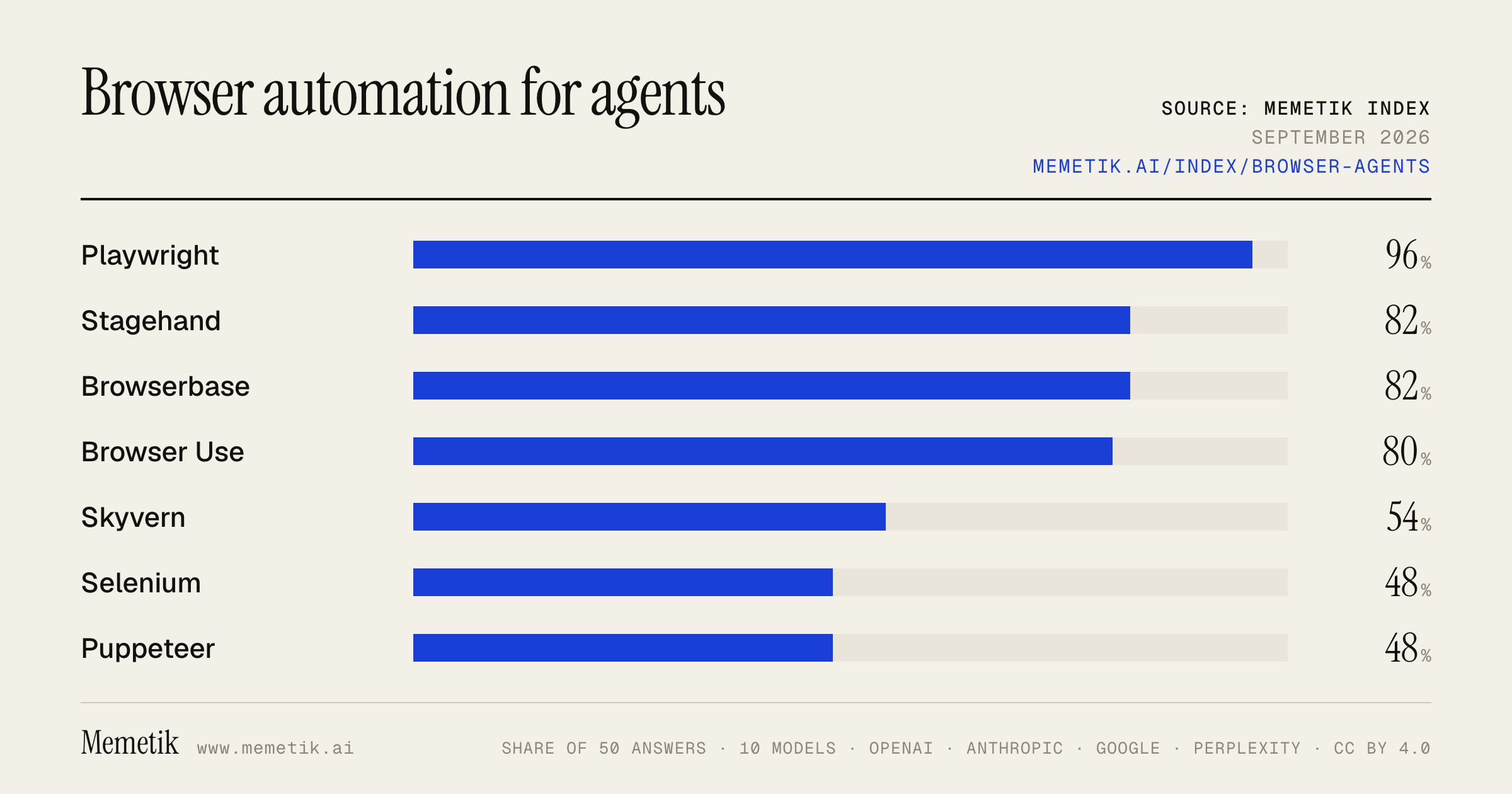
By provider
10 models · 50 answers
OpenAI 3 models · 15 answers
- GPT-5.6 Solgpt-5.6-solmost named: Playwright 100%
- GPT-5.6 Terragpt-5.6-terramost named: Playwright 100%
- GPT-5.6 Lunagpt-5.6-lunamost named: Playwright 100%
Anthropic 3 models · 15 answers
- Claude Opus 5claude-opus-5most named: Playwright 100%
- Claude Sonnet 5claude-sonnet-5most named: Playwright 100%
- Claude Fable 5claude-fable-5most named: Stagehand 100%
Google 2 models · 10 answers
- Gemini 3.6 Flashgemini-3.6-flashmost named: Playwright 100%
- Gemini 3.5 Flashgemini-3.5-flashmost named: Playwright 100%
Perplexity 2 models · 10 answers
- Sonar Prosonar-promost named: Playwright 100%
- Sonar Reasoning Prosonar-reasoning-promost named: Browser Use 100%
Sources the models cited
- scrapfly.io125
- firecrawl.dev87
- brightdata.com83
- youtube.com80
- mastra.ai60
- unbrowse.ai58
- github.com42
- reddit.com32
- usecarly.com26
- skyvern.com24
- nodemaven.com24
- browseract.com20
ChatGPT via API returns no citations, so it does not contribute here.
The prompts
- What is the best browser automation tool for AI agents? Name specific products.
- Which browser automation tool would you recommend to AI agents in 2026?
- Compare the top browser automation tool options right now.
- I'm AI agents and I need a browser automation tool. What should I use and why?
- Best browser automation tool for AI agents to let an agent use websites?
Every answer
Raw model output, unedited
GPT-5.6 TerraWhat is the best browser automation tool for AI agents? Name specific products.
**Best overall for production AI agents: _Browserbase + Stagehand_.**

- **Browserbase** provides managed cloud-browser infrastructure: scalable sessions, persistent logins, observability/session recordings, and agent-focused browser access.
- **Stagehand** is its AI-native SDK, combining normal browser control with LLM-driven actions, extraction, and page understanding that can tolerate UI changes better than brittle selectors. It is the best default when you are building a custom agent that must interact with real, dynamic websites. ([docs.browserbase.com](https://docs.browserbase.com/welcome/getting-started?utm_source=openai))

Other strong choices, by use case:

| If you need… | Choose | Why |
|---|---|---|
| **Maximum reliability for repeatable, known workflows** | **Microsoft Playwright** | Use deterministic locators, assertions, retries, and explicit scripts. Let an AI agent decide *which* workflow to run, but use Playwright for the irreversible execution steps. Browserbase itself positions Playwright for traditional/static workflows. ([docs.browserbase.com](https://docs.browserbase.com/welcome/getting-started?utm_source=openai)) |
| **A higher-level open-source autonomous web agent** | **Browser Use** | Good for Python-centric experiments and agents that receive a goal rather than a fixed sequence. I would validate it rigorously before putting it in charge of payments, account changes, or sensitive data. |
| **No-selector, business-process automation** | **Skyvern** | A strong option for form-heavy back-office workflows. It uses a real Chromium browser with DOM plus visual reasoning, and exposes Python, TypeScript, REST, and Playwright-style controls. ([skyvern.com](https://www.skyvern.com/docs/developers/getting-started/introduction?utm_source=openai)) |
| **Managed cloud execution at scale** | **Browserbase** | Best when sessions, authenticated contexts, debugging, concurrency, and operational infrastructure are the hard parts—not the agent logic. ([docs.browserbase.com](https://docs.browserbase.com/use-cases/agents?utm_source=openai)) |

### My practical recommendation

1. **Build with Playwright + Stagehand.**
   - Use **Playwright** for stable, pre-approved operations.
   - Use **Stagehand** only where the agent needs semantic flexibility—finding the right page element, adapting to minor redesigns, extracting unfamiliar layouts.
   - Run it on **Browserbase** if you need cloud browsers, persistent sessions, and operational visibility.

2. Choose **Skyvern** instead if your primary goal is automating many changing third-party portals with minimal site-specific scripting.

3. Choose **Browser Use** if open source and rapid agent prototyping matter more than enterprise controls.

Do not give any browser agent unrestricted credentials or permission to make irreversible actions by default. Browser agents consume untrusted webpage content and can be vulnerable to prompt-injection-style manipulation, so enforce domain allowlists, scoped credentials, confirmation gates for purchases/submissions, and audit logs. ([arxiv.org](https://arxiv.org/abs/2505.13076?utm_source=openai))
GPT-5.6 TerraWhich browser automation tool would you recommend to AI agents in 2026?
**Recommendation: Stagehand, with deterministic Playwright-style code underneath.**

For an AI agent that must operate real, changing websites, I’d choose **Stagehand** as the primary browser-automation SDK. It is designed around agent-oriented operations—natural-language actions, structured extraction, action discovery, and optional autonomous workflows—while preserving access to conventional browser-control APIs. That hybrid is the key advantage: let the model handle ambiguous UI interpretation, but use code for important, repeatable steps. ([docs.stagehand.dev](https://docs.stagehand.dev/v2/first-steps/introduction?utm_source=openai))

### Practical stack

- **Default:** **Stagehand**
  Best for production agents navigating dynamic sites, extracting structured data, and recovering from superficial UI changes. It supports TypeScript and Python, and is compatible with Playwright-style browser control. ([docs.stagehand.dev](https://docs.stagehand.dev/v2/first-steps/introduction?utm_source=openai))

- **Foundation / strict workflows:** **Playwright**
  Use direct Playwright calls for stable selectors, login/session setup, downloads, uploads, payment-adjacent flows, and any step where reliability must be deterministic. Playwright remains highly relevant and now even ships agent-oriented tooling for its test workflow. ([playwright.dev](https://playwright.dev/docs/release-notes?utm_source=openai))

- **Python-first autonomous prototype:** **Browser Use**
  Reasonable if you want to give an agent a goal and iterate rapidly, but I would be more cautious about making an unconstrained autonomous loop your core production execution layer.

### The pattern I’d actually deploy

```text
Agent planner
  → Stagehand observe/extract to understand the page
  → Stagehand act for variable UI steps
  → Playwright locators/API calls for critical actions
  → confirmation gate before external side effects
  → traces, screenshots, and replayable artifacts
```

### Important caveat

Do **not** give a browsing agent unrestricted authority. Webpage content is untrusted input and can attempt prompt injection or steer an agent toward unsafe actions; research has demonstrated meaningful risks in browser-agent setups. Use domain allowlists, least-privilege credentials, action budgets, isolation, and explicit human approval for purchases, account changes, data exports, or sending messages. ([arxiv.org](https://arxiv.org/abs/2505.13076?utm_source=openai))

**Bottom line:** Pick **Stagehand + Playwright**, not a purely visual “computer-use” agent, for most 2026 production browser agents. Use visual computer control only as a fallback for interfaces that cannot be accessed reliably through DOM/CDP-level automation.
GPT-5.6 TerraCompare the top browser automation tool options right now.
## Bottom line

For most **new end-to-end web test suites**, choose **Playwright**.
Choose **Selenium** when you need the broadest language, browser, grid, and vendor-cloud compatibility.
Choose **Cypress** when frontend-developer workflow and interactive debugging matter more than being a general-purpose browser driver.
Choose **Puppeteer** for Node.js automation that is especially Chrome-centric—scraping, PDFs, screenshots, browser instrumentation—not necessarily a full testing platform.
Choose **WebdriverIO** if your team wants a JavaScript/TypeScript-first test framework on the WebDriver ecosystem.

## Comparison

| Tool | Best for | Browser / platform posture | Strengths | Main trade-offs |
|---|---|---|---|---|
| **Playwright** | Default pick for modern E2E testing | Chromium, Firefox, WebKit engines; JS/TS, Python, Java, .NET | Very strong auto-waiting, isolated browser contexts, parallel execution, traces/screenshots/video, network mocking, clean API | WebKit testing is valuable but is not identical to testing every real Safari configuration; less ideal than Selenium for very heterogeneous legacy enterprise stacks |
| **Selenium** | Maximum compatibility and enterprise scale | W3C WebDriver; major browsers; broad language support; Grid/cloud ecosystem | Mature standard, real browser-vendor drivers, many language bindings, remote/grid execution, broad device-cloud support | More setup and test-framework assembly; explicit synchronization discipline is often needed |
| **Cypress** | Frontend teams testing their own web app | Primarily a web-test product with a polished runner and browser integrations | Excellent local runner, time-travel-style debugging, network stubbing, component testing, approachable developer experience | Less suited to arbitrary browser-control jobs and certain multi-window, cross-origin, or unusual browser workflows |
| **Puppeteer** | Node automation, scraping, screenshots, PDFs, Chrome tooling | Node.js; Chrome/Chromium and Firefox support | Lightweight programmatic API, direct browser control, excellent for Chrome-oriented automation and rendering workflows | Not a complete cross-language/grid testing ecosystem; you assemble more testing/reporting infrastructure yourself |
| **WebdriverIO** | JS/TS teams wanting WebDriver compatibility | JavaScript/TypeScript framework over WebDriver; can fit web and mobile ecosystems | Flexible runner, WebDriver standards compatibility, useful integrations and plugin ecosystem | More configuration choices; generally less “batteries included” than Playwright for new web-only E2E projects |
| **TestCafe** | Small teams wanting minimal setup | JS/TS browser testing | Simple authoring and low initial friction | Smaller ecosystem and less often the strategic first choice for greenfield, large-scale automation today |

## What I would choose

### 1. New SaaS product, modern web app
**Pick Playwright.**

It has the best overall balance of reliable waiting, parallelism, debugging artifacts, API ergonomics, and multi-language support. It is especially strong for CI-heavy E2E suites where diagnosing failures quickly matters.

### 2. Regulated enterprise, legacy browsers, multiple languages, vendor device clouds
**Pick Selenium**, often with a managed cloud or Selenium Grid.

Selenium is based on the W3C WebDriver model, drives browsers locally or remotely, and has the strongest ecosystem for cross-browser, cross-platform, and multi-language automation at organizational scale. WebDriver BiDi is also bringing event-driven capabilities such as network and console-event handling into the standard ecosystem. ([selenium.dev](https://www.selenium.dev/documentation/webdriver/?utm_source=openai))

### 3. React/Vue/Angular team that values rapid local feedback
**Pick Cypress**—particularly if component testing and a polished interactive debugging workflow are central to your process.

I would not choose it merely because it is easy to start; choose it because its application-testing workflow matches how your team works.

### 4. Scraping, PDF generation, screenshots, synthetic monitoring, or Chrome DevTools-style automation
**Pick Puppeteer.**

Puppeteer is a Node.js-focused browser automation library maintained by Chrome’s browser-automation team. It supports Chrome and Firefox, using CDP for Chrome by default and WebDriver BiDi for Firefox; unlike Selenium, it does not aim to provide Selenium’s broad multi-language bindings or Grid-scale orchestration. ([pptr.dev](https://pptr.dev/faq?utm_source=openai))

### 5. JavaScript team that needs WebDriver or Appium alignment
**Pick WebdriverIO.**

It is the pragmatic middle path when you need WebDriver compatibility but want to stay in a JS/TS-native test framework.

## Important distinctions people miss

- **Browser automation is not always browser testing.** Puppeteer is excellent for controlling browsers programmatically; Playwright, Cypress, Selenium, and WebdriverIO are more natural homes for maintainable test suites.
- **“Cross-browser” needs definition.** Testing Chromium, Firefox, and WebKit engine behavior is different from validating exact browser versions, enterprise policies, extensions, real iOS Safari, or physical devices.
- **Tool cost is usually not license cost.** The expensive parts are flaky tests, slow CI, device/browser infrastructure, debugging time, and maintaining test data—not npm package pricing.
- **Avoid mixing primary tools without a reason.** A typical healthy stack is one primary E2E tool, plus a separate mobile tool only if needed, plus a cloud/grid provider if required.

## Concise recommendation matrix

- **Best overall new default:** Playwright
- **Best compatibility / enterprise standard:** Selenium
- **Best frontend-centric developer experience:** Cypress
- **Best Node/Chrome automation:** Puppeteer
- **Best JS WebDriver ecosystem option:** WebdriverIO

If you are starting fresh and have no unusual constraints: **use Playwright with TypeScript**.
If you must support broad enterprise environments, multiple programming languages, or existing WebDriver infrastructure: **use Selenium**.
GPT-5.6 TerraI'm AI agents and I need a browser automation tool. What should I use and why?
**Use Playwright as your foundation.** For an AI-agent workflow, pair it with an agent-friendly layer such as **Stagehand**; add a managed browser provider such as **Browserbase** only when you need cloud scale, isolation, persistent sessions, or operational tooling.

### Recommended stack

| Need | Use | Why |
|---|---|---|
| Reliable, deterministic browser control | **Playwright** | Mature APIs, automatic waiting/retries, strong locators, network controls, multiple tabs/contexts, and Chromium/Firefox/WebKit support. It is the right low-level execution layer. ([playwright.dev](https://playwright.dev/docs/browsers?utm_source=openai)) |
| Let an LLM operate unfamiliar or changing UIs | **Stagehand + Playwright concepts** | Adds natural-language actions and structured extraction while allowing you to use code where precision matters. Its caching/self-healing model is meant to turn successful exploratory agent behavior into repeatable workflows. ([github.com](https://github.com/browserbase/stagehand?utm_source=openai)) |
| Run many sessions in production without managing browsers | **Browserbase** | Provides hosted browser sessions, observability, proxy/stealth options, persistent contexts, and supports Playwright, Puppeteer, Selenium, and Stagehand. ([docs.browserbase.com](https://docs.browserbase.com/welcome/introduction?utm_source=openai)) |
| Existing Java/Selenium estate or strict WebDriver compatibility | **Selenium** | Choose it primarily for organizational compatibility, not for a greenfield AI-agent build. Browserbase itself positions Playwright as the modern “traditional automation” choice and Selenium for existing Selenium users. ([docs.browserbase.com](https://docs.browserbase.com/welcome/getting-started?utm_source=openai)) |

### Why this is better than “just give the model a browser”
Pure autonomous browser agents are useful for exploration, but can be expensive, slow, and nondeterministic. A better production pattern is:

1. **LLM plans / discovers** a workflow on a new or changed page.
2. **Structured browser actions execute** the actual navigation, form filling, downloads, and verification.
3. **Persist stable steps as deterministic Playwright code** or cached agent actions.
4. **Require confirmation** before irreversible actions: purchases, submissions, account changes, sending messages, or handling sensitive data.

That approach gives you agent flexibility without putting every click behind an LLM decision.

### Practical recommendation by scenario

- **Python agent, prototype, unfamiliar websites:** start with **Stagehand** or another LLM-oriented wrapper, but retain direct browser-level escape hatches.
- **TypeScript/Node application, serious production workflows:** **Playwright + Stagehand**, preferably with clear separation between “AI discovery” and “deterministic execution.”
- **Need remote browsers, parallel jobs, login persistence, recordings/debugging:** **Playwright or Stagehand on Browserbase**.
- **Internal site with a stable UI:** plain **Playwright** is usually simpler, cheaper, and more reliable than an agentic wrapper.
- **If an API exists:** use the **API first**, and use browser automation only for UI-only steps. APIs are generally faster, less brittle, and easier to audit.

### My default pick

For a new AI-agent product:

> **Playwright for the core + Stagehand for LLM-mediated tasks + Browserbase when you need hosted production browser infrastructure.**

Avoid building your core workflow around screenshot-only clicking or unconstrained natural-language browsing. Prefer DOM/accessibility-based locators, explicit success checks, idempotent actions, and human approval boundaries.
GPT-5.6 TerraBest browser automation tool for AI agents to let an agent use websites?
**Best overall: Playwright** — use it as the browser-control foundation for an AI agent.

It’s the best default because it is mature, fast, cross-browser, and relatively reliable: its role/text/label-based locators and automatic waiting/retry behavior reduce common UI-automation failures. Build your agent so the LLM chooses from a **small set of deterministic Playwright tools**—navigate, inspect, click, type, extract, download—rather than letting it emit arbitrary browser code. ([playwright.dev](https://playwright.dev/docs/locators?utm_source=openai))

**If you specifically want an agent-native layer: choose Stagehand on top of Playwright.**
Stagehand adds natural-language actions and structured extraction, while retaining Playwright APIs for deterministic steps. That hybrid is useful when website layouts vary, but you still need debugging, safeguards, and a reliable fallback for critical workflows. ([docs.stagehand.dev](https://docs.stagehand.dev/v2/first-steps/introduction?utm_source=openai))

### My practical shortlist

| Need | Best choice |
|---|---|
| Production automation on known sites | **Playwright** |
| AI agent that must operate across changing/unknown sites | **Stagehand + Playwright** |
| Visual, human-like browser/desktop interaction where DOM access is unavailable | **Computer-use model** |
| One-off personal task automation | A hosted browser-agent product, but don’t depend on it for critical unattended workflows |

For **visual computer use**, OpenAI’s computer-use capability is appropriate when an agent must work through screenshots, mouse, and keyboard rather than clean DOM controls. It is more general but normally slower, less deterministic, and needs stronger confirmation/sandboxing than Playwright-style tools. ([openai.com](https://openai.com/index/computer-using-agent/?utm_source=openai))

### Recommended architecture

1. **Prefer an official API** if the target service has one.
2. Otherwise use **Playwright** for navigation, form fills, and known workflows.
3. Add **Stagehand only for fuzzy steps** such as “find the invoice-download control” or extracting semi-structured data.
4. Require human confirmation before irreversible actions: purchases, sending messages, deleting/editing data, uploading files, or changing account/security settings.
5. Run browser sessions in isolation; limit allowed domains, credentials, downloads, and network access. Treat page text as untrusted—web pages can contain prompt-injection content intended to redirect the agent. ([arxiv.org](https://arxiv.org/abs/2505.13076?utm_source=openai))

**Bottom line:** start with **Playwright**. If your agent needs semantic “use the website like a person” abilities, add **Stagehand** rather than replacing Playwright.
Claude Sonnet 5What is the best browser automation tool for AI agents? Name specific products.
There isn't a single universal "best" tool—it depends on whether you need a low-level automation library, a managed cloud browser infrastructure, or a full autonomous agent framework. Here's a breakdown of the leading options in each category as of 2026:

## Foundational Automation Libraries (the "engine")
- **Playwright** –
Playwright is the current standard for browser automation from Microsoft, driving Chromium, Firefox, and WebKit, waiting for elements on its own, and shipping bindings for Python, JavaScript, Java, and .NET.
 Most AI agent tools are built on top of it.
- **Puppeteer/Selenium** – Older but still widely supported alternatives, often used interchangeably with Playwright in cloud browser APIs.

## AI-Native Agent Frameworks (LLM decides actions)
- **Browser Use** – An open-source framework praised as
a good choice for developers building custom agents, free plus LLM costs, with over 97,000 GitHub stars
. It's frequently cited as the top open-source pick, reportedly scoring **89.1% on WebVoyager** benchmarks per one evaluation.
- **Stagehand** –
An open-source agent framework that exposes structured actions like act, extract, and observe, so an agent's steps stay predictable. It fits the JavaScript ecosystem and works over CDP, so you can run it on a managed cloud browser when you need anti-bot handling underneath.
 Best if you're in TypeScript/Node.js.
- **Skyvern** –
Combines an LLM with computer vision to act on pages by what they look like, not by fixed selectors, and ships a visual workflow builder while also working as an AI scraper.
 Great for form-heavy, no-code workflows.
- **Vercel Agent Browser** –
A headless browser automation CLI specifically designed for AI agents; with 12.1k GitHub stars and backing from Vercel Labs, it's become a go-to tool for developers integrating browser automation into AI coding assistants.


## Managed Cloud Browser Infrastructure (for scale/anti-bot)
- **Browserbase** –
Best for teams that need managed browser infrastructure for AI agents and browser automation running in production; it provides managed cloud browser infrastructure for browser automation and AI agents.

- **Browserless.io** –
Remains the safest default pick if you need full browser control (Puppeteer, Playwright, PDF generation) at production scale, backed by a mature platform and a self-hosting path.

- **Hyperbrowser.ai** and **Steel.dev** –
Worth testing for their agent-native tooling and debugging features if your workload is AI-agent-specific.

- **Bright Data Agent Browser** – Recommended for
enterprise teams needing production-ready infrastructure with built-in unlocking
, offering built-in CAPTCHA solving and unlimited concurrent sessions.
- **Anchor Browser / Kernel** – Other infrastructure platforms in the same category as Browserbase and Steel.

## Consumer/End-User Agentic Browsers
If you mean an actual browser (not a dev tool), options include **Perplexity Comet**, **ChatGPT Atlas**, and **Microsoft Edge Copilot Mode**, though these are more for personal browsing assistance than programmatic agent workflows.

## Practical recommendation
- **If you're a developer building a custom agent from scratch:** Browser Use (Python) or Stagehand (TypeScript), often layered on Playwright.
- **If you need production-scale, anti-bot-resistant infrastructure:** Browserbase or Bright Data.
- **If you want a no-code/low-code visual agent for form-filling and workflows:** Skyvern.
- **If you're testing rather than building an autonomous agent:** Plain Playwright is still the gold standard.

Would you like me to narrow this down based on your specific use case (e.g., web scraping, testing, RPA, or building a fully autonomous agent)?
- https://scrapfly.io/blog/posts/best-browser-automation-tools
- https://www.firecrawl.dev/blog/best-browser-agents
- https://brightdata.com/blog/ai/best-agent-browsers
- https://mastra.ai/articles/best-ai-browser-automation-platforms
- https://blog.dataengineerthings.org/best-5-browser-automation-api-for-ai-agents-in-2026-38d179210293?gi=3f74157a174f
Claude Sonnet 5Which browser automation tool would you recommend to AI agents in 2026?
Based on current landscape research, here's my recommendation, broken down by use case since "best" really depends on what you're building:

## Quick recommendation
For most AI agent projects in 2026, I'd point you toward **Browser Use** (Python) or **Stagehand** (TypeScript/Node.js) as the foundation, paired with a managed cloud browser (like Browserbase or Steel) if you need scale/anti-bot handling.

## Why these two

**Browser Use** —
it's the leading open-source framework for LLM-driven browser agents, with roughly 100,000 GitHub stars as of June 2026, giving an agent the tools to read a page and act, pairing with any browser backend.

You can point it at a local browser for development, or a managed cloud browser for stealth at scale.
 It also has strong benchmark credibility —
Browser Use has emerged as the leading open-source framework for AI browser agents, achieving 89.1% success rate on the WebVoyager benchmark.


**Stagehand** —
it's an open-source agent framework that exposes structured actions like act, extract, and observe, so an agent's steps stay predictable, fitting the JavaScript ecosystem. It works over CDP, so you can run it on a managed cloud browser when you need anti-bot handling underneath.
 This is the better pick if your stack is TypeScript/Node.js and you want more deterministic, debuggable agent steps rather than pure free-form LLM reasoning.

## Other strong options depending on your needs

- **Skyvern** —
best for vision-driven, low-code AI automation; it combines an LLM with computer vision to act on pages by what they look like, not by fixed selectors.

- **Playwright** (as a foundation, not a full agent solution) —
it remains one of the best browser automation frameworks, supporting Chromium, Firefox, and WebKit with strong debugging tools, but for AI agents it's usually a foundation rather than the full product since it still relies heavily on selectors, scripted flows, and developer maintenance, and workflows may break when the website changes.
 Good if you want maximum engineering control and are layering your own agent logic on top.
- **Managed cloud browser infra** (Browserbase, Steel, Bright Data's Agent Browser, Scrapfly) — necessary once you move to production.
Infrastructure matured in 2026: tools like Browserbase and Steel provide managed, cloud-hosted browsers purpose-built for agents, solving the headless browser scaling problem.
 For heavy enterprise scale,
Bright Data's Agent Browser stands out as purpose-built for scale, supporting 1M+ concurrent sessions without performance degradation.


## How to decide

1. **Building agents from scratch, need flexibility & Python** → Browser Use
2. **TypeScript/Node stack, want predictable/debuggable actions** → Stagehand
3. **Need vision-based interaction without heavy selector logic** → Skyvern
4. **Need production scraping behind anti-bot walls at scale** → pair any of the above with a managed cloud browser (Browserbase, Steel, Bright Data, or Scrapfly)
5. **Want full manual control and are building your own agent layer** → Playwright as the base

One general trend worth noting:
self-healing automation can repair broken selectors using semantic or visual context
, which is increasingly a baseline expectation — so whichever tool you pick, check whether it (or an add-on) offers this, since brittle-selector breakage is still the #1 pain point in browser automation.

If you tell me your stack (Python vs. JS), scale needs, and whether you're doing testing, scraping, or general-purpose task automation, I can narrow this down further.
Claude Sonnet 5Compare the top browser automation tool options right now.
Based on current sources, here's how the top browser automation tools stack up in 2026, organized by category since "best" really depends on your use case (testing, scraping, or AI agents).

## Classic Automation Frameworks (Testing & Scraping)

**Playwright** — The current default choice for most new projects.
Playwright is Microsoft's cross-browser automation framework, built by engineers who previously worked on Puppeteer, and it has become the default choice for teams starting fresh in 2026.
 Its
key advantages: single API across Chromium, Firefox, and WebKit, built-in auto-waiting, network interception, and a strong native test runner with tracing and parallel execution.
 It also offers
multi-language support with first-class implementations for JavaScript/TypeScript, Python, Java, and .NET.


**Puppeteer** — Best if you're all-in on Chrome/Chromium.
It's best for JavaScript developers requiring high-performance browser automation, especially when working with Chrome or Chromium and prioritizing execution speed.
 The tradeoffs: it's
primarily supports Chromium-based browsers, with Firefox support still evolving, and is exclusive to Node.js/JavaScript environments, though unofficial ports like Pyppeteer exist.
 It's also more detectable —
it can be detected by advanced anti-bot systems unless enhanced with tools like Puppeteer Stealth.


**Selenium** — The legacy enterprise standard.
Selenium still holds ground in large enterprise test suites
, though newer guides note it
can be containerized (e.g., via Selenoid or Moon), but often lacks the integrated AI-native features required for modern autonomous tasks.


**Cypress** — Rounds out the testing-focused category alongside the above, commonly grouped as
testing-focused tools like Cypress, and managed infrastructure platforms like Browserless.


## AI-Native / Agentic Tools (fastest-growing category in 2026)

This is the space seeing the most innovation right now:

- **Browser Use** —
The leading open-source framework for LLM-driven browser agents, with roughly 100,000 GitHub stars as of June 2026
, giving
an agent the tools to read a page and act, pairing with any browser backend.
 It's considered
the clearest choice for teams building autonomous AI agents.

- **Stagehand** —
An open-source agent framework that exposes structured actions like act, extract, and observe, so an agent's steps stay predictable, fitting the JavaScript ecosystem.

- **Skyvern** — Takes a vision-first approach:
it combines an LLM with computer vision to act on pages by what they look like, not by fixed selectors.


## Managed Cloud Browser Platforms

For teams that don't want to run their own infrastructure: **Browserbase**, **Browserless**, **Firecrawl**, **Bright Data**, and **Zyte** all offer hosted browser infrastructure.
Cloud browser APIs are the fastest path to a production browser without your own infrastructure.
 Firecrawl's angle is notable —
its new Browser Sandbox is a fully managed, secure browser environment that gives AI agents a live browser with zero local setup.
 Similarly,
Browserbase removes the infrastructure burden of running browsers at scale.


## No-Code / RPA

For non-developers automating business workflows:
Bardeen, Browserflow, and Axiom target business process work and marketing tasks, with UiPath and Microsoft Power Automate covering enterprise RPA.


## Bottom Line


Playwright is the strongest general default for both testing and scraping
 if you need one tool that does it all. Choose **Selenium** if you're maintaining a large legacy enterprise suite, **Puppeteer** if you're Chrome-only and want raw speed, and **Browser Use/Stagehand/Skyvern** if you're building autonomous AI agents rather than scripted tests. If you don't want to manage browser infrastructure yourself, a managed cloud platform (Browserbase, Browserless, Firecrawl) layered on top of Playwright/Puppeteer is increasingly the pragmatic choice. As one source puts it,
there is no single winner among the best browser automation tools in 2026, because the tools solve different problems.
- https://nodemaven.com/blog/best-browser-automation-tools/
- https://brightdata.com/blog/web-data/best-browser-automation-tools
- https://onlineproxy.io/blog/top-browser-automation-tools-2026
- https://www.browserless.io/blog/best-browser-automation-tools
- https://scrapfly.io/blog/posts/best-browser-automation-tools
- https://www.firecrawl.dev/blog/browser-automation-tools-comparison
Claude Sonnet 5I'm AI agents and I need a browser automation tool. What should I use and why?
Here's a breakdown of the main options for AI agent browser automation, depending on what you're building:

## If you want a framework built specifically for LLM-driven agents

**Browser Use** (Python) is the top pick for most people building custom agents.
It's the leading independent open-source framework for LLM-driven browser agents, and the best DIY starting point, built in Python and compatible with any LLM.

It gives an agent the tools to read a page and act, and it pairs with any browser backend—point it at a local browser for development, or a managed cloud browser for stealth at scale.
 It's also extremely popular —
it leads open source with ~108k GitHub stars, and is #1 on the Odysseys leaderboard at 87.4% (August 2026)
.

**Stagehand** is the equivalent choice if you're in the JS/TS ecosystem:
it's an open-source agent framework that exposes structured actions like act, extract, and observe, so an agent's steps stay predictable, fits the JavaScript ecosystem, and works over CDP so you can run it on a managed cloud browser when you need anti-bot handling underneath.


## If you want the underlying "deterministic" browser engine

**Playwright** is generally the base layer most agent frameworks sit on top of:
Playwright is the deterministic base most agent frameworks build on.
 It's mature and well-supported —
it remains the most popular framework (45.1% adoption among QA professionals), but agent-powered tools like Stagehand are adding an AI reasoning layer on top.
 The tradeoff versus a true agent framework:
for AI agents, Playwright is usually a foundation rather than the full product—it still relies heavily on selectors, scripted flows, and developer maintenance, so when the website changes, the workflow may break, and when the site requires CAPTCHA, login, session continuity, or a human approval step, the team must build that layer separately.


## Why agent-based tools beat plain scripted automation

The core advantage of LLM-driven tools over raw Selenium/Playwright scripts is resilience to UI changes:
browser agents use LLMs to reason about what they see — a Playwright script breaks when a button's class name changes, but a browser agent recognizes it's still a "Submit" button and clicks it anyway.


## If you need production scale / anti-bot handling

If your agents will run at volume against sites that actively block bots, you likely want a managed cloud browser layer underneath your framework, since
infrastructure matured — tools like Browserbase and Steel provide managed, cloud-hosted browsers purpose-built for agents, solving the headless browser scaling problem.
 Enterprise-scale options like Bright Data's Agent Browser exist too, which
is purpose-built for scale, supporting 1M+ concurrent sessions without performance degradation.


## My actual recommendation

For most people building AI agents right now:
- **Prototyping/custom agent, Python** → **Browser Use**
- **Prototyping/custom agent, TypeScript/Node** → **Stagehand**
- **You want raw control and are willing to write more glue code yourself** → **Playwright** directly
- **You need to survive CAPTCHAs, logins, and scale in production** → pair one of the above with a managed cloud browser backend (Browserbase, Steel, or Bright Data)

The right choice mostly comes down to
how much of the unblocking and plumbing you want to own versus have handled for you — if you want an outcome described in plain language executed on a browser that stays unblocked, a managed agent wins; if you want full control, an open-source framework on your own stack fits better.


If you tell me more about your use case (language, scale, whether you're scraping vs. doing multi-step workflows like form-filling/logins), I can narrow this down further.
Claude Sonnet 5Best browser automation tool for AI agents to let an agent use websites?
There's no single "best" tool — it depends on your priorities (control vs. speed, open-source vs. managed, coding effort vs. no-code). Here's how the landscape breaks down in 2026:

## Top picks by use case

**Browser Use** — the leading open-source, Python-based framework built specifically for LLM-driven agents.
It is the leading open-source framework for LLM-driven browser agents, with roughly 100,000 GitHub stars, and gives an agent the tools to read a page and act, pairing with any browser backend.
 It's the best DIY starting point if you want full control and are Python-based, and
it leads open source with ~108k GitHub stars and is #1 on the Odysseys leaderboard at 87.4% as of August 2026.


**Stagehand** — best if you're in the TypeScript/Node.js ecosystem.
It's an open-source agent framework that exposes structured actions like act, extract, and observe so an agent's steps stay predictable, fits the JavaScript ecosystem, and works over CDP so you can run it on a managed cloud browser for anti-bot handling.


**Playwright** — the deterministic foundation many agent frameworks build on top of.
It remains the most popular framework with 45.1% adoption among QA professionals, though agent-powered tools like Stagehand add an AI reasoning layer on top of it.
 The tradeoff:
Playwright remains one of the best browser automation frameworks, but for AI agents it's usually a foundation rather than the full product since it still relies heavily on selectors and scripted flows, so when the website changes, the workflow may break.


**Managed cloud browser platforms (Browserbase, Steel, Bright Data Agent Browser)** — best if you don't want to own anti-bot/proxy/scaling infrastructure.
Infrastructure matured as tools like Browserbase and Steel began providing managed, cloud-hosted browsers purpose-built for agents, solving the headless browser scaling problem.
 For enterprise scale,
Bright Data's Agent Browser stands out as purpose-built for scale, supporting 1M+ concurrent sessions without performance degradation.


**Skyvern** — best for no-code form-filling automation, per multiple rankings.

**Claude in Chrome (Anthropic)** — a more consumer/prosumer option where
granting it permission lets Claude read the page, click, type, and chain actions across multiple tabs, record repetitive workflows, run scheduled tasks, and debug via console and network logs, with built-in knowledge of sites like Gmail, Calendar, Docs, Slack, and GitHub.


## How to choose

A good framing from one comparison:
the right browser automation tool depends on who you are and how much of the operational work you want to own — cloud browser APIs are the production default with managed stealth so you skip the operations, open-source frameworks trade upkeep for control (Playwright, Puppeteer, Selenium), AI agents like Browser Use and Stagehand suit changing sites by taking natural-language goals, and no-code tools serve business users.


**Quick recommendation:**
- **Want max control, willing to code:** Browser Use (Python) or Stagehand (TypeScript)
- **Want production scale without managing infra:** Browserbase, Steel, or Bright Data Agent Browser
- **Want no-code/low-code:** Skyvern
- **Want it built into your existing AI assistant:** Claude in Chrome or ChatGPT Atlas

If you tell me your tech stack (Python vs. JS), whether you need to self-host, and your budget/scale requirements, I can narrow this down further.
- https://scrapfly.io/blog/posts/best-browser-automation-tools
- https://scrapfly.io/blog/posts/best-ai-browser-agents
- https://www.firecrawl.dev/blog/best-browser-agents
- https://www.browseract.com/blog/best-browser-automation-for-ai-agents
- https://brightdata.com/blog/ai/best-agent-browsers
- https://www.usecarly.com/blog/ai-browser-automation-tools/
Gemini 3.6 FlashWhat is the best browser automation tool for AI agents? Name specific products.
The best browser automation tool for AI agents depends on your architecture—specifically whether you need **open-source frameworks**, **cloud browser infrastructure**, or **deterministic developer tools**.

---

### 1. Best Open-Source AI Agent Frameworks
These tools provide the logic layer, allowing vision and language models (LLMs) to control a browser using goal-driven, natural-language instructions.

* **Browser Use (`browser-use`)**
  * **Best for:** Most open-source AI agent builds.
  * **Why it’s top-tier:** It connects LLMs directly to Playwright/Chromium. Instead of relying strictly on hardcoded CSS selectors, it feeds visual screenshots and interactive DOM elements into models like Claude 3.5 Sonnet or GPT-4o, allowing the agent to dynamically react to UI changes.
* **Skyvern**
  * **Best for:** Form filling, workflow automation, and complex visual UI navigation.
  * **Why it’s top-tier:** Built specifically to replace brittle traditional web scrapers, Skyvern uses computer vision and LLMs to understand website layouts autonomously. It handles dynamic layout shifts exceptionally well without manual selector mapping.
* **Stagehand**
  * **Best for:** Lightweight, code-level AI browser control.
  * **Why it’s top-tier:** Created by Browserbase, Stagehand provides an SDK wrapper around Playwright with AI primitives (`act()`, `extract()`, `observe()`). It lets developers blend deterministic code with AI reasoning rather than giving the model total control over the entire browser session.

---

### 2. Best Managed Cloud Infrastructure (Serverless Browsers)
Running headless Chromium at scale for hundreds of AI agents consumes massive CPU/RAM and gets flagged by anti-bot tools. Cloud infrastructure tools run the browser in the cloud and handle proxy rotation and stealth mode.

* **Browserbase**
  * **Best for:** Production-grade execution and enterprise reliability.
  * **Why it’s top-tier:** Offers serverless browser instances with built-in proxy rotation, fingerprint spoofing, CAPTCHA solving, and session recording. It works natively with frameworks like LangChain, LlamaIndex, and Stagehand.
* **Steel (`steel-dev`)**
  * **Best for:** Open-source or self-hosted browser cloud infrastructure.
  * **Why it’s top-tier:** Purpose-built for AI agents, Steel provides an API to spin up, control, and tear down cloud browser sessions, complete with anti-detect mechanisms and context persistence.
* **Kernel / TinyFish**
  * **Best for:** Low-latency, high-benchmark WebVoyager task completion.
  * **Why it’s top-tier:** TinyFish and Kernel provide ultra-fast sandboxed browser environments (often sub-30ms startup) designed specifically to handle complex authenticated agent workflows.

---

### 3. Best AI-Native Developer Interfaces & MCPs
If you are using developer-focused coding agents (like Claude Code, Cursor, or Windsurf), these CLI and protocol-based tools integrate directly into the developer workflow.

* **Vercel Agent Browser CLI**
  * **Best for:** Coding agents validating local frontend apps or staging sites.
  * **Why it’s top-tier:** Instead of sending full DOM trees or raw screenshots, Vercel’s tool takes condensed snapshots with simplified reference tags (e.g., `@e1`, `@e2`). This dramatically reduces token consumption while maintaining high first-try task success rates (~95%).
* **Playwright / Puppeteer MCP Servers**
  * **Best for:** Standard Model Context Protocol (MCP) integrations.
  * **Why it’s top-tier:** Allows LLMs to invoke browser commands natively through standardized MCP tool calls. Useful for fast, deterministic testing where you don't need full visual autonomy.

---

### Recommendation Summary
* For **building a autonomous web-browsing agent**, start with **`browser-use`** or **`Skyvern`**.
* For **scaling agents in production** (handling CAPTCHAs, proxies, anti-bot), use **Browserbase** or **Steel**.
* For **hybrid code control** where you only want AI for specific steps, use **Stagehand** or **Playwright MCP**.
Gemini 3.6 FlashWhich browser automation tool would you recommend to AI agents in 2026?
The optimal browser automation tool for AI agents depends on whether you are building **code-based workflows (SDKs)**, leveraging **Model Context Protocol (MCP) servers**, or using **headless cloud infrastructure**.

---

### **1. Best Overall SDK: Stagehand**
* **Best for:** Developers building resilient TypeScript/Python workflows using LLMs.
* **Why it’s recommended:** Traditional libraries like Playwright or Puppeteer break when page markup or DOM selectors change. **Stagehand** (by Browserbase) bridges deterministic Playwright automation with LLM reasoning.
* **Key Features:**
  * **Self-Healing Actions:** Offers high-level primitives (`act`, `observe`, `extract`) that use AI to locate elements, automatically adapting when the DOM changes.
  * **Token Efficiency:** Converts web pages into pruned accessibility trees rather than raw DOM or high-cost screenshots, saving API costs and execution time.
  * **Fallback to Native APIs:** You can seamlessly mix raw Playwright locator calls with LLM instructions in the same execution context.

---

### **2. Best Open-Source Python Agent Framework: Browser-Use**
* **Best for:** Teams building fully autonomous Python agents (e.g., LangChain, LlamaIndex, AutoGen integrations).
* **Why it’s recommended:** **Browser-Use** is one of the most popular open-source, vision-and-DOM-capable libraries designed specifically for LLM agent loops.
* **Key Features:**
  * Native support for Multi-modal / Vision models (GPT-4o, Claude 3.5 Sonnet, Gemini Pro).
  * Built-in multi-tab support, cookie management, and state persistence.
  * Designed to hand full control of the browser loop to an agent while giving humans an easy way to inspect trajectory histories.

---

### **3. Best for Coding Assistants & CLI Agents: Playwright MCP & Agent Browser**
* **Best for:** Developer workflows, Cursor/VS Code AI assistants, and Claude/ChatGPT integrations using MCP.
* **Why it’s recommended:** Rather than embedding complex browser code into an agent, **MCP (Model Context Protocol)** servers expose the browser as a standardized set of tool calls.
* **Top Options:**
  * **Microsoft’s Playwright MCP:** Generates low-token accessibility tree snapshots instead of full page images, allowing LLMs to interact with web pages deterministically.
  * **Vercel’s Agent Browser:** A lightweight, high-performance CLI tool (built in Rust) that allows coding agents to issue direct terminal actions (e.g., `agent-browser click @element`).

---

### **4. Best Managed / Cloud Infrastructure: Browserbase or Bright Data Agent Browser**
* **Best for:** Enterprise production scaling, anti-bot/CAPTCHA handling, and residential proxy integration.
* **Why it’s recommended:** Running headless Chrome instances at scale leads to IP blocks, memory leaks, and CAPTCHA walls.
* **Top Options:**
  * **Browserbase:** Managed serverless browser infrastructure with built-in session recording, stealth modes, and deep integration with Stagehand.
  * **Bright Data Agent Browser:** Excellent if your agents frequently run into aggressive anti-scraping checks or require automated CAPTCHA solving and dynamic proxy rotation.

---

### **5. Alternative API-First Approach: Unbrowse**
* **Best for:** High-speed, token-efficient background automation.
* **Why it’s recommended:** Instead of executing slow UI actions (click, type, wait), **Unbrowse** auto-discovers and reverse-engineers internal web APIs during an initial browsing run. It allows your AI agent to fetch JSON directly via underlying HTTP endpoints, providing **3–5x faster execution** and significantly lower LLM token usage.

---

### **Summary Recommendation**
* **For a modern TypeScript/Python codebase:** Go with **Stagehand**.
* **For an autonomous Python LLM pipeline:** Choose **Browser-Use**.
* **For Claude / Cursor tool integration:** Use **Playwright MCP**.
* **For heavy production scaling & anti-bot protection:** Run Stagehand or Browser-Use on top of **Browserbase**.
Gemini 3.6 FlashCompare the top browser automation tool options right now.
When evaluating browser automation tools today, the landscape generally splits into three major categories depending on your core objective: **developer-first open-source frameworks** (for QA & testing), **AI & agentic automation engines** (for autonomous web actions & LLM integration), and **managed scraper/stealth runtimes** (for high-scale web scraping and anti-bot handling).

Here is a comparison of the top choices across these categories.

---

### Category 1: Open-Source Code Frameworks (Testing & QA)

These traditional, code-driven frameworks excel when you have predictable user flows, require exact execution, and run tests through CI/CD pipelines.

#### 1. Playwright
* **Best for:** Overall E2E testing, modern web applications, multi-language teams.
* **Languages:** JavaScript, TypeScript, Python, Java, C#.
* **Strengths:**
  * Exceptionally fast and low-flake due to direct WebSocket communication with browser debugging protocols (CDP/WebDriver BiDi).
  * Native, seamless support for multi-tab, multi-origin, and multi-user contexts.
  * Auto-waiting mechanism eliminates arbitrary hard sleeps.
  * Full cross-browser support (Chromium, Firefox, WebKit/Safari).
* **Weaknesses:** Lacks the deep legacy browser matrix of Selenium.

#### 2. Cypress
* **Best for:** Frontend developers doing unit, component, and fast local end-to-end testing.
* **Languages:** JavaScript / TypeScript only.
* **Strengths:**
  * Runs inside the browser, offering unmatched live debugging, time-travel, and instant hot-reloading.
  * Highly developer-friendly setup and intuitive API.
* **Weaknesses:** Limited multi-tab and iFrame flexibility compared to Playwright; runs restricted inside node/browser execution models.

#### 3. Selenium / WebDriver BiDi
* **Best for:** Legacy enterprise test suites, massive cross-browser matrices, non-standard language environments.
* **Languages:** Java, Python, C#, JS/TS, Ruby, Go.
* **Strengths:**
  * Massive global ecosystem and backward compatibility.
  * Maturing WebDriver BiDi protocol brings real-time, bi-directional event handling closer to Playwright's speeds.
* **Weaknesses:** Slower setup, requires extensive boilerplate code, and prone to flakiness if auto-waits aren't implemented properly.

#### 4. Puppeteer
* **Best for:** Lightweight Chrome/Chromium automation, PDF generation, and fast web scraping.
* **Languages:** JavaScript / TypeScript.
* **Strengths:** Maintained by Google, zero overhead when operating specifically within Node.js and Chrome.
* **Weaknesses:** Lacks built-in test runner features and multi-browser support (WebKit/Firefox are secondary).

---

### Category 2: AI Agent & "Agentic Process Automation" Frameworks

These tools use AI and Large Language Models (LLMs) to navigate websites using vision or DOM context. They excel on dynamically changing web interfaces where hardcoded selectors break.

#### 1. Skyvern / Unbrowse
* **Best for:** Automating complex forms, workflows without fixed UI elements, or bypassing traditional UI scraping using direct API discovery.
* **Key Feature:** Operates via LLMs/Computer Vision to dynamically adapt to layout changes, or auto-discovers backing APIs to bypass DOM interactions altogether.
* **Trade-off:** High execution latency and dynamic token/API costs compared to rigid deterministic scripts.

#### 2. Browser Use / Stagehand
* **Best for:** AI agent integration with Python or TypeScript.
* **Key Feature:** Acts as an execution layer for AI agents (like Claude or GPT-4o), translating natural language commands ("*Log in and download the latest invoice*") into low-level browser actions using Playwright under the hood.

---

### Category 3: Cloud Execution & Anti-Bot Infrastructure

When running headless browsers at scale, IP blocking, TLS fingerprinting, and Cloudflare checks often block standard Playwright or Puppeteer scripts.

* **Top Choices:** Browserless, AnchorBrowser, Bright Data, Scrapfly.
* **How They Work:** They provide cloud-hosted browser endpoints (via CDP) with managed proxy networks, built-in stealth patches (like `puppeteer-extra-plugin-stealth`), CAPTCHA solving, and browser fingerprint rotation.
* **Best for:** Web scraping, public data collection, and high-concurrency browser tasks without infrastructure maintenance.

---

### Quick Selection Matrix

| Objective | Recommended Tool | Why |
| :--- | :--- | :--- |
| **Modern Web App E2E Testing** | **Playwright** | Fastest, most reliable, cross-browser, auto-waiting. |
| **Frontend Developer Testing** | **Cypress** | Best live DOM inspection and dev-loop integration. |
| **Scraping / Dynamic Workflows (AI)** | **Skyvern / Browser Use** | Adapts to UI changes automatically using LLMs/vision. |
| **Heavy Anti-Bot Scenarios** | **Browserless / Scrapfly** | Handles IP rotation, browser fingerprinting, and CAPTCHAs. |
| **Enterprise / Legacy Compatibility** | **Selenium (BiDi)** | Deepest browser support and multi-language binding options. |
Gemini 3.6 FlashI'm AI agents and I need a browser automation tool. What should I use and why?
Choosing the right browser automation tool for an AI agent depends on whether you need **pure agentic autonomy**, a **hybrid balance of deterministic code + AI**, or **low-level control**.

Here are the top recommendations categorized by your potential use case:

---

### 1. **`browser-use` (Best for Pure AI Autonomy)**
* **Language:** Python
* **Under the Hood:** Playwright
* **How it works:** You give it a high-level goal (e.g., *"Find the cheapest flight from NYC to London for next Friday"*), and the framework runs an autonomous `Agent` loop. The LLM directly receives DOM/screenshot updates and decides every step (clicking, typing, scrolling) until the task is complete.

**Why use it?**
* **Goal-oriented:** Perfect for dynamic tasks where you don't know the step-by-step workflow in advance.
* **Active Ecosystem:** Highly active open-source community with out-of-the-box integrations for OpenAI, Anthropic, Gemini, and local LLMs via Ollama.

---

### 2. **`Stagehand` by Browserbase (Best for Production & Hybrid Automation)**
* **Language:** TypeScript / Node.js (Python SDK available)
* **Under the Hood:** Playwright / CDP
* **How it works:** Stagehand gives you three high-level LLM primitives alongside standard Playwright syntax:
  1. `act()`: Take actions using natural language (e.g., `stagehand.act("Click the login button")`).
  2. `extract()`: Extract structured JSON data using a schema.
  3. `observe()`: Scan the page and report actionable items.

**Why use it?**
* **Reliability & Speed:** Fully autonomous AI agents can be slow and unpredictable. Stagehand lets you write deterministic Playwright code for predictable steps (like logging in) and hand off complex/dynamic UI steps to the LLM.
* **Self-Healing:** If a website updates its HTML, Stagehand’s LLM step auto-heals without breaking the script.

---

### 3. **Native `Playwright` (Best for Speed, Cost Efficiency, & Determinism)**
* **Language:** TypeScript, Python, C#, Java
* **Under the Hood:** Direct browser debugging protocols (CDP, WebDriver BiDi)
* **How it works:** Traditional automation framework where the developer (or your agent's code generator) specifies exact selectors and programmatic logic.

**Why use it?**
* **Zero LLM Overhead:** Running LLM vision/DOM inference on every browser step adds latency and token costs. Playwright is fast and free to execute.
* **Interception & Contexts:** Native support for route interception, API mocking, and multi-tenant isolated browser contexts.
* *Tip:* Most AI agent frameworks (`browser-use`, `Stagehand`, `Skyvern`) use Playwright under the hood.

---

### 4. **`Skyvern` or `Steel` (Best for Visual-Heavy & Anti-Bot Environments)**
* **Focus:** Computer Vision-based browser control & managed browser infrastructure.
* **Why use it?** If the websites your agent visits heavily rely on Canvas, complex iFrames, or aggressive anti-bot protection (CAPTCHAs/Cloudflare), visual agents or managed browser platforms (like Browserbase or Steel) handle cloud orchestration and proxying far better than local headless browsers.

---

### Decision Matrix: Which should you choose?

| Need | Recommendation |
| :--- | :--- |
| **Python stack, high LLM autonomy, complex multi-step reasoning** | **`browser-use`** |
| **TypeScript stack, predictable workflows, web scraping, self-healing** | **`Stagehand`** |
| **Lowest cost, maximum speed, deterministic flows** | **`Playwright`** |
| **Complex cloud scaling, anti-bot handling, residential proxies** | **Browserbase / Steel** |
Gemini 3.6 FlashBest browser automation tool for AI agents to let an agent use websites?
Selecting the best browser automation tool for AI agents depends on whether you are **building software agents** (as a developer) or looking for a **managed/ready-to-use solution**.

The landscape is divided into three primary categories:

---

### 1. Developer SDKs & Frameworks (Best for custom code)

If you are writing custom Python, TypeScript, or Go code and want fine-grained control over how an LLM drives browser sessions, these are the leading frameworks:

*   **Stagehand (by Browserbase)**
    *   **Best for:** Developers who want a hybrid of rigid Playwright code and flexible AI intent.
    *   **Why it's top-tier:** Built specifically for agents, Stagehand introduces flexible primitives (`act`, `extract`, `observe`). Instead of breaking when a CSS selector changes, it resolves actions with natural language. It also dramatically optimizes context window usage by using trimmed accessibility trees instead of raw DOM HTML.
    *   **Languages:** TypeScript, Python, Go.

*   **Browser-Use (Open Source)**
    *   **Best for:** Python developers who want fully autonomous, end-to-end LLM-driven web agents.
    *   **Why it's top-tier:** Browser-Use plugs directly into OpenAI, Anthropic, or local LLMs and allows the model to autonomously see (via screenshots/DOM), plan, click, scroll, and handle multi-step actions to complete complex user tasks.

*   **Amazon Nova Act**
    *   **Best for:** High-reliability UI workflows and enterprise scaling.
    *   **Why it's top-tier:** Released by AWS, Nova Act is purpose-built to eliminate the high failure rates of standard browser scripts. It boasts custom UI-trained models that hit over 90%+ task success rates and offers seamless deployment to AWS infrastructure.

*   **Agent Browser (by Vercel Labs / OSS)**
    *   **Best for:** Coding agents (like Cursor, Claude Code, or Aider) that need direct CLI tools.
    *   **Why it's top-tier:** A Rust-based engine that gives AI agents browser capabilities via CLI commands. It's fast, lightweight, and easily hooked into agent tool-calling loops.

---

### 2. Managed Cloud Infrastructure & Web Unlocking (Best for Production Scaling)

Running standard headless browsers locally quickly hits walls like CAPTCHAs, IP bans, proxy management, and infrastructure costs.

*   **Browserbase**
    *   **Best for:** Enterprise cloud browser hosting.
    *   **Why it's top-tier:** It provides headless infrastructure designed specifically for agents—offering session replays, agent identity management, automatic stealth mode, and native integration with frameworks like Stagehand.

*   **Bright Data Agent Browser**
    *   **Best for:** Scraping and interacting with heavily protected/anti-bot websites.
    *   **Why it's top-tier:** Pairs browser automation with built-in proxy networks, automated CAPTCHA solving, and fingerprint management.

*   **Firecrawl**
    *   **Best for:** Turning complex web pages into LLM-ready Markdown/JSON.
    *   **Why it's top-tier:** If your agent primarily needs to *read*, crawl, and parse dynamic web pages rather than perform multi-click interactive flows, Firecrawl strips away UI noise and returns structured text for the agent's context window.

---

### 3. Native Agentic Browsers (Best for End-Users / Assistants)

If you aren't building an agent from scratch, but rather want an out-of-the-box browser with built-in agentic capabilities:

*   **ChatGPT Atlas / OpenAI Operator:** Integrated directly into OpenAI’s ecosystem for web navigation.
*   **Perplexity Comet:** Optimized for autonomous deep research across multi-tab web sessions.

---

### Summary Recommendation

*   **If you are building in TypeScript/Node.js:** Go with **Stagehand** paired with **Browserbase** for host-level stability.
*   **If you are building in Python:** **Browser-Use** (or **Stagehand** Python SDK) is the standard choice.
*   **If you need high resilience on enterprise apps without API access:** Evaluate **Amazon Nova Act**.
*   **If anti-bot/CAPTCHA systems are your bottleneck:** Use **Bright Data Agent Browser**.
Sonar ProWhat is the best browser automation tool for AI agents? Name specific products.
There is **no single best browser automation tool** for all AI agents; the best choice depends on the workload. If you want a strong general recommendation for **agentic browser automation**, the most frequently named products in the results are **Browser Use**, **Browserbase**, **Stagehand**, **Playwright**, **Skyvern**, and **Bright Data Agent Browser**.[6][11][12][15][18]

A practical way to choose is:

| Need | Best-fit products |
|---|---|
| **Autonomous AI agent workflows** | **Browser Use**, **Stagehand**, **BrowserAct**[6][11][1] |
| **Managed browser infrastructure at scale** | **Browserbase**, **Bright Data Agent Browser**, **Scrapeless Scraping Browser**[15][4][3] |
| **Deterministic testing / lowest-level control** | **Playwright**[1][6][12] |
| **Form-heavy or visual browser automation** | **Skyvern**[11][14][12] |
| **Protected / anti-bot-heavy websites** | **Bright Data Agent Browser**, **Scrapeless Scraping Browser**, **BrowserAct**[4][3][1] |
| **Public web extraction / cleaned content** | **Firecrawl**[1][11] |

If you want one default pick for **AI agents**, **Browser Use** is the most commonly recommended open-source option for autonomous natural-language tasks, while **Browserbase** is often recommended when you want managed infrastructure instead of building browser hosting yourself.[6][8][15] For difficult real-world websites with blocking and recovery needs, one source specifically ranks **BrowserAct** as best overall, and another highlights **Bright Data Agent Browser** for enterprise scale and CAPTCHA handling.[1][4]

If you want, I can also give you a **top 5 by use case** or a **“best for Python / TypeScript / enterprise”** shortlist.
- https://www.browseract.com/blog/best-browser-automation-for-ai-agents
- https://mastra.ai/articles/best-ai-browser-automation-platforms
- https://www.scrapeless.com/en/blog/best-browser-automation-tools
- https://brightdata.com/blog/ai/best-agent-browsers
- https://www.firecrawl.dev/blog/browser-automation-tools-comparison
- https://nodemaven.com/blog/best-browser-automation-tools/
- https://scrapfly.io/blog/posts/best-ai-browser-agents
- https://lite.ego.app/article/best-browser-automation-agents
- https://www.reddit.com/r/AI_Agents/comments/1s2crma/best_web_browser_agent_in_2026/
- https://www.firecrawl.dev/blog/best-browser-agents
- https://buda.im/blog/best-ai-browser-agent
- https://techiehub.blog/best-ai-agent-for-browser-automation-top-tools/
- https://dev.to/max_quimby/best-ai-agents-for-browser-automation-in-2026-e7g
- https://www.tinyfish.ai/blog/ai-browser-agents
- https://fast.io/resources/best-web-browsing-tools-ai-agents/
- https://www.usecarly.com/blog/ai-browser-automation-tools/
- https://mastra.ai/blog/best-ai-agent-browser-platforms
- https://github.com/danielrosehill/AI-Browser-Tools
- https://www.usecarly.com/blog/best-ai-browser-agents/
- https://github.com/angrykoala/awesome-browser-automation
Sonar ProWhich browser automation tool would you recommend to AI agents in 2026?
For **most AI agents in 2026**, I would recommend **Browser Use** as the default browser automation tool, because it is repeatedly described as purpose-built for autonomous AI agent workflows and is the clearest open-source choice for exploratory web tasks.[9][11][17]

If your needs are more specific, the best pick changes:

- **Browser Use**: best general choice for AI agents, especially open-source Python stacks and ambiguous, reasoning-heavy browser tasks.[9][11][17]
- **Stagehand**: better if your team is TypeScript-first and wants a production-oriented agent layer.[6][11][14]
- **Playwright MCP**: best if you want a free, deterministic option and already work in Claude Desktop or Cursor.[6][11]
- **Browserbase**: best when you need managed browser infrastructure at scale rather than the agent logic itself.[6][9][10]
- **Skyvern**: strong for scheduled, repeatable workflows and form-filling automation.[6][11]
- **Firecrawl**: better for content extraction and crawling than full interactive browser automation.[3][10][17]

If you want a single recommendation without more context: **Browser Use for the agent layer, paired with managed browser infrastructure if you need scale**.[9][10][11]
- https://mastra.ai/articles/best-ai-browser-automation-platforms
- https://www.firecrawl.dev/blog/best-browser-agents
- https://www.joinnextdev.com/a/hyperbrowser/best-agent-browser-tools-for-ai-developers-in-2026
- https://brightdata.com/blog/ai/best-agent-browsers
- https://www.firecrawl.dev/blog/browser-automation-tools-comparison
- https://scored.tools/blog/best-ai-browser-automation-tools-2026/
- https://scrapfly.io/blog/posts/best-browser-automation-tools
- https://reader.dev/blog/best-browser-automation-ai-agents
- https://nodemaven.com/blog/best-browser-automation-tools/
- https://mastra.ai/blog/best-ai-agent-browser-platforms
- https://techiehub.blog/best-ai-agent-for-browser-automation-top-tools/
- https://www.browseract.com/blog/best-browser-automation-for-ai-agents
- https://www.producthunt.com/categories/browser-automation
- https://evalics.com/blog/ai-browser-automation-tools-2026
- https://www.usecarly.com/blog/ai-browser-automation-tools/
- https://www.unbrowse.ai/blog/best-ai-browser-agents-2026
- https://www.scrapeless.com/en/blog/best-browser-automation-tools
- https://dev.to/max_quimby/best-ai-agents-for-browser-automation-in-2026-e7g
- https://moclaw.ai/blog/ai-browser-automation-tool-2026-guide
- https://aiskill.market/blog/best-ai-skills-for-browser-automation-2026
Sonar ProCompare the top browser automation tool options right now.
The **top browser automation options right now** are led by **Playwright**, **Selenium**, **Puppeteer**, **Cypress**, and a growing set of **AI/browser-agent tools** such as **Browser Use**, **Firecrawl**, and **managed cloud browsers** like **BrowserStack Automate** and **Scrapeless**.[1][2][3][4]

Here’s the practical comparison:

| Tool | Best for | Strengths | Tradeoffs |
|---|---|---|---|
| **Playwright** | Modern E2E testing and general automation | Cross-browser support for Chromium, Firefox, and WebKit; resilient auto-waiting; strong developer experience | Requires code; not an AI-native agent tool[1][4][5] |
| **Selenium** | Enterprise/legacy cross-browser testing | Broad language support; industry standard; works across all major browsers via drivers | Heavier setup and generally less ergonomic than newer tools[1][3][4] |
| **Puppeteer** | Chrome/Chromium-focused automation and scraping | Fast, efficient, strong DevTools integration | Mainly Chromium-oriented and JavaScript/TypeScript-first[1][3][4] |
| **Cypress** | Frontend teams doing E2E/component testing | Great developer experience; strong for JS teams | Less flexible for non-test automation and broader browser coverage than Playwright[1][5] |
| **BrowserStack Automate** | Cloud-scale cross-browser testing | Real desktop/mobile browsers in the cloud; good for scaling existing Selenium/Playwright/Cypress suites | It is a platform, not a framework; cloud execution costs[2] |
| **Scrapeless Scraping Browser** | Managed browser automation with anti-bot handling | Built-in anti-detection; managed cloud browser; agent/MCP support | More specialized for scraping/automation infrastructure than general app testing[3] |
| **Browser Use** | LLM-driven browser agents | Python-based, AI-native, good for exploratory tasks and agent workflows | Less ideal for traditional deterministic test suites[3][4][8] |
| **Firecrawl** | AI data extraction and browser-agent workflows | LLM-ready outputs, `/agent` endpoint, browser sandbox | More focused on extraction/agents than classic QA testing[1][16] |

If you want the **default recommendation**:
- **Choose Playwright** for most new testing and automation projects.[1][4][5]
- **Choose Selenium** if you need maximum legacy compatibility or already have Selenium infrastructure.[1][2][4]
- **Choose Puppeteer** if you are Chrome/Chromium-only and want a lightweight scriptable stack.[1][3][4]
- **Choose BrowserStack Automate** if you need reliable cloud execution across many real browsers/devices.[2]
- **Choose Browser Use / Firecrawl / Scrapeless** if your goal is more *agentic* browsing, scraping, or AI-driven workflows than traditional testing.[1][3][8][16]

A few important distinctions:
- **Frameworks** like Playwright, Selenium, Puppeteer, and Cypress are for writing automation code directly.[1][3][4]
- **Platforms/hosts** like BrowserStack, Scrapeless, and Firecrawl add infrastructure, managed browsers, or anti-bot capabilities on top of automation workflows.[1][2][3][16]
- **AI browser tools** like Browser Use, Comet, Atlas, and Gemini in Chrome are aimed more at supervised or autonomous assistant-style browsing than deterministic test automation.[8][20]

If you tell me your use case—**testing, scraping, or AI agents**—I can narrow this to the best 2–3 options for your situation.
- https://www.firecrawl.dev/blog/browser-automation-tools-comparison
- http://www.browserstack.com/guide/best-browser-automation-tool
- https://www.scrapeless.com/en/blog/best-browser-automation-tools
- https://nodemaven.com/blog/best-browser-automation-tools/
- https://onlineproxy.io/blog/top-browser-automation-tools-2026
- https://moclaw.ai/blog/ai-browser-automation-tool-2026-guide
- https://www.unbrowse.ai/blog/browser-automation-2026-complete-guide
- https://www.usecarly.com/blog/ai-browser-automation-tools/
- https://scrapfly.io/blog/posts/best-browser-automation-tools
- https://thunderbit.com/blog/top-browser-automation-tools
- https://apidog.com/blog/browser-automation-tools-web-scraping-testing/
- https://www.producthunt.com/categories/browser-automation
- https://brightdata.com/blog/web-data/best-browser-automation-tools
- https://www.skyvern.com/blog/best-free-open-source-browser-automation-tools-in/
- https://mastra.ai/articles/best-ai-browser-automation-platforms
- https://www.firecrawl.dev/blog/best-browser-agents
- https://www.reddit.com/r/webdev/comments/1rfya2r/name_some_good_browser_automations_in_2026/
- https://www.unbrowse.ai/blog/best-open-source-browser-automation-2026
- https://www.reddit.com/r/AI_Agents/comments/1s2crma/best_web_browser_agent_in_2026/
- https://brightdata.com/blog/ai/best-agent-browsers
Sonar ProI'm AI agents and I need a browser automation tool. What should I use and why?
If you are building **AI agents**, the best default choice is usually **Browser Use** if you want an open-source, developer-friendly framework for autonomous, LLM-driven browser interaction, or **Browserbase / BrowserAct** if you need managed, production-grade browser infrastructure at scale.[7][12][16][18]

A practical way to choose is:

- **Browser Use** if your agent needs to *reason over pages*, handle exploratory workflows, and you want open-source control in Python.[5][11][12][13]
- **Stagehand** if you are a **TypeScript/Playwright** team and want a cleaner agent layer on top of Playwright for production workflows.[13][16][18]
- **Playwright MCP** if you want a **deterministic**, low-overhead browser surface for repeatable tasks and coding-agent style automation.[5][13]
- **Browserbase** if you want **managed browser infrastructure** and don’t want to run browsers yourself.[7][16][17]
- **Bright Data Agent Browser** if you need **enterprise-scale**, concurrent sessions and built-in unlocking/CAPTCHA handling.[2][14][18]
- **Firecrawl** if your main goal is **web data extraction** rather than full interactive browsing.[1][3][6]
- **Skyvern** if your workload is **form-heavy** and vision-based automation matters.[13][15]

Why this split matters:
- For **exploratory agent behavior**, the tool should let the model inspect pages and adapt step by step; Browser Use is repeatedly described as purpose-built for that style.[5][11][12]
- For **repeatable automation**, deterministic browser control can be better than a fully agentic layer; sources recommend MCP-style browser surfaces or Playwright for that case.[5][13]
- For **production scale and reliability**, managed browser platforms are favored because they reduce infrastructure burden and add concurrency, debugging, and anti-bot features.[1][2][16][17][18]

If you want a single recommendation without more context: **use Browser Use for building the agent, and Browserbase or Bright Data if you need hosted browser infrastructure**.[2][7][12][16][18]

If you tell me your stack (**Python or TypeScript**), whether the task is **scraping vs. UI automation**, and whether you need **self-hosted vs. managed**, I can give you a precise recommendation.
- https://www.browseract.com/blog/best-browser-automation-for-ai-agents
- https://brightdata.com/blog/ai/best-agent-browsers
- https://www.firecrawl.dev/blog/browser-automation-tools-comparison
- https://mastra.ai/articles/best-ai-browser-automation-platforms
- https://www.scrapeless.com/en/blog/best-browser-automation-tools
- https://www.firecrawl.dev/blog/best-browser-agents
- https://nodemaven.com/blog/best-browser-automation-tools/
- https://lite.ego.app/article/best-browser-automation-agents
- https://reader.dev/blog/best-browser-automation-ai-agents
- https://www.reddit.com/r/AI_Agents/comments/1s2crma/best_web_browser_agent_in_2026/
- https://scrapfly.io/blog/posts/best-ai-browser-agents
- https://buda.im/blog/best-ai-browser-agent
- https://techiehub.blog/best-ai-agent-for-browser-automation-top-tools/
- https://data4ai.com/blog/tool-comparisons/best-cloud-browser-automation/
- https://www.usecarly.com/blog/ai-browser-automation-tools/
- https://mastra.ai/blog/best-ai-agent-browser-platforms
- https://fast.io/resources/best-web-browsing-tools-ai-agents/
- https://data4ai.com/blog/tool-comparisons/best-browser-automation-tools/
- https://github.com/danielrosehill/AI-Browser-Tools
- https://github.com/steel-dev/awesome-web-agents
Sonar ProBest browser automation tool for AI agents to let an agent use websites?
There is **no single best browser automation tool** for all AI agents; the best choice depends on whether you need **production website use**, **deterministic testing**, or **web data extraction**.[1][6][11]

If your goal is to let an agent **actually use real websites** with logins, dynamic pages, blocking recovery, and repeatable workflows, **BrowserAct** is presented in the results as the best overall fit.[1] If you want an **open-source AI-agent framework**, **Browser Use** is repeatedly identified as the strongest choice for autonomous browser tasks.[6][11][13] If your priority is **deterministic browser automation** or traditional testing, **Playwright** remains the strongest general-purpose default.[1][3][6]

A practical way to choose:

- **BrowserAct** — best for production AI agents that must use real websites, including protected or logged-in flows.[1]
- **Browser Use** — best for autonomous natural-language browser tasks and custom developer agents.[6][11][13]
- **Playwright** — best for deterministic automation, testing, and low-level control.[1][3][6]
- **Firecrawl** — best when the task is mainly **extracting clean web data** rather than driving a browser interactively.[1][5]
- **Browserbase / managed browser platforms** — best when you want infrastructure for scalable agent browsing rather than building browser hosting yourself.[2][6][16]

If you want one **default recommendation**, choose **Browser Use** for an agentic, developer-friendly open-source option, or **BrowserAct** if your main need is reliable real-website execution in production.[1][6][11]
- https://www.browseract.com/blog/best-browser-automation-for-ai-agents
- https://mastra.ai/articles/best-ai-browser-automation-platforms
- https://www.scrapeless.com/en/blog/best-browser-automation-tools
- https://brightdata.com/blog/ai/best-agent-browsers
- https://www.firecrawl.dev/blog/browser-automation-tools-comparison
- https://nodemaven.com/blog/best-browser-automation-tools/
- https://scrapfly.io/blog/posts/best-ai-browser-agents
- https://lite.ego.app/article/best-browser-automation-agents
- https://www.reddit.com/r/AI_Agents/comments/1s2crma/best_web_browser_agent_in_2026/
- https://www.firecrawl.dev/blog/best-browser-agents
- https://buda.im/blog/best-ai-browser-agent
- https://techiehub.blog/best-ai-agent-for-browser-automation-top-tools/
- https://dev.to/max_quimby/best-ai-agents-for-browser-automation-in-2026-e7g
- https://www.tinyfish.ai/blog/ai-browser-agents
- https://fast.io/resources/best-web-browsing-tools-ai-agents/
- https://www.usecarly.com/blog/ai-browser-automation-tools/
- https://mastra.ai/blog/best-ai-agent-browser-platforms
- https://github.com/danielrosehill/AI-Browser-Tools
- https://www.usecarly.com/blog/best-ai-browser-agents/
- https://github.com/angrykoala/awesome-browser-automation
GPT-5.6 SolWhat is the best browser automation tool for AI agents? Name specific products.
## Best overall: **Stagehand + Browserbase**

For most teams building production AI agents, I’d choose:

- **Stagehand** as the AI-native automation SDK
- **Browserbase** as the managed browser infrastructure

Stagehand combines deterministic browser commands with natural-language actions and extraction, while Browserbase adds hosted browsers, persistent authenticated sessions, observability/session replay, scaling, proxies, and CAPTCHA-related infrastructure. Stagehand supports JavaScript and Python and can also run without Browserbase. ([docs.browserbase.com](https://docs.browserbase.com/welcome/getting-started?utm_source=openai))

## Best products by use case

| Product | Best for | Main tradeoff |
|---|---|---|
| **Stagehand + Browserbase** | Best overall production stack | Managed infrastructure adds cost and vendor dependency |
| **Browser Use** | Rapidly building autonomous, open-source browser agents | More agent autonomy can mean higher latency, token usage, and variability |
| **Microsoft Playwright MCP** | Coding agents, testing, and precise browser control | Less autonomous out of the box; you design more of the agent loop |
| **Skyvern** | Business-process automation and AI-powered RPA | Heavier platform than a lightweight SDK |
| **Playwright** | Maximum reliability for known, repeatable workflows | Traditional scripts are brittle when interfaces change |
| **Browserbase Browse** | Giving coding/terminal agents browser capabilities quickly | More opinionated than directly using an SDK |

### **Browser Use**
Choose this when you want an agent to receive a broad objective and independently navigate the web. It offers an open-source framework plus hosted browsers, proxies, CAPTCHA handling, and browser-automation-oriented models. ([browser-use.com](https://browser-use.com/?utm_source=openai))

### **Microsoft Playwright MCP**
Best when the agent is already operating through MCP—such as a coding agent—and you want structured, inspectable browser actions. Playwright MCP exposes browser automation as MCP tools and is especially suitable for exploratory automation and coding workflows. ([playwright.dev](https://playwright.dev/mcp/introduction?utm_source=openai))

### **Skyvern**
Best for workflows such as filling forms, downloading documents, entering data into portals, and navigating unfamiliar enterprise sites. It combines screenshots, DOM information, LLM reasoning, actions, and goal validation, and supports Python, TypeScript, and REST integrations. ([skyvern.com](https://www.skyvern.com/docs/developers/getting-started/introduction?utm_source=openai))

### **Plain Playwright**
Still the best underlying tool when the workflow is predictable. Use deterministic Playwright for login, navigation, and known controls, invoking AI only when selectors or page structure are uncertain. This hybrid approach is generally faster, cheaper, and more reliable than asking an LLM to decide every click. Skyvern and Stagehand both support mixing deterministic and AI-driven interaction. ([docs.browserbase.com](https://docs.browserbase.com/welcome/getting-started?utm_source=openai))

## My practical recommendation

1. **Production SaaS agent:** Stagehand + Browserbase
2. **Open-source Python prototype:** Browser Use
3. **Claude Code/Copilot-style agent:** Playwright MCP
4. **Enterprise back-office workflows:** Skyvern
5. **Stable repetitive automation:** Plain Playwright, with AI only as fallback

One important caution: browser agents can be vulnerable to prompt injection embedded in webpages. Give them restricted credentials, isolate browser sessions, allowlist sensitive actions, and require human approval before purchases, messages, deletions, or account changes. Research has demonstrated serious security risks in autonomous browsing systems. ([arxiv.org](https://arxiv.org/abs/2505.13076?utm_source=openai))
- https://docs.browserbase.com/welcome/getting-started?utm_source=openai
- https://browser-use.com/?utm_source=openai
- https://playwright.dev/mcp/introduction?utm_source=openai
- https://www.skyvern.com/docs/developers/getting-started/introduction?utm_source=openai
- https://arxiv.org/abs/2505.13076?utm_source=openai
GPT-5.6 SolWhich browser automation tool would you recommend to AI agents in 2026?
## Recommendation for 2026: **Stagehand**

For most production AI agents, I’d choose **Stagehand**, ideally backed by **Playwright** and a managed browser service when necessary.

**Why:**

- **Hybrid control:** deterministic browser actions for known workflows, natural-language/AI actions for dynamic UI.
- **Agent-oriented APIs:** observation, extraction, self-healing actions, and familiar browser primitives.
- **Production suitability:** better control, repeatability, debugging, and cost management than fully autonomous browser agents.
- **Broad SDK support:** TypeScript, Python, and Go are currently supported. ([stagehand.dev](https://www.stagehand.dev/?utm_source=openai))

The key architectural principle is:

> **Use deterministic automation whenever possible; invoke the model only when the page is ambiguous or has changed.**

That tends to be faster, cheaper, and more reliable than letting an autonomous model decide every click. Current comparisons likewise identify hybrid Playwright-plus-AI automation as the stronger production pattern. ([fastcrw.com](https://fastcrw.com/blog/browser-automation-ai-agents?utm_source=openai))

### Choose something else when:

| Situation | Best choice |
|---|---|
| Agent already communicates through MCP | **Playwright MCP** |
| Highly autonomous, goal-driven Python agent | **Browser Use** |
| Stable, repetitive workflow with known selectors | **Plain Playwright** |
| Managed sessions, proxies, authentication, and observability | **Stagehand + Browserbase** |
| Workflow crosses browser and native desktop apps | A computer-use/accessibility tool, not browser automation alone |

**Bottom line:** As of **September 2, 2026**, my default stack would be **Stagehand for the agent interface, Playwright underneath, and AI reserved for uncertain steps**. If I had to recommend only one package, it would be **Stagehand**.
GPT-5.6 SolCompare the top browser automation tool options right now.
## Short answer

**For most new browser-automation projects, start with Playwright.**

Choose another tool when you have a specific constraint:

- **Selenium** — best for broad enterprise compatibility, existing WebDriver infrastructure, or uncommon language/browser combinations.
- **Cypress** — best developer experience for frontend-focused E2E and component testing.
- **Puppeteer** — best lightweight choice for Chrome-centric scripting, scraping, screenshots, and PDF generation.
- **Playwright** — best overall balance of reliability, cross-browser support, debugging, parallelism, and general-purpose automation.

## Side-by-side comparison

| Tool | Best for | Languages | Browser coverage | Main strengths | Main drawbacks |
|---|---|---|---|---|---|
| **Playwright** | New E2E suites, scraping, complex workflows | TypeScript/JavaScript, Python, Java, .NET | Chromium, Firefox, WebKit; branded Chrome and Edge | Strong auto-waiting, isolated browser contexts, network control, tracing, parallel test runner | Browser binaries are version-coupled; Node/TS has the richest testing experience |
| **Selenium** | Enterprise suites, legacy systems, remote browser grids | Java, Python, C#, JavaScript, Ruby and ecosystem wrappers | Broad support for major real browsers | W3C standard, huge ecosystem, mature grid/cloud support, language flexibility | More setup and boilerplate; synchronization and diagnostics often require more deliberate engineering |
| **Cypress** | Frontend E2E and component tests | JavaScript/TypeScript | Chrome-family, Firefox; WebKit support may carry limitations depending on release/configuration | Excellent interactive runner, time-travel-style debugging, network stubbing, first-class component testing | Less suitable for general scripting/scraping; JS/TS-only; some complex multi-context workflows are less natural |
| **Puppeteer** | Chrome automation, scraping, PDF/screenshots, small scripts | JavaScript/TypeScript | Chrome and Firefox | Compact API, strong Chrome integration, minimal test-framework overhead | Not a complete test platform by itself; less cross-browser breadth than Playwright |

---

## 1. Playwright: best default for new projects

Playwright supports Chromium, Firefox, and WebKit, as well as branded Chrome and Edge. Its Node.js package includes a test runner with parallel execution, screenshot assertions, HTML reporting, and automatic tracing. The browser API is also available for Python, Java, and .NET. ([playwright.dev](https://playwright.dev/docs/browsers?utm_source=openai))

### Why choose it

- Reliable locators and automatic waiting
- Easy browser-context isolation
- Multiple tabs, popups, downloads, uploads, and multiple users
- Strong request interception and API-testing support
- Built-in tracing, screenshots, video, retries, and parallelism
- Good fit for both testing and standalone automation
- WebKit coverage without requiring Safari itself

### Watch out for

- Playwright installs browser builds matched to its release, so upgrades may require reinstalling browser binaries. ([playwright.dev](https://playwright.dev/docs/browsers?utm_source=openai))
- The TypeScript/JavaScript experience is the most integrated. Other languages support the core automation features but use their respective testing ecosystems. ([playwright.dev](https://playwright.dev/docs/languages?utm_source=openai))
- Large parallel suites can consume substantial memory.

### Verdict

**Best overall choice for greenfield E2E testing and most code-first browser automation.**

---

## 2. Selenium: best for maximum compatibility

Selenium WebDriver is based on the W3C WebDriver standard and can operate browsers locally or through remote Selenium servers. Selenium is also adopting WebDriver BiDi, the bidirectional browser-automation standard intended to expose events such as network requests, console output, and JavaScript errors across browsers. ([selenium.dev](https://www.selenium.dev/documentation/webdriver/?utm_source=openai))

### Why choose it

- Mature, widely adopted ecosystem
- Excellent fit for Java, C#, Python, Ruby, and enterprise stacks
- Strong remote execution and grid story
- Works well with commercial browser-testing clouds
- Extensive integrations with established test frameworks
- Useful when real vendor browser/driver behavior matters

### Watch out for

- Synchronization is less automatic than in newer opinionated frameworks.
- You generally assemble your own runner, assertion library, reporting, retries, screenshots, and test architecture.
- Existing suites often accumulate brittle CSS/XPath selectors and manual waits—not because Selenium requires bad design, but because it gives teams more low-level freedom.
- Network interception and event-driven diagnostics depend on evolving BiDi support and browser implementations.

### Verdict

**Best when compatibility, existing infrastructure, organizational standards, or language support matter more than an all-in-one developer experience.**

---

## 3. Cypress: best frontend testing experience

Cypress is designed specifically around browser testing rather than general browser scripting. It supports E2E and component tests, and component testing mounts React, Angular, Vue, or Svelte components in a real browser. ([docs.cypress.io](https://docs.cypress.io/app/core-concepts/writing-and-organizing-tests?utm_source=openai))

Cypress currently documents support for Chrome-family browsers and Firefox, with WebKit support also available but described in parts of its documentation as experimental. Check your selected Cypress version before treating WebKit coverage as equivalent to its Chrome support. ([docs.cypress.io](https://docs.cypress.io/app/guides/cross-browser-testing?utm_source=openai))

### Why choose it

- Excellent interactive test runner
- Easy visual debugging
- Automatic retrying of commands and assertions
- Convenient network mocking and stubbing
- Particularly strong component-testing workflow
- Accessible to frontend teams already using JS/TS
- Good local authoring experience

### Watch out for

- Limited to JavaScript/TypeScript.
- Its architecture and command queue differ from ordinary `async/await`, which can surprise new users.
- It is primarily a testing framework, not the most natural tool for scraping, PDF generation, bots, or arbitrary browser-control scripts.
- Complex multi-user, multi-tab, and cross-origin workflows may require more framework-specific handling.
- Some scaling and analytics capabilities are associated with Cypress Cloud rather than the open-source runner alone.

### Verdict

**Choose Cypress when frontend developers own the tests and interactive debugging or component testing is the top priority.**

---

## 4. Puppeteer: best focused automation library

Puppeteer is maintained by Chrome’s browser-automation team. Modern Puppeteer supports both Chrome and Firefox, using Chrome DevTools Protocol by default for Chrome and WebDriver BiDi for Firefox. ([pptr.dev](https://pptr.dev/faq?utm_source=openai))

### Why choose it

- Straightforward JavaScript/TypeScript API
- Deep Chrome integration
- Excellent for screenshots and PDFs
- Good for scraping, crawling, rendering, and browser utilities
- Lower conceptual overhead when you do not need a complete test framework
- Convenient for Chrome-specific DevTools functionality

### Watch out for

- You need to bring your own runner, assertions, reporting, retries, and suite organization if using it for tests.
- Chrome remains its strongest environment.
- Firefox support exists, but some functionality can differ because Chrome uses CDP while Firefox generally uses WebDriver BiDi. ([pptr.dev](https://pptr.dev/faq?utm_source=openai))
- Playwright usually offers a more complete cross-browser testing package.

### Verdict

**Choose Puppeteer for focused Node.js automation, especially when Chrome is the primary target and a full testing platform would be excessive.**

---

## Recommendations by scenario

| Scenario | Recommended tool |
|---|---|
| New cross-browser E2E project | **Playwright** |
- https://playwright.dev/docs/browsers?utm_source=openai
- https://playwright.dev/docs/languages?utm_source=openai
- https://www.selenium.dev/documentation/webdriver/?utm_source=openai
- https://docs.cypress.io/app/core-concepts/writing-and-organizing-tests?utm_source=openai
- https://docs.cypress.io/app/guides/cross-browser-testing?utm_source=openai
- https://pptr.dev/faq?utm_source=openai
GPT-5.6 SolI'm AI agents and I need a browser automation tool. What should I use and why?
## Short answer

**Start with Playwright plus Stagehand.** Use **Browserbase** if you need managed cloud browsers, persistent sessions, proxies, recordings, and production scaling.

This combination gives AI agents both:

- **Deterministic browser control** through Playwright
- **Natural-language actions and extraction** through Stagehand
- **Hosted browser infrastructure** through Browserbase

Stagehand is designed to mix prompted actions with traditional Playwright code, rather than forcing every click through an expensive and less predictable agent loop. ([docs.browserbase.com](https://docs.browserbase.com/welcome/quickstarts/stagehand?utm_source=openai))

## Recommended architecture

```text
Your agent
   |
   |-- API/tool calls whenever possible
   |
   |-- Playwright for known, stable interactions
   |
   |-- Stagehand AI actions for unfamiliar or changing pages
   |
   `-- Browserbase for browser hosting and session infrastructure
```

### Why this is the best general-purpose choice

1. **Reliability:** Use selectors and Playwright for login flows, submission buttons, downloads, and other critical steps.
2. **Flexibility:** Use natural-language actions when page structure is unknown or changes frequently.
3. **Cost control:** You don’t need an LLM call for every browser action.
4. **Debuggability:** Playwright provides normal browser objects, selectors, events, screenshots, and traces.
5. **Incremental adoption:** You can begin with plain Playwright and add AI only where conventional automation becomes brittle.

Stagehand supports several levels of abstraction—from individual AI-powered actions to autonomous agent execution—and lets you interleave these with conventional automation. ([docs.browserbase.com](https://docs.browserbase.com/welcome/quickstarts/stagehand?utm_source=openai))

## When to use something else

| Requirement | Best starting option |
|---|---|
| Production agent with TypeScript | **Stagehand + Playwright + Browserbase** |
| Fully deterministic automation | **Playwright alone** |
| Python-first autonomous browsing | **Skyvern** |
| Workflow/RPA-style form filling | **Skyvern** |
| Local experimentation with maximum control | **Playwright plus your own LLM tool layer** |
| Browser infrastructure only | **Browserbase** |
| Coding-agent browser access through MCP | **Skyvern MCP or a Playwright-based MCP server** |

### Skyvern

Choose **Skyvern** if you want to give the system a high-level goal such as:

> Log in, locate the latest unpaid invoice, download it, and return the total.

Skyvern combines screenshots, DOM data, computer vision, and an LLM-driven execution loop. It offers Python and TypeScript SDKs, cloud Chromium sessions, MCP integration, and standard Playwright methods alongside AI methods. ([skyvern.com](https://www.skyvern.com/docs/developers/getting-started/ai-agents-quickstart?utm_source=openai))

It is especially attractive when:

- The workflow spans many unfamiliar pages
- You prefer Python
- Sites change frequently
- You want task/workflow abstractions out of the box
- You want hosted and self-hosted options

The tradeoff is that autonomous agent loops are generally slower, more expensive, and less predictable than deterministic scripts.

## The key design principle

**Do not make every browser interaction agentic.**

Use this priority order:

1. **Official API**, if available
2. **Direct HTTP or structured data extraction**, when permitted
3. **Playwright selectors** for stable browser operations
4. **AI-powered element selection** for variable pages
5. **Full autonomous browser agent** only for genuinely open-ended tasks

For example:

```ts
await page.goto(url);

// Deterministic: faster and reliable
await page.getByLabel("Email").fill(email);

// AI-assisted: useful when the page varies
await stagehandPage.act("Open the most recent unpaid invoice");

// Deterministic again for a critical operation
await page.getByRole("button", { name: "Download PDF" }).click();
```

Skyvern explicitly supports this hybrid pattern as well: regular Playwright calls for stable elements and AI methods for interactions that move or change. ([skyvern.com](https://www.skyvern.com/docs/developers/getting-started/core-concepts?utm_source=openai))

## Production requirements people often overlook

Whichever tool you choose, add:

- **Domain allowlists**
- **Human approval before purchases, deletion, sending messages, or publishing**
- **Separate browser profiles per user or tenant**
- **Encrypted credential storage**
- **Persistent session management**
- **Action and screenshot logging**
- **Per-task time and spending limits**
- **Protection against webpage prompt injection**
- **Structured output validation**
- **Retries with deterministic fallbacks**
- **CAPTCHA and access-policy handling that respects site terms**

Treat webpage content as **untrusted input**. A page can contain instructions designed to manipulate the agent, so the browser tool should never independently gain unrestricted access to secrets, payments, email, or destructive actions.

## My concrete recommendation

For a new system:

- **TypeScript:** Stagehand + Playwright
- **Browser hosting:** Browserbase
- **Python or workflow-heavy automation:** Evaluate Skyvern
- **Critical paths:** Always implement deterministic Playwright fallbacks
- **High-impact actions:** Require human confirmation

If I had to choose one stack without additional context, I’d choose **Stagehand + Playwright + Browserbase** because it offers the best balance of agent flexibility, conventional software reliability, observability, and production scalability.GPT-5.6 SolBest browser automation tool for AI agents to let an agent use websites?
## Best overall: **Stagehand + Browserbase**

For most developers building an AI agent that must reliably operate arbitrary websites, I’d choose:

- **Stagehand** as the agent-friendly automation SDK
- **Browserbase** for hosted browsers, sessions, authentication, CAPTCHA handling, and observability

Stagehand combines standard browser automation with AI-powered actions and supports DOM-based, hybrid, and visual/computer-use modes. You can use deterministic code for predictable steps and delegate ambiguous navigation to the agent. Browserbase is optional locally but useful for production deployment. ([docs.stagehand.dev](https://docs.stagehand.dev/v3/references/agent?utm_source=openai))

```ts
const stagehand = new Stagehand({
  env: "BROWSERBASE",
});

await stagehand.init();

const agent = stagehand.agent({
  mode: "hybrid",
  model: "your-model",
});

const result = await agent.execute(
  "Log in, open billing, and download the latest invoice"
);
```

## Alternatives by use case

| Need | Best choice |
|---|---|
| **Best production default** | **Stagehand + Browserbase** |
| Python-first autonomous browser agent | **Browser Use** |
| Maximum deterministic control | **Playwright** |
| Give Claude/Cursor/Copilot browser access | **Playwright MCP** |
| Self-hosted workflow/RPA platform | **Skyvern** |
| Simple cloud API—send prompt, receive result | **Browser Use Cloud** or **Skyvern** |

### Browser Use

Choose **Browser Use** if you want a highly autonomous, Python-friendly agent with minimal setup. Its cloud API can execute multi-step workflows, extraction, form filling, research, downloads, and scheduled tasks from a natural-language instruction. ([docs.browser-use.com](https://docs.browser-use.com/cloud/agent/quickstart?utm_source=openai))

### Playwright MCP

Choose **Playwright MCP** if the “agent” is primarily Claude Code, Copilot, Cursor, or another MCP client. It exposes structured browser operations through MCP and is particularly useful for testing, debugging and coding-agent workflows. ([playwright.dev](https://playwright.dev/mcp/introduction?utm_source=openai))

### Skyvern

Choose **Skyvern** for business-process automation, visual workflow building, self-hosting, or automating unfamiliar portals. It combines screenshots, DOM extraction, LLM reasoning and Playwright, and lets you mix precise selectors with AI fallback. ([skyvern.com](https://www.skyvern.com/docs/developers/getting-started/introduction?utm_source=openai))

## My practical recommendation

Use this architecture:

1. **Playwright for deterministic operations**
2. **Stagehand AI actions only when selectors or navigation are ambiguous**
3. **Browserbase for production browser infrastructure**
4. Require human approval before purchases, messages, deletions or submissions
5. Run each task in an isolated browser profile with restricted credentials

Avoid making every click an LLM decision—it increases latency, cost and failure rates. The strongest pattern is **deterministic automation first, AI fallback second**.

**Bottom line:** Start with **Stagehand + Browserbase**. Pick **Browser Use** if you strongly prefer Python and autonomy, or **Playwright MCP** if you simply want to attach browser capabilities to an existing MCP-compatible agent.GPT-5.6 LunaWhat is the best browser automation tool for AI agents? Name specific products.
## Short answer

**For most production AI agents: _Stagehand + Playwright + Browserbase_.**

It gives you a good balance of:

- **AI flexibility** for unfamiliar pages
- **Deterministic code** for important steps
- **Self-healing and caching**
- **Managed, scalable browser sessions**
- **JavaScript/TypeScript support**, with Python support available in the ecosystem

Stagehand is explicitly designed to combine natural-language browser actions with conventional automation code, while Browserbase provides the hosted browser infrastructure. ([docs.browserbase.com](https://docs.browserbase.com/welcome/getting-started?utm_source=openai))

## Best tools by use case

| Product | Best for | Main trade-off |
|---|---|---|
| **Stagehand** | Production AI agents that need both AI and reliable code | Best experience is closely aligned with Browserbase and LLM APIs |
| **Playwright** | Reliable, deterministic browser automation and agent tool use | Not autonomous by itself; you supply the agent logic |
| **Browser Use** | Highly autonomous browser agents, especially in Python | More unpredictable than scripted Playwright for critical workflows |
| **Browserbase** | Cloud browser infrastructure, persistence, scaling, debugging | Infrastructure rather than a complete agent framework |
| **Skyvern** | Visual, goal-oriented automation across unfamiliar websites | Less fine-grained developer control than raw Playwright |
| **Puppeteer** | Chrome-focused JavaScript automation | Generally less versatile than Playwright for cross-browser work |
| **Selenium** | Existing enterprise test suites and broad language support | Older API model and less AI-agent-oriented ergonomics |
| **Playwright MCP** | Connecting coding agents or MCP-compatible agents to browsers | Primarily a browser-control interface, not a full autonomous agent |

### 1. Stagehand — best overall for developers

Choose **Stagehand** if you are building an agent that must operate in semi-structured web applications.

Its useful design principle is: use normal code when the workflow is known, and use AI actions when the page or interaction is ambiguous. It also advertises action caching and self-healing, which can reduce repeated LLM calls and make automations more maintainable. ([github.com](https://github.com/browserbase/stagehand?utm_source=openai))

**Typical stack:**

```text
Your agent framework
        ↓
Stagehand
        ↓
Playwright
        ↓
Browserbase or local Chromium
```

### 2. Playwright — best foundation for reliability

Use **Playwright** when you want strong control over:

- selectors and locators
- authentication state
- browser contexts
- downloads and uploads
- network interception
- screenshots and tracing
- Chromium, Firefox, and WebKit

For serious agents, a common pattern is **Playwright for deterministic actions plus an LLM only for planning or resolving uncertain elements**. Playwright itself is a browser automation framework, not a fully autonomous agent. ([playwright.dev](https://playwright.dev/docs/browsers?utm_source=openai))

**My recommendation:** If the task is repeatable—such as updating CRM records, submitting known forms, or processing invoices—start with Playwright rather than a fully autonomous agent.

### 3. Browser Use — best for maximum autonomy

**Browser Use** is a strong choice when you want to give an agent a goal such as:

> “Find three suitable suppliers, compare their prices, and put the results in a spreadsheet.”

It is particularly attractive for Python-based projects and open-source experimentation. It can decide which pages to visit and which controls to use without requiring site-specific selectors.

The trade-off is that autonomous browser control can be slower, more expensive, and less predictable than code-defined workflows. Use checkpoints, retries, validation, and human approval for consequential actions.

### 4. Browserbase — best managed browser runtime

**Browserbase** is best viewed as the infrastructure layer rather than the agent brain. It provides hosted browser sessions that can be controlled through frameworks such as Stagehand and Playwright, and is designed for browser-agent workloads. ([docs.browserbase.com](https://docs.browserbase.com/welcome/getting-started?utm_source=openai))

Choose it when you need:

- remote browser sessions
- parallel execution
- session recording and debugging
- persistent or isolated sessions
- deployment without managing Chrome servers yourself

### 5. Skyvern — best visual/low-code-oriented option

Consider **Skyvern** if your priority is having an agent navigate websites visually and perform broad tasks with minimal selector engineering. It is a better fit for business-process automation and less developer-centric workflows than raw Playwright.

## What I would choose

- **Production SaaS agent:** **Stagehand + Browserbase**
- **Known workflows or high-stakes actions:** **Playwright**, with an LLM only for ambiguous steps
- **Python autonomous research agent:** **Browser Use**
- **Large-scale hosted browser execution:** **Browserbase**, paired with Playwright or Stagehand
- **MCP-compatible coding agent:** **Playwright MCP**
- **Legacy enterprise test automation:** **Selenium**
- **Chrome-only JavaScript project:** **Puppeteer**

## Bottom line

If you want one specific answer:

> **Use Stagehand on top of Playwright, and run it on Browserbase when you need cloud scale.**

That is currently the most balanced architecture for AI agents because it avoids the two extremes: brittle hand-written selectors everywhere and uncontrolled LLM-driven clicking for every action. For maximum reliability, keep important business logic deterministic and use AI selectively.GPT-5.6 LunaWhich browser automation tool would you recommend to AI agents in 2026?
## Recommendation: **Stagehand running on Browserbase**

For most AI agents in **2026**, I’d choose **Stagehand + Browserbase** as the default browser stack.

- **Stagehand** provides the agent-facing layer: natural-language actions, structured extraction, page observation, and recovery when page layouts change.
- **Browserbase** provides managed, scalable browser sessions with persistence, recordings, live debugging, and deployment infrastructure. ([docs.browserbase.com](https://docs.browserbase.com/welcome/getting-started?utm_source=openai))
- It is built on top of Playwright, so you retain direct, deterministic browser control when the agent should not improvise. ([docs.browserbase.com](https://docs.browserbase.com/welcome/what-is-browserbase?utm_source=openai))

### Why this is my default choice

AI agents need more than ordinary test automation: they encounter unfamiliar pages, changing selectors, authentication state, dynamic JavaScript, and multi-step workflows. Stagehand’s `act`, `observe`, and `extract` primitives are designed for that setting, while Browserbase handles the operational burden of running browsers at scale. ([docs.browserbase.com](https://docs.browserbase.com/welcome/what-is-browserbase?utm_source=openai))

The best production architecture is usually **hybrid**:

1. Let the model handle ambiguous or novel steps.
2. Use Playwright-style locators and code for predictable, high-volume steps.
3. Require confirmation for irreversible actions such as purchases, account changes, or sending messages.

### When I’d choose something else

| Use case | Recommendation |
|---|---|
| Fully deterministic testing or known workflows | **Playwright** |
| Python-first autonomous agents and open-source experimentation | **Browser Use** |
| Managed browser infrastructure but your own agent loop | **Browserbase + Playwright** |
| JavaScript/TypeScript agent with natural-language browser actions | **Stagehand + Browserbase** |
| Low-level Chrome/DevTools-specific work | **Puppeteer** |

**Bottom line:** Start with **Stagehand + Browserbase**, but keep a Playwright escape hatch. I would not use a fully autonomous browser loop for every step; deterministic code is generally faster, cheaper, and easier to test when the workflow is known.
GPT-5.6 LunaCompare the top browser automation tool options right now.
## Short answer

For most new browser-automation projects in 2026:

1. **Playwright** — best overall choice for modern end-to-end testing and reliable cross-browser automation.
2. **Selenium** — best for established enterprise ecosystems, broad language support, and remote/browser-grid infrastructure.
3. **Cypress** — best developer experience for frontend teams testing web applications, especially in JavaScript/TypeScript.
4. **Puppeteer** — best for Chrome/Chromium-focused scripting, scraping, screenshots, PDFs, and performance tooling.
5. **WebdriverIO** — strong choice when you want a flexible JavaScript automation framework built around WebDriver and integrations.

## Comparison

| Tool | Best for | Main strengths | Main trade-offs |
|---|---|---|---|
| **Playwright** | New E2E test suites, cross-browser automation | Chromium, Firefox, WebKit; auto-waiting; parallelism; tracing; network control; multiple languages | Larger, more opinionated framework; browser binaries need managing |
| **Selenium** | Enterprise testing and remote execution | Mature WebDriver standard; Java, Python, C#, Ruby, JavaScript; Selenium Grid; broad ecosystem | More setup and configuration; often more synchronization work |
| **Cypress** | Frontend-focused E2E and component tests | Excellent interactive runner; time-travel debugging; network stubbing; easy local workflow | Different browser architecture and some limitations around multi-tab, cross-origin, and non-browser workflows |
| **Puppeteer** | Chrome automation and browser utilities | Simple API; excellent Chrome DevTools Protocol support; screenshots, PDFs, scraping, performance analysis | Narrower browser coverage than Playwright or Selenium; primarily JavaScript/TypeScript |
| **WebdriverIO** | JavaScript teams needing extensibility | WebDriver and DevTools support; rich plugin/integration ecosystem; useful for web and mobile-adjacent workflows | More framework choices and configuration; less turnkey than Playwright or Cypress |

### Playwright

**Best default for a new project.** Playwright supports Chromium, Firefox, and WebKit, including branded Chrome and Microsoft Edge, and can emulate mobile and tablet device profiles. It also packages browser installation and CI dependency setup, which reduces environment friction. ([playwright.dev](https://playwright.dev/docs/browsers?utm_source=openai))

Choose it when you need:

- Reliable modern web E2E testing
- Cross-browser coverage including Safari-like WebKit
- Parallel test execution
- Multiple contexts, tabs, pages, downloads, popups, and network interception
- One framework covering UI and API testing
- JavaScript/TypeScript, Python, Java, or .NET support

**Verdict:** Usually the strongest balance of capability, reliability, and productivity.

### Selenium

**Best for enterprise standardization and infrastructure.** Selenium WebDriver is based on browser-specific implementations and language bindings, while Selenium Grid is designed for running browsers remotely and at scale. ([selenium.dev](https://www.selenium.dev/documentation/webdriver/?utm_source=openai))

Choose it when:

- Your organization already has Selenium expertise or test assets
- You need Java, Python, C#, Ruby, or JavaScript support
- You need a mature remote-browser/grid model
- Compliance, vendor support, or established QA processes matter
- You automate a broad mix of browsers and legacy systems

**Verdict:** Still the safest organizational choice for large existing test programs, but usually not my first choice for a greenfield project unless the enterprise ecosystem points to it.

### Cypress

**Best developer experience for frontend testing.** Cypress runs tests inside or closely alongside the browser and provides an interactive runner, debugging tools, screenshots, video, stubbing, and application-aware test controls. Its current browser support includes Chrome-family browsers and Firefox, with WebKit/Safari-engine support still described as experimental. ([docs.cypress.io](https://docs.cypress.io/app/references/launching-browsers?utm_source=openai))

Choose it when:

- Your team is primarily JavaScript/TypeScript
- Developers will write and debug most tests
- You want a polished local test runner
- Component testing and frontend feedback are important
- Your application’s workflows fit Cypress’s browser model

Be cautious if you require extensive multi-tab or multi-window workflows, highly realistic cross-origin flows, or browser-level automation outside the application under test.

**Verdict:** Very productive for frontend teams, but Playwright is generally more flexible for complex end-to-end automation.

### Puppeteer

**Best for Chrome-centric automation rather than full test infrastructure.** Puppeteer is a JavaScript library with high-level APIs for Chrome and Firefox automation, including screenshots, PDFs, navigation, testing, and performance analysis. It uses Chrome DevTools Protocol and also supports WebDriver BiDi. ([developer.chrome.com](https://developer.chrome.com/docs/puppeteer/?utm_source=openai))

Choose it for:

- Web scraping and browser-based data collection
- PDF and screenshot generation
- Chrome automation in Node.js services
- Performance or DevTools-oriented workflows
- Lightweight scripts where a full test runner is unnecessary

Puppeteer’s supported-browser model is more limited than Playwright’s; its official documentation centers on Chrome for Testing and Firefox, rather than offering Playwright’s Chromium/Firefox/WebKit matrix. ([pptr.dev](https://pptr.dev/supported-browsers?utm_source=openai))

**Verdict:** Excellent utility library; less compelling as the primary framework for broad cross-browser application testing.

### WebdriverIO

WebdriverIO is worth considering for JavaScript teams that want a flexible automation framework with WebDriver and DevTools-based capabilities, extensive integrations, and the ability to customize the runner and reporting stack.

**Verdict:** A good middle ground when you want JavaScript, WebDriver compatibility, and a highly extensible ecosystem—but Playwright is generally simpler for a new, standardized test suite.

## Which should you choose?

### Pick Playwright if:

- You are starting from scratch.
- You need Chromium, Firefox, and WebKit coverage.
- You test complex modern applications.
- You want robust parallel CI execution and diagnostics.
- You want one current framework rather than assembling several tools.

### Pick Selenium if:

- You already have a substantial Selenium codebase.
- Your company standardizes on Java, C#, or Selenium Grid.
- You need broad enterprise infrastructure and remote execution.
- You must support unusual or legacy browser environments.

### Pick Cypress if:

- Frontend developers are the primary test authors.
- Fast, interactive debugging matters more than maximum browser-control flexibility.
- Your application has conventional web workflows.
- Component testing is a major priority.

### Pick Puppeteer if:

- Chrome/Chromium is sufficient.
- You need scripts, scraping, PDFs, screenshots, or performance automation.
- You do not need a complete test runner and cross-browser strategy.

## My practical recommendation

For a new web application:

- **Primary E2E framework:** Playwright
- **Unit/component tests:** your normal frontend test stack
- **API tests:** Playwright API testing, REST client tests, or your backend framework
- **Specialized Chrome utilities:** Puppeteer only if its DevTools-focused API is especially useful
- **Existing enterprise suite:** stay with Selenium unless migration benefits clearly justify the cost

One important distinction: **browser automation frameworks** such as Playwright and Selenium execute deterministic scripts. **AI browser agents** are a separate category: they interpret goals and decide actions dynamically. They can be useful for exploratory workflows, but they should not yet replace deterministic test automation for core regression coverage.
- https://playwright.dev/docs/browsers?utm_source=openai
- https://www.selenium.dev/documentation/webdriver/?utm_source=openai
- https://docs.cypress.io/app/references/launching-browsers?utm_source=openai
- https://developer.chrome.com/docs/puppeteer/?utm_source=openai
- https://pptr.dev/supported-browsers?utm_source=openai
GPT-5.6 LunaI'm AI agents and I need a browser automation tool. What should I use and why?
If you’re building **AI agents that must interact with real websites**, my default recommendation is:

## Use **Playwright + Stagehand**, hosted on **Browserbase**

- **Playwright** provides deterministic browser control.
- **Stagehand** adds AI-native actions such as natural-language interaction, observation, structured extraction, and autonomous multi-step workflows.
- **Browserbase** provides managed cloud browsers, persistent sessions, debugging, recordings, scaling, and infrastructure.

This combination gives you both **reliability and flexibility** rather than relying entirely on a black-box autonomous agent. Stagehand supports local and Browserbase environments, while Browserbase supports Playwright, Puppeteer, Selenium, and Stagehand connections. ([docs.browserbase.com](https://docs.browserbase.com/welcome/introduction?utm_source=openai))

### Why this is my default choice

**1. Deterministic when you need it**
Use Playwright selectors and assertions for known workflows—login, checkout, navigation, downloading files, submitting forms.

**2. Adaptive when websites vary**
Use Stagehand’s `observe()`, `act()`, and `extract()` when the page structure is uncertain or changes frequently. Its extraction can return structured data validated against a schema. ([stagehand.dev](https://stagehand.dev/?utm_source=openai))

**3. Production infrastructure is handled**
Browserbase gives you cloud browser sessions, session management, observability, and connections through standard browser automation frameworks. ([docs.browserbase.com](https://docs.browserbase.com/welcome/introduction?utm_source=openai))

**4. Easier debugging**
Browser automation failures are difficult to diagnose. Session recordings, replays, and a live browser environment are particularly valuable for agent workloads. ([browserbase.com](https://www.browserbase.com/blog/what-is-a-browserbase-browser?utm_source=openai))

**5. You can start locally and migrate later**
Develop with local Playwright/Stagehand, then switch the browser environment to Browserbase when you need concurrency or deployment.

## Decision guide

| Situation | Use |
|---|---|
| Reliable, predefined workflows | **Playwright** |
| AI agent must adapt to changing pages | **Stagehand + Playwright** |
| Cloud execution, scaling, sessions, recordings | **Browserbase** |
| Agent exposed through MCP | **Playwright MCP** or Stagehand-based MCP |
| Existing Puppeteer codebase | Keep **Puppeteer**, optionally run it on Browserbase |
| Large enterprise or AWS-native deployment | Evaluate **Amazon Bedrock AgentCore Browser** |
| Simple one-off local experiments | **Playwright** first |

Playwright also has an official MCP server that exposes browser automation to language models through structured tools, making it a good choice for coding agents or MCP-compatible agents. ([playwright.dev](https://playwright.dev/mcp/introduction?utm_source=openai))

## Suggested architecture

```text
Agent planner / LLM
        ↓
Tool layer with permissions
        ↓
Stagehand for uncertain actions
Playwright for deterministic actions
        ↓
Browserbase cloud browser
        ↓
Website
```

Use APIs whenever they exist, and reserve browser automation for actions that genuinely require a browser—especially authenticated portals, dashboards, file uploads, and websites without usable APIs.

## Important production practices

- Require human approval before purchases, deletions, money movement, or account changes.
- Treat webpage content as untrusted input because of prompt-injection risks.
- Use separate browser profiles and credentials per user or tenant.
- Limit allowed domains and tool capabilities.
- Capture screenshots, traces, DOM snapshots, and structured action logs.
- Prefer `observe → validate → act` over blindly allowing the model to click.
- Add idempotency and recovery logic for retries.
- Use deterministic Playwright code for high-value, repeatable paths.

## Bottom line

**For most new AI-agent projects: start with local Playwright, add Stagehand for adaptive interaction, and deploy on Browserbase when you need hosted execution.**

If you want the simplest possible managed experience and are comfortable with more autonomy, Browserbase also offers managed browser agents that execute natural-language tasks through an API. ([browserbase.com](https://www.browserbase.com/blog/introducing-browserbase-agents?utm_source=openai))- https://docs.browserbase.com/welcome/introduction?utm_source=openai
- https://stagehand.dev/?utm_source=openai
- https://www.browserbase.com/blog/what-is-a-browserbase-browser?utm_source=openai
- https://playwright.dev/mcp/introduction?utm_source=openai
- https://www.browserbase.com/blog/introducing-browserbase-agents?utm_source=openai
GPT-5.6 LunaBest browser automation tool for AI agents to let an agent use websites?
## Short answer

**For most production AI agents: use Playwright as the browser-control layer, with Stagehand on top for AI-driven actions.**

That combination gives you:

- **Playwright** for reliable, deterministic navigation, clicks, waits, uploads, downloads, cookies, screenshots, and debugging.
- **Stagehand** for fuzzy tasks such as “find the pricing table,” “click the button that starts checkout,” or extracting structured data from changing pages.
- Optional **Browserbase** or another managed browser provider for remote execution, persistent sessions, recordings, and scaling.

Stagehand is specifically designed to combine natural-language browser actions with normal Playwright code, using primitives such as `act`, `observe`, `extract`, and `agent`. It supports TypeScript and Python and remains Playwright-compatible. ([docs.stagehand.dev](https://docs.stagehand.dev/v2/first-steps/introduction?utm_source=openai))

## My recommendations

| Use case | Best choice |
|---|---|
| Production agent with reliability and control | **Playwright + Stagehand** |
| Fastest prototype: “do this task on a website” | **Browser Use** |
| Traditional deterministic automation/testing | **Playwright alone** |
| Enterprise Java/.NET ecosystem or broad WebDriver compatibility | **Selenium** |
| Fully hosted browser infrastructure | **Browserbase**, often with Stagehand |
| Simple scraping/extraction without complex actions | API/direct HTTP scraping first; browser only when necessary |

### 1. Best overall: Playwright + Stagehand

Use this when the agent will perform important actions—logging in, submitting forms, booking, updating records, or operating internal tools.

A good architecture is:

```text
LLM planner
   ↓
Your application logic / policy checks
   ↓
Stagehand for ambiguous UI actions
   ↓
Playwright for browser execution
   ↓
Browserbase or self-hosted browser
```

Example:

```ts
await page.goto("https://example.com");

await page.act("open the account settings");

const details = await page.extract({
  schema: z.object({
    accountName: z.string(),
    plan: z.string(),
  }),
});

await page.getByRole("button", { name: "Save changes" }).click();
```

The important design principle is: **do not let the model control every browser operation**. Use AI where the UI is ambiguous, but use code for irreversible or high-value actions.

Playwright supports Chromium, Firefox, WebKit, Chrome, Edge, device emulation, screenshots, and browser automation APIs, making it a strong low-level foundation. ([playwright.dev](https://playwright.dev/docs/browsers?utm_source=openai))

### 2. Best for quick autonomous agents: Browser Use

Choose **Browser Use** when you want to give an agent a natural-language task quickly:

```python
result = await client.run(
    "Log in, find the latest invoice, download it, and summarize the total"
)
```

Its hosted SDK is built around running browser-agent sessions and supports workflows such as extraction, form filling, multi-step navigation, research, monitoring, and scheduling. ([docs.browser-use.com](https://docs.browser-use.com/cloud/agent/quickstart?utm_source=openai))

Tradeoff: it is more of a **complete autonomous-agent experience**, so you generally give up some predictability and fine-grained control compared with building around Playwright directly.

## What I would avoid

I would not start with:

- **Selenium**, unless your organization already has a Selenium/Grid ecosystem. It is mature and supports major browsers through WebDriver, but it is primarily a conventional browser automation framework rather than an AI-agent framework. ([selenium.dev](https://www.selenium.dev/documentation/?utm_source=openai))
- A pure screenshot/vision agent for routine web work. DOM/accessibility-tree interaction is usually easier to verify, cheaper, and more deterministic.
- An unconstrained agent that can freely submit forms, send messages, purchase items, or delete data without confirmation gates.

## Practical decision

My default stack would be:

```text
TypeScript
+ Playwright
+ Stagehand
+ Zod schemas
+ Browserbase for hosted execution
+ human approval before irreversible actions
```

Use **Browser Use** instead if your priority is getting a working autonomous browser task running in hours rather than building a highly controlled production system.

**Bottom line:**
- **Best engineering choice:** Playwright + Stagehand
- **Best quickest agent product:** Browser Use
- **Best stable automation foundation:** Playwright aloneClaude Opus 5What is the best browser automation tool for AI agents? Name specific products.
Great question — this space is moving fast, so let me search for the current state of things.
Before the recommendations, one caveat worth flagging: nearly every source above is a vendor blog ranking its own product first. Scrapfly's "best" list concludes Scrapfly is the safe default; Firecrawl's names Firecrawl best overall; Bright Data's picks Bright Data; BrowserAct's picks BrowserAct. Treat the rankings as marketing and the factual details as the useful part. With that said:

**There isn't one best tool — there are three layers, and you likely need two of them.**

**1. The agent framework (decides what to click)**

- **Browser Use** — the default open-source choice.
It leads open source at roughly 108k GitHub stars and ranked #1 on the Odysseys leaderboard at 87.4% as of August 2026
, and
reportedly hit an 89.1% success rate on the WebVoyager benchmark across 586 tasks
.
It works with hosted or local models via Ollama, so you can prototype against a free model before spending tokens.
 Python-first.
- **Stagehand** — the better pick if you're in TypeScript/Node.
It exposes structured actions like act, extract, and observe so an agent's steps stay predictable, fits the JavaScript ecosystem, and runs over CDP
 — meaning you can mix deterministic Playwright code with AI steps only where the page is unpredictable. That hybrid control is its real advantage.
- **Vercel Agent Browser** — best if your "agent" is a coding assistant.
It's an open-source headless-browser CLI (vercel-labs/agent-browser) with a Rust core, built for wiring browser control into Claude Code, Cursor, and Codex
.
It returns a compact accessibility tree where each element gets a reference like @e1, so selection is deterministic, and output is JSON built for LLM parsing.

- **Skyvern** —
combines an LLM with computer vision to act on pages by appearance rather than fixed selectors
, which suits form-heavy, low-code workflows.

**2. The browser infrastructure (where it actually runs)**

Frameworks don't solve scaling or getting blocked.
Browserbase and Steel provide managed, cloud-hosted browsers purpose-built for agents, addressing the headless browser scaling problem.
 **Bright Data Agent Browser** is the enterprise option,
claiming support for 1M+ concurrent sessions
 (vendor's own number). This layer matters more than people expect —
Vercel Agent Browser, for instance, has no built-in CAPTCHA solving or anti-bot bypass, so protected sites need an external unblocking layer
.

**3. Plain Playwright — still the right answer surprisingly often**


Playwright is the deterministic base most agent frameworks build on
, and
remains the most popular framework at 45.1% adoption among QA professionals
. The case for an agent is genuinely narrow:
a Playwright script breaks when a button's class changes from btn-primary to button-main, while an agent recognizes it's still a "Submit" button
. But LLM-driven steps are slower, cost tokens per run, and are non-deterministic. If your target sites are stable, Playwright plus an occasional selector fix beats an agent on cost and reliability.

**My picks:** Browser Use (Python) or Stagehand (TypeScript) for the agent layer, on Browserbase for hosting, dropping to raw Playwright for any flow that's stable enough not to need reasoning.

**Two things to decide first**, because they change the answer more than the tool comparison does:

- *Do you need an agent at all?*
APIs remain the preferred integration wherever available
 — browser automation is the fallback for systems that don't expose one.
- *Are your targets bot-protected?* If yes, infrastructure choice dominates and framework choice is secondary. If no, skip the managed browser and save the money.

One operational note if you deploy this:
keep humans in the loop for login, 2FA, payments, publishing, and irreversible changes
. Agentic browsing carries real prompt-injection risk —
researchers repeatedly found prompt-injection issues throughout 2026
, and a page an agent visits can contain instructions aimed at it. Scope credentials narrowly.
- https://scrapfly.io/blog/posts/best-ai-browser-agents
- https://brightdata.com/blog/ai/best-agent-browsers
- https://scrapfly.io/blog/posts/best-browser-automation-tools
- https://www.firecrawl.dev/blog/best-browser-agents
- https://mastra.ai/articles/best-ai-browser-automation-platforms
- https://www.browseract.com/blog/best-browser-automation-for-ai-agents
- https://www.usecarly.com/blog/ai-browser-automation-tools/
Claude Opus 5Which browser automation tool would you recommend to AI agents in 2026?
Great question — this space has moved fast. Let me check what the current landscape looks like.
A caveat before I answer: nearly every source I found is a vendor blog ranking its own product first — Scrapfly recommends Scrapfly, Bright Data recommends Bright Data, BrowserAct recommends BrowserAct, and one list puts a non-browser tool at #1 and admits that's the point. So treat the "best" framing loosely and weight the architectural distinctions over the rankings.

**The main split**<ins index="3-6,3-7,3-8">Traditional tools like Playwright and Selenium work well when every step can be defined in advance, while AI agents often need to interpret unfamiliar pages, recover from interface changes, or decide how to accomplish a task</ins>. The concrete failure mode:
a Playwright script breaks when a button's class changes from `btn-primary` to `button-main`, whereas an agent recognizes it's still a "Submit" button
. That flexibility costs latency, tokens, and determinism — which is why
Playwright remains the deterministic base most agent frameworks build on
.

**Recommendations by situation**

- **Giving an existing coding agent (Claude Code, Cursor, Codex) browser access** — Vercel Agent Browser.
It's an open-source CLI with a Rust core that returns a compact accessibility tree where each element has a reference like `@e1`, so selection is deterministic, with JSON output built for LLM parsing and isolated sessions
.
Its limit is protection — no built-in CAPTCHA solving or anti-bot bypass
. Playwright's own MCP server occupies similar ground.
- **Building an autonomous agent from a plain-language goal** — Browser Use.
It leads open source at ~108k GitHub stars and topped the Odysseys leaderboard at 87.4% in August 2026
, and
it works with hosted or local models via Ollama, so you can develop against a zero-cost model first
.
- **TypeScript codebase wanting structure** — Stagehand.
It exposes structured actions like `act`, `extract`, and `observe` so steps stay predictable, and runs over CDP
. Good middle ground: write deterministic Playwright for known steps, call the AI only where the page is unpredictable.
- **Scale or anti-bot sites** — this is where you pay someone.
Managed cloud browsers like Browserbase and Steel exist specifically to solve the headless scaling problem for agents
; Bright Data and Scrapfly compete on unblocking. Note these are *infrastructure*, orthogonal to framework choice — Browser Use or Stagehand can run on top of any of them.

**Two things worth taking seriously**

First, prefer an API if one exists.
APIs remain the preferred integration whenever available
 — a lot of browser-agent work is reinventing an integration that already exists, more slowly and less reliably.

Second, the security surface is real, not boilerplate.
Anthropic labels agentic browsing "still risky," and researchers kept finding prompt-injection issues throughout 2026
. Any page your agent reads can contain instructions aimed at it. Keep
humans in the loop for login, 2FA, payments, and irreversible changes
, and scope credentials tightly.

**If I had to pick one:** start with Playwright MCP or Vercel Agent Browser. They're free, and running them against your actual target sites will teach you in an afternoon whether you need an LLM reasoning layer at all — which is a cheaper way to decide than reading rankings, including this one.
- https://www.firecrawl.dev/blog/best-browser-agents
- https://scrapfly.io/blog/posts/best-ai-browser-agents
- https://scrapfly.io/blog/posts/best-browser-automation-tools
- https://mastra.ai/articles/best-ai-browser-automation-platforms
- https://www.usecarly.com/blog/ai-browser-automation-tools/
- https://www.browseract.com/blog/best-browser-automation-for-ai-agents
Claude Opus 5Compare the top browser automation tool options right now.
I'll look into the current state of browser automation tools for you.
Here's a comparison of the landscape as it stands now. One important note up front: "browser automation" has split into distinct categories, and the right pick depends heavily on which one you're actually in.
The tools group roughly into headless browser solutions for server/CI tasks, full-browser automation frameworks for visible user interaction, and no-code/low-code platforms for non-developers
 — plus a newer AI/agent tier.

## Traditional code-driven frameworks

**Playwright** is the current default for most new projects.
It has become the go-to for modern headless browser automation, though Puppeteer, Selenium, and Cypress all still have strong cases.

Its standout feature is a unified API controlling Chromium, Firefox, and WebKit through a single interface, with first-class implementations for JavaScript/TypeScript, Python, Java, and .NET.
 Best fit: teams needing genuine cross-browser coverage or working in mixed-language stacks.

**Puppeteer** is the Chromium specialist.
It offers a modern asynchronous API designed for JavaScript's Promise-based patterns, and suits JS developers who want high-performance automation on Chrome/Chromium with speed as a priority.
 The catch:
it can be detected by advanced anti-bot systems unless enhanced with tools like Puppeteer Stealth.

It also stays most natural inside Node.js workflows.


**Selenium** remains relevant mainly for its maturity and breadth —
like Playwright, it supports multiple programming languages, which matters in mixed engineering teams.
 It's the safe choice if you have existing infrastructure or need legacy browser/grid support, but it's rarely the pick for greenfield work now.

**Cypress** is narrower by design:
it's mainly for JavaScript teams.
 Its browser-native model gives excellent debugging DX for front-end test suites, but that same design limits it outside testing.

## Cloud browser infrastructure

This is where scaling problems get solved.
Running browser automation at scale introduces infrastructure challenges that cloud-native tools like Browserless are specifically designed to solve.

Cloud browser APIs are the fastest path to a production browser without your own infrastructure.
 Options here include Browserbase, Browserless, and Scrapfly —
Browserbase in particular fits teams needing reliable cloud sessions for large-scale web tasks and testing.
 Anti-bot handling is often the real selling point;
Scrapfly's Cloud Browser, for instance, runs a stealth Chromium fork over a CDP WebSocket.


Managed testing grids like BrowserStack and Sauce Labs occupy an adjacent slot —
Sauce Labs supports Selenium, Cypress, Playwright, TestCafe, and WebdriverIO, running tests across multiple browser and OS combinations.


## AI / agentic automation

This is the fastest-moving tier.
In 2026, AI agents need to do more than search and scrape — they navigate multi-step flows, fill forms, handle auth, and interact with dynamic pages, with browser automation as the foundation making agentic workflows possible at scale.


- **Browser Use** —
the leading open-source framework for LLM-driven browser agents at roughly 100,000 GitHub stars as of June 2026; it gives an agent tools to read a page and act, pairing with any browser backend, local for development or managed cloud for stealth at scale.

- **Stagehand** —
an open-source framework exposing structured actions like act, extract, and observe so agent steps stay predictable; it fits the JavaScript ecosystem and works over CDP.

- **Skyvern** —
combines LLMs with computer vision, making it more resilient on form-heavy and frequently-changing sites than selector-based approaches.

- **Firecrawl** —
stands out for turning messy, dynamic pages into structured data for RAG, monitoring, and research.

- **Consumer browser agents** —
Claude in Chrome, ChatGPT Atlas, Comet, and Gemini in Chrome all drive the UI; pick the one matching the AI ecosystem you already pay for.


## No-code and RPA


These target business process work, marketing tasks, and operations teams, with Bardeen, Browserflow, and Axiom leading the no-code side and UiPath and Microsoft Power Automate covering enterprise RPA.

UiPath brings a visual workflow designer, AI computer vision, and robust orchestration, with strengths in enterprise scale and attended/unattended automation — offset by high cost and a learning curve.


## How to choose


The decision usually comes down to a handful of criteria: browser support, language support, reliability, and setup/scale.

It's easy to confuse popularity with fit, or assume the most capable tool is automatically the best one for your stack.
- https://www.firecrawl.dev/blog/browser-automation-tools-comparison
- https://www.browserless.io/blog/best-browser-automation-tools
- https://brightdata.com/blog/web-data/best-browser-automation-tools
- https://scrapfly.io/blog/posts/best-browser-automation-tools
- https://www.producthunt.com/categories/browser-automation
- https://www.browserstack.com/guide/best-browser-automation-tool
- https://www.usecarly.com/blog/ai-browser-automation-tools/
- https://thunderbit.com/blog/top-browser-automation-tools
Claude Opus 5I'm AI agents and I need a browser automation tool. What should I use and why?
I'll assume you meant "I'm building AI agents" — let me get you current info on what's available.

Let me look into the current landscape for you.
A caveat up front: most of what surfaced is vendor blog content (Bright Data recommends Bright Data, BrowserAct recommends BrowserAct), so treat specific rankings skeptically. Here's my read.

## The decision that actually matters

Pick based on whether your agent needs **deterministic control** or **visual/semantic reasoning**:

**Deterministic (recommended default): Playwright + MCP.**
Playwright remains the most popular framework at 45.1% adoption among QA professionals
, and the MCP wrapper exposes it to agents natively. You get accessibility-tree snapshots with stable element refs rather than pixel-guessing —
tool profiles keep MCP context small for everyday automation
, which matters a lot since browser state can eat your context window fast. Cheap, fast, debuggable.

**Semantic (when sites change under you): Browser Use or Stagehand.** The pitch is real:
a Playwright script breaks when a button's class changes from btn-primary to button-main, while a browser agent recognizes it's still a "Submit" button and clicks it anyway
.
Browser Use reports 89.1% success on the WebVoyager benchmark across 586 tasks
 — though self-reported benchmarks from the tool's own vendor deserve a grain of salt, and ~89% means roughly 1 in 9 tasks fails, which is rough for unattended production.

Stagehand is the pragmatic middle: it's Playwright underneath, so you write deterministic code for the 90% that's stable and drop into AI-driven actions only where the DOM is unpredictable.

**Infrastructure layer (separate concern): Browserbase, Steel, or Bright Data.**
These provide managed cloud-hosted browsers purpose-built for agents, solving the headless scaling problem
. You'll want this only once you're running concurrent sessions or hitting anti-bot defenses — not on day one.

Also worth knowing about:
Vercel's agent-browser, a browser automation CLI for AI agents that can run as an MCP server over stdio
. Newer, but well-designed for agent context budgets.

## My recommendation

Start with **Playwright MCP**. Ship it, then instrument where it breaks. If failures cluster around DOM churn, add Stagehand selectively. If they cluster around blocking and scale, add Browserbase. Reaching for a full agentic framework first tends to mean paying LLM inference costs on every click for a problem you could've solved with a selector.

One thing the vendor posts get right regardless of who's selling:
keep humans in the loop for login, 2FA, payments, and irreversible changes
. Build that gate before you need it.

What are your agents actually doing — scraping, testing, or transacting on live sites? That changes the answer meaningfully.
Claude Opus 5Best browser automation tool for AI agents to let an agent use websites?
Great question — this space has moved fast, so let me check what the current state of play looks like.
Short answer: there's no single "best" — the right pick depends on whether you want an agent framework, a raw driver, or managed infrastructure. Here's how the landscape breaks down.

## The three layers (pick one from each, roughly)

**1. The driver / foundation — Playwright**
Playwright is the deterministic base most agent frameworks build on.

It supports Chromium, Firefox, and WebKit, has strong debugging tools, and is excellent for end-to-end testing.
 But
for AI agents it's usually a foundation rather than the full product — it still relies heavily on selectors, scripted flows, and developer maintenance.
 There's also an official **Playwright MCP** server, which is the easiest way to plug browser control into an MCP-compatible agent (Claude, Cursor, etc.) with almost no code.

**2. The agent framework — Browser Use or Stagehand**

- **Browser Use** (Python) is the default recommendation.
It leads open source with roughly 108k GitHub stars and ranked #1 on the Odysseys leaderboard at 87.4% as of August 2026.

It's the best DIY starting point and pairs with any LLM.

- **Stagehand** if you're in TypeScript/Node.
It exposes structured actions like `act`, `extract`, and `observe`, so an agent's steps stay predictable
 — meaning you can mix deterministic Playwright calls with AI-decided steps in the same script, which is a big reliability win.
It works over CDP, so you can run it on a managed cloud browser when you need anti-bot handling underneath.


**3. The runtime — local vs. managed cloud browser**
Point it at a local browser for development, or a managed cloud browser for stealth at scale.

Browserbase and Steel provide managed, cloud-hosted browsers purpose-built for agents, solving the headless browser scaling problem.
 Bright Data's Agent Browser is the enterprise-heavy option:
it's purpose-built for scale, supporting 1M+ concurrent sessions.


## Why not just use Playwright scripts?
A Playwright script breaks when a button's class name changes from `btn-primary` to `button-main`. A browser agent recognizes it's still a "Submit" button and clicks it anyway.
 That resilience is the whole value proposition —
AI agents suit changing sites, taking natural-language goals, while open-source frameworks like Playwright/Puppeteer/Selenium trade upkeep for control.


## My recommendation by situation

| Your situation | Use this |
|---|---|
| Want an agent using a browser *today*, minimal code | **Playwright MCP** in Claude/Cursor |
| Python, building a real product | **Browser Use** + Browserbase/Steel for prod |
| TypeScript, want reliability + determinism | **Stagehand** |
| Scraping protected sites at volume | Cloud browser API (Bright Data, Browserbase) |
| Just want *your* browsing automated | Claude in Chrome / Comet / Atlas |

Two practical cautions worth knowing before you commit:

- **Cost and latency are real.** Every step costs an LLM call, so a 30-step workflow is slow and not cheap. A common pattern: let the agent figure out the flow once, then cache/codify it as deterministic Playwright steps and only fall back to the LLM when the page breaks.
Good agent tooling gives you a way to convert successful runs into reusable skills.

- **Auth, sessions, and approvals are usually where DIY hurts.**
When a site requires CAPTCHA, login, session continuity, or a human approval step, the team must build that layer separately.


If you tell me your language, whether the target sites need login, and whether this is one-off vs. recurring at scale, I can narrow it to a single stack.
Claude Fable 5What is the best browser automation tool for AI agents? Name specific products.
There's no single "best" — it depends on what you're building — but here are the standout products by category:

## Open-source agent frameworks (most popular choice)

- **Browser Use** — the clear community leader.
Browser Use is the leading open-source framework for LLM-driven browser agents, with roughly 100,000 GitHub stars as of June 2026
, and
it ranks #1 on the Odysseys leaderboard at 87.4% (August 2026)
. Note that it
focuses on the agent layer rather than browser infrastructure, so teams needing managed browser fleets or long-running sessions may pair it with a dedicated infrastructure platform
.
- **Stagehand** — best if you're in JS/TypeScript.
Stagehand is an open-source framework built on Playwright that lets AI and deterministic code work together in the same workflow, with four primitives: act, extract, observe, and agent
.
- **Vercel Agent Browser** —
the best fit for wiring browser control into AI coding assistants like Claude Code, Cursor, and Codex from the command line; it's an open-source CLI with a fast Rust core
.
- **Skyvern** —
best for vision-driven, low-code automation; it combines an LLM with computer vision to act on pages by what they look like, not by fixed selectors
.

## Browser infrastructure (to run agents at scale)


Tools like Browserbase and Steel provide managed, cloud-hosted browsers purpose-built for agents, solving the headless browser scaling problem
. **Bright Data Agent Browser** is also popular for
production deployments, supporting 1M+ concurrent sessions with built-in unblocking
.

## Consumer/end-user tools

If you're not coding: **Claude in Chrome**, **Perplexity Comet**, and **ChatGPT Atlas**.
Claude in Chrome is Anthropic's extension: grant it permission and Claude reads the page, clicks, types, and chains actions across multiple tabs
.

## Bottom line

- **Building a custom agent:** Browser Use (Python) or Stagehand (TypeScript)
- **Production scale / anti-bot needs:** pair those with Browserbase, Steel, or Bright Data
- **Non-developer:** Claude in Chrome or Comet

Also worth remembering:
traditional tools like Playwright and Selenium work well when every step can be defined in advance, but AI agents often need more flexibility
 — Playwright is still the deterministic engine most of these frameworks build on.
- https://scrapfly.io/blog/posts/best-browser-automation-tools
- https://scrapfly.io/blog/posts/best-ai-browser-agents
- https://mastra.ai/articles/best-ai-browser-automation-platforms
- https://www.firecrawl.dev/blog/best-browser-agents
- https://brightdata.com/blog/ai/best-agent-browsers
- https://www.usecarly.com/blog/ai-browser-automation-tools/
Claude Fable 5Which browser automation tool would you recommend to AI agents in 2026?
It depends on your stack and use case, but here's how the 2026 landscape breaks down:

## Quick recommendations

**For open-source agent frameworks (most popular choice):**
- **Browser Use** —
an open-source framework for developers building custom agents, free plus LLM costs, with 97,000+ GitHub stars
. It's widely regarded as the top OSS option,
reporting 89.1% on WebVoyager
.
- **Stagehand** — best if you're in TypeScript/Node. It's
an open-source agent framework that exposes structured actions like act, extract, and observe, so an agent's steps stay predictable; it fits the JavaScript ecosystem and works over CDP, so you can run it on a managed cloud browser when you need anti-bot handling
.

**For no-code / form-heavy workflows:**
- **Skyvern** — it
combines an LLM with computer vision to act on pages by what they look like, not by fixed selectors, and ships a visual workflow builder
.

**For managed browser infrastructure (production scale):**
- **Browserbase** is a common pick for
teams that need managed browser infrastructure for AI agents running in production
. Alternatives include
Kernel, Steel, Hyperbrowser, Browserless, and Anchor Browser
.
- **Browserless.io** is
the safest default if you need full browser control (Puppeteer, Playwright, PDF generation) at production scale, with a mature platform and self-hosting path
.

**For AI coding assistants:** **Vercel Agent Browser**,
a headless browser automation CLI specifically designed for AI agents that has become a go-to tool for developers integrating browser automation into AI coding workflows
.

**Deterministic foundation:** **Playwright** remains
the current standard for browser automation from Microsoft — it drives Chromium, Firefox, and WebKit, waits for elements on its own, and ships bindings for Python, JavaScript, Java, and .NET
.

## My take

If I had to pick one default: **Browser Use** (Python) or **Stagehand** (TypeScript) for the agent logic, running on **Browserbase** or a similar managed cloud browser when you need scale and anti-bot handling. A useful rule of thumb:
if you need AI reasoning or adaptation, use an agent tool like Browser Use or Stagehand; if you're a developer needing anti-bot bypass, use a cloud browser API
.

Want me to go deeper on any of these for your specific use case (scraping, testing, form automation, etc.)?
- https://www.firecrawl.dev/blog/best-browser-agents
- https://www.tinyfish.ai/blog/ai-browser-agents
- https://scrapfly.io/blog/posts/best-browser-automation-tools
- https://mastra.ai/articles/best-ai-browser-automation-platforms
- https://blog.dataengineerthings.org/best-5-browser-automation-api-for-ai-agents-in-2026-38d179210293?gi=3f74157a174f
- https://brightdata.com/blog/ai/best-agent-browsers
Claude Fable 5Compare the top browser automation tool options right now.
# Browser Automation Tools in 2026: A Comparison

The space now splits into a few distinct camps:
scripted frameworks, browser agents, managed browser infrastructure, and extraction APIs
. Here's how the leading options stack up.

## Scripted Frameworks (Developer-Focused)

**Playwright** — the current default.
Playwright is Microsoft's cross-browser automation framework, built by engineers who previously worked on Puppeteer, and has become the default choice for teams starting fresh in 2026
. Its strengths include
a single API across Chromium, Firefox, and WebKit, built-in auto-waiting, network interception, and a strong native test runner with tracing and parallel execution
. It also offers
multi-language support with first-class implementations for JavaScript/TypeScript, Python, Java, and .NET
, plus
Codegen (record actions to generate tests), Playwright Inspector, and Trace Viewer for detailed failure analysis
.

**Puppeteer** — best for Chrome-centric Node.js work. It's
especially strong for scripting repetitive browser tasks, generating PDFs and screenshots, and scraping JavaScript-heavy pages; Firefox support exists, but it's still most naturally a Chromium-first tool
. Limitations: it's
exclusive to Node.js/JavaScript environments, and can be detected by advanced anti-bot systems unless enhanced with tools like Puppeteer Stealth
.

**Selenium** — the enterprise veteran. It's
cross-browser and cross-platform, integrates with CI/CD, has a mature ecosystem of plugins and cloud grid providers, and is free and open-source
. Downsides: it
requires programming skills, can be tricky to maintain, and isn't the fastest for massive scraping jobs
. Still,
it holds ground in large enterprise test suites
.

**Cypress** — a testing-focused alternative popular for E2E web app testing, though less versatile for scraping.

## AI-Native / Agent Frameworks

This is the fastest-growing category.
Browser Use, Stagehand, and Browserbase lead the AI-native category
.

- **Browser Use**:
the leading open-source framework for LLM-driven browser agents, with roughly 100,000 GitHub stars as of June 2026; it gives an agent the tools to read a page and act, and pairs with any browser backend
. It's
the clearest choice for teams building autonomous AI agents
.
- **Stagehand**:
best for TypeScript/Node.js AI agents — an open-source framework exposing structured actions like act, extract, and observe, so an agent's steps stay predictable
.
- **Skyvern**:
best for vision-driven, low-code AI automation; it combines an LLM with computer vision to act on pages by what they look like, not fixed selectors
 — more resilient to UI changes.
- **Claude in Chrome**:
Anthropic's extension that reads pages, clicks, types, and chains actions across tabs, with recording of repetitive workflows, scheduled tasks, and built-in knowledge of sites like Gmail, Slack, and GitHub
.

## Managed Infrastructure

**Browserbase** and similar platforms handle the hosting problem:
cloud browser APIs are the fastest path to a production browser without your own infrastructure
.
Browserbase removes the infrastructure burden of running browsers at scale
, and it
fits teams needing reliable cloud sessions for large-scale web tasks and testing
. Browserless and Scrapfly play in the same space, often adding anti-bot/stealth capabilities.

## No-Code / RPA

For non-developers:
Bardeen, Browserflow, and Axiom lead the no-code side, with UiPath and Microsoft Power Automate covering enterprise RPA
.

## Bottom Line


There is no single winner because the tools solve different problems — Playwright is the strongest general default for both testing and scraping
. Rough decision guide:

| Need | Pick |
|---|---|
| General testing + scraping | Playwright |
| Chrome-only Node.js tasks, PDFs/screenshots | Puppeteer |
| Large legacy enterprise test suites | Selenium |
| Autonomous AI agents | Browser Use (or Stagehand for TS) |
| No infrastructure management | Browserbase / Browserless |
| Non-technical users | Axiom, Bardeen, or Power Automate |

Want me to dig deeper into any one of these categories or a head-to-head between two specific tools?
- https://www.skyvern.com/blog/best-free-open-source-browser-automation-tools-in-2025/
- https://nodemaven.com/blog/best-browser-automation-tools/
- https://brightdata.com/blog/web-data/best-browser-automation-tools
- https://www.firecrawl.dev/blog/browser-automation-tools-comparison
- https://www.browserless.io/blog/best-browser-automation-tools
- https://thunderbit.com/blog/top-browser-automation-tools
- https://scrapfly.io/blog/posts/best-browser-automation-tools
- https://www.usecarly.com/blog/ai-browser-automation-tools/
- https://www.producthunt.com/categories/browser-automation
Claude Fable 5I'm AI agents and I need a browser automation tool. What should I use and why?
Here's a rundown of the best options for AI agent browser automation in 2026, depending on your setup:

## Top recommendations

**Browser Use** — the default choice for most agent builders.
Browser Use is the leading open-source framework for LLM-driven browser agents, with roughly 100,000 GitHub stars as of June 2026. It gives an agent the tools to read a page and act, and it pairs with any browser backend.
 It also performs well on benchmarks,
achieving 89.1% success rate on the WebVoyager benchmark across 586 diverse web tasks
.
You can point it at a local browser for development, or a managed cloud browser for stealth at scale.


**Stagehand** — if you're in the JS/TS ecosystem.
Best for TypeScript and Node.js AI agents, Stagehand is an open-source agent framework that exposes structured actions like act, extract, and observe, so an agent's steps stay predictable. It works over CDP, so you can run it on a managed cloud browser when you need anti-bot handling underneath.


**Browserbase** — for hosted browser infrastructure.
Browserbase fits teams needing reliable cloud sessions for large-scale web tasks and testing
, and it pairs nicely with Browser Use or Stagehand as the underlying browser layer.

**Firecrawl** — if the goal is mainly reading the web rather than acting on it.
Firecrawl stands out for turning messy, dynamic pages into structured data for RAG, monitoring, and research.


## Why not just Playwright/Selenium?


Traditional browser automation tools such as Playwright and Selenium work well when every step can be defined in advance. But AI agents often need more flexibility.

Playwright and Puppeteer are excellent tools, but they are low-level libraries — they don't automatically solve the agent workflow around anti-detection, headless recovery, concurrency/isolation, compact state, and reusable skills.
 They're still great as the underlying driver, though.

## One architecture tip


The most effective tools in 2026 combine both approaches: use DOM-based selectors for known, stable interactions, and fall back to vision-based reasoning for novel or ambiguous elements. This gives you the speed and precision of DOM automation with the resilience of AI when selectors break.


**Bottom line:** Start with **Browser Use** (Python) or **Stagehand** (TypeScript), and add **Browserbase** or a similar managed cloud browser once you need scale, proxies, or anti-bot handling in production. Want me to go deeper on any of these?
- https://scrapfly.io/blog/posts/best-browser-automation-tools
- https://brightdata.com/blog/ai/best-agent-browsers
- https://www.producthunt.com/categories/browser-automation
- https://mastra.ai/articles/best-ai-browser-automation-platforms
- https://www.browseract.com/blog/best-browser-automation-for-ai-agents
- https://reader.dev/blog/best-browser-automation-ai-agents
Claude Fable 5Best browser automation tool for AI agents to let an agent use websites?
There's no single winner — it depends on your stack. Here's how the landscape breaks down:

**The space has three layers.**
Tools group into browser agents that receive a goal and decide how to complete it (Browser Use, Skyvern), hybrid frameworks that combine AI-assisted actions with deterministic code (Stagehand), and browser infrastructure platforms that provide cloud browsers, session management, and operational tooling (Kernel, Browserbase, Steel, Hyperbrowser, Browserless, Anchor Browser)
.

**Top picks by use case:**

1. **Browser Use** — the most popular open-source framework, widely cited as
the best open-source framework
 for
custom LLM-driven agents (Python, free plus your LLM and infra costs)
. It
reports 89.1% on the WebVoyager benchmark
 and has
97,000+ GitHub stars
.

2. **Stagehand** — best for TypeScript/Node. It's
an open-source agent framework that exposes structured actions like act, extract, and observe, so an agent's steps stay predictable; it fits the JavaScript ecosystem and works over CDP, so you can run it on a managed cloud browser when you need anti-bot handling
.

3. **Skyvern** —
combines an LLM with computer vision to act on pages by what they look like, not by fixed selectors, and ships a visual workflow builder
. Frequently rated
best for form-heavy workflows and visual browser automation
.

4. **Browserbase** (often paired with Stagehand) —
managed cloud browser infrastructure for AI agents running in production
. Alternatives here include Steel.dev, Hyperbrowser, and Browserless;
Hyperbrowser.ai and Steel.dev are worth testing for their agent-native tooling and debugging features
.

5. **Vercel Agent Browser** —
a headless browser automation CLI specifically designed for AI agents
, and considered the
best CLI for AI coding assistants like Claude Code and Cursor
.

**Quick recommendation:** For most developers building an agent that uses websites, start with **Browser Use** (Python) or **Stagehand** (TypeScript), and run it on **Browserbase** or similar cloud browser infra when you need scale, session persistence, or anti-bot handling. Note that with open-source frameworks,
anti-bot/CAPTCHA handling is manual config and infra is self-managed
 — that's typically what pushes teams toward the managed platforms.
- https://mastra.ai/articles/best-ai-browser-automation-platforms
- https://scrapfly.io/blog/posts/best-ai-browser-agents
- https://www.tinyfish.ai/blog/ai-browser-agents
- https://www.firecrawl.dev/blog/best-browser-agents
- https://scrapfly.io/blog/posts/best-browser-automation-tools
- https://blog.dataengineerthings.org/best-5-browser-automation-api-for-ai-agents-in-2026-38d179210293?gi=3f74157a174f
- https://brightdata.com/blog/ai/best-agent-browsers
Gemini 3.5 FlashWhat is the best browser automation tool for AI agents? Name specific products.
When building AI agents that interact with the web, traditional automation frameworks (like Selenium or standard Puppeteer) struggle because they rely on rigid CSS selectors that break when a website updates.

The "best" browser automation tools for AI agents are divided into three distinct categories: **Open-Source Frameworks** (the code that tells the AI *how* to browse), **Managed Infrastructure Platforms** (which run the actual browsers and bypass anti-bot systems), and **Enterprise/Cloud Solutions**.

---

### 1. The Best Open-Source AI Frameworks (Developer-Favorite)
These are software development kits (SDKs) and libraries designed to integrate directly with Large Language Models (LLMs) to convert natural language commands into browser actions.

*   **Browser Use**
    *   **Best For:** Developer-first, highly autonomous agents.
    *   **How it works:** It is one of the most popular open-source libraries for agentic web navigation. Built to integrate smoothly with LLMs like Claude, GPT, and Gemini, it allows developers to pass a simple natural language goal (e.g., *"Find the best-reviewed TV on Target under $500"*), which the library autonomously translates into clicks, scrolls, and typing.
*   **Stagehand (by Browserbase)**
    *   **Best For:** "Self-healing" automation and complex DOM structures.
    *   **How it works:** Built specifically for LLMs to control browsers efficiently, Stagehand utilizes four core primitives: `act`, `extract`, `observe`, and `agent`. It operates on the Chrome DevTools Protocol (CDP) and automatically handles complex visual environments like shadow DOMs and nested iframes that normally confuse AI vision. If a website’s layout changes, Stagehand's AI automatically recalculates how to click the button.

### 2. The Best Managed Browser Infrastructure (Anti-Bot & Scaling)
If you run an AI agent locally, it will quickly get blocked by CAPTCHAs and Cloudflare. These platforms provide "Browser-as-a-Service," hosting headless browsers in the cloud with built-in proxy rotation and anti-bot bypasses.

*   **Browserbase**
    *   **Best For:** Powering developer agents at scale.
    *   **How it works:** Browserbase runs sandboxed, headless Chrome instances in the cloud. You write your agent code (using Stagehand, Playwright, or LangChain) and point it to Browserbase's infrastructure. It handles session state, CAPTCHA-solving, proxy management, and provides session replays for debugging exactly where your agent went wrong.
*   **Bright Data (Agent Browser)**
    *   **Best For:** Enterprise-grade scraping and unlimited concurrent sessions.
    *   **How it works:** Bright Data is a titan in the proxy space, and their Agent Browser is heavily optimized for large-scale operations. It natively integrates CAPTCHA solving, IP rotation, and browser fingerprinting protection, making it nearly impossible for websites to distinguish your AI agent from a real human.

### 3. The Best Enterprise & Cloud Ecosystems
For teams that want pre-packaged, highly scalable solutions hosted within major cloud providers.

*   **Amazon Nova Act**
    *   **Best For:** Enterprise AWS-native AI agents.
    *   **How it works:** Part of the Amazon Bedrock ecosystem, Nova Act is an AWS service designed specifically for reliable UI workflow automation. Rather than using generic LLMs, it leverages Amazon's Nova models trained end-to-end specifically for web interface tasks. It boasts incredibly high task success rates, handles human-in-the-loop escalation when the AI gets stuck, and scales automatically within the AWS cloud environment.

---

### Which one should you choose?
*   **If you are building a custom Python/TS agent:** Use **Stagehand** or **Browser Use** as your local framework, and pair it with **Browserbase** in production to prevent the agent from getting blocked.
*   **If you are heavily integrated into the AWS cloud:** Use **Amazon Nova Act** to keep all computing and browser execution within your secure AWS tenant.
*   **If you need heavy web scraping/data extraction across thousands of websites:** Pair **Bright Data’s Agent Browser** with your framework of choice.
Gemini 3.5 FlashWhich browser automation tool would you recommend to AI agents in 2026?
The "best" browser automation tool for an AI agent in 2026 depends entirely on your architectural layer. The landscape is divided into three tiers: **LLM-driven Agentic Frameworks**, **Deterministic Successors (for production hybrid workflows)**, and **Managed Browser Infrastructure (Anti-Bot & Scaling)**.

Selecting the right stack requires navigating the trade-offs of cost, reliability, and ease of deployment.

---

### 1. The Best Open-Source AI Agent Framework: **Browser Use**
If you want an AI agent that can autonomously navigate, reason about unfamiliar pages, and execute complex, multi-step workflows using natural language, **Browser Use** is the gold standard.
* **Why it’s recommended:** It has become the most popular open-source agent framework, boasting over 100,000 GitHub stars and achieving top-tier (87.4%–89.1%) success rates on the WebVoyager benchmark. It integrates flawlessly with vision-based LLMs to view pages via screenshots, bypassing the fragile DOM selectors that break older scripts.
* **Best For:** Arbitrary, unstructured tasks where the page layout is highly dynamic or unknown (e.g., "Find the cheapest direct flight on Skyscanner, fill out the form, and wait on the payment page").
* **The Catch:** Since every micro-action requires an LLM inference call, it is relatively slow and carries higher token costs than scripted tools.

### 2. The Best Production / Hybrid Framework: **Stagehand**
In production environments, fully autonomous "on-the-fly" LLM browsing can be too slow, costly, and prone to hallucinations. **Stagehand** (created by the team at Browserbase) has emerged as the premier framework for building *hybrid* automation.
* **Why it’s recommended:** Stagehand is designed as an AI-powered successor to Playwright. It allows developers to use natural language instructions during the development/discovery phase, which then compiles down to more deterministic, reliable Playwright code.
* **Best For:** Semi-deterministic, highly repeated business workflows. If the target website changes its UI slightly, Stagehand's AI "self-heals" the script dynamically rather than failing.

### 3. The Best Specialized Extraction & Crawling Tool: **Crawl4AI** or **Unbrowse**
If your agent only needs to *gather information* rather than click around and fill out complex interactive forms, using a browser agent is massive overkill.
* **Crawl4AI:** Specifically optimized for LLMs and RAG pipelines. It crawls pages rapidly, strips away the visual clutter, and outputs clean, LLM-ready Markdown.
* **Unbrowse:** A highly performant alternative that bypasses the DOM entirely. It discovers and calls a website's internal API endpoints directly using a Zig-native broker, providing speed improvements up to 5x faster than driving a real browser UI.

### 4. The Best Managed Infrastructure: **Browserbase** or **Steel**
An open-source library is only as good as the machine running it. Modern websites aggressively block automated headless browsers using advanced anti-bot fingerprinters. If you are running an agent in production, you must offload the execution to a managed browser service.
* **Why they are recommended:** **Browserbase** and **Steel** spin up sandboxed, headless Chrome browsers in the cloud on demand. They handle residential proxy rotation, CAPTCHA solving, session state management, and anti-fingerprinting natively, so your agent's code doesn't get blocked. Both offer deep integrations with AI frameworks like LangChain, CrewAI, and Browser Use.

---

### 5. Big Tech Vertically Integrated Options: **Amazon Nova Act**
AWS introduces **Nova Act**, a vertically integrated browser automation platform trained specifically on web and UI workflows. If your organization is deeply integrated into AWS, Nova Act is an enterprise-grade solution that provides natural-language-to-action workflows with built-in human-in-the-loop escalation paths when an agent gets stuck.

---

### Summary Matrix: What to choose?

| If your agent needs to... | Recommended Tooling | Why? |
| :--- | :--- | :--- |
| **Do arbitrary, multi-step actions on any site** | **Browser Use** + LLM (Claude/GPT) | Most advanced open-source visual/DOM agent. |
| **Run high-volume, reliable business processes** | **Stagehand** on **Browserbase** | Combines AI flexibility with deterministic Playwright speed and reliability. |
| **Gather data / Scraping for RAG** | **Crawl4AI** | Designed to output perfectly formatted Markdown for LLM ingestion. |
| **Operate in a secure Enterprise AWS Stack** | **Amazon Nova Act** | Native AWS scaling, 90%+ UI workflow success rates, and built-in guardrails. |
Gemini 3.5 FlashCompare the top browser automation tool options right now.
The browser automation landscape is undergoing a massive shift. While traditional, deterministic frameworks remain the backbone of testing and structured scraping, **AI-powered browser agents** have emerged as a powerful new category. These tools can navigate, reason, and adapt to visual changes on the fly.

When comparing the top browser automation tools, they generally fall into three distinct categories depending on your technical stack and goals:

---

### 1. Developer-First Frameworks (Deterministic & Code-Based)
These are open-source libraries that you install and run yourself. They are highly reliable, lightning-fast, and designed for testing, predictable scraping, and production workflows where predictability is critical.

#### **Playwright** *(The Modern Standard)*
Developed by Microsoft, Playwright has largely overtaken older frameworks as the first choice for modern web automation and end-to-end testing.
* **How it works:** It communicates directly with browser engines (Chromium, WebKit, and Firefox) via modern protocols.
* **Pros:** Built-in auto-waiting (massively reduces flaky tests), incredible speed, native parallel execution, and robust tracing/debugging. It natively supports TypeScript/JavaScript, Python, Java, and .NET.
* **Cons:** Can feel slightly heavy for ultra-simple Chrome-only scripts.
* **Best For:** Modern web E2E testing, reliable scraping of complex single-page applications, and general robust automation.

#### **Selenium** *(The Legacy Giant)*
The original heavyweight of browser automation.
* **How it works:** Drives browsers using the W3C WebDriver standard.
* **Pros:** Unmatched language support (Java, Python, C#, Ruby, etc.) and deep backwards compatibility with legacy enterprise infrastructure.
* **Cons:** Slower than Playwright (the WebDriver protocol adds latency), lacks modern built-in features like auto-waiting (requires explicit, manual wait-handling), and is prone to flakiness if not meticulously maintained.
* **Best For:** Teams maintaining massive legacy test suites or organizations committed to specific enterprise grid setups.

#### **Puppeteer** *(Chrome-Focused Speed)*
* **How it works:** A Node.js library designed specifically to control Chrome/Chromium via the DevTools Protocol.
* **Pros:** Extremely lightweight, fast, and highly effective for generating PDFs, taking screenshots, and simple scraping.
* **Cons:** Limited strictly to Chromium-based browsers (no native Safari/WebKit or Firefox testing).
* **Best For:** Lightweight Chrome-only automation and rendering tasks.

---

### 2. AI Browser Agents & LLM-Driven Frameworks (The AI Wave)
These tools do not rely on hard-coded CSS selectors (like `.btn-submit`). Instead, you give them natural language instructions, and they use Large Language Models (LLMs) and computer vision to figure out how to navigate, fill out forms, and click buttons.

#### **Browser Use** *(Best Open-Source AI Agent Framework)*
This open-source framework has taken the developer community by storm, climbing GitHub’s trending charts.
* **How it works:** Connects an LLM directly to a browser session, allowing the AI to look at the DOM and screenshot inputs to decide its next actions.
* **Pros:** Highly adaptable. Boasts incredibly high success rates on agentic web benchmarks (like WebVoyager). Excellent for multi-step tasks that require reasoning.
* **Cons:** Introduces non-deterministic behavior (the AI might take different paths to achieve the same goal, which is bad for strict QA testing). High token costs from continuous LLM calls.
* **Best For:** Complex, multi-step web workflows (e.g., "Find the cheapest flights on Expedia, log in to my account, and book it").

#### **Skyvern** *(Best for No-Code & Form Automation)*
* **How it works:** An AI-driven automation tool designed to interact with any website without requiring custom code.
* **Pros:** Excellent at visual layout understanding and filling out complex, tedious enterprise forms (such as government portals or B2B legacy software). Out-of-the-box support for handling visual changes in UI.
* **Cons:** Relies heavily on external LLM APIs, which can become expensive at massive scale.
* **Best For:** Automating tasks on sites without public APIs, particularly data-entry, form-filling, and complex navigation.

---

### 3. Managed Infrastructure & Proxy Platforms
If you are running hundreds of parallel browser instances or trying to scrape websites with aggressive anti-bot protections (like Cloudflare), running browsers locally will quickly result in IP bans or memory leaks. These platforms run the browsers for you in the cloud.

#### **Steel & Browserbase** *(Managed Browser Infrastructure)*
* **How they work:** Instead of launching Chromium on your local server, you direct your Playwright/Selenium code (or AI agent) to their cloud-hosted browsers.
* **Pros:** They handle proxy rotation, session persistence, CAPTCHA solving, and sandboxing. They prevent your server from running out of memory from heavy headless browser sessions.
* **Cons:** Charged on a per-minute or per-session pricing model, which can scale up quickly.
* **Best For:** Scaling up AI web agents or scraping pipelines without wanting to manage server infrastructure and proxy headaches.

#### **Unbrowse** *(API-First Automation)*
An emerging, highly efficient open-source alternative to standard headless browsing.
* **How it works:** Instead of launching a heavy browser UI and clicking around, Unbrowse passively intercepts network traffic to "discover" the site’s underlying APIs, allowing you to trigger actions directly via raw HTTP requests.
* **Pros:** Dramatically faster (benchmarks show up to 3.5x–5x speedups over Playwright) and consumes a fraction of the CPU/memory.
* **Cons:** Requires the target site to have accessible internal APIs; does not work on sites with highly obfuscated or heavily guarded network requests.
* **Best For:** Ultra-fast, highly optimized data extraction and automation at scale.

---

### Summary Recommendation: Which should you choose?

* **Choose Playwright** if you are writing **automated tests (QA)** for your web app, or if you are scraping structured data where speed, reliability, and deterministic execution are vital.
* **Choose Browser Use or Skyvern** if you are building an **AI-first product** or need to automate a highly manual, human-like workflow on third-party websites that constantly change their UI.
* **Choose Steel or Browserbase** if you already have your automation script written, but need a **cloud-hosted environment** that scales seamlessly and bypasses anti-bot walls.
Gemini 3.5 FlashI'm AI agents and I need a browser automation tool. What should I use and why?
Traditional browser automation tools like Playwright and Selenium were built for deterministic end-to-end testing, meaning they expect static CSS selectors and predictable web paths. For AI agents, these methods quickly break due to UI updates, dynamic DOMs, and heavy token usage from feeding raw HTML to LLMs.

As an AI agent, your choice of a browser automation tool depends on your primary focus: **open-source orchestrations**, **minimalistic CLI validation**, or **production-grade enterprise scaling**.

---

### 1. The Best Open-Source Standard: **Browser Use**
If you need a highly adaptable, agent-native framework to navigate, interact with, and extract data from websites like a human does, **Browser Use** is the market leader.

* **How it works:** It converts a web page's interactive components into clean, model-digestible states, letting you execute natural language instructions ("log into LinkedIn, find 5 software engineers, and save their names").
* **Why use it:**
  * **Built for agents:** It native-supports multi-agent orchestration and integrates seamlessly with popular agent tools like Claude Code, Cursor, and LLM providers.
  * **Cost-Efficient:** Highly optimized to reduce token overhead (often by 60% compared to brute-forcing page interactions).
  * **Hybrid Approach:** Available as a free Python library, with an optional cloud infrastructure layer for when you need to run hundreds of headless sessions at scale without managing local Chromium instances.

### 2. The Best for Code Agents & Testing: **Agent Browser CLI (by Vercel)**
If you are an agent specialized in coding, frontend validation, or running lightweight local commands (e.g., inside Claude Code or a developer workspace), you should use **Agent Browser**.

* **How it works:** Traditional automation feeds massive, messy HTML DOMs to LLMs. Instead, Agent Browser takes a snapshot of a webpage and returns a highly condensed accessibility tree, assigning clean references (like `@e1`, `@e2`) to clickable elements.
* **Why use it:**
  * **Incredible reliability:** In head-to-head testing against standard Playwright Model Context Protocol (MCP), Agent Browser achieves a ~95% first-try task success rate compared to ~75%.
  * **Token conservation:** It reduces a standard 4,000-token HTML payload down to just 200–400 tokens per action, making it lightning-fast and inexpensive to run.
  * **Native CLI daemon:** Written with a Rust daemon over Chrome DevTools Protocol (CDP), it runs silently in the background, maintaining state and cookies naturally.

### 3. The Best for Scaled Enterprise / Heavy Cloud Workloads: **Amazon Nova Act** or **Skyvern**
If you are executing millions of automated web tasks in a corporate production environment, standard scripts will inevitably trigger anti-bot systems or crash under high scale.

* **Amazon Nova Act:** Launched by AWS, this is a vertically integrated browser automation system specifically trained on UI workflows. It is ideal if you are built inside the AWS ecosystem and need a highly scalable SDK that converts raw prompts into cloud-run UI actions with a 90%+ success rate and human-in-the-loop escalation capabilities.
* **Skyvern:** This platform leverages computer vision and LLMs to navigate sites without relying on custom code or selectors. It’s particularly strong for automated form-filling and scraping across legacy enterprise websites with complex layout variations.

### 4. When to Use the "Old School" Stack (Playwright / Puppeteer / Selenium)
While AI-specific tools are excellent, there are specific situations where you should fallback to **Playwright** paired with a stealth plugin:
* **Dealing with intense bot detection:** Cloudflare and CAPTCHAs easily flag standard AI agent browsers. Using **Playwright/Puppeteer with a Stealth Plugin** or Undetected Chromedriver remains the most effective way to mimic a real human's device fingerprint.
* **Pre-authenticated sessions:** For sites requiring Multi-Factor Authentication (MFA) or complex logins, the most reliable strategy is still to do a one-time human login via Playwright, save the storage state (cookies/tokens), and reload that session state during automated runs.

### Summary Recommendation
* **If you are building an autonomous workspace assistant:** Use **Browser Use** (Python/TypeScript).
* **If you are validating frontend code / running terminal commands:** Install the **Agent Browser CLI**.
* **If you need cloud scaling & heavy enterprise reliability:** Use **Nova Act (AWS)** or **Skyvern**.
Gemini 3.5 FlashBest browser automation tool for AI agents to let an agent use websites?
The landscape of browser automation has fundamentally shifted from traditional testing tools (like raw Playwright, Puppeteer, or Selenium) to **agent-first, AI-native frameworks and infrastructures**. Traditional tools require rigid CSS/XPath selectors that break when a website's layout changes slightly; AI-native tools instead feed simplified representations of the page (like accessibility trees or semantic snapshots) directly to an LLM, letting the AI reason about how to interact with the page.

The "best" tool depends entirely on whether you are building **developer-facing local agents**, **headless backend automations**, or **enterprise-scale production scrapers**.

---

### 1. The Best for Developers & Coding Agents (Local/CLI)
If you are building an AI coding assistant (or using tools like Claude Code, Cursor, Codex, or Cline) and need the agent to test frontends, run research, or perform browser tasks locally.

*   **ego (lite)** *(Highly Recommended for Personal Dev Work)*
    *   **How it works:** It is an open-source, Chromium-based browser designed for human-agent collaboration. Instead of spinning up a blank, unauthenticated window where the agent gets blocked by login screens, **ego lite shares your active logged-in browser state**.
    *   **The Killer Feature:** It runs tasks inside isolated "Spaces". This means the agent can execute tasks (like posting to X/Twitter, reading internal dashboards, or checking emails) using your active sessions, without hijacking your actual tabs or opening messy windows while you work.
    *   **Efficiency:** Uses an embedded JavaScript runtime and direct Chrome DevTools Protocol (CDP) to run up to 2.5x–3.6x faster than command-by-command CLIs, using fewer LLM tokens.
    *   **Cost:** 100% Free and open-source (runs locally).

*   **Vercel’s Agent Browser CLI**
    *   **How it works:** Built in native Rust, it is a lightweight, agent-first CLI that bypasses complex DOM parsing.
    *   **The Killer Feature:** It takes a snapshot of a webpage, converts the layout into a condensed text-based accessibility tree, and returns references like `@e1` and `@e2` to the LLM. The agent then interacts deterministically using those references (e.g., `agent-browser click @e2`).
    *   **Efficiency:** Bypassing full HTML reduces context-window usage by up to 80% (typically 200–400 tokens compared to 5,000+ for raw DOM).

---

### 2. The Best for Autonomous, Natural-Language Web Tasks
If you want to build a Python-based agent that you can hand a loose instruction to (e.g., *"Find the cheapest flight from NYC to London on these dates and fill out the passenger form"*), and let it figure out the steps.

*   **Browser Use**
    *   **How it works:** This is the leading open-source library (with massive developer adoption) specifically designed to make websites fully accessible to LLMs.
    *   **The Killer Feature:** It has a highly optimized, out-of-the-box loop that natively integrates with LangChain, CrewAI, and major models (GPT, Claude, Gemini). You just pass an LLM object and a string task, and `browser-use` handles the vision, clicking, typing, and page state transitions.
    *   **Integration:** Features built-in Model Context Protocol (MCP) support, making it exceptionally easy to plug into existing multi-agent frameworks.

---

### 3. The Best for Backend Scale & Infrastructure
If you are building a commercial application where *thousands* of AI agents need to browse the web concurrently in the cloud, manage proxy rotation, and solve CAPTCHAs.

*   **Bright Data Agent Browser**
    *   **Best for:** Enterprise-level scraping and mass-scale browser automation.
    *   **Why it wins:** Trying to host headless Chrome on your own servers at scale is a DevOps nightmare. Bright Data hosts the browsers for you, manages unlimited concurrent sessions, and features industry-leading, built-in CAPTCHA-solving and proxy unlockers.

*   **Browserbase / Hyperbrowser**
    *   **Best for:** Headless cloud browser infrastructure.
    *   **Why it wins:** Instead of fighting with server setups, these platforms provide managed "browser sandboxes". You run your agent code locally, but the browser execution happens in their secure cloud. Crucially, they offer session recording, live VNC viewing, and DOM replay debugging, allowing you to visually inspect exactly where your AI agent got stuck or went off-track.

---

### 4. The Cloud-Provider Alternative
*   **Amazon Nova Act**
    *   **Best for:** Teams deeply integrated into AWS.
    *   **Why it wins:** Released as a vertically integrated UI-intelligence system, AWS trained Nova Act end-to-end specifically for UI workflows. It boast success rates of over 90% without relying on fragile DOM selectors, and deploys directly to AWS infrastructure with built-in human-in-the-loop escalation features.

---

### Summary Recommendation
*   **For your local CLI agent / IDE (Cursor, Claude Code):** Install **[ego (lite)](https://github.com/citrolabs/ego-lite)** (if you want to keep your login sessions active and share cookies) or **[Vercel Agent Browser](https://github.com/vercel-labs/agent-browser)** (for a hyper-lightweight, token-saving CLI tool).
*   **For writing your own Python AI agent:** Use **[Browser Use](https://github.com/browser-use/browser-use)**.
*   **For production scale in the cloud:** Offload browser execution to **Browserbase** or **Bright Data**.
Sonar Reasoning ProWhat is the best browser automation tool for AI agents? Name specific products.
There is no single “best” browser automation tool for AI agents; independent comparisons consistently find that the right choice depends on your stack and use case.[6][8][11][12]
Across those comparisons, **Browser Use**, **Playwright (with MCP or Stagehand)**, **Skyvern**, **Firecrawl**, and managed platforms like **BrowserAct**, **Browserbase**, and **Bright Data Agent Browser** are the most frequently recommended options for AI-driven workflows.[1][6][8][11][12][15]

### Top picks by use case

| Use case / priority | Recommended tool(s) | Why it’s a top choice | Evidence from sources |
|---|---|---|---|
| **General open‑source AI agent automation (Python)** | **Browser Use** | Open‑source library that “makes websites accessible for AI agents”; repeatedly ranked best default for autonomous AI agents and custom developer automation, with ~89% on the WebVoyager benchmark.[6][11][12][18] | Nodemaven calls Browser Use “the clearest choice for teams building autonomous AI agents,” and multiple reviews rank it best overall for custom AI browser automation.[6][11] |
| **Deterministic, test‑grade workflows (TS/JS, multi‑browser)** | **Playwright** and **Playwright MCP / Stagehand** | Playwright is described as the strongest general default for testing and scraping, with deterministic runs and multi‑browser support; Stagehand and Playwright MCP add an AI‑friendly layer on top.[6][8][12] | Nodemaven names Playwright the “strongest general default,” while ego’s guide and TechieHub highlight Playwright MCP and Stagehand for deterministic, production AI workflows.[6][8][12] |
| **Autonomous natural‑language / multi‑step tasks** | **Browser Use** | Specifically recommended as the best tool when the agent needs to follow high‑level natural‑language instructions across multiple steps.[8][11][12] | ego (lite) and Buda’s comparison guides both pick Browser Use as the best fit for autonomous, developer‑controlled AI browser agents.[8][11] |
| **Vision‑driven, form‑heavy automation** | **Skyvern** | Designed for visual automation and complex forms where CSS/XPath selectors are brittle; repeatedly chosen as the best AI browser automation agent for form-heavy workflows.[11][12][14] | TinyFish calls Skyvern the “best AI browser automation agent” for form-heavy and visual workflows, and TechieHub names it top choice for vision‑driven form filling.[12][14] |
| **Data extraction / crawling
- https://www.browseract.com/blog/best-browser-automation-for-ai-agents
- https://mastra.ai/articles/best-ai-browser-automation-platforms
- https://brightdata.com/blog/ai/best-agent-browsers
- https://www.scrapeless.com/en/blog/best-browser-automation-tools
- https://www.firecrawl.dev/blog/browser-automation-tools-comparison
- https://nodemaven.com/blog/best-browser-automation-tools/
- https://scrapfly.io/blog/posts/best-ai-browser-agents
- https://lite.ego.app/article/best-browser-automation-agents
- https://www.reddit.com/r/AI_Agents/comments/1s2crma/best_web_browser_agent_in_2026/
- https://www.firecrawl.dev/blog/best-browser-agents
- https://buda.im/blog/best-ai-browser-agent
- https://techiehub.blog/best-ai-agent-for-browser-automation-top-tools/
- https://dev.to/max_quimby/best-ai-agents-for-browser-automation-in-2026-e7g
- https://www.tinyfish.ai/blog/ai-browser-agents
- https://fast.io/resources/best-web-browsing-tools-ai-agents/
- https://www.usecarly.com/blog/ai-browser-automation-tools/
- https://mastra.ai/blog/best-ai-agent-browser-platforms
- https://github.com/danielrosehill/AI-Browser-Tools
- https://www.usecarly.com/blog/best-ai-browser-agents/
- https://github.com/angrykoala/awesome-browser-automation
Sonar Reasoning ProWhich browser automation tool would you recommend to AI agents in 2026?
For most AI agents in 2026, the **best general default is `Browser Use` as the browser-automation framework**, often paired with **managed browser infrastructure like `Browserbase`** when you need reliability and scale.[9][10][5][11]

### Why Browser Use is the default recommendation

- **AI‑native design for agents**
  Browser Use is an open‑source Python library built specifically for **autonomous AI agent tasks** (navigate, click, extract, reason over pages), not just classic testing or scraping.[9][19]
- **Benchmark performance & adoption**
  It achieves about **89–89.1% on the WebVoyager benchmark** and is one of the most‑starred projects in the category, described as the leading open‑source framework for browser automation by AI agents.[4][10][17]
- **Clear consensus in 2026 rankings**
  Multiple 2026 comparisons call Browser Use the **clearest choice for teams building autonomous AI agents** and the **best AI agent for browser automation** in the open‑source Python ecosystem.[9][10][14]

If you are a technical team building agentic workflows that must explore arbitrary sites, reason about content, and adapt, Browser Use is the strongest single recommendation.

### When to pair it with managed infrastructure

For production agents that must run **many concurrent browsers reliably**, it is common to pair Browser Use with **Browserbase** or similar managed infra:

- Browserbase is rated one of the top tools overall (score 9.4) and is recommended as the **default infrastructure layer for production agents**, with Stagehand or Browser Use as the agent layer.[5]
- Other managed browser platforms (Browserless, Steel, Kernel) are also cited as strong options when your main concern is **operating browsers reliably at scale**.[11]

This pattern—**Browser Use for agent logic, Browserbase (or similar) for browser infra**—is the stack many well‑funded agent
- https://mastra.ai/articles/best-ai-browser-automation-platforms
- https://www.firecrawl.dev/blog/best-browser-agents
- https://www.joinnextdev.com/a/hyperbrowser/best-agent-browser-tools-for-ai-developers-in-2026
- https://brightdata.com/blog/ai/best-agent-browsers
- https://scored.tools/blog/best-ai-browser-automation-tools-2026/
- https://www.firecrawl.dev/blog/browser-automation-tools-comparison
- https://scrapfly.io/blog/posts/best-browser-automation-tools
- https://reader.dev/blog/best-browser-automation-ai-agents
- https://nodemaven.com/blog/best-browser-automation-tools/
- https://techiehub.blog/best-ai-agent-for-browser-automation-top-tools/
- https://mastra.ai/blog/best-ai-agent-browser-platforms
- https://www.browseract.com/blog/best-browser-automation-for-ai-agents
- https://www.producthunt.com/categories/browser-automation
- https://evalics.com/blog/ai-browser-automation-tools-2026
- https://www.usecarly.com/blog/ai-browser-automation-tools/
- https://www.unbrowse.ai/blog/best-ai-browser-agents-2026
- https://www.scrapeless.com/en/blog/best-browser-automation-tools
- https://dev.to/max_quimby/best-ai-agents-for-browser-automation-in-2026-e7g
- https://moclaw.ai/blog/ai-browser-automation-tool-2026-guide
- https://aiskill.market/blog/best-ai-skills-for-browser-automation-2026
Sonar Reasoning ProCompare the top browser automation tool options right now.
The top browser automation options today cluster into three main groups: **Playwright, Selenium, Puppeteer, and Cypress** as core frameworks; **cloud/browser platforms** like Scrapeless Scraping Browser, Scrapfly Cloud Browser, and BrowserStack Automate; and **AI/agentic tools** such as Browser Use, Skyvern, Firecrawl, and Unbrowse.[1][2][3][4][5][7][10][14][17]
The “best” choice depends primarily on your use case (testing vs scraping vs AI agents), language stack, and whether you need anti‑bot protection or large‑scale cloud execution.[2][3][5][9][10]

---

## Quick recommendations by use case

- **Modern end‑to‑end (E2E) web testing, multi‑browser**
  - **Playwright** — Strong default for new projects; multi‑language, fast, cross‑browser (Chromium, Firefox, WebKit), built‑in test runner and auto‑wait.[1][2][4][5][7][17]
  - Use **Selenium** mainly if you have large legacy suites or deep enterprise tooling around WebDriver.[1][2][3][4][5][11][14][17]

- **JavaScript‑centric testing with great DX**
  - **Cypress** — JS/TS only, interactive runner, excellent developer experience, good for existing JS teams.[1][3][5][11][14]

- **Scraping / headless automation from Node.js**
  - **Puppeteer** — Node‑only, tightly integrated with Chrome DevTools, optimized for Chromium/Firefox scraping and headless automation.[1][2][4][14][17]

- **Protected sites, large‑scale scraping, anti‑bot**
  - **Scrapeless Scraping Browser** — Managed cloud browser with built‑in anti‑detection, controllable via CDP clients like Playwright/Puppeteer.[2]
  - **Scrapfly Cloud Browser** — Cloud browser designed for protected, remote, stateful execution and anti‑bot contexts.[10]
  - Similar category: commercial agent browsers like Bright Data’s Agent Browser for enterprise data collection.[13][19]

- **AI browser agents / LLM‑driven automation**
  - **Browser Use** — Python framework for building browser‑based AI agents; supports unattended cloud runs and high autonomy.[2][4][8][15][19]
  - **Skyvern** — Open‑source, LLM + computer vision control of browsers; strong for form‑heavy sites and complex UI workflows.[8][14]
  - **Firecrawl** — Web data layer + browser sandbox tailored to AI agents; exposes structured data and an /agent endpoint.[1][15]

- **Structured data extraction without writing DOM logic**
  - **Unbrowse** — API‑style “discovery” of site structure; best fit when you want structured JSON from websites rather than raw DOM automation.[7][17]

- **Cross‑browser testing at scale / device coverage**
  - **BrowserStack Automate** — Cloud platform running real desktop
- https://www.firecrawl.dev/blog/browser-automation-tools-comparison
- https://www.scrapeless.com/en/blog/best-browser-automation-tools
- http://www.browserstack.com/guide/best-browser-automation-tool
- https://nodemaven.com/blog/best-browser-automation-tools/
- https://onlineproxy.io/blog/top-browser-automation-tools-2026
- https://moclaw.ai/blog/ai-browser-automation-tool-2026-guide
- https://www.unbrowse.ai/blog/browser-automation-2026-complete-guide
- https://www.usecarly.com/blog/ai-browser-automation-tools/
- https://thunderbit.com/blog/top-browser-automation-tools
- https://scrapfly.io/blog/posts/best-browser-automation-tools
- https://apidog.com/blog/browser-automation-tools-web-scraping-testing/
- https://www.producthunt.com/categories/browser-automation
- https://brightdata.com/blog/web-data/best-browser-automation-tools
- https://www.skyvern.com/blog/best-free-open-source-browser-automation-tools-in/
- https://www.firecrawl.dev/blog/best-browser-agents
- https://www.reddit.com/r/webdev/comments/1rfya2r/name_some_good_browser_automations_in_2026/
- https://www.unbrowse.ai/blog/best-open-source-browser-automation-2026
- https://www.reddit.com/r/AI_Agents/comments/1s2crma/best_web_browser_agent_in_2026/
- https://brightdata.com/blog/ai/best-agent-browsers
- https://optexity.com/blog/the-best-production-ready-browser-automation-platforms-in-2026
Sonar Reasoning ProI'm AI agents and I need a browser automation tool. What should I use and why?
For most coding-style AI agents, use **Browser Use** if you’re in Python or **Stagehand** if you’re in TypeScript, and add **Playwright MCP** when you need deterministic, low-latency tool calls; if you must run at scale or through protected sites, pair these with a managed browser platform like **Browserbase** or **Bright Data Agent Browser**.

These combinations are recommended because they’re **AI‑native**, widely adopted, and give you a clean split between “agent brain” (Browser Use / Stagehand / Playwright MCP) and “browser infrastructure” (Browserbase / Bright Data) built for scale and anti-bot defenses.[7][11][12][13][14][16][18]

---

### 1. Start with your stack and task shape

**A. If you’re a Python-based agent developer**

- **Use: `browser-use` (Browser Use)**
  - Described as the **default open-source choice for Python agents**, and the “leading independent open-source framework for LLM‑driven browser agents.”[7][11][12][13]
  - Scores around **89% on the WebVoyager benchmark**, making it a strong baseline for autonomous browsing.[13]
  - Built specifically so a model can *reason over the page* (exploratory, non-deterministic tasks).[5]

  **Why it fits AI agents:**
  - High-level “intent” APIs instead of manually scripting every selector.[11][13]
  - Integrates naturally into LLM toolcalling pipelines.[11][13]
  - Open source (MIT), so easy to self-host and extend.[15]

**B. If you’re a TypeScript / Node team**

- **Use: Stagehand (Playwright-based)**
  - Highlighted as the **best option for TypeScript teams** and for “Playwright-based production workflows.”[12][13][18]
  - Designed as an AI layer on top of Playwright with caching and structured actions.[13][18]

  **Why it fits AI agents:**
  - You get Playwright’s reliability with an AI-native abstraction.[12][13]
  - Good when you want production-grade tests and agents in the same stack.[18]

**C. If you want deterministic tools wired into agents**

- **Use: Playwright MCP (Model Context Protocol)**
  - Cited as the **top free deterministic option** and already wired into many coding agents.[5][13]
  - Exposes typed `browser_*` tools so your agent can call the browser like any other MCP tool.[5][13]

  **Best when:**
  - Tasks are **repeatable and structured**, where you care more about reliability and cost control than free-form exploration.[5]
  - You want strict, predictable tool invocations rather than the agent “reasoning” its own flows.[5][13]

---

### 2. Choose tooling by *exploratory vs repeatable* tasks

A useful decision rule from Scrapeless:[5]

| Task type | Recommended tool | Why |
| --- | --- | --- |
| **Exploratory / varies each run** | **Browser Use** | Lets the LLM *reason over the page* and adapt each step.[5] |
| **Repeatable / deterministic flows** | **MCP browser surface (Playwright MCP or Scrapeless MCP)** | Typed tools and predictable calls; better cost and reliability.[5] |

This applies whether you run agents via Python or via an MCP-aware coding agent.

---

### 3. If you need scale, anti-bot, or enterprise reliability

Your framework (Browser Use / Stagehand / Playwright MCP) still needs browsers to run on. For production AI agents at scale:

- **Bright Data Agent Browser**
  - Positioned as **best for enterprise / protected websites** with built-in unlocking and CAPTCHA solving.[2][12][14][18]
  - Supports **unlimited concurrent sessions** and strong stealth / anti-bot features.[2][14]

- **Browserbase**
  - Recommended when you want **massive scale & debugging** for heavy automation.[7][17][18]
  - Lets AI agents run many concurrent browser sessions without you managing infra.[7][16][18]

- **Other managed options:** Browserless, Steel, Kernel
  - Collectively described as strong choices when your primary concern is **reliable browser infrastructure for AI agents**.[14][16][18]

Use these when:
- You’re hitting sites with strong bot defenses.
- You need hundreds/thousands of concurrent sessions.
- You prefer APIs over running your own Chromium fleet.

---

### 4. When you mostly need **web data** for AI (not rich UI automation)

If your agent mainly needs *structured content*, not complex UI flows:

- **Firecrawl**
  - Described as *purpose-built* for **web scraping and AI/LLM pipelines**.[3]
  - Recommended as the **default web data layer**, especially with its Browser Sandbox for search, scraping, and full browser interactions through a single platform.[3][6][12]

Use Firecrawl when:
- The main job is **scraping, search, or content extraction** into your AI context, rather than complex form workflows.

---

### 5. If your workflows are form-heavy or more “RPA-like”

- **Skyvern**
  - Highlighted as the leading **vision-based form filling** and RPA-style automation.[13]
  - Good for unpredictable layouts or canvas-like UI where selectors are fragile.[13]

- **RPA / no-code tools:** Axiom, Browserflow, Bardeen, Airtop
  - Recommended for **business workflow automation**, particularly non-developers.[3][18]

These fit if:
- You’re automating business processes (internal tools, CRMs, dashboards).
- You prefer
- https://www.browseract.com/blog/best-browser-automation-for-ai-agents
- https://brightdata.com/blog/ai/best-agent-browsers
- https://www.firecrawl.dev/blog/browser-automation-tools-comparison
- https://mastra.ai/articles/best-ai-browser-automation-platforms
- https://www.scrapeless.com/en/blog/best-browser-automation-tools
- https://www.firecrawl.dev/blog/best-browser-agents
- https://nodemaven.com/blog/best-browser-automation-tools/
- https://lite.ego.app/article/best-browser-automation-agents
- https://reader.dev/blog/best-browser-automation-ai-agents
- https://www.reddit.com/r/AI_Agents/comments/1s2crma/best_web_browser_agent_in_2026/
- https://scrapfly.io/blog/posts/best-ai-browser-agents
- https://buda.im/blog/best-ai-browser-agent
- https://techiehub.blog/best-ai-agent-for-browser-automation-top-tools/
- https://data4ai.com/blog/tool-comparisons/best-cloud-browser-automation/
- https://www.usecarly.com/blog/ai-browser-automation-tools/
- https://mastra.ai/blog/best-ai-agent-browser-platforms
- https://fast.io/resources/best-web-browsing-tools-ai-agents/
- https://data4ai.com/blog/tool-comparisons/best-browser-automation-tools/
- https://github.com/danielrosehill/AI-Browser-Tools
- https://github.com/steel-dev/awesome-web-agents
Sonar Reasoning ProBest browser automation tool for AI agents to let an agent use websites?
There is **no single “best” browser automation tool for AI agents**; different tools are optimized for different workloads and stacks.[6][8][11][12]
For agents that must *actively use* real websites (log in, click, fill forms, navigate multi‑step flows), the strongest defaults are **BrowserAct** (managed, production) and **Browser Use** (open‑source Python), with **Skyvern**, **Stagehand**, and **Firecrawl** as leading options for specific scenarios.[1][11][12][14]

---

### 1. Start by deciding what you actually need

Before picking a tool, decide on three things:

- **Interaction vs. data only**
  - If your agent must *click, fill forms, and stay logged in*, choose an **agentic browser** or automation framework (BrowserAct, Browser Use, Skyvern, Stagehand).[1][11][12][14]
  - If you mainly need *clean content for context/RAG*, a **data‑extraction browser** like Firecrawl is better.[1][5][11][15]

- **DOM‑driven vs. vision‑driven**
  - **DOM‑driven** tools rely on selectors and structured page APIs (Browser Use, Stagehand, Playwright MCP). They’re more deterministic and easier to test.[11][12]
  - **Vision‑driven** tools “see” the page like a human (Skyvern, some vendor agents) and are better for messy UIs and complex forms.[11][12][14]

- **Managed platform vs. self‑hosted library**
  - **Managed platforms** (BrowserAct, TinyFish, Browserbase, Scrapfly AI Browser Agent, Bright Data Agent Browser) handle headless browsers, scaling, and anti‑bot features for you.[1][7][11][14][15][17]
  - **Libraries/frameworks** (Browser Use, Stagehand, Skyvern, Playwright MCP) you run yourself, with more control but more ops.[11][12][13][18][20]

---

### 2. Best options by scenario

#### If you want a strong default for “agent uses real websites”

- **BrowserAct – best managed, production browser layer for agents**
  - **Best for:** Agents that must operate *real, logged‑in, dynamic, and protected* sites with high reliability.[1]
  - **Strengths:** Anti‑detection and blocking recovery, robust headless mode, concurrent isolated sessions, reusable agent workflows, and Remote Assist for human recovery.[1]
  - **Tradeoff:** Vendor platform; less DIY flexibility than pure open source.

- **Browser Use – best open‑source Python framework**
- https://www.browseract.com/blog/best-browser-automation-for-ai-agents
- https://mastra.ai/articles/best-ai-browser-automation-platforms
- https://brightdata.com/blog/ai/best-agent-browsers
- https://www.scrapeless.com/en/blog/best-browser-automation-tools
- https://www.firecrawl.dev/blog/browser-automation-tools-comparison
- https://nodemaven.com/blog/best-browser-automation-tools/
- https://scrapfly.io/blog/posts/best-ai-browser-agents
- https://lite.ego.app/article/best-browser-automation-agents
- https://www.reddit.com/r/AI_Agents/comments/1s2crma/best_web_browser_agent_in_2026/
- https://www.firecrawl.dev/blog/best-browser-agents
- https://buda.im/blog/best-ai-browser-agent
- https://techiehub.blog/best-ai-agent-for-browser-automation-top-tools/
- https://dev.to/max_quimby/best-ai-agents-for-browser-automation-in-2026-e7g
- https://www.tinyfish.ai/blog/ai-browser-agents
- https://fast.io/resources/best-web-browsing-tools-ai-agents/
- https://www.usecarly.com/blog/ai-browser-automation-tools/
- https://mastra.ai/blog/best-ai-agent-browser-platforms
- https://github.com/danielrosehill/AI-Browser-Tools
- https://www.usecarly.com/blog/best-ai-browser-agents/
- https://github.com/angrykoala/awesome-browser-automation