Index / Startup stack
Where do AI models tell startups to host their app?
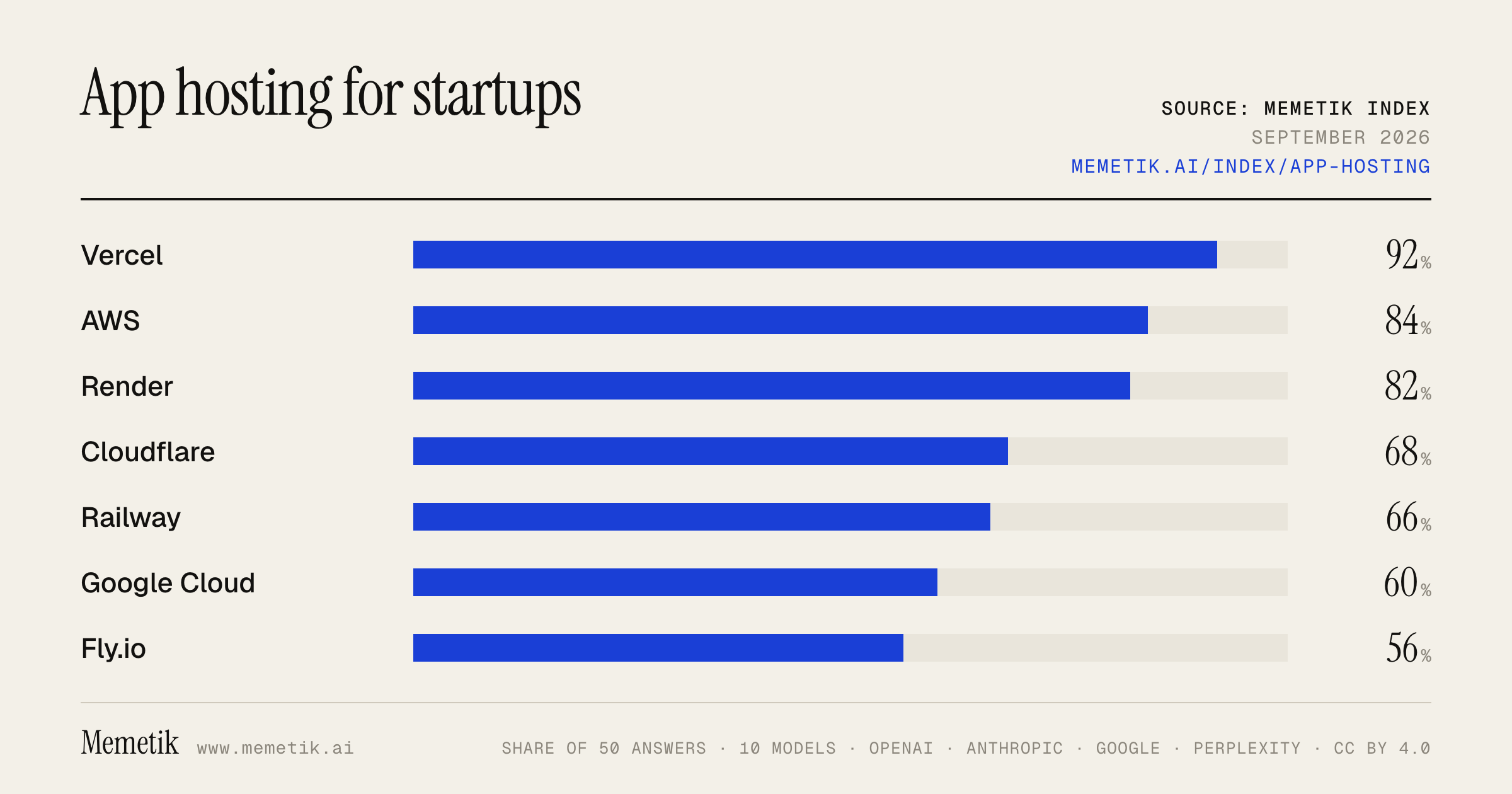
Vercel was named in 46 of 50 answers and came first in 31. AWS follows at 84%. 18 vendors were named at least once. First edition, so there is no prior period.
Answer share
5 prompts × 10 models · 50 answers
By provider
10 models · 50 answers
OpenAI 3 models · 15 answers
- GPT-5.6 Solgpt-5.6-solmost named: Vercel 100%
- GPT-5.6 Terragpt-5.6-terramost named: Vercel 100%
- GPT-5.6 Lunagpt-5.6-lunamost named: Vercel 100%
Anthropic 3 models · 15 answers
- Claude Opus 5claude-opus-5most named: Vercel 100%
- Claude Sonnet 5claude-sonnet-5most named: AWS 100%
- Claude Fable 5claude-fable-5most named: Vercel 80%
Google 2 models · 10 answers
- Gemini 3.6 Flashgemini-3.6-flashmost named: Vercel 100%
- Gemini 3.5 Flashgemini-3.5-flashmost named: Vercel 100%
Perplexity 2 models · 10 answers
- Sonar Prosonar-promost named: Vercel 80%
- Sonar Reasoning Prosonar-reasoning-promost named: Vercel 80%
Sources the models cited
- reddit.com57
- makerkit.dev32
- appwrite.io30
- youtube.com28
- northflank.com25
- vercel.com23
- medium.com23
- hostingstep.com21
- render.com19
- techradar.com19
- webapprater.com19
- pandastack.io18
ChatGPT via API returns no citations, so it does not contribute here.
The prompts
- What is the best hosting platform for a web app? Name specific products.
- Which hosting platform would you recommend to a web app in 2026?
- Compare the top hosting platform options right now.
- I'm a web app and I need a hosting platform. What should I use and why?
- Best hosting platform for a web app for a Next.js app with a backend?
Every answer
Raw model output, unedited
GPT-5.6 TerraWhat is the best hosting platform for a web app? Name specific products.
There isn’t one best host for every web app, but **my default recommendation for most full-stack startups and solo developers is Render**.

### Best default: **Render**
Use it for a conventional web app—Node/Express, Django, Rails, Laravel, FastAPI, Docker, etc.—especially if you want a backend, managed PostgreSQL, Redis-compatible cache, background jobs, cron jobs, and simple Git-based deployments in one place. ([render.com](https://render.com/docs/web-services?utm_source=openai))

**Choose Render if:** you want the least operational complexity without being locked into a serverless-only model.

### Best for Next.js / frontend-heavy apps: **Vercel**
Vercel is the best-fit choice when your app is primarily **Next.js**, uses server-rendering or edge/serverless functions, and benefits from streamlined framework integration and CDN delivery. Vercel Functions run backend code without you managing servers and can be pinned to regions for data-locality needs. ([vercel.com](https://vercel.com/docs/functions?utm_source=openai))

**Choose Vercel if:** Next.js is central to the product and your backend needs are mostly API endpoints, integrations, and short-to-medium-running jobs.

### Best for Dockerized apps needing geographic control: **Fly.io**
Fly.io is compelling when you want to run Dockerized services close to users or need more infrastructure control than Vercel. Be cautious about treating local disks as a database solution: Fly Volumes are tied to a single machine/region and are not automatically replicated. ([fly.io](https://fly.io/docs/volumes/overview/?utm_source=openai))

**Choose Fly.io if:** latency by region, WebSockets, long-lived processes, or VM/container control matter.

### Best if you already use AWS: **AWS App Runner**
App Runner is a good managed middle ground for AWS teams: deploy from source or an image, integrate with AWS services, and enable automatic deployments when a repository or image is updated. ([docs.aws.amazon.com](https://docs.aws.amazon.com/pdfs/apprunner/latest/dg/apprunner-guide.pdf?utm_source=openai))

**Choose AWS App Runner if:** you need AWS-native networking, IAM, RDS, S3, queues, or compliance options—and have some cloud expertise.

## Simple answer
- **Most web apps:** **Render**
- **Next.js SaaS:** **Vercel**
- **Docker / regional low-latency / real-time:** **Fly.io**
- **Existing AWS organization:** **AWS App Runner**

For a typical production SaaS, I’d use **Render for the application plus managed PostgreSQL**, and put static assets behind a CDN/object store if needed. Avoid relying on free tiers for production; for example, Render’s free web services spin down after 15 minutes of inactivity. ([render.com](https://render.com/docs/free?utm_source=openai))
GPT-5.6 TerraWhich hosting platform would you recommend to a web app in 2026?
For a **typical production web app in 2026**, I’d recommend **Google Cloud Run** as the default hosting platform.

It offers a strong middle ground:

- Run any stack that can be packaged as a container—Node, Python, Go, Rails, Django, Java, etc.
- Fully managed HTTPS, autoscaling, traffic splitting, rollbacks, WebSockets, HTTP/2, gRPC, secrets, and private/public service options.
- Can scale down to zero for low-traffic apps, while allowing minimum instances when cold-start latency matters.
- Supports web services, scheduled/batch jobs, and worker-style workloads without immediately forcing you into Kubernetes. ([docs.cloud.google.com](https://docs.cloud.google.com/run/docs/overview/what-is-cloud-run?utm_source=openai))

**My default architecture**
- **Frontend:** Cloudflare or Vercel for CDN/static delivery if useful
- **App/API/workers:** Cloud Run
- **Database:** managed Postgres (Cloud SQL, Neon, Supabase, etc.) in the *same region* as the API
- **Async work:** Cloud Run jobs / queue-driven workers
- **Infrastructure:** Terraform or Pulumi from day one, even for a small project

### When I’d choose something else

| Situation | Better choice | Why |
|---|---|---|
| Next.js-heavy product; small team; need exceptional preview-deployment workflow | **Vercel** | The smoothest developer experience for Next.js, CDN delivery, previews, and integrated server functions. Its functions scale automatically and can be region-configured, but usage-based compute and bandwidth costs deserve close monitoring as usage grows. ([vercel.com](https://vercel.com/docs/functions?utm_source=openai)) |
| Simple MVP, internal tool, or conventional app with predictable traffic | **Render** or **Railway** | Faster and simpler to operate than a hyperscaler. Fine when low infrastructure control is acceptable. |
| AWS-native company with IAM, VPC, RDS, queues, observability, and compliance already in AWS | **AWS ECS on Fargate** | Better strategic fit than adding another cloud. I’d generally prefer it over App Runner for a serious long-lived AWS platform. |
| Globally distributed, latency-sensitive services needing lightweight VMs and regional placement | **Fly.io** | Good for geographic proximity and long-lived processes, but usually involves more hands-on operational work. |
| High-scale or specialized orchestration: many services, sidecars, custom networking, GPUs, cluster needs | **Kubernetes**—managed GKE/EKS/AKS | Use only when Cloud Run/Fargate constraints are truly blocking you; Kubernetes is not the default starting point. |

### Bottom line

- **Best general-purpose recommendation:** **Cloud Run**
- **Best choice for a Next.js/SaaS frontend-led app:** **Vercel**, optionally with API/worker workloads on Cloud Run
- **Best “get an MVP online tonight” option:** **Render/Railway**
- **Avoid starting on Kubernetes** unless your team already operates it or has a concrete requirement that managed containers cannot satisfy.

One non-negotiable: host your app compute and primary database **in or very near the same region**. Vercel likewise advises running functions close to the data source to reduce latency. ([vercel.com](https://vercel.com/docs/regions?utm_source=openai))
GPT-5.6 TerraCompare the top hosting platform options right now.
Assuming you mean **hosting/deploying modern websites and web apps**—not traditional managed WordPress hosting—the strongest options break down like this:

| Platform | Best for | Starting cost* | Main strengths | Main trade-offs |
|---|---|---:|---|---|
| **Vercel** | Next.js, React, frontend-heavy SaaS | Free; Pro **$20/user/mo** | Excellent Git-based workflow, preview deployments, global CDN, strong Next.js integration | Usage-based costs can grow; less ideal for long-running backend workloads |
| **Cloudflare Workers / Pages** | Fast global static sites, edge APIs, cost-sensitive apps | Free; paid from **$5/mo** | Extremely broad edge deployment, no egress charge on Workers pricing, no cold starts, good for lightweight APIs and assets | Different runtime model from a normal server; can require architectural adaptation |
| **DigitalOcean App Platform** | Straightforward full-stack apps without managing servers | Static sites can be free; containers paid | Simple managed PaaS for web services, APIs, and databases; easier than AWS | Less platform polish and framework-specific tooling than Vercel; transfer is billed separately |
| **DigitalOcean Droplets** | Low-cost, flexible VPS hosting | From roughly **$4/mo** | Predictable server model, root-level flexibility, good for Docker, WordPress, VPS apps | You own patching, security, backups, monitoring, scaling, and deployment setup |
| **Amazon Lightsail** | Beginners who want a conventional server with an AWS path | From **$3.50/mo** | Fixed bundled pricing, simple AWS console, VM/container/database options | Still requires server administration; AWS ecosystem complexity remains as needs grow |

\*Prices and included usage can change; these are the currently published entry points. ([vercel.com](https://vercel.com/pricing?utm_source=openai))

## My practical picks

### 1. **Best default for a React / Next.js product: Vercel**
Choose Vercel if your app is primarily a frontend, uses Next.js, and your team values a smooth developer experience over maximum infrastructure control. It has automatic CI/CD from Git, preview deployments, global delivery, and integrated server-side/edge capabilities. The free Hobby tier is intended for personal, non-commercial projects; Pro is listed at $20 per month and includes usage credit, so production teams should model bandwidth, image, function, and build usage—not only the seat price. ([vercel.com](https://vercel.com/pricing?utm_source=openai))

**Use it when:** marketing sites, dashboards, B2B SaaS frontends, Next.js apps.
**Avoid making it your whole stack when:** you have persistent workers, specialized networking, heavy compute, or a strong need for predictable fixed infrastructure cost.

### 2. **Best performance-per-dollar for edge-oriented apps: Cloudflare**
Cloudflare Workers is the standout if you need low-latency delivery worldwide, static assets, caching, lightweight APIs, request manipulation, or a globally distributed backend. The paid plan starts at $5/month, includes 10 million requests and 30 million CPU milliseconds, and Cloudflare says it does not charge additional data-transfer/egress or throughput fees for this plan. ([cloudflare.com](https://www.cloudflare.com/plans/developer-platform/?utm_source=openai))

**Use it when:** static sites, API gateways, auth middleware, edge rendering, globally distributed APIs, and traffic-heavy apps with modest compute per request.
**Watch out for:** a Workers application is not simply “a Node server in the cloud”; runtime constraints and stateful/background-processing patterns need intentional design.

### 3. **Best managed platform for a conventional full-stack service: DigitalOcean App Platform**
If you want to deploy a normal containerized web app, API, worker, or service from a repository without operating VMs, App Platform is a strong middle ground. DigitalOcean positions it as a fully managed PaaS, with free static components and paid container instances for dynamic applications. ([digitalocean.com](https://www.digitalocean.com/pricing/app-platform?utm_source=openai))

**Use it when:** Django, Rails, Laravel, Node/Express, Python/FastAPI, Go, Dockerized services, and smaller teams that want conventional server behavior without server operations.
**Watch out for:** validate data-transfer costs and instance sizing—DigitalOcean notes App Platform transfer is calculated separately from Droplet transfer. ([digitalocean.com](https://www.digitalocean.com/pricing/app-platform?utm_source=openai))

### 4. **Best value if you can operate a server: DigitalOcean Droplets**
A Droplet is a standard Linux VM. It is generally the best fit when you want maximum control, run Docker Compose, host multiple small services inexpensively, or avoid platform-specific constraints. DigitalOcean states Droplets use granular billing and offers lower-cost entry configurations; its SaaS materials cite a Basic Droplet starting at $4/month. ([digitalocean.com](https://www.digitalocean.com/pricing/droplets?utm_source=openai))

**Use it when:** WordPress on your own stack, VPNs, game servers, self-hosted tools, custom Docker workloads, or steady long-running services.
**Trade-off:** it is only inexpensive if you account for your time. You must handle OS updates, TLS, firewall rules, backups, monitoring, deployments, incident response, and scaling.

### 5. **Best simple AWS entry point: Amazon Lightsail**
Lightsail is AWS’s friendlier fixed-price VPS option. Published Linux/Unix instance pricing starts at $3.50/month, with bundles that package compute, SSD storage, and transfer; it also offers containers and managed databases. ([aws.amazon.com](https://aws.amazon.com/lightsail/faq/?utm_source=openai))

**Use it when:** you want a simple WordPress/LAMP server or a conventional VM but may later need AWS services.
**Trade-off:** it gives you a simpler AWS billing model, but it does not remove the operational responsibilities of running a server.

## Quick decision guide

- **Personal portfolio / documentation / static landing page:** **Cloudflare Pages/Workers** or **Vercel Hobby**
- **Next.js startup / frontend-led SaaS:** **Vercel**
- **Worldwide API with lots of requests but short execution:** **Cloudflare Workers**
- **Normal backend plus database, minimal DevOps:** **DigitalOcean App Platform**
- **WordPress or any app needing full server control:** **DigitalOcean Droplet** or **AWS Lightsail**
- **You expect serious AWS usage later:** **Lightsail**, then migrate pieces to AWS services as needed

## Bottom line

For most teams starting today:

1. **Vercel** is the best developer-experience choice for Next.js and frontend-centric products.
2. **Cloudflare** is the best value/performance choice for globally distributed static and edge workloads.
3. **DigitalOcean App Platform** is the cleanest conventional full-stack managed-hosting option.
4. **DigitalOcean Droplets** are the best low-cost control option if you have operational skill.
5. **Lightsail** is a sensible simple-server option for people who prefer AWS.
GPT-5.6 TerraI'm a web app and I need a hosting platform. What should I use and why?
## Short answer

For a typical full-stack web app, **start with Render**.

It is the best general-purpose choice when you want to deploy an API or SSR frontend, a database, background jobs, scheduled tasks, and Redis-like caching without becoming an infrastructure specialist. Render supports web services, private services, workers, cron jobs, managed Postgres, key-value storage, persistent disks, private networking, autoscaling, and preview environments in one platform. ([render.com](https://render.com/docs/service-types?utm_source=openai))

## Choose based on your app

| If your app is… | Use | Why |
|---|---|---|
| A normal SaaS / full-stack app with an API, database, auth, jobs | **Render** | Straightforward “always-on server” model; one place for app services, Postgres, Redis-compatible cache, workers, and scheduled tasks. |
| Primarily **Next.js** with mostly request/response APIs | **Vercel** | Excellent Next.js integration, Git-based preview deployments, CDN delivery, and auto-scaling server functions. ([vercel.com](https://vercel.com/docs/functions?utm_source=openai)) |
| A global edge-first app—very low latency, lightweight APIs, caching-heavy | **Cloudflare Workers** | Runs compute close to users and supports several full-stack frameworks, including React Router, Astro, Next.js via OpenNext, TanStack Start, and more. ([3b21a3e4.previews.developers.cloudflare.com](https://3b21a3e4.previews.developers.cloudflare.com/workers/static-assets/routing/full-stack-application/?utm_source=openai)) |
| A containerized app needing custom runtimes, WebSockets, long-running processes, or background consumers | **Render** (or Fly.io as a specialist alternative) | A conventional container/server deployment is usually less restrictive than function-centric platforms. Render explicitly supports web services, background workers, disks, and private services. ([render.com](https://render.com/docs/service-types?utm_source=openai)) |
| An enterprise system with unusual networking/compliance needs or massive cloud integration | **AWS / GCP** | Maximum control—but substantially more operational complexity. Use only when you have a concrete reason. |

## My practical recommendation

Pick **Render + managed Postgres** if any of these apply:

- You have a Node, Python, Ruby, Go, Java, or Docker backend.
- You need WebSockets, queues, workers, file processing, cron jobs, or persistent server behavior.
- You want your app and database connected privately rather than assembling several vendors.
- You expect your architecture to grow beyond “frontend + a few API routes.”

A sensible first production architecture:

```text
GitHub repo
  → Render Web Service (frontend + API / SSR)
  → Render Postgres
  → Render Key Value (optional: sessions, rate limits, queues/cache)
  → Render Background Worker (optional)
  → Render Cron Job (optional)
```

Use infrastructure-as-code early—Render Blueprints or equivalent—so staging and production can be reproduced reliably.

## When I would choose Vercel instead

Choose **Vercel** if your app is a Next.js application and the backend is relatively simple: route handlers, server actions, third-party APIs, and a hosted database such as Postgres elsewhere. It provides automatic deployments from Git, unique preview URLs for changes, and functions that scale with demand. ([vercel.com](https://vercel.com/docs/functions?utm_source=openai))

The tradeoff: its function model has constraints that become more noticeable with persistent connections, long-running tasks, intensive CPU work, local files, or worker-style jobs. Vercel functions have a read-only filesystem other than temporary `/tmp` storage, for example. ([vercel.com](https://vercel.com/docs/functions/runtimes?utm_source=openai))

## Avoid this common mistake

Don’t choose a host only because it has a generous free tier or because a tutorial uses it. Decide first whether your app needs:

1. **Persistent compute** vs. functions that scale to zero
2. **WebSockets / realtime**
3. **Background workers and scheduled jobs**
4. **A relational database**
5. **File uploads and durable storage**
6. **Data residency / region requirements**
7. **Predictable monthly cost** vs. usage-based billing

If you tell me your stack (for example, “Next.js + Prisma + Postgres,” “Django,” or “React + Express”), whether you need realtime/jobs, and expected traffic, I can give you a specific deployment setup rather than a generic platform choice.
GPT-5.6 TerraBest hosting platform for a web app for a Next.js app with a backend?
## Short answer

For **most Next.js web apps with a real backend**, I’d choose **Railway** as the best default.

It is especially strong when you want to run the complete stack together:

- Next.js app (SSR, Route Handlers, Server Actions)
- PostgreSQL
- Redis / queues
- Background workers
- Cron jobs
- Object/file storage

Railway’s official full-stack Next.js setup supports those components in one project with private internal networking, and it supports deployment migrations such as `prisma migrate deploy`. ([docs.railway.com](https://docs.railway.com/guides/fullstack-nextjs?utm_source=openai))

## Pick by app type

| Your situation | Best choice | Why |
|---|---|---|
| Typical SaaS, dashboard, CRUD app, API, Postgres | **Railway** | Simplest all-in-one developer experience for a persistent backend. |
| Frontend-heavy app; backend is mainly short API routes/server actions | **Vercel** | Best-in-class Next.js deployment, previews, caching, and CDN integration. |
| Workers, long-running jobs, queues, predictable server-style infrastructure | **Render** | First-class always-on background workers and managed services. ([render.com](https://render.com/docs/background-workers?utm_source=openai)) |
| Docker-centric team, regional placement, more infrastructure control | **Fly.io** | Runs your Next.js app as containerized Machines close to users; managed Postgres is available. ([fly.io](https://fly.io/docs/js/frameworks/nextjs/?utm_source=openai)) |
| Larger company, compliance, existing cloud infrastructure | **AWS**—usually ECS/Fargate + RDS | Maximum flexibility, but substantially more operational work. |

## My recommendation

### Choose **Railway** if you’re early-stage or want to move quickly
Use:

```text
Next.js on Railway
Postgres on Railway
Redis on Railway (if jobs/rate limiting/cache)
Worker service on Railway (if jobs)
S3/R2 for uploads if needed
```

It avoids a common split-stack problem: hosting the web UI on Vercel but then managing a separate API, database, worker service, queues, private networking, credentials, and cross-provider latency elsewhere.

For production, set Next.js to standalone mode:

```ts
// next.config.ts
const nextConfig = {
  output: "standalone",
};

export default nextConfig;
```

Railway explicitly documents this configuration for its Next.js deployment approach. ([docs.railway.com](https://docs.railway.com/guides/nextjs?utm_source=openai))

### Choose **Vercel** if the backend is light
Vercel is excellent if your backend is mostly:

- Server Actions
- Route Handlers / API endpoints
- Auth callbacks
- Webhooks
- Short database reads/writes
- Cached reads and content delivery

It remains the most frictionless host for the Next.js framework itself. But don’t treat it as a traditional always-on backend server. Its Functions use a usage-based compute model, so I would avoid relying on it alone for persistent processes, heavy CPU work, long-running AI/media tasks, or queue consumers. ([vercel.com](https://vercel.com/docs/functions/usage-and-pricing?utm_source=openai))

A strong hybrid is:

```text
Vercel: Next.js frontend / SSR / short API endpoints
Neon or Supabase: Postgres
Upstash: Redis / rate limiting
Railway or Render: worker service only, if required
R2 or S3: uploads
```

## Avoid putting these directly in Next.js request handlers

Regardless of host, use a separate worker/queue for:

- Sending batches of email
- Video, image, or document processing
- Web scraping
- Large report generation
- Long AI-agent runs
- Retryable Stripe/third-party workflows
- Scheduled sync jobs

Render is particularly attractive if these are central to the product: it offers continuously running background workers meant to consume jobs from a queue. ([render.com](https://render.com/docs/background-workers?utm_source=openai)) Railway also documents a full-stack pattern with Redis-backed worker services. ([docs.railway.com](https://docs.railway.com/guides/fullstack-nextjs?utm_source=openai))

## Bottom line

- **Best overall full-stack default:** **Railway**
- **Best pure Next.js/frontend platform:** **Vercel**
- **Best when workers and background processing matter:** **Render**
- **Best for Docker/control/geo placement:** **Fly.io**
- **Best for enterprise cloud requirements:** **AWS**

If I were starting a conventional Next.js SaaS today, I’d deploy the app, Postgres, and any Redis-backed worker on **Railway**, and use **Cloudflare R2** or **S3** for user-uploaded files.- https://docs.railway.com/guides/fullstack-nextjs?utm_source=openai
- https://render.com/docs/background-workers?utm_source=openai
- https://fly.io/docs/js/frameworks/nextjs/?utm_source=openai
- https://docs.railway.com/guides/nextjs?utm_source=openai
- https://vercel.com/docs/functions/usage-and-pricing?utm_source=openai
Claude Sonnet 5What is the best hosting platform for a web app? Name specific products.
Choosing the "best" hosting platform really depends on your app's tech stack, scale, budget, and how much infrastructure management you want to handle yourself. Here's a breakdown of the leading options by category:

## All-in-One / Easiest to Use (PaaS)
- **Vercel** – Best for Next.js and frontend-heavy apps with serverless functions; excellent DX and global edge network.
- **Netlify** – Great for static sites, JAMstack apps, and frontend frameworks with built-in CI/CD.
- **Render** – Simple deployment for web services, static sites, background workers, and databases; often seen as a modern Heroku alternative.
- **Railway** – Developer-friendly, great for quickly deploying full-stack apps and databases with minimal config.
- **Heroku** – Pioneer of PaaS, still solid for small-to-medium apps, though pricier since Salesforce dropped free tiers.
- **Fly.io** – Good for deploying apps close to users globally, supports Docker containers well.

## Major Cloud Providers (More Control, More Complexity)
- **Amazon Web Services (AWS)** – Most comprehensive ecosystem (EC2, Elastic Beanstalk, ECS/Fargate, Lambda, Amplify). Best if you need deep customization or enterprise-scale infrastructure.
- **Google Cloud Platform (GCP)** – Strong for Kubernetes (GKE), Cloud Run (serverless containers), and App Engine.
- **Microsoft Azure** – Popular in enterprise environments, especially if you're using .NET or already in the Microsoft ecosystem (Azure App Service).

## Specialized/Modern Options
- **DigitalOcean App Platform** – Simpler pricing and interface than AWS/GCP, good for small-to-medium businesses wanting more control without full cloud complexity.
- **Cloudflare Pages/Workers** – Excellent for edge computing and static/JAMstack sites with serverless functions, very fast global CDN.
- **Supabase / Firebase** – If you need backend-as-a-service (auth, database, storage) bundled with hosting for the frontend.

## Quick Recommendations by Use Case
- **Solo dev/MVP/side project:** Vercel, Netlify, or Railway
- **Full-stack app needing a database:** Render or Railway
- **Enterprise-scale or complex infrastructure needs:** AWS or GCP
- **Static site or JAMstack:** Netlify, Vercel, or Cloudflare Pages
- **Already using Next.js:** Vercel (built by the same team, so it's optimized)
- **Cost-sensitive with more DevOps skill:** DigitalOcean

If you tell me more about your app (framework, expected traffic, budget, whether you need a database, etc.), I can give a more tailored recommendation.
Claude Sonnet 5Which hosting platform would you recommend to a web app in 2026?
There's no single "best" answer—it really depends on your app's stack, scale, and budget. Here's a practical breakdown based on current 2026 options:

## For frontend-heavy / Next.js apps
**Vercel** remains the top pick if you're building with Next.js or similar frameworks.
It's best for Next.js and frontend-first projects.
 It has strong enterprise chops too —
it offers 99.99% uptime SLA for Enterprise plans, along with SOC 2 Type 2, ISO 27001:2022, PCI DSS v4.0, and HIPAA via Secure Compute compliance.


## For Jamstack/static sites
**Netlify** is a strong alternative,
best for Jamstack and static sites.
 Like Vercel, it's enterprise-ready with
99.99% Enterprise uptime and SOC 2 Type 2, ISO 27001, GDPR/CCPA, PCI v4.0, HIPAA add-on compliance.


## For full-stack apps (frontend + backend together)
If your web app needs both a frontend and a real backend/database in one place, consider:
- **Appwrite** —
best for full stack developers who need both frontend and backend in one platform.

- **Render or Railway** —
best for balanced frontend + backend deployment.

- Newer options worth exploring:
Koyeb, Northflank, and Zeabur are better for backend apps that need containers or long-running services.


## For high-traffic, bandwidth-sensitive apps
**Cloudflare Workers/Pages** is excellent if performance and edge distribution matter —
it's best fit for high-traffic, bandwidth-sensitive sites, with a 99.99% Workers SLA (100% advertised for Enterprise plans) and SOC 2 Type 2, ISO 27001, FedRAMP Moderate, PCI L1 compliance.


## For large-scale, complex, or enterprise infrastructure
If you need full control, custom infrastructure, or are already embedded in a specific cloud ecosystem, go with the major clouds:
- **AWS** — good for
large enterprises, high-traffic global apps, and scalable backend systems, with pay-as-you-go pricing that's flexible but can be complex for beginners.

- **Google Cloud Platform** — strong for
AI/ML apps, analytics-heavy platforms, and scalable web apps.

- **Microsoft Azure** — best if you need
excellent hybrid & multi-cloud support and enterprise integration, especially for businesses already in the Microsoft ecosystem.


## My actual recommendation

If I had to pick one default for most modern web apps in 2026:

- **Small-to-mid projects, fast shipping, frontend-focused:** Vercel (if using Next.js/React) or Netlify.
- **Full-stack apps needing a backend + database without managing servers:** Render or Railway — great developer experience, reasonable pricing, minimal DevOps overhead.
- **Scaling to enterprise, need compliance/control/global infra:** AWS or GCP, possibly fronted by Cloudflare for edge performance.
- **Budget-conscious hobby projects:** Cloudflare Pages, Deno Deploy, or Appwrite's free tier are great starting points before you need to pay.

If you tell me more about your stack (framework, expected traffic, database needs, budget), I can narrow this down to a specific recommendation.
Claude Sonnet 5Compare the top hosting platform options right now.
I'll research the current top hosting platform options to give you an accurate comparison.
Based on current testing and reviews, here's how the top hosting platform options compare right now, split into the main categories people typically ask about: **traditional/shared web hosting** and **cloud infrastructure hosting**.

## Shared/Managed Web Hosting (Best for Websites, Blogs, Small Business)

**Hostinger** is the current front-runner across multiple review sites.
Hostinger takes the top recommendation for delivering a premium, all-in-one hosting experience, combining user-friendly management with competitive pricing, with a feature set that caters seamlessly to beginners, small business owners, and hobbyists.
 Another guide echoes this, noting
for most new websites, Hostinger offers the strongest combination of price, performance, features, and ease of use.


**Namecheap** remains the budget champion.
It's still confirmed as the best option for cheap web hosting in 2026
, and testing shows
it offers the lowest renewal price on its plans — their Stellar plan costs $1.98/month and renews at $4.88/month, just a 2.5x markup, the lowest in the industry after InterServer's 1x.


**Bluehost** is the go-to for WordPress beginners.
Its page builder for WordPress is considered the easiest to use
, and
it's officially recommended by WordPress, making it an excellent choice for the open-source platform.
 That said,
if you already know your way around WordPress, there's better value elsewhere—such as Hostinger.


**WordPress.com** stands out for raw performance. One in-depth 2026 test ranks it as
the best performer overall, starting from $2.75/month.


**ScalaHosting and SiteGround** serve more specific niches:
ScalaHosting is a better fit when managed VPS features matter, while SiteGround remains attractive for small sites where premium support and WordPress tools justify a higher renewal price.


**GreenGeeks and HostArmada** are solid mid-tier options but show some reliability gaps. HostArmada's testing shows
speed around 432ms and uptime at 99.95%, which is a little concerning
, while GreenGeeks had
an uptime score of 99.90% with 40 outages over 10 months — higher than Hostinger Business's 6 outages and Bluehost's 9.


**Other notable names** frequently cited as leading alternatives include
IONOS, InterServer, Liquid Web, InMotion Hosting, Hosting.com, and Kinsta
, along with Cloudways and UltaHost for more flexible/cloud-based setups.

## Key Differentiators to Consider

| Factor | Winner | Why |
|---|---|---|
| Overall value/features | Hostinger | Best all-around price-to-feature ratio |
| Cheapest long-term cost | Namecheap / InterServer | Lowest renewal markup (2.5x and 1x respectively) |
| WordPress beginners | Bluehost | Official WP recommendation, easiest builder |
| Raw performance | WordPress.com | Top speed/reliability in 2026 testing |
| Managed VPS | ScalaHosting | Best for those needing more server control |
| Premium support | SiteGround | Strong support, but pricier renewals |

## A Note on Storage & Limits
Not all "unlimited" claims are equal:
InterServer and IONOS provide unlimited space on select plans, while HostArmada and SiteGround provide the smallest amount of space, with Liquid Web and Hostinger doing slightly better.
 Also watch for hidden restrictions — for example,
Namecheap's acceptable-use policy limits multimedia files, archives, disk images, and database dumps to a maximum of 10GB each on shared hosting.


## Bottom Line
- **Best overall for most people:** Hostinger (balance of price, speed, features)
- **Best budget/cheapest renewals:** Namecheap or InterServer
- **Best for WordPress beginners:** Bluehost
- **Best raw performance:** WordPress.com
- **Best for growing/technical sites:** ScalaHosting (VPS) or Kinsta/Cloudways (managed cloud)

If you're looking at **enterprise cloud infrastructure** (AWS, Google Cloud, Azure) rather than website hosting, let me know and I can pull a dedicated comparison on those, since they serve a very different use case (app deployment, scalable infrastructure) versus the website-hosting platforms above.
Claude Sonnet 5I'm a web app and I need a hosting platform. What should I use and why?
The right hosting platform depends heavily on your app's tech stack, traffic patterns, budget, and how much infrastructure management you want to handle yourself. Here's a breakdown to help you decide:

## Quick Recommendations by Use Case

**If you want the simplest possible deployment (small-to-medium apps, side projects, MVPs):**
- **Vercel** – Best for Next.js/React frontends. Extremely fast deploys, great DX, generous free tier.
- **Netlify** – Similar to Vercel, great for static sites and JAMstack apps with serverless functions.
- **Railway** or **Render** – Great for full-stack apps (frontend + backend + database) with minimal config. Feels like "Heroku done right."

**If you're building something that needs to scale seriously or you want more control:**
- **AWS** – The most powerful and flexible, but steeper learning curve. Good if you need services like S3, Lambda, RDS, or enterprise-grade compliance.
- **Google Cloud Platform (GCP)** – Strong for apps using Kubernetes, BigQuery, or ML/AI workloads.
- **Azure** – Best if your org is already in the Microsoft ecosystem (Active Directory, .NET stack, etc.).

**If you want a middle ground (more control than Vercel, less complexity than raw AWS):**
- **DigitalOcean App Platform** – Simple pricing, solid performance, good docs.
- **Fly.io** – Great for apps needing global edge deployment with Docker containers.
- **Heroku** – Still solid for beginners, though pricier now that free tier is gone.

## Key Questions to Narrow It Down

1. **What's your stack?** Static site vs. Node/Python/Ruby backend vs. containerized microservices all favor different platforms.
2. **Do you need a database?** Some platforms (Railway, Render, Supabase) bundle managed databases; others require you to wire up RDS or a separate DB host.
3. **What's your expected traffic?** Low-traffic hobby projects can live happily on free tiers; high-traffic production apps need autoscaling and CDN support.
4. **Budget?** Vercel/Netlify/Railway are cheap to start but can get pricey at scale. AWS/GCP are cost-effective at scale but require more DevOps investment.
5. **How much DevOps do you want to do yourself?** PaaS (Vercel, Render, Railway) = less control, less work. IaaS (AWS, GCP) = more control, more setup.

## My General Suggestion

- **Just starting out / prototyping** → Vercel, Netlify, or Railway. You'll deploy in minutes.
- **Full-stack app with a database, need production traffic** → Render or DigitalOcean App Platform.
- **Enterprise-scale, compliance needs, or complex infra** → AWS or GCP.

If you tell me more about your app — what framework/language it's built in, whether it needs a database, expected traffic, and your budget — I can give you a much more specific recommendation.
Claude Sonnet 5Best hosting platform for a web app for a Next.js app with a backend?
Here's a practical breakdown depending on your needs:

## Top Choice: Vercel (if backend = API routes/Server Actions within Next.js)
If your "backend" is just Next.js API routes, Server Actions, or server components talking to an external database (Postgres, Supabase, etc.), Vercel is the easiest path.
Vercel is the creator of Next.js and provides the most seamless hosting experience by a significant margin, with every Next.js feature — ISR, edge functions, image optimization, middleware — working out of the box.

As the company behind Next.js, every new framework feature works on Vercel first, and the deployment experience is unmatched: push to GitHub, get a live URL in 30 seconds.


The tradeoff:
Vercel's pricing becomes significant above ~10 million requests per month, bandwidth costs add up on media-heavy sites, and the Enterprise plan gets costly for teams needing SLAs or SSO.


## If You Have a Separate/Heavier Backend (custom server, workers, multiple services, DB hosting)

**Railway** – Great if you want the Next.js app plus a database, background workers, cron jobs, etc. all in one dashboard.
Railway wins for full-stack teams who need everything in one place.


**Render** – A solid, affordable middle ground.
Render can host Next.js apps as a standard Node.js web service — SSR and API routes work, though ISR requires more manual configuration. It's more affordable than Vercel or Netlify for teams, with web services starting at $7/month, but the DX is less polished for Next.js specifically.
 It also supports Docker if you want more control:
Render lets you deploy Next.js as a standard Node.js app or Docker container, which means you're never blocked by platform-specific quirks.


**Fly.io** – Best if you need full control, multi-region deployment, or persistent servers (e.g., websockets, long-running processes).
Fly.io runs your Next.js app inside a container, which means you get full control but also full responsibility for the deployment configuration.


**AWS Amplify** – Makes sense if your backend already leans on AWS services.
AWS Amplify fully supports Next.js including SSR, ISR, and middleware, with better integration with AWS services (RDS, DynamoDB, S3, Cognito), predictable pricing at scale, and no per-seat charges.
 The downside:
higher cold start latency (Lambda-based), more complex configuration, and slower deployment times (2-4 minutes vs 30-60 seconds on Vercel).


**Cloudflare Pages** – Excellent if your app is mostly static/edge-friendly and cost is a big factor, but be cautious with a heavy Node.js backend.
Next.js support has historically been incomplete on Cloudflare — if you rely heavily on Next.js API routes with Node.js APIs or complex App Router features, you may encounter issues. Cloudflare Pages works best for predominantly static Next.js apps or those deliberately built for edge compatibility.


## Quick Recommendation Logic
- **Just want it live fast, backend is lightweight (API routes/DB via external service):** → **Vercel**
- **Need databases, workers, queues, or multiple microservices alongside Next.js:** → **Railway** or **Render**
- **Need full infrastructure control, custom Docker, multi-region:** → **Fly.io**
- **Already deep in AWS ecosystem:** → **AWS Amplify**
- **Mostly static/content site with light dynamic bits, cost-sensitive:** → **Cloudflare Pages**

As one guide summarizes it:
There is no single best host for Next.js — the right choice depends on your traffic volume, team size, budget sensitivity, and operational appetite.


If you tell me more about your backend (e.g., is it a separate Express/Nest server, a database, background jobs, websockets?) and your budget/team size, I can narrow this down to one specific recommendation.
Gemini 3.6 FlashWhat is the best hosting platform for a web app? Name specific products.
The "best" hosting platform for a web app depends heavily on your application’s architecture, your team's expertise, and your budget.

Here are the top hosting platforms categorized by use case, along with specific product names:

---

### 1. Modern Platform-as-a-Service (PaaS)
*Best for: Rapid deployment, frontend-heavy frameworks (React, Next.js, Vue), serverless functions, and modern full-stack apps.*

* **Vercel**
  * **Best for:** Next.js, React, and frontend-focused frameworks.
  * **Why it's great:** Offers seamless GitHub integration, global edge hosting, automatic preview deployments, and zero-configuration setup for modern frontend stacks.
* **Netlify**
  * **Best for:** Static sites, Jamstack, single-page applications (SPAs), and serverless backend extensions.
  * **Why it's great:** Excellent developer experience, instant continuous integration (CI/CD), forms handling, and strong API routing capabilities.
* **Render**
  * **Best for:** Full-stack apps (Node.js, Python/Django, Ruby on Rails, Go), background workers, and managed databases (PostgreSQL, Redis).
  * **Why it's great:** Acts as a modern, cost-effective alternative to Heroku with automatic SSL, preview environments, and simple Docker support.
* **Fly.io**
  * **Best for:** Microservices, Docker containers, and apps requiring low latency globally.
  * **Why it's great:** Runs containerized applications on micro-VMs globally, placing your app physically close to your users.

---

### 2. Managed Application Hosting & Containers
*Best for: Dockerized applications, microservices, and developers who want abstraction without full cloud complexity.*

* **AWS App Runner**
  * **Best for:** Deploying containerized web apps and APIs quickly on AWS without managing infrastructure.
  * **Why it's great:** Fully managed service that scales automatically and integrates natively with the AWS ecosystem.
* **Google Cloud Run**
  * **Best for:** Serverless container execution (Docker containers that respond to web requests).
  * **Why it's great:** Scales down to zero (so you only pay when requests are actively being processed) and handles massive scale automatically.
* **DigitalOcean App Platform**
  * **Best for:** Simple, predictable pricing for Node, Python, PHP, Go, and Docker apps.
  * **Why it's great:** Very beginner-friendly interface with fixed monthly pricing structure.

---

### 3. Hyper-Scale Public Cloud Platforms (IaaS/PaaS)
*Best for: Large enterprise applications, complex architectures, heavy database workloads, and custom infrastructure.*

* **Amazon Web Services (AWS)**
  * **Key Products:** **AWS EC2** (virtual servers), **AWS Elastic Beanstalk** (PaaS for app deployment), **Amazon ECS / EKS** (container management).
  * **Why it's great:** Industry standard with the largest ecosystem of tools, services, and compliance standards.
* **Google Cloud Platform (GCP)**
  * **Key Products:** **Google Compute Engine** (VMs), **Google App Engine** (PaaS), **Google Kubernetes Engine (GKE)**.
  * **Why it's great:** Exceptional networking performance, leading Kubernetes management, and top-tier data/AI tools.
* **Microsoft Azure**
  * **Key Products:** **Azure App Service**, **Azure Virtual Machines**, **Azure Container Apps**.
  * **Why it's great:** Integrates seamlessly with Microsoft enterprise stacks (.NET, C#, Active Directory, Visual Studio).

---

### 4. Specialized & Budget-Friendly Infrastructure (VPS)
*Best for: Developers who want full control over Linux virtual servers at a lower cost.*

* **DigitalOcean (Droplets)** – Extremely popular among developers for fast setup and simple UI.
* **Hetzner Cloud** – Highly cost-effective virtual servers (especially in Europe).
* **Linode (Akamai)** – Reliable developer-focused cloud compute with predictable pricing.

---

### Summary Recommendation Matrix

| Web App Type | Recommended Platform |
| :--- | :--- |
| **Next.js / React / Vue Frontend** | **Vercel** or **Netlify** |
| **Node.js, Django, Rails, Laravel (Monolith)** | **Render** or **DigitalOcean App Platform** |
| **Dockerized App / Microservices** | **Google Cloud Run** or **Fly.io** |
| **Enterprise / Heavy Compute / AWS Ecosystem** | **AWS (App Runner or Elastic Beanstalk)** |
| **Full Infrastructure Control on a Budget** | **DigitalOcean Droplets** or **Hetzner** |
Gemini 3.6 FlashWhich hosting platform would you recommend to a web app in 2026?
The best hosting platform for a web application depends heavily on your application's architecture (frontend, backend, containerized), your team size, and your budget.

### 1. Best for Frontend & Full-Stack JS (Next.js, Remix, Nuxt, Astro)
* **Vercel**
  * **Best for:** Next.js applications, serverless architectures, and fast-moving frontend teams.
  * **Why choose it:** Unmatched developer experience (DX) with zero-config deployments, automatic preview URLs for pull requests, built-in edge functions, and an global CDN.
  * **Alternatives:** **Netlify** (great for general JAMstack/static/serverless apps) or **Cloudflare Pages** (unbeatable global performance and bandwidth pricing).

---

### 2. Best Modern PaaS for Full-Stack & APIs (Node, Python, Go, Docker)
* **Railway**
  * **Best for:** Developers looking for a fast, modern replacement for legacy PaaS tools.
  * **Why choose it:** Simple git-to-deploy workflow, automatic database provisioning (Postgres, Redis, MongoDB), native Docker support, and predictable pay-as-you-go pricing.
* **Render**
  * **Best for:** Small teams and startups needing managed infrastructure without high overhead.
  * **Why choose it:** Automatic SSL, background workers, zero-downtime deploys, and managed databases.
* **Fly.io**
  * **Best for:** Applications needing global server presence and low latency.
  * **Why choose it:** Deploys Docker containers on microVMs close to your users worldwide.

---

### 3. Best for Container-Native & Scaling Up
* **AWS App Runner** / **Google Cloud Run**
  * **Best for:** Production-grade containerized microservices and APIs.
  * **Why choose it:** Scales automatically from zero up to heavy traffic spikes, eliminates traditional Kubernetes complexity, and charges only for the exact computing power used during active requests.

---

### 4. Best for Enterprise & Deep Cloud Ecosystems
* **AWS (Amazon Web Services)**, **Google Cloud (GCP)**, or **Microsoft Azure**
  * **Best for:** Large enterprise applications, heavy compliance requirements, complex microservices, or deep AI/machine learning integration.
  * **Why choose it:** Maximum control, custom networking, and extensive service catalogs.

---

### Quick Recommendation Guide

| Your App Architecture | Top Recommendation |
| :--- | :--- |
| **Next.js / React / Vue** | **Vercel** |
| **Full-Stack / Node / Python / Ruby / Docker** | **Railway** or **Render** |
| **Containerized Microservices** | **Google Cloud Run** or **AWS App Runner** |
| **Global Edge API / High Traffic** | **Cloudflare Workers/Pages** or **Fly.io** |
Gemini 3.6 FlashCompare the top hosting platform options right now.
The right hosting platform depends heavily on your specific needs—whether you are building a small personal blog, launching a high-traffic e-commerce store, hosting web apps, or managing client sites.

---

### 1. Best Overall & Value: **Hostinger**
* **Best For:** Beginners, small-to-medium business sites, and budget-conscious users.
* **Key Features:** Custom hPanel (easy alternative to cPanel), free SSL certificates, automated website migrations, built-in AI website builder, and NVMe storage on higher-tier plans.
* **Pros:** Extremely affordable introductory pricing, fast loading speeds (uses LiteSpeed servers), and very user-friendly interface.
* **Cons:** Support relies entirely on live chat/tickets (no phone support); renewal rates increase after the initial sign-up period.

---

### 2. Best Premium Managed WordPress: **SiteGround**
* **Best For:** WordPress sites, WooCommerce stores, and users who prioritize top-tier support and reliability.
* **Key Features:** Google Cloud Infrastructure, custom caching engine (SuperCacher), automated staging, advanced security tools, and automated daily backups.
* **Pros:** Excellent 24/7 customer support, exceptional uptime, and strong built-in security features.
* **Cons:** Stricter storage limits compared to competitors and higher price point upon renewal.

---

### 3. Best Managed Cloud Hosting: **Cloudways**
* **Best For:** Growing sites, developers, agencies, and high-traffic blogs needing scalable performance.
* **Key Features:** Managed hosting built on top of top cloud infrastructure (DigitalOcean, AWS, Google Cloud), pay-as-you-go billing, object caching (Redis, Varnish), and staging environments.
* **Pros:** Insanely fast performance, flexible resource scaling without server migration, and flexibility to choose your cloud provider.
* **Cons:** Requires a bit more technical familiarity; no email hosting included natively (requires add-on like Rackspace).

---

### 4. Best for Developers & Cloud Infrastructure: **DigitalOcean / Hetzner**
* **Best For:** Developers, SaaS platforms, custom apps, and those who want total control over unmanaged VPS servers.
* **Key Features:** Droplets/Instances, automated API deployments, block storage, and Kubernetes integration.
* **Pros:** Maximum performance per dollar, complete root access, and highly scalable.
* **Cons:** Completely unmanaged—you are responsible for server configuration, security, updates, and maintenance.

---

### 5. Best for Modern Web Frameworks (JAMstack & Edge): **Vercel / Netlify**
* **Best For:** Front-end developers using modern frameworks like Next.js, React, Vue, Svelte, or static site generators.
* **Key Features:** Git-driven deployments (push-to-deploy), edge function computing, instant previews for pull requests, and automated global CDN distribution.
* **Pros:** Generous free tiers, instant deployment workflows, and ultra-fast loading times globally via edge networks.
* **Cons:** Server-side database hosting requires external integrations; pricing can scale rapidly on paid tiers with heavy traffic/bandwidth.

---

### Quick Recommendation Guide

| Use Case | Best Choice |
| :--- | :--- |
| **New website / On a budget** | **Hostinger** |
| **WordPress site (Hands-off, high support)** | **SiteGround** |
| **Scaling WooCommerce / High Traffic** | **Cloudways** |
| **Custom Web Apps / Web Dev Projects** | **Vercel** or **DigitalOcean** |
Gemini 3.6 FlashI'm a web app and I need a hosting platform. What should I use and why?
To give you the best recommendation, it helps to narrow down your specific needs, as the "right" hosting platform depends on a few key factors:

1. **Tech Stack & Architecture:** What language, framework, and database are you using? (e.g., Next.js, Node.js/Express, Python/Django, Ruby on Rails, Containerized/Docker, static frontend + API).
2. **Traffic & Scale:** Is this a prototype/MVP, a medium-sized production app, or an enterprise app requiring high availability?
3. **Budget:** Are you looking for a generous free tier/low monthly cost, or do you have a flexible budget for managed infrastructure?
4. **DevOps Preference:** Do you want zero-config / fully managed deployments ("just push code"), or do you want full control over virtual servers and networking?

---

### Popular Categories & Top Recommendations

Here is a breakdown of the top options based on common use cases:

#### 1. Modern PaaS (Platform as a Service) – *Best for Developer Experience & Fast Setups*
* **Vercel / Netlify:**
  * **Best for:** Frontend-heavy apps, Jamstack, Next.js, Nuxt, SvelteKit, and serverless functions.
  * **Why:** Blazing fast setup, automatic git-based deployments, built-in global CDN, and previews for pull requests.
* **Render / Fly.io / Railway:**
  * **Best for:** Full-stack apps (Node, Python, Go, Ruby, Docker), background workers, and managed databases (PostgreSQL, Redis).
  * **Why:** Great alternative to Heroku. Easy deployment directly from GitHub, simple scaling, and built-in database management.

#### 2. Traditional Cloud Providers (IaaS/PaaS) – *Best for Maximum Control & Enterprise Scale*
* **AWS (Amazon Web Services), Google Cloud (GCP), Microsoft Azure:**
  * **Best for:** Complex, scalable architectures, enterprise applications, or apps requiring specific compliance/services.
  * **Key Services:** AWS App Runner / Elastic Beanstalk (PaaS), AWS EC2 (VMs), GCP Cloud Run (container hosting).
  * **Why:** Infinite scalability and massive service ecosystem, though they carry a steeper learning curve and potential for unexpected cost spikes if misconfigured.

#### 3. Simple Cloud VPS – *Best for Fixed Budgets & Full Server Access*
* **DigitalOcean / Hetzner / Linode (Akamai):**
  * **Best for:** Apps where you want a simple Virtual Private Server (VPS), low predictable costs, and full root access.
  * **Why:** DigitalOcean also offers an "App Platform" (PaaS) if you don't want to manage Linux servers directly, making it a good hybrid choice.

---

### What to share to get a tailored recommendation:

If you'd like a specific recommendation, feel free to share:
* Your **frontend and backend framework**
* If you need a **database** (Postgres, MySQL, MongoDB, etc.)
* Your expected **traffic/budget**
Gemini 3.6 FlashBest hosting platform for a web app for a Next.js app with a backend?
The "best" platform depends on how your backend is built (e.g., inside Next.js Server Actions/API routes vs. a separate dedicated service), your budget, and how much infrastructure management you want to handle.

---

### 1. Vercel (Best Overall & Fastest Developer Experience)
* **Best for:** Apps using Next.js for both frontend and backend (Server Actions, Route Handlers), or those who want zero-config setups.
* **Why it's great:** Built by the creators of Next.js. You get native support for every feature (ISR, Middleware, Image Optimization, Edge Functions) out of the box with automatic Git deployments.
* **The Backend Catch:** If your backend needs long-running processes, WebSockets, or persistent server connections, Vercel’s serverless functions will hit timeout limits.
* **Pricing:** Generous free tier; $20/user/month for Pro.

---

### 2. Railway (Best for Next.js + Dedicated Backend/Database)
* **Best for:** Full-stack apps that need Next.js alongside a separate API (e.g., Express, NestJS, FastAPI) and databases (Postgres, Redis).
* **Why it's great:** Railway allows you to host continuous, long-running backend processes, Docker containers, and databases under a single project interface with unified internal networking.
* **The Backend Advantage:** Unlike serverless platforms, Railway easily handles WebSockets, persistent TCP connections, and heavy background jobs without function execution timeouts.
* **Pricing:** Usage-based (starts around $5/month).

---

### 3. Render or Fly.io (Best PaaS Alternatives to Railway)
* **Render:**
  * Great middle-ground platform.
  * Native support for background workers, Docker, Node.js, and databases.
  * Very easy UI with zero maintenance, though build times can be slightly slower.
* **Fly.io:**
  * Runs your apps directly on microVMs close to your users worldwide.
  * Excellent if you need low-latency, global serverful backends and real-time features (WebSockets).

---

### 4. AWS / SST (Best for Enterprise & Scalability)
* **Best for:** Teams with AWS infrastructure or applications scaling to heavy production workloads.
* **How to use:** Using **SST** (Serverless Stack) or **Flightcontrol** makes deploying Next.js and backend microservices to your own AWS account straightforward without manually configuring CloudFront, S3, or Lambda.
* **Why it's great:** Complete control over infrastructure, low raw compute costs, and no platform lock-in.

---

### 5. Self-Hosting with Coolify on a VPS (Best Budget & High Control Option)
* **Best for:** Developers looking to host full-stack apps (Next.js + Backend + DB) for a flat $5–$10/month on Hetzner, DigitalOcean, or AWS EC2.
* **Why it's great:** **Coolify** is an open-source, self-hosted alternative to Heroku/Vercel. You install it on a Virtual Private Server (VPS) and get Git push deployments, automatic SSL, and database management without per-user or usage-based cloud markup.

---

### Summary Recommendation

| Your Scenario | Best Choice |
| :--- | :--- |
| **All-in-one Next.js app (Server Actions / API routes)** | **Vercel** |
| **Next.js + separate Backend (Node/Python/Go) + Database** | **Railway** or **Render** |
| **Heavy WebSockets / Real-time connections** | **Fly.io** or **Railway** |
| **Lowest cost / Full control** | **Coolify on VPS (Hetzner / DigitalOcean)** |
| **AWS infrastructure compliance / Scaling enterprise** | **SST (on AWS)** |
Sonar ProWhat is the best hosting platform for a web app? Name specific products.
There is no single **best** hosting platform for every web app; the best choice depends on your stack and whether you need frontend-only, full-stack, or database hosting. For most modern JavaScript web apps, **Vercel** is the top default choice, while **Railway** and **Render** are strong picks for full-stack apps, and **Cloudflare Pages** is excellent for static or budget-focused projects.[1][2][3]

- **Best for Next.js / React frontend apps:** **Vercel**.[1][2][3]
- **Best for full-stack apps with databases:** **Railway**.[1][2][3]
- **Best Heroku replacement:** **Render**.[1][2][3]
- **Best budget static hosting:** **Cloudflare Pages**.[1][2][3]
- **Best for startup-friendly simplicity:** **Vercel** or **Render**.[1][4]
- **Best for enterprise cloud control:** **AWS**, **Google Cloud**, or **Azure**.[2]

If you want specific products to evaluate first, start with:

- **Vercel**
- **Railway**
- **Render**
- **Cloudflare Pages**
- **Netlify**
- **Firebase App Hosting**
- **DigitalOcean App Platform**[1][2][3][10][14]

If you tell me your stack, I can name the single best option for it—for example, “Next.js + Supabase,” “Django + Postgres,” or “React static site.”
- https://www.devpick.io/blog/best-hosting-web-apps-2026
- https://dev.to/kkibet/where-to-host-your-web-app-a-complete-guide-to-platforms-3hc
- https://www.hostinger.com/my/tutorials/best-hosting-providers-for-web-apps
- https://webapprater.com/articles/resources/best-web-app-hosting-platforms-for-startups-in-2026.html
- https://www.reddit.com/r/webdev/comments/1955lfe/where_to_host_a_web_app/
- https://bonto.dev/best/cheap-hosting
- https://www.reddit.com/r/indiehackers/comments/1ho9dzf/whats_the_best_and_cheapest_way_to_host_a_web_app/
- https://bloggingjoy.com/web-hosting-for-web-apps/
- https://talent500.com/blog/top-platforms-to-host-your-website/
- https://firebase.google.com/products/app-hosting
- https://northflank.com/blog/cloud-application-hosting-platforms
- https://www.hostingadvice.com/how-to/best-hosting-for-web-and-mobile-apps/
- https://dev.to/isaacdlyman/where-should-i-host-my-web-app-am8
- https://cloud.google.com/solutions/web-hosting
- https://www.webstacks.com/blog/best-enterprise-web-hosting-platforms
- https://cloud.google.com/hosting-options
- https://hostingstep.com/best-web-hosting/
- https://www.websiteplanet.com/web-hosting/
Sonar ProWhich hosting platform would you recommend to a web app in 2026?
For a **default recommendation in 2026**, I’d pick **Hostinger** for most web apps because multiple 2026 reviews rate it as a top overall choice, especially for value, speed, and ease of use.[2][6][8][13]

If your app has a more specific stack, the better choice changes:

- **Vercel** for **Next.js / React front ends** and edge-rendered apps, since it’s repeatedly recommended for that use case.[12][14]
- **DigitalOcean** for a **developer-friendly VPS/cloud** setup with predictable pricing and more control.[4][12]
- **Kinsta** or **WP Engine** for **managed WordPress** or a heavier production WordPress stack.[2][4][12]
- **Bluehost** if you want a **beginner-friendly WordPress-oriented host**, though it is not the most consistently top-rated overall pick across sources.[1][3][4]

If you want one practical answer without more context: **Hostinger** is the safest general-purpose recommendation, while **Vercel** is the best pick for modern JavaScript web apps.[2][6][8][12]
- https://hostingstep.com/best-web-hosting/
- https://www.websiteplanet.com/web-hosting/
- https://www.pcmag.com/picks/the-best-web-hosting-services
- https://webcostestimator.com/guides/best-web-hosting-2026/
- https://www.hostsearch.com/articles/10-website-hosting-providers-for-2026-(tested-and-reviewed).asp
- https://www.techradar.com/web-hosting/best-web-hosting-service-websites
- https://uptimerobot.com/knowledge-hub/devops/hosting-providers/
- https://www.zdnet.com/article/best-web-hosting/
- https://www.forbes.com/advisor/business/software/best-web-hosting-services/
- https://digitalworkflowlab.com/en/2026/03/18/best-web-hosting-services-in-2026-top-10/
- https://createandgrow.com/the-top-10-best-web-hosting-services-for-2026/
- https://www.linkedin.com/pulse/hosting-platforms-2026-make-building-websites-easy-suman-chatterjee-qhsoc
- https://guacdigital.com/best-hosting-for-website-the-complete-2026-guide-to-choosing-the-right-provider/
- https://github.com/iSoumyaDey/Awesome-Web-Hosting-2026
- https://www.reddit.com/r/businessemail/comments/1qbnbxh/web_hosting_platforms_that_still_make_sense_in/
- https://www.reddit.com/r/webhosting/comments/1s594aa/best_web_hosting_providers_in_2026_community/
- https://www.reddit.com/r/HostingHostel/comments/1qojin0/what_are_the_best_web_hosts_in_2026_full_overview/
- https://www.hostingadvice.com/best/
- https://www.fixnhost.com/blog/top-web-hosting-services-to-consider/
Sonar ProCompare the top hosting platform options right now.
The **top hosting platform right now depends on your use case**, but the most consistently recommended names across recent 2026 reviews are **Hostinger**, **Bluehost**, **DreamHost**, **SiteGround**, and **InMotion Hosting**.[1][2][5][7] If you want the shortest answer: **Hostinger** is the most common “best overall” pick, while **Bluehost** and **DreamHost** are frequent alternatives depending on budget and site type.[1][5][7]

| Platform | Best for | What stands out | Tradeoff |
|---|---|---|---|
| **Hostinger** | Best overall value / beginners / small sites | Repeatedly ranked **best overall** or near the top; low intro pricing; solid feature set[5][7][15] | Renewal pricing is much higher than intro pricing in some comparisons[1][8] |
| **Bluehost** | WordPress beginners / common small-business sites | Ranked **#1** in one tested 2026 roundup; low intro price; broad beginner appeal[1] | Performance/value rankings vary by reviewer[1][2][7] |
| **DreamHost** | Multiple sites / budget-conscious users | Strong in affordability and multi-site support; often placed near the top[1][6][8] | Not always the top performer in speed-focused lists[1][3] |
| **SiteGround** | Reliability / security / managed WordPress | Frequently praised for balance of performance and features[5][16] | Usually priced above the cheapest shared-host options[5][8] |
| **InMotion Hosting** | Support / business hosting | Commonly highlighted for customer support and business use[5][8] | Less often the absolute cheapest or fastest option[5][8] |

A few important patterns show up in the 2026 reviews:

- **Hostinger** appears most often as the overall winner or best value choice across major roundups.[5][7][15]
- **Bluehost** still ranks highly in some testing-based lists, especially for general-purpose sites and WordPress beginners.[1][17]
- **DreamHost** is consistently attractive when you want lower introductory cost and multi-site hosting.[1][6][8]
- **SiteGround** is usually positioned as a premium balance option: better features and support, but not the cheapest.[5][16]
- **InMotion Hosting** is commonly recommended when customer support matters more than absolute lowest price.[5][8]

If you want the most practical recommendation by scenario:

- **Best overall:** Hostinger[5][7][15]
- **Best for WordPress beginners:** Bluehost[1][16]
- **Best for multiple sites on a budget:** DreamHost[1][6][8]
- **Best for security/performance balance:** SiteGround[5][16]
- **Best for support-focused business hosting:** InMotion Hosting[5][8]

One caveat: the rankings are not fully consistent across reviewers. For example, one tested roundup puts **Bluehost** first, while another major review outlet names **Hostinger** best overall.[1][7] That usually means the “best” choice depends on whether you care most about price, speed, features, or support.
- https://hostingstep.com/best-web-hosting/
- https://www.pcmag.com/picks/the-best-web-hosting-services
- https://www.websiteplanet.com/web-hosting/
- https://uptimerobot.com/knowledge-hub/devops/hosting-providers/
- https://gizmodo.com/best-web-hosting
- https://www.hostinger.com/tutorials/best-web-hosting
- https://www.techradar.com/web-hosting/best-web-hosting-service-websites
- https://www.forbes.com/advisor/business/software/best-web-hosting-services/
- https://createandgrow.com/the-top-10-best-web-hosting-services-for-2026/
- https://www.reddit.com/r/webhosting/comments/1s594aa/best_web_hosting_providers_in_2026_community/
- https://www.linkedin.com/pulse/top-10-best-web-hosting-providers-2026-practical-guide-yash-kumar-nobpc
- https://www.reddit.com/r/HostingHostel/comments/1qojin0/what_are_the_best_web_hosts_in_2026_full_overview/
- https://www.whtop.com/top.100-web-hosting
- https://www.reddit.com/r/businessemail/comments/1qbnbxh/web_hosting_platforms_that_still_make_sense_in/
- https://guacdigital.com/best-hosting-for-website-the-complete-2026-guide-to-choosing-the-right-provider/
- https://wptechstudio.net/blog/best-web-hosting-2026/
- https://www.hostingadvice.com/best/
- https://www.fixnhost.com/blog/top-web-hosting-services-to-consider/
Sonar ProI'm a web app and I need a hosting platform. What should I use and why?
If you’re hosting a **web app** rather than a simple website, the best default choice is usually **Vercel** for frontend or Next.js apps, and **Railway** or **Render** for full-stack apps with a backend and database.[1][2][3]

The right platform depends mostly on your stack and what you need the host to do:[2][3]

- **Use Vercel** if your app is built with **Next.js** or is frontend-heavy and you want the smoothest deployment workflow, preview URLs, and strong performance out of the box.[1][3][4]
- **Use Railway** if you need a **database** and want a simple full-stack setup with easy provisioning.[1][2][3]
- **Use Render** if you want a clean, Heroku-like experience for backend services and full-stack apps.[1][2][3]
- **Use Cloudflare Pages** if your app is mostly **static** and you care most about low cost and global edge delivery.[1][2][3]
- **Use Firebase App Hosting** if you want a managed option for modern full-stack apps with support for SSR and SSG, especially if you’re already in the Google ecosystem.[10][16]

A practical rule of thumb is:[2][3]

- **Next.js / frontend app** → **Vercel**
- **Full-stack app with DB** → **Railway** or **Render**
- **Static app / marketing site** → **Cloudflare Pages**
- **Enterprise / heavy compliance / cloud-standardized team** → **AWS, Azure, or Google Cloud**[2][15][16]

If you want one recommendation without more context, choose **Vercel** for the best developer experience unless your app clearly needs backend infrastructure and a database, in which case **Railway** is usually the easiest starting point.[1][2][3]
- https://www.devpick.io/blog/best-hosting-web-apps-2026
- https://dev.to/kkibet/where-to-host-your-web-app-a-complete-guide-to-platforms-3hc
- https://www.hostinger.com/my/tutorials/best-hosting-providers-for-web-apps
- https://webapprater.com/articles/resources/best-web-app-hosting-platforms-for-startups-in-2026.html
- https://www.reddit.com/r/webdev/comments/1955lfe/where_to_host_a_web_app/
- https://bonto.dev/best/cheap-hosting
- https://www.reddit.com/r/indiehackers/comments/1ho9dzf/whats_the_best_and_cheapest_way_to_host_a_web_app/
- https://bloggingjoy.com/web-hosting-for-web-apps/
- https://talent500.com/blog/top-platforms-to-host-your-website/
- https://firebase.google.com/products/app-hosting
- https://northflank.com/blog/cloud-application-hosting-platforms
- https://www.hostingadvice.com/how-to/best-hosting-for-web-and-mobile-apps/
- https://dev.to/isaacdlyman/where-should-i-host-my-web-app-am8
- https://cloud.google.com/solutions/web-hosting
- https://www.webstacks.com/blog/best-enterprise-web-hosting-platforms
- https://cloud.google.com/hosting-options
- https://hostingstep.com/best-web-hosting/
- https://www.websiteplanet.com/web-hosting/
Sonar ProBest hosting platform for a web app for a Next.js app with a backend?
For a **Next.js app with a backend**, the best default choice for most teams is **Vercel** if you want the smoothest deployment and the least setup friction. If your backend is more substantial—databases, auth, background jobs, or long-running services—**Railway** is often a better fit than a pure frontend host because it is positioned as a balanced platform for apps that need more than static hosting.[1][3][5]

A practical way to choose is:

- **Vercel**: best if you want the fastest path to production, especially for Next.js features like SSR, ISR, and edge middleware.[1][5][10]
- **Railway**: best if your Next.js app includes a real backend and you want one platform that is still easy to use but more backend-friendly.[1][5]
- **Cloudflare Pages / Cloudflare + OpenNext**: best if performance and bandwidth cost matter most, especially for edge-heavy apps.[1][3][10]
- **Render / Fly.io / self-hosted VPS**: good if you need more control over backend processes, but they generally require more operational work than Vercel.[5][10][12]

If you want a simple recommendation:
- **Frontend-heavy Next.js app with light backend logic**: **Vercel**
- **Next.js app plus API, database, workers, or queues**: **Railway**
- **Cost-sensitive or globally distributed traffic**: **Cloudflare**
- **You want maximum control and lowest infra cost**: **VPS/self-hosting**[1][3][5][10]

If you tell me whether your backend is just API routes/server actions or a separate service with a database and jobs, I can recommend the best specific platform.
- https://makerkit.dev/blog/tutorials/best-hosting-nextjs
- https://www.luckymedia.dev/guides/best-nextjs-hosting
- https://www.techplained.com/best-hosting-nextjs
- https://www.reddit.com/r/nextjs/comments/1s8x9cd/what_hosting_platform_do_you_use_for_your_nextjs/
- https://andrewjpyle.com/tools/best-hosting-for-nextjs
- https://cloudcostly.com/best-hosting-for/nextjs
- https://www.reddit.com/r/nextjs/comments/1fu6tvl/which_hosting_service_do_you_use_for_your_nextjs/
- https://pandastack.io/best/nextjs-hosting
- https://vpscomparehub.com/blog/vps-for-nextjs/
- https://tooldecisionengine.com/comparisons/best-hosting-for-nextjs-in-2026/
- https://www.hostchoice.in/next-js-hosting
- https://hostadvice.com/nextjs-hosting/
- https://dev.to/ethanleetech/best-8-deployment-and-hosting-for-nextjs-dip
- https://pantheon.io/learning-center/hosting/nextjs
- https://www.reddit.com/r/nextjs/comments/1e5itxt/best_hosting_option_for_nextjs/
- https://nextjstemplates.com/blog/best-nextjs-hosting
- https://blog.back4app.com/next-js-hosting-providers/
- https://medium.com/@udit/how-to-host-a-next-js-website-free-of-cost-and-scalable-8f25de30de18
- https://www.digitalocean.com/solutions/nextjs-hosting
- https://nextjs.org/docs/pages/getting-started/deploying
GPT-5.6 SolWhat is the best hosting platform for a web app? Name specific products.
There isn’t one universally best host—the right product depends on your stack. **For most conventional full-stack web apps, my default recommendation is Render.**

### Best products by use case

| Use case | Recommended product | Why |
|---|---|---|
| Typical full-stack app | **Render Web Services** | Simple Git deployments, Docker support, managed PostgreSQL, background workers, private services, scaling, TLS, and rollbacks in one platform. ([render.com](https://render.com/docs/web-services?utm_source=openai)) |
| Next.js or frontend-heavy app | **Vercel** | Usually the smoothest developer experience for Next.js, preview deployments, server-rendered frontends, and globally delivered assets. |
| Containerized production app | **Google Cloud Run** | Runs virtually any container, automatically scales, provides managed HTTPS, and integrates well with Google Cloud services. ([docs.cloud.google.com](https://docs.cloud.google.com/run/docs/overview/what-is-cloud-run?utm_source=openai)) |
| Globally distributed API or edge app | **Cloudflare Workers** | Executes code across Cloudflare’s global network and integrates with D1, KV, Durable Objects, R2, Queues, and other edge services. ([developers.cloudflare.com](https://developers.cloudflare.com/workers/?utm_source=openai)) |
| Easy developer-focused PaaS | **Railway** | Convenient for quickly deploying apps, databases, workers, and internal projects with minimal infrastructure work. |
| More infrastructure control | **AWS ECS with Fargate** | Strong choice for organizations already using AWS or requiring detailed networking, security, and service integrations. |
| Microsoft ecosystem | **Azure Container Apps** | Suitable for containerized apps using Azure, Microsoft Entra ID, .NET, and related enterprise services. |
| Static frontend | **Cloudflare Pages**, **Vercel**, or **Netlify** | Straightforward Git-based deployment and CDN delivery. |

### My practical recommendation

- **Choose Render** for Django, Rails, Laravel, FastAPI, Express, or a standard frontend/API/database architecture.
- **Choose Vercel** if the application is primarily **Next.js**.
- **Choose Cloud Run** if you already use Docker and want strong autoscaling without managing Kubernetes.
- **Choose Cloudflare Workers** if worldwide latency and edge execution are central requirements.
- **Choose AWS ECS/Fargate** when enterprise controls and AWS integration matter more than simplicity.

One warning: Render’s free web services spin down after inactivity and are intended for testing or hobby use, not serious production workloads. ([render.com](https://render.com/docs/your-first-deploy?utm_source=openai))

**Shortest answer:** Render is the best general-purpose default; Vercel is best for Next.js; Google Cloud Run is best for portable containerized apps.
GPT-5.6 SolWhich hosting platform would you recommend to a web app in 2026?
## Short answer

**For a typical web app starting in 2026, I’d recommend Render as the safest general-purpose default.**

It supports conventional web services, background workers, databases, private services, cron jobs, Docker deployments, and straightforward horizontal or vertical scaling. That makes it suitable for Node.js, Python, Ruby, Go, and similar server-based applications without requiring much infrastructure expertise. Render can scale services to multiple instances, while automatic scaling is available on its Pro tier and above. ([render.com](https://render.com/docs/scaling?utm_source=openai))

### Choose something else when:

| Your application | Recommended platform |
|---|---|
| Standard full-stack app with API, workers and PostgreSQL | **Render** |
| Next.js application with heavy frontend/SSR requirements | **Vercel** |
| Globally distributed API or edge-first application | **Cloudflare Workers** |
| Docker app requiring low-level control or deployment near users | **Fly.io** |
| Large organization already committed to a major cloud | **AWS, Google Cloud or Azure** |

### Why these alternatives?

- **Vercel:** Best developer experience for Next.js. Its Fluid Compute provides concurrency and dynamic scaling, but costs can become harder to predict as traffic, data transfer and function usage increase. ([vercel.com](https://vercel.com/docs/functions/usage-and-pricing?utm_source=openai))
- **Cloudflare Workers:** My choice for an edge-native application. As of September 2026, its paid plan starts at $5 per month, includes 10 million monthly requests, and does not add data-transfer charges for Workers. The tradeoff is that its runtime and architecture differ from a conventional server. ([developers.cloudflare.com](https://developers.cloudflare.com/workers/platform/pricing/?utm_source=openai))
- **Fly.io:** Strong for containerized applications, regional placement and greater infrastructure control. Machines are billed by runtime, and internet egress pricing varies by region. It generally requires more operational knowledge than Render or Vercel. ([fly.io](https://fly.io/docs/about/pricing/?utm_source=openai))

## My practical recommendation

For a new SaaS product, I would probably use:

- **Render** for the API and background workers
- **Managed PostgreSQL**
- **Cloudflare** for DNS, CDN and security
- Object storage compatible with **S3**
- Vercel only if the frontend is strongly tied to Next.js-specific functionality

If the app is primarily a Next.js frontend with lightweight server functions, I would instead deploy the entire initial version on **Vercel**.

The best answer ultimately depends on your framework, database, expected traffic, geographic requirements and whether you need long-running processes—but **Render is the least opinionated default**, while **Vercel is the strongest framework-specific choice**.
GPT-5.6 SolCompare the top hosting platform options right now.
## Best hosting platforms right now

**As of September 2, 2026**, for modern websites and web applications, the strongest shortlist is:

| Platform | Best for | Entry price | Major strengths | Main drawbacks |
|---|---|---:|---|---|
| **Vercel** | Next.js, React and polished frontend applications | Free; Pro **$20/month per developer seat** | Excellent Next.js integration, preview deployments, strong CDN, serverless compute, smooth developer experience | Costs can grow across bandwidth, compute, image optimization and observability; free tier is intended for personal/non-commercial use |
| **Cloudflare Workers & Pages** | Globally distributed apps, APIs and cost-efficient high traffic | Free; Paid **$5/month minimum** | No additional data-transfer charges, enormous edge network, low starting cost, integrated storage and edge services | Runtime differs from a traditional Node server; platform architecture has a steeper learning curve |
| **Netlify** | Marketing sites, content sites and teams wanting simple workflows | Free; Personal **$9/month**; Pro **$20/month** | Easy deployments, excellent previews, built-in forms/functions/CDN, Pro includes unlimited members | Credit-based billing takes time to understand; reaching the credit limit can pause projects unless additional usage is enabled |
| **Render** | Conventional full-stack apps, background workers and managed databases | Usage/service based | Straightforward container and Git deployment, persistent services, managed PostgreSQL, familiar server environment | Usually less optimized for edge delivery and frontend previews than Vercel or Netlify |
| **Railway** | Prototypes, startups and quickly deploying APIs/databases | Usage based | Very fast setup, good developer experience, convenient databases and private networking | Usage-based bills can become less attractive at sustained scale; fewer enterprise controls than larger platforms |
| **AWS** | Complex systems, regulated workloads and maximum infrastructure flexibility | Usage based | Huge service catalog, granular networking/security, global scale, minimal platform lock-in if architected carefully | Highest complexity; pricing and permissions can be difficult; often requires dedicated cloud expertise |
| **DigitalOcean App Platform** | Small businesses wanting a simpler traditional cloud | Usage/service based | Easier than AWS, predictable structure, apps and databases in one ecosystem | Smaller serverless/edge ecosystem and fewer advanced services |
| **GitHub Pages** | Documentation, portfolios and purely static sites | Free | Extremely simple, reliable and integrated with GitHub | No native server-side application runtime; limited platform functionality |

### The three leading frontend platforms

**Vercel is the best default for Next.js.** Its free plan includes 100 GB of monthly data transfer and 1 million edge requests; Pro includes $20 in usage credit, 1 TB of transfer and 10 million edge requests. However, additional resources are individually metered, and commercial users generally need Pro. ([vercel.com](https://vercel.com/pricing?utm_source=openai))

**Cloudflare offers the best price-to-performance ratio for global traffic.** Workers Paid starts at $5 per account per month and does not add egress or bandwidth charges. It is particularly compelling for APIs, edge-rendered applications and workloads that might generate substantial data transfer. ([developers.cloudflare.com](https://developers.cloudflare.com/workers/platform/pricing/?utm_source=openai))

**Netlify is strongest for collaborative web publishing.** Its current plans use credits covering bandwidth, compute, requests, AI and production deployments. Pro is $20 monthly with unlimited members, making it potentially cheaper than seat-based alternatives for larger teams. ([netlify.com](https://www.netlify.com/pricing/?utm_source=openai))

## My recommendations

- **Next.js SaaS or commercial React app:** **Vercel**
- **High-traffic site or globally distributed API:** **Cloudflare**
- **Marketing/content site with several collaborators:** **Netlify**
- **Node, Python, Ruby or Docker app with workers and PostgreSQL:** **Render**
- **Fast MVP or hackathon product:** **Railway**
- **Complex enterprise architecture:** **AWS**
- **Simple static documentation or portfolio:** **GitHub Pages**
- **Traditional VPS:** Consider **DigitalOcean, Hetzner or AWS Lightsail**

### Bottom line

For most new projects:

1. Choose **Vercel** when framework integration and developer experience matter most.
2. Choose **Cloudflare** when performance, bandwidth economics and global execution matter most.
3. Choose **Render** when you need a conventional backend rather than an edge/serverless frontend platform.
4. Choose **Netlify** when collaborative publishing and built-in web features matter more than deep framework optimization.
GPT-5.6 SolI'm a web app and I need a hosting platform. What should I use and why?
Assuming you mean **“I have a web app”**:

## My default recommendation: **Render**

Use Render if your application has a conventional backend—Node/Express, Django, FastAPI, Rails, Go, Docker—and possibly PostgreSQL, background workers, or scheduled jobs.

**Why:**

- Deploys automatically from GitHub, GitLab, or Bitbucket.
- Supports most common runtimes plus Docker.
- Offers web services, managed PostgreSQL, private services, workers, cron jobs, persistent disks, and private networking in one platform.
- Requires much less infrastructure work than AWS while leaving you a relatively straightforward path to migrate because your app remains a normal server or container. ([render.com](https://render.com/docs/web-services?from=finddev.tools&utm_source=openai))

For a real production application, use a **paid instance**. Render explicitly describes its free services as suitable for testing and hobby projects—not production—and free web services spin down after 15 minutes without traffic. ([render.com](https://render.com/docs/your-first-deploy?utm_source=openai))

## Choose something else when…

| Your application | Best starting choice | Why |
|---|---|---|
| Next.js or frontend-heavy React | **Vercel** | Excellent framework integration, preview deployments, automatic CI/CD, CDN, and managed serverless compute. ([vercel.com](https://vercel.com/docs/pricing?utm_source=openai)) |
| Static SPA, Astro, documentation, simple edge functions | **Cloudflare Pages/Workers** | Fast global delivery and generous static-site limits; Pages supports Git builds and preview deployments. ([developers.cloudflare.com](https://developers.cloudflare.com/pages/platform/limits/?utm_source=openai)) |
| Express, Django, Rails, FastAPI, Docker | **Render** | Straightforward, conventional app hosting with databases and workers nearby. |
| Large company, strict compliance, complex networking | **AWS, GCP, or Azure** | Maximum control and service depth, but considerably more operational complexity. |
| You already know Kubernetes | **Managed Kubernetes** | Useful for genuinely complex multi-service systems—not usually a good starting point. |

## Practical default architecture

For most early-stage applications:

- **App/API:** Render
- **Database:** Managed PostgreSQL in the same region
- **Uploads:** Object storage, not the app’s local filesystem
- **DNS/CDN/security:** Cloudflare
- **Source and deployments:** GitHub with automatic deployment
- **Monitoring:** Platform logs plus an error tracker such as Sentry

Avoid storing important data on the server’s ordinary filesystem: Render’s default filesystem is ephemeral, so local changes can disappear after restarts or deployments. ([render.com](https://render.com/docs/faq?utm_source=openai))

**Bottom line:** Start with **Render** unless this is specifically a Next.js application, in which case start with **Vercel**. Don’t begin with AWS or Kubernetes unless you already have requirements that justify the extra operational work.
- https://render.com/docs/web-services?from=finddev.tools&utm_source=openai
- https://render.com/docs/your-first-deploy?utm_source=openai
- https://vercel.com/docs/pricing?utm_source=openai
- https://developers.cloudflare.com/pages/platform/limits/?utm_source=openai
- https://render.com/docs/faq?utm_source=openai
GPT-5.6 SolBest hosting platform for a web app for a Next.js app with a backend?
## Best default: **Vercel**

If your backend is implemented using **Next.js Route Handlers, Server Actions, or API routes**, Vercel is generally the best choice:

- Native, zero-config Next.js deployment
- Automatic scaling and preview deployments
- CDN, caching, SSR, and image optimization
- Server-side functions support full Node.js
- Straightforward GitHub integration

Vercel Functions scale automatically, but remain function-based: execution limits apply, and persistent processes or traditional always-running servers require a different architecture. ([vercel.com](https://vercel.com/docs/functions?utm_source=openai))

### Recommended architecture

```text
Next.js frontend + API routes → Vercel
PostgreSQL                   → managed database provider
File storage                 → object-storage provider
Background jobs              → managed queue/job provider
```

## Choose **Render** instead when your backend needs:

- A continuously running Express, NestJS, Fastify, or Python server
- WebSockets or persistent connections
- Long-running background workers
- Cron jobs
- Docker
- Private networking between backend services and databases

Render can run Next.js itself as a standard Node.js web service, or you can host the Next.js frontend on Vercel and a separate backend on Render. ([render.com](https://render.com/docs/deploy-nextjs-app?utm_source=openai))

## Quick decision table

| Application type | Best choice |
|---|---|
| Next.js with Server Actions/API routes | **Vercel** |
| MVP or SaaS application | **Vercel** |
| Separate traditional backend server | **Render** |
| WebSockets or persistent process | **Render** |
| Background workers and cron-heavy system | **Render** |
| Maximum infrastructure control | AWS/GCP/Azure |
| Everything in one containerized platform | **Render** |

### My practical recommendation

Start with **Vercel** if the “backend” is part of the Next.js application. It offers the smoothest development and deployment experience.

Use **Vercel for Next.js + Render for a separate backend** if you have WebSockets, workers, CPU-heavy processing, or an always-running API. Vercel itself notes that function-based backends require adapting concepts such as WebSockets and persistent database connections. ([vercel.com](https://vercel.com/docs/frameworks/backend?utm_source=openai))
GPT-5.6 LunaWhat is the best hosting platform for a web app? Name specific products.
There isn’t one universally “best” hosting platform. For most web apps, I’d choose based on framework, backend architecture, expected traffic, and how much infrastructure you want to manage.

## My top recommendations

| Best for | Platform/product | Why choose it |
|---|---|---|
| **Next.js, React, frontend-heavy apps** | **Vercel** | Excellent Git-based deployments, previews, CDN, automatic scaling, and first-class Next.js support. |
| **Typical full-stack SaaS** | **Render** | Simple deployment for web services, background workers, cron jobs, Postgres, Redis-compatible Key Value, Docker, and private networking. |
| **Fast MVPs and small teams** | **Railway** | Very easy deployment from GitHub or Docker, convenient environment variables, databases, and low operational overhead. |
| **Containerized applications** | **Google Cloud Run** | Runs standard containers with automatic scaling and pay-per-use economics; a strong middle ground between PaaS and raw cloud infrastructure. |
| **Globally distributed or realtime apps** | **Fly.io** | Runs lightweight VMs close to users and supports regional deployment, persistent volumes, and private networking. |
| **Large or enterprise systems** | **AWS ECS/Fargate or EKS** | Broadest AWS ecosystem, networking, IAM, compliance, queues, databases, observability, and enterprise integration. |
| **Simple VPS-style hosting** | **DigitalOcean Droplets or App Platform** | More predictable infrastructure and often better cost control than usage-heavy serverless platforms, while remaining relatively approachable. |

## The default choice I’d make

### 1. For a Next.js application: **Vercel**

Choose **Vercel Pro** when you want the smoothest developer experience. It includes automatic CI/CD, preview deployments, a global CDN, security features, and usage credits; the listed Pro price is **$20 per month**. ([vercel.com](https://vercel.com/pricing?utm_source=openai))

Best stack:

- Vercel — application hosting
- Supabase or Neon — Postgres
- Upstash Redis — caching/queues
- S3 or Cloudflare R2 — object storage
- Stripe — payments

**Caution:** Vercel’s usage-based function, bandwidth, and storage charges can become significant as traffic grows, so set spending limits and monitor usage. ([vercel.com](https://vercel.com/pricing?utm_source=openai))

### 2. For a conventional full-stack app: **Render**

Render is probably the best general-purpose choice for many small and medium-sized SaaS applications. You can deploy:

- Node, Python, Ruby, Go, or Docker web services
- Background workers
- Cron jobs
- Static sites
- Postgres
- Private services
- Key-value storage

Render’s current workspace structure includes a free Hobby plan, a **$25/month Pro plan**, and a **$499/month Scale plan**; service compute and usage charges are separate. ([render.com](https://render.com/pricing?utm_source=openai))

Choose Render over Vercel if your app has:

- Long-running backend processes
- Background jobs
- WebSockets
- A traditional Express, Django, Rails, or Laravel server
- More predictable server-based workloads

### 3. For the easiest MVP deployment: **Railway**

**Railway** is an excellent choice when you want to deploy a complete application quickly without learning much cloud infrastructure. It is particularly convenient for:

- Small SaaS products
- APIs
- Docker applications
- Staging environments
- Apps requiring a web server plus a database and worker

I would choose Railway for a prototype or early-stage product when speed matters more than sophisticated networking, compliance, or enterprise controls.

### 4. For containers and scalable APIs: **Google Cloud Run**

**Google Cloud Run** is one of the strongest options if your application can run in a Docker container. It gives you more portability than a framework-specific platform while avoiding most Kubernetes complexity.

Use it for:

- Python, Go, Java, Node, or Rust APIs
- AI inference services
- Containerized monoliths
- Event-driven workers
- Services that scale from zero

It is especially attractive if you already use Google Cloud services such as Cloud SQL, Pub/Sub, BigQuery, or Cloud Storage.

### 5. For global distribution: **Fly.io**

**Fly.io** is a good fit for applications where latency and geographic placement matter. It uses lightweight VMs and lets you deploy applications in multiple regions, with persistent storage and private networking available. Its pricing is usage-based; for example, its published pricing lists a shared 256 MB VM at roughly **$2.02/month**, before other resources and usage. ([fly.io](https://fly.io/pricing/?utm_source=openai))

Use Fly.io for:

- Realtime applications
- Multiplayer or collaborative apps
- Region-specific services
- Apps with persistent processes
- Workloads needing more control than typical serverless platforms

## Practical recommendations by situation

- **Personal project or static frontend:** Vercel, Netlify, or Cloudflare Pages
- **Next.js SaaS:** Vercel + Supabase/Neon
- **Django/Rails/Laravel app:** Render or Railway
- **Dockerized backend:** Cloud Run or Fly.io
- **Realtime/WebSocket app:** Fly.io, Render, or Cloud Run
- **High, predictable traffic:** DigitalOcean, Hetzner, AWS ECS/Fargate, or dedicated Kubernetes
- **Enterprise/compliance-heavy system:** AWS ECS/Fargate, EKS, Google Cloud Run, or Azure Container Apps
- **Lowest infrastructure cost with technical expertise:** Hetzner Cloud or a DigitalOcean VPS
- **Lowest operational complexity:** Render or Railway

## Bottom line

If you gave me no other requirements, I would recommend:

1. **Vercel** for a Next.js or frontend-focused app
2. **Render** for a normal full-stack SaaS
3. **Railway** for a quick MVP
4. **Google Cloud Run** for a serious containerized backend
5. **AWS ECS/Fargate** for an enterprise application

For most new full-stack products, **Render is the safest general recommendation**, while **Vercel is the best specialized choice for Next.js**.
GPT-5.6 LunaWhich hosting platform would you recommend to a web app in 2026?
## Short answer

**For most new web apps in 2026, I’d recommend Render.** It offers a strong balance of simplicity, conventional backend hosting, databases, background workers, predictable deployment, and reasonable scaling—without forcing you deeply into AWS.

As of 2026, Render’s **Hobby plan is free**, while **Pro is $25/month per workspace with unlimited team members**, and it supports web services, workers, cron jobs, Postgres, Redis-compatible Key Value, Docker, private networking, autoscaling, and preview environments. ([render.com](https://render.com/changelog/updated-plans-for-render-workspaces?utm_source=openai))

## My platform recommendations by use case

| Use case | Recommendation |
|---|---|
| Typical full-stack SaaS or API | **Render** |
| Next.js-heavy app with mostly frontend/serverless logic | **Vercel** |
| Globally distributed app or long-running processes | **Fly.io** |
| Enterprise, compliance, complex networking, or existing cloud infrastructure | **AWS, Google Cloud, or Azure** |
| Static frontend only | **Cloudflare Pages, Vercel, or Netlify** |
| Lowest-cost conventional deployment | **A managed VPS**, such as Hetzner or DigitalOcean |

### 1. Render — best default

Choose Render if you want to deploy a Dockerized app, Rails/Django/Laravel/Node/Go API, background worker, scheduled job, and Postgres database with minimal infrastructure work.

**Pros**
- Very straightforward Git-based deployments
- Good support for traditional servers and containers
- Built-in databases, workers, cron jobs, private services, and previews
- Easier to understand than AWS
- Better fit than function-only platforms for persistent backend processes

**Cons**
- Less globally sophisticated than AWS or Fly.io
- Usage-based bandwidth and compute can still become significant
- Free services may sleep or have limited resources

For a small production SaaS, Render is probably the most sensible starting point. Its own 2026 estimates put a continuously running small web service plus small Postgres database around **$13/month before bandwidth and storage growth**, though exact costs depend on service sizes and usage. ([render.com](https://render.com/articles/how-much-does-cloud-application-hosting-cost-for-small-businesses?utm_source=openai))

### 2. Vercel — best for Next.js and frontend-centric apps

Use Vercel when your application is primarily Next.js, uses server-rendered pages, edge delivery, previews, and relatively short-lived API functions.

Vercel provides excellent deployment ergonomics, automatic CI/CD, preview deployments, CDN delivery, HTTPS, DDoS mitigation, and serverless/“Fluid Compute.” Its Pro plan is **$20/month**, with included usage credits and then usage-based billing. ([vercel.com](https://vercel.com/pricing?utm_source=openai))

**Important caveat:** I would not automatically put a compute-heavy backend, websocket server, queue consumer, or high-volume API entirely on Vercel. Function execution, bandwidth, and other metered resources can make costs less predictable as usage grows. Vercel changed function invocation billing to per-unit pricing for Pro and new Enterprise customers in 2026. ([vercel.com](https://vercel.com/changelog/function-invocations-now-billed-per-unit?utm_source=openai))

A common excellent setup is:

> **Vercel for the frontend + Render/Fly.io/Cloud Run for the backend + managed Postgres**

### 3. Fly.io — best for control and global placement

Fly.io is a good choice if you need:
- Long-running processes
- WebSockets
- Custom Docker environments
- Multiple geographic regions
- Low-latency services near users
- More control than Render provides

It bills usage-based for lightweight VMs, storage, and bandwidth. For example, small shared-CPU machines can start at only a few dollars per month, but networking, persistent storage, replicas, and operational complexity need to be considered. ([fly.io](https://fly.io/pricing/?utm_source=openai))

I’d choose Fly.io for an engineering team comfortable with infrastructure—not necessarily for someone launching their first app.

### 4. AWS/GCP/Azure — best when the business demands it

Use a major cloud when you need:
- Enterprise contracts and SLAs
- Private networking and complex IAM
- Compliance requirements
- Specialized databases, queues, analytics, or AI services
- Large-scale or highly customized infrastructure
- An existing company-wide cloud platform

For a new small app, I would generally avoid starting with a large collection of AWS primitives unless you already have cloud expertise. AWS’s simpler App Runner service also stopped accepting new customers on **April 30, 2026**, so I would not select it for a new deployment. ([youtube.com](https://www.youtube.com/watch?v=aNYbZpLwBj0&utm_source=openai))

## My practical default architecture

For a typical 2026 SaaS:

- **Frontend:** Vercel or Render
- **Backend/API:** Render
- **Database:** Render Postgres, Neon, Supabase, or another managed Postgres provider
- **Background jobs:** Render worker
- **Object storage:** S3-compatible storage
- **Monitoring:** Sentry plus the platform’s logs/metrics
- **Containerization:** Docker from the beginning

If you want **one platform**, choose **Render**.

If you are building a **Next.js app with a light backend**, choose **Vercel**.

If you expect **persistent processes, real-time connections, or multi-region infrastructure**, choose **Fly.io**.

The most important decision is less about the brand and more about avoiding accidental platform lock-in: keep your app containerized, use standard Postgres, store files in object storage, and make deployment reproducible with infrastructure-as-code.
- https://render.com/changelog/updated-plans-for-render-workspaces?utm_source=openai
- https://render.com/articles/how-much-does-cloud-application-hosting-cost-for-small-businesses?utm_source=openai
- https://vercel.com/pricing?utm_source=openai
- https://vercel.com/changelog/function-invocations-now-billed-per-unit?utm_source=openai
- https://fly.io/pricing/?utm_source=openai
- https://www.youtube.com/watch?v=aNYbZpLwBj0&utm_source=openai
GPT-5.6 LunaCompare the top hosting platform options right now.
Assuming you mean **hosting for websites and web applications**—not traditional shared hosting—these are the strongest mainstream options as of **September 2, 2026**.

## Quick recommendation

| Best for | Pick |
|---|---|
| Next.js, React, and fastest developer workflow | **Vercel** |
| Static sites, marketing sites, forms, and team previews | **Netlify** |
| Lowest-cost global edge deployment and serverless apps | **Cloudflare Workers/Pages** |
| Full-stack apps with conventional servers, databases, and background workers | **Render** |
| Maximum control and broadest infrastructure choices | **AWS** |
| Simple prototypes with usage-based infrastructure | **Railway** or **Fly.io** |

## Comparison

| Platform | Strengths | Weaknesses | Typical starting cost |
|---|---|---|---|
| **Vercel** | Excellent Git integration, previews, CDN, Next.js support, serverless/edge functions, polished DX | Usage-based billing can become difficult to predict; best experience is centered around modern JavaScript frameworks | Free Hobby plan; Pro is **$20/month**, including $20 usage credit. ([vercel.com](https://vercel.com/pricing?utm_source=openai)) |
| **Netlify** | Very easy static deployment, forms, deploy previews, redirects, functions, CMS-friendly workflows | New credit-based billing requires monitoring; less ideal than a conventional server for complex backends | Free plan; Personal **$9/month**; Pro **$20/month** with unlimited members. ([netlify.com](https://www.netlify.com/pricing/?utm_source=openai)) |
| **Cloudflare Workers/Pages** | Excellent global network, strong security/DDoS protection, inexpensive edge compute, no additional Workers bandwidth/egress charge on paid plan | More specialized programming model; stateful apps and traditional server workloads require Cloudflare-specific services | Free tier; Workers Paid starts at **$5/month**. ([developers.cloudflare.com](https://developers.cloudflare.com/workers/platform/pricing/?utm_source=openai)) |
| **Render** | Straightforward managed web services, databases, cron jobs, background workers, and Docker deployment | Usually less globally optimized than edge-first platforms; scaling and cold-start behavior depend on service type | Low-cost paid services; exact cost depends on service size and usage |
| **Railway** | Very fast project setup, simple database provisioning, good for prototypes and small full-stack apps | Usage billing can be less predictable; fewer enterprise/infrastructure features than AWS | Usage-based, generally inexpensive for small projects |
| **Fly.io** | Deploys containers close to users, flexible networking, good for stateful or regional applications | More operational complexity; requires more infrastructure knowledge than Vercel or Netlify | Usage-based |
| **AWS** | Broadest services, mature networking/security, strong enterprise support, virtually unlimited architecture options | Steepest learning curve; more configuration, maintenance, and billing complexity | Usage-based; can be cheap or very expensive depending on architecture |

## Platform-by-platform guidance

### 1. Vercel — best default for modern frontend applications

Choose Vercel if you are building:

- Next.js applications
- React or frontend-heavy products
- SaaS dashboards
- Content sites needing excellent performance
- Applications with frequent preview deployments

Vercel’s strongest advantage is the integrated workflow: connect a Git repository, receive preview deployments for changes, and deploy globally with little configuration. Its current Pro plan is $20/month and includes usage credit, with additional charges for resources such as data transfer, function execution, and requests. ([vercel.com](https://vercel.com/pricing?utm_source=openai))

**Watch out for:** high-traffic dynamic applications, image-heavy sites, or workloads with substantial function execution. Model usage before committing, and configure spending limits.

### 2. Netlify — best for static sites and content-oriented teams

Netlify remains particularly good for:

- Marketing websites
- Documentation
- Blogs and content sites
- Jamstack applications
- Sites needing forms, redirects, previews, and simple serverless functions
- Agencies managing multiple client sites

Its free tier includes custom domains with SSL, deploy previews, functions, a global CDN, and a monthly credit allowance. The Pro plan is listed at $20/month with unlimited members, while the Personal plan starts at $9/month. ([netlify.com](https://www.netlify.com/pricing/?utm_source=openai))

**Watch out for:** Netlify now uses credit-based pricing for new accounts, including meters for bandwidth, compute, requests, and production deploys. If your site has unusual traffic or many production deploys, estimate credit consumption carefully. ([docs.netlify.com](https://docs.netlify.com/manage/accounts-and-billing/billing/overview/?utm_source=openai))

### 3. Cloudflare Workers/Pages — best value for globally distributed applications

Choose Cloudflare when you prioritize:

- Global latency
- Low bandwidth costs
- Edge functions
- APIs and lightweight backends
- Security and DDoS protection
- High-volume public traffic
- Tight control over infrastructure spending

The paid Workers plan starts at $5/month and includes higher usage allowances. Cloudflare states that Workers Paid does not add charges for data transfer or throughput, which can make it attractive for bandwidth-heavy applications. ([developers.cloudflare.com](https://developers.cloudflare.com/workers/platform/pricing/?utm_source=openai))

**Watch out for:** Workers are not simply “a cheap VPS.” You may need to adapt to Cloudflare’s runtime, storage products, queues, Durable Objects, and edge-oriented architecture.

### 4. Render — best balanced choice for conventional full-stack apps

Render is often the best fit when you need a more traditional application stack:

- A persistent backend service
- PostgreSQL
- Background workers
- Scheduled jobs
- Docker containers
- WebSockets
- A straightforward deployment experience

Compared with Vercel or Netlify, Render is generally a better conceptual match for applications that behave like conventional servers rather than frontend projects with serverless endpoints.

**Choose Render over Vercel when:** your backend needs long-running processes, workers, custom runtimes, or a database-centric architecture.

### 5. Railway — best for quick prototypes and small products

Railway is appealing if you want to deploy:

- An API
- A small SaaS
- A database-backed prototype
- A few services without learning cloud infrastructure

It is usually faster to get running than AWS and more flexible for backend services than frontend-focused hosts.

**Main risk:** usage-based billing. It is convenient for small workloads, but you should set budget alerts and monitor resource consumption.

### 6. Fly.io — best for regional containers and more control

Fly.io is worth considering for:

- Containerized applications
- Apps that need to run near users in particular regions
- Stateful services
- Custom networking
- Applications that do not fit neatly into serverless hosting

It offers more control than Vercel or Netlify, but that control comes with more operational responsibility. It is best for developers comfortable with containers, networking, deployments, and troubleshooting.

### 7. AWS — best for complex or enterprise systems

AWS makes sense when you need:

- Multiple regions
- Private networking
- Advanced IAM and security policies
- Managed queues and event systems
- Specialized databases
- Compliance requirements
- Large-scale infrastructure
- The ability to avoid platform-specific constraints

For a simple website, AWS is usually excessive. For a serious production platform with complex requirements, it may be the safest long-term foundation.

## My practical shortlist

### For a personal site or documentation

1. **Cloudflare Pages**
2. **Netlify**
3. **Vercel**

Use Netlify if you want built-in forms and content workflows. Use Vercel if the site is Next.js. Use Cloudflare if cost and global delivery matter most.

### For a Next.js SaaS

1. **Vercel**
2. **Render**
3. **AWS**

Vercel is the easiest starting point. Render may be more economical or flexible if your backend needs persistent services. AWS is appropriate when you already have cloud infrastructure expertise.

### For a Python, Ruby, Go, or Node backend

1. **Render**
2. **Railway**
3. **Fly.io
GPT-5.6 LunaI'm a web app and I need a hosting platform. What should I use and why?
For most small teams building a conventional web app, I’d start with **Render**.

## My default recommendation: Render

Use **Render** if your app has a backend, database, background jobs, or scheduled tasks.

**Why:**

- Simple Git-based deployments and automatic HTTPS.
- Supports web services, workers, cron jobs, Postgres, private services, Docker, and preview environments.
- Easier mental model than assembling several AWS services.
- You can run a traditional long-lived server rather than restructuring everything around serverless functions.
- A small production setup—always-on web service plus small Postgres database—can start around the low tens of dollars per month, before bandwidth and storage growth. ([render.com](https://render.com/pricing?utm_source=openai))

**Tradeoff:** Render may become more expensive than a self-managed VPS at larger scale, and its free services are not suitable for production because free web services spin down after inactivity. ([render.com](https://render.com/articles/how-much-does-cloud-application-hosting-cost-for-small-businesses?utm_source=openai))

## Choose based on your app

| Your situation | Best starting choice | Why |
|---|---|---|
| Next.js, React frontend, mostly serverless/API routes | **Vercel** | Excellent Git previews, CDN, framework integration, and serverless functions |
| Full-stack app with Rails, Django, Laravel, Node, Go, etc. | **Render** | Straightforward application servers, databases, workers, and cron jobs |
| You want low-level control or global deployment | **Fly.io** | Usage-based VMs, persistent volumes, and regional placement |
| Enterprise requirements, complex networking, compliance, or existing AWS expertise | **AWS** | Broadest capabilities and ecosystem, but substantially more operational complexity |
| Simple static frontend only | **Cloudflare Pages** or **Vercel** | Fast global delivery and easy deployment |

### Vercel

Vercel is particularly strong when your app is **Next.js** or primarily a frontend with lightweight backend operations. Its Hobby plan is free, while Pro is currently $20/month and includes usage credit, collaboration, previews, CDN delivery, and serverless capabilities. ([vercel.com](https://vercel.com/pricing?utm_source=openai))

Be careful with high-volume or long-running backend workloads: Vercel’s compute, invocations, memory, and data transfer are usage-metered. ([vercel.com](https://vercel.com/pricing?utm_source=openai))

### Fly.io

Choose Fly.io when you specifically need:

- Deployment near users in multiple regions.
- Containers or VMs with more control.
- WebSockets or long-running processes.
- A more infrastructure-oriented workflow.

Fly bills based on provisioned resources. For example, its listed shared 1-CPU, 256 MB machine is about $2.02/month when continuously running, while storage, bandwidth, IP addresses, and databases add separate charges. ([fly.io](https://fly.io/pricing/?utm_source=openai))

The tradeoff is that you’ll handle more operational details than on Render.

## Practical architecture I’d use

For a typical SaaS or web application:

- **Frontend and backend:** Render, unless it is a Next.js app that fits Vercel well.
- **Database:** Managed Postgres from the same provider initially.
- **Object/file storage:** S3-compatible storage, not the application server’s local disk.
- **Email:** A dedicated transactional email provider.
- **Monitoring:** Provider logs plus an error-monitoring service.
- **CDN/DNS:** The hosting provider’s integration or Cloudflare.

## Bottom line

- **Unsure what to pick? Use Render.**
- **Using Next.js and want the smoothest developer experience? Use Vercel.**
- **Need infrastructure control or multi-region deployment? Use Fly.io.**
- **Already have AWS expertise or enterprise constraints? Use AWS.**

The most important details for a more precise recommendation are your **language/framework, database, expected traffic, need for background jobs/WebSockets, and monthly budget**.
GPT-5.6 LunaBest hosting platform for a web app for a Next.js app with a backend?
## Short answer

**For most Next.js apps with a backend, I’d choose Railway.**

It gives you a straightforward way to deploy:

- A full-stack Next.js app
- Separate Node, Python, or other backend services
- PostgreSQL
- Redis
- Background workers and scheduled jobs
- Docker containers
- Environment variables and private service networking

Railway has an official Next.js + PostgreSQL deployment guide and supports adding workers, file storage, and database migrations within the same project. ([docs.railway.com](https://docs.railway.com/guides/nextjs?utm_source=openai))

## Best choice by situation

| Situation | Recommendation |
|---|---|
| Next.js frontend plus API routes/server actions only | **Vercel** |
| Full-stack app with database, workers, queues, or separate backend | **Railway** |
| Simple, predictable traditional web service | **Render** |
| Global deployment and more infrastructure control | **Fly.io** |
| Enterprise, compliance, complex networking | **AWS, Azure, or GCP** |

### My practical recommendations

### 1. Railway — best all-in-one default

Use this if your backend needs a persistent runtime, database, background jobs, or Redis. It supports deploying from GitHub, CLI, or Docker, and its documentation specifically covers Next.js with PostgreSQL. ([docs.railway.com](https://docs.railway.com/guides/nextjs?utm_source=openai))

A typical setup:

```text
Railway project
├── Next.js app
├── PostgreSQL
├── Redis
└── Background worker
```

### 2. Vercel — best for a Next.js-centric application

Choose Vercel when the “backend” is primarily:

- Route handlers
- Server actions
- Middleware
- Lightweight API endpoints
- Server-side rendering

It is usually the smoothest Next.js deployment experience, but a separate backend may be preferable for long-running jobs, WebSockets, heavy processing, or persistent services.

### 3. Render — best simple alternative

Render is easy to understand and supports full Next.js server applications as Node web services. It also supports separate backend services, private services, background workers, cron jobs, and managed PostgreSQL. ([render.com](https://render.com/docs/deploy-nextjs-app?utm_source=openai))

I’d favor Render over Railway if you prefer a more traditional Heroku-like deployment model and clearer service separation.

### 4. Fly.io — best for global placement and control

Fly.io is a good option when latency and regional deployment matter. It deploys Next.js using Docker and lets you scale across regions, but it generally requires more infrastructure knowledge than Railway or Render. ([fly.io](https://fly.io/nextjs/?utm_source=openai))

## Recommended architecture

For a typical production app:

```text
Next.js + backend API: Railway or Render
PostgreSQL: managed PostgreSQL
File uploads: S3-compatible object storage
Email: Resend, Postmark, or SES
Redis/queues: Railway, Upstash, or managed Redis
```

**My default pick:**

- **One Next.js codebase with modest backend logic:** Vercel
- **Next.js plus a real backend/database/workers:** Railway
- **Simple production deployment with fewer surprises:** Render
Claude Opus 5What is the best hosting platform for a web app? Name specific products.
Great question — though the honest answer depends heavily on what you're building. Let me give you a framework plus specific recommendations, and let me check current pricing and offerings since this space changes fast.
There's no single "best" — the right answer depends on your stack, traffic pattern, and how much infrastructure you want to manage. Here are specific products by use case:

**Frontend-heavy / Next.js apps: Vercel**
Best for Next.js and frontend-first projects
 — it's built by the Next.js team, so framework features work with zero config. Netlify is the comparable alternative,
best for Jamstack and static sites
, with
a free tier including 100GB bandwidth and 300 build minutes
.

**Full-stack apps with a real backend and database: Railway or Render**
Railway focuses heavily on developer experience, with an intuitive interface for provisioning databases and services alongside your app, making it popular with small teams
. It bundles
the runtime, managed Postgres/MySQL/Redis/Mongo, private networking, and cron jobs on one surface and one bill
. Render is the close competitor:
it covers web services, databases, and background workers in a single dashboard, appealing to teams that want more infrastructure flexibility than Vercel without raw cloud console complexity
.

**Latency-sensitive or global apps: Fly.io**
Fly.io deploys applications close to users across a global network of regions, which matters for products where latency and geographic distribution outweigh simplest-possible setup
. Cloudflare Workers/Pages is the other edge-first option.

**Predictable billing: DigitalOcean App Platform**
It's a middle ground between full infrastructure control and managed simplicity, with transparent, predictable pricing that appeals to teams wary of unpredictable bills from larger cloud providers
.

**Budget/side projects: Koyeb** —
a free nano instance, with paid micro instances at $5.50/mo and linear pricing that makes cost projection straightforward
.

**Avoiding vendor lock-in: Northflank** —
it lets you deploy into your own AWS, Azure, or GCP accounts while keeping a managed platform experience
.

**My default recommendation:** if you're building a typical full-stack web app in 2026, start with **Vercel** (frontend) + **Railway** or **Render** (backend/DB), or just Railway/Render for everything if it's a monolith. Move to AWS/GCP only when you have a concrete reason — compliance, cost at scale, or specialized infrastructure.

One caveat: several of the sources above are vendor blogs with obvious incentives — the Railway comparison, for instance,
openly declares the author runs Railway
. Worth verifying current pricing directly before committing.

If you tell me your stack, expected traffic, and whether you need a database, I can narrow this to one recommendation.
- https://appwrite.io/blog/post/free-hosting-platform
- https://bonto.dev/best/cheap-hosting
- https://webapprater.com/articles/resources/best-web-app-hosting-platforms-for-startups-in-2026.html
- https://blog.railway.com/p/best-cloud-hosting-platforms-2026
- https://northflank.com/blog/cloud-application-hosting-platforms
Claude Opus 5Which hosting platform would you recommend to a web app in 2026?
It depends a lot on what you're building — but let me pull up current information so the recommendation reflects where things actually stand in 2026 rather than older assumptions.
I can give you a solid recommendation, though I should flag upfront that "which platform" depends heavily on details you haven't told me yet — so treat what follows as a decision framework with defaults rather than a single answer.

## My default recommendations

**If it's a Next.js/React frontend-heavy app:** Vercel.
It remains the strongest fit for Next.js and frontend-first projects.
 You pay a premium and accept some lock-in, but the deploy experience is hard to beat.

**If you need frontend + backend + database on one bill:** Railway or Render.
Railway focuses heavily on developer experience, with an intuitive interface for provisioning databases and services alongside your app, making it popular with small teams.

Render offers a simple deployment experience covering web services, databases, and background workers in a single dashboard — more infrastructure flexibility than Vercel without raw cloud console complexity.
 This is where most full-stack side projects and early SaaS products should land.

**If latency/geographic distribution is core to the product:** Fly.io.
It lets you deploy close to users across a global network of regions, which matters for products where latency beats setup simplicity.


**If you want predictable bills above all:** DigitalOcean App Platform.
It's a reasonable middle ground between full infrastructure control and managed simplicity, with transparent pricing that appeals to teams wary of unpredictable bills from larger cloud providers.


## Two caveats worth being honest about

A lot of "best hosting 2026" content is vendor-published —
the Railway comparison I found literally opens with the author declaring "I run Railway"
, and the Appwrite roundup unsurprisingly ranks Appwrite first. That's not disqualifying, but it means the rankings shouldn't carry much weight on their own.

Also, avoiding lock-in is a real consideration if you expect to scale.
Platforms like Northflank let you deploy into your own AWS/Azure/GCP accounts while keeping a managed experience
, which is a hedge worth considering if you think you'll outgrow a PaaS.

## What would sharpen this

- What's the stack (framework, language, database)?
- Is there long-running/background work, or is it request-response?
- Expected traffic and budget?
- Any compliance constraints (HIPAA, SOC 2, data residency)?

If you tell me those, I can narrow this to one or two concrete options instead of four. And if you're just starting out and want a single answer with no further discussion: **Railway or Render** for a full-stack app, **Vercel** if it's Next.js.
Claude Opus 5Compare the top hosting platform options right now.
I'll look into the current hosting landscape for you.

Since "hosting" could mean a few different things, I'm going to cover the most common cases — web app/site hosting and general cloud platforms. Let me search.
I got results for traditional web hosting, but my second search (on developer platforms like Vercel/Netlify/Cloudflare) didn't go through, so I've hit my search limit for this turn. Here's what I can offer: solid current data on traditional/shared hosting, plus my own general knowledge on developer platforms — clearly labeled so you know which is which.

## Traditional web hosting (current test data)

**Hostinger** comes out on top in most 2026 roundups.
TechRadar names it their top recommendation, citing an all-in-one experience that combines user-friendly management with competitive pricing, plus features like high-performance storage and email hosting suited to beginners, small business owners, and hobbyists.

Another guide reaches the same conclusion, calling it the strongest combination of price, performance, features, and ease of use for most new websites.
 Reliability data backs this up —
one long-run test recorded only 6 outages for Hostinger Business over 10 months, versus 9 for Bluehost and 40 for GreenGeeks.


**Namecheap** is the value pick.
It offers the lowest renewal pricing, with a Stellar plan going from $1.98/month to $4.88/month — a 2.5x markup that's the industry's lowest after InterServer's 1x.
 The catch:
TTFB of 479ms and 99.39% uptime
 is noticeably weaker, and
its acceptable-use policy caps multimedia files, archives, disk images, and database dumps at 10GB each on shared hosting.


**Bluehost** suits beginners specifically.
One reviewer rates its WordPress page builder the easiest to use, while noting that experienced WordPress users will find better value elsewhere, such as Hostinger.

It's also officially recommended by WordPress.


**Specialist picks:**
ScalaHosting fits better when managed VPS features matter, and SiteGround stays attractive for small sites where premium support and WordPress tooling justify its high renewal price.
 On the performance end,
Cybernews rated WordPress.com best for overall performance, from $2.75/month.


One caveat worth flagging:
these roundups typically earn affiliate commissions on purchases made through their links
, so treat the rankings as a starting point rather than neutral verdicts.

## Developer platforms (my general knowledge — not verified by search)

This half I couldn't confirm with current sources, and this space moves fast on pricing and free-tier limits, so verify before committing:

- **Vercel** — strongest for Next.js; excellent DX, but bandwidth/function overages have historically been a cost concern at scale.
- **Netlify** — comparable static/JAMstack workflow, broader framework neutrality.
- **Cloudflare Pages/Workers** — typically the most generous bandwidth economics given the edge network, with a more constrained runtime model.
- **Railway / Render / Fly.io** — better fits for full backends, persistent services, and databases rather than static frontends.

## Choosing

The honest answer is that "top" depends entirely on your workload. If you're running WordPress or a small business site, the first section is your list, and Hostinger is the safe default. If you're deploying a React/Next app, the second section matters more and the first is largely irrelevant.

If you tell me which you're after — and your traffic level, stack, and budget — I can narrow this down considerably, and search the developer-platform side properly next turn.
Claude Opus 5I'm a web app and I need a hosting platform. What should I use and why?
Happy to help — though "web app" covers a lot of ground, so the right answer depends on a few things. Let me give you the main options and when each makes sense, and if you tell me more I can narrow it down.

## First, the questions that actually determine the answer

1. **What's the stack?** Next.js/React, Django, Rails, Go, Laravel, static site + API?
2. **Do you need a database?** Managed Postgres/MySQL, or something you host yourself?
3. **Long-running processes?** Background jobs, websockets, cron, ML inference — these rule out some serverless platforms.
4. **Traffic and budget?** Hobby project vs. paying customers vs. enterprise compliance requirements.
5. **How much ops work do you want to do?** Zero, or are you fine with a Linux box and a Dockerfile?

## The general landscape

**Platform-as-a-Service (easiest, most opinionated)**
- **Vercel** — the default for Next.js and frontend-heavy apps. Git-push deploys, great preview environments, edge network. Gets expensive at scale and is awkward for long-running backend work.
- **Netlify** — similar niche, strong for static/Jamstack sites with serverless functions.
- **Railway / Render** — the sweet spot for "I have a normal backend app + a database." Both handle Docker, background workers, cron, and managed Postgres with minimal config. Render is a bit more mature; Railway has a nicer DX.
- **Fly.io** — great if you want containers running close to users in multiple regions, or need persistent connections/websockets.
- **Heroku** — still works, still simple, but pricier than the newer options and no longer the obvious default.

**Virtual servers (cheapest per unit of compute, most work)**
- **Hetzner** — absurdly good price/performance, EU-based, popular for self-hosting with Docker or Coolify/Dokku.
- **DigitalOcean / Linode / Vultr** — friendly VPS providers with decent managed database and app-platform offerings alongside.

**Hyperscalers (most powerful, most complexity)**
- **AWS / Google Cloud / Azure** — pick these if you need specific managed services, have compliance requirements, or expect real scale. Their container services (AWS ECS/Fargate, Google Cloud Run) are genuinely good middle grounds. Cloud Run in particular is a nice scale-to-zero container host that doesn't lock you into a proprietary framework.

**Also worth knowing:** **Cloudflare Workers/Pages** for edge-first apps, and **Supabase** if you want Postgres + auth + storage as a backend and only need to host a frontend.

## If I had to guess without more info

- **Next.js or a frontend framework** → Vercel, or Cloudflare Pages if you're cost-sensitive.
- **Django / Rails / Express / Laravel with a database** → Render or Railway. This is the most common case and these are the least painful answers.
- **Containerized app, want control and low cost** → Fly.io, or a Hetzner box with Coolify.
- **Enterprise, compliance, or existing cloud contract** → Google Cloud Run or AWS ECS.

One piece of general advice: prefer platforms that deploy a **Dockerfile** over ones that require framework-specific magic. It keeps your migration costs low if pricing or priorities change later.

Tell me your stack, whether you need a database and background jobs, and rough budget/traffic expectations, and I'll give you a single recommendation instead of a menu.
Claude Opus 5Best hosting platform for a web app for a Next.js app with a backend?
For a Next.js app with a backend, here's how the main options stack up:

**Vercel** — The default choice, made by the Next.js team. Zero-config deployments, best-in-class support for App Router, Server Components, ISR, edge middleware, and image optimization. New Next.js features work there first. Downside: pricing can climb sharply once you're past hobby scale, especially bandwidth and function invocations. Best if your "backend" is mostly Next.js API routes / server actions.

**Railway / Render / Fly.io** — Good when you have a genuinely separate backend (an Express/NestJS/FastAPI service, workers, cron jobs). You deploy the Next.js app as a normal Node container alongside your API and database. Pricing is predictable and usage-based rather than seat-based. Fly.io is nice if you want multi-region or persistent connections (WebSockets).

**Cloudflare Workers/Pages** — Cheapest at scale and very fast globally, with an integrated stack (D1, R2, KV, Durable Objects). The tradeoff is the Workers runtime isn't full Node, so some npm packages and Next.js features need workarounds.

**AWS (Amplify, SST/OpenNext, ECS)** — Most control and cheapest at very high scale, but you take on real operational overhead. Worth it if you're already on AWS or have compliance requirements.

**Netlify** — Solid Vercel alternative with similar DX, though Next.js support tends to lag slightly.

**A quick heuristic:**
- Backend is just Next.js API routes/server actions → **Vercel**
- Separate long-running API, workers, or WebSockets → **Railway** (simplest) or **Fly.io** (more control)
- Cost-sensitive at high traffic, edge-first → **Cloudflare**
- Enterprise/existing AWS footprint → **SST/OpenNext on AWS**

A very common production setup is Next.js on Vercel + backend API on Railway/Fly + Postgres on Neon or Supabase. That keeps the frontend DX excellent while avoiding serverless limitations on the backend.

One caveat worth flagging: I haven't checked current pricing or feature details, and these platforms change their tiers and limits fairly often, so it's worth verifying the specifics before committing. If you tell me more about your backend — is it Next.js API routes, or a separate service? — plus your expected traffic and whether you need things like WebSockets, background jobs, or a specific database, I can narrow this down considerably.
Claude Fable 5What is the best hosting platform for a web app? Name specific products.
There's no single "best" — it depends on your stack and scale. Here are the standout options by use case:

**Frontend / Next.js & React apps**
-
**Vercel**: Best for Next.js and frontend-first projects

-
**Netlify**: Best for Jamstack and static sites
, with
Git-driven front-end deploys and built-in serverless functions


**Full-stack apps with a backend**
-
**Render/Railway**: Best for balanced frontend + backend deployment
 — both are dev-friendly, Heroku-style platforms
- **Fly.io** — great for containerized apps running close to users; it's
among the most affordable platforms alongside Railway, Render, Vercel, Koyeb, Netlify, DigitalOcean App Platform, and Heroku

-
**Firebase**: Best for mobile-first teams in the Google ecosystem


**Enterprise / heavy scale**
-
**AWS**: global infrastructure, broad service set (VMs, containers, serverless), deep security & compliance — ideal for large enterprises and high-traffic global apps. **Azure** is best for enterprises with legacy systems or already in the Microsoft ecosystem, and **GCP** suits AI/ML and data-intensive apps

- **Cloudflare Workers/Pages** —
for global CDN, edge compute, WAF, and powerful DDoS protection
, best for
high-traffic, bandwidth-sensitive sites


**My short answer:** For most solo devs and startups, **Vercel** (if Next.js/frontend-heavy) or **Railway/Render** (if you need a real backend + database) offer the best developer experience. If you expect serious scale or need fine-grained control, go with **AWS** or **Fly.io**. Tell me your tech stack and budget and I can narrow it down.
Claude Fable 5Which hosting platform would you recommend to a web app in 2026?
It really depends on your stack and stage, but here are the strongest picks in 2026:

**Frontend-heavy / Next.js apps → Vercel**

Vercel is best for Next.js and frontend-first projects, while Netlify is best for Jamstack and static sites.


**Full-stack apps with a database → Railway or Render**

Railway focuses heavily on developer experience, with an intuitive interface for provisioning databases and services alongside your app, making it popular with small teams
. It also offers
managed Postgres/MySQL/Redis/Mongo, private networking, and cron jobs on one bill, with one-click high-availability Postgres shipped in March 2026
. Meanwhile,
Render offers a simple deployment experience covering web services, databases, and background workers within a single dashboard — more flexibility than Vercel without raw cloud console complexity
.

**Latency-sensitive, global apps → Fly.io**

Fly.io lets you deploy applications close to your users across a global network of regions, ideal when latency and geographic distribution matter
.

**Predictable pricing → DigitalOcean App Platform**

It's a reasonable middle ground between full infrastructure control and managed simplicity, with transparent, predictable pricing
.

**Enterprise / avoiding lock-in → Northflank or the big clouds**

Northflank lets you deploy into your own AWS, Azure, or GCP accounts while keeping a managed platform experience, avoiding vendor lock-in
. If you need strict
compliance, SLAs, and reliability
, AWS/GCP/Azure directly remain the safe choice.

**My general recommendation:** for most solo devs and startups building a typical full-stack web app, **Railway or Render** hit the sweet spot of price, DX, and included databases. If your app is Next.js-centric, go **Vercel**. Also worth noting:
Git-based workflows and CI/CD integrations are critical
 whichever you choose — all of the above support them.

Want me to narrow it down based on your framework, expected traffic, or budget?
Claude Fable 5Compare the top hosting platform options right now.
Here's a comparison of the leading web hosting platforms based on recent testing:

## Top Overall Pick: Hostinger
Across multiple reviews, Hostinger consistently ranks first.
After evaluating 60 top web hosting services with real-world testing across speed, security, and reliability, TechRadar gave Hostinger its top recommendation, citing a premium all-in-one experience combining user-friendly management with competitive pricing, plus high-performance storage and email hosting suited to beginners, small businesses, and hobbyists
. Similarly,
for most new websites, Hostinger offers the strongest combination of price, performance, features, and ease of use
. It also showed strong reliability —
just 6 outages over 10 months of monitoring, versus 9 for Bluehost and 40 for GreenGeeks
.

## Best Budget Option: Namecheap

Namecheap remains the best option for cheap web hosting in 2026
.
Its Stellar plan costs $1.98/month and renews at $4.88/month — a 2.5x markup that's the lowest in the industry after InterServer's 1x
. However, performance is middling:
479ms TTFB and 99.39% uptime recorded
. Also note
its acceptable-use policy limits multimedia files, archives, disk images, and database dumps to 10GB each on shared hosting
.

## Best for WordPress Beginners: Bluehost

Bluehost's page builder for WordPress is considered the easiest to use if you're nervous about building a site
, and it's
officially recommended by WordPress
. That said,
if you already have WordPress experience, there's better value elsewhere, such as Hostinger
.

## Best Performance: WordPress.com
Cybernews' quarterly testing ranked
WordPress.com as best performance overall, from $2.75/month
.

## Other Strong Contenders
- **SiteGround** –
attractive for small sites where premium support and WordPress tools justify a high renewal price

- **ScalaHosting** –
a better fit when managed VPS features matter

- **HostArmada** –
starts at $1.99/month with a 45-day money-back guarantee, free domain, SSL, daily backups, and email; speed of 432ms is roughly level with Hostinger Business, though its 99.95% uptime is slightly concerning

- **InterServer / IONOS** –
both provide unlimited storage space on select plans


## Bottom Line

The best web host depends on what you're building, how much traffic you expect, and what happens after the introductory price expires
. For most people, Hostinger is the safest all-around choice; pick Namecheap for the lowest long-term cost, Bluehost if you're a total beginner with WordPress, or SiteGround/ScalaHosting if premium support or managed VPS matters more than price.
Claude Fable 5I'm a web app and I need a hosting platform. What should I use and why?
The best choice depends on your stack and needs, but here's a quick breakdown of the top options:

**If you're frontend-heavy (React, Next.js, static/Jamstack):**
-
Vercel: Best for Next.js and frontend-first projects

-
Netlify: Best for Jamstack and static sites
 —
its free tier includes 100GB bandwidth and 300 build minutes, plus built-in form handling and auth


**If you have a full-stack app with a backend and database (my default recommendation for most web apps):**
- **Render** —
it offers a genuinely simple deployment experience covering web services, databases, and background workers within a single dashboard, appealing to teams that want more infrastructure flexibility than Vercel without the complexity of raw cloud provider consoles

- **Railway** —
it focuses heavily on developer experience, with an intuitive interface for provisioning databases and services alongside your app, making it popular for small teams
.
The runtime, managed Postgres/MySQL/Redis/Mongo, private networking, cron jobs, and multi-region support all live on one surface and one bill


**Other situations:**
- **Global/low-latency needs:**
Fly.io lets you deploy applications close to your users across a global network of regions, ideal where latency and geographic distribution matter

- **Predictable costs:**
DigitalOcean's App Platform offers a reasonable middle ground between full infrastructure control and managed simplicity, with transparent, predictable pricing

- **Mobile-adjacent / Google ecosystem:**
Firebase is best for mobile-first teams in the Google ecosystem

- **Enterprise / avoiding lock-in:**
Northflank lets you deploy in your own cloud accounts—AWS, Azure, or GCP—while getting a managed platform experience


**My advice:** For a typical web app (frontend + API + database), start with **Render or Railway** — both give you git-based deploys, managed databases, and free/cheap tiers to start. If your app is mostly frontend with light serverless functions, **Vercel** is the smoothest path, especially with Next.js.

What's your tech stack? I can narrow this down further.
- https://appwrite.io/blog/post/free-hosting-platform
- https://bonto.dev/best/cheap-hosting
- https://webapprater.com/articles/resources/best-web-app-hosting-platforms-for-startups-in-2026.html
- https://blog.railway.com/p/best-cloud-hosting-platforms-2026
- https://northflank.com/blog/cloud-application-hosting-platforms
Claude Fable 5Best hosting platform for a web app for a Next.js app with a backend?
Here's a rundown of the top options for a Next.js app with a backend:

## Top Pick: Vercel

Vercel is built by the Next.js team and supports every Next.js feature from day one — App Router, Server Actions, ISR, Edge Middleware, Image Optimization, and more, with zero configuration for most projects and best-in-class developer experience.

Push to GitHub and get a live URL in about 30 seconds.
 The main caveat:
pricing becomes significant above ~10 million requests per month
.

## Best if you need a "real" backend (databases, workers, etc.)
- **Railway** —
best for full-stack Next.js apps that need database and backend services co-located, and teams where per-seat pricing makes Vercel too expensive
.
- **Render** —
runs Next.js as a standard Node.js server, giving you the most flexibility: background workers, cron jobs, websockets, and persistent disks alongside your app, with clean Docker-based deploys
.
Web services start at $7/month
.
- **DigitalOcean App Platform** —
detects Next.js automatically, handles SSR, API routes, and static assets, and is a cost-effective alternative for projects that outgrow Vercel's free tier
.
- **AWS Amplify** —
best for teams already invested in AWS or apps using AWS backend services
.

## Budget option
**Cloudflare** —
the free tier includes genuinely unlimited bandwidth, and the $20/month plan is per team, not per member
. However,
Next.js support has historically been incomplete there — apps relying heavily on Node.js APIs or complex App Router features may hit issues, so it works best for mostly-static apps
.

## My recommendation
- **Backend = Next.js API routes / Server Actions only?** → **Vercel**. It's the default choice for good reason.
- **Backend = separate service, database, cron jobs, or websockets?** → **Railway** or **Render**, since you can co-locate everything (a Postgres DB, workers, your app) on one platform at predictable cost.

If you tell me more about your backend (API routes vs. separate server, database needs, expected traffic), I can narrow it down further.
Gemini 3.5 FlashWhat is the best hosting platform for a web app? Name specific products.
There is no single "best" hosting platform for a web app because the ideal choice depends heavily on your app's architecture (frontend-heavy vs. full-stack), your budget, and how much server management you want to handle.

The industry’s leading platforms for hosting web apps are categorized below by their strengths and specific product use cases.

---

### 1. Best for Frontend & Serverless Web Apps: **Vercel**
If you are building a modern Jamstack or Javascript-heavy frontend app (especially using frameworks like **Next.js, React, Nuxt, or Svelte**), **Vercel** is the gold standard.
* **How it works:** You connect your GitHub repository. Every time you push code, Vercel automatically builds and deploys your application to a global edge network.
* **Key Features:** Instant preview deployments for every pull request, built-in global CDN, and automated SSL. It runs serverless functions seamlessly for backend API routes.
* **The Catch:** While its free/hobby tier is highly generous, scaling on Vercel can get expensive. Heavy, long-running database queries or continuous backend processing are not a good fit for Vercel's serverless architecture.
* *Alternative:* **Netlify** or **Cloudflare Pages**.

### 2. Best "Hassle-Free" Platforms (PaaS) for Full-Stack Apps: **Render** & **Railway**
If you are deploying a traditional full-stack app (e.g., Node.js/Express, Python/Django, Ruby on Rails, Go) that requires a continuous, "always-on" server and a database, these **Platform-as-a-Service (PaaS)** providers are the top modern replacements for Heroku.

* **Render:** Highly reliable, structured, and incredibly user-friendly. You can easily spin up web services, static sites, cron jobs, and managed databases (like PostgreSQL and Redis).
* **Railway:** Known for its highly intuitive, visual dashboard and developer experience. It uses a pay-as-you-go model and supports seamless Docker-based deployments. You simply link your repository, and Railway automatically detects your language, provisions a container, and deploys it.
* **The Catch:** Free tiers on PaaS providers usually "spin down" (go to sleep) after a period of inactivity, causing a "cold start" delay for the next visitor. You will need to upgrade to their entry-level paid tiers (typically starting around $5–$7/month) for production apps.

### 3. Best for Global Performance & Scalability: **Fly.io**
If you have a global audience and need low latency, **Fly.io** is a powerful choice that behaves like a hybrid of a simple PaaS and a massive cloud provider.
* **How it works:** Fly.io takes your application (packaged in a Docker container) and deploys it to physical servers running "microVMs" directly at the "edge" (locations physically close to your users worldwide).
* **Key Features:** Exceptional speed, easy global scaling, and built-in private networking for multi-region databases.
* **The Catch:** It has a steeper learning curve than Render or Vercel. You will have to get comfortable using their command-line interface (CLI) to manage deployments.

### 4. Best Balance of Power and Value (VPS): **DigitalOcean**
If you have some system administration skills and want maximum hardware performance for your dollar, a Virtual Private Server (VPS) is the most cost-effective path. **DigitalOcean** is the most popular developer-friendly cloud platform.
* **Products to use:**
  * **Droplets:** Standard Linux virtual machines starting at around $4–$6/month. You get full root access to install whatever software stack you want (e.g., Nginx, Node, Docker, databases).
  * **DigitalOcean App Platform:** Their fully-managed PaaS alternative if you want the "Git-push-to-deploy" convenience without managing the Linux OS yourself.
* **The Catch:** If you choose a raw Droplet, you are responsible for server security, OS updates, backups, and configuring SSL certificates yourself.
* *Alternative:* **Hetzner** (unbeatable raw performance-per-dollar in Europe/US) or **Linode (Akamai)**.

### 5. Best for Enterprise & Maximum Ecosystem Integration: **AWS (Amazon Web Services)**
For large-scale, enterprise-grade web applications that require complex architecture, compliance, or integration with machine learning and deep data pipelines, **AWS** is the industry heavyweight.
* **Products to use:**
  * **AWS Amplify:** AWS’s answer to Vercel/Netlify for hosting frontend frameworks and serverless backends.
  * **AWS Elastic Beanstalk:** A PaaS tool that allows you to upload your code, and AWS handles provisioning, load balancing, and auto-scaling automatically.
  * **Amazon EC2 / ECS:** Raw virtual servers and container orchestrators (like Kubernetes) for massive, custom setups.
* **The Catch:** AWS is notorious for its steep learning curve, complex dashboard, and confusing pricing. A minor configuration mistake can result in an unexpectedly high bill.

---

### Summary Recommendation: Which should you choose?

* **Choose Vercel** if you are building a React, Next.js, or Vue frontend and want the fastest, easiest setup.
* **Choose Render or Railway** if you are building a full-stack SaaS app (Frontend + Backend API + Database) and want a quick deploy without server-management headaches.
* **Choose DigitalOcean (Droplets)** if you want fixed, highly affordable monthly pricing and don't mind spending a few hours setting up a Linux server.
* **Choose AWS** if you are an established business, require robust enterprise security compliance, or are scaling past millions of users.
Gemini 3.5 FlashWhich hosting platform would you recommend to a web app in 2026?
In 2026, the web hosting landscape has moved past the era of generic "one-size-fits-all" recommendations. Standard-bearers like Heroku have transitioned into maintenance-only mode, Vercel has adjusted its pricing several times to curb edge-case bill shock, and other PaaS giants like Fly.io and Railway have refined their pricing and infrastructure offerings.

The best hosting platform for your web app depends entirely on your **architectural stack**, **budget**, and **growth trajectory**.

---

### 1. For Frontend & Jamstack/Serverless (Next.js, Nuxt, SvelteKit, Astro)
If your application is heavily frontend-driven, utilizes Serverless functions, or relies on Edge rendering, frontend-first platforms are your best bet.

*   **Vercel**
    *   **Best for:** Next.js applications and React-based frameworks.
    *   **Why:** Vercel remains the undisputed king of Developer Experience (DX) for Next.js. Features like instant preview deployments on every Git push, instant rollbacks, and first-class optimization for Edge/ISR (Incremental Static Regeneration) are incredibly smooth.
    *   **The Catch:** Beware of scaling costs. If your app experiences sudden, massive bot traffic spikes or requires heavy serverless execution, Vercel’s bandwidth/invocation overage charges can result in a unexpectedly high bill.
*   **Cloudflare Pages & Workers**
    *   **Best for:** Highly global, low-latency, and cost-conscious edge apps.
    *   **Why:** If you want to build a modern app without the risk of bandwidth bill shocks, Cloudflare is incredibly generous. Egress is essentially free, and cold starts on Cloudflare Workers are practically non-existent.
    *   **The Catch:** You must write code compatible with the V8 isolate environment (meaning some standard Node.js APIs or heavy NPM packages won't work out of the box).

---

### 2. For Modern Monoliths & Full-Stack Apps (Node.js, Python/Django, Go, Ruby on Rails)
If your app is dynamic, runs a continuous background process, utilizes WebSockets, has long-running tasks, or needs a database attached right next to the server, you need a container-based Platform-as-a-Service (PaaS).

*   **Railway**
    *   **Best for:** The modern developer’s default choice for backends, APIs, and micro-SaaS.
    *   **Why:** Railway has captured much of the market share left behind by Heroku's decline. It has excellent DX—you simply connect your GitHub repo, and it automatically detects your language, provisions a container, and deploys it. In 2026, their "Metal" infrastructure and transparent, per-second resource billing make it incredibly cost-effective and powerful.
    *   **The Catch:** There is no longer a permanent free tier (they only offer a one-time trial credit), so you will pay from day one.
*   **Render**
    *   **Best for:** Predictable, stable, and low-maintenance hosting.
    *   **Why:** Render is highly reliable. Unlike other platforms that use fluctuating usage-based resource metering, Render mostly uses flat, fixed-price instances. You know exactly what your server and managed database will cost you at the end of every month.
    *   **The Catch:** Their free tier services sleep after 15 minutes of inactivity (causing slow cold starts for users), and they charge workspace seat fees for collaborative teams.

---

### 3. For Highly Global, Distributed Apps (Containers & Edge-like Speeds)
*   **Fly.io**
    *   **Best for:** Multi-region, low-latency container deployments.
    *   **Why:** Fly.io converts your Docker containers into micro-VMs and runs them on physical hardware in data centers around the world. If you want your backend server running in London, Tokyo, and New York simultaneously with a globally replicated database, Fly.io is unparalleled.
    *   **The Catch:** The operational overhead is slightly higher than Railway or Render. You must understand basic container networking and region configuration, as Fly.io's automated scaling can sometimes shut machines down unexpectedly if not configured properly.

---

### 4. For Solo Developers or Self-Hosters on a Budget (The VPS Route)
*   **Coolify + Hetzner / DigitalOcean**
    *   **Best for:** Saving massive amounts of money while retaining PaaS-like features.
    *   **Why:** If you want the luxury of a PaaS (automatic Git deployments, built-in SSL, easy database creation) but only want to pay a flat $5 to $10 a month for unlimited projects, self-hosting with **Coolify** is the breakout trend. You rent a Virtual Private Server (VPS) from a provider like Hetzner, DigitalOcean, or Linode, install Coolify with a single terminal command, and use it as your private, free Heroku/Railway alternative.
    *   **The Catch:** You are your own DevOps engineer. If your VPS crashes, your disk fills up, or your database backup fails, you are responsible for fixing it.

---

### Summary Recommendation Matrix

| If your app is... | ...and you value... | Your Best Pick is: |
| :--- | :--- | :--- |
| **Next.js / Frontend-Heavy** | Ultimate DX, previews, instant scaling | **Vercel** |
| **A standard full-stack API** | Ease of use, auto-deployments, Postgres | **Railway** |
| **A database-heavy project** | Cost predictability, no complex pricing | **Render** |
| **Global & Real-Time** | Edge latency, global container scaling | **Fly.io** |
| **A portfolio / Static site** | Remaining 100% free with massive traffic | **Cloudflare Pages** |
| **A bootstrapped micro-SaaS** | Rock-bottom monthly costs | **Coolify on a Hetzner VPS** |
Gemini 3.5 FlashCompare the top hosting platform options right now.
Because "web hosting" can mean completely different things depending on your project, the top hosting platforms are best compared by categorizing them into four distinct areas: **Budget & All-In-One Shared Hosting**, **Premium Managed WordPress Hosting**, **Modern Developer & Jamstack Platforms**, and **Scalable Cloud VPS Hosting**.

---

### 1. Budget & All-in-One Shared Hosting
*Best for: Beginners, bloggers, and small businesses looking for cheap, easy, and comprehensive packages (including email, domains, and easy installers).*

* **Hostinger**
  * **The Vibe:** Currently widely regarded as the best overall "bang for your buck" shared host.
  * **Pros:** Highly competitive introductory pricing, modern and custom-built "hPanel" dashboard (much cleaner than traditional cPanel), outstanding loading speeds for its price tier, and integrated AI website-building tools.
  * **Cons:** Renewal prices jump significantly compared to the intro rates (a standard industry practice, but worth watching out for).
* **Bluehost**
  * **The Vibe:** The classic, officially-recommended WordPress host that remains highly beginner-friendly.
  * **Pros:** Extremely smooth, guided onboarding setup for WordPress, and a free domain included for the first year.
  * **Cons:** Heavily pushes upsells throughout the checkout process and dashboard, and performance can drag on lower-tier shared plans compared to Hostinger.
* **DreamHost**
  * **The Vibe:** The champion of "honest" budget hosting.
  * **Pros:** Does not hike renewal rates as aggressively as competitors, offers a generous 97-day money-back guarantee, and is one of the few platforms that offers true unlimited-bandwidth/unlimited-site plans at a low price.
  * **Cons:** Dashboard can be slightly confusing for total beginners, and customer support is primarily ticket-based with limited live chat hours.

---

### 2. Premium Managed WordPress Hosting
*Best for: Serious business websites, high-traffic blogs, and WooCommerce stores that require hands-on support, daily backups, and robust speed optimization out of the box.*

* **SiteGround**
  * **The Vibe:** The premium standard for customer service and speed.
  * **Pros:** Top-tier security, custom-built caching (SuperCacher) that makes sites load incredibly fast, and arguably the most helpful 24/7 human customer support team in the business.
  * **Cons:** Considerably more expensive than shared hosting, and strict database storage limits are enforced.
* **Kinsta**
  * **The Vibe:** Enterprise-level Managed WordPress built on Google Cloud infrastructure.
  * **Pros:** Exceptional speed, auto-scaling capabilities (handling sudden traffic spikes effortlessly), staging environments, and premium APM (application performance monitoring) tools.
  * **Cons:** Premium price tag (starting around $35/month), meaning it's only suitable for professional or high-earning sites.

---

### 3. Modern Developer & Frontend Platforms (Jamstack)
*Best for: Developers building modern JavaScript frameworks (Next.js, React, Vue), static sites, and headless setups using Git-based workflows.*

* **Vercel**
  * **The Vibe:** The gold standard for Next.js and frontend developer experience.
  * **Pros:** Automatic CI/CD deployment straight from GitHub, instant edge-network content delivery, and a highly generous free tier for personal projects.
  * **Cons:** Can get very expensive very quickly if you scale up to the "Pro" or "Enterprise" tiers and exceed bandwidth limits.
* **Netlify**
  * **The Vibe:** Vercel’s primary competitor, highly optimized for Jamstack architectures.
  * **Pros:** Excellent forms handling, built-in serverless functions, identity management, and highly reliable deployment rollbacks.
  * **Cons:** Can feel complex if you aren't familiar with modern Git-based deployment workflows.
* **Cloudflare Pages**
  * **The Vibe:** The absolute best for free, ultra-fast static hosting.
  * **Pros:** Runs directly on Cloudflare’s massive global edge network, resulting in unmatched speeds. Best-in-class free tier with no bandwidth limits (unlike Vercel/Netlify).
  * **Cons:** Slightly steeper learning curve for beginners, and serverless function capabilities (Cloudflare Workers) require a different style of development.

---

### 4. Cloud & VPS (Virtual Private Servers)
*Best for: System administrators, growing apps, and tech-savvy users who want raw server access, massive scalability, and maximum performance control.*

* **Cloudways**
  * **The Vibe:** "Managed Cloud." Best for people who want the raw power of DigitalOcean, AWS, or Google Cloud, but don't want to manage a command-line server.
  * **Pros:** Extremely fast, lets you choose your underlying cloud provider, and handles server updates, security, and firewalls for you.
  * **Cons:** No email hosting included (you have to buy it separately through an add-on like Rackspace), and it can be overkill for simple static sites.
* **DigitalOcean / Kamatera / Linode (Akamai)**
  * **The Vibe:** Pure, raw unmanaged cloud VPS.
  * **Pros:** Highly affordable, "pay-per-hour" resource billing, absolute control over your OS and environment, and instant scaling.
  * **Cons:** Zero hand-holding. If your server crashes or gets hacked, you are entirely on your own to fix it via SSH command-line.

---

### Summary Recommendation: Which should you choose?

1. **If you are a beginner building your first personal or small business site:** Go with **Hostinger**. It is the most balanced option in terms of ease of use, cost, and modern interface.
2. **If you have a business website or high-traffic blog and want peace of mind:** Go with **SiteGround**. The support is outstanding, and it's highly optimized for keeping your site fast and secure.
3. **If you are a modern developer coding in React/Next.js/HTML:** Go with **Vercel** or **Cloudflare Pages**. The developer experience, automatic Git deployments, and free tiers are unbeatable.
4. **If you need dedicated resources but want a user-friendly panel:** Go with **Cloudways**. It gives you dedicated cloud speed without requiring a systems engineering degree.
Gemini 3.5 FlashI'm a web app and I need a hosting platform. What should I use and why?
Because there is no "one-size-fits-all" hosting provider, the best choice for your web app depends heavily on three things: **your tech stack**, **your budget/scale**, and **how much server management you want to do**.

To help you choose, we can break down the best hosting platforms into four distinct categories based on your needs.

---

### Category 1: PaaS (Platform-as-a-Service)
*Best if: You want to focus purely on your code and deploy instantly without worrying about managing Linux servers, SSL certificates, or basic database provisioning.*

* **Render**
  * **What it is:** The modern successor to Heroku. It’s incredibly developer-friendly, offering git-push-to-deploy, automatic SSL, and managed databases.
  * **Why use it:** It’s affordable, has an intuitive UI, and scales well from hobby projects to production-grade apps.
* **Railway**
  * **What it is:** An infrastructure platform that lets you provision databases and services using "templates" or direct GitHub integration.
  * **Why use it:** Extremely fast setup, excellent developer experience (DX), and a "pay-for-what-you-use" pricing model that makes it highly cost-effective for smaller apps.
* **Heroku**
  * **What it is:** The pioneer of PaaS.
  * **Why use it:** Still highly reliable and has a massive ecosystem of add-ons, though it has lost popularity due to the elimination of its free tier and higher pricing compared to modern competitors.

### Category 2: Serverless / Frontend-Heavy (Jamstack & Edge)
*Best if: Your app is built on a modern framework (Next.js, Remix, Nuxt, SvelteKit) or is mostly frontend/API-driven and needs to load globally in milliseconds.*

* **Vercel**
  * **What it is:** The creators of Next.js.
  * **Why use it:** If your app is built with **Next.js**, Vercel is the gold standard. It deploys your app globally on edge networks, handles serverless API routes seamlessly, and offers an unmatched developer experience.
* **Netlify**
  * **What it is:** A direct competitor to Vercel.
  * **Why use it:** Excellent for Jamstack sites and SPA (Single Page Application) frontends. It has fantastic form handling, identity services, and split-testing tools built-in.
* **Cloudflare Pages / Workers**
  * **What it is:** Cloudflare's serverless hosting.
  * **Why use it:** Virtually unbeatable speed and a highly generous free tier. Ideal if you want to run your app "at the edge" (physically close to your users) using Cloudflare Workers for backend logic.

### Category 3: VPS (Virtual Private Servers) / IaaS
*Best if: You want full root access, need to run custom background workers, or want the absolute cheapest cost-per-resource (CPU/RAM).*

* **DigitalOcean**
  * **What it is:** Simple, developer-focused cloud servers (called "Droplets").
  * **Why use it:** You get a dedicated server instance for as little as $4–$6/month. It requires you to configure Linux, Nginx/Apache, and security yourself (unless you use their App Platform), but it teaches you real system administration and gives you 100% control.
* **Hetzner**
  * **What it is:** A European hosting provider known for raw hardware power.
  * **Why use it:** It is hands-down the cheapest high-performance VPS hosting on the market. If your app is resource-heavy (requires lots of RAM/CPU), Hetzner is unbeatable for the price.

### Category 4: Enterprise Cloud Providers
*Best if: You are building a massive, highly scalable app that requires compliance, complex microservices, Kubernetes, or deep integration with machine learning tools.*

* **AWS (Amazon Web Services)**
  * **Why use it:** It is the industry standard. Services like **Elastic Beanstalk** (for PaaS), **Amplify** (for frontends), or **ECS/Fargate** (for containerized apps) can scale infinitely. However, it has a steep learning curve and can be expensive if configured incorrectly.
* **Google Cloud Platform (GCP)**
  * **Why use it:** If you are deploying containerized apps, **Google Cloud Run** is one of the best serverless container platforms in the world. It automatically scales your container down to zero when not in use, saving you money.

---

### How to choose: A Quick Decision Matrix

1. **"I just built a Next.js/React app and want it online in 2 minutes."**
   * 👉 **Use Vercel** (or Netlify).
2. **"I have a traditional backend (Node, Python/Django, Ruby on Rails) with a database."**
   * 👉 **Use Render** or **Railway**. It handles the database and backend environment automatically.
3. **"I want the cheapest option, and I don't mind configuring a Linux terminal."**
   * 👉 **Use DigitalOcean** or **Hetzner**.
4. **"I have a Docker container and want it to scale automatically from 0 to millions of users."**
   * 👉 **Use Google Cloud Run**.
5. **"My company is already on AWS and we have a DevOps engineer."**
   * 👉 **Use AWS ECS** or **Elastic Beanstalk**.

**Recommendation for most startups & indie hackers:** Start on **Render** or **Railway** (for full-stack apps) or **Vercel** (for frontend/Next.js). They offer the lowest friction, allowing you to validate your app first. You can always migrate to a VPS or AWS later when you need to optimize costs at scale.
Gemini 3.5 FlashBest hosting platform for a web app for a Next.js app with a backend?
When deploying a **Next.js app with an integrated backend** (using Route Handlers, Server Actions, middleware, or server-side rendering), you need a platform that supports continuous node execution (or efficient serverless computing) and database hosting.

The "best" hosting platform depends entirely on your priorities: **Developer Experience (DX), predictable pricing, or maximum control.**

---

### 1. The Best for Developer Experience (Zero-Configuration)
#### **Vercel**
Since Vercel created and maintains Next.js, it is the native environment for the framework. Every single feature (App Router, Server Actions, Image Optimization, Incremental Static Regeneration) works instantly with zero setup.
* **The Backend:** Next.js Route Handlers and Server Actions deploy as **Serverless/Fluid Compute functions**.
* **Pros:** Instant deployments from GitHub; excellent global edge network; best-in-class developer dashboard; easy database integrations (Neon, Supabase, etc.) via their marketplace.
* **Cons:** Serverless function timeout limits (10s on Hobby, 60s on Pro) mean you cannot run long background tasks or use WebSockets. Bandwidth and serverless execution costs can scale unpredictably and become expensive once your traffic spikes.
* **Best For:** MVPs, startups, marketing sites, and teams that value saving engineering time over minimizing server bills.

---

### 2. The Best "Middle Ground" (Managed Containers)
If you want the easy git-to-deploy developer experience of Vercel, but want to avoid serverless limitations (like cold starts and strict timeout limits), container-based PaaS providers are highly recommended.

#### **Railway**
Railway has become one of the most popular Vercel alternatives for full-stack Next.js applications. It runs your application in a persistent Docker container.
* **The Backend:** Because your app runs as a persistent node process, you have **no serverless execution timeouts**, cold starts, or WebSocket limitations. You can easily spin up a managed PostgreSQL or Redis instance in the same dashboard with unified billing.
* **Pros:** Phenomenal DX (git-to-deploy); very predictable resource-based pricing; allows background workers and long-running scripts.
* **Cons:** No native edge-network features (you may need to put Cloudflare in front of it for global caching).

#### **Render**
Similar to Railway, Render is a fully managed cloud platform.
* **Pros:** Extremely reliable; supports web services, managed PostgreSQL databases, and background cron jobs.
* **Cons:** The free tier spins down services after inactivity, so you will need their paid tier (~$7/month) for a production backend.

---

### 3. The Best for Cost-Efficiency (Self-Hosting VPS)
If you are comfortable with minor DevOps work, hosting on a Virtual Private Server (VPS) offers unmatched performance-to-price ratios.

#### **Coolify on a VPS (Hetzner, DigitalOcean, or Linode)**
**Coolify** is an open-source, self-hosted alternative to Vercel/Heroku. You rent a cheap VPS (e.g., $5–$10/month on Hetzner or DigitalOcean) and install Coolify with a single command. It gives you a Vercel-like UI on your own hardware.
* **The Backend:** You build Next.js using "Standalone Mode" (which optimizes it to run in a lightweight Docker container). You can host your Next.js frontend, Node.js/Go backend, PostgreSQL, and Redis all on a single $10 VPS.
* **Pros:** Incredibly cheap (flat rate regardless of traffic/bandwidth); full server control; no limits on background tasks or web sockets.
* **Cons:** You are responsible for server maintenance, OS updates, backups, and security.

---

### 4. The Best for AWS / Enterprise Deployments
If your company mandates deploying to AWS but you don't want to lose Next.js features, you shouldn't just deploy a raw EC2 instance.

#### **SST (Ion) or Flightcontrol**
These platforms act as automation layers over your AWS account.
* **How it works:** They use **OpenNext** (an open-source adapter that translates Next.js features into AWS-native architecture like AWS Lambda, S3, and CloudFront).
* **Pros:** You get the benefits of AWS's massive, secure infrastructure and low pay-as-you-go pricing, paired with a highly automated deployment flow.
* **Cons:** AWS configuration can still be complex, and OpenNext occasionally requires manual troubleshooting when major Next.js updates roll out.

---

### Summary: Which one should you choose?

| If your priority is... | Recommended Platform | Why? |
| :--- | :--- | :--- |
| **Speed to market / Best DX** | **Vercel** | Ultimate convenience, native Next.js support, free tier is very generous to start. |
| **SaaS with a Database & APIs** | **Railway** | Handles the frontend + backend + database seamlessly in one place with predictable, low costs. |
| **Rock-bottom costs & scaling** | **Coolify on Hetzner VPS** | Costs as low as $5/month, handles unlimited traffic/bandwidth without extra charges. |
| **Existing Enterprise AWS** | **SST / OpenNext** | Keeps your app in your private AWS VPC next to your corporate databases. |
Sonar Reasoning ProWhat is the best hosting platform for a web app? Name specific products.
There is no single “best” host for all web apps, but for most modern projects the leading options are **Vercel**, **Netlify**, **Cloudflare Pages**, **Railway**, **Render**, and major clouds like **AWS** or **Firebase App Hosting**, depending on your tech stack, complexity, and budget.[1][2][5][10][13]

For a typical JavaScript web app, **Vercel** for the frontend plus **Railway** or **Render** for the backend/database is a very strong default combination.[1][2][5]

---

### Top recommendations by scenario

**1. Modern JavaScript frontend (Next.js, React, Svelte, Vue, Gatsby)**
- **Vercel** – Optimized for **Next.js** and other modern frameworks; excellent developer experience, CI/CD, edge network, and generous free tier.[1][2][15]
- **Netlify** – Great for static and JAMstack apps (React, Vue, SSG frameworks), with built‑in forms, serverless functions, and easy Git-based deployments.[2][5]
- **Cloudflare Pages** – Superb **budget static hosting** with unlimited free bandwidth and tight integration with Cloudflare Workers and KV; ideal for landing pages and static SPAs.[1][2][5][11]

**2. Full‑stack web apps (backend + database)**
- **Railway** – Designed for **full‑stack apps**; one-click provisioning of databases, simple environment management, and a useful free tier.[1][2][5]
- **Render** – A clean **Heroku-style** PaaS with web services, background workers, cron jobs, and managed databases; often recommended as a Heroku replacement.[1][2][5]
- **DigitalOcean App Platform** – Lets you deploy Docker images or Git repos with autoscaling, or fall back to Droplets for full control; popular with indie devs who want more control without full DIY cloud setup.[3][5]
- **Northflank** – An **all‑in‑one cloud app platform** that can host APIs, databases, background jobs, and full‑stack web apps, including AI workloads, either on their cloud or yours.[14]

**3. Beginner‑friendly, “all‑in‑one” hosting**
- **Hostinger Horizons** – Marketed as the best **all‑in‑one hosting platform for web apps**, aimed at beginners and solo developers, with integrated backend support and AI‑generated or custom apps.[4][5]
- Traditional shared hosts like **Hostinger** and **Bluehost** – Often ranked as top **overall web hosting** (especially for more typical sites), but better suited to simpler PHP/WordPress‑style projects than complex modern web apps.[9][12][16]

**4. Static sites, marketing pages, or very low‑budget projects**
- **Cloudflare Pages** – Frequently cited as *“unbeatable for static sites on a budget”* due to free bandwidth and global CDN.[1][5][11]
- **Netlify** – Very easy onboarding and good free tier for static/JAMstack sites.[2][5]
- **GitHub Pages** – Simple, free static hosting for very basic sites and documentation.[2][11]

**5. Enterprise‑grade and highly scalable apps**
- **Amazon Web Services (AWS)** – Often ranked as **best overall app hosting** when evaluating features, scalability, and flexibility (e.g., using services like Amplify, Elastic Beanstalk, ECS/Fargate).[10][5]
- **Firebase App Hosting (on Google Cloud)** – Newer **full‑stack web app hosting** powered by Cloud Run, Cloud Build, and Cloud CDN, with automatic scaling and minimal infrastructure management.[6][13]
- **Azure App Service** – A strong choice for **.NET Core** and other Microsoft‑centric stacks, providing managed web app hosting with tight Azure integration.[2][13]

---

### Fast “if I had to pick one” guidance

- **Frontend-heavy Next.js/React app:** Use **Vercel**.[1][2][15]
- **Simple static or marketing site on a budget:** Use **Cloudflare Pages** or **Netlify**.[1][2][5][11]
- **Full‑
- https://www.devpick.io/blog/best-hosting-web-apps-2026
- https://dev.to/kkibet/where-to-host-your-web-app-a-complete-guide-to-platforms-3hc
- https://www.reddit.com/r/webdev/comments/1955lfe/where_to_host_a_web_app/
- https://www.hostinger.com/my/tutorials/best-hosting-providers-for-web-apps
- https://bloggingjoy.com/web-hosting-for-web-apps/
- https://firebase.google.com/products/app-hosting
- https://dev.to/isaacdlyman/where-should-i-host-my-web-app-am8
- https://www.hostingadvice.com/how-to/best-hosting-for-web-and-mobile-apps/
- https://hostingstep.com/best-web-hosting/
- https://gitnux.org/service/app-hosting/
- https://www.reddit.com/r/indiehackers/comments/1ho9dzf/whats_the_best_and_cheapest_way_to_host_a_web_app/
- https://www.websiteplanet.com/web-hosting/
- https://cloud.google.com/solutions/web-hosting
- https://northflank.com/blog/cloud-application-hosting-platforms
- https://talent500.com/blog/top-platforms-to-host-your-website/
- https://www.techradar.com/web-hosting/best-web-hosting-service-websites
Sonar Reasoning ProWhich hosting platform would you recommend to a web app in 2026?
For a *typical* modern web app in 2026, the safest default choices are **Vercel** (or **Netlify**) for frontend/JAMstack apps and **DigitalOcean** or **Hostinger** for full‑stack apps that need more backend control.[13][15][5][14]

Because “web app” can mean different things, here’s how I’d choose.

---

### 1. Modern JS / Next.js / SPA web app

**Best fit:** **Vercel** or **Netlify**

- **Vercel** is specifically recommended as the best choice for **Next.js apps and edge‑rendered front ends**.[13]
- **Netlify** is recommended as the best platform for **JAMstack developers who deploy via Git**, which fits most React/Vue static or serverless-fronted apps.[13]
- Both are highlighted as quick‑start options for “dev‑curious” users who want simple Git-based deploys for side projects and apps.[13][15]

Use one of these if:
- Your frontend is Next.js/React/Vue and you deploy from Git.
- You want automatic builds, previews, CDNs, and serverless functions without managing servers.

**Default recommendation here:**
- **Next.js or React app:** pick **Vercel**.[13]
- Framework‑agnostic JAMstack app (static + functions): pick **Netlify**.[13][15]

---

### 2. Full‑stack app (custom backend APIs, containers, or monoliths)

**Best fit:** **DigitalOcean** (App Platform or Droplets) or a VPS/hosting provider like **Hostinger**

- DigitalOcean is repeatedly recommended as a top **VPS** and developer‑friendly cloud, ideal for “minimalist cloud for indie devs with predictable pricing.”[5][13]
- It is explicitly named as a top choice for “apps that might scale,” alongside AWS/Azure/Google Cloud.[13]
- **Hostinger** is consistently rated as the **best overall value** in 2026, combining low prices with solid performance and NVMe storage, suitable for many types of websites and apps.[14][6][2]

Use this setup if:
- You want control over backend frameworks (Node, Django, Rails, Laravel, Go, etc.).
- You prefer a simpler, cheaper cloud than AWS/GCP but still need scalability and root access (DigitalOcean).
- You want shared/VPS hosting with a control panel and minimal DevOps (Hostinger).

**Default recommendation here:**
- If you’re a developer comfortable with SSH and Docker: **DigitalOcean**.[5][13]
- If you want cPanel-style hosting with strong value and minimal setup: **Hostinger**.[14][6]

---

### 3. High-growth / “next unicorn” ambitions

**Best fit:** **AWS**, **Azure**, or **Google Cloud**

- For apps “that might scale,” AWS and other major clouds are explicitly recommended as starting points because they offer virtually infinite scaling options and managed services.[13][7]

Choose this if:
- You expect rapid growth, multi-region deployments, or complex architectures (microservices, queues, event-driven workflows).
- You need managed services (RDS/Cloud SQL, queues, event buses, ML APIs) from day one.

---

### 4. Simpler or static web apps

If your “web app” is mostly static pages with light interactivity:

- **Netlify**, **Vercel**, **Cloudflare Pages**, or **GitHub Pages** are called out as top free/low-cost static hosts with global edge delivery.[13][15]
- **Cloudflare Pages** in particular is recommended as the “best free-first static host with global edge” for static sites.[13]

---

### 5. If you’re a beginner or mostly using WordPress/PHP

- **Hostinger** is widely cited as the best overall value for beginners and small businesses, with easy WordPress installs and low prices.[14][6][2][8]
- **Bluehost** is still frequently recommended as “best for WordPress beginners” and “best for WordPress site creation.”[1][3][5][14]

Use one of these if:
- Your “web app” is more like a content site or simple membership/e‑commerce on WordPress rather than a custom-coded app.

---

### Quick mapping by scenario

| Scenario                                        | Recommended platform(s)              | Why                                                       |
|-----------------------------------------------|--------------------------------------|-----------------------------------------------------------|
| Next.js / React SPA with serverless
- https://hostingstep.com/best-web-hosting/
- https://www.websiteplanet.com/web-hosting/
- https://www.pcmag.com/picks/the-best-web-hosting-services
- https://www.hostsearch.com/articles/10-website-hosting-providers-for-2026-(tested-and-reviewed).asp
- https://webcostestimator.com/guides/best-web-hosting-2026/
- https://www.techradar.com/web-hosting/best-web-hosting-service-websites
- https://uptimerobot.com/knowledge-hub/devops/hosting-providers/
- https://www.zdnet.com/article/best-web-hosting/
- https://www.forbes.com/advisor/business/software/best-web-hosting-services/
- https://digitalworkflowlab.com/en/2026/03/18/best-web-hosting-services-in-2026-top-10/
- https://createandgrow.com/the-top-10-best-web-hosting-services-for-2026/
- https://www.reddit.com/r/HostingHostel/comments/1qojin0/what_are_the_best_web_hosts_in_2026_full_overview/
- https://www.linkedin.com/pulse/hosting-platforms-2026-make-building-websites-easy-suman-chatterjee-qhsoc
- https://guacdigital.com/best-hosting-for-website-the-complete-2026-guide-to-choosing-the-right-provider-58/
- https://github.com/iSoumyaDey/Awesome-Web-Hosting-2026
- https://www.reddit.com/r/businessemail/comments/1qbnbxh/web_hosting_platforms_that_still_make_sense_in/
- https://www.pcmag.com/picks/the-best-cheap-web-hosting-services
- https://www.reddit.com/r/webhosting/comments/1s594aa/best_web_hosting_providers_in_2026_community/
- https://www.hostingadvice.com/best/
Sonar Reasoning ProCompare the top hosting platform options right now.
The most commonly recommended **top hosting platforms in 2026** are **Hostinger, Bluehost, SiteGround, DreamHost, GreenGeeks, HostGator, IONOS, InMotion Hosting, GoDaddy, and premium managed WordPress hosts like WP Engine and Kinsta**.[5][6][7][9][12][16][18] The “best” choice depends strongly on your use case (budget, WordPress, performance, eco-friendliness, or VPS/cloud needs).[12][16]

---

### 1. Quick comparison of leading hosting platforms

| Provider | Best for (typical consensus) | Approx. intro shared price* | Key strengths | Main drawbacks |
|---------|------------------------------|-----------------------------|---------------|----------------|
| **Hostinger** | **Overall value / beginners**[5
- https://hostingstep.com/best-web-hosting/
- https://www.pcmag.com/picks/the-best-web-hosting-services
- https://www.websiteplanet.com/web-hosting/
- https://uptimerobot.com/knowledge-hub/devops/hosting-providers/
- https://www.techradar.com/web-hosting/best-web-hosting-service-websites
- https://gizmodo.com/best-web-hosting
- https://www.hostinger.com/tutorials/best-web-hosting
- https://createandgrow.com/the-top-10-best-web-hosting-services-for-2026/
- https://www.forbes.com/advisor/business/software/best-web-hosting-services/
- https://www.reddit.com/r/HostingHostel/comments/1qojin0/what_are_the_best_web_hosts_in_2026_full_overview/
- https://www.linkedin.com/pulse/top-10-best-web-hosting-providers-2026-practical-guide-yash-kumar-nobpc
- https://guacdigital.com/best-hosting-for-website-the-complete-2026-guide-to-choosing-the-right-provider-58/
- https://www.whtop.com/top.100-web-hosting
- https://www.reddit.com/r/businessemail/comments/1qbnbxh/web_hosting_platforms_that_still_make_sense_in/
- https://www.pcmag.com/picks/the-best-cheap-web-hosting-services
- https://wptechstudio.net/blog/best-web-hosting-2026/
- https://www.reddit.com/r/webhosting/comments/1s594aa/best_web_hosting_providers_in_2026_community/
- https://www.hostingadvice.com/best/
Sonar Reasoning ProI'm a web app and I need a hosting platform. What should I use and why?
You should use a **modern app hosting platform** rather than generic shared hosting, and the best choice depends on your tech stack, how complex your app is, and your budget. For most small‑to‑medium modern JavaScript web apps, **Vercel** (frontend‑heavy) or **Railway/Render** (full‑stack with a database) are usually the best balance of ease, features, and scaling.[1][2][3][4][7]

---

### 1. Start by answering three questions

Most guides recommend deciding based on three factors:[1][2][8]

- **What is your tech stack?**
  - Next.js / SvelteKit / React SPA: frontend‑optimized platforms like **Vercel**, **Netlify**, or **Cloudflare Pages**.[1][2][3][7][14]
  - Node.js / Python / Ruby backend: full‑stack PaaS like **Railway**, **Render**, or **DigitalOcean App Platform**.[2][3][4][7]
  - .NET: **Azure App Service**.[2]

- **How complex is your app?**
  - Simple static or marketing site: **Cloudflare Pages**, **Netlify**, or **GitHub Pages**.[1][2][3][7]
  - Full‑stack app with a database: **Railway**, **Render**, or **DigitalOcean App Platform**.[1][2][3][4][7]
  - Large, high‑scale or enterprise app: **AWS**, **Google Cloud**, or **Azure** solutions.[2][3][13][14][15]

- **What is your budget?**
  - Need a free tier: **Vercel**, **Netlify**, **Cloudflare Pages**, **GitHub Pages**, **Railway**, **Render** all offer free plans with limits.[2][3][7][10]
  - Want predictable low cost: **DigitalOcean App Platform**, **Render**, **Railway**, or beginner‑friendly hosts like **Hostinger Horizons**.[2][3][4][7]

---

### 2. Common scenarios and what to use

| Your situation | Use this | Why it’s a good fit |
| --- | --- | --- |
| **Next.js or modern React app, mostly frontend** | **Vercel** | Specifically optimized for Next.js and modern JAMstack, with automatic builds from Git, preview deployments, edge functions, and great developer experience.[1][2][3][4][7][14] |
| **Static site / landing page / docs** | **Cloudflare Pages** or **Netlify** | Designed for static/JAMstack sites; Cloudflare Pages offers generous free bandwidth and global edge distribution, making it ideal on a budget.[1][2][3][7][14] |
| **Full‑stack Node/Python/Ruby app with a database** | **Railway** or **Render** | Both provide “Heroku‑like” PaaS: deploy from Git, add databases and background workers from one dashboard, with auto scaling and sensible free tiers.[1][2][3][4][7] |
| **Early‑stage SaaS / startup, small team** | **Railway**, **Render**, or **DigitalOcean App Platform** | These focus on simple deployment, integrated databases/services, and predictable pricing, avoiding the complexity of raw AWS/GCP consoles.[2][3][4][7] |
| **App that needs realtime DB, auth, and tight Google integration** | **Firebase App Hosting / Firebase Hosting** | Bundles hosting with real‑time database, authentication, and serverless functions for modern full‑stack web apps.[3][9][14] |
| **Enterprise app where you’re already on AWS/Azure/GCP** | **AWS Amplify**, **Azure App Service**, or **Google Cloud web hosting/App Hosting** | Fit best when you want to stay within an existing cloud commitment and leverage cloud‑native services and SLAs.[2][3][13][14][15] |
| **Beginner wanting “all‑in‑one” with simple UI** | **Hostinger Horizons** or similar managed host | Provides integrated app hosting, CDN, Git integration, and one
- https://www.devpick.io/blog/best-hosting-web-apps-2026
- https://dev.to/kkibet/where-to-host-your-web-app-a-complete-guide-to-platforms-3hc
- https://www.hostinger.com/my/tutorials/best-hosting-providers-for-web-apps
- https://webapprater.com/articles/resources/best-web-app-hosting-platforms-for-startups-in-2026.html
- https://www.reddit.com/r/webdev/comments/1955lfe/where_to_host_a_web_app/
- https://www.reddit.com/r/indiehackers/comments/1ho9dzf/whats_the_best_and_cheapest_way_to_host_a_web_app/
- https://bloggingjoy.com/web-hosting-for-web-apps/
- https://talent500.com/blog/top-platforms-to-host-your-website/
- https://firebase.google.com/products/app-hosting
- https://northflank.com/blog/cloud-application-hosting-platforms
- https://www.hostingadvice.com/how-to/best-hosting-for-web-and-mobile-apps/
- https://dev.to/isaacdlyman/where-should-i-host-my-web-app-am8
- https://cloud.google.com/solutions/web-hosting
- https://www.webstacks.com/blog/best-enterprise-web-hosting-platforms
- https://cloud.google.com/hosting-options
- https://hostingstep.com/best-web-hosting/
- https://www.websiteplanet.com/web-hosting/
Sonar Reasoning ProBest hosting platform for a web app for a Next.js app with a backend?
For a **Next.js web app with a backend**, the best default choice for most developers is **Vercel**, especially if your backend is implemented as Next.js API routes, server actions, or edge/serverless functions.[1][2][10][16][20]
If you need a more traditional long‑running backend plus databases and background jobs, **Railway** or **Render** are strong alternatives that can host both the app and backend services together.[3][5][18]

---

### 1. When Vercel is the “best” choice

Vercel is built by the team behind Next.js and offers **zero‑config, first‑class support** for all modern Next.js features (SSR, ISR, server components, middleware, image optimization, edge functions, etc.).[1][2][5][16][20]

Use **Vercel** if:

- Your backend can live inside **Next.js itself** (API routes, server actions, edge functions).[5][19][20]
- You want the **fastest, simplest path to production** with automatic Git deployments and autoscaling.[1][2][10][20]
- You care more about **developer experience** than low‑level infrastructure control.[1][2][10][16]

Multiple 2026 comparisons explicitly call Vercel the **best overall hosting for Next.js for most teams**.[1][2][10][16]

Main watch‑out: function invocations and bandwidth are **usage‑based**, so costs can climb at high traffic.[5][10]

---

### 2. If your backend is heavier (DB, auth, background jobs)

For apps where the backend is more than just API routes—e.g., you need:

- A dedicated Node service
- Queues / background workers
- Managed databases in the same platform

then **Railway** or **Render** often fit better than only using Vercel.[3][5][18]

- **Railway**
  - Good for **balanced teams** that want app + DB + workers in one place.[1][3][5]
  - Hobby plans are cheap and production‑ready; autoscaling containers and managed Postgres are available.[1][3][5][18]
  - Frequently recommended for “database, auth, and background work.”[5]

- **Render**
  - Similar value proposition: **managed web services, workers, and databases** with straightforward deployment.[5][18]
  - Often paired with Next.js when teams want a unified backend stack.[5][18]

A common pattern is: **Next.js frontend on Vercel, backend services + DB on Railway or Render**.[5][18]

---

### 3. If you care most about global performance and cost

If your app is **edge‑heavy** (lots of middleware, global traffic, latency‑sensitive workloads) and you care about **cost efficiency at scale**, **Cloudflare** is a compelling alternative.[1][3][10]

- Cloudflare Pages + Workers give **edge‑first hosting** with excellent global performance and low per‑request cost.[1][3][10]
- Several 2026 benchmarks note Cloudflare as **best for edge performance and economics** compared to Vercel at high scale.[1][3][10]

However, developer experience and Next.js‑specific integration are currently smoother on Vercel.[1][2][10]

---

### 4. If you want maximum control (VPS / self‑hosting)

If you are comfortable managing infrastructure and want **best value per dollar** or custom setups:

- **Hetzner Cloud**, **DigitalOcean**, **Vultr**, and similar VPS providers let you run a **standalone Next.js build in Docker or Node**.[3][9][19]
- Benchmarks often find **Hetzner** to give the **most resources per dollar** for Next.js apps.[3][7][9]

This route is ideal when:

- You expect **medium to high traffic** and want predictable low cost.[3][7][9]
- You’re okay handling deployments, monitoring, and scaling yourself.[3][7][9]

---

### 5. Practical recommendation

Given a typical “Next.js web app with a backend”:

1. **If backend can live inside Next.js (API routes / server actions):**
   - Host everything on **Vercel**.

2. **If you need a separate backend with DB and workers, but want simplicity:**
   - Use **Vercel for the Next.js frontend**,
   - Use **Railway or Render for the backend + database**.[5][18]

3. **If you’re cost‑sensitive at global scale or edge‑focused:**
   - Consider **Cloudflare** instead of Vercel.[1][3][10]

4. **If you’re infrastructure‑savvy and optimizing for cost/control:**
   - Use a **VPS** (e.g., Hetzner/DigitalOcean) and deploy a standalone Next.js build plus your backend services.[3][7][9][19]

If you share more about your traffic level, budget, and how your backend is structured (API routes vs separate service), I can narrow this down to a specific recommended setup.
- https://makerkit.dev/blog/tutorials/best-hosting-nextjs
- https://www.luckymedia.dev/guides/best-nextjs-hosting
- https://www.techplained.com/best-hosting-nextjs
- https://www.reddit.com/r/nextjs/comments/1s8x9cd/what_hosting_platform_do_you_use_for_your_nextjs/
- https://andrewjpyle.com/tools/best-hosting-for-nextjs
- https://pandastack.io/best/nextjs-hosting
- https://cloudcostly.com/best-hosting-for/nextjs
- https://www.reddit.com/r/nextjs/comments/1fu6tvl/which_hosting_service_do_you_use_for_your_nextjs/
- https://vpscomparehub.com/blog/vps-for-nextjs/
- https://tooldecisionengine.com/comparisons/best-hosting-for-nextjs-in-2026/
- https://www.hostchoice.in/next-js-hosting
- https://hostadvice.com/nextjs-hosting/
- https://dev.to/ethanleetech/best-8-deployment-and-hosting-for-nextjs-dip
- https://pantheon.io/learning-center/hosting/nextjs
- https://www.reddit.com/r/nextjs/comments/1e5itxt/best_hosting_option_for_nextjs/
- https://nextjstemplates.com/blog/best-nextjs-hosting
- https://blog.back4app.com/next-js-hosting-providers/
- https://medium.com/@udit/how-to-host-a-next-js-website-free-of-cost-and-scalable-8f25de30de18
- https://nextjs.org/docs/pages/getting-started/deploying
- https://vercel.com/frameworks/nextjs