Index / AI media
Which AI video generator do AI models recommend?
Veo was named in 50 of 50 answers and came first in 28. Runway follows at 92%. 16 vendors were named at least once. First edition, so there is no prior period.
Answer share
5 prompts × 10 models · 50 answers
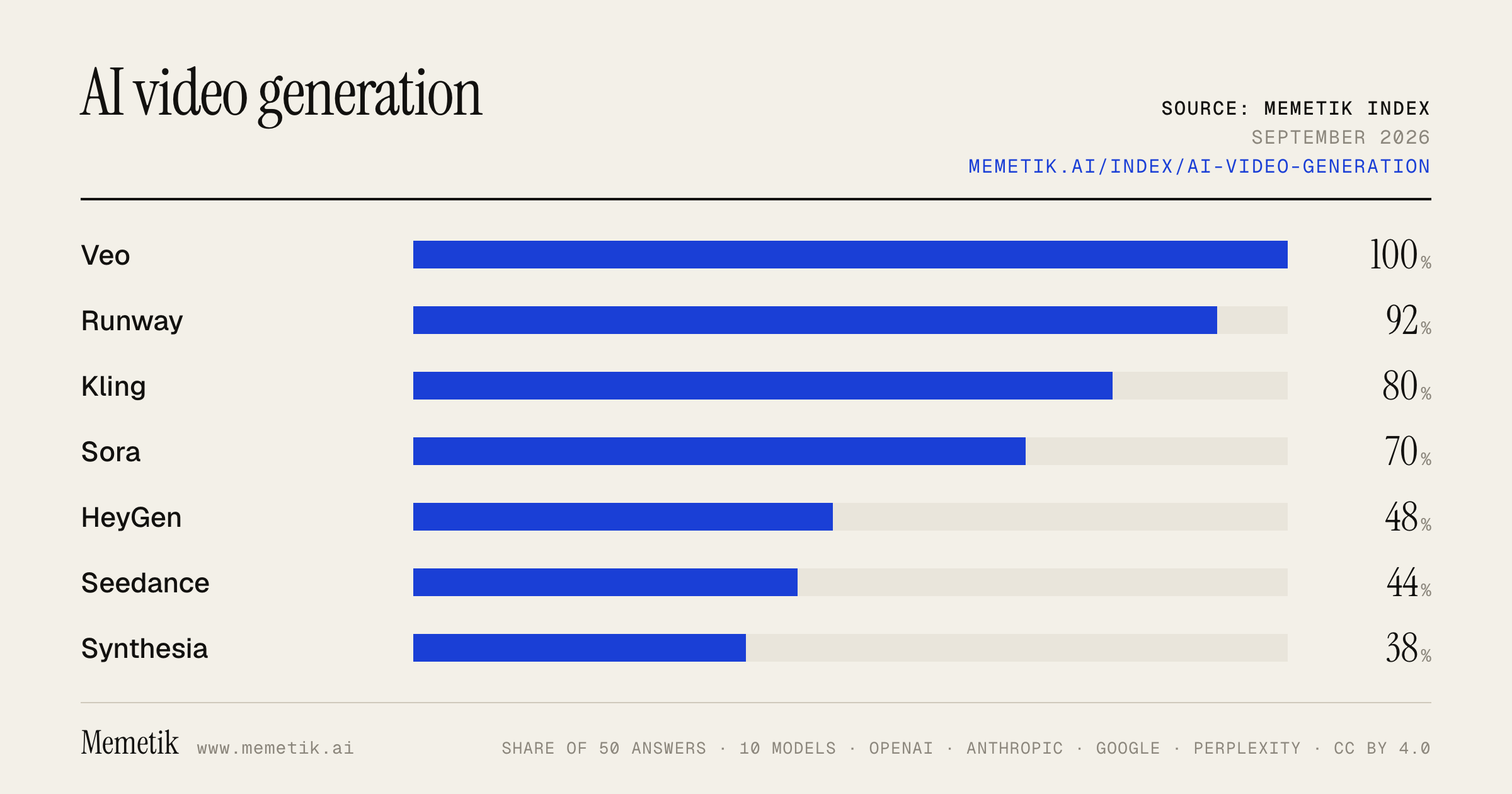
By provider
10 models · 50 answers
OpenAI 3 models · 15 answers
- GPT-5.6 Solgpt-5.6-solmost named: Veo 100%
- GPT-5.6 Terragpt-5.6-terramost named: Veo 100%
- GPT-5.6 Lunagpt-5.6-lunamost named: Veo 100%
Anthropic 3 models · 15 answers
- Claude Opus 5claude-opus-5most named: Veo 100%
- Claude Sonnet 5claude-sonnet-5most named: Veo 100%
- Claude Fable 5claude-fable-5most named: Veo 100%
Google 2 models · 10 answers
- Gemini 3.6 Flashgemini-3.6-flashmost named: Veo 100%
- Gemini 3.5 Flashgemini-3.5-flashmost named: Veo 100%
Perplexity 2 models · 10 answers
- Sonar Prosonar-promost named: Veo 100%
- Sonar Reasoning Prosonar-reasoning-promost named: Veo 100%
Sources the models cited
- reddit.com128
- zapier.com86
- youtube.com68
- pixflow.net60
- heygen.com54
- pixverse.ai50
- pinggy.io40
- therundown.ai33
- pickaxe.co29
- higgsfield.ai28
- deepmind.google21
- curiousrefuge.com19
ChatGPT via API returns no citations, so it does not contribute here.
The prompts
- What is the best AI video generation model or tool for a content creator? Name specific products.
- Which AI video generation model or tool would you recommend to a content creator in 2026?
- Compare the top AI video generation model or tool options right now.
- I'm a content creator and I need an AI video generation model or tool. What should I use and why?
- Best AI video generation model or tool for cinematic short-form video?
Every answer
Raw model output, unedited
GPT-5.6 TerraWhat is the best AI video generation model or tool for a content creator? Name specific products.
## Best overall for most content creators: **Runway (Gen‑4.5)**

If I had to pick **one** tool for a creator making social clips, ads, music-video shots, B-roll, product visuals, or short narrative scenes, I’d choose **Runway**, using its **Gen‑4.5** model.

Why: it is not just a text-to-video generator—it is a fairly complete creation workflow with text/image-to-video, video transformation and editing, character-performance tools, iteration workflows, and professional exports. Runway positions Gen‑4.5 as its highest-quality text- and image-to-video model, while its Aleph tools focus on editing/restyling existing footage. ([help.runwayml.com](https://help.runwayml.com/hc/en-us/articles/37425232841875-Getting-Started-with-Generative-Video?utm_source=openai))

### Pick by use case

| If you need… | Best product/model | Why |
|---|---|---|
| **One versatile tool for a creator** | **Runway Gen‑4.5** | Strong general video quality plus a mature toolset for generating, editing, animating performances, and iterating content. ([help.runwayml.com](https://help.runwayml.com/hc/en-us/articles/37425232841875-Getting-Started-with-Generative-Video?utm_source=openai)) |
| **Best AI-native video with sound/dialogue** | **Google Veo 3.1 in Flow** | Veo is designed around high-fidelity video *with audio*, improved prompt adherence, and creative controls—useful for cinematic ads, sketches, and audiovisual scenes. ([deepmind.google](https://deepmind.google/models/veo/?_sm_nck=1&utm_source=openai)) |
| **Brand/commercial work inside Adobe workflows** | **Adobe Firefly Video** | A strong option when you use Premiere Pro/After Effects and care about Adobe’s commercially oriented, permission-based Firefly model and camera/motion controls. ([adobe.com](https://www.adobe.com/content/dam/cc/in/about-adobe/newsroom/pdfs/2024/Press%20Release-%20Adobe%20Previews%20Its%20Upcoming%20Firefly%20Video%20Model-12SEP2024.pdf?utm_source=openai)) |
| **Consistent characters / multi-shot stories** | **Runway Gen‑4 / Gen‑4.5** | Runway’s reference-driven workflow is particularly oriented toward keeping characters, objects, locations, and visual style consistent between shots. ([runwayml.com](https://runwayml.com/research/introducing-runway-gen-4?iframe=yes&utm_source=openai)) |
| **Fast, inexpensive idea testing** | **Runway Gen‑4 Turbo** | Useful for rapidly exploring concepts before spending more credits on higher-end generations. ([help.runwayml.com](https://help.runwayml.com/hc/en-us/articles/37327109429011-Creating-with-Gen-4-Video?utm_source=openai)) |
| **Editing real footage with AI** | **Runway Aleph 2.0** | Better suited than pure text-to-video for restyling a shot, changing elements, lighting, or art direction in footage you already filmed. ([runwayml.com](https://runwayml.com/product?m=1&utm_source=openai)) |

### My practical recommendation

- **New or solo creator:** Start with **Runway Gen‑4.5**.
- **Creator making cinematic videos where generated sound matters:** Add **Google Flow / Veo 3.1**.
- **Freelancer, agency, or brand team already in Creative Cloud:** Use **Adobe Firefly Video**, potentially alongside Runway for alternate generations and then finish in Premiere/After Effects. Adobe has also integrated access to some third-party models in Firefly workflows. ([news.adobe.com](https://news.adobe.com/news/downloads/pdfs/2025/12/adobe-newsroom-runway-press-release-12-18.pdf?utm_source=openai))

### One product I would *not* start with

**OpenAI Sora** is not a sensible new choice right now: OpenAI says the Sora web and app experiences were discontinued on **April 26, 2026**, with the API scheduled to discontinue on **September 24, 2026**. ([openai.com](https://openai.com/api-docs/sora/?utm_source=openai))

### Bottom line

**Buy/use Runway Gen‑4.5 first.**
It is the best all-around AI-video choice for a content creator because it combines strong generation quality with the surrounding tools needed to actually turn clips into publishable content. Use **Veo 3.1** when native AI audio and cinematic realism are the priority, and **Adobe Firefly Video** when commercial workflow and Adobe integration matter most.
- https://help.runwayml.com/hc/en-us/articles/37425232841875-Getting-Started-with-Generative-Video?utm_source=openai
- https://deepmind.google/models/veo/?_sm_nck=1&utm_source=openai
- https://www.adobe.com/content/dam/cc/in/about-adobe/newsroom/pdfs/2024/Press%20Release-%20Adobe%20Previews%20Its%20Upcoming%20Firefly%20Video%20Model-12SEP2024.pdf?utm_source=openai
- https://runwayml.com/research/introducing-runway-gen-4?iframe=yes&utm_source=openai
- https://help.runwayml.com/hc/en-us/articles/37327109429011-Creating-with-Gen-4-Video?utm_source=openai
- https://runwayml.com/product?m=1&utm_source=openai
- https://news.adobe.com/news/downloads/pdfs/2025/12/adobe-newsroom-runway-press-release-12-18.pdf?utm_source=openai
- https://openai.com/api-docs/sora/?utm_source=openai
GPT-5.6 TerraWhich AI video generation model or tool would you recommend to a content creator in 2026?
**My default recommendation for most content creators in 2026: _Runway_, using its current Gen‑4.5 model.**

It is the best all-around *tool*, rather than merely the strongest raw model: it supports text-to-video and image-to-video, has tools for iterative editing and multi-shot workflows, and emphasizes controllable, consistent characters, objects, and locations—features that matter much more for publishing regularly than winning a one-off visual demo. Runway also offers professional delivery options such as ProRes, PNG sequences, 10-bit SDR, and HDR for creators working with editors or brand clients. ([help.runwayml.com](https://help.runwayml.com/hc/en-us/articles/37425232841875-Getting-Started-with-Generative-Video?utm_source=openai))

### Choose based on your workflow

- **Best overall / creator who wants one main platform:** **Runway Gen‑4.5**
  Best for short-form series, music-video shots, ads, product visuals, cinematic B-roll, and projects needing repeatable visual identity. Start from a reference image, generate short shots, then cut them together in your normal editor.

- **Best for commercial-brand and Adobe-centric work:** **Adobe Firefly Video**
  Pick this if you already live in Premiere Pro/After Effects or if licensing and brand-risk review are central. Adobe positions Firefly Video as commercially safe and IP-friendly, with controls for shot/camera direction and integration into Premiere workflows. ([news.adobe.com](https://news.adobe.com/news/downloads/pdfs/2025/02/021225-firefly-relaunch.pdf?utm_source=openai))

- **Worth testing for top-tier generative-video quality:** **Google Veo 3 / Veo 3.1**
  Google’s current model-card listing includes Veo 3 and Veo 3.1 Lite, so it remains a major option to test for hero shots. But I would select it only after running your own prompt-and-edit test against Runway, because the best model on a benchmark is not necessarily the best production workflow for *your* formats. ([deepmind.google](https://deepmind.google/models/model-cards/?utm_source=openai))

### What I would *not* recommend starting with

Don’t build a new workflow around **OpenAI Sora**. Although Sora 2 had strong video-and-audio capabilities, OpenAI discontinued the Sora web and app product on **April 26, 2026**, and says its API is scheduled to shut down on **September 24, 2026**. ([openai.com](https://openai.com/index/launching-sora-responsibly/?utm_source=openai))

### Practical setup

Use **Runway Gen‑4.5 + Premiere/CapCut/DaVinci Resolve**:
1. Make a character/product reference image.
2. Generate **5–10 second shots**, not entire finished videos.
3. Keep a prompt template for your channel’s lighting, lens, palette, pacing, and aspect ratio.
4. Generate several variants, select the strongest seconds, then edit conventionally.
5. For paid client/brand work, consider Firefly as the safer primary generation environment.

So: **Runway Gen‑4.5 is my single recommendation for the average serious creator; Adobe Firefly wins when commercial safety and Adobe integration outweigh everything else.**
- https://help.runwayml.com/hc/en-us/articles/37425232841875-Getting-Started-with-Generative-Video?utm_source=openai
- https://news.adobe.com/news/downloads/pdfs/2025/02/021225-firefly-relaunch.pdf?utm_source=openai
- https://deepmind.google/models/model-cards/?utm_source=openai
- https://openai.com/index/launching-sora-responsibly/?utm_source=openai
GPT-5.6 TerraCompare the top AI video generation model or tool options right now.
## Short answer

**Best overall model:** **Google Veo 3.1**, especially through **Google Flow**, if you want the strongest blend of visual realism, native synchronized audio/dialogue, image references, camera control, editing operations, and 1080p/4K output. Google’s own evaluations also position it strongly on prompt alignment, visual quality, physics, and audiovisual sync—but treat those as vendor-reported benchmarks, not a neutral universal ranking. ([deepmind.google](https://deepmind.google/models/veo/?_sm_nck=1&utm_source=openai))

**Best production-focused creative tool:** **Runway Gen-4 / Gen-4.5** for reference-driven shots, repeatable characters/objects/locations, and integration into a practical media-production workflow. ([runwayml.com](https://runwayml.com/research/introducing-runway-gen-4?iframe=yes&utm_source=openai))

**Best enterprise / commercial-safety choice:** **Adobe Firefly Video**, particularly when Adobe Creative Cloud integration, governance, and commercially safer/IP-conscious workflows matter more than chasing the single highest raw model score. ([adobe.com](https://www.adobe.com/content/dam/cc/in/about-adobe/newsroom/pdfs/2025/Press%20Release-%20Adobe%20Expands%20Generative%20AI%20Offerings%20Delivering%20New%20Firefly%20App%20with%20Industrys%20First%20Commercially%20Safe%20Video%20Model.pdf?utm_source=openai))

---

## Comparison of the leading options

| Option | Best for | Major strengths | Main tradeoffs |
|---|---|---|---|
| **Google Veo 3.1 + Flow** | Cinematic ads, short films, realistic scenes, audiovisual clips | Native sound effects, ambience and dialogue; strong physics and realism; references for characters/styles/objects; first/last-frame transitions; camera, motion, and object editing; 1080p and 4K options. ([deepmind.google](https://deepmind.google/models/veo/?_sm_nck=1&utm_source=openai)) | May be more tool/ecosystem-specific; the most advanced features can require learning Flow’s workflow rather than simply typing a one-line prompt. |
| **Runway Gen-4 / Gen-4.5** | Multi-shot storytelling, branded characters/products, VFX-adjacent workflows | Excellent emphasis on **world consistency**: retain a character, object, location, style, and cinematography across shots from visual references. Adobe describes Gen-4.5 as particularly strong in motion, prompt adherence, temporal consistency, complex scenes, and expressive characters. ([runwayml.com](https://runwayml.com/research/introducing-runway-gen-4?iframe=yes&utm_source=openai)) | Native audio is not the headline differentiator; generation is credit-based, and Gen-4 video is listed at 12 credits per second. ([help.runwayml.com](https://help.runwayml.com/hc/en-us/articles/37327109429011-Creating-with-Gen-4-Video?utm_source=openai)) |
| **Adobe Firefly Video** | Brand, agency, enterprise, Premiere/After Effects users | Text-to-video and image-to-video, camera-angle controls, first/last-frame guidance, motion design and atmospheric elements; tightly connected to Adobe’s editing ecosystem. Adobe positions its model around commercially safer, IP-friendly generation. ([adobe.com](https://www.adobe.com/content/dam/cc/in/about-adobe/newsroom/pdfs/2025/Press%20Release-%20Adobe%20Expands%20Generative%20AI%20Offerings%20Delivering%20New%20Firefly%20App%20with%20Industrys%20First%20Commercially%20Safe%20Video%20Model.pdf?utm_source=openai)) | For cutting-edge “wow” realism, many creators will still compare outputs against Veo or Runway on the exact shots they need. Its biggest advantage is workflow and commercial posture, not necessarily winning every beauty contest. |
| **Google Veo 3.1 Lite** | Faster / lower-cost iteration within Google’s stack | A lighter member of the Veo 3 family that still supports text- or image-prompted high-quality video **with audio**. ([deepmind.google](https://deepmind.google/models/model-cards/veo-3-1-lite/?utm_source=openai)) | Use it when speed and volume matter; reserve the flagship model for final shots. |
| **OpenAI Sora / Sora 2** | **Not a current buying decision** | Sora historically offered text/image/video inputs, storyboarding, remixing/blending, extensions, and provenance metadata. ([openai.com](https://openai.com/index/sora-is-here/?utm_source=openai)) | OpenAI’s official pages state that the **Sora product was no longer available as of April 26, 2026**. As of **September 2, 2026**, I would not treat it as a currently selectable tool unless OpenAI announces a new generally available offering. ([openai.com](https://openai.com/index/sora-is-here/?utm_source=openai)) |

## What I’d choose by use case

- **You want the best single tool for premium AI-native video:** **Veo 3.1 in Google Flow.**
- **You need the same actor, mascot, product, or environment across many shots:** **Runway Gen-4/4.5.**
- **You work in Premiere Pro / After Effects, at an agency, or under brand/legal constraints:** **Adobe Firefly Video.**
- **You need high-volume concepting before final renders:** **Veo 3.1 Lite**, then move only selected shots to Veo 3.1 or Runway.
- **You are building an application rather than editing manually:** prioritize the provider with the API, controls, and governance model that match your pipeline—Google offers Veo through Gemini/API-related surfaces, while Adobe and Runway are strongest when the creative workflow itself is central. ([deepmind.google](https://deepmind.google/models/veo/?_sm_nck=1&utm_source=openai))

## My practical ranking

1. **Veo 3.1 / Google Flow — best overall capability**
2. **Runway Gen-4 / 4.5 — best controllable production workflow**
3. **Adobe Firefly Video — best commercial/Adobe ecosystem workflow**
4. **Veo 3.1 Lite — best “draft fast, finish selectively” companion**

The important caveat: there is no model that reliably wins every prompt. For a real project, generate the *same 5–10 representative shots* in Veo, Runway, and Firefly, then judge: character stability, hands/faces, camera movement, editability, audio needs, generation time, and rights/workflow requirements. That small
- https://deepmind.google/models/veo/?_sm_nck=1&utm_source=openai
- https://runwayml.com/research/introducing-runway-gen-4?iframe=yes&utm_source=openai
- https://www.adobe.com/content/dam/cc/in/about-adobe/newsroom/pdfs/2025/Press%20Release-%20Adobe%20Expands%20Generative%20AI%20Offerings%20Delivering%20New%20Firefly%20App%20with%20Industrys%20First%20Commercially%20Safe%20Video%20Model.pdf?utm_source=openai
- https://help.runwayml.com/hc/en-us/articles/37327109429011-Creating-with-Gen-4-Video?utm_source=openai
- https://deepmind.google/models/model-cards/veo-3-1-lite/?utm_source=openai
- https://openai.com/index/sora-is-here/?utm_source=openai
GPT-5.6 TerraI'm a content creator and I need an AI video generation model or tool. What should I use and why?
For most content creators, I’d start with **Runway** as your primary AI-video tool.

**Why Runway:** it is built around a creator workflow rather than just one-shot text-to-video generation: you can direct clips from images, iterate quickly, and use it alongside live-action, animation, and VFX work. Its Gen-4 line emphasizes controllability and visual consistency—important when you need a repeatable style rather than a lucky viral clip. ([help.runwayml.com](https://help.runwayml.com/hc/en-us/articles/37327109429011-Creating-with-Gen-4-Video?utm_source=openai))

But the best choice depends on what you create:

| If you need… | Use | Why |
|---|---|---|
| **A versatile everyday tool for YouTube, Reels, music visuals, ads, and B-roll** | **Runway** | Best all-around starting point for controllable generation and an iterative production workflow. ([help.runwayml.com](https://help.runwayml.com/hc/en-us/articles/37327109429011-Creating-with-Gen-4-Video?utm_source=openai)) |
| **The most cinematic, photorealistic scenes with generated dialogue, ambience, and sound effects** | **Google Flow / Veo 3.1** | Veo focuses on realism, prompt adherence, physics, and **native synchronized audio**, so it is especially compelling for narrative scenes and polished standalone clips. ([deepmind.google](https://deepmind.google/technologies/veo/?utm_source=openai)) |
| **Brand/client work, Adobe integration, and a more rights-conscious workflow** | **Adobe Firefly** | Firefly supports text- and image-to-video, camera controls, and is designed by Adobe for commercially safer, permission-based training data. It is the sensible option if you already live in Premiere Pro/After Effects/Photoshop. ([helpx.adobe.com](https://helpx.adobe.com/au/firefly/web/work-with-audio-and-video/work-with-video/generate-videos-using-text-prompts.html?utm_source=openai)) |
| **Fast concepts and social experiments** | **Runway or Veo** | Make a short set of tests in both; quality varies enormously by prompt, subject, and shot type. For this use case, your ability to iterate is more valuable than a theoretical “best” model. |

## My practical recommendation

1. **Subscribe to Runway first** if you want one platform to learn and use regularly.
2. **Use Veo through Google Flow** for your hero shots: cinematic ads, short-film moments, realistic environments, product fantasy shots, or clips that need generated sound/dialogue.
3. **Use Firefly** if paid client work, brand safety, and Adobe handoff matter most.

## Important workflow advice

Don’t rely on text-to-video alone. The more reliable creator workflow is:

1. Create a strong **reference/keyframe image** first.
2. Animate it with image-to-video.
3. Generate several short clips rather than asking for a full finished video.
4. Edit, sound-design, subtitle, and color-grade in a normal editor.

That approach gives you far more consistency in characters, composition, and branding.

## What I would *not* choose

I would **not build a new workflow around OpenAI Sora** right now. OpenAI says the Sora web/app experience was discontinued on **April 26, 2026**, and its API is scheduled to discontinue on **September 24, 2026**. ([openai.com](https://openai.com/api-docs/sora/?utm_source=openai))

**Bottom line:**
- Pick **Runway** for the best general creator tool.
- Add **Veo/Flow** when maximum realism and native audio matter.
- Pick **Adobe Firefly** when commercial production and Adobe integration are your priority.
- https://help.runwayml.com/hc/en-us/articles/37327109429011-Creating-with-Gen-4-Video?utm_source=openai
- https://deepmind.google/technologies/veo/?utm_source=openai
- https://helpx.adobe.com/au/firefly/web/work-with-audio-and-video/work-with-video/generate-videos-using-text-prompts.html?utm_source=openai
- https://openai.com/api-docs/sora/?utm_source=openai
GPT-5.6 TerraBest AI video generation model or tool for cinematic short-form video?
**Best overall for cinematic short-form video: Google Veo 3.1, using Google Flow.**

It’s my pick if you want polished, film-like 5–15 second shots—especially photoreal scenes with convincing camera language, ambient sound/music/dialogue, and coherent scene extensions. Veo 3.1 is Google’s current flagship video model and Flow is its filmmaking-oriented interface for building cinematic clips and scenes. ([deepmind.google](https://deepmind.google/technologies/veo/?utm_source=openai))

### Choose by priority

| If you care most about… | Best pick | Why |
|---|---|---|
| **Overall cinematic realism + native audio** | **Veo 3.1 + Flow** | Best default for dramatic, polished short scenes. |
| **Precise creative control / VFX-style workflow** | **Runway Gen-4** | Strong option when you need reference-driven generation, controllability, and a more production-oriented toolset; Runway positions Gen‑4 around “world consistency” and flexible integration with live action/VFX workflows. ([runwayml.com](https://runwayml.com/research/introducing-runway-gen-4?iframe=yes&utm_source=openai)) |
| **Fast experimentation with highly stylized / social-first shots** | **Kling** | Worth testing alongside Veo; it is frequently competitive for motion-heavy image-to-video work, though results can be less predictable shot-to-shot. |
| **Prompt-to-shot ideation inside the OpenAI ecosystem** | **Sora 2 API** | Capable flagship model with synchronized audio, but I would not make it the sole foundation of a production workflow while OpenAI’s Sora product/distribution is changing. ([openai.com](https://openai.com/api-docs/sora/?utm_source=openai)) |

### My practical recommendation
For a cinematic Reel, TikTok, ad, music-video insert, or short-film sequence:

1. **Generate hero shots in Veo 3.1 / Flow.**
2. Use **image-to-video** whenever possible: create/choose a strong first frame, then animate it. It gives you substantially better art direction than text-only generations.
3. Generate in **short, single-action shots**—usually 4–8 seconds—not entire scenes with multiple beats.
4. Build the final 20–60 second piece in a conventional editor (Premiere, Resolve, CapCut, etc.). AI video is strongest as a shot generator, not yet as a full editing system.
5. Keep **Runway** as your second tool when a shot needs more controlled movement, compositing, or iterations.

### Prompt structure that tends to work
```text
[Subject] [does one clear action] in [specific setting].
Cinematography: [lens / framing / camera move].
Lighting: [time of day / quality].
Mood and grade: [film reference adjectives].
Natural motion, realistic physics, shallow depth of field.
8-second continuous shot, no cuts, no text, no subtitles.
```

Example:
```text
A lone female motorcyclist removes her helmet beside a neon-lit desert gas station at blue hour.
Slow handheld push-in, 50mm anamorphic lens, subtle lens flare.
Wet pavement reflecting magenta signage, wind moving her jacket naturally.
Melancholic neo-noir, restrained cinematic color grade.
8-second continuous shot, no cuts, no text.
```

**Bottom line:** If you only subscribe to one right now, choose **Google Flow with Veo 3.1**. If you’re making client work or need more shot control, pair it with **Runway Gen‑4**.
Claude Sonnet 5What is the best AI video generation model or tool for a content creator? Name specific products.
There's no single "best" model — the right choice depends on what kind of content you're making. Here's how the leading options break down as of 2026:

## Top picks by use case

**OpenAI Sora 2** – Best for narrative concepting and polished cinematic mood.
Kling 3.0 fits high-motion scenes, while Sora 2 fits narrative concepting and polished visual mood.


**Google Veo 3.1** – Best for realistic marketing/commercial content.
Google Veo 3.1 fits realistic marketing concepts.
 It's also considered a leader in cinematic lighting quality —
the "looks like a movie" lighting quality still belongs to Gen-4.5 and Veo 3.1 respectively.


**Runway Gen-4.5** – Best for professional production, camera control, and generative editing.
Runway Gen-4.5 fits camera control and generative editing.
 For more traditional production work, one review notes
for professional video production, advertising, and commercial content, Runway Gen-4 is the most reliable choice, with consistency and control that are unmatched.


**Kling 3.0 (Kuaishou)** – Best for high-motion, physically realistic action and short-form social/talking-head content.
Kling 3.0 from Kuaishou is one of the most technically capable video generators available, with standout motion realism — it handles fast movement, object physics, and camera transitions more convincingly than most models at comparable resolution.
 It's especially strong for social content:
Kling is the model to pick first for short-form social content where you want talking heads in any of a dozen languages at 4K without paying Veo prices.
 It also has massive adoption —
Kuaishou reports over 60 million creators and 600 million videos generated globally since Kling launched in mid-2024.


**Seedance 2.0 (ByteDance)** – Best for brand/commercial content with strong physical realism and consistency.
Seedance 2.0 handles motion better than most current video models, making character and environmental interactions look physically believable, and it supports multi-scene generation from a single reference, keeping the same character while shifting camera angles across aligned cuts.


**PixVerse V6** – Good multi-purpose option:
PixVerse V6 fits creators who need multi-shot generation, native audio, and repeatable testing across text-to-video and image-to-video workflows.


**Luma Dream Machine 2.0** – Best if you want flexibility across multiple engines.
Luma's Dream Machine has quietly become one of the most versatile AI video platforms available, giving access to multiple generation models within a single platform rather than locking you into one model's strengths and weaknesses — ideal for creators who treat AI video as a creative collaboration rather than a one-shot prompt.
 It also has strong camera/storyboard tools:
Dream Machine 2.0's storyboard mode chains shots with automatic scene transitions and character consistency, exposing dolly, crane, orbit, and handheld camera moves as first-class controls.


**Pika 2.5** – Best for fun, stylized social content:
Pika is the most fun AI video tool, especially good if you're making social media content, memes, or anything that benefits from a creative twist.


**Adobe Firefly** – Solid for quick, safe concept work:
the Firefly model has very fast generation times and is stable and reliable, making it useful for concept exploration and early-stage motion ideas.


## If you want ONE tool instead of juggling several
Aggregator platforms like **Higgsfield** and **Artlist's AI video generator** let you access multiple top models (Kling, Seedance, Veo, etc.) from one subscription with commercial licensing handled for you.
Higgsfield is considered a strong AI video model aggregator, offering a wide range of AI image and video models for a reasonable price with a clean interface, and it tends to give access to new models very quickly.


## Bottom line recommendation
For most solo content creators today, a practical setup is:
- **Kling 3.0** for fast-turnaround, high-motion social/short-form content and talking heads
- **Runway Gen-4.5** or **Veo 3.1** when you need polished, professional-looking commercial or brand content
- **Higgsfield or Artlist** if you'd rather not manage multiple subscriptions and want one workspace with commercial rights sorted out

As one review puts it plainly:
no single model covers the full scope of production — each one handles a specific layer of the process, and strong outputs come from combining them with clear intent.
- https://pixverse.ai/en/blog/best-ai-video-generators
- https://pinggy.io/blog/best_video_generation_ai_models/
- https://pickaxe.co/post/top-ai-video-generators
- https://artlist.io/blog/best-ai-video-generators-in-2026/
- https://invideo.io/blog/best-ai-video-generation-models/
- https://www.synthesia.io/post/best-ai-video-generators
Claude Sonnet 5Which AI video generation model or tool would you recommend to a content creator in 2026?
As of 2026, there's no single "best" tool — the right choice depends on what you're creating. Here's a breakdown based on current options:

## Top picks by use case

**For all-around ease of use and dialogue/audio:** Google Veo 3.1 stands out —
Google's Veo 3.1 model is the best AI video generation all-arounder on the market, with strong prompt adherence to stick close to image references and text prompts, great realism combining video and audio generation, and robust creative features
. It's also notable that
Veo 3.1 is the only model generating 48kHz synchronized dialogue, not just SFX, with Lite/Fast/Quality tiers, priced at AI Pro $19.99/mo, Ultra $249.99/mo, or API $0.03-$0.50/sec
.

**For best price-to-performance ratio:** ByteDance's Seedance 2.0 is frequently ranked #1 overall.
Seedance 2.0 takes the top spot for overall best AI video generation model in 2026, with the combination of motion quality, prompt adherence, and price performance unmatched — its Fast tier at $0.022/sec provides production-grade output at a fraction of competitor pricing
. It also currently leads benchmarks:
ByteDance Seedance 2.0 is the current #1 on the Artificial Analysis leaderboard for with-audio generation (1213 Elo), supporting 9 images + 3 clips + 3 audio inputs per generation, accessible via Doubao
.

**For high-resolution/professional output:** Kling 3.0 is strong here —
Kling 3.0 (released Feb 2026) offers native 4K, 60fps, 15-second clips, and multilingual lip-sync, with four entries in the Artificial Analysis top 10, plus a free tier and paid plans
.

**For color-grading/pro pipelines:**
Luma's Ray3 is the first model to generate native 16-bit HDR (exportable as EXR), aimed at pro color pipelines
 — useful if you're doing high-end post-production work.

**For lip-sync heavy content:** HappyHorse-1.0 from Alibaba is a newer standout:
HappyHorse-1.0 (Alibaba, April 2026) is the current #1 on the Artificial Analysis leaderboard without audio (1357 Elo), roughly tied #1 with audio, featuring 15B params, 7-language lip-sync, 1080p output, and joint audio-video generation, live on the fal.ai API
.

**Important note on Sora:** If you were considering OpenAI's Sora, be aware that
Sora has recently been discontinued as a consumer app and API in 2026, as OpenAI decided to shut it down to focus on other areas such as robotics and advanced research
.

## For open-source/self-hosted options
If you want to run models locally or need more control/customization:
the open source landscape is dominated by DiT-based architectures, with LTX-2.5, Wan Video, and CogVideoX as leading production-capable models — LTX-2.5 is notably the only open source model with native audio-video generation in a single pass, plus an extensive fine-tuning ecosystem including LoRA adapters and FP8 quantization for 32GB GPU workflows
.

## My practical recommendation
For most content creators in 2026, I'd suggest:
1. **Start with Google Veo 3.1** if you want an easy, versatile, all-in-one tool with great audio/dialogue sync — ideal for social content, ads, and storytelling.
2. **Try Seedance 2.0** if budget and speed matter most, since it offers near-top-tier quality at very low cost per second.
3. **Consider a multi-model platform** (like invideo, Framia, or Atlas Cloud) if you want flexibility —
many teams now use aggregator platforms to access multiple AI video generation models in one place, testing different models side by side, reusing assets, and keeping workflow consistent instead of resetting context every time
. This avoids locking into one model since strengths vary so much by project type.

If you tell me more about your specific use case (e.g., short-form social videos, ads, cinematic storytelling, or budget constraints), I can narrow this down further.
- https://zapier.com/blog/best-ai-video-generator/
- https://pinggy.io/blog/best_video_generation_ai_models/
- https://www.atlascloud.ai/blog/guides/best-ai-video-generation-models-2026
- https://framia.converge.ai/blog/ai-video-generation-models/
- https://ltx.io/blog/best-open-source-video-generation-models
- https://invideo.io/blog/best-ai-video-generation-models/
Claude Sonnet 5Compare the top AI video generation model or tool options right now.
Based on current data, here's how the leading AI video generation tools stack up as of September 2026:

## Top Models at a Glance

**Kling 3.0 / Kling v3 (Kuaishou)** — Currently the strongest overall performer on blind human-vote leaderboards.
As of September 2026, Kling v3 leads the text-to-video leaderboard with an arena score of 1934, followed by Happy Horse 1.0 (1816) and Seedance 2.0 Fast (1747)
. It's also technically loaded:
Kling 3.0 offers native 4K, 60fps, 15-second clips, and multilingual lip-sync
, and
comes with a free tier plus paid plans
.

**Seedance 2.0 (ByteDance)** — The value/commercial leader.
It takes the top spot for overall best AI video generation model in 2026, with motion quality, prompt adherence, and price performance that's unmatched — its Fast tier at $0.022/sec provides production-grade output at a fraction of competitor pricing, while the Pro tier delivers premium quality for hero content
. It's also strong on audio:
ByteDance Seedance 2.0 is the current #1 on the Artificial Analysis with-audio leaderboard at 1213 Elo
.

**Happy Horse 1.0/1.1 (Alibaba)** — A newer, fast-rising contender.
Released in April 2026, it's the current #1 on the without-audio leaderboard at ~1357 Elo
, and it also
added 7-language lip-sync support (English, Mandarin, Cantonese, Japanese, Korean, German, French)
. Interestingly, one leaderboard notes
Happy Horse 1.0 is unremarkable at generation but first at editing
.

**Google Veo 3.1 (Gemini)** — Consistently near the top across tasks.
Gemini Omni Flash is the steady hand, never leaving the top two on any track
, making it one of the most reliable all-rounders rather than a category leader.

**Runway Gen-4.5** — The photorealism specialist.
Runway Gen-4.5 sets the bar for photorealism
 among current models, making it a favorite for cinematic, high-fidelity work.

**LTX-2.3/2.5 (Lightricks)** — Built for speed and length.
LTX-2.3 added stereo audio at 24kHz in March 2026
, and
it can generate 20-second clips in a single pass
 — longer than most competitors, which
typically cap around 8-10 seconds and stitch clips together
. Another source notes
LTX-2.5 dominates speed with 6.8-second renders
.

**Wan 2.6/2.7 (Alibaba, open-source)** — The best open-weight option.
Alibaba's Wan 2.7 is the strongest model you can run on your own hardware
, appealing to developers who want local control rather than cloud APIs.

**Vidu Q3** — Notable for clip length,
doing 16 seconds
 in one pass.

## Pricing Range
Costs vary widely by tier and provider:
at the cheapest end, Seedance 2.0 Fast produces one minute of 8-second clips for approximately $1.32, while at the premium end, Kling Video O3 costs approximately $9.00 per minute
.

## How to Choose
There's no universal "best" — it depends on the job. As one comparison puts it:
there is no single "best" AI video model in 2026, and the leaderboard proves it with numbers rather than opinion — the model that comes out on top depends entirely on the job: turning a text prompt into a clip, animating a still photograph, or restyling footage you already have
. Similarly, another guide frames the real differentiators as:
control, motion accuracy, and how precisely they match your intent — some models deliver cinematic depth, others focus on physics and realism, while a few prioritize speed
.

### Quick recommendations:
- **Best overall quality (blind-vote leaderboard):** Kling 3.0
- **Best value/commercial use:** Seedance 2.0
- **Best photorealism:** Runway Gen-4.5
- **Best for long single-pass clips:** LTX-2.3 (20s) or Vidu Q3 (16s)
- **Best open-source/self-hosted:** Wan 2.7
- **Best all-around reliability:** Google Veo (Gemini Omni Flash)
- **Best for editing existing footage:** Happy Horse 1.0/1.1

Many creators now use multi-model platforms (like Higgsfield, invideo, or Atlas Cloud) that let you switch between Seedance, Kling, Veo, and others in one workspace rather than committing to a single vendor — useful since
you can switch between Seedance, WAN, Kling, or Sora 2 depending on the shot you need, without breaking your sequence, which matters when building multi-shot videos that demand consistency across scenes
.
- https://llm-stats.com/leaderboards/best-ai-for-video-generation
- https://pinggy.io/blog/best_video_generation_ai_models/
- https://www.atlascloud.ai/blog/guides/best-ai-video-generation-models-2026
- https://www.pixazo.ai/blog/ai-video-generation-models-comparison
- https://resource.digen.ai/ai-video-generation-models-compared-2026/
- https://invideo.io/blog/best-ai-video-generation-models/
Claude Sonnet 5I'm a content creator and I need an AI video generation model or tool. What should I use and why?
There's no single "best" tool — it really depends on what kind of content you're making. Here's a breakdown based on the current landscape:

## Top picks by use case

**If you want the most realistic, cinematic footage with built-in sound:**
Google Veo 3.1 is considered the top all-rounder right now.
Google Veo 3.1 is the benchmark for AI video generation quality in 2026, leading on prompt adherence, native audio generation, and 4K output in both landscape and portrait, making it the strongest all-rounder for narrative scenes, marketing footage, and establishing shots.
 Its standout feature is audio:
when you describe a scene, Veo generates ambient sound, dialogue, and environmental audio alongside the footage automatically, eliminating the separate audio production step most other tools require.


The catch is accessibility —
Veo 3.1 is primarily available through Google Flow, which is gated behind enterprise or premium subscriptions, with the Google AI Ultra tier running as high as $249.99/month, and creator communities often describe it as a "studio tool" rather than a "creator tool" due to pricing constraints.


**If you want precise creative/camera control:**
Runway is the go-to.
Runway is where creative professionals go when they need precise control over every aspect of AI-assisted video creation — Gen-4.5 was ranked the world's top-rated video model in December 2025 independent benchmarks, and its Multi-Motion Brush lets you animate specific regions of a frame independently, like background water moving while the foreground subject stays still.
 It also recently added Aleph, an in-video editing system for making direct modifications after generation.

**If you want the best value/budget option:**
Kling 3.0 is frequently cited as the best bang for your buck.
Kling 3.0 from Kuaishou is the best value proposition in AI video generation tools for 2026 — at approximately $10/month, it delivers cinematic quality competing directly with Runway and Veed.
 It's also particularly strong at human motion:
Kling AI has made a name for itself by specializing in the generation of photorealistic human characters and movements, making it an excellent choice for creators who need realistic human actors for social media, marketing, or other content.


**If you want narrative/storytelling polish:**
Sora 2 is favored for concept and mood. Per one hands-on comparison,
Kling 3.0 fits high-motion scenes, while Sora 2 fits narrative concepting and polished visual mood.


**If you want fast, daily social content (no watermark, free):**
CapCut is a solid pick —
CapCut is recommended for daily social content, with no watermark and free editing.


**If you want creative/experimental effects:**
Pika stands out for stylized remixing.
Pika is a fun and creative tool popular with artists, designers, and social media creators, offering a wide range of features for remixing and adding creative twists — including Pikaframes, Pikaswaps, and Pikatwists — that allow for a high degree of creative manipulation.


## My recommendation

Since you're a content creator (not necessarily an enterprise team), here's how I'd think about it:

1. **Start with Kling 3.0** if budget matters — cheap, high quality, great for talking-head/human-motion content.
2. **Use Runway** if your content leans cinematic and you want fine-grained editing control over shots.
3. **Try Veo 3.1 via CapCut** (a more accessible entry point than Google Flow) if native audio generation would save you significant post-production time.
4. **Consider a multi-model aggregator** (like Higgsfield or PixVerse) if you don't want to be locked into one engine —
a multi-model platform wins when your work spans engines, giving you one subscription, one credit system, one workspace, and a creative suite carries the work past generation into consistency, editing, and scale.
 This is smart if you're experimenting and don't yet know which model fits your style best.

**Bottom line:** If you told me your specific format (YouTube long-form, TikTok/Shorts, ads, animation, talking-head, etc.) and budget, I could narrow this down to one clear recommendation instead of a menu.
- https://thinkcloudly.com/general/ai-video-generation-tools/
- https://www.heygen.com/blog/best-ai-video-generators-tested-and-reviewed
- https://manus.im/blog/best-ai-video-generator
- https://pixverse.ai/en/blog/best-ai-video-generators
- https://www.heygen.com/blog/free-ai-video-generators
- https://higgsfield.ai/blog/best-ai-video-generators-2026
Claude Sonnet 5Best AI video generation model or tool for cinematic short-form video?
Based on the latest comparisons (as of mid-2026), there's no single "best" model—it really depends on what you value most for your cinematic short-form work. Here's the breakdown:

## Top Picks for Cinematic Quality

**Google Veo 3.1 — Best overall for cinematic realism + audio**

The best current blend of realism, physical plausibility, and integrated audio
 makes Veo 3.1 the go-to safe choice.
What sets it apart is that Veo is the only widely available model generating 48kHz synchronized dialogue, not just background SFX and ambient noise — if your content needs people talking, Veo is currently the only choice that does it in one pass.
 Reviewers note
Veo 3.1 leads in camera work and audio.


**Kling 3.0 — Best value + stylized cinematic look**

For stylized storytelling, music videos, fashion, and concept work, Kling 3.0 offers up to 4K, multi-shot sequences, and a distinctive cinematic look.
 It's also praised as
a stable, controllable, production-ready cinematic generator.


**Seedance 2.0 — Best for multi-character/multimodal control**

Seedance 2.0 leads on multimodal control and multi-character scenes.
 It's
built around accepting multiple inputs at once: text, images, reference video, and audio in a single generation pass, rather than the usual one-prompt-in, one-clip-out approach.
 Note that some reviewers flag it as
the most cinematic output but hard to access.


**Runway Gen-4.5 — Best for creative control/editing workflow**

Runway is one of the most mature platforms combining generation, editing, and effects, with Gen-4 supporting consistent characters, objects, and environments across shots using reference images and prompts.
 Reviewers note
Runway gives you the most control.


**Sora — Best for short, conceptual cinematic ideas**

Sora is strong when you want clean semantic alignment from prompt to video, especially for conceptual, short-form cinematic ideas, at 1080p resolution and 30fps.


**Luma Ray3 — Best for mood/environment shots**

Luma's current Ray3/Ray3.14 models still matter for cinematic mood and environment-heavy shots.


## Quick Recommendation Matrix

| Need | Best Pick |
|---|---|
| Realistic dialogue + audio sync | **Veo 3.1** |
| Stylized/high-res cinematic look | **Kling 3.0** |
| Multi-character complex scenes | **Seedance 2.0** |
| Fine-grained editing control | **Runway Gen-4.5** |
| Fast, budget-friendly volume | **Kling 3.0 Turbo** or **Hailuo 2.3** |
| Mood/atmosphere-driven b-roll | **Luma Ray3** |

As one source puts it:
dialogue-heavy scenes point toward Veo or Kling, control-heavy editing points toward Runway, and multi-character complexity points toward Seedance.


**My practical suggestion:** If you want one tool to start with for cinematic short-form content, **Veo 3.1** is the safest all-around choice thanks to its realism and native audio. But if budget or stylization matters more, **Kling 3.0** is excellent value with a strong cinematic aesthetic.
- https://www.buildmvpfast.com/articles/best-llms-2026-guide/video-generation-ai
- https://pinggy.io/blog/best_video_generation_ai_models/
- https://www.dejaoffice.com/blog/2026/07/30/best-ai-video-models-for-cinematic-short-films-in-2026-a-practical-comparison/
- https://higgsfield.ai/blog/best-ai-video-generators-2026
- https://www.synthesia.io/post/best-ai-video-generators
- https://russellsapalmer.medium.com/the-top-ai-video-models-entering-2026-c9997cb7271c
Gemini 3.6 FlashWhat is the best AI video generation model or tool for a content creator? Name specific products.
There is no single "best" AI video generator for content creators, as the right tool depends heavily on your specific workflow, style, and goals.

### 1. Best for Cinematic Quality & Creative Control
* **Runway (Gen-3 / Gen-4)**: The industry standard for high-end cinematic visuals. It offers precise camera controls (pan, zoom, tilt), motion brush features, and image-to-video capabilities, making it ideal for visual storytelling, music videos, and cinematic B-roll.
* **Kling AI**: Extremely popular for generating high-fidelity, realistic motion and longer scene duration. It handles complex human physics and action sequences well, often rivaling professional studio tools.
* **Luma Dream Machine**: Outstanding for fast, photo-realistic generation with natural camera movements. It excels at taking a still image and adding fluid, believable motion.
* **Google Veo**: High consistency and prompt accuracy, great for creating reliable, photorealistic background clips and B-roll.

### 2. Best for Social Media Content Creators (Shorts, Reels, TikTok)
* **CapCut AI**: CapCut integrates generative AI features directly into a full-featured video editor. It includes AI script-to-video, auto-captioning, background removal, and face retouching, making it the fastest end-to-end tool for vertical content creators.
* **InVideo AI**: Generates full, ready-to-post videos from a simple text prompt (including script, AI voiceover, stock/generated footage, and subtitles). Excellent for faceless YouTube channels or quick educational clips.
* **Higgsfield**: Built specifically for social media creators, specializing in vertical video formats, dynamic character movement, and stylish camera tracking.

### 3. Best for Talking-Head & Faceless Avatar Videos
* **HeyGen**: The market leader for photorealistic AI avatars and voice cloning. Perfect for creators who want to produce tutorials, news updates, or faceless presentations without getting in front of a camera.
* **ElevenLabs + D-ID / SadTalker**: Combining ElevenLabs (for industry-leading AI voice cloning and expressive text-to-speech) with lip-sync animation platforms creates hyper-realistic talking avatars.

### 4. Best for Editing Existing Content & Repurposing
* **Descript**: An essential tool for podcasters and YouTubers. It transcribes your audio/video and lets you edit the video by simply editing the text script. Features include Studio Sound (voice enhancement), AI eye-contact correction, and filler-word removal.
* **Opus Clip**: Automatically takes long-form YouTube videos or podcasts and extracts the most viral hooks into formatted short-form clips with automated captions and dynamic layouts.

---

### Recommendation Summary
* **If you want cinematic FX/B-roll:** Use **Runway** or **Kling AI**.
* **If you want fast social media edits:** Use **CapCut** or **InVideo AI**.
* **If you make talking-head/educational content:** Use **HeyGen** or **Descript**.
Gemini 3.6 FlashWhich AI video generation model or tool would you recommend to a content creator in 2026?
The best AI video generation tool in **2026** depends on your specific use case, workflow, and budget. However, several top-tier models dominate the space across different creator needs:

---

### **1. Best Overall for Creators & Filmmakers: Runway (Gen-4 / Gen-4.5)**
* **Best for:** Cinematic short films, music videos, fine camera control, and advanced editing workflows.
* **Why it stands out:** Runway remains the industry standard for creative control. It offers precise controls for camera motion, image-to-video consistency, motion brushing, and multi-shot storyboarding.
* **Key Strengths:** Exceptional aesthetic quality, granular editing features, robust ecosystem.

---

### **2. Best for High-Motion Realism & Action: Kling AI (Kling 2.6 / 3.0)**
* **Best for:** High-action scenes, realistic human dynamics, complex physics, and longer coherent clips.
* **Why it stands out:** Developed by Kuaishou, Kling is renowned for handling rapid movement, liquid dynamics, and natural human motion with far fewer visual artifacts than competitors.
* **Key Strengths:** Strong motion physics, prompt adherence, multi-second shot continuity.

---

### **3. Best for Visual Fidelity & Photorealism: Google Veo (Veo 3 / 3.1)**
* **Best for:** Commercial-grade B-roll, hyper-realistic textures, lighting, and integration with broader AI ecosystems.
* **Why it stands out:** Google’s Veo models generate ultra-crisp (up to 4K upscaled) output with hyper-realistic lighting and room acoustics/depth.
* **Key Strengths:** Excellent image-to-video accuracy, native multi-frame prompting, and direct access via Google AI Studio/Gemini API.

---

### **4. Best for Narrative & Concept Exploration: OpenAI Sora (Sora 2)**
* **Best for:** Complex multi-character scenes, worldbuilding, and highly detailed visual storytelling.
* **Why it stands out:** OpenAI’s Sora 2 delivers deep spatial understanding, enabling scenes with intricate backgrounds, shifting camera perspectives, and continuous multi-object tracking.
* **Key Strengths:** Complex environment simulation, narrative consistency.

---

### **5. Best for Fast Social Media Clips & Stylized Content: Pika & Hailuo AI**
* **Best for:** Short TikTok/Reels content, quick animations, stylized visual effects, and rapid turnaround.
* **Why it stands out:**
  * **Pika (Pika 2.5):** Great for adding fun, stylized effects, quick audio/lip-sync, and social-first edits.
  * **Hailuo AI (Minimax):** Popular for generating fast, high-volume visual clips with smooth aesthetics at lower credit costs.

---

### **Recommendation Summary**

| Creator Role | Recommended Tool | Primary Reason |
| :--- | :--- | :--- |
| **Short-Film / Director** | **Runway** or **Sora 2** | Deepest creative control and narrative stability. |
| **Social Content / Action Clips** | **Kling AI** | Superior physics, realistic human movement, fast rendering. |
| **Commercial / Ad Creator** | **Google Veo** | Hyper-realistic textures and commercial-grade lighting. |
| **Budget / Social Shorts** | **Hailuo AI** or **Pika** | Quick, cost-effective, ideal for rapid social media iteration. |

*Tip:* Many creators use multi-model aggregators (e.g., InVideo AI, Higgsfield) to test multiple generators within a single interface before committing to a specific subscription.
Gemini 3.6 FlashCompare the top AI video generation model or tool options right now.
The AI video generation landscape has evolved rapidly, moving away from short, shaky 4-second demos into full production ecosystems. State-of-the-art tools now offer native audio generation (dialogue, sound effects, ambient noise), fine-grained camera direction, long clip continuity, and high-fidelity physics.

---

### 1. **Google Veo (Veo 3.1)**
* **Best For:** Overall cinematic quality, native audio sync, and high-resolution rendering.
* **Key Strengths:**
  * **Native Audio:** Generates realistic sound effects, ambient audio, and matching dialogue tied directly to the visual movement.
  * **Resolution & Detail:** Excellent 4K output with cinematic lighting, depth of field, and camera physics.
  * **Filmmaking Tools:** Integrated directly into Google’s *Flow* filmmaking environment, making keyframing, camera tracking, and prompt iterations smooth.
* **Weaknesses:** Access can still carry strict compute caps or tiered API walls depending on usage.

---

### 2. **Runway (Gen-4 & Gen-4.5)**
* **Best For:** Professional editors, motion designers, and workflow-first creators.
* **Key Strengths:**
  * **Creative Control:** Industry-leading editing features like Motion Brush, multi-camera direction, structural video-to-video editing, and character consistency presets.
  * **Production Ecosystem:** Excellent timeline controls and integration with professional post-production workflows.
  * **Balanced Output:** High realism combined with exceptional prompt adherence.
* **Weaknesses:** Subscriptions can get expensive quickly for heavy production, as advanced controls require higher-tier credits.

---

### 3. **Kling AI (Kling 3.0 / Omni)**
* **Best For:** Complex human motion, long clips, and lip-sync dialogue.
* **Key Strengths:**
  * **Human Kinetics:** Outperforms most competitors on realistic human body mechanics, facial expressions, and complex multi-person scenes.
  * **Length & Audio:** Capable of rendering extended clips (with extension options up to multi-minute sequences) with built-in voice acting and lip-syncing capabilities.
* **Weaknesses:** Background elements can occasionally suffer from subtle motion blur or artifacting during fast pans.

---

### 4. **MiniMax (Hailuo AI / 2.3)**
* **Best For:** Fluid motion, expressive physics, and creative or stylized prompts.
* **Key Strengths:**
  * **Fluid Dynamics:** Excels at complex physical motions (flowing liquids, cloth physics, dynamic lighting shifts) where other models glitch.
  * **Speed & Agility:** Very responsive to abstract, surreal, or stylistically challenging prompts.
* **Weaknesses:** Lacks some of the deep post-production and camera keyframing controls seen in Runway or Google Flow.

---

### 5. **OpenAI Sora (Sora 2 / 2 Pro)**
* **Best For:** Photorealism and realistic physics simulation.
* **Key Strengths:**
  * **Physics Understanding:** Exceptional at handling complex occlusions, reflections, structural continuity, and multi-shot consistency.
  * **Cinematic Realism:** Sets a high baseline for lighting, depth, and cinematic realism.
* **Weaknesses:** **Platform Transitions:** OpenAI has shifted its access models (announcing sunsetting for standalone web apps while pivoting toward deeper integrations and API partnerships), making it less suitable as a standalone end-to-end editing platform.

---

### 6. **Luma AI (Dream Machine / Luma Ray)**
* **Best For:** Image-to-video transformations and fast concepting.
* **Key Strengths:**
  * **Image Continuity:** Unmatched at taking a single high-resolution starting image (or camera reference frame) and animating it with dramatic camera movement.
  * **Speed:** Rapid generation speeds make it popular for quick social media clips, storyboarding, and look-development.
* **Weaknesses:** Native clip lengths remain shorter by default (typically around 5 seconds per generation before extending).

---

### Specialized Mention: Avatar & Corporate Video

If your primary need is **presenters, corporate training, or multilingual video localization**:
* **HeyGen & Synthesia:** Remain the top tools for hyper-realistic AI avatars, multi-language lip-syncing, and video translation. They are tailored for business presentations rather than film/cinematic storytelling.

---

### Quick Selection Matrix

| Focus Area | Top Recommendation | Why? |
| :--- | :--- | :--- |
| **All-Around Cinematic + Sound** | **Google Veo 3.1** | Native matching audio, 4K resolution, excellent physics. |
| **Directorial & Fine Control** | **Runway Gen-4.5** | Best camera/motion controls, timeline editing, character lock. |
| **Human Characters & Dialogue** | **Kling AI (v3)** | Natural human movement, multi-subject tracking, built-in lip-sync. |
| **Image-to-Video Animation** | **Luma Dream Machine** | Flawless keyframe-to-clip transitions and camera pans. |
| **Expressive Physics / Motion** | **MiniMax (Hailuo)** | Handles fluid, surreal, and dynamic physical interactions best. |
| **Corporate / Faceless / UGC** | **HeyGen / Synthesia** | Unbeatable talking avatar generation and auto-dubbing
 [1.1.3
Gemini 3.6 FlashI'm a content creator and I need an AI video generation model or tool. What should I use and why?
Choosing the right AI video generator depends on your specific focus as a creator, whether that is storytelling, commercial ads, social media content, or avatar-led presentations.

The best tools are broken down by category to help you choose the right fit:

---

### 1. Best for High-End Cinematic & Storytelling: **OpenAI Sora / Google Veo**
* **Why use them:** They excel at physical realism, camera movement, dynamic lighting, and prompt adherence.
* **Key Strengths:** Google’s Veo 3 / 3.1 stands out for native audio integration (dialogue, ambient noise, and background sound generated directly with the video). OpenAI’s Sora 2 delivers cinematic physics and complex multi-subject action.
* **Best for:** Short filmmakers, music video creators, and visual storytellers.

### 2. Best for Commercials, Ads & Consistency: **Runway (Gen-3 / Gen-4)**
* **Why use it:** Runway remains the industry standard for production workflows. It gives creators precise controls like camera motion, multi-motion brush controls, keyframing, and subject consistency across multiple generated clips.
* **Key Strengths:** Superior control knobs and direct integration into traditional video editing software.
* **Best for:** Professional editors, agency content creators, and brand marketers.

### 3. Best for Talking Characters, Lip Sync & Value: **Kling AI**
* **Why use it:** Developed by Kuaishou, Kling is renowned for exceptional lip-sync accuracy, talking character consistency, and rendering complex human motion.
* **Key Strengths:** Outstanding image-to-video capabilities, longer clip generation options, and generous pricing compared to Western counterparts.
* **Best for:** Creators working with dialogue, character-driven narratives, and budget-conscious channels.

### 4. Best for Fast Social Media Clips & B-Roll: **Luma Dream Machine**
* **Why use it:** Built for speed and fluid motion. It quickly transforms images or text into dynamic clips with accurate physics and spatial awareness.
* **Key Strengths:** Fast iteration—great for taking a still design or image and making it pop for short-form content.
* **Best for:** TikTok, YouTube Shorts, and Instagram Reels creators needing high-volume B-roll.

### 5. Best for Social Effects & Quick Edits: **Pika**
* **Why use it:** Pika specializes in creative micro-effects and stylized visuals (e.g., custom inflation, squishing, or specialized motion tools).
* **Key Strengths:** Fun, engaging UI designed for quick visual hooks on social media.
* **Best for:** Meme channels, viral trend creators, and social media managers looking for quick eye-catchers.

### 6. Best for Talking Avatars & Faceless Channels: **HeyGen / Synthesia**
* **Why use them:** Unlike diffusion-based scene generators, these platforms specialize in photorealistic AI avatars reading scripts in dozens of languages with natural facial expressions and voice lip-sync.
* **Best for:** Educational channels, faceless YouTube tutorials, product demos, and localized content.

---

### Which one should you pick?

* **If you want "All-in-One" flexibility:** Try model-aggregation platforms like **OpenArt**, **Higgsfield**, or **Fal.ai**, which let you test models like Veo, Kling, Sora, and Seedance under a single subscription using a pay-as-you-go credit system.
* **If you need cinematic B-roll/scenery:** Start with **Google Veo** or **Runway**.
* **If your videos rely on people/actors speaking:** Choose **Kling AI** (for stylized character generation) or **HeyGen** (for script-reading avatars).
Gemini 3.6 FlashBest AI video generation model or tool for cinematic short-form video?
When choosing the **best AI video generation model or tool for cinematic short-form content** (TikTok, Instagram Reels, YouTube Shorts, or mini-trailers), the right option depends on your specific focus: maximum realism, precise camera control, fast workflow, or native audio.

---

### 1. The Best Overall for Cinematic Control & Realism: **Runway (Gen-4 / Gen-4.5)**
* **Best For:** Directors, filmmakers, and creators who need high visual fidelity and precise creative direction.
* **Key Features:**
  * Exceptional control over camera movements (pan, tilt, zoom, rack focus) and physics.
  * Powerful image-to-video capabilities, allowing you to establish character and style consistency first using Midjourney, Flux, or DALL-E, and then animate.
  * Advanced editing features like multi-motion brush and keyframing.
* **Drawback:** Purely visual—no built-in audio. Premium pricing model.

---

### 2. Best All-Rounder & Native Audio Leader: **Google Veo 3.1**
* **Best For:** Fast short-form production where sound design and dialogue matter as much as visuals.
* **Key Features:**
  * Native audio generation: automatically synthesizes atmospheric sound effects (SFX), ambient noise, lip-synced dialogue, and music matching the prompt.
  * Excellent physics, temporal consistency, and photorealism across cinematic prompts.
  * Fast generation options (e.g., Veo 3.1 Fast).
* **Drawback:** Higher credit consumption for full 1080p high-fidelity renders.

---

### 3. Best Budget & Cinematic Value Champion: **Kling AI (3.0 / 2.1)**
* **Best For:** Content creators who produce high volumes of cinematic videos on a budget.
* **Key Features:**
  * Generates longer cinematic clips (up to 10 seconds natively, with smooth extension options).
  * Exceptional motion fidelity, realistic liquid/particle dynamics, and multi-shot continuity.
  * Great start-and-end frame keyframing for controlled cinematic transitions.
* **Drawback:** Processing times can slow down during peak server loads.

---

### 4. Best Speed & Cinematic B-Roll Generator: **Luma Dream Machine**
* **Best For:** Rapid prototyping, quick iteration, and stylized B-roll.
* **Key Features:**
  * High-speed rendering (generates high-framerate clips in under two minutes).
  * Strong camera motion and natural lighting response (HDR color pipelines).
  * Fluid image-to-video translation.
* **Drawback:** Complex multi-subject prompts can occasionally distort or lose character consistency.

---

### 5. Best All-in-One Platforms / Aggregators (Recommended Workflow Hubs)
If you do not want to subscribe to multiple tools, video production platforms aggregate these models into single interfaces:
* **Higgsfield AI:** Pairs top video models (like Kling and Seedance) with direct character consistency tools (*Soul ID*) and custom camera controls (*Cinema Studio*).
* **OpenArt AI / M Studio:** Allows you to generate scripts, storyboards, upscale to 4K, and swap between models (Veo, Runway, LTX) within one timeline.

---

### Summary Recommendation

* **Go with Runway** if your top priority is **pro-grade cinematic aesthetic and camera control**.
* **Go with Google Veo 3.1** if you want **instant short-form videos with realistic audio/SFX built-in**.
* **Go with Kling AI** if you want the **best quality-to-cost ratio** for daily social media posting.
Sonar ProWhat is the best AI video generation model or tool for a content creator? Name specific products.
For a **content creator**, the best *all-around* AI video tool is usually **Google Veo 3.1** if you want the highest-quality prompt-to-video output, or **Runway** if you want more **creative control** and filmmaking-style editing.[1][6][8]

If you want a more creator-specific shortlist, these are the strongest picks by use case:

- **Best overall quality:** **Google Veo 3.1** — described as the best all-around AI video generator, with reliable, high-quality results from prompts or images.[1]
- **Best for filmmaking control:** **Runway** — repeatedly recommended for cinematic, film-style generation and advanced generative editing.[1][6][8]
- **Best all-in-one creator workflow:** **VEED** — combines text-to-video, AI avatars, subtitles, and a full editor in one platform.[15]
- **Best for talking-head / avatar content:** **HeyGen** — especially strong for avatars, voice cloning, translation, and workflow automation.[4][6][10]
- **Best for social clips and repurposing:** **CapCut / Dreamina** — useful when you want creator-friendly, fast visual workflows and social-first output.[5][9]
- **Best for ads and marketing creatives:** **Creatify** — positioned specifically for ad generation and performance marketing.[4][10]

If I had to give you a single recommendation, I’d say:

- **Choose Veo 3.1** if your priority is **best video quality**
- **Choose Runway** if your priority is **creative control**
- **Choose VEED or HeyGen** if your priority is **content creation workflow** rather than pure generation[1][6][15]

If you want, I can also give you the **best tool by content type** — for example **YouTube shorts, faceless channels, talking-avatar videos, ads, or cinematic B-roll**.
- https://zapier.com/blog/best-ai-video-generator/
- https://www.switcherstudio.com/blog/ai-tools-for-content-creators
- https://www.jotform.com/ai/best-ai-video-generator/
- https://www.heygen.com/blog/best-ai-video-generators-tested-and-reviewed
- https://www.heygen.com/blog/free-ai-video-generators
- https://www.cnet.com/tech/services-and-software/best-ai-video-generators/
- https://pixverse.ai/en/blog/best-ai-video-generators
- https://manus.im/blog/best-ai-video-generator
- https://dreamina.capcut.com/ai-video/best-ai-video-generators-for-content-creators
- https://learn.g2.com/best-ai-video-generators
- https://www.designrush.com/agency/video-production/trends/ai-video-generators
- https://www.motiontheagency.com/blog/top-generative-ai-video-tools
- https://www.lummi.ai/blog/best-ai-video-generators
- https://www.aitoolssme.com/comparison/video-generators
- https://www.veed.io/learn/best-ai-video-generator
- https://www.reddit.com/r/ChatGPT/comments/1msydf9/what_is_the_best_ai_tool_to_create_videos/
- https://www.synthesia.io/post/best-ai-video-generators
- https://www.reddit.com/r/generativeAI/comments/1qrq2ks/hello_everyone_what_is_the_best_ai_video/
- https://www.tomsguide.com/features/5-best-ai-video-generators-tested-and-compared
- https://www.reddit.com/r/AskMarketing/comments/1n1wla0/whats_the_best_ai_video_generation_tool_for/
Sonar ProWhich AI video generation model or tool would you recommend to a content creator in 2026?
For most content creators in 2026, I’d recommend **Google Veo 3.1** as the best default choice because it is repeatedly singled out for **high-quality, reliable, realistic video generation** and, importantly, **native audio generation** in several 2026 roundups.[2][3][7][13]

If your workflow is more specific, the best pick changes:

- **Best overall creative control / pro editing:** **Runway Gen-4.5** or **Runway Gen-4**, which are consistently described as the stronger option for filmmakers, advanced editing, and production workflows.[1][3][7][8][11]
- **Best realism / physics / cinematic footage:** **Veo 3.1** or **Veo 3**, which multiple sources describe as the benchmark for realistic motion and audio-video generation.[2][3][7][8][13]
- **Best for stylized or high-motion scenes:** **Kling 3.0**, which is often highlighted for motion quality, longer clips, and a distinctive cinematic look.[2][4][8][13]
- **Best for avatar-led business content:** **Synthesia** or **HeyGen**, which are the recurring recommendations for training, marketing, and explainer videos with talking avatars.[6][7][12]

If you want one practical recommendation without overthinking it: **choose Veo 3.1 for general creator work, or Runway if you care more about editing control than raw generation quality**.[1][2][3][7][8]

If you want, I can also give you a **creator-specific recommendation by niche** — for example, YouTube faceless videos, TikTok shorts, ads, music videos, or talking-avatar content.
- https://zapier.com/blog/best-ai-video-generator/
- https://pickaxe.co/post/top-ai-video-generators
- https://www.cnet.com/tech/services-and-software/best-ai-video-generators/
- https://www.motiontheagency.com/blog/top-generative-ai-video-tools
- https://pixverse.ai/en/blog/best-ai-video-generators
- https://www.heygen.com/blog/free-ai-video-generators
- https://resources.rework.com/tools/ai-tools/best-ai-video-generators-2026
- https://www.flowhunt.io/blog/best-ai-video-generators-2026/
- https://wavespeed.ai/blog/posts/best-free-ai-video-generators-2026/
- https://seedance-2ai.org/blog/best-ai-video-generators-2026-comparison
- https://manus.im/blog/best-ai-video-generator
- https://habr.com/en/articles/1011054/
- https://higgsfield.ai/blog/best-ai-video-generators-2026
- https://www.reddit.com/r/generativeAI/comments/1usft7x/ive_tested_most_ai_video_generators_in_2026heres/
- https://www.reddit.com/r/AI_Agents/comments/1ruyrte/my_top_4_ai_tools_for_video_creation_in_2026/
- https://www.reddit.com/r/generativeAI/comments/1pvrk5b/the_8_best_ai_video_platforms_to_start_your/
Sonar ProCompare the top AI video generation model or tool options right now.
The **top AI video generation options right now** are led by **Google Veo 3.1**, **Runway Gen-4**, **Kling 3.0**, **Seedance 2.0**, and **Sora 2**—but the “best” choice depends on whether you want **realism, cinematic control, audio, or production workflow**.[1][2][4][5][8][12]

Here’s the most useful comparison:

| Tool / Model | Best for | Key strength | Typical access / price notes |
|---|---|---|---|
| **Google Veo 3.1** | All-around quality, realism, audio | Native audio generation; strong cinematic output | AI Pro starts at **$19.99/mo**; some guides also list Plus/Pro tiers with credits[1][2][4][9][12][14] |
| **Runway Gen-4 / Gen-4.5** | Professional production, editing, ad work | Temporal consistency, creative control, advanced generative editing | Free/limited trial; Standard about **$12/mo** in one guide[1][2][9] |
| **Kling 3.0** | Cinematic quality, narrative clips, social content | Strong motion, multi-shot sequencing, accessible pricing | Free tier or low-cost paid plans; one guide lists **$9.8/mo**[1][4][5][9][10] |
| **Seedance 2.0** | High-end cinematic content, multi-shot storytelling | Strong consistency and camera control; often ranked highly in model tests | Access varies by platform/subscription; often discussed as a top performer in recent model comparisons[4][5][7][8][10] |
| **Sora 2** | Realistic scenes, longer narrative clips | Native audio, realism, multi-shot continuity | Listed in premium tiers / app or API access depending on source[4][5][8] |
| **Hailuo / MiniMax** | Budget-friendly realism | Good motion realism and image-to-video quality | Often described as a lower-cost or generous free option[8][9] |
| **Pika 2.5** | Fast social content, stylized videos | Creative effects and ease of use | Free and low-cost plans available[1][9] |
| **Luma Dream Machine / Ray3** | Iterative creation, image-to-video | Strong workflow for quick experimentation | Free/low-cost plans mentioned in reviews[1][9] |
| **Synthesia / HeyGen** | Talking-head, marketing, localized video | Avatar-based video and translation at scale | More specialized than general video generation[1] |

A practical way to choose:

- **Best overall quality with audio:** **Google Veo 3.1** is the most consistently recommended for realistic, polished output with native audio.[1][4][9][12][14]
- **Best for professional editing and production workflows:** **Runway Gen-4 / Gen-4.5**.[2][9]
- **Best for cinematic motion and value:** **Kling 3.0**.[1][4][9][10]
- **Best for high-end model performance in recent benchmarks:** **Seedance 2.0** is repeatedly highlighted as a top performer, especially for multi-shot and cinematic work.[4][5][7][10]
- **Best for avatar/talking-head marketing:** **Synthesia** or **HeyGen**.[1]

There is some disagreement across reviewers about the single “best” model: some rank **Veo 3** highest for realism and audio, while others favor **Kling 3.0** or **Seedance 2.0** for overall output or benchmark performance.[9][10][12][15][16] The most credible pattern across the sources is that **Veo leads on polished realism/audio**, **Runway leads on production tooling**, and **Kling/Seedance lead on cinematic motion and multi-shot generation**.[2][4][5][8][9][12][14]

If you want, I can also give you a **shortlist by use case** like *best for marketing ads, best for filmmakers, best free tool, best open-weight model, or best API option*.
- https://pickaxe.co/post/top-ai-video-generators
- https://zapier.com/blog/best-ai-video-generator/
- https://llm-stats.com/leaderboards/best-ai-for-video-generation
- https://pinggy.io/blog/best_video_generation_ai_models/
- https://invideo.io/blog/best-ai-video-generation-models/
- https://fal.ai/learn/tools/ai-video-generators
- https://higgsfield.ai/blog/best-ai-video-generators-2026
- https://wavespeed.ai/blog/posts/ai-video-generation-models-2026/
- https://www.flowhunt.io/blog/best-ai-video-generators-2026/
- https://curiousrefuge.com/blog/best-ai-video-generators-2026
- https://www.youtube.com/watch?v=PsJLCiWnZhM
- https://www.cnet.com/tech/services-and-software/best-ai-video-generators/
- https://pixverse.ai/en/blog/best-ai-video-generators
- https://www.datacamp.com/blog/top-video-generation-models
- https://www.youtube.com/watch?v=vPqSgj8Ta3Y
- https://www.youtube.com/watch?v=jYbdm6aKFas
- https://curiousrefuge.com/blog/best-ai-video-generators-for-2026
- https://www.youtube.com/watch?v=-vwHldNaGPI
- https://www.youtube.com/watch?v=S6Bilkmrk54&vl=en
- https://russellsapalmer.medium.com/the-top-ai-video-models-entering-2026-c9997cb7271c
Sonar ProI'm a content creator and I need an AI video generation model or tool. What should I use and why?
If you want **one tool to start with**, I’d recommend **Runway** for most content creators because it combines strong text/image-to-video generation with **editing and production control**, which makes it useful beyond just generating clips.[1][4][11]

If your work is more specific, the best choice changes:

- **Runway** — best for **creative control** and cinematic, film-style output.[1][4][11]
- **Google Veo** — best for **reliable, high-quality realistic video** from prompts or images.[1][7][11]
- **HeyGen** — best for **talking avatars, localization, and business/social explainers**.[4][5][10]
- **Synthesia** — best for **training, corporate, and avatar-led videos**.[4][10][17]
- **CapCut AI video generator** — best for **fast short-form social content** and quick editing workflows.[2][4][5]
- **Pictory** — best for turning **scripts or blog posts into videos**.[2]
- **Adobe Firefly** — a strong choice if you want something oriented toward **professional commercial use** within Adobe-centered workflows.[6][9]

A practical way to choose:
- Use **Runway** if you want the most flexible all-around creator tool.[1][4][11]
- Use **Veo** if your priority is **visual realism**.[1][7][11]
- Use **HeyGen** or **Synthesia** if you make lots of **presenter/face-to-camera** videos.[4][10][17]
- Use **CapCut** if you mainly produce **TikTok, Reels, Shorts**, or other quick social edits.[2][4][5]

If you want the shortest answer: **Runway for most creators, Veo for realism, and HeyGen/Synthesia for avatar videos**.[1][4][7][10][11]

If you want, I can also recommend the **best tool by content type**: YouTube, TikTok/Reels, ads, faceless channels, or product demos.
- https://zapier.com/blog/best-ai-video-generator/
- https://www.switcherstudio.com/blog/ai-tools-for-content-creators
- https://www.jotform.com/ai/best-ai-video-generator/
- https://www.heygen.com/blog/best-ai-video-generators-tested-and-reviewed
- https://www.heygen.com/blog/free-ai-video-generators
- https://www.cnet.com/tech/services-and-software/best-ai-video-generators/
- https://pixverse.ai/en/blog/best-ai-video-generators
- https://manus.im/blog/best-ai-video-generator
- https://dreamina.capcut.com/ai-video/best-ai-video-generators-for-content-creators
- https://learn.g2.com/best-ai-video-generators
- https://www.designrush.com/agency/video-production/trends/ai-video-generators
- https://www.motiontheagency.com/blog/top-generative-ai-video-tools
- https://www.lummi.ai/blog/best-ai-video-generators
- https://www.aitoolssme.com/comparison/video-generators
- https://www.veed.io/learn/best-ai-video-generator
- https://www.reddit.com/r/ChatGPT/comments/1msydf9/what_is_the_best_ai_tool_to_create_videos/
- https://www.synthesia.io/post/best-ai-video-generators
- https://www.reddit.com/r/generativeAI/comments/1qrq2ks/hello_everyone_what_is_the_best_ai_video/
- https://www.tomsguide.com/features/5-best-ai-video-generators-tested-and-compared
- https://www.reddit.com/r/AskMarketing/comments/1n1wla0/whats_the_best_ai_video_generation_tool_for/
Sonar ProBest AI video generation model or tool for cinematic short-form video?
For **cinematic short-form video**, the strongest single pick across the results is **Runway Gen-4.5** if you want the best overall **creative control** and professional workflow.[2][5][20] If your priority is the highest-fidelity cinematic generation itself, **Google Veo 3.1 / Veo 3** is the most frequently cited leader for realistic scenes, native audio, and prompt adherence.[6][13][14][17][18]

A practical way to choose:

- **Best overall for cinematic short-form production:** **Runway Gen-4.5** — strongest all-round control and production features.[2][5][20]
- **Best for raw cinematic realism:** **Google Veo 3.1 / Veo 3** — often ranked best for cinematic quality, long-clip fidelity, and native audio.[6][13][14][17][18]
- **Best for photorealistic motion and value:** **Kling AI** — repeatedly highlighted for realistic human motion and strong price-to-quality.[2][16][20]
- **Best for fast, dynamic short clips:** **Seedance 2** — noted for longer outputs, speed, complex physics, and dynamic movement.[1][14]
- **Best for narrative storytelling:** **Sora 2** — often positioned as strongest for story-driven cinematic clips.[2][18][20]

If you want a single recommendation without more context: **pick Runway Gen-4.5 for the best cinematic short-form workflow, or Veo 3.1 if you care most about the cinematic look of the generated shot itself**.[2][6][14][20]

If you tell me your target format—**9:16 Shorts, 16:9 trailer-style, or ad creative**—I can narrow it to one best tool.
- https://www.synthesia.io/post/best-ai-video-generators
- https://toolixlab.com/blog/best-ai-video-generation-tools-2026
- https://degenito.ai/blog/best-ai-video-tools-for-short-form-content-in-2026/
- https://www.designrush.com/agency/video-production/trends/ai-video-generators
- https://higgsfield.ai/blog/9-best-ai-video-generators-social-media
- https://www.socialcrawl.dev/blog/ai-video-generator
- https://fliki.ai/blog/best-ai-video-generators
- https://pixverse.ai/en/blog/best-ai-video-generators
- https://www.heygen.com/blog/free-ai-video-generators
- https://magichour.ai/blog/best-ai-video-editing-tools-for-short-form-content
- https://shortsninja.com/blog/best-ai-video-generators/
- https://zapier.com/blog/best-ai-video-generator/
- https://memeburn.com/best-ai-video-generator-tools/
- https://openart.ai/blog/best-ai-video-generators/
- https://www.reddit.com/r/StableDiffusion/comments/1oo4ir2/whats_the_best_ai_tool_for_actually_making/
- https://www.imagine.art/blogs/best-ai-video-generators
- https://diyai.io/ai-tools/video-generation/best-ai-video-tools/
- https://longstories.ai/blog/best-ai-video-generators-comparison
- https://openart.ai/blog/best-cinematic-ai-video-generators-for-filmmakers/
- https://manus.im/blog/best-ai-video-generator
GPT-5.6 SolWhat is the best AI video generation model or tool for a content creator? Name specific products.
**As of September 2, 2026, Runway is the best all-around AI video platform for most content creators.** Its **Gen-4.5** model combines strong visual quality with an unusually complete production workflow: text-to-video, image-to-video, performance transfer, relighting, background replacement, dialogue, upscaling, and other editing tools. Gen-4.5 also launched at the top of Artificial Analysis’s text-to-video benchmark. ([runway.com](https://runway.com/research/introducing-runway-gen-4.5?utm_source=openai))

### Best products by use case

| Product | Best for | Main strength |
|---|---|---|
| **Runway — Gen-4.5** | **Best overall** | High-quality generation plus practical editing and creative controls |
| **Google Veo 3.1** | Cinematic clips with sound | Realistic visuals, native audio, dialogue and sound effects |
| **Kling AI 3.0** | Value, character motion and multi-shot videos | Strong image-to-video, complex movement and longer sequences |
| **OpenAI Sora 2** | Easy prompt-driven experimentation | Realism, physical coherence and straightforward creation |
| **Adobe Firefly Video** | Commercial/brand workflows | Adobe integration and a workflow suited to designers and editors |
| **HeyGen** | Talking presenters, ads and social marketing | AI avatars, voice cloning, translation and lip synchronization |
| **Synthesia** | Training and business videos | Polished presenter videos without filming |
| **Pika** | Memes and fast social effects | Quick, approachable transformations and effects |
| **Luma Dream Machine** | Artistic experimentation | Fast cinematic motion and visually creative results |

Google describes Veo as its filmmaker-oriented model with native audio and expanded creative controls, while OpenAI positions Sora 2 around improved realism, physics and controllability. ([deepmind.google](https://deepmind.google/technologies/veo/?utm_source=openai))

### My practical recommendation

- **YouTube, short films or cinematic storytelling:** Start with **Runway**; use **Veo 3.1** for shots requiring generated dialogue or sound.
- **TikTok, Reels and high-volume social content:** Consider **Kling AI** for generation and **CapCut** for final editing.
- **Faceless channels or presenter content:** Choose **HeyGen**.
- **Courses, onboarding or corporate training:** Choose **Synthesia**.
- **Existing Adobe workflow:** Choose **Adobe Firefly Video**, then finish in Premiere Pro.
- **One subscription only:** Pick **Runway**. It is currently the safest general-purpose choice because it offers both a leading model and useful post-generation tools—not merely a prompt box.

The important distinction is that the **best model** and **best tool** are not necessarily identical: Veo or Kling may win an individual shot, but Runway is usually better for completing an entire creator workflow. AI video quality also changes rapidly, so test the same three representative prompts in two platforms before purchasing an annual plan.
GPT-5.6 SolWhich AI video generation model or tool would you recommend to a content creator in 2026?
## My 2026 recommendation: **Google Veo 3.1 through Flow**

For most content creators, **Veo 3.1 is the best overall starting point as of September 2, 2026**. It combines strong photorealism, prompt adherence, synchronized audio/dialogue, and cinematic results. Google positions Veo as its filmmaking-focused model, while **Flow** provides the practical interface for building and extending scenes. ([deepmind.google](https://deepmind.google/models/model-cards/?utm_source=openai))

### Choose a different tool when:

| Your priority | Recommendation | Why |
|---|---|---|
| **Best overall generated footage** | **Veo 3.1 / Google Flow** | Excellent realism, audio and cinematic output |
| **Maximum creative control and editing** | **Runway** | Better production workflow, iteration and control over shots; particularly useful when generated clips must fit a larger edit ([techradar.com](https://www.techradar.com/ai-platforms-assistants/sora-is-gone-but-these-3-ai-video-tools-are-already-replacing-it?utm_source=openai)) |
| **Adobe/Premiere workflow** | **Adobe Firefly** | Strong choice for professional creators already using Creative Cloud; Firefly’s video workflow can incorporate models including Veo 3.1 and Runway Gen-4.5, plus Adobe Stock assets ([news.adobe.com](https://news.adobe.com/news/downloads/pdfs/2026/04/04152026-adobeushersinanewera-3.pdf?utm_source=openai)) |
| **Value and frequent experimentation** | **Kling AI** | Competitive realism and motion, generally positioned between Veo’s raw quality and Runway’s control ([techradar.com](https://www.techradar.com/ai-platforms-assistants/sora-is-gone-but-these-3-ai-video-tools-are-already-replacing-it?utm_source=openai)) |
| **Talking presenters or training videos** | **HeyGen or Synthesia** | Prefer avatar-focused platforms rather than cinematic text-to-video models |
| **Short social effects and rapid concepts** | **Pika** | Easier for quick, stylized transformations than controlled filmmaking |

### Important 2026 caveat

I would **not recommend starting with OpenAI Sora now**. Its consumer web and app experiences were discontinued on **April 26, 2026**, and the Sora API is scheduled to shut down on **September 24, 2026**. ([openai.com](https://openai.com/index/sora/?utm_source=openai))

## Practical buying advice

If you create YouTube videos, ads or short films:

1. Start with **one month of Google Flow/Veo** for hero shots, cinematic B-roll and clips requiring native sound.
2. Move to **Runway** if shot consistency, revisions and fine control become more important than maximum first-generation quality.
3. Choose **Adobe Firefly** instead if most of your work already ends in Premiere Pro or other Adobe applications.
4. Keep **Kling** as a lower-cost secondary generator, because no model wins every prompt.

**Bottom line:** Choose **Veo 3.1/Flow** for the best all-around output, **Runway** for the best creator workflow, or **Adobe Firefly** for the most convenient professional production ecosystem. I would personally use **Veo plus an external editor**, rather than expecting one AI platform to generate an entire polished video.
- https://deepmind.google/models/model-cards/?utm_source=openai
- https://www.techradar.com/ai-platforms-assistants/sora-is-gone-but-these-3-ai-video-tools-are-already-replacing-it?utm_source=openai
- https://news.adobe.com/news/downloads/pdfs/2026/04/04152026-adobeushersinanewera-3.pdf?utm_source=openai
- https://openai.com/index/sora/?utm_source=openai
GPT-5.6 SolCompare the top AI video generation model or tool options right now.
## Best AI video generators as of **September 2, 2026**

### Quick verdict

1. **Google Veo 3.1 — best overall model**
2. **Runway Gen-4.5/Gen-4 — best production platform**
3. **Veo 3.1 Lite — best for faster, higher-volume generation**
4. **OpenAI Sora 2 — capable, but being discontinued; avoid for new projects**

| Option | Best for | Major strengths | Main drawbacks |
|---|---|---|---|
| **Google Veo 3.1** | Cinematic quality, commercials, realistic scenes | Native dialogue/audio, strong realism and physics, prompt adherence, reference images, first/last-frame control, scene extension, object insertion, 1080p and 4K output | Premium-quality generation can be slower or expensive; individual clips still require editing into longer sequences |
| **Runway Gen-4.5/Gen-4** | Filmmakers and creative teams needing a complete workflow | Strong character/object/location consistency, reference-driven shots, multiple camera perspectives, editing and production tools in one platform | Individual generations may not match Veo’s best realism or native audiovisual output |
| **Veo 3.1 Lite** | Iteration, social media, API workflows and volume | Generates video with audio from text or images; accessible through Gemini API, AI Studio, Vertex AI, Flow and Workspace | Quality/control can be below full Veo 3.1 |
| **Sora 2 API** | Existing Sora integrations only | Synchronized audio, good physical motion, realism and stylistic range | Sora’s consumer product closed on **April 26, 2026**, and its API is scheduled to close on **September 24, 2026** |

### 1. Google Veo 3.1: strongest all-around choice

Veo 3.1 is the safest default if your priority is the **best-looking final footage**. It combines video and native audio generation, including dialogue, ambience and sound effects. Google also offers unusually extensive controls: camera movement, first and last frames, reference “ingredients,” scene extension, outpainting and object insertion. Google advertises 1080p and 4K output. ([deepmind.google](https://deepmind.google/models/veo/our-partnership-with-darren-aronofskys-primordial-soup/?utm_source=openai))

**Choose it for:**

- Commercials and cinematic establishing shots
- Realistic human or environmental footage
- Scenes where synchronized speech and sound matter
- Image-to-video with multiple reference elements
- Shots that need specific opening and closing compositions

**Watch out for:** Google’s benchmark claims are based partly on its own internal human evaluations, so they should not be treated as completely independent proof of superiority. ([deepmind.google](https://deepmind.google/models/veo/?_sm_nck=1&utm_source=openai))

### 2. Runway: best end-to-end creative environment

Runway is arguably the better **tool**, even if Veo is the better individual **model**. Its Gen-4 family emphasizes consistent characters, objects, locations and visual styles across separate shots. It can use reference images to produce different compositions and perspectives without custom model training. ([runwayml.com](https://runwayml.com/research/introducing-runway-gen-4?iframe=yes&utm_source=openai))

Runway’s official educational material identifies **Gen-4.5**, Gen-4 Video and Gen-4 Turbo as its animation options, while the detailed Gen-4 documentation emphasizes world consistency and controllability. ([runwayml.com](https://runwayml.com/assets/runway-education-curriculum-packet-dec-2025.pdf?_rsc=t4qyr&utm_source=openai))

**Choose it for:**

- Short films, music videos and storyboards
- Recurring characters across many shots
- Product visualization
- Teams that want generation and post-production tools together
- Rapid shot iteration rather than one spectacular isolated clip

**Bottom line:** For professional workflows, a common practical approach is to generate hero shots with Veo and organize, iterate or finish the project in Runway or a traditional editor.

### 3. Veo 3.1 Lite: best scalable option

Veo 3.1 Lite supports text-to-video and image-to-video generation with audio. Google distributes it through the Gemini API, AI Studio, Vertex AI, Flow and Workspace, making it particularly suitable for developers and organizations already using Google Cloud. ([deepmind.google](https://deepmind.google/models/model-cards/veo-3-1-lite/?utm_source=openai))

It is the better choice when **generation speed, iteration count or deployment convenience** matters more than extracting the maximum possible quality from every shot.

### 4. Sora 2: no longer a sensible new-platform choice

Sora 2 introduced synchronized audio, improved physics, sharper realism and greater steerability. Its API supports text or image input and 720p portrait or landscape video, with published generation pricing of $0.10 per second for Sora 2 and $0.30 per second for Sora 2 Pro. ([openai.com](https://openai.com/index/sora-2-system-card/?utm_source=openai))

However, the Sora web and app products were discontinued on **April 26, 2026**, and OpenAI says the API will be discontinued on **September 24, 2026**. Therefore, it should only be considered for finishing an existing project or migration—not for a new workflow. ([openai.com](https://openai.com/index/sora/?utm_source=openai))

## Recommendations by use case

- **Best possible cinematic clip:** **Veo 3.1**
- **Best for native dialogue and sound:** **Veo 3.1**
- **Best complete filmmaking workspace:** **Runway**
- **Best for consistent characters across shots:** **Runway Gen-4 family**
- **Best for API deployment on Google Cloud:** **Veo 3.1 or Veo 3.1 Lite**
- **Best for fast experimentation or volume:** **Veo 3.1 Lite**
- **Best for starting a new OpenAI-based video workflow:** **None currently—Sora is being retired**
- **Best practical professional setup:** **Veo for generation plus Runway, Premiere Pro or DaVinci Resolve for assembly and finishing**

### My overall recommendation

If you want **one subscription/tool**, start with **Runway** because its workflow features make it easier to turn generations into an actual project.

If you want the **
- https://deepmind.google/models/veo/our-partnership-with-darren-aronofskys-primordial-soup/?utm_source=openai
- https://deepmind.google/models/veo/?_sm_nck=1&utm_source=openai
- https://runwayml.com/research/introducing-runway-gen-4?iframe=yes&utm_source=openai
- https://runwayml.com/assets/runway-education-curriculum-packet-dec-2025.pdf?_rsc=t4qyr&utm_source=openai
- https://deepmind.google/models/model-cards/veo-3-1-lite/?utm_source=openai
- https://openai.com/index/sora-2-system-card/?utm_source=openai
- https://openai.com/index/sora/?utm_source=openai
GPT-5.6 SolI'm a content creator and I need an AI video generation model or tool. What should I use and why?
## My short recommendation

**Start with Google Flow using Veo 3.1** if your priority is generating polished, cinematic clips for YouTube, Shorts, TikTok, ads, or storytelling. It currently offers a strong combination of realistic motion, prompt adherence, reference-image consistency, creative controls, and **native dialogue, ambience, music, and sound effects**. Flow also supports scene-building workflows rather than treating every generation as an isolated clip. ([deepmind.google](https://deepmind.google/models/veo/our-partnership-with-darren-aronofskys-primordial-soup/?utm_source=openai))

### Choose based on your workflow

| Your main need | Best choice | Why |
|---|---|---|
| Cinematic, attention-grabbing clips | **Google Flow / Veo 3.1** | Strong visuals and physics, synchronized audio, reference images, first/last-frame transitions, outpainting, and object insertion |
| Sponsored content and client work | **Adobe Firefly** | Designed around commercially safer training data and integrates with Premiere Pro, Photoshop, Express, and other Adobe tools |
| Maximum model flexibility | **Adobe Firefly platform** | Lets you use Firefly alongside selected third-party models from one creative environment |
| Automated generation through an API | **Veo API** | Better long-term starting point than adopting an API already scheduled for retirement |
| OpenAI Sora | **Do not start a new workflow with it** | The Sora consumer product closed on April 26, 2026, and its API is scheduled to shut down on September 24, 2026 |

### Why Veo 3.1 is my overall pick

Veo 3.1 is especially useful for creators because it can:

- Generate **video and synchronized audio together**
- Use images of characters, objects, or environments as visual references
- Connect supplied first and last frames
- Expand footage for different aspect ratios
- Add objects to existing footage
- Produce text-to-video and image-to-video clips
- Work inside Google Flow for assembling shots and scenes ([deepmind.google](https://deepmind.google/models/veo/?_sm_nck=1&utm_source=openai))

The native-audio capability matters more than it may appear. Generating dialogue, ambience, and visuals together can reduce the amount of sound design and lip-sync work required afterward.

## When Adobe Firefly is the better answer

Pick **Firefly** if you already edit in Premiere Pro or regularly produce:

- Brand partnerships
- Product advertisements
- Corporate social content
- Client campaigns
- Videos where licensing and provenance are major concerns

Adobe says its Firefly models are trained on licensed material such as Adobe Stock, openly licensed content, and public-domain material—not Creative Cloud customers’ private content. Firefly also connects directly to Adobe’s editing ecosystem, making it easier to generate an asset and then finish it professionally. ([news.adobe.com](https://news.adobe.com/news/2025/02/firefly-web-app-commercially-safe?utm_source=openai))

Firefly’s plans provide different amounts of video-generation capacity, with team options starting at lower monthly price points and scaling to high-volume plans. Exact credits and included partner models can change, so check the current plan limits against the number of clips you expect to create. ([adobe.com](https://www.adobe.com/products/firefly/plans.html?msockid=104df2c96e196f2e3531e4076f4b6e3b&utm_source=openai))

## My practical setup for a creator

I would use:

1. **Veo 3.1/Flow** for hero shots, cinematic B-roll, visual hooks, transitions, and concept scenes.
2. **Adobe Premiere Pro** for final editing, captions, pacing, music control, and color correction.
3. **Firefly** when working with brands or when you need generated elements integrated directly into Adobe.
4. Real footage or licensed stock for important factual demonstrations—AI video still makes continuity, text, anatomy, and product-detail mistakes.

Before subscribing annually, test each tool using the same five prompts:

- A talking-character shot
- A fast-action shot
- A product close-up
- A recurring character across three clips
- A vertical 9:16 social clip

Evaluate **usable seconds per dollar**, not simply the number of generations. A cheap model becomes expensive if you discard most of its output.

**Bottom line:** Choose **Veo 3.1 in Flow** for overall creative quality and audiovisual generation. Choose **Adobe Firefly** if commercial workflow, client confidence, and Premiere integration matter more than maximum visual spectacle. Avoid building a new production system around Sora because its product has been discontinued and its API retirement is imminent. ([openai.com](https://openai.com/api-docs/sora/?utm_source=openai))
- https://deepmind.google/models/veo/our-partnership-with-darren-aronofskys-primordial-soup/?utm_source=openai
- https://deepmind.google/models/veo/?_sm_nck=1&utm_source=openai
- https://news.adobe.com/news/2025/02/firefly-web-app-commercially-safe?utm_source=openai
- https://www.adobe.com/products/firefly/plans.html?msockid=104df2c96e196f2e3531e4076f4b6e3b&utm_source=openai
- https://openai.com/api-docs/sora/?utm_source=openai
GPT-5.6 SolBest AI video generation model or tool for cinematic short-form video?
## Best overall: **Google Veo 3.1 in Flow**

For **cinematic short-form video**, my first choice as of **September 2, 2026** is **Veo 3.1**, particularly through Google’s **Flow** filmmaking interface.

**Why:**
- Strong photorealism, natural motion and cinematic camera behavior
- Native synchronized audio
- Reference-image/“Ingredients to Video” workflows for visual consistency
- Native vertical generation for Reels, TikTok and Shorts
- 1080p and 4K output options
- Google reports that Veo 3.1 leads overall preference testing on MovieGenBench. ([blog.google](https://blog.google/innovation-and-ai/technology/ai/veo-3-1-ingredients-to-video/?utm_source=openai))

## Best alternatives

### **Runway Gen-4.5 — best production workflow**
Choose Runway when you want **more hands-on direction, iteration and editing**, rather than merely generating impressive individual shots. It performs well with detailed camera choreography, sequenced actions and atmospheric changes. ([runwayml.com](https://runwayml.com/research/introducing-runway-gen-4.5?_bhlid=d37596b790cc616c0bd5b74c82c210ed708ec7a0&utm_source=openai))

Best for:
- Commercials and music videos
- Image-to-video shots
- Precise camera directions
- Teams producing multiple revisions

### **Veo 3.1 Lite — best for faster experimentation**
A lighter Veo option for generating high-resolution video with audio, useful when you need many drafts before committing to premium renders. ([deepmind.google](https://deepmind.google/models/model-cards/veo-3-1-lite/?utm_source=openai))

### **Sora 2 — no longer my recommendation**
Although Sora 2 offered realistic generation and synchronized audio, OpenAI states that the Sora product became unavailable on **April 26, 2026**. ([openai.com](https://openai.com/index/sora-2/?utm_source=openai))

## My practical recommendation

Use this stack:

1. **Midjourney, Flux or another image model** — establish characters, wardrobe and locations.
2. **Veo 3.1/Flow** — generate the highest-impact cinematic shots.
3. **Runway Gen-4.5** — create alternate shots and handle more controlled iterations.
4. **DaVinci Resolve or Premiere Pro** — edit, color-grade, add transitions and finalize sound.

Generate the film **shot by shot**, usually in 4–8-second clips. Don’t ask one model to produce an entire coherent short film in a single generation.

**Bottom line:**
- **Highest cinematic quality:** Veo 3.1
- **Best creator workflow and control:** Runway Gen-4.5
- **Best overall setup:** Use both, then finish in DaVinci Resolve.
- https://blog.google/innovation-and-ai/technology/ai/veo-3-1-ingredients-to-video/?utm_source=openai
- https://runwayml.com/research/introducing-runway-gen-4.5?_bhlid=d37596b790cc616c0bd5b74c82c210ed708ec7a0&utm_source=openai
- https://deepmind.google/models/model-cards/veo-3-1-lite/?utm_source=openai
- https://openai.com/index/sora-2/?utm_source=openai
GPT-5.6 LunaWhat is the best AI video generation model or tool for a content creator? Name specific products.
## Short answer

For most content creators, **Runway Gen-4.5** is the best overall choice because it combines strong video generation with practical creative tools, editing, image generation, audio, and character/performance features in one workspace. Runway says Gen-4.5 supports both text-to-video and image-to-video, while its broader platform is designed to combine generation and post-production workflows. ([help.runwayml.com](https://help.runwayml.com/hc/en-us/articles/37425232841875-Getting-Started-with-Generative-Video?utm_source=openai))

However, the “best” tool depends heavily on what you create:

| Best for | Product |
|---|---|
| **Best overall creator workflow** | **Runway Gen-4.5** |
| **Best cinematic realism and native audio** | **Google Veo 3.1 / Flow** |
| **Best motion, action, and longer creative shots** | **Kling AI 3.0** |
| **Best talking-head/avatar videos** | **HeyGen** |
| **Best social-media effects and quick experiments** | **Pika** |
| **Best brand-safe commercial production** | **Adobe Firefly Video** |
| **Best for editing existing footage with AI** | **Runway** or **Adobe Premiere Pro’s AI tools** |

## My top recommendation: Runway Gen-4.5

Choose **Runway** if you want to make:

- YouTube intros and B-roll
- Short films and music-video sequences
- Product ads
- Social-media clips
- Stylized animation
- Consistent characters and visual worlds
- Image-to-video shots based on your own artwork or thumbnails

Its main advantage is not just the model’s output quality—it is the **end-to-end workflow**. You can generate clips, edit them, create images, add effects, and develop a visual style without constantly moving between separate services. Runway describes Gen-4 as emphasizing “world consistency,” and its current help documentation identifies Gen-4.5 as its most advanced model. ([help.runwayml.com](https://help.runwayml.com/hc/en-us/articles/37425232841875-Getting-Started-with-Generative-Video?utm_source=openai))

**Best practical setup:** use ChatGPT or Claude for scripts and shot lists, Midjourney or Adobe Firefly for reference images, Runway for animated shots, and Premiere Pro or DaVinci Resolve for final editing.

## Best for cinematic quality: Google Veo 3.1

**Google Veo 3.1**, accessed through products such as **Flow** or Gemini-related tools, is probably the strongest option if your priority is cinematic-looking footage, realistic physics, camera movement, and generated sound.

Google highlights:

- Native dialogue and sound effects
- Better prompt adherence
- Greater realism
- More consistent creative control
- Extended video and filmmaking-oriented workflows through Flow ([deepmind.google](https://deepmind.google/technologies/veo/?utm_source=openai))

Use Veo if you are creating:

- Cinematic YouTube B-roll
- Narrative short films
- Product commercials
- Atmospheric travel or documentary visuals
- Videos where sound effects and dialogue should be generated with the scene

The drawback is that it may feel more like a **generation model** than a complete creator editing environment, so you will probably still need another editor.

## Best alternative: Kling AI 3.0

**Kling AI 3.0** is an excellent choice for creators who want strong motion, dynamic action, image-to-video generation, and increasingly sophisticated audio and multi-scene control.

Kling’s current platform advertises:

- Text-to-video and image-to-video
- Motion control
- Storyboard-style multi-scene generation
- Native audio features
- Character and visual consistency tools
- Native 4K capabilities in its latest product line ([kling.ai](https://kling.ai/?utm_source=openai))

I would consider Kling especially for:

- Action scenes
- Dance and movement
- Fantasy and sci-fi
- Anime-style videos
- Product animations
- Fast-paced TikTok and Shorts content

Kling can sometimes produce impressive individual shots, but Runway is generally the safer choice if you want a more complete professional workflow.

## Best for avatar and presenter content: HeyGen

For tutorials, sales videos, explainers, internal training, and multilingual presenter videos, use **HeyGen** rather than a cinematic text-to-video model.

It is designed around:

- AI avatars
- Script-to-video production
- Voiceovers
- Lip synchronization
- Presenter-style content
- Localization and translation

If your channel is primarily a person speaking to camera, an avatar tool can be much more efficient than trying to generate a realistic person from scratch in Runway or Veo.

## Best for social effects: Pika

**Pika** is a strong option for fast, entertaining social-media content. It is especially useful for:

- Meme videos
- Image transformations
- Short visual effects
- Stylized transitions
- Character and object effects
- Quick TikTok or Instagram experiments

I would choose Pika for speed and novelty, not necessarily for the most realistic cinematic footage.

## Best for commercial and brand-safe work: Adobe Firefly Video

If you work with clients, brand guidelines, or an established Adobe workflow, **Adobe Firefly Video** is worth considering. Its appeal is integration with Adobe’s creative ecosystem and a stronger emphasis on commercial-production workflows.

Use it if you already work in:

- Premiere Pro
- After Effects
- Photoshop
- Illustrator
- Creative Cloud

For many agencies, the ability to move between generated assets and conventional editing tools may be more valuable than getting the absolute best raw generation quality.

## What I would use by creator type

### YouTube creator
**Runway Gen-4.5 + Premiere Pro or DaVinci Resolve**

Use AI for B-roll, intros, transitions, thumbnails, and visual cutaways. Keep your narration and primary footage real if trust and personality matter.

### TikTok or Shorts creator
**Kling AI 3.0 + Pika**

Use Kling for visually impressive shots and Pika for quick effects, memes, and transformations.

### Filmmaker
**Google Veo 3.1 + Runway**

Use Veo for realistic cinematic shots and native audio; use Runway for iteration, image-to-video work, compositing, and broader production control.

### Faceless channel
**Runway or Veo + ElevenLabs + Premiere Pro**

Generate visual B-roll, create narration separately, and assemble everything in an editor.

### Business educator or influencer
**HeyGen + CapCut or Premiere Pro**

Use an avatar or recorded presenter, then add captions, charts, screen recordings, and short AI-generated cutaways.

## Bottom line

If you want **one product**, start with **Runway Gen-4.5**.

If you care most about **cinematic realism and sound**, test **Google Veo 3.1**.

If you want **dynamic motion and highly stylized social content**, test **Kling AI 3.0**.

I would not choose **Sora** for a new workflow: OpenAI’s own current pages state that the Sora product became unavailable on **April 26, 2026**, despite older Sora 2 documentation still appearing online. ([openai.com](https://openai.com/index/sora-is-here/?utm_source=openai))
GPT-5.6 LunaWhich AI video generation model or tool would you recommend to a content creator in 2026?
As of **September 2, 2026**, I’d recommend **Google Veo 3.1—ideally through Google Flow—as the best default for most content creators**.

### My recommendations

**1. Best overall: Google Veo 3.1 + Flow**
Choose this for cinematic shorts, ads, explainers, B-roll, and realistic social content. Its strongest advantages are **high realism, strong prompt adherence, camera control, and native synchronized audio**. Flow is particularly useful because it is designed around filmmaking workflows rather than isolated prompt experiments. ([deepmind.google](https://deepmind.google/technologies/veo/?utm_source=openai))

**2. Best creator workflow: Runway Gen-4.5**
Choose Runway if you generate frequently and want more hands-on creative control, iteration, and visual effects. It is a better fit than Veo if your priority is manipulating existing footage, designing shots, and building a repeatable production workflow—not just generating the most impressive single clip.

**3. Best value and image-to-video: Kling 3.0**
Kling is worth considering for high-volume social content, character motion, product visuals, and image-to-video work. It reportedly supports longer clips, multiple shots, high resolution, and native audio, though results and availability can vary by region and plan. ([news.adobe.com](https://news.adobe.com/news/downloads/pdfs/2026/04/04152026-adobeushersinanewera-3.pdf?utm_source=openai))

**4. Best multi-model workspace: Adobe Firefly**
If you already use Premiere Pro, After Effects, or Photoshop, Firefly may be the most practical choice. Its major benefit is access to multiple third-party models—including Veo, Runway, Kling, and Luma—within a broader Adobe-oriented workflow. ([news.adobe.com](https://news.adobe.com/news/downloads/pdfs/2026/04/04152026-adobeushersinanewera-3.pdf?utm_source=openai))

### What I would personally do

- **Solo creator making polished videos:** Veo 3.1 + a conventional editor such as Premiere, Resolve, or Final Cut.
- **Daily TikTok/Shorts creator:** Kling 3.0 or Runway, depending on whether you value cost or editing control.
- **Commercial/client work:** Runway or Adobe Firefly, with Veo/Kling used selectively for hero shots.
- **YouTube creator using talking-head footage:** Use AI mainly for B-roll, backgrounds, transitions, cleanup, and occasional generated inserts—not for the entire video.

I would **not choose Sora as a new primary workflow in 2026**: OpenAI’s Sora web and app experiences were discontinued on **April 26, 2026**. ([openai.com](https://openai.com/api-docs/sora/?utm_source=openai))

**Bottom line:** Start with **Veo 3.1** if quality is your priority; choose **Runway** if workflow and control matter more; choose **Kling** if you need affordable volume. Because pricing, access, and model quality are changing quickly, test the same five prompts in each before committing to an annual plan.
GPT-5.6 LunaCompare the top AI video generation model or tool options right now.
## Short answer

**Best overall right now: Google Veo 3.1** — especially if you want realistic, cinematic clips with native dialogue, sound effects, and music.

But the best choice depends on your workflow:

- **Best cinematic quality + native audio:** Google **Veo 3.1**
- **Best professional production workflow:** **Runway Gen-4.5**
- **Best commercial/IP-conscious option:** **Adobe Firefly Video**
- **Best rapid social-media creation:** **Pika**
- **Best budget/experimentation option:** **Kling** or **Luma Dream Machine**
- **Not currently an option:** OpenAI **Sora** — its web/app product was discontinued on **April 26, 2026**, and its API is scheduled to shut down on **September 24, 2026**. ([openai.com](https://openai.com/api-docs/sora/?utm_source=openai))

## Comparison

| Tool/model | Best for | Main strengths | Main drawbacks |
|---|---|---|---|
| **Google Veo 3.1** | High-end cinematic generation | Excellent realism, prompt adherence, physics, reference-image control, camera controls, scene extension, object insertion, and native audio | Often expensive or credit-limited; clips are still relatively short; access may depend on Google products |
| **Runway Gen-4.5** | Filmmakers, commercials, controlled shots | Strong motion quality, visual fidelity, temporal consistency, and professional creative workflow | Usually requires more shot-by-shot iteration and editing; native audio is not its main differentiator |
| **Adobe Firefly Video** | Agencies, brands, enterprise, Adobe users | Commercial-safety positioning, text/image-to-video, camera controls, 1080p generation, and integration with Premiere Pro/After Effects | Generative quality may trail the very best cinematic models in some complex scenes; credit costs can add up |
| **Kling** | Realistic motion and value | Often strong at human movement, camera motion, image-to-video, and longer-feeling shots; popular for cost-effective experimentation | Interface, availability, moderation, and output consistency can vary by region and plan |
| **Luma Dream Machine** | Ideation and visual experimentation | Fast, intuitive image-to-video and cinematic motion; useful for concepting and mood shots | Character continuity and precise multi-shot storytelling can be less reliable |
| **Pika** | Social content and effects | Easy to use, fast, playful transformations, stylized effects, and short-form content workflows | Less suited to serious cinematic continuity or highly exacting production work |
| **OpenAI Sora 2** | — | Historically strong for realism, narrative composition, synchronized dialogue, and sound effects | The Sora product is no longer available as of April 26, 2026; do not select it for a new workflow. ([openai.com](https://openai.com/index/sora-2/?utm_source=openai)) |

## 1. Google Veo 3.1: strongest all-around model

Veo 3.1 is the most compelling choice if your priority is **a finished-looking shot rather than merely an attractive animation**. Google highlights native generation of dialogue, ambient sound, sound effects, and music, along with improved realism, physics, prompt adherence, and creative control. ([deepmind.google](https://deepmind.google/technologies/veo/?utm_source=openai))

It also supports workflows such as:

- Reference images for characters, objects, and scenes
- Style references
- Camera-motion controls
- First-and-last-frame transitions
- Scene extension
- Object insertion
- Motion-path controls
- 1080p and 4K output in supported workflows ([deepmind.google](https://deepmind.google/models/veo/?_sm_nck=1&utm_source=openai))

**Choose it if:** you want cinematic ads, narrative shots, product films, music-video concepts, or realistic dialogue scenes.

**Potential issue:** generation credits and access can be restrictive, and you may still need an editor for assembling multiple shots.

## 2. Runway Gen-4.5: strongest production-oriented alternative

Runway is generally the better choice when you care about **directorial iteration and shot design**: trying different compositions, motion styles, lenses, pacing, and variations within a broader editing workflow.

Its Gen-4.5 model is positioned around motion quality, prompt adherence, visual fidelity, complex multi-element scenes, realistic physics, and temporal consistency. Adobe has also made Gen-4.5 available through Firefly, where users can generate clips and move them into Adobe’s video-editing ecosystem. ([news.adobe.com](https://news.adobe.com/news/downloads/pdfs/2025/12/adobe-newsroom-runway-press-release-12-18.pdf?utm_source=openai))

**Choose it if:** you already use Premiere, After Effects, or a professional post-production workflow—or if you expect to generate many individual shots and edit them together.

**Potential issue:** for synchronized dialogue and fully generated sound, Veo is usually the more obvious pick.

## 3. Adobe Firefly Video: best for brands and commercial workflows

Firefly is less about winning every visual benchmark and more about **workflow, rights, and integration**. Adobe says its Firefly Video Model is designed to be commercially safe and trained on content Adobe has permission to use, rather than customer content. ([adobe.com](https://www.adobe.com/content/dam/cc/in/about-adobe/newsroom/pdfs/2024/Press%20Release-%20Adobe%20Previews%20Its%20Upcoming%20Firefly%20Video%20Model-12SEP2024.pdf?utm_source=openai))

Its practical advantages include:

- Text-to-video and image-to-video
- Camera-angle and camera-motion controls
- 1080p generation
- Integration with Adobe’s creative applications
- Access to multiple third-party models, including Runway Gen-4.5 in supported Firefly workflows
- Enterprise-oriented controls and workflows ([news.adobe.com](https://news.adobe.com/news/downloads/pdfs/2025/12/adobe-newsroom-runway-press-release-12-18.pdf?utm_source=openai))

**Choose it if:** you are creating advertising, branded content, client work, or internal enterprise video and need a clearer commercial-use story.

**Potential issue:** “commercially safe” does not mean every generated result is automatically cleared for every use. You still need normal legal, trademark, likeness, and review processes.

## 4. Kling: strong value for realistic movement

Kling is worth considering when you want **good realism and motion without paying exclusively for the premium Western platforms**. It is particularly useful for image-to-video, human movement, camera motion, and visual concepts that need more physical motion than a simple animated loop.

**Choose it if:** you are making social videos, visual concepts, product shots, or narrative experiments and want to stretch credits.

**Potential issue:** output quality can vary more from prompt to prompt, and availability or plan details may differ depending on your location.

## 5. Luma Dream Machine: excellent for ideation

Luma is a particularly pleasant tool for turning still images into moving visual concepts. It works well for:

- Mood reels
- Concept art animation
- Architectural fly-through ideas
- Stylized camera moves
- Early-stage storyboarding
- Short cinematic experiments

**Choose it if:** you want to explore ideas quickly rather than build a tightly controlled final production.

**Potential issue:** it is less dependable for maintaining the same character, wardrobe, environment, and spatial layout across many shots.

## 6. Pika: best for simple, shareable effects

Pika is aimed more at accessibility and social creativity than traditional filmmaking. It is useful for turning images or short clips into entertaining transformations and effects.

**Choose it if:** you make TikTok, Instagram, YouTube Shorts, memes, music snippets, or quick promotional concepts.

**Potential issue:** it is not my first recommendation for realistic dialogue, complex action choreography, or multi-shot continuity.

## My practical ranking

### For maximum visual quality

1. **Veo 3.1**
2. **Runway Gen-4.5**
3. **Kling**
4. **Luma**
5. **Firefly Video**
6. **Pika**

This ranking is approximate because results depend heavily on the prompt, input image, subject, aspect ratio, and number of generations.

### For professional video production

1. **Runway**
2. **Adobe Firefly**
3. **Veo through Google Flow**
4. **Kling**
5. **Luma**
6. **Pika**

### For dialogue and sound

1. **Veo 3.1**
2. **Sora 2**, historically—but it is discontinued
3. **Runway plus external audio tools**
4. **Firefly plus external audio tools
- https://openai.com/api-docs/sora/?utm_source=openai
- https://openai.com/index/sora-2/?utm_source=openai
- https://deepmind.google/technologies/veo/?utm_source=openai
- https://deepmind.google/models/veo/?_sm_nck=1&utm_source=openai
- https://news.adobe.com/news/downloads/pdfs/2025/12/adobe-newsroom-runway-press-release-12-18.pdf?utm_source=openai
- https://www.adobe.com/content/dam/cc/in/about-adobe/newsroom/pdfs/2024/Press%20Release-%20Adobe%20Previews%20Its%20Upcoming%20Firefly%20Video%20Model-12SEP2024.pdf?utm_source=openai
GPT-5.6 LunaI'm a content creator and I need an AI video generation model or tool. What should I use and why?
For most content creators, I’d start with **Runway**—specifically its current **Gen-4.5** workflow.

### My recommendation

| Your goal | Best choice | Why |
|---|---|---|
| Cinematic B-roll, short films, music videos, creative social content | **Runway** | Strong creative control, text/image-to-video, character/location consistency, and tools for editing and compositing. Runway’s current workflow includes Gen-4.5 for text- and image-to-video, plus professional export options. ([help.runwayml.com](https://help.runwayml.com/hc/en-us/articles/37425232841875-Getting-Started-with-Generative-Video?utm_source=openai)) |
| Realistic scenes with dialogue, sound effects, or ambient audio | **Google Veo / Flow** | Veo can generate video with synchronized audio, including dialogue and environmental sounds. Newer Veo updates also support vertical video and higher-resolution workflows. ([blog.google](https://blog.google/innovation-and-ai/products/generative-media-models-io-2025/?utm_source=openai)) |
| Brand work, client work, and Adobe-based editing | **Adobe Firefly** | Best fit if you already use Premiere, After Effects, Photoshop, or Express. Adobe emphasizes commercially safer, IP-friendly generation and integration with Creative Cloud. ([blog.adobe.com](https://blog.adobe.com/en/publish/2025/02/12/meet-firefly-video-model-ai-powered-creation-with-unparalleled-creative-control?utm_source=openai)) |
| Presenter-led explainers, tutorials, training, or multilingual videos | **HeyGen or Synthesia** | Better than cinematic generators for avatars, scripts, localization, and recurring presenter formats. |
| Fast, simple social clips and editing | **CapCut, Canva, or Adobe Express** | Easier for captions, resizing, templates, effects, and publishing—but generally less powerful for fully generated cinematic footage. |

## Why I’d choose Runway first

Runway is a good general-purpose creator tool because it sits between a simple social-media app and a professional VFX platform:

- Generate from **text or reference images**.
- Maintain more consistent characters, locations, and objects across shots.
- Create cinematic camera movement and stylized visuals.
- Use generated clips alongside live-action footage.
- Iterate quickly, then move toward more controlled, production-oriented outputs. ([runwayml.com](https://runwayml.com/research/introducing-runway-gen-4?iframe=yes&utm_source=openai))

It’s particularly suitable for **short-form creators making hooks, transitions, product shots, visual stories, music-video inserts, and cinematic B-roll**.

## When I would choose Veo instead

Choose **Google Veo/Flow** if your videos depend heavily on:

- Naturalistic human performance
- Dialogue or sound design generated with the scene
- Photorealistic environments
- Vertical social-video output
- More complete “shot” generation rather than silent visual clips

The main caveat is that you should test whether the model gives you enough repeatability and control for your specific recurring characters or brand style.

## When Firefly is the smarter business choice

For commercial work, Firefly deserves serious consideration—not necessarily because it always produces the most impressive raw clip, but because it fits a professional Adobe workflow and Adobe positions its video model around commercial safety and permitted training content. ([adobe.com](https://www.adobe.com/content/dam/cc/in/about-adobe/newsroom/pdfs/2024/Press%20Release-%20Adobe%20Previews%20Its%20Upcoming%20Firefly%20Video%20Model-12SEP2024.pdf?utm_source=openai))

Use it when you need to:

- Fill gaps in existing footage
- Generate inserts or background plates
- Extend or modify shots
- Keep the workflow inside Premiere or After Effects
- Reduce legal and client concerns around generative assets

Adobe has also announced access to Runway Gen-4.5 inside Firefly, so the choice may increasingly be about **workflow and licensing** rather than model quality alone. ([news.adobe.com](https://news.adobe.com/news/downloads/pdfs/2025/12/adobe-newsroom-runway-press-release-12-18.pdf?utm_source=openai))

## My practical advice

Don’t pick based only on spectacular demo reels. Run the same test in two or three tools:

> “A creator opens a small package on a desk, pulls out a glowing blue product, and looks toward camera. Natural hand movement, realistic lighting, slow handheld push-in, vertical 9:16.”

Evaluate:

1. Hand and face consistency
2. Prompt accuracy
3. Motion realism
4. Brand/product fidelity
5. Generation speed and cost
6. Commercial-use terms
7. Ease of editing several clips into one finished video

### Bottom line

- **Best overall starting point:** Runway
- **Best for audio-rich realistic scenes:** Google Veo/Flow
- **Best for commercial Adobe workflows:** Adobe Firefly
- **Best for talking-head or avatar content:** HeyGen or Synthesia
- **Best for quick social editing:** CapCut or Canva

If you tell me your niche, platform, budget, and whether you want **cinematic clips, avatars, product videos, or automated long-form videos**, I can narrow this to one specific recommendation.
- https://help.runwayml.com/hc/en-us/articles/37425232841875-Getting-Started-with-Generative-Video?utm_source=openai
- https://blog.google/innovation-and-ai/products/generative-media-models-io-2025/?utm_source=openai
- https://blog.adobe.com/en/publish/2025/02/12/meet-firefly-video-model-ai-powered-creation-with-unparalleled-creative-control?utm_source=openai
- https://runwayml.com/research/introducing-runway-gen-4?iframe=yes&utm_source=openai
- https://www.adobe.com/content/dam/cc/in/about-adobe/newsroom/pdfs/2024/Press%20Release-%20Adobe%20Previews%20Its%20Upcoming%20Firefly%20Video%20Model-12SEP2024.pdf?utm_source=openai
- https://news.adobe.com/news/downloads/pdfs/2025/12/adobe-newsroom-runway-press-release-12-18.pdf?utm_source=openai
GPT-5.6 LunaBest AI video generation model or tool for cinematic short-form video?
## Best overall: **Google Veo 3.1**

For **cinematic short-form video**, I’d currently choose **Veo 3.1**, especially if you want realistic lighting, camera movement, believable physics, and **native synchronized audio**. Google positions it specifically for filmmakers and storytellers, with expanded creative controls and longer video generation. ([deepmind.google](https://deepmind.google/models/veo/?_sm_nck=1&utm_source=openai))

### Quick ranking

| Tool/model | Best for | My take |
|---|---|---|
| **Google Veo 3.1 / Flow** | Maximum realism and cinematic shots | **Best overall** for polished short scenes with sound |
| **Runway Gen-4.5** | Creative control and iterative production | Best if you want an actual filmmaker-oriented workflow with generation, editing, and compositing tools |
| **Kling** | Motion-heavy shots and value | Strong alternative for dynamic action, camera movement, and experimentation |
| **Luma** | Fast visual ideation and stylized shots | Good for concepts, transitions, and atmospheric imagery |
| **Pika** | Social-first effects and quick clips | Better for TikTok/Reels effects than serious cinematic storytelling |

Runway’s Gen-4 line is particularly useful when you need consistency across shots and want the generated material to sit alongside live action, animation, or VFX footage. ([runwayml.com](https://runwayml.com/research/introducing-runway-gen-4?iframe=yes&utm_source=openai))

### My practical recommendation

- **One tool only:** **Google Flow with Veo 3.1**
- **Best professional workflow:** **Runway + Veo**
- **Best low-cost experimentation:** **Kling or Luma**
- **Best for cinematic ads/product videos:** **Veo 3.1**, then edit in **Premiere, DaVinci Resolve, or CapCut**
- **Best for a narrative short:** Generate keyframes or reference images first, then use image-to-video rather than relying entirely on text-to-video

For a 30–60 second short, don’t try to generate the entire piece in one prompt. Create roughly **4–8 second shots**, maintain a visual reference sheet for characters and locations, and assemble the final sequence in an editor.

One important update: **OpenAI’s Sora web and app experiences were discontinued on April 26, 2026**, so I would not select Sora for a new production pipeline. ([openai.com](https://openai.com/api-docs/sora/?utm_source=openai))
Claude Opus 5What is the best AI video generation model or tool for a content creator? Name specific products.
I'll look into the current state of AI video generation tools for you.
There's no single "best" — it depends on what kind of content you make. Here's how the landscape breaks down as of now:

## The top general-purpose models

**Google Veo 3.1** — the safest default pick.
Zapier calls it the best all-arounder on the market, citing strong prompt adherence to image references and text prompts, realism, and combined video + audio generation.

It's also frequently recommended specifically for realistic marketing concepts.
 Accessible through the Gemini app, Flow, and Google AI Studio.

**Seedance 2.0 (ByteDance)** — the speed and hit-rate leader.
One reviewer generated a 10-second clip in roughly 30 seconds, versus 60–120 seconds for competitors — meaning you can test 10 prompt variations in the time others take for 3.

In a 20-prompt test it produced usable output 85% of the time, versus roughly 65% for Kling 3.0.

It's also being called the strongest model for commercial content this year.
 The tradeoff:
it interprets prompts fairly literally and rarely surprises — for experimental or heavily stylized concepts, Kling 3.0 is the better tool.


**Kling 3.0** — best for footage that needs to look actually filmed.
One review calls it the current benchmark for that, noting Curious Refuge's 2026 testing scored it 8.1/10 overall with visual fidelity at 8.4, the highest in the field.


**Runway Gen-4.5** — best if you need directorial control.
It's the pick for camera control and generative editing
 rather than pure one-shot quality.

## If you're a talking-head / faceless-channel creator

**HeyGen** is a different category — avatars rather than generated scenes.
It ranks first in some testing for overall business use, combining avatar-driven video, 175+ language translation with lip sync, Video Agent automation, and pricing from $24/month.
 **Synthesia** is the enterprise-leaning alternative;
it occupies a different niche from text-to-video generators, aimed at professional human-led videos without cameras or actors.


## Two practical warnings

- **Sora 2 has an API problem.**
OpenAI's docs note the Sora 2 video generation models and Videos API are deprecated and scheduled to shut down on September 24, 2026
 — so don't build an automated pipeline on it right now. The consumer app is a separate matter.
- **Check commercial rights before you monetize.**
Most free plans are personal-use only
, which matters the moment you're doing client or sponsored work.

## My recommendation

If you want one tool: **Veo 3.1**, because native audio plus reliability covers the most ground. If you're doing high-volume short-form and iterating constantly, **Seedance 2.0**. If you're a face-on-camera or educational creator, **HeyGen** solves a different problem entirely and is probably more useful to you than any of the generative models.

One structural note:
clips are still mostly 5–10 seconds, so for longer sequences you'll want a tool supporting "extensions" to stitch clips together
. Plan on assembling in a real editor regardless of which model you pick.
- https://zapier.com/blog/best-ai-video-generator/
- https://pixverse.ai/en/blog/best-ai-video-generators
- https://www.heygen.com/blog/free-ai-video-generators
- https://higgsfield.ai/blog/best-ai-video-generators-2026
- https://www.heygen.com/blog/best-ai-video-generators-tested-and-reviewed
- https://pickaxe.co/post/top-ai-video-generators
- https://www.aixploria.com/en/category/video-generators/
Claude Opus 5Which AI video generation model or tool would you recommend to a content creator in 2026?
I'll look into the current state of AI video generation tools to give you an up-to-date recommendation.
Based on what's out there right now, here's my honest take — the answer depends on what kind of content you make, and I'd push back on the idea that there's one winner.

## The main contenders in 2026

**Google Veo 3.1** — the safest all-around pick.
Zapier calls it the best all-arounder on the market, citing strong prompt adherence to image references and text prompts, realism that combines video and audio generation, and solid creative tooling.

It's also widely recommended for realistic marketing concepts.


**Kling 3.0** — the pick if you want footage that reads as *filmed*.
HeyGen's testing calls it the current benchmark for footage that looks shot rather than generated, and Curious Refuge's 2026 testing scored its visual fidelity at 8.4, the highest in the field.

It's also the better tool for experimental, heavily stylized concepts.


**Seedance 2.0 (ByteDance)** — the speed play, and probably the most interesting new entrant.
It launched in February 2026
 and
reportedly generates a 10-second clip in roughly 30 seconds versus 60–120 seconds for competitors — meaning you can test 10 prompt variations in the time it takes to test 3 elsewhere.

One tester got usable output on 17 of 20 prompts (85%) versus roughly 65% for Kling 3.0.

Some reviewers now call it the strongest model for commercial content in 2026.


**Runway Gen-4.5** —
best if you need camera control and generative editing
 rather than pure text-to-video.

**HeyGen / Synthesia** — a totally different category.
These are for professional, human-led videos without cameras, microphones, or actors.
 If you're doing talking-head explainers, tutorials, or localized content, generative video models are the wrong tool entirely.

## My actual recommendation

**If you're a solo creator doing short-form social content:** start with Seedance 2.0 for iteration speed, and keep Veo 3.1 for hero shots. High prompt-volume workflows live or die on generation latency, and that speed gap is the single biggest practical difference in this list.

**If you're doing narrative or cinematic work:** Kling 3.0 as primary, Runway for the editing and camera-control layer.

**If you're making educational or spokesperson content:** skip generative models, go HeyGen or Synthesia.

## Three caveats worth more than the rankings

1. **Verify Sora before building on it.**
The Sora 2 video generation models and Videos API are reportedly deprecated and scheduled to shut down on September 24, 2026
 — that's a few weeks from now, so check the current status directly with OpenAI before committing.

2. **Check commercial rights.**
Most free plans are personal-use only
 — a genuine trap if you're doing client work.

3. **Be skeptical of the review sites, including the ones above.** Several of these "best of" roundups are published by vendors who rank themselves first. HeyGen's list puts HeyGen at #1; Higgsfield's list concludes you should use Higgsfield; PixVerse's list leads with PixVerse. Treat their head-to-head numbers as marketing until you've run your own prompts.

Which of those buckets do you fall into? I can get more specific.
- https://zapier.com/blog/best-ai-video-generator/
- https://pixverse.ai/en/blog/best-ai-video-generators
- https://www.heygen.com/blog/best-ai-video-generators-tested-and-reviewed
- https://higgsfield.ai/blog/best-ai-video-generators-2026
- https://www.heygen.com/blog/free-ai-video-generators
- https://pickaxe.co/post/top-ai-video-generators
- https://www.aixploria.com/en/category/video-generators/
Claude Opus 5Compare the top AI video generation model or tool options right now.
I'll search for current information on AI video generation tools.
# AI Video Generation Landscape — Late 2026

## The Current Leaders

**ByteDance Seedance 2.0** — Widely regarded as the overall front-runner.
It takes the top spot for overall best model, with a combination of motion quality, prompt adherence, and price/performance that's hard to match — its Fast tier at ~$0.022/sec delivers production-grade output well below competitor pricing, while the Pro tier handles hero content.

It offers multi-shot generation, strong visual consistency, and cinematic camera control, making it well suited to product videos and brand storytelling.

It also ranks #1 on Artificial Analysis' with-audio leaderboard (~1213 Elo), accepting 9 images, 3 clips, and 3 audio inputs.


**Google Veo 3.1** — The safest all-around pick.
Zapier calls it the best all-arounder on the market, citing strong prompt adherence to image references and text prompts plus great realism combining video and audio.

Notably, it's the only model offering synchronized dialogue rather than just sound effects, at 1080p with 48kHz audio — priced via AI Pro at $19.99/mo, Ultra at $249.99/mo, or API at $0.03–$0.50/sec.


**Kling 3.0 (Kuaishou)** — The mass-market favorite.
It supports native 4K/60fps/15s with audio and holds four entries in the Artificial Analysis top 10.

In blind human voting on the LLM Stats Video Arena, Kling v3 currently sits at the top with an Elo around 1934.

Its multi-shot sequencing and reference elements make it strong for narrative videos and ads, starting around $9.80/month.


**Alibaba HappyHorse-1.0** — A newer entrant worth watching.
It ranks #1 on the without-audio leaderboard at ~1357 Elo, built on a 15B transformer with 7-language lip-sync.


**OpenAI Sora 2** —
Strong on native audio generation, realistic environments, and multi-shot continuity
, but
at ~$0.10/sec with ~90s generation times, it's now one of the slower options in the field.


**Runway Gen-4.5** — The pick for hands-on filmmakers.
Motion brushes, scene consistency, and the GWM-1 world model target creative control and film production, from $12/mo.


**Luma Ray3** —
The first model with native 16-bit HDR, plus Ray3 Modify for transforming live actor footage, from $7.99/mo.


## Open-Source Options


Wan 2.2 and LTX-2.3 now produce output rivaling Sora and Veo on motion realism.
 Key tradeoffs:

- **Wan 2.2** —
Apache 2.0, runs at 720p from as little as 8GB VRAM in GGUF form; best overall versatility for commercial use on consumer GPUs, but no native audio.

- **LTX-2.3** —
The only open option with native audio, hitting 4K @ 50fps from 16GB VRAM on Blackwell hardware.

22B params, vertical-native, free until $10M+ ARR.

- **HunyuanVideo 1.5** —
8.3B params with ~75s renders on a single RTX 4090.


## Speed & Cost at a Glance


| Model | Price/sec | Max Duration | Audio | Speed |
|---|---|---|---|---|
| Wan 2.6 | $0.07 | 15s | Yes | ~20s |
| Vidu Q3 | $0.07 | 16s | Yes | ~25s |
| Kling Video O3 | $0.085 | 15s | Yes | ~120s |
| Veo 3.1 | $0.09 | 8s | Yes | ~60s |
| Sora 2 | $0.10 | 10s | No | ~90s |
| Kling 3.0 | $0.153 | 10s | Yes | ~60s |


## Bottom Line


There's no single best model — Seedance 2.0 leads for commercial content and prompt adherence, Veo 3.1 for realism and motion physics, Kling 3.0 for stylized storytelling, and most professionals combine two or three, choosing per scene.


Practical guidance:
if visual quality is paramount, use Kling Video O3 or Veo 3.1 and reserve them for hero shots given premium pricing; if speed matters most, Wan 2.6 turns around clips in roughly 20 seconds.
 For dialogue-driven content, Veo 3.1 is the standout. For privacy, cost control, or fine-tuning, Wan 2.2 or LTX-2.3 locally.
- https://www.atlascloud.ai/blog/guides/best-ai-video-generation-models-2026
- https://invideo.io/blog/best-ai-video-generation-models/
- https://pinggy.io/blog/best_video_generation_ai_models/
- https://zapier.com/blog/best-ai-video-generator/
- https://llm-stats.com/leaderboards/best-ai-for-video-generation
- https://www.thundercompute.com/blog/best-open-source-ai-video-generation-models
- https://higgsfield.ai/blog/best-ai-video-generators-2026
Claude Opus 5I'm a content creator and I need an AI video generation model or tool. What should I use and why?
AI video generation moves fast, so let me check what's current before recommending anything.
I can give you a solid answer, but I want to flag upfront: "content creator" covers wildly different jobs, and the right tool depends heavily on which one you are. Let me lay out the landscape and then tell you how to pick.

## The honest framing

There's no single best tool.
The best AI video generator for ads isn't always the best for storyboarding
, and most of the "best of" lists you'll find are published by vendors ranking themselves first — I'd treat the specific rankings in my sources with some skepticism for exactly that reason.

## The main options by use case

**Realistic, cinematic footage (b-roll, ads, "did they film this?" shots)**
Google's Veo 3.1 is frequently called the best all-arounder, with strong prompt adherence to image references and text prompts, plus combined video and audio generation
.
Kling 3.0 is the other benchmark if you want footage that looks filmed rather than generated
.

**Fast iteration / high volume social content**
ByteDance's Seedance 2.0 launched in February 2026 and its headline is speed — roughly 30 seconds for a 10-second clip, versus 60-120 seconds for competitors
.
If you iterate heavily on prompts, that means testing 10 variations in the time others take for 3
. One reviewer
reported 85% usable output across 20 prompts versus roughly 65% for Kling 3.0
 — though that's a single small test, not rigorous benchmarking.

**Talking-head / explainer / multilingual content**
This is a different category entirely.
Tools like Synthesia exist for professional human-led video without cameras or actors
. HeyGen is the other big name here, with
avatar creation, 175+ language translation with lip sync, starting around $24/month
.

**Editing control rather than pure generation**
Runway Gen-4.5 is positioned around camera control and generative editing
 — better if you want to direct shots rather than roll the dice on prompts.

## Two practical warnings

**Don't build on Sora's API right now.**
OpenAI's docs note the Sora 2 video generation models and Videos API are deprecated and scheduled to shut down on September 24, 2026
 — that's three weeks from today. Verify current status before committing.

**Check commercial rights before you monetize.**
Most free plans are personal-use only
. If you're running ads or client work, read the license terms — this catches people out constantly.

## What I'd actually do

Rather than picking one, spend a week testing 2-3 on **your** real prompts.
Runway offers 125 one-time free credits, and Krea gives 100 compute units per day
, and most others have free tiers. The failure modes are predictable —
hands, fast movement, face continuity, and audio that doesn't match the scene
 — so test whichever of those matters most for your content.

To point you at something specific rather than a menu: **what kind of content do you make, and is this for your own channel or client work?** That changes the answer a lot — and it also changes how much the licensing fine print matters.
Claude Opus 5Best AI video generation model or tool for cinematic short-form video?
I'll look into the current state of AI video generation tools to give you up-to-date recommendations.
Here's the current landscape for cinematic short-form work:

## Top picks

**Seedance 2.0 (ByteDance)** — The current benchmark leader.
It sits at #1 on Artificial Analysis' with-audio leaderboard (1213 Elo) as of February 2026
, and
one comparison names it the overall best model of 2026, citing an unmatched combination of motion quality, prompt adherence, and price performance
.
Its input flexibility is the real standout: up to 9 reference images, 3 video clips, and 3 audio files per generation — the most permissive input grid of any current model. Output is 5 or 10 seconds, with a multi-shot mode that threads sequences up to ~15 seconds.
 Cost is aggressive too:
roughly $1.32 for a minute's worth of 8-second clips on the Fast tier
. Catch:
distribution runs through the Doubao app rather than a public Western API, so outside China you're waiting on international rollout
.

**Google Veo 3.1** — The safest all-arounder if you want accessibility plus quality.
Zapier's testers call it the best all-arounder, praising prompt adherence to image references and text, and realism from combined video + audio generation
.
It delivers broadcast-quality 1080p with native synchronized dialogue, SFX, and ambient audio, supports clips up to 60 seconds — notably longer than most competitors — and holds character consistency well across extended sequences.

Both horizontal and vertical aspect ratios are supported
, which matters for Reels/TikTok/Shorts.

**Luma Ray3** — The specialist pick if you're finishing in a real color pipeline.
It's the first model to generate native 16-bit HDR, exportable as EXR, aimed at pro color grading workflows.


## Worth knowing

- **Sora is out of the picture.**
OpenAI discontinued it as both a consumer app and API in 2026 to refocus on robotics and advanced research.

- **Kling** remains a strong quality play but is the premium-priced option —
Kling Video O3 runs about $9.00 per minute
.
- **Open source:**
Wan, Mochi, and HunyuanVideo are the main self-hostable options
, with
Wan2.2-T2V-A14B recommended for text-to-video and Wan2.2-I2V-A14B for image-to-video
.

## Practical advice

Short-form cinematic work is almost always multi-shot, so the deciding factor is usually consistency, not single-clip beauty.
Judge candidates on frame continuity — weak models distort backgrounds or shift geometry as the camera moves — and character consistency, meaning facial structure and proportions survive across different shots and angles.


Also consider a multi-model aggregator rather than committing to one.
Platforms like invideo let you switch between Seedance, Wan, Kling, or Sora depending on the shot without restarting your sequence, which matters for multi-shot consistency
, and
Atlas Cloud offers all models under a single API key, switching by changing the model ID
.

**Bottom line:** If you want the best quality-per-dollar and can access Doubao, go Seedance 2.0. If you want reliability, long clips, native audio, and easy Western access, Veo 3.1 is the pragmatic choice. Add Ray3 only if HDR/EXR delivery is a requirement.
- https://pinggy.io/blog/best_video_generation_ai_models/
- https://www.atlascloud.ai/blog/guides/best-ai-video-generation-models-2026
- https://zapier.com/blog/best-ai-video-generator/
- https://aifreeforever.com/blog/ai-video-generation-models
- https://framia.converge.ai/blog/ai-video-generation-models/
- https://www.siliconflow.com/articles/best-open-source-models-for-video-to-text-transcription
- https://invideo.io/blog/best-ai-video-generation-models/
Claude Fable 5What is the best AI video generation model or tool for a content creator? Name specific products.
There's no single "best" tool — it depends on what kind of content you make. Here are the standout picks in 2026:

**Best all-around: Google Veo (3.1)**

Google's Veo 3.1 model is considered the best all-arounder on the market, with strong prompt adherence to image references and text prompts, great realism combining video and audio generation
. It's also affordable —
free credits monthly, with a Pro tier at $19.99/month for 1,000 credits
.

**Best for cinematic/filmmaking control: Runway (Gen-4.5)**

Runway Gen-4.5 excels at camera control and generative editing
, making it the pick for creators who want fine-grained directorial control,
starting at $12/month
.

**Best budget cinematic option: Kling 3.0**

Kling 3.0 is great for high-motion scenes, with strong motion physics, action handling, and character consistency
, and it's cheap —
around $0.07/sec
.

**Best for talking-head / presenter videos: HeyGen or Synthesia**
If you're making faceless YouTube content, explainers, or multilingual videos,
Synthesia offers 240+ realistic avatars, while HeyGen handles personalized video at scale with 175+ language translation
.

**Best free option for social clips: CapCut**

CapCut is best for social media clips — no watermark on desktop, fast editing, and built-in templates
.

**Also worth watching:** Sora 2 (OpenAI) for
narrative concepting and polished visual mood
, Pika 2.5 for
creative and stylized video
, and Luma Dream Machine for fast iteration.

**My recommendation:** For a typical content creator making YouTube/TikTok content, start with **Google Veo** (best quality-to-price ratio with native audio) plus **CapCut** for editing. If you lean cinematic, add **Runway** or **Kling**. If you do presenter-style videos, go with **HeyGen**.
Claude Fable 5Which AI video generation model or tool would you recommend to a content creator in 2026?
It depends on what kind of content you make, but here are the top recommendations for 2026:

## Best all-around: Google Veo


Google's Veo 3.1 model is considered the best all-arounder on the market, with strong prompt adherence, great realism combining video and audio generation
. It's also affordable —
free credits monthly, $4.99/month for Plus, or $19.99/month for Pro with 1,000 credits
.

## By use case

- **Cinematic / high-motion scenes:**
Kling 3.0 fits high-motion scenes
 with
strong motion physics, action handling, and character consistency
 — and it's budget-friendly at
$6.99+/month with 4K output
.
- **Filmmaking control:**
Runway Gen-4.5 fits camera control and generative editing
, starting around $12/month.
- **Talking-head / presenter videos:**
HeyGen is best for realistic presenter videos
, while
Synthesia is strong for presenter-led explainers and walkthroughs
.
- **Quick social clips:**
CapCut is best for social media clips — no watermark on desktop, fast editing, built-in templates
.
- **Commercially safe output:**
Adobe Firefly for commercially-safe AI video generation with IP indemnification
 — useful if you worry about copyright issues in client work.

One notable change:
Sora's consumer app was discontinued in April 2026
, so it's no longer a mainstream option for creators.

**My recommendation:** Start with **Google Veo** (free credits let you test it) for general b-roll and cinematic content, and add **Kling 3.0** if you need longer, motion-heavy clips on a budget. If your content is presenter-driven (tutorials, courses), go with **HeyGen** instead.
- https://zapier.com/blog/best-ai-video-generator/
- https://pixverse.ai/en/blog/best-ai-video-generators
- https://www.synthesia.io/post/best-ai-video-generators
- https://www.perfectcorp.com/consumer/blog/video-editing/best-ai-video-generators
- https://www.blendnow.com/blog/best-ai-video-generator-tools-ranked-and-reviewed
- https://www.heygen.com/blog/free-ai-video-generators
Claude Fable 5Compare the top AI video generation model or tool options right now.
# Top AI Video Generation Models (as of September 2026)

The landscape has matured fast —
AI video generation in 2026 has crossed from tech demo to practical tool, with leading models outputting 1080p or native 4K with lip-synced dialogue, holding character identity across multiple shots, and producing 15–20 second clips in a single pass
. Here's how the leaders stack up:

## The frontrunners

**Kling 3.0 (Kuaishou)** — Currently the arena leader.
As of September 2026, Kling v3 leads the text-to-video leaderboard with an arena score of 1934, followed by Happy Horse 1.0 (1816) and Seedance 2.0 Fast (1747)
. It offers
native 4K, 60fps, 15-second clips, multilingual lip-sync, four entries in the top 10, and a free tier plus paid plans
. Premium pricing is steep though —
Kling Video O3 costs approximately $9.00 per minute
.

**Seedance 2.0 (ByteDance)** — The best value pick.
It takes the top spot in several roundups for its combination of motion quality, prompt adherence, and price performance, with the Fast tier at $0.022/sec providing production-grade output at a fraction of competitor pricing
. It
ranks #1 on the with-audio leaderboard (1213 Elo) and accepts 9 images + 3 clips + 3 audio inputs per generation
. At
roughly $1.32 per minute for the Fast tier
, it's the cheapest strong option. Notably,
it rules text-to-video and holds second at image-to-video, but slides to fifth for editing tasks
.

**HappyHorse-1.0/1.1 (Alibaba)** —
Current #1 on the without-audio leaderboard (1357 Elo)
, with
7-language lip-sync (English, Mandarin, Cantonese, Japanese, Korean, German, French)
. Interestingly, it's
unremarkable at generation but first at editing
.

**Google (Veo 3.1 / Gemini Omni Flash)** —
Gemini Omni Flash is the steady hand, never leaving the top two on any track
 (text-to-video, image-to-video, editing), making it the most balanced all-rounder.

**Runway Gen-4.5** —
Sets the bar for photorealism
; a favorite for cinematic/film work.

**LTX-2.x (Lightricks)** — The speed champion:
LTX-2.5 dominates speed with 6.8-second renders
, and
LTX-2.3 added stereo audio at 24kHz and does 20-second clips
.

**Open-source option** —
Alibaba's Wan 2.7 is the strongest open-weight model, the best one you can run on your own hardware
.

## Quick guidance

- **Best overall value / commercial content:** Seedance 2.0
- **Highest blind-vote quality:** Kling 3.0 (at premium cost)
- **Most consistent across tasks:** Google's Gemini Omni Flash / Veo 3.1
- **Photorealism/cinematic:** Runway Gen-4.5
- **Speed:** LTX-2.5
- **Video editing/restyling:** HappyHorse
- **Self-hosting:** Wan 2.7

Bottom line:
there is no single "best" AI video model in 2026 — the top model depends entirely on the job: turning text into a clip, animating a still photo, or restyling existing footage
. Many teams now use multi-model platforms (Higgsfield, invideo, Atlas Cloud, fal, etc.) to switch engines per shot rather than committing to one vendor.
- https://pinggy.io/blog/best_video_generation_ai_models/
- https://llm-stats.com/leaderboards/best-ai-for-video-generation
- https://www.atlascloud.ai/blog/guides/best-ai-video-generation-models-2026
- https://www.pixazo.ai/blog/ai-video-generation-models-comparison
- https://resource.digen.ai/ai-video-generation-models-compared-2026/
Claude Fable 5I'm a content creator and I need an AI video generation model or tool. What should I use and why?
Great question — the honest answer is that
the best AI video generator in 2026 depends on the job
. Here's a breakdown by use case:

## Top picks by need

**Best all-rounder / realism: Google Veo 3.1**

Google's Veo 3.1 model is the best AI video generation all-arounder on the market
,
with strong prompt adherence to stick close to your image references and text prompts, great realism combining video and audio generation, and robust creative tools
. It's also
available on multi-model platforms like Higgsfield from a $49/mo tier
.

**Best cinematic footage: Kling 3.0**

If your job is creating footage that looks like it was filmed, not generated, Kling 3.0 is the current benchmark — Curious Refuge's 2026 testing scored it 8.1/10 overall, with visual fidelity at 8.4, the highest in the field
. It's also
the better tool for experimental and heavily stylized concepts
.

**Best for fast iteration: Seedance 2.0 (ByteDance)**
Speed is its standout — one reviewer
generated a 10-second clip in roughly 30 seconds, while every other tool took 60–120 seconds; for creators who iterate on prompts, testing 10 variations in Seedance takes the same time as testing 3 in Kling or Runway
. It also had
consistently high visual quality, with an 85% usable-output rate vs. roughly 65% for Kling 3.0 in the same test
. It's considered
the strongest AI video model for commercial content in 2026
.

**Best editing control: Runway Gen-4.5**

Runway Gen-4.5 fits camera control and generative editing
, and
its free plan includes 125 one-time credits
 so you can try before paying.

**If you make talking-head/explainer content: HeyGen or Synthesia**
These are avatar platforms, not text-to-video.
HeyGen combines avatar-driven video creation, 175+ language translation with lip sync, Video Agent automation, and pricing starting at $24/month
.
Synthesia occupies a similar niche — professional, human-led videos without cameras, microphones, or actors
.

## Things to watch out for

- **Sora:** note that
the Sora 2 video generation models and Videos API are deprecated and scheduled to shut down on September 24, 2026
, so I'd avoid building a workflow around it.
- **Licensing:**
if you're making content for clients, check the fine print — most "free" plans are for personal use only
.
- **Clip length:**
most clips are still 5–10 seconds; for longer sequences, pick a tool supporting extensions to stitch clips seamlessly
.

## My suggestion

For a general content creator: start with **Veo 3.1** for realistic clips with native audio, and try **Seedance 2.0** while it still has generous free access for rapid prompt iteration. If your content is presenter-style (tutorials, courses, social explainers), **HeyGen** will save you far more time than a pure generative model. Alternatively, a multi-model platform (Higgsfield, Krea, etc.) lets you access several engines under
one subscription, one credit system, one workspace
 — useful if you don't want to commit to a single model.

What kind of videos are you making (short-form social, ads, tutorials, cinematic)? I can narrow it down further.
- https://pixverse.ai/en/blog/best-ai-video-generators
- https://zapier.com/blog/best-ai-video-generator/
- https://higgsfield.ai/blog/best-ai-video-generators-2026
- https://www.heygen.com/blog/best-ai-video-generators-tested-and-reviewed
- https://www.heygen.com/blog/free-ai-video-generators
- https://pickaxe.co/post/top-ai-video-generators
- https://www.aixploria.com/en/category/video-generators/
Claude Fable 5Best AI video generation model or tool for cinematic short-form video?
For cinematic short-form video in 2026, there's no single winner — but a few models consistently top the rankings:

## Top picks

**Seedance 2.0/2.5 (ByteDance)** — the most frequent "best overall" pick.
Seedance leads in visual consistency and cinematic output
, and
it leads on multimodal control and multi-character scenes
.
It also handles motion better than most current models, making characters and environmental interactions (debris, collisions, movement through space) look physically believable instead of floaty.
 One caveat: it's been described as
"Most cinematic output but hard to access"
 (access is via Doubao/certain platforms).

**Google Veo 3.1** — best for film language and sound. It
leads in camera work and audio
 and is
strong for film language, camera movement, and polished cinematic output
. It offers
cinematic quality that rivals real footage and integrated audio generation
, though
it is quite expensive to use
.

**Kling 3.0 (Kuaishou)** — best value. It
wins on value and motion
, is
a stable, controllable, production-ready cinematic generator
, and
supports up to 10-second clips with native audio, making it one of the most feature-complete options
.

**Runway Gen-4.5** — best for iteration/control: it
gives you the most control
, though it shows
strong camera motion but weak detail stability
.

## How to choose

A useful rule of thumb:
dialogue-heavy scenes point toward Veo or Kling, control-heavy editing points toward Runway, multi-character complexity points toward Seedance
. Notably,
Veo 3.1 and Kling 3.0 currently lead on native or near-native lip sync with clean dialogue audio
.

If you want an open-source option,
LTX 2.5 from Lightricks brings native audio generation, longer clips, and a redesigned DiT transformer
, with strong cinematic camera control among open-weights models.

**My bottom line:** For cinematic short-form specifically, start with **Seedance 2.x** if you can access it (or via aggregators like invideo/fal that bundle it), **Veo 3.1** if audio/dialogue and camera work matter most, and **Kling 3.0** if budget is a concern. Since these models leapfrog each other every few months, testing your actual prompt on 2–3 of them via a multi-model platform is the safest bet.
- https://invideo.io/blog/best-ai-video-generation-models/
- https://www.dejaoffice.com/blog/2026/07/30/best-ai-video-models-for-cinematic-short-films-in-2026-a-practical-comparison/
- https://www.synthesia.io/post/best-ai-video-generators
- https://flyne.ai/blog/detail/Best-AI-Video-Models-2026-The-Ultimate-Guide-to-Image-to-Video-Generation-c776feaf6b2e/
- https://www.atlascloud.ai/blog/tips/best-ai-video-generation-models-2026
- https://www.pixazo.ai/blog/best-open-source-ai-video-generation-models
Gemini 3.5 FlashWhat is the best AI video generation model or tool for a content creator? Name specific products.
Choosing the "best" AI video tool depends entirely on your workflow. Because different AI video engines (models) excel at different things, content creators are increasingly using **all-in-one suite platforms** that aggregate multiple models, rather than subscribing to a single company's closed ecosystem.

The top-tier models and the best creator-focused tools on the market are categorized below by their strengths to help you choose the right fit:

---

### 1. The Best AI Video Models (The Engines)
If you want to generate high-fidelity, original video clips from text or images, these are the leading underlying models:

*   **Google Veo (v3.1): Best for Photorealism & Consistent Audio/Lip-Sync**
    *   **What it does best:** Veo 3.1 is the ultimate "all-rounder" for cinematic realism. It excels in prompt adherence, sticking closely to reference images. Most notably, it generates native, high-quality audio and highly realistic lip-sync alongside the video.
    *   **Best for:** YouTube talking-head videos, B-roll, and narrative shorts.
*   **Kling (v3.0): Best Overall for Motion, Physics & Camera Control**
    *   **What it does best:** Kling 3.0 has incredible temporal consistency and a strong grasp of physical movement. It handles fast, complex action shots without turning the subject into a distorted blob.
    *   **Best for:** Action sequences, sports content, dynamic transitions, and character movements.
*   **Seedance (v2.0): Best for Multi-Shot Creative Control**
    *   **What it does best:** Highly precise prompt-matching and multi-shot generation. It gives creators immense creative control over cinematic styling, lighting, and heavy physical depth.
    *   **Best for:** High-end commercial videos, stylized music videos, and filmic projects.
*   **Sora 2 (OpenAI): Best for "World Physics" & Simulations**
    *   **What it does best:** OpenAI’s model treats video as a world-simulation problem rather than pattern matching, producing unbelievably lifelike camera panning and realistic environments.
    *   **Best for:** Immersive, high-production-value environments.

---

### 2. The Best AI Video Generation Tools & Workspaces
While the models above are the "engines," these are the actual platforms and interfaces content creators use to build videos:

#### **A. The Multi-Model Hubs (Best for High-End Creators)**
Instead of paying $30/month for five different tools, these aggregators allow you to use all the top-tier models (Kling, Veo, Seedance, Sora, Wan, etc.) in a single workspace:
*   **Higgsfield AI:** This has become a massive favorite for social media creators. It hosts several of the top models but adds crucial creator features like *character consistency* (making sure your AI-generated character looks identical across shots) and direct marketing studio tools.
*   **OpenArt & Morphic:** Excellent multi-modal hubs. Morphic, for example, lets you use different models for different steps (e.g., using a Google model for lip-sync, Kling for motion, and ElevenLabs for audio) and generates the components in parallel.

#### **B. The Best All-In-One Automated Editors (Best for YouTube, TikTok & Reels)**
If you are a solo creator who needs to push out high-volume social media content quickly, you don’t need cinematic rendering—you need fast assembly:
*   **Invideo AI:** Perfect for turning a single text prompt into a complete YouTube or TikTok video. It writes the script, generates the relevant visuals, adds an AI voiceover, overlays subtitles, and outputs a ready-to-publish draft in minutes.
*   **OpusClip:** A must-have for podcasters and long-form creators. You feed it a long-form YouTube video, and its AI automatically analyzes the transcript, extracts the most viral hooks, crops them into 9:16 vertical shorts, and auto-generates animated captions.
*   **Descript:** The best tool for editing talking-head videos. Instead of cutting video on a timeline, Descript transcribes your video, and you edit the footage simply by editing the text transcript (deleting words deletes the video segment). It also features an AI "Overdub" to clone your voice and correct mistakes in post-production.
*   **CapCut:** The undisputed king for fast-paced TikTok and Reel creators. It has heavy AI integration built directly into its timeline, including auto-captions, smart background removal, and quick template-matching.

### Summary Recommendation
*   If you are making **cinematic, high-concept, or artistic videos**, use **Higgsfield AI** to access **Kling 3.0** or **Google Veo 3.1**.
*   If you are a **social media content creator** looking to pump out faceless channels, automated scripts, or short-form clips, go with **Invideo AI** (for generation from scratch) or **OpusClip** (for repurposing long-form content).
Gemini 3.5 FlashWhich AI video generation model or tool would you recommend to a content creator in 2026?
In 2026, the AI video generation landscape has moved past the era of "uncanny valley" nightmare fuel. We are no longer asking "which model wins the demo reel," but rather **"which model fits your specific workflow, budget, and platform?"**

Because different tools excel at vastly different tasks, the best recommendation depends entirely on what kind of content you create.

---

### 1. Best All-Arounder & Cinematic Powerhouse: **Google Veo 3.1**
If you are looking for the absolute highest quality, photorealism, and ease of use, **Google Veo 3.1** (accessible via platforms like Google Flow) is the top recommendation.
* **Why it’s great:** It has some of the best prompt adherence on the market, meaning it actually listens to your image references and text prompts. Crucially, it features **native audio generation and lip-syncing**—if you write a script for a character, Veo 3.1 generates high-quality speech and matches the mouth movements instantly without requiring a separate audio tool.
* **Best for:** Cinematic storytelling, highly realistic human characters, and content where high-fidelity audio/video integration is key.
* **Pricing:** Includes a generous free tier of about 50 free credits/day, with paid plans (Google AI Plus/Pro) starting quite affordably.

### 2. Best for High-Speed Social Media Creators: **ByteDance Seedance 2.0**
For creators pushing out TikToks, YouTube Shorts, or Instagram Reels daily, rendering speed and iteration are everything. **Seedance 2.0** (released by ByteDance) has become the gold standard for speed.
* **Why it’s great:** It is incredibly fast. Where other tools take 1 to 2 minutes to render a clip, Seedance 2.0 can spit out a high-quality 10-second clip in about 30 seconds. It has an exceptionally high generation success rate (fewer weird glitches/mutated limbs) and boasts fantastic physics, giving weight and realistic motion to moving objects.
* **Best for:** High-volume content creators, rapid prototyping, and social-first video formats.

### 3. Best for Talking-Head, Marketing & B2B Content: **HeyGen or Synthesia**
If you are a solo creator running a faceless channel, a digital marketer, or an educator who needs a realistic "presenter" on screen, specialized avatar tools are still vastly superior to general video generators.
* **Why they are great:** **HeyGen** and **Synthesia** provide highly realistic AI avatars, seamless voice cloning, and translation into dozens of languages. They allow you to write a text script and turn it into a polished, professional talking-head video in minutes without ever turning on a physical camera.
* **Best for:** Explainer videos, localized content (translating yourself into 20+ languages with your own cloned voice), and corporate marketing.

### 4. Best for Complex Editing & Professional Workflows: **Runway (Gen-4 Family)**
For creators who are also video editors and want precise, granular control over their shots, Runway remains the industry favorite.
* **Why it’s great:** Runway Gen-4 excels at **temporal consistency** (keeping characters and backgrounds looking the same from shot to shot). Unlike simpler text-to-video apps, Runway offers advanced "steerability" tools—allowing you to control exact camera movements (pan, zoom, tilt), isolate specific motion brushes, and upscale footage to 4K.
* **Best for:** Professional editors, commercial/ad creators, and filmmakers who need control over the camera rather than relying on random AI luck.

### 5. Best "Value" Cinematic Option: **Kling 3.0**
Developed by Kuaishou, **Kling 3.0** has become a fierce competitor to the Western giants by offering premium quality at a much lower cost.
* **Why it’s great:** It is highly praised for its physics engine and its ability to generate seamless multi-shot sequences. If you are on a budget but still want Hollywood-level, dramatic, long-duration cinematic footage, Kling 3.0 offers incredible bang for your buck.

---

### 💡 Recommendation for Your Workflow
* **If you want to make quick, flashy social media edits:** Use **Seedance 2.0** for speed.
* **If you want to build cinematic stories or music videos:** Pair **Google Veo 3.1** (for hyper-realistic characters and dialogue) with **Kling 3.0** (for massive scale and action).
* **If you want to edit like a pro with precise camera control:** Subscribe to **Runway Gen-4**.
* **Pro-Tip:** Many creators in 2026 are using aggregated workspaces like **OpenArt** or **Morphic**. These dashboards allow you to pay one subscription fee to access Veo, Kling, Seedance, and Runway all in one interface, saving you from subscribing to five different tools.
Gemini 3.5 FlashCompare the top AI video generation model or tool options right now.
The AI video generation landscape has matured significantly, shifting from experimental "dreamy" morphing to highly realistic, steerable production-ready tools. While the industry previously focused strictly on visual fidelity, today's top tools compete on **steerability (how well they follow directions), character consistency, motion physics, and integrated audio.**

The top AI video generation models and tools are compared below, categorized by their primary strengths.

---

### 1. The Best "All-Rounders" & Cinematic Powerhouses

#### **Google Veo (Veo 3 / 3.1)**
Google Veo is widely considered the overall market leader for high-quality, general-purpose video generation. Accessible via Google AI Studio and Google Flow, it stands out for its deep integration of audio and video.
*   **Key Strengths:**
    *   **Audiovisual Integration:** Offers exceptional lip-syncing and native dialogue generation. If you prompt a character to say something, it renders high-quality audio and aligns the character's lip movements automatically.
    *   **Prompt Adherence:** Features an "ingredients-to-video" workflow that allows you to feed multiple reference images and text instructions to highly steer the model's output.
    *   **Visual Fidelity:** Excellent rendering of lighting, texture, and realistic movement.
*   **Best For:** Professional content creators, cinematic clips with dialogue, and corporate video creation (via Google Vids).

#### **Runway (Gen-3 Alpha / Gen-4.5)**
Runway remains the "industry gold standard" for professional video editing suites, providing unmatched granular control.
*   **Key Strengths:**
    *   **Creative Direction Tools:** Includes advanced features like the "Motion Brush," camera control sliders, and highly consistent image-to-video capabilities.
    *   **Character Consistency:** The platform excels at keeping characters looking identical across different generated clips—a major hurdle in AI filmmaking.
    *   **Full Toolkit:** Runway is not just a generator; it is a full post-production suite offering background removal, upscaling, and timeline editing.
*   **Best For:** Filmmakers, commercial video editors, and production teams requiring extreme control over physics, camera movement, and consistency.

---

### 2. Best for High Physics Realism & Budget Use

#### **Kling AI (Kling 3.0)**
Kling AI has quickly become the ultimate "workhorse" of the AI video community, offering a rare combination of incredible physical realism and low cost.
*   **Key Strengths:**
    *   **Real-world Physics:** Kling handles complex interactions (like a chef chopping vegetables or cars crashing) with realistic weight, gravity, and fluid motion.
    *   **Cost-Effective:** It has one of the most generous free tiers and highly affordable paid subscriptions compared to US-based competitors.
    *   **3D Motion:** Excellent camera panning and depth, which avoids the flat, "pan-and-scan" feel of lesser generators.
*   **Best For:** Budget-conscious creators, complex action/VFX shots, and everyday generation needs.

#### **Luma Dream Machine (Ray 3.2)**
Luma Labs, famous for its 3D modeling and NeRF technology, translated its spatial awareness into Dream Machine.
*   **Key Strengths:**
    *   **Incredible Speed:** Luma is incredibly fast, capable of generating fluid motion clips in just a couple of minutes.
    *   **Camera Sweeps:** Outstanding spatial awareness, making it excellent for massive drone-style landscape sweeps and architectural fly-throughs.
*   **Best For:** Fast social media iterations, architectural visualization, and dynamic action sequences.

---

### 3. Best Specialized Tools

#### **HeyGen / Synthesia (Best for Avatars & Talking Heads)**
If your goal is to create business videos, training materials, or personalized marketing messages featuring realistic human presenters, generic generators like Veo or Runway are the wrong tool. You need HeyGen or Synthesia.
*   **Key Strengths:**
    *   **Digital Twins:** They generate hyper-realistic digital avatars from photo/video references that look and speak like real humans.
    *   **Scale and Translation:** Great for instantly localizing one video into dozens of languages with matched lip-sync.
*   **Best For:** Corporate training, marketing departments, explainer videos, and scaled customer outreach.

#### **Open-Source Alternatives: Wan / LTX Video**
For developers, researchers, or those with powerful local GPUs, open-source video models like **Wan** and **LTX Video** have become viable, free alternatives.
*   **Key Strengths:** No generation subscription costs, zero censorship limitations, and total customizability.

---

### Summary Comparison Table

| Tool | Best For | Max Quality / Strengths | Speed | Sound Integration | Free/Paid Structure |
| :--- | :--- | :--- | :--- | :--- | :--- |
| **Google Veo 3.1** | All-around quality & voice | Deep prompt adherence, lip-sync | Fast | **Excellent** (Native Audio) | Generous daily free tier / Paid plans |
| **Runway Gen-4.5** | Commercial workflows | Character consistency, motion brush | Moderate | None | Limited free trials / Subscription-heavy |
| **Kling AI 3.0** | Action & Physics on a budget | Strong object-to-object physics | Slower | Minimal | **Very Generous** daily free credits |
| **Luma Dream Machine** | Social media & Drone shots | High speed, sweeping camera pans | **Blazing Fast** | None | 30 free generations/mo, pay-as-you-go |
| **HeyGen** | Talking heads & Explainer videos | Perfect lip-sync and custom human avatars | Moderate | Built-in text-to-speech | Credit-based business subscription |

### Recommendation
*   If you want **high-end, movie-like quality with characters speaking**, use **Google Veo**.
*   If you need **meticulous control over a scene or product presentation**, go with **Runway**.
*   If you want to experiment, **test ideas quickly**, or have limited budget, start with **Kling** or **Luma**.
Gemini 3.5 FlashI'm a content creator and I need an AI video generation model or tool. What should I use and why?
Because there is no single "perfect" AI video tool, the right choice for you depends entirely on **the type of content you create**.

To make this practical, AI video tools are categorized below by specific content creation workflows so you can choose the one that fits your exact needs.

---

### 1. For Cinematic, High-Fidelity B-Roll & Visuals
*If you need stunning, photorealistic visuals, epic camera movements, and highly cinematic shots to weave into your videos (similar to high-end stock footage).*

*   **Runway (Gen-4.5)**
    *   **Why use it:** Runway is the industry gold standard for filmmakers and creative directors. It gives you precise control over camera movements, pacing, and visual style.
    *   **Standout Feature:** The *Motion Brush* allows you to paint over a specific area of a still image and direct only that part to move (e.g., making water ripple while keeping a person still).
*   **Kling AI (3.0)**
    *   **Why use it:** Kling has become one of the strongest competitors in physics-aware motion and realistic human movements. If you are generating scenes involving complex physical interactions or people moving naturally, Kling excels here.
*   **Google Veo (3.1)**
    *   **Why use it:** Built by Google, Veo offers incredible prompt adherence and cinematic realism. It is a fantastic option if you want extremely clean, high-resolution up-to-4K output with highly predictable, stable physics.

### 2. For Social Media, YouTube, & Explainer Videos (Text-to-Video)
*If you want to type in an idea or a script and have an AI generate a fully-formed video complete with a voiceover, stock footage, captions, and music in minutes.*

*   **Invideo AI**
    *   **Why use it:** It is the ultimate tool for rapid content scaling (TikTok, YouTube Shorts, faceless channels). You literally prompt it: *"Create a 60-second video about the history of coffee for TikTok,"* and it will write the script, find relevant clips, apply a highly realistic AI voiceover, add subtitles, and edit it together.
    *   **Standout Feature:** You can edit the final video simply by typing instructions (e.g., *"Change the voiceover to a British accent and make the pacing faster"*).

### 3. For "Talking Head" Videos & Digital Avatars
*If you create educational content, online courses, tutorials, or marketing videos and don't want to get in front of the camera yourself.*

*   **HeyGen**
    *   **Why use it:** HeyGen creates shockingly realistic AI human avatars that look and speak just like real people.
    *   **Standout Feature:** *Custom Avatars and Voice Cloning.* You can record a quick 2-minute video of yourself, upload it, and HeyGen will create a digital clone of you. From then on, you only have to type a script, and your digital twin will "speak" it with perfect lip-syncing and your exact voice. It also translates videos into dozens of languages while keeping your voice consistent.

### 4. For Repurposing Long-Form Content (Podcasts & Streamers)
*If you already record long-form videos (like YouTube videos, podcasts, or Twitch streams) and need to chop them into viral TikToks, Reels, or Shorts.*

*   **OpusClip**
    *   **Why use it:** It saves dozens of hours of manual editing. You drop in a YouTube link, and the AI analyzes the video for high-hook, high-emotion moments. It then automatically chops them into vertical clips, auto-crops the camera to keep the speaker in the frame, and adds trendy animated captions.

### 5. For Editing Video by Editing Text
*If you shoot your own footage but dread the traditional timeline editing process.*

*   **Descript**
    *   **Why use it:** Descript transcribes your audio and video into a text document. If you want to delete a section of your video, you simply highlight the text and press "Delete"—the video clip automatically edits itself to match.
    *   **Standout Feature:** *Studio Sound* instantly removes background noise and makes a cheap microphone sound like it was recorded in a professional studio.

---

### Which one should you sign up for first?
1.  **If you are a faceless channel/social media creator:** Start with **Invideo AI** or **OpusClip**.
2.  **If you do educational/corporate/course creation:** Start with **HeyGen**.
3.  **If you are making highly stylized, cinematic, or artistic content:** Start with **Runway** or **Kling AI** (both have generous free trials to experiment with).
Gemini 3.5 FlashBest AI video generation model or tool for cinematic short-form video?
In the rapidly evolving AI video landscape, choosing the "best" model or tool for **cinematic, short-form video** (such as TikTok, Reels, YouTube Shorts, or commercial B-roll) depends entirely on your workflow priorities. Rather than relying on a single all-purpose tool, creators achieve the best results by matching specific models to their unique strengths.

---

### 1. Google Veo 3.1: Best Overall Cinematic Quality & Realism
If your primary goal is to achieve a **photorealistic, Hollywood-style aesthetic** with perfect lighting and natural physical movement, **Google Veo 3.1** is the current industry gold standard.
* **Why it’s great for short-form:** It has unmatched prompt adherence and generates incredibly fluid, cinematic camera pans and zooms without warping the background.
* **Key Features:** Native high-quality audio generation, strong 4K output capabilities, and excellent text-to-video understanding.
* **Best Used For:** High-end cinematic B-roll, establishing shots, and visually stunning aesthetic loops for social media hooks.

### 2. Seedance 2.5: Best for Multi-Shot Sequences & Long-Shot Consistency
If you want to create a cohesive story with **consistent characters and environments across multiple cuts** in a single prompt, ByteDance's **Seedance 2.5** is the breakthrough model.
* **Why it’s great for short-form:** Traditionally, AI video models generate a single 4-to-10 second clip. Seedance 2.5 allows you to generate up to **30 continuous seconds in a single pass**. Impressively, it can handle multiple cuts and camera angles inside that single prompt while keeping the lighting, subject, and scene perfectly consistent.
* **Key Features:** Region-editing (re-roll just a character’s hair or clothes while keeping the motion intact), and support for up to 50 reference files (allowing you to feed in character sheets, style sheets, and audio at the same time).
* **Best Used For:** 30-second narrative-driven short-form videos, detailed character-driven stories, and quick multi-shot commercials.

### 3. Kling 3.0 & 3.0 Omni: Best for Lip-Sync, Dialogue, & Natural Human Motion
Developed by Kuaishou, **Kling 3.0** is widely regarded as the best overall platform for **human expressions, dialogue, and physics**.
* **Why it’s great for short-form:** If your video features a talking character (whether realistic or stylized), Kling 3.0 has the most advanced native lip-syncing and emotional beat recognition.
* **Key Features:** "Elements 3.0" for character consistency, highly flexible storyboard control, and up to 15 seconds of continuous high-fidelity video. It also has "OmniEdit" features allowing you to relight scenes or swap objects easily in post.
* **Best Used For:** Dialogue-heavy shorts, realistic character reactions, and complex action sequences with believable physics.

### 4. Runway (Gen-4 / Gen-4.5): Best for Professional Editing & Creative Control
While Google and ByteDance dominate raw generation, **Runway** remains the preferred sandbox for professional editors due to its highly polished suite of direct control tools.
* **Why it’s great for short-form:** Runway provides granular "director-level" controls. If you have a specific commercial shot in mind, Runway’s platform lets you control camera motion, speed, and framing with extreme precision.
* **Key Features:** "Act-Two" (which translates your real performance on camera to an animated character) and "Aleph 2.0" framework for advanced image-to-video capabilities.
* **Best Used For:** Highly stylized commercials, precise product showcases, and workflows that require seamless integration with traditional video editing software (Premiere, After Effects, DaVinci Resolve).

---

### Summary Recommendation: Which should you choose?

* **The Ultimate Pro Combo:** Use **Midjourney** or **Nano Banana** to generate highly stylized cinematic still frames, and then feed those images into **Google Veo 3.1** (via platforms like *OpenArt* or *Higgsfield*) for maximum aesthetic beauty.
* **The Quickest Narrative Route:** If you want to write a prompt and get a completed 30-second multi-scene story with native music and voiceover immediately, use **Seedance 2.5** (accessible in ByteDance’s *Dreamina* platform).
* **The "Character Speaking to Camera" Route:** Use **Kling 3.0** inside a suite like *Higgsfield* or *Artlist* for flawless talking heads and believable emotional acting.
Sonar Reasoning ProWhat is the best AI video generation model or tool for a content creator? Name specific products.
For most content creators today, the strongest general‑purpose AI video options are **Google Veo 3** for high‑quality prompt‑to‑video, **Runway Gen‑4.5** for cinematic creative control, and an all‑in‑one editor like **Dreamina** or **VEED** for end‑to‑end content workflows.[1][4][5][6][12][20]
The “best” tool depends on whether you need realistic b‑roll, social clips, avatar/talking‑head videos, or long‑form YouTube content, so it’s useful to choose by use case rather than a single winner.[5][6][10]

---

### 1. Top general‑purpose AI video generators

These are the most consistently recommended “core” generative video tools across independent reviews and tests:

- **Google Veo 3 / 3.1**
  - Physics‑aware motion, cinematic rendering, and strong prompt‑to‑video quality.[1][18][20]
  - Frequently rated the **best overall or best cinematic AI video generator** for all users.[1][4][15][20]
  - Good for: short cinematic clips, b‑roll, story snippets, realistic scenes.

- **Runway (Gen‑4.x)**
  - Focused on filmmaking: granular camera controls, motion, and advanced generative editing.[1][5][10]
  - Manus and HeyGen’s comparative tests both call Runway the **best for filmmakers / advanced creative control**.[5][10]
  - Good for: stylized content, music videos, complex transitions, VFX‑style edits.

- **Dreamina (CapCut’s AI visual workflow)**
  - Designed as a **“best all‑in‑one AI video workflow for content creators”**, combining image and video generation, refinement, and editing in one place.[6]
  - Emphasizes reference‑based generation and seamless movement between image and video for creators.[6]
  - Good for: creators who want a single canvas for thumbnails, clips, and edits.

- **VEED.IO**
  - Combines text‑to‑video, AI avatars, auto‑subtitles in 100+ languages, and a full online editor.[12]
  - Marketed and reviewed as a **best overall all‑in‑one AI video generator and editor for creators and teams**.[12]
  - Good for: social content, YouTube videos, repurposing, and collaborative editing.

---

### 2. Best tools by creator use case

Use this section to match tools to the type of content you produce most often.

#### A. Short cinematic clips & b‑roll (Reels, TikTok, YouTube Shorts)

- **Google Veo 3 / 3.1** – **Best for cinematic realism and physics‑aware motion**.[1][18][20]
- **Kling AI (Kling 3.0)** – Frequently rated **best for realistic, photorealistic humans and natural movement**, and a budget‑friendly option.[5][10][19]
- **Pika Labs 2.5** – Highlighted on Reddit as the **best budget option** for creative generative video.[18]
- https://zapier.com/blog/best-ai-video-generator/
- https://www.switcherstudio.com/blog/ai-tools-for-content-creators
- https://www.jotform.com/ai/best-ai-video-generator/
- https://www.cnet.com/tech/services-and-software/best-ai-video-generators/
- https://manus.im/blog/best-ai-video-generator
- https://dreamina.capcut.com/ai-video/best-ai-video-generators-for-content-creators
- https://learn.g2.com/best-ai-video-generators
- https://www.heygen.com/blog/free-ai-video-generators
- https://www.designrush.com/agency/video-production/trends/ai-video-generators
- https://www.heygen.com/blog/best-ai-video-generators-tested-and-reviewed
- https://www.aitoolssme.com/comparison/video-generators
- https://www.veed.io/learn/best-ai-video-generator
- https://www.lummi.ai/blog/best-ai-video-generators
- https://www.canva.com/features/ai-video-generator/
- https://www.synthesia.io/post/best-ai-video-generators
- https://www.reddit.com/r/ProductMarketing/comments/1em8jrl/i_tried_5_ai_video_tools_so_you_dont_have_to/
- https://www.reddit.com/r/AskMarketing/comments/1n1wla0/whats_the_best_ai_video_generation_tool_for/
- https://www.reddit.com/r/generativeAI/comments/1qrq2ks/hello_everyone_what_is_the_best_ai_video/
- https://www.reddit.com/r/DigitalMarketing/comments/1te600k/best_beginnerfriendly_ai_video_generators_for/
- https://www.tomsguide.com/features/5-best-ai-video-generators-tested-and-compared
Sonar Reasoning ProWhich AI video generation model or tool would you recommend to a content creator in 2026?
For a content creator in 2026, I would not rely on a single “best” model: use **Seedance 2.0 or Google Veo 3.1** as your main generator, pair them with **Runway Gen‑4.5** for editing, and add **Kling 3.0** if you want more cinematic or stylized shots.[11][3][8][15]

Across independent reviews, these four cover the widest range of creator needs: realism, brand consistency, editing control, stylized motion, and reasonable pricing.[1][3][7][8][11][13][15]

---

### 1. Why there’s no single best tool for creators

Multiple 2026 comparisons stress that **there is no universal “best” AI video generator—only the best per use case**.[7][11][15] Different tools specialize in:

- Realistic, cinematic footage
- Commercial/brand-consistent content
- Long or multi-shot sequences
- Avatar/talking-head videos
- Budget or open-source workflows

For a content creator, the most practical approach is to choose a small **stack** rather than a single tool.

---

### 2. Recommended stack by creator use case

| Creator need / use case | Recommended tool(s) | Why this is a strong choice in 2026 |
| --- | --- | --- |
| **General social & YouTube content** (short videos, promos, thumbnails-to-video) | **Seedance 2.0**[11][15] | Ranked “best overall” and “most versatile and complete platform” in 2026 due to **quad‑modal input** (text, images, video, audio), native audio with lip sync, 2K output, and strong character consistency.[11] Also highlighted as the leading choice for **commercial content, ads, and brand consistency** with excellent prompt adherence and multiple reference inputs.[15] |
| **Hyper‑realistic / cinematic clips** (B‑roll, hero shots, film‑like scenes) | **Google Veo 3.1**[1][2][3][5][8][15] | Frequently described as the **top cinematic AI video generator** and “current king” of text‑to‑video, with highly realistic motion and physics and strong prompt reliability.[2][3][8][15] Supports **native audio generation**, making it well‑suited for marketing concepts and high‑impact visuals.[3][5][11] |
| **Professional editing & creative control** (layering, compositing, motion control) | **Runway Gen‑4 / Gen‑4.5**[1][3][8][11][13] | Consistently recommended as **best for professionals** and “advanced creative control,” thanks to its built‑in editor, Motion Brush, and production‑oriented workflow.[1][3][8][11][13] Independent tests often select Runway as “Best Overall” for balancing creative control, quality, and features.[13] |
| **Stylized / music videos / fashion / high‑motion scenes** | **Kling 3.0**[3][8][10][11][15] | Frequently cited for **realistic motion**, long durations (up to around 2 minutes), and distinctive cinematic style.[3][8][10][11] Some rankings call it “Best overall” or “Best for realism and cinematic quality,” especially for dynamic, high‑motion short‑form content.[8][10][11][15] |
| **Avatar‑led explainers, tutorials, and marketing** | **Synthesia** and **HeyGen**[6][10][13][14] | Synthesia is widely recommended for **business and training content**, with scalable professional avatars and multilingual support.[13][14] HeyGen is highlighted as “best AI talking avatar generator,” offering a studio, voice cloning and 175+ languages even on its free tier.[6][10] Ideal if your content is mostly talking‑head explanations rather than cinematic visuals. |
| **Beginner‑friendly experimentation & fun short‑form** | **Pika 2.
- https://zapier.com/blog/best-ai-video-generator/
- https://www.cnet.com/tech/services-and-software/best-ai-video-generators/
- https://pickaxe.co/post/top-ai-video-generators
- https://www.motiontheagency.com/blog/top-generative-ai-video-tools
- https://pixverse.ai/en/blog/best-ai-video-generators
- https://www.heygen.com/blog/free-ai-video-generators
- https://resources.rework.com/tools/ai-tools/best-ai-video-generators-2026
- https://www.flowhunt.io/blog/best-ai-video-generators-2026/
- https://www.reddit.com/r/generativeAI/comments/1usft7x/ive_tested_most_ai_video_generators_in_2026heres/
- https://www.reddit.com/r/generativeAI/comments/1w0eebm/hello_everyone_what_is_the_best_ai_video/
- https://seedance-2ai.org/blog/best-ai-video-generators-2026-comparison
- https://wavespeed.ai/blog/posts/best-free-ai-video-generators-2026/
- https://manus.im/blog/best-ai-video-generator
- https://habr.com/en/articles/1011054/
- https://higgsfield.ai/blog/best-ai-video-generators-2026
- https://www.reddit.com/r/generativeAI/comments/1pvrk5b/the_8_best_ai_video_platforms_to_start_your/
- https://www.reddit.com/r/AI_Agents/comments/1ruyrte/my_top_4_ai_tools_for_video_creation_in_2026/
Sonar Reasoning ProCompare the top AI video generation model or tool options right now.
The strongest AI video generation options right now are **Google Veo 3.1**, **Kling 3.0**, **Seedance 2.0**, **Runway Gen‑4/4.5**, **Pika 2.5**, **OpenAI Sora 2**, and high‑end API models like **HappyHorse‑1.0** and **WAN 2.6**, with each excelling for different use cases (cinematic realism, social content, ads, or developer access).[1][2][3][4][7][8][9][10][14]

Below is a concise, practical comparison so you can pick the right one for your workflow.

---

## 1. Overall landscape: tools vs. pure models

There are two main types of “top” options:

- **End‑user tools/platforms** (UI + credits + export):
  **Google Veo**, **Kling**, **Runway**, **Pika**, **Sora**, **Seedance (hosted)**, **Synthesia**, **HeyGen**, etc.[1][5][7][10][18]

- **Underlying models, often API‑only** for developers:
  **HappyHorse‑1.0 (Alibaba ATH)**, **WAN 2.6 (Alibaba)**, **Seedance 2.0 (ByteDance)** via APIs like fal.ai, plus **Hailuo / MiniMax**, **HunyuanVideo**.[2][3][8][9]

For most creators, the platform tools are what matter; for engineers building products, the raw models/API access are crucial.

---

## 2. Quick comparison of the top options

### High‑end, general‑purpose generators

| Tool / Model | Best for | Key strengths | Audio | Res / length (typical) | Pricing (indicative) |
|---|---|---|---|---|---|
| **Google Veo 3.1** | Best overall cinematic, “prompt → finished clip”[7][13][14] | Very high visual fidelity, strong prompt adherence, native dialogue audio[1][7][14] | **Yes – synchronized dialogue & SFX**[1][2][14] | 720p–1080p, ~8s per clip, up to 4K in some tiers[1][9][14] | From ~\$4.99–19.99/mo consumer; higher for pro/API[1][5][14] |
| **Kling 3.0 / Omni** | General users + social creators + cinematic storytelling[2][4][7][10] | Top leaderboard score; great human motion, multi‑shot, good UX[4][7][8][10][11] | **Yes – native audio & lip‑sync variants**[2][7] | Up to 4K/60fps/15s with audio in some versions[2][7] | Free tier plus paid plans; often ~\$9–10/mo entry[2][8][10] |
| **Seedance 2.0** | Commercial content, ads, brand storytelling[6][7][8][11] | Multi‑shot generation, strong visual consistency, product shots, director‑style controls[6][8][9][11] | **Yes – strong lip‑sync/audio in latest builds**[2][7] | Typically 1080p, ~8s clips; multi‑shot sequences[7][8][9][10] | From ~\$14/mo on hosted plans or via APIs[3][8][10] |
| **Runway Gen‑4 / 4.5** | Creative production, ads, generative editing[1][5][7][10][17][18] | Excellent editing tools, inpainting/outpainting, motion brush, film‑style looks[1][5][7][8][10][17] | SFX/music via tools; dialogue usually added in post | Up to 4K exports, ~16s clips typical[1][5][10] | Free tier; paid from ~\$12–15/mo[1][5][18] |
| **OpenAI Sora
- https://pickaxe.co/post/top-ai-video-generators
- https://pinggy.io/blog/best_video_generation_ai_models/
- https://fal.ai/learn/tools/ai-video-generators
- https://llm-stats.com/leaderboards/best-ai-for-video-generation
- https://zapier.com/blog/best-ai-video-generator/
- https://higgsfield.ai/blog/best-ai-video-generators-2026
- https://pixflow.net/blog/best-ai-video-generator/
- https://invideo.io/blog/best-ai-video-generation-models/
- https://wavespeed.ai/blog/posts/ai-video-generation-models-2026/
- https://www.flowhunt.io/blog/best-ai-video-generators-2026/
- https://curiousrefuge.com/blog/best-ai-video-generators-2026
- https://www.buildmvpfast.com/articles/best-llms-2026-guide/video-generation-ai
- https://www.cnet.com/tech/services-and-software/best-ai-video-generators/
- https://www.datacamp.com/blog/top-video-generation-models
- https://curiousrefuge.com/blog/best-ai-video-generators-for-2026
- https://pixverse.ai/en/blog/best-ai-video-generators
- https://russellsapalmer.medium.com/the-top-ai-video-models-entering-2026-c9997cb7271c
- https://manus.im/blog/best-ai-video-generator
Sonar Reasoning ProI'm a content creator and I need an AI video generation model or tool. What should I use and why?
You should pick an AI video tool based on *what kind of content* you make: for most creators, an **all‑in‑one editor + AI generator** (like **Runway**, **VEED**, or **Dreamina/CapCut**) is the best starting point, and you add more specialized tools (like **HeyGen/Synthesia** or **Google Veo/Kling**) as your needs become more advanced.[1][5][6][9][12]

Below is a practical, use‑case–driven guide so you can choose quickly and avoid tool overload.

---

## 1. Quick recommendations by use case

| Your main need | Recommended tools | Why these? |
| --- | --- | --- |
| **One main tool for You
- https://zapier.com/blog/best-ai-video-generator/
- https://www.switcherstudio.com/blog/ai-tools-for-content-creators
- https://www.jotform.com/ai/best-ai-video-generator/
- https://www.cnet.com/tech/services-and-software/best-ai-video-generators/
- https://dreamina.capcut.com/ai-video/best-ai-video-generators-for-content-creators
- https://manus.im/blog/best-ai-video-generator
- https://learn.g2.com/best-ai-video-generators
- https://www.heygen.com/blog/free-ai-video-generators
- https://www.designrush.com/agency/video-production/trends/ai-video-generators
- https://www.heygen.com/blog/best-ai-video-generators-tested-and-reviewed
- https://www.aitoolssme.com/comparison/video-generators
- https://www.veed.io/learn/best-ai-video-generator
- https://www.lummi.ai/blog/best-ai-video-generators
- https://www.canva.com/features/ai-video-generator/
- https://www.synthesia.io/post/best-ai-video-generators
- https://www.reddit.com/r/ProductMarketing/comments/1em8jrl/i_tried_5_ai_video_tools_so_you_dont_have_to/
- https://www.reddit.com/r/AskMarketing/comments/1n1wla0/whats_the_best_ai_video_generation_tool_for/
- https://www.reddit.com/r/generativeAI/comments/1qrq2ks/hello_everyone_what_is_the_best_ai_video/
- https://www.reddit.com/r/DigitalMarketing/comments/1te600k/best_beginnerfriendly_ai_video_generators_for/
- https://www.tomsguide.com/features/5-best-ai-video-generators-tested-and-compared
Sonar Reasoning ProBest AI video generation model or tool for cinematic short-form video?
For **cinematic short-form video (Reels/Shorts/TikTok)**, the strongest *single* tool most reviewers converge on is **Runway Gen‑4.5**, which combines a high‑end cinematic model with robust editing and control in one platform.[2][5][18]
If you purely want maximum raw image fidelity and have access, **Google Veo 3.1** and **Kling 3.0** are usually rated as the top cinematic engines, with Kling often winning on lifelike human realism and value.[6][12][13][15][16]

---

### Top picks for cinematic short-form

**1. Runway Gen‑4.5 – best all‑around for cinematic short clips**

- Consistently ranked as **best overall cinematic tool** for creators needing both generation and post‑production in one place.[2][5][18]
- Gen‑4.5 is described as “the strongest single cinematic model” for quality‑critical production, especially short‑form where visual quality is the differentiator.[5]
- Includes **Director Mode, Motion Brush, and a timeline**, making it ideal for crafting 5–60s cinematic shots and refining them without leaving the app.[5][18]
- Good fit for Shorts/Reels/ads when you want control over framing, motion, and style, not just a pretty one‑off clip.[5][18]

**Use this if:** you want a *production tool*, not just a raw model, and care about shot control, revisions, and an editor built in.

---

**2. Google Veo 3.1 – highest‑fidelity cinematic engine**

- Frequently named **best for cinematic clips and high‑fidelity generation**, with up to 4K output.[6][12][16]
- Strong **prompt adherence**, long clip lengths (up to around 120s), and **native audio generation**, making it excellent for hero shots and branded cinematic pieces.[6][7][12][13]
- Recommended specifically for **cinematic 16:9 brand / YouTube video**, and also strong for short, cinematic spots when you crop or generate in vertical formats.[6][12]

**Use this if:** you prioritize **pure image + audio quality** and have access via platforms like Google’s tools or integrated hosts (e.g., Adobe Firefly).[6]

---

**3. Kling AI 3.0 – best cinematic realism & value**

- Often listed alongside Veo as a **top choice for cinema‑quality, photorealistic scenes**, especially with human characters and complex motion.[6][12][13][15][18]
- Praised for **photorealistic human characters, natural movements**, and very strong output relative to price; some tests call it the best price‑to‑quality ratio for pro work.[2][4][12][15]
- Social/video reviewers highlight Kling’s strength for **YouTube Shorts / vertical narrative mode**, where you need realistic people speaking on camera.[4][6]

**Use this if:** you want **realistic humans for short-form** (talking heads, fashion, dramatic close‑ups) and care about cost.

---

**4. Magic Hour – best *short‑form–focused* cinematic generator**

- Designed specifically around **cinematic short‑form clips**, with **multi‑model generation** and a generous free plan.[9]
- Independent tests call it “the strongest choice for cinematic short‑form output,” especially for quickly generating new cinematic footage without filming.[9]

**Use this if:** your priority is **fast, cinematic shorts** (5–30s) with flexibility to switch between underlying models (Veo/Kling/Runway, etc.) inside a single workflow.

---

**5. OpenArt & other multi‑model studios – best for mini “films”**

- OpenArt is recommended as **best for cinematic videos as *stories***, not just single shots, because it orchestrates multiple top cinematic engines with character and scene consistency.[13]
- Among the underlying engines it hosts, Veo 3.1, Kling 3.0, and Seedance 2.0 are highlighted as leading raw cinematic models.[1][7][13]

**Use this if:** you’re trying to make a **multi‑shot short film or trailer** and want help keeping characters and style consistent across several clips.

---

### How to choose for cinematic short-form (quick guide)

- **You want one main tool with editing, grading, and control:**
  → Pick **Runway Gen‑4.5**.[2][5][18]

- **You want the absolute best single‑clip fidelity + native audio and can pay for it:**
  → Pick **Google Veo 3.1**.[6][12][16]

- **You focus on vertical Shorts/Reels with realistic people on camera:**
  → Pick **Kling AI 3.0** (Narrative / talking‑head scenarios).[4][6][15]

- **You want a free/low-cost way to experiment with cinematic short clips, using multiple engines behind the scenes:**
  → Pick **Magic Hour** or a **multi‑model studio** like OpenArt or Higgsfield’s Cinema Studio.[9][13][19]

- **You care most about narrative storytelling across several shots (mini “film”):**
  → Consider **Sora 2** or an orchestration platform like OpenArt that supports it, plus Veo/Kling for specific hero shots.[2][13][16][18]

If you tell me your main platform (TikTok, Reels, Shorts, ads) and budget, I can narrow this down to 1–2 concrete picks and suggest a sample workflow and prompt style tailored to that use case.
- https://www.synthesia.io/post/best-ai-video-generators
- https://toolixlab.com/blog/best-ai-video-generation-tools-2026
- https://degenito.ai/blog/best-ai-video-tools-for-short-form-content-in-2026/
- https://www.designrush.com/agency/video-production/trends/ai-video-generators
- https://higgsfield.ai/blog/9-best-ai-video-generators-social-media
- https://www.socialcrawl.dev/blog/ai-video-generator
- https://fliki.ai/blog/best-ai-video-generators
- https://pixverse.ai/en/blog/best-ai-video-generators
- https://magichour.ai/blog/best-ai-video-editing-tools-for-short-form-content
- https://shortsninja.com/blog/best-ai-video-generators/
- https://zapier.com/blog/best-ai-video-generator/
- https://memeburn.com/best-ai-video-generator-tools/
- https://openart.ai/blog/best-ai-video-generators/
- https://www.reddit.com/r/StableDiffusion/comments/1oo4ir2/whats_the_best_ai_tool_for_actually_making/
- https://www.imagine.art/blogs/best-ai-video-generators
- https://longstories.ai/blog/best-ai-video-generators-comparison
- https://openart.ai/blog/best-cinematic-ai-video-generators-for-filmmakers/
- https://manus.im/blog/best-ai-video-generator
- https://higgsfield.ai/ai-video
- https://www.tomsguide.com/features/5-best-ai-video-generators-tested-and-compared