Index / Startup stack
Which AI meeting notetaker do AI models recommend?
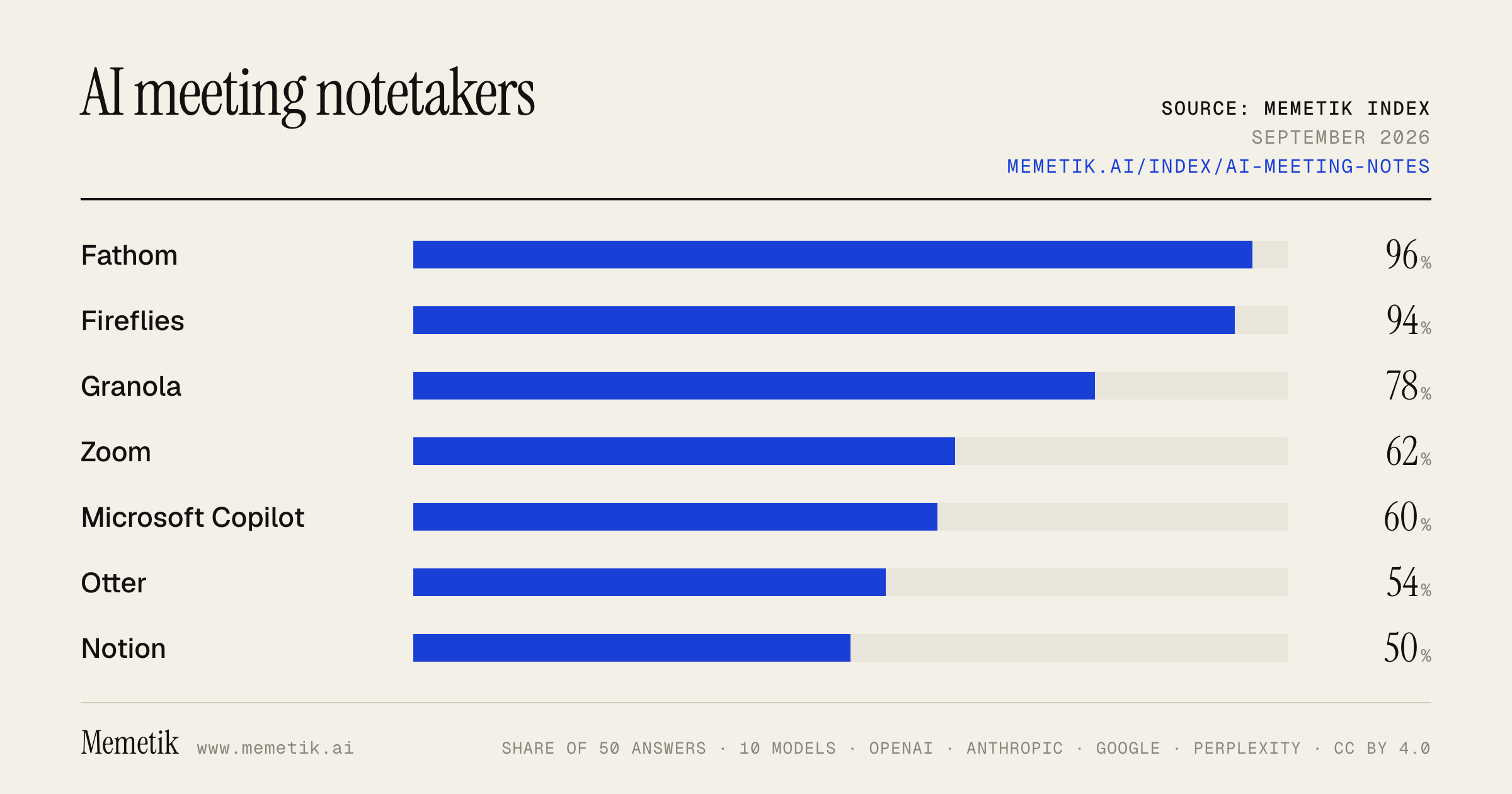
Fathom was named in 48 of 50 answers and came first in 8. Fireflies follows at 94%. 19 vendors were named at least once. First edition, so there is no prior period.
Answer share
5 prompts × 10 models · 50 answers
By provider
10 models · 50 answers
OpenAI 3 models · 15 answers
- GPT-5.6 Solgpt-5.6-solmost named: Fathom 100%
- GPT-5.6 Terragpt-5.6-terramost named: Fathom 80%
- GPT-5.6 Lunagpt-5.6-lunamost named: Fathom 100%
Anthropic 3 models · 15 answers
- Claude Opus 5claude-opus-5most named: Fathom 100%
- Claude Sonnet 5claude-sonnet-5most named: Fathom 100%
- Claude Fable 5claude-fable-5most named: Fathom 100%
Google 2 models · 10 answers
- Gemini 3.6 Flashgemini-3.6-flashmost named: Fathom 100%
- Gemini 3.5 Flashgemini-3.5-flashmost named: Fathom 100%
Perplexity 2 models · 10 answers
- Sonar Prosonar-promost named: Fathom 100%
- Sonar Reasoning Prosonar-reasoning-promost named: Fathom 80%
Sources the models cited
- simular.ai116
- youtube.com102
- meetingnotes.com60
- laxis.com54
- tminusai.com44
- meetjamie.ai37
- vibe.us36
- read.ai34
- cirrusinsight.com34
- shadow.do28
- zapier.com28
- reddit.com26
ChatGPT via API returns no citations, so it does not contribute here.
The prompts
- What is the best AI meeting notetaker for a founder? Name specific products.
- Which AI meeting notetaker would you recommend to a founder in 2026?
- Compare the top AI meeting notetaker options right now.
- I'm a founder and I need an AI meeting notetaker. What should I use and why?
- Best AI meeting notetaker for sales calls with CRM sync?
Every answer
Raw model output, unedited
GPT-5.6 TerraWhat is the best AI meeting notetaker for a founder? Name specific products.
## Best overall for most founders: **Fathom**

If I were choosing one AI meeting notetaker for a startup founder, I’d start with **Fathom**.

Why it wins:
- **Very strong free plan**: unlimited recordings, transcription, storage, instant summaries, clips, and search.
- Works across the usual founder stack: **Zoom, Google Meet, and Microsoft Teams**.
- Good for the meetings that matter most to a founder—customer discovery, sales calls, recruiting, investor conversations, and 1:1s—because you can turn key moments into clips, search past calls, and generate action items/follow-ups on paid plans.
- It offers both a normal meeting bot and a **bot-free capture option (beta on Mac)**, which can make external calls feel less awkward. ([fathom.ai](https://www.fathom.ai/pricing?utm_source=openai))

**Best use:** Use Fathom as your default recorder for every external-facing call. Set a simple post-call workflow: skim summary → confirm decisions → send follow-up → create tasks.

### Other excellent founder-specific choices

| Product | Best for | Why choose it |
|---|---|---|
| **Fathom** | **Best overall / customer-facing founders** | Best value, polished recaps, clips, action items, cross-call search, and CRM-oriented features as the team grows. ([fathom.ai](https://www.fathom.ai/pricing?utm_source=openai)) |
| **Fireflies.ai** | **A growing team that needs a searchable meeting brain** | Strong meeting archive, integrations, team analytics, task management, and customizable “AI Skills”/templates. Its Business plan includes unlimited transcription, summaries, and storage. ([fireflies.ai](https://fireflies.ai/pricing?fpr=patbogo2-ms&utm_source=openai)) |
| **Otter.ai** | **Live transcription and collaborative internal meetings** | Especially good if you want to follow a live transcript, capture slides, collaborate in notes, and ask AI questions about a meeting. It supports Zoom, Teams, and Meet via calendar-connected notetaking. ([get.otter.ai](https://get.otter.ai/ai-meeting-agent-meta/?utm_source=openai)) |

## My practical recommendation

- **Solo founder or founder-led sales:** **Fathom Free**, then upgrade to Premium only if you rely on automated action items, custom summaries, and AI follow-up emails.
- **Founder with a 5–50 person team:** **Fireflies Business** if the bigger need is institutional memory—finding what prospects, customers, and teammates said across hundreds of calls.
- **Internal-meeting-heavy company:** **Otter Pro or Business** if live notes, slide capture, and real-time collaboration matter more than sales-call workflows.

## One caution

Don’t let the tool become a passive transcript graveyard. Whatever you choose, standardize a short template for every meeting:

1. **Decisions made**
2. **Owner + deadline**
3. **Customer/investor objections or requests**
4. **Follow-up message**
5. **What changed in our understanding?**

That workflow matters more than small differences in transcription quality.

**Bottom line: choose Fathom first.** It is the best default blend of founder usefulness, ease of adoption, and value; choose Fireflies instead if your central priority is building a team-wide, searchable repository of every conversation.
GPT-5.6 TerraWhich AI meeting notetaker would you recommend to a founder in 2026?
**My default recommendation for a founder in 2026: Granola**—especially if you’re on a Mac and spend much of your week in investor, customer-discovery, hiring, and product calls.

Why it is the best *founder* fit: it is designed as a personal, bot-free AI notepad rather than a meeting participant that visibly joins every call. You can jot a few cues during the conversation, then receive a structured note, decisions, and action items with transcript context afterward. That tends to produce more useful notes for the messy, high-context conversations founders have—and avoids the social friction of a “notetaker bot” joining sensitive calls. Granola says it captures device audio and deletes the audio after transcription; it is also SOC 2 Type II certified. ([granola.ai](https://www.granola.ai/blog/ai-notetakers-product-teams-2026-guide?utm_source=openai))

**Choose Fathom instead** if you want fully hands-off recording/summaries, are Windows-first, or mainly need a lightweight tool for sales and external calls. Its free entry point has historically been unusually generous, so it is a sensible tool to trial before committing. ([granola.ai](https://www.granola.ai/blog/meeting-note-tool-pricing-granola-vs-fireflies-fathom-otter?utm_source=openai))

**Choose Fireflies instead** if the real objective is operationalizing calls across a team—particularly CRM workflows, searchable team-wide call history, and sales/customer-success process. It is more of a meeting-intelligence system than a founder’s personal notebook. ([granola.ai](https://www.granola.ai/blog/meeting-note-tool-pricing-granola-vs-fireflies-fathom-otter?utm_source=openai))

**My practical setup:**
- Founder/personal calls: **Granola**
- Revenue team at scale: **Fireflies**
- Lowest-friction trial or hands-off solo capture: **Fathom**

Before rolling any of them out, test it on 10 real calls and check: (1) whether summaries preserve nuance, (2) whether notes flow into your CRM/Notion/Slack without manual work, (3) data retention and model-training terms, and (4) consent requirements for the states and countries in which you record. For investor, legal, personnel, board, or highly confidential customer calls, I would use a stricter policy—or take notes manually—until your counsel/security owner approves the vendor and recording practice.
GPT-5.6 TerraCompare the top AI meeting notetaker options right now.
## Best AI meeting notetakers: practical shortlist

**Bottom line:**
- **Best overall for most people:** **Otter.ai**
- **Best for sales / customer-facing teams:** **Grain**
- **Best for meeting analytics and knowledge search:** **Read AI**
- **Best for automation-heavy teams:** **Fireflies.ai**
- **Also worth a trial for a lightweight individual experience:** **Fathom**

These tools have converged on basics—bot joins Zoom/Google Meet/Teams, produces a transcript, summary, and action items. The real differentiator now is what happens **after** the call: search, CRM updates, coaching, clips, and organization-wide governance.

| Tool | Best for | Standout strengths | Watch-outs |
|---|---|---|---|
| **Otter.ai** | Individuals, managers, general internal meetings | Strong live transcription, searchable meeting library, slide capture, collaborative notes, AI Q&A and workflows | Minute and per-meeting limits can matter on lower plans; less purpose-built for sales coaching/video clips |
| **Fireflies.ai** | Teams that want integrations and automated workflows | Broad conversation-intelligence orientation, CRM/Slack/Zapier-style automation, customizable AI outputs | Advanced AI capabilities use a credit model, so heavy use can add cost/complexity |
| **Grain** | Sales, CS, research, enablement | Video clips, timestamp-linked notes, structured templates for discovery/follow-up/customer feedback, shareable evidence from calls | More oriented to go-to-market workflows than simple personal note-taking |
| **Read AI** | Cross-work-tool knowledge and meeting effectiveness | Meeting summaries plus engagement/meeting metrics, playback, “Ask Read” across meetings and connected email/messages | Its wider “work assistant” scope may be more than a user wants for plain note-taking |
| **Fathom** | Individuals wanting a simple, low-friction recorder | Often a compelling option to test for polished summaries and shareable recaps | Validate its current integrations, admin controls, and pricing against your particular stack before rolling it out company-wide |

### 1. Otter.ai — best general-purpose choice

Choose **Otter** if your primary goal is: *“Make all my meetings searchable, summarized, and easy to follow up.”* It supports Zoom, Microsoft Teams, and Google Meet; offers live transcription, speaker identification, AI summaries, file imports, mobile/desktop apps, and an AI chat/search layer across meetings. Its higher tiers add workflows, CRM integrations, admin controls, and concurrent meeting coverage. ([otter.ai](https://otter.ai/pricing?msockid=3cc3de1ff61b68153ea6c8b9f76c6933&utm_source=openai))

**Pricing snapshot:** Otter has a free Basic plan with 300 transcription minutes per month. Its current public pricing page shows Pro at **$8.49/user/month billed annually** and lists Business at a higher per-user rate, with plan-specific limits and features. Confirm the checkout price, since promotions and billing terms can change. ([otter.ai](https://otter.ai/pricing?msockid=3cc3de1ff61b68153ea6c8b9f76c6933&utm_source=openai))

**Pick it if:** You want the safest all-around choice for internal meetings, interviews, classes, or independent work.

---

### 2. Fireflies.ai — best for workflow automation

Choose **Fireflies** if meeting notes need to turn into downstream work: CRM updates, team notifications, structured sales fields, tasks, or custom AI outputs. Its positioning is closer to **conversation intelligence + automations** than merely transcription.

The important buying detail is its **AI Credits** system. Standard transcription, note-taking, and recap emails are included in plans, but advanced functions—such as AI Skills, Personal Assistant capabilities, and other AI tools—draw from credits. Extra credits are sold as paid monthly add-ons. ([guide.fireflies.ai](https://guide.fireflies.ai/articles/2114151875-learn-about-ai-credits?lang=en&utm_source=openai))

**Pick it if:** Your team values integrations and operational workflows more than a minimalist notetaker.

**Be careful if:** You need predictable all-in cost for high-volume advanced AI use.

---

### 3. Grain — best for customer conversations, clips, and enablement

Choose **Grain** if your team runs lots of sales, customer-success, user-research, or partner calls and needs to circulate the *actual evidence*, not just a summary. Its notable workflow is turning calls into reusable, timestamp-linked notes and shareable moments.

Grain supports customizable AI note templates, including **Sales Discovery, Sales Follow-up, Customer Feedback, and Partner Check-in** formats; its notes and action items can link back to the exact moment in the recording. It also allows unpaid viewer seats, while recording users require paid seats. ([support.grain.com](https://support.grain.com/en/articles/9039877-note-templates?utm_source=openai))

**Pick it if:** You need managers and teammates to review customer conversations, create coaching material, or share a short clip instead of forwarding a 60-minute call.

---

### 4. Read AI — best for meeting intelligence and cross-workspace search

Choose **Read AI** if you want more than recap notes: meeting metrics, real-time notes, playback, coaching-oriented insights, and search across meetings, emails, and messages. It works with Zoom, Teams, and Google Meet, and its “Ask Read” feature is designed to retrieve answers across connected work context. ([read.ai](https://www.read.ai/?utm_source=openai))

Its free tier includes **five meetings per month**; paid tiers offer unlimited meetings and increasing levels of playback, integrations, workspace capabilities, and security/admin controls. ([support.read.ai](https://support.read.ai/hc/en-us/articles/22307341312275-What-are-the-different-paid-plans-that-Read-offers?utm_source=openai))

**Pick it if:** You want to understand how meetings are going—not only what was said—and want a wider AI knowledge layer across work communications.

---

## My recommendations by situation

- **Solo professional / manager / student:** **Otter**, then trial **Fathom** as a simpler alternative.
- **Small team that lives in Slack, a CRM, and automations:** **Fireflies**.
- **Sales, customer success, recruiting, research, or enablement:** **Grain**.
- **Leadership teams focused on meeting quality, coaching, and knowledge retrieval:** **Read AI**.
- **Enterprise rollout:** Pilot **Otter, Fireflies, and Read** against your actual compliance, admin, retention, SSO, and CRM requirements; do not select only from a demo
- https://otter.ai/pricing?msockid=3cc3de1ff61b68153ea6c8b9f76c6933&utm_source=openai
- https://guide.fireflies.ai/articles/2114151875-learn-about-ai-credits?lang=en&utm_source=openai
- https://support.grain.com/en/articles/9039877-note-templates?utm_source=openai
- https://www.read.ai/?utm_source=openai
- https://support.read.ai/hc/en-us/articles/22307341312275-What-are-the-different-paid-plans-that-Read-offers?utm_source=openai
GPT-5.6 TerraI'm a founder and I need an AI meeting notetaker. What should I use and why?
## My default recommendation: **Granola Business**

For a founder, I’d choose **Granola** as the default personal meeting notetaker—especially if your calendar is a mix of customer discovery, investor calls, recruiting, 1:1s, and product discussions.

**Why it’s the best founder fit:**
- **No bot joins the call.** That creates less awkwardness with candidates, customers, and investors than a visible recording bot.
- It is built around **your rough notes plus an AI-enriched transcript**, rather than handing you a generic summary. That means you can jot “pricing concern,” “intro to X,” or “follow up Friday,” and get usable context afterward.
- It gives you a searchable memory across meetings, templates/“recipes,” and integrations with tools founders commonly use—Notion, Slack, HubSpot, Attio, Affinity, Zapier, and MCP-compatible AI tools.
- The **Business plan is $14/user/month** and adds unlimited history, advanced features, integrations, admin controls, and API/MCP access. ([granola.ai](https://www.granola.ai/pricing?_rsc=flivy&utm_source=openai))

### The catch
Granola’s approach is optimized for notes and transcripts, **not preserving an audio/video recording**. If you regularly need to replay calls, share clips, audit exactly what was said, or coach a sales team, that is a meaningful tradeoff. ([granola.ai](https://www.granola.ai/blog/is-granola-worth-it-cost-benefit-analysis-founders?utm_source=openai))

---

## Choose **Fathom** instead if sales calls are the center of your world

If you are founder-led sales and want recordings, clips, automated follow-ups, and CRM sync, pick **Fathom**.

It has an unusually useful free tier: unlimited recordings and transcripts, with advanced AI summaries for the first five calls each month. Its paid tier adds unlimited advanced summaries, action items, follow-up emails, custom summaries, and “Ask Fathom.” It syncs with HubSpot, Salesforce, and Close; team plans add shared recordings, folders, alerts, deal/customer views, coaching metrics, SSO, and retention/security controls. ([help.fathom.video](https://help.fathom.video/en/articles/5290881?utm_source=openai))

**Simple rule:**
- **Granola** = better founder brain / less intrusive customer and investor conversations.
- **Fathom** = better revenue-call system / recordings and deal intelligence.

---

## When I’d use the others

- **Otter** — choose it if live collaborative transcripts are important: people editing notes together in real time, high transcription volume, and a more conventional meeting-assistant workflow. Its Business plan is listed from **$19.99/user/month** with 6,000 monthly transcription minutes; enterprise adds stronger governance such as SSO, SCIM, audit logs, and model-training opt-out. ([otter.ai](https://otter.ai/enterprise?utm_source=openai))
- **Fireflies** — worth evaluating for a larger, CRM-heavy sales org that wants broad conversation-intelligence workflows, but I would not make it the first tool a founder adopts.

---

## What I’d do this week

1. Install **Granola** and use it for a week on internal, customer, and hiring calls.
2. Create three templates: **customer discovery**, **candidate interview**, and **investor/board update**.
3. If you find yourself wishing for recordings, clips, or automatic deal tracking, trial **Fathom** alongside it for sales calls.
4. Make a standard disclosure habit for external calls: tell participants the meeting is being transcribed/recorded and follow your company’s consent and data-retention policy.

**Bottom line:** Start with **Granola Business**. Switch—or add—**Fathom** once sales recording and CRM workflow matter more than keeping the call experience bot-free.
GPT-5.6 TerraBest AI meeting notetaker for sales calls with CRM sync?
## Best overall for sales calls + real CRM sync: **Avoma**

If your priority is **automatically turning sales conversations into usable CRM data—not just attaching a call summary**—I’d choose **Avoma**.

Why it stands out:
- Syncs AI meeting/call notes to the appropriate **Salesforce, HubSpot, Pipedrive, Zoho, Copper, and Zendesk Sell** records.
- Supports configurable mapping of conversation-derived details into CRM fields—e.g., pain points, next steps, qualification criteria, stakeholders, objections, and methodology fields such as MEDDIC or BANT.
- Offers supported **two-way sync** for HubSpot properties, plus deal-stage and contact workflows.
- Includes actual sales conversation intelligence/coaching, not merely transcription. ([avoma.com](https://www.avoma.com/integrations/hubspot?utm_source=openai))

**Best fit:** a sales team that wants CRM hygiene and forecast data to improve automatically after discovery, demo, and follow-up calls.

### Strong alternatives

| If you need… | Choose | Why |
|---|---|---|
| Lightweight, polished meeting notes with straightforward CRM logging | **Grain** | Automatically sends summaries, recordings, and highlights to HubSpot/Salesforce contacts and deals; can update HubSpot properties via custom AI prompts. ([grain.com](https://grain.com/?utm_source=openai)) |
| Full enterprise revenue-intelligence program and manager coaching | **Gong** | Better suited to larger teams that need broad deal inspection, coaching, governance, and revenue workflows—not simply an AI notetaker. Gong supports native CRM integration and automation work. ([gong.io](https://www.gong.io/wp-content/uploads/2025/01/Implementation-Engage-Essentials-Plus-v12.2024.pdf?utm_source=openai)) |
| Lowest friction for individual reps / small teams | **Grain** | Simpler deployment and transparent entry pricing; its CRM sync is especially practical if your main need is getting clean call context into HubSpot or Salesforce. ([grain.com](https://grain.com/?utm_source=openai)) |

### Bottom line

- **Pick Avoma** if CRM field updates, sales methodology capture, coaching, and pipeline accuracy are central.
- **Pick Grain** if you want a simpler, less enterprise-heavy note-taking tool that still pushes excellent call summaries into HubSpot or Salesforce.
- **Pick Gong** only if you have the budget and organizational need for enterprise-grade revenue intelligence beyond notes.

Before committing, run a short pilot using 10–20 real calls and verify: record matching, duplicate-contact behavior, custom-field mapping, whether reps can edit AI outputs before sync, and whether summaries reliably distinguish a *customer commitment* from a *rep’s next step*.
Claude Sonnet 5What is the best AI meeting notetaker for a founder? Name specific products.
Based on current reviews and comparisons, here are the top AI meeting notetakers well-suited for a founder, along with why each fits that use case:

**Granola** — Popular pick for founders who take back-to-back meetings.
Granola is described as the AI notepad designed for back-to-back meetings.
 It's bot-free:
Granola is the 2026 darling of the AI note-taking world, capturing audio locally on your Mac and generating structured notes without a bot ever joining your call, so clients never know you're recording.
 This matters a lot for founders doing sensitive investor or partner calls where a visible recording bot feels awkward.

**Fathom** — Best if you want a zero-cost, no-friction option.
Fathom is the best free AI note taker available in 2026 — ideal for individuals and small teams who want reliable transcription and summaries without paying anything.
 Reviewers also note
Fathom works with minimal setup, is often the first AI note taker people try because it just works with no setup headaches or credit card required, and its free plan does the core job well, which is rare at this quality.


**Fireflies.ai** — Best if you need integrations into a broader stack (CRM, Slack, project tools) as you scale a team.
Fireflies.ai is described as the most widely-used general-purpose AI notetaker in 2026.
 Its main strength is depth of integration:
Fireflies.ai's killer feature is its 50+ native integrations that push meeting insights directly into Salesforce, HubSpot, Slack, Asana, Notion, and dozens more, automating what would otherwise be manual copying into your CRM.
 One caveat:
like Otter, Fireflies.ai's Notetaker drops into every meeting as a participant, and its bot scrapes your calendar and auto-joins calls, sometimes to meetings you didn't want recorded
 — worth knowing if you value discretion.

**Shadow** — A niche but interesting pick for founders on Mac who want more than just audio transcription.
Shadow is a bot-free Mac notetaker that captures what was on screen, not just what was said — it records the call's system audio from outside the meeting so nothing joins as a participant, and takes smart screenshots of whatever is shared, tying each one to the right point in the transcript.
 Good if your meetings often involve shared decks, dashboards, or product demos.

**Fellow** — Best if you're building out a small team and want the full meeting lifecycle covered, not just notes.
Fellow is the top pick for teams (not just individuals), and is the strongest all-around AI note taker in 2026, genuinely handling structured agendas before the call, accurate transcription and AI notes during it, and an AI agent for follow-through after.
 It was also
the top pick by The New York Times Wirecutter for transcribing and summarizing meetings.


### Recommendation for a founder specifically
If you're a solo founder or early-stage with a packed calendar of investor calls, customer calls, and 1:1s, most reviewers converge on **Granola or Fathom** as the top choices — one Product Hunt comparison sums it up:
Notion suits teams tying meeting notes to docs and projects, Fathom emphasizes automated recaps and CRM follow-through, while Granola appeals to users wanting unobtrusive, cross-meeting recall for online, phone, and in-person conversations.


- **Granola** if you want a private, bot-free tool that feels personal and doesn't announce itself to investors/clients (Mac only).
- **Fathom** if you want the best free option with zero setup friction.
- **Fireflies** if you're starting to build a team and need meeting data flowing into a CRM/Slack automatically.

If you tell me your platform (Mac vs. Windows), team size, and whether privacy/discretion in calls matters most, I can narrow this down further.
- https://www.metaview.ai/resources/blog/ai-notetaking-apps
- https://www.simular.ai/alternatives/ai-meeting-note-takers
- https://meetingnotes.com/blog/best-ai-note-takers
- https://www.cirrusinsight.com/blog/ai-meeting-note-takers
- https://www.laxis.com/blog/best-ai-note-taker-2026/
- https://www.producthunt.com/categories/ai-meeting-notetakers
Claude Sonnet 5Which AI meeting notetaker would you recommend to a founder in 2026?
For a founder in 2026, the "right" pick depends on what you value most, but here's a practical breakdown based on current reviews:

**Top overall recommendation: Granola**

Granola is considered the 2026 favorite in AI note-taking, capturing audio locally on your Mac and generating structured notes without a bot ever joining your call, so clients never know you're recording.
 This is ideal for founders because you're often in sensitive investor calls, customer conversations, or board meetings where a visible "bot" joining feels awkward or unprofessional.

**Best free option: Fathom**
If you're bootstrapped and cost-conscious,
Fathom disrupted the market by offering an unlimited free tier with features competitors charge $20+/mo for, recording, transcribing, and generating summaries with zero cost for individual users.

It's often the first AI note taker people try because it just works with no setup headaches and no credit card required — a good tool to hand to someone who has never used one before.


**If you need CRM/sales integration:**
As you start doing more sales, fundraising, or customer calls,
Fireflies is the strongest bot-based pick for CRM sync — it plugs into Salesforce, HubSpot, Pipedrive, and several others, making it a good fit for teams that want automated updates after every call.


**If you live in Notion:**

Notion's AI notetaker lives inside the productivity ecosystem many teams already use, with summaries and action items connecting directly to project databases and wikis — best for teams that want meeting outcomes wired straight into project pages.


**My recommendation for a founder specifically:**
Start with **Granola** if you're mostly on a Mac and want something unobtrusive for investor/customer conversations — it's become the go-to for founders because it feels native and private. If budget is tight, **Fathom** is a genuinely strong free alternative with no real downgrade in core quality. As your team grows and you need action items flowing into a CRM or project tool, layer in **Fireflies** (for sales-heavy workflows) or **Notion's notetaker** (if your whole company already runs on Notion).

One general industry note:
most tools are good at transcription, but almost none are good at what happens after — action items get captured but don't move anywhere, summaries sit in a standalone app, and that follow-through gap is the main differentiator between tools now.
 As a founder, it's worth weighing not just transcript quality but whether the tool actually pushes tasks into your existing workflow (Linear, Notion, Slack, CRM, etc.), since that's where most of these tools still fall short.
- https://www.simular.ai/alternatives/ai-meeting-note-takers
- https://www.cirrusinsight.com/blog/ai-meeting-note-takers
- https://medium.com/@justtalkingtech/best-ai-meeting-note-takers-in-2026-i-tested-14-over-90-days-heres-the-honest-ranking-a7ea13fb8b47
- https://www.assemblyai.com/blog/top-ai-notetakers
- https://meetingnotes.com/blog/best-ai-note-takers
Claude Sonnet 5Compare the top AI meeting notetaker options right now.
Here's a comparison of the leading AI meeting notetaker tools as of 2026, based on the most consistently cited names across current reviews:

## Top Contenders

**Fathom** — Widely considered the best free option.
Fathom is the best free AI note taker available in 2026 — ideal for individuals and small teams who want reliable transcription and summaries without paying anything.
 It's also praised for ease of use:
it's one of the simplest places to start, often the first AI note taker people try because it just works with no setup headaches and no credit card required.


**Granola** — The privacy-focused favorite for Mac users.
It's considered the 2026 darling of the AI note-taking world, capturing audio locally on your Mac and generating structured notes without a bot ever joining your call.
 Along with Fathom,
Granola and Fathom win for privacy-conscious individuals.


**Fireflies.ai** — The go-to for sales and CRM-heavy teams.
Fireflies integrates directly with HubSpot and Salesforce to automatically log meeting transcripts, AI summaries, and extracted action items against the correct contact record, making it the go-to tool for revenue-focused teams in 2026.
 It also has strong search capabilities:
its in-app search is class-leading, letting you search across every past meeting for specific phrases and retrieve the exact timestamp in seconds.


**Otter.ai** — Another strong team-collaboration pick.
Otter.ai and Fireflies.ai lead for team collaboration and CRM integrations.


**Fellow** — Best for teams wanting a full meeting lifecycle tool.
Fellow is the only AI meeting note taker that genuinely handles the full meeting lifecycle: structured agendas before the call, accurate transcription and AI notes during it, and an AI agent (Ask Fellow) for follow-through.
 It's also earned outside recognition —
Fellow was the top pick by The New York Times Wirecutter for transcribing and summarizing meetings.


**Jamie** — An emerging favorite in independent testing. One detailed hands-on comparison ranked it
Best overall: Jamie (accurate, private, bot-free, strong in almost every category)
, with
Best free: Fathom
 as runner-up in that same test.

**Laxis** — Notable for its bot-free approach in sales contexts.
Laxis records Zoom, Microsoft Teams, and Google Meet calls straight from your device, so prospects never see a "notetaker" join — sidestepping IT policies that block third-party bots.


## Key Differentiators to Consider

1. **Bot vs. botless architecture**: Tools like Granola, Jamie, and Laxis capture audio locally without a visible bot joining the call, which matters for client-facing calls or strict IT policies. Others (Otter, Fireflies, Fathom) typically use a bot that joins the meeting.

2. **What happens after the transcript**: Several reviewers note this is where tools now differentiate most.
Most tools are good at transcription, but almost none are good at what happens after — action items get captured but don't move anywhere, and summaries sit in a standalone app nobody returns to. That gap is where tools diverge sharply.


3. **Underlying transcription engine**: Accuracy varies less than it used to, since
companies like Granola, Grain, Zoom, Supernormal, Metaview, and Fireflies build on AssemblyAI's Voice AI infrastructure
 rather than building their own speech recognition from scratch.

## Quick Recommendation Guide
- **Want free and simple**: Fathom
- **Privacy-conscious / Mac user**: Granola
- **Sales team needing CRM sync**: Fireflies
- **Larger team needing agendas + follow-through**: Fellow
- **Want to avoid a visible "bot" in calls**: Granola, Jamie, or Laxis

Since rankings vary somewhat by reviewer and use case (sales vs. general office vs. compliance-heavy industries), it's worth trying the free tiers of 2-3 of these directly on your own meetings before committing to a paid plan.
- https://meetingnotes.com/blog/best-ai-note-takers
- https://www.cirrusinsight.com/blog/ai-meeting-note-takers
- https://www.simular.ai/alternatives/ai-meeting-note-takers
- https://www.aicentralresources.com/blog/12-best-ai-meeting-note-takers-in-2026-ranked-tested
- https://www.meetjamie.ai/blog/ai-note-taker
- https://www.laxis.com/blog/best-ai-note-taker-2026/
- https://www.assemblyai.com/blog/top-ai-notetakers
Claude Sonnet 5I'm a founder and I need an AI meeting notetaker. What should I use and why?
# Choosing an AI Meeting Notetaker

This is a fast-moving space, so let me give you my honest take based on what generally matters most for founders, along with a quick search to make sure I'm not missing recent developments.
Based on current reviews, here's my honest breakdown for a founder specifically:

## My top pick: **Granola**


Granola is widely considered the 2026 standout in AI note-taking, and it captures audio locally on your Mac and generates structured notes without a bot ever joining your call.
 For a founder, this matters a lot: you're often in investor calls, customer discovery, and sensitive negotiations where a visible "notetaker bot" joining the call looks unprofessional or raises confidentiality concerns.
Granola and Fathom also win specifically for privacy-conscious individuals.


## Strong alternative: **Fathom**
If cost is a concern (it often is for founders),
Fathom is considered the best free AI note taker available, ideal for individuals and small teams who want reliable transcription and summaries without paying anything.

It's also one of the simplest to set up — it's often the first tool people try because it just works with no setup headaches, and its free plan does the core job well, which is rare at this quality.


## If you're doing a lot of sales/customer calls: **Fireflies or Otter**

Otter.ai and Fireflies.ai lead for team collaboration and CRM integrations.
 Specifically,
Fireflies integrates directly with HubSpot and Salesforce to automatically log meeting transcripts, summaries, and action items against the correct contact record, which is the core reason it remains the go-to tool for revenue-focused teams.
 It also has excellent recall:
you can search across every past meeting for specific phrases and retrieve the exact timestamp in seconds — genuinely transformative for teams running large account volumes.


## If you want something beyond just notes — actual follow-through: **Fellow**
One important insight from recent testing:
most tools are good at transcription, but almost none are good at what happens after — action items get captured but don't move anywhere, summaries sit in an app nobody returns to, and that gap is where tools diverge sharply.

Fellow is called out as the tool that genuinely handles the full meeting lifecycle — structured agendas before the call, accurate notes during it, and an AI agent for follow-through
 — useful if you're trying to run a tight operating cadence with a small team.

## One more to consider: **Jamie**
A recent hands-on comparison ranked it highly:
after testing Jamie, Fathom, Otter, Fireflies, and Granola, the reviewer's top category was "Best overall: Jamie (accurate, private, bot-free, strong in almost every category)."


---

### My actual recommendation as a founder:

**Start with Granola.** As a founder, you're in a huge variety of meetings — investor pitches, 1:1s, customer calls, board meetings — often on your personal laptop, often with external people who'd be put off by a bot joining. Granola's local, botless approach handles all of these gracefully, and it produces clean, structured notes rather than just a raw transcript dump.

If you later find yourself running a sales-heavy motion with a team that needs CRM sync and shared visibility, **layer in Fireflies** for that specific function. And if you're a solo founder just trying to stop paying for tools, **Fathom's free tier** is genuinely capable enough to start with zero cost.

The one thing to actually test yourself: accuracy with your own accent, jargon, and typical meeting format — since
a platform might have a polished interface but fail its core job if it struggles with an accent or drops words during cross-talk.
 Most of these tools have free trials, so run 2-3 of your actual meetings through your top pick before committing to a paid plan.
Claude Sonnet 5Best AI meeting notetaker for sales calls with CRM sync?
Here's a breakdown of the top AI meeting notetakers for sales calls with CRM sync, based on what teams actually need them for:

## Top Picks by Use Case

**Gong** — Best for enterprise sales teams that need deep conversation intelligence

Gong offers CRM auto-logging that syncs summaries, action items, and key moments to opportunity records automatically, tracks competitor mentions across calls, and connects with Salesforce, HubSpot, and a broad integration ecosystem, while identifying deal warnings by analyzing patterns that historically correlate with losses.
 The tradeoff:
conversation intelligence platforms like Gong analyze sales interactions at scale — tracking deal risks, coaching reps, scoring calls, and feeding data into revenue forecasts — but cost 5–10x more than lighter alternatives.


**Fathom** — Best free option for virtual sales calls

Fathom joins Zoom, Google Meet, and Microsoft Teams meetings automatically when connected to your calendar, syncs summaries and action items to Salesforce, HubSpot, and Close CRM with one click, and its free model provides unlimited transcription with 5 advanced AI summaries per month.


**Fireflies.ai** — Best for automatic CRM sync across teams

Fireflies AI is purpose-built for revenue teams that need post-call data in a CRM without manual entry.
 Pricing tiers matter here:
Pro at $20/member/month adds unlimited video, while Business at $32/member/month includes CRM integrations and SSO.
 One caveat:
Fireflies.ai stands out for sentiment analysis and 100+ language transcription, although it runs on a confusing AI credit system and can't record without a bot.


**Avoma** — Best balance of note-taking + light coaching for mid-market teams

Avoma covers the full meeting lifecycle from scheduling through follow-up, balancing note-taking with light conversation intelligence — a sweet spot for mid-market teams — and supports pre-meeting briefings with full account context, real-time capture during calls, and automated post-meeting recaps with CRM updates.


**Bluedot** — Best bot-free option with deep CRM field mapping

Bluedot records and transcribes meetings on any device (laptop, phone, Apple Watch) without a bot, then updates your HubSpot or Salesforce based on AI summaries — with custom field mapping.
 It also offers
an Enterprise-tier Sales Agent for live coaching during calls plus CRM sync after each conversation, along with integrations across Salesforce, HubSpot, Dynamics, Zoho, Outreach, Salesloft, Dialpad, JustCall, and RingCentral.


**Laxis** — Best budget-friendly native Salesforce/HubSpot integration for inside sales coaching, per one source's ranking.

## Key Decision Factors

When choosing, focus on:

1. **CRM depth** —
CRM integration matters most because manual CRM updates after calls are one of the biggest time drains in sales, and the right tool pushes call summaries, action items, and key details directly into Salesforce, HubSpot, or Pipedrive automatically.


2. **Bot vs. bot-free recording** —
A visible AI bot joining a first discovery call or enterprise demo changes the dynamic, so tools that record from the rep's device without appearing in the attendee list keep the call natural.
 This matters especially if
you sell to privacy-conscious industries (healthcare, finance, legal) or senior executives — bot-free recording from Fellow, Krisp, or Avoma can help maintain a natural conversation.


3. **Team size/motion** —
High-velocity inside sales teams prioritize fast CRM sync and quick summaries
, while enterprise orgs with complex deal cycles benefit more from Gong-tier analytics.

**Bottom line:** For most sales teams, **Fathom** (free/low-cost virtual calls) or **Fireflies** (cross-team CRM automation) cover the basics well. If you need deal-risk analytics and coaching at scale, **Gong** or **Avoma** are stronger fits — just expect to pay significantly more.
- https://pipeline.zoominfo.com/sales/ai-note-taking-call-analysis-sales
- https://meetingnotes.com/blog/best-ai-meeting-assistant-for-sales-teams
- https://www.duocircle.com/blog/5-best-ai-note-takers-for-sales-calls-in-2026/
- https://www.bluedothq.com/blog/ai-note-takers-for-sales
- https://www.getmaxiq.com/blog/best-ai-note-takers-for-sales
Gemini 3.6 FlashWhat is the best AI meeting notetaker for a founder? Name specific products.
For a startup founder, the "best" AI meeting note-taker depends heavily on **how you meet** (virtual vs. in-person), **who you meet with** (investors, candidates, or customers), and **how you process information** (handwriting/typing your own scratch notes vs. letting an AI run completely in the background).

Here are the top AI meeting note-takers specifically tailored to founder workflows:

---

### 1. **Granola** (Best for Pitching, 1-on-1s, & Privacy-Conscious Founders)
* **How it works:** Instead of sending an awkward, visible bot into your Zoom or Google Meet call, Granola runs quietly on your Mac or phone. It listens locally, takes audio transcriptions, and allows you to type quick bullet points during the meeting. Afterward, it combines your rough scratch notes with the full transcript to generate polished, structured summary notes in your exact tone.
* **Why founders love it:**
  * **No "Bot In The Room":** When meeting with VCs, angel investors, or high-profile recruits, having a bot ("Otter Notetaker") join the lobby can ruin the vibe or raise privacy concerns.
  * **Customizable outputs:** You can prompt Granola to output notes into specific founder templates, like *Investor Update*, *Customer Discovery Pain Points*, or *Candidate Evaluation*.
  * Works seamless for both video calls and in-person coffee chats via its mobile app.

---

### 2. **Fathom** (Best Overall for Free & Pure Video-Call Efficiency)
* **How it works:** Fathom joins your Zoom, Teams, or Google Meet calls, transcribes the conversation in real-time, and generates summaries structured around key call highlights.
* **Why founders love it:**
  * **Generous Free Tier:** Unlike competitors that limit you to a few meetings per month, Fathom offers unlimited meeting recording and transcription on its free tier.
  * **One-Click Syncing:** Automatically routes action items and summaries into Notion, Slack, Hubspot, or Salesforce right after you press "End Call".
  * **Highlighting:** You can click a button during a live call to bookmark a timestamp when an investor asks a crucial question or a user gives vital product feedback.

---

### 3. **Fireflies.ai** (Best for Team Scale & Automated Workflows)
* **How it works:** An enterprise-grade AI assistant that joins meetings automatically via calendar integration, transcribes calls, and acts as a searchable knowledge engine.
* **Why founders love it:**
  * **Cross-Call Intelligence:** Fireflies doesn't just summarize individual meetings; you can search across *all* company calls for specific topics (e.g., search "pricing feedback" across 50 user calls).
  * **Automated Action Items:** It pushes tasks directly into project management tools like Trello, Asana, or Jira.
  * Great for growing teams where the founder needs to delegate tasks discussed during executive or product syncs.

---

### 4. **Plaud Note / Plaud NotePin** (Best for In-Person Networking & On-the-Go)
* **How it works:** A ultra-thin hardware device (shaped like a credit card or a wearable pin) powered by ChatGPT/Claude. It records in-person meetings, phone calls, or voice memos and syncs them to an app that transcribes and summarizes the recording.
* **Why founders love it:**
  * A huge portion of founder conversations happen **off-calendar**: coffee chats, conference hallway networking, phone calls, or walking syncs.
  * Captures physical phone calls with a dedicated sensor toggle, making it easy to capture quick founder-to-founder advice or investor calls taken on the go.

---

### 5. **Read AI** (Best for Multi-Channel Context & CRM Automation)
* **How it works:** Beyond taking meeting notes, Read AI syncs meeting transcripts with your email (Gmail/Outlook) and messaging tools (Slack/Teams).
* **Why founders love it:**
  * **Cross-Platform Knowledge:** It synthesizes discussions that started in a meeting, continued over Slack, and concluded via email into a single dashboard.
  * **Automated Follow-ups:** Automatically drafts post-meeting follow-up emails and syncs data to your CRM, saving hours of founder admin work every week.

---

### Summary Recommendation for Founders:
* **Go with Granola** if you do a lot of pitch/investor meetings where sending a bot is taboo, or if you prefer keeping personal scratch notes.
* **Go with Fathom** if you want a reliable, free tool for standard video calls that seamlessly syncs to Slack and Notion.
* **Go with Plaud** if you spend half your day taking calls on your phone or pitching over coffee in person.
Gemini 3.6 FlashWhich AI meeting notetaker would you recommend to a founder in 2026?
For a startup founder, the ideal AI meeting notetaker depends heavily on **how** you meet (in-person vs. video call), **who** you’re talking to (investors, clients, or internal teams), and whether you care about a bot joining your screen.

The top recommendations for founders, broken down by specific workflow needs, include:

---

### 1. **Granola** – *Best Overall for Founders & Pitch Meetings*
* **Why it’s great:** Granola operates **bot-free**. It captures audio directly from your Mac without sending an annoying "[Bot Name] is recording" guest into your Zoom, Google Meet, or pitch calls.
* **Founder Superpower:** It combines AI transcription with your own light, bullet-point jotting. During a call, you can type rough notes (e.g., *"interested in seed round, intro to Jane"*), and Granola uses its AI to expand your intent alongside the transcript into structured summaries.
* **Best for:** Pitching investors, sensitive founder-to-founder chats, and high-stakes client calls where a bot looks unprofessional.

---

### 2. **Fathom** – *Best for Remote Teams & Operations (Free & Unlimited)*
* **Why it’s great:** Fathom remains one of the fastest, most frictionless tools for standard Zoom, Google Meet, and MS Teams calls. It generates instant summaries right as the meeting ends.
* **Founder Superpower:** Its sync with CRMs (HubSpot, Salesforce) and project tools (Notion, Slack, Linear) is best-in-class. It automatically formats notes into actionable items and assigns them to your team.
* **Best for:** Operations, internal team syncs, customer discovery calls, and founders on a budget who need reliable automation out of the box.

---

### 3. **Fellow** – *Best for Leadership & All-in-One Team Management*
* **Why it’s great:** Fellow offers **both bot and botless recording options**, making it versatile across different call types. It’s built around management frameworks—combining agendas, 1-on-1s, and project tracking into one place.
* **Founder Superpower:** Its "Ask Fellow" feature acts as a global vector search across *all* past founder meetings. You can query: *"What did our lead candidate ask about equity in May?"* and get an instant answer.
* **Best for:** Founders managing growing teams, running structured 1-on-1s, and scaling post-Seed/Series A operations.

---

### 4. **Plaud Note Pro / Hardware Notetakers** – *Best for In-Person Networking & Coffee Chats*
* **Why it’s great:** If a lot of your founder work happens offline—at conferences, coffee shops, or whiteboard sessions—a physical AI recording device (like Plaud Note Pro) bridges the gap.
* **Founder Superpower:** MagSafe-attaches to the back of your phone to transcribe cellular calls, voice memos, and in-person conversations seamlessly into structured notes, synced straight to your phone app.
* **Best for:** Offline networking, venture events, and on-the-go founder ideation.

---

### Summary Recommendation:
* Go with **Granola** if you want discrete, privacy-first, human-in-the-loop notes during investor and sales calls.
* Go with **Fathom** if you want a seamless, automated workflow for internal remote meetings and CRM syncs.
* Add a **Plaud Note Pro** if your week is dominated by coffee chats and offline events.
Gemini 3.6 FlashCompare the top AI meeting notetaker options right now.
The AI meeting notetaker landscape is split into two distinct categories: **Bot-based tools** (which send an automated participant into your meeting) and **Bot-free / Local tools** (which process audio directly on your device or via browser extensions without joining as a participant).

Below is a comparison of the top AI meeting notetakers across key use cases.

---

### 1. Fathom
* **Best For:** Individuals and small teams looking for a generous free option.
* **Key Strengths:**
  * Generous free tier with unlimited recording and transcription time.
  * Extremely fast generation of meeting recaps, action items, and video highlights.
  * Direct one-click export to CRMs (Salesforce, HubSpot) and task management tools (Asana, Notion, Slack).
* **Limitations:** Advanced team-sharing and custom AI templates require a paid plan.
* **Format:** Bot-based (Zoom, Google Meet, MS Teams).

---

### 2. Fireflies.ai
* **Best For:** Business automation, deep integrations, and search across past meetings.
* **Key Strengths:**
  * **Ask Fred:** An in-meeting AI assistant you can query to find specific details across your entire meeting history.
  * Robust workflow automations (automatically pushing action items into Jira, Trello, Zapier, or CRMs).
  * Strong conversation intelligence, tracking sentiment, speaker talk-time ratios, and custom keywords.
* **Limitations:** The interface can feel overwhelming for individual users.
* **Format:** Bot-based.

---

### 3. Granola
* **Best For:** Privacy-conscious users, internal team syncs, and hybrid human/AI notes.
* **Key Strengths:**
  * **Bot-Free Experience:** Runs directly on your Mac or Windows desktop, capturing system audio without an awkward bot joining your call.
  * Enhances manual notes: Type small jottings during the meeting, and Granola’s AI fills in the context based on the transcript.
  * Clean, distraction-free UI.
* **Limitations:** Requires running a desktop app; doesn't auto-join calls remotely if your computer is off.

---

### 4. Otter.ai
* **Best For:** Live collaboration, real-time transcription, and live Q&A.
* **Key Strengths:**
  * Real-time transcription allows participants to highlight and comment on live text during the meeting.
  * OtterPilot automatically joins scheduled calendar events and posts summaries to Slack or email.
  * Cross-meeting chat allows you to ask questions like "What were our main takeaways from last week's product call?"
* **Limitations:** Transcription can struggle with heavy accents or fast multi-party cross-talk; free plan caps monthly minutes heavily.
* **Format:** Bot-based.

---

### 5. Tactiq
* **Best For:** Browser-native usage (Google Meet) without bots joining the call.
* **Key Strengths:**
  * Uses a Chrome extension—no bot joins the call to record or transcribe.
  * Works smoothly with custom LLM prompts (including direct integrations/connectors to Anthropic Claude or ChatGPT via MCP).
  * Displays a live transcript on the side of your screen in real time.
* **Limitations:** Requires using supported web browsers for video calls rather than native desktop apps.

---

### 6. Read AI
* **Best For:** Cross-channel context and executive meeting metrics.
* **Key Strengths:**
  * Connects meeting data with broader communication channels (email, Slack, cloud storage) to create a searchable context graph.
  * Measures meeting effectiveness, participant engagement, and sentiment trends over time.
  * Generates automated executive summaries across multiple meetings.
* **Limitations:** Aggressive automated meeting invites if calendar permissions aren't carefully managed.
* **Format:** Bot-based.

---

### Quick Selection Summary

| Feature / Need | Recommended Tool | Why |
| :--- | :--- | :--- |
| **Best Overall (Free / Solopreneurs)** | **Fathom** | Unlimited transcription on free tier, easy export. |
| **Best No-Bot / Privacy Option** | **Granola** or **Tactiq** | Processes system/browser audio without adding external bot accounts. |
| **Best for Heavy CRM / Sales Workflows**| **Fireflies.ai** | Deepest integrations into Salesforce, HubSpot, and automation pipelines. |
| **Best for Real-time Team Collaboration**| **Otter.ai** | Live shared transcription and in-call chat capabilities. |
| **Best for Workspace-Wide Context** | **Read AI** | Synthesizes meeting insights alongside email and Slack/Teams messages. |
Gemini 3.6 FlashI'm a founder and I need an AI meeting notetaker. What should I use and why?
Choosing an AI meeting note taker depends heavily on **how you run your startup, who you meet with, and where your notes need to land**.

The primary choice for founders involves deciding between **bot-less AI tools** (runs locally on your desktop) and **bot-based AI tools** (a bot joins your Zoom/Meet link).

---

### **1. Granola — Best Overall for Early-Stage Founders**
* **Type:** Bot-less (runs on your Mac / local system)
* **Why it fits founders:**
  * **No awkward bot:** It captures audio directly from your computer, so no "Granola Notetaker" joins the call. This is crucial for sensitive investor pitches, early customer discovery calls, or executive hiring where a bot can feel unnatural or cold.
  * **Interactive note-taking:** You can type short, rough bullet points while talking, and Granola automatically merges your manual notes with the raw transcript to create structured, polished output.
  * **Privacy:** Since it records locally rather than inviting a cloud-based meeting bot, it offers better privacy control.

---

### **2. Fathom — Best Free Option for Budget-Conscious Founders**
* **Type:** Bot / Native Zoom/Meet Integration
* **Why it fits founders:**
  * **Generous Free Tier:** Offers unlimited recording, transcription, and AI summaries for free (unlike competitors with strict monthly caps).
  * **Instant Summaries:** Provides fast AI summaries, action item extraction, and email follow-up drafts immediately after calls.
  * **CRM Sync:** Paid tiers connect directly to HubSpot, Salesforce, and Close, making it useful if you are running your own founder-led sales.

---

### **3. Fireflies.ai — Best for Operations & Searchable Knowledge Base**
* **Type:** Bot
* **Why it fits founders:**
  * **Deep Integrations:** Automatically pushes meeting summaries into Slack channels, Notion, HubSpot, Jira, and Asana.
  * **Central Knowledge Hub:** Stores all past calls into a single searchable repository. You can ask its AI assistant (Fred) questions like, *"What were the main objections raised in customer interviews last month?"*
  * **Automated Workflows:** Useful once you start delegating action items to a growing team.

---

### **4. Shadow (or Otter.ai for Mobile/In-Person)**
* **Shadow:** Designed specifically for founders who jump on off-calendar calls, spontaneous Slack huddles, or quick founder-to-founder check-ins without scheduled calendar invites.
* **Otter.ai:** Best if you do a lot of **in-person founder meetings**, coffee chats, or networking events, thanks to its robust mobile app and live transcription.

---

### **Summary Recommendation**

| Your Situation | Recommended Tool | Main Reason |
| :--- | :--- | :--- |
| **Pitches, Investor Calls, Customer Discovery** | **Granola** | Invisible to participants (no bot), allows live jotting, produces custom executive-level notes. |
| **Bootstrapped / Tight Budget** | **Fathom** | Generous free tier with no minute caps and fast, action-oriented summaries. |
| **Founder-Led Sales & CRM Sync** | **Fireflies.ai** or **Fathom Pro** | Auto-updates CRMs (HubSpot/Salesforce) and routes action items directly to Slack/Jira. |
| **In-Person Coffee Chats & On-the-Go** | **Otter.ai** | Strong mobile recording capabilities and live transcript sharing. |

**Recommendation:** Start with **Granola** if you prioritize call discretion (especially with investors and key hires). Switch to **Fireflies** or **Fathom** if you need automated CRM sync and seamless multi-app workflow integrations.
Gemini 3.6 FlashBest AI meeting notetaker for sales calls with CRM sync?
Choosing the best AI meeting notetaker for sales calls depends on whether you are an individual rep looking for a budget-friendly tool, a team that needs automated CRM integration, or an enterprise looking for full revenue intelligence.

### 1. **Fathom** – Best Overall for Individual Reps & Small Sales Teams
* **Why it’s great:** Fathom offers one of the best user experiences for sales calls, auto-generating summaries, next steps, and action items. Its free version is remarkably generous, but its paid plans provide robust CRM automation.
* **CRM Sync:** Seamlessly matches contacts and logs call summaries, full transcripts, and video clips directly into **HubSpot, Salesforce, Close, and Zoho**.
* **Best feature:** Free tier has no time limits for recording and transcribing.

### 2. **Fireflies.ai** – Best for Deep CRM & Workflow Automation
* **Why it’s great:** Fireflies is known for its massive integration ecosystem (50+ apps). It doesn't just push transcripts into CRMs; it allows you to customize custom prompt outputs so your call notes fit your team's specific MEDDIC, BANT, or SPICED sales methodologies.
* **CRM Sync:** Native 2-way sync with **Salesforce, HubSpot, Pipedrive, Zoho, and Freshsales**. It updates contact notes, attaches call audio, and updates custom CRM deal fields automatically.
* **Best feature:** Highly customizable AI summaries and custom data mapping for CRM fields.

### 3. **Fellow** – Best for Privacy & "Bot-Free" Recording
* **Why it’s great:** Many enterprise prospects dislike meeting bots joining their Zoom/Teams calls. Fellow excels at **botless recording** (desktop audio capture) so you can capture meetings seamlessly without an extra participant appearing on screen.
* **CRM Sync:** Strong, reliable sync with **HubSpot and Salesforce** that maps notes and action items to exact deals and accounts.
* **Best feature:** Discrect recording options and built-in sales meeting agendas.

### 4. **Granola** – Best for Mac Users & In-Person/Hybrid Sales Calls
* **Why it’s great:** Granola takes a unique approach: it records audio directly from your device (no bot on the call) and combines its transcription with **your live, typed notes** to output tailored call summaries. It also has mobile apps for reps who meet prospects in person or on mobile calls.
* **CRM Sync:** Integrates with **HubSpot and Salesforce** via direct connectors or automation tools like Zapier/Make.
* **Best feature:** Blends AI notes with manual rep notes, perfect for reps who like to jot down key points during the call.

### 5. **Gong** (or **Avoma**) – Best Enterprise Revenue Intelligence
* **Why it’s great:** If you need more than just note-taking—such as call coaching, competitor mention tracking, deal risk analysis, and talk-to-listen ratios—Gong is the industry gold standard. Avoma is a great alternative for mid-market teams looking for revenue intelligence at a lower price point.
* **CRM Sync:** Bi-directional, enterprise-grade sync with **Salesforce and HubSpot**, updating pipeline metrics, deal stages, and account activity automatically.
* **Best feature:** Deep deal analytics, coaching scorecards, and revenue forecasting.

---

### Quick Recommendation Guide

| Your Main Need | Top Choice | Key Benefit |
| :--- | :--- | :--- |
| **Best Free / Low Cost** | **Fathom** | Generous free plan; simple CRM logging. |
| **Custom CRM Field Mapping** | **Fireflies.ai** | Map specific AI outputs to custom CRM deal fields. |
| **No Bot on the Call** | **Fellow** or **Granola** | Captures audio via app/desktop without an explicit guest bot. |
| **Full Sales Coaching & Pipeline Intelligence** | **Gong** | Unmatched deal risk signals and conversation analytics. |
Sonar ProWhat is the best AI meeting notetaker for a founder? Name specific products.
For a founder, the **best AI meeting notetaker depends on your workflow**, but the strongest specific picks are **Shadow**, **CraftNote**, **Jamie**, **Granola**, and **Fathom**. If you want one practical default for a founder who cares about capturing decisions across many meeting types, **CraftNote** is the best all-around choice in one review, while **Shadow** is the strongest pick for a Mac-based founding team that wants bot-free, auto-detected meeting capture with screen-aware notes.[2][3]

Here’s the clearest founder-focused shortlist:

- **CraftNote** — best all-around for founders who need to capture decisions across calls, in-person chats, and uploads, with searchable archives and structured summaries.[2]
- **Shadow** — best for Mac founders who want OS-level auto-detection, bot-free capture, screen-aware notes, and workflow exports.[3]
- **Jamie** — best for founders who prioritize privacy, accuracy, and bot-free recording; one review says it was the overall best in testing.[7]
- **Granola** — best for minimalist, bot-free meeting notes, especially for founders on Mac.[4][10]
- **Fathom** — best free option and a strong choice for founders doing lots of live remote calls.[6][11]

If you want the simplest recommendation:
- Choose **CraftNote** if your meetings are mixed and decision-heavy.[2]
- Choose **Shadow** if you are on **Mac** and want the most founder-native workflow.[3]
- Choose **Jamie** if **privacy and transcription accuracy** matter most.[7]
- Choose **Fathom** if you want the strongest **free** option.[6][11]

A few other notable products for founders are **Otter.ai**, **Fireflies.ai**, and **Lindy**; reviews highlight **Otter** for live transcription and **Fireflies** for team collaboration/CRM integrations, while **Lindy** is positioned more as a meeting-to-follow-up assistant than a pure notetaker.[1][13][16]
- https://www.simular.ai/alternatives/ai-meeting-note-takers
- https://craftnote.com/blog/best-ai-note-takers-consultants-founders-executives-2026
- https://www.shadow.do/blog/best-ai-note-takers-for-startups-2026
- https://www.tinystartups.com/blog/best-ai-meeting-note-takers
- https://www.meetjamie.ai/blog/ai-note-takers-for-startups
- https://peterclaridge.com/the-best-ai-notetaking-tools-for-meetings-review
- https://www.meetjamie.ai/blog/ai-note-taker
- https://meetingnotes.com/blog/best-ai-meeting-notetakers-for-venture-capital-firms
- https://www.assemblyai.com/blog/top-ai-notetakers
- https://efficient.app/best/ai-note-taker
- https://meetingnotes.com/blog/best-ai-note-takers
- https://www.cirrusinsight.com/blog/ai-meeting-note-takers
- https://www.lindy.ai/blog/ai-note-taking-app
- https://www.laxis.com/blog/best-ai-note-taker-2026/
- https://www.read.ai/articles/8-budget-friendly-ai-meeting-assistant-tools-for-startups
- https://zapier.com/blog/best-ai-meeting-assistant/
- https://vibe.us/blog/best-ai-note-takers/
- https://www.reddit.com/r/ProductivityApps/comments/1mp5gn8/tested_5_ai_note_taking_apps_for_inperson/
- https://fellow.ai/blog/ai-meeting-note-taker-for-venture-capital/
- https://perfectwikiforteams.com/blog/best-ai-meeting-notes-for-teams/
Sonar ProWhich AI meeting notetaker would you recommend to a founder in 2026?
For most founders in 2026, I’d recommend **Jamie** if you want the best overall balance of **accuracy, privacy, and bot-free note taking** across high-stakes meetings.[2] If your top priority is a **free** option, **Fathom** is the strongest budget-friendly pick.[4][10]

Why Jamie is the best founder default:
- It is described as the **best overall** in a hands-on 2026 review.[2]
- The same review says it is best when **accuracy and privacy matter most**, which fits founder meetings with investors, customers, and sensitive internal discussions.[2]
- It also offers **CRM integrations** and “agentic” automation beyond notes, which can be useful for founders who want follow-up work handled after calls.[2]

Other strong founder-fit options:
- **Granola**: best if you want **unobtrusive, real-time notes** and strong cross-meeting recall.[9][10][14]
- **Laxis**: good if you want a **bot-free** tool with **CRM** features and in-person capture, and one review calls it the **best overall** after testing multiple apps.[11]
- **Fathom**: best if you want a **free plan** and sales-ready summaries.[4][10]
- **Fireflies**: good for **team collaboration**, analytics, and CRM workflows.[1][9]

If I had to pick one for a typical founder, I’d choose **Jamie**; if you want, I can also give you a **founder-focused shortlist by use case**: fundraising, sales calls, recruiting, or all-hands.
- https://www.simular.ai/alternatives/ai-meeting-note-takers
- https://www.meetjamie.ai/blog/ai-note-taker
- https://www.cirrusinsight.com/blog/ai-meeting-note-takers
- https://reclaim.ai/blog/ai-meeting-assistants
- https://zackproser.com/blog/best-ai-meeting-notes-tools-2026
- https://www.itsconvo.com/blog/best-ai-note-taking-apps-2026
- https://vibe.us/blog/best-ai-note-takers/
- https://justtalkingtech.medium.com/best-ai-meeting-note-takers-in-2026-i-tested-14-over-90-days-heres-the-honest-ranking-a7ea13fb8b47
- https://www.assemblyai.com/blog/top-ai-notetakers
- https://www.producthunt.com/categories/ai-meeting-notetakers
- https://www.laxis.com/blog/best-ai-note-taker-2026/
- https://www.reddit.com/r/AiNoteTaker/comments/1rls9rp/5_best_ai_meeting_note_takers_in_2026_after/
- https://zapier.com/blog/best-ai-meeting-assistant/
- https://efficient.app/best/ai-note-taker
- https://voicetonotes.ai/blog/best-ai-note-taker-apps/
- https://www.metaview.ai/resources/blog/ai-notetaking-apps
- https://www.lindy.ai/blog/ai-note-taking-app
- https://www.read.ai/articles/best-ai-meeting-assistants
- https://youcanbook.me/blog/ai-note-taker
Sonar ProCompare the top AI meeting notetaker options right now.
Here are the **top AI meeting notetakers right now**, grouped by what they do best: **tl;dv** and **Fathom** are the strongest “best free” picks, **Fireflies.ai** is the best for search, integrations, and team analytics, **Otter.ai** is the best-known all-around live transcription option, and **Krisp** and **Jamie** stand out for bot-free workflows and privacy-focused use cases.[2][4][5][9][19]

| Tool | Best for | Key strengths | Main tradeoff |
|---|---|---|---|
| **tl;dv** | Best free team option | Unlimited free video/transcripts/summaries on major meeting platforms; bot-free desktop capture is now available[12][19] | Free tiers and advanced features are more limited than paid plans |
| **Fathom** | Best free forever solo option | Unlimited free recording and strong summaries; widely recommended for budget users[5][9][19] | Less focused on deep CRM/team intelligence than Fireflies |
| **Fireflies.ai** | Search, integrations, and team collaboration | Searchable meeting archive, broad integrations, analytics, and multilingual support[1][4][5][9] | The most powerful setup is more valuable for teams than casual users |
| **Otter.ai** | Live transcription | Real-time transcription with speaker identification and collaborative notes[2][5] | Free plan is limited versus the best free competitors |
| **Krisp** | Bot-free notes + audio quality | Bot-free capture, noise cancellation, and strong notes in messy audio environments[6][9][10] | Best when audio quality is a concern; less centered on CRM workflows |
| **Jamie** | Privacy and bot-free meetings | Bot-free operation, strong privacy positioning, and clean readable recaps[3][11] | Smaller ecosystem than Fireflies/Otter |
| **Avoma** | Sales/revenue intelligence | Conversation analysis, CRM-oriented workflows, and customer-meeting insights[4][11] | More specialized and usually overkill for simple note-taking |
| **Fellow** | Compliance and meeting control | Pause/redact controls and strong enterprise governance[2][8] | Less compelling if you only want the cheapest usable notes |

A few practical takeaways:

- If you want the **best free plan**, **tl;dv** is the strongest team option and **Fathom** is the simplest solo option.[5][9][19]
- If you want the **best searchable archive and integrations**, **Fireflies.ai** is the standout.[1][4][5][9]
- If you want **live transcription**, **Otter.ai** remains one of the most established choices.[2][5]
- If you care most about **bot-free capture**, **Krisp** and **Jamie** are consistently highlighted.[3][9][10]
- If you work in **sales or customer success**, **Avoma** and **Fireflies.ai** are usually the most relevant.[2][4][11]

If you want, I can also turn this into a **“best by use case” shortlist** for your exact situation, like **sales teams, Google Meet users, Zoom-heavy teams, or privacy-first workflows**.
- https://www.simular.ai/alternatives/ai-meeting-note-takers
- https://www.cirrusinsight.com/blog/ai-meeting-note-takers
- https://www.meetjamie.ai/blog/ai-note-taker
- https://www.eweek.com/artificial-intelligence/best-ai-meeting-assistants/
- https://www.guideflow.com/blog/best-ai-note-taking-tools
- https://time.com/partner-content/charter/6987522/the-best-ai-note-taking-tools-for-meetings/
- https://resources.rework.com/tools/ai-tools/best-ai-meeting-assistants-2026
- https://pickaxe.co/post/top-ai-meeting-assistants
- https://krisp.ai/blog/ai-note-taking-apps/
- https://reclaim.ai/blog/ai-meeting-assistants
- https://www.remio.ai/post/the-best-10-ai-meeting-note-takers-for-busy-professionals-in-2026
- https://tldv.io/blog/best-ai-meeting-assistants/
- https://voicetonotes.ai/blog/best-ai-note-taker-apps/
- https://www.digitalocean.com/resources/articles/best-ai-notetaking-app
- https://zapier.com/blog/best-ai-meeting-assistant/
- https://www.reddit.com/r/ProductivityApps/comments/1mp5gn8/tested_5_ai_note_taking_apps_for_inperson/
- https://www.reddit.com/r/AI_Agents/comments/1rav5ks/what_is_actually_the_best_ai_note_taking_app_for/
- https://perfectwikiforteams.com/blog/best-ai-meeting-notes-for-teams/
- https://tldv.io/blog/free-ai-note-taking/
- https://www.read.ai/articles/8-budget-friendly-ai-meeting-assistant-tools-for-startups
Sonar ProI'm a founder and I need an AI meeting notetaker. What should I use and why?
If you’re a founder, the best default choice is **Jamie** or **Fathom**, depending on your priorities: **Jamie** if you care most about privacy, bot-free capture, and clean summaries with tasks, and **Fathom** if you want the strongest free option for scheduled video calls.[6][7] If your meetings are often **in-person, off-calendar, or cross-stack follow-up heavy**, **Shadow** or **CraftNote** are better fits because they focus on capturing real founder workflows beyond just a live Zoom recap.[3][2]

Here’s the practical founder-first breakdown:

- **Best overall for most founders: Jamie** — It is described as the most balanced option for startups that care about **privacy and speed**, with bot-free recording, clean summaries, owners/tasks, and compliant data handling by default.[6][7]
- **Best free starter: Fathom** — It is repeatedly singled out for an **unlimited free tier** and fast summaries, making it the easiest low-friction option if most of your meetings are scheduled Zoom/Meet/Teams calls.[5][7]
- **Best for founders with a lot of in-person and ad-hoc conversations: Shadow** — It is positioned as strong for founders because it can handle **off-calendar calls** and **screen-aware notes**, with Markdown and webhook export for workflow automation.[3]
- **Best if you want the notes archive to drive follow-up work: CraftNote** — It’s recommended for founders who need notes, structured summaries, and later retrieval across calls and uploads, not just a transcript.[2]
- **Best if you want deeper workflow automation/integrations: Fireflies or Lindy** — Fireflies is highlighted for **200+ AI apps** and broad integrations, while Lindy is framed as best when you want notes to turn into follow-up work automatically.[5][13]

A simple way to choose:

- Pick **Jamie** if you handle **investor, client, or sensitive internal meetings** and want the safest all-around founder tool.[6][7]
- Pick **Fathom** if you want to start **today for free** and most meetings are standard video calls.[5][7]
- Pick **Shadow** if your day includes **hallway conversations, site visits, or spontaneous meetings** that don’t live on the calendar.[3][17]
- Pick **CraftNote** if your main pain is **finding decisions later** and turning meetings into a searchable founder memory.[2]

If you want the shortest recommendation: **Jamie for best overall founder use, Fathom for free, Shadow for in-person/off-calendar, and CraftNote for archive/search-heavy workflows**.[6][7][3][2]
- https://www.simular.ai/alternatives/ai-meeting-note-takers
- https://craftnote.com/blog/best-ai-note-takers-consultants-founders-executives-2026
- https://www.shadow.do/blog/best-ai-note-takers-for-startups-2026
- https://www.tinystartups.com/blog/best-ai-meeting-note-takers
- https://peterclaridge.com/the-best-ai-notetaking-tools-for-meetings-review
- https://www.meetjamie.ai/blog/ai-note-takers-for-startups
- https://www.meetjamie.ai/blog/ai-note-taker
- https://meetingnotes.com/blog/best-ai-meeting-notetakers-for-venture-capital-firms
- https://www.assemblyai.com/blog/top-ai-notetakers
- https://efficient.app/best/ai-note-taker
- https://meetingnotes.com/blog/best-ai-note-takers
- https://www.cirrusinsight.com/blog/ai-meeting-note-takers
- https://www.lindy.ai/blog/ai-note-taking-app
- https://www.laxis.com/blog/best-ai-note-taker-2026/
- https://www.read.ai/articles/8-budget-friendly-ai-meeting-assistant-tools-for-startups
- https://zapier.com/blog/best-ai-meeting-assistant/
- https://vibe.us/blog/best-ai-note-takers/
- https://www.reddit.com/r/ProductivityApps/comments/1mp5gn8/tested_5_ai_note_taking_apps_for_inperson/
- https://fellow.ai/blog/ai-meeting-note-taker-for-venture-capital/
- https://perfectwikiforteams.com/blog/best-ai-meeting-notes-for-teams/
Sonar ProBest AI meeting notetaker for sales calls with CRM sync?
For **sales calls with CRM sync**, the strongest all-around pick is **Fireflies.ai** because multiple reviews describe it as especially strong for **CRM automation**, with native connections to **Salesforce, HubSpot, Pipedrive**, and other tools.[2][17][19] If you want a more sales-specific tool with deeper revenue workflows, **Gong** or **Avoma** are also strong contenders, but they are typically positioned more toward conversation intelligence and team analytics than lightweight note-taking.[5][8][20]

A practical shortlist:

| Tool | Best for | Why it stands out |
|---|---|---|
| **Fireflies.ai** | Teams that want **easy CRM sync** and automated post-call updates | Repeatedly described as the strongest option for CRM integrations and structured call data flowing into sales tools.[2][17][19] |
| **Laxis** | Reps who want **native HubSpot/Salesforce CRM** plus lower-cost sales features | Reported to include native CRM integration and sales-focused summaries, with a lower starting price than some competitors.[12] |
| **Bluedot** | Teams wanting **bot-free recording** and custom CRM field auto-fill | Emphasizes bot-free capture and auto-filling custom HubSpot/Salesforce fields.[6] |
| **Fathom** | Users who want **highly structured, skimmable notes** | Frequently rated best overall for note quality, though CRM focus is less central in the results you provided.[1] |
| **Gong** | Larger revenue teams needing **coaching and pipeline analytics** | Better for deep sales intelligence than simple note capture.[5][14] |

If your main goal is simply: **“record sales calls, summarize them, and push notes into the CRM automatically”**, choose **Fireflies.ai** first.[2][17][19] If your priority is **sales coaching and deal intelligence**, look at **Gong**; if you want **lower-cost CRM-native sales notes**, look at **Laxis** or **Bluedot**.[5][6][12]

If you want, I can also give you a **1-minute recommendation based on your CRM** — for example **HubSpot vs Salesforce vs Pipedrive** — and whether you need **bot-free recording**.
- https://arrows.to/guide/top-ai-notetakers/a-side-by-side-comparison-of-22-ai-notetakers-for-sales/
- https://justtalkingtech.medium.com/best-ai-meeting-note-takers-in-2026-i-tested-14-over-90-days-heres-the-honest-ranking-a7ea13fb8b47
- https://www.plaud.ai/blogs/articles/6-best-ai-note-takers-for-sales-calls-in-2026
- https://www.getmaxiq.com/blog/best-ai-note-takers-for-sales
- https://www.cirrusinsight.com/blog/ai-meeting-note-takers
- https://www.bluedothq.com/blog/ai-note-takers-for-sales
- https://meetingnotes.com/blog/best-ai-meeting-assistant-for-sales-teams
- https://www.happyscribe.com/blog/best-ai-meeting-note-takers-for-sales-teams
- https://www.meetjamie.ai/blog/10-best-ai-meeting-recorders-for-sales
- https://krisp.ai/blog/blog-best-ai-note-taker-for-sales-calls/
- https://monday.com/blog/crm-and-sales/crm-meeting-notes/
- https://www.laxis.com/blog/best-ai-note-taker-2026/
- https://www.reddit.com/r/sales/comments/1nw9vu1/ai_note_taker/
- https://efficient.app/best/ai-note-taker
- https://www.reddit.com/r/productivity/comments/1qb1dms/best_notetakers_in_2026_sales_consultants_learners/
- https://www.reddit.com/r/AgentsOfAI/comments/1sgibnf/i_tested_6_ai_notetaking_tools_for_meetings_and/
- https://www.simular.ai/alternatives/ai-meeting-note-takers
- https://www.meetjamie.ai/blog/ai-note-taker
- https://www.plaud.ai/blogs/articles/5-best-ai-note-takers-for-phone-calls-in-2026
- https://zapier.com/blog/best-ai-meeting-assistant/
GPT-5.6 SolWhat is the best AI meeting notetaker for a founder? Name specific products.
## Best overall for most founders: **Granola**

Granola is my top recommendation for a founder because it:

- **Doesn’t add a visible bot** to investor, customer or recruiting calls.
- Combines your rough notes with the transcript to produce more intentional summaries—not merely generic recaps.
- Works across virtual and in-person meetings through desktop and mobile apps.
- Integrates with founder-oriented tools including **Notion, Slack, HubSpot, Attio, Affinity and Zapier**.
- Deletes meeting audio after transcription rather than retaining a recording.

Its Business plan is listed at **$14 per user/month**. The principal downside is that it doesn’t provide audio playback, so choose something else when retaining recordings is important. ([granola.ai](https://www.granola.ai/blog/meeting-note-tool-pricing-granola-vs-fireflies-fathom-otter?utm_source=openai))

## Best alternatives

| Product | Best for | Main trade-off |
|---|---|---|
| **Fathom** | Solo founders wanting a strong free option | Uses a meeting participant/bot; advanced summaries and team features are paid |
| **Fireflies.ai** | Sales-heavy startups needing CRM synchronization and conversation analytics | More system-like and intrusive than a lightweight personal notepad |
| **Otter.ai** | Live transcription and collaborative internal meetings | Free usage is capped; less tailored to high-quality executive notes |
| **Read AI** | Founders interested in meeting engagement and communication analytics | Analytics can feel excessive for ordinary calls |
| **Granola** | Investor calls, customer discovery, hiring and general founder work | No stored audio or playback |

Fathom stands out for its generous free entry point, Fireflies for CRM-heavy workflows and broad language support, and Otter for real-time collaborative transcription. ([granola.ai](https://www.granola.ai/blog/meeting-note-tool-pricing-granola-vs-fireflies-fathom-otter?utm_source=openai))

### My practical recommendation

- **Typical founder:** Granola
- **Bootstrapped and unwilling to pay:** Fathom
- **Founder-led sales with HubSpot/Salesforce:** Fireflies.ai
- **Team needs live transcripts during meetings:** Otter.ai
- **Need permanent recordings:** Fathom or Fireflies—not Granola

Whichever product you choose, disclose that AI transcription is being used and obtain consent where required. For highly sensitive board, investor, legal or personnel conversations, verify the vendor’s current retention and AI-training settings before recording.
GPT-5.6 SolWhich AI meeting notetaker would you recommend to a founder in 2026?
## My recommendation: **Granola**

As of **September 2, 2026**, Granola is the best default for most founders—especially those juggling customer discovery, fundraising, hiring, and internal meetings.

**Why:**

- **No visible meeting bot**, making investor and candidate calls feel less awkward.
- Combines your typed notes with the transcript instead of merely producing a wall of text.
- Lets you search and chat across past meetings.
- Integrates with founder-oriented tools including Attio, Notion, Slack, HubSpot, Affinity, Zapier, MCP, and an API.
- The Business plan is currently **$14 per user/month** with unlimited meeting history. ([granola.ai](https://www.granola.ai/pricing?refer=similarlabs_ai-productivity_granola-ai-meeting-notes&utm_source=openai))

### When I’d choose something else

| Situation | Best choice | Reason |
|---|---|---|
| **Bootstrapped or testing the category** | **Fathom** | Its free individual plan offers unlimited recordings, transcripts, summaries, clips, and search. |
| **Sales-heavy startup** | **Fireflies.ai** | Better suited to structured CRM workflows and centralized team capture. |
| **Need coaching and deal intelligence** | **Fathom Business** | CRM field sync, scorecards, coaching metrics, and deal views. |
| **Transcript-first workflow** | **Otter** | Better if searchable, near-verbatim transcripts matter more than polished founder notes. |
| **Everyone already uses one meeting suite** | **Zoom/Meet/Teams built-in AI** | Often sufficient and avoids adding another vendor. |

Fathom’s paid individual plan starts at **$16 per month when billed annually**, while its Team plan starts at **$15 per user/month billed annually**, with a two-user minimum. ([fathom.ai](https://www.fathom.ai/pricing?utm_source=openai))

### Bottom line

- **Solo founder or small leadership team:** Granola
- **Best free option:** Fathom
- **Founder-led sales organization:** Fireflies or Fathom Business
- **My pick if I could install only one:** **Granola Business**

Before enabling any notetaker, establish a recording-consent policy and check customer, investor, healthcare, legal, or confidential-data requirements. A botless interface is less intrusive, but it does **not** eliminate consent or privacy obligations.
GPT-5.6 SolCompare the top AI meeting notetaker options right now.
## Best AI meeting notetakers right now

**As of September 2, 2026**, these are the strongest general-purpose options:

| Product | Best for | Key strengths | Main drawback | Starting price* |
|---|---|---|---|---|
| **Fathom** | Best overall value | Unlimited recordings, storage and transcription; polished summaries; action items; Zoom, Meet and Teams support | Free users get only five advanced summaries monthly; bot appears in meetings | Free; Premium listed around **$15/user/month** |
| **Granola** | Best bot-free experience | Captures device audio without joining as a participant; combines your notes with AI; unlimited meetings; no stored audio | Less suitable when you need video recordings or a formal recording archive | Free; Business **$14/user/month** |
| **Fireflies.ai** | Best for integrations and automation | Unlimited transcription on Pro; customizable summary templates; strong CRM/workflow options; bot and bot-free capture methods | Advanced AI features consume separately purchased AI credits | Free; Pro **$10/user/month annually** |
| **Otter.ai** | Best live transcription and collaboration | Excellent real-time transcript experience; comments, highlights, speaker identification, mobile apps and cross-meeting AI chat | Free and Pro plans have minute/import limits; best admin features cost more | Free; Pro **$8.49/user/month annually** |
| **Avoma** | Best for sales and customer-facing teams | Meeting notes plus CRM updates, conversation intelligence and revenue workflows | More expensive and complicated than a pure notetaker | Typically sales-oriented paid plans |
| **tl;dv** | Best for multilingual and research workflows | Strong clips, templates, cross-meeting insights and integrations | Feature-rich interface can feel heavier than Fathom or Granola | Free tier available |
| **Read AI** | Best for meeting analytics | Adds engagement, participation and meeting-effectiveness analysis alongside notes | Scores can feel intrusive; requires thoughtful workplace rollout | Free tier available |

\*Prices can vary by billing cycle and team tier.

### 1. Fathom — best default recommendation

Fathom’s free plan includes unlimited recordings, storage and transcription in 38 languages. Advanced summaries are limited to the first five calls each month, while Premium adds unlimited advanced summaries, custom summaries, action items, follow-up emails and Ask Fathom. ([fathom.video](https://fathom.video/pricing?utm_source=openai))

**Choose it if:** You want something dependable that works immediately and produces clean summaries without extensive configuration.

**Skip it if:** You strongly dislike having a visible bot join calls.

---

### 2. Granola — best if you don’t want a meeting bot

Granola runs on your device rather than joining as another attendee. It enhances notes you type during the meeting, retains the transcript and notes, and says it doesn’t retain meeting audio. Its free plan offers unlimited meeting notes but limits access to notes older than 30 days; Business adds unlimited history, integrations, admin tools and MCP support. ([granola.ai](https://www.granola.ai/?referee=Chris_Messina&utm_source=openai))

**Choose it if:** You’re a founder, manager, recruiter or researcher who wants discreet, high-quality notes.

**Skip it if:** Your organization needs cloud video recordings, participant-facing recording controls or a comprehensive call library.

---

### 3. Fireflies.ai — best for integrations and automated workflows

Fireflies is especially strong when notes need to flow into CRMs and other business systems. Pro costs $10 per user monthly on annual billing and includes unlimited transcription and AI summaries. However, advanced features—such as specialized AI Skills, meeting preparation and task workflows—use separately priced AI credits. It supports visible meeting bots as well as bot-free browser and desktop capture. ([guide.fireflies.ai](https://guide.fireflies.ai/articles/2114151875-learn-about-ai-credits?lang=en&utm_source=openai))

**Choose it if:** You need customizable templates, CRM synchronization and automated post-meeting workflows.

**Skip it if:** You want extremely simple, predictable pricing.

---

### 4. Otter.ai — best for live notes

Otter remains particularly good during the meeting: live transcription, speaker identification, collaborative highlighting, comments, action items and AI chat. The free plan provides 300 transcription minutes monthly. Pro currently lists 1,200 in-app recording minutes, unlimited storage and additional integrations at $8.49 per user monthly with annual billing. ([get.otter.ai](https://get.otter.ai/meeting-notes/?utm_source=openai))

**Choose it if:** Real-time accessibility, live transcripts and collaborative notes matter most.

**Skip it if:** You have many hours of meetings—the lower tiers’ minute and file-import limits become restrictive.

## My practical shortlist

- **Best for most individuals:** **Fathom**
- **Best bot-free option:** **Granola**
- **Best for operations and integrations:** **Fireflies**
- **Best for live transcription/accessibility:** **Otter**
- **Best for sales organizations:** **Avoma**, or consider a full revenue-intelligence platform
- **Best for multilingual research and reusable clips:** **tl;dv**
- **Best for participation analytics:** **Read AI**

### Bottom line

If you don’t have specialized requirements, start with **Fathom**. Choose **Granola** when a meeting bot would be awkward, **Fireflies** when notes must trigger business workflows, and **Otter** when the live transcript is as important as the post-meeting summary.

Regardless of product, tell participants when AI transcription is active and follow your company’s recording and consent requirements.
GPT-5.6 SolI'm a founder and I need an AI meeting notetaker. What should I use and why?
## My recommendation: **Start with Granola**

For most founders, Granola offers the best balance of **low friction, useful summaries, and discretion**. It captures audio from your device rather than adding an obvious bot participant, and it lets your own shorthand guide the final notes. That makes it particularly good for investor conversations, recruiting, customer discovery, and one-on-ones. Its Business plan is currently **$14 per user/month**, with unlimited history, custom templates, cross-meeting chat, API access, and integrations including Notion, Slack, HubSpot, Attio, Affinity, and Zapier. ([granola.ai](https://www.granola.ai/pricing?_rsc=flivy&utm_source=openai))

### Why it fits a founder

- **No meeting bot:** Less awkward on sensitive external calls.
- **Founder-quality notes:** Your typed bullets tell the AI what actually mattered, rather than leaving you with a generic transcript summary.
- **Searchable memory:** You can ask questions across meetings—useful for identifying repeated customer objections or reconstructing decisions.
- **Reasonable price:** You probably need one or a few seats, not a company-wide rollout.
- **Useful workflow integrations:** Especially relevant if customer context belongs in Attio, HubSpot, Notion, or Slack. ([granola.ai](https://www.granola.ai/pricing?_rsc=flivy&utm_source=openai))

Its main limitation is that it is primarily a **notes product**, not a full video-recording and sales-coaching platform. If you need recordings, shareable clips, detailed call analytics, or managerial review, choose something else.

## Best alternatives

| Tool | Choose it when… | Main trade-off |
|---|---|---|
| **Fathom** | You want the strongest free starting point and shareable recordings | A bot joins meetings |
| **Fireflies** | You want a team-wide meeting repository, CRM workflows, recordings, and analytics | Busier product; advanced AI features use credits |
| **Otter** | Live transcription and collaboration during meetings matter most | Usage limits and higher tiers can be less founder-friendly |
| **Granola** | You want discreet, high-quality personal notes without a bot | Less focused on video clips and sales coaching |

### Fathom: best free option

Fathom’s free plan includes unlimited recordings, transcription, and storage, although advanced summaries are limited after the first five calls each month. Premium is listed at **$15 per user/month**, while Team Edition starts at **$19 per user/month**. It is a strong choice if you frequently send customers or teammates a recording or clip after a call. ([fathom.video](https://fathom.video/pricing?utm_source=openai))

### Fireflies: best for a growing go-to-market team

Fireflies is better when meeting data needs to become shared company infrastructure. Its Pro plan is **$10 per seat/month billed annually**, and Business is **$19**, adding unlimited storage, conversation intelligence, multi-language capabilities, and team analytics. Standard transcription and summaries are included, while certain advanced features consume separately managed AI credits. ([fireflies.ai](https://fireflies.ai/pricing?fp_sid=mc&fpr=iytaq&utm_source=openai))

### Otter: best for live transcripts

Otter is compelling if you want to follow and edit a transcript during the call, capture slides, identify speakers, and collaborate in real time. Its free tier includes 300 monthly transcription minutes; Pro is currently **$8.49 per user/month when billed annually**, with 1,200 monthly minutes and a 90-minute per-meeting limit. ([get.otter.ai](https://get.otter.ai/ai-meeting-agent-meta/?utm_source=openai))

## Simple decision

- **Solo founder or executive:** Granola
- **Bootstrapped and want free:** Fathom
- **Sales or customer-success team:** Fireflies
- **Need live transcription or accessibility:** Otter
- **Need serious sales coaching and deal intelligence:** Eventually evaluate a dedicated revenue-intelligence platform rather than a general notetaker.

## How I’d implement it

Run **Granola and Fathom for one week each**, using the same four meeting types:

1. Customer discovery
2. Recruiting interview
3. Internal planning
4. Investor or adviser conversation

Score them on:

- Did the summary correctly capture decisions?
- Were action items assigned accurately?
- Could you produce a follow-up email in under two minutes?
- Could you retrieve a specific customer insight a week later?
- Did the capture method make anyone uncomfortable?

My likely outcome: **Granola for you personally**, then **Fireflies** later if you need a shared, structured meeting system across sales, customer success, and recruiting.

Whatever you choose, explicitly tell participants when a meeting is being transcribed or recorded and follow the consent laws applicable to everyone on the call.
GPT-5.6 SolBest AI meeting notetaker for sales calls with CRM sync?
## Best overall: **Avoma**

For most small-to-midsize sales teams, I’d choose **Avoma**. It combines automated notes with sales-specific capabilities such as structured CRM updates, call scoring, coaching, keyword tracking, and conversation intelligence. It also supports a wider CRM range—including Salesforce, HubSpot, Pipedrive, Zoho, and Copper—than many lightweight alternatives. ([versusref.com](https://www.versusref.com/notetakers/best/sales-teams/?utm_source=openai))

### Best choices by situation

| Situation | Recommendation | Why |
|---|---|---|
| **Best overall for sales** | **Avoma** | Strong CRM automation plus coaching and deal intelligence |
| **Enterprise revenue organization** | **Gong** | Deepest coaching, pipeline analytics, forecasting, and manager visibility—but usually overkill for simple notes |
| **Best value / smaller team** | **Fathom** | Excellent summaries, straightforward Salesforce/HubSpot sync, and affordable team plans; field-level CRM sync is available on its higher plan ([contextrankings.com](https://contextrankings.com/rankings/2026-08-30-the-best-ai-sales-call-coaching-tools-for-small-b2b-teams/?utm_source=openai)) |
| **Broad integrations and searchable calls** | **Fireflies.ai** | Good balance of transcription, conversation search, CRM workflows, and price ([fireflies.ai](https://fireflies.ai/blog/ai-note-takers-for-sales-teams?utm_source=openai)) |
| **International sales calls** | **tl;dv** | Strong multilingual support and sales-playbook monitoring ([contextrankings.com](https://contextrankings.com/rankings/2026-08-30-the-best-ai-sales-call-coaching-tools-for-small-b2b-teams/?utm_source=openai)) |

### My practical recommendation

- **Under 10 reps, mostly HubSpot or Salesforce:** Start with **Fathom**.
- **10–50 reps needing coaching and structured CRM data:** Pick **Avoma**.
- **Large team with dedicated RevOps/sales enablement:** Evaluate **Gong**.
- **Using Pipedrive, Zoho, or multiple systems:** Compare **Avoma and Fireflies** first.

Before signing, test whether the integration **populates specific CRM fields**—next step, pain point, budget, competitor, and deal stage—rather than merely attaching a transcript or summary. That distinction matters more than transcription accuracy for sales adoption. Also confirm recording-consent and data-retention settings with your legal/security team.
GPT-5.6 LunaWhat is the best AI meeting notetaker for a founder? Name specific products.
## Best overall for a founder: **Granola**

For most founders, I’d choose **Granola**. It feels less like a bot joining your calls and more like an AI notepad: you can take your own rough notes, let it transcribe the meeting, and have AI turn both into a polished, structured recap. It also supports reusable templates, meeting search/chat, and sharing to tools such as Slack, Notion, HubSpot, Attio, and Zapier. ([docs.granola.ai](https://docs.granola.ai/help-center/taking-notes/ai-enhanced-notes?utm_source=openai))

**Why it fits founders:**

- Low-friction, founder-friendly workflow
- Good for investor calls, customer discovery, recruiting, and 1:1s
- Lets your own notes guide the AI instead of relying only on a transcript
- Useful “ask my meetings” recall across past conversations
- Doesn’t automatically share notes with meeting participants

**Tradeoff:** Granola requires you to open/start the meeting note; it isn’t the best choice if you want a bot to automatically attend every meeting without intervention. ([docs.granola.ai](https://docs.granola.ai/help-center/taking-notes/transcription?utm_source=openai))

## Other strong choices

| Product | Best for | Why you might choose it |
|---|---|---|
| **Fathom** | Fast, polished post-meeting follow-up | Strong choice if your priority is turning calls into summaries, action items, and follow-up material with minimal editing. |
| **Fireflies.ai** | Building a searchable company memory | Better for a growing team that wants to capture meetings across Zoom, Meet, Teams, Webex, in-person conversations, and uploaded recordings. It supports transcripts, summaries, action items, broad integrations, and natural-language search across meetings. ([guide.fireflies.ai](https://guide.fireflies.ai/articles/1193528158-what-is-fireflies-ai?utm_source=openai)) |
| **Otter.ai** | Transcription and live collaboration | A solid transcript-first option if you want searchable conversations, live notes, speaker identification, and shared meeting records. |
| **Read AI** | Meeting analytics and coaching | Consider it if you want participation, engagement, and meeting-quality insights—not just notes. |
| **tl;dv** | Distributed teams and multiple languages | Useful if you need recorded meeting libraries, searchable clips, summaries, and broader international-team workflows. |
| **Gong** | Sales-led, well-funded companies | Powerful for revenue intelligence and sales coaching, but usually excessive for an early-stage founder using it primarily for notes. |

## My practical recommendation

- **Solo founder or very small team:** **Granola**
- **Founder doing lots of sales/customer calls:** **Fathom**
- **Team of 10+ wanting a meeting knowledge base:** **Fireflies.ai**
- **You care most about accurate transcripts:** **Otter.ai**
- **Sales organization with a real sales-ops budget:** **Gong**

### Bottom line

Start with **Granola**. If you find that you want automatic capture across everyone’s meetings and a centralized searchable archive, move to **Fireflies.ai**. If your main goal is customer-call follow-up and sales execution, test **Fathom** alongside Granola.
GPT-5.6 LunaWhich AI meeting notetaker would you recommend to a founder in 2026?
## My recommendation: **Granola**

For a founder in 2026, I’d start with **Granola Business**—especially if you want a personal meeting memory system rather than a sales-operations platform.

### Why Granola fits founders

- **No intrusive bot joining the call:** It’s designed to work alongside your meeting rather than visibly appearing as another participant.
- **Good for founder-style meetings:** investor calls, customer interviews, recruiting conversations, partnerships, and internal 1:1s.
- **Notes are more useful than raw transcripts:** You can take lightweight notes during the meeting and have Granola turn them into structured summaries afterward.
- **Strong cross-meeting recall:** Its AI chat can help answer questions across your meeting history.
- **Useful integrations:** Business includes integrations such as Notion, Slack, HubSpot, Attio, Affinity, Zapier, MCP, and API access.
- **Reasonable price:** The current Business plan is listed at **$14/user/month**, with a free tier that has limited history. ([granola.ai](https://www.granola.ai/pricing?refer=similarlabs_ai-productivity_granola-ai-meeting-notes&utm_source=openai))

### The main caveat

Granola is best as a **founder’s personal operating system for conversations**. If your primary goal is automatically pushing sales-call data into a CRM, managing a large team’s call library, or analyzing sales performance, I’d choose **Fathom** or **Fireflies** instead.

## Quick decision guide

| Your priority | Pick |
|---|---|
| Best overall for an individual founder | **Granola** |
| Best free option | **Fathom** |
| Sales calls, CRM updates, and team analytics | **Fathom** |
| Broad integrations and searchable company meeting archive | **Fireflies** |
| Live transcription and a more traditional notetaker | **Otter** |

### When I’d choose Fathom instead

Choose **Fathom** if you want a generous free plan, automatic action items and follow-up emails, shared team meeting records, or CRM synchronization. Its free individual plan includes unlimited recordings and transcriptions, while paid plans add unlimited advanced summaries and more automation. ([fathom.ai](https://www.fathom.ai/pricing?utm_source=openai))

### When I’d choose Fireflies instead

Choose **Fireflies** if you’re building a team-wide “conversation database”—particularly for sales, customer success, or recruiting. It offers extensive integrations, search, transcription, summaries, and team analytics, although its newer AI features use credits, so the pricing is somewhat less straightforward. ([fireflies.ai](https://fireflies.ai/pricing?fpr=patbogo2-ms&utm_source=openai))

## My practical setup

I’d do this:

1. **Try Granola free** for a week across customer, investor, and recruiting calls.
2. Upgrade to **Granola Business** if you rely on cross-meeting search and integrations.
3. Use **Fathom** instead if your team needs shared call workflows or CRM automation.
4. Establish a consent and retention policy before recording sensitive investor, employee, or customer conversations.

**Bottom line:** For most solo or early-stage founders, **Granola is my default recommendation; Fathom is the better choice once the company needs a shared, sales-oriented meeting system.**
GPT-5.6 LunaCompare the top AI meeting notetaker options right now.
## Quick verdict

- **Best for most individuals:** **Fathom** — unusually generous free plan and easy summaries.
- **Best bot-free option:** **Granola** — records through your device rather than adding an AI participant.
- **Best for sales and CRM workflows:** **Fireflies.ai** or **Avoma**.
- **Best for live transcription and collaboration:** **Otter.ai**.
- **Best value if you already use a major meeting platform:** **Zoom AI Companion, Google Meet’s note-taking, or Microsoft Teams Intelligent Recap** may eliminate the need for a separate tool. ([theairankings.com](https://theairankings.com/best-ai-for-meetings/?utm_source=openai))

Pricing and plan limits change frequently; the figures below are approximate, generally reflecting annual billing or commonly advertised entry tiers as of **September 2, 2026**.

| Tool | Approx. paid entry | Capture style | Strongest use case | Main drawback |
|---|---:|---|---|---|
| **Fathom** | About $15–$20/user/month | Meeting bot | Individuals and small teams | Best AI features and CRM functionality are more limited on free tiers |
| **Granola** | Free limited tier; about $14/user/month for Business | **Bot-free**, device audio | Personal notes, research, sensitive conversations | Less of a full sales/conversation-intelligence system |
| **Fireflies.ai** | About $10/user/month annual; higher tiers around $18–$29 | Bot, with some bot-free options | Sales teams, searchable meeting archive, integrations | Can feel heavier and more administrative |
| **Otter.ai** | About $8–$17/user/month depending on plan/billing | Bot, browser, or app recording | Live transcripts and collaborative notes | Free usage is capped; less sales-oriented than Fireflies or Avoma |
| **Avoma** | Typically around $19+/user/month; enterprise pricing varies | Meeting bot | Revenue teams, coaching, CRM workflows | More expensive and complex for simple note-taking |
| **Read AI** | Plan-dependent; commonly positioned as a meeting-intelligence product | Meeting bot/integrations | Meeting analytics, summaries, engagement insights | Analytics may be unnecessary if you only want notes |
| **Native platform assistants** | Often included with an existing paid plan | Built into Zoom, Meet, or Teams | Organizations standardized on one platform | Less useful across mixed-platform meetings |

### 1. Fathom: best overall starting point

Fathom is probably the easiest recommendation for an individual or small team. Its free tier has historically offered **unlimited recordings and transcripts**, with AI summaries limited to a number of meetings per month; paid plans add more AI usage, collaboration, and CRM features. ([theairankings.com](https://theairankings.com/best-ai-for-meetings/?utm_source=openai))

**Choose it if you want:**

- Automatic summaries and action items
- Simple sharing of meeting recaps
- A low-friction free trial
- Zoom/Google Meet-style workflows

**Avoid it if:**

- You do not want a bot visible in the meeting
- You need deep CRM automation or revenue forecasting
- You routinely use many different meeting and communication platforms

**Best for:** consultants, founders, managers, and small teams.

---

### 2. Granola: best bot-free experience

Granola takes a different approach: it captures meeting audio from your computer and combines the transcript with notes you type yourself. That makes it feel more like an AI-enhanced notebook than a passive recorder. Its reported Business tier is around **$14/user/month**, with free usage limited by history or integrations. ([granola.ai](https://www.granola.ai/blog/ai-notetakers-product-teams-2026-guide?utm_source=openai))

**Choose it if you want:**

- No AI participant joining the call
- Better control over what becomes part of the final notes
- A lightweight personal workflow
- Strong notes for interviews, discovery calls, and research

**Avoid it if:**

- You need a centralized team-wide meeting database
- You want automatic CRM updates, sales coaching, or forecasting
- You frequently need to record meetings away from your computer

**Important:** Bot-free does **not** automatically mean consent-free. Recording laws and company policies can still require notice or permission, especially for participants in different states or countries.

**Best for:** product managers, researchers, executives, consultants, and people who already take notes.

---

### 3. Fireflies.ai: best for sales and integrations

Fireflies is strongest when meeting notes are only the first step. It offers searchable transcripts, conversation queries, action items, workflows, and integrations with tools such as CRMs, Slack, Notion, and project systems. Its annual entry pricing is commonly reported around **$10/user/month**, with higher tiers around $18–$29. ([granola.ai](https://www.granola.ai/blog/meeting-note-tool-pricing-granola-vs-fireflies-fathom-otter?utm_source=openai))

**Choose it if you want:**

- A searchable archive of many meetings
- CRM and workflow automation
- Sales-call summaries and follow-up extraction
- Cross-meeting questions and analytics

**Avoid it if:**

- You want the simplest possible notes app
- Your team is sensitive to visible bots
- You do not need integrations and automation

**Best for:** sales, recruiting, customer success, and agencies.

---

### 4. Otter.ai: best for live transcription

Otter remains particularly good when the transcript itself matters. It emphasizes real-time transcription, speaker identification, searchable conversations, and collaborative editing. Its free tier is commonly listed at about **300 minutes per month**, with paid tiers ranging roughly from **$8–$17/user/month** depending on billing and plan. ([developers.fabric.so](https://developers.fabric.so/comparison/best-ai-meeting-note-taker?utm_source=openai))

**Choose it if you want:**

- Live captions and transcription
- A transcript that multiple people can edit
- Mobile recording
- A comparatively inexpensive entry plan

**Avoid it if:**

- Your main priority is CRM automation
- You want especially polished executive summaries
- You want a fully bot-free workflow

**Best for:** journalists, students, internal meetings, accessibility, and teams that actively edit transcripts.

---

### 5. Avoma: best for revenue teams

Avoma is more than a notetaker. It combines transcription and summaries with agenda templates, coaching, deal intelligence, CRM synchronization, and revenue workflows. That makes it more suitable for structured sales organizations than for casual personal use. ([avoma.com](https://www.avoma.com/blog/best-granola-alternatives?utm_source=openai))

**Choose it if you want:**

- Sales-call analysis
- Coaching and rep enablement
- Structured meeting templates
- CRM-connected meeting intelligence
- Forecasting and pipeline context

**Avoid it if:**

- You only need summaries
- You are a solo user
- You want transparent, low-cost pricing

**Best for:** sales managers, revenue operations, and larger customer-facing teams.

---

### 6. Read AI: best for meeting analytics

Read AI is worth considering if you care about patterns across meetings—such as participation, engagement, talk-time balance, and meeting effectiveness—in addition to notes and summaries.

**Choose it if you want:**

- Meeting analytics and coaching signals
- Cross-meeting insights
- A broader “meeting intelligence” layer

**Avoid it if:**

- You simply want clean notes and action items
- Employees may view engagement scoring as intrusive
- You need a mature CRM-centered sales workflow

---

## Built-in alternatives may be enough

Before buying a standalone product, check what your organization already licenses:

- **Zoom AI Companion**
- **Microsoft Teams Intelligent Recap or Copilot**
- **Google Meet’s “Take notes for me” / Gemini features**

These are especially attractive when your meetings already happen almost exclusively in one ecosystem. Their main weakness is cross-platform coverage and, depending on the plan, the depth of their searchable archive and workflow integrations. ([theairankings.com](https://theairankings.com/best-ai-for-meetings/?utm_source=openai))

## My practical recommendations

### For a solo professional

Start with **Fathom**. If you dislike bots or work with sensitive clients, try **Granola** instead.

### For a 5–50 person company

Choose:

- **Fathom** for straightforward
- https://theairankings.com/best-ai-for-meetings/?utm_source=openai
- https://www.granola.ai/blog/ai-notetakers-product-teams-2026-guide?utm_source=openai
- https://www.granola.ai/blog/meeting-note-tool-pricing-granola-vs-fireflies-fathom-otter?utm_source=openai
- https://developers.fabric.so/comparison/best-ai-meeting-note-taker?utm_source=openai
- https://www.avoma.com/blog/best-granola-alternatives?utm_source=openai
GPT-5.6 LunaI'm a founder and I need an AI meeting notetaker. What should I use and why?
## My recommendation: **Granola**

For a founder, I’d start with **Granola** because it feels more like an intelligent personal notebook than a meeting “bot” joining every call.

### Why Granola fits founders

- **No visible bot participant by default:** It captures the meeting from your device rather than joining as another attendee, which is less awkward for investor, recruiting, customer, and partner conversations.
- **Better human-in-the-loop notes:** You can add your own rough notes or prompts, and Granola turns them into structured summaries rather than giving you only a generic transcript.
- **Good founder workflow:** Its paid plan includes unlimited meeting history, custom note templates, AI chat across meetings, and integrations with tools such as Notion, Slack, HubSpot, Attio, Affinity, and Zapier.
- **Reasonable price:** The Business plan is currently **$14/user/month**; there is also a free plan with limited history. ([granola.ai](https://www.granola.ai/pricing?refer=similarlabs_ai-productivity_granola-ai-meeting-notes&utm_source=openai))
- **Useful integrations:** It offers API access and MCP support, which could be valuable if you want to turn meetings into CRM updates, follow-up tasks, or internal knowledge later. ([granola.ai](https://www.granola.ai/pricing?refer=similarlabs_ai-productivity_granola-ai-meeting-notes&utm_source=openai))

**Best for:** founder 1:1s, investor meetings, customer discovery, recruiting, product discussions, and a high volume of personal meetings.

## When I’d choose something else

### Choose **Fathom** if sales and customer calls are central

Fathom is probably the strongest default if your main goal is to capture customer conversations and make sure follow-ups happen. It has unlimited recordings and transcriptions on its free plan, AI summaries, action items, follow-up emails, clips, search, and CRM integrations on paid tiers. Its individual Premium plan is listed at **$16/month when billed annually**, while team plans start at **$15/user/month annually** with a two-user minimum. ([fathom.ai](https://www.fathom.ai/pricing?utm_source=openai))

**Pick Fathom if you want:**
- Strong follow-up and action-item workflows
- Meeting clips to share with your team
- Sales-oriented summaries and CRM synchronization
- The most generous free option for an individual user

### Choose **Fireflies** if you need a company-wide meeting database

Fireflies is better suited to a growing team that wants centralized search, analytics, integrations, and structured meeting intelligence. Its paid Business plan is currently advertised at **$19/seat/month billed annually**, but some advanced AI functions use separate AI credits, so watch the usage model. ([fireflies.ai](https://fireflies.ai/pricing?fpr=patbogo2-ms&utm_source=openai))

**Pick Fireflies if you want:**
- Lots of integrations and automation
- Team-wide search across meetings
- Analytics and conversation intelligence
- Broader language support and more administrative controls

## My practical decision

| Your situation | Use |
|---|---|
| Solo founder or tiny team; you want natural, unobtrusive notes | **Granola** |
| Founder-led sales and customer calls | **Fathom** |
| 10+ people and you want a searchable meeting repository | **Fireflies** |
| You already live in Zoom, Meet, or Teams and want basic notes | Start with the native AI assistant first |

### Suggested setup

1. **Try Granola for two weeks.**
2. Create templates for:
   - Investor meetings
   - Customer discovery
   - Hiring interviews
   - Weekly leadership meetings
3. Require every summary to produce:
   - Decisions
   - Open questions
   - Action items with owners and dates
   - Follow-up email draft
   - CRM or project-management updates
4. If your main pain is sales follow-up rather than personal memory, switch to **Fathom**.

One important caveat: recording and transcription laws vary by jurisdiction, and meeting participants may need to be notified or consent. Make disclosure part of your meeting process regardless of which tool you choose.

**Bottom line:** Start with **Granola** for the best founder experience; choose **Fathom** instead if you’re primarily optimizing a sales pipeline.
GPT-5.6 LunaBest AI meeting notetaker for sales calls with CRM sync?
## Best overall: **Avoma**

For sales calls where **CRM sync is the priority**, I’d shortlist **Avoma first**. It combines meeting transcription, sales conversation intelligence, and relatively deep CRM automation rather than merely exporting a summary.

### Why Avoma is my top pick
- Native integrations with **Salesforce, HubSpot, Pipedrive, and Zoho**. ([help.avoma.com](https://help.avoma.com/connecting-to-your-crm?utm_source=openai))
- Syncs meeting notes and AI insights to relevant CRM records.
- Supports **custom CRM field mapping** and, for supported fields, **two-way sync**—useful for qualification data, deal stages, and structured sales fields. ([avoma.com](https://www.avoma.com/integrations/hubspot?utm_source=openai))
- Provides sales-specific features such as call analysis, deal risk signals, rep coaching, and call playlists. ([avoma.com](https://www.avoma.com/integrations/hubspot?utm_source=openai))
- Can capture both web meetings and some dialer/phone calls, depending on your setup. ([avoma.com](https://www.avoma.com/release-notes/avoma-hubspot-integration?utm_source=openai))

**Best for:** sales teams that want notes automatically written into opportunities/deals and want structured conversation data—not just transcripts.

## Best options by use case

| Tool | Best for | CRM-sync strength | My take |
|---|---|---:|---|
| **Avoma** | CRM automation plus sales intelligence | **Excellent** | Best balance for most sales teams |
| **Gong** | Enterprise sales coaching and revenue intelligence | **Excellent** | Strongest for large teams, but likely costly and implementation-heavy |
| **Fireflies.ai** | Affordable, broad integrations, searchable meeting archive | Very good | Good general-purpose choice; validate exactly which CRM fields it can update |
| **Fathom** | Simple, polished summaries and follow-ups | Good | Great for individual reps and small teams; less sales-operations depth |
| **Otter** | General transcription and meeting notes | Moderate | Better as a broad notetaker than a dedicated sales conversation-intelligence platform |

### When to choose Gong instead
Choose **Gong** if you have a larger revenue organization and need:
- Rep coaching and scorecards
- Deal and forecast intelligence
- Conversation trend analysis across a sales team
- Strong Salesforce, HubSpot, or Dynamics workflows

Gong supports exporting captured calls, emails, and activities into CRM objects, including Salesforce tasks/custom objects and HubSpot meetings. ([help.gong.io](https://help.gong.io/docs/crm-integrations?utm_source=openai))

### When Fireflies is the better buy
Choose **Fireflies** if you mainly need:
- Automatic recording/transcription
- Summaries and action items
- A searchable library of calls
- Broad integrations at a lower-complexity setup

Fireflies advertises CRM integrations including Salesforce and HubSpot, but I’d confirm whether your desired workflow supports **automatic association to the correct deal/opportunity** and **custom-field updates**, rather than only pushing a note or activity. ([fireflies.ai](https://fireflies.ai/?utm_source=openai))

## My practical recommendation

- **1–10 sales reps:** Fathom or Fireflies for simplicity; Avoma if CRM hygiene matters.
- **10–100 reps:** **Avoma** is probably the strongest default.
- **100+ reps / formal enablement team:** Gong, assuming the budget and implementation effort are justified.
- **Salesforce with custom fields and strict process:** Avoma or Gong; test field mapping in a sandbox before buying.
- **HubSpot-centric team:** Avoma is especially compelling because it can sync notes, meetings, contacts, deal stages, and mapped CRM properties. ([avoma.com](https://www.avoma.com/integrations/hubspot?utm_source=openai))

### Bottom line

**Pick Avoma unless you specifically need Gong-level enterprise coaching.**
For most sales teams, it offers the best combination of **accurate call notes, sales workflows, and meaningful CRM write-back**. Before committing, run a pilot with 10–20 calls and check:

1. Does it associate calls with the correct contact, company, and opportunity?
2. Can it update your custom qualification fields?
3. Are notes written where reps and managers actually look?
4. Does it capture phone/dialer calls as well as Zoom, Meet, or Teams?
5. Can admins control what gets written to the CRM?
- https://help.avoma.com/connecting-to-your-crm?utm_source=openai
- https://www.avoma.com/integrations/hubspot?utm_source=openai
- https://www.avoma.com/release-notes/avoma-hubspot-integration?utm_source=openai
- https://help.gong.io/docs/crm-integrations?utm_source=openai
- https://fireflies.ai/?utm_source=openai
Claude Opus 5What is the best AI meeting notetaker for a founder? Name specific products.
Here's a rundown of the main options, and which type of founder each suits best:

## Top picks

**Granola** — Probably the strongest choice for founders specifically. It doesn't join calls as a visible bot; it listens via your Mac/iOS audio and merges your own typed shorthand with the transcript into a clean summary. That "no bot in the room" quality matters a lot for investor calls, sensitive candidate conversations, and co-founder discussions where a visible recorder changes the dynamic. Great for people who take some notes themselves and want them cleaned up rather than replaced.

**Fathom** — The best value play. Generous free tier, fast summaries, solid CRM sync, and works across Zoom/Meet/Teams. If you're pre-revenue or watching every dollar, start here.

**Otter.ai** — The most mature transcription engine and the best if you need searchability across hundreds of hours, plus decent real-time transcription for accessibility. Feels more like a transcription tool with AI bolted on than an AI-native product.

**Fireflies.ai** — Best if you want a searchable knowledge base of every conversation your company has ever had, plus lots of integrations (Slack, HubSpot, Salesforce, Notion). Strong for founders who are starting to build a team and want conversation intelligence across it.

## Sales-heavy founders

If you're doing founder-led sales, the notetaker category is the wrong category. Look at **Gong** (expensive, enterprise-grade, deal intelligence) or **Attention** / **Avoma** as mid-market alternatives. These do coaching, deal risk flagging, and pipeline hygiene — not just notes.

## Also worth knowing

- **Zoom AI Companion**, **Google Gemini in Meet**, and **Microsoft Teams Copilot** are now bundled into plans you may already pay for. Quality is decent and improving fast. Check whether you're already paying for one before buying anything.
- **Circleback** — cleaner, more opinionated summaries than most; smaller company, loyal following.
- **tl;dv** — good multi-language support and clip-sharing.

## My actual recommendation

Run **Granola** as your default, and lean on whatever's already bundled in your video platform as the backup for calls where a shared recording matters. That combination costs little and covers most founder situations.

## Two caveats

**Consent and legality.** Recording laws vary by jurisdiction — some places require all parties to consent, not just you. Tools that listen without an announced bot make this easier to get wrong. Announce that you're recording, or at minimum know your local rules.

**Data handling.** Your calls include cap table talk, comp figures, and unreleased plans. Check retention policies and whether your data trains their models before you pipe your most sensitive conversations through a startup's infrastructure.

One thing worth flagging: this category moves fast, and my information has a cutoff — pricing, free tier limits, and feature sets in particular change frequently. I'd verify current pricing directly before committing, and I'd check whether any newer entrants have emerged. Happy to search for the latest if useful.
Claude Opus 5Which AI meeting notetaker would you recommend to a founder in 2026?
Let me look into the current state of AI meeting notetakers to give you an up-to-date recommendation.
## My recommendation: Granola

For a founder specifically, I'd start with **Granola**. Founders spend their days in fundraising calls, customer discovery, and candidate interviews — contexts where a bot visibly joining the call changes the dynamic.
Granola captures audio locally and generates structured notes without a bot ever joining the call, so the person on the other end never sees a notetaker appear
.
It's also strong at cross-meeting recall across online, phone, and in-person conversations
 — useful when you're trying to remember what an investor said three weeks ago or piece together patterns across 20 customer interviews.

It's also worth noting
the bot-free approach sidesteps IT policies that block third-party bots
, which matters if you're selling into larger companies.

### Alternatives depending on your situation

**Fathom — if you want free and simple.**
It offers an unlimited free tier with features competitors charge $20+/mo for, including recording, transcription, and summaries at zero cost for individuals
.
It's often the first notetaker people try because it works with no setup and no credit card, and the free plan does the core job well
. Downside: it uses a visible bot.

**Fireflies — if you're running a sales motion.**
Its real strength is 50+ native integrations pushing meeting insights into Salesforce, HubSpot, Slack, Asana, and Notion, automating the CRM copy-paste
. One caveat:
its bot scrapes your calendar and auto-joins calls, sometimes meetings you didn't want recorded
 — configure it carefully.

**Fellow — if you're past ~15 people.**
For teams rather than individuals, it's rated the strongest all-around option
, and
it handles the full meeting lifecycle: agendas before, transcription during, and an AI agent after
.

**Notion AI Notetaker — if your company already runs on Notion.**
Summaries and action items connect directly to project databases and wikis with automatic linking
, which avoids adding yet another tool.

### The thing to actually watch for

Multiple 2026 reviews converge on the same critique:
most tools are good at transcription and almost none are good at what happens after — action items get captured but don't move anywhere, and summaries sit in an app nobody returns to
. So when you trial something, judge it on whether it actually changes your follow-through, not on transcript accuracy — that's table stakes now.

Practical approach: run Granola and Fathom in parallel for two weeks (both have free tiers). You'll know quickly whether the bot-free experience matters enough to you to pay for it.
- https://www.simular.ai/alternatives/ai-meeting-note-takers
- https://www.producthunt.com/categories/ai-meeting-notetakers
- https://www.laxis.com/blog/best-ai-note-taker-2026/
- https://www.cirrusinsight.com/blog/ai-meeting-note-takers
- https://meetingnotes.com/blog/best-ai-note-takers
- https://www.assemblyai.com/blog/top-ai-notetakers
Claude Opus 5Compare the top AI meeting notetaker options right now.
I'll look into the current state of AI meeting notetakers for you.
Here's how the main contenders stack up as of now. One quick caveat before the details: nearly every "best AI notetaker" listicle is published by a vendor in the space, so treat any single ranking with skepticism — the Laxis post that crowns Laxis #1, the tl;dv post that names tl;dv "best overall," and the Jamie post that picks Jamie as "best overall" are all self-interested. The consensus below is drawn from where multiple independent-ish sources agree.

## The two architectures

The biggest fork in the road is **bot vs. bot-free**.
Bot-free note takers capture audio directly from your device instead of adding a participant to the call.
 Bots (Otter, Fireflies, tl;dv) join as a visible attendee — better for team-wide capture and integrations, worse for client-facing calls where a "Fireflies Notetaker" popping in feels intrusive.

## The main options

**Granola** — the darling of the bot-free camp.
It runs locally on Mac, doesn't join the call as a separate participant, and shapes its polished notes around the rough scribbles you typed during the meeting.
 That hybrid model (your notes + AI) is genuinely differentiated. Downsides are real though:
no recordings, no mobile, and no native Salesforce support
. Pricing is reported inconsistently across sources —
$18/user/month in one
 versus
$12/mo in another
 — so verify directly.

**Fathom** — the near-unanimous pick for best free tier.
It's described as free forever with unlimited recordings, best for solo users and freelancers.
 The catch is where the free tier actually bites:
unlimited recording and transcription, but only 5 AI summaries a month — meeting six is just a raw transcript.


**Otter.ai** — the veteran, and still the answer for live and in-person capture.
It's the standout for recording in-person meetings or calls without a meeting link
, and
its mobile app is considered unmatched for lectures and interviews
. Free tier:
300 minutes a month, but capped at 30 minutes per conversation — so a 50-minute call gets truncated.


**Fireflies.ai** — the integrations and search workhorse.
Best for searchable meeting history and CRM sync
, with
50+ integrations
 and
100+ language support, making it the pick for global or audio-only teams.


**Sales/revenue tools (Gong, Avoma, Grain, Cirrus Insight)** — a different category.
Once meetings drive revenue, the question shifts from who took the notes to what happened to the deal, which is where conversation intelligence tools pull ahead.

Gong is quote-based with no free tier; Avoma starts around $19/user/month.


**Bundled options** — don't overlook these if you're already paying.
Zoom AI Companion is included on most paid Zoom plans, and Teams Recap comes with Teams Premium.
 For many teams these are "good enough" and cost nothing extra.

## How to choose

The honest answer from the more credible sources is that there's no single winner.
The best app depends on your workflow — Granola for real-time notes, Grain and Fathom for sales calls, Fireflies for analytics — and you should test two or three against your actual meetings, paying closest attention to transcription and diarization accuracy, since everything else is built on that.


Two things worth weighing that the rankings tend to underplay:

1. **Accuracy claims are mostly unverifiable.** Most tools don't build their own speech recognition —
the leading notetakers run on hosted APIs, with Granola, Grain, Zoom, Supernormal, and Fireflies all building on AssemblyAI's infrastructure.
 If several products share a transcription engine, "most accurate" comparisons between them are largely noise. Differentiation is in the UI, summaries, and workflow.

2. **Consent and compliance.** Bot-free tools that record device audio can quietly sidestep the notification a visible bot provides — which matters in two-party-consent jurisdictions and for any regulated industry.
Fellow is positioned for control and compliance
, and there are region-specific options like
Sally for GDPR compliance with German hosting.


**Quick starting points:** solo user wanting free → Fathom. In-person/mobile → Otter. Client-facing calls, Mac → Granola. Team search + CRM → Fireflies. Already on Zoom or Teams → try the bundled AI first before paying for anything.

Note that pricing and free-tier limits in this space change frequently and the sources above already disagree with each other, so confirm current numbers on the vendors' own pages before committing.
- https://tldv.io/blog/free-ai-note-taking/
- https://www.metaview.ai/resources/blog/ai-notetaking-apps
- https://www.laxis.com/blog/best-ai-note-taker-2026/
- https://www.simular.ai/alternatives/ai-meeting-note-takers
- https://www.lindy.ai/blog/ai-note-taking-app
- https://www.cirrusinsight.com/blog/ai-meeting-note-takers
- https://www.assemblyai.com/blog/top-ai-notetakers
Claude Opus 5I'm a founder and I need an AI meeting notetaker. What should I use and why?
Happy to help — one quick thing first: recommendations for AI notetakers go stale fast (pricing changes, new features, new entrants), so let me check what the current landscape looks like before I answer.

I'll flag upfront that I'm going to have to guess at a few things about your situation, and I'll be explicit about where those guesses change the answer.
Before the recommendation, a caveat on the evidence: nearly every "best AI notetaker 2026" article is published by a company selling one of the tools. Notice that
the Laxis blog concludes Laxis is best overall
,
the Jamie blog concludes Jamie is best overall
, and
the tl;dv blog concludes tl;dv is best overall
. So I'm weighting the structural facts (bot vs. bot-free, free tier limits, platform support) over anyone's rankings.

## The main decision isn't which tool — it's bot vs. bot-free

This matters more than any feature comparison, and it's the fork most listicles bury.

**Bot-based** (Otter, Fireflies, tl;dv) join your call as a visible participant. Everyone sees "Fireflies Notetaker has joined." Upside: they work regardless of your OS, capture cloud recordings, and
lead for team collaboration and CRM integrations
.

**Bot-free** (Granola, Fathom, Jamie, Tactiq)
capture audio directly from your device instead, with no participant added to the call
.

For a founder, this is the crux. You're doing investor calls, candidate interviews, early sales calls, and cofounder conversations. A visible recording bot changes those conversations — an investor may be more guarded, a candidate more performative. Bot-free avoids that. The tradeoff is that bot-free shifts consent from "obvious to everyone" to "your responsibility to disclose," which you should still do explicitly, especially in two-party-consent jurisdictions.

## My recommendation

**Start with Granola if you're on Mac.**
It runs locally on your Mac, doesn't join the call as a separate participant, and produces notes shaped by the rough scribbles you typed during the meeting.
 That last part is the real differentiator for your use case: it merges *your* judgment with the transcript rather than producing a generic recap.
It's around $18/user/month, with 25 meetings free
, and it's
the notetaker that has taken over operator Twitter
 — a weak signal, but it does mean founder-shaped workflows.

Two real limitations you should know before committing:
no recordings, no mobile, and no Salesforce native support
, and
it's Mac-only
. If you're on Windows or Linux, Granola is off the table — go to Jamie or a bot-based tool instead.

**Test it against Fathom in parallel.**
Fathom's free tier is unlimited
, so this costs you nothing. The catch worth knowing:
unlimited recording and transcription, but 5 AI summaries a month — meeting six is a raw transcript
.

## Where I'd change this answer

- **If you're hiring aggressively and want structured candidate comparison** — a recruiting-specific tool may beat a general notetaker.
- **If you've hired reps and meetings drive revenue** —
the question shifts from "who took the notes" to "what happened to the deal," where conversation intelligence tools pull ahead
. Fireflies at
$10/user/month
 is the cheap on-ramp.
- **If you're already all-in on Zoom or Teams** —
Zoom AI Companion is included on most paid plans
. Worse notes, zero marginal cost. Try it before paying for anything.
- **If you have EU customers or data-residency concerns** — you need to evaluate on compliance, not note quality.

One thing worth doing regardless of which you pick:
test two or three against your actual meetings, paying closest attention to transcription and diarization accuracy, since that's what everything else is built on
. Diarization — who-said-what attribution — is the thing that degrades most on messy multi-person founder calls, and it's exactly what a controlled single-speaker test won't reveal.

If you tell me your OS, team size, and whether you're pre- or post-revenue, I can narrow this to one pick.
- https://www.laxis.com/blog/best-ai-note-taker-2026/
- https://www.meetjamie.ai/blog/ai-note-taker
- https://tldv.io/blog/free-ai-note-taking/
- https://www.simular.ai/alternatives/ai-meeting-note-takers
- https://www.metaview.ai/resources/blog/ai-notetaking-apps
- https://www.cirrusinsight.com/blog/ai-meeting-note-takers
- https://www.assemblyai.com/blog/top-ai-notetakers
Claude Opus 5Best AI meeting notetaker for sales calls with CRM sync?
Let me look into what's currently available in this space.
Here's how the landscape shakes out, organized by what kind of team you are:

## The main options

**Fireflies.ai — the most consistent recommendation for CRM sync specifically**
It joins meetings, transcribes them, and pushes notes to over 50 apps, including Salesforce, HubSpot, Slack, Notion, and Asana.

It's strongest at post-call automation — the AI extracts action items and topics, then syncs them to your CRM.

It also offers transcription in 100+ languages, smart search across transcripts, and its AskFred assistant lets you query individual transcripts; the Business plan adds conversation intelligence dashboards with speaker analytics.
 One reviewer who tested 14 tools over 90 days concluded
Fireflies is the strongest bot-based pick if your team needs CRM sync
. Pricing runs
from about $18/mo with a limited free tier
.

**Gong — if you're enterprise and want deal intelligence, not just notes**
Gong's key strength is deal risk identification across the pipeline, with native Salesforce and HubSpot integration on enterprise pricing.
 The important caveat:
it's best for enterprise orgs with 50+ reps and dedicated enablement teams — if your team primarily needs meeting notes with CRM sync, Gong is likely more than you need.


**Avoma — the mid-market middle ground**
Built for mid-market teams, it records Zoom, Teams, and Meet calls, analyzes for coaching signals, and syncs to CRM at a lower price and with less setup overhead than Gong.

It integrates with Salesforce, HubSpot, and Pipedrive
, starting
around $19/user/month
.

**Fathom — best free option for small teams**
Its strength is one-click summaries with zero setup, integrating with Salesforce, HubSpot, and Close.

It has a strong reputation for fast, accurate summaries and one of the best free plans in the category.
 Best for
solo sellers and small teams
.

**Laxis — cheaper native CRM tier**
It joins Zoom, Meet, and Teams, syncs to Salesforce and HubSpot, and adds coaching metrics like talk-to-listen ratio at a lower price than Gong
, with
native HubSpot and Salesforce CRM at $15.99/mo
. Note that this claim comes from Laxis's own blog, so weight it accordingly.

## How to pick

- **Under 10 reps, budget-conscious:** Start with Fathom's free tier or Fireflies' free plan.
- **10–50 reps, want coaching:** Avoma or Fireflies Business.
- **50+ reps with a RevOps function:** Gong, or Chorus if you're already on ZoomInfo —
it adds a natural conversation analytics layer on top of contact intelligence for teams already invested in ZoomInfo
.

## Two things worth flagging

**Bot vs. bot-free matters for external sales calls.** Most of these tools join as a visible participant, which some prospects react badly to.
Granola is bot-free with clean notes but has no recordings, no mobile, and no native Salesforce support
 — so it's a poor fit if CRM sync is your priority.

**Otter has a legal cloud.** One reviewer noted
Otter has a class action lawsuit hanging over it that you should know about
. I'd verify the current status before committing if it's on your shortlist.

One caution on sources: several of these rankings come from vendors reviewing their own category (Laxis ranking Laxis first, Oliv ranking Oliv first, Cirrus Insight ranking Cirrus Insight first). The convergence on Fireflies for CRM sync across independent sources is more meaningful than any single ranking. Since most offer free tiers, running two in parallel for a week of real calls will tell you more than any comparison table — CRM sync quality in particular varies a lot depending on how customized your Salesforce or HubSpot instance is.
- https://vibe.us/blog/best-ai-note-takers-sales-calls/
- https://meetingnotes.com/blog/best-ai-meeting-assistant-for-sales-teams
- https://medium.com/@justtalkingtech/best-ai-meeting-note-takers-in-2026-i-tested-14-over-90-days-heres-the-honest-ranking-a7ea13fb8b47
- https://www.simular.ai/alternatives/ai-meeting-note-takers
- https://pipeline.zoominfo.com/sales/ai-note-taking-call-analysis-sales
- https://monday.com/blog/crm-and-sales/crm-meeting-notes/
- https://www.laxis.com/blog/best-ai-note-taker-2026/
Claude Fable 5What is the best AI meeting notetaker for a founder? Name specific products.
For a founder — juggling investor calls, sales conversations, and internal syncs — here are the standout options:

**Top pick: Granola** —
Granola is the 2026 darling of the AI note-taking world. It captures audio locally on your Mac and generates structured notes without a bot ever joining your call, so clients never know you're recording
. That bot-free discretion matters a lot for fundraising and early sales calls, and
Granola appeals to users wanting unobtrusive, cross-meeting recall for online, phone, and in-person conversations
.

**Best free option: Fathom** —
Fathom offers an unlimited free tier with features competitors charge $20+/mo for — it records, transcribes, and generates summaries with zero cost for individual users
.
It's often the first AI note taker people try because it just works with no setup headaches
.

**Best for sales/CRM-heavy workflows: Fireflies.ai** —
Its killer feature is 50+ native integrations that push meeting insights directly into Salesforce, HubSpot, Slack, Asana, Notion, and more — automating the copy-paste into your CRM
. One caveat:
its bot scrapes your calendar and auto-joins calls, sometimes to meetings you didn't want recorded
.

**Best all-around for teams: Fellow** —
Fellow is one top reviewer's overall pick, as the only tool handling the full meeting lifecycle: agendas before the call, transcription and AI notes during, and an AI agent after
. It was also
the top pick by The New York Times Wirecutter for transcribing and summarizing meetings
.

**Also worth a look:** Notion's AI notetaker if you already run your company in Notion —
summaries and action items connect directly to project databases and wikis
.

**My recommendation:** Start with **Granola** (or **Fathom** if you want free). As a founder, the bot-free approach keeps sensitive investor/customer calls low-key, and you can add Fireflies later once you have a sales team living in a CRM.
- https://www.simular.ai/alternatives/ai-meeting-note-takers
- https://www.producthunt.com/categories/ai-meeting-notetakers
- https://www.cirrusinsight.com/blog/ai-meeting-note-takers
- https://www.laxis.com/blog/best-ai-note-taker-2026/
- https://meetingnotes.com/blog/best-ai-note-takers
- https://www.assemblyai.com/blog/top-ai-notetakers
Claude Fable 5Which AI meeting notetaker would you recommend to a founder in 2026?
For a founder — lots of external calls (investors, customers, hiring), small team, no time for setup — I'd point you to **Granola** first, with a couple of alternatives depending on your workflow:

**Top pick: Granola**

Granola is the 2026 darling of the AI note-taking world — it captures audio locally on your Mac and generates structured notes without a bot ever joining your call, so your clients never know you're recording.
 That bot-free approach matters a lot for founders: no awkward "notetaker has joined" moment on a fundraising or sales call. It also
appeals to users wanting unobtrusive, cross-meeting recall for online, phone, and in-person conversations
 — useful when half your important conversations happen at coffee meetings, not on Zoom.

**Best free option: Fathom**
If budget is tight,
Fathom offers an unlimited free tier with features competitors charge $20+/mo for — it records, transcribes, and generates summaries at zero cost for individual users
, and
it's usually the first AI note taker people try because it just works with no setup headaches and no credit card up front
.

**If you're sales-heavy: Fireflies**
Once you're running a pipeline,
Fireflies' 50+ native integrations push meeting insights directly into Salesforce, HubSpot, Slack, Asana, and Notion — automating the copy-notes-into-CRM workflow
. One caveat:
its bot scrapes your calendar and auto-joins calls, sometimes to meetings you didn't want recorded
.

**If your team lives in Notion:**
Notion's AI notetaker connects summaries and action items directly to your project databases and wikis
 — one less tool to manage.

**My advice:** start with Granola (or Fathom if you want free), since as a founder your priority is discreet capture on high-stakes external calls. Reviewers note
Granola and Fathom win for privacy-conscious individuals
, which maps well to the founder use case. Add a CRM-integrated tool like Fireflies later once you have a sales motion worth instrumenting.
Claude Fable 5Compare the top AI meeting notetaker options right now.
Here's how the leading AI meeting notetakers stack up right now, based on recent hands-on reviews:

## Top options at a glance

**Fathom — Best free option**

Fathom is widely considered the best free AI note taker in 2026 — ideal for individuals and small teams who want reliable transcription and summaries without paying anything.

It's often the first tool people try because it just works with no setup headaches or credit card, and the free plan does the core job well — which is rare at that quality.


**Granola — Best botless/privacy-focused**

Granola is the "2026 darling" of the category: it captures audio locally on your Mac and generates structured notes without a bot ever joining your call.

It's the cleanest tool if you want nothing visible in the participant list.


**Fireflies — Best for sales/CRM teams**

Fireflies is the most capable of the bot-based group, especially for CRM sync — it plugs into Salesforce, HubSpot, Pipedrive, and others, making it the pick for sales teams wanting automated updates after every call.


**Otter.ai — Best for team collaboration**

Otter.ai and Fireflies.ai lead for team collaboration and CRM integrations
, with Otter known for searchable meeting archives and real-time transcription.

**Fellow — Best all-around for teams**

Fellow was the top pick by The New York Times Wirecutter for transcribing and summarizing meetings
.
It's notable for handling the full meeting lifecycle: structured agendas before the call, accurate transcription and AI notes during it, and an AI agent (Ask Fellow) afterward
, plus a compliance/security focus.

## Key things to know when choosing

1. **Transcription quality is largely a solved problem.**
Transcription accuracy has been commoditized — in testing, the top 8 tools all achieved 90–95%+ accuracy in English.

The real differentiators in 2026 are how notes get into your workflow (integrations) and whether a bot joins your call (privacy and client perception).


2. **Bot vs. botless matters for client calls.** Bot-based tools (Fireflies, Otter, Fathom) show a visible "notetaker" participant, which can make clients tense; botless tools (Granola, Jamie, Laxis) record from your device invisibly.
Granola and Fathom win for privacy-conscious individuals.


3. **The bot-based tools are very similar.**
One 90-day, 14-tool test concluded the five bot-based options blur together — the differences aren't interesting enough to justify switching once you've picked one.


4. **Post-meeting follow-through is the real gap.**
Most tools are good at transcription but poor at what happens after: action items get captured but don't move anywhere, and summaries sit in a standalone app nobody returns to.
 If that matters, prioritize Fellow or Fireflies for their workflow integrations.

**Quick recommendation:** Individual on a budget → Fathom. Client-facing/privacy-conscious → Granola. Sales team with a CRM → Fireflies. Team wanting full meeting lifecycle + compliance → Fellow.
Claude Fable 5I'm a founder and I need an AI meeting notetaker. What should I use and why?
For a founder, my top pick would be **Granola** — with **Fathom** as the budget alternative. Here's the breakdown:

## Top pick: Granola (bot-free, founder favorite)


Granola is the 2026 darling of the AI note-taking world — it captures audio locally on your Mac and generates structured notes without a bot ever joining your call, so your clients never know you're recording.
 As a founder, you're constantly in sensitive conversations — investor pitches, candidate interviews, early customer calls — where a "Notetaker bot has joined" notification changes the vibe. One reviewer noted that
clients visibly tense up when Fireflies or Fathom bots appear in meetings
. Granola also
appeals to users wanting unobtrusive, cross-meeting recall for online, phone, and in-person conversations
 — useful when half your "meetings" happen over coffee.

## Best free option: Fathom

If you want zero cost while bootstrapping:
Fathom disrupted the market by offering an unlimited free tier with features competitors charge $20+/mo for — it records, transcribes, and generates summaries at zero cost for individual users.
 It's also
often the first AI note taker people try, because it just works with no setup headaches and no credit card up front
. The tradeoff: it uses a visible bot.

## Situational alternatives

- **Fireflies** — if you're sales-heavy:
its killer feature is 50+ native integrations that push meeting insights directly into Salesforce, HubSpot, Slack, Asana, and Notion — automating the copy-notes-into-CRM workflow
. Downside:
its bot scrapes your calendar and auto-joins calls, sometimes to meetings you didn't want recorded
.
- **Notion AI Notetaker** — if your company already runs on Notion:
summaries and action items connect directly to project databases and wikis, best for teams that want meeting outcomes wired straight into project pages
.
- **Fellow** — if you're building out a team:
it's considered the strongest all-around AI note taker for teams in 2026
, handling
structured agendas before the call, transcription and AI notes during it, and an AI agent afterward
.

## My advice

Start with **Fathom (free)** to validate the habit. If bot-in-the-room awkwardness bothers you on investor/customer calls — and for most founders it does — switch to **Granola**. And keep in mind the real differentiator:
most tools are good at transcription and bad at what happens after — action items get captured but don't move anywhere, and summaries sit in an app nobody returns to
. Whichever you choose, build a habit of reviewing action items right after each call.
- https://www.simular.ai/alternatives/ai-meeting-note-takers
- https://www.laxis.com/blog/best-ai-note-taker-2026/
- https://www.producthunt.com/categories/ai-meeting-notetakers
- https://www.cirrusinsight.com/blog/ai-meeting-note-takers
- https://www.assemblyai.com/blog/top-ai-notetakers
- https://meetingnotes.com/blog/best-ai-note-takers
Claude Fable 5Best AI meeting notetaker for sales calls with CRM sync?
Here's a quick rundown of the top options, depending on your budget and sales motion:

**Top picks**

1. **Fireflies.ai** – Best overall value for CRM sync.
Its killer feature is 50+ native integrations that push meeting insights directly into Salesforce, HubSpot, Slack, and more — automating the manual copy-into-CRM workflow.
 Runs about $10/month.

2. **Gong** – Best for enterprise teams and managers.
Its CRM integration is deep — it pushes call summaries, action items, and deal risk signals directly into Salesforce, structured to populate the fields managers review during pipeline meetings.
 It also offers coaching features like
side-by-side comparison of how top performers handle objections, plus talk-to-listen ratio analysis
. The catch:
pricing typically runs $100–150/user/month on annual contracts with minimum seat requirements
.

3. **Fathom** – Best free option.
It joins Zoom, Google Meet, and Teams automatically, syncs summaries and action items to Salesforce, HubSpot, and Close CRM with one click, and the free tier includes unlimited transcription with 5 advanced AI summaries per month.


4. **Laxis** – Best bot-free option with cheap CRM sync.
It records calls straight from your device so prospects never see a "notetaker" join, and includes native HubSpot & Salesforce integration at $15.99/mo.


**Things to consider when choosing**

- **Bot-free recording matters on sales calls**:
a visible AI bot joining a first discovery call changes the dynamic; tools that record from your device keep the call natural
. Laxis and Granola do this; Fireflies/Fathom send a bot.
- **Compliance**:
11 US states require all-party consent for recording, including California, Florida, and Illinois
.
- **Team size**: If you need conversation intelligence (deal risk, coaching), go Gong or Avoma. If you just want notes auto-logged to your CRM, Fireflies or Fathom is plenty.

**My recommendation**: Start with Fathom (free) to test the workflow, then upgrade to Fireflies if you need deeper integrations — or Gong if you're managing a team and can justify enterprise pricing.
- https://www.simular.ai/alternatives/ai-meeting-note-takers
- https://www.plaud.ai/blogs/articles/6-best-ai-note-takers-for-sales-calls-in-2026
- https://pipeline.zoominfo.com/sales/ai-note-taking-call-analysis-sales
- https://www.laxis.com/blog/best-ai-note-taker-2026/
- https://www.duocircle.com/blog/5-best-ai-note-takers-for-sales-calls-in-2026/
- https://vibe.us/blog/best-ai-note-takers-sales-calls/
Gemini 3.5 FlashWhat is the best AI meeting notetaker for a founder? Name specific products.
As a founder, your meeting schedule is rarely a tidy, back-to-back calendar of standard video calls. A typical week includes off-the-cuff Slack or Teams huddles, late-night investor catch-ups, impromptu coffee chats, and back-to-back product syncs.

Because of this, **the "best" AI meeting notetaker depends on how you run your startup.** The leading products on the market are categorized below by the specific workflows they serve best.

---

### 1. Granola (Best for "Bot-Free" Privacy & Executive Control)
If you frequently pitch to investors, speak with high-profile candidates, or negotiate sensitive deals, having a clunky AI "bot" join your Zoom or Google Meet room can disrupt the vibe or raise privacy concerns.

* **How it works:** Granola is a Mac app that runs locally and captures the meeting from your computer's audio—meaning **no bot joins the call**.
* **The Founder Advantage:** Granola assumes you are active in the meeting. It lets you write down quick, raw bullet points during the call. Once the meeting ends, it intelligently merges your personal shorthand with the audio transcript to build highly polished, professional, and context-aware summaries.
* **Best for:** Founders who want complete control, zero "bot awkwardness," and clean, human-readable notes.

### 2. Fathom (Best for Product, UX, & Engineering-Heavy Founders)
If you spend your days doing customer discovery, talking to beta testers, and aligning with engineers, you need to share actual user feedback with your team, not just text summaries.

* **How it works:** Fathom joins your Zoom, Teams, or Google Meet calls. It is completely free for individual use (with a very generous tier).
* **The Founder Advantage:** As you talk, you can click to highlight key moments in real-time. Fathom will instantly generate bite-sized video and audio clips of those exact moments. You can drop these "voice of the customer" clips directly into Slack, Notion, or Linear for your engineering team to watch.
* **Best for:** Hands-on product founders who need to easily clip, share, and archive customer feedback and user interviews.

### 3. Fireflies.ai (Best for Sales, CRM Sync, & Heavy Automation)
Once you hit the growth phase, you can't afford to lose momentum on sales leads, investor follow-ups, or partner outreach.

* **How it works:** Fireflies is a highly automated cloud assistant that integrates deeply with your entire tech stack (Slack, HubSpot, Salesforce, Notion, Zapier, etc.).
* **The Founder Advantage:** Beyond transcribing, Fireflies excels at *what happens next*. It automatically updates lead statuses in your CRM, logs meeting notes under the correct contact, and can even auto-generate personalized follow-up emails based on custom templates you set up.
* **Best for:** B2B or enterprise startup founders who are actively fundraising, managing a sales pipeline, and relying heavily on CRMs.

### 4. Shadow.do (Best for Spontaneous, Off-Calendar Meetings)
Startup life doesn't always wait for a calendar invite.

* **How it works:** Shadow is designed around "auto-detection." It runs silently in the background of your OS and recognizes when you are in a meeting, regardless of the platform—whether it's an unscheduled FaceTime call, a quick Slack Huddle, or a Zoom link someone sent you last-minute.
* **The Founder Advantage:** You never have to worry about "forgetting to invite the bot" or launching an app manually before a sudden call. It is also "screen-aware," helping to contextually map what was on your screen during the conversation.
* **Best for:** Fast-moving founders who live in a world of spontaneous, off-calendar syncs.

### 5. Plaud Note / Vibe Dot (Best for In-Person & "On-the-Go" Founders)
If you spend your days pacing around the office, grabbing coffee with mentors, or walking the floor of conferences, a software-only tool won't help you.

* **How it works:** These are sleek physical hardware devices (like the credit-card-sized **Plaud Note** or the clip-on **Vibe Dot**) that record in-person conversations and sync with an AI app on your phone.
* **The Founder Advantage:** You can easily record hallway agreements, conference networking, and face-to-face pitch meetings with the press of a physical button. The companion AI instantly processes the audio, separates speakers, and outputs structured action items and summaries.
* **Best for:** Founders who take a large portion of their high-value meetings offline and in person.

---

### Summary Recommendation: Which should you choose?
* If you want a **free, reliable, video-first** tool to clip user feedback: Choose **Fathom**.
* If you want **minimalist, bot-free notes** on a Mac that blend with your own thoughts: Choose **Granola**.
* If you need your notes to **immediately trigger actions** in your CRM, Slack, and email: Choose **Fireflies.ai**.
Gemini 3.5 FlashWhich AI meeting notetaker would you recommend to a founder in 2026?
As a founder, your meeting schedule is rarely a tidy sequence of planned 30-minute calendar invites. Your days are an unpredictable mix of off-calendar investor syncs, spontaneous Slack Huddles, structured pitch meetings, and casual coffee chats.

Because of this chaotic workflow, **the "best" tool is no longer just about who has the cleanest transcription**—accuracy is highly commoditized now. Instead, the right AI meeting assistant depends on **how** you meet, how much you value privacy/optics, and where your notes need to end up.

The top recommendations for founders, categorized by their distinct strengths, include:

---

### 1. The Best for Founder-Led Sales & Optics: **Granola**
If you frequently pitch to investors, speak with high-value prospects, or jump into unscheduled calls, **Granola** is the gold standard.
* **Why it’s great for founders:** It is completely **bot-free**. Instead of sending an awkward, uninvited "Granola Assistant" bot into a high-stakes Zoom or Google Meet call (which can make some investors or clients uncomfortable), Granola runs locally on your Mac, capturing system audio.
* **How it works:** It acts as a hybrid of human and AI. You jot down brief, rough, bulleted thoughts during the meeting, and afterward, Granola marries your human perspective with the automated transcription to output highly contextual, clean summaries.
* **The Catch:** It is primarily a desktop-first experience (built for macOS) and isn’t designed as a centralized database for massive teams to collaborate on transcripts.

### 2. The Best for Free, Frictionless Use: **Fathom**
If you want a highly capable, zero-cost way to get automated summaries and transcriptions for your standard video calls, **Fathom** is the easiest choice.
* **Why it’s great for founders:** Fathom’s free tier is incredibly generous, offering unlimited recording and transcription without pushing you into a paid plan immediately.
* **How it works:** It uses a traditional meeting bot that joins your Zoom, Teams, or Google Meet calls. It is exceptionally good at organizing transcripts, generating accurate action items, and letting you highlight key moments in real time during a call with a single click.
* **The Catch:** Because it relies on a bot, it will be visible in your meetings, and it does not capture in-person conversations or spontaneous phone calls.

### 3. The Best for Team Scaling & CRM Automation: **Fireflies.ai** or **Laxis**
If your startup is beginning to scale, you have a growing sales team, and you need meeting data to automatically sync to HubSpot, Salesforce, Notion, or Slack.
* **Why they’re great for founders:**
  * **Fireflies.ai** acts as a searchable "knowledge engine" for your company. It lets you search across months of past meetings for specific keywords (e.g., "competitor price" or "objection") and automatically pushes meeting recaps into your CRM.
  * **Laxis** is highly favored for founders doing heavy sales. At a highly competitive price point, it offers some of the best native integrations with Salesforce and HubSpot, ensuring no follow-up task gets dropped.
* **The Catch:** These tools are more complex to configure, and the bot-heavy experience is built for structured internal syncs and pipeline reviews rather than casual founder chats.

### 4. The Best for In-Person & On-the-Go Meetings: **Plaud Note (or Vibe Dot)**
As a founder, many of your most important conversations happen *outside* of a browser window—whether walking a conference floor, grabbed for a quick chat in a coffee shop, or taking a phone call while driving.
* **Why it’s great for founders:** These are sleek hardware-focused AI recorders. The **Plaud Note Pro** (which magnetically clips to the back of your phone) or the **Vibe Dot** can record phone calls and physical, in-person meetings with a single press. The companion apps then use advanced LLMs to transcribe and cleanly format your meeting notes.
* **The Catch:** Requires carrying a physical device and managing a separate hardware charging cycle.

---

### Summary Recommendation:
* **Go with Granola** if you are a macOS user who wants a seamless, low-friction, bot-free experience that keeps your meetings looking professional.
* **Go with Fathom** if you want the absolute best free, high-utility meeting assistant that "just works" on video calls.
* **Go with Plaud** if a large portion of your networking and decision-making happens face-to-face or on phone calls.
Gemini 3.5 FlashCompare the top AI meeting notetaker options right now.
The landscape of AI meeting notetakers has matured significantly. Simple transcripts and summaries are now "table stakes," and the top tools distinguish themselves by **how they capture the meeting** (via a visible bot joining the call versus quiet, local computer audio) and **where they send the information** (CRM sync, project management tools, or custom knowledge bases).

The top-tier AI meeting notetakers are categorized below by their strengths to help you choose the best fit for your workflow.

---

### 1. The Heavy Hitters (Traditional "Bot-Based" Assistants)
These tools send a visible AI "bot" assistant to join your Zoom, Google Meet, or Microsoft Teams calls. They offer highly robust, cloud-processed features.

#### **Fathom — Best Free Option & Overall Solo Pick**
Fathom is widely considered the gold standard for individuals and small teams, primarily because of its incredibly generous free tier.
* **How it works:** A bot joins your call, records, transcribes, and generates highly accurate summaries and action items almost instantly after you hang up.
* **Pros:**
  * The **free tier is genuinely unlimited** with no caps on recording time or the number of meetings.
  * Generates some of the cleanest, most readable post-meeting summaries in the industry.
  * Allows you to easily highlight portions of a call in real-time to generate instant video clips.
* **Cons:** Native CRM integration (Salesforce, HubSpot) is locked behind the paid tier ($20/month).
* **Best for:** Freelancers, individual professionals, and teams looking for world-class meeting summaries without a monthly fee.

#### **Fireflies.ai — Best for Sales Teams & Deep CRM Workflows**
Fireflies is less of a simple note-taker and more of a "meeting intelligence" platform. Its core strength lies in automation and integration.
* **How it works:** It joins your video calls or dial-in meetings to capture audio, track custom topics, and run workflows.
* **Pros:**
  * Unmatched integration ecosystem—it automatically pushes action items, summaries, and key conversation topics directly into Salesforce, HubSpot, Slack, and Notion.
  * Deep search capabilities let you track specific keywords or sentiments across months of historical meetings.
  * Custom "AI Prompts" allow you to ask the system to write a specific follow-up email format or pull out specific technical metrics.
* **Cons:** The interface is dense and has a learning curve; the free plan is heavily restricted by storage limits.
* **Best for:** Sales, marketing, and operations teams who need meeting data synced automatically to other software.

#### **Otter.ai — Best for Live Collaboration & On-the-Go Capture**
Otter is a veteran in transcription, heavily favored for its real-time processing and mobile application.
* **How it works:** It connects to your calendar to auto-join calls, but it also features a highly robust mobile app for in-person capture.
* **Pros:**
  * Exceptional real-time transcription. You can watch it transcribe word-for-word live during the meeting.
  * Great for team collaboration—colleagues can highlight, comment on, or add images to the live transcript while the meeting is still happening.
  * Excellent for capturing in-person conversations or lectures via phone.
* **Cons:** Its automated summary quality has slightly fallen behind Fathom; the free tier is capped at 300 minutes per month.
* **Best for:** Journalists, students, and teams who collaborate on live transcripts or frequently meet in person.

---

### 2. The Modern "Bot-Free" & Privacy-First Assistants
A major shift has made **"bot-free"** notetakers highly popular. These tools do not send an awkward AI bot to sit in your meeting room. Instead, they run quietly in the background on your computer (or capture local audio).

#### **Granola — Best for Minimalists & Active Note-Takers**
Granola is the darling of the bot-free movement, designed specifically for people who want to stay in control of their notes.
* **How it works:** It captures meeting audio locally on your computer (Mac-focused). It doesn't join as a bot, meaning your clients or colleagues have no idea you're using it unless you tell them.
* **Pros:**
  * **Privacy-first:** Highly appealing for industries with strict confidentiality agreements (e.g., healthcare, finance, legal).
  * **Co-authoring:** Instead of giving you a massive transcript wall, Granola takes your own rough, bulleted shorthand notes and uses the meeting audio to flesh them out into highly polished, structured professional summaries.
* **Cons:** Currently optimized primarily for Mac users. It requires you to actively type *some* notes to get the absolute best results.
* **Best for:** Executives, consultants, and anyone who wants to write their own notes but wants AI to do the "clean up" work securely.

#### **Fellow — Best for Enterprise Security & Team Feedback**
Fellow is a massive player for larger, security-conscious corporate environments that want the flexibility of both worlds.
* **How it works:** Fellow offers both bot and bot-free recording options, alongside standard collaborative meeting agendas and action items.
* **Pros:**
  * **Enterprise-grade security:** Features SOC 2 certification, GDPR/HIPAA compliance, zero-day data retention options, and password-protected recaps.
  * Built specifically to handle pre-meeting prep (agendas), in-meeting notes, and post-meeting feedback and follow-ups all in one suite.
* **Cons:** Might be overly complex and expensive for a solo user or a small startup.
* **Best for:** Regulated industries (private equity, finance, healthcare) and mid-to-large-size organizations.

---

### Quick Comparison Matrix

| Feature | Fathom | Fireflies.ai | Otter.ai | Granola | Fellow |
| :--- | :--- | :--- | :--- | :--- | :--- |
| **How it Joins** | Bot (Zoom, Meet, Teams) | Bot (Zoom, Meet, Teams, Dial-in) | Bot or Web Browser | Bot-free (Mac Audio Capture) | Bot or Bot-free options |
| **Best Free Tier?** | **Yes** (unlimited) | Very limited | Limited (300 min/mo) | Free trial available | Free trial available |
| **Best For** | Individuals & Startups
 [1.2.
Gemini 3.5 FlashI'm a founder and I need an AI meeting notetaker. What should I use and why?
As a founder, your days are characterized by context-switching, unpredictable calendars, and conversations that shift on a dime—from highly confidential pitch meetings to unstructured Slack huddles.

The "perfect" AI meeting assistant for you isn't just about who has the cleanest transcription; it’s about **privacy**, **workflow**, and **where you spend most of your day**.

### 1. The "Bot vs. Botless" Choice (Crucial for Founders)
Before looking at tools, you must decide on your recording method:
*   **The Botless Route (Highly Recommended for Founders):** These tools capture computer audio locally without a virtual "bot" joining the call. *Why this matters:* Google now flags third-party note-taking bots as security risks, and having a bot join a pitch deck review with an investor or a sensitive partner meeting can look unprofessional or feel intrusive.
*   **The Bot Route:** These tools send an automated user (e.g., "Fireflies Bot") to sit in your Zoom, Google Meet, or Teams meeting. While highly automated, they can feel clunky for ad-hoc, off-calendar conversations.

---

### The Best AI Notetakers for Founders (By Use Case)

#### Option A: Granola
*   **The Vibe:** For the founder who wants total control, zero awkwardness, and clean, human-like summaries.
*   **How it works:** It lives on your Mac, recording audio locally without sending a bot to your calls. It doesn't just passively listen; it merges the transcription with your own rough, bulleted jottings to output perfectly formatted, highly tailored notes.
*   **Why founders love it:**
    *   **Ultra-private:** No one on your call knows you're using it. You can safely use it with VC investors, clients, and partners.
    *   **Flexible:** Perfect for spontaneous chats or impromptu brainstorms that aren’t on your Google Calendar.
    *   **Custom "Recipes":** You can train it to write in your voice or extract specific startup metrics.
*   **Best for:** Seed-to-Series A founders who do a lot of high-stakes pitching, hiring, and product brainstorming.

#### Option B: Fathom
*   **The Vibe:** The ultimate free/low-cost powerhouse for teams that run on Zoom or Google Meet.
*   **How it works:** A bot joins your meetings (though it's very easy to customize when it joins). Fathom transcribes everything, generates summaries, and highlights key sections.
*   **Why founders love it:**
    *   **Generous Free Tier:** It offers unlimited recording and summaries with no forced time limits, making it highly budget-friendly for early-stage startups.
    *   **Searchable Archive:** You can search across your entire history of meetings to find when a specific feature or competitor was mentioned.
    *   **CRM Integration:** It seamlessly pushes meeting highlights directly into HubSpot or Salesforce.
*   **Best for:** Early-stage startups looking for a cost-effective, high-utility tool with solid CRM syncing.

#### Option C: Fellow (or Jamie)
*   **The Vibe:** For the executive team that values enterprise-grade security and structured execution.
*   **How it works:** Highly focused on security and compliance (SOC 2, GDPR, HIPAA). It offers both bot and botless recording options.
*   **Why founders love it:**
    *   **Privacy-First:** Offers zero-day data retention options and password-protected meeting recaps, making it trusted by founders in highly regulated spaces (fintech, healthtech, web3).
    *   **Execution-Focused:** Instead of just throwing a transcript at you, it integrates your meeting notes directly with your agendas, action items, and task-tracking software (Slack, Linear, Notion, Jira).
*   **Best for:** Growth-stage founders, or those operating in regulated industries where confidentiality is non-negotiable.

#### Option D: Fireflies.ai
*   **The Vibe:** For the operations-heavy founder looking for deep analytics and workflow automation.
*   **How it works:** A traditional bot-style notetaker that acts as a central repository for all team meetings.
*   **Why founders love it:**
    *   **AI Search & Filters:** You can search not just by keywords, but by sentiments, questions asked, and speaker talk-time ratios.
    *   **Workflow Automation:** It excels at trigger-based automation—like automatically sending a recap email to a Slack channel the moment a meeting ends.
*   **Best for:** Remote teams that have a high volume of internal standups, sprint planning, and client-facing onboarding calls.

---

### The Verdict: What Should You Pick?

*   If you are primarily in **fundraising, sales, or hiring mode** and want something incredibly quiet, sleek, and highly customized to your thought process, use **Granola**.
*   If you want a **free, robust, and reliable tool** to handle high-volume team syncs and push summaries directly into your CRM, go with **Fathom**.
*   If you deal with **sensitive IP, fintech, or healthcare**, or simply want to link meeting action items directly into Jira, Notion, or Slack, use **Fellow**.
Gemini 3.5 FlashBest AI meeting notetaker for sales calls with CRM sync?
The "best" AI meeting notetaker for sales calls with CRM sync depends heavily on your **team size, CRM platform (HubSpot vs. Salesforce), budget, and whether you prefer a "bot-less" experience** (recording without a visible participant joining the call).

The top options are categorized below by their strengths to help you choose the right fit:

---

### 1. Fathom (Best Overall for Mid-Market Teams & HubSpot/Salesforce Users)
Fathom is widely considered the best overall AI meeting notetaker for small-to-medium sales teams. It is highly regarded for its seamless user experience, incredibly accurate transcripts, and powerful CRM syncing capabilities.
* **CRM Sync Capabilities:** Connects deeply with **HubSpot** and **Salesforce**. Unlike basic tools that only paste raw text, Fathom allows **custom field mapping**. For example, if a prospect mentions their budget or timeline, Fathom can map those specific details directly into HubSpot deal properties.
* **Key Features:**
  * **Deal View:** Combines all historical calls associated with a specific HubSpot or Salesforce deal into a single timeline, summarizing the entire relationship and highlighting key decision-makers.
  * **Ask Fathom:** A conversational AI assistant that lets you query across all calls (e.g., *"What were the prospect’s main objections on our last three calls?"*).
* **Limitations:** The CRM integrations and team collaboration features are locked behind their paid Team/Business plans (though they offer a very generous free tier for individual solo users).
* **Pricing:** Free tier for individual use; paid team tiers start around $19–$24/user/month.

### 2. Fireflies.ai (Best for Deeper CRM Customization & Tech Stack Breadth)
If your sales team uses a less-common CRM (like Pipedrive, Close, Copper, or Zoho) or requires complex post-call workflows across Slack and project management tools, Fireflies is the industry leader.
* **CRM Sync Capabilities:** Pushes call summaries, action items, and transcripts directly to **50+ CRMs and productivity apps** automatically.
* **Key Features:**
  * **AskFred AI:** A conversational assistant that allows sales managers to search the entire team’s call library. You can ask, *"What competitors came up most during discovery calls this week?"*
  * **Sentiment Analysis:** Breaks down the tone of the prospect throughout the call, helping managers flag deals that might be at risk.
  * **Highly Customizable Summaries:** Create customized AI prompts to format summaries exactly how your sales playbook (like MEDDPICC or BANT) requires.
* **Limitations:** It relies on a highly visible "bot" that joins your meetings. Some sales reps find that enterprise-level prospects are occasionally hesitant to talk when they see an AI recording bot in the participant list.
* **Pricing:** Free tier available; paid plans with CRM integrations start at $10/user/month (billed annually).

### 3. Tactiq or Granola (Best "Bot-Less" Options)
If you sell to enterprise buyers, security teams, or highly regulated industries where **meeting bots are frequently blocked** or make prospects uncomfortable, you need a local, bot-less notetaker.
* **Tactiq:** Operates via a Chrome extension that captures Google Meet, Zoom, or Teams audio directly from your browser, eliminating the need for an external bot. It generates clean notes and allows you to auto-push transcripts and next steps straight into HubSpot.
* **Granola:** A Mac-based desktop app that runs locally, capturing system audio without a bot. It merges its transcription with your rough hand-typed notes to generate highly accurate sales call summaries.
* **Limitations:** They are slightly more manual compared to Fathom or Fireflies, which run completely in the background on autopilot.
* **Pricing:** Tactiq has a free tier; Granola starts around $14/user/month.

### 4. Gong (Best Enterprise Revenue Intelligence - $30k+ Budget)
If you manage a large, rapidly scaling enterprise sales team (50+ reps) and need forecasting, conversation coaching, and deep pipeline analytics alongside notetaking, Gong is the gold standard.
* **CRM Sync Capabilities:** Offers the most sophisticated, bidirectional Salesforce integration on the market. It doesn't just log calls; it analyzes CRM data against conversation data to flag when a deal is stalling.
* **Limitations:** Gong is not an "app" you download; it is a heavyweight enterprise platform. It is prohibitively expensive for small-to-medium teams, requiring annual contracts that frequently cost thousands of dollars per user alongside steep platform fees.
* **Pricing:** Quote-only (typically starting around $1,600 per user/year plus a heavy platform fee).

---

### Which one should you choose?

1. **Choose Fathom** if you are an SMB or Mid-Market team using **HubSpot or Salesforce**. It provides 90% of the value of Gong at a tiny fraction of the cost.
2. **Choose Fireflies** if you use **non-traditional CRMs** (Pipedrive, Close, etc.) or want highly customized, prompt-based summary formats.
3. **Choose Tactiq or Granola** if your buyers are highly security-conscious and **you cannot have a visible AI bot** on your sales calls.
4. **Choose Gong** only if you are an enterprise organization with **50+ reps**, a massive budget, and a need for high-level pipeline forecasting.
Sonar Reasoning ProWhat is the best AI meeting notetaker for a founder? Name specific products.
There is no single “best” AI meeting notetaker for every founder; the right choice depends on whether your calls are mostly scheduled vs ad‑hoc, how much you care about privacy, and whether you want automation beyond notes. For most startup founders, the strongest options in 2026 are **Shadow**, **Granola**, **CraftNote**, **Jamie**, **Lindy**, **Sai by Simular**, plus **Fathom** or **Fellow** as strong baselines.[2][3][4][7][10][13]

Below are specific products and when each tends to be “best” for a founder:

- **Shadow** – best if you’re a Mac founder living in ad‑hoc calls
  Shadow is highlighted as the “strongest single pick for a Mac founding team” because it: auto‑detects meetings at the OS level (including unscheduled calls), is **bot‑free** (no visible bot in the meeting), captures the shared screen, and exports to Markdown/webhooks so notes go straight into tools you already use.[2]
  This is especially good for founder–investor calls, customer discovery, candidate chats, and any off‑calendar meetings where you don’t want a join‑as-a-participant bot.[2]

- **Granola** – best lightweight, bot‑free notepad popular with founders
  Granola is described as an “AI notepad that captures your meetings with no bot in the room” and is called the “current favorite among founders and VCs.”[4]
  It’s Mac‑first, free to start, and optimized for people doing back‑to‑back calls who dislike meeting bots.[4][16]
  Trade‑off: it does not auto‑detect off‑calendar calls the way Shadow does and is more limited on integrations/export.[2][16]

- **CraftNote** – best if you want structured records across *all* conversations
  A dedicated review names **CraftNote** the best all‑around pick for high‑stakes professional work, with secure records, structured summaries, and fast follow‑up in a single flow.[3]
  For the **founder** role specifically, the same source recommends CraftNote because it captures decisions across calls, in‑person conversations, and uploads, with ask‑anything search and meeting‑platform integrations.[3]
  If your day is mostly live remote calls, it notes that **Otter** is a reasonable alternative.[3]

- **Jamie** – best if you care most about accuracy + privacy (startups)
  Jamie is rated “best overall” in one 2026 test, topping the charts for transcription accuracy, summaries, and speaker identification.[7]
  It is **bot‑free**, captures recordings locally, and is positioned as ideal for confidential, high‑stakes, or number‑heavy meetings where you also want CRM integrations and “agentic” skills that automate work beyond the notes.[7]
  Another startup‑focused review calls Jamie the most balanced option for startups that care about privacy and speed.[6]

- **Lindy** – best if you want notes to automatically drive follow‑up work
  Lindy is ranked as the **“overall best AI note‑taking app”** for meetings where you want help not just during the meeting but afterwards.[13]
  It is explicitly recommended for **founders** (along with sales reps and ops teams) who revisit old calls and want decisions, action items, and follow‑up work pulled out and acted on.[13]
  Lindy stands out when you want your notes to turn into concrete tasks and workflows, not just static summaries.[13]

- **Sai by Simular** – best if you want full meeting lifecycle automation
  Sai is described as the best option for **full meeting lifecycle automation**, aimed at sales teams and **founders** who want “everything after the notes handled automatically.”[1]
  The positioning is that it goes beyond capturing and summarizing to automate post‑meeting actions (like follow‑ups and CRM updates).[1]

- **Fathom** – best free baseline for scheduled Zoom/Meet/Teams calls
  Multiple reviews rank **Fathom** as the best free option, with “truly unlimited free recordings and transcription” and no time cap on the free plan.[5][7][10]
  It is especially strong for scheduled Zoom, Google Meet, and Microsoft Teams calls, making it a good default if you’re budget‑sensitive and mostly do calendar‑based video meetings.[7][8][16]
  Limitations: free plan focuses on transcription and summaries; action items and some advanced features are paid.[7]

- **Fellow** – best if your founding team already needs governance and compliance
  Fellow is named the top pick in several 2026 rankings for teams that need governance, compliance, and deep integrations.[10][18]
  It’s highlighted as the only mainstream AI note taker with HIPAA certification at a team price point and with enterprise‑governed, botless recording.[10]
  One VC‑focused review calls Fellow the best AI meeting assistant for VC teams because it supports botless capture across Zoom, in‑person, and hybrid meetings, with cross‑meeting intelligence and strict compliance features.[18]
  This makes more sense once you have a small team and need shared, governed notes rather than just a solo founder tool.

- **Other founder‑relevant tools worth testing against your workflow**
  - **Otter.ai** – long‑standing, strong live transcription; decent alternative for remote‑only founders if you don’t mind a bot joining meetings.[3][10]
  - **Fireflies.ai** – good for collaboration and
- https://www.simular.ai/alternatives/ai-meeting-note-takers
- https://www.shadow.do/blog/best-ai-note-takers-for-startups-2026
- https://craftnote.com/blog/best-ai-note-takers-consultants-founders-executives-2026
- https://www.tinystartups.com/blog/best-ai-meeting-note-takers
- https://peterclaridge.com/the-best-ai-notetaking-tools-for-meetings-review
- https://www.meetjamie.ai/blog/ai-note-takers-for-startups
- https://www.meetjamie.ai/blog/ai-note-taker
- https://www.assemblyai.com/blog/top-ai-notetakers
- https://meetingnotes.com/blog/best-ai-meeting-notetakers-for-venture-capital-firms
- https://meetingnotes.com/blog/best-ai-note-takers
- https://efficient.app/best/ai-note-taker
- https://www.cirrusinsight.com/blog/ai-meeting-note-takers
- https://www.lindy.ai/blog/ai-note-taking-app
- https://www.read.ai/articles/8-budget-friendly-ai-meeting-assistant-tools-for-startups
- https://zapier.com/blog/best-ai-meeting-assistant/
- https://vibe.us/blog/best-ai-note-takers/
- https://www.reddit.com/r/ProductivityApps/comments/1mp5gn8/tested_5_ai_note_taking_apps_for_inperson/
- https://fellow.ai/blog/ai-meeting-note-taker-for-venture-capital/
- https://www.pcmag.com/picks/best-ai-tools-taking-notes
- https://www.plaud.ai/blogs/articles/best-ai-note-takers-for-in-person-meetings
Sonar Reasoning ProWhich AI meeting notetaker would you recommend to a founder in 2026?
I’d recommend **Jamie** as the primary AI meeting notetaker for a founder in 2026, because it combines **high accuracy, strong privacy, CRM integrations, and agentic automation beyond notes**, which maps well to high‑stakes founder workflows.[2][18] If you’re doing a lot of structured hiring or sales, I’d layer in specialized tools (Metaview for recruiting, Fathom or Granola for sales/customer calls) rather than trying to make one tool do everything.[9][10][16]

---

### Why Jamie is a strong fit for a founder

- **Built for high‑stakes, confidential meetings**
  Jamie is explicitly positioned as *best overall* among tested note takers, with a focus on accuracy and privacy, and is recommended for “confidential, high-stakes, or number-heavy meetings.”[2]
  That aligns with founder scenarios like investor updates, board meetings, M&A, and sensitive customer calls.

- **Privacy and “bot‑free” experience**
  The review emphasizes that Jamie is *bot‑free* and privacy‑focused, meaning it doesn’t join calls as a visible bot participant, which reduces friction with investors, customers, or candidates and avoids awkward consent conversations on every call.[2]
  For founders who spend time with external stakeholders, minimizing visible AI bots is a real advantage.[18]

- **CRM integrations and real post‑meeting work**
  Jamie supports CRM integrations and “agentic skills that go beyond your meeting notes and do automated work outside your notes for you.”[2]
  That’s closer to an **AI meeting assistant** than a simple notetaker—connecting
- https://www.simular.ai/alternatives/ai-meeting-note-takers
- https://www.meetjamie.ai/blog/ai-note-taker
- https://www.cirrusinsight.com/blog/ai-meeting-note-takers
- https://reclaim.ai/blog/ai-meeting-assistants
- https://zackproser.com/blog/best-ai-meeting-notes-tools-2026
- https://www.itsconvo.com/blog/best-ai-note-taking-apps-2026
- https://vibe.us/blog/best-ai-note-takers/
- https://justtalkingtech.medium.com/best-ai-meeting-note-takers-in-2026-i-tested-14-over-90-days-heres-the-honest-ranking-a7ea13fb8b47
- https://www.assemblyai.com/blog/top-ai-notetakers
- https://www.producthunt.com/categories/ai-meeting-notetakers
- https://www.laxis.com/blog/best-ai-note-taker-2026/
- https://www.reddit.com/r/AiNoteTaker/comments/1rls9rp/5_best_ai_meeting_note_takers_in_2026_after/
- https://zapier.com/blog/best-ai-meeting-assistant/
- https://efficient.app/best/ai-note-taker
- https://voicetonotes.ai/blog/best-ai-note-taker-apps/
- https://www.metaview.ai/resources/blog/ai-notetaking-apps
- https://www.lindy.ai/blog/ai-note-taking-app
- https://www.read.ai/articles/best-ai-meeting-assistants
- https://youcanbook.me/blog/ai-note-taker
Sonar Reasoning ProCompare the top AI meeting notetaker options right now.
The leading AI meeting notetakers today include Otter.ai, Fireflies.ai, Fathom, tl;dv, Jamie, Granola, Krisp AI Note Taker, and a few others that repeatedly rank at the top across independent reviews.[1][2][6][7][14][15] The best choice depends mainly on whether you prioritize price, team features, privacy, multilingual support, or sales/analytics workflows.[2][6][7][15]

## Snapshot: Top AI Meeting Notetakers

| Tool | Best for | Key strengths | Pricing snapshot* | Notable tradeoffs |
| --- | --- | --- | --- | --- |
| **Otter.ai** | General business meetings and teams needing live transcription and search[6][9][15] | Real‑time transcription, auto action items, searchable archives, strong collaboration tools[6][9][15] | Freemium; paid plans from around \$8–\$9/user/month annually[2][6] | Less specialized analytics vs sales‑focused tools; can be overkill for light use[6][15] |
| **Fireflies.ai** | Teams needing deep integrations, automation, and searchable archives[1][2][6][7][15] | Connects with major meeting apps and CRMs, topic tracking, team analytics, workflow automation[1][2][6][7][15] | Freemium; paid plans from about \$10/user/month annually[2][11][13] | Interface and feature set can feel complex for solo users; some advanced features paywalled[6][15] |
| **Fathom** | Users wanting a strong free option and sales or customer calls[6][7][10][11][15] | Free unlimited recording for individuals, instant highlights and summaries, strong for sales calls[6][10][11][15] | Free forever plan; team plans from mid‑tier SaaS pricing[6][11][13] | Team‑wide administration and advanced features may require paid tiers; fewer CRM automations than Fireflies/Avoma[6][15] |
| **tl;dv** | Multilingual and async teams that share clips and searchable archives[2][6][7][11][15] | 30+ language support, powerful search, highlights/clips, recurring AI reports[6][7][11][15] | Freemium; paid plans from about \$18/user/month annually[2][11] | Higher starting price than some competitors; more focused on calls and clips than broad note management[2][6] |
| **Jamie** | Privacy‑sensitive teams who dislike “meeting bots” joining calls[4][6][7][14][15] | Bot‑free architecture, high transcription accuracy, strong summaries, focus on privacy[4][6][7][14][15] | Freemium; paid plans in typical SaaS mid‑range[4][6][7] | Smaller ecosystem than Otter/Fireflies; fewer long‑tail integrations[6][7] |
| **Granola** | Minimal, human‑first note‑taking with light AI assist[2][3][10][13] | Very clean interface, combines manual and AI notes, can stay invisible in participant list for “stealth” note‑taking[2][3][10][13] | Free plan; paid from around \$14/user/month[2][3][13] | Less emphasis on heavy automation and analytics; more focused on writer‑style note workflows[3][10] |
| **Krisp AI Note Taker** | Noisy environments and users who care about audio quality and bot‑free recording[6][11][14][15] | Noise cancellation, accent conversion, accurate transcription and summaries, bot‑free recording; named overall top pick in some tests[6][14][15] | Freemium; paid from about \$8/user/month[2][11][14] | More focused on audio quality than deep meeting analytics; some advanced features behind paid tiers[14][15] |
| **Notta / TicNote / Tactiq** | Lightweight note‑taking and transcription with specific strengths[6][7] | Notta: multilingual transcription; TicNote: overall simple cloud solution; Tactiq: quick browser‑based capture[7] | Freemium to low‑mid paid tiers, depending on tool[6][7][12] | Narrower feature sets vs Otter/Fireflies; better for lighter or individual use cases[7][12] |
| **Avoma / Fellow / MeetGeek / Read AI** | Sales, coaching, compliance, and analytics‑heavy teams[2][5][8][11][15] | Avoma: conversation intelligence and coaching; Fellow: compliance + integrations; MeetGeek and Read AI: meeting analytics and voice agents[2][5][8][11][15] | Typically no permanent free tier; entry around \$19–\$24/user/month for Avoma; others similar mid‑range SaaS[2][5][11] | Overkill for simple note‑taking; best when you need coaching, analytics, or governance features[5][8][15]
- https://www.simular.ai/alternatives/ai-meeting-note-takers
- https://zapier.com/blog/best-ai-meeting-assistant/
- https://justtalkingtech.medium.com/best-ai-meeting-note-takers-in-2026-i-tested-14-over-90-days-heres-the-honest-ranking-a7ea13fb8b47
- https://www.meetjamie.ai/blog/ai-note-taker
- https://www.cirrusinsight.com/blog/ai-meeting-note-takers
- https://www.guideflow.com/blog/best-ai-note-taking-tools
- https://ticnote.com/en/blog/ai-meeting-transcription-tools-comparison
- https://meetingnotes.com/blog/best-ai-note-takers
- https://learn.g2.com/best-ai-meeting-assistants
- https://tana.inc/blog/best-ai-meeting-assistants-2026
- https://www.jotform.com/ai/agents/best-ai-meeting-assistant/
- https://vibe.us/blog/best-ai-note-takers/
- https://circleback.ai/blog/best-ai-meeting-assistants
- https://www.techraisal.com/blog/best-ai-note-takers-tested-ranked/
- https://almcorp.com/blog/top-ai-transcription-tools-for-meetings/
Sonar Reasoning ProI'm a founder and I need an AI meeting notetaker. What should I use and why?
For a typical early-stage founder, the strongest single pick is **Jamie**: it’s **bot‑free**, **privacy‑focused**, produces **clean structured summaries with owners and tasks**, and is built specifically for startups doing high‑stakes customer, investor, and internal strategy meetings.[6][7] If you want a **free, frictionless option** for back‑to‑back Zoom/Meet/Teams calls, add **Fathom** as a secondary tool for those purely remote sessions.[5][7][16]

---

### Step 1: Match the tool to your actual workflow

Before choosing a specific product, founders are advised to decide based on where and how conversations happen, not feature lists.[2][3][12][16]

Key questions:

- **Are most meetings remote (Zoom/Meet/Teams) or mixed with in‑person and ad‑hoc conversations?**
  - If mostly scheduled video calls, tools like Fathom and Shadow shine.[2][5][16]
  - If you have lots of investor/customer meetings and strategy sessions that are sensitive, privacy‑first tools like Jamie or CraftNote matter more.[3][6][7]

- **How sensitive is the content?** (board, fundraising, major customer deals)
  - For high‑stakes conversations, sources emphasize encryption, bot‑free capture, no use of your data to train general AI, and controlled sharing.[3][6][7][10][18]

- **Do you need just notes, or follow‑up automation (tasks, emails, CRM updates)?**
  - If you want the notetaker to trigger follow‑up work, tools like Lindy, Fireflies, Motion, and Jamie (with agentic/CRM features) are better fits.[7][11][13]

---

### Recommended primary tool for a founder: **Jamie**

Multiple 2026 reviews rank **Jamie** as the **best overall AI note taker** when accuracy and privacy matter, especially for startups and confidential meetings.[6][7]

Why it fits a founder:

- **Privacy & bot‑free recording**
  - Jamie records **without joining your call as a visible bot**, capturing audio locally instead, which avoids the “there’s an AI bot in this board meeting” problem.[6][7]
  - It is explicitly positioned for **confidential, high‑stakes, or number‑heavy meetings** and keeps data compliant by default, which matters for investor and client conversations.[6][7]

- **Fast, structured summaries that are actually usable**
  - It produces **clean summaries with owners and tasks**, so you don’t just get a blob of text but clear decisions and action items you can execute.[6]
  - Independent testing found it took the **#1 position in transcription accuracy, summary quality, and speaker identification** among the tools compared.[7]

- **Designed for startups**
  - Reviews call Jamie “the most balanced option for startups that care about privacy and speed,” specifically highlighting customer, investor, and internal strategy meetings as its best fit.[6]
  - It supports **CRM integrations and agentic skills** that go beyond notes (e.g., automated work outside the notes), which is useful if you want your meeting recap to trigger follow‑up workflows.[7]

If you want *one* tool that will behave well in high‑stakes founder contexts, this is the safest default.

---

### If you need a free, low‑friction option: **Fathom**

If cost is a big factor or you’re mostly doing scheduled video calls, **Fathom** is consistently
- https://www.simular.ai/alternatives/ai-meeting-note-takers
- https://www.shadow.do/blog/best-ai-note-takers-for-startups-2026
- https://craftnote.com/blog/best-ai-note-takers-consultants-founders-executives-2026
- https://www.tinystartups.com/blog/best-ai-meeting-note-takers
- https://peterclaridge.com/the-best-ai-notetaking-tools-for-meetings-review
- https://www.meetjamie.ai/blog/ai-note-takers-for-startups
- https://www.meetjamie.ai/blog/ai-note-taker
- https://www.assemblyai.com/blog/top-ai-notetakers
- https://meetingnotes.com/blog/best-ai-meeting-notetakers-for-venture-capital-firms
- https://meetingnotes.com/blog/best-ai-note-takers
- https://efficient.app/best/ai-note-taker
- https://www.cirrusinsight.com/blog/ai-meeting-note-takers
- https://www.lindy.ai/blog/ai-note-taking-app
- https://www.read.ai/articles/8-budget-friendly-ai-meeting-assistant-tools-for-startups
- https://zapier.com/blog/best-ai-meeting-assistant/
- https://vibe.us/blog/best-ai-note-takers/
- https://www.reddit.com/r/ProductivityApps/comments/1mp5gn8/tested_5_ai_note_taking_apps_for_inperson/
- https://fellow.ai/blog/ai-meeting-note-taker-for-venture-capital/
- https://www.pcmag.com/picks/best-ai-tools-taking-notes
- https://www.plaud.ai/blogs/articles/best-ai-note-takers-for-in-person-meetings
Sonar Reasoning ProBest AI meeting notetaker for sales calls with CRM sync?
**For most sales teams, the best AI meeting notetaker for sales calls with strong CRM sync is _Fireflies.ai_; if you want bot‑free capture across Zoom + phone + in‑person with native HubSpot/Salesforce at a lower price, _Laxis_ or _Bluedot_ are the top alternatives.[2][3][6][12][17][19]**

Below is a concise comparison focused specifically on **sales calls + CRM automation**.

---

## 1. Top pick for CRM automation after sales calls: **Fireflies.ai**

Multiple 2026 reviews explicitly call **Fireflies.ai** the strongest choice when CRM sync and integrations are the main priority for sales teams.[2][3][15][17][19]

**Why it’s a top choice for sales + CRM:**

- **Deep CRM integrations:** Native sync with **Salesforce, HubSpot, Pipedrive, Close and ~50+ other tools**, pushing notes, tasks, and call data directly into your CRM and workflows.[2][3][17][19]
- **Designed for sales interactions:** It automatically extracts **action items, objections, and next steps**, which is exactly what sales teams need for fast follow‑up and pipeline hygiene.[2][15][19]
- **Automated CRM updates:** Reviews describe Fireflies as the tool to “hand a sales team if they wanted automated updates after every call,” with structured meeting data flowing into CRM without manual copy‑paste.[2][3][17][19]
- **Team‑wide call intelligence:** Built for organizations that want centralized call recordings, transcripts, and analytics across many reps, not just individual usage.[17][19]

**Trade‑offs:**

- Works best for **online/VoIP calls** (Zoom, Meet, Teams, dialers); it is weaker for regular mobile phone calls and solo practitioners.[3][19]
- CRM features are **gated behind higher‑tier plans** (around the $29/month level), whereas some competitors include CRM earlier.[12]

If your reps mostly sell via **Zoom/Teams/Meet** and you want **automatic logging of every call into Salesforce or HubSpot**, Fireflies is the safest “default” choice.

---

## 2. Best bot‑free, cross‑channel option with native CRM: **Laxis**

If you care about **privacy, bot‑free recording, and mixed channels (Zoom + phone + in‑person)** while still getting native CRM sync, **Laxis** is a standout.[12]

**Key advantages for sales teams:**

- **Bot‑free capture:** Records without a visible bot in the participant list, and can be used as a voice‑to‑text keyboard and with OSO AI earbuds for in‑person meetings.[12]
- **Native CRM at lower price:** Includes **HubSpot and Salesforce CRM integration at about $15.99/month**, which is cheaper than Fireflies’ CRM‑enabled tiers.[12]
- **Sales‑oriented summaries:** Combines your manual notes with the transcript to produce personalized summaries, plus AI sales coaching and an AI writer for follow‑up emails.[12]
- Explicitly recommended as **“strongest pick for sales teams”** in at least one long‑term hands‑on test across multiple tools.[12]

Choose **Laxis** if you want **CRM sync + flexibility across online meetings, phone, and in‑person** with less reliance on a visible meeting bot.

---

## 3. Best for voice‑to‑CRM across any device: **Bluedot**

For reps who sell **from laptops, phones, and wearables**, and want **voice‑to‑CRM** without a bot joining the call, **Bluedot** is positioned as a top sales‑specific option.[6]

- Records **bot‑free on any device** (laptop, phone, Apple Watch), then generates transcripts and AI notes.[6]
- Can **auto‑fill custom Salesforce and HubSpot fields** directly from conversations, essentially acting as a bridge between call audio and CRM.[6]
- Enterprise tiers add a **Sales Agent for live coaching during calls** alongside CRM sync.[6]

Bluedot is ideal if your main pain point is **getting spoken information into CRM from a variety of devices** rather than deep conversation analytics.

---

## 4. Other strong options if CRM sync is required

Depending on your stack and team size, these may fit better:

- **Gong / Chorus / Avoma** – Enterprise‑grade **conversation intelligence platforms** with CRM sync, coaching, and pipeline analytics; best if you want forecast and coaching, not just notes.[7][8][14][20]
- **Cirrus Insight** – Built for **Salesforce enterprise teams**, offering meeting AI before, during, and after calls plus CRM automation.[5]
- **tl;dv** – Combines call recording and summaries with CRM automation; free tier includes unlimited recordings and transcription, with CRM sync for Salesforce, HubSpot, Close for limited users.[4]
- **MeetGeek** – Recommended when you want **automated CRM sync plus coaching insights** in one tool.[9]
- **Krisp AI note taker** – Focused on **accurate transcriptions and structured notes** that reliably push into HubSpot/Salesforce, good when simple, actionable notes + CRM integrations are the main need.[10]
- **Plaud Note** – Strong for **mobile sales calls and in‑person meetings**, but weaker on deep analytics or native CRM push; better for
- https://arrows.to/guide/top-ai-notetakers/a-side-by-side-comparison-of-22-ai-notetakers-for-sales/
- https://justtalkingtech.medium.com/best-ai-meeting-note-takers-in-2026-i-tested-14-over-90-days-heres-the-honest-ranking-a7ea13fb8b47
- https://www.plaud.ai/blogs/articles/6-best-ai-note-takers-for-sales-calls-in-2026
- https://www.getmaxiq.com/blog/best-ai-note-takers-for-sales
- https://www.cirrusinsight.com/blog/ai-meeting-note-takers
- https://www.bluedothq.com/blog/ai-note-takers-for-sales
- https://meetingnotes.com/blog/best-ai-meeting-assistant-for-sales-teams
- https://www.happyscribe.com/blog/best-ai-meeting-note-takers-for-sales-teams
- https://www.meetjamie.ai/blog/10-best-ai-meeting-recorders-for-sales
- https://krisp.ai/blog/blog-best-ai-note-taker-for-sales-calls/
- https://monday.com/blog/crm-and-sales/crm-meeting-notes/
- https://www.laxis.com/blog/best-ai-note-taker-2026/
- https://www.reddit.com/r/sales/comments/1nw9vu1/ai_note_taker/
- https://efficient.app/best/ai-note-taker
- https://www.reddit.com/r/productivity/comments/1qb1dms/best_notetakers_in_2026_sales_consultants_learners/
- https://www.reddit.com/r/AgentsOfAI/comments/1sgibnf/i_tested_6_ai_notetaking_tools_for_meetings_and/
- https://www.simular.ai/alternatives/ai-meeting-note-takers
- https://www.meetjamie.ai/blog/ai-note-taker
- https://www.plaud.ai/blogs/articles/5-best-ai-note-takers-for-phone-calls-in-2026
- https://zapier.com/blog/best-ai-meeting-assistant/