Index / AI media
Which AI image generator do AI models recommend?
Adobe Firefly was named in 48 of 50 answers and came first in 18. Midjourney follows at 96%. 15 vendors were named at least once. First edition, so there is no prior period.
Answer share
5 prompts × 10 models · 50 answers
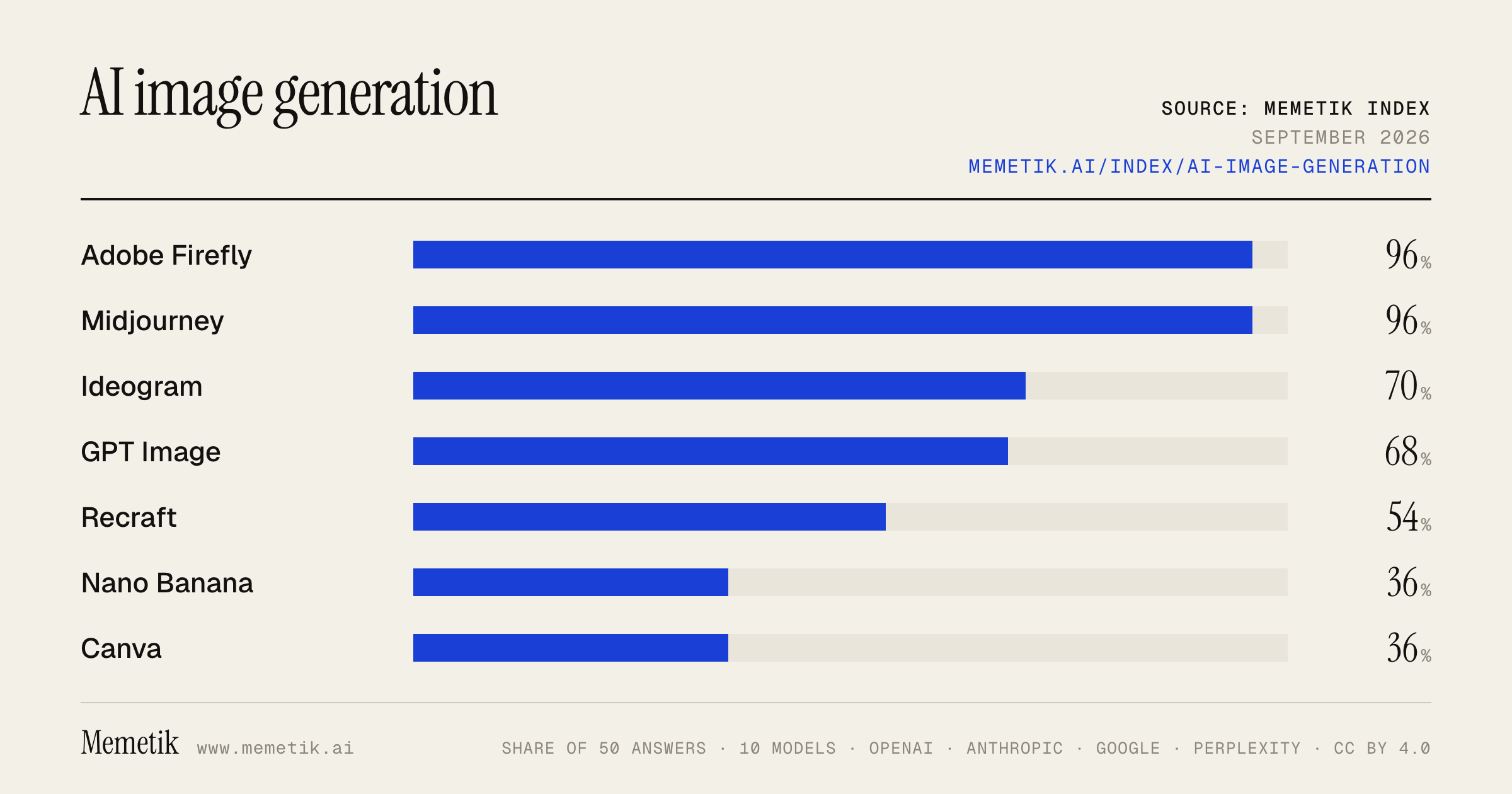
By provider
10 models · 50 answers
OpenAI 3 models · 15 answers
- GPT-5.6 Solgpt-5.6-solmost named: Adobe Firefly 100%
- GPT-5.6 Terragpt-5.6-terramost named: Adobe Firefly 100%
- GPT-5.6 Lunagpt-5.6-lunamost named: Adobe Firefly 100%
Anthropic 3 models · 15 answers
- Claude Opus 5claude-opus-5most named: Midjourney 100%
- Claude Sonnet 5claude-sonnet-5most named: GPT Image 100%
- Claude Fable 5claude-fable-5most named: Adobe Firefly 100%
Google 2 models · 10 answers
- Gemini 3.6 Flashgemini-3.6-flashmost named: Adobe Firefly 100%
- Gemini 3.5 Flashgemini-3.5-flashmost named: Adobe Firefly 100%
Perplexity 2 models · 10 answers
- Sonar Prosonar-promost named: Adobe Firefly 100%
- Sonar Reasoning Prosonar-reasoning-promost named: Adobe Firefly 100%
Sources the models cited
- youtube.com94
- guideflow.com45
- freeacademy.ai29
- zapier.com25
- magicshot.ai25
- toools.design21
- datanorth.ai19
- reddit.com18
- kimi.ai17
- getimg.ai15
- aitoolssme.com14
- cnet.com13
ChatGPT via API returns no citations, so it does not contribute here.
The prompts
- What is the best AI image generation tool for a designer? Name specific products.
- Which AI image generation tool would you recommend to a designer in 2026?
- Compare the top AI image generation tool options right now.
- I'm a designer and I need an AI image generation tool. What should I use and why?
- Best AI image generation tool for product marketing images?
Every answer
Raw model output, unedited
GPT-5.6 TerraWhat is the best AI image generation tool for a designer? Name specific products.
**Best overall for most professional designers: Adobe Firefly + Photoshop.**

If you already design in Adobe Creative Cloud, this is the most practical choice—not necessarily because it always produces the prettiest first image, but because it fits a real production workflow: generate, mask, retouch, expand a layout, composite, and finish in Photoshop. Adobe positions Firefly-generated work as designed for commercial use, and its generative tools include **Generative Fill** and **Generative Expand**. ([helpx.adobe.com](https://helpx.adobe.com/legal/product-descriptions/adobe-firefly.html?utm_source=openai))

### Specific products to consider

| Product | Best for | Why a designer would choose it |
|---|---|---|
| **Adobe Firefly / Photoshop** | Production design, campaigns, client work | Best workflow integration, controlled editing, and commercial-use positioning. |
| **Midjourney** | Art direction, moodboards, premium-looking concepts | Excellent for evocative, stylized imagery and visual exploration. Its web editor supports uploaded images, layers, inpainting, outpainting, pan, and zoom-out. ([docs.midjourney.com](https://docs.midjourney.com/hc/en-us/articles/32764383466893-Editor?utm_source=openai)) |
| **ChatGPT Images** | Fast ideation and precise conversational edits | Particularly good when you want to describe revisions plainly—e.g., “keep the composition, change the jacket to red, remove the logo.” It supports uploaded-image edits, selections, transparent backgrounds, and arbitrary aspect ratios. ([help.openai.com](https://help.openai.com/en/articles/11084440-chatgpt-images?utm_source=openai)) |
| **Ideogram** | Posters, social graphics, packaging concepts, headline-led visuals | The strongest pick when the image needs readable typography. It offers editable text-layer extraction plus a canvas with inpainting/outpainting. ([ideogram.ai](https://ideogram.ai/features/text-rendering/?utm_source=openai)) |

### My recommendation by designer type

- **Brand/marketing/agency designer:** **Adobe Firefly + Photoshop** as your main tool; add **Ideogram** for ad concepts or poster visuals containing type.
- **Editorial, fashion, entertainment, or concept artist:** **Midjourney** for the strongest visual exploration; finish in Photoshop.
- **Product/UI designer:** **ChatGPT Images** for quick, directed iterations of illustrations, mockups, visual assets, and photo edits; finish layouts in Figma or Adobe tools.
- **Social, poster, merch, cover, or packaging designer:** **Ideogram**, because text is often the failure point in AI image tools—and it can turn generated type into editable layers. ([ideogram.ai](https://ideogram.ai/features/text-layers/?utm_source=openai))

### Short answer

If you want to buy or learn **one**: choose **Adobe Firefly with Photoshop**.
If you care most about beautiful, surprising art direction: choose **Midjourney**.
If typography inside the image matters: choose **Ideogram**.
If you want the easiest “talk to the image and revise it” workflow: choose **ChatGPT Images**.
- https://helpx.adobe.com/legal/product-descriptions/adobe-firefly.html?utm_source=openai
- https://docs.midjourney.com/hc/en-us/articles/32764383466893-Editor?utm_source=openai
- https://help.openai.com/en/articles/11084440-chatgpt-images?utm_source=openai
- https://ideogram.ai/features/text-rendering/?utm_source=openai
- https://ideogram.ai/features/text-layers/?utm_source=openai
GPT-5.6 TerraWhich AI image generation tool would you recommend to a designer in 2026?
**My default recommendation for a working designer in 2026: Adobe Firefly—especially if you already use Photoshop, Illustrator, or the broader Creative Cloud stack.**

Why it wins as a *design tool*, rather than simply an image generator:

- **It fits production workflow.** You can generate, extend, remove, composite, and iterate directly around assets in Photoshop, rather than treating AI output as a dead-end image you must rebuild manually. Firefly also connects across Creative Cloud apps and includes image, vector, and generative-editing features. ([adobe.com](https://www.adobe.com/products/firefly/plans.html?msockid=30c2e6fee4776ea729e9f05de5bc6fb7&utm_source=openai))
- **It is the safer default for client and commercial work.** Adobe states that outputs from its Firefly models are safe for commercial use, and describes its initial commercial model as trained on Adobe Stock, openly licensed, and public-domain material. That does not replace a client’s legal review or brand-clearance process, but it is a materially better starting point for agency/in-house work than treating every model identically. ([helpx.adobe.com](https://helpx.adobe.com/firefly/web/get-started/learn-the-basics/adobe-firefly-faq.html?utm_source=openai))
- **It now supports more than Adobe’s own models in key workflows.** Photoshop’s generative tools can offer model choice, while Firefly’s own current models emphasize higher-resolution generation and editing—useful when you need to test a visual direction, then actually finish the asset. ([news.adobe.com](https://news.adobe.com/news/downloads/pdfs/2025/10/102825-creative-cloud.pdf?utm_source=openai))

**Choose Midjourney instead** if your primary job is **art direction, moodboards, campaign concepting, fashion/editorial imagery, or highly stylized visual exploration**. Its web editor, image references, style references, moodboards, and personalization profiles make it exceptionally strong for developing a distinctive visual language quickly. ([docs.midjourney.com](https://docs.midjourney.com/hc/en-us/articles/32433330574221-Personalization?utm_source=openai))

### Practical recommendation
Use a two-tool setup if budget permits:

1. **Midjourney** for fast, high-taste exploration and concept images.
2. **Adobe Firefly + Photoshop** to turn selected concepts into controlled, editable, client-ready deliverables.

If I could give a designer only **one** subscription as of **September 2, 2026**, it would be **Adobe Firefly/Creative Cloud**—because the hard part of professional design is usually not generating a pretty first image; it is revising, integrating, versioning, and shipping it.
- https://www.adobe.com/products/firefly/plans.html?msockid=30c2e6fee4776ea729e9f05de5bc6fb7&utm_source=openai
- https://helpx.adobe.com/firefly/web/get-started/learn-the-basics/adobe-firefly-faq.html?utm_source=openai
- https://news.adobe.com/news/downloads/pdfs/2025/10/102825-creative-cloud.pdf?utm_source=openai
- https://docs.midjourney.com/hc/en-us/articles/32433330574221-Personalization?utm_source=openai
GPT-5.6 TerraCompare the top AI image generation tool options right now.
## Best AI image generators right now — practical comparison

| Tool | Best for | Main strengths | Main drawbacks | Typical cost |
|---|---|---|---|---|
| **Midjourney** | Beautiful, stylized artwork and concept art | Often the most immediately striking aesthetic output; excellent mood, lighting, illustration, fashion/editorial concepts | Less ideal when you need exact layout, editable design assets, or dependable text | $10–$120/month; unlimited relaxed image generations begin at Standard ($30/month). Private/“Stealth” generation starts at Pro ($60/month). ([docs.midjourney.com](https://docs.midjourney.com/hc/en-us/articles/27870484040333-Comparing-Midjourney-Plans?utm_source=openai)) |
| **ChatGPT / OpenAI image generation** | Conversational iteration, edits, and following detailed instructions | Very good “make this change, but preserve everything else” workflow; useful for image editing and generating from a precise written brief; convenient if you already work in ChatGPT | Can be less artistically distinctive than Midjourney; usage limits/cost structure can be less transparent in the consumer product | ChatGPT has limited image generation on Free; API image pricing is token-based and varies by image size/quality. ([help.openai.com](https://help.openai.com/en/articles/20001415-chatgpt-rate-card-enterprise-token-based-pricing?utm_source=openai)) |
| **Adobe Firefly** | Professional design, Photoshop workflows, and commercially cautious teams | Best integration with Photoshop, Illustrator, Express, and broader Creative Cloud workflows; strong controls for production editing, graphics, and asset pipelines | Pure “wow” artistic output may not be your favorite compared with Midjourney; credits/plans can be confusing | Firefly Standard has been listed from $9.99/month, with higher tiers and Creative Cloud bundles available. Adobe positions Firefly models as commercially safe. ([adobe.com](https://www.adobe.com/content/dam/cc/in/about-adobe/newsroom/pdfs/2025/Press%20Release-%20Adobe%20Expands%20Generative%20AI%20Offerings%20Delivering%20New%20Firefly%20App%20with%20Industrys%20First%20Commercially%20Safe%20Video%20Model.pdf?utm_source=openai)) |
| **Ideogram** | Posters, ads, logos, social graphics, and images containing readable text | One of the strongest choices for typography, graphic layout, and text-heavy images; offers private generation, character consistency, canvas/editing, and batch generation on paid tiers | Results can feel more “designed” than cinematic; highest-volume/pro workflows get expensive | Free tier available; Plus is $20/month and Pro $60/month. Its API lists $0.03 / $0.06 / $0.10 per image for Turbo / Default / Quality. ([ideogram.ai](https://ideogram.ai/pricing/?tab=personal&via=appscribed&utm_source=openai)) |
| **FLUX / open-model workflows** | Developers, local generation, custom workflows, and maximum control | Strong option when you want API flexibility, ComfyUI/local deployment, custom fine-tunes, or control over the generation pipeline | More technical; model/license/hosting choices take work; best experience often requires setup | Varies widely by hosted provider, model license, and your own GPU costs |
| **Google Imagen / Gemini** | People already using Google’s AI ecosystem | Convenient general-purpose generation and editing inside Google products; worth testing if Gemini is already your primary assistant | Product access and model availability can vary by account, region, and plan; less of a dedicated creator-first workflow than Midjourney or Adobe | Varies by Gemini/Google Cloud plan and usage |

## My recommendations

- **Want the most beautiful images with the least effort:** **Midjourney**
- **Need a design with correct words, headlines, labels, or poster copy:** **Ideogram**
- **Need to iterate by chatting and make precise edits to a supplied image:** **ChatGPT**
- **Work in Photoshop/Illustrator or need a professional marketing-production workflow:** **Adobe Firefly**
- **Need an API, self-hosting, automation, custom models, or node-based control:** **FLUX/open-model stack**

## Important trade-offs

1. **Aesthetics vs. control**
   Midjourney tends to win for visual taste and atmosphere. ChatGPT, Firefly, Ideogram, and open workflows are generally easier to direct when you need revisions, layout intent, or production constraints.

2. **Text in images**
   Choose **Ideogram** first for signage, packaging, thumbnail headlines, infographics, and ads. It explicitly emphasizes typography/layout control and editable text-oriented output. ([ideogram.ai](https://ideogram.ai/models/4.0/?utm_source=openai))

3. **Privacy**
   Check this before uploading client work. For example, Midjourney’s private Stealth mode requires a Pro or Mega plan, while Ideogram includes private generation on Plus and above. ([docs.midjourney.com](https://docs.midjourney.com/hc/en-us/articles/27870484040333-Comparing-Midjourney-Plans?utm_source=openai))

4. **Commercial use is not the same as legal clearance**
   Most services grant broad rights in outputs, but that does **not** eliminate risks around trademarks, copyrighted characters, recognizable people, training-data concerns, or use of reference images you do not own. Ideogram says it does not restrict output rights but puts responsibility for third-party rights on the user. ([docs.ideogram.ai](https://docs.ideogram.ai/faq?utm_source=openai))

## If you only want to try two

- **Creative/artistic work:** Midjourney + ChatGPT
- **Marketing/design work:** Ideogram + Adobe Firefly
- **Product/API work:** OpenAI image API + FLUX/open workflow

**Bottom line:** there is no universal winner. Midjourney is the best default for visual inspiration; Ideogram is the most compelling specialist for text and graphic design; ChatGPT is the best general-purpose conversational editor; Adobe Firefly is the safest bet for Creative Cloud-centric professional workflows.
- https://docs.midjourney.com/hc/en-us/articles/27870484040333-Comparing-Midjourney-Plans?utm_source=openai
- https://help.openai.com/en/articles/20001415-chatgpt-rate-card-enterprise-token-based-pricing?utm_source=openai
- https://www.adobe.com/content/dam/cc/in/about-adobe/newsroom/pdfs/2025/Press%20Release-%20Adobe%20Expands%20Generative%20AI%20Offerings%20Delivering%20New%20Firefly%20App%20with%20Industrys%20First%20Commercially%20Safe%20Video%20Model.pdf?utm_source=openai
- https://ideogram.ai/pricing/?tab=personal&via=appscribed&utm_source=openai
- https://ideogram.ai/models/4.0/?utm_source=openai
- https://docs.ideogram.ai/faq?utm_source=openai
GPT-5.6 TerraI'm a designer and I need an AI image generation tool. What should I use and why?
## Short answer

**If you already design in Photoshop/Illustrator and make client-facing work, start with Adobe Firefly.**
It is the strongest *production* choice: it lives inside the Adobe workflow, supports image generation plus Photoshop Generative Fill/Expand and Illustrator recoloring, and Adobe states that outputs from non-beta Firefly features can be used commercially. Its models are trained on licensed Adobe Stock, openly licensed, and public-domain material—useful when you need a more conservative workflow for client work. ([helpx.adobe.com](https://helpx.adobe.com/firefly/web/get-started/learn-the-basics/generative-credits-overview.html?utm_source=openai))

**Add ChatGPT Images as your ideation and art-direction tool.**
It is particularly useful for working conversationally: upload a comp, describe targeted changes, select an area to edit, request transparent backgrounds, and iterate on imagery while keeping the creative brief in the same thread. It also handles rendered text and instruction-following well enough to be valuable for mockups, presentations, campaign concepts, and illustrative assets. ([help.openai.com](https://help.openai.com/en/articles/11084440-chatgpt-images?utm_source=openai))

## My recommendation by situation

| Your situation | Use | Why |
|---|---|---|
| You use Creative Cloud and need assets for brands, ads, packaging, social, or decks | **Adobe Firefly** | Best handoff from generation to retouching and layout; more business-oriented commercial positioning. ([helpx.adobe.com](https://helpx.adobe.com/firefly/web/get-started/learn-the-basics/adobe-firefly-faq.html?utm_source=openai)) |
| You need rapid visual exploration, unusual concepts, or iterative feedback from a written brief | **ChatGPT Images** | You can direct and revise images in plain language, use uploaded references, and make localized edits. ([help.openai.com](https://help.openai.com/en/articles/11084440-chatgpt-images?utm_source=openai)) |
| You need both | **Firefly + ChatGPT Images** | Generate/explore concepts in ChatGPT; finish, composite, extend, mask, recolor, and prepare files in Photoshop/Firefly. |

## Why I’d choose Firefly as the single-tool answer

1. **It fits the way designers actually deliver work.** Generation is only the first 10%—then comes cleanup, compositing, extensions, resizing, color correction, and exporting. Firefly is connected to Photoshop, Illustrator, Express, Premiere, Lightroom, and other Creative Cloud apps. ([adobe.com](https://www.adobe.com/products/firefly/plans.html?msockid=23b32e50014961a30ecc388800306014&utm_source=openai))

2. **It is the safer default for commercial workflows.** Adobe says non-beta Firefly outputs may be used in commercial projects, and describes its core training sources as licensed Adobe Stock, public-domain, and openly licensed material. That does not eliminate the need for your own brand, trademark, likeness, and client-review process—but it is a practical advantage for agency or in-house work. ([helpx.adobe.com](https://helpx.adobe.com/creative-cloud/apps/generative-ai/generative-credits-faq.html?utm_source=openai))

3. **The cost model makes sense if you already pay Adobe.** Paid Firefly/Creative Cloud offerings share generative-credit access across Adobe apps, while paid Firefly plans include unlimited standard image/vector generations; premium features consume credits. Check the exact plan at purchase, since allocations and feature classifications change. ([helpx.adobe.com](https://helpx.adobe.com/firefly/web/get-started/learn-the-basics/generative-credits-overview.html?utm_source=openai))

## A practical setup

- **Primary:** Adobe Firefly / Photoshop
- **Secondary:** ChatGPT Images
- **Workflow:**
  1. Write a mini art-direction brief: audience, mood, composition, palette, visual references, and where text/logo will go.
  2. Make 10–20 rough directions in ChatGPT Images.
  3. Choose one direction—not one output—and rebuild/refine it in Photoshop.
  4. Keep critical logo type, legal copy, product claims, and brand marks as conventional design elements rather than relying on a generated image.

If you tell me what kind of designer you are—**brand, UI/product, editorial, fashion, 3D, marketing, or illustration**—and whether you need commercial/client use, I can give you a tighter one-tool recommendation and a prompt workflow.
- https://helpx.adobe.com/firefly/web/get-started/learn-the-basics/generative-credits-overview.html?utm_source=openai
- https://help.openai.com/en/articles/11084440-chatgpt-images?utm_source=openai
- https://helpx.adobe.com/firefly/web/get-started/learn-the-basics/adobe-firefly-faq.html?utm_source=openai
- https://www.adobe.com/products/firefly/plans.html?msockid=23b32e50014961a30ecc388800306014&utm_source=openai
- https://helpx.adobe.com/creative-cloud/apps/generative-ai/generative-credits-faq.html?utm_source=openai
GPT-5.6 TerraBest AI image generation tool for product marketing images?
**Best overall for product marketing: Adobe Firefly + Photoshop.**

It’s the strongest choice if you need polished ads while keeping your *actual product* accurate—especially for ecommerce, paid campaigns, packaging, and brand work. Firefly is positioned for commercially safe generation, integrates directly with Creative Cloud, and Adobe offers brand-oriented capabilities such as custom models and scalable production workflows. ([partners.adobe.com](https://partners.adobe.com/digitalexperience/products/firefly?utm_source=openai))

**The workflow that produces the best results:**
1. Start with a real, high-quality cutout/product photo.
2. Use Photoshop/Firefly to generate or extend the *environment*—lighting, set, props, background.
3. Keep logos, labels, ingredients, claims, prices, and CTA copy as normal editable design layers, not AI-rendered pixels.
4. Review every output for product geometry, label accuracy, and misleading visual claims.

This avoids the common failure mode: image models subtly changing the bottle shape, packaging copy, logo, color, or physical features.

### Best tool by need

| Need | Best pick | Why |
|---|---|---|
| **Brand-safe production ads / ecommerce** | **Adobe Firefly + Photoshop** | Best end-to-end compositing and professional design workflow; Adobe emphasizes commercial-use safety and Content Credentials. ([partners.adobe.com](https://partners.adobe.com/digitalexperience/products/firefly?utm_source=openai)) |
| **Fast ideation and iterative art direction** | **ChatGPT Images** | Excellent conversational workflow: upload a reference, request variations, then refine the scene, composition, or props in plain language. OpenAI provides image generation/editing through ChatGPT and its API. ([openai.com](https://openai.com/index/image-generation-api/?utm_source=openai)) |
| **Premium editorial / lifestyle campaign look** | **Midjourney** | Great for high-impact, stylized art direction and scene exploration; its editor supports external images, inpainting, outpainting, pan, zoom, and remixing. ([docs.midjourney.com](https://docs.midjourney.com/hc/en-us/articles/32764383466893-Editor?utm_source=openai)) |
| **Ads with headline text built into the visual** | **Ideogram** | Particularly useful for poster-like social ads and concept comps because of strong text/layout features, styles, background removal, and batch generation. Still, use a design tool for final legal/brand copy. ([ideogram.ai](https://ideogram.ai/models/4.0/?utm_source=openai)) |

### My direct recommendation
- **Small brand / solo marketer:** Start with **ChatGPT Images** for rapid concepts, then finish in Canva, Figma, or Photoshop.
- **Serious ecommerce or agency workflow:** Choose **Adobe Firefly + Photoshop**.
- **Luxury, fashion, beauty, or highly visual campaigns:** Use **Midjourney** to develop the art direction, then composite the genuine product in Photoshop.
- **Text-led paid social:** Use **Ideogram** for concepts, but rebuild all copy as editable typography before publishing.

**Bottom line:** If you want one tool to buy for dependable product marketing, pick **Adobe Firefly + Photoshop**. If you value the quickest path from “idea” to multiple compelling concepts, pick **ChatGPT Images**.
Claude Sonnet 5What is the best AI image generation tool for a designer? Name specific products.
For a designer, the "best" tool really depends on what part of the workflow you need AI for. Here's a breakdown of the top specific products:

**For pure image quality / concept art & mood boards**
- **Midjourney** –
Midjourney produces the most aesthetically refined AI-generated images available in 2026, with concept art, marketing imagery, mood boards, or illustrations that look good without heavy post-processing.

It now offers both Discord-based and web-based interfaces, with style references, character consistency features, and upscaling giving you meaningful control over outputs.
 The tradeoff:
Midjourney generates images, not layouts, so you'll likely pair it with another tool (Canva, Figma) for final design composition.


**For designers who want native vector/SVG output (great for logos, icons, print)**
- **Recraft** –
after testing Recraft on their own platform, it's very much targeting designers and the platform allows a very professional approach.
 It's specifically noted for native SVG generation among design-focused tools.

**For IP-safe, commercial/agency work inside Adobe workflows**
- **Adobe Firefly** –
best for professional designers in the Adobe ecosystem, agencies, and commercial projects requiring IP-safe outputs, with a free tier with limited credits or inclusion in Creative Cloud subscriptions (~$55/month for All Apps).


**For open-source flexibility and prompt-based editing**
- **FLUX** (by Black Forest Labs) –
There are a few different versions — FLUX.2 Max, FLUX.2 Pro, FLUX.2 Flex, FLUX.2 Klein — all excellent and widely embraced by the AI art community, designed for prompt-based editing.
 It can also do targeted edits:
models like FLUX.1 Kontext can take a real photo and modify specific parts without regenerating the whole image — a different capability from text-to-image, making it a real editing tool, not just a "new image" generator.


**For accurate text-in-image (packaging, ads, signage)**
- **Ideogram** and **Google Imagen 4** –
text rendering became a solved problem for top-tier models; now Imagen 4, GPT Image 2, and Ideogram all handle short text reliably, unlocking flyers, ads, packaging, and signage work.


**For model variety / one-subscription access to many engines**
- **Freepik (Magnific)** and **Krea** –
Krea's free tier with 50 daily generations is the most generous no-cost option, and if you want model variety, OpenArt (100+ models) and Krea (64+ models) let you access various AI models under one subscription.
 Freepik is also popular among design professionals:
Freepik (now called Magnific) lets you access over 30 models under one subscription, and many designer and creative friends use it because it's considered the best deal right now.


**Quick recommendation**

- **If you want the highest visual/aesthetic quality for concepts, illustrations, and mood boards:** Midjourney
- **If you're deep in Adobe Creative Cloud and need commercially safe assets:** Adobe Firefly
- **If you need vectors/logos/branding-ready output:** Recraft
- **If you want an all-in-one, budget-friendly hub with many models:** Freepik or Krea
- **If you're technical and want open-source control/editing:** FLUX

A common real-world setup:
AI image generation is most useful as material inside a design process rather than a replacement for it — designers usually need several different capabilities: ideation, accurate text, reference-based consistency, and editing.
 Many designers therefore combine Midjourney (for ideation) with Firefly or Photoshop (for finishing) or Recraft (for vector/brand assets).
- https://www.guideflow.com/blog/ai-design-tools
- https://www.aitoolssme.com/comparison/image-generators
- https://zapier.com/blog/best-ai-image-generator/
- https://magicshot.ai/blog/best-ai-image-generators-2026
- https://www.toools.design/blog-posts/ai-tools-for-graphic-design
- https://openart.ai/blog/best-ai-image-generators-for-designers/
Claude Sonnet 5Which AI image generation tool would you recommend to a designer in 2026?
I can share some current information about AI image generation tools to help guide this decision, since this landscape changes quickly.
Based on current information, there's no single "best" tool—it really depends on what part of your workflow you need AI for. Here's a practical breakdown for a designer in 2026:

**For pure aesthetic quality / concept art & mood boards:**

Midjourney produces the most aesthetically refined AI-generated images available in 2026, and if you need concept art, marketing imagery, mood boards, or illustrations that look good without heavy post-processing, this is where the bar is set.
 The catch:
Midjourney generates images, not layouts, so you'll likely pair it with another tool like Canva or Figma for final design composition.


**For IP-safe commercial/client work (Adobe ecosystem):**
Adobe Firefly is
best for professional designers in the Adobe ecosystem, agencies, and commercial projects requiring IP-safe outputs, with a free tier and inclusion in Creative Cloud subscriptions (~$55/month for All Apps)
 — important if licensing/liability is a concern for client deliverables.

**For vector output and branding-specific work:**

Specialized tools like Kittl offer AI-first design with built-in branding and print workflows, and Recraft offers native SVG generation
 — genuinely useful if you need scalable vector assets rather than raster images.

**For model variety / flexibility without multiple subscriptions:**

Krea's free tier with 50 daily generations is the most generous no-cost option, and if you want model variety, OpenArt (100+ models) and Krea (64+ models) let you access various AI models under one subscription.
 Freepik (now Magnific) is also popular among designers for similar reasons —
it lets you access literally over 30 models under one subscription
.

**For text-heavy designs (packaging, flyers, signage):**
This used to be a weak spot for AI, but
text rendering became a solved problem for top-tier models—eighteen months ago every AI image with text looked like alien hieroglyphics, but now Imagen 4, GPT Image 2, and Ideogram all handle short text reliably
.

**For photo editing on existing assets (not just generation):**

Editing caught up to generation—models like FLUX.1 Kontext can take a real photo and modify specific parts without regenerating the whole image
, which is huge if you're refining client photos rather than generating from scratch.

**A realistic expectation to set:**

Adobe's 2026 Creators' Toolkit Report found that 57% of creators say their AI outputs typically need moderate to extensive editing before they're ready to share
. So
AI image generation is most useful as material inside a design process, not as a replacement for the process
.

**My actual recommendation:** If you want one starting point, try **Midjourney** for raw creative/aesthetic quality, or **Adobe Firefly** if you're already in Creative Cloud and need commercially-safe licensing. If budget or flexibility matters more, **Freepik/Magnific** or **Krea** give you access to many models (Midjourney, FLUX, Recraft, etc.) under one subscription rather than juggling several tools.
Claude Sonnet 5Compare the top AI image generation tool options right now.
I'll research the current top AI image generation tools to give you an accurate comparison.
Based on current data (as of September 2026), here's how the top AI image generation tools stack up:

## Top-Tier Models (Best Overall Quality)

**Nano Banana Pro (Google)** — Currently one of the most decorated tools in benchmarks.
Nano Banana Pro is the most-decorated AI image generator in third-party benchmarks as of early 2026, scoring 8.0/10 and ranking #1 in CNET's comparison, and also ranking #1 in CuriousRefuge's blind creator test.
 It's praised for
its strong blend of speed, quality, and cost
, and is accessible free inside the Gemini app.

**GPT Image 2 (OpenAI)** — Tops blind human-preference rankings.
As of September 2026, GPT Image 2 by OpenAI is the top-ranked AI image generator with an arena score of 506, followed by GPT Image 1.5 and MAI-Image-2.5.
 Unlike diffusion-based competitors,
it's a transformer-based generator that produces images token by token, similar to how language models produce text.


**Midjourney** — Still the aesthetic leader for artistic work.
It remains the benchmark for aesthetic output in 2026 — if you want art that looks like art, moody and painterly, nothing else gets close.
 However,
photorealism isn't its strongest game, the Discord interface is being phased out for a web app (though workflow is still clunky), and text rendering is mediocre.
 Pricing runs
$10 to $120 per month depending on tier.


## Specialized/Strong Alternatives

**Flux.2 (Black Forest Labs)** — The go-to for commercial realism.
E-commerce managers use Flux.2 Pro for hyper-realistic product placement in varied lifestyle settings without the cost of a physical photoshoot.


**Ideogram 4.0** — Best for text/typography.
Brand designers lean on Ideogram 4.0's typographic precision for social assets with flawless copy.


**Adobe Firefly** — Best for commercial/enterprise safety.
It's Adobe's generative AI system built specifically for commercial use, tightly integrated into Photoshop, Illustrator, and Express, focusing on image generation, background replacement, text effects, and generative fill.

Its commercially safe training keeps global campaigns compliant.


**Leonardo.ai** — Strong all-around creative suite. Its flagship model,
now called Lucid Origin, is a highly prompt-responsive model built for graphic design, photorealistic renders, and specific creative direction, with Fast and Ultra variants, plus features like Image Guidance and Realtime Canvas for sketch-guided generation.

Pricing includes a free tier with Pro plans starting at $30/month, and built-in upscaling to 4K.


**Meta AI Image (Superintelligence Labs)** — New but notable for accessibility.
Launched July 7, 2026, it's free for everyday use inside Meta AI, Instagram, and WhatsApp, with conversational prompting, photo restoration, style transformation, and multi-photo blending.


**Nano Banana 2** — Built for speed at scale.
Its ultra-low latency (along with the new Lite variant) enables high-velocity A/B testing, generating hundreds of ad variations for specific audience segments in real time.


## Quick Recommendation Guide

| Need | Best Pick |
|---|---|
| Overall quality/free access | Nano Banana Pro |
| Highest benchmark scores | GPT Image 2 |
| Artistic/stylized aesthetics | Midjourney |
| Photorealistic product shots | Flux.2 Pro |
| Text/typography in images | Ideogram 4.0 |
| Commercial/enterprise safety | Adobe Firefly |
| All-in-one creative suite | Leonardo.ai |
| Free casual use | Meta AI / Gemini |

One important caveat worth noting:
the best AI image generator truly depends on your specific use case
, and as testers note,
models change weekly, so rankings can shift fast.
 If you want to test multiple models without juggling subscriptions, aggregator platforms exist that let you run several side-by-side
— Flux, Imagen, GPT-Image, Midjourney, Recraft, and 20+ more — in a single free workflow, no install or API key required.
- https://alici.ai/blog/best-ai-image-generators-2026
- https://magicshot.ai/blog/best-ai-image-generators-2026
- https://llm-stats.com/leaderboards/best-ai-for-image-generation
- https://datanorth.ai/blog/top-10-best-ai-image-generation-tools-2026
- https://jimmacleod.medium.com/the-best-ai-image-tools-for-2026-compared-and-evaluated-4dee99b4b565
Claude Sonnet 5I'm a designer and I need an AI image generation tool. What should I use and why?
Here's an honest overview of the main AI image generation tools as of 2026, with tradeoffs to help you pick based on your specific design needs:

## Top options for designers

**Midjourney**
Best known for aesthetic quality and artistic coherence out of the box. It tends to produce the most visually polished, "art-directed" results with minimal prompting effort. Great for concept art, mood boards, illustration-style work, and creative exploration. Downside: it runs through Discord (though there's now a web app too), and you have less precise control over exact composition/text compared to some competitors.

**Adobe Firefly**
If you're already in the Adobe ecosystem (Photoshop, Illustrator, InDesign), this is a strong choice because it's integrated directly into those tools — generative fill, generative expand, text effects, vector recoloring, etc. It's trained to be commercially safe (trained on licensed/stock content), which matters if you're doing client work and need indemnification. Quality is good but sometimes slightly behind Midjourney/DALL-E on pure creative flair.

**DALL-E 3 (via ChatGPT/Bing)**
Excellent at following complex, detailed prompts precisely — good if you need specific compositions, text in images, or literal interpretations of a brief. Integrated with ChatGPT, so you can iterate conversationally. Weaker on painterly/artistic style compared to Midjourney.

**Stable Diffusion (SDXL, SD3, etc.)**
The best choice if you want full control: it's open-source, runs locally, and supports custom model training (LoRA/fine-tuning) so you can create brand-consistent styles or train on your own portfolio. Steeper learning curve, but tools like ComfyUI or Automatic1111 give you node-based/granular control over every part of the pipeline. Great for production pipelines, batch work, or when you need reproducibility and no per-image cost.

**Ideogram**
Increasingly popular specifically for typography and logo-style work — it handles text rendering in images better than most competitors, which is a common pain point in this space.

**Recraft**
Worth checking out for icon sets, vector-style outputs, and brand-consistent asset generation — more niche but useful if that's your workflow.

## How I'd choose

- **Need it inside your existing design software?** → Adobe Firefly
- **Want the most "art-directed" beautiful output fast?** → Midjourney
- **Need precise control, local hosting, or custom-trained styles?** → Stable Diffusion
- **Need accurate text/logos in-image?** → Ideogram
- **Need exact prompt-following for compositions/briefs?** → DALL-E 3

A lot of professional designers end up using **two tools in tandem** — e.g., Midjourney for concept exploration and mood generation, then Firefly or Photoshop's generative tools for final production/compositing since it integrates with layers, masks, and existing assets.

Want me to narrow this down based on your specific use case (e.g., illustration, product mockups, branding, marketing assets, UI/UX)?
Claude Sonnet 5Best AI image generation tool for product marketing images?
Based on current comparisons, here are the top AI image generation tools for product marketing, depending on your specific needs:

## Top Picks

**Nano Banana 2 (Google)** – Currently a standout for marketing use because it
handles dense on-image text reliably, including multi-word headlines, pricing callouts, and CTA copy
. It's fast too —
the Lite variant, released June 30, 2026, generates images in about 4 seconds
, making it great for high-volume production at low cost.

**Leonardo.ai** – Best if brand consistency across many product shots matters most.
Leonardo.ai is an AI platform focused on consistent imagery with fine-tuned models for specific visual styles and brand aesthetics, excelling at brand consistency through custom model training.

You can train the AI on your existing product photos or brand imagery so it learns to generate new variations matching your established visual identity — its product photography capabilities stand out for e-commerce marketers.


**getimg.ai** – A strong all-in-one option for teams producing at scale.
Its Elements system stores reusable visual references — product shots, brand characters, style guides, color palettes — so every output stays on-brand across campaigns, and it offers multi-model access with 33+ AI image models
.

**Creatify (Asset Generator)** – Ideal if you want to compare multiple models for the same shot.
Instead of building one proprietary model, it gives you access to 40+ AI models in a single workspace, including GPT-image-1, DALL-E 3, Flux 2 Pro, Flux 1.1 Pro Ultra, Recraft v3, Seedream 5.0, and Imagen4 — letting you generate the same product shot across multiple models and pick the best result.


**Freepik AI** – Good if you also need stock assets alongside AI generation.
It bundles 30+ image models with access to Freepik's stock photo, vector, and template library from ~$7.50/month.


## How to Choose

Since product images have specific needs, prioritize tools based on:
photorealistic output and strong lighting control for hero shots and lifestyle scenes, ability to generate variations quickly (backgrounds, props, seasonal themes, formats), good prompt adherence to specific product details, practical editing options like inpainting/outpainting and background replacement, and commercial usage clarity with predictable costs.


### My recommendation:
- **For text-heavy ads/banners with pricing or CTAs:** Nano Banana 2 or GPT Image 1.5
- **For consistent branded product catalogs at scale:** Leonardo.ai or getimg.ai
- **For testing multiple styles quickly:** Creatify (access to 40+ models in one place)
- **For budget-conscious solo marketers:** Freepik AI or Canva AI

Would you like a deeper comparison on pricing or specific use cases (e.g., Amazon listings, Shopify, social ads)?
- https://getimg.ai/blog/best-ai-image-generator-for-marketing
- https://datanorth.ai/blog/top-10-best-ai-image-generation-tools-2026
- https://www.cometly.com/post/ai-marketing-image-generator
- https://creatify.ai/blog/best-ai-image-generators-and-tools
- https://www.genailast.com/blogs/best-ai-image-generation-tools-for-product-marketing-1.php
Gemini 3.6 FlashWhat is the best AI image generation tool for a designer? Name specific products.
There is no single "best" AI image generation tool for every designer because different designers have vastly different requirements—such as vector output, precise text rendering, commercial safety, or maximum artistic realism.

The top AI image generation tools tailored to specific design workflows include:

---

### 1. **Adobe Firefly**
* **Best for:** Professional graphic designers, commercial work, and brand consistency.
* **Why designers love it:**
  * **Commercial Safety:** Firefly is trained on Adobe Stock and public domain content, making it safe for commercial use without copyright concerns.
  * **Ecosystem Integration:** It is natively built into Photoshop, Illustrator, and Express. Features like *Generative Fill*, *Generative Expand*, and *Text-to-Vector* fit directly into existing non-destructive layer workflows.
  * **Control:** Offers precise, designer-friendly controls for aspect ratios, camera angles, color palettes, and reference images.

---

### 2. **Midjourney**
* **Best for:** Concept art, creative direction, high-end art direction, and photorealism.
* **Why designers love it:**
  * **Unmatched Visual Aesthetic:** Midjourney consistently produces the most visually stunning, stylistically coherent, and cinematic images on the market.
  * **Style Matching:** Tools like Style Reference (`--sref`) and Character Reference (`--cref`) allow you to maintain brand guidelines or consistent characters across an entire campaign.
  * **Web Editor:** With its standalone web platform (moving past its Discord roots), it offers fine-tuned localized editing and panning/zooming.

---

### 3. **FLUX (by Black Forest Labs)**
* **Best for:** Photorealism, complex prompt adherence, and open-source flexibility.
* **Why designers love it:**
  * **Precision:** FLUX excels at rendering highly specific details, realistic hands, complex lighting, and multi-subject scenes that trip up other models.
  * **Customization:** Because it is an open-weights model, technical designers and agencies can run it locally and train custom LoRAs (fine-tuned models) on their own products or brand assets.

---

### 4. **Recraft**
* **Best for:** Vector design, SVG graphics, and UI/brand asset creation.
* **Why designers love it:**
  * **Native Vector (SVG) Output:** Unlike most raster-only generators, Recraft can generate true vector files that can be edited endlessly in Illustrator or Figma without pixelation.
  * **Brand Control:** Lets you lock in custom color palettes, specific visual styles (3D, flat vector, line art), and canvas dimensions tailored for brand system guidelines.

---

### 5. **Ideogram**
* **Best for:** Graphic design with heavy typography, posters, logos, and merch.
* **Why designers love it:**
  * **Typography Mastery:** Historically, AI generators scramble text. Ideogram renders legible, accurate, and beautifully styled typography inside images.
  * **Layout & Style Presets:** It understands graphic design composition (posters, t-shirt prints, badges) better than most photorealistic models.

---

### 6. **Krea AI**
* **Best for:** Real-time generation, moodboarding, product marketing, and upscaling.
* **Why designers love it:**
  * **Real-time Canvas:** Allows you to draw simple shapes or combine stock photos, and instantly transforms them into rendered visuals in real time.
  * **Enhancement & Upscaling:** Features one of the best AI upscalers on the market, adding realistic texture, crisp details, and high resolution to low-res concepts.

---

### Summary Recommendation for Designers:
* Choose **Adobe Firefly** if you work inside the Creative Cloud and need commercially safe assets.
* Choose **Midjourney** if you are in pre-visualization, moodboarding, or creative concept generation.
* Choose **Recraft** if you work with UI/UX, icon sets, or vector graphics.
* Choose **Ideogram** if you are designing logos, typography, or print materials.
Gemini 3.6 FlashWhich AI image generation tool would you recommend to a designer in 2026?
For a designer in 2026, the best AI image generation tool depends heavily on your specific workflow, control needs, and output requirements. Rather than a single "winner," the leading tools serve distinct aspects of a professional design workflow:

---

### 1. **Best for Seamless Workflow & Commercial Safety: Adobe Firefly**
* **Ideal for:** Graphic designers, UI/UX designers, and brand agencies working within standard design software.
* **Why it stands out:**
  * **Native Integration:** Built directly into Photoshop, Illustrator, and InDesign, allowing for non-destructive editing, Generative Fill, and expand/reframe features.
  * **Vector Generation:** Excellent for vector graphics and icon creation directly in Adobe Illustrator.
  * **Commercial Safety:** Trained exclusively on Adobe Stock and open-license content, making it safer for enterprise and client work without legal concerns.

### 2. **Best for Visual Aesthetics & Concept Art: Midjourney**
* **Ideal for:** Art directors, visual concept artists, and editorial designers.
* **Why it stands out:**
  * **Unrivaled Aesthetic Quality:** Produces stunning, photorealistic, and highly artistic compositions right out of the box with minimal prompting effort.
  * **Design Controls:** Style references, image composition prompts, and character consistency features allow designers to maintain visual coherence across campaigns.
  * **Web Interface:** Beyond Discord, the standalone Midjourney web platform offers intuitive controls for canvas pan, zoom, and regional repainting.

### 3. **Best for Typography, Logos, & Layouts: Ideogram**
* **Ideal for:** Brand designers, poster artists, and print/digital layout designers.
* **Why it stands out:**
  * **Flawless Text Rendering:** Ideogram leads the industry in accurately generating legible typography, logos, callouts, and text within generated artwork.
  * **Design Styles:** Features built-in style modes specifically tuned for vector art, realistic product photography, typography layouts, and graphic design.

### 4. **Best for Precision Control & Technical Customization: FLUX (by Black Forest Labs)**
* **Ideal for:** Power users, 3D artists, and designers who need exact control over composition, pose, and brand guidelines.
* **Why it stands out:**
  * **State-of-the-Art Prompt Adherence:** Captures complex, multi-subject prompts and lighting nuances remarkably well.
  * **Customization via LoRAs:** Being open-weights, it allows designers to train fine-tuned models on specific brand assets, products, or unique visual styles.
  * **Precise Editing:** Integrates with tools like ControlNet for exact pose matching, spatial awareness, and line-art coloring.

---

### **Recommendation Summary:**

* **If you rely on Adobe Creative Cloud:** Stick with **Adobe Firefly** for immediate productivity, vector output, and client-safe workflows.
* **If you need marketing concepts or high-end imagery:** Use **Midjourney** for unmatched aesthetics and moodboarding.
* **If text/lettering is central to your work:** Use **Ideogram** to quickly iterate on logos, posters, and typographic concepts.
* **If you need exact control over brand assets:** Set up **FLUX** or **Stable Diffusion** for custom fine-tuning and precise composition control.
Gemini 3.6 FlashCompare the top AI image generation tool options right now.
Here is a comparison of the top AI image generation tools currently leading the market. Each tool has unique strengths depending on whether you value aesthetic realism, prompt accuracy, commercial safety, or granular control.

---

### 1. **Midjourney** (v6 / v6.1)
* **Best For:** Unmatched aesthetic beauty, photorealism, and artistic styles.
* **How It Works:** Accessed via Discord or the dedicated Midjourney Web UI.
* **Pros:**
  * Consistently produces the most visually stunning, artistic, and photorealistic images out of the box.
  * Excellent lighting, texture, and stylistic nuance without requiring overly complex prompts.
  * Powerful features like image pan, zoom/outpaint, inpainting (Vary Region), and character consistency tools.
* **Cons:**
  * No free trial; subscription only (starts at $10/month).
  * Text rendering within images is improved but still occasionally imperfect compared to Flux or DALL-E 3.
  * Interface (Discord-heavy for basic tiers) can feel unintuitive for beginners.

---

### 2. **FLUX.1** (by Black Forest Labs)
* **Best For:** Open-weights quality, precise text rendering, and high prompt compliance.
* **How It Works:** Available via web platforms (e.g., NightCafe, Replicate, Poe) or downloadable to run locally on high-end GPUs.
* **Pros:**
  * Created by former Stability AI engineers; rivals or exceeds Midjourney in prompt adherence and detail.
  * Exceptional at rendering clear, accurate text inside images.
  * Available in open-weight models (*Schnell* and *Dev*) for local customization and integration, as well as an enterprise API (*Pro*).
* **Cons:**
  * Running locally requires a high-performance GPU (VRAM-heavy).
  * Web interfaces vary in cost depending on the platform hosting it.

---

### 3. **DALL-E 3** (by OpenAI)
* **Best For:** Conversational prompting, ease of use, and text accuracy.
* **How It Works:** Built directly into ChatGPT Plus/Team/Enterprise, Microsoft Copilot, and available via API.
* **Pros:**
  * Understands natural language better than almost any other tool—you can describe complex scenes conversationally.
  * Excellent at adding specific text, words, or signs inside generated graphics.
  * Integrates seamlessly with ChatGPT for iterative editing and refining.
* **Cons:**
  * Photorealism can look a bit "painterly" or airbrushed compared to Midjourney or FLUX.
  * Strict content filtering can occasionally trigger false positives.

---

### 4. **Adobe Firefly** (Firefly Image 3)
* **Best For:** Graphic designers, commercial safety, and seamless Photoshop/Illustrator integration.
* **How It Works:** Integrated into Adobe Creative Cloud (Photoshop Generative Fill, Illustrator) and available as a web app.
* **Pros:**
  * **Commercially Safe:** Trained exclusively on Adobe Stock and public domain content, making it safe for commercial brand use.
  * Deep integration with professional workflows (e.g., Photoshop’s Generative Fill/Expand).
  * Great control over style, composition references, and camera angles via a clean UI.
* **Cons:**
  * Less raw artistic creativity or photorealism compared to Midjourney.
  * Requires an Adobe subscription or generative credit purchase for high usage.

---

### 5. **Stable Diffusion** (SDXL & SD3 / SD3.5 by Stability AI)
* **Best For:** Complete control, offline privacy, custom LoRAs, and developers.
* **How It Works:** Open-source models run locally via interfaces like ComfyUI, WebUI (AUTOMATIC1111), or third-party web apps.
* **Pros:**
  * **100% Free and Private:** Can be run locally on your hardware with no subscription fees or content censors.
  * Massive ecosystem of custom models, fine-tunes, LoRAs, and ControlNet tools (for exact pose and structure control).
* **Cons:**
  * Steep learning curve for local installation and workflow setup (e.g., nodes in ComfyUI).
  * Requires a dedicated GPU (NVIDIA with 8GB+ VRAM recommended).

---

### 6. **Google Imagen 3**
* **Best For:** High detail, natural lighting, and integration with Gemini.
* **How It Works:** Available via Google Gemini, ImageFX (Google Test Kitchen), and Google Cloud Vertex AI.
* **Pros:**
  * Delivers impressive photographic fidelity and lighting.
  * Strong prompt adherence and clean text generation.
  * Free to experiment with via Google's ImageFX platform.
* **Cons:**
  * Limited fine-tuning and style customization controls compared to Midjourney or Stable Diffusion.
  * Availability and feature access vary by region and account type.

---

### Summary Comparison Table

| Tool | Primary Strength | Skill Level | Access / Pricing Model | Commercial Safety |
| :--- | :--- | :--- | :--- | :--- |
| **Midjourney** | Visual aesthetics & realism | Intermediate | Paid Subscription ($10+/mo) | Standard terms |
| **FLUX.1** | Prompt accuracy & text in images | Inter. to Advanced | Free (Local) / Paid APIs | Varies by tier |
| **DALL-E 3** | Conversational prompting | Beginner | Included with ChatGPT Plus / Free via Copilot | Standard terms |
| **Adobe Firefly** | Workflow integration & legal safety | Beginner to Pro | Creative Cloud / Credits | Highest (Stock-trained) |
| **Stable Diffusion** | Total customization & control | Advanced | Free Open Source | Dependent on model/data |
| **Google Imagen 3**| Photorealism & Gemini ecosystem | Beginner | Free (ImageFX) / Paid (Vertex AI) | Standard terms |

---

### Which one should you choose?

* **Choose Midjourney** if you want the highest visual quality for art, marketing concepts, and realistic portraits.
* **Choose FLUX.1** if you need state-of-the-art open models with precise text rendering and high detail.
* **Choose DALL-E 3** if you want a simple, chat-based experience without learning complex prompting syntax.
* **Choose Adobe Firefly** if you work in graphic design/branding and need legal piece-of-mind or Photoshop integration.
* **Choose Stable Diffusion** if you want full privacy, zero cost, and granular technical control over poses
Gemini 3.6 FlashI'm a designer and I need an AI image generation tool. What should I use and why?
Because AI image generators excel in different areas, the best tool for you depends on your specific design workflow, needed level of control, and output requirements.

Here are the top options tailored for professional designers:

---

### 1. **Midjourney** (Best for Pure Aesthetic Quality & Concepting)
* **Best for:** Mood boards, high-concept visual exploration, illustration, and photorealistic imagery.
* **Why use it:** Midjourney produces the most visually stunning, artistic, and polished images out of the box. Its lighting, textures, and composition are industry-leading.
* **Pros:** Unmatched visual fidelity; strong community; powerful style parameter tuning (`--s`, `--stylize`, `--v`).
* **Cons:** Runs through Discord or a web UI with limited canvas control; hard to do precise layout edits or direct text placement.

---

### 2. **Adobe Firefly** (Best for Direct Workflow Integration & Commercial Safety)
* **Best for:** Graphic design, photo editing, commercial advertising, and vector work.
* **Why use it:** It is directly integrated into **Photoshop, Illustrator, and InDesign** (via Generative Fill, Generative Expand, and Text to Vector). Crucially, Firefly is trained on Adobe Stock and public domain content, making it **commercially safe** with protection against copyright issues.
* **Pros:** Seamless integration with standard design software; native vector generation in Illustrator; safe for enterprise/commercial use.
* **Cons:** Stylistically less adventurous or expressive compared to Midjourney.

---

### 3. **Flux (by Black Forest Labs) / Stable Diffusion** (Best for Fine Control & Customization)
* **Best for:** Product design, brand consistency, precise character/object placement, and advanced UI/UX workflows.
* **Why use it:** **Flux** (specifically Flux.1) and **Stable Diffusion** (via tools like ComfyUI, ControlNet, or web frontends) offer absolute control. You can feed in wireframes, depth maps, or pose references to generate images that fit exact structural guidelines.
* **Pros:** Unrivaled control over layout, typography rendering, and composition; open-weights options allow running locally or training custom LoRAs on specific brand guidelines.
* **Cons:** Steeper learning curve; requires technical setup or third-party web interfaces (like Scenario, Magnific, or Leonardo.ai) to use easily.

---

### 4. **DALL-E 3 (via ChatGPT Plus)** (Best for Quick Prompting & Layout Ideas)
* **Best for:** Ideation, brainstorming, and following complex text instructions.
* **Why use it:** Thanks to ChatGPT's conversational interface, DALL-E 3 is exceptional at understanding long, nuanced prompts and rendering readable text inside images better than most legacy tools.
* **Pros:** Easy to use; understands complex multi-subject prompts and text well.
* **Cons:** Harder to iterate on exact details without changing the rest of the image; output can sometimes look overly "AI-rendered" or plastic.

---

### 5. **Magnific AI / Krea AI** (Best for Upscaling, Enhancing, & Real-time Ideation)
* **Best for:** High-resolution rendering, refining rough sketches, and adding micro-details.
* **Why use it:** These aren't just base text-to-image generators; they are powerful enhancement tools. You can take a low-res Midjourney image or a rough 2D mockup and upscale it to 4K/8K while hallucinating ultra-realistic textures and details.
* **Pros:** Essential for final production assets, pitch decks, and print resolution; real-time canvas tools allow you to draw and see AI render live.
* **Cons:** Can be relatively expensive on credit-based plans.

---

### Recommended Setup for Designers:
* **For Branding & Layout:** **Adobe Firefly** + **Photoshop** (for safety and workflow speed).
* **For Concept Art & Visual Direction:** **Midjourney**.
* **For Finishing & Production Quality:** **Magnific AI** or **Krea** (for upscaling/refining).

***

**Which area of design do you focus on the most?** (e.g., UI/UX, product design, brand identity, or 3D/concept art?) I can tailor specific prompts, workflows, or tool combinations for your exact needs.
Gemini 3.6 FlashBest AI image generation tool for product marketing images?
The "best" AI image generation tool for product marketing depends heavily on whether you need to **place an existing physical product into a realistic background** or **generate creative, conceptual product imagery from scratch**.

Here is a breakdown of the top AI tools for product marketing, categorized by use case:

---

### 1. Best for E-Commerce & Product Placement (Upload exact product photos)
If you already have product photos (e.g., a bottle, shoe, or electronic device) and need to generate realistic studio or lifestyle backgrounds without altering the product itself:

*   **Photoroom**
    *   **Best For:** E-commerce stores, Shopify sellers, social media ads.
    *   **Why It Wins:** Purpose-built for products. It automatically cuts out your product background with extreme precision and lets you generate custom AI backgrounds, studio lighting, and realistic shadows while keeping your product 100% accurate.
*   **Mokker.ai / Pebblely**
    *   **Best For:** Instant lifestyle backgrounds.
    *   **Why It Wins:** You upload a cutout PNG of your product, and the AI generates hundreds of realistic environments (wood tables, outdoor settings, marble countertops) tailored to your brand’s mood.

---

### 2. Best for Fine Control, Retouching & Commercial Safety
If you need high-resolution control, precise editing, and copyright-safe visuals for large-scale marketing campaigns:

*   **Adobe Firefly & Photoshop (Generative Fill)**
    *   **Best For:** Professional graphic designers and marketing agencies.
    *   **Why It Wins:**
        *   **Commercial Safety:** Trained on Adobe Stock, making it legally safer for commercial ads.
        *   **Precision:** Allows you to select specific parts of an image to add/replace backgrounds, fix lighting, or adjust composition without starting over.
        *   **Brand Consistency:** Matches lighting and perspective seamlessly when inserting products.

---

### 3. Best for Conceptual, Lifestyle & Brand Visuals (From Scratch)
If you need high-end mood board visuals, background landscapes, or conceptual ad creatives before photography even happens:

*   **Midjourney (v6+)**
    *   **Best For:** Ultra-realistic lifestyle shots, luxury branding, and creative ad concepts.
    *   **Why It Wins:** Produces the highest artistic quality, photorealism, lighting, and texture handling of any text-to-image generator.
    *   *Note:* It is harder to keep an exact real-world product 100% consistent, but it is unmatched for generating ambient lifestyle backgrounds or concept art.

---

### 4. Best All-in-One Platform for Marketers
If you want to generate backgrounds, add typography, resize for various social platforms, and post—all in one place:

*   **Canva (Magic Studio)**
    *   **Best For:** Social media managers and small business marketing teams.
    *   **Why It Wins:** Combines background generation with Canva’s massive library of ad templates, fonts, and multi-platform resizing tools (Instagram, Meta ads, banner ads).

---

### Quick Recommendation Guide:
*   **Shopify / E-commerce Product Shots:** Use **Photoroom** or **Mokker**.
*   **Professional Marketing Ads & Retouching:** Use **Adobe Photoshop (Generative Fill)**.
*   **High-End Lifestyle & Conceptual Visuals:** Use **Midjourney**.
*   **Fast Social Media Ad Creation:** Use **Canva**.
Sonar ProWhat is the best AI image generation tool for a designer? Name specific products.
For a **designer**, the best overall choice is usually **OpenArt AI Image Generator** if you want a **multi-model workflow** with image generation plus editing in one place.[3] If you already work inside Adobe, **Adobe Firefly** is the strongest fit for professional design workflows and Creative Cloud integration.[3][13][14]

The best specific products depend on the design task:

- **OpenArt AI Image Generator** — best overall for designers who want multiple leading models and editing tools in one workflow.[3]
- **Adobe Firefly** — best for designers already using Photoshop, Illustrator, or the rest of Creative Cloud.[3][13][14]
- **Midjourney** — best for **artistic quality**, visual exploration, moodboards, and concept art.[4][11][14]
- **Recraft** — best for **graphic design** work; it is explicitly aimed at designers and creatives, and it can generate **native SVG/vector output**.[2][4][15]
- **Ideogram** — best when your design needs **accurate text** in images, such as logos or typography-led concepts.[4][7]
- **FLUX** — best for **customization and control** if you want more flexibility across platforms or local deployment.[4][7]

If you want one quick pick:
- **Most designers:** **OpenArt**[3]
- **Adobe-centered workflows:** **Adobe Firefly**[3][13][14]
- **High-end concept art:** **Midjourney**[4][11][14]
- **Designers needing vector/SVG assets:** **Recraft**[15]
- https://www.cnet.com/tech/services-and-software/best-ai-image-generators/
- https://www.experte.com/ai-image-generators
- https://openart.ai/blog/best-ai-image-generators-for-designers/
- https://zapier.com/blog/best-ai-image-generator/
- https://christytuckerlearning.com/comparing-ai-image-generation-tools/
- https://buffer.com/resources/ai-image-generator/
- https://www.guideflow.com/blog/best-ai-image-generators
- https://learn.g2.com/best-ai-image-generators
- https://www.krumzi.com/blog/best-ai-design-tools-in-2026-12-picks-for-stunning-visuals-without-design-skills
- https://www.browse-ai.tools/blog/10-best-ai-image-generation-tools-for-designers-in-2026
- https://www.guideflow.com/blog/ai-design-tools
- https://fast.io/resources/best-ai-tools-for-designers-2026/
- https://www.format.com/magazine/resources/design/best-ai-graphic-design-tools
- https://www.hostinger.com/tutorials/best-ai-image-generators/
- https://www.toools.design/blog-posts/ai-tools-for-graphic-design
- https://www.pcmag.com/picks/the-best-ai-image-generators
- https://blog.hubspot.com/marketing/ai-for-graphic-design
- https://manus.im/tools/ai-design
- https://www.reddit.com/r/WillPatersonDesign/comments/1k7whjy/what_is_the_best_ai_tool_i_can_use_to_generate/
- https://www.kimi.ai/resources/best-ai-design-tools
Sonar ProWhich AI image generation tool would you recommend to a designer in 2026?
For a **designer in 2026**, I’d recommend **Midjourney** if the goal is the strongest *visual quality and aesthetic exploration*.[2][8][12] If the designer needs a more production-safe choice for client work and brand pipelines, **Adobe Firefly** is the better recommendation.[5][11][20]

The choice depends on what “designer” means in practice:

- **Midjourney** is repeatedly described as the best for **artistic quality**, **concept art**, and **visual exploration**.[2][8][12][17]
- **Adobe Firefly** is consistently positioned as best for **commercial safety** and pro design workflows.[5][11][20]
- **Recraft** is the better pick if the designer needs **vector graphics**, logos, or editable output.[11][15]
- **Ideogram** is strongest when **readable text in images** matters.[5][11][15]
- **Nano Banana 2** is presented by several 2026 roundups as the **best overall** or best balance of speed and quality, especially for fast iteration.[6][9][18]

If you want a single default recommendation without more context: **Midjourney for most designers, Adobe Firefly for brand/client-safe work**.[8][11][20]
- https://www.guideflow.com/blog/ai-design-tools
- https://www.krumzi.com/blog/best-ai-design-tools-in-2026-12-picks-for-stunning-visuals-without-design-skills
- https://www.cnet.com/tech/services-and-software/best-ai-image-generators/
- https://ltx.io/blog/best-ai-image-generator
- https://aimlapi.com/blog/the-best-ai-image-generators
- https://datanorth.ai/blog/top-10-best-ai-image-generation-tools-2026
- https://learn.g2.com/best-ai-image-generators
- https://storyflow.so/blog/best-ai-tools-for-designers-2026
- https://overchat.ai/ai-hub/best-ai-image-generators
- https://zapier.com/blog/best-ai-image-generator/
- https://resources.rework.com/tools/ai-tools/best-ai-image-generators-2026
- https://toolixlab.com/blog/best-ai-image-generation-tools-2026
- https://www.browse-ai.tools/blog/10-best-ai-image-generation-tools-for-designers-in-2026
- https://www.aitoolssme.com/comparison/image-generators
- https://felo.ai/blog/ai-image-generators-2026/
- https://www.zekagraphic.com/best-ai-image-generators-2026-graphic-designers/
- https://curiousrefuge.com/blog/the-best-ai-image-generators-2026
- https://amadine.com/useful-articles/ai-graphic-design-tools
- https://juma.ai/blog/ai-tools-for-generating-images
- https://storyflow.so/blog/best-ai-tools-for-graphic-designers-2026
Sonar ProCompare the top AI image generation tool options right now.
The **best AI image generator right now depends on your goal**: for overall quality and prompt adherence, **OpenAI’s GPT Image 2** is the strongest all-around pick in several 2026 roundups and blind-leaderboard rankings, while **Midjourney** remains the top choice for stylized, artistic images, and **Google’s Nano Banana / Gemini image models** are especially strong for fast iteration and realism.[2][3][4][7][9]

| Tool | Best for | Main strengths | Main tradeoffs |
|---|---|---|---|
| **GPT Image 2 / ChatGPT image** | Overall quality, prompt following, text in images | Repeatedly ranked at or near the top overall; strong text rendering and broad usefulness.[2][3][4][7][13] | Can have a recognizable “house style,” and some sources say it is less specialized than the best niche tools.[7] |
| **Midjourney** | Artistic, cinematic, mood-driven images | Widely praised for visual richness and aesthetic ceiling.[1][3][9][10] | Less focused on exact prompt obedience and text accuracy than the leaders in those areas.[3][10] |
| **Nano Banana / Gemini image models** | Fast, accurate, photorealistic work | Strong real-world consistency, speed, and Google ecosystem integration.[1][3][6][8][9] | Availability and pricing can vary by plan; some sources highlight cost or access constraints.[1][8] |
| **Ideogram** | Text, typography, logos | Best-in-class text rendering and font control.[1][3][10] | Less versatile than the top generalist models for pure image quality.[3] |
| **Adobe Firefly** | Commercial-safe design workflows | Best fit for Adobe users and enterprise/commercial work.[1][3][10] | Not usually the most photorealistic or artistic compared with Midjourney or GPT Image 2.[3][10] |
| **FLUX / Flux 2 Pro** | Control, customization, developer use | Strong lighting and open-weight/customization appeal.[1][3][7][12] | Text rendering still trails GPT Image 2 in several comparisons.[7] |
| **Recraft** | Graphic design, vectors, branding | Good for design assets, brand consistency, and editable/vector-oriented output.[1][3][10] | More specialized; not the top pick for general-purpose art generation.[3][10] |
| **Stable Diffusion 3.5** | Self-hosting, customization, privacy | Open-source flexibility and fine-tuning depth.[3][5][12] | Usually requires more setup and hands-on tuning than hosted tools.[5][12] |

What the comparison implies in practice:

- Choose **GPT Image 2** if you want the most balanced option overall, especially for prompt adherence and text-in-image.[2][3][4][7]
- Choose **Midjourney** if you care most about **art direction, atmosphere, and cinematic style**.[1][3][9][10]
- Choose **Nano Banana / Gemini** if you want **fast, reliable, realistic** outputs and work inside Google’s ecosystem.[1][3][6][8][9]
- Choose **Ideogram** if your images must contain **clean text, posters, or typography**.[1][3][10]
- Choose **Adobe Firefly** if your priority is **commercial and brand-safe workflows**, especially in Adobe apps.[1][3][10]
- Choose **FLUX** or **Stable Diffusion** if you want **more control, customization, or local/self-hosted workflows**.[1][3][5][12]

If you want, I can turn this into a **“best by use case” shortlist** with the top 3 picks for:
- marketing images
- product mockups
- photorealism
- logos/posters
- artistic concept art
- https://zapier.com/blog/best-ai-image-generator/
- https://curiousrefuge.com/blog/best-ai-image-generators-2026
- https://aimlapi.com/blog/the-best-ai-image-generators
- https://tech-insider.org/best-ai-image-generator-2026/
- https://www.experte.com/ai-image-generators
- https://alloypress.com/blogs/best-ai-image-generator
- https://llm-stats.com/leaderboards/best-ai-for-image-generation
- https://datanorth.ai/blog/top-10-best-ai-image-generation-tools-2026
- https://buffer.com/resources/ai-image-generator/
- https://resources.rework.com/tools/ai-tools/best-ai-image-generators-2026
- https://www.aitoolssme.com/comparison/image-generators
- https://sureprompts.com/blog/best-ai-image-generators-2026
- https://www.tomsguide.com/best-picks/best-ai-image-generators
- https://learn.g2.com/best-ai-image-generators
- https://jimmacleod.medium.com/the-best-ai-image-tools-for-2026-compared-and-evaluated-4dee99b4b565
- https://www.cnet.com/tech/services-and-software/best-ai-image-generators/
- https://www.pcmag.com/picks/the-best-ai-image-generators
- https://uk.pcmag.com/ai/162243/the-best-ai-image-generators-for-2026
- https://www.edureka.co/blog/generative-ai-image/
Sonar ProI'm a designer and I need an AI image generation tool. What should I use and why?
For most designers, **Adobe Firefly** is the safest first choice if you work in Photoshop/Illustrator or need commercially safer outputs, while **Midjourney** is the strongest choice for high-end concept art and visual exploration.[3][13][14] If you want one tool that handles *generation plus editing* across many styles, **OpenArt** is a strong all-around option because it combines multiple leading models with editing, restyling, and upscaling in one workflow.[3]

A practical way to choose:

- **Adobe Firefly** if your work is already in the Adobe ecosystem and you need professional creative workflows with commercial safety.[3][13][14]
- **Midjourney** if your priority is the **best raw image quality** and art-directed, aesthetic results.[11][12][15]
- **OpenArt** if you want **multiple models in one place** and a more flexible design workflow with editing tools.[3]
- **Ideogram** if your designs need **accurate text in images** like logos, posters, or title treatments.[7]
- **Canva** if you need fast, template-based delivery for social content and marketing assets.[7][14]
- **Stable Diffusion** if you want the most **technical control**, custom models, or local deployment.[7][14]

If you want a simple recommendation without overthinking it: **use Firefly for client-safe design work, Midjourney for concepting, and OpenArt if you want the most versatile all-in-one workflow**.[3][11][13]
- https://www.cnet.com/tech/services-and-software/best-ai-image-generators/
- https://www.experte.com/ai-image-generators
- https://openart.ai/blog/best-ai-image-generators-for-designers/
- https://zapier.com/blog/best-ai-image-generator/
- https://christytuckerlearning.com/comparing-ai-image-generation-tools/
- https://buffer.com/resources/ai-image-generator/
- https://www.guideflow.com/blog/best-ai-image-generators
- https://learn.g2.com/best-ai-image-generators
- https://www.krumzi.com/blog/best-ai-design-tools-in-2026-12-picks-for-stunning-visuals-without-design-skills
- https://www.browse-ai.tools/blog/10-best-ai-image-generation-tools-for-designers-in-2026
- https://www.guideflow.com/blog/ai-design-tools
- https://fast.io/resources/best-ai-tools-for-designers-2026/
- https://www.format.com/magazine/resources/design/best-ai-graphic-design-tools
- https://www.hostinger.com/tutorials/best-ai-image-generators/
- https://www.toools.design/blog-posts/ai-tools-for-graphic-design
- https://www.pcmag.com/picks/the-best-ai-image-generators
- https://blog.hubspot.com/marketing/ai-for-graphic-design
- https://www.reddit.com/r/WillPatersonDesign/comments/1k7whjy/what_is_the_best_ai_tool_i_can_use_to_generate/
- https://manus.im/tools/ai-design
- https://www.kimi.ai/resources/best-ai-design-tools
Sonar ProBest AI image generation tool for product marketing images?
For **product marketing images**, the best default choice is **Midjourney** if your priority is the *highest-looking* hero visuals and lifestyle-style ad creatives, while **Ideogram** is better if you need **clean in-image text** on banners or social graphics.[5][8][11] If you want the most **brand-safe** option for commercial use and legal/provenance concerns, **Adobe Firefly** is the strongest pick.[1][5]

What the results suggest for different product-marketing needs:

- **Best overall visual quality:** **Midjourney** is repeatedly cited as the top choice for premium ad and product-photo-style imagery.[8][11]
- **Best for text-heavy graphics:** **Ideogram** is specifically recommended when text inside the image matters.[5]
- **Best for brand-safe enterprise use:** **Adobe Firefly** is highlighted as the leading option when commercial safety is non-negotiable.[1][5]
- **Best all-around marketing workflow:** **Canva** and **getimg.ai** are both presented as strong marketing-first tools, especially when teams want speed, templates, and editing in one place.[1][3][6]
- **Best if you want conversational editing inside a general AI tool:** **GPT Image inside ChatGPT** is described as a strong default for landing-page heroes, ad creative, and lifestyle visuals.[7]

If you want a single practical recommendation:
- Choose **Midjourney** for the best-looking product marketing images.
- Choose **Adobe Firefly** if you need safer commercial usage.
- Choose **Ideogram** if your marketing assets need embedded text.
- https://aiunpacker.com/blog/10-ai-image-generators-to-create-professional-marketing-materials
- https://creatify.ai/blog/best-ai-image-generators-and-tools
- https://newsdata.io/blog/best-5-ai-image-generators-for-marketers-in-2026/
- https://sozee.ai/resources/best-ai-image-generators-marketing/
- https://pexo.ai/blog/best-ai-image-generator-for-advertising-7503
- https://getimg.ai/blog/best-ai-image-generator-for-marketing
- https://www.joinleland.com/library/a/ai-image-generators
- https://techaigoz.com/blog/ai-image-generation-tools-for-marketing
- https://www.genailast.com/blogs/best-ai-image-generation-tools-for-product-marketing.php
- https://blog.hubspot.com/marketing/best-ai-image-generator
- https://www.reddit.com/r/AskMarketing/comments/1s3ays8/what_is_the_best_ai_for_product_marketing_images/
- https://www.cometly.com/post/ai-marketing-image-generator
- https://storychief.io/blog/best-ai-image-generator-tools
- https://www.imagine.art/blogs/best-ai-image-generators-for-marketers
- https://zapier.com/blog/best-ai-image-generator/
- https://www.linkedin.com/pulse/ai-image-generators-i-tested-13-best-heres-scoop-ramona-sukhraj--vm1qe
- https://www.cometly.com/post/ai-generated-product-images
- https://claid.ai/blog/article/ai-product-photo-tools
- https://fibbl.com/best-ai-tools-for-product-photography/
- https://www.reddit.com/r/dropshipping/comments/1p0qroj/whats_the_best_ai_generated_product_photo_software/
GPT-5.6 SolWhat is the best AI image generation tool for a designer? Name specific products.
## Best overall for most professional designers: **Adobe Firefly**

If your workflow already uses **Photoshop, Illustrator, or Adobe Express**, Firefly is the strongest practical choice. It combines image generation, generative editing, vector generation, compositing, and production workflows within Adobe’s ecosystem. Firefly also offers access to selected third-party models, reducing the need to move between separate services. ([helpx.adobe.com](https://helpx.adobe.com/firefly/web/get-started/learn-the-basics/adobe-firefly-overview.html?utm_source=openai))

### Other top choices

- **Midjourney** — Best for **art direction, mood boards, editorial imagery, concept art, and striking visual exploration**. Its web editor supports inpainting, outpainting, remixing, resizing, panning, and editing uploaded images. ([docs.midjourney.com](https://docs.midjourney.com/hc/en-us/articles/32764383466893-Editor?utm_source=openai))
- **Recraft** — Best for **logos, icons, illustrations, brand assets, and vector graphics**. Recraft V4 can generate editable SVG artwork directly and supports design-oriented composition and color control. ([recraft.ai](https://www.recraft.ai/ai-models/recraft?utm_source=openai))
- **Ideogram** — Best for **typography, posters, ads, packaging concepts, and social graphics containing text**. Its Canvas includes text placement, generation, remixing, inpainting, and outpainting. ([docs.ideogram.ai](https://docs.ideogram.ai/canvas-and-editing/canvas/canvas-overview?utm_source=openai))

### Quick recommendation by use case

| Designer’s priority | Best product |
|---|---|
| Everyday commercial design and photo editing | **Adobe Firefly + Photoshop** |
| Highest-impact visual concepts | **Midjourney** |
| Vector assets, icons and branding | **Recraft** |
| Text-heavy graphics and poster concepts | **Ideogram** |
| One-tool recommendation for an Adobe user | **Adobe Firefly** |
| Best two-tool combination | **Midjourney + Adobe Photoshop/Firefly** |

**Bottom line:** Choose **Adobe Firefly** for the most complete professional workflow. Choose **Midjourney** if visual quality and creative exploration matter more than production integration. For brand and vector designers, **Recraft** may be the better specialized choice.
- https://helpx.adobe.com/firefly/web/get-started/learn-the-basics/adobe-firefly-overview.html?utm_source=openai
- https://docs.midjourney.com/hc/en-us/articles/32764383466893-Editor?utm_source=openai
- https://www.recraft.ai/ai-models/recraft?utm_source=openai
- https://docs.ideogram.ai/canvas-and-editing/canvas/canvas-overview?utm_source=openai
GPT-5.6 SolWhich AI image generation tool would you recommend to a designer in 2026?
## My 2026 recommendation: **Adobe Firefly**

For a **working designer**, particularly one producing client or brand work, Firefly is the best default choice because it combines:

- Integration with **Photoshop, Illustrator, Express, and the wider Creative Cloud workflow**
- Generative Fill, image expansion, reference-based generation, vectors, and image editing
- Access to multiple image models rather than forcing every assignment through one aesthetic
- A stronger emphasis on commercially usable, IP-friendly production workflows than most competitors ([news.adobe.com](https://news.adobe.com/news/downloads/pdfs/2025/10/102825-creative-cloud.pdf?utm_source=openai))

It may not always produce the most visually striking first draft, but it performs well where professional design work actually happens: **generating, revising, compositing, art-directing, and delivering assets**.

### When I’d choose something else

| Requirement | Better choice |
|---|---|
| Concept art, moodboards, highly stylized imagery | **Midjourney** |
| Precise iterative editing and complicated instructions | **ChatGPT Images** |
| Posters and images containing typography | **Ideogram** |
| Editable vectors and SVG-style assets | **Recraft** |
| Local deployment or customized pipelines | **FLUX ecosystem** |

Current comparisons still generally characterize Midjourney as particularly strong aesthetically, Ideogram as strong with typography, and Firefly as the safer production-oriented option for commercial design. ([hivekit.ai](https://www.hivekit.ai/insights/midjourney-vs-chatgpt-vs-firefly-business-images?utm_source=openai))

### Practical recommendation

If paying for **only one tool**, choose **Firefly**, especially if you already subscribe to Creative Cloud.

If your budget allows two, use:

1. **Firefly** for production, editing, compositing, and delivery
2. **Midjourney** for visual exploration and art-direction concepts

For a designer specializing in posters, logos, or type-heavy social graphics, I would replace Midjourney with **Ideogram or Recraft**. In 2026, the strongest setup is increasingly a **workflow of complementary models**, not a single universally superior generator.
GPT-5.6 SolCompare the top AI image generation tool options right now.
## Best AI image generators — September 2026

| Tool | Best for | Strengths | Main drawbacks | Typical access |
|---|---|---|---|---|
| **ChatGPT Images 2.0** | **Best overall for most people** | Excellent prompt comprehension, readable text, conversational revisions, transparent backgrounds, and editing uploaded images | Less granular manual control than dedicated design applications; complex generations can be slow | Available on every ChatGPT tier; paid plans provide higher limits |
| **Midjourney** | **Best visual aesthetics and concept art** | Striking compositions, cinematic styling, fashion/editorial imagery, strong style exploration | Iterative editing is less conversational; precise layouts and long text can require more work | Subscription-focused |
| **Google Gemini / Nano Banana** | **Best for editing existing photos** | Strong likeness preservation, outfit/background changes, image blending, and multi-step conversational edits | Controls and availability can vary by account or region; not as production-oriented as Adobe | Free access available, with higher limits/features through Google AI plans |
| **Adobe Firefly** | **Best for professional design teams** | Photoshop/Illustrator integration, image and vector workflows, brand-oriented controls, commercially safer positioning | Native results can feel more conservative; credit system becomes complicated for video/audio and premium models | Free daily generations; paid plans start at **$9.99/month** |
| **Ideogram** | **Best for typography, posters and ads** | Particularly good at words inside images, graphic-design compositions, logos and social creative | Usually weaker than Midjourney for highly artistic imagery and ChatGPT for complicated instruction-following | Free and paid tiers |
| **Recraft** | **Best for vectors, icons and brand assets** | Vector generation, icon sets, consistent graphic styles, editable design assets | Not the first choice for photorealistic people or cinematic artwork | Free and paid tiers |
| **FLUX ecosystem** | **Best for developers and custom workflows** | Model/API flexibility, strong realism, deployable through multiple platforms, useful for pipelines and fine-tuning | More setup; quality, licensing and pricing depend on the particular FLUX model and host | API, hosted interfaces and some local workflows |

### My practical recommendations

**Choose ChatGPT Images 2.0 if you want one general-purpose tool.** It handles creation and editing in a normal conversation, including instructions involving text, specific details and transparent backgrounds. “Images with thinking” is available on Plus, Pro and Business, while regular image generation is available across all tiers. OpenAI retired the official DALL·E GPT on August 30, 2026, so ChatGPT Images is now its primary consumer image experience. ([help.openai.com](https://help.openai.com/en/articles/11084440-im?utm_source=openai))

**Choose Midjourney if the image’s visual impact matters more than exact compliance.** It remains my first pick for mood boards, fantasy art, editorial concepts, cinematic scenes and quickly discovering an attractive visual direction.

**Choose Gemini if you frequently modify photos of people, pets or products.** Google specifically emphasizes Nano Banana’s ability to preserve likeness while changing clothing, combining pictures and transferring styles. In the U.S., eligible users can also opt into personalized generation using context from Google Photos and other connected services. ([blog.google](https://blog.google/innovation-and-ai/products/gemini-app/personal-intelligence-nano-banana-us-expansion/?utm_source=openai))

**Choose Adobe Firefly for a Creative Cloud workflow or business deployment.** Its biggest advantage is not necessarily raw image quality—it is the combination of generative tools, vectors, Adobe editing applications and a more enterprise-oriented workflow. Current U.S. Firefly plans listed by Adobe start at $9.99/month for Standard, followed by $19.99 Pro, $49.99 Pro Plus and $199.99 Premium; free daily generations are also available. ([adobe.com](https://www.adobe.com/products/firefly/plans.html?msockid=00f1a15a0f816ace2b3fb7a70ec06bcd&utm_source=openai))

**Choose Ideogram for text-heavy graphics** such as posters, thumbnails, packaging concepts and advertisements. **Choose Recraft** when the desired output is an icon, vector illustration, logo concept or reusable brand asset rather than a conventional AI picture.

**Choose FLUX when you need an API or custom technical pipeline.** It makes more sense for developers, agencies and advanced users who care about deployment choices, automation or customized models than for someone who just wants the simplest interface.

## Quick decision guide

- **Only subscribing to one:** ChatGPT
- **Most beautiful artwork:** Midjourney
- **Editing personal photos:** Gemini
- **Photoshop and business design:** Adobe Firefly
- **Text inside images:** Ideogram
- **Vectors, icons and brand systems:** Recraft
- **API, local or customized workflows:** FLUX

A particularly effective professional combination is **Midjourney for visual exploration + ChatGPT for precise revisions and text + Photoshop/Firefly for final production**. Prices and generation limits change frequently, so confirm the exact allowances shown in each service before subscribing. ChatGPT’s currently advertised U.S. consumer tiers include Go at $8/month, Plus at $20 and Pro at $200. ([openai.com](https://openai.com/index/introducing-chatgpt-go/?utm_source=openai))
- https://help.openai.com/en/articles/11084440-im?utm_source=openai
- https://blog.google/innovation-and-ai/products/gemini-app/personal-intelligence-nano-banana-us-expansion/?utm_source=openai
- https://www.adobe.com/products/firefly/plans.html?msockid=00f1a15a0f816ace2b3fb7a70ec06bcd&utm_source=openai
- https://openai.com/index/introducing-chatgpt-go/?utm_source=openai
GPT-5.6 SolI'm a designer and I need an AI image generation tool. What should I use and why?
## Short answer

**For most working designers, I’d start with Adobe Firefly—especially if you already use Photoshop or Illustrator.** It provides the most practical path from AI generation to an editable, production-ready asset, with Creative Cloud integration, image and vector generation, Content Credentials, and Adobe’s emphasis on commercially safe training and outputs. ([adobe.com](https://www.adobe.com/products/firefly/plans.html?msockid=00f1a15a0f816ace2b3fb7a70ec06bcd&utm_source=openai))

However, the best tool depends on the work:

| Your priority | Best starting point | Why |
|---|---|---|
| Production and client work | **Adobe Firefly** | Photoshop/Illustrator workflow, vectors, commercial-use positioning |
| Precise concepts, layouts and revisions | **ChatGPT Images** | Strong instruction following, text, conversational iteration and editing |
| High-impact visual exploration | **Midjourney** | Strong aesthetics, art direction and style-reference controls |
| One-tool recommendation | **Firefly if you use Adobe; otherwise ChatGPT Images** | Lowest workflow friction |

### 1. Adobe Firefly — best production workflow

Choose Firefly if you make campaign assets, product imagery, social graphics, composites or design-system variations.

**Why:**

- Integrated with Photoshop, Illustrator, Express and the wider Creative Cloud workflow.
- Generates images and vectors rather than stopping at a flat concept image.
- Adobe describes its own Firefly models and outputs as commercially safe and adds Content Credentials.
- Firefly also provides access to selected third-party models, letting you compare generators without continually switching platforms. ([adobe.com](https://www.adobe.com/products/firefly/plans.html?msockid=00f1a15a0f816ace2b3fb7a70ec06bcd&utm_source=openai))

**Downside:** It may not always produce the most visually dramatic first result. Its strength is controllability and finishing, not merely the initial “wow.”

### 2. ChatGPT Images — best creative collaborator

Choose ChatGPT Images when you need to explain a design objective in ordinary language and then refine it through feedback.

It supports generation, uploaded-image editing, selective edits, arbitrary aspect ratios, transparent backgrounds and in-image text. The current Images 2.0 experience is available across ChatGPT tiers, although some advanced modes depend on the plan. ([help.openai.com](https://help.openai.com/en/articles/11084440-im?utm_source=openai))

It’s especially useful for requests such as:

> “Keep the product and composition unchanged, simplify the background, move the headline into the top third and produce 1:1, 4:5 and 16:9 versions.”

Its strongest advantage is that you can discuss audience, hierarchy, tone and constraints—not just write isolated prompts. OpenAI reports improved instruction following, preservation during editing and handling of dense text in the current generation. ([openai.com](https://openai.com/index/new-chatgpt-images-is-here/?utm_source=openai))

**Downside:** Outputs remain flattened raster images; for typography-heavy final work, you’ll generally want to rebuild type and layout in Figma, Illustrator or InDesign.

### 3. Midjourney — best for visual direction

Choose Midjourney for mood boards, editorial imagery, concept art, fashion, environments and visually distinctive campaign directions.

Its Style Reference system can transfer qualities such as color, texture, medium and lighting from references while supporting multiple weighted references. That makes it particularly effective when developing a coherent visual world rather than a single literal image. ([docs.midjourney.com](https://docs.midjourney.com/hc/en-us/articles/32180011136653-Style-Reference?utm_source=openai))

**Downsides:**

- Less naturally connected to traditional production workflows.
- You should check its commercial terms carefully: companies earning more than $1 million annually need a Pro or Mega plan for commercial company use. ([docs.midjourney.com](https://docs.midjourney.com/hc/en-us/articles/27870375276557-Using-Images-Videos-Commercially?utm_source=openai))
- It can prioritize visual appeal over exact layout or object-level compliance.

## My practical recommendation

Use a **two-tool workflow**:

1. **ChatGPT Images or Midjourney** for broad concept exploration.
2. **Firefly plus Photoshop/Illustrator** for controlled revisions and final production.

If you only want one subscription:

- Already live in Creative Cloud → **Firefly**
- Mostly produce digital concepts, mockups and social content → **ChatGPT Images**
- Your value is primarily art direction and distinctive aesthetics → **Midjourney**

Before committing, give each tool the same five real assignments from your workload—such as a product composite, editorial illustration, poster with text, campaign variations and an edit to an existing asset. Judge them on **usable outputs per hour**, not on which one creates the prettiest demonstration image.
- https://www.adobe.com/products/firefly/plans.html?msockid=00f1a15a0f816ace2b3fb7a70ec06bcd&utm_source=openai
- https://help.openai.com/en/articles/11084440-im?utm_source=openai
- https://openai.com/index/new-chatgpt-images-is-here/?utm_source=openai
- https://docs.midjourney.com/hc/en-us/articles/32180011136653-Style-Reference?utm_source=openai
- https://docs.midjourney.com/hc/en-us/articles/27870375276557-Using-Images-Videos-Commercially?utm_source=openai
GPT-5.6 SolBest AI image generation tool for product marketing images?
## Best overall: **Adobe Firefly**

For **product marketing images**, Firefly is my top recommendation because it combines:

- Product-photo retouching and background/lighting variations
- Packaging mockups and campaign assets
- Brand consistency through reference images, Style Kits, and custom models
- Integration with Photoshop, Illustrator, and Adobe Express
- Adobe models designed and trained for commercially safe business use; qualifying enterprise plans can include IP indemnification. ([business.adobe.com](https://business.adobe.com/products/firefly-business/firefly-ai-approach.html?utm_source=openai))

### Better choices for particular needs

| Need | Recommended tool |
|---|---|
| **Professional brand campaigns** | **Adobe Firefly + Photoshop** |
| **Easy conversational creation and revisions** | **ChatGPT Images** |
| **Artistic, attention-grabbing concepts** | **Midjourney** |
| **High-volume marketplace product backgrounds** | **Photoroom** |
| **Complete social posts and simple layouts** | **Canva** |

**ChatGPT Images** is particularly good when you want to upload a product photo and repeatedly describe precise changes—such as replacing the setting, adding promotional text, changing the aspect ratio, or creating a transparent background. ([openai.com](https://openai.com/index/introducing-chatgpt-images-2-0/?utm_source=openai))

### My practical recommendation

- Choose **Firefly** if these are production assets for a serious brand or paid advertising.
- Choose **ChatGPT Images** if ease of use, ideation, and natural-language editing matter most.
- Use **Firefly or Photoroom to preserve the actual product**, rather than generating the product from scratch. Always verify labels, dimensions, colors, logos, and packaging text before publishing.

**Best workflow:** start with a genuine, well-lit product photo, use AI to generate the environment and lighting, then add prices, disclaimers, and final typography separately in Photoshop, Express, Canva, or your ad platform.
GPT-5.6 LunaWhat is the best AI image generation tool for a designer? Name specific products.
## Best overall: **Adobe Photoshop + Firefly**

For most professional designers, **Adobe Photoshop with Firefly** is the best all-around choice—not necessarily because it produces the most beautiful images, but because it fits into a real design workflow:

- Generative Fill and Generative Expand
- Precise selection-based editing
- Layered, non-destructive Photoshop workflows
- Image compositing, retouching, masking, and color correction
- Commercially oriented content credentials and Adobe Creative Cloud integration

Photoshop’s current generative features include Generative Fill, Generative Expand, and Generative Upscale. ([helpx.adobe.com](https://helpx.adobe.com/photoshop/desktop/generative-ai/generative-ai-features-overview.html?utm_source=openai))

## Specific tools by use case

| Tool | Best for | Why designers use it |
|---|---|---|
| **Adobe Photoshop + Firefly** | Professional production work | Best integration with editing, layers, compositing, retouching, and Creative Cloud |
| **Midjourney** | High-end visual exploration | Excellent for art direction, moodboards, campaign concepts, editorial imagery, and cinematic styles. It supports style references, image prompts, and an in-browser editor. ([docs.midjourney.com](https://docs.midjourney.com/hc/en-us/articles/32180011136653-Style-Reference?utm_source=openai)) |
| **ChatGPT image generation / GPT Image** | Iterative concept development | Strong conversational workflow, reference-image editing, prompt refinement, and practical compositions with readable text. OpenAI describes GPT Image as supporting detailed guidelines and accurate text rendering. ([openai.com](https://openai.com/index/image-generation-api/?utm_source=openai)) |
| **Ideogram** | Posters, logos, headlines, and typography | Usually one of the better choices when the image must contain legible words |
| **Recraft** | Brand assets and graphic design | Useful for icons, illustrations, logo concepts, vector-style artwork, and consistent visual systems |
| **FLUX** | Photorealism and advanced control | Good for technically minded designers who want model choice, API access, local workflows, or image-to-image control |
| **Canva AI** | Social, presentations, and marketing graphics | Best when speed, templates, resizing, collaboration, and quick content production matter more than maximum control |
| **Stable Diffusion / ComfyUI** | Maximum customization | Best for technical users who want custom models, ControlNet-style conditioning, LoRAs, local generation, and repeatable pipelines |

### My practical recommendation

- **If you use Photoshop:** choose **Firefly inside Photoshop**.
- **If you need the strongest visual ideation:** add **Midjourney**.
- **If you design posters or text-heavy graphics:** use **Ideogram**.
- **If you create brand illustrations, icons, or vectors:** try **Recraft**.
- **If you want a fast conversational brainstorming partner:** use **ChatGPT image generation**.
- **If you need maximum technical control:** use **FLUX** or **Stable Diffusion with ComfyUI**.

### Best two-tool setup

For a working graphic designer, I would choose:

> **Midjourney for exploration → Photoshop/Firefly for refinement and delivery**

Midjourney is particularly useful for generating varied visual directions and maintaining a style through reference images, while Photoshop is better for precise, client-ready production. This division of labor is generally more effective than expecting one tool to handle ideation, editing, typography, layout, and final export equally well.
GPT-5.6 LunaWhich AI image generation tool would you recommend to a designer in 2026?
## Recommendation: **Adobe Firefly**

For most professional designers in 2026, I’d recommend **Adobe Firefly** as the best all-around choice—especially if you already use Photoshop, Illustrator, InDesign, or Adobe Stock.

### Why Firefly is the strongest default

- **Fits an existing production workflow:** Firefly features are integrated into Photoshop, Illustrator, Express, Acrobat, Adobe Stock, and the Firefly app. ([helpx.adobe.com](https://helpx.adobe.com/firefly/web/get-started/learn-the-basics/adobe-firefly-faq.html?utm_source=openai))
- **Useful beyond simple text-to-image:** It supports generative fill, compositing, image expansion, vector/design workflows, and increasingly broader creative-media tools. ([partners.adobe.com](https://partners.adobe.com/digitalexperience/products/firefly?utm_source=openai))
- **Better suited to client work:** Adobe says its own Firefly models are designed for commercial safety, based initially on licensed Adobe Stock, openly licensed, and public-domain material. Outputs also include Content Credentials. ([helpx.adobe.com](https://helpx.adobe.com/firefly/web/get-started/learn-the-basics/adobe-firefly-faq.html?utm_source=openai))
- **More controllable than a pure concept-art generator:** The value is not only image quality, but the ability to move from rough idea to editable, composited deliverable inside tools designers already use.

### Choose something else if your priority is:

| Primary need | Best choice |
|---|---|
| Polished visual exploration, moodboards, concept art | **Midjourney** |
| Posters, logos, packaging, or images containing readable text | **Ideogram** |
| Conversational edits and rapid visual iteration | **ChatGPT image generation** |
| Commercial production inside Adobe apps | **Firefly** |

Midjourney remains particularly strong for stylistic exploration and now includes browser-based editing, inpainting, outpainting, layers, and retexturing. ([docs.midjourney.com](https://docs.midjourney.com/hc/en-us/articles/32764383466893-Editor?utm_source=openai)) Ideogram is a compelling specialist for typography and brand-oriented layouts; its 4.0 release also emphasizes editable, layer-based production workflows. ([ideogram.ai](https://ideogram.ai/news/ideogram-4.0/?utm_source=openai))

### My practical 2026 setup

If budget permits, I’d use:

1. **Midjourney** for broad visual ideation and art direction.
2. **Firefly/Photoshop** for client-safe refinement, compositing, and final production.
3. **Ideogram** whenever accurate lettering or poster-style typography is central.

**Bottom line:** If you want one tool, choose **Adobe Firefly**. If you want the most inspiring concept generator, choose **Midjourney**; if you design text-heavy visuals, choose **Ideogram**.
- https://helpx.adobe.com/firefly/web/get-started/learn-the-basics/adobe-firefly-faq.html?utm_source=openai
- https://partners.adobe.com/digitalexperience/products/firefly?utm_source=openai
- https://docs.midjourney.com/hc/en-us/articles/32764383466893-Editor?utm_source=openai
- https://ideogram.ai/news/ideogram-4.0/?utm_source=openai
GPT-5.6 LunaCompare the top AI image generation tool options right now.
As of **September 2, 2026**, there isn’t one universal winner. The best choice depends on whether you value artistic quality, accurate text, editing, commercial licensing, or local control.

| Tool | Best for | Main strengths | Main drawbacks | Typical choice |
|---|---|---|---|---|
| **Midjourney** | Artistic, cinematic, concept-art imagery | Often produces the most polished and visually distinctive results; strong style control, image references, variations, and now image-to-video workflows | Less convenient for precise design layouts and production editing; privacy requires Pro or Mega | **Best for pure visual quality and creative exploration** |
| **ChatGPT Images** | General-purpose generation and editing | Excellent conversational workflow; strong instruction following; can edit uploaded images, add readable text, create transparent backgrounds, and iterate through dialogue | Less granular than specialist art tools; availability and usage limits depend on ChatGPT tier | **Best all-around option for most people** |
| **Adobe Firefly** | Professional design and Photoshop workflows | Integrates with Photoshop, Illustrator, Premiere, Lightroom, and Express; supports Generative Fill, Expand, text-to-vector, and multiple third-party models; Adobe emphasizes commercially safer workflows | Credit system can be complicated; native Firefly output may be less stylistically impressive than Midjourney | **Best for designers, agencies, and Creative Cloud users** |
| **Google Gemini / Imagen-based tools** | Photorealism, multi-step instructions, practical edits | Strong understanding of complex prompts and real-world context; convenient if you already use Google’s ecosystem | Product names, limits, and access can vary by Google plan and region; less focused on an art-directed workflow | **Best for practical image creation and edits inside Google’s ecosystem** |
| **Ideogram** | Posters, logos, thumbnails, and images containing text | One of the strongest options for legible typography and graphic compositions | Generally less compelling than Midjourney for painterly or cinematic art | **Best when the image must contain accurate words** |
| **FLUX** | Advanced users, APIs, and customization | Strong photorealism and prompt adherence; options for hosted APIs and local/open-weight workflows; useful for developers and fine-tuning | Setup can be technical; hardware, hosting, and licensing vary by model/version | **Best for developers and power users who want control** |
| **Stable Diffusion ecosystems** | Local generation, fine-tuning, and maximum customization | Broad model and extension ecosystem; can run locally; supports ControlNet, LoRAs, inpainting, and specialized workflows | Steepest learning curve; quality depends heavily on model, workflow, and hardware | **Best for technical users and privacy-conscious creators** |

### My practical ranking

1. **Best overall:** **ChatGPT Images**
   Best balance of ease, editing, prompt understanding, and useful business/social graphics. ChatGPT Images 2.0 is currently available across ChatGPT tiers, with additional “thinking” image capabilities on higher tiers. ([help.openai.com](https://help.openai.com/en/articles/11084440-im?utm_source=openai))

2. **Best-looking artistic images:** **Midjourney**
   Choose it for concept art, fantasy, fashion, environments, editorial visuals, and cinematic work. Its current plans range from **$10/month to $120/month**, with unlimited relaxed image generation beginning at the Standard tier; private Stealth Mode is limited to Pro and Mega. ([docs.midjourney.com](https://docs.midjourney.com/hc/en-us/articles/27870484040333-Comparing-Midjourney-Plans?utm_source=openai))

3. **Best for professional/commercial design:** **Adobe Firefly**
   Especially compelling if you already use Photoshop or Illustrator. Adobe’s current Firefly plans include a free tier and paid plans beginning at **$9.99/month**, while paid plans provide access to standard features such as Generate Image, Generative Fill, and Generative Expand. ([adobe.com](https://www.adobe.com/products/firefly/plans.html?msockid=00f1a15a0f816ace2b3fb7a70ec06bcd&utm_source=openai))

4. **Best for text in images:** **Ideogram**
   Use it for signage, packaging mockups, ads, presentation covers, logos, memes, and social graphics where incorrect lettering would ruin the result.

5. **Best for technical control:** **FLUX or Stable Diffusion**
   Choose these when you need local processing, custom models, repeatable pipelines, fine-tuning, or API integration rather than the simplest user experience.

### Which one should you choose?

- **I want impressive images with minimal effort:** ChatGPT Images
- **I want the most artistic/cinematic results:** Midjourney
- **I edit photos or make client deliverables:** Firefly + Photoshop
- **I need accurate words, logos, or poster layouts:** Ideogram
- **I’m building an app or automated workflow:** OpenAI’s GPT Image API or FLUX
- **I need local/private generation and customization:** Stable Diffusion or a local FLUX workflow
- **I want to explore multiple models in one creative workspace:** Firefly is increasingly useful because it exposes models from Adobe and other providers, including OpenAI, Google, Flux, Ideogram, Luma, and others. ([news.adobe.com](https://news.adobe.com/news/downloads/pdfs/2025/06/firefly-pr-6-17-25-5-1.pdf?utm_source=openai))

**Bottom line:** Start with **ChatGPT Images** for general use, add **Midjourney** for standout art, and use **Firefly** when the work needs to move into a professional Adobe production workflow.
- https://help.openai.com/en/articles/11084440-im?utm_source=openai
- https://docs.midjourney.com/hc/en-us/articles/27870484040333-Comparing-Midjourney-Plans?utm_source=openai
- https://www.adobe.com/products/firefly/plans.html?msockid=00f1a15a0f816ace2b3fb7a70ec06bcd&utm_source=openai
- https://news.adobe.com/news/downloads/pdfs/2025/06/firefly-pr-6-17-25-5-1.pdf?utm_source=openai
GPT-5.6 LunaI'm a designer and I need an AI image generation tool. What should I use and why?
For most professional designers, I’d start with **Adobe Firefly—especially if you already use Photoshop or Illustrator**.

### My recommendation

| Tool | Best for | Why use it |
|---|---|---|
| **Adobe Firefly** | Production design and client work | Integrated with Photoshop, Illustrator, and Adobe Express; excellent for Generative Fill, Expand, compositing, and variations. Adobe also positions its own Firefly models as commercially safe and trained on licensed or public-domain content. ([adobe.com](https://www.adobe.com/ai/overview/firefly/gen-ai-approach.html?utm_source=openai)) |
| **Midjourney** | Art direction, moodboards, and striking concepts | Often the strongest choice for distinctive visual style, atmosphere, editorial imagery, and early-stage exploration. Its style references, image references, personalization, and web Editor help maintain a visual direction across iterations. ([docs.midjourney.com](https://docs.midjourney.com/hc/en-us/articles/32180011136653-Style-Reference?utm_source=openai)) |
| **ChatGPT image generation** | Iterative ideation and conversational editing | Useful when you want to describe changes naturally—“keep the composition, make it more editorial, remove the background object”—and refine an image through dialogue. OpenAI’s image-generation system is also available through its API for custom workflows. ([openai.com](https://openai.com/index/image-generation-api/?utm_source=openai)) |
| **Firefly Boards** | Collaborative exploration | Good for assembling references, remixing concepts, and comparing models in one environment. Adobe has been adding partner models alongside its own models inside Firefly and Photoshop. ([helpx.adobe.com](https://helpx.adobe.com/creative-cloud/apps/generative-ai/non-adobe-models-in-adobe-products.html?utm_source=openai)) |

### What I’d choose by workflow

- **Branding, advertising, packaging, or client production:** **Firefly + Photoshop**
- **Concept art, campaign directions, fashion, editorial, or cinematic imagery:** **Midjourney**
- **Fast brainstorming and visual problem-solving:** **ChatGPT**
- **A serious professional workflow:** Use **Midjourney for exploration**, then **Photoshop/Firefly for refinement and delivery**

### Important caveat

“Commercially safe” is not the same as “automatically cleared for every use.” Review each tool’s current terms, especially for logos, recognizable people, client-owned references, and work requiring exclusive rights. Adobe’s commercial-safety claims apply specifically to its own Firefly models; Photoshop may also offer third-party models, so check which model generated the asset. ([adobe.com](https://www.adobe.com/ai/overview/firefly/gen-ai-approach.html?utm_source=openai))

**Bottom line:** If you want one tool, choose **Adobe Firefly** for practical design work. If your priority is maximum visual inspiration and style, choose **Midjourney**. My preferred combination would be **Midjourney + Photoshop/Firefly**.
- https://www.adobe.com/ai/overview/firefly/gen-ai-approach.html?utm_source=openai
- https://docs.midjourney.com/hc/en-us/articles/32180011136653-Style-Reference?utm_source=openai
- https://openai.com/index/image-generation-api/?utm_source=openai
- https://helpx.adobe.com/creative-cloud/apps/generative-ai/non-adobe-models-in-adobe-products.html?utm_source=openai
GPT-5.6 LunaBest AI image generation tool for product marketing images?
## Best overall: **Photoroom**

For product marketing images, I’d start with **Photoroom** rather than a general-purpose image generator. It is built around real product photos, so it’s better suited to preserving the product’s shape, color, texture, and branding while generating backgrounds, lifestyle scenes, shadows, cutouts, and marketplace-ready formats. It also supports batch editing, brand kits, resizing, and API workflows. ([photoroom.com](https://www.photoroom.com/?utm_source=openai))

### Best tool by use case

| Use case | Best choice | Why |
|---|---|---|
| E-commerce listings and product catalogs | **Photoroom** | Fast cutouts, backgrounds, shadows, staging, batch processing |
| High-end ad creative and detailed editing | **Adobe Photoshop + Firefly** | Strongest control for compositing, generative fill, expansion, and final retouching ([helpx.adobe.com](https://helpx.adobe.com/au/firefly/web/work-with-images/edit-images/generative-fill.html?utm_source=openai)) |
| Social posts, ads, and branded layouts | **Canva** | Convenient combination of AI generation, templates, copy, resizing, and publishing |
| Artistic or cinematic campaign concepts | **Midjourney** | Excellent visual aesthetics, but less dependable for exact product fidelity |
| Large-scale automated catalog production | **Photoroom API** | Consistent processing across many SKUs and channels ([photoroom.com](https://www.photoroom.com/api?utm_source=openai)) |

### My practical recommendation

Use this workflow:

1. Take one clean, well-lit photo of the actual product.
2. Upload it to **Photoroom**.
3. Generate several controlled scenes—studio, lifestyle, seasonal, and social-ad versions.
4. Use **Photoshop/Firefly** for final cleanup, typography, compositing, and precise brand adjustments.
5. Keep the original product photo for marketplace requirements where exact visual accuracy matters.

**Important:** Don’t generate the product entirely from text if it has packaging, logos, labels, or distinctive geometry. AI can subtly alter those details. Start with a real product image and generate only the environment around it.

**Bottom line:**
- Choose **Photoroom** for the fastest product-marketing workflow.
- Choose **Photoshop + Firefly** if you have a designer and need maximum control.
- Use **Midjourney** mainly for moodboards and visually ambitious campaign concepts, not final packaging-accurate product shots.
Claude Opus 5What is the best AI image generation tool for a designer? Name specific products.
I'll look into the current state of AI image tools, since this space changes fast.
There's no single winner — the right pick depends on what kind of work you do.
The best tool is the one that fits your specific workflow rather than a universal champion
, and
the challenge in 2026 isn't finding an AI tool that makes pretty pictures, it's finding one that fits your workflow, budget, and output requirements
.

Here's how the main contenders break down:

**Midjourney — best for aesthetics and concept work**
It produces the most aesthetically refined AI-generated images available, and for concept art, marketing imagery, mood boards, or illustrations that look good without heavy post-processing, it sets the bar
.
Style references, character consistency, and upscaling give meaningful control
. The catch:
it generates images, not layouts, so you'll pair it with Figma or Canva for final composition
.

**Recraft — best for vector/brand work**
It's known for native SVG generation
, and one reviewer noted
it's very much targeting designers with a professional approach to the platform
. If you need scalable logos and icons rather than raster art, this is the standout.

**Ideogram — best for typography in images**
For exact text rendering and print media typography, Ideogram leads
.
Its text engine can create editable text layers and clear typography
 — useful for flyers, packaging, and ad mockups.

**Adobe Firefly — best for commercial/IP safety**
It's aimed at professional designers in the Adobe ecosystem, agencies, and commercial projects requiring IP-safe outputs, with a free tier and inclusion in Creative Cloud subscriptions
.

**FLUX (esp. FLUX.1 Kontext) — best for editing real assets**
It can take a real photo and modify specific parts without regenerating the whole image — a different capability from text-to-image, making AI a real editing tool
.

**Freepik/Magnific or Krea — best value if you want model variety**
Freepik gives access to 30+ models under one subscription, which is why many designers subscribe
.
OpenArt (100+ models) and Krea (64+ models) similarly let you access many models under one subscription
.

**My recommendation:** if you want one subscription, start with **Freepik/Magnific or Krea** for model variety, since
single-purpose image tools are fading and the winners are bundled platforms
. If you want the best single tool for polished visuals, it's **Midjourney** — supplemented by **Recraft** when you need vectors and **Firefly** when a client demands clean licensing.
Claude Opus 5Which AI image generation tool would you recommend to a designer in 2026?
I'd want to check what the current landscape looks like before recommending anything — this space moves fast.
I can't give you a single answer without knowing what kind of designer you are — the honest recommendation splits sharply by use case. Here's the current landscape:

**If you need production assets with text in them** (packaging, ads, signage, flyers), this is the biggest shift worth knowing about.
Text rendering went from unusable to solved for top-tier models — Imagen 4, GPT Image 2, and Ideogram now handle short text reliably, which unlocks flyers, ads, packaging, and signage as real categories.

Ideogram 4.0 is cited as leading on prompt alignment and embedded typography, including editable text layers.


**If you need aesthetic quality above all** (concept art, mood boards, editorial illustration), Midjourney still sets the bar.
It produces the most aesthetically refined output available, and for concept art, marketing imagery, mood boards, or illustrations, it works without heavy post-processing.
 The caveat matters though:
it generates images, not layouts, so you'll pair it with Figma or Canva for composition.


**If you're doing brand/vector work**, Recraft is the one built for you —
it's noted specifically for native SVG generation
, and
one reviewer who initially dismissed it changed their mind after testing it on its own platform, finding it clearly aimed at designers
.

**If you're in an agency or doing commercial client work**, Adobe Firefly's pitch is legal safety rather than raw quality —
it's positioned for professionals in the Adobe ecosystem and commercial projects requiring IP-safe outputs
.

**Two structural trends worth factoring in before you subscribe to anything:**

First, editing has caught up to generation.
Models like FLUX.1 Kontext can modify specific parts of a real photo without regenerating the whole image — a genuinely different capability that makes AI an editing tool, not just a generation tool.
 For most working designers, that's more valuable day-to-day than better text-to-image.

Second, aggregators may beat single tools.
The single-purpose image tool is reportedly dying, with platforms bundling image, video, and more winning out.

OpenArt (100+ models) and Krea (64+ models) give you access to many models under one subscription
, and
Freepik/Magnific offers 30+ models, which one reviewer says their designer friends all subscribe to as the best current deal
.

**My actual recommendation:** don't commit to a single generator yet. Start with an aggregator like Freepik or Krea for a month —
Krea's free tier offers 50 daily generations, the most generous no-cost option
 — and find out which underlying model your work actually gravitates toward. Then subscribe directly to that one if the aggregator's version feels limiting. Buying Midjourney on reputation before you know whether your bottleneck is aesthetics, typography, or photo editing is the common expensive mistake.

One caveat on all of the above: several of these sources carry affiliate relationships with the tools they rank —
at least one discloses this outright
 — so treat the rankings as a starting shortlist rather than a verdict. If you tell me what you actually design, I can narrow this considerably.
Claude Opus 5Compare the top AI image generation tool options right now.
I'll look up the current state of AI image generation tools for you.
Here's how the leading options stack up as of now:

## The top contenders

**Google Nano Banana / Nano Banana Pro (Gemini)** — Currently the consensus front-runner.
It leads third-party benchmarks for UGC ad creatives and character consistency, with CNET scoring it 8.0/10 and topping their 2026 ranking.

The newer Nano Banana 2, launched in February 2026, is Google's high-efficiency model, combining "Pro"-level reasoning with faster "Flash" architecture.

Reviewers point to its blend of speed, quality, and cost
 — and it's accessible free in the Gemini app.

**OpenAI GPT Image 2** — Worth noting the naming has changed:
this is OpenAI's current model, and it is not called "DALL-E 4."

It's consistently rated the easiest-to-use generator in Arena.ai and Zapier evaluations, making it the best entry point for non-technical users.
 The tradeoff:
output leans more toward stock-photo aesthetics than cinematic realism.


**Midjourney (V7)** —
Still the benchmark for aesthetic output — if you want art that looks like art, moody and painterly, nothing else gets close.
 But
photorealism isn't its strength, the Discord interface is only now being phased out for a proper web app, and text rendering is mediocre.

Pricing runs $10–$120/month by tier.


**Adobe Firefly (Image Model 5)** — The safe corporate choice.
It's the only major tool trained exclusively on licensed and public domain content, making it the only truly IP-safe option for commercial work.

It feels less experimental than rivals but much more practical for production work that needs to ship.


**Stable Diffusion** — The tinkerer's pick.
Stability AI's open-weights model remains preferred for local deployment or fine-tuning on internal data, with the most flexible ecosystem for inpainting and outpainting.

Free to self-host; API versions run about $0.025 per image.


**Recraft (V4.1)** — Best for design/vector work.
It keeps the "design-first" positioning that made V3 the only major tool generating native vector graphics alongside raster, and adds more natural human rendering plus improved 3D and gradient handling.

Quality is strong with short, clear prompts, though detail-heavy scenes can produce smudged faces.


## Quick picks by use case

| Need | Pick |
|---|---|
| Best all-around / character consistency | Nano Banana Pro |
| Easiest to use | GPT Image 2 |
| Artistic, stylized visuals | Midjourney |
| Legally safe commercial work | Adobe Firefly |
| Full control, self-hosting, fine-tuning | Stable Diffusion |
| Logos, vectors, typography | Recraft V4.1 Vector |

One caveat: this space moves fast enough that
most "best AI image generator" lists are outdated before they're published
 — so it's worth trying two or three on your own prompts rather than trusting rankings alone. Most offer free tiers for exactly that.
- https://alici.ai/blog/best-ai-image-generators-2026
- https://datanorth.ai/blog/top-10-best-ai-image-generation-tools-2026
- https://magicshot.ai/blog/best-ai-image-generators-2026
- https://curiousrefuge.com/blog/best-ai-image-generators-2026
- https://jimmacleod.medium.com/the-best-ai-image-tools-for-2026-compared-and-evaluated-4dee99b4b565
Claude Opus 5I'm a designer and I need an AI image generation tool. What should I use and why?
I'd be glad to help — but let me check what the current state of these tools looks like, since this space moves fast.
I have enough to work with, though I should be upfront about something: the honest answer to "what should I use" is "it depends on what you're designing," and I can't give you a single recommendation without knowing more. What I *can* do is narrow it down sharply by use case.

**First, a caveat on my sources.** Most of what surfaced were listicle-style roundups, several with affiliate links (
one openly discloses that its links help support the site
, and
another pivots mid-article into pitching a savings account product
). Treat specific rankings from these with skepticism. The broad capability trends they agree on are more trustworthy than any "#1 pick."

**The two trends that actually matter for you as a designer:**


Text rendering has largely been solved by top-tier models — where AI-generated text used to look like garbage, models like Imagen 4, GPT Image 2, and Ideogram now handle short text reliably, which opens up flyers, ads, packaging, and signage
. And
editing has caught up to generation — models like FLUX.1 Kontext can modify specific parts of a real photo without regenerating the whole image, making these genuine editing tools rather than just "new image" tools
. If your mental model of AI image tools is from 18 months ago, both of those are worth re-testing.

**Matching tool to job:**

- **Concept art, mood boards, illustration** — Midjourney remains the aesthetic benchmark.
It reportedly produces the most aesthetically refined output, for work that looks good without heavy post-processing
. The catch:
it generates images, not layouts, so you'll pair it with Figma or similar for composition
.
- **Vector/SVG work** — Recraft is the standout, since
it offers native SVG generation
 and
is explicitly built for designers
. If you need scalable logo or icon output, this is the differentiator nothing else on the list matches.
- **Typography-heavy layouts** —
Ideogram leads for exact text rendering and print typography
, with
editable text layers
.
- **Client work with IP-safety requirements** — Adobe Firefly,
aimed at agencies and commercial projects requiring IP-safe outputs
. Worth serious weight if you're billing clients.

**My actual advice:** don't commit to one yet.
Aggregators like OpenArt (100+ models) and Krea (64+ models) let you access many models under a single subscription
, and
Krea's free tier reportedly offers 50 daily generations
. Spend a month on an aggregator running *your* real prompts across models before subscribing to anything directly — model quality shifts fast enough that a ranking from six months ago is close to worthless, and your specific style will suit some models far better than benchmarks suggest.

If you tell me what you actually design — brand identity, editorial, packaging, product/UI, marketing assets — I can get much more specific.
- https://www.toools.design/blog-posts/ai-tools-for-graphic-design
- https://www.bleap.finance/en-us/blog/best-ai-tools-for-image-generation
- https://magicshot.ai/blog/best-ai-image-generators-2026
- https://www.guideflow.com/blog/ai-design-tools
- https://www.aitoolssme.com/comparison/image-generators
- https://www.yttags.com/blog/15-best-ai-image-generation-tools-2026/
Claude Opus 5Best AI image generation tool for product marketing images?
I'll look into the current landscape of AI image generation tools for product marketing.
Before the recommendations, one caveat on the search results: a large share of the "best AI product photo generator" articles are published by the tools themselves. The Mockey list ranks Mockey first, the Mage blog recommends Mage's models, MagicShot's roundup names MagicShot best overall, and the WizCommerce and Vibemyad posts promote their own products. I've weighted those accordingly and leaned on the points that recur across independent sources.

**The honest answer is that there's no single winner** —
it depends on the job: ad creatives at scale, social visuals, banner text that renders cleanly, e-commerce product shots, or images headed into video
. One roundup makes a claim worth taking seriously:
that output quality has largely converged across credible tools in 2026, and the real differentiators are brand consistency, workflow, and what happens before generation
. If that's right, your decision should hinge on fit with your pipeline more than on image quality benchmarks.

**Two distinct categories to choose between:**

*Product-specific tools* (upload your actual product photo, generate scenes around it):
- **Photoroom** —
background removal plus product photography that turns a phone snapshot into consistent catalog and ad images at scale, aimed at Shopify and marketplace sellers
.
The trade-off is that it's purpose-built for product imagery, not general campaign creative.

- **Pebblely** —
noted for shadow and lighting matching so products look integrated rather than pasted on, with multiple variations from a single photo
.
- **Booth.ai** — worth a look specifically if you sell apparel; it focuses on
virtual model generation and on-figure visualization for fashion
.

*General models*, if you need broader campaign creative: Midjourney for stylized work, Nano Banana 2 / GPT Image for photorealism, and Ideogram when text has to render correctly in the image.

**The critical caveat for marketing use:**
read the licensing terms before generating for anything client-facing — "I made it with AI" isn't a defense if a generation reproduces a copyrighted style or face, so pick tools with clear commercial licensing.
 Some platforms gate commercial rights behind paid tiers.

My practical suggestion: if you have real product photos, start with a product-specific tool — keeping your actual item recognizable matters more for conversion than raw generation quality. Since most offer free tiers, run the same product through two or three and compare. What are you selling, and do you have existing photography to work from?
Claude Fable 5What is the best AI image generation tool for a designer? Name specific products.
There's no single winner — the best choice depends on your workflow, but here are the standout products for designers in 2026:

**Top picks by use case:**

- **Midjourney** – Best for pure visual quality.
Midjourney produces the most aesthetically refined AI-generated images available in 2026 — for concept art, marketing imagery, mood boards, or illustrations that look good without heavy post-processing, it sets the bar.
 It also offers
style references, character consistency features, and upscaling for meaningful control over outputs
. The caveat:
it generates images, not layouts, so you'll likely pair it with another tool like Canva or Figma for final composition
.

- **Adobe Firefly** – Best for commercial safety and Adobe workflows. It's
best for professional designers in the Adobe ecosystem, agencies, and commercial projects requiring IP-safe outputs
, and
premium access is included with Adobe Creative Cloud plans
.

- **Recraft** – Best for vector/design-native work. It offers
native SVG generation
 and
is very much targeting designers, with a platform that allows a very professional approach
.

- **Ideogram** – Best for typography.
For exact text rendering and print media typography, Ideogram leads the way
, with
an advanced text rendering engine capable of creating editable text layers and clear typography
.

- **Freepik** – Best value multi-model platform.
It gives you access to over 30 models under one subscription, which is why many designers consider it the best deal right now
.

Also worth knowing:
FLUX.1 Kontext can take a real photo and modify specific parts without regenerating the whole image
, making it great for AI-powered editing rather than pure generation.

**My recommendation:** If you had to pick one, **Midjourney** for aesthetic exploration/concepting, or **Adobe Firefly** if you need commercially safe outputs integrated with Photoshop/Illustrator. Add **Recraft** or **Ideogram** if vectors or text-in-image are core to your work.
Claude Fable 5Which AI image generation tool would you recommend to a designer in 2026?
It depends on the designer's workflow, but here are the standouts for 2026:

**Top pick for most designers: Recraft** —
it offers superior control over visual style and reference images
, and it's
particularly useful for design assets and vectors, icons, and brand assets
 with
native SVG output starting at around $12/mo with a free tier
. Native vector generation is a big deal if you need scalable, print-ready assets rather than just raster images.

**If you live in Creative Cloud: Adobe Firefly** — it offers
seamless integration with Photoshop and Illustrator
 and is
best for commercial safety thanks to licensed training data and clear usage rights
, which matters for client work.

**For concepting and mood boards: Midjourney** — widely considered to have the
best aesthetic quality
 and is
great for high-impact visual exploration
, though
final production work often moves to another design app
.

**For typography-heavy work: Ideogram or Seedream** —
Ideogram currently leads in generating legible, correctly spelled text within images, while most other tools struggle with typography
, and
Seedream is noted for flawless text spelling and placement
.

**For maximum control/custom pipelines: Stable Diffusion or FLUX** — best
when custom technical control and local deployment are worth the setup effort
.

**My recommendation:** For a working designer, pair **Recraft** (production assets, vectors, brand consistency) with **Midjourney** (ideation and art direction). If your team already runs on Adobe and legal safety for commercial use is a priority, **Firefly** is the safer single choice.
Claude Fable 5Compare the top AI image generation tool options right now.
Here's a comparison of the leading AI image generation tools as of 2026:

## Top Options

**Google Nano Banana (Pro / 2)** — The current consensus leader.
Nano Banana Pro leads third-party benchmarks for UGC ad creatives and character consistency — CNET scores it 8.0/10, topping their 2026 ranking.

Launched in February 2026, Nano Banana 2 is Google's high-efficiency image model, combining the reasoning of "Pro" versions with the speed of "Flash" architecture
, and one reviewer called it the best overall
inside the free Gemini app, thanks to its strong blend of speed, quality, and cost.


**Midjourney** — Still the pick for artistic style.
Midjourney remains the benchmark for aesthetic output in 2026 — if you want art that looks like art, moody and painterly, nothing else gets close.
 Downsides:
photorealism is not its strongest game, the workflow is still clunky compared to newer tools, and text rendering is mediocre
.
Pricing runs $10 to $120 per month depending on tier.


**OpenAI GPT Image 2** — The easiest option for most people.
GPT Image 2 is OpenAI's current model (not "DALL-E 4") and is consistently rated the easiest-to-use AI image generator, making it the best entry point for non-technical users.
 Note that
its output leans more toward stock photos than cinematic realism
.

**Adobe Firefly** — Best for commercial safety.
Firefly Image Model 5 is the only major tool trained exclusively on licensed and public domain content — making it the only truly IP-safe option for commercial work.

Its appeal is trust and workflow; it feels less experimental but much more practical for production work that needs to ship.


**Stable Diffusion (Stability AI)** — Best for self-hosting and customization.
The open-weights model remains the preferred choice for local implementation or fine-tuning on internal data, with the most flexible ecosystem for inpainting/outpainting workflows.

It's free to self-host, with API versions around $0.025 per image.


**Recraft** — Best for design work.
It's the only major tool generating native vector graphics alongside raster images, with V4.1 adding more natural human rendering and improved 3D composition; the lineup splits into general, Vector (logos/typography), and Utility variants.
 It also has a distinctive interface —
an ever-expanding canvas like Figma, with editing tools and the ability to turn images into videos or mockups
.

**FLUX.2** — Worth watching for open/pro hybrid use;
FLUX.2 shipped in January 2026
.

## Quick Recommendations
- **Best all-rounder / free:** Nano Banana 2 via Gemini
- **Artistic output:** Midjourney
- **Ease of use:** GPT Image 2 in ChatGPT
- **Commercial/brand safety:** Adobe Firefly
- **Open-source/local:** Stable Diffusion or FLUX.2
- **Logos, vectors, design:** Recraft

The right choice really depends on your use case — happy to dig deeper into any of these.
- https://alici.ai/blog/best-ai-image-generators-2026
- https://datanorth.ai/blog/top-10-best-ai-image-generation-tools-2026
- https://magicshot.ai/blog/best-ai-image-generators-2026
- https://curiousrefuge.com/blog/best-ai-image-generators-2026
- https://jimmacleod.medium.com/the-best-ai-image-tools-for-2026-compared-and-evaluated-4dee99b4b565
Claude Fable 5I'm a designer and I need an AI image generation tool. What should I use and why?
Great question — the honest answer is that
there's no single best AI for design — there's the best tool for your specific workflow
. Here's how I'd break it down for a designer in 2026:

## Top picks by use case

**Midjourney — best pure image quality.**
Midjourney produces the most aesthetically refined AI-generated images available in 2026. If you need concept art, marketing imagery, mood boards, or illustrations that actually look good without heavy post-processing, this is where the bar is set.
 It also offers
style references, character consistency features, and upscaling for meaningful control over outputs
. The caveats:
Midjourney generates images, not layouts — you'll likely pair it with another tool (Canva, Figma) for final design composition
, and there's no free tier.

**Adobe Firefly — best for commercial safety.** It's the go-to
for professional designers in the Adobe ecosystem, agencies, and commercial projects requiring IP-safe outputs, with a free tier and inclusion in Creative Cloud subscriptions (~$55/month for All Apps)
. If client indemnification matters, this is your pick.

**Recraft — best for vector/design-native work.** It offers
native SVG generation
, and reviewers note
it's very much targeting designers and the platform allows a very professional approach
.

**Ideogram — best for text in images.**
For exact text rendering and print media typography, Ideogram leads the way
, with
an advanced text rendering engine capable of creating editable text layers, plus native transparency and instant background/object removal
. Ideal for flyers, packaging, and ads.

**Multi-model platforms (Freepik, Krea, OpenArt) — best value.**
OpenArt (100+ models) and Krea (64+ models) let you access various AI models under one subscription
, and
Krea's free tier with 50 daily generations is the most generous no-cost option
. Freepik is popular with designers because
it lets you access over 30 models under one subscription
.

## Worth knowing about the 2026 landscape

-
Text rendering became a solved problem for top-tier models — Imagen 4, GPT Image 2, and Ideogram all handle short text reliably, unlocking flyers, ads, packaging, and signage
.
-
Editing caught up to generation — models like FLUX.1 Kontext can take a real photo and modify specific parts without regenerating the whole image
.

## My recommendation

If you're doing client/commercial work in the Adobe ecosystem, start with **Firefly** for safety, and add **Midjourney** for anything that needs to look stunning. If you're a graphic/brand designer needing vectors and typography, try **Recraft + Ideogram**. If you want to experiment cheaply across many models, **Krea's free tier** or a **Freepik** subscription is the best value.

Want me to dig deeper into pricing or a specific workflow (e.g., branding vs. UI vs. illustration)?
Claude Fable 5Best AI image generation tool for product marketing images?
There's no single winner —
it depends on the marketing job: high-converting ad creatives at scale, scroll-stopping social visuals, headline/banner text that renders cleanly, brand-safe campaign imagery, or e-commerce product shots
. Here's a quick breakdown:

**Best all-around for product marketing: getimg.ai**

It bundles image, video, and audio generation models into a single workspace — marketers can generate a product visual, upscale it, and remove its background without switching tools, with model options spanning photorealistic product shots to stylized social content
.

**Best for premium/aesthetic brand imagery: Midjourney**

Midjourney is known for exceptional artistic quality and aesthetic output that stands out in crowded feeds
, and it's
ideal for brand marketers and creative teams who prioritize visual impact — lifestyle brands, fashion, and businesses where stunning imagery drives conversions
. Its
V8 Alpha model generates native 2K HD images at 5x the speed of previous versions, with stronger prompt comprehension
.

**Best for text on images (banners, packaging, CTAs): Ideogram or Nano Banana 2**

Ideogram stands out for rendering legible, accurate text inside generated images — useful for social ads, posters, and packaging mockups requiring readable typography
. Similarly,
Nano Banana 2 handles dense on-image text reliably (multi-word headlines, pricing callouts, CTA copy), and GPT Image 1.5 also performs well for text-heavy compositions
.

**Best for enterprises / Adobe workflows: Adobe Firefly**

Creative Cloud integration (Generative Fill, Generative Expand) makes it a fit for teams already in the Adobe ecosystem, especially enterprise marketing teams with legal or compliance requirements
 — though
its own image model is generally considered less competitive than FLUX.2 and GPT Image 1.5 for creative output
.

**Best for conversion-optimized ads: AdCreative.ai**

Its AI is trained on millions of high-performing ads and includes a creative-scoring system
.

**My recommendation:** For product marketing specifically, start with **getimg.ai** (or a similar multi-model platform) for product shots and background editing, and add **Ideogram** if you need clean text overlays. One caveat:
for high-value campaign assets, review each platform's commercial license terms before a major launch
.
Gemini 3.5 FlashWhat is the best AI image generation tool for a designer? Name specific products.
For a professional designer, there is no single "best" AI image generator; instead, the ideal tool depends entirely on **your specific workflow**. While casual users look for fun text-to-image prompts, professional designers require commercial safety, style consistency, vector output, and deep integration into existing design suites.

The top AI image generation tools for designers are categorized below by their strengths and specific use cases:

---

### 1. Best for Vector & Graphic Design: **Recraft**
For graphic, brand, and UI designers, Recraft is often considered the gold standard.
* **Why it’s great for designers:** Unlike most generators that only output rasterized pixel grids (PNG/JPG), Recraft can generate **infinite-resolution vector graphics (SVG)**.
* **Key Features:**
  * It can generate icons, logos, vector illustrations, and brand assets in highly consistent, predefined styles.
  * It features a infinite canvas-style interface, making it feel more like a design tool than a chat box.
  * You can upload a color palette to force the AI to generate graphics matching a brand's exact brand guidelines.

### 2. Best for Commercial Safety & Creative Suite Integration: **Adobe Firefly**
If you are working for corporate clients, agencies, or on commercial projects, Adobe Firefly is the safest and most practical choice.
* **Why it’s great for designers:** It is trained strictly on licensed content (Adobe Stock) and public domain images, meaning **it is legally and commercially safe to use** without risk of copyright infringement.
* **Key Features:**
  * It is natively baked directly into **Photoshop** (Generative Fill, Generative Expand) and **Illustrator** (Generative Recolor, Text to Vector), seamlessly fitting into your existing workflow.
  * It has excellent "Generative Fill" and in-painting, allowing you to easily alter specific parts of an image, swap out objects, or extend backgrounds in seconds.

### 3. Best for Art Direction, Moodboarding, and Photorealism: **Midjourney**
When it comes to raw aesthetic quality, cinematic lighting, and creative art direction, Midjourney remains the industry leader.
* **Why it’s great for designers:** It excels at translating complex, abstract artistic styles, textures, and moods. If you need to pitch a visual direction to a client, create high-fidelity mockups, or generate striking photography, Midjourney’s output is unmatched.
* **Key Features:**
  * Strong control over composition with parameters like aspect ratio adjustments (`--ar`), style reference (`--sref`), and character consistency (`--cref`).
  * Features a robust web interface that makes editing, panning, zooming, and upscaling highly visual and easy to manage.

### 4. Best for Typography & Layout Concepts: **Ideogram**
Most AI image generators struggle severely with spelling text. Ideogram is widely regarded as the best model for generating crisp, accurate typography embedded directly into the image.
* **Why it’s great for designers:** It is incredibly useful for mocking up posters, packaging design, t-shirts, book covers, and social media templates where text integration is crucial.
* **Key Features:**
  * Flawlessly renders complex, stylized text without warping or misspelling words.
  * Understands design layouts, spacing, and hierarchy better than standard models.

### 5. Best for Speed, Prompt Adherence, and Variations: **Google Gemini (with Imagen 3 / "Nano Banana Pro" engine)**
Google's advanced image generation engine (widely referred to in the design space by its technical moniker **Nano Banana Pro**) is highly praised for its intelligence and speed.
* **Why it’s great for designers:** It is arguably the most "intelligent" model when it comes to understanding complex, highly specific layout instructions.
* **Key Features:**
  * Outstanding prompt adherence: if you specify "a blue coffee cup on the left, a yellow notebook on the right with a soft shadow cast at a 45-degree angle," it will place the items exactly where you asked.
  * Incredible speed and versatility for rapid prototyping, iteration, and visual brainstorming.

---

### Which one should you choose?
* **If you need SVGs, logos, and icon packs:** Go with **Recraft**.
* **If you do professional client work and use Photoshop/Illustrator daily:** Go with **Adobe Firefly**.
* **If you need gorgeous, high-fidelity visual concepts, packaging mockups, or mood boards:** Go with **Midjourney**.
* **If your designs rely heavily on accurate text elements:** Go with **Ideogram**.
Gemini 3.5 FlashWhich AI image generation tool would you recommend to a designer in 2026?
In 2026, the landscape of AI image generation has shifted from "generic prompting" to highly specialized, workflow-integrated tools. Instead of a single "best" tool, the industry has consolidated into three distinct champions depending on your design discipline, plus a rising class of native layout/vector UI tools.

The best tools are recommended based on specific design workflows:

---

### 1. For Brand Identity, Marketing, and Graphic Design: **Recraft (v3/v4)**
If you are a graphic designer working on branding, icons, and vector art, **Recraft** is the gold standard.
* **Why it’s recommended:** Unlike standard pixel-based models, Recraft can output **scalable vector graphics (SVGs)** natively.
* **Key Strengths:** It excels at generating perfectly clean vector icons, brand illustrations, and logos that can be imported directly into Adobe Illustrator or Figma and scaled infinitely. It also offers powerful style-matching controls, allowing you to train a set of assets on a precise brand style sheet in seconds.

### 2. For Photorealism, Product Mockups, and Ad Campaigns: **FLUX 1.1 Pro (by Black Forest Labs)**
For designers who need ultra-precise, commercially viable product shots or hyper-realistic photography, **FLUX 1.1 Pro** (often paired with the "Raw" or "Kontext" modes) is unmatched.
* **Why it’s recommended:** FLUX is a "precision scalpel". Its anatomical accuracy, spatial logic, and rendering of materials (like glass, metal, and skin texture) are superior to its competitors.
* **Key Strengths:**
  * **Anatomical & Spatial Logic:** It understands complex physical layouts (e.g., "a blue mug on top of a red book to the left of a yellow laptop") without blending the colors or objects.
  * **Exceptional Photorealism:** Its dedicated "Raw Mode" generates images that look like genuine camera shots rather than glossy, synthetic AI art.

### 3. For Editorial, Mood Boards, and Cinematic Art Direction: **Midjourney (v8 / v8.1)**
If your work leans heavily into high-end art direction, conceptual editorial photography, or rich illustrations, **Midjourney** remains the absolute king of aesthetics.
* **Why it’s recommended:** Midjourney has an unmatched "creative soul." While other models can be overly literal, Midjourney translates poetic or conceptual briefs into stunning, emotionally resonant visual compositions.
* **Key Strengths:**
  * **The Web Alpha Interface:** You no longer need Discord; Midjourney’s dedicated web interface provides excellent workflow tools, persistent canvas editing, and folders to organize your assets.
  * **In-Painting & Character Reference (`/cref`):** Its ability to maintain consistent faces across multiple different scenes makes it incredibly valuable for storyboarding and narrative-driven campaigns.

### 4. For Typography, Packaging, and Poster Design: **Ideogram (v3/v4)**
If you are designing visual assets that *must* feature integrated text—like book covers, product packaging, posters, or social media cards—**Ideogram** is the tool of choice.
* **Why it’s recommended:** While other models still occasionally struggle with long sentences, Ideogram is specifically engineered to render beautifully styled, complex typography seamlessly into an image.
* **Key Strengths:** It understands font pairing, letter hierarchy, and nesting text inside objects (like labels or signs) with a near-perfect accuracy rate.

---

### Special Category: UI, UX, and Layout Designers
If you are looking for AI that builds **layouts and interactive mockups** rather than just generating images, two breakout tools have redefined UI workflows in 2026:
* **Claude Design:** Created by Anthropic, this is an incredible tool for collaborative prototyping, allowing you to co-create functional visual layouts, slides, and web mockups interactively.
* **Google Stitch (with Gemini/Nano Banana):** Perfect for UX designers who want to quickly generate responsive app screens, landing pages, and component-based mockups directly into design environments.

### Summary Recommendation:
* **The Brand Designer:** Use **Recraft** for vector assets + **Ideogram** for typographic layouts.
* **The Advertising/Digital Designer:** Use **FLUX 1.1 Pro** for photorealism and product shots.
* **The Art Director/Concept Artist:** Use **Midjourney v8** for stunning mood boards and cinematic compositions.
Gemini 3.5 FlashCompare the top AI image generation tool options right now.
The AI image generation landscape has matured significantly. While early tools were treated as fun novelties, today's top-tier image generators are highly specialized production-grade tools. Rather than one "best" overall model, the top options each dominate specific niches—from raw photorealism and typography to open-source customization and commercial integration.

A comprehensive comparison of the top AI image generation tools highlights their respective strengths, ideal use cases, and pricing structures.

---

### 1. Midjourney (V8)
**Best For:** Unmatched artistic quality, cinematic aesthetics, and high-end concept art.

Midjourney continues to set the benchmark for the "creative ceiling." With its V8 engine, it produces stunning, rich, and highly stylized textures, complex lighting, and native 2K output.

* **How it works:** Traditionally accessed through Discord, Midjourney features a robust web application with excellent inpainting, outpainting, and character-consistency tools.
* **Strengths:** Gorgeous visual aesthetics out-of-the-box; excellent for editorial illustration, character design, and cinematic concept art.
* **Weaknesses:** It is notoriously difficult to automate or build into software pipelines due to strict API limitations. Prompt adherence can sometimes be "vague" as it prioritizes beauty over exact instructions.
* **Pricing:** Starts at $10/month. No free tier.

---

### 2. ChatGPT Images 2.0 / DALL-E 3 (OpenAI)
**Best For:** Exceptional prompt adherence, rapid brainstorming, and conversational editing.

Instead of just relying on the older DALL-E 3 framework, OpenAI's latest image generations are driven by **GPT Image 2** (the underlying engine inside ChatGPT Plus). It leverages visual reasoning, functioning more like a multimodal system than a simple diffusion model.

* **How it works:** Completely integrated within the ChatGPT interface. You describe what you want, ChatGPT optimizes the prompt, and you can edit specific sections simply by chatting with the bot.
* **Strengths:** Industry-leading prompt accuracy; excellent text-in-image rendering; highly reliable API for developers.
* **Weaknesses:** Images can sometimes look overly "digital" or artificial compared to Midjourney's cinematic touch. Heavy content moderation filters can occasionally block benign prompts.
* **Pricing:** Free (limited); $20/month via ChatGPT Plus; pay-per-image via API.

---

### 3. FLUX.2 (by Black Forest Labs)
**Best For:** Photorealism, high-fidelity hands/anatomy, and local open-source deployment.

Created by the original founders of Stable Diffusion, Black Forest Labs’ **Flux 2** family (including Pro, Flex, and Dev versions) has become the gold standard for hyper-photorealistic imagery.

* **How it works:** It can be run locally on powerful hardware, accessed via API, or used on cloud-hosting platforms like OpenArt, fal.ai, and Replicate.
* **Strengths:** Absolute best-in-class realism (especially for human skin, hair, and hands); exceptional text generation within images; open-weights options (Dev/Flex) allow for incredible community-built customization.
* **Weaknesses:** Demands incredibly high system requirements to run locally. It lacks the easy, conversational "out-of-the-box" UI that OpenAI provides unless you use a third-party host.
* **Pricing:** Free to run locally; cheap API/pay-as-you-go hosting fees.

---

### 4. Google Imagen 4 / Nano Banana Pro
**Best For:** Spatial logic, complex multi-object layouts, and Google ecosystem integration.

Google’s latest image generation suite (powered by **Imagen 4** and the highly regarded **Nano Banana Pro** model) is built on an incredibly "smart" architecture. It is uniquely capable of reverse-engineering images to edit micro-details.

* **How it works:** Accessed via Google Gemini, Google Workspace, or Vertex AI.
* **Strengths:** Unrivaled spatial intelligence—if you ask for "a red cup to the left of a blue book, with a yellow pencil casting a shadow on the right," it will place them precisely; excellent for editing lighting, angles, and shadows.
* **Weaknesses:** Less "artistic" flair than Midjourney; heavily tied to Google’s software ecosystem.
* **Pricing:** Integrated into Google Gemini Advanced ($20/month) or billed per image via Google Cloud APIs.

---

### 5. Stable Diffusion 3.5 (by Stability AI)
**Best For:** Deep customization, developer control, and workflow automation.

Stable Diffusion 3.5 remains the foundational giant for power users. While other models are easier for beginners, Stable Diffusion is designed to be disassembled and rebuilt.

* **How it works:** Best run locally using web UIs (like ComfyUI or Automatic1111).
* **Strengths:** Complete customization via ControlNet (which lets you copy poses, depths, or line-art outlines) and LoRAs (fine-tuning on your own face, product, or art style); 100% free if run locally.
* **Weaknesses:** Steeper learning curve; setting up the perfect pipeline requires a solid understanding of negative prompts, seed controls, and sampling steps.
* **Pricing:** Free (Open Source).

---

### 6. Adobe Firefly (V5)
**Best For:** Professional graphic designers, commercial-safe workflows, and vector output.

Adobe Firefly is designed specifically for creative professionals working in marketing and design agencies.

* **How it works:** Natively integrated directly into Adobe Photoshop, Illustrator, and InDesign.
* **Strengths:** Built-in generative fill and vector generation; trained strictly on licensed imagery, meaning it is 100% **commercially safe** with copyright indemnification for enterprise clients; matches your existing canvas color palettes perfectly.
* **Weaknesses:** Not as creative or photo-realistic as Flux or Midjourney; restricted from generating public figures or copy-protected assets.
* **Pricing:** Included with Adobe Creative Cloud subscriptions, or available as a standalone web premium plan.

---

### Quick Selection Guide

* Choose **Midjourney V8** if you want to make **breathtaking art, book covers, or marketing concepts** where visual appeal is everything.
* Choose **ChatGPT (GPT Image 2)** if you want to **brainstorm, need text in your images,** and want a simple conversational editor.
* Choose **Flux 2** if you want **hyper-realistic photos of people** that can fool the human eye.
* Choose **Stable Diffusion 3.5** if you are a **developer or power user** who wants to train the AI on a specific person or product style.
* Choose **Adobe Firefly** if you are a **professional designer** working inside Photoshop who needs commercial-grade, copyright-safe assets.
Gemini 3.5 FlashI'm a designer and I need an AI image generation tool. What should I use and why?
As a designer, the "best" AI image generation tool depends entirely on your specific workflow, the medium you design for, and how much control you need over the final output. Instead of relying on a single tool, most professional designers utilize a stack of different tools tailored to specific tasks.

---

### 1. For Brand, Vector, and Graphic Designers: **Recraft (Recraft V3)**
If you do brand design, UI/UX icons, or print graphics, Recraft is an essential tool.
* **Why you should use it:** Unlike standard generators that only output raster images (like JPEGs), Recraft was built specifically for graphic designers. It generates **scalable vector art (.SVG)**, clean illustrations, and high-fidelity icon sets.
* **Key Strengths:** It understands design terminology, brand color palettes, and stylistic consistency extremely well. It also has an endless canvas layout, making it great for moodboarding.
* **Best For:** Brand identity design, icon kits, vector illustrations, and print-ready files.

### 2. For Typography, Posters, and Ad Creatives: **Ideogram (Ideogram 2.0 / 4.0)**
If you need accurate, legible text rendered directly into your designs, Ideogram is the industry leader.
* **Why you should use it:** While other models often struggle with gibberish text, Ideogram handles graphic layouts, posters, book covers, and apparel designs with flawless typographic accuracy.
* **Key Strengths:** You can input complex sentences or single words, specify fonts (serif, sans-serif, 3D, script), and the model will seamlessly integrate the typography into the overall aesthetic.
* **Best For:** Poster design, social media templates, packaging design, and branding assets where text is front and center.

### 3. For Client-Ready Safety and Studio Integration: **Adobe Firefly**
If you work in a traditional corporate or agency environment and need full legal protection and native integration.
* **Why you should use it:** Adobe Firefly is trained exclusively on Adobe Stock images, openly licensed content, and public domain content. It offers commercial safety guarantees that other models do not.
* **Key Strengths:** It is deeply integrated directly into your existing workflow (Photoshop, Illustrator, and InDesign). Features like Generative Fill and Generative Expand are incredibly precise for editing and extending existing design assets.
* **Best For:** Commercial client projects, photo manipulation, background replacements, and agency workflows where copyright indemnity is mandatory.

### 4. For Unmatched Aesthetics and Artistic Direction: **Midjourney**
If you are doing concept art, lookbooks, or high-end visual direction.
* **Why you should use it:** Midjourney remains the "art director" of the AI space. It has an innate understanding of photographic lighting, art history, architectural styles, and complex cinematography.
* **Key Strengths:** If you prompt it with artistic terms, it will generate the most visually stunning, cohesive, and "designed" results with very little effort. Its character reference and style reference features make it easier to maintain visual consistency across a campaign.
* **Best For:** Moodboards, conceptual photography, cinematic scenes, fashion design, and high-end illustrations.

### 5. For Hyper-Realism and Absolute Control: **FLUX (by Black Forest Labs)**
If you are looking for highly realistic mockups or want complete, granular control over the output.
* **Why you should use it:** FLUX is one of the most powerful, open-weight model families available. It excels at spatial reasoning (understanding "left of," "behind," etc.) and handles complex, multi-object scenes without getting confused.
* **Key Strengths:** Because it is open-weight, you can run it locally or use it on various platforms to train highly specific custom styles, poses, and character models. It also produces exceptionally realistic human hands, skin textures, and lighting.
* **Best For:** Hyper-realistic product mockups, complex multi-element compositions, and custom-trained AI workflows.

---

### Which one should you choose?
* **If you need vectors and icons:** Use **Recraft**.
* **If you are creating ads/posters with text:** Use **Ideogram**.
* **If you want stunning, artistic visuals:** Use **Midjourney**.
* **If you are working inside Adobe Creative Cloud:** Use **Adobe Firefly**.
* **If you want to try them all:** Platforms like **OpenArt**, **VEED**, or **Freepik** allow you to access multiple models (like FLUX, Ideogram, and more) in a single canvas interface so you can compare outputs on the fly.
Gemini 3.5 FlashBest AI image generation tool for product marketing images?
When choosing an AI image generation tool for product marketing, the "best" tool depends on what you are starting with: **Are you starting from scratch (concept art/text-to-image), or do you already have a real product photo that you need to place in a professional lifestyle background?**

Product marketing tools fall into three distinct categories:

---

### Category 1: Dedicated AI Product Photography (Best for Real Products)
If you already have photos of your physical product (like a cosmetics bottle, shoe, or beverage) and want to place it in gorgeous, realistic environments (on a marble countertop, at a beach, etc.) without losing the physical accuracy of the product itself, use these:

#### 1. **Flair AI**
*   **Best for:** Art-directed, high-end branded scenes.
*   **How it works:** Flair provides a highly intuitive drag-and-drop canvas. You upload your product, place digital props around it, and then prompt the AI to generate a scene.
*   **Why it's great:** Unlike pure text-to-image tools that might accidentally alter your brand’s logo or packaging details, Flair preserves the exact geometry of your product while blending realistic lighting, shadows, and reflections into the background.

#### 2. **Photoroom**
*   **Best for:** Mobile-first sellers and fast, bulk e-commerce listings.
*   **How it works:** Photoroom features incredibly accurate one-tap background removal. It allows you to take a photo on your phone, wipe the background, and instantly swap in studio-quality backgrounds.
*   **Why it's great:** Excellent batch-processing capabilities. If you have 50 items to upload to Shopify, Amazon, or Etsy, Photoroom can apply the same lighting and style template across your entire catalog in minutes.

#### 3. **Claid.ai**
*   **Best for:** High-volume catalogs and enterprise compliance.
*   **How it works:** It acts as a single workspace for cleanups (fixing blurry images, upscaling, adjusting shadows) and AI-generation.
*   **Why it's great:** Claid excels at standardizing product images across multi-vendor marketplaces. If you need consistent color profiles, dimensions, and backgrounds for thousands of SKUs, this is the industry standard.

---

### Category 2: Text-to-Image Generators (Best for Ad Concepts & "Lifestyle" Contexts)
If you want to generate high-end, conceptual lifestyle shots, abstract ad creatives, or don’t yet have a physical product and want to mock up conceptual designs:

#### 4. **FLUX (by Black Forest Labs)**
*   **Best for:** Hyper-photorealism and incredible text rendering.
*   **Why it's great:** FLUX has set a massive standard for image generation. If you prompt it to write text on an ad or a product label, it does so with almost perfect accuracy (unlike older AI models that produce garbled text). It produces stunningly realistic lighting and reflections, making it perfect for lifestyle-centric marketing assets.

#### 5. **Midjourney**
*   **Best for:** Elite creative direction, highly stylized aesthetics, and banner ads.
*   **Why it's great:** If you want your product marketing to look like a high-fashion editorial, a moody cinematic shot, or a beautifully illustrated vector art campaign, Midjourney is unmatched. While its text-rendering has improved, it remains a powerhouse for "vibe" and creative concept generation.

#### 6. **Ideogram**
*   **Best for:** Text-heavy graphic design and social media graphics.
*   **Why it's great:** Ideogram is famously known as the "typography king". If your product marketing campaign relies heavily on incorporating text (e.g., quotes, slogans, labels) directly into the generated image, Ideogram handles spelling and stylized typography better than almost any other engine.

---

### Category 3: Design Suites with Native AI (Best for Workflow Integration)
If you want to do the image generation, graphic design, copywriting, and layout all in one workspace:

#### 7. **Adobe Firefly (via Photoshop)**
*   **Best for:** Precise control and legally "safe" commercial use.
*   **Why it's great:** Adobe trained Firefly strictly on licensed Adobe Stock and public domain content, offering IP indemnification for enterprise clients. Using **Generative Fill** in Photoshop, you can highlight a small portion of a product photo and ask the AI to "add condensation droplets," "add a splash of water," or "extend the background" with pixel-perfect blending.

#### 8. **Canva (with Magic Studio)**
*   **Best for:** Small business owners and social media managers.
*   **Why it's great:** Canva integrates robust AI generation tools directly into its existing layout templates. You can generate an AI image of your product, and immediately apply a discount text overlay, add your logo, resize it for Instagram, TikTok, and Facebook, and schedule the post in one place.

---

### Summary Recommendation: Which should you choose?

*   If you have **actual physical products** and need them in studio backgrounds: **Flair AI** (for artistic control) or **Photoroom** (for speed and volume).
*   If you want to generate **conceptual, ultra-realistic lifestyle ads from scratch**: **FLUX** or **Midjourney**.
*   If you are **already using Photoshop** and need to edit existing photos professionally: **Adobe Firefly**.
Sonar Reasoning ProWhat is the best AI image generation tool for a designer? Name specific products.
For most **professional designers**, the best all‑round AI image tool today is **Adobe Firefly** because it integrates directly into Photoshop/Illustrator, produces commercially safe outputs, and fits existing Creative Cloud workflows.[3][4][13][14][20]
For **concept art and visual exploration**, designers usually pair that with **Midjourney** (for image quality and style control) and often a **ChatGPT / GPT Image 1.5** workflow for fast, natural‑language ideation and product visuals.[2][3][5][11][14]

Below are specific products and where each tends to be “best” for designers:

### Core picks for most designers

- **Adobe Firefly (Image Model / Firefly in Photoshop, Illustrator, Express)**
  - Best if you already work in **Adobe Creative Cloud**.[3][4][13][14]
  - Tight integration with Photoshop, Illustrator, Express, etc., so you can generate, then refine in the same tools.[3][13][20]
  - Emphasizes **commercially safe** outputs and licensed training data, which matters for client work and agencies.[3][13][14][20]

- **Midjourney (v6/v7)**
  - Frequently rated **highest for artistic quality**, style control, and detailed compositions.[3][10][12][14]
  - Excellent for **moodboards, concept art, and visual exploration** in branding, illustration, and UI/UX concepting.[2][3][4][12][13]
  - Commonly described as leading in “raw image quality” versus other generators.[3][10][14]

- **ChatGPT / GPT Image 1.5 (DALL‑E‑based image generation)**
  - Highlighted as a **best overall AI image generator** thanks to ease of use and conversational refinement.[2][5][8][13][14]
  - GPT Image 1.5 scores highly in benchmarks for **photorealistic textures, accurate text, and lifelike lighting**, making it strong for product shots and marketing visuals.[2][11]
  - Ideal when you want to rapidly iterate on ideas via natural language rather than tweaking sliders or settings.[5][8][13]

### Tools that solve specific design needs

- **Recraft**
  - Designed *specifically* for designers and creatives, with emphasis on brand‑ready assets.[2][5]
  - One of the only tools that can output **native vectors/SVGs directly from the AI model**, very useful for logos, icons, and flat graphics.[16]
  - Frequently recommended as a top choice for **graphic design** rather than just art generation.[5][12][16]

- **Stable Diffusion / FLUX (e.g., Stable Diffusion 3.5, FLUX.2)**
  - **Stable Diffusion 3.5**: strong for custom styles, fine‑tuning, and internal business use; can be self‑hosted or integrated into custom pipelines.[2][14]
  - **FLUX**: praised for **customization and control**, available via multiple apps (NightCafe, Tensor.Art, etc.) and local deployment.[5][8]
  - Best if you want **maximum control**, custom models, or on‑premise workflows rather than a closed SaaS.

- **OpenArt AI Image Generator**
  - Recommended as “best overall” for designers who want **multiple leading models plus editing** in a single interface.[4]
  - Lets you switch between models (e.g., Midjourney‑like, Stable Diffusion‑based, etc.) and handle a full design workflow in one place.[4]

- **Canva AI (Magic Media / Magic Studio)**
  - Rated top for **collaborative, all‑in‑one visual content creation**: social graphics, presentations, marketing assets.[9][18]
  - Integrates image generation directly into **templates and drag‑and‑drop design**, so non‑design tasks (social, decks, thumbnails) are very fast.[14][18]
  - Good for teams and clients who already use Canva for content.

- **Ideogram**
  - Often singled out as best for **accurate text and typography** in images (posters, social graphics, logo concepts).[5][8][17]
  - Useful when you need *readable* AI‑generated text and layout‑driven designs (e.g., posters, ads, covers).

- **Nano Banana 2 / Google Gemini image generation**
  - In independent tests, Nano Banana 2 (Google’s image model) was the **most consistent performer overall**
- https://www.cnet.com/tech/services-and-software/best-ai-image-generators/
- https://www.experte.com/ai-image-generators
- https://www.guideflow.com/blog/ai-design-tools
- https://openart.ai/blog/best-ai-image-generators-for-designers/
- https://zapier.com/blog/best-ai-image-generator/
- https://christytuckerlearning.com/comparing-ai-image-generation-tools/
- https://buffer.com/resources/ai-image-generator/
- https://www.guideflow.com/blog/best-ai-image-generators
- https://learn.g2.com/best-ai-image-generators
- https://www.krumzi.com/blog/best-ai-design-tools-in-2026-12-picks-for-stunning-visuals-without-design-skills
- https://www.browse-ai.tools/blog/10-best-ai-image-generation-tools-for-designers-in-2026
- https://fast.io/resources/best-ai-tools-for-designers-2026/
- https://www.format.com/magazine/resources/design/best-ai-graphic-design-tools
- https://www.hostinger.com/tutorials/best-ai-image-generators/
- https://www.pcmag.com/picks/the-best-ai-image-generators
- https://www.toools.design/blog-posts/ai-tools-for-graphic-design
- https://www.reddit.com/r/graphic_design/comments/16rxm5g/the_15_most_useful_free_to_use_ai_design_tools/
- https://blog.hubspot.com/marketing/ai-for-graphic-design
- https://www.kimi.ai/resources/best-ai-design-tools
- https://www.adobe.com/products/firefly/features/ai-graphic-design-generator.html
Sonar Reasoning ProWhich AI image generation tool would you recommend to a designer in 2026?
For a professional designer in 2026, I’d recommend **Nano Banana 2** as the main AI image generator, and pairing it with **Midjourney v7** for high-aesthetic art and **Adobe Firefly** when you need commercially safe client work.[12][2][6][20][7][14]

You will get the most reliable, flexible workflow by using *one primary model (Nano Banana 2)* plus *one or two specialist tools* depending on your niche.

---

### 1. Why Nano Banana 2 as the primary recommendation

- Multiple 2026 reviews rank **Nano Banana 2 (Gemini 3.1 Flash Image)** as the **best overall AI image generator**, citing its blend of speed, quality, and cost.[12][2][6][20]
- It supports strong **text-to-image** and **image-to-image** editing with inpainting, making it suitable for concepting, product shots, and marketing visuals.[12][2]
- Benchmarks show it is nearly **2× faster** than older models while still reaching high resolutions (up to 4K in practice).[12][2]
- Industry guides describe Nano Banana as Google’s flagship creative image model, optimized for **visual reasoning** and multimodal workflows, which is useful in modern design pipelines.[13]
- Several production-focused tests name **Nano Banana Pro/2** as “best overall quality” or “best overall model” in real-world scenarios.[3][15][20]

If you want one tool that balances **speed, quality, photorealism, and price** for day‑to‑day design work, Nano Banana 2 is the strongest single choice in 2026.[12][2][6][20]

---

### 2. When to prefer other tools (designer-specific scenarios)

Use the following as a practical routing guide:

| Design need | Recommended tool | Why it’s strong |
|------------|------------------|-----------------|
| **Stylized, cinematic, high-aesthetic art** | **Midjourney v7** | Consistently ranked as the **aesthetic benchmark** and “best artistic quality” across 2026 roundups.[1][9][10][18][7] |
| **Accurate text in images, social-native content, simple prompting** | **GPT Image 2 / ChatGPT image** | Guides for designers and tool comparisons rank GPT Image 1–2 as best for **prompt accuracy, text rendering, and ease of use** inside chat workflows.[4][6][8][10][11][16] |
| **Client work that must be commercially safe/licensable** | **Adobe Firefly (and Photoshop with Firefly)** | Frequently named as the top choice for **commercial safety**, brand-safe generation, and integration into Adobe’s pro pipeline.[2][6][7][14] |
| **Logos, icons, vector assets** | **Recraft** | Highlighted as the only major generator producing **editable vector output**, ideal for identity and icon systems.[2][7][11][14] |
| **All-in-one layout + generation (social, presentations, simple brand work)** | **Canva Magic Studio** | Ranked as the strongest **all‑in‑one design and AI workspace**, where generated images drop straight into ready-to-ship layouts.[14] |
| **Open-source, privacy, fine-tuning** | **Stable Diffusion 3.x** | Recommended when you need **self‑hosting**, custom fine‑tuning, or strict data control.[2][3] |

---

### 3. Practical recommendation by designer type

- **Brand / marketing / graphic designers**
  - Make **Nano Banana 2** your main generator for campaigns, product visuals, and fast iterations.[12][2][20]
  - Use **Adobe Firefly/Photoshop** when deliverables are client-facing and licensing or brand safety is critical.[6][7][14]
  - Use **Recraft** for logos, icon systems, and SVG/vector deliverables.[2][7][11][14]

- **Illustrators, concept artists, editorial designers**
  - Pair **Nano Banana 2** (for fast ideation and photorealism) with **Midjourney v7** when you need distinctive, cinematic, or highly stylized imagery.[1][9][10][18][17]

- **Social/content creators and multidisciplinary designers**
  - **GPT Image 2 via ChatGPT** is excellent if you want natural-language prompting, accurate text, and tight integration with writing and planning in the same interface.[4][8][10][11][16]

---

### 4. If you *must* pick only one

If you can only adopt a single tool in 2026, **Nano Banana 2** is the best all-around recommendation for a designer: it offers **top-tier quality**, **fast iteration**, good **text handling**, and strong **value**, while remaining versatile enough for most professional design workloads.[12][2][6][20]
- https://www.guideflow.com/blog/ai-design-tools
- https://datanorth.ai/blog/top-10-best-ai-image-generation-tools-2026
- https://www.xainflow.com/blog/best-ai-image-generators-2026-comparison
- https://www.mockupidea.com/blog/top-10-ai-tools-designers-2026
- https://www.cnet.com/tech/services-and-software/best-ai-image-generators/
- https://aimlapi.com/blog/the-best-ai-image-generators
- https://resources.rework.com/tools/ai-tools/best-ai-image-generators-2026
- https://zapier.com/blog/best-ai-image-generator/
- https://www.devlinpeck.com/content/ai-in-design
- https://toolixlab.com/blog/best-ai-image-generation-tools-2026
- https://www.browse-ai.tools/blog/10-best-ai-image-generation-tools-for-designers-in-2026
- https://overchat.ai/ai-hub/best-ai-image-generators
- https://amadine.com/useful-articles/ai-graphic-design-tools
- https://storyflow.so/blog/best-ai-tools-for-graphic-designers-2026
- https://www.aitoolssme.com/comparison/image-generators
- https://juma.ai/blog/ai-tools-for-generating-images
- https://curiousrefuge.com/blog/the-best-ai-image-generators-2026
- https://www.toools.design/blog-posts/ai-tools-for-graphic-design
- https://jimmacleod.medium.com/the-best-ai-image-tools-for-2026-compared-and-evaluated-4dee99b4b565
- https://curiousrefuge.com/blog/best-ai-image-generators-2026
Sonar Reasoning ProCompare the top AI image generation tool options right now.
The leading AI image generators right now are **ChatGPT (OpenAI)**, **Google’s Nano Banana/Gemini**, **Midjourney**, **FLUX**, **Stable Diffusion**, **Adobe Firefly**, **Ideogram**, and **Leonardo AI**, with different tools winning on overall quality, text accuracy, creative control, openness, or commercial safety.[1][7][8][9][10][14]

There is no single universal “best”: most recent comparative tests put **Nano Banana (Gemini image)** and **ChatGPT’s GPT‑Image models** at the top for general use, with **Midjourney** often ranked highest for artistic aesthetics and **FLUX/Stable Diffusion** for technical control and custom workflows.[5][6][7][8][10][14][20]

---

### Quick comparison of top options

| Tool / model | Best for | Key strengths | Main limitations | Typical pricing (high level) |
| --- | --- | --- | --- | --- |
| **ChatGPT (GPT‑Image 1.5 / Image 2)** | **Overall, conversational prompting, everyday use** | Frequently rated *best overall* for ease of use, natural language refinement, and strong all‑round image quality.[1][6][9][12][14] Integrated chat makes iterative edits (“make this brighter”, “change background”) very simple.[1][9] Excellent at mixing illustration, photo, and design styles; strong text rendering in many tests.[14] | Fewer dials than FLUX/Stable Diffusion; power users may find less low-level control.[1][14] Some content and style restrictions (e.g., certain photorealistic people or trademarks).[1] | Free usage via ChatGPT with limits; more generous usage on paid plans starting around consumer tiers (e.g., Plus/Go).[1][9] |
| **Google Nano Banana (Gemini image / “Nano Banana Pro”)** | **Top-tier quality and accuracy, especially for realistic scenes** | Several independent tests rank Nano Banana Pro as the current *best all‑around model* for image generation, scoring ~93% vs 74% for ChatGPT in one large evaluation.[5][10][15] Buffer and other reviews highlight its **high consistency** on real‑world objects and styles.[8] Strong integration into the Google ecosystem and Gemini apps.[1][7] | Access can be more limited depending on region/plan, and interface polish varies by product (Gemini Web, mobile, etc.).[1][5] Controls and community ecosystem are less mature than Midjourney/Stable Diffusion. | Included in Google AI/Gemini paid plans; limited free usage, then affordable subscription tiers.[1][5] |
| **Midjourney (v7)** | **Artistic, cinematic, “wow factor” images** | Consistently rated the **aesthetic leader**: reviewers and communities note its highly cinematic, stylized, and visually rich output, especially for art, concept design, and editorial work.[1][8][18][20] Strong community prompts and styles; excellent for moodboards and creative concepts.[7][9][20] | Runs via web app and/or Discord, which some find less intuitive than standard web UIs.[1][18] Weaker at accurate text, logos, or exact adherence to technical prompts compared to Ideogram or FLUX.[1][8] Less granular control than open models. | Subscription only; plans around $10/month+ with commercial rights.[1][9][18] |
| **FLUX (e.g., FLUX.2)** | **Customization, technical control, and API workflows** | Frequently cited as *best for customization and control* among newer models.[1][7][9][14] Open‑weights / API-first design makes it ideal for developers, studios, and advanced users who want to fine‑tune styles, integrate into pipelines, or self‑host.[1][7][14] Strong at prompt adherence and complex compositions in tests.[1][9] | Less beginner‑friendly; interfaces vary because many third‑party front ends wrap the model.[1][14] Requires more technical knowledge for self‑hosting and advanced workflows. | Usage‑based pricing via APIs; often free or low‑cost on hosting platforms, with optional self‑hosting.[1][7][14] |
| **Stable Diffusion (v3.x / 3.5)** | **Full control, open-source, private/on‑prem workflows** | Long‑standing open model ecosystem; best for organizations that need **local installation, privacy, and deep customization**.[7][9][14] Massive community of custom models, LoRAs, and workflows; ideal for unique styles and internal tools.[7][14][19] | Out‑of‑the‑box results can be less polished than top proprietary models; more setup, GPU requirements, and prompt engineering skill needed.[7][14][19] Text rendering and accuracy generally lag behind Nano/ChatGPT/Ideogram in tests.[7][14] | Model weights are free; you pay for your own hardware/cloud or for managed platforms that host Stable Diffusion.[7][9][14] |
| **Adobe Firefly (Image Model 5)** | **Designers, commercial-safe content within Creative Cloud** | Designed for **licensed / commercially safe training data**, making it attractive for enterprise and brands with strict IP requirements.[7][9][16] Deep integration into Photoshop, Illustrator, and other Adobe apps (generative fill, background replacement, etc.) makes it great for mixed workflows.[7][16]
- https://zapier.com/blog/best-ai-image-generator/
- https://christytuckerlearning.com/comparing-ai-image-generation-tools/
- https://www.cnet.com/tech/services-and-software/best-ai-image-generators/
- https://www.pcmag.com/picks/the-best-ai-image-generators
- https://www.aitoolssme.com/comparison/image-generators
- https://www.tomsguide.com/best-picks/best-ai-image-generators
- https://www.experte.com/ai-image-generators
- https://buffer.com/resources/ai-image-generator/
- https://www.guideflow.com/blog/best-ai-image-generators
- https://www.zdnet.com/article/best-ai-image-generator/
- https://learn.g2.com/best-ai-image-generators
- https://creatify.ai/blog/best-ai-image-generators-and-tools
- https://www.jotform.com/ai/best-ai-image-generator/
- https://pickaxe.co/post/top-ai-image-generators
- https://travisnicholson.medium.com/i-tested-10-ai-image-tools-only-3-are-worth-your-time-c45b096bf41a
- https://designinputstudio.com/i-tried-all-of-the-ai-image-generators-so-you-dont-have-to/
- https://zapier.com/blog/ai-art-generator/
- https://www.techradar.com/pro/best-ai-image-generator-of-year
- https://aimadesimple0.substack.com/p/i-tested-tons-of-ai-image-generators
- https://www.reddit.com/r/Aiarty/comments/1pyfgps/i_tested_20_ai_image_generators_here_are_the_top/
Sonar Reasoning ProI'm a designer and I need an AI image generation tool. What should I use and why?
For a working designer, the most practical setup is a **small stack** rather than a single tool: use **Adobe Firefly** if you’re in Creative Cloud, **Midjourney** for highest‑impact visuals, and **ChatGPT (GPT Image 1.5)** or **OpenArt** for flexible, multi‑style generation and quick iterations.[2][3][4][5][8]

---

## If you want a single primary tool

Pick the one that best matches how you already work:

- **Already use Photoshop / Illustrator / InDesign → Adobe Firefly**
  - Built directly into Photoshop, Illustrator, and other Creative Cloud apps, so you can generate, extend, and edit inside your existing files.[10][13][20]
  - Strong focus on **commercial safety** and licensed training data, which is important for client work and brand projects.[8][13][14]
  - Great for **photo integration**, composites, and production‑ready assets.[5][14]

- **Care most about raw image quality / concept art → Midjourney**
  - Consistently rated as **highest image quality** and the benchmark for artistic, editorial, and concept imagery.[3][10][14][16]
  - Ideal for **moodboards, ad concepts, illustrations, and visual exploration**.[2][3][12][16]
  - Designers and illustrators often use it for concepting, then finish in Photoshop or a layout tool.[6][12][16]

- **Want the easiest, conversational workflow → ChatGPT with GPT Image 1.5**
  - Ranked “best overall” for conversational prompting and iterative refinement.[5][8]
  - GPT Image 1.5 is especially strong for **product images, social media graphics, and image edits for web/presentations**.[2]
  - Very good when you like to talk through ideas, refine step‑by‑step, and pair image generation with copywriting or ideation in the same place.[5][8]

- **Want multiple top models in one place → OpenArt**
  - Built specifically “for designers who want access to multiple leading image models and editing tools in one workflow.”[4]
  - Lets you switch between models (e.g., GPT Image, Midjourney‑style, Stable Diffusion) and offers **reference-based creation, restyling, upscaling, and editing** in one UI.[4][11]
  - Good if you often need different looks (illustrative, photoreal, stylized) across projects.

---

## Quick recommendations by design use case

Use this to decide what to try first:

- **Branding, marketing, social content**
  - Start with **Adobe Firefly** or **Canva Magic Media** for marketing visuals and templated assets.[8][10][14]
  - Add **ChatGPT / GPT Image 1.5** for fast product shots and social graphics you can iterate via chat.[2][5][8]

- **Concept art, illustration, visual exploration**
  - **Midjourney** (primary) for detailed, stylized imagery and moodboards.[3][10][14][16]
  - Consider **FLUX** for more technical/creative control if you like to fine‑tune styles.[2][8][11]

- **Commercial client work where licensing is sensitive**
  - **Adobe Firefly** is the safest default due to its licensing and usage‑rights posture.[8][13][14]
  - Many reviewers explicitly recommend Firefly as the go‑to for **commercial projects**.[8][13][14]

- **Logos, posters, or layouts with readable text in the image**
  - **Ideogram** is recommended when accurate text and titles in images are key.[4][8][17]

- **Vectors, icons, and design systems**
  - **Recraft** is highlighted as the main tool that outputs **native SVG/vector** assets, useful for icon sets and graphic systems.[11][16]

- **Heavy customization, custom styles, or local control**
  - **Stable Diffusion** (e.g., SD 3.5) is best when you need full control, custom models, and technical tinkering.[2][14][16]

---

## A practical “designer stack” (minimal but powerful)

If you’re willing to use 2–3 tools, this covers most professional needs:

- **For generation & exploration**
  - **Midjourney** for your most visually striking concepts and editorial‑style images.[3][10][14][16]
  - **ChatGPT / GPT Image 1.5** for quick briefs, product shots, and iterative variations you can refine via conversation.[2][5][8]

- **For production, refinement, and client‑safe delivery**
  - **Adobe Firefly inside Photoshop/Illustrator** for upscaling, cleanup, prompt-based fills, and final composites under clear usage rights.[10][13][20]

- **Optional: one “hub” tool**
  - **OpenArt** if you want to test several leading models and keep editing, restyling, and upscaling in a single workflow.[4][11]

According to multiple design‑focused reviews, the most effective designers don’t rely on a single generator; they **combine creation, refinement, and specialization tools** to cover concepting, production, and delivery.[4][11][12][16]

If you tell me what you mainly design (brand identities,
- https://www.cnet.com/tech/services-and-software/best-ai-image-generators/
- https://www.experte.com/ai-image-generators
- https://www.guideflow.com/blog/ai-design-tools
- https://openart.ai/blog/best-ai-image-generators-for-designers/
- https://zapier.com/blog/best-ai-image-generator/
- https://christytuckerlearning.com/comparing-ai-image-generation-tools/
- https://buffer.com/resources/ai-image-generator/
- https://www.guideflow.com/blog/best-ai-image-generators
- https://learn.g2.com/best-ai-image-generators
- https://www.krumzi.com/blog/best-ai-design-tools-in-2026-12-picks-for-stunning-visuals-without-design-skills
- https://www.browse-ai.tools/blog/10-best-ai-image-generation-tools-for-designers-in-2026
- https://fast.io/resources/best-ai-tools-for-designers-2026/
- https://www.format.com/magazine/resources/design/best-ai-graphic-design-tools
- https://www.hostinger.com/tutorials/best-ai-image-generators/
- https://www.pcmag.com/picks/the-best-ai-image-generators
- https://www.toools.design/blog-posts/ai-tools-for-graphic-design
- https://www.reddit.com/r/graphic_design/comments/16rxm5g/the_15_most_useful_free_to_use_ai_design_tools/
- https://blog.hubspot.com/marketing/ai-for-graphic-design
- https://www.kimi.ai/resources/best-ai-design-tools
- https://www.adobe.com/products/firefly/features/ai-graphic-design-generator.html
Sonar Reasoning ProBest AI image generation tool for product marketing images?
There is no single “best” AI image generator for all product marketing images, but **Midjourney** and **GPT Image 1.5 (via ChatGPT)** are the strongest general picks for high-quality product visuals, while **Adobe Firefly** is the safest choice when brand control and licensing are critical.[6][5][13][1]

Which one is best for you depends mainly on whether you prioritize **photo‑realism**, **
- https://aiunpacker.com/blog/10-ai-image-generators-to-create-professional-marketing-materials
- https://creatify.ai/blog/best-ai-image-generators-and-tools
- https://www.genailast.com/blogs/best-ai-image-generation-tools-for-product-marketing.php
- https://fibbl.com/best-ai-tools-for-product-photography/
- https://pexo.ai/blog/best-ai-image-generator-for-advertising-7503
- https://techaigoz.com/blog/ai-image-generation-tools-for-marketing
- https://www.reddit.com/r/AskMarketing/comments/1s3ays8/what_is_the_best_ai_for_product_marketing_images/
- https://storychief.io/blog/best-ai-image-generator-tools
- https://getimg.ai/blog/best-ai-image-generator-for-marketing
- https://sozee.ai/resources/best-ai-image-generators-marketing/
- https://www.marketermilk.com/blog/ai-marketing-tools
- https://aiflowreview.com/ai-image-generator-small-business/
- https://www.experte.com/ai-image-generators
- https://www.reddit.com/r/content_marketing/comments/1srhff1/hi_which_ai_tool_is_the_best_for_image_generation/
- https://www.cometly.com/post/ai-generated-product-images
- https://www.cometly.com/post/ai-marketing-image-generator
- https://blog.hubspot.com/marketing/best-ai-image-generator
- https://www.linkedin.com/pulse/ai-image-generators-i-tested-13-best-heres-scoop-ramona-sukhraj--vm1qe
- https://www.reddit.com/r/dropshipping/comments/1p0qroj/whats_the_best_ai_generated_product_photo_software/
- https://claid.ai/blog/article/ai-product-photo-tools